











K8s上の
Containerized Cloud Foundryと
Containerized OpenStackを
Prometheusで監視してみる
@jyoshise
吉瀬(@jyoshise)と申します
Hewlett Packard Enterpriseのほうから
参りました
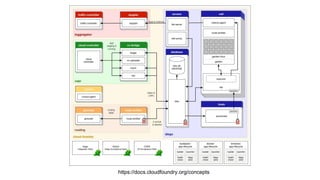
Cloud Foundry
Cloud Native Application Platform
(アプリケーションPaaS)
を構成するためのOSS Suite
大規模分散システム
https://docs.cloudfoundry.org/concepts
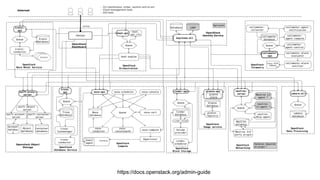
OpenStack
IaaSを構成するためのOSS Suite
大規模分散システム
https://docs.openstack.org/admin-guide
Stackato
Cloud Foundryのコンポーネントを
全部コンテナ化して
Kubernetesの上で動かすという
攻めたディストリビューション
前回(Kubernetes Meetup Tokyo #3)
ご紹介しましたので詳しくは資料みてね
https://www.slideshare.net/JunichiYoshise/k8s-meetup-containerizedcloudfoundry
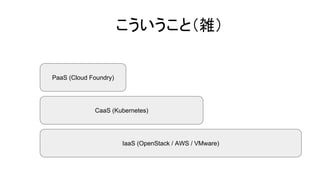
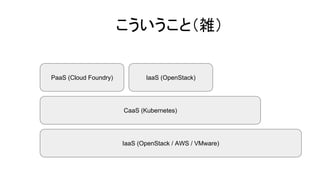
IaaS (OpenStack / AWS / VMware)
CaaS (Kubernetes)
PaaS (Cloud Foundry)
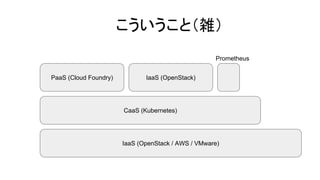
こういうこと(雑)
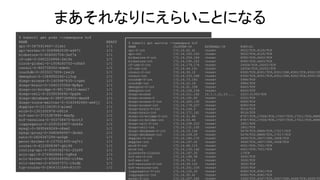
$ kubectl get pods --namespace hcf
NAME READY STATUS RESTARTS AGE
api-0-3675919467-21xhl 1/1 Running 1 9d
api-worker-0-3049882539-wd471 1/1 Running 0 9d
blobstore-0-406600704-3xf7x 1/1 Running 0 9d
cf-usb-0-2602224866-2ml4s 1/1 Running 2 9d
clock-global-0-1009240702-nfhb5 1/1 Running 0 9d
consul-0-863739302-mdm4c 1/1 Running 0 9d
couchdb-0-2033217656-jsxjk 1/1 Running 0 9d
demophon-0-1589950246-ll3cp 1/1 Running 0 9d
diego-access-0-1403987635-lvgsh 1/1 Running 0 9d
diego-brain-0-1640103366-8p8pz 1/1 Running 0 9d
diego-cc-bridge-0-981728410-mxsl7 1/1 Running 0 9d
diego-cell-0-2030030692-5pgfm 1/1 Running 0 9d
diego-database-0-3897369900-dwxk8 1/1 Running 0 9d
diego-route-emitter-0-3163492945-sm4jj 1/1 Running 0 9d
doppler-0-211362913-p1xm2 1/1 Running 0 9d
etcd-0-1301000978-z8014 1/1 Running 0 9d
hcf-sso-0-3715387895-4mxfp 1/1 Running 0 9d
hcf-versions-0-933758475-bcrt3 1/1 Running 0 9d
loggregator-0-2291018957-drb6s 1/1 Running 0 9d
mysql-0-3695449249-n8sm2 1/1 Running 0 9d
mysql-proxy-0-3480694567-3bnbh 1/1 Running 0 9d
nats-0-2826367294-xn5gb 1/1 Running 0 9d
persi-broker-0-107551493-xq7tl 1/1 Running 0 9d
router-0-4123958387-ghl96 1/1 Running 0 9d
routing-api-0-3365362741-22x9f 1/1 Running 0 9d
sclr-api-0-2749608661-5q8nd 1/1 Running 0 9d
sclr-broker-0-4265049362-r184m 1/1 Running 0 9d
sclr-server-0-636657571-l6zdb 1/1 Running 0 9d
tcp-router-0-2904721089-8jz70 1/1 Running 0 9d
まあそれなりにえらいことになる
$ kubectl get service --namespace hcf
NAME CLUSTER-IP EXTERNAL-IP PORT(S)
api-0-int 172.16.62.41 <none> 9022/TCP,8125/TCP
api-int 172.16.193.165 <none> 9022/TCP,8125/TCP
blobstore-0-int 172.16.254.164 <none> 8080/TCP,4443/TCP
blobstore-int 172.16.195.202 <none> 8080/TCP,4443/TCP
cf-usb-0-int 172.16.179.174 <none> 24054/TCP,24053/TCP
cf-usb-int 172.16.44.191 <none> 24054/TCP,24053/TCP
consul-0-int 172.16.30.10 <none> 8300/TCP,8301/TCP,8301/UDP,8302/TCP,8302/UD
consul-int 172.16.153.248 <none> 8300/TCP,8301/TCP,8301/UDP,8302/TCP,8302/UD
couchdb-0-int 172.16.73.182 <none> 5984/TCP
couchdb-int 172.16.22.18 <none> 5984/TCP
demophon-0-int 172.16.91.108 <none> 8443/TCP
demophon-int 172.16.156.236 <none> 8443/TCP
diego-access 172.16.211.162 10.1.1.21,15.... 2222:31355/TCP
diego-access-0 172.16.191.62 <none> 2222/TCP
diego-access-0-int 172.16.205.130 <none> 8080/TCP
diego-access-int 172.16.179.227 <none> 8080/TCP
diego-brain-0-int 172.16.144.2 <none> 9016/TCP
diego-brain-int 172.16.171.161 <none> 9016/TCP
diego-cc-bridge-0-int 172.16.31.89 <none> 8787/TCP,17006/TCP,17007/TCP,17011/TCP,8888
diego-cc-bridge-int 172.16.53.40 <none> 8787/TCP,17006/TCP,17007/TCP,17011/TCP,8888
diego-cell-0-int 172.16.238.223 <none> 1801/TCP
diego-cell-int 172.16.131.150 <none> 1801/TCP
diego-database-0-int 172.16.19.146 <none> 5678/TCP,8889/TCP,17017/TCP
diego-database-int 172.16.109.29 <none> 5678/TCP,8889/TCP,17017/TCP
doppler-0-int 172.16.180.170 <none> 3456/TCP,3457/UDP,3458/TCP
doppler-int 172.16.167.20 <none> 3456/TCP,3457/UDP,3458/TCP
etcd-0-int 172.16.66.115 <none> 4001/TCP,7001/TCP
etcd-int 172.16.135.142 <none> 4001/TCP,7001/TCP
glusterfs-cluster 172.16.187.20 <none> 1/TCP
hcf-sso-0-int 172.16.196.38 <none> 3000/TCP
hcf-sso-int 172.16.75.14 <none> 3000/TCP
hcf-versions-0-int 172.16.59.125 <none> 3000/TCP
hcf-versions-int 172.16.201.104 <none> 3000/TCP
loggregator-0-int 172.16.152.30 <none> 8080/TCP,8081/TCP
loggregator-int 172.16.50.41 <none> 8080/TCP,8081/TCP
mysql-0-int 172.16.207.245 <none> 3306/TCP,4567/TCP,4567/UDP,4568/TCP,9200/TC
kolla-kubernetes
OpenStackのコンポーネントを
コンテナ化して
Kubernetesの上で動かすという
攻めたプロジェクト
AnsibleでOpenStackの構成を定義して
helmのChartを作ってデプロイ
せっかくだからこいつも
同じKubernetesの上で動かしてみた
IaaS (OpenStack / AWS / VMware)
CaaS (Kubernetes)
PaaS (Cloud Foundry)
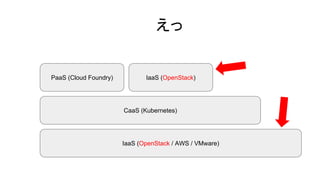
こういうこと(雑)
IaaS (OpenStack)
IaaS (OpenStack / AWS / VMware)
CaaS (Kubernetes)
PaaS (Cloud Foundry)
えっ
IaaS (OpenStack)
にしても
$ kubectl get pods --namespace hcf
NAME READY STATUS RESTARTS AGE
api-0-3675919467-21xhl 1/1 Running 1 9d
api-worker-0-3049882539-wd471 1/1 Running 0 9d
blobstore-0-406600704-3xf7x 1/1 Running 0 9d
cf-usb-0-2602224866-2ml4s 1/1 Running 2 9d
clock-global-0-1009240702-nfhb5 1/1 Running 0 9d
consul-0-863739302-mdm4c 1/1 Running 0 9d
couchdb-0-2033217656-jsxjk 1/1 Running 0 9d
demophon-0-1589950246-ll3cp 1/1 Running 0 9d
diego-access-0-1403987635-lvgsh 1/1 Running 0 9d
diego-brain-0-1640103366-8p8pz 1/1 Running 0 9d
diego-cc-bridge-0-981728410-mxsl7 1/1 Running 0 9d
diego-cell-0-2030030692-5pgfm 1/1 Running 0 9d
diego-database-0-3897369900-dwxk8 1/1 Running 0 9d
diego-route-emitter-0-3163492945-sm4jj 1/1 Running 0 9d
doppler-0-211362913-p1xm2 1/1 Running 0 9d
etcd-0-1301000978-z8014 1/1 Running 0 9d
hcf-sso-0-3715387895-4mxfp 1/1 Running 0 9d
hcf-versions-0-933758475-bcrt3 1/1 Running 0 9d
loggregator-0-2291018957-drb6s 1/1 Running 0 9d
mysql-0-3695449249-n8sm2 1/1 Running 0 9d
mysql-proxy-0-3480694567-3bnbh 1/1 Running 0 9d
nats-0-2826367294-xn5gb 1/1 Running 0 9d
persi-broker-0-107551493-xq7tl 1/1 Running 0 9d
router-0-4123958387-ghl96 1/1 Running 0 9d
routing-api-0-3365362741-22x9f 1/1 Running 0 9d
sclr-api-0-2749608661-5q8nd 1/1 Running 0 9d
sclr-broker-0-4265049362-r184m 1/1 Running 0 9d
sclr-server-0-636657571-l6zdb 1/1 Running 0 9d
tcp-router-0-2904721089-8jz70 1/1 Running 0 9d
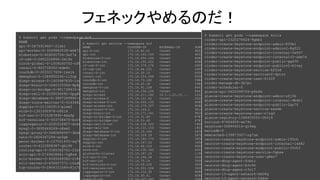
フェネックやめるのだ!
$ kubectl get service --namespace hcf
NAME CLUSTER-IP EXTERNAL-IP PORT(S)
api-0-int 172.16.62.41 <none> 9022/TCP,8125/TCP
api-int 172.16.193.165 <none> 9022/TCP,8125/TCP
blobstore-0-int 172.16.254.164 <none> 8080/TCP,4443/TCP
blobstore-int 172.16.195.202 <none> 8080/TCP,4443/TCP
cf-usb-0-int 172.16.179.174 <none> 24054/TCP,24053/TCP
cf-usb-int 172.16.44.191 <none> 24054/TCP,24053/TCP
consul-0-int 172.16.30.10 <none> 8300/TCP,8301/TCP,8301/UDP,8302/TCP,8302/UDP,8400/TCP,8500/TCP
consul-int 172.16.153.248 <none> 8300/TCP,8301/TCP,8301/UDP,8302/TCP,8302/UDP,8400/TCP,8500/TCP
couchdb-0-int 172.16.73.182 <none> 5984/TCP
couchdb-int 172.16.22.18 <none> 5984/TCP
demophon-0-int 172.16.91.108 <none> 8443/TCP
demophon-int 172.16.156.236 <none> 8443/TCP
diego-access 172.16.211.162 10.1.1.21,15.... 2222:31355/TCP
diego-access-0 172.16.191.62 <none> 2222/TCP
diego-access-0-int 172.16.205.130 <none> 8080/TCP
diego-access-int 172.16.179.227 <none> 8080/TCP
diego-brain-0-int 172.16.144.2 <none> 9016/TCP
diego-brain-int 172.16.171.161 <none> 9016/TCP
diego-cc-bridge-0-int 172.16.31.89 <none> 8787/TCP,17006/TCP,17007/TCP,17011/TCP,8888/TCP,1518/TCP,17014/TCP,1
diego-cc-bridge-int 172.16.53.40 <none> 8787/TCP,17006/TCP,17007/TCP,17011/TCP,8888/TCP,1518/TCP,17014/TCP,1
diego-cell-0-int 172.16.238.223 <none> 1801/TCP
diego-cell-int 172.16.131.150 <none> 1801/TCP
diego-database-0-int 172.16.19.146 <none> 5678/TCP,8889/TCP,17017/TCP
diego-database-int 172.16.109.29 <none> 5678/TCP,8889/TCP,17017/TCP
doppler-0-int 172.16.180.170 <none> 3456/TCP,3457/UDP,3458/TCP
doppler-int 172.16.167.20 <none> 3456/TCP,3457/UDP,3458/TCP
etcd-0-int 172.16.66.115 <none> 4001/TCP,7001/TCP
etcd-int 172.16.135.142 <none> 4001/TCP,7001/TCP
glusterfs-cluster 172.16.187.20 <none> 1/TCP
hcf-sso-0-int 172.16.196.38 <none> 3000/TCP
hcf-sso-int 172.16.75.14 <none> 3000/TCP
hcf-versions-0-int 172.16.59.125 <none> 3000/TCP
hcf-versions-int 172.16.201.104 <none> 3000/TCP
loggregator-0-int 172.16.152.30 <none> 8080/TCP,8081/TCP
loggregator-int 172.16.50.41 <none> 8080/TCP,8081/TCP
$ kubectl get pods --namespace kolla
cinder-api-2320276624-9gmbz
cinder-create-keystone-endpoint-admin-893b1
cinder-create-keystone-endpoint-adminv2-8gf22
cinder-create-keystone-endpoint-internal-5wf47
cinder-create-keystone-endpoint-internalv2-xbm74
cinder-create-keystone-endpoint-public-gg430
cinder-create-keystone-endpoint-publicv2-b1vgj
cinder-create-keystone-service-kf03d
cinder-create-keystone-servicev2-kptzr
cinder-create-keystone-user-61f2f
cinder-manage-db-3b7pc
cinder-scheduler-0
glance-api-2620599706-p9sfm
glance-create-keystone-endpoint-admin-xfj5b
glance-create-keystone-endpoint-internal-dbdr1
glance-create-keystone-endpoint-public-2qz7f
glance-create-keystone-service-sxx6m
glance-create-keystone-user-n7rg2
glance-registry-1366455552-0h0j4
horizon-97956455-ww79v
keystone-308904014-q19wg
mariadb-0
memcached-139873907-zg7zm
neutron-create-keystone-endpoint-admin-193ch
neutron-create-keystone-endpoint-internal-l4d42
neutron-create-keystone-endpoint-public-25vh3
neutron-create-keystone-service-5qbxw
neutron-create-keystone-user-q8mz7
neutron-dhcp-agent-0vbtc
neutron-dhcp-agent-b3v96
neutron-dhcp-agent-r3vl7
neutron-l3-agent-network-0m09q
neutron-l3-agent-network-fd4xv
監視とかどうすんの
Prometheus
詳しくは@ladicleさんのLTで
と思ったらパオー
いい感じに情報を集めて
いい感じにクエリできて
いい感じにサクサク動く
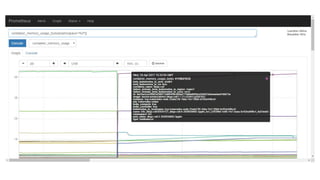
入れてみた
$ helm install stable/prometheus
IaaS (OpenStack / AWS / VMware)
CaaS (Kubernetes)
PaaS (Cloud Foundry)
こういうこと(雑)
IaaS (OpenStack)
Prometheus
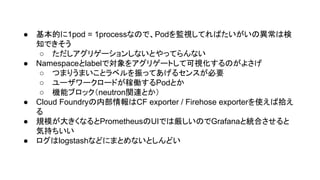
軽く使ってみた印象
● 基本的に1pod = 1processなので、Podを監視してればたいがいの異常は検
知できそう
○ ただしアグリゲーションしないとやってらんない
● Namespaceとlabelで対象をアグリゲートして可視化するのがよさげ
○ つまりうまいことラベルを振ってあげるセンスが必要
○ ユーザワークロードが稼働するPodとか
○ 機能ブロック(neutron関連とか)
● Cloud Foundryの内部情報はCF exporter / Firehose exporterを使えば拾え
る
● 規模が大きくなるとPrometheusのUIでは厳しいのでGrafanaと統合させると
気持ちいい
● ログはlogstashなどにまとめないとしんどい
結論
WE ARE HIRING
ご清聴ありがとうございました

K8s上の containerized cloud foundryとcontainerized open stackをprometheusで監視してみる

  • 1.
    K8s上の Containerized Cloud Foundryと ContainerizedOpenStackを Prometheusで監視してみる @jyoshise
  • 2.
  • 3.
  • 4.
  • 5.
    Cloud Native ApplicationPlatform (アプリケーションPaaS) を構成するためのOSS Suite
  • 6.
  • 7.
  • 8.
  • 9.
  • 10.
  • 11.
  • 12.
  • 13.
  • 14.
    前回(Kubernetes Meetup Tokyo#3) ご紹介しましたので詳しくは資料みてね https://www.slideshare.net/JunichiYoshise/k8s-meetup-containerizedcloudfoundry
  • 15.
    IaaS (OpenStack /AWS / VMware) CaaS (Kubernetes) PaaS (Cloud Foundry) こういうこと(雑)
  • 16.
    $ kubectl getpods --namespace hcf NAME READY STATUS RESTARTS AGE api-0-3675919467-21xhl 1/1 Running 1 9d api-worker-0-3049882539-wd471 1/1 Running 0 9d blobstore-0-406600704-3xf7x 1/1 Running 0 9d cf-usb-0-2602224866-2ml4s 1/1 Running 2 9d clock-global-0-1009240702-nfhb5 1/1 Running 0 9d consul-0-863739302-mdm4c 1/1 Running 0 9d couchdb-0-2033217656-jsxjk 1/1 Running 0 9d demophon-0-1589950246-ll3cp 1/1 Running 0 9d diego-access-0-1403987635-lvgsh 1/1 Running 0 9d diego-brain-0-1640103366-8p8pz 1/1 Running 0 9d diego-cc-bridge-0-981728410-mxsl7 1/1 Running 0 9d diego-cell-0-2030030692-5pgfm 1/1 Running 0 9d diego-database-0-3897369900-dwxk8 1/1 Running 0 9d diego-route-emitter-0-3163492945-sm4jj 1/1 Running 0 9d doppler-0-211362913-p1xm2 1/1 Running 0 9d etcd-0-1301000978-z8014 1/1 Running 0 9d hcf-sso-0-3715387895-4mxfp 1/1 Running 0 9d hcf-versions-0-933758475-bcrt3 1/1 Running 0 9d loggregator-0-2291018957-drb6s 1/1 Running 0 9d mysql-0-3695449249-n8sm2 1/1 Running 0 9d mysql-proxy-0-3480694567-3bnbh 1/1 Running 0 9d nats-0-2826367294-xn5gb 1/1 Running 0 9d persi-broker-0-107551493-xq7tl 1/1 Running 0 9d router-0-4123958387-ghl96 1/1 Running 0 9d routing-api-0-3365362741-22x9f 1/1 Running 0 9d sclr-api-0-2749608661-5q8nd 1/1 Running 0 9d sclr-broker-0-4265049362-r184m 1/1 Running 0 9d sclr-server-0-636657571-l6zdb 1/1 Running 0 9d tcp-router-0-2904721089-8jz70 1/1 Running 0 9d まあそれなりにえらいことになる $ kubectl get service --namespace hcf NAME CLUSTER-IP EXTERNAL-IP PORT(S) api-0-int 172.16.62.41 <none> 9022/TCP,8125/TCP api-int 172.16.193.165 <none> 9022/TCP,8125/TCP blobstore-0-int 172.16.254.164 <none> 8080/TCP,4443/TCP blobstore-int 172.16.195.202 <none> 8080/TCP,4443/TCP cf-usb-0-int 172.16.179.174 <none> 24054/TCP,24053/TCP cf-usb-int 172.16.44.191 <none> 24054/TCP,24053/TCP consul-0-int 172.16.30.10 <none> 8300/TCP,8301/TCP,8301/UDP,8302/TCP,8302/UD consul-int 172.16.153.248 <none> 8300/TCP,8301/TCP,8301/UDP,8302/TCP,8302/UD couchdb-0-int 172.16.73.182 <none> 5984/TCP couchdb-int 172.16.22.18 <none> 5984/TCP demophon-0-int 172.16.91.108 <none> 8443/TCP demophon-int 172.16.156.236 <none> 8443/TCP diego-access 172.16.211.162 10.1.1.21,15.... 2222:31355/TCP diego-access-0 172.16.191.62 <none> 2222/TCP diego-access-0-int 172.16.205.130 <none> 8080/TCP diego-access-int 172.16.179.227 <none> 8080/TCP diego-brain-0-int 172.16.144.2 <none> 9016/TCP diego-brain-int 172.16.171.161 <none> 9016/TCP diego-cc-bridge-0-int 172.16.31.89 <none> 8787/TCP,17006/TCP,17007/TCP,17011/TCP,8888 diego-cc-bridge-int 172.16.53.40 <none> 8787/TCP,17006/TCP,17007/TCP,17011/TCP,8888 diego-cell-0-int 172.16.238.223 <none> 1801/TCP diego-cell-int 172.16.131.150 <none> 1801/TCP diego-database-0-int 172.16.19.146 <none> 5678/TCP,8889/TCP,17017/TCP diego-database-int 172.16.109.29 <none> 5678/TCP,8889/TCP,17017/TCP doppler-0-int 172.16.180.170 <none> 3456/TCP,3457/UDP,3458/TCP doppler-int 172.16.167.20 <none> 3456/TCP,3457/UDP,3458/TCP etcd-0-int 172.16.66.115 <none> 4001/TCP,7001/TCP etcd-int 172.16.135.142 <none> 4001/TCP,7001/TCP glusterfs-cluster 172.16.187.20 <none> 1/TCP hcf-sso-0-int 172.16.196.38 <none> 3000/TCP hcf-sso-int 172.16.75.14 <none> 3000/TCP hcf-versions-0-int 172.16.59.125 <none> 3000/TCP hcf-versions-int 172.16.201.104 <none> 3000/TCP loggregator-0-int 172.16.152.30 <none> 8080/TCP,8081/TCP loggregator-int 172.16.50.41 <none> 8080/TCP,8081/TCP mysql-0-int 172.16.207.245 <none> 3306/TCP,4567/TCP,4567/UDP,4568/TCP,9200/TC
  • 17.
  • 18.
  • 19.
  • 20.
  • 21.
    IaaS (OpenStack /AWS / VMware) CaaS (Kubernetes) PaaS (Cloud Foundry) こういうこと(雑) IaaS (OpenStack)
  • 22.
    IaaS (OpenStack /AWS / VMware) CaaS (Kubernetes) PaaS (Cloud Foundry) えっ IaaS (OpenStack)
  • 24.
  • 25.
    $ kubectl getpods --namespace hcf NAME READY STATUS RESTARTS AGE api-0-3675919467-21xhl 1/1 Running 1 9d api-worker-0-3049882539-wd471 1/1 Running 0 9d blobstore-0-406600704-3xf7x 1/1 Running 0 9d cf-usb-0-2602224866-2ml4s 1/1 Running 2 9d clock-global-0-1009240702-nfhb5 1/1 Running 0 9d consul-0-863739302-mdm4c 1/1 Running 0 9d couchdb-0-2033217656-jsxjk 1/1 Running 0 9d demophon-0-1589950246-ll3cp 1/1 Running 0 9d diego-access-0-1403987635-lvgsh 1/1 Running 0 9d diego-brain-0-1640103366-8p8pz 1/1 Running 0 9d diego-cc-bridge-0-981728410-mxsl7 1/1 Running 0 9d diego-cell-0-2030030692-5pgfm 1/1 Running 0 9d diego-database-0-3897369900-dwxk8 1/1 Running 0 9d diego-route-emitter-0-3163492945-sm4jj 1/1 Running 0 9d doppler-0-211362913-p1xm2 1/1 Running 0 9d etcd-0-1301000978-z8014 1/1 Running 0 9d hcf-sso-0-3715387895-4mxfp 1/1 Running 0 9d hcf-versions-0-933758475-bcrt3 1/1 Running 0 9d loggregator-0-2291018957-drb6s 1/1 Running 0 9d mysql-0-3695449249-n8sm2 1/1 Running 0 9d mysql-proxy-0-3480694567-3bnbh 1/1 Running 0 9d nats-0-2826367294-xn5gb 1/1 Running 0 9d persi-broker-0-107551493-xq7tl 1/1 Running 0 9d router-0-4123958387-ghl96 1/1 Running 0 9d routing-api-0-3365362741-22x9f 1/1 Running 0 9d sclr-api-0-2749608661-5q8nd 1/1 Running 0 9d sclr-broker-0-4265049362-r184m 1/1 Running 0 9d sclr-server-0-636657571-l6zdb 1/1 Running 0 9d tcp-router-0-2904721089-8jz70 1/1 Running 0 9d フェネックやめるのだ! $ kubectl get service --namespace hcf NAME CLUSTER-IP EXTERNAL-IP PORT(S) api-0-int 172.16.62.41 <none> 9022/TCP,8125/TCP api-int 172.16.193.165 <none> 9022/TCP,8125/TCP blobstore-0-int 172.16.254.164 <none> 8080/TCP,4443/TCP blobstore-int 172.16.195.202 <none> 8080/TCP,4443/TCP cf-usb-0-int 172.16.179.174 <none> 24054/TCP,24053/TCP cf-usb-int 172.16.44.191 <none> 24054/TCP,24053/TCP consul-0-int 172.16.30.10 <none> 8300/TCP,8301/TCP,8301/UDP,8302/TCP,8302/UDP,8400/TCP,8500/TCP consul-int 172.16.153.248 <none> 8300/TCP,8301/TCP,8301/UDP,8302/TCP,8302/UDP,8400/TCP,8500/TCP couchdb-0-int 172.16.73.182 <none> 5984/TCP couchdb-int 172.16.22.18 <none> 5984/TCP demophon-0-int 172.16.91.108 <none> 8443/TCP demophon-int 172.16.156.236 <none> 8443/TCP diego-access 172.16.211.162 10.1.1.21,15.... 2222:31355/TCP diego-access-0 172.16.191.62 <none> 2222/TCP diego-access-0-int 172.16.205.130 <none> 8080/TCP diego-access-int 172.16.179.227 <none> 8080/TCP diego-brain-0-int 172.16.144.2 <none> 9016/TCP diego-brain-int 172.16.171.161 <none> 9016/TCP diego-cc-bridge-0-int 172.16.31.89 <none> 8787/TCP,17006/TCP,17007/TCP,17011/TCP,8888/TCP,1518/TCP,17014/TCP,1 diego-cc-bridge-int 172.16.53.40 <none> 8787/TCP,17006/TCP,17007/TCP,17011/TCP,8888/TCP,1518/TCP,17014/TCP,1 diego-cell-0-int 172.16.238.223 <none> 1801/TCP diego-cell-int 172.16.131.150 <none> 1801/TCP diego-database-0-int 172.16.19.146 <none> 5678/TCP,8889/TCP,17017/TCP diego-database-int 172.16.109.29 <none> 5678/TCP,8889/TCP,17017/TCP doppler-0-int 172.16.180.170 <none> 3456/TCP,3457/UDP,3458/TCP doppler-int 172.16.167.20 <none> 3456/TCP,3457/UDP,3458/TCP etcd-0-int 172.16.66.115 <none> 4001/TCP,7001/TCP etcd-int 172.16.135.142 <none> 4001/TCP,7001/TCP glusterfs-cluster 172.16.187.20 <none> 1/TCP hcf-sso-0-int 172.16.196.38 <none> 3000/TCP hcf-sso-int 172.16.75.14 <none> 3000/TCP hcf-versions-0-int 172.16.59.125 <none> 3000/TCP hcf-versions-int 172.16.201.104 <none> 3000/TCP loggregator-0-int 172.16.152.30 <none> 8080/TCP,8081/TCP loggregator-int 172.16.50.41 <none> 8080/TCP,8081/TCP $ kubectl get pods --namespace kolla cinder-api-2320276624-9gmbz cinder-create-keystone-endpoint-admin-893b1 cinder-create-keystone-endpoint-adminv2-8gf22 cinder-create-keystone-endpoint-internal-5wf47 cinder-create-keystone-endpoint-internalv2-xbm74 cinder-create-keystone-endpoint-public-gg430 cinder-create-keystone-endpoint-publicv2-b1vgj cinder-create-keystone-service-kf03d cinder-create-keystone-servicev2-kptzr cinder-create-keystone-user-61f2f cinder-manage-db-3b7pc cinder-scheduler-0 glance-api-2620599706-p9sfm glance-create-keystone-endpoint-admin-xfj5b glance-create-keystone-endpoint-internal-dbdr1 glance-create-keystone-endpoint-public-2qz7f glance-create-keystone-service-sxx6m glance-create-keystone-user-n7rg2 glance-registry-1366455552-0h0j4 horizon-97956455-ww79v keystone-308904014-q19wg mariadb-0 memcached-139873907-zg7zm neutron-create-keystone-endpoint-admin-193ch neutron-create-keystone-endpoint-internal-l4d42 neutron-create-keystone-endpoint-public-25vh3 neutron-create-keystone-service-5qbxw neutron-create-keystone-user-q8mz7 neutron-dhcp-agent-0vbtc neutron-dhcp-agent-b3v96 neutron-dhcp-agent-r3vl7 neutron-l3-agent-network-0m09q neutron-l3-agent-network-fd4xv
  • 26.
  • 27.
  • 28.
  • 29.
  • 30.
  • 31.
  • 32.
    IaaS (OpenStack /AWS / VMware) CaaS (Kubernetes) PaaS (Cloud Foundry) こういうこと(雑) IaaS (OpenStack) Prometheus
  • 34.
  • 35.
    ● 基本的に1pod =1processなので、Podを監視してればたいがいの異常は検 知できそう ○ ただしアグリゲーションしないとやってらんない ● Namespaceとlabelで対象をアグリゲートして可視化するのがよさげ ○ つまりうまいことラベルを振ってあげるセンスが必要 ○ ユーザワークロードが稼働するPodとか ○ 機能ブロック(neutron関連とか) ● Cloud Foundryの内部情報はCF exporter / Firehose exporterを使えば拾え る ● 規模が大きくなるとPrometheusのUIでは厳しいのでGrafanaと統合させると 気持ちいい ● ログはlogstashなどにまとめないとしんどい
  • 36.
  • 37.
  • 38.