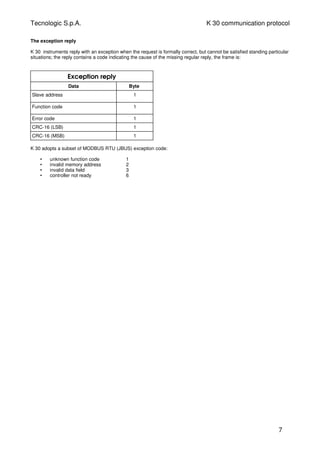
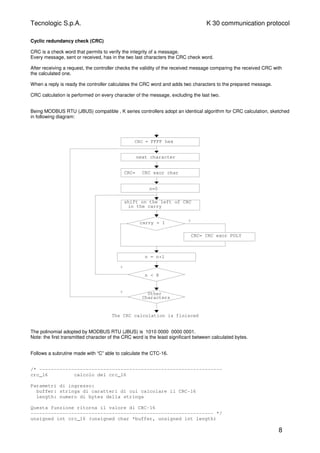
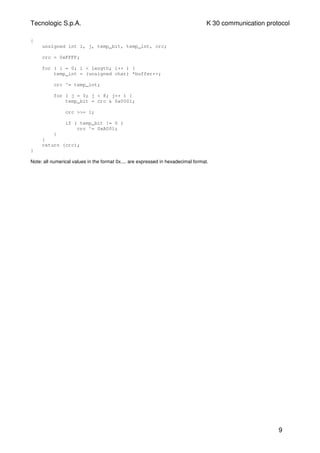
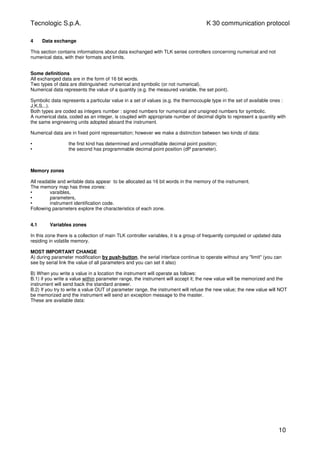
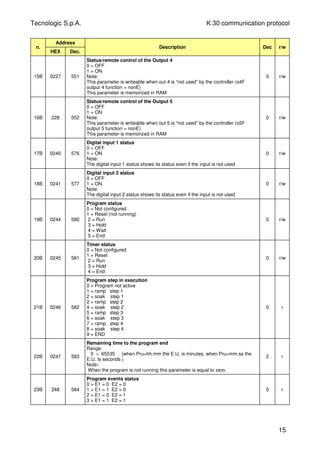
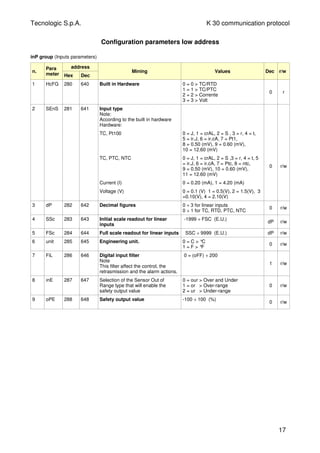
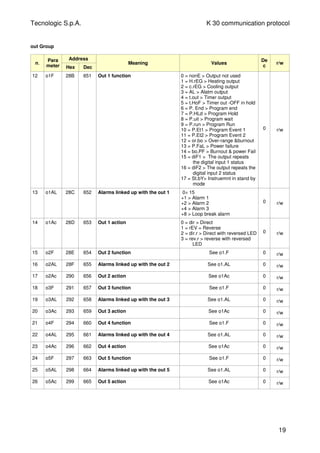
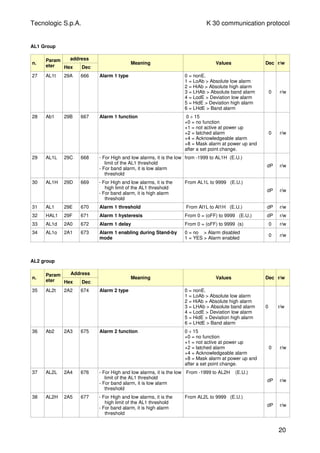
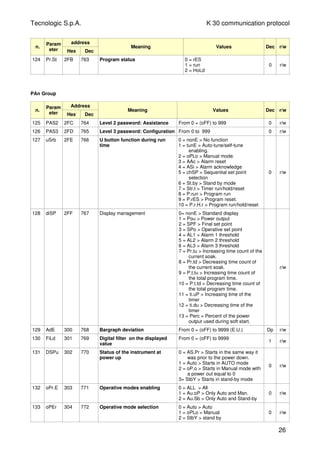
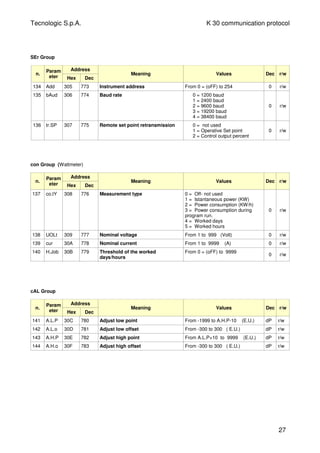
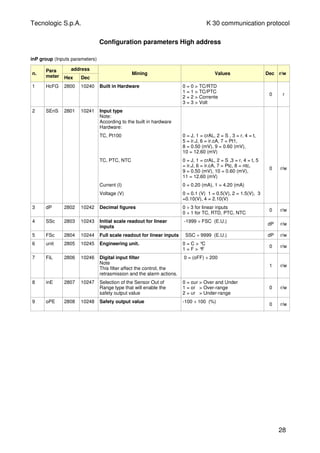
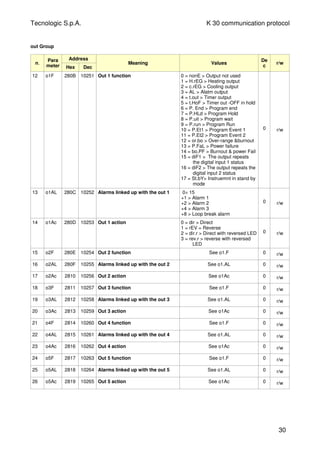
TECNOLOGIC - K 30- ENGINEERING MANUAL -Vr.0.0 PAG. A
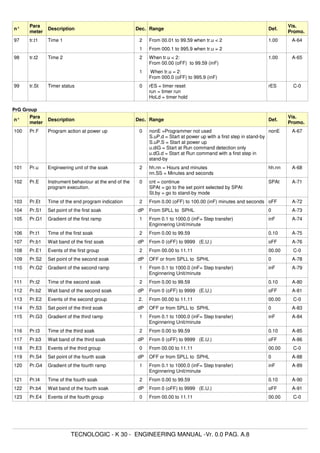
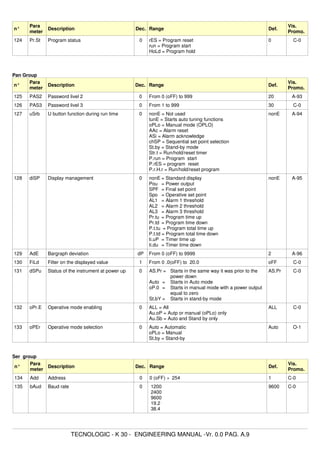
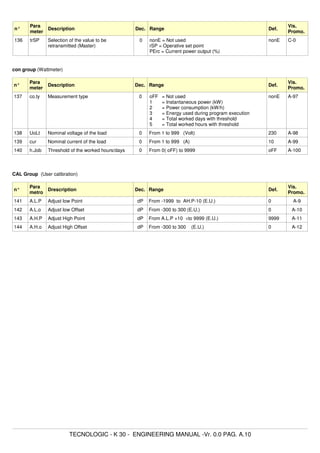
Prelim
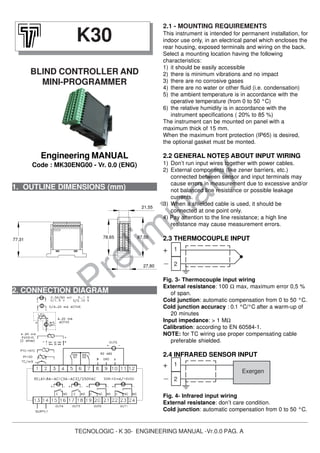
inary1. OUTLINE DIMENSIONS (mm)
2.1 - MOUNTING REQUIREMENTS
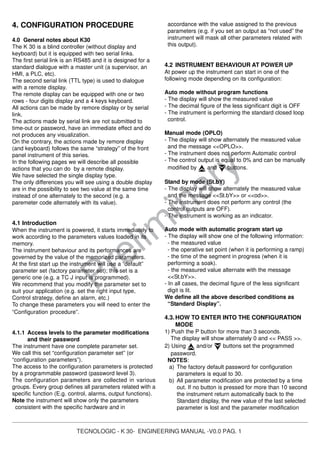
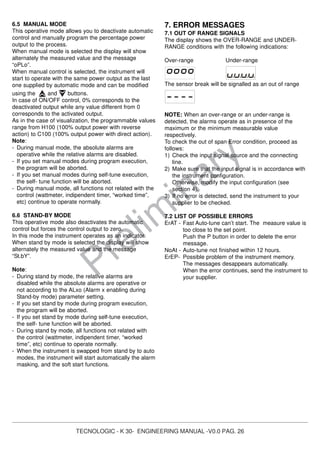
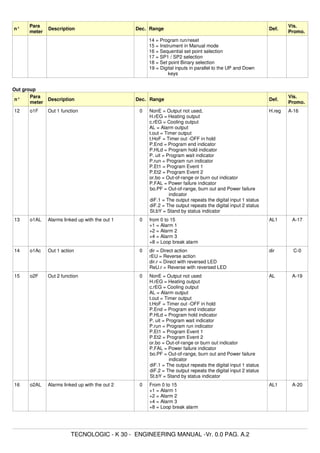
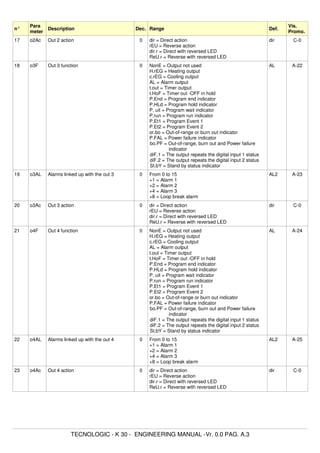
This instrument is intended for permanent installation, for
indoor use only, in an electrical panel which encloses the
rear housing, exposed terminals and wiring on the back.
Select a mounting location having the following
characteristics:
1) it should be easily accessible
2) there is minimum vibrations and no impact
3) there are no corrosive gases
4) there are no water or other fluid (i.e. condensation)
5) the ambient temperature is in accordance with the
operative temperature (from 0 to 50 °C)
6) the relative humidity is in accordance with the
instrument specifications ( 20% to 85 %)
The instrument can be mounted on panel with a
maximum thick of 15 mm.
When the maximum front protection (IP65) is desired,
the optional gasket must be monted.
2.2 GENERAL NOTES ABOUT INPUT WIRING
1) Don’t run input wires together with power cables.
2) External components (like zener barriers, etc.)
connected between sensor and input terminals may
cause errors in measurement due to excessive and/or
not balanced line resistance or possible leakage
currents.
3) When a shielded cable is used, it should be
connected at one point only.
4) Pay attention to the line resistance; a high line
resistance may cause measurement errors.
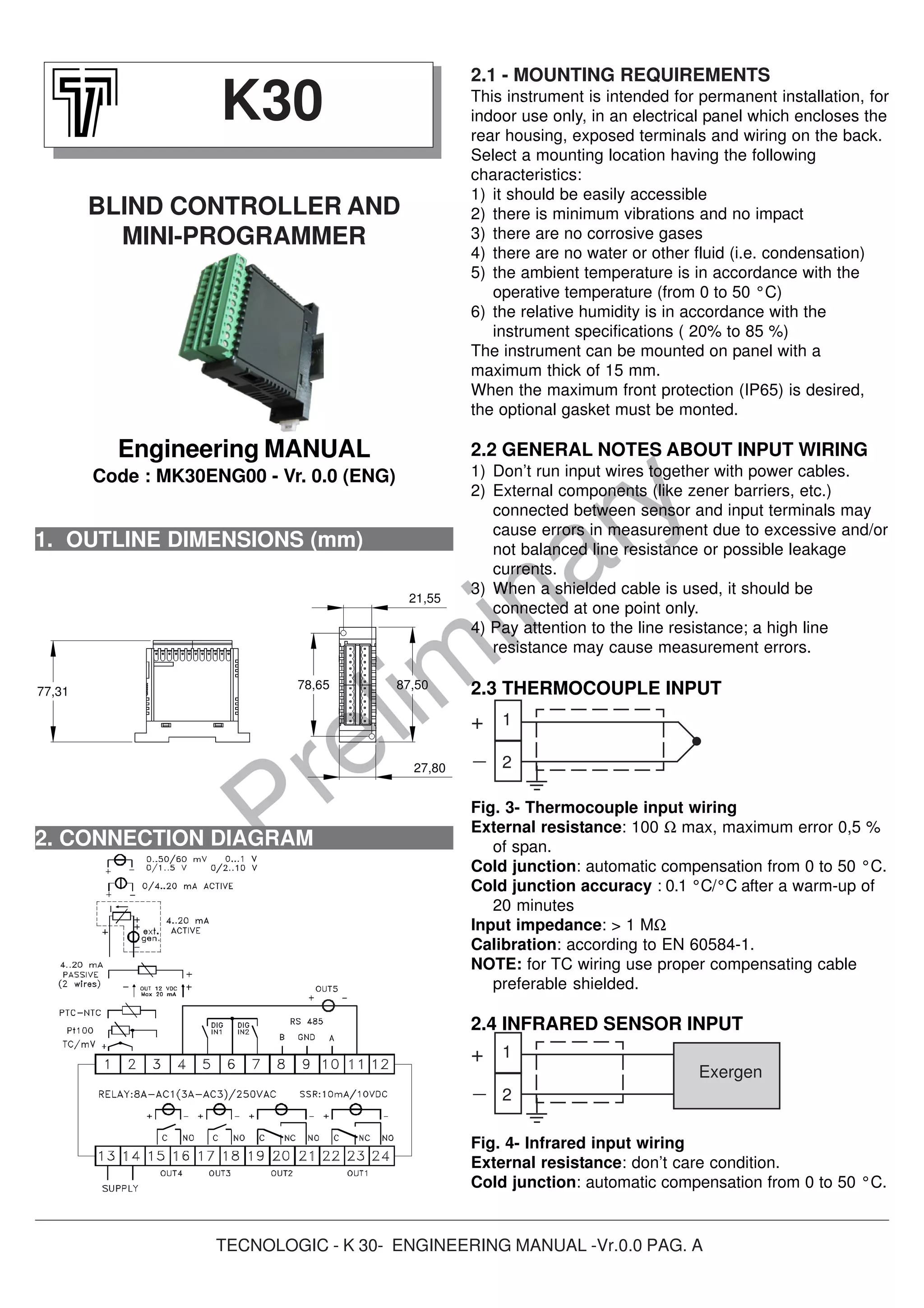
2.3 THERMOCOUPLE INPUT
Fig. 3- Thermocouple input wiring
External resistance: 100 Ω max, maximum error 0,5 %
of span.
Cold junction: automatic compensation from 0 to 50 °C.
Cold junction accuracy : 0.1 °C/°C after a warm-up of
20 minutes
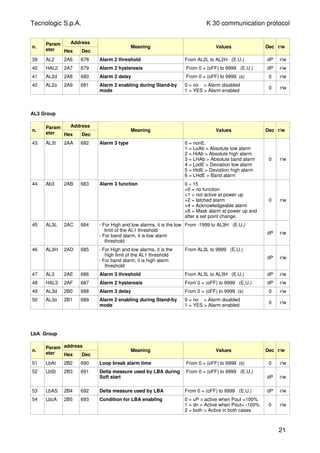
Input impedance: > 1 MΩ
Calibration: according to EN 60584-1.
NOTE: for TC wiring use proper compensating cable
preferable shielded.
2.4 INFRARED SENSOR INPUT
Fig. 4- Infrared input wiring
External resistance: don’t care condition.
Cold junction: automatic compensation from 0 to 50 °C.
K30
BLIND CONTROLLER AND
MINI-PROGRAMMER
Engineering MANUAL
Code : MK30ENG00 - Vr. 0.0 (ENG)
2. CONNECTION DIAGRAM
1
2
Exergen
+
_
1
2
+
_
87,50
27,80
78,65
21,55
77,31
TECNOLOGIC - K 30- ENGINEERING MANUAL -Vr.0.0 PAG. B
Prelim
inary
Cold junction accuracy : 0.1 °C/°C
Input impedance: > 1 MΩ
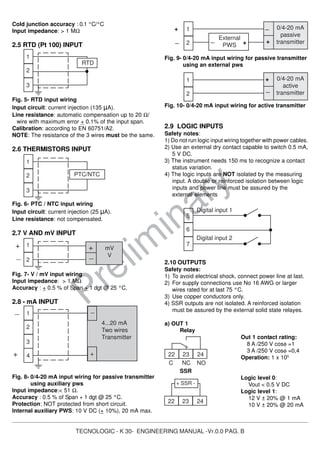
2.5 RTD (Pt 100) INPUT
Fig. 5- RTD input wiring
Input circuit: current injection (135 µA).
Line resistance: automatic compensation up to 20 Ω/
wire with maximum error + 0.1% of the input span.
Calibration: according to EN 60751/A2.
NOTE: The resistance of the 3 wires must be the same.
2.6 THERMISTORS INPUT
Fig. 6- PTC / NTC input wiring
Input circuit: current injection (25 µA).
Line resistance: not compensated.
2.7 V AND mV INPUT
Fig. 7- V / mV input wiring
Input impedance: > 1 MΩ
Accuracy : + 0.5 % of Span + 1 dgt @ 25 °C.
2.8 - mA INPUT
Fig. 8- 0/4-20 mA input wiring for passive transmitter
using auxiliary pws
Input impedance:< 51 Ω.
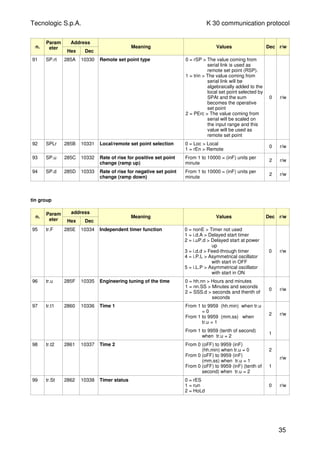
Accuracy : 0.5 % of Span + 1 dgt @ 25 °C.
Protection: NOT protected from short circuit.
Internal auxiliary PWS: 10 V DC (+ 10%), 20 mA max.
Fig. 9- 0/4-20 mA input wiring for passive transmitter
using an external pws
Fig. 10- 0/4-20 mA input wiring for active transmitter
2.9 LOGIC INPUTS
Safety notes:
1) Do not run logic input wiring together with power cables.
2) Use an external dry contact capable to switch 0.5 mA,
5 V DC.
3) The instrument needs 150 ms to recognize a contact
status variation.
4) The logic inputs are NOT isolated by the measuring
input. A double or reinforced isolation between logic
inputs and power line must be assured by the
external elements
2.10 OUTPUTS
Safety notes:
1) To avoid electrical shock, connect power line at last.
2) For supply connections use No 16 AWG or larger
wires rated for at last 75 °C.
3) Use copper conductors only.
4) SSR outputs are not isolated. A reinforced isolation
must be assured by the external solid state relayes.
a) OUT 1
Relay
Out 1 contact rating:
8 A /250 V cosφ =1
3 A /250 V cosφ =0,4
Operation: 1 x 10⁵
SSR
Logic level 0:
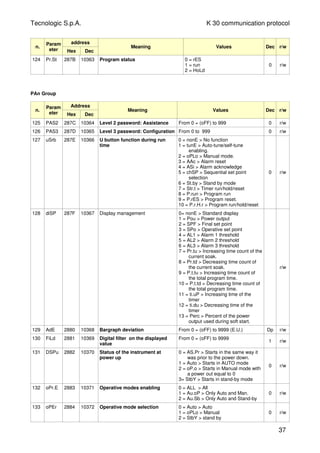
Vout < 0.5 V DC
Logic level 1:
12 V ± 20% @ 1 mA
10 V ± 20% @ 20 mA
1
2
3
PTC/NTC
1
2
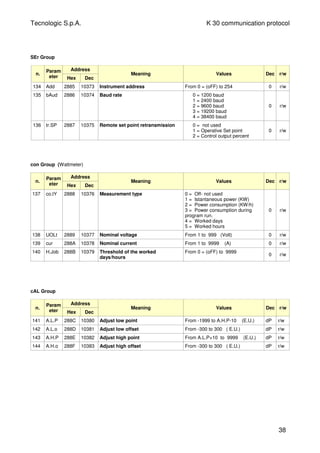
3
RTD
1
2
mV
V
+
_
+
_
1
2
External
PWS + +_
_ 0/4-20 mA
passive
transmitter_
+
1
2
_
+ 0/4-20 mA
active
transmitter
22 23 24
NOC NC
22 23 24
+ SSR -
5
6
7
Digital input 1
Digital input 2
1
2
3
4...20 mA
Two wires
Transmitter
4 +
_
+
_
TECNOLOGIC - K 30- ENGINEERING MANUAL -Vr.0.0 PAG. C
Prelim
inary
NOTE: This output is not isolated. A double or reinforced
isolation between instrument output and power supply
must be assured by the external solid state relay.
b) OUT 2
Relay
Out 2 contact rating:
8 A /250 V cosφ =1
3 A /250 V cosφ =0.4
Operation: 1 x 10⁵
SSR
Logic level 0:
Vout < 0.5 V DC
Logic level 1:
12 V ± 20% @ 1 mA
10 V ± 20% @ 20 mA
NOTE: This output is not isolated. A double or reinforced
isolation between instrument output and power supply
must be assured by the external solid state relay.
c) OUT 3
Relay
Out 3 contact rating:
- 8 A /250 V cosφ =1
- 3 A /250 V cosφ =0.4
Operation: 1 x 10⁵
SSR
Logic level 0:
Vout < 0.5 V DC
Logic level 1:
12 V ± 20% @ 1 mA
10 V ± 20% @ 20 mA
NOTE: This output is not isolated. A double or reinforced
isolation between instrument output and power supply
must be assured by the external solid state relay.
d) OUT 4
Relay
Out 3 contact rating:
8 A /250 V cosφ =1
3 A /250 V cosφ =0.4
Operation: 1 x 10⁵
SSR
Logic level 0:
Vout < 0.5 V DC
Logic level 1:
12 V ± 20% @ 1 mA
10 V ± 20% @ 20 mA
NOTE: This output is not isolated. A double or reinforced
isolation between instrument output and power supply
must be assured by the external solid state relay.
e) OUT 5
SSR
Logic level 0:
Vout < 0.5 V DC
Logic level 1:
12 V ± 20% @ 1 mA
10 V ± 20% @ 20 mA
NOTE: This output is not isolated. A double or reinforced
isolation between instrument output and power supply
must be assured by the external solid state relay.
2.11 SERIAL INTERFACE
Interface type:
- Isolated (50 V) RS 485
- not isolated TTL
Voltage levels: according to EIA
standard
Protocol type: MODBUS RTU.
Byte format: 8 bit without parity
Stop bit: one.
Baud rate: programmable from 1200 to 38400 baud
Address: programmable from 1 to 255
NOTES:
1) RS-485 interface allows to connect up to 30 devices
with one remote master unit.
2) The cable length must not exceed 1.5 km at 9600
BAUD.
3) Follows the description of the signal sense of the
voltage appearing across the interconnection cable
as defined by EIA for RS-485.
a) The ” A ” terminal of the generator shall be
negative with respect to the ” B ” terminal for a
binary 1 (MARK or OFF) state.
b) The ” A ” terminal of the generator shall be
positive with respect to the ” B ” terminal for a
binary 0 (SPACE or ON).
4) This instrument allows to set serial link parameters
(address and baud rate) in two different way:
A) Programmable parameters: all dipswitchs present
in the back side of the instrument must be set to
OFF.
The instrument will use the values programmed in
[134] Add and [135] bAud parameters.
17
18
C
N0
17
18
+
_
SSR
19 20 21
NOC NC
19 20 21
+ SSR -
15
16
C
N0
15
16
+
_
SSR
A/A’
B/B’
C/C’
8
9
10
8
9
10
A/A’
B/B’
GND
A/A’
B/B’
Master
4
11
+
_
SSR
1 2 3 4
ON
5 6 7 8
TECNOLOGIC - K 30- ENGINEERING MANUAL -Vr.0.0 PAG. D
Prelim
inary
B) Fixed parameters: the dipswitchs present in the
back side of the instrument must be set according
to the following table:
In other words:
- the address is 6 bit binary word and it use a
standard codification. Example: the address 23
will be setted by setting equal to 1 the switches 5,
3, 2 and 1 (16 + 4 + 2 + 1 = 23)
- the baid rate is a 2 bit binary word but its values
is described by the following table
Parameters [134] Add and [135] bAud become
read only.
2.12 POWER SUPPLY
Power consumption: 5 W max.
Supply voltage:
from 100 to 240 V AC (+ 10%)
NOTES:
1) Before connecting the instrument to the power line,
make sure that line voltage is equal to the voltage
shown on the identification label.
2) To avoid electrical shock, connect power line at the
end of the wiring procedure.
3) For supply connections use No 16 AWG or larger
wires rated for at last 75 °C.
4) Use copper conductors only.
5) The power supply input is NOT fuse protected.
Please, provide a T type 1A, 250 V fuse externally.
3. TECHNICAL CHARACTERISTICS
3.1 TECHNICAL SPECIFICATIONS
Case: Plastic, self-extinguishing degree: V-0 according
to UL 94.
Front protection: IP 65 (when the optional panel
gasketis mounted) for indoor locations according to
EN 60070-1.
Rear terminals protection: IP 20 according to
EN 60070-1.
Installation: Panel mounting
Terminal block:24 screw terminals (screw M3, for
cables from φ 0.25 to φ 2.5 mm2
or from AWG 22 to
AWG 14 ) with connection diagrams.
Dimensions: 75 x 33 mm, depth 75,5 mm
Cutout: 71 (-0 a + 0,5 mm) x 29 (-0 a +0,5 mm)
Weight: 180 g max.
Power supply:
- 100 to 240 VAC (+ 10 % of the nominal value)
- 24 V AC/DC (+ 10 % of the nominal value)..
Power consumption: 5 VA max.
Insulation voltage:
2300 V rms according to EN 61010-1.
Display: one 4 digits red display h 12 mm + 3 LED
Bargraph.
Display updating time: 500 ms.
Sampling time: 130 ms.
Resolution: 30000 counts.
Total Accuracy: + 0.5% F.S.V. + 1 digit @ 25°C of room
temperature.
Common mode rejection: 120 dB at 50/60 Hz.
Normal mode rejection: 60 dB at 50/60 Hz.
Electromagnetic compatibility and safety
requirements:
Compliance: directive EMC 2004/108/CE (EN
61326), directive LV 2006/95/CE (EN 61010-1)
Installation category: II
Pollution category: 2
Temperature drift: It is part of the global accuracy.
Operating temperature: from 0 to 50°C (from 32 to
122°F).
Storage temperature: -30 to +70°C (-22 to 158°F)
Humidity: from 20 % to 85% RH, non condensing.
Protections:WATCH DOG (hardware/software) for the
automatic restart.
13
14
Supply
Dipswitch
1
2
3
4
5
6
7
8
Function
Address bit 0
Address bit 1
Address bit 2
Address bit 3
Address bit 4
Address bit 5
Baudrate bit 0
Baudrate bit 1
Switch 7
OFF
ON
OFF
ON
Baud rate
2400
9600
19200
38400
Switch 8
OFF
OFF
ON
ON
TECNOLOGIC - K 30- ENGINEERING MANUAL -Vr.0.0 PAG. E
Prelim
inary
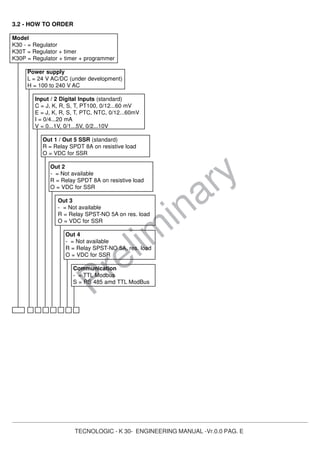
3.2 - HOW TO ORDER
Model
K30 - = Regulator
K30T = Regulator + timer
K30P = Regulator + timer + programmer
Power supply
L = 24 V AC/DC (under development)
H = 100 to 240 V AC
Input / 2 Digital Inputs (standard)
C = J, K, R, S, T, PT100, 0/12...60 mV
E = J, K, R, S, T, PTC, NTC, 0/12...60mV
I = 0/4...20 mA
V = 0...1V, 0/1...5V, 0/2...10V
Out 1 / Out 5 SSR (standard)
R = Relay SPDT 8A on resistive load
O = VDC for SSR
Out 2
- = Not available
R = Relay SPDT 8A on resistive load
O = VDC for SSR
Out 3
- = Not available
R = Relay SPST-NO 5A on res. load
O = VDC for SSR
Out 4
- = Not available
R = Relay SPST-NO 5A, res. load
O = VDC for SSR
Communication
- = TTL Modbus
S = RS 485 amd TTL ModBus
TECNOLOGIC - K 30- ENGINEERING MANUAL -V0.0 PAG. 1
Prelim
inary
4. CONFIGURATION PROCEDURE
4.0 General notes about K30
The K 30 is a blind controller (without display and
keyboard) but it is equipped with two serial links.
The first serial link is an RS485 and it is designed for a
standard dialogue with a master unit (a supervisor, an
HMI, a PLC, etc).
The second serial link (TTL type) is used to dialogue
with a remote display.
The remote display can be equipped with one or two
rows - four digits display and a 4 keys keyboard.
All actions can be made by remore display or by serial
link.
The actions made by serial link are not submitted to
time-out or password, have an immediate effect and do
not produces any visualization.
On the contrary, the actions made by remore display
(and keyboard) follows the same “strategy” of the front
panel instrument of this series.
In the following pages we will describe all possible
actions that you can do by a remote display.
We have selected the single display type.
The only differences you will see using a double display
are in the possibility to see two value at the same time
instead of one alternately to the second (e.g. a
paremeter code alternately with its value).
4.1 Introduction
When the instrument is powered, it starts immediately to
work according to the parameters values loaded in its
memory.
The instrument behaviour and its performances are
governed by the value of the memorized parameters.
At the first start up the instrument will use a “default”
parameter set (factory parameter set); this set is a
generic one (e.g. a TC J input is programmed).
We recommend that you modify the parameter set to
suit your application (e.g. set the right input type,
Control strategy, define an alarm, etc.)
To change these parameters you will need to enter the
“Configuration procedure”.
4.1.1 Access levels to the parameter modifications
and their password
The instrument have one complete parameter set.
We call this set “configuration parameter set” (or
“configuration parameters”).
The access to the configuration parameters is protected
by a programmable password (password level 3).
The configuration parameters are collected in various
groups. Every group defines all parameters related with a
specific function (E.g. control, alarms, output functions).
Note the instrument will show only the parameters
consistent with the specific hardware and in
accordance with the value assigned to the previous
parameters (e.g. if you set an output as “not used” the
instrument will mask all other parameters related with
this output).
4.2 INSTRUMENT BEHAVIOUR AT POWER UP
At power up the instrument can start in one of the
following mode depending on its configuration:
Auto mode without program functions
- The display will show the measured value
- The decimal figure of the less significant digit is OFF
- The instrument is performing the standard closed loop
control.
Manual mode (OPLO)
- The display will show alternately the measured value
and the message <<OPLO>>.
- The instrument does not perform Automatic control
- The control output is equal to 0% and can be manually
modified by and buttons.
Stand by mode (St.bY)
- The display will show alternately the measured value
and the message <<St.bY>> or <<od>>.
- The instrument does not perform any control (the
control outputs are OFF).
- The instrument is working as an indicator.
Auto mode with automatic program start up
- The display will show one of the following information:
- the measured value
- the operative set point (when it is performing a ramp)
- the time of the segment in progress (when it is
performing a soak).
- the measured value alternate with the message
<<St.bY>>.
- In all cases, the decimal figure of the less significant
digit is lit.
We define all the above described conditions as
“Standard Display”.
4.3.HOW TO ENTER INTO THE CONFIGURATION
MODE
1) Push the P button for more than 3 seconds.
The display will show alternately 0 and << PASS >>.
2) Using and/or buttons set the programmed
password.
NOTES:
a) The factory default password for configuration
parameters is equal to 30.
b) All parameter modification are protected by a time
out. If no button is pressed for more than 10 second
the instrument return automatically back to the
Standard display, the new value of the last selected
parameter is lost and the parameter modification
TECNOLOGIC - K 30- ENGINEERING MANUAL -V0.0 PAG. 2
Prelim
inary
procedure is closed.
When you desire to remove the time out (e.g. for
the first configuration of an instrument) you can use
a password equal to 1000 plus the programmed
password (e.g. 1000 + 30 [default] = 1030).
It is always possible to end manually the parameter
configuration procedure (see the next paragraph).
c) During parameter modification the instrument
continue to perform the control.
In certain conditions, when a configuration change
can produce a heavy bump to the process, it is
advisable to temporarily stop the controller from
controlling during the programming procedure (its
control output will be Off)
A password equal to 2000 + the programmed value
(e.g. 2000 + 30 = 2030).
The control will restart automatically when the
configuration procedure will be manually closed.
3) Push the P button
If the password is correct the display will show the
acronym of the first parameter group preceded by the
symbol .
In other words the display will show .
The instrument is in configuration mode.
4.4.HOW TO EXIT FROM THE CONFIGURATION
MODE
Push button for more than 5 seconds.
The instrument will come back to the “standard display”
4.5.KEYBOARD FUNCTION DURING PARAMETER
MODIFICATION
A short press allows you to exit from the current
parameter group and select a new parameter
group.
A long press allows you to close the configuration
parameter procedure (the instrument will come
back to the “standard display”).
When the display is showing a group, It allows you
to enter in the selected group.
When the display is showing a parameter, it allows
you to memorize the selected value and to go
to the next parameter within the same group.
it allows you to increase the value of the selected
parameter
it allows you to decrease the value of the selected
parameter
NOTE: The group selection is cyclic as well as the
selection of the parameters in a group.
4.6. FACTORY RESET - DEFAULT PARAMETERS
LOADING PROCEDURE
Some times, e.g. when you re-configure an instrument
previously used for other works or from other people or
when you have made too many errors during configuration
and you decided to re-configure the instrument, it is
possible to restore the factory configuration.
This action allows you to put the instruent in a defined con-
dition (in the same condition it was at the first power up).
The default data are the typical values loaded in the
instrument prior to shipment from factory.
To load the factory default parameter set, proceed as
follows:
1) Press the P button for more than 5 seconds
2) The display will show alternately “PASS” and “0”.
3) By and button set the value -481.
4) Push P button.
5) The instrument will turn OFF all LEDs then it will show
“dFLt” messages and than it turn ON all LEDs of the
display for 2 seconds and than it will restart as for a
new power up.
The procedure is complete.
Note: the complete list of the default parameter is
available in Appendix A.
4.7.ALL CONFIGURATION PARAMETERS
In the following pages we will describe all the parameters
of the instrument. However, the instrument will only show
the parameters applicable to its hardware options in
accordance with the specific instrument configuration (i.e.
setting AL1t [Alarm 1 type] equal to <<nonE>> [not used],
all parameters related with the alarm 1 will be skipped).
] inP GROUP - Main and auxiliary input
configuration
[2] SEnS - Input type
Available: Always
Range:
When the code of the input type is equal to C (see
Ordering Code at page 29)
J = TC J (0 to 1000 °C/ 32 to 1832 °F)
crAL = TC K (0 to 1370 °C/ 32 to 2498 °F)
S = TC S (0 to 1760 °C/ 32 to 3200 °F)
r = TC R (0 to 1760 °C/ 32 to 3200 °F)
t = TC T (0 to 400 °C/ 32 to 752 °F)
ir.J = Exergen IRS J (0 to 1000 °C/ 32 to 1832 °F)
ir.cA = Exergen IRS K (0 to 1370 °C/ 32 to 2498 °F)
Pt1 = RTD Pt 100 (-200 to 850 °C/-328 to 1562 °F)
0.50 = 0 to 50 mV linear
0.60 = 0 to 60 mV linear
12.60 = 12 to 60 mV linear
When the code of the input type is equal to E
J = TC J (0 to 1000 °C/ 32 to 1832 °F)
crAL = TC K (0 to 1370 °C/ 32 to 2498 °F)
TECNOLOGIC - K 30- ENGINEERING MANUAL -V0.0 PAG. 3
Prelim
inary
S = TC S (0 to 1760 °C/ 32 to 3200 °F)
r = TC R (0 to 1760 °C/ 32 to 3200 °F)
t = TC T (0 to 400 °C/ 32 to 752 °F)
ir.J = Exergen IRS J (0 to 1000 °C/ 32 to 1832 °F)
ir.cA = Exergen IRS K (0 to 1370 °C/ 32 to 2498 °F)
Ptc = PTC KTY81-121 (-55 to 150 °C/-67 to 302 °F)
ntc = NTC 103-AT2 (-50 to 110 °C/-58 to 230 °F)
0.50 = 0 to 50 mV linear
0.60 = 0 to 60 mV linear
12.60 = 12 to 60 mV linear
When the code of the input type is equal to I
0.20 = 0 to 20 mA linear
4.20 = 4 to 20 mA linear
When the code of the input type is equal to V
0.1 = 0 to 1 V linear
0.5 = 0 to 5 V linear
1.5 = 1 to 5 V linear
0.10 = 0 to 10 V linear
2.10 = 2 to 10 V linear
Note:
- When a TC input is selected and a decimal figure is
programmed (see the next parameter) the maximum
displayed value become 999.9 °C or 999.9 °F.
- Every change of the SEnS parameter setting will force
the following change:
[3] dP = 0
[129] ES.L = -1999
[130] ES.H = 9999
[3] dP - Decimal point position
Available: Always
Range:
When [2] SenS = Linear input: 0 to 3.
When [2] SenS different from linear input: 0 or 1
Note: Every change of the dP parameter setting will
produce a change of the parameters related with it (e.g.
set points, proportional band, etc.)
[4] SSc – Initial scale read-out for linear inputs
Available: when a linear input is selected by [2] SenS.
Range: -1999 to 9999
Notes:
- It allows the scaling of the analogue input to set the
minimum displayed/measured value
The instrument will show a measured value up to 5%
less then SSc value and than it will show an underrange
error.
- It is possible to set a initial scale read-out higher then the
full scale read-out in order to obtain a reverse read-out
scaling
E.g. 0 mA = 0 mBar and 20 mA = - 1000 mBar
(vacuum).
[5] FSc - Full scale read-out for linear input
Available: when a linear input is selected by [2] SenS.
Range: -1999 to 9999
Notes:
- It allows the scaling of the analogue input to set the
maximum displayed/measured value
The instrument will show a measured value up to 5%
higher than [5] FSc value and then it will show an
overrange error.
- It is possible to set a full scale read-out lower than the
initial scale read-out in order to obtain a reverse read-out
scaling
E.g. 0 mA = 0 mBar and 20 mA = - 1000 mBar
(vacuum).
[6] unit - Engineering unit
Available: when a temperature sensor is selected by
[2] SenS parameter.
Range:
°c = Centigrade
°F = Fahrenheit
[7] FiL - Digital filter on the measured value
Available: Always
Range: oFF (No filter) 0.1 to 20.0 s
Note: this is a first order digital filter applied on the
measured value. For this reason it will affect both the
measured value but also the control action and the
alarms behaviour.
[8] inE - Selection of the Sensor Out of Range type
that will enable the safety output value.
Available: Always
Range:
our = when an overrange or an underrange is
detected, the power output will be forced to the
value of [9] oPE parameter.
or = when an overrange is detected, the power output
will be forced to the value of [9] oPE parameter.
ur = when an underrange is detected, the power
output will be forced to the value of [9] oPE
parameter.
[9] oPE - Safety output value
Available: Ever
Range: -100 to 100 % (of the output).
Notes:
- When the instrument is programmed with one control
action only (heat or cool), setting a value outside of the
available output range, the instrument wil use Zero.
E.g. when heat action only has been programmed,
and oPE is equal to -50% (cooling) the instrument will
use the zero value.
- When ON/OFF control is programmed and an out of
range is detected, the instrument will perform the safety
output value using a fixed cycle time equal to 20 seconds.
[10] diF1 - Digital input 1 function
Available: when the instrument is equipped with digital
inputs.
TECNOLOGIC - K 30- ENGINEERING MANUAL -V0.0 PAG. 4
Prelim
inary
Range:
oFF = No function
1 = Alarm Reset [status]
2 = Alarm acknowledge (ACK) [status].
3 = Hold of the measured value [status].
4 = Stand by mode of the instrument [status]
When the contact is closed the instrument
operates in stand by mode.
5 = HEAt with SP1 and CooL with “SP2” [status]
(see “Note about digital inputs”)
6 = Timer Run/Hold/Reset [transition]
Short closure allows to start timer execution
and to suspend it while a long closure (longer
than 10 seconds) allows to reset the timer.
7 = Timer Run [transition] a short closure allows
to start timer execution.
8 = Timer rese [transition] a short closure allows
to reset timer count.
9 = Timer run/hold [Status]
- Contact closure = timer RUN
- contact opend = timer Hold
10 = Program Run [transition]
The first closure allows to start program
execution but a second closure restart the
program execution from the beginning.
11 = Program Reset [transition]
A contact closure allows to reset program
execution.
12 = Program Hold [transition]
The first closure allows to hold program
execution and a second closure continue
program execution.
13 = Program Run/Hold [status]
When the contact is closed the program is
running.
14 = Program Run/Reset [status]
Contact closed - Program run
Contact open - Program reset
15 = Instrument in Manual mode (Open Loop)
[status]
16 = Sequential set point selection [transition]
(see “Note about digital inputs”)
17 = SP1 / SP2 selection [status]
18 = Binary selection of the set point made by
digital input 1 (less significant bit) and digital
input 2 (most significant bit) [status].
19 = Digital input 1 will work in parallel to the
button while digital input 2 will work in
parallel to the button.
[11] diF2 - Digital input 2 function
Available: when the instrument is equipped with digital
inputs.
Range:
oFF = No function
1 = Alarm Reset [status]
2 = Alarm acknowledge (ACK) [status].
3 = Hold of the measured value [status].
4 = Stand by mode of the instrument [status]
When the contact is closed the instrument
operates in stand by mode.
5 = HEAt with SP1 and CooL with “SP2” [status]
(see “Note about digital inputs”)
6 = Timer Run/Hold/Reset [transition]
Short closure allows to start timer execution
and to suspend it while a long closure (longer
than 10 seconds) allows to reset the timer.
7 = Timer Run [transition] a short closure allows
to start timer execution.
8 = Timer rese [transition] a short closure allows
to reset timer count.
9 = Timer run/hold [Status]
- Contact closure = timer RUN
- contact opend = timer Hold
10 = Program Run [transition]
The first closure allows to start program
execution but a second closure restart the
program execution from the beginning.
11 = Program Reset [transition]
A contact closure allows to reset program
execution.
12 = Program Hold [transition]
The first closure allows to hold program
execution and a second closure continue
program execution.
13 = Program Run/Hold [status]
When the contact is closed the program is
running.
14 = Program Run/Reset [status]
Contact closed - Program run
Contact open - Program reset
15 = Instrument in Manual mode (Open Loop)
[status]
16 = Sequential set point selection [transition]
(see “Note about digital inputs”)
17 = SP1 / SP2 selection [status]
18 = Binary selection of the set point made by
digital input 1 (less significant bit) and digital
input 2 (most significant bit) [status].
18 = Digital input 1 will work in parallel to the
button while digital input 2 will work in
parallel to the button.
Notes about digital inputs
1) When diF1 or diF2 (e.g. diF1) are equal to 5 the
instrument operates as follows:
- when the contact is open, the control action is an
heating action and the active set point is SP1.
- when the contact is closed, the control action is a
cooling action and the active set point is SP2.
2) When diF1 is equal to 18, diF2 setting is forced to 18
and diF2 value and cannot perform another
additional function.
3) When diF1 and diF2 are equal to 18, the set point
selection will be in accordance with the following
table
TECNOLOGIC - K 30- ENGINEERING MANUAL -V0.0 PAG. 5
Prelim
inary
Dig In1 dig.In2 Operative set point
Off Off = Set point 1
On Off = Set point 2
Off On = Set point 3
On On = Set point 4
4) When diF1 is equal to 19, diF2 setting is forced to
up.du and 19 value and cannot perform another
additional function.
5) When a “Sequential set point selection” is used,
every closure of of the logic input increase the value
of SPAT (active set point) of one step.
The selection is cyclic -> SP1 -> SP2 -> SP3 -> SP4
] out group - Output parameters
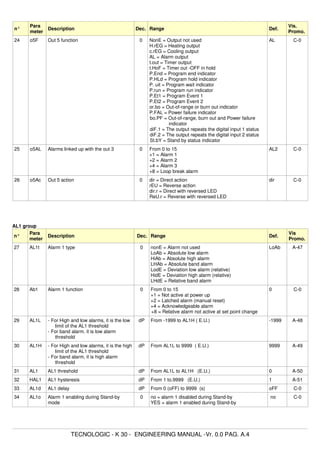
[12] o1F - Out 1 function
Available: Always
Range:
nonE = Output not used. With this setting the status
of the this output can be driven directly
from serial link.
H.rEG = Heating output
c.rEG = Cooling output
AL = Alarm output
t.out = Timer output
t.HoF = Timer out - OFF in Hold
P.End = Program end indicator
P.HLd = Program hold indicator
P. uit = Program wait indicator
P.run = Program run indicator
P.Et1 = Program Event 1
P.Et2 = Program Event 2
or.bo = Out-of-range or burn out indicator
P.FAL = Power failure indicator
bo.PF = Out-of-range, burn out and Power failure
indicator.
diF.1 = The output repeats the digital input 1 status
diF.2 = The output repeats the digital input 2 status
St.bY = Stand By status indicator
Notes:
- When two or more outputs are programmed in the
same way, these outputs will be driven in parallel.
- The power failure indicator will be reset when the
instrument detect an alarm reset command by U key,
digital input or serial link.
- When no control output is programmed, all the relative
alarm (when present) will be forced to “nonE” (not used).
[13] o1.AL – Alarms linked up with the out 1
Available: when [12] o1F = AL
Range: 0 to 15 with the following rule.
+1 = Alarm 1
+2 = Alarm 2
+4 = Alarm 3
+8 = loop break alarm
Example 1: Setting 3 (2+1) the output will be driven by
the alarm 1 and 2 (OR condition).
Example 2: Setting 13 (8+4+1) the output will be driven
by alarm 1 + alarm 3 + loop break alarm.
[14] o1Ac – Output 1 action
Available: when [12] o1F is different from “nonE”
Range:
dir = Direct action
rEV = Reverse action
dir.r = Direct action with revers LED indication
rEV.r = Reverse action with reverse LED indication.
Notes:
- Direct action: the output repeats the status of the
driven element.
Example: the output is an alarm output with direct
action. When the alarm is ON, the relay will be
energized (logic output 1).
- Reverse action: the output status is the opposite of the
status of the driven element.
Example: the output is an alarm output with reverse
action. When the alarm is OFF, the relay will be
energized (logic output 1). This setting is usually named
“fail-safe” and it is generally used in dangerous process
in order to generate an alarm when the instrument power
supply goes OFF or the internal watchdog starts.
[15] o2F - Out 2 function
Available: When the instrument has out 2 option.
Range:
nonE = Output not used. With this setting the status
of the this output can be driven directly
from serial link.
H.rEG = Heating output
c.rEG = Cooling output
AL = Alarm output
t.out = Timer output
t.HoF = Timr out - OFF in Hold
P.End = Program end indicator
P.HLd = Program hold indicator
P. uit = Program wait indicator
P.run = Program run indicator
P.Et1 = Program Event 1
P.Et2 = Program Event 2
or.bo = Out-of-range or burn out indicator
P.FAL = Power failure indicator
bo.PF = Out-of-range, burn out and Power failure
indicator.
diF.1 = The output repeates the digital input 1 status
diF.2 = The output repeates the digital input 2 status
St.By = Stand By status indicator
For other details see [12] O1F parameter
[16] o2.AL – Alarms linked up with Out 2
Available: when [15] o2F = AL
Range: 0 to 15 with the following rule.
+1 = Alarm 1
+2 = Alarm 2
+4 = Alarm 3
+8 = loop break alarm
TECNOLOGIC - K 30- ENGINEERING MANUAL -V0.0 PAG. 6
Prelim
inary
For more details see [13] o1.AL parameter
[17] o2Ac – Output 2 action
Available: when [15] o2F is different from “nonE”
Range:
dir = Direct action
rEV = Reverse action
dir.r = Direct action with revers LED indication
rEv.r = Reverse action with reverse LED indication.
For more details see [14] o1.Ac parameter.
[18] o3F - Out 3 function
Available: When the instrument has out 3 option
Range:
nonE = Output not used. With this setting the status
of the this output can be driven directly
from serial link.
H.rEG = Heating output
c.rEG = Cooling output
AL = Alarm output
t.out = Timer output
t.HoF = Timr out - OFF in Hold
P.End = Program end indicator
P.HLd = Program hold indicator
P. uit = Program wait indicator
P.run = Program run indicator
P.Et1 = Program Event 1
P.Et2 = Program Event 2
or.bo = Out-of-range or burn out indicator
P.FAL = Power failure indicator
bo.PF = Out-of-range, burn out and Power failure
indicator.
diF.1 = The output repeates the digital input 1 status
diF.2 = The output repeates the digital input 2 status
St.By = Stand By status indicator
For other details see [12] O1F parameter.
[19] o3.AL – Alarms linked up with Out 3
Available: when [18] o3F = AL
Range: 0 to 15 with the following rule.
+1 = Alarm 1
+2 = Alarm 2
+4 = Alarm 3
+8 = loop break alarm
For more details see [13] o1.AL parameter
[20] o3Ac – Output 3 action
Available: when [18] o3F is different from “nonE”
Range:
dir = Direct action
rEV = Reverse action
dir.r = Direct action with revers LED indication
rEV.r = Reverse action with reverse LED indication.
For more details see [14] o1.Ac parameter.
[21] o4F - Out 4 function
Available: When the instrument has out 4 option
Range:
nonE = Output not used. With this setting the status
of the this output can be driven directly
from serial link.
H.rEG = Heating output
c.rEG = Cooling output
AL = Alarm output
t.out = Timer output
t.HoF = Timr out - OFF in Hold
P.End = Program end indicator
P.HLd = Program hold indicator
P. uit = Program wait indicator
P.run = Program run indicator
P.Et1 = Program Event 1
P.Et2 = Program Event 2
or.bo = Out-of-range or burn out indicator
P.FAL = Power failure indicator
bo.PF = Out-of-range, burn out and Power failure
indicator.
diF.1 = The output repeates the digital input 1 status
diF.2 = The output repeates the digital input 2 status
St.By = Stand By status indicator
For other details see [12] O1F parameter.
[22] o4.AL – Alarms linked up with Out 4
Available: when [21] o4F = AL
Range: 0 to 15 with the following rule.
+1 = Alarm 1
+2 = Alarm 2
+4 = Alarm 3
+8 = loop break alarm
For more details see [13] o1.AL parameter
[23] o4Ac – Output 4 action
Available: when [21] o4F is different from “nonE”
Range:
dir = Direct action
rEV = Reverse action
dir.r = Direct action with revers LED indication
rEV.r = Reverse action with reverse LED indication.
For more details see [14] o1.Ac parameter.
[24] o5F - Out 4 function
Available: Always
Range:
nonE = Output not used. With this setting the status
of the this output can be driven directly
from serial link.
H.rEG = Heating output
c.rEG = Cooling output
AL = Alarm output
t.out = Timer output
t.HoF = Timr out - OFF in Hold
P.End = Program end indicator
P.HLd = Program hold indicator
P. uit = Program wait indicator
P.run = Program run indicator
P.Et1 = Program Event 1
P.Et2 = Program Event 2
TECNOLOGIC - K 30- ENGINEERING MANUAL -V0.0 PAG. 7
Prelim
inary
or.bo = Out-of-range or burn out indicator
P.FAL = Power failure indicator
bo.PF = Out-of-range, burn out and Power failure
indicator.
diF.1 = The output repeates the digital input 1 status
diF.2 = The output repeates the digital input 2 status
St.By = Stand By status indicator
For other details see [12] O1F parameter.
[25] o5.AL – Alarms linked up with Out 5
Available: when [24] o5F = AL
Range: 0 to 15 with the following rule.
+1 = Alarm 1
+2 = Alarm 2
+4 = Alarm 3
+8 = loop break alarm
For more details see [13] o1.AL parameter
[26] o5Ac – Output 5 action
Available: when [24] o5F is different from “nonE”
Range:
dir = Direct action
rEV = Reverse action
dir.r = Direct action with revers LED indication
rEV.r = Reverse action with reverse LED indication.
For more details see [14] o1.Ac parameter.
] AL1 Group - Alarm 1 parameters
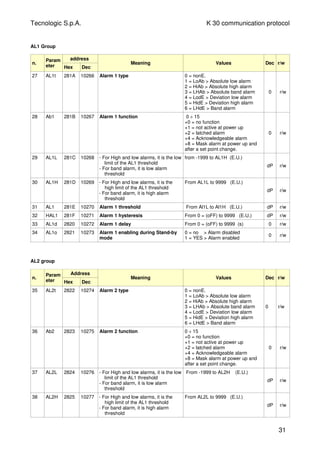
[27] AL1t - Alarm 1 type
Available: Always
Range:
When one or more outputs are programmed as control
output
nonE = Alarm not used
LoAb = Absolute low alarm
HiAb = Absolute high alarm
LHAb = Absolute band alarm
LodE = Deviation low alarm (relative)
HidE = Deviation high alarm (relative)
LHdE = Relative band alarm.
When no output is programmed as control output
nonE = Alarm not used
LoAb = Absolute low alarm
HiAb = Absolute high alarm
LHAb = Absolute band alarm
Notes:
- The relative and deviation alarms are “relative” to the
operative set point value.
[28] Ab1 – Alarm 1 function
Available: when [27] AL1t is different from “nonE”
Range: 0 to 15 with the following rule:
+1 = Not active at power up.
+2 = Latched alarm (manual reset)
+4 = Acknowledgeable alarm
+8 = Relative alarm not active at set point change
Example: setting Ab1 equal to 5 (1+4) the alarm 1 will
be “not active at power up” and “Acknowledgeable”.
Notes:
- The “not active at power up” selection allows you to
inhibit the alarm function at instrument power up or
when the instrument detects a transfer from
- manual mode (oplo) to auto mode
- Stand-by mode to auto mode.
The alarm will be automatically enabled when the
measured value reaches, for the first time, the alarm
threshold plus or minus the hysteresis (in other words,
when the initial alarm condition disappears).
- A “Latched alarm” (manual reset) is an alarm that will
remain active even if the conditions that generated the
alarm no longer persist. Alarm reset can be done only
by an external command (U button, digital inputs or
serial link).
- An “Acknowledgeable” alarm is an alarm that can be
reset even if the conditions that generated the alarm
are still present. Alarm acknowledge can be done
only by an external command (U button, digital inputs
or serial link).
P V
+ 1
+ 0
T i m e
A L 1
O NON
ON
o f f o f f
o f fo f fA b 1 =
A b 1 =
PWR ON
A L 1
P V
t im e
O N
o f fA b 1 = + 2
O N
o f f o f fA b 1 = + 0
Alarm
reset
Alarm
reset
LoAb
off
ON
AL1
AL1
PV
HiAb
HAL1
time
off
ON
AL1
PV
time
HAL1
off off
ON
OUT
off off
ON
OUT
AL1
LodE
ON
off
PV
SP
-AL1
HAL1
time
off
ON
SP
AL1
PV
HidE
time
HAL1
ON
off off off off
ON
OUT
AL1
OUT
AL1
TECNOLOGIC - K 30- ENGINEERING MANUAL -V0.0 PAG. 8
Prelim
inary
- A “relative alarm not active at set point change” is an
alarm that masks the alarm condition after a set
point change until process variable reaches the
alarm threshold plus or minus hysteresis.
- The instrument does not memorize in EEPROM the
alarm status. For this reason, the alarm status will be
lost if a power down occurs.
[29] AL1L - For High and low alarms, it is the low
limit of the AL1 threshold
- For band alarm, it is low alarm
threshold.
Available: when [27] AL1t is different from “nonE”
Range: from - 1999 to [30] AL1H engineering units.
[30] AL1H - For High and low alarms, it is the high
limit of the AL1 threshold
- For band alarm, it is high alarm
threshold.
Available: when [27] AL1t is different from “nonE”
Range: from [29] AL1L to 9999 engineering units.
[31] AL1- Alarm 1 threshold
Available: when
- [27] AL1t = LoAb Absolute low alarm
- [27] AL1t = HiAb Absolute high alarm
- [27] AL1t = LodE Deviation low alarm (relative)
- [27] AL1t = LidE Deviation high alarm (relative)
Range: from [29] AL1L to [30] AL1H engineering units.
[32] HAL1 - Alarm 1 hysteresis
Available: when [27] AL1t is different to “nonE”
Range: from 1 to 9999 engineering units
Notes:
- The hysteresis value is the difference between the
Alarm threshold value and the point the Alarm
automatically resets.
- When the alarm threshold plus or minus the
hysteresis is out of input range, the instrument will not
be able to reset the alarm.
Example: Input range from 0 to 1000 (mBar).
- set point equal to 900 (mBar)
- deviation low alarm equal to 50 (mBar)
- Hysteresis equal to 160 (mBar)
the theoretical reset point is 900 - 50 + 160 = 1010
(mBar) but this value is out of range.
The reset can be made only by turning the instrument
OFF, removeing the condition that generate the alarm
and than turn the instrument ON again.
- All band alarms use the same hysteresis value for
both thresholds.
- When the hysteresis of a band alarm is bigger than
the programmed band, the instrument will not be able
to reset the alarm.
Example: Input range from 0 to 500 (°C).
- set point equal to 250 (°C)
- relative band alarm
- Low threshold equal to 10 (°C)
- High threshold equal to 10 (°C)
- Hysteresis equal to 25 (°C)
[33] AL1d – Alarm 1 delay
Available: when [27] AL1t different form “nonE”
Range: from oFF (0) to 9999 seconds
Note: The alarm goes ON only when the alarm condition
persists for a time longer than [33] AL1d time but the
reset is immediate.
[34] AL1o - Alarm 1 enabling during Stand-by mode
Available: when [27] AL1t different from “nonE”
Range:
no = alarm 1 disabled during Stand by mode
YES = alarm 1 enabled during Stand by mode
] AL2 Group - Alarm 2 parameters
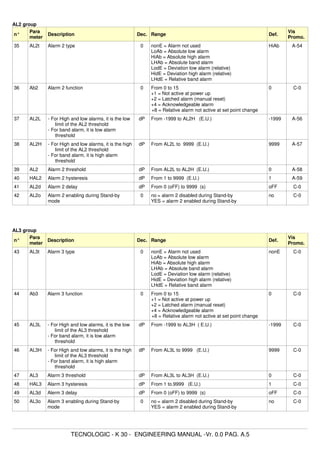
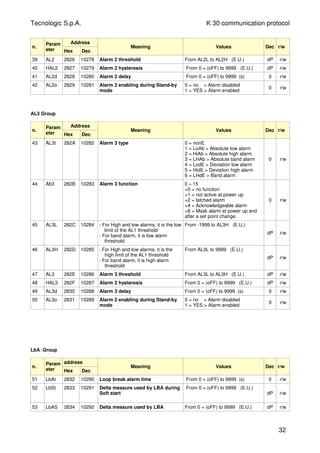
[35] AL2t - Alarm 2 type
Available: Aways
Range:
When one or more outputs are programmed as control
output
nonE = Alarm not used
LoAb = Absolute low alarm
HiAb = Absolute high alarm
LHAb = Absolute band alarm
LodE = Deviation low alarm (relative)
HidE = Deviation high alarm (relative)
LHdE = Relative band alarm.
When no output is programmed as control output
nonE = Alarm not used
LoAb = Absolute low alarm
HiAb = Absolute high alarm
LHAb = Absolute band alarm
A L 1
P V
t im e
O N
o f fA b 1 = + 4
O N
o f f o f fA b 1 = + 0
Alarm
ACK
Alarm
ACK
o f f
PV
Time
AL1
ON
Ab1 = +8
Ab1 = +0
Sp1
Sp2
AL1
ON
Off
ON ON
Off Off
ON
Off
ON
Off Off
TECNOLOGIC - K 30- ENGINEERING MANUAL -V0.0 PAG. 9
Prelim
inary
Notes: The relative alarm are “relative” to the current
set point (this may be different to the Target setpoint if
you are using the ramp to set point function).
[36] Ab2 – Alarm 2 function
Available: when [35] AL2t is different from “nonE”
Range: 0 to 15 with the following rule:
+1 = Not active at power up.
+2 = Latched alarm (manual reset)
+4 = Acknowledgeable alarm
+8 = Relative alarm not active at set point change
Example: setting Ad2 equal to 5 (1+4) the alarm 2 will
be “not active at power up” and “Acknowledgeable”.
Notes: For other details see [28] Ab1 parameter.
[37] AL2L - For High and low alarms, it is the low
limit of the AL2 threshold
- For band alarm, it is low alarm
threshold.
Available: when [35] AL2t is different from “nonE”
Range: from - 1999 to [38] AL2H engineering units.
[38] AL2H - For High and low alarms, it is the high
limit of the AL2 threshold
- For band alarm, it is high alarm
threshold.
Available: when [35] AL2t is different from “nonE”
Range: from [37] AL2L to 9999 engineering units.
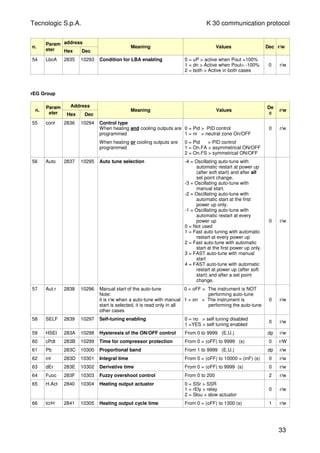
[39] AL2 - Alarm 2 threshold
Available: when
- [35] AL2t = LoAb Absolute low alarm
- [35] AL2t = HiAb Absolute high alarm
- [35] AL2t = LodE Deviation low alarm (relative)
- [35] AL2t = LidE Deviation high alarm (relative)
Range: from [37] AL2L to [38] AL2H engineering units.
[40] HAL2 - Alarm 2 hysteresis
Available: when [35] AL2t is different to “nonE”
Range: from 1 to 9999 engineering units
Notes: for other details see [32] HAL1 parameter
[41] AL2d – Alarm 2 delay
Available: when [32] AL2t different form “nonE”
Range: from oFF (0) to 9999 seconds
Note: The alarm goes ON only when the alarm condition
persist for a time longer than [38] AL2d time but the reset
is immediate.
[42] AL2o - Alarm 2 enabling during Stand-by mode
Available: when [35] AL2t different from “nonE”
Range:
no = alarm 2 disabled during Stand by mode
YES = alarm 2 enabled during Stand by mode
] AL3 Group - Alarm 3 parameters
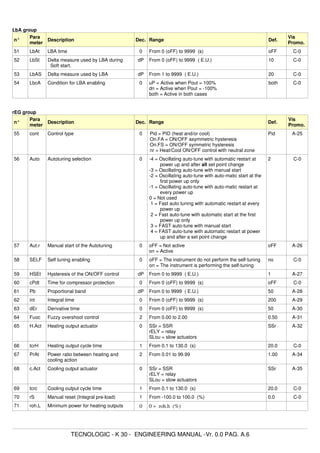
[43] AL3t - Alarm 3 type
Available: Always
Range:
When one or more outputs are programmed as control
output
nonE = Alarm not used
LoAb = Absolute low alarm
HiAb = Absolute high alarm
LHAb = Absolute band alarm
LodE = Deviation low alarm (relative)
HidE = Deviation high alarm (relative)
LHdE = Relative band alarm.
When no output is programmed as control output
nonE = Alarm not used
LoAb = Absolute low alarm
HiAb = Absolute high alarm
LHAb = Absolute band alarm
Notes: The relative alarm are “relative” to the current
set point (this may be different to the Target setpoint if
you are using the ramp to set point function).
[44] Ab3 – Alarm 3 function
Available: when [43] AL3t is different from “nonE”
Range: 0 to 15 with the following rule:
+1 = Not active at power up.
+2 = Latched alarm (manual reset)
+4 = Acknowledgeable alarm
+8 = Relative alarm not active at set point change
Example: setting Ad3 equal to 5 (1+4) the alarm 3 will
be “not active at power up” and “Acknowledgeable”.
Notes: For other details see [28] Ab1 parameter.
[45] AL3L - For High and low alarms, it is the low
limit of the AL3 threshold
- For band alarm, it is low alarm
threshold.
Available: when [43] AL3t is different from “nonE”
Range: from - 1999 to [46] AL3H engineering units.
[46] AL3H - For High and low alarms, it is the high
limit of the AL3 threshold
- For band alarm, it is high alarm
threshold.
Available: when [43] AL3t is different from “nonE”
Range: from [45] AL3L to 9999 engineering units.
[47] AL3 - Alarm 3 threshold
Available: when
- [43] AL3t = LoAb Absolute low alarm
- [43] AL3t = HiAb Absolute high alarm
- [43] AL3t = LodE Deviation low alarm (relative)
- [43] AL3t = LidE Deviation high alarm (relative)
Range: from [45] AL3L to [46] AL3H engineering units.
TECNOLOGIC - K 30- ENGINEERING MANUAL -V0.0 PAG. 10
Prelim
inary
[48] HAL3 - Alarm 3 hysteresis
Available: when [43] AL3t is different to “nonE”
Range: from 1 to 9999 engineering units
Notes: for other details see [42] HAL1 parameter
[49] AL3d – Alarm 3 delay
Available: when [43] AL3t different form “nonE”
Range: from oFF (0) to 9999 seconds
Note: The alarm goes ON only when the alarm condition
persist for a time longer than [49] AL3d time but the reset
is immediate.
[50] AL3o - Alarm 3 enabling during Stand-by mode
Available: when [43] AL3t different from “nonE”
Range:
no = alarm 3 disabled during Stand by mode
YES = alarm 3 enabled during Stand by mode.
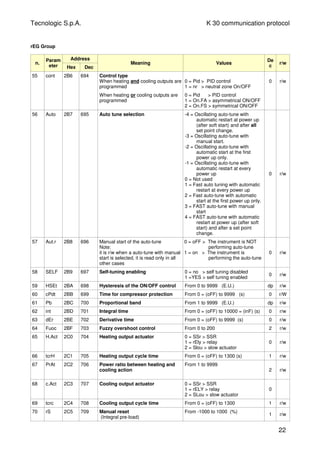
] LbA group - Loop break alarm
General note about LBA alarm
The LBA operate as follows:
When you apply 100 % of the power output to a
process, the process variable, after a time due to the
process inertia, begins to change in a known direction
(increases for an heating action or decreases for a
cooling action).
Example: if I apply 100% of the power output to a
furnace, the temperature must go up unless one of the
component in the loop is faulty (heater, sensor, power
supply, fuse, etc...)
The same philosophy can be applied to the minimum
power. In our example, when I turn OFF the power to a
furnaces, the temperature must go down, if not the SSR
is in short circuit, the valve is jammed, etc..
LBA function is automatically enabled when the PID
requires the maximum or the minimum power.
When the process response is slower than the
programmed limit the instrument generates an alarm.
NOTES:
- When the instrument is in manual mode, the LBA
function is disabled.
- When LBA alarm is ON the instrument continue to
perform the standard control. If the process response
come back into the programmed limit, the instrument
reset automatically the LBA alarm.
- This function is available only when the programmed
control algorithm is equal to PID (Cont = PID).
[51] LbAt - LBA time
Available: when [55] Cont = PID
Range: oFF = LBA not used or from 1 to 9999 seconds
[52] LbSt – Delta measure used by LBA during Soft
start.
Available: when [51] LbAt is different from oFF
Range:
- oFF = loop break alarm is inhibit during soft start
- 1 to 9999 engineering units.
[53] LbAS – Delta measure used by loop break alarm
(loop break alarm step)
Available: when [51] LbAt is different from oFF
Range: from 1 to 9999 engineering units.
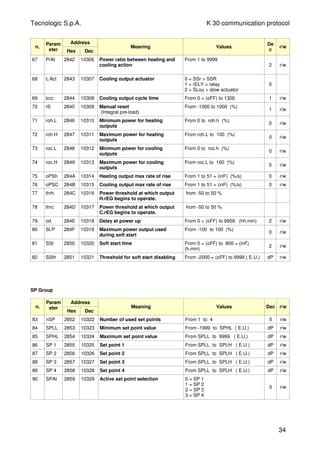
[54] LbcA - Condition for LBA enabling
Available: when [51] LbAt is different from oFF
Range:
uP = Enabled when the PID requires the
maximum power only.
dn = Enabled when the PID requires the
minimum power only
both = Enabled in both condition (when the PID
requires the maximum or the minimum
power).
LBA application example:
LbAt (LBA time) = 120 seconds (2 minutes)
LbAS (delta LBA) = 5 °C
The machine has been designed in order to reach
200 °C in 20 minutes (20°C/min).
When the PID demand 100 % power, the instrument
starts the time count.
During time count if the measured value increases
more than 5 °C, the instrument restarts the time
count. Otherwise if the measured value does not
reach the programmed delta (5 °C in 2 minutes) the
instrument will generate the alarm.
] rEG group - Control parameters
The rEG group will be available only when at least
one output is programmed as control output (H.rEG
or C.rEG).
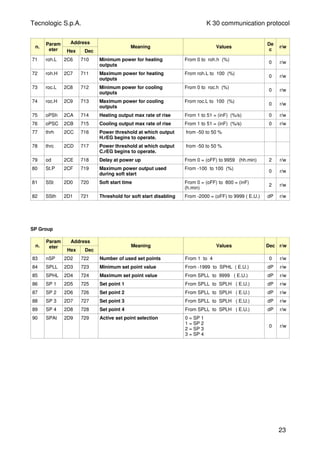
[55] cont - Control type:
Available: when at least one output is programmed as
control output (H.rEG or C.rEG).
Range:
When two control action (heat and cool) are
programmed:
Pid = PID (heat and cool)
nr = Heat/Cool ON/OFF control with neutral
zone
0N
OUT c.rEG
(cooling)
OUT H.rEG
(heating)
SP
PV
OFF
0N
OFF
OFF
OFF
0N
time
HSEt
HSEt
TECNOLOGIC - K 30- ENGINEERING MANUAL -V0.0 PAG. 11
Prelim
inary
When one control action (heat or cool) is programmed:
Pid = PID (heat or cool)
On.FA = ON/OFF asymmetric hysteresis
On.FS = ON/OFF symmetric hysteresis
Note:
- ON/OFF control with asymmetric hysteresis :
- OFF when PV > SP
- ON when PV < (SP - hysteresis)
- ON/OFF control with symmetric hysteresis :
- OFF when PV > (SP + hysteresis)
- ON when PV < (SP - hysteresis)
[56] Auto – Auto tune selection
Tecnologic has developed two auto-tune algorithms:
1) Oscillating auto-tune:
2) Fast auto-tune
1) The oscillating auto-tune is the usual auto-tune and:
- it is more accurate
- can start even if PV is close to the set point.
- can be used even if the set point is close to the ambient
temperature.
2) The fast type is suitable when:
- The process is very slow and you want to be operative
in a short time.
- When an high overshoot is not acceptable.
- In multi loop machinery where the fast method reduces
the calculation error due to the effect of the other loops.
NOTE: fast auto-tune can start only when the measured
value (PV) is lower than (SP + 1/2SP).
Available: when [49] cont = PID
Range: from -4 to 4
where:
-4 = Oscillating auto-tune with automatic restart
at power up (after soft start) and after all set
point change.
-3 = Oscillating auto-tune with manual start.
-2 = Oscillating auto-tune with automatic start at
the first power up only.
-1 = Oscillating auto-tune with automatic restart
at every power up
0 = Not used
1 = Fast auto tuning with automatic restart at
every power up
2 = Fast auto-tune with automatic start at the
first power up only.
3 = FAST auto-tune with manual start
4 = FAST auto-tune with automatic restart at
power up (after soft start) and after a set
point change.
NOTE: The auto-tune is inhibited during program
execution.
[57] Aut.r - Manual start of the auto-tune
Available: when [55] cont = PID
Range:
oFF = the instrument is not performing the auto-tune
on = the instrument is performing the auto-tune
[58] SELF - Self-tune enable
The self-tuning is an adaptive algorithm able to obtimize
continuously the PID parameter value.
This algorithm is specifically designed for all process
subjected to big load variation able to change heavily
the process response.
Available: when [55] cont = PID
Range:
oFF = the instrument is not performing the self-tune
on = the instrument is performing the self-tune
[59] HSEt - Hysteresis of the ON/OFF control
Available: when [55] cont is different from PID.
Range: from 0 to 9999 engineering units.
[60] cPdt – Time for compressor protection
Available: when [55] cont = nr
Range:
- OFF = protection disabled
- From 1 to 9999 seconds.
[61] Pb - Proportional band
Available: When [55] cont = PID and [58] SELF = no
Range: from 1 to 9999 engineering units.
Note: auto-tune functions calculate this value.
[62] int - Integral time
Available: When [55] cont = PID and [58] SELF = no
Range:
- OFF = Integral action excluded
- from 1 to 9999 seconds
- inF= Integral action excluded
Note: auto-tune functions calculate this value.
[63] dEr - Derivative time
Available: When [55] cont = PID and [58] SELF = no
Range:
- oFF - derivative action excluded
- from 1 to 9999 seconds
Note: auto-tune functions calculate this value.
OUT
SP
PV
OFF
ON
HEAt - On.FA
OUT
time
HSEt
SP
PV
HSEt
time
CooL - On.FA
ON ON ON ON ON
CooL - On.FSHEAt - On.FS
ONON
OUT
SP
OFF
PV
OFF
ON
HSEt
time
OUT
ON
SP
PV
ON
OFF OFF
ON
time
HSEt
HSEt
HSEt
H.rEG C.rEG
C.rEGH.rEG
OFF OFF OFF
TECNOLOGIC - K 30- ENGINEERING MANUAL -V0.0 PAG. 12
Prelim
inary
[64] Fuoc - Fuzzy overshoot control
This parameter reduces the overshoot usually present
at instrument start up or after a set point change and it
will be active only in this two cases.
Setting a value between 0.00 and 1.00 it is possible to
slow down the instrument action during set point
approach.
Setting Fuoc = 1 this function is disabled
2
1
3
S P
P V
tim e
Available: When [55] cont = PID and [58] SELF = no
Range: from 0 to 2.00.
Note: fast auto-tune calculates the Fuoc parameter
while the oscillating one sets it equal to 0.5.
[65] H.Act – Heating output (H.rEG) actuator
This parameter sets the minimum cycle time of the
heating output.
It aims to respect the minimum cycle time of a specific
actuator in order to assure a long actuator life.
Available: When at list one output is programmed in
order to be the heating output (H.rEG), [55] cont = PID
and [58] SELF = no
Range:
SSr = Solid state relay output
rELY = Relay or contactor
SLou = Slow actuator (e.g. burners)
Note: setting
- SSr no limit is applied to the [63] tcrH parameter
and it is pre-set equal to 1 seconds
- rELY the [63] tcrH parameter is limited to 20
seconds and [63] tcrH is pre-set equal to 20
seconds
- SLou the [63] tcrH parameter is limited to 40
seconds and [63] tcrH is pre-set equal to 40
seconds
[66] tcrH - Cycle time of the heating output
Available: When at least one output is programmed in
order to be the heating output (H.rEG), [55] cont = PID
and [58] SELF = no
Range:
when [65] H.Act = SSr
from 1.0 to 130.0 seconds
when [65] H.Act = reLY
from 20,0 to 130.0 seconds
when [65] H.Act = SLou
from 40,0 to 130.0 second
[67] PrAt - Power ratio between heating and cooling
action (relative cooling gain)
The instrument uses the same PID parameter set for
heat and for cool action but the efficiency of the two
actions are usually different.
This parameter allows to define the ratio between the
efficiency of the heating system and the efficiency of the
cooling one.
An example will help us tu explain you the philosophy.
Consider one loop of a plastic extruder.
The working temperature is equal to 250 °C.
When you want to increase the temperature from 250 to
270 °C (delta 20 °C) using 100% of the heating power
(resistor), you will need 60 seconds.
On the contrary, when you want to decrease the
temperature from 250 to 230 °C (delta 20 °C) using 100%
of the cooling power (fan), you will need 20 seconds only.
In our example the ratio is equal to 60/20 = 3 ([63] PrAt
= 3) and it say that the efficiency of the cooling system
is 3 time more efficient of the heating one.
Available: When two control action are programmed
(H.rEG and c.rEG) and [55] cont = PID and [58] SELF =
no
Range: from 0.01 a 99.99
Note: auto-tune functions calculate this value.
[68] c.Act – Cooling output (C.rEG) actuator
Available: When at list one output is e programmed in
order to be the cooling output (c.rEG), [55] cont = PID
and [58] SELF = no
Range:
SSr = Solid state relay output
rELY. = Relay or contactor
SLou = Slow actuator (e.g. compressors)
Note: for more details see [65] h.Act parameter
[69] tcrc - Cycle time of the cooling output
Available: When at least one output is e programmed in
order to be the cooling output (c.rEG), [55] cont = PID
and [58] SELF = no
Range:
when [65] H.Act = SSr
from 1.0 to 130.0 seconds
when [65] H.Act = reLY
from 20,0 to 130.0 seconds
when [65] H.Act = SLou
from 40,0 to 130.0 second
Note: auto-tune functions calculate this value.
[70] rS - Manual reset (integral pre-load)
It allows to drastically reduce the undershoot due to a
hot restart.
When your process is steady, the instrument operates
with a steady power output (e.g. 30%).
If a short power down occurs, the process restarts with a
process variable close to the set point while the
instrument starts with an integral action equal to zero.
TECNOLOGIC - K 30- ENGINEERING MANUAL -V0.0 PAG. 13
Prelim
inary
Setting a manual reset equal to the average power
output (in our example 30 %) the instrument will start
with a power output equal to the value it will use at
steady state (instead of zero) and the undershoot will
become very little (in theory equal to zero).
Available: When [55] cont = PID and [58] SELF = no
Range: from -100.0 to 100.0 %
[71] roh.L - Minimum power for heating outputs
Available: When at list one output is e programmed in
order to be the Heating output (H.rEG) and [58] cont =
PID.
Range: from 0 to [72] roh.h %
[72] roh.h - Maximum power for heating outputs
Available: When at list one output is e programmed in
order to be the Heating output (H.rEG) and [58] cont =
PID.
Range: from [71] roh.L to 100 %
[73] roc.L - Minimum power for cooling outputs
Available: When at list one output is e programmed in
order to be the cooling output (C.rEG) and [58] cont =
PID.
Range: from 0 to [74] roc.h %
[74] roc.h - Maximum power for cooling output
Available: When at list one output is e programmed in
order to be the cooling output (C.rEG) and [58] cont =
PID.
Range: from [73] roc.L to 100 %
[75] oPSh - Heating output max rate of rise
Available: When at list one output is e programmed in
order to be the Heating output (H.rEG) and [58] cont =
PID.
Range: from 1 to 50%/s + inF = step transfer
[76] oPSc - Cooling output max rate of rise
Available: When at list one output is e programmed in
order to be the coolingoutput (C.rEG) and [58] cont =
PID.
Range: from 1 to 50%/s + inF = step transfer
GENERAL NOTES ABOUT SPLIT RANGE FUNCTION
The use of this function is only possible if the PID
control is dual function and can be used to delay or
bring forward the intervention of the actuators
commanded by the instrument.
Using this function it is therefore possible to optimise
the intervention of the two actuators in such a way that
their actions do not overlap or so that they overlap so
that they obtain the mix of the two actions of the
actuators.
Basically, this means setting two power offsets (one for
direct action and one for reverse action) that set the
beginning of the intervention of the actuator
commanded by the output.
The parameters that can be set for this function
contained in the block “]rEG”, are:
“thr1” : Power threshold at which output H.rEG begins
to operate.
“thr2” : Power threshold at which output C.rEG begins
to operate.
Basically, if one wishes to bring forward the reverse
action (H.rEG) and delay the direct action (C.rEG) it is
necessary to set positive values on parameter “thr1” and
negative values on parameter “thr2”.
In this way, the area within which the two outputs are not
ctivated at the same time is increased.
Vice versa if one wishes to extend the reverse action
(H.rEG) and bring forward the direct action (C.rEG) it is
necessary to set negative values on parameter “thr1”
and positive values on parameter “thr2”.
In this way, the area within which the two outputs are
activated at the same time is increased.
The split range function is deactivated by setting the
respective parameters =0.
Note : In order to simplify the explanation of the
example graphs a dual action control that is only
proportional (and therefore with “dEr” and “Int” = OFF)
with “Prat” = 1.0 and “rS” = 0.0 was considered.
Pb
Pb
time
-100%
thr2
thr1
100%
H.rEG
(Cooling)
C.rEG
(Heating)
0%
SP
PV
Pb
Pb
time
thr1
thr2
100%
-100%
C.rEG
(Cooling)
H.rEG
(Heating)
0%
SP
PV
time
Pb
Pb
100%
-100%
(Heating)
(Cooling)
C.rEG
H.rEG
0%
SP
PV
TECNOLOGIC - K 30- ENGINEERING MANUAL -V0.0 PAG. 14
Prelim
inary
[77] thrh - Power threshold at which output H.rEG
begins to operate.
Available: When two control action are programmed
(H.rEG and c.rEG) and [55] cont = PID and [58].
Range: from -50 to 50 %
[78] thrc - Power threshold at which output C.rEG
begins to operate.
Available: When two control action are programmed
(H.rEG and c.rEG) and [55] cont = PID and [58].
Range: from -50 to 50 %
[79] od – Delay at power up
Available: When at list one output is programmed as
control output.
Range:
- oFF : Function not used
- from 0,01 to 99.59 hh.mm
Notes:
- This parameter defines the time during which (after a
power up) the instrument remains in stand by mode
before to start all other function (control, alarms,
program, etc.)
- When a program with automatic start at power up and
od function are programmed, the instrument performs
od function before to start the program execution.
- When an auto-tune with automatic start at power up
and od function are programmed, the od function will
be aborted and auto-tune will start immediately.
[80] St.P - Maximum power output used during soft
start
Available: When at list one output is programmed as
control output and [55] cont = PID
Range: from -100 to 100 %
Notes:
- When St.P parameter have a positive value, the limit
will be applied to the heating output(s) only.
- When St.P parameter have a negative value, the limit
will be applied to the cooling output(s) only.
- When a program with automatic start at power up and
soft start function are programmed, the instrument
performs both functions at the same time. In other
words, the program performs the first ramp, while the
requested power is lower than the limit the instrument
operates as usual, when the PID requires more then
the limit the power output will be limited.
- The auto-tune function inhibits the soft start function
[81] SSt - Soft start time
Available: When at list one output is programmed as
control output and annd [55] cont = PID
Range:
- oFF : Function not used
- from 0.01 to 7.59 hh.mm
- inF : soft start always active
[82] SS.tH – Threshold for soft start disabling
Available: When at list one output is programmed as
control output and [55] cont = PID
Range: from -1999 to 9999 engineering units
Note:
- When the power limiter have a positive value (the limit
is applied to the heating action) the soft start function
will be aborted when the measured value is greater or
equal to SS.tH parameter.
- When the power limiter have a negative value (the
limit is applied to the cooling action) the soft start
function will be aborted when the measured value is
lower or equal to SS.tH parameter.
] SP Group - Set point parameters
The SP group will be available only when at least
one output is programmed as control output (H.rEG
or C.rEG).
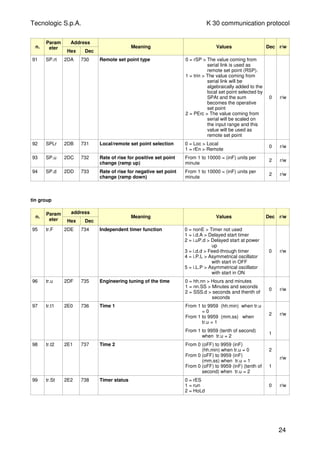
[83] nSP – Number of used set points
Available: When at least one output is programmed as
control output.
Range: from 1 to 4
Note: When you change the value of this parameter, the
instrument operates as follows:
- [90] SPAt parameter will be forced to SP1.
- The instrument verifies that all used set point are
within the limits programmed by [84] SPLL end [85]
SPHL.
If an SP is out of this range, the instrument forces it to
the limit more closed to it.
[84] SPLL - Minimum set point value
Available: When at least one output is programmed as
control output.
Range: from -1999 to [85] SPHL engineering units
Notes:
- When you change the [83] SPLL value, the instrument
checks all local set points ([86] SP1, [87] SP2, [88] SP3
and [89] SP4 parameters) and all set points of the
program ([104] Pr.S1, [109] Pr.S2, [114] Pr.S3, [119]
Pr.S4 parameters).
If an SP is out of this range, the instrument forces it to
the maximum acceptable value
- A [84] SPLL change produces the following actions
- when [91] SP.rt = SP the remote set point will be
forced to be equal to the active set point
- When [91] SP.rt = trim the remote set point will be
forced to zero
- When [91] SP.rt = PErc the remote set point will be
forced to zero
[85] SPHL - Maximum set point value
Available: When at least one output is programmed as
control output.
Range: from [84] SPLL to 9999 engineering units
Note: for other details see [84] SPLL parameter.
TECNOLOGIC - K 30- ENGINEERING MANUAL -V0.0 PAG. 15
Prelim
inary
[86] SP 1 - Set Point 1
Available: When at least one output is programmed as
control output.
Range: from [84] SPLL to [85] SPHL engineering units
[87] SP 2 - Set Point 2
Available: When at least one output is programmed as
control output and [83] nSP > 1.
Range: from [84] SPLL to [85] SPHL engineering units
[88] SP 3 - Set Point 3
Available: When at least one output is programmed as
control output and [83] nSP > 2.
Range: from [84] SPLL to [85] SPHL engineering units
[89] SP 4 - Set Point 4
Available: When at least one output is programmed as
control output and [83] nSP =4.
Range: from [84] SPLL to [85] SPHL engineering units
[90] SPAt - Selection of the active Set point
Available: When at least one output is programmed as
control output.
Range: from “SP1” to [83] nSP.
Notes:
- A [90] SPAt change produces the following actions
- when [91] SP.rt = SP - the remote set point will be
forced to be equal to the active set point
- When [91] SP.rt = trin - the remote set point will be
forced to zero
- When [91] SP.rt = PErc - the remote set point will
be forced to zero
- SP2, SP3 and SP4 selection will be shown only the
relative set point is enabled (see [83] nSP parameter).
[91] SP.rt – Remote set point type
These instrument will communicate with each other,
using RS 485 serial interface without a PC. An
instrument can be set as a Master while the other are
(as usual) Slave units. The Master unit can send his
operative set point to the slave units.
In this way, for example, it is possible to change
simultaneously the set point of 20 instruments by
changing the set point of the master unit (e.g. hot runner
application).
SP.rt parameter defines how the slaves units will use the
value coming from serial link.
The [136] tr.SP (Selection of the value to be
retransmitted (Master)) parameter allows to define the
value sent by master unit.
Available: When at least one output is e programmed
as control output and the serial interface is present.
Range:
rSP = The value coming from serial link is used as
remote set point (RSP).
trin = The value coming from serial link will be
algebraically added to the local set point
selected by SPAt and the sum becomes the
operative set point
PErc = The value coming from serial will be scaled
on the input range and this value will be
used as remote set point.
Note:
- A [80] SPrt change produces the following actions
- when [91] SP.rt = rSP - the remote set point will
be forced to be equal to the active set point
- When [91] SP.rt = trin - the remote set point will be
forced to zero
- When [91] SP.rt = PErc - the remote set point will
be forced to zero
Example:
A 6 zone reflow-oven for PCB .
The master unit sends its set point value to 5 other
zones (slave controllers).
The Slave zones use it as a set point trim.
The first zone is the master zone and it uses a set point
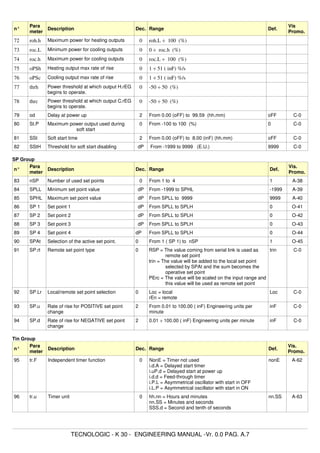
equal to 210 °C.
The second zone has a local set point equal to - 45 °C
The third zone has a local set point equal to -45 (°C)
The fourth zone has a local set point equal to -30
The fifth zone has a local set point equal to +40
The sixth zone has a local set point equal to +50
In this way, the thermal profile will be the following:
- master SP = 210 °C
- second zone SP = 210 -45 = 165 °C
- third zone SP = 210 -45 = 165 °C
- fourth zone SP = 210 - 30 = 180 °C
- fifth zone SP = 210 + 40 = 250 °C
- sixth zone SP = 210 + 50 = 260 °C
Changing the SP of the master unit, all the other slave
units will immediately change their operative set point.
[92] SPLr – Local/remote set point selection
Available: When at list one output is programmed as
control output.
Range:
Loc = local set point selected by [90] SPAt
rEn = Remote set point (coming from serial link)
[93] SP.u - Rate of rise for positive set point change
(ramp up)
Available: When at list one output is e programmed as
control output.
Range:
from 0.01 to 99.99 units per minute
inF = ramp disabled (step transfer)
[94] SP.d - Rate of rise for negative set point change
(ramp down)
Available: When at list one output is e programmed as
control output.
Range:
from 0.01 to 99.99 units per minute
inF = ramp disabled (step transfer)
General note about remote set point: when the
TECNOLOGIC - K 30- ENGINEERING MANUAL -V0.0 PAG. 16
Prelim
inary
remote set point (RSP) with trim action is programmed,
the local set point range becomes the following:
from [84] SPLL+ RSP to [85] SPHL - RSP
] tin Group - Timer function parameters
Five timer types are available:
Delayed start with a delay time and a “end of cycle” time
Start Tr.t1
OFF ONOUT OFF
Tr.t2
- Setting tr.t2 = Inf the timer out remains in ON condition
until a reset command is detected.
Start Tr.t1
OFF ONOUT OFF
Reset
Tr.t2 = inF
Delayed start at power up with a delay time and a “end
of cycle” time
Start
PWR UP
Tr.t1
OFF ONOUT OFF
Tr.t2
Feed-through
Start Tr.t1
ON OFF
Reset
OUT
Asymmetrical oscillator with start in OFF
Start Tr.t1
Off ONOUT
Reset
Tr.t2
Off ON Off ON
Tr.t1 Tr.t2 Tr.t1 Tr.t2
Asymmetrical oscillator with start in ON
Start Tr.t1
ONOUT
Reset
Tr.t2 Tr.t1 Tr.t2 Tr.t1 Tr.t2
OFF ON ONOFF OFF
NOTES:
- The instrument can receive the start, hold and reset
commands by U button, by logic inputs and/or by
serial link
- An HOLD command can suspend the time count.
[95] tr.F = Independent timer function
Available: Always
Range:
nonE = Timer not used
i.d.A = Delayed start timer
i.uP.d = Delayed start at power up
i.d.d = Feed-through timer
i.P.L = Asymmetrical oscillator with start in OFF
i.L.P = Asymmetrical oscillator with start in ON
[96] tr.u – Engineering unit of the time
Available: when [95] tr.F is different form nonE
Range:
hh.nn = Hours and minutes
nn.SS = Minutes and seconds
SSS.d = Seconds and tenth of seconds
Note: when the timer is running, you can see the value
of this parameter but you can NOT modify it.
[97] tr.t1 – Time 1
Available: when [95] tr.F is different form nonE
Range:
- when [96] tr.u = hh.nn from 00.01 to 99.59
- when [96] tr.u = nn.SS from 00.01 to 99.59
- when [96] tr.u = SSS.d from 000.1 to 995.9
[98] tr.t2 – Time 2
Available: when [95] tr.F is different form nonE
Range:
- when [96] tr.u = hh.nn from 00.01 to 99.59 + inF
- when [96] tr.u = nn.SS from 00.01 to 99.59 + inF
- when [96] tr.u = SSS.d from 000.1 to 995.9 + inF
Note: Setting [98] tr.t2 = inF, the second time can be
stopped by a reset command only.
[99] tr.St – Timer status
Available: when [84] tr.F is different form nonE
Range:
- run = Timer Run
- HoLd = Timer Hold
- rES = Timer reset
Note: this parameter allows to manage timer execution
by a parameter (without digital inputs or U button).
] PrG Group - Programmer function parameter
These instruments are able to perform a set point profile
compounded of 4 groups of 2 steps (8 step total).
The first step is a ramp (used to reach the desired set
point), the second is a soak (on the desired set point).
When a RUN command is detected the instrument
aligns the operative set point to the measured value and
starts to execute the first ramp.
TECNOLOGIC - K 30- ENGINEERING MANUAL -V0.0 PAG. 17
Prelim
inary
In addition, each soak is equipped with a wait band
which suspends the time count when the measured
value goes out of the defined band (guaranteed soak).
Moreover, for each segment it is possible to define the
status of two events. An event can drive an output and
make an action during one or more specific program steps.
Some additional parameters allow to define the time
scale, the automatic RUN conditions and the instrument
behaviour at the end of the program.
NOTES:
1) all steps can be modified during program
execution.
2) During program execution the instrument
memorize the segment currently in use and, by a
30 minutes interval, it memorize also the elapsed
time of the soaks.
If a power down occures during program
execution, at the next power up the instrument is
able to continue the program execution starting
from the segment in progress at power down and,
if the segment was a soak, it is also capable to
restart from the soak time minus the elapsed time
memorized.
In order to obtain this features, the “[120]dSPu -
Status of the instrument at power u” parameter
must be set to “AS.Pr”.
If the “[120]dSPu” parameter is different from
“AS.Pr” The memorization function will be hinibit.
PWR UP
or RUN
Time
Spx
Status
Temp.
OFF
Ramp2
Soak 2
Ramp3
Soak 3
Soak4
Ramp4
Ramp to
Spx
Prog.END
Prg. Step
Pr.S1
Ramp1
Soak1
Program run
Pr.S4
Pr.S2
Pr.S3
[100] Pr.F = Programmer action at power up
Available: Always
Range:
nonE = Program not used
S.uP.d = Start at power up with a first step in stand by
S.uP.S = Start at power up
u.diG = Start at RUN command detection only
U.dG.d = Start at RUN command detection with a first
step in stand by
[101] Pr.u – Engineering units of the soaks
Available: when [100] Pr.F is different from nonE
Range:
hh.nn = Hours and minutes
nn.SS = Minutes and seconds
Note: during program execution, this parameter can not
be modified.
[102] Pr.E – Instrument behaviour at the End of the
program execution
Available: when [100] Pr.F is different from nonE
Range:
cnt = continue (the instrument will use the set
point of the last soak until a reset command
is detected)
SPAt = go to the set point selected by [90] SPAt
parameter
St.bY = Go in stand by mode.
Note:
- Setting [102] Pr.E = cnt the instrument operates as
follows: at program end, it will use the set point of the
last soak.
When a reset command is detected, it goes to the set
point selected by [90] SPAt parameter. The transfer
will be a step transfer or a ramp according to the [93]
SP.u (Maximum rate of rise for positive set point
change) and [94] SPd (Maximum rate of rise for
negative set point change).
- Setting [102] Pr.E = SPAt the instrument goes
immediately to the set point selected by [79] SPAt
parameter. The transfer will be a step transfer or a
ramp according to the [93] SP.u (Maximum rate of rise
for positive set point change) and [94] SPd (Maximum
rate of rise for negative set point change).
[103] Pr.Et – Time of the End program indication
Available: when [100] Pr.F is different from nonE
Range:
- oFF = Function not used
- from 00.01 to 99.59 minutes and seconds
- inF = indefinitely ON
Note:
- Setting [103] Pr.Et = inF the end program indication
will go OFF only when a reset command or a new
RUN command is detected.
[104] Pr.S1 - Set point of the first soak
Available: when [100] Pr.F is different from nonE or
[100] Pr.F is different from S.uP.d.
Range: From [84] SPLL to [85] SPHL
[105] Pr.G1 – Gradient of the first ramp
Available: when [100] Pr.F is different from nonE or
[100] Pr.F is different from S.uP.d.
Range:
- From 0.1 ÷ 999.9 eng. units per minute
- inF = Step transfer
[106] Pr.t1 – Time of the first soak
Available: when [100] Pr.F is different from nonE
Range: from 0.00 to 99.59 Time units.
TECNOLOGIC - K 30- ENGINEERING MANUAL -V0.0 PAG. 18
Prelim
inary
[107] Pr.b1 – Wait band of the first soak
Available: when [100] Pr.F is different from nonE or
[100] Pr.F is different from S.uP.d.
Range: from OFF to 9999 engineering units
Note: the wait band suspends the time counting when
the measured value goes out of the defined band
(guaranteed soak).
[108] Pr.E1 – Events of the first group
Available: when [100] Pr.F is different from nonE or
[100] Pr.F is different from S.UP.d.
Range: from 00.00 to 11.11 where
0 = event OFF
1 = event ON
Event 1 status during ramp
Event 2 status during ramp
Event 1 status during soak
Event 2 status during soak
Display Ramp Soak
Event 1 Event 2 Event 1 Event 2
00.00 = off off off off
10.00 = on off off off
01.00 = off on off off
11.00 = on on off off
00.10 = off off on off
10.10 = on off on off
01.10 = off on on off
11.10 = on on on off
00.01 = off off off on
10.01 = on off off on
01.01 = off on off on
11.01 = on on off on
00.11 = off off on on
10.11 = on off on on
01.11 = off on on on
11.11 = on on on on
[109] Pr.S2 - Set point of the second soak
Available: when [100] Pr.F is different from nonE
Range:
- from [84] SPLL to [85] SPHL
- oFF = program end
Note: It is not necessary to configure all steps.
When you use for example 2 groups only, it is sufficient
to set the set point of the third group equal to OFF. The
instrument will mask all the following parameters of the
programmer.
[110] Pr.G2 – Gradient of the second ramp
Available: when [100] Pr.F is different from nonE and
[109] Pr.S2 is different from oFF
Range:
- From 0.1 ÷ 999.9 eng. units per minute
- inF = Step transfer
[111] Pr.t2 – Time of the second soak
Available: when [100] Pr.F is different from nonE and
[109] Pr.S2 is different from oFF
Range: from 0.00 to 99.59 time units
[112] Pr.b2 – Wait band of the second soak
Available: when [100] Pr.F is different from nonE and
[109] Pr.S2 is different from oFF
Range: from OFF to 9999 engineering units
Note: for more details see [107]Pr.b1 parameter
[113] Pr.E2 – Events of the second group
Available: when [100] Pr.F is different from nonE and
[109] Pr.S2 is different from oFF
Range: from 00.00 to 11.11 where
0 = event OFF
1 = event ON
Note: for more details see [108]Pr.E1 parameter.
[114] Pr.S3 - Set point of the third soak
Available: when [100] Pr.F is different from nonE and
[109] Pr.S2 is different from oFF
Range:
- from [84] SPLL to [85] SPHL
- oFF = program end
Note: for more details see [109]Pr.S2 parameter.
[115] Pr.G3 – Gradient of the third ramp
Available: when [100] Pr.F is different from nonE, [109]
Pr.S2 is different from oFF and [114] Pr.S3 is different
from OFF.
Range:
- From 0.1 to 999.9 eng. units per minute
- inF = Step transfer
[116] Pr.t3 – Time of the third soak
Available: when [100] Pr.F is different from nonE, [109]
Pr.S2 is different from oFF and [114] Pr.S3 is different
from OFF.
Range: from 0.00 to 99.59 time units.
[117] Pr.b3 – Wait band of the third soak
Available: when [100] Pr.F is different from nonE, [109]
Pr.S2 is different from oFF and [114] Pr.S3 is different
from OFF.
Range: from OFF to 9999 engineering units
Note: for more details see [107]Pr.b1 parameter
[107] Pr.E3 – Events of the third group
Available: when [100] Pr.F is different from nonE, [109]
Pr.S2 is different from oFF and [114] Pr.S3 is different
TECNOLOGIC - K 30- ENGINEERING MANUAL -V0.0 PAG. 19
Prelim
inary
from OFF.
Range: from 00.00 to 11.11 where
0 = event OFF
1 = event ON
Note: for more details see [108]Pr.E1 parameter.
[119] Pr.S4 - Set point of the fourth soak
Available: when [100] Pr.F is different from nonE, [109]
Pr.S2 is different from oFF and [114] Pr.S3 is different
from OFF.
Range:
- from [84] SPLL to [85] SPHL
- oFF = program end
Note: for more details see [109]Pr.S2 parameter.
[120] Pr.G4 – Gradient of the fourth ramp
Available: when [100] Pr.F is different from nonE, [109]
Pr.S2 is different from oFF, [114] Pr.S3 is different from
OFF and [119] Pr.S4 is different from OFF
Range:
- From 0.1 ÷ 999.9 eng. units per minute
- inF = Step transfer
[121] Pr.t4 – Time of the fourth soak
Available: when [100] Pr.F is different from nonE, [109]
Pr.S2 is different from oFF, [114] Pr.S3 is different from
OFF and [119] Pr.S4 is different from OFF
Range: from 0.00 to 99.59 time units.
[122] Pr.b4 – Wait band of the fourth soak
Available: when [100] Pr.F is different from nonE, [109]
Pr.S2 is different from oFF, [114] Pr.S3 is different from
OFF and [119] Pr.S4 is different from OFF
Range: from OFF to 9999 engineering units
Note: for more details see [107]Pr.b1 parameter
[123] Pr.E4 – Event of the fourth segment
Available: when [100] Pr.F is different from nonE, [109]
Pr.S2 is different from oFF, [114] Pr.S3 is different from
OFF and [119] Pr.S4 is different from OFF
Range: from 00.00 to 11.11 where
0 = event OFF
1 = event ON
Note: for more details see [108]Pr.E1 parameter.
[124] Pr.St – Program status
Available: when [100] Pr.F is different from nonE
Range:
- run = Program Run
- HoLd = Program Hold
- rES = Program reset
Note: this parameter allows to manage program
execution by a parameter.
“ ] PAn” group - Operator HMI
[125] PAS2 – Level 2 password: Limited access level
Available: Always
Range:
- oFF = Level 2 not protected by password (as level
1 = Operator level).
- from 1 to 999.
[126] PAS3 – Level 3 password : configuration level
Available: Always
Range: from 3 to 999.
Note: Setting [125] PAS2 equal to [126] PAS3, the level
2 will be masked.
[127] uSrb - U button function during RUN TIME
Available: ever
Range:
nonE = No function
tunE = Auto-tune/self-tune enabling
A single press (longer than 1 second) starts
the auto-tune .
oPLo = Manual mode.
The first pressure puts the instrument in
manual mode (OPLO) while a second one
puts the instrument in Auto mode.
AAc = Alarm reset
ASi = Alarm acknowledge
chSP = Sequential set point selection
(see note below).
St.by = Stand by mode
The first press puts the instrument in stand
by mode while a second one puts the
instrument in Auto mode.
Str.t = Timer run/hold/reset
(see note below).
P.run = Program run
(see note below).
P.rES = Program reset.
(see note below).
P.r.H.r = Program run/hold/reset
(see note below).
NOTES:
- When “Sequential set point selection” is used, every
press of the U button (longer than 1 second) increase
the value of SPAT (active set point) of one step.
The selection is cyclic -> SP1 -> SP2 -> SP3 -> SP4
Note: when a new set point is selected using the U
key, the display will show for 2 seconds the acronym
of the new set point (e.g. SP2).
- When “Sequential set point selection” is used, the
number of set points selecteble is limited by [69] nSP.
- When “Timer run/hold/reset” is selected, a short press
starts/stops(hold) timer count while a long press
(longer than 10 second) resets the timer.
- When “Program run” is selected, the first press starts
TECNOLOGIC - K 30- ENGINEERING MANUAL -V0.0 PAG. 20
Prelim
inary
the program execution but a second press restarts
the program execution from the beginning.
- When “Program reset” is selected, a short press
allows it to reset the program execution.
- When “Program run/hold/reset” is selected, a short
press starts/stop(Hold) program execution while a long
press (longer than 10 second) resets the program.
[128] diSP – Display management
Available: Always
Range:
nonE = Standard display
Pou = Power output
SPF = Final set point
Spo = Operative set point
AL1 = Alarm 1 threshold
AL2 = Alarm 2 threshold
AL3 = Alarm 3 threshold
Pr.tu = - During a soak, the instrument will show the
elapsed time of the soak
- During a ramp the display will show the
operative set point.
At the end of the program execution, the
instrument will show “P.End” messages
alternately with the measured value.
- When no program is running, the
instrument will show the standard display.
Pr.td = - During a soak, the instrument will show the
remaining time of the soak (count down).
- During a ramp the display will show the
operative set point.
At the end of the program execution, the
instrument will show “P.End” messages
alternately with the measured value.
- When no program is running, the
instrument will show the standard display.
P.t.tu = When the programmer is running, the
display will show the total elapsed time.
At the end of the program execution, the
instrument will show “t.End” messages
alternately with the measured value.
P.t.td = When the programmer is running, the
display will show the total remaining time
(count down).
At the end of the program execution, the
instrument will show “P.End” messages
alternately with the measured value.
ti.uP = When the timer is running, the display will
show the timer counting up.
At the end of the counting, the instrument
will show “t.End” messages alternately with
the measured value.
ti.du = When the timer is running, the display will
show the timer counting down.
At the end of the counting, the instrument
will show “t.End” messages alternately with
the measured value.
[129] AdE - Bar-graph deviation
Available: Always
Range:
- oFF Bar-graph not used
- from 1 to 9999 engineering units.
[130] FiLd - Filter on the displayed value
Available: Always
Range:
- oFF Filter disabled
- from 0.1 to 20.0 engineering units.
Note:
This is a “window filter” related to the set point; it is applied
to the displayed value only and it have no effect on the
other functions of the instrument (control, alarms, etc.).
[131]dSPu - Status of the instrument at power up
Available: Always
Range:
AS.Pr = Starts in the same way it was prior to the
power down.
Auto = Starts in Auto mode
oP.0 = Starts in manual mode with a power output
equal to zero.
St.bY = Starts in stand-by mode
[132] oPr.E - Operative modes enabling
Available: Always
Range:
ALL = All modes will be selectable by the next
parameter.
Au.oP = Auto and manual (OPLO) mode only will be
selectable by the next parameter.
Au.Sb = Auto and Stand-by modes only will be
selectable by the next parameter.
NOTES:
1) when you change the value of [121] oPr.E, the
instrument forces [122] oPEr parameter equal to
Auto.
2) During program execution the instrument
memorize the segment currently in use and, by a
30 minutes interval, it memorize also the elapsed
time of the soaks.
If a power down occures during program
execution, at the next power up the instrument is
able to continue the program execution starting
from the segment in progress at power down and,
if the segment was a soak, it is also capable to
restart from the soak time minus the elapsed time
memorized.
In order to obtain this features, the “[131]dSPu -
Status of the instrument at power u” parameter
must be set to “AS.Pr”.
If the “[131]dSPu” parameter is different from
“AS.Pr” The memorization function will be hinibit.
[133] oPEr – Operative mode selection
Available: Always
TECNOLOGIC - K 30- ENGINEERING MANUAL -V0.0 PAG. 21
Prelim
inary
Range:
When [132] oPr.E = ALL
Auto = Auto mode
oPLo = Manual mode
St.bY = Stand by mode
When [132] oPr.E = Au.oP
Auto = Auto mode
oPLo = Manual mode
When [132] oPr.E = Au.Sb
Auto = Auto mode
St.bY = Stand by mode
] Ser group - Serial link parameter
[134] Add - Instrument address
Available: Always
Range:
- oFF = Serial interface not used
- from 1 to 254
[135] bAud - Baud rate
Available: when [134] Add different from oFF
Range:
1200 = 1200 baud
2400 = 2400 baud
9600 = 9600 baud
19.2 = 19200 baud
38.4 = 38400 baud
[136] trSP – Selection of the value to be
retransmitted (Master)
Available: when [134] Add different from oFF
Range:
nonE = Retransmission not used (the instrument is a
slave)
rSP = The instrument become a Master and it
retransmits the operative set point.
PErc = The instrument become a Master and it
retransmits the power output.
Note: for more details see [91] SP.rt (Remote set point
type) parameter.
] COn Group - Consumption parameters
[137] Co.tY – Measurement type
Available: Always
Range:
oFF = Not used
1 = Instantaneous power (kW)
h = Power consumption (kW/h)
2 = Energy used during program execution.
This measure starts from zero when a
program runs end stops at the end of the
program. A new program execution will
reset the value.
3 = Total worked days with threshold. It is the
number of hours that the instrument is
turned ON divided for 24.
4 = Total worked hours with threshold. It is the
number of hours that the instrument is
turned ON.
Note:
Items 3 and 4 are an internal counter for machine
service inspection intervals. It works every time the
instrument is turned ON.
When the count reaches the programmed threshold, the
display shows alternately the standard display and the
message “r. iSP” (requested Inspection). The count reset
can be done only by changing the threshold value.
[138] UoLt – nominal Voltage of the load
Available: when [137] Co.tY = ist or [137] Co.tY = h or
[137] Co.tY = S.S
Range: from 1 to 9999 (V)
[139] cur – Nominal current of the load
Available: when [137] Co.tY = ist or [137] Co.tY = h or
[137] Co.tY = S.S
Range: from 1 to 999 (A)
[140] h.Job – Threshold of the working period
Available: when [137] Co.tY = tot.d or [137] Co.tY =
tot.H
Range:
- oFF = threshold not used
- from 1 to 999 days or
- from 1 to 999 hours.
]
CAL group - user calibration group
This function allows to calibrate the complete measuring
chain and to compensate the errors due to:
- Sensor location
- Sensor class (sensor errors)
- Instrument accuracy
[141] AL.P – Adjust Low Point
Available: Always
Range: from -1999 to (AH.P - 10) engineering units
Note: the minimum differance between AL.P and AH.P
is equal to 10 Engineering Units.
[142] ALo – Adjust Low Offset
Available: Always
Range: from -300 to 300 Engineering Units
[143] AH.P – Adjust High Point
Available: Always
Range: from (AL.P + 10) to 9999 engineering units
TECNOLOGIC - K 30- ENGINEERING MANUAL -V0.0 PAG. 22
Prelim
inary
Note: the minimum differance between AL.P and AH.P
is equal to 10 Engineering Units
[144] AL.o – Adjust Low Offset
Available: Always
Range: from -300 to 300 Engineering Units
Example: Environmental chamber with an operative
range from 10 to + 100 °C.
1) Insert in the chamber a reference sensor connected
with a reference instrument (usually a calibrator).
2) Start the control of the instrument, and set a set point
equal to the minimum value of the operative range
(e.g. 10 °C)
When the temperature in the chamber is steady, take
note of the themperature measured by the reference
system (e.g. 9 °C).
3) Set [141] AL.P = 10 (low working point) and [142] ALo
=-1 (it is the difference between the reading of the
instrument and the reading of the reference system).
Note that after this set the measured value of the
instrument is equal to the measured value of the
reference system.
4) Set a set point equal to the maximum value of the
operative range (e.g. 100 °C). When the temperature
in the chamber is steady, take note of the themperature
measured by the reference system (e.g. 98 °C).
5) Set [143] AH.P = 100 (low working point) and [144] ALo
=+2 (it is the difference between the reading of the
instruent and the reading of the reference system).
Note that after this set the measured value of the
instrument is equal to the measured value of the
reference system.
The most important step of the configuration procedure
is completed.
In order to exit from configuration parameter procedure,
proceed as follows:
- Push U button.
- Push U button for more than 10 seconds
- The instrument will come back to the “standard
display”.
5. PARAMETERS PROMOTION
Another important step of the instrument configuration is
due to the possibility to create a custom HMI
(interface) in order to make the instrument easy to
use for the operator and comfortable for the
assistance.
By a special procedure, named promotion, the OEM can
create two parameter subsets.
The first one is the “limited access” level.
This subset is protected by the password programmed
by [125] PAS2 parameter.
The last subset is the “Operator” set (Level1).
This level si NOT password protected.
Notes:
- The “limited access” parameter are collected in a list.
- The sequence of the “limited access” parameters is
programmable and can be made according to your needs
- The parameter sequence of the operator level is the same
programmed for “limited access” level but only specified
parameters can be displayed and modified. This set must
be create according to your requirements
5.1 PARAMETERS PRMOTION PROCEDURE
The limited access parameter set is a list, so that, before
to start promotion procedure, we suggest to operate as
follows:
1) Prepare the exact parameter list you want to make
accessible for limited access.
2) Number the desired parameters in the same
sequence you want to have in the limited access.
3) Define which of the selected parameter will be
available in Operator level also.
Example:
I would like to obtain the following limited access list:
- OPEr - Operative mode selection
- SP1 - first sset point
- SP2 - Second set point
- SPAt - Set point selection
- AL1 - Alarm 1 threshold
- AL2 - Alarm 2 threshold
- Pb - Proportional band
- Int - Integral time
- dEr - Derivative time
- Aut.r - Manual start of the auto-tune
But I want that the operator to be able to change: the
operative mode, the SP1 value and the AL1 value.
In this case the promotion will be the following:
Param. Promotion Limited Access Operator
- OPEr - o 1 OPEr OPEr
- SP1 - o 2 SP1 SP1
- SP2 - A 3 SP2
- SPAt - A 4 SPAt
- AL1 - o 5 AL1 AL1
- AL2 - A 6 AL2
- Pb - A 7 Pb
- Int - A 8 Int
- dEr - A 9 dEr
- Aut.r - A 10 Aut.r
Now, proceed as follows:
1) Push the P button for more than 3 seconds.
2) The display will show alternately “PASS” and “0”.
AH.P
100 °C
AH.o = 2
Real curve
Modified curve
AL.o = -1
AH.P
10 °C
TECNOLOGIC - K 30- ENGINEERING MANUAL -V0.0 PAG. 23
Prelim
inary
3) By and button set a password equal to - 81.
4) Push P button.
The instrument will show the acronym of the first
configuration parameter group “]
inP”.
5) By U button select the group of the first parameter of
your list.
6) By P button select the first parameter of your list.
7) The instrument will show alternately the acronym of
the parameter and his current promotion level.
The promotion level is defined by a letter followed by
a number.
The letter can be:
– “c”: it shows that this parameter is NOT promoted
and it is present only in configuration.
In this case the number is forced to zero.
– “A”: it shows that this parameter has been
promoted to the limited access level.
The number will show the position in the limited
access list.
– “o”: it shows that the parameter has been
promoted to the Operator level.
The number will show the position in the limited
access list.
8) By and button assign to this parameter the
desired position.
Note: setting a value different from 0 the letter “c”
will change automatically to “A” and the parameter is
automatically promoted to the limited access level.
9) In order to modify the level from limited access to
operator and vice versa, push U button and,
maintaining the pressure, push Up button.
The letter will change from “A” to “o” and vice versa.
10) Select the second parameter that you want to add to
the “limited access” level and repeat step 6, 7 and 8.
11) Repeat step 6, 7, 8 until the list has been completed.
12) When you need to exit from promotion procedure,
push U button and maintain the pressure for more
than 10 seconds.
The instrument will show the “standard display”.
NOTE: when you set the some number to two
parameter, the instrument will use only the last
programmed parameter.
Example: in the previous example, I have set for SP2 a
promoton value equal to A3.
If now I set for SP3 a promotion value equal to o3, the
Limited Access list and the operator list becomes.
Param. Promotion Limited Access Operator
- OPEr - o 1 OPEr OPEr
- SP1 - o 2 SP1 SP1
- SP3 - o 3 SP3 SP3
- SPAt - A 4 SPAt
- AL1 - o 5 AL1 AL1
............................
6. OPERATIVE MODES
As we said at paragraph 4.1, when the instrument is
powered, it starts immediately to work according to the
memorized parameter value.
In other words, the instrument has one status only, the
“run time” status.
During “run time” we can force the instrument to operate
in three different modes: Automatic mode, Manual
mode or Stand by mode.
- In Automatic mode the instrument drives automatically
the control output according to the parameter value set
and the setpoint/measured value.
- In Manual mode the instrument shows the measured
value and allows you to set manually the control output
power.
No Automatic action will be made.
- In stand by mode the instrument operates as an
indicator. It will show the measured value and forces
the control outputs to zero.
As we have seen, it is always possible to modify the
value assigned to a parameter independently from the
operative modes selected.
6.1 HOW TO ENTER INTO THE “OPERATOR LEVEL”
The instrument is showing the “standard display”.
1) Press the P button
2) The instrument will show alternately the acronym of
the first parameter promoted to this level and its
value.
3) By and button assign to this parameter the
desired value.
4) Press the P button in order to memorize the new
value and go to the next parameter.
5) When you want to come back to the “standard
display” push the U button for more than 5 seconds.
NOTE: the parameter modification of the Operator level
is subject to a time out. If no button is pressed for
more than 10 seconds, the instrument goes back to
the “standard display” and the new value of the last
selected parameter will be lost.
6.2 HOW TO ENTER INTO THE “LIMITED ACCESS
LEVEL”
The instrument is showing the “standard display”.
1) Press the P button for more than 5 seconds
2) The display will show alternately “PASS” and “0”.
3) By and button set the value assigned to [114]
PAS2 (Level 2 password).
NOTES:
a) The factory default password for configuration
parameters is equal to 20.
b) All parameter modification are protected by a time
out. If no button is pressed for more than 10 second
the instrument comes automatically back to the
Standard display, the new value of the last selected
parameter is lost and the parameter modification
procedure is closed.
TECNOLOGIC - K 30- ENGINEERING MANUAL -V0.0 PAG. 24
Prelim
inary
When you desire to remove the time out (e.g. for
the first configuration of an instrument) you can use
a password equal to 1000 plus the programmed
password (e.g. 1000 + 20 [default] = 1020).
It is always possible to manually End the parameter
configuration procedure (see below).
c) During parameter modification the instrument
continues to perform the control.
In certain conditions (e.g. when a parameter change
can produces a heavy bump to the process) it is
advisable to temporarily stop the controller from
controlling during the programming procedure (its
control output will be Off). A password equal to 2000
+ the programmed value (e.g. 2000 + 20 = 2020) will
switch the control out off during configuration. The
control will restart automatically when the parameter
modification procedure will be manually ended.
4) Push P button.
5) The instrument will show alternately the acronym of
the first parameter promoted to this level and its
value.
6) By and button assign to this parameter the
desired value.
7) Press the P button in order to memorize the new
value and go to the next parameter.
8) When you want to come back to the “standard
display” push the U button for more than 5 seconds.
6.3 HOW TO SEE BUT NOT MODIFY THE “LIMITED
ACCESS PARAMETERS”
Sometime it is necessary to give to the operator the
possibility to see the value assigned to the parameter
promoted in the Limited Access level but it is important
that all changes are made by autorized personnel only.
In this cases, proceed as follows:
1) Press the P button for more than 5 seconds
2) The display will show alternately “PASS” and “0”.
3) By and button set the value -181.
4) Push P button.
5) The instrument will show alternately the acronym of
the first parameter promoted to the level 2 and its
value.
6) Using P button it is possible to see the value
assigned to all parameter present in level 2 but it will
not be possible to modify it.
7) It is possible to come back to the “standard display”
by pushing the U button for more than 3 seconds or
by pushing no pushbutton for more than 10 seconds.
6.4 AUTOMATIC MODE
6.4.1 Keyboard function when the instrument is in
Auto mode
It will perform the action programmed by [116]
uSrb (U button function during RUN TIME)
parameter.
It allows entry into parameter modification
procedures.
It allows you to start the “Direct set point
modification” function (see below).
it allows you to display the “additional
informations” (see below).
6.4.2 Direct set point modification
This function allows to modify rapidly the set point value
selected by [79] SPAt (selection of the active Set point)
or to the set point of the segment group (of the
programmer) currently in progress.
The instrument is showing the “standard display”.
1) Push button.
The display will show alternately the acronym of the
selected set point (e.g. SP2) and its value
NOTE: when the programmer is running, the
instrument will show the set point of the group
currently in use (e.g. if the instrument is performing
the soak 3 the instrument will show [104] Pr.S3).
2) By and buttons, assign to this parameter the
desired value
3) Do not push any button for more than 5 second or
push the P button.
In both cases the instrument memorize the new
value and come back to the “standard display”.
NOTE: If the selected set point has not been promoted
to the Operator level, the instrument allows you to see
the value but not to modify it.
6.4.3 Additional informations
This instrument is able to show you some additional
informations that can help you to manage your system.
The additional information is related to how the
instrument is programmed, hence in many cases, only
part of this information is available.
1) When the instrument is showing the “standard
display” push button.
The display will show “H” or “c” followed by a
number. This value is the current power output
applied to the process. The “H” show you that the
action is a Heating action while the “c” show you
that the action is a Cooling action.
2) Push button again. When the programmer is
running the instrument will show the segment
currently performed and the Event status as shown
below:
where the first character can be “r” for a
ramp or “S” for a soak, the next digit show the
number of the segment (e.g. S3 means Soak
number 3) and the two less significant digits (LSD)
show you the status of the two event (the LSD is the
Event 2).
TECNOLOGIC - K 30- ENGINEERING MANUAL -V0.0 PAG. 25
Prelim
inary
Temp.
Pr.S1
Wait
Pr.S1
20 °C
Time
Closed
Dig In 1
PWR
ON
Time
Closed
Closed
Closed
Prog.End
Pr.t1
Shutter
Time
Pr.S3 = 20 °C
Status
Run P.End
Temp.
Event 1
Passivation
Drying
Pr.S2
Wait
Pr.S1
20 °C
Event 1 = ON shutter closed
Time
Program
OFFOFF
Program Run
3) Push button again. When the programmer is
running the instrument will show the theoretical
remaining time to the end of the program preceded
by a P letter:
4) Push button again. When the wattmeter function
is running the instrument will show “U” followed by
the measured energy.
Note: The energy calculation will be in accordance
with the [123] Co.tY parameter setting.
5) Push button again. When the “Worked time
count” is running the instrument will show “d” for
days or “h” for hours followed by the measured time.
6) Push button again. The instrument will come
back to the “standard display”.
NOTE: The additional information visualization is subject
to a time out. If no button is pressed for more than
10 second the instrument comes automatically back
to the Standard display,
6.4.4 The programmer function
In paragraph 4 (page 18) we have described all
parameters related with the programmer and their action
during program execution.
In this paragraph we will give you some additional
informations and some application examples.
Notes:
- The decimal point of the LSD is used to show the
programmer status independently from the displayed
value selected by [114] diSP (Display management) .
Decimal point of the LSD.
The relation between the programmer status and the
LED are the following:
- Program in RUN - the LED is ON.
- Program in Hold - The LED is flashing fast
- Program in wait - The LED is flashing slow
- Program in end or reset - The LED is OFF
Application Example 1: Spray Paint Drying Booth.
When the operator is in the booth and painting the car,
the internal temperature must be 20 °C and the air, used
for booth ventilation, comes from outside.
During the passivation and drying phases, the operator
is out of the booth and the system closes the shutter of
the air and recycles the internal air in order to reduce
the power consumption.
When the drying time is finished, before the operator is
allowed to enter into the boot, you must be sure that:
1) the air in the booth has been refreshed
2) the temperature is lower than a limit.
So that you need a profile like below:
Out 1 = H.rEG (heating output)
Out 2 = P.Et1 (program event 1)
Out 3 = P.run (program running)
Pr.E1and Pr.E2 = 10.10 (event 1 goes ON during ramp
1, soak 1, ramp 2 and soak 2)
When the program is running the door is locked
Application Example 2: edgb anding machine with
glue tank (for wood).
At the working temperature the hot melt rapidly oxidizes
and runs down from the “dispenser”.
For this reason, when the machine does not work for a
certain time, it is suitable to move the temperature of the
dispenser to a lower value to idle.
In this cases the configuration is the following:
Out 1 = h.reg (heating output)
Out 2 = AL (alarm used to enable the dragger)
diF.1 = P.run (dig. input 1 used for Program run/restart)
Pr.F = S.uP.S (start at power up)
Pr.E = cnt (Instrument behaviour at the end of the
program execution = continue).
Connect a proximity switch to Dig. In 1 for panel detection.
When a new panel is detected before the end of the first
soak time, the program restarts and the set point remain
equal to Pr.S1.
If no panel is detected, the instrument goes to Pr.S2
(idle temp) and remain there until a new panel arrives.
Shutter
TECNOLOGIC - K 30- ENGINEERING MANUAL -V0.0 PAG. 26
Prelim
inary
6.5 MANUAL MODE
This operative mode allows you to deactivate automatic
control and manually program the percentage power
output to the process.
When manual mode is selected the display will show
alternately the measured value and the message
“oPLo”.
When manual control is selected, the instrument will
start to operate with the same power output as the last
one supplied by automatic mode and can be modified
using the and buttons.
In case of ON/OFF control, 0% corresponds to the
deactivated output while any value different from 0
corresponds to the activated output.
As in the case of visualization, the programmable values
range from H100 (100% output power with reverse
action) to C100 (100% output power with direct action).
Note:
- During manual mode, the absolute alarms are
operative while the relative alarms are disabled.
- If you set manual modes during program execution,
the program will be aborted.
- If you set manual modes during self-tune execution,
the self- tune function will be aborted.
- During manual mode, all functions not related with the
control (wattmeter, indipendent timer, “worked time”,
etc) continue to operate normally.
6.6 STAND-BY MODE
This operative mode also deactivates the automatic
control but forces the control output to zero.
In this mode the instrument operates as an indicator.
When stand by mode is selected the display will show
alternately the measured value and the message
“St.bY”.
Note:
- During stand by mode, the relative alarms are
disabled while the absolute alarms are operative or
not according to the ALxo (Alarm x enabling during
Stand-by mode) parameter setting.
- If you set stand by mode during program execution,
the program will be aborted.
- If you set stand by mode during self-tune execution,
the self- tune function will be aborted.
- During stand by mode, all functions not related with
the control (wattmeter, indipendent timer, “worked
time”, etc) continue to operate normally.
- When the instrument is swapped from stand by to auto
modes, the instrument will start automatically the alarm
masking, and the soft start functions.
7. ERROR MESSAGES
7.1 OUT OF RANGE SIGNALS
The display shows the OVER-RANGE and UNDER-
RANGE conditions with the following indications:
Over-range Under-range
The sensor break will be signalled as an out of range
NOTE: When an over-range or an under-range is
detected, the alarms operate as in presence of the
maximum or the minimum measurable value
respectively.
To check the out of span Error condition, proceed as
follows:
1) Check the input signal source and the connecting
line.
2) Make sure that the input signal is in accordance with
the instrument configuration.
Otherwise, modify the input configuration (see
section 4).
3) If no error is detected, send the instrument to your
supplier to be checked.
7.2 LIST OF POSSIBLE ERRORS
ErAT - Fast Auto-tune can’t start. The measure value is
too close to the set point.
Push the P button in order to delete the error
message.
NoAt - Auto-tune not finished within 12 hours.
ErEP- Possible problem of the instrument memory.
The messages desappears automatically.
When the error continues, send the instrument to
your supplier.
TECNOLOGIC - K 30- ENGINEERING MANUAL -V0.0 PAG. 27
Prelim
inary
8. - GENERAL NOTES
8.1 - PROPER USE
Every possible use not described in this manual must be
consider as a improper use.
This instrument is in compliance with EN 61010-1
“Safety requirements for electrical equipment for
measurement, control and laboratory use”; for this
reason it coud not be used as a safety equipment.
Whenever a failure or a malfunction of the control
device may cause dangerous situations for persons,
thing or animals, please remember that the plant has to
be equipped with additional safety devices.
Tecnologic S.p.A. and its legal representatives do not
assume any responsibility for any damage to people,
things or animals deriving from violation, wrong or
improper use or in any case not in compliance with
the instrument’s features.
8.2 - GUARANTEE AND REPAIRS
This product is under warranty against manufacturing
defects or faulty materials that are found within 12
months from delivery date.
The guarantee is limited to repairs or to the replacement
of the instrument.
The tampering of the instrument or an improper use of
the product will bring about the immediate withdrawal of
the warranty’s effects.
In the event of a faulty instrument, either within the
period of warrantee, or further to its expiry, please
contact our sales department to obtain authorisation for
sending the instrument to our company.
The faulty product must be shipped to Tecnologic with a
detailed description of the faults found, without any fees
or charge for Tecnologic, except in the event of
alternative agreements.
8.3 MAINTENANCE
This instrument does not requires periodical
recalibration and it have no consumable parts so that no
particular maintenance is required.
Some times, a cleaning action is suggestable.
1) SWITCH THE EQUIPMENT OFF (power supply,
relay out, etc.).
2) Take the instrument out of its case.
3) Using a vacuum cleaner or a compressed air jet
(max. 3 kg/cm2
) remove all deposits of dust and dirt
which may be present on the louvers and on the
internal circuits being careful not to damage the
electronic components.
4) To clean external plastic or rubber parts use only a
cloth moistened with:
- Ethyl Alcohol (pure or denatured) [C2H5OH] or
- Isopropyl Alcohol (pure or denatured)
[(CH3)2CHOH] or
- Water (H2O).
5) Make sure that there are no loose terminals.
6) Before putting the instrument back in its case, make
sure that it is perfectly dry.
7) Put the instrument back and turn it ON.
8.4 ACCESSORIES
The instrument has a lateral socket into which a special
tool can be inserted. This tool, named A03, allows:
- To memorize a complete instrument configuration and
to use it for other instruments.
- To transfer a complete instrument configuration to a
PC or from a PC to an instrument
- To transfer from a PC to an instrument a complete
instrument configuration
- To transfer a configuration from an A03 to another
one.
- To test serial interface of the instruments and to help
the OEM during machine start up.
Appendix A
InP group
n°
Para
meter
Description Dec. Range Def.
Vis.
Promo.
1 HcFG Parameter available by serial link.
It shows the current hardware.
0 TC/RTD
TC/PTC
Current
Voltage
Accord
ing to
the
Hardw.
Not vis
2 SEnS Sensor selection (according to the
hardware)
TC, Pt100 input
TC, PTC, NTC input
I input
V input
0
J, crAL, S , r, t, ir.J, ir.cA, Pt1, 0.50 (mV), 0.60 (mV)
12.60 (mV)
J, crAL, S , r, t, Ir.J, Ir.cA, Ptc, ntc, 0.50 (mV), 0.60
(mV), 12.60 (mV)
0.20 (mA), 4.20 (mA)
0.5(V), 1.5(V), 0.10(V), 2.10(V), 0.1 (V)
J
Ptc
4.20
0.10
A-4
3 dP Decimal figures 0 From 0 to 3 0 A-5
4 SSc Initial scale readout dP From -1999 to FSC (E.U.) -1999 A-6
5 FSc Final scale readout dP From SSc to 9999 (E.U.) 9999 A-7
6 unit Engineering unit 0 °c or °F 0 = °c A-8
7 FiL Digital filter on the measured value 1 From 0( oFF) to 20.0 (s) 1.0 C-0
8 inE Selection of the Sensor Out of Range
type that will enable the safety output
value
0 or = Over-range
ur = Under-range
our = Over and Under
our C-0
9 oPE Safety output value 0 from -100 to 100 (%) 0 C-0
10 diF1 Digital input 1 function 0 oFF = No function
1 = Alarm Reset
2 = Alarm acknowledge (ACK)
3 = Hold of the measured value
4 = Stand by mode
5 = HEAt with SP1 and CooL with “SP2”
6 = Timer run/hold/reset [transition]
7 = Timer run [transition]
8 = Timer reset [transition]
9 = Timer run/hold [Status]
10 = Program run
11 = Program reset
12 = Program hold
13 = Program run/hold
14 = Program run/reset
15 = Instrument in Manual mode
16 = Sequential set point selection
17 = SP1 / SP2 selection
18 = Set point Binary selection
19 = Digital inputs in parallel to the UP and Down
keys
nonE A-13
11 diF2 Digital input 2 function 0 oFF = No function
1 = Alarm Reset
2 = Alarm acknowledge (ACK)
3 = Hold of the measured value
4 = Stand by mode
5 = HEAt with SP1 and CooL with “SP2”
6 = Timer run/hold/reset [transition]
7 = Timer run [transition]
8 = Timer reset [transition]
9 = Timer run/hold [Status]
10 = Program run
11 = Program reset
12 = Program hold
13 = Program run/hold
nonE A-14
TECNOLOGIC - K 30 - ENGINEERING MANUAL -Vr. 0.0 PAG. A.1
n°
Para
meter
Description Dec. Range Def.
Vis.
Promo.
14 = Program run/reset
15 = Instrument in Manual mode
16 = Sequential set point selection
17 = SP1 / SP2 selection
18 = Set point Binary selection
19 = Digital inputs in parallel to the UP and Down
keys
Out group
n°
Para
meter
Description Dec. Range Def.
Vis.
Promo.
12 o1F Out 1 function 0 NonE = Output not used,
H.rEG = Heating output
c.rEG = Cooling output
AL = Alarm output
t.out = Timer output
t.HoF = Timer out -OFF in hold
P.End = Program end indicator
P.HLd = Program hold indicator
P. uit = Program wait indicator
P.run = Program run indicator
P.Et1 = Program Event 1
P.Et2 = Program Event 2
or.bo = Out-of-range or burn out indicator
P.FAL = Power failure indicator
bo.PF = Out-of-range, burn out and Power failure
indicator
diF.1 = The output repeats the digital input 1 status
diF.2 = The output repeats the digital input 2 status
St.bY = Stand by status indicator
H.reg A-16
13 o1AL Alarms linked up with the out 1 0 from 0 to 15
+1 = Alarm 1
+2 = Alarm 2
+4 = Alarm 3
+8 = Loop break alarm
AL1 A-17
14 o1Ac Out 1 action 0 dir = Direct action
rEU = Reverse action
dir.r = Direct with reversed LED
ReU.r = Reverse with reversed LED
dir C-0
15 o2F Out 2 function 0 NonE = Output not used
H.rEG = Heating output
c.rEG = Cooling output
AL = Alarm output
t.out = Timer output
t.HoF = Timer out -OFF in hold
P.End = Program end indicator
P.HLd = Program hold indicator
P. uit = Program wait indicator
P.run = Program run indicator
P.Et1 = Program Event 1
P.Et2 = Program Event 2
or.bo = Out-of-range or burn out indicator
P.FAL = Power failure indicator
bo.PF = Out-of-range, burn out and Power failure
indicator
diF.1 = The output repeats the digital input 1 status
diF.2 = The output repeats the digital input 2 status
St.bY = Stand by status indicator
AL A-19
16 o2AL Alarms linked up with the out 2 0 From 0 to 15
+1 = Alarm 1
+2 = Alarm 2
+4 = Alarm 3
+8 = Loop break alarm
AL1 A-20
TECNOLOGIC - K 30 - ENGINEERING MANUAL -Vr. 0.0 PAG. A.2
n°
Para
meter
Description Dec. Range Def.
Vis.
Promo.
17 o2Ac Out 2 action 0 dir = Direct action
rEU = Reverse action
dir.r = Direct with reversed LED
ReU.r = Reverse with reversed LED
dir C-0
18 o3F Out 3 function 0 NonE = Output not used
H.rEG = Heating output
c.rEG = Cooling output
AL = Alarm output
t.out = Timer output
t.HoF = Timer out -OFF in hold
P.End = Program end indicator
P.HLd = Program hold indicator
P. uit = Program wait indicator
P.run = Program run indicator
P.Et1 = Program Event 1
P.Et2 = Program Event 2
or.bo = Out-of-range or burn out indicator
P.FAL = Power failure indicator
bo.PF = Out-of-range, burn out and Power failure
indicator
diF.1 = The output repeats the digital input 1 status
diF.2 = The output repeats the digital input 2 status
St.bY = Stand by status indicator
AL A-22
19 o3AL Alarms linked up with the out 3 0 From 0 to 15
+1 = Alarm 1
+2 = Alarm 2
+4 = Alarm 3
+8 = Loop break alarm
AL2 A-23
20 o3Ac Out 3 action 0 dir = Direct action
rEU = Reverse action
dir.r = Direct with reversed LED
ReU.r = Reverse with reversed LED
dir C-0
21 o4F Out 4 function 0 NonE = Output not used
H.rEG = Heating output
c.rEG = Cooling output
AL = Alarm output
t.out = Timer output
t.HoF = Timer out -OFF in hold
P.End = Program end indicator
P.HLd = Program hold indicator
P. uit = Program wait indicator
P.run = Program run indicator
P.Et1 = Program Event 1
P.Et2 = Program Event 2
or.bo = Out-of-range or burn out indicator
P.FAL = Power failure indicator
bo.PF = Out-of-range, burn out and Power failure
indicator
diF.1 = The output repeats the digital input 1 status
diF.2 = The output repeats the digital input 2 status
St.bY = Stand by status indicator
AL A-24
22 o4AL Alarms linked up with the out 4 0 From 0 to 15
+1 = Alarm 1
+2 = Alarm 2
+4 = Alarm 3
+8 = Loop break alarm
AL2 A-25
23 o4Ac Out 4 action 0 dir = Direct action
rEU = Reverse action
dir.r = Direct with reversed LED
ReU.r = Reverse with reversed LED
dir C-0
TECNOLOGIC - K 30 - ENGINEERING MANUAL -Vr. 0.0 PAG. A.3
n°
Para
meter
Description Dec. Range Def.
Vis.
Promo.
24 o5F Out 5 function 0 NonE = Output not used
H.rEG = Heating output
c.rEG = Cooling output
AL = Alarm output
t.out = Timer output
t.HoF = Timer out -OFF in hold
P.End = Program end indicator
P.HLd = Program hold indicator
P. uit = Program wait indicator
P.run = Program run indicator
P.Et1 = Program Event 1
P.Et2 = Program Event 2
or.bo = Out-of-range or burn out indicator
P.FAL = Power failure indicator
bo.PF = Out-of-range, burn out and Power failure
indicator
diF.1 = The output repeats the digital input 1 status
diF.2 = The output repeats the digital input 2 status
St.bY = Stand by status indicator
AL C-0
25 o5AL Alarms linked up with the out 3 0 From 0 to 15
+1 = Alarm 1
+2 = Alarm 2
+4 = Alarm 3
+8 = Loop break alarm
AL2 C-0
26 o5Ac Out 5 action 0 dir = Direct action
rEU = Reverse action
dir.r = Direct with reversed LED
ReU.r = Reverse with reversed LED
dir C-0
AL1 group
n°
Para
meter
Description Dec. Range Def.
Vis
Promo.
27 AL1t Alarm 1 type 0 nonE = Alarm not used
LoAb = Absolute low alarm
HiAb = Absolute high alarm
LHAb = Absolute band alarm
LodE = Deviation low alarm (relative)
HidE = Deviation high alarm (relative)
LHdE = Relative band alarm
LoAb A-47
28 Ab1 Alarm 1 function 0 From 0 to 15
+1 = Not active at power up
+2 = Latched alarm (manual reset)
+4 = Acknowledgeable alarm
+8 = Relative alarm not active at set point change
0 C-0
29 AL1L - For High and low alarms, it is the low
limit of the AL1 threshold
- For band alarm, it is low alarm
threshold
dP From -1999 to AL1H ( E.U.) -1999 A-48
30 AL1H - For High and low alarms, it is the high
limit of the AL1 threshold
- For band alarm, it is high alarm
threshold
dP From AL1L to 9999 ( E.U.) 9999 A-49
31 AL1 AL1 threshold dP From AL1L to AL1H (E.U.) 0 A-50
32 HAL1 AL1 hysteresis dP From 1 to.9999 (E.U.) 1 A-51
33 AL1d AL1 delay dP From 0 (oFF) to 9999 (s) oFF C-0
34 AL1o Alarm 1 enabling during Stand-by
mode
0 no = alarm 1 disabled during Stand-by
YES = alarm 1 enabled during Stand-by
no C-0
TECNOLOGIC - K 30 - ENGINEERING MANUAL -Vr. 0.0 PAG. A.4
AL2 group
n°
Para
meter
Description Dec. Range Def.
Vis
Promo.
35 AL2t Alarm 2 type 0 nonE = Alarm not used
LoAb = Absolute low alarm
HiAb = Absolute high alarm
LHAb = Absolute band alarm
LodE = Deviation low alarm (relative)
HidE = Deviation high alarm (relative)
LHdE = Relative band alarm
HiAb A-54
36 Ab2 Alarm 2 function 0 From 0 to 15
+1 = Not active at power up
+2 = Latched alarm (manual reset)
+4 = Acknowledgeable alarm
+8 = Relative alarm not active at set point change
0 C-0
37 AL2L - For High and low alarms, it is the low
limit of the AL2 threshold
- For band alarm, it is low alarm
threshold
dP From -1999 to AL2H (E.U.) -1999 A-56
38 AL2H - For High and low alarms, it is the high
limit of the AL2 threshold
- For band alarm, it is high alarm
threshold
dP From AL2L to 9999 (E.U.) 9999 A-57
39 AL2 Alarm 2 threshold dP From AL2L to AL2H (E.U.) 0 A-58
40 HAL2 Alarm 2 hysteresis dP From 1 to 9999 (E.U.) 1 A-59
41 AL2d Alarm 2 delay dP From 0 (oFF) to 9999 (s) oFF C-0
42 AL2o Alarm 2 enabling during Stand-by
mode
0 no = alarm 2 disabled during Stand-by
YES = alarm 2 enabled during Stand-by
no C-0
AL3 group
n°
Para
meter
Description Dec. Range Def.
Vis
Promo.
43 AL3t Alarm 3 type 0 nonE = Alarm not used
LoAb = Absolute low alarm
HiAb = Absolute high alarm
LHAb = Absolute band alarm
LodE = Deviation low alarm (relative)
HidE = Deviation high alarm (relative)
LHdE = Relative band alarm
nonE C-0
44 Ab3 Alarm 3 function 0 From 0 to 15
+1 = Not active at power up
+2 = Latched alarm (manual reset)
+4 = Acknowledgeable alarm
+8 = Relative alarm not active at set point change
0 C-0
45 AL3L - For High and low alarms, it is the low
limit of the AL3 threshold
- For band alarm, it is low alarm
threshold
dP From -1999 to AL3H ( E.U.) -1999 C-0
46 AL3H - For High and low alarms, it is the high
limit of the AL3 threshold
- For band alarm, it is high alarm
threshold
dP From AL3L to 9999 (E.U.) 9999 C-0
47 AL3 Alarm 3 threshold dP From AL3L to AL3H (E.U.) 0 C-0
48 HAL3 Alarm 3 hysteresis dP From 1 to.9999 (E.U.) 1 C-0
49 AL3d Alerm 3 delay dP From 0 (oFF) to 9999 (s) oFF C-0
50 AL3o Alarm 3 enabling during Stand-by
mode
0 no = alarm 2 disabled during Stand-by
YES = alarm 2 enabled during Stand-by
no C-0
TECNOLOGIC - K 30 - ENGINEERING MANUAL -Vr. 0.0 PAG. A.5
LbA group
n°
Para
meter
Description Dec. Range Def.
Vis
Promo.
51 LbAt LBA time 0 From 0 (oFF) to 9999 (s) oFF C-0
52 LbSt Delta measure used by LBA during
Soft start.
dP From 0 (oFF) to 9999 ( E.U.) 10 C-0
53 LbAS Delta measure used by LBA dP From 1 to 9999 ( E.U.) 20 C-0
54 LbcA Condition for LBA enabling 0 uP = Active when Pout = 100%
dn = Active when Pout = -100%
both = Active in both cases
both C-0
rEG group
n°
Para
meter
Description Dec. Range Def.
Vis
Promo.
55 cont Control type 0 Pid = PID (heat and/or cool)
On.FA = ON/OFF asymmetric hysteresis
On.FS = ON/OFF symmetric hysteresis
nr = Heat/Cool ON/OFF control with neutral zone
Pid A-25
56 Auto Autotuning selection 0 -4 = Oscillating auto-tune with automatic restart at
power up and after all set point change
-3 = Oscillating auto-tune with manual start
-2 = Oscillating auto-tune with auto-matic start at the
first power up only
-1 = Oscillating auto-tune with auto-matic restart at
every power up
0 = Not used
1 = Fast auto tuning with automatic restart at every
power up
2 = Fast auto-tune with automatic start at the first
power up only
3 = FAST auto-tune with manual start
4 = FAST auto-tune with automatic restart at power
up and after a set point change
2 C-0
57 Aut.r Manual start of the Autotuning 0 oFF = Not active
on = Active
oFF A-26
58 SELF Self tuning enabling 0 oFF = The instrument do not perform the self-tuning
on = The instrument is performing the self-tuning
no C-0
59 HSEt Hysteresis of the ON/OFF control dP From 0 to 9999 ( E.U.) 1 A-27
60 cPdt Time for compressor protection 0 From 0 (oFF) to 9999 (s) oFF C-0
61 Pb Proportional band dP From 0 to 9999 ( E.U.) 50 A-28
62 int Integral time 0 From 0 (oFF) to 9999 (s) 200 A-29
63 dEr Derivative time 0 From 0 (oFF) to 9999 (s) 50 A-30
64 Fuoc Fuzzy overshoot control 2 From 0.00 to 2.00 0.50 A-31
65 H.Act Heating output actuator 0 SSr = SSR
rELY = relay
SLou = slow actuators
SSr A-32
66 tcrH Heating output cycle time 1 From 0.1 to 130.0 (s) 20.0 C-0
67 PrAt Power ratio between heating and
cooling action
2 From 0.01 to 99.99 1.00 A-34
68 c.Act Cooling output actuator 0 SSr = SSR
rELY = relay
SLou = slow actuators
SSr A-35
69 tcrc Cooling output cycle time 1 From 0.1 to 130.0 (s) 20.0 C-0
70 rS Manual reset (Integral pre-load) 1 From -100.0 to 100.0 (%) 0.0 C-0
71 roh.L Minimum power for heating outputs 0 0 ÷ roh.h (%)
TECNOLOGIC - K 30 - ENGINEERING MANUAL -Vr. 0.0 PAG. A.6
n°
Para
meter
Description Dec. Range Def.
Vis
Promo.
72 roh.h Maximum power for heating outputs 0 roh.L ÷ 100 (%)
73 roc.L Minimum power for cooling outputs 0 0 ÷ roc.h (%)
74 roc.h Maximum power for cooling outputs 0 roc.L ÷ 100 (%)
75 oPSh Heating output max rate of rise 0 1 ÷ 51 ( inF) %/s
76 oPSc Cooling output max rate of rise 0 1 ÷ 51 ( inF) %/s
77 thrh Power threshold at which output H.rEG
begins to operate.
0 -50 ÷ 50 (%)
78 thrc Power threshold at which output C.rEG
begins to operate.
0 -50 ÷ 50 (%)
79 od Delay at power up 2 From 0.00 (oFF) to 99.59 (hh.mm) oFF C-0
80 St.P Maximum power output used during
soft start
0 From -100 to 100 (%) 0 C-0
81 SSt Soft start time 2 From 0.00 (oFF) to 8.00 (inF) (hh.mm) oFF C-0
82 SStH Threshold for soft start disabling dP From -1999 to 9999 (E.U.) 9999 C-0
SP Group
n°
Para
meter
Description Dec. Range Def.
Vis.
Promo.
83 nSP Number of used set points 0 From 1 to 4 1 A-38
84 SPLL Minimum set point value dP From -1999 to SPHL -1999 A-39
85 SPHL Maximum set point value dP From SPLL to 9999 9999 A-40
86 SP 1 Set point 1 dP From SPLL to SPLH 0 O-41
87 SP 2 Set point 2 dP From SPLL to SPLH 0 O-42
88 SP 3 Set point 3 dP From SPLL to SPLH 0 O-43
89 SP 4 Set point 4 dP From SPLL to SPLH 0 O-44
90 SPAt Selection of the active set point. 0 From 1 ( SP 1) to nSP 1 O-45
91 SP.rt Remote set point type 0 RSP = The value coming from serial link is used as
remote set point
trin = The value will be added to the local set point
selected by SPAt and the sum becomes the
operative set point
PErc = The value will be scaled on the input range and
this value will be used as remote set point
trin C-0
92 SP.Lr Local/remote set point selection 0 Loc = local
rEn = remote
Loc C-0
93 SP.u Rate of rise for POSITIVE set point
change
2 From 0.01 to 100.00 ( inF) Engineering units per
minute
inF C-0
94 SP.d Rate of rise for NEGATIVE set point
change
2 0.01 ÷ 100.00 ( inF) Engineering units per minute inF C-0
Tin Group
n°
Para
meter
Description Dec. Range Def.
Vis.
Promo.
95 tr.F Independent timer function 0 NonE = Timer not used
i.d.A = Delayed start timer
i.uP.d = Delayed start at power up
i.d.d = Feed-through timer
i.P.L = Asymmetrical oscillator with start in OFF
i.L.P = Asymmetrical oscillator with start in ON
nonE A-62
96 tr.u Timer unit 0 hh.nn = Hours and minutes
nn.SS = Minutes and seconds
SSS.d = Second and tenth of seconds
nn.SS A-63
TECNOLOGIC - K 30 - ENGINEERING MANUAL -Vr. 0.0 PAG. A.7
n°
Para
meter
Description Dec. Range Def.
Vis.
Promo.
97 tr.t1 Time 1 2 From 00.01 to 99.59 when tr.u < 2 1.00 A-64
1 From 000.1 to 995.9 when tr.u = 2
98 tr.t2 Time 2 2 When tr.u < 2:
From 00.00 (oFF) to 99.59 (inF)
1.00 A-65
1 When tr.u = 2:
From 000.0 (oFF) to 995.9 (inF)
99 tr.St Timer status 0 rES = timer reset
run = timer run
HoLd = timer hold
rES C-0
PrG Group
n°
Para
meter
Description Dec. Range Def.
Vis.
Promo.
100 Pr.F Program action at power up 0 nonE =Programmer not used
S.uP.d = Start at power up with a first step in stand-by
S.uP.S = Start at power up
u.diG = Start at Run command detection only
u.dG.d = Start at Run command with a first step in
stand-by
nonE A-67
101 Pr.u Engineering unit of the soak 2 hh.nn = Hours and minutes
nn.SS = Minutes and seconds
hh.nn A-68
102 Pr.E Instrument behaviour at the end of the
program execution.
0 cnt = continue
SPAt = go to the set point selected by SPAt
St.by = go to stand-by mode
SPAt A-71
103 Pr.Et Time of the end program indication 2 From 0.00 (oFF) to 100.00 (inF) minutes and seconds oFF A-72
104 Pr.S1 Set point of the first soak dP From SPLL to SPHL 0 A-73
105 Pr.G1 Gradient of the first ramp 1 From 0.1 to 1000.0 (inF= Step transfer)
Enginnering Unit/minute
inF A-74
106 Pr.t1 Time of the first soak 2 From 0.00 to 99.59 0.10 A-75
107 Pr.b1 Wait band of the first soak dP From 0 (oFF) to 9999 (E.U.) oFF A-76
108 Pr.E1 Events of the first group 2 From 00.00 to 11.11 00.00 C-0
109 Pr.S2 Set point of the second soak dP OFF or from SPLL to SPHL 0 A-78
110 Pr.G2 Gradient of the second ramp 1 From 0.1 to 1000.0 (inF= Step transfer)
Enginnering Unit/minute
inF A-79
111 Pr.t2 Time of the second soak 2 From 0.00 to 99.59 0.10 A-80
112 Pr.b2 Wait band of the second soak dP From 0 (oFF) to 9999 (E.U.) oFF A-81
113 Pr.E2 Events of the second group 2. From 00.00 to 11.11 00.00 C-0
114 Pr.S3 Set point of the third soak dP OFF or from SPLL to SPHL 0 A-83
115 Pr.G3 Gradient of the third ramp 1 From 0.1 to 1000.0 (inF= Step transfer)
Enginnering Unit/minute
inF A-84
116 Pr.t3 Time of the third soak 2 From 0.00 to 99.59 0.10 A-85
117 Pr.b3 Wait band of the third soak dP From 0 (oFF) to 9999 (E.U.) oFF A-86
118 Pr.E3 Events of the third group 0 From 00.00 to 11.11 00.00 C-0
119 Pr.S4 Set point of the fourth soak dP OFF or from SPLL to SPHL 0 A-88
120 Pr.G4 Gradient of the fourth ramp 1 From 0.1 to 1000.0 (inF= Step transfer)
Enginnering Unit/minute
inF A-89
121 Pr.t4 Time of the fourth soak 2 From 0.00 to 99.59 0.10 A-90
122 Pr.b4 Wait band of the fourth soak dP From 0 (oFF) to 9999 (E.U.) oFF A-91
123 Pr.E4 Events of the fourth group 0 From 00.00 to 11.11 00.00 C-0
TECNOLOGIC - K 30 - ENGINEERING MANUAL -Vr. 0.0 PAG. A.8
n°
Para
meter
Description Dec. Range Def.
Vis.
Promo.
124 Pr.St Program status 0 rES = Program reset
run = Program start
HoLd = Program hold
0 C-0
Pan Group
n°
Para
meter
Description Dec. Range Def.
Vis.
Promo.
125 PAS2 Password livel 2 0 From 0 (oFF) to 999 20 A-93
126 PAS3 Password livel 3 0 From 1 to 999 30 C-0
127 uSrb U button function during run time 0 nonE = Not used
tunE = Starts auto tuning functions
oPLo = Manual mode (OPLO)
AAc = Alarm reset
ASi = Alarm acknowledge
chSP = Sequential set point selection
St.by = Stand-by mode
Str.t = Run/hold/reset timer
P.run = Program start
P.rES = program reset
P.r.H.r = Run/hold/reset program
nonE A-94
128 diSP Display management 0 nonE = Standard display
Pou = Power output
SPF = Final set point
Spo = Operative set point
AL1 = Alarm 1 threshold
AL2 = Alarm 2 threshold
AL3 = Alarm 3 threshold
Pr.tu = Program time up
Pr.td = Program time down
P.t.tu = Program total time up
P.t.td = Program total time down
ti.uP = Timer time up
ti.du = Timer time down
nonE A-95
129 AdE Bargraph deviation dP From 0 (oFF) to 9999 2 A-96
130 FiLd Filter on the displayed value 1 From 0 .0(oFF) to 20.0 oFF C-0
131 dSPu Status of the instrument at power up 0 AS.Pr = Starts in the same way it was prior to the
power down
Auto = Starts in Auto mode
oP.0 = Starts in manual mode with a power output
equal to zero
St.bY = Starts in stand-by mode
AS.Pr C-0
132 oPr.E Operative mode enabling 0 ALL = All
Au.oP = Autp or manual (oPLo) only
Au.Sb = Auto and Stand by only
ALL C-0
133 oPEr Operative mode selection 0 Auto = Automatic
oPLo = Manual
St.by = Stand-by
Auto O-1
Ser group
n°
Para
meter
Description Dec. Range Def.
Vis.
Promo.
134 Add Address 0 0 (oFF) ÷ 254 1 C-0
135 bAud Baud rate 0 1200
2400
9600
19.2
38.4
9600 C-0
TECNOLOGIC - K 30 - ENGINEERING MANUAL -Vr. 0.0 PAG. A.9
n°
Para
meter
Description Dec. Range Def.
Vis.
Promo.
136 trSP Selection of the value to be
retransmitted (Master)
0 nonE = Not used
rSP = Operative set point
PErc = Current power output (%)
nonE C-0
con group (Wattmeter)
n°
Para
meter
Description Dec. Range Def.
Vis.
Promo.
137 co.ty Measurement type 0 oFF = Not used
1 = Instantaneous power (kW)
2 = Power consumption (kW/h)
3 = Energy used during program execution
4 = Total worked days with threshold
5 = Total worked hours with threshold
nonE A-97
138 UoLt Nominal voltage of the load 0 From 1 to 999 (Volt) 230 A-98
139 cur Nominal current of the load 0 From 1 to 999 (A) 10 A-99
140 h.Job Threshold of the worked hours/days 0 From 0( oFF) to 9999 oFF A-100
CAL Group (User calibration)
n°
Para
metro
Drescription Dec. Range Def.
Vis.
Promo.
141 A.L.P Adjust low Point dP From -1999 to AH.P-10 (E.U.) 0 A-9
142 A.L.o Adjust low Offset dP From -300 to 300 (E.U.) 0 A-10
143 A.H.P Adjust High Point dP From A.L.P +10 ÷to 9999 (E.U.) 9999 A-11
144 A.H.o Adjust High Offset dP From -300 to 300 (E.U.) 0 A-12
TECNOLOGIC - K 30 - ENGINEERING MANUAL -Vr. 0.0 PAG. A.10
Tecnologic S.p.A. K 30 communication protocol
APPENDIX B
K 30 Communication protocol
INDEX
1 Preface ..............................................................................................................................................................................4
2 Physical connection ..........................................................................................................................................................5
2.1 Interface....................................................................................................................................................................5
2.2 Line............................................................................................................................................................................5
3 Communication protocol....................................................................................................................................................6
3.1 Function 3 - read n word..........................................................................................................................................7
3.2 Function 6 - one word write.....................................................................................................................................8
3.3 The exception replay................................................................................................................................................9
3.4 Cyclic redundancy check (CRC)...........................................................................................................................10
4 Data exchange.................................................................................................................................................................12
4.1 Some definitions....................................................................................................................................................12
4.2 Memory zones........................................................................................................................................................13
4.2.1 Variables zones..........................................................................................................................................................13
4.2.2 Parameters programming .........................................................................................................................................15
4.2.3 Identification code zone.............................................................................................................................................25
5 Performance.....................................................................................................................................................................25
1
Tecnologic S.p.A. K 30 communication protocol
1 Preface
Tecnologic uses ModBUS® RTU communication protocol.
It is a royalty free protocol and it is easy to implement.
For ModBus RTU a vast literature is available also in internet.
The ModBus protocol represent all data in hexadecimal format.
All communication string finish with a check sum type CRC (cyclic redundancy check).
Every devices in a line must have different address.
The protocol allows one master only and up to 255 slaves
Only Master unit can start the transmission by sending the address of the unit and the command to execute.
Only the unit having the same address will answer to the master.
The transmission characteristics are usually programmable:
• Device address: from 1 to 255
• Baud rate: bit per second
• byte format:
1 start bit
8 data bitis
2 final bits composed as follows:
1 parity bit (even or odd)
1 stop bit
or
no parity bit
2 stop bits
The K30 allows to configure:
• address (1 – 254)
• Baud rate (1200 – 2400 – 9600 – 19200 – 38400)
The byte format is fixed : 8 bits without parity and 1 stop bit
This document is intended to describe the K 30 controllers using the MODBUS protocol in their communication capability
and is mainly directed to technicians, system integrators and software developers.
2 Physical connection
Interface
K series controllers are provided with a RS485 serial communication interface, insulated so that any problem arising from
ground potential is removed.
While at rest, the instruments are in a receive condition and are revert to transmission after a correct message has been
decoded that matches the configured address.
Line
The instruments are equipped with 2 terminals named A and B.
The connection between TLKs has to be carried on in parallel, i.e. all A terminals have to be connected between them so
as B terminals.
A termination resistor of 120 ohm is required to maintain the quiescent condition on the line;
Adopted baud rates range from 1200 to 38400 baud, that is very satisfactory for application performances, yet very slow
for RS485 interface. This fact allows the wiring of the line with a medium quality twisted pair cable: total capacity of the
line should not exceed 200 nF.
The line can be up to 1000 meters in length.
2
Tecnologic S.p.A. K 30 communication protocol
3 Communication protocol
The protocol adopted by K 30 is a subset of the widely used MODBUS RTU (JBUS)1
protocol, so that connections are
easy for many commercial PLCs and supervisory programs.
For users needing to develop their own communication software, all information is available as well as implementation
hints.
The MODBUS RTU (JBUS) communication functions implemented in K series are:
• Function 3 - read n register
• Function 6 - preset one register .
• Function 16 – preset multiple register
These functions allow the supervisory program to read and modify any data of the controller.
The communication is based on messages sent by the master station (host) to the slave stations (K 30) and viceversa.
The slave station that recognises the message as sent to it, analyses the content and, if it is formally and semantically
correct, generates a reply message directed back to the master.
The communication process involves five types of messages:
from master to slave from slave to master
function 3: read n registers request function 3: read n registers reply
function 6: preset one register request function 6: preset one register reply
function 16: preset multiple registers
request
Function 16: preset multiple registers
reply
exception reply (as reply to all functions
in abnormal conditions)
Every a message contains four fields:
• slave address (from 1 to 255): MODBUS RTU (JBUS) reserves address 0 for broadcasting messagesand it is
implemented in the K series;
• function code: contains 3, 6 or 16 for specified functions;
• information field: contains data like word addresses and word values as required by function in use;
• control word: a cyclic redundancy check (CRC) performed with particular rules for CRC16.
The characteristics of the asyncronous transmission are 8 bits, no parity, one stop bit.
1 AEG Schneider Automation, Inc. registered trade mark
3
Tecnologic S.p.A. K 30 communication protocol
Function code 3: read multiple registers (maximum 16 registers for K30)
This function code is used by the master to read a group of sequential registers present in the slave.
Master request Slave reply
Data Byte Data Byte
Slave address (1-255) 1 Slave address (1-255) 1
Function code ( 3 ) 1 Function code ( 3 ) 1
First register address (MSB = Most Significant
Byte)
1 Byte number (n) 1
First register address (LSB = less Significant Byte) 1 Data(s) n
Number of requested registers (MSB) 1 CRC-16 (LSB) 1
Number of requested registers (LSB) 1 CRC-16 (MSB) 1
CRC-16 (LSB) 1
CRC-16 (MSB) 1
In the “Data(s)” fild the values of the requested registers are presented in word format [2 byte] : the first byte represent
the MSB (Most Significant Byte) while the second byte represent the LSB (Less Significant Byte). This mode will be the
same for all requested locations.
Example:
The master requires to the address 1 the value of the locations 25 and 26 (0x19 and 0x1A).
Master request Slave reply
Data Byte (Hex) Data Byte (Hex)
Slave address 01 Slave address 01
Function code ( 3 = read ) 03 Function code ( 3 = read ) 03
First register address (MSB) 00 Byte number 04
First register address (LSB) 19 Value of the first register (MSB) 00
Number of requested registers (MSB) 00 Value of the first register (LSB) 0A
Number of requested registers (LSB) 02 Value of the second register (MSB) 00
CRC-16 (LSB) 15 Value of the second register (LSB) 14
CRC-16 (MSB) CC CRC-16 (LSB) DA
CRC-16 (MSB) 3E
The slave replay means:
The value of the location 25 = 10 (0x000A hexadecimal)
The value of the location 26 = 20 (0x0014 hexadecimal)
4
Tecnologic S.p.A. K 30 communication protocol
Function code 6: write a single word (one location)
Master request Slave reply
Data Byte Data Byte
Slave address (1-255) 1 Slave address (1-255) 1
Function code ( 6 ) 1 Function code ( 6 ) 1
Register address (MSB) 1 Register address (MSB) 1
Register address (LSB) 1 Register address (LSB) 1
Value to write (MSB) 1 Written value (MSB) 1
Value to write (LSB) 1 Written value (LSB) 1
CRC-16 (MSB) 1 CRC-16 (MSB) 1
CRC-16 (LSB) 1 CRC-16 (LSB) 1
Example:
The master unit asks to the slave 1 to write in the memory location 770 (0x302) the value 10 (0x0A).
Master request Slave reply
Data Byte (Hex) Data Byte (Hex)
Slave address 01 Slave address 01
Function code ( 6 ) 06 Function code ( 6 ) 06
Register address (MSB) 03
s
Register address (MSB) 03
Register address (LSB) 02 Register address (LSB) 02
Value to write (MSB) 00 Written value (MSB) 00
Value to write (LSB) 0A Written value (LSB) 0A
CRC-16 (MSB) A8 CRC-16 (MSB) A8
CRC-16 (LSB) 49 CRC-16 (LSB) 49
5
Tecnologic S.p.A. K 30 communication protocol
Function code 16: preset multiple registers (maximum 16 registers for K30)
This function code allows to preset 16 registers at a time.
Master request Slave reply
Data Byte Data Byte
Slave address (1-254) 1 Slave address (1-254) 1
Function code ( 16 ) 1 Function code (16 ) 1
First register address (MSB) 1 First register address (MSB) 1
First register address (LSB) 1 First register address (LSB) 1
Number of requested registers (MSB) 1 Number of written registers (MSB) 1
Number of requested registers (LSB) 1 Number of written registers (LSB) 1
Byte count 1 CRC-16 (LSB) 1
Values n CRC-16 (MSB) 1
CRC-16 (LSB) 1
CRC-16 (MSB) 1
Example:
The master unit requires to the slave 1 to write in the registers 10314 (0x284A) and 10315 (0x284B) the values 100
(0x64) and 200 (oxC8)
Master request Slave reply
Data Byte (Hex) Data Byte (Hex)
Slave address 01 Slave address 01
Function code ( 16 ) 10 Function code ( 16 ) 10
First register address (MSB) 28
s
First register address (MSB) 28
First register address (LSB) 4A First register address (LSB) 4A
Number of requested registers (MSB) 00 Number of written registers (MSB) 00
Number of requested registers (LSB) 02 Number of written registers (LSB) 02
Byte count 4 CRC-16 (LSB) 69
Value 1 (MSB) 00 CRC-16 (MSB) BE
Value 1 (LSB) 64
Value 2 (MSB) 00
Value 2 ((LSB) C8
CRC-16 (LSB) C9
CRC-16 (MSB) A8
6
Tecnologic S.p.A. K 30 communication protocol
The exception reply
K 30 instruments reply with an exception when the request is formally correct, but cannot be satisfied standing particular
situations; the reply contains a code indicating the cause of the missing regular reply, the frame is:
Exception reply
Data Byte
Slave address 1
Function code 1
Error code 1
CRC-16 (LSB) 1
CRC-16 (MSB) 1
K 30 adopts a subset of MODBUS RTU (JBUS) exception code:
• unknown function code 1
• invalid memory address 2
• invalid data field 3
• controller not ready 6
7
Tecnologic S.p.A. K 30 communication protocol
Cyclic redundancy check (CRC)
CRC is a check word that permits to verify the integrity of a message.
Every message, sent or received, has in the two last characters the CRC check word.
After receiving a request, the controller checks the validity of the received message comparing the received CRC with
the calculated one.
When a reply is ready the controller calculates the CRC word and adds two characters to the prepared message.
CRC calculation is performed on every character of the message, excluding the last two.
Being MODBUS RTU (JBUS) compatible , K series controllers adopt an identical algorithm for CRC calculation, sketched
in following diagram:
The polinomial adopted by MODBUS RTU (JBUS) is 1010 0000 0000 0001.
Note: the first transmitted character of the CRC word is the least significant between calculated bytes.
Follows a subrutine made with “C” able to calculate the CTC-16.
/* ---------------------------------------------------------------
crc_16 calcolo del crc_16
Parametri di ingresso:
buffer: stringa di caratteri di cui calcolare il CRC-16
length: numero di bytes della stringa
Questa funzione ritorna il valore di CRC-16
--------------------------------------------------------------- */
unsigned int crc_16 (unsigned char *buffer, unsigned int length)
8
Other
Characters
CRC = FFFF hex
CRC exor charCRC=
n=0
shift on the left of CRC
in the carry
carry = 1
CRC= CRC exor POLY
n = n+1
Y
Y
Y
The CRC calculation is finisced
next character
n < 8
Tecnologic S.p.A. K 30 communication protocol
{
unsigned int i, j, temp_bit, temp_int, crc;
crc = 0xFFFF;
for ( i = 0; i < length; i++ ) {
temp_int = (unsigned char) *buffer++;
crc ^= temp_int;
for ( j = 0; j < 8; j++ ) {
temp_bit = crc & 0x0001;
crc >>= 1;
if ( temp_bit != 0 )
crc ^= 0xA001;
}
}
return (crc);
}
Note: all numerical values in the format 0x.... are expressed in hexadecimal format.
9
Tecnologic S.p.A. K 30 communication protocol
4 Data exchange
This section contains informations about data exchanged with TLK series controllers concerning numerical and not
numerical data, with their formats and limits.
Some definitions
All exchanged data are in the form of 16 bit words.
Two types of data are distinguished: numerical and symbolic (or not numerical).
Numerical data represents the value of a quantity (e.g. the measured variable, the set point).
Symbolic data represents a particular value in a set of values (e.g. the thermocouple type in the set of available ones :
J,K,S...).
Both types are coded as integers number : signed numbers for numerical and unsigned numbers for symbolic.
A numerical data, coded as an integer, is coupled with appropriate number of decimal digits to represent a quantity with
the same engineering units adopted aboard the instrument.
Numerical data are in fixed point representation; however we make a distinction between two kinds of data:
• the first kind has determined and unmodifiable decimal point position;
• the second has programmable decimal point position (dP parameter).
Memory zones
All readable and writable data appear to be allocated as 16 bit words in the memory of the instrument.
The memory map has three zones:
• varaibles,
• parameters,
• instrument identification code.
Following parameters explore the characteristics of each zone.
4.1 Variables zones
In this zone there is a collection of main TLK controller variables, it is a group of frequently computed or updated data
residing in volatile memory.
MOST IMPORTANT CHANGE
A) during parameter modification by push-button, the serial interface continue to operate without any "limit" (you can
see by serial link the value of all parameters and you can set it also)
B) When you write a value in a location the instrument will operate as follows:
B.1) if you write a value within parameter range, the instrument will accept it; the new value will be memorized and the
instrument will send back the standard answer.
B.2) If you try to write a value OUT of parameter range, the instrument will refuse the new value; the new value will NOT
be memorized and the instrument will send an exception message to the master.
These are available data:
10
Tecnologic S.p.A. K 30 communication protocol
5 Address map
All K instruments use only words :
Initial address Final address
Hex Dec Hex Dec
mining
1 1 13 21 Group of variables common to all new Tecnologic's
instruments.
200 512 250 592 Group of variables compatible with the old Tecnologic's
instruments (before K series)
280 640 31B 795 Configuration parameters
2800 10240 2891 10385 Repetition of the configuration parameters.
It was added in order to maintain the compatibility with the
older Tecnologic's prodocts.
11
Tecnologic S.p.A. K 30 communication protocol
n.
Address
HEX Dec.
Description Dec r/w
1A 1 1
PV : Measured value
Note:
When a measuring error is detected the instrument send:
-10000 = Underrange
10000 = Overrange
10001 = Overflow of the A/D converter
10003 = Variable not available
dP r
2A 2 2 Number of decimal figures of the measured value r
3A 3 3 Operative set point (value) dP r
4A 4 4
Power output
Range: -100.00 ÷ 100.00 (%)
Note:
This parameter is ever writeable but it will be active only when the instrument
operate in Manual mode.
2 r/w
5A 5 5
Active set point selection
0 = SP 1
1 = SP 2
2 = SP 3
3 = SP 4
0 r/w
6A 6 6
SP 1
Range: SPLL ÷ SPLH
dP r/w
7A 7 7
SP 2
Range: SPLL ÷ SPLH
dP r/w
8A 8 8
SP 3
Range: SPLL ÷ SPLH
dP r/w
9A 9 9
SP 4
Range: SPLL ÷ SPLH
dP r/w
10A A 10
Alarms status
bit 0 = Alarm 1 status
bit 1 = Alarm 2 status
bit 2 = Alarm 3 status
bit 3÷8 = reserved
bit 9 = LBA status
bit 10 = power feilure indicator
bit 11 = Generic error
bit 12÷15 = reserved
0 r
11A B 11
Outputs status (physical outputs)
bit 0 = Output 1 status
bit 1 = Output 2 status
bit 3 = Output 3 status
bit 4 = Output 4 status
bit 5 = Output 5 status
bit 6÷15 = Reserved
When an output is driven by serial link, the relative bit will remain equal to 0.
0 r
12
Tecnologic S.p.A. K 30 communication protocol
n.
Address
HEX Dec.
Description Dec r/w
12A C 12
Instrument status
bit 0 = Automatic
bit 1 = manual
bit 2 = Standby
bit 3 = Remote Set point (temporary) used
bit 4 = Auto-tuning active
bit 5 = Self tuning active
bit 6 = Reserved
bit 7 = Timer running
bit 8 = Soft start running
bit 9 = Ramp for set point change (up or down) running
bit 10 = Delay at start up (od) running
bit 11 = Program running
bit 12 = Measure status (0 = OK while 1 = error).
bit 13÷15 = Reserved
0 r
13A D 13
Alarms reset
0 = Not resetted
1 = Resetted
0 r/w
14A E 14
Alarms acknowledge
0 = Not acknowledge
1 = acknowledge
0 r/w
15A F 15
Control status
0 = Automatic
1 = Manual
2 = Stand-by
0 r/w
16A 10 16
Remote set point (temporary) (from serial link)
Range: SPLL ÷ SPLH
Note: the remote set point is memorized in RAM
dP r/w
17A 11 17
Auto tuning activation
0 = not active
1 = active
0 r/w
18A 12 18
Power output used when a measuring error is detected.
Range: -100 ÷ 100
Note: This valie is memorized in RAM
0 r/w
19A 13 19
Default parameters loading.
481 = Default parameter loading
0 r/ w
20A 14 20
Parameters table identification code
Range: 0 ÷ 65535
Note
The word is composed by two parts:
Low byte – Version of the parameter table
High byte - Version of the family protocoll
0 r
21A 15 21
Instrument identification code
11 = K30
0 r
13
Tecnologic S.p.A. K 30 communication protocol
Group of variables compatible with the old Tecnologic's instruments (before K series)
n.
Address
HEX Dec.
Description Dec r/w
1B 0200 512
PV : Measured value
As address 1
2B 0201 513
Number of decimal figure of the measured value
As address 2
3B 0202 514
Power output
As address 4
2 r
4B 0203 515
Power output of the heating output
Range: 0 ÷ 100.00 (%)
2 r
5B 0204 516
Power output of the cooling output
Range: 0 ÷ 100.00 (%)
2 r
6B 0205 517
Alarm 1 status
0 = OFF
1 = ON
0 r
7B 0206 518
Alarm 2 status
0 = OFF
1 = ON
0 r
8B 0207 519
Alarm 3 status
0 = OFF
1 = ON
0 r
9B 0208 520
Operative set point
As address 3
10B 020A 522
LBA status
0 = OFF
1 = ON
0 r
11B 020F 527
Control status
0 = Automatic
1 = Manual
2 = Standby
3 = Tuning
0 r/w
12B 0224 548
Status / remote control of the Output 1
0 = OFF
1 = ON
Note:
This parameter is writeable when out 1 is “not used” by the controller (o1F
output 1 function = nonE)
This parameter is memorized in RAM
0 r/w
13B 0225 549
Status / remote control of the Output 2
0 = OFF
1 = ON
Note:
This parameter is writeable when out 2 is “not used” by the controller (o2F
output 2 function = nonE)
This parameter is memorized in RAM
0 r/w
14B 0226 550
Status / remote control of the Output 3
0 = OFF
1 = ON
Note:
This parameter is writeable when out 3 is “not used” by the controller (o3F
output 3 function = nonE)
This parameter is memorized in RAM
0 r/w
14
Tecnologic S.p.A. K 30 communication protocol
n.
Address
HEX Dec.
Description Dec r/w
15B 0227 551
Status/remote control of the Output 4
0 = OFF
1 = ON
Note:
This parameter is writeable when out 4 is “not used” by the controller (o4F
output 4 function = nonE)
This parameter is memorized in RAM
0 r/w
16B 228 552
Status/remote control of the Output 5
0 = OFF
1 = ON
Note:
This parameter is writeable when out 5 is “not used” by the controller (o5F
output 5 function = nonE)
This parameter is memorized in RAM
0 r/w
17B 0240 576
Digital input 1 status
0 = OFF
1 = ON
Note:
The digital input 1 status shows its status even if the input is not used
0 r/w
18B 0241 577
Digital input 2 status
0 = OFF
1 = ON
Note:
The digital input 2 status shows its status even if the input is not used
0 r/w
19B 0244 580
Program status
0 = Not configured
1 = Reset (not running)
2 = Run
3 = Hold
4 = Wait
5 = End
0 r/w
20B 0245 581
Timer status
0 = Not configured
1 = Reset
2 = Run
3 = Hold
4 = End
0 r/w
21B 0246 582
Program step in execution
0 = Program not active
1 = ramp step 1
2 = soak step 1
2 = ramp step 2
4 = soak step 2
5 = ramp step 3
6 = soak step 3
7 = ramp step 4
8 = soak step 4
9 = END
0 r
22B 0247 583
Remaining time to the program end
Range:
0 ÷ 65535 (when Pru=hh.mm the E.U. is minutes, when Pru=mm.ss the
E.U. Is seconds )
Note:
When the program is not running this parameter is equal to zero.
2 r
23B 248 584
Program events status
0 > E1 = 0 E2 = 0
1 > E1 = 1 E2 = 0
2 > E1 = 0 E2 = 1
3 > E1 = 1 E2 = 1
0 r
15
Tecnologic S.p.A. K 30 communication protocol
n.
Address
HEX Dec.
Description Dec r/w
24B 249 585
Remaining time to the timer end
Range:
0 ÷ 65535 (Hours when Tru=hh.mm, Minutes when Tru=mm.ss)
2 r
0 ÷ 9959 (tenth of seconds when Tru=SSS.d)
Note:
When the timer is not active this parameter is equal to zero.
1
25B 24A 586
Wattmeter:
The meening of this parameter is defined by the CO.ty parameter setting.
0 CO.ty = 0ff
KW CO.ty = 1
Kwh CO.ty = 2
Energy used during program execution (Kwh) CO.ty = 3
worked days CO.ty = 4
Worked hours CO.ty = 5
0
r
26B 24B 587
Time necessary to execute the first ramp of the program.
Range: from 0 to 65535 (minute or seconds according to [101] P.ru parameter
value)
27B 250 592
Power output when the instrument is in manual mode
Campo: -100.00 ÷ 100.00 (%)
2 r/w
16
Tecnologic S.p.A. K 30 communication protocol
Configuration parameters low address
inP group (Inputs parameters)
n.
Para
meter
address
Hex Dec
Mining Values Dec r/w
1 HcFG 280 640 Built in Hardware 0 = 0 > TC/RTD
1 = 1 > TC/PTC
2 = 2 > Corrente
3 = 3 > Volt
0 r
2 SEnS 281 641 Input type
Note:
According to the built in hardware
Hardware:
TC, Pt100 0 = J, 1 = crAL, 2 = S , 3 = r, 4 = t,
5 = ir.J, 6 = ir.cA, 7 = Pt1,
8 = 0.50 (mV), 9 = 0.60 (mV),
10 = 12.60 (mV)
TC, PTC, NTC 0 = J, 1 = crAL, 2 = S ,3 = r, 4 = t, 5
= ir.J, 6 = ir.cA, 7 = Ptc, 8 = ntc,
9 = 0.50 (mV), 10 = 0.60 (mV),
11 = 12.60 (mV)
0 r/w
Current (I) 0 = 0.20 (mA), 1 = 4.20 (mA)
Voltage (V) 0 = 0.1 (V) 1 = 0.5(V), 2 = 1.5(V), 3
=0.10(V), 4 = 2.10(V)
3 dP 282 642 Decimal figures 0 ÷ 3 for linear inputs
0 ÷ 1 for TC, RTD, PTC, NTC
0 r/w
4 SSc 283 643 Initial scale readout for linear
inputs
-1999 ÷ FSC (E.U.)
dP r/w
5 FSc 284 644 Full scale readout for linear inputs SSC ÷ 9999 (E.U.) dP r/w
6 unit 285 645 Engineering unit. 0 = C > °C
1 = F > °F
0 r/w
7 FiL 286 646 Digital input filter
Note
This filter affect the control, the
retrasmission and the alarm actions.
0 = (oFF) ÷ 200
1 r/w
8 inE 287 647 Selection of the Sensor Out of
Range type that will enable the
safety output value
0 = our > Over and Under
1 = or > Over-range
2 = ur > Under-range
0 r/w
9 oPE 288 648 Safety output value -100 ÷ 100 (%)
0 r/w
17
Tecnologic S.p.A. K 30 communication protocol
n.
Para
meter
address
Hex Dec
Mining Values Dec r/w
10 diF1 289 649 Digital input 1 function
Note:
The digital input status is available
even if the input is “not used”.
0 = oFF > not used
1 = Alarm Reset
2 = Alarm acknowledge (ACK)
3 = Hold of the measured value
4 = Stand by mode
5 = HEAt with SP1 and CooL with
“SP2”
6 = Timer run/hold/reset [transition]
7 = Timer run [transition]
8 = Timer reset [transition]
9 = Timer run/hold [Status]
10 = Program run
11 = Program reset
12 = Program hold
13 = Program run/hold
14 = Program run/reset
15 = Instrument in Manual mode
16 = Sequential set point selection
17 = SP1 / SP2 selection
18 = Set point Binary selection
19 = Digital inputs in parallel to the
UP and Down keys
0 r/w
11 diF2 28A 650 Digital input 12 function
Note:
The digital input status is available
even if the input is “not used”.
0 = oFF > not used
1 = Alarm Reset
2 = Alarm acknowledge (ACK)
3 = Hold of the measured value
4 = Stand by mode
5 = HEAt with SP1 and CooL with
“SP2”
6 = Timer run/hold/reset [transition]
7 = Timer run [transition]
8 = Timer reset [transition]
9 = Timer run/hold [Status]
10 = Program run
11 = Program reset
12 = Program hold
13 = Program run/hold
14 = Program run/reset
15 = Instrument in Manual mode
16 = Sequential set point selection
17 = SP1 / SP2 selection
18 = Set point Binary selection
19 = Digital inputs in parallel to the
UP and Down keys
0 r/w
18
Tecnologic S.p.A. K 30 communication protocol
out Group
n.
Para
meter
Address
Hex Dec
Meaning Values
De
c
r/w
12 o1F 28B 651 Out 1 function 0 = nonE > Output not used
1 = H.rEG > Heating output
2 = c.rEG > Cooling output
3 = AL > Alatm output
4 = t.out > Timer output
5 = t.HoF > Timer out -OFF in hold
6 = P. End > Program end
7 = P.HLd > Program Hold
8 = P.uit > Program wait
9 = P.run > Program Run
10 = P.Et1 > Program Event 1
11 = P.Et2 > Program Event 2
12 = or.bo > Over-range &burnout
13 = P.FaL > Power failure
14 = bo.PF > Burnout & power Fail
15 = diF1 > The output repeats
the digital input 1 status
16 = diF2 > The output repeats the
digital input 2 status
17 = St.bY> Instruemnt in stand by
mode
0 r/w
13 o1AL 28C 652 Alarms linked up with the out 1 0÷ 15
+1 > Alarm 1
+2 > Alarm 2
+4 > Alarm 3
+8 > Loop break alarm
0 r/w
14 o1Ac 28D 653 Out 1 action 0 = dir > Direct
1 = rEV = Reverse
2 = dir.r > Direct with reversed LED
3 = rev.r > reverse with reversed
LED
0 r/w
15 o2F 28E 654 Out 2 function See o1.F 0 r/w
16 o2AL 28F 655 Alarms linked up with the out 2 See o1.AL 0 r/w
17 o2Ac 290 656 Out 2 action See o1Ac 0 r/w
18 o3F 291 657 Out 3 function See o1.F 0 r/w
19 o3AL 292 658 Alarms linked up with the out 3 See o1.AL 0 r/w
20 o3Ac 293 659 Out 3 action See o1Ac 0 r/w
21 o4F 294 660 Out 4 function See o1.F 0 r/w
22 o4AL 295 661 Alarms linked up with the out 4 See o1.AL 0 r/w
23 o4Ac 296 662 Out 4 action See o1Ac 0 r/w
24 o5F 297 663 Out 5 function See o1.F 0 r/w
25 o5AL 298 664 Alarms linked up with the out 5 See o1.AL 0 r/w
26 o5Ac 299 665 Out 5 action See o1Ac 0 r/w
19
Tecnologic S.p.A. K 30 communication protocol
AL1 Group
n.
Param
eter
address
Hex Dec
Meaning Values Dec r/w
27 AL1t 29A 666 Alarm 1 type 0 = nonE.
1 = LoAb > Absolute low alarm
2 = HiAb > Absolute high alarm
3 = LHAb > Absolute band alarm
4 = LodE > Deviation low alarm
5 = HidE > Deviation high alarm
6 = LHdE > Band alarm
0 r/w
28 Ab1 29B 667 Alarm 1 function 0 ÷ 15
+0 = no function
+1 = not active at power up
+2 = latched alarm
+4 = Acknowledgeable alarm
+8 = Mask alarm at power up and
after a set point change.
0 r/w
29 AL1L 29C 668 - For High and low alarms, it is the low
limit of the AL1 threshold
- For band alarm, it is low alarm
threshold
from -1999 to AL1H (E.U.)
dP r/w
30 AL1H 29D 669 - For High and low alarms, it is the
high limit of the AL1 threshold
- For band alarm, it is high alarm
threshold
From AL1L to 9999 (E.U.)
dP r/w
31 AL1 29E 670 Alarm 1 threshold From Al1L to Al1H (E.U.) dP r/w
32 HAL1 29F 671 Alarm 1 hysteresis From 0 = (oFF) to 9999 (E.U.) dP r/w
33 AL1d 2A0 672 Alarm 1 delay From 0 = (oFF) to 9999 (s) 0 r/w
34 AL1o 2A1 673 Alarm 1 enabling during Stand-by
mode
0 = no > Alarm disabled
1 = YES > Alarm enabled
0 r/w
AL2 group
n.
Param
eter
Address
Hex Dec
Meaning Values Dec r/w
35 AL2t 2A2 674 Alarm 2 type 0 = nonE.
1 = LoAb > Absolute low alarm
2 = HiAb > Absolute high alarm
3 = LHAb > Absolute band alarm
4 = LodE > Deviation low alarm
5 = HidE > Deviation high alarm
6 = LHdE > Band alarm
0 r/w
36 Ab2 2A3 675 Alarm 2 function 0 ÷ 15
+0 = no function
+1 = not active at power up
+2 = latched alarm
+4 = Acknowledgeable alarm
+8 = Mask alarm at power up and
after a set point change.
0 r/w
37 AL2L 2A4 676 - For High and low alarms, it is the low
limit of the AL1 threshold
- For band alarm, it is low alarm
threshold
From -1999 to AL2H (E.U.)
dP r/w
38 AL2H 2A5 677 - For High and low alarms, it is the
high limit of the AL1 threshold
- For band alarm, it is high alarm
threshold
From AL2L to 9999 (E.U.)
dP r/w
20
Tecnologic S.p.A. K 30 communication protocol
n.
Param
eter
Address
Hex Dec
Meaning Values Dec r/w
39 AL2 2A6 678 Alarm 2 threshold From AL2L to AL2H (E.U.) dP r/w
40 HAL2 2A7 679 Alarm 2 hysteresis From 0 = (oFF) to 9999 (E.U.) dP r/w
41 AL2d 2A8 680 Alarm 2 delay From 0 = (oFF) to 9999 (s) 0 r/w
42 AL2o 2A9 681 Alarm 2 enabling during Stand-by
mode
0 = no > Alarm disabled
1 = YES > Alarm enabled
0 r/w
AL3 Group
n.
Param
eter
Address
Hex Dec
Meaning Values Dec r/w
43 AL3t 2AA 682 Alarm 3 type 0 = nonE.
1 = LoAb > Absolute low alarm
2 = HiAb > Absolute high alarm
3 = LHAb > Absolute band alarm
4 = LodE > Deviation low alarm
5 = HidE > Deviation high alarm
6 = LHdE > Band alarm
0 r/w
44 Ab3 2AB 683 Alarm 3 function 0 ÷ 15
+0 = no function
+1 = not active at power up
+2 = latched alarm
+4 = Acknowledgeable alarm
+8 = Mask alarm at power up and
after a set point change.
0 r/w
45 AL3L 2AC 684 - For High and low alarms, it is the low
limit of the AL1 threshold
- For band alarm, it is low alarm
threshold
From -1999 to AL3H (E.U.)
dP r/w
46 AL3H 2AD 685 - For High and low alarms, it is the
high limit of the AL1 threshold
- For band alarm, it is high alarm
threshold
From AL3L to 9999 (E.U.)
dP r/w
47 AL3 2AE 686 Alarm 3 threshold From AL3L to AL3H (E.U.) dP r/w
48 HAL3 2AF 687 Alarm 2 hysteresis From 0 = (oFF) to 9999 (E.U.) dP r/w
49 AL3d 2B0 688 Alarm 3 delay From 0 = (oFF) to 9999 (s) 0 r/w
50 AL3o 2B1 689 Alarm 2 enabling during Stand-by
mode
0 = no > Alarm disabled
1 = YES > Alarm enabled
0 r/w
LbA Group
n.
Param
eter
address
Hex Dec
Meaning Values Dec r/w
51 LbAt 2B2 690 Loop break alarm time From 0 = (oFF) to 9999 (s) 0 r/w
52 LbSt 2B3 691 Delta measure used by LBA during
Soft start
From 0 = (oFF) to 9999 (E.U.)
dP r/w
53 LbAS 2B4 692 Delta measure used by LBA From 0 = (oFF) to 9999 (E.U.) dP r/w
54 LbcA 2B5 693 Condition for LBA enabling 0 = uP > active when Pout =100%
1 = dn > Active when Pout= -100%
2 = both > Active in both cases
0 r/w
21
Tecnologic S.p.A. K 30 communication protocol
rEG Group
n.
Param
eter
Address
Hex Dec
Meaning Values
De
c
r/w
55 cont 2B6 694 Control type
When heating and cooling outputs are
programmed
0 = Pid > PID control
1 = nr > neutral zone On/OFF
0 r/w
When heating or cooling outputs are
programmed
0 = Pid > PID control
1 = On.FA > asymmetrical ON/OFF
2 = On.FS > symmetrical ON/OFF
56 Auto 2B7 695 Auto tune selection -4 = Oscillating auto-tune with
automatic restart at power up
(after soft start) and after all
set point change.
-3 = Oscillating auto-tune with
manual start.
-2 = Oscillating auto-tune with
automatic start at the first
power up only.
-1 = Oscillating auto-tune with
automatic restart at every
power up
0 = Not used
1 = Fast auto tuning with automatic
restart at every power up
2 = Fast auto-tune with automatic
start at the first power up only.
3 = FAST auto-tune with manual
start
4 = FAST auto-tune with automatic
restart at power up (after soft
start) and after a set point
change.
0 r/w
57 Aut.r 2B8 696 Manual start of the auto-tune
Note:
it is r/w when a auto-tune with manual
start is selected, it is read only in all
other cases
0 = oFF > The instrument is NOT
performing auto-tune
1 = on > The instrument is
performing the auto-tune
0 r/w
58 SELF 2B9 697 Self-tuning enabling 0 = no > self tuning disabled
1 =YES > self tuning enabled
0 r/w
59 HSEt 2BA 698 Hysteresis of the ON/OFF control From 0 to 9999 (E.U.) dp r/w
60 cPdt 2BB 699 Time for compressor protection From 0 = (oFF) to 9999 (s) 0 r/W
61 Pb 2BC 700 Proportional band From 1 to 9999 (E.U.) dp r/w
62 int 2BD 701 Integral time From 0 = (oFF) to 10000 = (inF) (s) 0 r/w
63 dEr 2BE 702 Derivative time From 0 = (oFF) to 9999 (s) 0 r/w
64 Fuoc 2BF 703 Fuzzy overshoot control From 0 to 200 2 r/w
65 H.Act 2C0 704 Heating output actuator 0 = SSr > SSR
1 = rEly > relay
2 = Slou > slow actuator
0 r/w
66 tcrH 2C1 705 Heating output cycle time From 0 = (oFF) to 1300 (s) 1 r/w
67 PrAt 2C2 706 Power ratio between heating and
cooling action
From 1 to 9999
2 r/w
68 c.Act 2C3 707 Cooling output actuator 0 = SSr > SSR
1 = rELY > relay
2 = SLou > slow actuator
0
69 tcrc 2C4 708 Cooling output cycle time From 0 = (oFF) to 1300 1 r/w
70 rS 2C5 709 Manual reset
(Integral pre-load)
From -1000 to 1000 (%)
1 r/w
22
Tecnologic S.p.A. K 30 communication protocol
n.
Param
eter
Address
Hex Dec
Meaning Values
De
c
r/w
71 roh.L 2C6 710 Minimum power for heating
outputs
From 0 to roh.h (%)
0 r/w
72 roh.H 2C7 711 Maximum power for heating
outputs
From roh.L to 100 (%)
0 r/w
73 roc.L 2C8 712 Minimum power for cooling
outputs
From 0 to roc.h (%)
0 r/w
74 roc.H 2C9 713 Maximum power for cooling
outputs
From roc.L to 100 (%)
0 r/w
75 oPSh 2CA 714 Heating output max rate of rise From 1 to 51 = (inF) (%/s) 0 r/w
76 oPSC 2CB 715 Cooling output max rate of rise From 1 to 51 = (inF) (%/s) 0 r/w
77 thrh 2CC 716 Power threshold at which output
H.rEG begins to operate.
from -50 to 50 %
78 thrc 2CD 717 Power threshold at which output
C.rEG begins to operate.
from -50 to 50 %
79 od 2CE 718 Delay at power up From 0 = (oFF) to 9959 (hh.min) 2 r/w
80 St.P 2CF 719 Maximum power output used
during soft start
From -100 to 100 (%)
0 r/w
81 SSt 2D0 720 Soft start time From 0 = (oFF) to 800 = (inF)
(h.min)
2 r/w
82 SSth 2D1 721 Threshold for soft start disabling From -2000 = (oFF) to 9999 ( E.U.) dP r/w
SP Group
n.
Param
eter
Address
Hex Dec
Meaning Values Dec r/w
83 nSP 2D2 722 Number of used set points From 1 to 4 0 r/w
84 SPLL 2D3 723 Minimum set point value From -1999 to SPHL ( E.U.) dP r/w
85 SPHL 2D4 724 Maximum set point value From SPLL to 9999 ( E.U.) dP r/w
86 SP 1 2D5 725 Set point 1 From SPLL to SPLH ( E.U.) dP r/w
87 SP 2 2D6 726 Set point 2 From SPLL to SPLH ( E.U.) dP r/w
88 SP 3 2D7 727 Set point 3 From SPLL to SPLH ( E.U.) dP r/w
89 SP 4 2D8 728 Set point 4 From SPLL to SPLH ( E.U.) dP r/w
90 SPAt 2D9 729 Active set point selection 0 = SP 1
1 = SP 2
2 = SP 3
3 = SP 4
0 r/w
23
Tecnologic S.p.A. K 30 communication protocol
n.
Param
eter
Address
Hex Dec
Meaning Values Dec r/w
91 SP.rt 2DA 730 Remote set point type 0 = rSP > The value coming from
serial link is used as
remote set point (RSP).
1 = trin > The value coming from
serial link will be
algebraically added to the
local set point selected by
SPAt and the sum
becomes the operative
set point
2 = PErc > The value coming from
serial will be scaled on
the input range and this
value will be used as
remote set point
0 r/w
92 SPLr 2DB 731 Local/remote set point selection 0 = Loc > Local
1 = rEn > Remote
0 r/w
93 SP.u 2DC 732 Rate of rise for positive set point
change (ramp up)
From 1 to 10000 = (inF) units per
minute
2 r/w
94 SP.d 2DD 733 Rate of rise for negative set point
change (ramp down)
From 1 to 10000 = (inF) units per
minute
2 r/w
tin group
n.
Param
eter
address
Hex Dec
Meaning Values Dec r/w
95 tr.F 2DE 734 Independent timer function 0 = nonE > Timer not used
1 = i.d.A > Delayed start timer
2 = i.uP.d > Delayed start at power
up
3 = i.d.d > Feed-through timer
4 = i.P.L > Asymmetrical oscillator
with start in OFF
5 = i.L.P > Asymmetrical oscillator
with start in ON
0 r/w
96 tr.u 2DF 735 Engineering tuning of the time 0 = hh.nn > Hours and minutes
1 = nn.SS > Minutes and seconds
2 = SSS.d > seconds and thenth of
seconds
0 r/w
97 tr.t1 2E0 736 Time 1 From 1 to 9959 (hh.min) when tr.u
= 0
From 1 to 9959 (mm.ss) when
tr.u = 1
2 r/w
From 1 to 9959 (tenth of second)
when tr.u = 2
1
98 tr.t2 2E1 737 Time 2 From 0 (oFF) to 9959 (inF)
(hh.min) when tr.u = 0
From 0 (oFF) to 9959 (inF)
(mm.ss) when tr.u = 1
From 0 (oFF) to 9959 (inF) (tenth of
second) when tr.u = 2
2
1
r/w
99 tr.St 2E2 738 Timer status 0 = rES
1 = run
2 = HoLd
0 r/w
24
Tecnologic S.p.A. K 30 communication protocol
PrG Group
n.
Param
eter
address
Hex Dec
Meaning Values Dec r/w
100 Pr.F 2E3 739 Programmer action at power up 0 = nonE > Program not used
1 = S.uP.d > Start at power up with
a first step in stand by
2 = S.uP.S > Start at power up
3 = u.diG > Start at RUN command
detection only
4 = U.dG.d > Start at RUN
command detection with a
first step in stand by
0 r/w
101 Pr.u 2E4 740 Engineering unit of the time (soak) 0 = hh.nn > hours and minutes
1 = nn.SS > minutes and seconds
0 r/w
102 Pr.E 2E5 741 Instrument behaviour at the End of
the program execution
0= cnt > continue (the instrument
will use the set point of the last
soak until a reset command is
detected)
1 = SPAt > go to the set point
selected by [79] SPAt
parameter
2 = St.bY > Go in stand by mode.
0 r/w
103 Pr.Et 2E6 742 Time of the “end program”
indication
From 0 = (oFF) to 10000 = (inF)
(mm.ss)
2 r/w
104 Pr.S1 2E7 743 Set point of the first soak From SPLL to SPHL (E.U.)
-8000 = Program END
dP r/w
105 Pr.G1 2E8 744 Gradient of the first ramp From 1 to 10000 = (inF) (Unit/min)
where inF = step transfer
1 r/w
106 Pr.t1 2E9 745 Time of the first soak From 0 to 9959 2 r/w
107 Pr.b1 2EA 746 Wait band of the first soak From 0 = (oFF) to 9999 (E.U.) 0 r/w
108 Pr.E1 2EB 747 Event of the first group From 00.00 to 11.11 (binary) 2 r/w
109 Pr.S2 2EC 748 Set point of the second soak From SPLL to SPHL (E.U.)
-8000 = Program END
dP r/w
110 Pr.G2 2ED 749 Gradient of the second ramp From 1 to 10000 = (inF) (Unit/min)
where inF = step transfer
1 r/w
111 Pr.t2 2EE 750 Time of the second soak From 0 to 9959 2 r/w
112 Pr.b2 2EF 751 Wait band of the second soak From 0 = (oFF) to 9999 (E.U.) 0 r/w
113 Pr.E2 2F0 752 Event of the second group From 00.00 to 11.11 (binary) 2 r/w
114 Pr.S3 2F1 753 Set point of the third soak From SPLL to SPHL (E.U.)
-8000 = Program END
dP r/w
115 Pr.G3 2F2 754 Gradient of the third ramp From 1 to 10000 = (inF) (Unit/min)
where inF = step transfer
1 r/w
116 Pr.t3 2F3 755 Time of the third soak From 0 to 9959 2 r/w
117 Pr.b3 2F4 756 Wait band of the third soak From 0 = (oFF) to 9999 (E.U.) 0 r/w
118 Pr.E3 2F5 757 Events of the third group From 00.00 to 11.11 (binary) 2 r/w
119 Pr.S4 2F6 758 Set point of the fourth soak From SPLL to SPHL (E.U.)
-8000 = Program END
dP r/w
120 Pr.G4 2F7 759 Gradient of the fourth ramp From 1 to 10000 = (inF) (Unit/min)
where inF = step transfer
1 r/w
121 Pr.t4 2F8 760 Time of the fourth soak From 0 to 9959 2 r/w
122 Pr.b4 2F9 761 Wait band of the fourth soak From 0 = (oFF) to 9999 (E.U.) 0 r/w
123 Pr.E4 2FA 762 Events of the fourth group From 00.00 to 11.11 (binary) 2 r/w
25
Tecnologic S.p.A. K 30 communication protocol
n.
Param
eter
address
Hex Dec
Meaning Values Dec r/w
124 Pr.St 2FB 763 Program status 0 = rES
1 = run
2 = HoLd
0 r/w
PAn Group
n.
Param
eter
Address
Hex Dec
Meaning Values Dec r/w
125 PAS2 2FC 764 Level 2 password: Assistance From 0 = (oFF) to 999 0 r/w
126 PAS3 2FD 765 Level 3 password: Configuration From 0 to 999 0 r/w
127 uSrb 2FE 766 U button function during run
time
0 = nonE > No function
1 = tunE > Auto-tune/self-tune
enabling.
2 = oPLo > Manual mode.
3 = AAc > Alarm reset
4 = ASi > Alarm acknowledge
5 = chSP > Sequential set point
selection
6 = St.by > Stand by mode
7 = Str.t > Timer run/hold/reset
8 = P.run > Program run
9 = P.rES > Program reset.
10 = P.r.H.r > Program run/hold/reset
0 r/w
128 diSP 2FF 767 Display management 0= nonE > Standard display
1 = Pou > Power output
2 = SPF > Final set point
3 = SPo > Operative set point
4 = AL1 > Alarm 1 threshold
5 = AL2 > Alarm 2 threshold
6 = AL3 > Alarm 3 threshold
7 = Pr.tu > Increasing time count of the
current soak.
8 = Pr.td > Decreasing time count of
the current soak.
9 = P.t.tu > Increasing time count of
the total program time.
10 = P.t.td > Decreasing time count of
the total program time.
11 = ti.uP > Increasing time of the
timer
12 = ti.du > Decreasing time of the
timer
13 = Perc > Percent of the power
output used during soft start.
r/w
129 AdE 300 768 Bargraph deviation From 0 = (oFF) to 9999 (E.U.) Dp r/w
130 FiLd 301 769 Digital filter on the displayed
value
From 0 = (oFF) to 9999
1 r/w
131 DSPu 302 770 Status of the instrument at
power up
0 = AS.Pr > Starts in the same way it
was prior to the power down.
1 = Auto > Starts in AUTO mode
2 = oP.o > Starts in Manual mode with
a power out equal to 0
3= StbY > Starts in stand-by mode
0 r/w
132 oPr.E 303 771 Operative modes enabling 0 = ALL > All
1 = Au.oP > Only Auto and Man.
2 = Au.Sb > Only Auto and Stand-by
0 r/w
133 oPEr 304 772 Operative mode selection 0 = Auto > Auto
1 = oPLo > Manual
2 = StbY > stand by
0 r/w
26
Tecnologic S.p.A. K 30 communication protocol
SEr Group
n.
Param
eter
Address
Hex Dec
Meaning Values Dec r/w
134 Add 305 773 Instrument address From 0 = (oFF) to 254 0 r/w
135 bAud 306 774 Baud rate 0 = 1200 baud
1 = 2400 baud
2 = 9600 baud
3 = 19200 baud
4 = 38400 baud
0 r/w
136 tr.SP 307 775 Remote set point retransmission 0 = not used
1 = Operative Set point
2 = Control output percent
0 r/w
con Group (Wattmeter)
n.
Param
eter
Address
Hex Dec
Meaning Values Dec r/w
137 co.tY 308 776 Measurement type 0 = Off- not used
1 = Istantaneous power (KW)
2 = Power consumption (KW/h)
3 = Power consumption during
program run.
4 = Worked days
5 = Worked hours
0 r/w
138 UOLt 309 777 Nominal voltage From 1 to 999 (Volt) 0 r/w
139 cur 30A 778 Nominal current From 1 to 9999 (A) 0 r/w
140 H.Job 30B 779 Threshold of the worked
days/hours
From 0 = (oFF) to 9999
0 r/w
cAL Group
n.
Param
eter
Address
Hex Dec
Meaning Values Dec r/w
141 A.L.P 30C 780 Adjust low point From -1999 to A.H.P-10 (E.U.) dP r/w
142 A.L.o 30D 781 Adjust low offset From -300 to 300 ( E.U.) dP r/w
143 A.H.P 30E 782 Adjust high point From A.L.P+10 to 9999 (E.U.) dP r/w
144 A.H.o 30F 783 Adjust high offset From -300 to 300 ( E.U.) dP r/w
27
Tecnologic S.p.A. K 30 communication protocol
Configuration parameters High address
inP group (Inputs parameters)
n.
Para
meter
address
Hex Dec
Mining Values Dec r/w
1 HcFG 2800 10240 Built in Hardware 0 = 0 > TC/RTD
1 = 1 > TC/PTC
2 = 2 > Corrente
3 = 3 > Volt
0 r
2 SEnS 2801 10241 Input type
Note:
According to the built in hardware
Hardware:
TC, Pt100 0 = J, 1 = crAL, 2 = S , 3 = r, 4 = t,
5 = ir.J, 6 = ir.cA, 7 = Pt1,
8 = 0.50 (mV), 9 = 0.60 (mV),
10 = 12.60 (mV)
TC, PTC, NTC 0 = J, 1 = crAL, 2 = S ,3 = r, 4 = t, 5
= ir.J, 6 = ir.cA, 7 = Ptc, 8 = ntc,
9 = 0.50 (mV), 10 = 0.60 (mV),
11 = 12.60 (mV)
0 r/w
Current (I) 0 = 0.20 (mA), 1 = 4.20 (mA)
Voltage (V) 0 = 0.1 (V) 1 = 0.5(V), 2 = 1.5(V), 3
=0.10(V), 4 = 2.10(V)
3 dP 2802 10242 Decimal figures 0 ÷ 3 for linear inputs
0 ÷ 1 for TC, RTD, PTC, NTC
0 r/w
4 SSc 2803 10243 Initial scale readout for linear
inputs
-1999 ÷ FSC (E.U.)
dP r/w
5 FSc 2804 10244 Full scale readout for linear inputs SSC ÷ 9999 (E.U.) dP r/w
6 unit 2805 10245 Engineering unit. 0 = C > °C
1 = F > °F
0 r/w
7 FiL 2806 10246 Digital input filter
Note
This filter affect the control, the
retrasmission and the alarm actions.
0 = (oFF) ÷ 200
1 r/w
8 inE 2807 10247 Selection of the Sensor Out of
Range type that will enable the
safety output value
0 = our > Over and Under
1 = or > Over-range
2 = ur > Under-range
0 r/w
9 oPE 2808 10248 Safety output value -100 ÷ 100 (%)
0 r/w
28
Tecnologic S.p.A. K 30 communication protocol
n.
Para
meter
address
Hex Dec
Mining Values Dec r/w
10 diF1 2809 10249 Digital input 1 function
Note:
The digital input status is available
even if the input is “not used”.
0 = oFF > not used
1 = Alarm Reset
2 = Alarm acknowledge (ACK)
3 = Hold of the measured value
4 = Stand by mode
5 = HEAt with SP1 and CooL with
“SP2”
6 = Timer run/hold/reset [transition]
7 = Timer run [transition]
8 = Timer reset [transition]
9 = Timer run/hold [Status]
10 = Program run
11 = Program reset
12 = Program hold
13 = Program run/hold
14 = Program run/reset
15 = Instrument in Manual mode
16 = Sequential set point selection
17 = SP1 / SP2 selection
18 = Set point Binary selection
19 = Digital inputs in parallel to the
UP and Down keys
0 r/w
11 diF2 280A 10250 Digital input 12 function
Note:
The digital input status is available
even if the input is “not used”.
0 = oFF > not used
1 = Alarm Reset
2 = Alarm acknowledge (ACK)
3 = Hold of the measured value
4 = Stand by mode
5 = HEAt with SP1 and CooL with
“SP2”
6 = Timer run/hold/reset [transition]
7 = Timer run [transition]
8 = Timer reset [transition]
9 = Timer run/hold [Status]
10 = Program run
11 = Program reset
12 = Program hold
13 = Program run/hold
14 = Program run/reset
15 = Instrument in Manual mode
16 = Sequential set point selection
17 = SP1 / SP2 selection
18 = Set point Binary selection
19 = Digital inputs in parallel to the
UP and Down keys
0 r/w
29
Tecnologic S.p.A. K 30 communication protocol
out Group
n.
Para
meter
Address
Hex Dec
Meaning Values
De
c
r/w
12 o1F 280B 10251 Out 1 function 0 = nonE > Output not used
1 = H.rEG > Heating output
2 = c.rEG > Cooling output
3 = AL > Alatm output
4 = t.out > Timer output
5 = t.HoF > Timer out -OFF in hold
6 = P. End > Program end
7 = P.HLd > Program Hold
8 = P.uit > Program wait
9 = P.run > Program Run
10 = P.Et1 > Program Event 1
11 = P.Et2 > Program Event 2
12 = or.bo > Over-range &burnout
13 = P.FaL > Power failure
14 = bo.PF > Burnout & power Fail
15 = diF1 > The output repeats
the digital input 1 status
16 = diF2 > The output repeats the
digital input 2 status
17 = St.bY> Instruemnt in stand by
mode
0 r/w
13 o1AL 280C 10252 Alarms linked up with the out 1 0÷ 15
+1 > Alarm 1
+2 > Alarm 2
+4 > Alarm 3
+8 > Loop break alarm
0 r/w
14 o1Ac 280D 10253 Out 1 action 0 = dir > Direct
1 = rEV = Reverse
2 = dir.r > Direct with reversed LED
3 = rev.r > reverse with reversed
LED
0 r/w
15 o2F 280E 10254 Out 2 function See o1.F 0 r/w
16 o2AL 280F 10255 Alarms linked up with the out 2 See o1.AL 0 r/w
17 o2Ac 2810 10256 Out 2 action See o1Ac 0 r/w
18 o3F 2811 10257 Out 3 function See o1.F 0 r/w
19 o3AL 2812 10258 Alarms linked up with the out 3 See o1.AL 0 r/w
20 o3Ac 2813 10259 Out 3 action See o1Ac 0 r/w
21 o4F 2814 10260 Out 4 function See o1.F 0 r/w
22 o4AL 2815 10261 Alarms linked up with the out 4 See o1.AL 0 r/w
23 o4Ac 2816 10262 Out 4 action See o1Ac 0 r/w
24 o5F 2817 10263 Out 5 function See o1.F 0 r/w
25 o5AL 2818 10264 Alarms linked up with the out 5 See o1.AL 0 r/w
26 o5Ac 2819 10265 Out 5 action See o1Ac 0 r/w
30
Tecnologic S.p.A. K 30 communication protocol
AL1 Group
n.
Param
eter
address
Hex Dec
Meaning Values Dec r/w
27 AL1t 281A 10266 Alarm 1 type 0 = nonE.
1 = LoAb > Absolute low alarm
2 = HiAb > Absolute high alarm
3 = LHAb > Absolute band alarm
4 = LodE > Deviation low alarm
5 = HidE > Deviation high alarm
6 = LHdE > Band alarm
0 r/w
28 Ab1 281B 10267 Alarm 1 function 0 ÷ 15
+0 = no function
+1 = not active at power up
+2 = latched alarm
+4 = Acknowledgeable alarm
+8 = Mask alarm at power up and
after a set point change.
0 r/w
29 AL1L 281C 10268 - For High and low alarms, it is the low
limit of the AL1 threshold
- For band alarm, it is low alarm
threshold
from -1999 to AL1H (E.U.)
dP r/w
30 AL1H 281D 10269 - For High and low alarms, it is the
high limit of the AL1 threshold
- For band alarm, it is high alarm
threshold
From AL1L to 9999 (E.U.)
dP r/w
31 AL1 281E 10270 Alarm 1 threshold From Al1L to Al1H (E.U.) dP r/w
32 HAL1 281F 10271 Alarm 1 hysteresis From 0 = (oFF) to 9999 (E.U.) dP r/w
33 AL1d 2820 10272 Alarm 1 delay From 0 = (oFF) to 9999 (s) 0 r/w
34 AL1o 2821 10273 Alarm 1 enabling during Stand-by
mode
0 = no > Alarm disabled
1 = YES > Alarm enabled
0 r/w
AL2 group
n.
Param
eter
Address
Hex Dec
Meaning Values Dec r/w
35 AL2t 2822 10274 Alarm 2 type 0 = nonE.
1 = LoAb > Absolute low alarm
2 = HiAb > Absolute high alarm
3 = LHAb > Absolute band alarm
4 = LodE > Deviation low alarm
5 = HidE > Deviation high alarm
6 = LHdE > Band alarm
0 r/w
36 Ab2 2823 10275 Alarm 2 function 0 ÷ 15
+0 = no function
+1 = not active at power up
+2 = latched alarm
+4 = Acknowledgeable alarm
+8 = Mask alarm at power up and
after a set point change.
0 r/w
37 AL2L 2824 10276 - For High and low alarms, it is the low
limit of the AL1 threshold
- For band alarm, it is low alarm
threshold
From -1999 to AL2H (E.U.)
dP r/w
38 AL2H 2825 10277 - For High and low alarms, it is the
high limit of the AL1 threshold
- For band alarm, it is high alarm
threshold
From AL2L to 9999 (E.U.)
dP r/w
31
Tecnologic S.p.A. K 30 communication protocol
n.
Param
eter
Address
Hex Dec
Meaning Values Dec r/w
39 AL2 2826 10278 Alarm 2 threshold From AL2L to AL2H (E.U.) dP r/w
40 HAL2 2827 10279 Alarm 2 hysteresis From 0 = (oFF) to 9999 (E.U.) dP r/w
41 AL2d 2828 10280 Alarm 2 delay From 0 = (oFF) to 9999 (s) 0 r/w
42 AL2o 2829 10281 Alarm 2 enabling during Stand-by
mode
0 = no > Alarm disabled
1 = YES > Alarm enabled
0 r/w
AL3 Group
n.
Param
eter
Address
Hex Dec
Meaning Values Dec r/w
43 AL3t 282A 10282 Alarm 3 type 0 = nonE.
1 = LoAb > Absolute low alarm
2 = HiAb > Absolute high alarm
3 = LHAb > Absolute band alarm
4 = LodE > Deviation low alarm
5 = HidE > Deviation high alarm
6 = LHdE > Band alarm
0 r/w
44 Ab3 282B 10283 Alarm 3 function 0 ÷ 15
+0 = no function
+1 = not active at power up
+2 = latched alarm
+4 = Acknowledgeable alarm
+8 = Mask alarm at power up and
after a set point change.
0 r/w
45 AL3L 282C 10284 - For High and low alarms, it is the low
limit of the AL1 threshold
- For band alarm, it is low alarm
threshold
From -1999 to AL3H (E.U.)
dP r/w
46 AL3H 282D 10285 - For High and low alarms, it is the
high limit of the AL1 threshold
- For band alarm, it is high alarm
threshold
From AL3L to 9999 (E.U.)
dP r/w
47 AL3 282E 10286 Alarm 3 threshold From AL3L to AL3H (E.U.) dP r/w
48 HAL3 282F 10287 Alarm 2 hysteresis From 0 = (oFF) to 9999 (E.U.) dP r/w
49 AL3d 2830 10288 Alarm 3 delay From 0 = (oFF) to 9999 (s) 0 r/w
50 AL3o 2831 10289 Alarm 2 enabling during Stand-by
mode
0 = no > Alarm disabled
1 = YES > Alarm enabled
0 r/w
LbA Group
n.
Param
eter
address
Hex Dec
Meaning Values Dec r/w
51 LbAt 2832 10290 Loop break alarm time From 0 = (oFF) to 9999 (s) 0 r/w
52 LbSt 2833 10291 Delta measure used by LBA during
Soft start
From 0 = (oFF) to 9999 (E.U.)
dP r/w
53 LbAS 2834 10292 Delta measure used by LBA From 0 = (oFF) to 9999 (E.U.) dP r/w
32
Tecnologic S.p.A. K 30 communication protocol
n.
Param
eter
address
Hex Dec
Meaning Values Dec r/w
54 LbcA 2835 10293 Condition for LBA enabling 0 = uP > active when Pout =100%
1 = dn > Active when Pout= -100%
2 = both > Active in both cases
0 r/w
rEG Group
n.
Param
eter
Address
Hex Dec
Meaning Values
De
c
r/w
55 cont 2836 10294 Control type
When heating and cooling outputs are
programmed
0 = Pid > PID control
1 = nr > neutral zone On/OFF
0 r/w
When heating or cooling outputs are
programmed
0 = Pid > PID control
1 = On.FA > asymmetrical ON/OFF
2 = On.FS > symmetrical ON/OFF
56 Auto 2837 10295 Auto tune selection -4 = Oscillating auto-tune with
automatic restart at power up
(after soft start) and after all
set point change.
-3 = Oscillating auto-tune with
manual start.
-2 = Oscillating auto-tune with
automatic start at the first
power up only.
-1 = Oscillating auto-tune with
automatic restart at every
power up
0 = Not used
1 = Fast auto tuning with automatic
restart at every power up
2 = Fast auto-tune with automatic
start at the first power up only.
3 = FAST auto-tune with manual
start
4 = FAST auto-tune with automatic
restart at power up (after soft
start) and after a set point
change.
0 r/w
57 Aut.r 2838 10296 Manual start of the auto-tune
Note:
it is r/w when a auto-tune with manual
start is selected, it is read only in all
other cases
0 = oFF > The instrument is NOT
performing auto-tune
1 = on > The instrument is
performing the auto-tune
0 r/w
58 SELF 2839 10297 Self-tuning enabling 0 = no > self tuning disabled
1 =YES > self tuning enabled
0 r/w
59 HSEt 283A 10298 Hysteresis of the ON/OFF control From 0 to 9999 (E.U.) dp r/w
60 cPdt 283B 10299 Time for compressor protection From 0 = (oFF) to 9999 (s) 0 r/W
61 Pb 283C 10300 Proportional band From 1 to 9999 (E.U.) dp r/w
62 int 283D 10301 Integral time From 0 = (oFF) to 10000 = (inF) (s) 0 r/w
63 dEr 283E 10302 Derivative time From 0 = (oFF) to 9999 (s) 0 r/w
64 Fuoc 283F 10303 Fuzzy overshoot control From 0 to 200 2 r/w
65 H.Act 2840 10304 Heating output actuator 0 = SSr > SSR
1 = rEly > relay
2 = Slou > slow actuator
0 r/w
66 tcrH 2841 10305 Heating output cycle time From 0 = (oFF) to 1300 (s) 1 r/w
33
Tecnologic S.p.A. K 30 communication protocol
n.
Param
eter
Address
Hex Dec
Meaning Values
De
c
r/w
67 PrAt 2842 10306 Power ratio between heating and
cooling action
From 1 to 9999
2 r/w
68 c.Act 2843 10307 Cooling output actuator 0 = SSr > SSR
1 = rELY > relay
2 = SLou > slow actuator
0
69 tcrc 2844 10308 Cooling output cycle time From 0 = (oFF) to 1300 1 r/w
70 rS 2845 10309 Manual reset
(Integral pre-load)
From -1000 to 1000 (%)
1 r/w
71 roh.L 2846 10310 Minimum power for heating
outputs
From 0 to roh.h (%)
0 r/w
72 roh.H 2847 10311 Maximum power for heating
outputs
From roh.L to 100 (%)
0 r/w
73 roc.L 2848 10312 Minimum power for cooling
outputs
From 0 to roc.h (%)
0 r/w
74 roc.H 2849 10313 Maximum power for cooling
outputs
From roc.L to 100 (%)
0 r/w
75 oPSh 284A 10314 Heating output max rate of rise From 1 to 51 = (inF) (%/s) 0 r/w
76 oPSC 284B 10315 Cooling output max rate of rise From 1 to 51 = (inF) (%/s) 0 r/w
77 thrh 284C 10316 Power threshold at which output
H.rEG begins to operate.
from -50 to 50 %
78 thrc 284D 10317 Power threshold at which output
C.rEG begins to operate.
from -50 to 50 %
79 od 284E 10318 Delay at power up From 0 = (oFF) to 9959 (hh.min) 2 r/w
80 St.P 284F 10319 Maximum power output used
during soft start
From -100 to 100 (%)
0 r/w
81 SSt 2850 10320 Soft start time From 0 = (oFF) to 800 = (inF)
(h.min)
2 r/w
82 SSth 2851 10321 Threshold for soft start disabling From -2000 = (oFF) to 9999 ( E.U.) dP r/w
SP Group
n.
Param
eter
Address
Hex Dec
Meaning Values Dec r/w
83 nSP 2852 10322 Number of used set points From 1 to 4 0 r/w
84 SPLL 2853 10323 Minimum set point value From -1999 to SPHL ( E.U.) dP r/w
85 SPHL 2854 10324 Maximum set point value From SPLL to 9999 ( E.U.) dP r/w
86 SP 1 2855 10325 Set point 1 From SPLL to SPLH ( E.U.) dP r/w
87 SP 2 2856 10326 Set point 2 From SPLL to SPLH ( E.U.) dP r/w
88 SP 3 2857 10327 Set point 3 From SPLL to SPLH ( E.U.) dP r/w
89 SP 4 2858 10328 Set point 4 From SPLL to SPLH ( E.U.) dP r/w
90 SPAt 2859 10329 Active set point selection 0 = SP 1
1 = SP 2
2 = SP 3
3 = SP 4
0 r/w
34
Tecnologic S.p.A. K 30 communication protocol
n.
Param
eter
Address
Hex Dec
Meaning Values Dec r/w
91 SP.rt 285A 10330 Remote set point type 0 = rSP > The value coming from
serial link is used as
remote set point (RSP).
1 = trin > The value coming from
serial link will be
algebraically added to the
local set point selected by
SPAt and the sum
becomes the operative
set point
2 = PErc > The value coming from
serial will be scaled on
the input range and this
value will be used as
remote set point
0 r/w
92 SPLr 285B 10331 Local/remote set point selection 0 = Loc > Local
1 = rEn > Remote
0 r/w
93 SP.u 285C 10332 Rate of rise for positive set point
change (ramp up)
From 1 to 10000 = (inF) units per
minute
2 r/w
94 SP.d 285D 10333 Rate of rise for negative set point
change (ramp down)
From 1 to 10000 = (inF) units per
minute
2 r/w
tin group
n.
Param
eter
address
Hex Dec
Meaning Values Dec r/w
95 tr.F 285E 10334 Independent timer function 0 = nonE > Timer not used
1 = i.d.A > Delayed start timer
2 = i.uP.d > Delayed start at power
up
3 = i.d.d > Feed-through timer
4 = i.P.L > Asymmetrical oscillator
with start in OFF
5 = i.L.P > Asymmetrical oscillator
with start in ON
0 r/w
96 tr.u 285F 10335 Engineering tuning of the time 0 = hh.nn > Hours and minutes
1 = nn.SS > Minutes and seconds
2 = SSS.d > seconds and thenth of
seconds
0 r/w
97 tr.t1 2860 10336 Time 1 From 1 to 9959 (hh.min) when tr.u
= 0
From 1 to 9959 (mm.ss) when
tr.u = 1
2 r/w
From 1 to 9959 (tenth of second)
when tr.u = 2
1
98 tr.t2 2861 10337 Time 2 From 0 (oFF) to 9959 (inF)
(hh.min) when tr.u = 0
From 0 (oFF) to 9959 (inF)
(mm.ss) when tr.u = 1
From 0 (oFF) to 9959 (inF) (tenth of
second) when tr.u = 2
2
1
r/w
99 tr.St 2862 10338 Timer status 0 = rES
1 = run
2 = HoLd
0 r/w
35
Tecnologic S.p.A. K 30 communication protocol
PrG Group
n.
Param
eter
address
Hex Dec
Meaning Values Dec r/w
100 Pr.F 2863 10339 Programmer action at power up 0 = nonE > Program not used
1 = S.uP.d > Start at power up with
a first step in stand by
2 = S.uP.S > Start at power up
3 = u.diG > Start at RUN command
detection only
4 = U.dG.d > Start at RUN
command detection with a
first step in stand by
0 r/w
101 Pr.u 2864 10340 Engineering unit of the time (soak) 0 = hh.nn > hours and minutes
1 = nn.SS > minutes and seconds
0 r/w
102 Pr.E 2865 10341 Instrument behaviour at the End of
the program execution
0= cnt > continue (the instrument
will use the set point of the last
soak until a reset command is
detected)
1 = SPAt > go to the set point
selected by [79] SPAt
parameter
2 = St.bY > Go in stand by mode.
0 r/w
103 Pr.Et 2866 10342 Time of the “end program”
indication
From 0 = (oFF) to 10000 = (inF)
(mm.ss)
2 r/w
104 Pr.S1 2867 10343 Set point of the first soak From SPLL to SPHL (E.U.)
-8000 = Program END
dP r/w
105 Pr.G1 2868 10344 Gradient of the first ramp From 1 to 10000 = (inF) (Unit/min)
where inF = step transfer
1 r/w
106 Pr.t1 2869 10345 Time of the first soak From 0 to 9959 2 r/w
107 Pr.b1 286A 10346 Wait band of the first soak From 0 = (oFF) to 9999 (E.U.) 0 r/w
108 Pr.E1 286B 10347 Event of the first group From 00.00 to 11.11 (binary) 2 r/w
109 Pr.S2 286C 10348 Set point of the second soak From SPLL to SPHL (E.U.)
-8000 = Program END
dP r/w
110 Pr.G2 286D 10349 Gradient of the second ramp From 1 to 10000 = (inF) (Unit/min)
where inF = step transfer
1 r/w
111 Pr.t2 286E 10350 Time of the second soak From 0 to 9959 2 r/w
112 Pr.b2 286F 10351 Wait band of the second soak From 0 = (oFF) to 9999 (E.U.) 0 r/w
113 Pr.E2 2870 10352 Event of the second group From 00.00 to 11.11 (binary) 2 r/w
114 Pr.S3 2871 10353 Set point of the third soak From SPLL to SPHL (E.U.)
-8000 = Program END
dP r/w
115 Pr.G3 2872 10354 Gradient of the third ramp From 1 to 10000 = (inF) (Unit/min)
where inF = step transfer
1 r/w
116 Pr.t3 2873 10355 Time of the third soak From 0 to 9959 2 r/w
117 Pr.b3 2874 10356 Wait band of the third soak From 0 = (oFF) to 9999 (E.U.) 0 r/w
118 Pr.E3 2875 10357 Events of the third group From 00.00 to 11.11 (binary) 2 r/w
119 Pr.S4 2876 10358 Set point of the fourth soak From SPLL to SPHL (E.U.)
-8000 = Program END
dP r/w
120 Pr.G4 2877 10359 Gradient of the fourth ramp From 1 to 10000 = (inF) (Unit/min)
where inF = step transfer
1 r/w
121 Pr.t4 2878 10360 Time of the fourth soak From 0 to 9959 2 r/w
122 Pr.b4 2879 10361 Wait band of the fourth soak From 0 = (oFF) to 9999 (E.U.) 0 r/w
123 Pr.E4 287A 10362 Events of the fourth group From 00.00 to 11.11 (binary) 2 r/w
36
Tecnologic S.p.A. K 30 communication protocol
n.
Param
eter
address
Hex Dec
Meaning Values Dec r/w
124 Pr.St 287B 10363 Program status 0 = rES
1 = run
2 = HoLd
0 r/w
PAn Group
n.
Param
eter
Address
Hex Dec
Meaning Values Dec r/w
125 PAS2 287C 10364 Level 2 password: Assistance From 0 = (oFF) to 999 0 r/w
126 PAS3 287D 10365 Level 3 password: Configuration From 0 to 999 0 r/w
127 uSrb 287E 10366 U button function during run
time
0 = nonE > No function
1 = tunE > Auto-tune/self-tune
enabling.
2 = oPLo > Manual mode.
3 = AAc > Alarm reset
4 = ASi > Alarm acknowledge
5 = chSP > Sequential set point
selection
6 = St.by > Stand by mode
7 = Str.t > Timer run/hold/reset
8 = P.run > Program run
9 = P.rES > Program reset.
10 = P.r.H.r > Program run/hold/reset
0 r/w
128 diSP 287F 10367 Display management 0= nonE > Standard display
1 = Pou > Power output
2 = SPF > Final set point
3 = SPo > Operative set point
4 = AL1 > Alarm 1 threshold
5 = AL2 > Alarm 2 threshold
6 = AL3 > Alarm 3 threshold
7 = Pr.tu > Increasing time count of the
current soak.
8 = Pr.td > Decreasing time count of
the current soak.
9 = P.t.tu > Increasing time count of
the total program time.
10 = P.t.td > Decreasing time count of
the total program time.
11 = ti.uP > Increasing time of the
timer
12 = ti.du > Decreasing time of the
timer
13 = Perc > Percent of the power
output used during soft start.
r/w
129 AdE 2880 10368 Bargraph deviation From 0 = (oFF) to 9999 (E.U.) Dp r/w
130 FiLd 2881 10369 Digital filter on the displayed
value
From 0 = (oFF) to 9999
1 r/w
131 DSPu 2882 10370 Status of the instrument at
power up
0 = AS.Pr > Starts in the same way it
was prior to the power down.
1 = Auto > Starts in AUTO mode
2 = oP.o > Starts in Manual mode with
a power out equal to 0
3= StbY > Starts in stand-by mode
0 r/w
132 oPr.E 2883 10371 Operative modes enabling 0 = ALL > All
1 = Au.oP > Only Auto and Man.
2 = Au.Sb > Only Auto and Stand-by
0 r/w
133 oPEr 2884 10372 Operative mode selection 0 = Auto > Auto
1 = oPLo > Manual
2 = StbY > stand by
0 r/w
37
Tecnologic S.p.A. K 30 communication protocol
SEr Group
n.
Param
eter
Address
Hex Dec
Meaning Values Dec r/w
134 Add 2885 10373 Instrument address From 0 = (oFF) to 254 0 r/w
135 bAud 2886 10374 Baud rate 0 = 1200 baud
1 = 2400 baud
2 = 9600 baud
3 = 19200 baud
4 = 38400 baud
0 r/w
136 tr.SP 2887 10375 Remote set point retransmission 0 = not used
1 = Operative Set point
2 = Control output percent
0 r/w
con Group (Wattmeter)
n.
Param
eter
Address
Hex Dec
Meaning Values Dec r/w
137 co.tY 2888 10376 Measurement type 0 = Off- not used
1 = Istantaneous power (KW)
2 = Power consumption (KW/h)
3 = Power consumption during
program run.
4 = Worked days
5 = Worked hours
0 r/w
138 UOLt 2889 10377 Nominal voltage From 1 to 999 (Volt) 0 r/w
139 cur 288A 10378 Nominal current From 1 to 9999 (A) 0 r/w
140 H.Job 288B 10379 Threshold of the worked
days/hours
From 0 = (oFF) to 9999
0 r/w
cAL Group
n.
Param
eter
Address
Hex Dec
Meaning Values Dec r/w
141 A.L.P 288C 10380 Adjust low point From -1999 to A.H.P-10 (E.U.) dP r/w
142 A.L.o 288D 10381 Adjust low offset From -300 to 300 ( E.U.) dP r/w
143 A.H.P 288E 10382 Adjust high point From A.L.P+10 to 9999 (E.U.) dP r/w
144 A.H.o 288F 10383 Adjust high offset From -300 to 300 ( E.U.) dP r/w
38
Tecnologic S.p.A. K 30 communication protocol
5.1 Identification code zone
This zone provides only informations for identifying model, order code and software release of the K series instrument.
Starting from the address 0800H it’s possibile to read the instrument name (TLK41, etc) and from the address 0x80A (up
to 0x818) it’s possibile tro read the instrument sales code (starting from 2.2 version)
6 Performance
After receiving a valid request the instrument prepares the reply, then sends it back to the master station according
following specifications:
• a minimum time is granted greater or equal 3 characters time (depending on adopted baud rate, allowing line
direction reversal)
• the reply is ready to be transmitted in less then 20 ms except in case 3;
A 20 ms silence on the line is necessary to recover from abnormal contitions or erroneous messages; this means that a
time less than 20 ms is allowed between any two characters in the same message.
NOTE VERY WELL: It’s now possible to write up to 16 words at the same time.
39
Tecnologic S.p.A. K 30 communication protocol
Tecnologic S.p.A.
Via Indipendenza, 56
27029 Vigevano (PV) Italia
Tel. ++39/0381/69871
Fax ++39/0381/698730
e-mail : support@tecnologic.it
info@tecnologic.it
All rights reserved. No parts of this publication may be reproduced, in any form, without Tecnologic S.p.A. written
permission.
Every care has been taken preparing this manual; the document has been carefully reviewed for technical accuracy. In
the event that technical or typographical errors exist Tecnologic S.p.A. reserves the right to make changes without any
notice.
In no event shall Tecnologic S.p.A. be liable for any damages arising out of or related to this document or the information
contained in it.
If errors are suspected, please contact Tecnologic S.p.A. at the above address.
40
S.p.A.

K30 Temperature Controller

  • 1.
    TECNOLOGIC - K30- ENGINEERING MANUAL -Vr.0.0 PAG. A Prelim inary1. OUTLINE DIMENSIONS (mm) 2.1 - MOUNTING REQUIREMENTS This instrument is intended for permanent installation, for indoor use only, in an electrical panel which encloses the rear housing, exposed terminals and wiring on the back. Select a mounting location having the following characteristics: 1) it should be easily accessible 2) there is minimum vibrations and no impact 3) there are no corrosive gases 4) there are no water or other fluid (i.e. condensation) 5) the ambient temperature is in accordance with the operative temperature (from 0 to 50 °C) 6) the relative humidity is in accordance with the instrument specifications ( 20% to 85 %) The instrument can be mounted on panel with a maximum thick of 15 mm. When the maximum front protection (IP65) is desired, the optional gasket must be monted. 2.2 GENERAL NOTES ABOUT INPUT WIRING 1) Don’t run input wires together with power cables. 2) External components (like zener barriers, etc.) connected between sensor and input terminals may cause errors in measurement due to excessive and/or not balanced line resistance or possible leakage currents. 3) When a shielded cable is used, it should be connected at one point only. 4) Pay attention to the line resistance; a high line resistance may cause measurement errors. 2.3 THERMOCOUPLE INPUT Fig. 3- Thermocouple input wiring External resistance: 100 Ω max, maximum error 0,5 % of span. Cold junction: automatic compensation from 0 to 50 °C. Cold junction accuracy : 0.1 °C/°C after a warm-up of 20 minutes Input impedance: > 1 MΩ Calibration: according to EN 60584-1. NOTE: for TC wiring use proper compensating cable preferable shielded. 2.4 INFRARED SENSOR INPUT Fig. 4- Infrared input wiring External resistance: don’t care condition. Cold junction: automatic compensation from 0 to 50 °C. K30 BLIND CONTROLLER AND MINI-PROGRAMMER Engineering MANUAL Code : MK30ENG00 - Vr. 0.0 (ENG) 2. CONNECTION DIAGRAM 1 2 Exergen + _ 1 2 + _ 87,50 27,80 78,65 21,55 77,31
  • 2.
    TECNOLOGIC - K30- ENGINEERING MANUAL -Vr.0.0 PAG. B Prelim inary Cold junction accuracy : 0.1 °C/°C Input impedance: > 1 MΩ 2.5 RTD (Pt 100) INPUT Fig. 5- RTD input wiring Input circuit: current injection (135 µA). Line resistance: automatic compensation up to 20 Ω/ wire with maximum error + 0.1% of the input span. Calibration: according to EN 60751/A2. NOTE: The resistance of the 3 wires must be the same. 2.6 THERMISTORS INPUT Fig. 6- PTC / NTC input wiring Input circuit: current injection (25 µA). Line resistance: not compensated. 2.7 V AND mV INPUT Fig. 7- V / mV input wiring Input impedance: > 1 MΩ Accuracy : + 0.5 % of Span + 1 dgt @ 25 °C. 2.8 - mA INPUT Fig. 8- 0/4-20 mA input wiring for passive transmitter using auxiliary pws Input impedance:< 51 Ω. Accuracy : 0.5 % of Span + 1 dgt @ 25 °C. Protection: NOT protected from short circuit. Internal auxiliary PWS: 10 V DC (+ 10%), 20 mA max. Fig. 9- 0/4-20 mA input wiring for passive transmitter using an external pws Fig. 10- 0/4-20 mA input wiring for active transmitter 2.9 LOGIC INPUTS Safety notes: 1) Do not run logic input wiring together with power cables. 2) Use an external dry contact capable to switch 0.5 mA, 5 V DC. 3) The instrument needs 150 ms to recognize a contact status variation. 4) The logic inputs are NOT isolated by the measuring input. A double or reinforced isolation between logic inputs and power line must be assured by the external elements 2.10 OUTPUTS Safety notes: 1) To avoid electrical shock, connect power line at last. 2) For supply connections use No 16 AWG or larger wires rated for at last 75 °C. 3) Use copper conductors only. 4) SSR outputs are not isolated. A reinforced isolation must be assured by the external solid state relayes. a) OUT 1 Relay Out 1 contact rating: 8 A /250 V cosφ =1 3 A /250 V cosφ =0,4 Operation: 1 x 10⁵ SSR Logic level 0: Vout < 0.5 V DC Logic level 1: 12 V ± 20% @ 1 mA 10 V ± 20% @ 20 mA 1 2 3 PTC/NTC 1 2 3 RTD 1 2 mV V + _ + _ 1 2 External PWS + +_ _ 0/4-20 mA passive transmitter_ + 1 2 _ + 0/4-20 mA active transmitter 22 23 24 NOC NC 22 23 24 + SSR - 5 6 7 Digital input 1 Digital input 2 1 2 3 4...20 mA Two wires Transmitter 4 + _ + _
  • 3.
    TECNOLOGIC - K30- ENGINEERING MANUAL -Vr.0.0 PAG. C Prelim inary NOTE: This output is not isolated. A double or reinforced isolation between instrument output and power supply must be assured by the external solid state relay. b) OUT 2 Relay Out 2 contact rating: 8 A /250 V cosφ =1 3 A /250 V cosφ =0.4 Operation: 1 x 10⁵ SSR Logic level 0: Vout < 0.5 V DC Logic level 1: 12 V ± 20% @ 1 mA 10 V ± 20% @ 20 mA NOTE: This output is not isolated. A double or reinforced isolation between instrument output and power supply must be assured by the external solid state relay. c) OUT 3 Relay Out 3 contact rating: - 8 A /250 V cosφ =1 - 3 A /250 V cosφ =0.4 Operation: 1 x 10⁵ SSR Logic level 0: Vout < 0.5 V DC Logic level 1: 12 V ± 20% @ 1 mA 10 V ± 20% @ 20 mA NOTE: This output is not isolated. A double or reinforced isolation between instrument output and power supply must be assured by the external solid state relay. d) OUT 4 Relay Out 3 contact rating: 8 A /250 V cosφ =1 3 A /250 V cosφ =0.4 Operation: 1 x 10⁵ SSR Logic level 0: Vout < 0.5 V DC Logic level 1: 12 V ± 20% @ 1 mA 10 V ± 20% @ 20 mA NOTE: This output is not isolated. A double or reinforced isolation between instrument output and power supply must be assured by the external solid state relay. e) OUT 5 SSR Logic level 0: Vout < 0.5 V DC Logic level 1: 12 V ± 20% @ 1 mA 10 V ± 20% @ 20 mA NOTE: This output is not isolated. A double or reinforced isolation between instrument output and power supply must be assured by the external solid state relay. 2.11 SERIAL INTERFACE Interface type: - Isolated (50 V) RS 485 - not isolated TTL Voltage levels: according to EIA standard Protocol type: MODBUS RTU. Byte format: 8 bit without parity Stop bit: one. Baud rate: programmable from 1200 to 38400 baud Address: programmable from 1 to 255 NOTES: 1) RS-485 interface allows to connect up to 30 devices with one remote master unit. 2) The cable length must not exceed 1.5 km at 9600 BAUD. 3) Follows the description of the signal sense of the voltage appearing across the interconnection cable as defined by EIA for RS-485. a) The ” A ” terminal of the generator shall be negative with respect to the ” B ” terminal for a binary 1 (MARK or OFF) state. b) The ” A ” terminal of the generator shall be positive with respect to the ” B ” terminal for a binary 0 (SPACE or ON). 4) This instrument allows to set serial link parameters (address and baud rate) in two different way: A) Programmable parameters: all dipswitchs present in the back side of the instrument must be set to OFF. The instrument will use the values programmed in [134] Add and [135] bAud parameters. 17 18 C N0 17 18 + _ SSR 19 20 21 NOC NC 19 20 21 + SSR - 15 16 C N0 15 16 + _ SSR A/A’ B/B’ C/C’ 8 9 10 8 9 10 A/A’ B/B’ GND A/A’ B/B’ Master 4 11 + _ SSR 1 2 3 4 ON 5 6 7 8
  • 4.
    TECNOLOGIC - K30- ENGINEERING MANUAL -Vr.0.0 PAG. D Prelim inary B) Fixed parameters: the dipswitchs present in the back side of the instrument must be set according to the following table: In other words: - the address is 6 bit binary word and it use a standard codification. Example: the address 23 will be setted by setting equal to 1 the switches 5, 3, 2 and 1 (16 + 4 + 2 + 1 = 23) - the baid rate is a 2 bit binary word but its values is described by the following table Parameters [134] Add and [135] bAud become read only. 2.12 POWER SUPPLY Power consumption: 5 W max. Supply voltage: from 100 to 240 V AC (+ 10%) NOTES: 1) Before connecting the instrument to the power line, make sure that line voltage is equal to the voltage shown on the identification label. 2) To avoid electrical shock, connect power line at the end of the wiring procedure. 3) For supply connections use No 16 AWG or larger wires rated for at last 75 °C. 4) Use copper conductors only. 5) The power supply input is NOT fuse protected. Please, provide a T type 1A, 250 V fuse externally. 3. TECHNICAL CHARACTERISTICS 3.1 TECHNICAL SPECIFICATIONS Case: Plastic, self-extinguishing degree: V-0 according to UL 94. Front protection: IP 65 (when the optional panel gasketis mounted) for indoor locations according to EN 60070-1. Rear terminals protection: IP 20 according to EN 60070-1. Installation: Panel mounting Terminal block:24 screw terminals (screw M3, for cables from φ 0.25 to φ 2.5 mm2 or from AWG 22 to AWG 14 ) with connection diagrams. Dimensions: 75 x 33 mm, depth 75,5 mm Cutout: 71 (-0 a + 0,5 mm) x 29 (-0 a +0,5 mm) Weight: 180 g max. Power supply: - 100 to 240 VAC (+ 10 % of the nominal value) - 24 V AC/DC (+ 10 % of the nominal value).. Power consumption: 5 VA max. Insulation voltage: 2300 V rms according to EN 61010-1. Display: one 4 digits red display h 12 mm + 3 LED Bargraph. Display updating time: 500 ms. Sampling time: 130 ms. Resolution: 30000 counts. Total Accuracy: + 0.5% F.S.V. + 1 digit @ 25°C of room temperature. Common mode rejection: 120 dB at 50/60 Hz. Normal mode rejection: 60 dB at 50/60 Hz. Electromagnetic compatibility and safety requirements: Compliance: directive EMC 2004/108/CE (EN 61326), directive LV 2006/95/CE (EN 61010-1) Installation category: II Pollution category: 2 Temperature drift: It is part of the global accuracy. Operating temperature: from 0 to 50°C (from 32 to 122°F). Storage temperature: -30 to +70°C (-22 to 158°F) Humidity: from 20 % to 85% RH, non condensing. Protections:WATCH DOG (hardware/software) for the automatic restart. 13 14 Supply Dipswitch 1 2 3 4 5 6 7 8 Function Address bit 0 Address bit 1 Address bit 2 Address bit 3 Address bit 4 Address bit 5 Baudrate bit 0 Baudrate bit 1 Switch 7 OFF ON OFF ON Baud rate 2400 9600 19200 38400 Switch 8 OFF OFF ON ON
  • 5.
    TECNOLOGIC - K30- ENGINEERING MANUAL -Vr.0.0 PAG. E Prelim inary 3.2 - HOW TO ORDER Model K30 - = Regulator K30T = Regulator + timer K30P = Regulator + timer + programmer Power supply L = 24 V AC/DC (under development) H = 100 to 240 V AC Input / 2 Digital Inputs (standard) C = J, K, R, S, T, PT100, 0/12...60 mV E = J, K, R, S, T, PTC, NTC, 0/12...60mV I = 0/4...20 mA V = 0...1V, 0/1...5V, 0/2...10V Out 1 / Out 5 SSR (standard) R = Relay SPDT 8A on resistive load O = VDC for SSR Out 2 - = Not available R = Relay SPDT 8A on resistive load O = VDC for SSR Out 3 - = Not available R = Relay SPST-NO 5A on res. load O = VDC for SSR Out 4 - = Not available R = Relay SPST-NO 5A, res. load O = VDC for SSR Communication - = TTL Modbus S = RS 485 amd TTL ModBus
  • 6.
    TECNOLOGIC - K30- ENGINEERING MANUAL -V0.0 PAG. 1 Prelim inary 4. CONFIGURATION PROCEDURE 4.0 General notes about K30 The K 30 is a blind controller (without display and keyboard) but it is equipped with two serial links. The first serial link is an RS485 and it is designed for a standard dialogue with a master unit (a supervisor, an HMI, a PLC, etc). The second serial link (TTL type) is used to dialogue with a remote display. The remote display can be equipped with one or two rows - four digits display and a 4 keys keyboard. All actions can be made by remore display or by serial link. The actions made by serial link are not submitted to time-out or password, have an immediate effect and do not produces any visualization. On the contrary, the actions made by remore display (and keyboard) follows the same “strategy” of the front panel instrument of this series. In the following pages we will describe all possible actions that you can do by a remote display. We have selected the single display type. The only differences you will see using a double display are in the possibility to see two value at the same time instead of one alternately to the second (e.g. a paremeter code alternately with its value). 4.1 Introduction When the instrument is powered, it starts immediately to work according to the parameters values loaded in its memory. The instrument behaviour and its performances are governed by the value of the memorized parameters. At the first start up the instrument will use a “default” parameter set (factory parameter set); this set is a generic one (e.g. a TC J input is programmed). We recommend that you modify the parameter set to suit your application (e.g. set the right input type, Control strategy, define an alarm, etc.) To change these parameters you will need to enter the “Configuration procedure”. 4.1.1 Access levels to the parameter modifications and their password The instrument have one complete parameter set. We call this set “configuration parameter set” (or “configuration parameters”). The access to the configuration parameters is protected by a programmable password (password level 3). The configuration parameters are collected in various groups. Every group defines all parameters related with a specific function (E.g. control, alarms, output functions). Note the instrument will show only the parameters consistent with the specific hardware and in accordance with the value assigned to the previous parameters (e.g. if you set an output as “not used” the instrument will mask all other parameters related with this output). 4.2 INSTRUMENT BEHAVIOUR AT POWER UP At power up the instrument can start in one of the following mode depending on its configuration: Auto mode without program functions - The display will show the measured value - The decimal figure of the less significant digit is OFF - The instrument is performing the standard closed loop control. Manual mode (OPLO) - The display will show alternately the measured value and the message <<OPLO>>. - The instrument does not perform Automatic control - The control output is equal to 0% and can be manually modified by and buttons. Stand by mode (St.bY) - The display will show alternately the measured value and the message <<St.bY>> or <<od>>. - The instrument does not perform any control (the control outputs are OFF). - The instrument is working as an indicator. Auto mode with automatic program start up - The display will show one of the following information: - the measured value - the operative set point (when it is performing a ramp) - the time of the segment in progress (when it is performing a soak). - the measured value alternate with the message <<St.bY>>. - In all cases, the decimal figure of the less significant digit is lit. We define all the above described conditions as “Standard Display”. 4.3.HOW TO ENTER INTO THE CONFIGURATION MODE 1) Push the P button for more than 3 seconds. The display will show alternately 0 and << PASS >>. 2) Using and/or buttons set the programmed password. NOTES: a) The factory default password for configuration parameters is equal to 30. b) All parameter modification are protected by a time out. If no button is pressed for more than 10 second the instrument return automatically back to the Standard display, the new value of the last selected parameter is lost and the parameter modification
  • 7.
    TECNOLOGIC - K30- ENGINEERING MANUAL -V0.0 PAG. 2 Prelim inary procedure is closed. When you desire to remove the time out (e.g. for the first configuration of an instrument) you can use a password equal to 1000 plus the programmed password (e.g. 1000 + 30 [default] = 1030). It is always possible to end manually the parameter configuration procedure (see the next paragraph). c) During parameter modification the instrument continue to perform the control. In certain conditions, when a configuration change can produce a heavy bump to the process, it is advisable to temporarily stop the controller from controlling during the programming procedure (its control output will be Off) A password equal to 2000 + the programmed value (e.g. 2000 + 30 = 2030). The control will restart automatically when the configuration procedure will be manually closed. 3) Push the P button If the password is correct the display will show the acronym of the first parameter group preceded by the symbol . In other words the display will show . The instrument is in configuration mode. 4.4.HOW TO EXIT FROM THE CONFIGURATION MODE Push button for more than 5 seconds. The instrument will come back to the “standard display” 4.5.KEYBOARD FUNCTION DURING PARAMETER MODIFICATION A short press allows you to exit from the current parameter group and select a new parameter group. A long press allows you to close the configuration parameter procedure (the instrument will come back to the “standard display”). When the display is showing a group, It allows you to enter in the selected group. When the display is showing a parameter, it allows you to memorize the selected value and to go to the next parameter within the same group. it allows you to increase the value of the selected parameter it allows you to decrease the value of the selected parameter NOTE: The group selection is cyclic as well as the selection of the parameters in a group. 4.6. FACTORY RESET - DEFAULT PARAMETERS LOADING PROCEDURE Some times, e.g. when you re-configure an instrument previously used for other works or from other people or when you have made too many errors during configuration and you decided to re-configure the instrument, it is possible to restore the factory configuration. This action allows you to put the instruent in a defined con- dition (in the same condition it was at the first power up). The default data are the typical values loaded in the instrument prior to shipment from factory. To load the factory default parameter set, proceed as follows: 1) Press the P button for more than 5 seconds 2) The display will show alternately “PASS” and “0”. 3) By and button set the value -481. 4) Push P button. 5) The instrument will turn OFF all LEDs then it will show “dFLt” messages and than it turn ON all LEDs of the display for 2 seconds and than it will restart as for a new power up. The procedure is complete. Note: the complete list of the default parameter is available in Appendix A. 4.7.ALL CONFIGURATION PARAMETERS In the following pages we will describe all the parameters of the instrument. However, the instrument will only show the parameters applicable to its hardware options in accordance with the specific instrument configuration (i.e. setting AL1t [Alarm 1 type] equal to <<nonE>> [not used], all parameters related with the alarm 1 will be skipped). ] inP GROUP - Main and auxiliary input configuration [2] SEnS - Input type Available: Always Range: When the code of the input type is equal to C (see Ordering Code at page 29) J = TC J (0 to 1000 °C/ 32 to 1832 °F) crAL = TC K (0 to 1370 °C/ 32 to 2498 °F) S = TC S (0 to 1760 °C/ 32 to 3200 °F) r = TC R (0 to 1760 °C/ 32 to 3200 °F) t = TC T (0 to 400 °C/ 32 to 752 °F) ir.J = Exergen IRS J (0 to 1000 °C/ 32 to 1832 °F) ir.cA = Exergen IRS K (0 to 1370 °C/ 32 to 2498 °F) Pt1 = RTD Pt 100 (-200 to 850 °C/-328 to 1562 °F) 0.50 = 0 to 50 mV linear 0.60 = 0 to 60 mV linear 12.60 = 12 to 60 mV linear When the code of the input type is equal to E J = TC J (0 to 1000 °C/ 32 to 1832 °F) crAL = TC K (0 to 1370 °C/ 32 to 2498 °F)
  • 8.
    TECNOLOGIC - K30- ENGINEERING MANUAL -V0.0 PAG. 3 Prelim inary S = TC S (0 to 1760 °C/ 32 to 3200 °F) r = TC R (0 to 1760 °C/ 32 to 3200 °F) t = TC T (0 to 400 °C/ 32 to 752 °F) ir.J = Exergen IRS J (0 to 1000 °C/ 32 to 1832 °F) ir.cA = Exergen IRS K (0 to 1370 °C/ 32 to 2498 °F) Ptc = PTC KTY81-121 (-55 to 150 °C/-67 to 302 °F) ntc = NTC 103-AT2 (-50 to 110 °C/-58 to 230 °F) 0.50 = 0 to 50 mV linear 0.60 = 0 to 60 mV linear 12.60 = 12 to 60 mV linear When the code of the input type is equal to I 0.20 = 0 to 20 mA linear 4.20 = 4 to 20 mA linear When the code of the input type is equal to V 0.1 = 0 to 1 V linear 0.5 = 0 to 5 V linear 1.5 = 1 to 5 V linear 0.10 = 0 to 10 V linear 2.10 = 2 to 10 V linear Note: - When a TC input is selected and a decimal figure is programmed (see the next parameter) the maximum displayed value become 999.9 °C or 999.9 °F. - Every change of the SEnS parameter setting will force the following change: [3] dP = 0 [129] ES.L = -1999 [130] ES.H = 9999 [3] dP - Decimal point position Available: Always Range: When [2] SenS = Linear input: 0 to 3. When [2] SenS different from linear input: 0 or 1 Note: Every change of the dP parameter setting will produce a change of the parameters related with it (e.g. set points, proportional band, etc.) [4] SSc – Initial scale read-out for linear inputs Available: when a linear input is selected by [2] SenS. Range: -1999 to 9999 Notes: - It allows the scaling of the analogue input to set the minimum displayed/measured value The instrument will show a measured value up to 5% less then SSc value and than it will show an underrange error. - It is possible to set a initial scale read-out higher then the full scale read-out in order to obtain a reverse read-out scaling E.g. 0 mA = 0 mBar and 20 mA = - 1000 mBar (vacuum). [5] FSc - Full scale read-out for linear input Available: when a linear input is selected by [2] SenS. Range: -1999 to 9999 Notes: - It allows the scaling of the analogue input to set the maximum displayed/measured value The instrument will show a measured value up to 5% higher than [5] FSc value and then it will show an overrange error. - It is possible to set a full scale read-out lower than the initial scale read-out in order to obtain a reverse read-out scaling E.g. 0 mA = 0 mBar and 20 mA = - 1000 mBar (vacuum). [6] unit - Engineering unit Available: when a temperature sensor is selected by [2] SenS parameter. Range: °c = Centigrade °F = Fahrenheit [7] FiL - Digital filter on the measured value Available: Always Range: oFF (No filter) 0.1 to 20.0 s Note: this is a first order digital filter applied on the measured value. For this reason it will affect both the measured value but also the control action and the alarms behaviour. [8] inE - Selection of the Sensor Out of Range type that will enable the safety output value. Available: Always Range: our = when an overrange or an underrange is detected, the power output will be forced to the value of [9] oPE parameter. or = when an overrange is detected, the power output will be forced to the value of [9] oPE parameter. ur = when an underrange is detected, the power output will be forced to the value of [9] oPE parameter. [9] oPE - Safety output value Available: Ever Range: -100 to 100 % (of the output). Notes: - When the instrument is programmed with one control action only (heat or cool), setting a value outside of the available output range, the instrument wil use Zero. E.g. when heat action only has been programmed, and oPE is equal to -50% (cooling) the instrument will use the zero value. - When ON/OFF control is programmed and an out of range is detected, the instrument will perform the safety output value using a fixed cycle time equal to 20 seconds. [10] diF1 - Digital input 1 function Available: when the instrument is equipped with digital inputs.
  • 9.
    TECNOLOGIC - K30- ENGINEERING MANUAL -V0.0 PAG. 4 Prelim inary Range: oFF = No function 1 = Alarm Reset [status] 2 = Alarm acknowledge (ACK) [status]. 3 = Hold of the measured value [status]. 4 = Stand by mode of the instrument [status] When the contact is closed the instrument operates in stand by mode. 5 = HEAt with SP1 and CooL with “SP2” [status] (see “Note about digital inputs”) 6 = Timer Run/Hold/Reset [transition] Short closure allows to start timer execution and to suspend it while a long closure (longer than 10 seconds) allows to reset the timer. 7 = Timer Run [transition] a short closure allows to start timer execution. 8 = Timer rese [transition] a short closure allows to reset timer count. 9 = Timer run/hold [Status] - Contact closure = timer RUN - contact opend = timer Hold 10 = Program Run [transition] The first closure allows to start program execution but a second closure restart the program execution from the beginning. 11 = Program Reset [transition] A contact closure allows to reset program execution. 12 = Program Hold [transition] The first closure allows to hold program execution and a second closure continue program execution. 13 = Program Run/Hold [status] When the contact is closed the program is running. 14 = Program Run/Reset [status] Contact closed - Program run Contact open - Program reset 15 = Instrument in Manual mode (Open Loop) [status] 16 = Sequential set point selection [transition] (see “Note about digital inputs”) 17 = SP1 / SP2 selection [status] 18 = Binary selection of the set point made by digital input 1 (less significant bit) and digital input 2 (most significant bit) [status]. 19 = Digital input 1 will work in parallel to the button while digital input 2 will work in parallel to the button. [11] diF2 - Digital input 2 function Available: when the instrument is equipped with digital inputs. Range: oFF = No function 1 = Alarm Reset [status] 2 = Alarm acknowledge (ACK) [status]. 3 = Hold of the measured value [status]. 4 = Stand by mode of the instrument [status] When the contact is closed the instrument operates in stand by mode. 5 = HEAt with SP1 and CooL with “SP2” [status] (see “Note about digital inputs”) 6 = Timer Run/Hold/Reset [transition] Short closure allows to start timer execution and to suspend it while a long closure (longer than 10 seconds) allows to reset the timer. 7 = Timer Run [transition] a short closure allows to start timer execution. 8 = Timer rese [transition] a short closure allows to reset timer count. 9 = Timer run/hold [Status] - Contact closure = timer RUN - contact opend = timer Hold 10 = Program Run [transition] The first closure allows to start program execution but a second closure restart the program execution from the beginning. 11 = Program Reset [transition] A contact closure allows to reset program execution. 12 = Program Hold [transition] The first closure allows to hold program execution and a second closure continue program execution. 13 = Program Run/Hold [status] When the contact is closed the program is running. 14 = Program Run/Reset [status] Contact closed - Program run Contact open - Program reset 15 = Instrument in Manual mode (Open Loop) [status] 16 = Sequential set point selection [transition] (see “Note about digital inputs”) 17 = SP1 / SP2 selection [status] 18 = Binary selection of the set point made by digital input 1 (less significant bit) and digital input 2 (most significant bit) [status]. 18 = Digital input 1 will work in parallel to the button while digital input 2 will work in parallel to the button. Notes about digital inputs 1) When diF1 or diF2 (e.g. diF1) are equal to 5 the instrument operates as follows: - when the contact is open, the control action is an heating action and the active set point is SP1. - when the contact is closed, the control action is a cooling action and the active set point is SP2. 2) When diF1 is equal to 18, diF2 setting is forced to 18 and diF2 value and cannot perform another additional function. 3) When diF1 and diF2 are equal to 18, the set point selection will be in accordance with the following table
  • 10.
    TECNOLOGIC - K30- ENGINEERING MANUAL -V0.0 PAG. 5 Prelim inary Dig In1 dig.In2 Operative set point Off Off = Set point 1 On Off = Set point 2 Off On = Set point 3 On On = Set point 4 4) When diF1 is equal to 19, diF2 setting is forced to up.du and 19 value and cannot perform another additional function. 5) When a “Sequential set point selection” is used, every closure of of the logic input increase the value of SPAT (active set point) of one step. The selection is cyclic -> SP1 -> SP2 -> SP3 -> SP4 ] out group - Output parameters [12] o1F - Out 1 function Available: Always Range: nonE = Output not used. With this setting the status of the this output can be driven directly from serial link. H.rEG = Heating output c.rEG = Cooling output AL = Alarm output t.out = Timer output t.HoF = Timer out - OFF in Hold P.End = Program end indicator P.HLd = Program hold indicator P. uit = Program wait indicator P.run = Program run indicator P.Et1 = Program Event 1 P.Et2 = Program Event 2 or.bo = Out-of-range or burn out indicator P.FAL = Power failure indicator bo.PF = Out-of-range, burn out and Power failure indicator. diF.1 = The output repeats the digital input 1 status diF.2 = The output repeats the digital input 2 status St.bY = Stand By status indicator Notes: - When two or more outputs are programmed in the same way, these outputs will be driven in parallel. - The power failure indicator will be reset when the instrument detect an alarm reset command by U key, digital input or serial link. - When no control output is programmed, all the relative alarm (when present) will be forced to “nonE” (not used). [13] o1.AL – Alarms linked up with the out 1 Available: when [12] o1F = AL Range: 0 to 15 with the following rule. +1 = Alarm 1 +2 = Alarm 2 +4 = Alarm 3 +8 = loop break alarm Example 1: Setting 3 (2+1) the output will be driven by the alarm 1 and 2 (OR condition). Example 2: Setting 13 (8+4+1) the output will be driven by alarm 1 + alarm 3 + loop break alarm. [14] o1Ac – Output 1 action Available: when [12] o1F is different from “nonE” Range: dir = Direct action rEV = Reverse action dir.r = Direct action with revers LED indication rEV.r = Reverse action with reverse LED indication. Notes: - Direct action: the output repeats the status of the driven element. Example: the output is an alarm output with direct action. When the alarm is ON, the relay will be energized (logic output 1). - Reverse action: the output status is the opposite of the status of the driven element. Example: the output is an alarm output with reverse action. When the alarm is OFF, the relay will be energized (logic output 1). This setting is usually named “fail-safe” and it is generally used in dangerous process in order to generate an alarm when the instrument power supply goes OFF or the internal watchdog starts. [15] o2F - Out 2 function Available: When the instrument has out 2 option. Range: nonE = Output not used. With this setting the status of the this output can be driven directly from serial link. H.rEG = Heating output c.rEG = Cooling output AL = Alarm output t.out = Timer output t.HoF = Timr out - OFF in Hold P.End = Program end indicator P.HLd = Program hold indicator P. uit = Program wait indicator P.run = Program run indicator P.Et1 = Program Event 1 P.Et2 = Program Event 2 or.bo = Out-of-range or burn out indicator P.FAL = Power failure indicator bo.PF = Out-of-range, burn out and Power failure indicator. diF.1 = The output repeates the digital input 1 status diF.2 = The output repeates the digital input 2 status St.By = Stand By status indicator For other details see [12] O1F parameter [16] o2.AL – Alarms linked up with Out 2 Available: when [15] o2F = AL Range: 0 to 15 with the following rule. +1 = Alarm 1 +2 = Alarm 2 +4 = Alarm 3 +8 = loop break alarm
  • 11.
    TECNOLOGIC - K30- ENGINEERING MANUAL -V0.0 PAG. 6 Prelim inary For more details see [13] o1.AL parameter [17] o2Ac – Output 2 action Available: when [15] o2F is different from “nonE” Range: dir = Direct action rEV = Reverse action dir.r = Direct action with revers LED indication rEv.r = Reverse action with reverse LED indication. For more details see [14] o1.Ac parameter. [18] o3F - Out 3 function Available: When the instrument has out 3 option Range: nonE = Output not used. With this setting the status of the this output can be driven directly from serial link. H.rEG = Heating output c.rEG = Cooling output AL = Alarm output t.out = Timer output t.HoF = Timr out - OFF in Hold P.End = Program end indicator P.HLd = Program hold indicator P. uit = Program wait indicator P.run = Program run indicator P.Et1 = Program Event 1 P.Et2 = Program Event 2 or.bo = Out-of-range or burn out indicator P.FAL = Power failure indicator bo.PF = Out-of-range, burn out and Power failure indicator. diF.1 = The output repeates the digital input 1 status diF.2 = The output repeates the digital input 2 status St.By = Stand By status indicator For other details see [12] O1F parameter. [19] o3.AL – Alarms linked up with Out 3 Available: when [18] o3F = AL Range: 0 to 15 with the following rule. +1 = Alarm 1 +2 = Alarm 2 +4 = Alarm 3 +8 = loop break alarm For more details see [13] o1.AL parameter [20] o3Ac – Output 3 action Available: when [18] o3F is different from “nonE” Range: dir = Direct action rEV = Reverse action dir.r = Direct action with revers LED indication rEV.r = Reverse action with reverse LED indication. For more details see [14] o1.Ac parameter. [21] o4F - Out 4 function Available: When the instrument has out 4 option Range: nonE = Output not used. With this setting the status of the this output can be driven directly from serial link. H.rEG = Heating output c.rEG = Cooling output AL = Alarm output t.out = Timer output t.HoF = Timr out - OFF in Hold P.End = Program end indicator P.HLd = Program hold indicator P. uit = Program wait indicator P.run = Program run indicator P.Et1 = Program Event 1 P.Et2 = Program Event 2 or.bo = Out-of-range or burn out indicator P.FAL = Power failure indicator bo.PF = Out-of-range, burn out and Power failure indicator. diF.1 = The output repeates the digital input 1 status diF.2 = The output repeates the digital input 2 status St.By = Stand By status indicator For other details see [12] O1F parameter. [22] o4.AL – Alarms linked up with Out 4 Available: when [21] o4F = AL Range: 0 to 15 with the following rule. +1 = Alarm 1 +2 = Alarm 2 +4 = Alarm 3 +8 = loop break alarm For more details see [13] o1.AL parameter [23] o4Ac – Output 4 action Available: when [21] o4F is different from “nonE” Range: dir = Direct action rEV = Reverse action dir.r = Direct action with revers LED indication rEV.r = Reverse action with reverse LED indication. For more details see [14] o1.Ac parameter. [24] o5F - Out 4 function Available: Always Range: nonE = Output not used. With this setting the status of the this output can be driven directly from serial link. H.rEG = Heating output c.rEG = Cooling output AL = Alarm output t.out = Timer output t.HoF = Timr out - OFF in Hold P.End = Program end indicator P.HLd = Program hold indicator P. uit = Program wait indicator P.run = Program run indicator P.Et1 = Program Event 1 P.Et2 = Program Event 2
  • 12.
    TECNOLOGIC - K30- ENGINEERING MANUAL -V0.0 PAG. 7 Prelim inary or.bo = Out-of-range or burn out indicator P.FAL = Power failure indicator bo.PF = Out-of-range, burn out and Power failure indicator. diF.1 = The output repeates the digital input 1 status diF.2 = The output repeates the digital input 2 status St.By = Stand By status indicator For other details see [12] O1F parameter. [25] o5.AL – Alarms linked up with Out 5 Available: when [24] o5F = AL Range: 0 to 15 with the following rule. +1 = Alarm 1 +2 = Alarm 2 +4 = Alarm 3 +8 = loop break alarm For more details see [13] o1.AL parameter [26] o5Ac – Output 5 action Available: when [24] o5F is different from “nonE” Range: dir = Direct action rEV = Reverse action dir.r = Direct action with revers LED indication rEV.r = Reverse action with reverse LED indication. For more details see [14] o1.Ac parameter. ] AL1 Group - Alarm 1 parameters [27] AL1t - Alarm 1 type Available: Always Range: When one or more outputs are programmed as control output nonE = Alarm not used LoAb = Absolute low alarm HiAb = Absolute high alarm LHAb = Absolute band alarm LodE = Deviation low alarm (relative) HidE = Deviation high alarm (relative) LHdE = Relative band alarm. When no output is programmed as control output nonE = Alarm not used LoAb = Absolute low alarm HiAb = Absolute high alarm LHAb = Absolute band alarm Notes: - The relative and deviation alarms are “relative” to the operative set point value. [28] Ab1 – Alarm 1 function Available: when [27] AL1t is different from “nonE” Range: 0 to 15 with the following rule: +1 = Not active at power up. +2 = Latched alarm (manual reset) +4 = Acknowledgeable alarm +8 = Relative alarm not active at set point change Example: setting Ab1 equal to 5 (1+4) the alarm 1 will be “not active at power up” and “Acknowledgeable”. Notes: - The “not active at power up” selection allows you to inhibit the alarm function at instrument power up or when the instrument detects a transfer from - manual mode (oplo) to auto mode - Stand-by mode to auto mode. The alarm will be automatically enabled when the measured value reaches, for the first time, the alarm threshold plus or minus the hysteresis (in other words, when the initial alarm condition disappears). - A “Latched alarm” (manual reset) is an alarm that will remain active even if the conditions that generated the alarm no longer persist. Alarm reset can be done only by an external command (U button, digital inputs or serial link). - An “Acknowledgeable” alarm is an alarm that can be reset even if the conditions that generated the alarm are still present. Alarm acknowledge can be done only by an external command (U button, digital inputs or serial link). P V + 1 + 0 T i m e A L 1 O NON ON o f f o f f o f fo f fA b 1 = A b 1 = PWR ON A L 1 P V t im e O N o f fA b 1 = + 2 O N o f f o f fA b 1 = + 0 Alarm reset Alarm reset LoAb off ON AL1 AL1 PV HiAb HAL1 time off ON AL1 PV time HAL1 off off ON OUT off off ON OUT AL1 LodE ON off PV SP -AL1 HAL1 time off ON SP AL1 PV HidE time HAL1 ON off off off off ON OUT AL1 OUT AL1
  • 13.
    TECNOLOGIC - K30- ENGINEERING MANUAL -V0.0 PAG. 8 Prelim inary - A “relative alarm not active at set point change” is an alarm that masks the alarm condition after a set point change until process variable reaches the alarm threshold plus or minus hysteresis. - The instrument does not memorize in EEPROM the alarm status. For this reason, the alarm status will be lost if a power down occurs. [29] AL1L - For High and low alarms, it is the low limit of the AL1 threshold - For band alarm, it is low alarm threshold. Available: when [27] AL1t is different from “nonE” Range: from - 1999 to [30] AL1H engineering units. [30] AL1H - For High and low alarms, it is the high limit of the AL1 threshold - For band alarm, it is high alarm threshold. Available: when [27] AL1t is different from “nonE” Range: from [29] AL1L to 9999 engineering units. [31] AL1- Alarm 1 threshold Available: when - [27] AL1t = LoAb Absolute low alarm - [27] AL1t = HiAb Absolute high alarm - [27] AL1t = LodE Deviation low alarm (relative) - [27] AL1t = LidE Deviation high alarm (relative) Range: from [29] AL1L to [30] AL1H engineering units. [32] HAL1 - Alarm 1 hysteresis Available: when [27] AL1t is different to “nonE” Range: from 1 to 9999 engineering units Notes: - The hysteresis value is the difference between the Alarm threshold value and the point the Alarm automatically resets. - When the alarm threshold plus or minus the hysteresis is out of input range, the instrument will not be able to reset the alarm. Example: Input range from 0 to 1000 (mBar). - set point equal to 900 (mBar) - deviation low alarm equal to 50 (mBar) - Hysteresis equal to 160 (mBar) the theoretical reset point is 900 - 50 + 160 = 1010 (mBar) but this value is out of range. The reset can be made only by turning the instrument OFF, removeing the condition that generate the alarm and than turn the instrument ON again. - All band alarms use the same hysteresis value for both thresholds. - When the hysteresis of a band alarm is bigger than the programmed band, the instrument will not be able to reset the alarm. Example: Input range from 0 to 500 (°C). - set point equal to 250 (°C) - relative band alarm - Low threshold equal to 10 (°C) - High threshold equal to 10 (°C) - Hysteresis equal to 25 (°C) [33] AL1d – Alarm 1 delay Available: when [27] AL1t different form “nonE” Range: from oFF (0) to 9999 seconds Note: The alarm goes ON only when the alarm condition persists for a time longer than [33] AL1d time but the reset is immediate. [34] AL1o - Alarm 1 enabling during Stand-by mode Available: when [27] AL1t different from “nonE” Range: no = alarm 1 disabled during Stand by mode YES = alarm 1 enabled during Stand by mode ] AL2 Group - Alarm 2 parameters [35] AL2t - Alarm 2 type Available: Aways Range: When one or more outputs are programmed as control output nonE = Alarm not used LoAb = Absolute low alarm HiAb = Absolute high alarm LHAb = Absolute band alarm LodE = Deviation low alarm (relative) HidE = Deviation high alarm (relative) LHdE = Relative band alarm. When no output is programmed as control output nonE = Alarm not used LoAb = Absolute low alarm HiAb = Absolute high alarm LHAb = Absolute band alarm A L 1 P V t im e O N o f fA b 1 = + 4 O N o f f o f fA b 1 = + 0 Alarm ACK Alarm ACK o f f PV Time AL1 ON Ab1 = +8 Ab1 = +0 Sp1 Sp2 AL1 ON Off ON ON Off Off ON Off ON Off Off
  • 14.
    TECNOLOGIC - K30- ENGINEERING MANUAL -V0.0 PAG. 9 Prelim inary Notes: The relative alarm are “relative” to the current set point (this may be different to the Target setpoint if you are using the ramp to set point function). [36] Ab2 – Alarm 2 function Available: when [35] AL2t is different from “nonE” Range: 0 to 15 with the following rule: +1 = Not active at power up. +2 = Latched alarm (manual reset) +4 = Acknowledgeable alarm +8 = Relative alarm not active at set point change Example: setting Ad2 equal to 5 (1+4) the alarm 2 will be “not active at power up” and “Acknowledgeable”. Notes: For other details see [28] Ab1 parameter. [37] AL2L - For High and low alarms, it is the low limit of the AL2 threshold - For band alarm, it is low alarm threshold. Available: when [35] AL2t is different from “nonE” Range: from - 1999 to [38] AL2H engineering units. [38] AL2H - For High and low alarms, it is the high limit of the AL2 threshold - For band alarm, it is high alarm threshold. Available: when [35] AL2t is different from “nonE” Range: from [37] AL2L to 9999 engineering units. [39] AL2 - Alarm 2 threshold Available: when - [35] AL2t = LoAb Absolute low alarm - [35] AL2t = HiAb Absolute high alarm - [35] AL2t = LodE Deviation low alarm (relative) - [35] AL2t = LidE Deviation high alarm (relative) Range: from [37] AL2L to [38] AL2H engineering units. [40] HAL2 - Alarm 2 hysteresis Available: when [35] AL2t is different to “nonE” Range: from 1 to 9999 engineering units Notes: for other details see [32] HAL1 parameter [41] AL2d – Alarm 2 delay Available: when [32] AL2t different form “nonE” Range: from oFF (0) to 9999 seconds Note: The alarm goes ON only when the alarm condition persist for a time longer than [38] AL2d time but the reset is immediate. [42] AL2o - Alarm 2 enabling during Stand-by mode Available: when [35] AL2t different from “nonE” Range: no = alarm 2 disabled during Stand by mode YES = alarm 2 enabled during Stand by mode ] AL3 Group - Alarm 3 parameters [43] AL3t - Alarm 3 type Available: Always Range: When one or more outputs are programmed as control output nonE = Alarm not used LoAb = Absolute low alarm HiAb = Absolute high alarm LHAb = Absolute band alarm LodE = Deviation low alarm (relative) HidE = Deviation high alarm (relative) LHdE = Relative band alarm. When no output is programmed as control output nonE = Alarm not used LoAb = Absolute low alarm HiAb = Absolute high alarm LHAb = Absolute band alarm Notes: The relative alarm are “relative” to the current set point (this may be different to the Target setpoint if you are using the ramp to set point function). [44] Ab3 – Alarm 3 function Available: when [43] AL3t is different from “nonE” Range: 0 to 15 with the following rule: +1 = Not active at power up. +2 = Latched alarm (manual reset) +4 = Acknowledgeable alarm +8 = Relative alarm not active at set point change Example: setting Ad3 equal to 5 (1+4) the alarm 3 will be “not active at power up” and “Acknowledgeable”. Notes: For other details see [28] Ab1 parameter. [45] AL3L - For High and low alarms, it is the low limit of the AL3 threshold - For band alarm, it is low alarm threshold. Available: when [43] AL3t is different from “nonE” Range: from - 1999 to [46] AL3H engineering units. [46] AL3H - For High and low alarms, it is the high limit of the AL3 threshold - For band alarm, it is high alarm threshold. Available: when [43] AL3t is different from “nonE” Range: from [45] AL3L to 9999 engineering units. [47] AL3 - Alarm 3 threshold Available: when - [43] AL3t = LoAb Absolute low alarm - [43] AL3t = HiAb Absolute high alarm - [43] AL3t = LodE Deviation low alarm (relative) - [43] AL3t = LidE Deviation high alarm (relative) Range: from [45] AL3L to [46] AL3H engineering units.
  • 15.
    TECNOLOGIC - K30- ENGINEERING MANUAL -V0.0 PAG. 10 Prelim inary [48] HAL3 - Alarm 3 hysteresis Available: when [43] AL3t is different to “nonE” Range: from 1 to 9999 engineering units Notes: for other details see [42] HAL1 parameter [49] AL3d – Alarm 3 delay Available: when [43] AL3t different form “nonE” Range: from oFF (0) to 9999 seconds Note: The alarm goes ON only when the alarm condition persist for a time longer than [49] AL3d time but the reset is immediate. [50] AL3o - Alarm 3 enabling during Stand-by mode Available: when [43] AL3t different from “nonE” Range: no = alarm 3 disabled during Stand by mode YES = alarm 3 enabled during Stand by mode. ] LbA group - Loop break alarm General note about LBA alarm The LBA operate as follows: When you apply 100 % of the power output to a process, the process variable, after a time due to the process inertia, begins to change in a known direction (increases for an heating action or decreases for a cooling action). Example: if I apply 100% of the power output to a furnace, the temperature must go up unless one of the component in the loop is faulty (heater, sensor, power supply, fuse, etc...) The same philosophy can be applied to the minimum power. In our example, when I turn OFF the power to a furnaces, the temperature must go down, if not the SSR is in short circuit, the valve is jammed, etc.. LBA function is automatically enabled when the PID requires the maximum or the minimum power. When the process response is slower than the programmed limit the instrument generates an alarm. NOTES: - When the instrument is in manual mode, the LBA function is disabled. - When LBA alarm is ON the instrument continue to perform the standard control. If the process response come back into the programmed limit, the instrument reset automatically the LBA alarm. - This function is available only when the programmed control algorithm is equal to PID (Cont = PID). [51] LbAt - LBA time Available: when [55] Cont = PID Range: oFF = LBA not used or from 1 to 9999 seconds [52] LbSt – Delta measure used by LBA during Soft start. Available: when [51] LbAt is different from oFF Range: - oFF = loop break alarm is inhibit during soft start - 1 to 9999 engineering units. [53] LbAS – Delta measure used by loop break alarm (loop break alarm step) Available: when [51] LbAt is different from oFF Range: from 1 to 9999 engineering units. [54] LbcA - Condition for LBA enabling Available: when [51] LbAt is different from oFF Range: uP = Enabled when the PID requires the maximum power only. dn = Enabled when the PID requires the minimum power only both = Enabled in both condition (when the PID requires the maximum or the minimum power). LBA application example: LbAt (LBA time) = 120 seconds (2 minutes) LbAS (delta LBA) = 5 °C The machine has been designed in order to reach 200 °C in 20 minutes (20°C/min). When the PID demand 100 % power, the instrument starts the time count. During time count if the measured value increases more than 5 °C, the instrument restarts the time count. Otherwise if the measured value does not reach the programmed delta (5 °C in 2 minutes) the instrument will generate the alarm. ] rEG group - Control parameters The rEG group will be available only when at least one output is programmed as control output (H.rEG or C.rEG). [55] cont - Control type: Available: when at least one output is programmed as control output (H.rEG or C.rEG). Range: When two control action (heat and cool) are programmed: Pid = PID (heat and cool) nr = Heat/Cool ON/OFF control with neutral zone 0N OUT c.rEG (cooling) OUT H.rEG (heating) SP PV OFF 0N OFF OFF OFF 0N time HSEt HSEt
  • 16.
    TECNOLOGIC - K30- ENGINEERING MANUAL -V0.0 PAG. 11 Prelim inary When one control action (heat or cool) is programmed: Pid = PID (heat or cool) On.FA = ON/OFF asymmetric hysteresis On.FS = ON/OFF symmetric hysteresis Note: - ON/OFF control with asymmetric hysteresis : - OFF when PV > SP - ON when PV < (SP - hysteresis) - ON/OFF control with symmetric hysteresis : - OFF when PV > (SP + hysteresis) - ON when PV < (SP - hysteresis) [56] Auto – Auto tune selection Tecnologic has developed two auto-tune algorithms: 1) Oscillating auto-tune: 2) Fast auto-tune 1) The oscillating auto-tune is the usual auto-tune and: - it is more accurate - can start even if PV is close to the set point. - can be used even if the set point is close to the ambient temperature. 2) The fast type is suitable when: - The process is very slow and you want to be operative in a short time. - When an high overshoot is not acceptable. - In multi loop machinery where the fast method reduces the calculation error due to the effect of the other loops. NOTE: fast auto-tune can start only when the measured value (PV) is lower than (SP + 1/2SP). Available: when [49] cont = PID Range: from -4 to 4 where: -4 = Oscillating auto-tune with automatic restart at power up (after soft start) and after all set point change. -3 = Oscillating auto-tune with manual start. -2 = Oscillating auto-tune with automatic start at the first power up only. -1 = Oscillating auto-tune with automatic restart at every power up 0 = Not used 1 = Fast auto tuning with automatic restart at every power up 2 = Fast auto-tune with automatic start at the first power up only. 3 = FAST auto-tune with manual start 4 = FAST auto-tune with automatic restart at power up (after soft start) and after a set point change. NOTE: The auto-tune is inhibited during program execution. [57] Aut.r - Manual start of the auto-tune Available: when [55] cont = PID Range: oFF = the instrument is not performing the auto-tune on = the instrument is performing the auto-tune [58] SELF - Self-tune enable The self-tuning is an adaptive algorithm able to obtimize continuously the PID parameter value. This algorithm is specifically designed for all process subjected to big load variation able to change heavily the process response. Available: when [55] cont = PID Range: oFF = the instrument is not performing the self-tune on = the instrument is performing the self-tune [59] HSEt - Hysteresis of the ON/OFF control Available: when [55] cont is different from PID. Range: from 0 to 9999 engineering units. [60] cPdt – Time for compressor protection Available: when [55] cont = nr Range: - OFF = protection disabled - From 1 to 9999 seconds. [61] Pb - Proportional band Available: When [55] cont = PID and [58] SELF = no Range: from 1 to 9999 engineering units. Note: auto-tune functions calculate this value. [62] int - Integral time Available: When [55] cont = PID and [58] SELF = no Range: - OFF = Integral action excluded - from 1 to 9999 seconds - inF= Integral action excluded Note: auto-tune functions calculate this value. [63] dEr - Derivative time Available: When [55] cont = PID and [58] SELF = no Range: - oFF - derivative action excluded - from 1 to 9999 seconds Note: auto-tune functions calculate this value. OUT SP PV OFF ON HEAt - On.FA OUT time HSEt SP PV HSEt time CooL - On.FA ON ON ON ON ON CooL - On.FSHEAt - On.FS ONON OUT SP OFF PV OFF ON HSEt time OUT ON SP PV ON OFF OFF ON time HSEt HSEt HSEt H.rEG C.rEG C.rEGH.rEG OFF OFF OFF
  • 17.
    TECNOLOGIC - K30- ENGINEERING MANUAL -V0.0 PAG. 12 Prelim inary [64] Fuoc - Fuzzy overshoot control This parameter reduces the overshoot usually present at instrument start up or after a set point change and it will be active only in this two cases. Setting a value between 0.00 and 1.00 it is possible to slow down the instrument action during set point approach. Setting Fuoc = 1 this function is disabled 2 1 3 S P P V tim e Available: When [55] cont = PID and [58] SELF = no Range: from 0 to 2.00. Note: fast auto-tune calculates the Fuoc parameter while the oscillating one sets it equal to 0.5. [65] H.Act – Heating output (H.rEG) actuator This parameter sets the minimum cycle time of the heating output. It aims to respect the minimum cycle time of a specific actuator in order to assure a long actuator life. Available: When at list one output is programmed in order to be the heating output (H.rEG), [55] cont = PID and [58] SELF = no Range: SSr = Solid state relay output rELY = Relay or contactor SLou = Slow actuator (e.g. burners) Note: setting - SSr no limit is applied to the [63] tcrH parameter and it is pre-set equal to 1 seconds - rELY the [63] tcrH parameter is limited to 20 seconds and [63] tcrH is pre-set equal to 20 seconds - SLou the [63] tcrH parameter is limited to 40 seconds and [63] tcrH is pre-set equal to 40 seconds [66] tcrH - Cycle time of the heating output Available: When at least one output is programmed in order to be the heating output (H.rEG), [55] cont = PID and [58] SELF = no Range: when [65] H.Act = SSr from 1.0 to 130.0 seconds when [65] H.Act = reLY from 20,0 to 130.0 seconds when [65] H.Act = SLou from 40,0 to 130.0 second [67] PrAt - Power ratio between heating and cooling action (relative cooling gain) The instrument uses the same PID parameter set for heat and for cool action but the efficiency of the two actions are usually different. This parameter allows to define the ratio between the efficiency of the heating system and the efficiency of the cooling one. An example will help us tu explain you the philosophy. Consider one loop of a plastic extruder. The working temperature is equal to 250 °C. When you want to increase the temperature from 250 to 270 °C (delta 20 °C) using 100% of the heating power (resistor), you will need 60 seconds. On the contrary, when you want to decrease the temperature from 250 to 230 °C (delta 20 °C) using 100% of the cooling power (fan), you will need 20 seconds only. In our example the ratio is equal to 60/20 = 3 ([63] PrAt = 3) and it say that the efficiency of the cooling system is 3 time more efficient of the heating one. Available: When two control action are programmed (H.rEG and c.rEG) and [55] cont = PID and [58] SELF = no Range: from 0.01 a 99.99 Note: auto-tune functions calculate this value. [68] c.Act – Cooling output (C.rEG) actuator Available: When at list one output is e programmed in order to be the cooling output (c.rEG), [55] cont = PID and [58] SELF = no Range: SSr = Solid state relay output rELY. = Relay or contactor SLou = Slow actuator (e.g. compressors) Note: for more details see [65] h.Act parameter [69] tcrc - Cycle time of the cooling output Available: When at least one output is e programmed in order to be the cooling output (c.rEG), [55] cont = PID and [58] SELF = no Range: when [65] H.Act = SSr from 1.0 to 130.0 seconds when [65] H.Act = reLY from 20,0 to 130.0 seconds when [65] H.Act = SLou from 40,0 to 130.0 second Note: auto-tune functions calculate this value. [70] rS - Manual reset (integral pre-load) It allows to drastically reduce the undershoot due to a hot restart. When your process is steady, the instrument operates with a steady power output (e.g. 30%). If a short power down occurs, the process restarts with a process variable close to the set point while the instrument starts with an integral action equal to zero.
  • 18.
    TECNOLOGIC - K30- ENGINEERING MANUAL -V0.0 PAG. 13 Prelim inary Setting a manual reset equal to the average power output (in our example 30 %) the instrument will start with a power output equal to the value it will use at steady state (instead of zero) and the undershoot will become very little (in theory equal to zero). Available: When [55] cont = PID and [58] SELF = no Range: from -100.0 to 100.0 % [71] roh.L - Minimum power for heating outputs Available: When at list one output is e programmed in order to be the Heating output (H.rEG) and [58] cont = PID. Range: from 0 to [72] roh.h % [72] roh.h - Maximum power for heating outputs Available: When at list one output is e programmed in order to be the Heating output (H.rEG) and [58] cont = PID. Range: from [71] roh.L to 100 % [73] roc.L - Minimum power for cooling outputs Available: When at list one output is e programmed in order to be the cooling output (C.rEG) and [58] cont = PID. Range: from 0 to [74] roc.h % [74] roc.h - Maximum power for cooling output Available: When at list one output is e programmed in order to be the cooling output (C.rEG) and [58] cont = PID. Range: from [73] roc.L to 100 % [75] oPSh - Heating output max rate of rise Available: When at list one output is e programmed in order to be the Heating output (H.rEG) and [58] cont = PID. Range: from 1 to 50%/s + inF = step transfer [76] oPSc - Cooling output max rate of rise Available: When at list one output is e programmed in order to be the coolingoutput (C.rEG) and [58] cont = PID. Range: from 1 to 50%/s + inF = step transfer GENERAL NOTES ABOUT SPLIT RANGE FUNCTION The use of this function is only possible if the PID control is dual function and can be used to delay or bring forward the intervention of the actuators commanded by the instrument. Using this function it is therefore possible to optimise the intervention of the two actuators in such a way that their actions do not overlap or so that they overlap so that they obtain the mix of the two actions of the actuators. Basically, this means setting two power offsets (one for direct action and one for reverse action) that set the beginning of the intervention of the actuator commanded by the output. The parameters that can be set for this function contained in the block “]rEG”, are: “thr1” : Power threshold at which output H.rEG begins to operate. “thr2” : Power threshold at which output C.rEG begins to operate. Basically, if one wishes to bring forward the reverse action (H.rEG) and delay the direct action (C.rEG) it is necessary to set positive values on parameter “thr1” and negative values on parameter “thr2”. In this way, the area within which the two outputs are not ctivated at the same time is increased. Vice versa if one wishes to extend the reverse action (H.rEG) and bring forward the direct action (C.rEG) it is necessary to set negative values on parameter “thr1” and positive values on parameter “thr2”. In this way, the area within which the two outputs are activated at the same time is increased. The split range function is deactivated by setting the respective parameters =0. Note : In order to simplify the explanation of the example graphs a dual action control that is only proportional (and therefore with “dEr” and “Int” = OFF) with “Prat” = 1.0 and “rS” = 0.0 was considered. Pb Pb time -100% thr2 thr1 100% H.rEG (Cooling) C.rEG (Heating) 0% SP PV Pb Pb time thr1 thr2 100% -100% C.rEG (Cooling) H.rEG (Heating) 0% SP PV time Pb Pb 100% -100% (Heating) (Cooling) C.rEG H.rEG 0% SP PV
  • 19.
    TECNOLOGIC - K30- ENGINEERING MANUAL -V0.0 PAG. 14 Prelim inary [77] thrh - Power threshold at which output H.rEG begins to operate. Available: When two control action are programmed (H.rEG and c.rEG) and [55] cont = PID and [58]. Range: from -50 to 50 % [78] thrc - Power threshold at which output C.rEG begins to operate. Available: When two control action are programmed (H.rEG and c.rEG) and [55] cont = PID and [58]. Range: from -50 to 50 % [79] od – Delay at power up Available: When at list one output is programmed as control output. Range: - oFF : Function not used - from 0,01 to 99.59 hh.mm Notes: - This parameter defines the time during which (after a power up) the instrument remains in stand by mode before to start all other function (control, alarms, program, etc.) - When a program with automatic start at power up and od function are programmed, the instrument performs od function before to start the program execution. - When an auto-tune with automatic start at power up and od function are programmed, the od function will be aborted and auto-tune will start immediately. [80] St.P - Maximum power output used during soft start Available: When at list one output is programmed as control output and [55] cont = PID Range: from -100 to 100 % Notes: - When St.P parameter have a positive value, the limit will be applied to the heating output(s) only. - When St.P parameter have a negative value, the limit will be applied to the cooling output(s) only. - When a program with automatic start at power up and soft start function are programmed, the instrument performs both functions at the same time. In other words, the program performs the first ramp, while the requested power is lower than the limit the instrument operates as usual, when the PID requires more then the limit the power output will be limited. - The auto-tune function inhibits the soft start function [81] SSt - Soft start time Available: When at list one output is programmed as control output and annd [55] cont = PID Range: - oFF : Function not used - from 0.01 to 7.59 hh.mm - inF : soft start always active [82] SS.tH – Threshold for soft start disabling Available: When at list one output is programmed as control output and [55] cont = PID Range: from -1999 to 9999 engineering units Note: - When the power limiter have a positive value (the limit is applied to the heating action) the soft start function will be aborted when the measured value is greater or equal to SS.tH parameter. - When the power limiter have a negative value (the limit is applied to the cooling action) the soft start function will be aborted when the measured value is lower or equal to SS.tH parameter. ] SP Group - Set point parameters The SP group will be available only when at least one output is programmed as control output (H.rEG or C.rEG). [83] nSP – Number of used set points Available: When at least one output is programmed as control output. Range: from 1 to 4 Note: When you change the value of this parameter, the instrument operates as follows: - [90] SPAt parameter will be forced to SP1. - The instrument verifies that all used set point are within the limits programmed by [84] SPLL end [85] SPHL. If an SP is out of this range, the instrument forces it to the limit more closed to it. [84] SPLL - Minimum set point value Available: When at least one output is programmed as control output. Range: from -1999 to [85] SPHL engineering units Notes: - When you change the [83] SPLL value, the instrument checks all local set points ([86] SP1, [87] SP2, [88] SP3 and [89] SP4 parameters) and all set points of the program ([104] Pr.S1, [109] Pr.S2, [114] Pr.S3, [119] Pr.S4 parameters). If an SP is out of this range, the instrument forces it to the maximum acceptable value - A [84] SPLL change produces the following actions - when [91] SP.rt = SP the remote set point will be forced to be equal to the active set point - When [91] SP.rt = trim the remote set point will be forced to zero - When [91] SP.rt = PErc the remote set point will be forced to zero [85] SPHL - Maximum set point value Available: When at least one output is programmed as control output. Range: from [84] SPLL to 9999 engineering units Note: for other details see [84] SPLL parameter.
  • 20.
    TECNOLOGIC - K30- ENGINEERING MANUAL -V0.0 PAG. 15 Prelim inary [86] SP 1 - Set Point 1 Available: When at least one output is programmed as control output. Range: from [84] SPLL to [85] SPHL engineering units [87] SP 2 - Set Point 2 Available: When at least one output is programmed as control output and [83] nSP > 1. Range: from [84] SPLL to [85] SPHL engineering units [88] SP 3 - Set Point 3 Available: When at least one output is programmed as control output and [83] nSP > 2. Range: from [84] SPLL to [85] SPHL engineering units [89] SP 4 - Set Point 4 Available: When at least one output is programmed as control output and [83] nSP =4. Range: from [84] SPLL to [85] SPHL engineering units [90] SPAt - Selection of the active Set point Available: When at least one output is programmed as control output. Range: from “SP1” to [83] nSP. Notes: - A [90] SPAt change produces the following actions - when [91] SP.rt = SP - the remote set point will be forced to be equal to the active set point - When [91] SP.rt = trin - the remote set point will be forced to zero - When [91] SP.rt = PErc - the remote set point will be forced to zero - SP2, SP3 and SP4 selection will be shown only the relative set point is enabled (see [83] nSP parameter). [91] SP.rt – Remote set point type These instrument will communicate with each other, using RS 485 serial interface without a PC. An instrument can be set as a Master while the other are (as usual) Slave units. The Master unit can send his operative set point to the slave units. In this way, for example, it is possible to change simultaneously the set point of 20 instruments by changing the set point of the master unit (e.g. hot runner application). SP.rt parameter defines how the slaves units will use the value coming from serial link. The [136] tr.SP (Selection of the value to be retransmitted (Master)) parameter allows to define the value sent by master unit. Available: When at least one output is e programmed as control output and the serial interface is present. Range: rSP = The value coming from serial link is used as remote set point (RSP). trin = The value coming from serial link will be algebraically added to the local set point selected by SPAt and the sum becomes the operative set point PErc = The value coming from serial will be scaled on the input range and this value will be used as remote set point. Note: - A [80] SPrt change produces the following actions - when [91] SP.rt = rSP - the remote set point will be forced to be equal to the active set point - When [91] SP.rt = trin - the remote set point will be forced to zero - When [91] SP.rt = PErc - the remote set point will be forced to zero Example: A 6 zone reflow-oven for PCB . The master unit sends its set point value to 5 other zones (slave controllers). The Slave zones use it as a set point trim. The first zone is the master zone and it uses a set point equal to 210 °C. The second zone has a local set point equal to - 45 °C The third zone has a local set point equal to -45 (°C) The fourth zone has a local set point equal to -30 The fifth zone has a local set point equal to +40 The sixth zone has a local set point equal to +50 In this way, the thermal profile will be the following: - master SP = 210 °C - second zone SP = 210 -45 = 165 °C - third zone SP = 210 -45 = 165 °C - fourth zone SP = 210 - 30 = 180 °C - fifth zone SP = 210 + 40 = 250 °C - sixth zone SP = 210 + 50 = 260 °C Changing the SP of the master unit, all the other slave units will immediately change their operative set point. [92] SPLr – Local/remote set point selection Available: When at list one output is programmed as control output. Range: Loc = local set point selected by [90] SPAt rEn = Remote set point (coming from serial link) [93] SP.u - Rate of rise for positive set point change (ramp up) Available: When at list one output is e programmed as control output. Range: from 0.01 to 99.99 units per minute inF = ramp disabled (step transfer) [94] SP.d - Rate of rise for negative set point change (ramp down) Available: When at list one output is e programmed as control output. Range: from 0.01 to 99.99 units per minute inF = ramp disabled (step transfer) General note about remote set point: when the
  • 21.
    TECNOLOGIC - K30- ENGINEERING MANUAL -V0.0 PAG. 16 Prelim inary remote set point (RSP) with trim action is programmed, the local set point range becomes the following: from [84] SPLL+ RSP to [85] SPHL - RSP ] tin Group - Timer function parameters Five timer types are available: Delayed start with a delay time and a “end of cycle” time Start Tr.t1 OFF ONOUT OFF Tr.t2 - Setting tr.t2 = Inf the timer out remains in ON condition until a reset command is detected. Start Tr.t1 OFF ONOUT OFF Reset Tr.t2 = inF Delayed start at power up with a delay time and a “end of cycle” time Start PWR UP Tr.t1 OFF ONOUT OFF Tr.t2 Feed-through Start Tr.t1 ON OFF Reset OUT Asymmetrical oscillator with start in OFF Start Tr.t1 Off ONOUT Reset Tr.t2 Off ON Off ON Tr.t1 Tr.t2 Tr.t1 Tr.t2 Asymmetrical oscillator with start in ON Start Tr.t1 ONOUT Reset Tr.t2 Tr.t1 Tr.t2 Tr.t1 Tr.t2 OFF ON ONOFF OFF NOTES: - The instrument can receive the start, hold and reset commands by U button, by logic inputs and/or by serial link - An HOLD command can suspend the time count. [95] tr.F = Independent timer function Available: Always Range: nonE = Timer not used i.d.A = Delayed start timer i.uP.d = Delayed start at power up i.d.d = Feed-through timer i.P.L = Asymmetrical oscillator with start in OFF i.L.P = Asymmetrical oscillator with start in ON [96] tr.u – Engineering unit of the time Available: when [95] tr.F is different form nonE Range: hh.nn = Hours and minutes nn.SS = Minutes and seconds SSS.d = Seconds and tenth of seconds Note: when the timer is running, you can see the value of this parameter but you can NOT modify it. [97] tr.t1 – Time 1 Available: when [95] tr.F is different form nonE Range: - when [96] tr.u = hh.nn from 00.01 to 99.59 - when [96] tr.u = nn.SS from 00.01 to 99.59 - when [96] tr.u = SSS.d from 000.1 to 995.9 [98] tr.t2 – Time 2 Available: when [95] tr.F is different form nonE Range: - when [96] tr.u = hh.nn from 00.01 to 99.59 + inF - when [96] tr.u = nn.SS from 00.01 to 99.59 + inF - when [96] tr.u = SSS.d from 000.1 to 995.9 + inF Note: Setting [98] tr.t2 = inF, the second time can be stopped by a reset command only. [99] tr.St – Timer status Available: when [84] tr.F is different form nonE Range: - run = Timer Run - HoLd = Timer Hold - rES = Timer reset Note: this parameter allows to manage timer execution by a parameter (without digital inputs or U button). ] PrG Group - Programmer function parameter These instruments are able to perform a set point profile compounded of 4 groups of 2 steps (8 step total). The first step is a ramp (used to reach the desired set point), the second is a soak (on the desired set point). When a RUN command is detected the instrument aligns the operative set point to the measured value and starts to execute the first ramp.
  • 22.
    TECNOLOGIC - K30- ENGINEERING MANUAL -V0.0 PAG. 17 Prelim inary In addition, each soak is equipped with a wait band which suspends the time count when the measured value goes out of the defined band (guaranteed soak). Moreover, for each segment it is possible to define the status of two events. An event can drive an output and make an action during one or more specific program steps. Some additional parameters allow to define the time scale, the automatic RUN conditions and the instrument behaviour at the end of the program. NOTES: 1) all steps can be modified during program execution. 2) During program execution the instrument memorize the segment currently in use and, by a 30 minutes interval, it memorize also the elapsed time of the soaks. If a power down occures during program execution, at the next power up the instrument is able to continue the program execution starting from the segment in progress at power down and, if the segment was a soak, it is also capable to restart from the soak time minus the elapsed time memorized. In order to obtain this features, the “[120]dSPu - Status of the instrument at power u” parameter must be set to “AS.Pr”. If the “[120]dSPu” parameter is different from “AS.Pr” The memorization function will be hinibit. PWR UP or RUN Time Spx Status Temp. OFF Ramp2 Soak 2 Ramp3 Soak 3 Soak4 Ramp4 Ramp to Spx Prog.END Prg. Step Pr.S1 Ramp1 Soak1 Program run Pr.S4 Pr.S2 Pr.S3 [100] Pr.F = Programmer action at power up Available: Always Range: nonE = Program not used S.uP.d = Start at power up with a first step in stand by S.uP.S = Start at power up u.diG = Start at RUN command detection only U.dG.d = Start at RUN command detection with a first step in stand by [101] Pr.u – Engineering units of the soaks Available: when [100] Pr.F is different from nonE Range: hh.nn = Hours and minutes nn.SS = Minutes and seconds Note: during program execution, this parameter can not be modified. [102] Pr.E – Instrument behaviour at the End of the program execution Available: when [100] Pr.F is different from nonE Range: cnt = continue (the instrument will use the set point of the last soak until a reset command is detected) SPAt = go to the set point selected by [90] SPAt parameter St.bY = Go in stand by mode. Note: - Setting [102] Pr.E = cnt the instrument operates as follows: at program end, it will use the set point of the last soak. When a reset command is detected, it goes to the set point selected by [90] SPAt parameter. The transfer will be a step transfer or a ramp according to the [93] SP.u (Maximum rate of rise for positive set point change) and [94] SPd (Maximum rate of rise for negative set point change). - Setting [102] Pr.E = SPAt the instrument goes immediately to the set point selected by [79] SPAt parameter. The transfer will be a step transfer or a ramp according to the [93] SP.u (Maximum rate of rise for positive set point change) and [94] SPd (Maximum rate of rise for negative set point change). [103] Pr.Et – Time of the End program indication Available: when [100] Pr.F is different from nonE Range: - oFF = Function not used - from 00.01 to 99.59 minutes and seconds - inF = indefinitely ON Note: - Setting [103] Pr.Et = inF the end program indication will go OFF only when a reset command or a new RUN command is detected. [104] Pr.S1 - Set point of the first soak Available: when [100] Pr.F is different from nonE or [100] Pr.F is different from S.uP.d. Range: From [84] SPLL to [85] SPHL [105] Pr.G1 – Gradient of the first ramp Available: when [100] Pr.F is different from nonE or [100] Pr.F is different from S.uP.d. Range: - From 0.1 ÷ 999.9 eng. units per minute - inF = Step transfer [106] Pr.t1 – Time of the first soak Available: when [100] Pr.F is different from nonE Range: from 0.00 to 99.59 Time units.
  • 23.
    TECNOLOGIC - K30- ENGINEERING MANUAL -V0.0 PAG. 18 Prelim inary [107] Pr.b1 – Wait band of the first soak Available: when [100] Pr.F is different from nonE or [100] Pr.F is different from S.uP.d. Range: from OFF to 9999 engineering units Note: the wait band suspends the time counting when the measured value goes out of the defined band (guaranteed soak). [108] Pr.E1 – Events of the first group Available: when [100] Pr.F is different from nonE or [100] Pr.F is different from S.UP.d. Range: from 00.00 to 11.11 where 0 = event OFF 1 = event ON Event 1 status during ramp Event 2 status during ramp Event 1 status during soak Event 2 status during soak Display Ramp Soak Event 1 Event 2 Event 1 Event 2 00.00 = off off off off 10.00 = on off off off 01.00 = off on off off 11.00 = on on off off 00.10 = off off on off 10.10 = on off on off 01.10 = off on on off 11.10 = on on on off 00.01 = off off off on 10.01 = on off off on 01.01 = off on off on 11.01 = on on off on 00.11 = off off on on 10.11 = on off on on 01.11 = off on on on 11.11 = on on on on [109] Pr.S2 - Set point of the second soak Available: when [100] Pr.F is different from nonE Range: - from [84] SPLL to [85] SPHL - oFF = program end Note: It is not necessary to configure all steps. When you use for example 2 groups only, it is sufficient to set the set point of the third group equal to OFF. The instrument will mask all the following parameters of the programmer. [110] Pr.G2 – Gradient of the second ramp Available: when [100] Pr.F is different from nonE and [109] Pr.S2 is different from oFF Range: - From 0.1 ÷ 999.9 eng. units per minute - inF = Step transfer [111] Pr.t2 – Time of the second soak Available: when [100] Pr.F is different from nonE and [109] Pr.S2 is different from oFF Range: from 0.00 to 99.59 time units [112] Pr.b2 – Wait band of the second soak Available: when [100] Pr.F is different from nonE and [109] Pr.S2 is different from oFF Range: from OFF to 9999 engineering units Note: for more details see [107]Pr.b1 parameter [113] Pr.E2 – Events of the second group Available: when [100] Pr.F is different from nonE and [109] Pr.S2 is different from oFF Range: from 00.00 to 11.11 where 0 = event OFF 1 = event ON Note: for more details see [108]Pr.E1 parameter. [114] Pr.S3 - Set point of the third soak Available: when [100] Pr.F is different from nonE and [109] Pr.S2 is different from oFF Range: - from [84] SPLL to [85] SPHL - oFF = program end Note: for more details see [109]Pr.S2 parameter. [115] Pr.G3 – Gradient of the third ramp Available: when [100] Pr.F is different from nonE, [109] Pr.S2 is different from oFF and [114] Pr.S3 is different from OFF. Range: - From 0.1 to 999.9 eng. units per minute - inF = Step transfer [116] Pr.t3 – Time of the third soak Available: when [100] Pr.F is different from nonE, [109] Pr.S2 is different from oFF and [114] Pr.S3 is different from OFF. Range: from 0.00 to 99.59 time units. [117] Pr.b3 – Wait band of the third soak Available: when [100] Pr.F is different from nonE, [109] Pr.S2 is different from oFF and [114] Pr.S3 is different from OFF. Range: from OFF to 9999 engineering units Note: for more details see [107]Pr.b1 parameter [107] Pr.E3 – Events of the third group Available: when [100] Pr.F is different from nonE, [109] Pr.S2 is different from oFF and [114] Pr.S3 is different
  • 24.
    TECNOLOGIC - K30- ENGINEERING MANUAL -V0.0 PAG. 19 Prelim inary from OFF. Range: from 00.00 to 11.11 where 0 = event OFF 1 = event ON Note: for more details see [108]Pr.E1 parameter. [119] Pr.S4 - Set point of the fourth soak Available: when [100] Pr.F is different from nonE, [109] Pr.S2 is different from oFF and [114] Pr.S3 is different from OFF. Range: - from [84] SPLL to [85] SPHL - oFF = program end Note: for more details see [109]Pr.S2 parameter. [120] Pr.G4 – Gradient of the fourth ramp Available: when [100] Pr.F is different from nonE, [109] Pr.S2 is different from oFF, [114] Pr.S3 is different from OFF and [119] Pr.S4 is different from OFF Range: - From 0.1 ÷ 999.9 eng. units per minute - inF = Step transfer [121] Pr.t4 – Time of the fourth soak Available: when [100] Pr.F is different from nonE, [109] Pr.S2 is different from oFF, [114] Pr.S3 is different from OFF and [119] Pr.S4 is different from OFF Range: from 0.00 to 99.59 time units. [122] Pr.b4 – Wait band of the fourth soak Available: when [100] Pr.F is different from nonE, [109] Pr.S2 is different from oFF, [114] Pr.S3 is different from OFF and [119] Pr.S4 is different from OFF Range: from OFF to 9999 engineering units Note: for more details see [107]Pr.b1 parameter [123] Pr.E4 – Event of the fourth segment Available: when [100] Pr.F is different from nonE, [109] Pr.S2 is different from oFF, [114] Pr.S3 is different from OFF and [119] Pr.S4 is different from OFF Range: from 00.00 to 11.11 where 0 = event OFF 1 = event ON Note: for more details see [108]Pr.E1 parameter. [124] Pr.St – Program status Available: when [100] Pr.F is different from nonE Range: - run = Program Run - HoLd = Program Hold - rES = Program reset Note: this parameter allows to manage program execution by a parameter. “ ] PAn” group - Operator HMI [125] PAS2 – Level 2 password: Limited access level Available: Always Range: - oFF = Level 2 not protected by password (as level 1 = Operator level). - from 1 to 999. [126] PAS3 – Level 3 password : configuration level Available: Always Range: from 3 to 999. Note: Setting [125] PAS2 equal to [126] PAS3, the level 2 will be masked. [127] uSrb - U button function during RUN TIME Available: ever Range: nonE = No function tunE = Auto-tune/self-tune enabling A single press (longer than 1 second) starts the auto-tune . oPLo = Manual mode. The first pressure puts the instrument in manual mode (OPLO) while a second one puts the instrument in Auto mode. AAc = Alarm reset ASi = Alarm acknowledge chSP = Sequential set point selection (see note below). St.by = Stand by mode The first press puts the instrument in stand by mode while a second one puts the instrument in Auto mode. Str.t = Timer run/hold/reset (see note below). P.run = Program run (see note below). P.rES = Program reset. (see note below). P.r.H.r = Program run/hold/reset (see note below). NOTES: - When “Sequential set point selection” is used, every press of the U button (longer than 1 second) increase the value of SPAT (active set point) of one step. The selection is cyclic -> SP1 -> SP2 -> SP3 -> SP4 Note: when a new set point is selected using the U key, the display will show for 2 seconds the acronym of the new set point (e.g. SP2). - When “Sequential set point selection” is used, the number of set points selecteble is limited by [69] nSP. - When “Timer run/hold/reset” is selected, a short press starts/stops(hold) timer count while a long press (longer than 10 second) resets the timer. - When “Program run” is selected, the first press starts
  • 25.
    TECNOLOGIC - K30- ENGINEERING MANUAL -V0.0 PAG. 20 Prelim inary the program execution but a second press restarts the program execution from the beginning. - When “Program reset” is selected, a short press allows it to reset the program execution. - When “Program run/hold/reset” is selected, a short press starts/stop(Hold) program execution while a long press (longer than 10 second) resets the program. [128] diSP – Display management Available: Always Range: nonE = Standard display Pou = Power output SPF = Final set point Spo = Operative set point AL1 = Alarm 1 threshold AL2 = Alarm 2 threshold AL3 = Alarm 3 threshold Pr.tu = - During a soak, the instrument will show the elapsed time of the soak - During a ramp the display will show the operative set point. At the end of the program execution, the instrument will show “P.End” messages alternately with the measured value. - When no program is running, the instrument will show the standard display. Pr.td = - During a soak, the instrument will show the remaining time of the soak (count down). - During a ramp the display will show the operative set point. At the end of the program execution, the instrument will show “P.End” messages alternately with the measured value. - When no program is running, the instrument will show the standard display. P.t.tu = When the programmer is running, the display will show the total elapsed time. At the end of the program execution, the instrument will show “t.End” messages alternately with the measured value. P.t.td = When the programmer is running, the display will show the total remaining time (count down). At the end of the program execution, the instrument will show “P.End” messages alternately with the measured value. ti.uP = When the timer is running, the display will show the timer counting up. At the end of the counting, the instrument will show “t.End” messages alternately with the measured value. ti.du = When the timer is running, the display will show the timer counting down. At the end of the counting, the instrument will show “t.End” messages alternately with the measured value. [129] AdE - Bar-graph deviation Available: Always Range: - oFF Bar-graph not used - from 1 to 9999 engineering units. [130] FiLd - Filter on the displayed value Available: Always Range: - oFF Filter disabled - from 0.1 to 20.0 engineering units. Note: This is a “window filter” related to the set point; it is applied to the displayed value only and it have no effect on the other functions of the instrument (control, alarms, etc.). [131]dSPu - Status of the instrument at power up Available: Always Range: AS.Pr = Starts in the same way it was prior to the power down. Auto = Starts in Auto mode oP.0 = Starts in manual mode with a power output equal to zero. St.bY = Starts in stand-by mode [132] oPr.E - Operative modes enabling Available: Always Range: ALL = All modes will be selectable by the next parameter. Au.oP = Auto and manual (OPLO) mode only will be selectable by the next parameter. Au.Sb = Auto and Stand-by modes only will be selectable by the next parameter. NOTES: 1) when you change the value of [121] oPr.E, the instrument forces [122] oPEr parameter equal to Auto. 2) During program execution the instrument memorize the segment currently in use and, by a 30 minutes interval, it memorize also the elapsed time of the soaks. If a power down occures during program execution, at the next power up the instrument is able to continue the program execution starting from the segment in progress at power down and, if the segment was a soak, it is also capable to restart from the soak time minus the elapsed time memorized. In order to obtain this features, the “[131]dSPu - Status of the instrument at power u” parameter must be set to “AS.Pr”. If the “[131]dSPu” parameter is different from “AS.Pr” The memorization function will be hinibit. [133] oPEr – Operative mode selection Available: Always
  • 26.
    TECNOLOGIC - K30- ENGINEERING MANUAL -V0.0 PAG. 21 Prelim inary Range: When [132] oPr.E = ALL Auto = Auto mode oPLo = Manual mode St.bY = Stand by mode When [132] oPr.E = Au.oP Auto = Auto mode oPLo = Manual mode When [132] oPr.E = Au.Sb Auto = Auto mode St.bY = Stand by mode ] Ser group - Serial link parameter [134] Add - Instrument address Available: Always Range: - oFF = Serial interface not used - from 1 to 254 [135] bAud - Baud rate Available: when [134] Add different from oFF Range: 1200 = 1200 baud 2400 = 2400 baud 9600 = 9600 baud 19.2 = 19200 baud 38.4 = 38400 baud [136] trSP – Selection of the value to be retransmitted (Master) Available: when [134] Add different from oFF Range: nonE = Retransmission not used (the instrument is a slave) rSP = The instrument become a Master and it retransmits the operative set point. PErc = The instrument become a Master and it retransmits the power output. Note: for more details see [91] SP.rt (Remote set point type) parameter. ] COn Group - Consumption parameters [137] Co.tY – Measurement type Available: Always Range: oFF = Not used 1 = Instantaneous power (kW) h = Power consumption (kW/h) 2 = Energy used during program execution. This measure starts from zero when a program runs end stops at the end of the program. A new program execution will reset the value. 3 = Total worked days with threshold. It is the number of hours that the instrument is turned ON divided for 24. 4 = Total worked hours with threshold. It is the number of hours that the instrument is turned ON. Note: Items 3 and 4 are an internal counter for machine service inspection intervals. It works every time the instrument is turned ON. When the count reaches the programmed threshold, the display shows alternately the standard display and the message “r. iSP” (requested Inspection). The count reset can be done only by changing the threshold value. [138] UoLt – nominal Voltage of the load Available: when [137] Co.tY = ist or [137] Co.tY = h or [137] Co.tY = S.S Range: from 1 to 9999 (V) [139] cur – Nominal current of the load Available: when [137] Co.tY = ist or [137] Co.tY = h or [137] Co.tY = S.S Range: from 1 to 999 (A) [140] h.Job – Threshold of the working period Available: when [137] Co.tY = tot.d or [137] Co.tY = tot.H Range: - oFF = threshold not used - from 1 to 999 days or - from 1 to 999 hours. ] CAL group - user calibration group This function allows to calibrate the complete measuring chain and to compensate the errors due to: - Sensor location - Sensor class (sensor errors) - Instrument accuracy [141] AL.P – Adjust Low Point Available: Always Range: from -1999 to (AH.P - 10) engineering units Note: the minimum differance between AL.P and AH.P is equal to 10 Engineering Units. [142] ALo – Adjust Low Offset Available: Always Range: from -300 to 300 Engineering Units [143] AH.P – Adjust High Point Available: Always Range: from (AL.P + 10) to 9999 engineering units
  • 27.
    TECNOLOGIC - K30- ENGINEERING MANUAL -V0.0 PAG. 22 Prelim inary Note: the minimum differance between AL.P and AH.P is equal to 10 Engineering Units [144] AL.o – Adjust Low Offset Available: Always Range: from -300 to 300 Engineering Units Example: Environmental chamber with an operative range from 10 to + 100 °C. 1) Insert in the chamber a reference sensor connected with a reference instrument (usually a calibrator). 2) Start the control of the instrument, and set a set point equal to the minimum value of the operative range (e.g. 10 °C) When the temperature in the chamber is steady, take note of the themperature measured by the reference system (e.g. 9 °C). 3) Set [141] AL.P = 10 (low working point) and [142] ALo =-1 (it is the difference between the reading of the instrument and the reading of the reference system). Note that after this set the measured value of the instrument is equal to the measured value of the reference system. 4) Set a set point equal to the maximum value of the operative range (e.g. 100 °C). When the temperature in the chamber is steady, take note of the themperature measured by the reference system (e.g. 98 °C). 5) Set [143] AH.P = 100 (low working point) and [144] ALo =+2 (it is the difference between the reading of the instruent and the reading of the reference system). Note that after this set the measured value of the instrument is equal to the measured value of the reference system. The most important step of the configuration procedure is completed. In order to exit from configuration parameter procedure, proceed as follows: - Push U button. - Push U button for more than 10 seconds - The instrument will come back to the “standard display”. 5. PARAMETERS PROMOTION Another important step of the instrument configuration is due to the possibility to create a custom HMI (interface) in order to make the instrument easy to use for the operator and comfortable for the assistance. By a special procedure, named promotion, the OEM can create two parameter subsets. The first one is the “limited access” level. This subset is protected by the password programmed by [125] PAS2 parameter. The last subset is the “Operator” set (Level1). This level si NOT password protected. Notes: - The “limited access” parameter are collected in a list. - The sequence of the “limited access” parameters is programmable and can be made according to your needs - The parameter sequence of the operator level is the same programmed for “limited access” level but only specified parameters can be displayed and modified. This set must be create according to your requirements 5.1 PARAMETERS PRMOTION PROCEDURE The limited access parameter set is a list, so that, before to start promotion procedure, we suggest to operate as follows: 1) Prepare the exact parameter list you want to make accessible for limited access. 2) Number the desired parameters in the same sequence you want to have in the limited access. 3) Define which of the selected parameter will be available in Operator level also. Example: I would like to obtain the following limited access list: - OPEr - Operative mode selection - SP1 - first sset point - SP2 - Second set point - SPAt - Set point selection - AL1 - Alarm 1 threshold - AL2 - Alarm 2 threshold - Pb - Proportional band - Int - Integral time - dEr - Derivative time - Aut.r - Manual start of the auto-tune But I want that the operator to be able to change: the operative mode, the SP1 value and the AL1 value. In this case the promotion will be the following: Param. Promotion Limited Access Operator - OPEr - o 1 OPEr OPEr - SP1 - o 2 SP1 SP1 - SP2 - A 3 SP2 - SPAt - A 4 SPAt - AL1 - o 5 AL1 AL1 - AL2 - A 6 AL2 - Pb - A 7 Pb - Int - A 8 Int - dEr - A 9 dEr - Aut.r - A 10 Aut.r Now, proceed as follows: 1) Push the P button for more than 3 seconds. 2) The display will show alternately “PASS” and “0”. AH.P 100 °C AH.o = 2 Real curve Modified curve AL.o = -1 AH.P 10 °C
  • 28.
    TECNOLOGIC - K30- ENGINEERING MANUAL -V0.0 PAG. 23 Prelim inary 3) By and button set a password equal to - 81. 4) Push P button. The instrument will show the acronym of the first configuration parameter group “] inP”. 5) By U button select the group of the first parameter of your list. 6) By P button select the first parameter of your list. 7) The instrument will show alternately the acronym of the parameter and his current promotion level. The promotion level is defined by a letter followed by a number. The letter can be: – “c”: it shows that this parameter is NOT promoted and it is present only in configuration. In this case the number is forced to zero. – “A”: it shows that this parameter has been promoted to the limited access level. The number will show the position in the limited access list. – “o”: it shows that the parameter has been promoted to the Operator level. The number will show the position in the limited access list. 8) By and button assign to this parameter the desired position. Note: setting a value different from 0 the letter “c” will change automatically to “A” and the parameter is automatically promoted to the limited access level. 9) In order to modify the level from limited access to operator and vice versa, push U button and, maintaining the pressure, push Up button. The letter will change from “A” to “o” and vice versa. 10) Select the second parameter that you want to add to the “limited access” level and repeat step 6, 7 and 8. 11) Repeat step 6, 7, 8 until the list has been completed. 12) When you need to exit from promotion procedure, push U button and maintain the pressure for more than 10 seconds. The instrument will show the “standard display”. NOTE: when you set the some number to two parameter, the instrument will use only the last programmed parameter. Example: in the previous example, I have set for SP2 a promoton value equal to A3. If now I set for SP3 a promotion value equal to o3, the Limited Access list and the operator list becomes. Param. Promotion Limited Access Operator - OPEr - o 1 OPEr OPEr - SP1 - o 2 SP1 SP1 - SP3 - o 3 SP3 SP3 - SPAt - A 4 SPAt - AL1 - o 5 AL1 AL1 ............................ 6. OPERATIVE MODES As we said at paragraph 4.1, when the instrument is powered, it starts immediately to work according to the memorized parameter value. In other words, the instrument has one status only, the “run time” status. During “run time” we can force the instrument to operate in three different modes: Automatic mode, Manual mode or Stand by mode. - In Automatic mode the instrument drives automatically the control output according to the parameter value set and the setpoint/measured value. - In Manual mode the instrument shows the measured value and allows you to set manually the control output power. No Automatic action will be made. - In stand by mode the instrument operates as an indicator. It will show the measured value and forces the control outputs to zero. As we have seen, it is always possible to modify the value assigned to a parameter independently from the operative modes selected. 6.1 HOW TO ENTER INTO THE “OPERATOR LEVEL” The instrument is showing the “standard display”. 1) Press the P button 2) The instrument will show alternately the acronym of the first parameter promoted to this level and its value. 3) By and button assign to this parameter the desired value. 4) Press the P button in order to memorize the new value and go to the next parameter. 5) When you want to come back to the “standard display” push the U button for more than 5 seconds. NOTE: the parameter modification of the Operator level is subject to a time out. If no button is pressed for more than 10 seconds, the instrument goes back to the “standard display” and the new value of the last selected parameter will be lost. 6.2 HOW TO ENTER INTO THE “LIMITED ACCESS LEVEL” The instrument is showing the “standard display”. 1) Press the P button for more than 5 seconds 2) The display will show alternately “PASS” and “0”. 3) By and button set the value assigned to [114] PAS2 (Level 2 password). NOTES: a) The factory default password for configuration parameters is equal to 20. b) All parameter modification are protected by a time out. If no button is pressed for more than 10 second the instrument comes automatically back to the Standard display, the new value of the last selected parameter is lost and the parameter modification procedure is closed.
  • 29.
    TECNOLOGIC - K30- ENGINEERING MANUAL -V0.0 PAG. 24 Prelim inary When you desire to remove the time out (e.g. for the first configuration of an instrument) you can use a password equal to 1000 plus the programmed password (e.g. 1000 + 20 [default] = 1020). It is always possible to manually End the parameter configuration procedure (see below). c) During parameter modification the instrument continues to perform the control. In certain conditions (e.g. when a parameter change can produces a heavy bump to the process) it is advisable to temporarily stop the controller from controlling during the programming procedure (its control output will be Off). A password equal to 2000 + the programmed value (e.g. 2000 + 20 = 2020) will switch the control out off during configuration. The control will restart automatically when the parameter modification procedure will be manually ended. 4) Push P button. 5) The instrument will show alternately the acronym of the first parameter promoted to this level and its value. 6) By and button assign to this parameter the desired value. 7) Press the P button in order to memorize the new value and go to the next parameter. 8) When you want to come back to the “standard display” push the U button for more than 5 seconds. 6.3 HOW TO SEE BUT NOT MODIFY THE “LIMITED ACCESS PARAMETERS” Sometime it is necessary to give to the operator the possibility to see the value assigned to the parameter promoted in the Limited Access level but it is important that all changes are made by autorized personnel only. In this cases, proceed as follows: 1) Press the P button for more than 5 seconds 2) The display will show alternately “PASS” and “0”. 3) By and button set the value -181. 4) Push P button. 5) The instrument will show alternately the acronym of the first parameter promoted to the level 2 and its value. 6) Using P button it is possible to see the value assigned to all parameter present in level 2 but it will not be possible to modify it. 7) It is possible to come back to the “standard display” by pushing the U button for more than 3 seconds or by pushing no pushbutton for more than 10 seconds. 6.4 AUTOMATIC MODE 6.4.1 Keyboard function when the instrument is in Auto mode It will perform the action programmed by [116] uSrb (U button function during RUN TIME) parameter. It allows entry into parameter modification procedures. It allows you to start the “Direct set point modification” function (see below). it allows you to display the “additional informations” (see below). 6.4.2 Direct set point modification This function allows to modify rapidly the set point value selected by [79] SPAt (selection of the active Set point) or to the set point of the segment group (of the programmer) currently in progress. The instrument is showing the “standard display”. 1) Push button. The display will show alternately the acronym of the selected set point (e.g. SP2) and its value NOTE: when the programmer is running, the instrument will show the set point of the group currently in use (e.g. if the instrument is performing the soak 3 the instrument will show [104] Pr.S3). 2) By and buttons, assign to this parameter the desired value 3) Do not push any button for more than 5 second or push the P button. In both cases the instrument memorize the new value and come back to the “standard display”. NOTE: If the selected set point has not been promoted to the Operator level, the instrument allows you to see the value but not to modify it. 6.4.3 Additional informations This instrument is able to show you some additional informations that can help you to manage your system. The additional information is related to how the instrument is programmed, hence in many cases, only part of this information is available. 1) When the instrument is showing the “standard display” push button. The display will show “H” or “c” followed by a number. This value is the current power output applied to the process. The “H” show you that the action is a Heating action while the “c” show you that the action is a Cooling action. 2) Push button again. When the programmer is running the instrument will show the segment currently performed and the Event status as shown below: where the first character can be “r” for a ramp or “S” for a soak, the next digit show the number of the segment (e.g. S3 means Soak number 3) and the two less significant digits (LSD) show you the status of the two event (the LSD is the Event 2).
  • 30.
    TECNOLOGIC - K30- ENGINEERING MANUAL -V0.0 PAG. 25 Prelim inary Temp. Pr.S1 Wait Pr.S1 20 °C Time Closed Dig In 1 PWR ON Time Closed Closed Closed Prog.End Pr.t1 Shutter Time Pr.S3 = 20 °C Status Run P.End Temp. Event 1 Passivation Drying Pr.S2 Wait Pr.S1 20 °C Event 1 = ON shutter closed Time Program OFFOFF Program Run 3) Push button again. When the programmer is running the instrument will show the theoretical remaining time to the end of the program preceded by a P letter: 4) Push button again. When the wattmeter function is running the instrument will show “U” followed by the measured energy. Note: The energy calculation will be in accordance with the [123] Co.tY parameter setting. 5) Push button again. When the “Worked time count” is running the instrument will show “d” for days or “h” for hours followed by the measured time. 6) Push button again. The instrument will come back to the “standard display”. NOTE: The additional information visualization is subject to a time out. If no button is pressed for more than 10 second the instrument comes automatically back to the Standard display, 6.4.4 The programmer function In paragraph 4 (page 18) we have described all parameters related with the programmer and their action during program execution. In this paragraph we will give you some additional informations and some application examples. Notes: - The decimal point of the LSD is used to show the programmer status independently from the displayed value selected by [114] diSP (Display management) . Decimal point of the LSD. The relation between the programmer status and the LED are the following: - Program in RUN - the LED is ON. - Program in Hold - The LED is flashing fast - Program in wait - The LED is flashing slow - Program in end or reset - The LED is OFF Application Example 1: Spray Paint Drying Booth. When the operator is in the booth and painting the car, the internal temperature must be 20 °C and the air, used for booth ventilation, comes from outside. During the passivation and drying phases, the operator is out of the booth and the system closes the shutter of the air and recycles the internal air in order to reduce the power consumption. When the drying time is finished, before the operator is allowed to enter into the boot, you must be sure that: 1) the air in the booth has been refreshed 2) the temperature is lower than a limit. So that you need a profile like below: Out 1 = H.rEG (heating output) Out 2 = P.Et1 (program event 1) Out 3 = P.run (program running) Pr.E1and Pr.E2 = 10.10 (event 1 goes ON during ramp 1, soak 1, ramp 2 and soak 2) When the program is running the door is locked Application Example 2: edgb anding machine with glue tank (for wood). At the working temperature the hot melt rapidly oxidizes and runs down from the “dispenser”. For this reason, when the machine does not work for a certain time, it is suitable to move the temperature of the dispenser to a lower value to idle. In this cases the configuration is the following: Out 1 = h.reg (heating output) Out 2 = AL (alarm used to enable the dragger) diF.1 = P.run (dig. input 1 used for Program run/restart) Pr.F = S.uP.S (start at power up) Pr.E = cnt (Instrument behaviour at the end of the program execution = continue). Connect a proximity switch to Dig. In 1 for panel detection. When a new panel is detected before the end of the first soak time, the program restarts and the set point remain equal to Pr.S1. If no panel is detected, the instrument goes to Pr.S2 (idle temp) and remain there until a new panel arrives. Shutter
  • 31.
    TECNOLOGIC - K30- ENGINEERING MANUAL -V0.0 PAG. 26 Prelim inary 6.5 MANUAL MODE This operative mode allows you to deactivate automatic control and manually program the percentage power output to the process. When manual mode is selected the display will show alternately the measured value and the message “oPLo”. When manual control is selected, the instrument will start to operate with the same power output as the last one supplied by automatic mode and can be modified using the and buttons. In case of ON/OFF control, 0% corresponds to the deactivated output while any value different from 0 corresponds to the activated output. As in the case of visualization, the programmable values range from H100 (100% output power with reverse action) to C100 (100% output power with direct action). Note: - During manual mode, the absolute alarms are operative while the relative alarms are disabled. - If you set manual modes during program execution, the program will be aborted. - If you set manual modes during self-tune execution, the self- tune function will be aborted. - During manual mode, all functions not related with the control (wattmeter, indipendent timer, “worked time”, etc) continue to operate normally. 6.6 STAND-BY MODE This operative mode also deactivates the automatic control but forces the control output to zero. In this mode the instrument operates as an indicator. When stand by mode is selected the display will show alternately the measured value and the message “St.bY”. Note: - During stand by mode, the relative alarms are disabled while the absolute alarms are operative or not according to the ALxo (Alarm x enabling during Stand-by mode) parameter setting. - If you set stand by mode during program execution, the program will be aborted. - If you set stand by mode during self-tune execution, the self- tune function will be aborted. - During stand by mode, all functions not related with the control (wattmeter, indipendent timer, “worked time”, etc) continue to operate normally. - When the instrument is swapped from stand by to auto modes, the instrument will start automatically the alarm masking, and the soft start functions. 7. ERROR MESSAGES 7.1 OUT OF RANGE SIGNALS The display shows the OVER-RANGE and UNDER- RANGE conditions with the following indications: Over-range Under-range The sensor break will be signalled as an out of range NOTE: When an over-range or an under-range is detected, the alarms operate as in presence of the maximum or the minimum measurable value respectively. To check the out of span Error condition, proceed as follows: 1) Check the input signal source and the connecting line. 2) Make sure that the input signal is in accordance with the instrument configuration. Otherwise, modify the input configuration (see section 4). 3) If no error is detected, send the instrument to your supplier to be checked. 7.2 LIST OF POSSIBLE ERRORS ErAT - Fast Auto-tune can’t start. The measure value is too close to the set point. Push the P button in order to delete the error message. NoAt - Auto-tune not finished within 12 hours. ErEP- Possible problem of the instrument memory. The messages desappears automatically. When the error continues, send the instrument to your supplier.
  • 32.
    TECNOLOGIC - K30- ENGINEERING MANUAL -V0.0 PAG. 27 Prelim inary 8. - GENERAL NOTES 8.1 - PROPER USE Every possible use not described in this manual must be consider as a improper use. This instrument is in compliance with EN 61010-1 “Safety requirements for electrical equipment for measurement, control and laboratory use”; for this reason it coud not be used as a safety equipment. Whenever a failure or a malfunction of the control device may cause dangerous situations for persons, thing or animals, please remember that the plant has to be equipped with additional safety devices. Tecnologic S.p.A. and its legal representatives do not assume any responsibility for any damage to people, things or animals deriving from violation, wrong or improper use or in any case not in compliance with the instrument’s features. 8.2 - GUARANTEE AND REPAIRS This product is under warranty against manufacturing defects or faulty materials that are found within 12 months from delivery date. The guarantee is limited to repairs or to the replacement of the instrument. The tampering of the instrument or an improper use of the product will bring about the immediate withdrawal of the warranty’s effects. In the event of a faulty instrument, either within the period of warrantee, or further to its expiry, please contact our sales department to obtain authorisation for sending the instrument to our company. The faulty product must be shipped to Tecnologic with a detailed description of the faults found, without any fees or charge for Tecnologic, except in the event of alternative agreements. 8.3 MAINTENANCE This instrument does not requires periodical recalibration and it have no consumable parts so that no particular maintenance is required. Some times, a cleaning action is suggestable. 1) SWITCH THE EQUIPMENT OFF (power supply, relay out, etc.). 2) Take the instrument out of its case. 3) Using a vacuum cleaner or a compressed air jet (max. 3 kg/cm2 ) remove all deposits of dust and dirt which may be present on the louvers and on the internal circuits being careful not to damage the electronic components. 4) To clean external plastic or rubber parts use only a cloth moistened with: - Ethyl Alcohol (pure or denatured) [C2H5OH] or - Isopropyl Alcohol (pure or denatured) [(CH3)2CHOH] or - Water (H2O). 5) Make sure that there are no loose terminals. 6) Before putting the instrument back in its case, make sure that it is perfectly dry. 7) Put the instrument back and turn it ON. 8.4 ACCESSORIES The instrument has a lateral socket into which a special tool can be inserted. This tool, named A03, allows: - To memorize a complete instrument configuration and to use it for other instruments. - To transfer a complete instrument configuration to a PC or from a PC to an instrument - To transfer from a PC to an instrument a complete instrument configuration - To transfer a configuration from an A03 to another one. - To test serial interface of the instruments and to help the OEM during machine start up.
  • 33.
    Appendix A InP group n° Para meter DescriptionDec. Range Def. Vis. Promo. 1 HcFG Parameter available by serial link. It shows the current hardware. 0 TC/RTD TC/PTC Current Voltage Accord ing to the Hardw. Not vis 2 SEnS Sensor selection (according to the hardware) TC, Pt100 input TC, PTC, NTC input I input V input 0 J, crAL, S , r, t, ir.J, ir.cA, Pt1, 0.50 (mV), 0.60 (mV) 12.60 (mV) J, crAL, S , r, t, Ir.J, Ir.cA, Ptc, ntc, 0.50 (mV), 0.60 (mV), 12.60 (mV) 0.20 (mA), 4.20 (mA) 0.5(V), 1.5(V), 0.10(V), 2.10(V), 0.1 (V) J Ptc 4.20 0.10 A-4 3 dP Decimal figures 0 From 0 to 3 0 A-5 4 SSc Initial scale readout dP From -1999 to FSC (E.U.) -1999 A-6 5 FSc Final scale readout dP From SSc to 9999 (E.U.) 9999 A-7 6 unit Engineering unit 0 °c or °F 0 = °c A-8 7 FiL Digital filter on the measured value 1 From 0( oFF) to 20.0 (s) 1.0 C-0 8 inE Selection of the Sensor Out of Range type that will enable the safety output value 0 or = Over-range ur = Under-range our = Over and Under our C-0 9 oPE Safety output value 0 from -100 to 100 (%) 0 C-0 10 diF1 Digital input 1 function 0 oFF = No function 1 = Alarm Reset 2 = Alarm acknowledge (ACK) 3 = Hold of the measured value 4 = Stand by mode 5 = HEAt with SP1 and CooL with “SP2” 6 = Timer run/hold/reset [transition] 7 = Timer run [transition] 8 = Timer reset [transition] 9 = Timer run/hold [Status] 10 = Program run 11 = Program reset 12 = Program hold 13 = Program run/hold 14 = Program run/reset 15 = Instrument in Manual mode 16 = Sequential set point selection 17 = SP1 / SP2 selection 18 = Set point Binary selection 19 = Digital inputs in parallel to the UP and Down keys nonE A-13 11 diF2 Digital input 2 function 0 oFF = No function 1 = Alarm Reset 2 = Alarm acknowledge (ACK) 3 = Hold of the measured value 4 = Stand by mode 5 = HEAt with SP1 and CooL with “SP2” 6 = Timer run/hold/reset [transition] 7 = Timer run [transition] 8 = Timer reset [transition] 9 = Timer run/hold [Status] 10 = Program run 11 = Program reset 12 = Program hold 13 = Program run/hold nonE A-14 TECNOLOGIC - K 30 - ENGINEERING MANUAL -Vr. 0.0 PAG. A.1
  • 34.
    n° Para meter Description Dec. RangeDef. Vis. Promo. 14 = Program run/reset 15 = Instrument in Manual mode 16 = Sequential set point selection 17 = SP1 / SP2 selection 18 = Set point Binary selection 19 = Digital inputs in parallel to the UP and Down keys Out group n° Para meter Description Dec. Range Def. Vis. Promo. 12 o1F Out 1 function 0 NonE = Output not used, H.rEG = Heating output c.rEG = Cooling output AL = Alarm output t.out = Timer output t.HoF = Timer out -OFF in hold P.End = Program end indicator P.HLd = Program hold indicator P. uit = Program wait indicator P.run = Program run indicator P.Et1 = Program Event 1 P.Et2 = Program Event 2 or.bo = Out-of-range or burn out indicator P.FAL = Power failure indicator bo.PF = Out-of-range, burn out and Power failure indicator diF.1 = The output repeats the digital input 1 status diF.2 = The output repeats the digital input 2 status St.bY = Stand by status indicator H.reg A-16 13 o1AL Alarms linked up with the out 1 0 from 0 to 15 +1 = Alarm 1 +2 = Alarm 2 +4 = Alarm 3 +8 = Loop break alarm AL1 A-17 14 o1Ac Out 1 action 0 dir = Direct action rEU = Reverse action dir.r = Direct with reversed LED ReU.r = Reverse with reversed LED dir C-0 15 o2F Out 2 function 0 NonE = Output not used H.rEG = Heating output c.rEG = Cooling output AL = Alarm output t.out = Timer output t.HoF = Timer out -OFF in hold P.End = Program end indicator P.HLd = Program hold indicator P. uit = Program wait indicator P.run = Program run indicator P.Et1 = Program Event 1 P.Et2 = Program Event 2 or.bo = Out-of-range or burn out indicator P.FAL = Power failure indicator bo.PF = Out-of-range, burn out and Power failure indicator diF.1 = The output repeats the digital input 1 status diF.2 = The output repeats the digital input 2 status St.bY = Stand by status indicator AL A-19 16 o2AL Alarms linked up with the out 2 0 From 0 to 15 +1 = Alarm 1 +2 = Alarm 2 +4 = Alarm 3 +8 = Loop break alarm AL1 A-20 TECNOLOGIC - K 30 - ENGINEERING MANUAL -Vr. 0.0 PAG. A.2
  • 35.
    n° Para meter Description Dec. RangeDef. Vis. Promo. 17 o2Ac Out 2 action 0 dir = Direct action rEU = Reverse action dir.r = Direct with reversed LED ReU.r = Reverse with reversed LED dir C-0 18 o3F Out 3 function 0 NonE = Output not used H.rEG = Heating output c.rEG = Cooling output AL = Alarm output t.out = Timer output t.HoF = Timer out -OFF in hold P.End = Program end indicator P.HLd = Program hold indicator P. uit = Program wait indicator P.run = Program run indicator P.Et1 = Program Event 1 P.Et2 = Program Event 2 or.bo = Out-of-range or burn out indicator P.FAL = Power failure indicator bo.PF = Out-of-range, burn out and Power failure indicator diF.1 = The output repeats the digital input 1 status diF.2 = The output repeats the digital input 2 status St.bY = Stand by status indicator AL A-22 19 o3AL Alarms linked up with the out 3 0 From 0 to 15 +1 = Alarm 1 +2 = Alarm 2 +4 = Alarm 3 +8 = Loop break alarm AL2 A-23 20 o3Ac Out 3 action 0 dir = Direct action rEU = Reverse action dir.r = Direct with reversed LED ReU.r = Reverse with reversed LED dir C-0 21 o4F Out 4 function 0 NonE = Output not used H.rEG = Heating output c.rEG = Cooling output AL = Alarm output t.out = Timer output t.HoF = Timer out -OFF in hold P.End = Program end indicator P.HLd = Program hold indicator P. uit = Program wait indicator P.run = Program run indicator P.Et1 = Program Event 1 P.Et2 = Program Event 2 or.bo = Out-of-range or burn out indicator P.FAL = Power failure indicator bo.PF = Out-of-range, burn out and Power failure indicator diF.1 = The output repeats the digital input 1 status diF.2 = The output repeats the digital input 2 status St.bY = Stand by status indicator AL A-24 22 o4AL Alarms linked up with the out 4 0 From 0 to 15 +1 = Alarm 1 +2 = Alarm 2 +4 = Alarm 3 +8 = Loop break alarm AL2 A-25 23 o4Ac Out 4 action 0 dir = Direct action rEU = Reverse action dir.r = Direct with reversed LED ReU.r = Reverse with reversed LED dir C-0 TECNOLOGIC - K 30 - ENGINEERING MANUAL -Vr. 0.0 PAG. A.3
  • 36.
    n° Para meter Description Dec. RangeDef. Vis. Promo. 24 o5F Out 5 function 0 NonE = Output not used H.rEG = Heating output c.rEG = Cooling output AL = Alarm output t.out = Timer output t.HoF = Timer out -OFF in hold P.End = Program end indicator P.HLd = Program hold indicator P. uit = Program wait indicator P.run = Program run indicator P.Et1 = Program Event 1 P.Et2 = Program Event 2 or.bo = Out-of-range or burn out indicator P.FAL = Power failure indicator bo.PF = Out-of-range, burn out and Power failure indicator diF.1 = The output repeats the digital input 1 status diF.2 = The output repeats the digital input 2 status St.bY = Stand by status indicator AL C-0 25 o5AL Alarms linked up with the out 3 0 From 0 to 15 +1 = Alarm 1 +2 = Alarm 2 +4 = Alarm 3 +8 = Loop break alarm AL2 C-0 26 o5Ac Out 5 action 0 dir = Direct action rEU = Reverse action dir.r = Direct with reversed LED ReU.r = Reverse with reversed LED dir C-0 AL1 group n° Para meter Description Dec. Range Def. Vis Promo. 27 AL1t Alarm 1 type 0 nonE = Alarm not used LoAb = Absolute low alarm HiAb = Absolute high alarm LHAb = Absolute band alarm LodE = Deviation low alarm (relative) HidE = Deviation high alarm (relative) LHdE = Relative band alarm LoAb A-47 28 Ab1 Alarm 1 function 0 From 0 to 15 +1 = Not active at power up +2 = Latched alarm (manual reset) +4 = Acknowledgeable alarm +8 = Relative alarm not active at set point change 0 C-0 29 AL1L - For High and low alarms, it is the low limit of the AL1 threshold - For band alarm, it is low alarm threshold dP From -1999 to AL1H ( E.U.) -1999 A-48 30 AL1H - For High and low alarms, it is the high limit of the AL1 threshold - For band alarm, it is high alarm threshold dP From AL1L to 9999 ( E.U.) 9999 A-49 31 AL1 AL1 threshold dP From AL1L to AL1H (E.U.) 0 A-50 32 HAL1 AL1 hysteresis dP From 1 to.9999 (E.U.) 1 A-51 33 AL1d AL1 delay dP From 0 (oFF) to 9999 (s) oFF C-0 34 AL1o Alarm 1 enabling during Stand-by mode 0 no = alarm 1 disabled during Stand-by YES = alarm 1 enabled during Stand-by no C-0 TECNOLOGIC - K 30 - ENGINEERING MANUAL -Vr. 0.0 PAG. A.4
  • 37.
    AL2 group n° Para meter Description Dec.Range Def. Vis Promo. 35 AL2t Alarm 2 type 0 nonE = Alarm not used LoAb = Absolute low alarm HiAb = Absolute high alarm LHAb = Absolute band alarm LodE = Deviation low alarm (relative) HidE = Deviation high alarm (relative) LHdE = Relative band alarm HiAb A-54 36 Ab2 Alarm 2 function 0 From 0 to 15 +1 = Not active at power up +2 = Latched alarm (manual reset) +4 = Acknowledgeable alarm +8 = Relative alarm not active at set point change 0 C-0 37 AL2L - For High and low alarms, it is the low limit of the AL2 threshold - For band alarm, it is low alarm threshold dP From -1999 to AL2H (E.U.) -1999 A-56 38 AL2H - For High and low alarms, it is the high limit of the AL2 threshold - For band alarm, it is high alarm threshold dP From AL2L to 9999 (E.U.) 9999 A-57 39 AL2 Alarm 2 threshold dP From AL2L to AL2H (E.U.) 0 A-58 40 HAL2 Alarm 2 hysteresis dP From 1 to 9999 (E.U.) 1 A-59 41 AL2d Alarm 2 delay dP From 0 (oFF) to 9999 (s) oFF C-0 42 AL2o Alarm 2 enabling during Stand-by mode 0 no = alarm 2 disabled during Stand-by YES = alarm 2 enabled during Stand-by no C-0 AL3 group n° Para meter Description Dec. Range Def. Vis Promo. 43 AL3t Alarm 3 type 0 nonE = Alarm not used LoAb = Absolute low alarm HiAb = Absolute high alarm LHAb = Absolute band alarm LodE = Deviation low alarm (relative) HidE = Deviation high alarm (relative) LHdE = Relative band alarm nonE C-0 44 Ab3 Alarm 3 function 0 From 0 to 15 +1 = Not active at power up +2 = Latched alarm (manual reset) +4 = Acknowledgeable alarm +8 = Relative alarm not active at set point change 0 C-0 45 AL3L - For High and low alarms, it is the low limit of the AL3 threshold - For band alarm, it is low alarm threshold dP From -1999 to AL3H ( E.U.) -1999 C-0 46 AL3H - For High and low alarms, it is the high limit of the AL3 threshold - For band alarm, it is high alarm threshold dP From AL3L to 9999 (E.U.) 9999 C-0 47 AL3 Alarm 3 threshold dP From AL3L to AL3H (E.U.) 0 C-0 48 HAL3 Alarm 3 hysteresis dP From 1 to.9999 (E.U.) 1 C-0 49 AL3d Alerm 3 delay dP From 0 (oFF) to 9999 (s) oFF C-0 50 AL3o Alarm 3 enabling during Stand-by mode 0 no = alarm 2 disabled during Stand-by YES = alarm 2 enabled during Stand-by no C-0 TECNOLOGIC - K 30 - ENGINEERING MANUAL -Vr. 0.0 PAG. A.5
  • 38.
    LbA group n° Para meter Description Dec.Range Def. Vis Promo. 51 LbAt LBA time 0 From 0 (oFF) to 9999 (s) oFF C-0 52 LbSt Delta measure used by LBA during Soft start. dP From 0 (oFF) to 9999 ( E.U.) 10 C-0 53 LbAS Delta measure used by LBA dP From 1 to 9999 ( E.U.) 20 C-0 54 LbcA Condition for LBA enabling 0 uP = Active when Pout = 100% dn = Active when Pout = -100% both = Active in both cases both C-0 rEG group n° Para meter Description Dec. Range Def. Vis Promo. 55 cont Control type 0 Pid = PID (heat and/or cool) On.FA = ON/OFF asymmetric hysteresis On.FS = ON/OFF symmetric hysteresis nr = Heat/Cool ON/OFF control with neutral zone Pid A-25 56 Auto Autotuning selection 0 -4 = Oscillating auto-tune with automatic restart at power up and after all set point change -3 = Oscillating auto-tune with manual start -2 = Oscillating auto-tune with auto-matic start at the first power up only -1 = Oscillating auto-tune with auto-matic restart at every power up 0 = Not used 1 = Fast auto tuning with automatic restart at every power up 2 = Fast auto-tune with automatic start at the first power up only 3 = FAST auto-tune with manual start 4 = FAST auto-tune with automatic restart at power up and after a set point change 2 C-0 57 Aut.r Manual start of the Autotuning 0 oFF = Not active on = Active oFF A-26 58 SELF Self tuning enabling 0 oFF = The instrument do not perform the self-tuning on = The instrument is performing the self-tuning no C-0 59 HSEt Hysteresis of the ON/OFF control dP From 0 to 9999 ( E.U.) 1 A-27 60 cPdt Time for compressor protection 0 From 0 (oFF) to 9999 (s) oFF C-0 61 Pb Proportional band dP From 0 to 9999 ( E.U.) 50 A-28 62 int Integral time 0 From 0 (oFF) to 9999 (s) 200 A-29 63 dEr Derivative time 0 From 0 (oFF) to 9999 (s) 50 A-30 64 Fuoc Fuzzy overshoot control 2 From 0.00 to 2.00 0.50 A-31 65 H.Act Heating output actuator 0 SSr = SSR rELY = relay SLou = slow actuators SSr A-32 66 tcrH Heating output cycle time 1 From 0.1 to 130.0 (s) 20.0 C-0 67 PrAt Power ratio between heating and cooling action 2 From 0.01 to 99.99 1.00 A-34 68 c.Act Cooling output actuator 0 SSr = SSR rELY = relay SLou = slow actuators SSr A-35 69 tcrc Cooling output cycle time 1 From 0.1 to 130.0 (s) 20.0 C-0 70 rS Manual reset (Integral pre-load) 1 From -100.0 to 100.0 (%) 0.0 C-0 71 roh.L Minimum power for heating outputs 0 0 ÷ roh.h (%) TECNOLOGIC - K 30 - ENGINEERING MANUAL -Vr. 0.0 PAG. A.6
  • 39.
    n° Para meter Description Dec. RangeDef. Vis Promo. 72 roh.h Maximum power for heating outputs 0 roh.L ÷ 100 (%) 73 roc.L Minimum power for cooling outputs 0 0 ÷ roc.h (%) 74 roc.h Maximum power for cooling outputs 0 roc.L ÷ 100 (%) 75 oPSh Heating output max rate of rise 0 1 ÷ 51 ( inF) %/s 76 oPSc Cooling output max rate of rise 0 1 ÷ 51 ( inF) %/s 77 thrh Power threshold at which output H.rEG begins to operate. 0 -50 ÷ 50 (%) 78 thrc Power threshold at which output C.rEG begins to operate. 0 -50 ÷ 50 (%) 79 od Delay at power up 2 From 0.00 (oFF) to 99.59 (hh.mm) oFF C-0 80 St.P Maximum power output used during soft start 0 From -100 to 100 (%) 0 C-0 81 SSt Soft start time 2 From 0.00 (oFF) to 8.00 (inF) (hh.mm) oFF C-0 82 SStH Threshold for soft start disabling dP From -1999 to 9999 (E.U.) 9999 C-0 SP Group n° Para meter Description Dec. Range Def. Vis. Promo. 83 nSP Number of used set points 0 From 1 to 4 1 A-38 84 SPLL Minimum set point value dP From -1999 to SPHL -1999 A-39 85 SPHL Maximum set point value dP From SPLL to 9999 9999 A-40 86 SP 1 Set point 1 dP From SPLL to SPLH 0 O-41 87 SP 2 Set point 2 dP From SPLL to SPLH 0 O-42 88 SP 3 Set point 3 dP From SPLL to SPLH 0 O-43 89 SP 4 Set point 4 dP From SPLL to SPLH 0 O-44 90 SPAt Selection of the active set point. 0 From 1 ( SP 1) to nSP 1 O-45 91 SP.rt Remote set point type 0 RSP = The value coming from serial link is used as remote set point trin = The value will be added to the local set point selected by SPAt and the sum becomes the operative set point PErc = The value will be scaled on the input range and this value will be used as remote set point trin C-0 92 SP.Lr Local/remote set point selection 0 Loc = local rEn = remote Loc C-0 93 SP.u Rate of rise for POSITIVE set point change 2 From 0.01 to 100.00 ( inF) Engineering units per minute inF C-0 94 SP.d Rate of rise for NEGATIVE set point change 2 0.01 ÷ 100.00 ( inF) Engineering units per minute inF C-0 Tin Group n° Para meter Description Dec. Range Def. Vis. Promo. 95 tr.F Independent timer function 0 NonE = Timer not used i.d.A = Delayed start timer i.uP.d = Delayed start at power up i.d.d = Feed-through timer i.P.L = Asymmetrical oscillator with start in OFF i.L.P = Asymmetrical oscillator with start in ON nonE A-62 96 tr.u Timer unit 0 hh.nn = Hours and minutes nn.SS = Minutes and seconds SSS.d = Second and tenth of seconds nn.SS A-63 TECNOLOGIC - K 30 - ENGINEERING MANUAL -Vr. 0.0 PAG. A.7
  • 40.
    n° Para meter Description Dec. RangeDef. Vis. Promo. 97 tr.t1 Time 1 2 From 00.01 to 99.59 when tr.u < 2 1.00 A-64 1 From 000.1 to 995.9 when tr.u = 2 98 tr.t2 Time 2 2 When tr.u < 2: From 00.00 (oFF) to 99.59 (inF) 1.00 A-65 1 When tr.u = 2: From 000.0 (oFF) to 995.9 (inF) 99 tr.St Timer status 0 rES = timer reset run = timer run HoLd = timer hold rES C-0 PrG Group n° Para meter Description Dec. Range Def. Vis. Promo. 100 Pr.F Program action at power up 0 nonE =Programmer not used S.uP.d = Start at power up with a first step in stand-by S.uP.S = Start at power up u.diG = Start at Run command detection only u.dG.d = Start at Run command with a first step in stand-by nonE A-67 101 Pr.u Engineering unit of the soak 2 hh.nn = Hours and minutes nn.SS = Minutes and seconds hh.nn A-68 102 Pr.E Instrument behaviour at the end of the program execution. 0 cnt = continue SPAt = go to the set point selected by SPAt St.by = go to stand-by mode SPAt A-71 103 Pr.Et Time of the end program indication 2 From 0.00 (oFF) to 100.00 (inF) minutes and seconds oFF A-72 104 Pr.S1 Set point of the first soak dP From SPLL to SPHL 0 A-73 105 Pr.G1 Gradient of the first ramp 1 From 0.1 to 1000.0 (inF= Step transfer) Enginnering Unit/minute inF A-74 106 Pr.t1 Time of the first soak 2 From 0.00 to 99.59 0.10 A-75 107 Pr.b1 Wait band of the first soak dP From 0 (oFF) to 9999 (E.U.) oFF A-76 108 Pr.E1 Events of the first group 2 From 00.00 to 11.11 00.00 C-0 109 Pr.S2 Set point of the second soak dP OFF or from SPLL to SPHL 0 A-78 110 Pr.G2 Gradient of the second ramp 1 From 0.1 to 1000.0 (inF= Step transfer) Enginnering Unit/minute inF A-79 111 Pr.t2 Time of the second soak 2 From 0.00 to 99.59 0.10 A-80 112 Pr.b2 Wait band of the second soak dP From 0 (oFF) to 9999 (E.U.) oFF A-81 113 Pr.E2 Events of the second group 2. From 00.00 to 11.11 00.00 C-0 114 Pr.S3 Set point of the third soak dP OFF or from SPLL to SPHL 0 A-83 115 Pr.G3 Gradient of the third ramp 1 From 0.1 to 1000.0 (inF= Step transfer) Enginnering Unit/minute inF A-84 116 Pr.t3 Time of the third soak 2 From 0.00 to 99.59 0.10 A-85 117 Pr.b3 Wait band of the third soak dP From 0 (oFF) to 9999 (E.U.) oFF A-86 118 Pr.E3 Events of the third group 0 From 00.00 to 11.11 00.00 C-0 119 Pr.S4 Set point of the fourth soak dP OFF or from SPLL to SPHL 0 A-88 120 Pr.G4 Gradient of the fourth ramp 1 From 0.1 to 1000.0 (inF= Step transfer) Enginnering Unit/minute inF A-89 121 Pr.t4 Time of the fourth soak 2 From 0.00 to 99.59 0.10 A-90 122 Pr.b4 Wait band of the fourth soak dP From 0 (oFF) to 9999 (E.U.) oFF A-91 123 Pr.E4 Events of the fourth group 0 From 00.00 to 11.11 00.00 C-0 TECNOLOGIC - K 30 - ENGINEERING MANUAL -Vr. 0.0 PAG. A.8
  • 41.
    n° Para meter Description Dec. RangeDef. Vis. Promo. 124 Pr.St Program status 0 rES = Program reset run = Program start HoLd = Program hold 0 C-0 Pan Group n° Para meter Description Dec. Range Def. Vis. Promo. 125 PAS2 Password livel 2 0 From 0 (oFF) to 999 20 A-93 126 PAS3 Password livel 3 0 From 1 to 999 30 C-0 127 uSrb U button function during run time 0 nonE = Not used tunE = Starts auto tuning functions oPLo = Manual mode (OPLO) AAc = Alarm reset ASi = Alarm acknowledge chSP = Sequential set point selection St.by = Stand-by mode Str.t = Run/hold/reset timer P.run = Program start P.rES = program reset P.r.H.r = Run/hold/reset program nonE A-94 128 diSP Display management 0 nonE = Standard display Pou = Power output SPF = Final set point Spo = Operative set point AL1 = Alarm 1 threshold AL2 = Alarm 2 threshold AL3 = Alarm 3 threshold Pr.tu = Program time up Pr.td = Program time down P.t.tu = Program total time up P.t.td = Program total time down ti.uP = Timer time up ti.du = Timer time down nonE A-95 129 AdE Bargraph deviation dP From 0 (oFF) to 9999 2 A-96 130 FiLd Filter on the displayed value 1 From 0 .0(oFF) to 20.0 oFF C-0 131 dSPu Status of the instrument at power up 0 AS.Pr = Starts in the same way it was prior to the power down Auto = Starts in Auto mode oP.0 = Starts in manual mode with a power output equal to zero St.bY = Starts in stand-by mode AS.Pr C-0 132 oPr.E Operative mode enabling 0 ALL = All Au.oP = Autp or manual (oPLo) only Au.Sb = Auto and Stand by only ALL C-0 133 oPEr Operative mode selection 0 Auto = Automatic oPLo = Manual St.by = Stand-by Auto O-1 Ser group n° Para meter Description Dec. Range Def. Vis. Promo. 134 Add Address 0 0 (oFF) ÷ 254 1 C-0 135 bAud Baud rate 0 1200 2400 9600 19.2 38.4 9600 C-0 TECNOLOGIC - K 30 - ENGINEERING MANUAL -Vr. 0.0 PAG. A.9
  • 42.
    n° Para meter Description Dec. RangeDef. Vis. Promo. 136 trSP Selection of the value to be retransmitted (Master) 0 nonE = Not used rSP = Operative set point PErc = Current power output (%) nonE C-0 con group (Wattmeter) n° Para meter Description Dec. Range Def. Vis. Promo. 137 co.ty Measurement type 0 oFF = Not used 1 = Instantaneous power (kW) 2 = Power consumption (kW/h) 3 = Energy used during program execution 4 = Total worked days with threshold 5 = Total worked hours with threshold nonE A-97 138 UoLt Nominal voltage of the load 0 From 1 to 999 (Volt) 230 A-98 139 cur Nominal current of the load 0 From 1 to 999 (A) 10 A-99 140 h.Job Threshold of the worked hours/days 0 From 0( oFF) to 9999 oFF A-100 CAL Group (User calibration) n° Para metro Drescription Dec. Range Def. Vis. Promo. 141 A.L.P Adjust low Point dP From -1999 to AH.P-10 (E.U.) 0 A-9 142 A.L.o Adjust low Offset dP From -300 to 300 (E.U.) 0 A-10 143 A.H.P Adjust High Point dP From A.L.P +10 ÷to 9999 (E.U.) 9999 A-11 144 A.H.o Adjust High Offset dP From -300 to 300 (E.U.) 0 A-12 TECNOLOGIC - K 30 - ENGINEERING MANUAL -Vr. 0.0 PAG. A.10
  • 43.
    Tecnologic S.p.A. K30 communication protocol APPENDIX B K 30 Communication protocol INDEX 1 Preface ..............................................................................................................................................................................4 2 Physical connection ..........................................................................................................................................................5 2.1 Interface....................................................................................................................................................................5 2.2 Line............................................................................................................................................................................5 3 Communication protocol....................................................................................................................................................6 3.1 Function 3 - read n word..........................................................................................................................................7 3.2 Function 6 - one word write.....................................................................................................................................8 3.3 The exception replay................................................................................................................................................9 3.4 Cyclic redundancy check (CRC)...........................................................................................................................10 4 Data exchange.................................................................................................................................................................12 4.1 Some definitions....................................................................................................................................................12 4.2 Memory zones........................................................................................................................................................13 4.2.1 Variables zones..........................................................................................................................................................13 4.2.2 Parameters programming .........................................................................................................................................15 4.2.3 Identification code zone.............................................................................................................................................25 5 Performance.....................................................................................................................................................................25 1
  • 44.
    Tecnologic S.p.A. K30 communication protocol 1 Preface Tecnologic uses ModBUS® RTU communication protocol. It is a royalty free protocol and it is easy to implement. For ModBus RTU a vast literature is available also in internet. The ModBus protocol represent all data in hexadecimal format. All communication string finish with a check sum type CRC (cyclic redundancy check). Every devices in a line must have different address. The protocol allows one master only and up to 255 slaves Only Master unit can start the transmission by sending the address of the unit and the command to execute. Only the unit having the same address will answer to the master. The transmission characteristics are usually programmable: • Device address: from 1 to 255 • Baud rate: bit per second • byte format: 1 start bit 8 data bitis 2 final bits composed as follows: 1 parity bit (even or odd) 1 stop bit or no parity bit 2 stop bits The K30 allows to configure: • address (1 – 254) • Baud rate (1200 – 2400 – 9600 – 19200 – 38400) The byte format is fixed : 8 bits without parity and 1 stop bit This document is intended to describe the K 30 controllers using the MODBUS protocol in their communication capability and is mainly directed to technicians, system integrators and software developers. 2 Physical connection Interface K series controllers are provided with a RS485 serial communication interface, insulated so that any problem arising from ground potential is removed. While at rest, the instruments are in a receive condition and are revert to transmission after a correct message has been decoded that matches the configured address. Line The instruments are equipped with 2 terminals named A and B. The connection between TLKs has to be carried on in parallel, i.e. all A terminals have to be connected between them so as B terminals. A termination resistor of 120 ohm is required to maintain the quiescent condition on the line; Adopted baud rates range from 1200 to 38400 baud, that is very satisfactory for application performances, yet very slow for RS485 interface. This fact allows the wiring of the line with a medium quality twisted pair cable: total capacity of the line should not exceed 200 nF. The line can be up to 1000 meters in length. 2
  • 45.
    Tecnologic S.p.A. K30 communication protocol 3 Communication protocol The protocol adopted by K 30 is a subset of the widely used MODBUS RTU (JBUS)1 protocol, so that connections are easy for many commercial PLCs and supervisory programs. For users needing to develop their own communication software, all information is available as well as implementation hints. The MODBUS RTU (JBUS) communication functions implemented in K series are: • Function 3 - read n register • Function 6 - preset one register . • Function 16 – preset multiple register These functions allow the supervisory program to read and modify any data of the controller. The communication is based on messages sent by the master station (host) to the slave stations (K 30) and viceversa. The slave station that recognises the message as sent to it, analyses the content and, if it is formally and semantically correct, generates a reply message directed back to the master. The communication process involves five types of messages: from master to slave from slave to master function 3: read n registers request function 3: read n registers reply function 6: preset one register request function 6: preset one register reply function 16: preset multiple registers request Function 16: preset multiple registers reply exception reply (as reply to all functions in abnormal conditions) Every a message contains four fields: • slave address (from 1 to 255): MODBUS RTU (JBUS) reserves address 0 for broadcasting messagesand it is implemented in the K series; • function code: contains 3, 6 or 16 for specified functions; • information field: contains data like word addresses and word values as required by function in use; • control word: a cyclic redundancy check (CRC) performed with particular rules for CRC16. The characteristics of the asyncronous transmission are 8 bits, no parity, one stop bit. 1 AEG Schneider Automation, Inc. registered trade mark 3
  • 46.
    Tecnologic S.p.A. K30 communication protocol Function code 3: read multiple registers (maximum 16 registers for K30) This function code is used by the master to read a group of sequential registers present in the slave. Master request Slave reply Data Byte Data Byte Slave address (1-255) 1 Slave address (1-255) 1 Function code ( 3 ) 1 Function code ( 3 ) 1 First register address (MSB = Most Significant Byte) 1 Byte number (n) 1 First register address (LSB = less Significant Byte) 1 Data(s) n Number of requested registers (MSB) 1 CRC-16 (LSB) 1 Number of requested registers (LSB) 1 CRC-16 (MSB) 1 CRC-16 (LSB) 1 CRC-16 (MSB) 1 In the “Data(s)” fild the values of the requested registers are presented in word format [2 byte] : the first byte represent the MSB (Most Significant Byte) while the second byte represent the LSB (Less Significant Byte). This mode will be the same for all requested locations. Example: The master requires to the address 1 the value of the locations 25 and 26 (0x19 and 0x1A). Master request Slave reply Data Byte (Hex) Data Byte (Hex) Slave address 01 Slave address 01 Function code ( 3 = read ) 03 Function code ( 3 = read ) 03 First register address (MSB) 00 Byte number 04 First register address (LSB) 19 Value of the first register (MSB) 00 Number of requested registers (MSB) 00 Value of the first register (LSB) 0A Number of requested registers (LSB) 02 Value of the second register (MSB) 00 CRC-16 (LSB) 15 Value of the second register (LSB) 14 CRC-16 (MSB) CC CRC-16 (LSB) DA CRC-16 (MSB) 3E The slave replay means: The value of the location 25 = 10 (0x000A hexadecimal) The value of the location 26 = 20 (0x0014 hexadecimal) 4
  • 47.
    Tecnologic S.p.A. K30 communication protocol Function code 6: write a single word (one location) Master request Slave reply Data Byte Data Byte Slave address (1-255) 1 Slave address (1-255) 1 Function code ( 6 ) 1 Function code ( 6 ) 1 Register address (MSB) 1 Register address (MSB) 1 Register address (LSB) 1 Register address (LSB) 1 Value to write (MSB) 1 Written value (MSB) 1 Value to write (LSB) 1 Written value (LSB) 1 CRC-16 (MSB) 1 CRC-16 (MSB) 1 CRC-16 (LSB) 1 CRC-16 (LSB) 1 Example: The master unit asks to the slave 1 to write in the memory location 770 (0x302) the value 10 (0x0A). Master request Slave reply Data Byte (Hex) Data Byte (Hex) Slave address 01 Slave address 01 Function code ( 6 ) 06 Function code ( 6 ) 06 Register address (MSB) 03 s Register address (MSB) 03 Register address (LSB) 02 Register address (LSB) 02 Value to write (MSB) 00 Written value (MSB) 00 Value to write (LSB) 0A Written value (LSB) 0A CRC-16 (MSB) A8 CRC-16 (MSB) A8 CRC-16 (LSB) 49 CRC-16 (LSB) 49 5
  • 48.
    Tecnologic S.p.A. K30 communication protocol Function code 16: preset multiple registers (maximum 16 registers for K30) This function code allows to preset 16 registers at a time. Master request Slave reply Data Byte Data Byte Slave address (1-254) 1 Slave address (1-254) 1 Function code ( 16 ) 1 Function code (16 ) 1 First register address (MSB) 1 First register address (MSB) 1 First register address (LSB) 1 First register address (LSB) 1 Number of requested registers (MSB) 1 Number of written registers (MSB) 1 Number of requested registers (LSB) 1 Number of written registers (LSB) 1 Byte count 1 CRC-16 (LSB) 1 Values n CRC-16 (MSB) 1 CRC-16 (LSB) 1 CRC-16 (MSB) 1 Example: The master unit requires to the slave 1 to write in the registers 10314 (0x284A) and 10315 (0x284B) the values 100 (0x64) and 200 (oxC8) Master request Slave reply Data Byte (Hex) Data Byte (Hex) Slave address 01 Slave address 01 Function code ( 16 ) 10 Function code ( 16 ) 10 First register address (MSB) 28 s First register address (MSB) 28 First register address (LSB) 4A First register address (LSB) 4A Number of requested registers (MSB) 00 Number of written registers (MSB) 00 Number of requested registers (LSB) 02 Number of written registers (LSB) 02 Byte count 4 CRC-16 (LSB) 69 Value 1 (MSB) 00 CRC-16 (MSB) BE Value 1 (LSB) 64 Value 2 (MSB) 00 Value 2 ((LSB) C8 CRC-16 (LSB) C9 CRC-16 (MSB) A8 6
  • 49.
    Tecnologic S.p.A. K30 communication protocol The exception reply K 30 instruments reply with an exception when the request is formally correct, but cannot be satisfied standing particular situations; the reply contains a code indicating the cause of the missing regular reply, the frame is: Exception reply Data Byte Slave address 1 Function code 1 Error code 1 CRC-16 (LSB) 1 CRC-16 (MSB) 1 K 30 adopts a subset of MODBUS RTU (JBUS) exception code: • unknown function code 1 • invalid memory address 2 • invalid data field 3 • controller not ready 6 7
  • 50.
    Tecnologic S.p.A. K30 communication protocol Cyclic redundancy check (CRC) CRC is a check word that permits to verify the integrity of a message. Every message, sent or received, has in the two last characters the CRC check word. After receiving a request, the controller checks the validity of the received message comparing the received CRC with the calculated one. When a reply is ready the controller calculates the CRC word and adds two characters to the prepared message. CRC calculation is performed on every character of the message, excluding the last two. Being MODBUS RTU (JBUS) compatible , K series controllers adopt an identical algorithm for CRC calculation, sketched in following diagram: The polinomial adopted by MODBUS RTU (JBUS) is 1010 0000 0000 0001. Note: the first transmitted character of the CRC word is the least significant between calculated bytes. Follows a subrutine made with “C” able to calculate the CTC-16. /* --------------------------------------------------------------- crc_16 calcolo del crc_16 Parametri di ingresso: buffer: stringa di caratteri di cui calcolare il CRC-16 length: numero di bytes della stringa Questa funzione ritorna il valore di CRC-16 --------------------------------------------------------------- */ unsigned int crc_16 (unsigned char *buffer, unsigned int length) 8 Other Characters CRC = FFFF hex CRC exor charCRC= n=0 shift on the left of CRC in the carry carry = 1 CRC= CRC exor POLY n = n+1 Y Y Y The CRC calculation is finisced next character n < 8
  • 51.
    Tecnologic S.p.A. K30 communication protocol { unsigned int i, j, temp_bit, temp_int, crc; crc = 0xFFFF; for ( i = 0; i < length; i++ ) { temp_int = (unsigned char) *buffer++; crc ^= temp_int; for ( j = 0; j < 8; j++ ) { temp_bit = crc & 0x0001; crc >>= 1; if ( temp_bit != 0 ) crc ^= 0xA001; } } return (crc); } Note: all numerical values in the format 0x.... are expressed in hexadecimal format. 9
  • 52.
    Tecnologic S.p.A. K30 communication protocol 4 Data exchange This section contains informations about data exchanged with TLK series controllers concerning numerical and not numerical data, with their formats and limits. Some definitions All exchanged data are in the form of 16 bit words. Two types of data are distinguished: numerical and symbolic (or not numerical). Numerical data represents the value of a quantity (e.g. the measured variable, the set point). Symbolic data represents a particular value in a set of values (e.g. the thermocouple type in the set of available ones : J,K,S...). Both types are coded as integers number : signed numbers for numerical and unsigned numbers for symbolic. A numerical data, coded as an integer, is coupled with appropriate number of decimal digits to represent a quantity with the same engineering units adopted aboard the instrument. Numerical data are in fixed point representation; however we make a distinction between two kinds of data: • the first kind has determined and unmodifiable decimal point position; • the second has programmable decimal point position (dP parameter). Memory zones All readable and writable data appear to be allocated as 16 bit words in the memory of the instrument. The memory map has three zones: • varaibles, • parameters, • instrument identification code. Following parameters explore the characteristics of each zone. 4.1 Variables zones In this zone there is a collection of main TLK controller variables, it is a group of frequently computed or updated data residing in volatile memory. MOST IMPORTANT CHANGE A) during parameter modification by push-button, the serial interface continue to operate without any "limit" (you can see by serial link the value of all parameters and you can set it also) B) When you write a value in a location the instrument will operate as follows: B.1) if you write a value within parameter range, the instrument will accept it; the new value will be memorized and the instrument will send back the standard answer. B.2) If you try to write a value OUT of parameter range, the instrument will refuse the new value; the new value will NOT be memorized and the instrument will send an exception message to the master. These are available data: 10
  • 53.
    Tecnologic S.p.A. K30 communication protocol 5 Address map All K instruments use only words : Initial address Final address Hex Dec Hex Dec mining 1 1 13 21 Group of variables common to all new Tecnologic's instruments. 200 512 250 592 Group of variables compatible with the old Tecnologic's instruments (before K series) 280 640 31B 795 Configuration parameters 2800 10240 2891 10385 Repetition of the configuration parameters. It was added in order to maintain the compatibility with the older Tecnologic's prodocts. 11
  • 54.
    Tecnologic S.p.A. K30 communication protocol n. Address HEX Dec. Description Dec r/w 1A 1 1 PV : Measured value Note: When a measuring error is detected the instrument send: -10000 = Underrange 10000 = Overrange 10001 = Overflow of the A/D converter 10003 = Variable not available dP r 2A 2 2 Number of decimal figures of the measured value r 3A 3 3 Operative set point (value) dP r 4A 4 4 Power output Range: -100.00 ÷ 100.00 (%) Note: This parameter is ever writeable but it will be active only when the instrument operate in Manual mode. 2 r/w 5A 5 5 Active set point selection 0 = SP 1 1 = SP 2 2 = SP 3 3 = SP 4 0 r/w 6A 6 6 SP 1 Range: SPLL ÷ SPLH dP r/w 7A 7 7 SP 2 Range: SPLL ÷ SPLH dP r/w 8A 8 8 SP 3 Range: SPLL ÷ SPLH dP r/w 9A 9 9 SP 4 Range: SPLL ÷ SPLH dP r/w 10A A 10 Alarms status bit 0 = Alarm 1 status bit 1 = Alarm 2 status bit 2 = Alarm 3 status bit 3÷8 = reserved bit 9 = LBA status bit 10 = power feilure indicator bit 11 = Generic error bit 12÷15 = reserved 0 r 11A B 11 Outputs status (physical outputs) bit 0 = Output 1 status bit 1 = Output 2 status bit 3 = Output 3 status bit 4 = Output 4 status bit 5 = Output 5 status bit 6÷15 = Reserved When an output is driven by serial link, the relative bit will remain equal to 0. 0 r 12
  • 55.
    Tecnologic S.p.A. K30 communication protocol n. Address HEX Dec. Description Dec r/w 12A C 12 Instrument status bit 0 = Automatic bit 1 = manual bit 2 = Standby bit 3 = Remote Set point (temporary) used bit 4 = Auto-tuning active bit 5 = Self tuning active bit 6 = Reserved bit 7 = Timer running bit 8 = Soft start running bit 9 = Ramp for set point change (up or down) running bit 10 = Delay at start up (od) running bit 11 = Program running bit 12 = Measure status (0 = OK while 1 = error). bit 13÷15 = Reserved 0 r 13A D 13 Alarms reset 0 = Not resetted 1 = Resetted 0 r/w 14A E 14 Alarms acknowledge 0 = Not acknowledge 1 = acknowledge 0 r/w 15A F 15 Control status 0 = Automatic 1 = Manual 2 = Stand-by 0 r/w 16A 10 16 Remote set point (temporary) (from serial link) Range: SPLL ÷ SPLH Note: the remote set point is memorized in RAM dP r/w 17A 11 17 Auto tuning activation 0 = not active 1 = active 0 r/w 18A 12 18 Power output used when a measuring error is detected. Range: -100 ÷ 100 Note: This valie is memorized in RAM 0 r/w 19A 13 19 Default parameters loading. 481 = Default parameter loading 0 r/ w 20A 14 20 Parameters table identification code Range: 0 ÷ 65535 Note The word is composed by two parts: Low byte – Version of the parameter table High byte - Version of the family protocoll 0 r 21A 15 21 Instrument identification code 11 = K30 0 r 13
  • 56.
    Tecnologic S.p.A. K30 communication protocol Group of variables compatible with the old Tecnologic's instruments (before K series) n. Address HEX Dec. Description Dec r/w 1B 0200 512 PV : Measured value As address 1 2B 0201 513 Number of decimal figure of the measured value As address 2 3B 0202 514 Power output As address 4 2 r 4B 0203 515 Power output of the heating output Range: 0 ÷ 100.00 (%) 2 r 5B 0204 516 Power output of the cooling output Range: 0 ÷ 100.00 (%) 2 r 6B 0205 517 Alarm 1 status 0 = OFF 1 = ON 0 r 7B 0206 518 Alarm 2 status 0 = OFF 1 = ON 0 r 8B 0207 519 Alarm 3 status 0 = OFF 1 = ON 0 r 9B 0208 520 Operative set point As address 3 10B 020A 522 LBA status 0 = OFF 1 = ON 0 r 11B 020F 527 Control status 0 = Automatic 1 = Manual 2 = Standby 3 = Tuning 0 r/w 12B 0224 548 Status / remote control of the Output 1 0 = OFF 1 = ON Note: This parameter is writeable when out 1 is “not used” by the controller (o1F output 1 function = nonE) This parameter is memorized in RAM 0 r/w 13B 0225 549 Status / remote control of the Output 2 0 = OFF 1 = ON Note: This parameter is writeable when out 2 is “not used” by the controller (o2F output 2 function = nonE) This parameter is memorized in RAM 0 r/w 14B 0226 550 Status / remote control of the Output 3 0 = OFF 1 = ON Note: This parameter is writeable when out 3 is “not used” by the controller (o3F output 3 function = nonE) This parameter is memorized in RAM 0 r/w 14
  • 57.
    Tecnologic S.p.A. K30 communication protocol n. Address HEX Dec. Description Dec r/w 15B 0227 551 Status/remote control of the Output 4 0 = OFF 1 = ON Note: This parameter is writeable when out 4 is “not used” by the controller (o4F output 4 function = nonE) This parameter is memorized in RAM 0 r/w 16B 228 552 Status/remote control of the Output 5 0 = OFF 1 = ON Note: This parameter is writeable when out 5 is “not used” by the controller (o5F output 5 function = nonE) This parameter is memorized in RAM 0 r/w 17B 0240 576 Digital input 1 status 0 = OFF 1 = ON Note: The digital input 1 status shows its status even if the input is not used 0 r/w 18B 0241 577 Digital input 2 status 0 = OFF 1 = ON Note: The digital input 2 status shows its status even if the input is not used 0 r/w 19B 0244 580 Program status 0 = Not configured 1 = Reset (not running) 2 = Run 3 = Hold 4 = Wait 5 = End 0 r/w 20B 0245 581 Timer status 0 = Not configured 1 = Reset 2 = Run 3 = Hold 4 = End 0 r/w 21B 0246 582 Program step in execution 0 = Program not active 1 = ramp step 1 2 = soak step 1 2 = ramp step 2 4 = soak step 2 5 = ramp step 3 6 = soak step 3 7 = ramp step 4 8 = soak step 4 9 = END 0 r 22B 0247 583 Remaining time to the program end Range: 0 ÷ 65535 (when Pru=hh.mm the E.U. is minutes, when Pru=mm.ss the E.U. Is seconds ) Note: When the program is not running this parameter is equal to zero. 2 r 23B 248 584 Program events status 0 > E1 = 0 E2 = 0 1 > E1 = 1 E2 = 0 2 > E1 = 0 E2 = 1 3 > E1 = 1 E2 = 1 0 r 15
  • 58.
    Tecnologic S.p.A. K30 communication protocol n. Address HEX Dec. Description Dec r/w 24B 249 585 Remaining time to the timer end Range: 0 ÷ 65535 (Hours when Tru=hh.mm, Minutes when Tru=mm.ss) 2 r 0 ÷ 9959 (tenth of seconds when Tru=SSS.d) Note: When the timer is not active this parameter is equal to zero. 1 25B 24A 586 Wattmeter: The meening of this parameter is defined by the CO.ty parameter setting. 0 CO.ty = 0ff KW CO.ty = 1 Kwh CO.ty = 2 Energy used during program execution (Kwh) CO.ty = 3 worked days CO.ty = 4 Worked hours CO.ty = 5 0 r 26B 24B 587 Time necessary to execute the first ramp of the program. Range: from 0 to 65535 (minute or seconds according to [101] P.ru parameter value) 27B 250 592 Power output when the instrument is in manual mode Campo: -100.00 ÷ 100.00 (%) 2 r/w 16
  • 59.
    Tecnologic S.p.A. K30 communication protocol Configuration parameters low address inP group (Inputs parameters) n. Para meter address Hex Dec Mining Values Dec r/w 1 HcFG 280 640 Built in Hardware 0 = 0 > TC/RTD 1 = 1 > TC/PTC 2 = 2 > Corrente 3 = 3 > Volt 0 r 2 SEnS 281 641 Input type Note: According to the built in hardware Hardware: TC, Pt100 0 = J, 1 = crAL, 2 = S , 3 = r, 4 = t, 5 = ir.J, 6 = ir.cA, 7 = Pt1, 8 = 0.50 (mV), 9 = 0.60 (mV), 10 = 12.60 (mV) TC, PTC, NTC 0 = J, 1 = crAL, 2 = S ,3 = r, 4 = t, 5 = ir.J, 6 = ir.cA, 7 = Ptc, 8 = ntc, 9 = 0.50 (mV), 10 = 0.60 (mV), 11 = 12.60 (mV) 0 r/w Current (I) 0 = 0.20 (mA), 1 = 4.20 (mA) Voltage (V) 0 = 0.1 (V) 1 = 0.5(V), 2 = 1.5(V), 3 =0.10(V), 4 = 2.10(V) 3 dP 282 642 Decimal figures 0 ÷ 3 for linear inputs 0 ÷ 1 for TC, RTD, PTC, NTC 0 r/w 4 SSc 283 643 Initial scale readout for linear inputs -1999 ÷ FSC (E.U.) dP r/w 5 FSc 284 644 Full scale readout for linear inputs SSC ÷ 9999 (E.U.) dP r/w 6 unit 285 645 Engineering unit. 0 = C > °C 1 = F > °F 0 r/w 7 FiL 286 646 Digital input filter Note This filter affect the control, the retrasmission and the alarm actions. 0 = (oFF) ÷ 200 1 r/w 8 inE 287 647 Selection of the Sensor Out of Range type that will enable the safety output value 0 = our > Over and Under 1 = or > Over-range 2 = ur > Under-range 0 r/w 9 oPE 288 648 Safety output value -100 ÷ 100 (%) 0 r/w 17
  • 60.
    Tecnologic S.p.A. K30 communication protocol n. Para meter address Hex Dec Mining Values Dec r/w 10 diF1 289 649 Digital input 1 function Note: The digital input status is available even if the input is “not used”. 0 = oFF > not used 1 = Alarm Reset 2 = Alarm acknowledge (ACK) 3 = Hold of the measured value 4 = Stand by mode 5 = HEAt with SP1 and CooL with “SP2” 6 = Timer run/hold/reset [transition] 7 = Timer run [transition] 8 = Timer reset [transition] 9 = Timer run/hold [Status] 10 = Program run 11 = Program reset 12 = Program hold 13 = Program run/hold 14 = Program run/reset 15 = Instrument in Manual mode 16 = Sequential set point selection 17 = SP1 / SP2 selection 18 = Set point Binary selection 19 = Digital inputs in parallel to the UP and Down keys 0 r/w 11 diF2 28A 650 Digital input 12 function Note: The digital input status is available even if the input is “not used”. 0 = oFF > not used 1 = Alarm Reset 2 = Alarm acknowledge (ACK) 3 = Hold of the measured value 4 = Stand by mode 5 = HEAt with SP1 and CooL with “SP2” 6 = Timer run/hold/reset [transition] 7 = Timer run [transition] 8 = Timer reset [transition] 9 = Timer run/hold [Status] 10 = Program run 11 = Program reset 12 = Program hold 13 = Program run/hold 14 = Program run/reset 15 = Instrument in Manual mode 16 = Sequential set point selection 17 = SP1 / SP2 selection 18 = Set point Binary selection 19 = Digital inputs in parallel to the UP and Down keys 0 r/w 18
  • 61.
    Tecnologic S.p.A. K30 communication protocol out Group n. Para meter Address Hex Dec Meaning Values De c r/w 12 o1F 28B 651 Out 1 function 0 = nonE > Output not used 1 = H.rEG > Heating output 2 = c.rEG > Cooling output 3 = AL > Alatm output 4 = t.out > Timer output 5 = t.HoF > Timer out -OFF in hold 6 = P. End > Program end 7 = P.HLd > Program Hold 8 = P.uit > Program wait 9 = P.run > Program Run 10 = P.Et1 > Program Event 1 11 = P.Et2 > Program Event 2 12 = or.bo > Over-range &burnout 13 = P.FaL > Power failure 14 = bo.PF > Burnout & power Fail 15 = diF1 > The output repeats the digital input 1 status 16 = diF2 > The output repeats the digital input 2 status 17 = St.bY> Instruemnt in stand by mode 0 r/w 13 o1AL 28C 652 Alarms linked up with the out 1 0÷ 15 +1 > Alarm 1 +2 > Alarm 2 +4 > Alarm 3 +8 > Loop break alarm 0 r/w 14 o1Ac 28D 653 Out 1 action 0 = dir > Direct 1 = rEV = Reverse 2 = dir.r > Direct with reversed LED 3 = rev.r > reverse with reversed LED 0 r/w 15 o2F 28E 654 Out 2 function See o1.F 0 r/w 16 o2AL 28F 655 Alarms linked up with the out 2 See o1.AL 0 r/w 17 o2Ac 290 656 Out 2 action See o1Ac 0 r/w 18 o3F 291 657 Out 3 function See o1.F 0 r/w 19 o3AL 292 658 Alarms linked up with the out 3 See o1.AL 0 r/w 20 o3Ac 293 659 Out 3 action See o1Ac 0 r/w 21 o4F 294 660 Out 4 function See o1.F 0 r/w 22 o4AL 295 661 Alarms linked up with the out 4 See o1.AL 0 r/w 23 o4Ac 296 662 Out 4 action See o1Ac 0 r/w 24 o5F 297 663 Out 5 function See o1.F 0 r/w 25 o5AL 298 664 Alarms linked up with the out 5 See o1.AL 0 r/w 26 o5Ac 299 665 Out 5 action See o1Ac 0 r/w 19
  • 62.
    Tecnologic S.p.A. K30 communication protocol AL1 Group n. Param eter address Hex Dec Meaning Values Dec r/w 27 AL1t 29A 666 Alarm 1 type 0 = nonE. 1 = LoAb > Absolute low alarm 2 = HiAb > Absolute high alarm 3 = LHAb > Absolute band alarm 4 = LodE > Deviation low alarm 5 = HidE > Deviation high alarm 6 = LHdE > Band alarm 0 r/w 28 Ab1 29B 667 Alarm 1 function 0 ÷ 15 +0 = no function +1 = not active at power up +2 = latched alarm +4 = Acknowledgeable alarm +8 = Mask alarm at power up and after a set point change. 0 r/w 29 AL1L 29C 668 - For High and low alarms, it is the low limit of the AL1 threshold - For band alarm, it is low alarm threshold from -1999 to AL1H (E.U.) dP r/w 30 AL1H 29D 669 - For High and low alarms, it is the high limit of the AL1 threshold - For band alarm, it is high alarm threshold From AL1L to 9999 (E.U.) dP r/w 31 AL1 29E 670 Alarm 1 threshold From Al1L to Al1H (E.U.) dP r/w 32 HAL1 29F 671 Alarm 1 hysteresis From 0 = (oFF) to 9999 (E.U.) dP r/w 33 AL1d 2A0 672 Alarm 1 delay From 0 = (oFF) to 9999 (s) 0 r/w 34 AL1o 2A1 673 Alarm 1 enabling during Stand-by mode 0 = no > Alarm disabled 1 = YES > Alarm enabled 0 r/w AL2 group n. Param eter Address Hex Dec Meaning Values Dec r/w 35 AL2t 2A2 674 Alarm 2 type 0 = nonE. 1 = LoAb > Absolute low alarm 2 = HiAb > Absolute high alarm 3 = LHAb > Absolute band alarm 4 = LodE > Deviation low alarm 5 = HidE > Deviation high alarm 6 = LHdE > Band alarm 0 r/w 36 Ab2 2A3 675 Alarm 2 function 0 ÷ 15 +0 = no function +1 = not active at power up +2 = latched alarm +4 = Acknowledgeable alarm +8 = Mask alarm at power up and after a set point change. 0 r/w 37 AL2L 2A4 676 - For High and low alarms, it is the low limit of the AL1 threshold - For band alarm, it is low alarm threshold From -1999 to AL2H (E.U.) dP r/w 38 AL2H 2A5 677 - For High and low alarms, it is the high limit of the AL1 threshold - For band alarm, it is high alarm threshold From AL2L to 9999 (E.U.) dP r/w 20
  • 63.
    Tecnologic S.p.A. K30 communication protocol n. Param eter Address Hex Dec Meaning Values Dec r/w 39 AL2 2A6 678 Alarm 2 threshold From AL2L to AL2H (E.U.) dP r/w 40 HAL2 2A7 679 Alarm 2 hysteresis From 0 = (oFF) to 9999 (E.U.) dP r/w 41 AL2d 2A8 680 Alarm 2 delay From 0 = (oFF) to 9999 (s) 0 r/w 42 AL2o 2A9 681 Alarm 2 enabling during Stand-by mode 0 = no > Alarm disabled 1 = YES > Alarm enabled 0 r/w AL3 Group n. Param eter Address Hex Dec Meaning Values Dec r/w 43 AL3t 2AA 682 Alarm 3 type 0 = nonE. 1 = LoAb > Absolute low alarm 2 = HiAb > Absolute high alarm 3 = LHAb > Absolute band alarm 4 = LodE > Deviation low alarm 5 = HidE > Deviation high alarm 6 = LHdE > Band alarm 0 r/w 44 Ab3 2AB 683 Alarm 3 function 0 ÷ 15 +0 = no function +1 = not active at power up +2 = latched alarm +4 = Acknowledgeable alarm +8 = Mask alarm at power up and after a set point change. 0 r/w 45 AL3L 2AC 684 - For High and low alarms, it is the low limit of the AL1 threshold - For band alarm, it is low alarm threshold From -1999 to AL3H (E.U.) dP r/w 46 AL3H 2AD 685 - For High and low alarms, it is the high limit of the AL1 threshold - For band alarm, it is high alarm threshold From AL3L to 9999 (E.U.) dP r/w 47 AL3 2AE 686 Alarm 3 threshold From AL3L to AL3H (E.U.) dP r/w 48 HAL3 2AF 687 Alarm 2 hysteresis From 0 = (oFF) to 9999 (E.U.) dP r/w 49 AL3d 2B0 688 Alarm 3 delay From 0 = (oFF) to 9999 (s) 0 r/w 50 AL3o 2B1 689 Alarm 2 enabling during Stand-by mode 0 = no > Alarm disabled 1 = YES > Alarm enabled 0 r/w LbA Group n. Param eter address Hex Dec Meaning Values Dec r/w 51 LbAt 2B2 690 Loop break alarm time From 0 = (oFF) to 9999 (s) 0 r/w 52 LbSt 2B3 691 Delta measure used by LBA during Soft start From 0 = (oFF) to 9999 (E.U.) dP r/w 53 LbAS 2B4 692 Delta measure used by LBA From 0 = (oFF) to 9999 (E.U.) dP r/w 54 LbcA 2B5 693 Condition for LBA enabling 0 = uP > active when Pout =100% 1 = dn > Active when Pout= -100% 2 = both > Active in both cases 0 r/w 21
  • 64.
    Tecnologic S.p.A. K30 communication protocol rEG Group n. Param eter Address Hex Dec Meaning Values De c r/w 55 cont 2B6 694 Control type When heating and cooling outputs are programmed 0 = Pid > PID control 1 = nr > neutral zone On/OFF 0 r/w When heating or cooling outputs are programmed 0 = Pid > PID control 1 = On.FA > asymmetrical ON/OFF 2 = On.FS > symmetrical ON/OFF 56 Auto 2B7 695 Auto tune selection -4 = Oscillating auto-tune with automatic restart at power up (after soft start) and after all set point change. -3 = Oscillating auto-tune with manual start. -2 = Oscillating auto-tune with automatic start at the first power up only. -1 = Oscillating auto-tune with automatic restart at every power up 0 = Not used 1 = Fast auto tuning with automatic restart at every power up 2 = Fast auto-tune with automatic start at the first power up only. 3 = FAST auto-tune with manual start 4 = FAST auto-tune with automatic restart at power up (after soft start) and after a set point change. 0 r/w 57 Aut.r 2B8 696 Manual start of the auto-tune Note: it is r/w when a auto-tune with manual start is selected, it is read only in all other cases 0 = oFF > The instrument is NOT performing auto-tune 1 = on > The instrument is performing the auto-tune 0 r/w 58 SELF 2B9 697 Self-tuning enabling 0 = no > self tuning disabled 1 =YES > self tuning enabled 0 r/w 59 HSEt 2BA 698 Hysteresis of the ON/OFF control From 0 to 9999 (E.U.) dp r/w 60 cPdt 2BB 699 Time for compressor protection From 0 = (oFF) to 9999 (s) 0 r/W 61 Pb 2BC 700 Proportional band From 1 to 9999 (E.U.) dp r/w 62 int 2BD 701 Integral time From 0 = (oFF) to 10000 = (inF) (s) 0 r/w 63 dEr 2BE 702 Derivative time From 0 = (oFF) to 9999 (s) 0 r/w 64 Fuoc 2BF 703 Fuzzy overshoot control From 0 to 200 2 r/w 65 H.Act 2C0 704 Heating output actuator 0 = SSr > SSR 1 = rEly > relay 2 = Slou > slow actuator 0 r/w 66 tcrH 2C1 705 Heating output cycle time From 0 = (oFF) to 1300 (s) 1 r/w 67 PrAt 2C2 706 Power ratio between heating and cooling action From 1 to 9999 2 r/w 68 c.Act 2C3 707 Cooling output actuator 0 = SSr > SSR 1 = rELY > relay 2 = SLou > slow actuator 0 69 tcrc 2C4 708 Cooling output cycle time From 0 = (oFF) to 1300 1 r/w 70 rS 2C5 709 Manual reset (Integral pre-load) From -1000 to 1000 (%) 1 r/w 22
  • 65.
    Tecnologic S.p.A. K30 communication protocol n. Param eter Address Hex Dec Meaning Values De c r/w 71 roh.L 2C6 710 Minimum power for heating outputs From 0 to roh.h (%) 0 r/w 72 roh.H 2C7 711 Maximum power for heating outputs From roh.L to 100 (%) 0 r/w 73 roc.L 2C8 712 Minimum power for cooling outputs From 0 to roc.h (%) 0 r/w 74 roc.H 2C9 713 Maximum power for cooling outputs From roc.L to 100 (%) 0 r/w 75 oPSh 2CA 714 Heating output max rate of rise From 1 to 51 = (inF) (%/s) 0 r/w 76 oPSC 2CB 715 Cooling output max rate of rise From 1 to 51 = (inF) (%/s) 0 r/w 77 thrh 2CC 716 Power threshold at which output H.rEG begins to operate. from -50 to 50 % 78 thrc 2CD 717 Power threshold at which output C.rEG begins to operate. from -50 to 50 % 79 od 2CE 718 Delay at power up From 0 = (oFF) to 9959 (hh.min) 2 r/w 80 St.P 2CF 719 Maximum power output used during soft start From -100 to 100 (%) 0 r/w 81 SSt 2D0 720 Soft start time From 0 = (oFF) to 800 = (inF) (h.min) 2 r/w 82 SSth 2D1 721 Threshold for soft start disabling From -2000 = (oFF) to 9999 ( E.U.) dP r/w SP Group n. Param eter Address Hex Dec Meaning Values Dec r/w 83 nSP 2D2 722 Number of used set points From 1 to 4 0 r/w 84 SPLL 2D3 723 Minimum set point value From -1999 to SPHL ( E.U.) dP r/w 85 SPHL 2D4 724 Maximum set point value From SPLL to 9999 ( E.U.) dP r/w 86 SP 1 2D5 725 Set point 1 From SPLL to SPLH ( E.U.) dP r/w 87 SP 2 2D6 726 Set point 2 From SPLL to SPLH ( E.U.) dP r/w 88 SP 3 2D7 727 Set point 3 From SPLL to SPLH ( E.U.) dP r/w 89 SP 4 2D8 728 Set point 4 From SPLL to SPLH ( E.U.) dP r/w 90 SPAt 2D9 729 Active set point selection 0 = SP 1 1 = SP 2 2 = SP 3 3 = SP 4 0 r/w 23
  • 66.
    Tecnologic S.p.A. K30 communication protocol n. Param eter Address Hex Dec Meaning Values Dec r/w 91 SP.rt 2DA 730 Remote set point type 0 = rSP > The value coming from serial link is used as remote set point (RSP). 1 = trin > The value coming from serial link will be algebraically added to the local set point selected by SPAt and the sum becomes the operative set point 2 = PErc > The value coming from serial will be scaled on the input range and this value will be used as remote set point 0 r/w 92 SPLr 2DB 731 Local/remote set point selection 0 = Loc > Local 1 = rEn > Remote 0 r/w 93 SP.u 2DC 732 Rate of rise for positive set point change (ramp up) From 1 to 10000 = (inF) units per minute 2 r/w 94 SP.d 2DD 733 Rate of rise for negative set point change (ramp down) From 1 to 10000 = (inF) units per minute 2 r/w tin group n. Param eter address Hex Dec Meaning Values Dec r/w 95 tr.F 2DE 734 Independent timer function 0 = nonE > Timer not used 1 = i.d.A > Delayed start timer 2 = i.uP.d > Delayed start at power up 3 = i.d.d > Feed-through timer 4 = i.P.L > Asymmetrical oscillator with start in OFF 5 = i.L.P > Asymmetrical oscillator with start in ON 0 r/w 96 tr.u 2DF 735 Engineering tuning of the time 0 = hh.nn > Hours and minutes 1 = nn.SS > Minutes and seconds 2 = SSS.d > seconds and thenth of seconds 0 r/w 97 tr.t1 2E0 736 Time 1 From 1 to 9959 (hh.min) when tr.u = 0 From 1 to 9959 (mm.ss) when tr.u = 1 2 r/w From 1 to 9959 (tenth of second) when tr.u = 2 1 98 tr.t2 2E1 737 Time 2 From 0 (oFF) to 9959 (inF) (hh.min) when tr.u = 0 From 0 (oFF) to 9959 (inF) (mm.ss) when tr.u = 1 From 0 (oFF) to 9959 (inF) (tenth of second) when tr.u = 2 2 1 r/w 99 tr.St 2E2 738 Timer status 0 = rES 1 = run 2 = HoLd 0 r/w 24
  • 67.
    Tecnologic S.p.A. K30 communication protocol PrG Group n. Param eter address Hex Dec Meaning Values Dec r/w 100 Pr.F 2E3 739 Programmer action at power up 0 = nonE > Program not used 1 = S.uP.d > Start at power up with a first step in stand by 2 = S.uP.S > Start at power up 3 = u.diG > Start at RUN command detection only 4 = U.dG.d > Start at RUN command detection with a first step in stand by 0 r/w 101 Pr.u 2E4 740 Engineering unit of the time (soak) 0 = hh.nn > hours and minutes 1 = nn.SS > minutes and seconds 0 r/w 102 Pr.E 2E5 741 Instrument behaviour at the End of the program execution 0= cnt > continue (the instrument will use the set point of the last soak until a reset command is detected) 1 = SPAt > go to the set point selected by [79] SPAt parameter 2 = St.bY > Go in stand by mode. 0 r/w 103 Pr.Et 2E6 742 Time of the “end program” indication From 0 = (oFF) to 10000 = (inF) (mm.ss) 2 r/w 104 Pr.S1 2E7 743 Set point of the first soak From SPLL to SPHL (E.U.) -8000 = Program END dP r/w 105 Pr.G1 2E8 744 Gradient of the first ramp From 1 to 10000 = (inF) (Unit/min) where inF = step transfer 1 r/w 106 Pr.t1 2E9 745 Time of the first soak From 0 to 9959 2 r/w 107 Pr.b1 2EA 746 Wait band of the first soak From 0 = (oFF) to 9999 (E.U.) 0 r/w 108 Pr.E1 2EB 747 Event of the first group From 00.00 to 11.11 (binary) 2 r/w 109 Pr.S2 2EC 748 Set point of the second soak From SPLL to SPHL (E.U.) -8000 = Program END dP r/w 110 Pr.G2 2ED 749 Gradient of the second ramp From 1 to 10000 = (inF) (Unit/min) where inF = step transfer 1 r/w 111 Pr.t2 2EE 750 Time of the second soak From 0 to 9959 2 r/w 112 Pr.b2 2EF 751 Wait band of the second soak From 0 = (oFF) to 9999 (E.U.) 0 r/w 113 Pr.E2 2F0 752 Event of the second group From 00.00 to 11.11 (binary) 2 r/w 114 Pr.S3 2F1 753 Set point of the third soak From SPLL to SPHL (E.U.) -8000 = Program END dP r/w 115 Pr.G3 2F2 754 Gradient of the third ramp From 1 to 10000 = (inF) (Unit/min) where inF = step transfer 1 r/w 116 Pr.t3 2F3 755 Time of the third soak From 0 to 9959 2 r/w 117 Pr.b3 2F4 756 Wait band of the third soak From 0 = (oFF) to 9999 (E.U.) 0 r/w 118 Pr.E3 2F5 757 Events of the third group From 00.00 to 11.11 (binary) 2 r/w 119 Pr.S4 2F6 758 Set point of the fourth soak From SPLL to SPHL (E.U.) -8000 = Program END dP r/w 120 Pr.G4 2F7 759 Gradient of the fourth ramp From 1 to 10000 = (inF) (Unit/min) where inF = step transfer 1 r/w 121 Pr.t4 2F8 760 Time of the fourth soak From 0 to 9959 2 r/w 122 Pr.b4 2F9 761 Wait band of the fourth soak From 0 = (oFF) to 9999 (E.U.) 0 r/w 123 Pr.E4 2FA 762 Events of the fourth group From 00.00 to 11.11 (binary) 2 r/w 25
  • 68.
    Tecnologic S.p.A. K30 communication protocol n. Param eter address Hex Dec Meaning Values Dec r/w 124 Pr.St 2FB 763 Program status 0 = rES 1 = run 2 = HoLd 0 r/w PAn Group n. Param eter Address Hex Dec Meaning Values Dec r/w 125 PAS2 2FC 764 Level 2 password: Assistance From 0 = (oFF) to 999 0 r/w 126 PAS3 2FD 765 Level 3 password: Configuration From 0 to 999 0 r/w 127 uSrb 2FE 766 U button function during run time 0 = nonE > No function 1 = tunE > Auto-tune/self-tune enabling. 2 = oPLo > Manual mode. 3 = AAc > Alarm reset 4 = ASi > Alarm acknowledge 5 = chSP > Sequential set point selection 6 = St.by > Stand by mode 7 = Str.t > Timer run/hold/reset 8 = P.run > Program run 9 = P.rES > Program reset. 10 = P.r.H.r > Program run/hold/reset 0 r/w 128 diSP 2FF 767 Display management 0= nonE > Standard display 1 = Pou > Power output 2 = SPF > Final set point 3 = SPo > Operative set point 4 = AL1 > Alarm 1 threshold 5 = AL2 > Alarm 2 threshold 6 = AL3 > Alarm 3 threshold 7 = Pr.tu > Increasing time count of the current soak. 8 = Pr.td > Decreasing time count of the current soak. 9 = P.t.tu > Increasing time count of the total program time. 10 = P.t.td > Decreasing time count of the total program time. 11 = ti.uP > Increasing time of the timer 12 = ti.du > Decreasing time of the timer 13 = Perc > Percent of the power output used during soft start. r/w 129 AdE 300 768 Bargraph deviation From 0 = (oFF) to 9999 (E.U.) Dp r/w 130 FiLd 301 769 Digital filter on the displayed value From 0 = (oFF) to 9999 1 r/w 131 DSPu 302 770 Status of the instrument at power up 0 = AS.Pr > Starts in the same way it was prior to the power down. 1 = Auto > Starts in AUTO mode 2 = oP.o > Starts in Manual mode with a power out equal to 0 3= StbY > Starts in stand-by mode 0 r/w 132 oPr.E 303 771 Operative modes enabling 0 = ALL > All 1 = Au.oP > Only Auto and Man. 2 = Au.Sb > Only Auto and Stand-by 0 r/w 133 oPEr 304 772 Operative mode selection 0 = Auto > Auto 1 = oPLo > Manual 2 = StbY > stand by 0 r/w 26
  • 69.
    Tecnologic S.p.A. K30 communication protocol SEr Group n. Param eter Address Hex Dec Meaning Values Dec r/w 134 Add 305 773 Instrument address From 0 = (oFF) to 254 0 r/w 135 bAud 306 774 Baud rate 0 = 1200 baud 1 = 2400 baud 2 = 9600 baud 3 = 19200 baud 4 = 38400 baud 0 r/w 136 tr.SP 307 775 Remote set point retransmission 0 = not used 1 = Operative Set point 2 = Control output percent 0 r/w con Group (Wattmeter) n. Param eter Address Hex Dec Meaning Values Dec r/w 137 co.tY 308 776 Measurement type 0 = Off- not used 1 = Istantaneous power (KW) 2 = Power consumption (KW/h) 3 = Power consumption during program run. 4 = Worked days 5 = Worked hours 0 r/w 138 UOLt 309 777 Nominal voltage From 1 to 999 (Volt) 0 r/w 139 cur 30A 778 Nominal current From 1 to 9999 (A) 0 r/w 140 H.Job 30B 779 Threshold of the worked days/hours From 0 = (oFF) to 9999 0 r/w cAL Group n. Param eter Address Hex Dec Meaning Values Dec r/w 141 A.L.P 30C 780 Adjust low point From -1999 to A.H.P-10 (E.U.) dP r/w 142 A.L.o 30D 781 Adjust low offset From -300 to 300 ( E.U.) dP r/w 143 A.H.P 30E 782 Adjust high point From A.L.P+10 to 9999 (E.U.) dP r/w 144 A.H.o 30F 783 Adjust high offset From -300 to 300 ( E.U.) dP r/w 27
  • 70.
    Tecnologic S.p.A. K30 communication protocol Configuration parameters High address inP group (Inputs parameters) n. Para meter address Hex Dec Mining Values Dec r/w 1 HcFG 2800 10240 Built in Hardware 0 = 0 > TC/RTD 1 = 1 > TC/PTC 2 = 2 > Corrente 3 = 3 > Volt 0 r 2 SEnS 2801 10241 Input type Note: According to the built in hardware Hardware: TC, Pt100 0 = J, 1 = crAL, 2 = S , 3 = r, 4 = t, 5 = ir.J, 6 = ir.cA, 7 = Pt1, 8 = 0.50 (mV), 9 = 0.60 (mV), 10 = 12.60 (mV) TC, PTC, NTC 0 = J, 1 = crAL, 2 = S ,3 = r, 4 = t, 5 = ir.J, 6 = ir.cA, 7 = Ptc, 8 = ntc, 9 = 0.50 (mV), 10 = 0.60 (mV), 11 = 12.60 (mV) 0 r/w Current (I) 0 = 0.20 (mA), 1 = 4.20 (mA) Voltage (V) 0 = 0.1 (V) 1 = 0.5(V), 2 = 1.5(V), 3 =0.10(V), 4 = 2.10(V) 3 dP 2802 10242 Decimal figures 0 ÷ 3 for linear inputs 0 ÷ 1 for TC, RTD, PTC, NTC 0 r/w 4 SSc 2803 10243 Initial scale readout for linear inputs -1999 ÷ FSC (E.U.) dP r/w 5 FSc 2804 10244 Full scale readout for linear inputs SSC ÷ 9999 (E.U.) dP r/w 6 unit 2805 10245 Engineering unit. 0 = C > °C 1 = F > °F 0 r/w 7 FiL 2806 10246 Digital input filter Note This filter affect the control, the retrasmission and the alarm actions. 0 = (oFF) ÷ 200 1 r/w 8 inE 2807 10247 Selection of the Sensor Out of Range type that will enable the safety output value 0 = our > Over and Under 1 = or > Over-range 2 = ur > Under-range 0 r/w 9 oPE 2808 10248 Safety output value -100 ÷ 100 (%) 0 r/w 28
  • 71.
    Tecnologic S.p.A. K30 communication protocol n. Para meter address Hex Dec Mining Values Dec r/w 10 diF1 2809 10249 Digital input 1 function Note: The digital input status is available even if the input is “not used”. 0 = oFF > not used 1 = Alarm Reset 2 = Alarm acknowledge (ACK) 3 = Hold of the measured value 4 = Stand by mode 5 = HEAt with SP1 and CooL with “SP2” 6 = Timer run/hold/reset [transition] 7 = Timer run [transition] 8 = Timer reset [transition] 9 = Timer run/hold [Status] 10 = Program run 11 = Program reset 12 = Program hold 13 = Program run/hold 14 = Program run/reset 15 = Instrument in Manual mode 16 = Sequential set point selection 17 = SP1 / SP2 selection 18 = Set point Binary selection 19 = Digital inputs in parallel to the UP and Down keys 0 r/w 11 diF2 280A 10250 Digital input 12 function Note: The digital input status is available even if the input is “not used”. 0 = oFF > not used 1 = Alarm Reset 2 = Alarm acknowledge (ACK) 3 = Hold of the measured value 4 = Stand by mode 5 = HEAt with SP1 and CooL with “SP2” 6 = Timer run/hold/reset [transition] 7 = Timer run [transition] 8 = Timer reset [transition] 9 = Timer run/hold [Status] 10 = Program run 11 = Program reset 12 = Program hold 13 = Program run/hold 14 = Program run/reset 15 = Instrument in Manual mode 16 = Sequential set point selection 17 = SP1 / SP2 selection 18 = Set point Binary selection 19 = Digital inputs in parallel to the UP and Down keys 0 r/w 29
  • 72.
    Tecnologic S.p.A. K30 communication protocol out Group n. Para meter Address Hex Dec Meaning Values De c r/w 12 o1F 280B 10251 Out 1 function 0 = nonE > Output not used 1 = H.rEG > Heating output 2 = c.rEG > Cooling output 3 = AL > Alatm output 4 = t.out > Timer output 5 = t.HoF > Timer out -OFF in hold 6 = P. End > Program end 7 = P.HLd > Program Hold 8 = P.uit > Program wait 9 = P.run > Program Run 10 = P.Et1 > Program Event 1 11 = P.Et2 > Program Event 2 12 = or.bo > Over-range &burnout 13 = P.FaL > Power failure 14 = bo.PF > Burnout & power Fail 15 = diF1 > The output repeats the digital input 1 status 16 = diF2 > The output repeats the digital input 2 status 17 = St.bY> Instruemnt in stand by mode 0 r/w 13 o1AL 280C 10252 Alarms linked up with the out 1 0÷ 15 +1 > Alarm 1 +2 > Alarm 2 +4 > Alarm 3 +8 > Loop break alarm 0 r/w 14 o1Ac 280D 10253 Out 1 action 0 = dir > Direct 1 = rEV = Reverse 2 = dir.r > Direct with reversed LED 3 = rev.r > reverse with reversed LED 0 r/w 15 o2F 280E 10254 Out 2 function See o1.F 0 r/w 16 o2AL 280F 10255 Alarms linked up with the out 2 See o1.AL 0 r/w 17 o2Ac 2810 10256 Out 2 action See o1Ac 0 r/w 18 o3F 2811 10257 Out 3 function See o1.F 0 r/w 19 o3AL 2812 10258 Alarms linked up with the out 3 See o1.AL 0 r/w 20 o3Ac 2813 10259 Out 3 action See o1Ac 0 r/w 21 o4F 2814 10260 Out 4 function See o1.F 0 r/w 22 o4AL 2815 10261 Alarms linked up with the out 4 See o1.AL 0 r/w 23 o4Ac 2816 10262 Out 4 action See o1Ac 0 r/w 24 o5F 2817 10263 Out 5 function See o1.F 0 r/w 25 o5AL 2818 10264 Alarms linked up with the out 5 See o1.AL 0 r/w 26 o5Ac 2819 10265 Out 5 action See o1Ac 0 r/w 30
  • 73.
    Tecnologic S.p.A. K30 communication protocol AL1 Group n. Param eter address Hex Dec Meaning Values Dec r/w 27 AL1t 281A 10266 Alarm 1 type 0 = nonE. 1 = LoAb > Absolute low alarm 2 = HiAb > Absolute high alarm 3 = LHAb > Absolute band alarm 4 = LodE > Deviation low alarm 5 = HidE > Deviation high alarm 6 = LHdE > Band alarm 0 r/w 28 Ab1 281B 10267 Alarm 1 function 0 ÷ 15 +0 = no function +1 = not active at power up +2 = latched alarm +4 = Acknowledgeable alarm +8 = Mask alarm at power up and after a set point change. 0 r/w 29 AL1L 281C 10268 - For High and low alarms, it is the low limit of the AL1 threshold - For band alarm, it is low alarm threshold from -1999 to AL1H (E.U.) dP r/w 30 AL1H 281D 10269 - For High and low alarms, it is the high limit of the AL1 threshold - For band alarm, it is high alarm threshold From AL1L to 9999 (E.U.) dP r/w 31 AL1 281E 10270 Alarm 1 threshold From Al1L to Al1H (E.U.) dP r/w 32 HAL1 281F 10271 Alarm 1 hysteresis From 0 = (oFF) to 9999 (E.U.) dP r/w 33 AL1d 2820 10272 Alarm 1 delay From 0 = (oFF) to 9999 (s) 0 r/w 34 AL1o 2821 10273 Alarm 1 enabling during Stand-by mode 0 = no > Alarm disabled 1 = YES > Alarm enabled 0 r/w AL2 group n. Param eter Address Hex Dec Meaning Values Dec r/w 35 AL2t 2822 10274 Alarm 2 type 0 = nonE. 1 = LoAb > Absolute low alarm 2 = HiAb > Absolute high alarm 3 = LHAb > Absolute band alarm 4 = LodE > Deviation low alarm 5 = HidE > Deviation high alarm 6 = LHdE > Band alarm 0 r/w 36 Ab2 2823 10275 Alarm 2 function 0 ÷ 15 +0 = no function +1 = not active at power up +2 = latched alarm +4 = Acknowledgeable alarm +8 = Mask alarm at power up and after a set point change. 0 r/w 37 AL2L 2824 10276 - For High and low alarms, it is the low limit of the AL1 threshold - For band alarm, it is low alarm threshold From -1999 to AL2H (E.U.) dP r/w 38 AL2H 2825 10277 - For High and low alarms, it is the high limit of the AL1 threshold - For band alarm, it is high alarm threshold From AL2L to 9999 (E.U.) dP r/w 31
  • 74.
    Tecnologic S.p.A. K30 communication protocol n. Param eter Address Hex Dec Meaning Values Dec r/w 39 AL2 2826 10278 Alarm 2 threshold From AL2L to AL2H (E.U.) dP r/w 40 HAL2 2827 10279 Alarm 2 hysteresis From 0 = (oFF) to 9999 (E.U.) dP r/w 41 AL2d 2828 10280 Alarm 2 delay From 0 = (oFF) to 9999 (s) 0 r/w 42 AL2o 2829 10281 Alarm 2 enabling during Stand-by mode 0 = no > Alarm disabled 1 = YES > Alarm enabled 0 r/w AL3 Group n. Param eter Address Hex Dec Meaning Values Dec r/w 43 AL3t 282A 10282 Alarm 3 type 0 = nonE. 1 = LoAb > Absolute low alarm 2 = HiAb > Absolute high alarm 3 = LHAb > Absolute band alarm 4 = LodE > Deviation low alarm 5 = HidE > Deviation high alarm 6 = LHdE > Band alarm 0 r/w 44 Ab3 282B 10283 Alarm 3 function 0 ÷ 15 +0 = no function +1 = not active at power up +2 = latched alarm +4 = Acknowledgeable alarm +8 = Mask alarm at power up and after a set point change. 0 r/w 45 AL3L 282C 10284 - For High and low alarms, it is the low limit of the AL1 threshold - For band alarm, it is low alarm threshold From -1999 to AL3H (E.U.) dP r/w 46 AL3H 282D 10285 - For High and low alarms, it is the high limit of the AL1 threshold - For band alarm, it is high alarm threshold From AL3L to 9999 (E.U.) dP r/w 47 AL3 282E 10286 Alarm 3 threshold From AL3L to AL3H (E.U.) dP r/w 48 HAL3 282F 10287 Alarm 2 hysteresis From 0 = (oFF) to 9999 (E.U.) dP r/w 49 AL3d 2830 10288 Alarm 3 delay From 0 = (oFF) to 9999 (s) 0 r/w 50 AL3o 2831 10289 Alarm 2 enabling during Stand-by mode 0 = no > Alarm disabled 1 = YES > Alarm enabled 0 r/w LbA Group n. Param eter address Hex Dec Meaning Values Dec r/w 51 LbAt 2832 10290 Loop break alarm time From 0 = (oFF) to 9999 (s) 0 r/w 52 LbSt 2833 10291 Delta measure used by LBA during Soft start From 0 = (oFF) to 9999 (E.U.) dP r/w 53 LbAS 2834 10292 Delta measure used by LBA From 0 = (oFF) to 9999 (E.U.) dP r/w 32
  • 75.
    Tecnologic S.p.A. K30 communication protocol n. Param eter address Hex Dec Meaning Values Dec r/w 54 LbcA 2835 10293 Condition for LBA enabling 0 = uP > active when Pout =100% 1 = dn > Active when Pout= -100% 2 = both > Active in both cases 0 r/w rEG Group n. Param eter Address Hex Dec Meaning Values De c r/w 55 cont 2836 10294 Control type When heating and cooling outputs are programmed 0 = Pid > PID control 1 = nr > neutral zone On/OFF 0 r/w When heating or cooling outputs are programmed 0 = Pid > PID control 1 = On.FA > asymmetrical ON/OFF 2 = On.FS > symmetrical ON/OFF 56 Auto 2837 10295 Auto tune selection -4 = Oscillating auto-tune with automatic restart at power up (after soft start) and after all set point change. -3 = Oscillating auto-tune with manual start. -2 = Oscillating auto-tune with automatic start at the first power up only. -1 = Oscillating auto-tune with automatic restart at every power up 0 = Not used 1 = Fast auto tuning with automatic restart at every power up 2 = Fast auto-tune with automatic start at the first power up only. 3 = FAST auto-tune with manual start 4 = FAST auto-tune with automatic restart at power up (after soft start) and after a set point change. 0 r/w 57 Aut.r 2838 10296 Manual start of the auto-tune Note: it is r/w when a auto-tune with manual start is selected, it is read only in all other cases 0 = oFF > The instrument is NOT performing auto-tune 1 = on > The instrument is performing the auto-tune 0 r/w 58 SELF 2839 10297 Self-tuning enabling 0 = no > self tuning disabled 1 =YES > self tuning enabled 0 r/w 59 HSEt 283A 10298 Hysteresis of the ON/OFF control From 0 to 9999 (E.U.) dp r/w 60 cPdt 283B 10299 Time for compressor protection From 0 = (oFF) to 9999 (s) 0 r/W 61 Pb 283C 10300 Proportional band From 1 to 9999 (E.U.) dp r/w 62 int 283D 10301 Integral time From 0 = (oFF) to 10000 = (inF) (s) 0 r/w 63 dEr 283E 10302 Derivative time From 0 = (oFF) to 9999 (s) 0 r/w 64 Fuoc 283F 10303 Fuzzy overshoot control From 0 to 200 2 r/w 65 H.Act 2840 10304 Heating output actuator 0 = SSr > SSR 1 = rEly > relay 2 = Slou > slow actuator 0 r/w 66 tcrH 2841 10305 Heating output cycle time From 0 = (oFF) to 1300 (s) 1 r/w 33
  • 76.
    Tecnologic S.p.A. K30 communication protocol n. Param eter Address Hex Dec Meaning Values De c r/w 67 PrAt 2842 10306 Power ratio between heating and cooling action From 1 to 9999 2 r/w 68 c.Act 2843 10307 Cooling output actuator 0 = SSr > SSR 1 = rELY > relay 2 = SLou > slow actuator 0 69 tcrc 2844 10308 Cooling output cycle time From 0 = (oFF) to 1300 1 r/w 70 rS 2845 10309 Manual reset (Integral pre-load) From -1000 to 1000 (%) 1 r/w 71 roh.L 2846 10310 Minimum power for heating outputs From 0 to roh.h (%) 0 r/w 72 roh.H 2847 10311 Maximum power for heating outputs From roh.L to 100 (%) 0 r/w 73 roc.L 2848 10312 Minimum power for cooling outputs From 0 to roc.h (%) 0 r/w 74 roc.H 2849 10313 Maximum power for cooling outputs From roc.L to 100 (%) 0 r/w 75 oPSh 284A 10314 Heating output max rate of rise From 1 to 51 = (inF) (%/s) 0 r/w 76 oPSC 284B 10315 Cooling output max rate of rise From 1 to 51 = (inF) (%/s) 0 r/w 77 thrh 284C 10316 Power threshold at which output H.rEG begins to operate. from -50 to 50 % 78 thrc 284D 10317 Power threshold at which output C.rEG begins to operate. from -50 to 50 % 79 od 284E 10318 Delay at power up From 0 = (oFF) to 9959 (hh.min) 2 r/w 80 St.P 284F 10319 Maximum power output used during soft start From -100 to 100 (%) 0 r/w 81 SSt 2850 10320 Soft start time From 0 = (oFF) to 800 = (inF) (h.min) 2 r/w 82 SSth 2851 10321 Threshold for soft start disabling From -2000 = (oFF) to 9999 ( E.U.) dP r/w SP Group n. Param eter Address Hex Dec Meaning Values Dec r/w 83 nSP 2852 10322 Number of used set points From 1 to 4 0 r/w 84 SPLL 2853 10323 Minimum set point value From -1999 to SPHL ( E.U.) dP r/w 85 SPHL 2854 10324 Maximum set point value From SPLL to 9999 ( E.U.) dP r/w 86 SP 1 2855 10325 Set point 1 From SPLL to SPLH ( E.U.) dP r/w 87 SP 2 2856 10326 Set point 2 From SPLL to SPLH ( E.U.) dP r/w 88 SP 3 2857 10327 Set point 3 From SPLL to SPLH ( E.U.) dP r/w 89 SP 4 2858 10328 Set point 4 From SPLL to SPLH ( E.U.) dP r/w 90 SPAt 2859 10329 Active set point selection 0 = SP 1 1 = SP 2 2 = SP 3 3 = SP 4 0 r/w 34
  • 77.
    Tecnologic S.p.A. K30 communication protocol n. Param eter Address Hex Dec Meaning Values Dec r/w 91 SP.rt 285A 10330 Remote set point type 0 = rSP > The value coming from serial link is used as remote set point (RSP). 1 = trin > The value coming from serial link will be algebraically added to the local set point selected by SPAt and the sum becomes the operative set point 2 = PErc > The value coming from serial will be scaled on the input range and this value will be used as remote set point 0 r/w 92 SPLr 285B 10331 Local/remote set point selection 0 = Loc > Local 1 = rEn > Remote 0 r/w 93 SP.u 285C 10332 Rate of rise for positive set point change (ramp up) From 1 to 10000 = (inF) units per minute 2 r/w 94 SP.d 285D 10333 Rate of rise for negative set point change (ramp down) From 1 to 10000 = (inF) units per minute 2 r/w tin group n. Param eter address Hex Dec Meaning Values Dec r/w 95 tr.F 285E 10334 Independent timer function 0 = nonE > Timer not used 1 = i.d.A > Delayed start timer 2 = i.uP.d > Delayed start at power up 3 = i.d.d > Feed-through timer 4 = i.P.L > Asymmetrical oscillator with start in OFF 5 = i.L.P > Asymmetrical oscillator with start in ON 0 r/w 96 tr.u 285F 10335 Engineering tuning of the time 0 = hh.nn > Hours and minutes 1 = nn.SS > Minutes and seconds 2 = SSS.d > seconds and thenth of seconds 0 r/w 97 tr.t1 2860 10336 Time 1 From 1 to 9959 (hh.min) when tr.u = 0 From 1 to 9959 (mm.ss) when tr.u = 1 2 r/w From 1 to 9959 (tenth of second) when tr.u = 2 1 98 tr.t2 2861 10337 Time 2 From 0 (oFF) to 9959 (inF) (hh.min) when tr.u = 0 From 0 (oFF) to 9959 (inF) (mm.ss) when tr.u = 1 From 0 (oFF) to 9959 (inF) (tenth of second) when tr.u = 2 2 1 r/w 99 tr.St 2862 10338 Timer status 0 = rES 1 = run 2 = HoLd 0 r/w 35
  • 78.
    Tecnologic S.p.A. K30 communication protocol PrG Group n. Param eter address Hex Dec Meaning Values Dec r/w 100 Pr.F 2863 10339 Programmer action at power up 0 = nonE > Program not used 1 = S.uP.d > Start at power up with a first step in stand by 2 = S.uP.S > Start at power up 3 = u.diG > Start at RUN command detection only 4 = U.dG.d > Start at RUN command detection with a first step in stand by 0 r/w 101 Pr.u 2864 10340 Engineering unit of the time (soak) 0 = hh.nn > hours and minutes 1 = nn.SS > minutes and seconds 0 r/w 102 Pr.E 2865 10341 Instrument behaviour at the End of the program execution 0= cnt > continue (the instrument will use the set point of the last soak until a reset command is detected) 1 = SPAt > go to the set point selected by [79] SPAt parameter 2 = St.bY > Go in stand by mode. 0 r/w 103 Pr.Et 2866 10342 Time of the “end program” indication From 0 = (oFF) to 10000 = (inF) (mm.ss) 2 r/w 104 Pr.S1 2867 10343 Set point of the first soak From SPLL to SPHL (E.U.) -8000 = Program END dP r/w 105 Pr.G1 2868 10344 Gradient of the first ramp From 1 to 10000 = (inF) (Unit/min) where inF = step transfer 1 r/w 106 Pr.t1 2869 10345 Time of the first soak From 0 to 9959 2 r/w 107 Pr.b1 286A 10346 Wait band of the first soak From 0 = (oFF) to 9999 (E.U.) 0 r/w 108 Pr.E1 286B 10347 Event of the first group From 00.00 to 11.11 (binary) 2 r/w 109 Pr.S2 286C 10348 Set point of the second soak From SPLL to SPHL (E.U.) -8000 = Program END dP r/w 110 Pr.G2 286D 10349 Gradient of the second ramp From 1 to 10000 = (inF) (Unit/min) where inF = step transfer 1 r/w 111 Pr.t2 286E 10350 Time of the second soak From 0 to 9959 2 r/w 112 Pr.b2 286F 10351 Wait band of the second soak From 0 = (oFF) to 9999 (E.U.) 0 r/w 113 Pr.E2 2870 10352 Event of the second group From 00.00 to 11.11 (binary) 2 r/w 114 Pr.S3 2871 10353 Set point of the third soak From SPLL to SPHL (E.U.) -8000 = Program END dP r/w 115 Pr.G3 2872 10354 Gradient of the third ramp From 1 to 10000 = (inF) (Unit/min) where inF = step transfer 1 r/w 116 Pr.t3 2873 10355 Time of the third soak From 0 to 9959 2 r/w 117 Pr.b3 2874 10356 Wait band of the third soak From 0 = (oFF) to 9999 (E.U.) 0 r/w 118 Pr.E3 2875 10357 Events of the third group From 00.00 to 11.11 (binary) 2 r/w 119 Pr.S4 2876 10358 Set point of the fourth soak From SPLL to SPHL (E.U.) -8000 = Program END dP r/w 120 Pr.G4 2877 10359 Gradient of the fourth ramp From 1 to 10000 = (inF) (Unit/min) where inF = step transfer 1 r/w 121 Pr.t4 2878 10360 Time of the fourth soak From 0 to 9959 2 r/w 122 Pr.b4 2879 10361 Wait band of the fourth soak From 0 = (oFF) to 9999 (E.U.) 0 r/w 123 Pr.E4 287A 10362 Events of the fourth group From 00.00 to 11.11 (binary) 2 r/w 36
  • 79.
    Tecnologic S.p.A. K30 communication protocol n. Param eter address Hex Dec Meaning Values Dec r/w 124 Pr.St 287B 10363 Program status 0 = rES 1 = run 2 = HoLd 0 r/w PAn Group n. Param eter Address Hex Dec Meaning Values Dec r/w 125 PAS2 287C 10364 Level 2 password: Assistance From 0 = (oFF) to 999 0 r/w 126 PAS3 287D 10365 Level 3 password: Configuration From 0 to 999 0 r/w 127 uSrb 287E 10366 U button function during run time 0 = nonE > No function 1 = tunE > Auto-tune/self-tune enabling. 2 = oPLo > Manual mode. 3 = AAc > Alarm reset 4 = ASi > Alarm acknowledge 5 = chSP > Sequential set point selection 6 = St.by > Stand by mode 7 = Str.t > Timer run/hold/reset 8 = P.run > Program run 9 = P.rES > Program reset. 10 = P.r.H.r > Program run/hold/reset 0 r/w 128 diSP 287F 10367 Display management 0= nonE > Standard display 1 = Pou > Power output 2 = SPF > Final set point 3 = SPo > Operative set point 4 = AL1 > Alarm 1 threshold 5 = AL2 > Alarm 2 threshold 6 = AL3 > Alarm 3 threshold 7 = Pr.tu > Increasing time count of the current soak. 8 = Pr.td > Decreasing time count of the current soak. 9 = P.t.tu > Increasing time count of the total program time. 10 = P.t.td > Decreasing time count of the total program time. 11 = ti.uP > Increasing time of the timer 12 = ti.du > Decreasing time of the timer 13 = Perc > Percent of the power output used during soft start. r/w 129 AdE 2880 10368 Bargraph deviation From 0 = (oFF) to 9999 (E.U.) Dp r/w 130 FiLd 2881 10369 Digital filter on the displayed value From 0 = (oFF) to 9999 1 r/w 131 DSPu 2882 10370 Status of the instrument at power up 0 = AS.Pr > Starts in the same way it was prior to the power down. 1 = Auto > Starts in AUTO mode 2 = oP.o > Starts in Manual mode with a power out equal to 0 3= StbY > Starts in stand-by mode 0 r/w 132 oPr.E 2883 10371 Operative modes enabling 0 = ALL > All 1 = Au.oP > Only Auto and Man. 2 = Au.Sb > Only Auto and Stand-by 0 r/w 133 oPEr 2884 10372 Operative mode selection 0 = Auto > Auto 1 = oPLo > Manual 2 = StbY > stand by 0 r/w 37
  • 80.
    Tecnologic S.p.A. K30 communication protocol SEr Group n. Param eter Address Hex Dec Meaning Values Dec r/w 134 Add 2885 10373 Instrument address From 0 = (oFF) to 254 0 r/w 135 bAud 2886 10374 Baud rate 0 = 1200 baud 1 = 2400 baud 2 = 9600 baud 3 = 19200 baud 4 = 38400 baud 0 r/w 136 tr.SP 2887 10375 Remote set point retransmission 0 = not used 1 = Operative Set point 2 = Control output percent 0 r/w con Group (Wattmeter) n. Param eter Address Hex Dec Meaning Values Dec r/w 137 co.tY 2888 10376 Measurement type 0 = Off- not used 1 = Istantaneous power (KW) 2 = Power consumption (KW/h) 3 = Power consumption during program run. 4 = Worked days 5 = Worked hours 0 r/w 138 UOLt 2889 10377 Nominal voltage From 1 to 999 (Volt) 0 r/w 139 cur 288A 10378 Nominal current From 1 to 9999 (A) 0 r/w 140 H.Job 288B 10379 Threshold of the worked days/hours From 0 = (oFF) to 9999 0 r/w cAL Group n. Param eter Address Hex Dec Meaning Values Dec r/w 141 A.L.P 288C 10380 Adjust low point From -1999 to A.H.P-10 (E.U.) dP r/w 142 A.L.o 288D 10381 Adjust low offset From -300 to 300 ( E.U.) dP r/w 143 A.H.P 288E 10382 Adjust high point From A.L.P+10 to 9999 (E.U.) dP r/w 144 A.H.o 288F 10383 Adjust high offset From -300 to 300 ( E.U.) dP r/w 38
  • 81.
    Tecnologic S.p.A. K30 communication protocol 5.1 Identification code zone This zone provides only informations for identifying model, order code and software release of the K series instrument. Starting from the address 0800H it’s possibile to read the instrument name (TLK41, etc) and from the address 0x80A (up to 0x818) it’s possibile tro read the instrument sales code (starting from 2.2 version) 6 Performance After receiving a valid request the instrument prepares the reply, then sends it back to the master station according following specifications: • a minimum time is granted greater or equal 3 characters time (depending on adopted baud rate, allowing line direction reversal) • the reply is ready to be transmitted in less then 20 ms except in case 3; A 20 ms silence on the line is necessary to recover from abnormal contitions or erroneous messages; this means that a time less than 20 ms is allowed between any two characters in the same message. NOTE VERY WELL: It’s now possible to write up to 16 words at the same time. 39
  • 82.
    Tecnologic S.p.A. K30 communication protocol Tecnologic S.p.A. Via Indipendenza, 56 27029 Vigevano (PV) Italia Tel. ++39/0381/69871 Fax ++39/0381/698730 e-mail : support@tecnologic.it info@tecnologic.it All rights reserved. No parts of this publication may be reproduced, in any form, without Tecnologic S.p.A. written permission. Every care has been taken preparing this manual; the document has been carefully reviewed for technical accuracy. In the event that technical or typographical errors exist Tecnologic S.p.A. reserves the right to make changes without any notice. In no event shall Tecnologic S.p.A. be liable for any damages arising out of or related to this document or the information contained in it. If errors are suspected, please contact Tecnologic S.p.A. at the above address. 40 S.p.A.