Download free for 30 days
Sign in
Upload
Language (EN)
Support
Business
Mobile
Social Media
Marketing
Technology
Art & Photos
Career
Design
Education
Presentations & Public Speaking
Government & Nonprofit
Healthcare
Internet
Law
Leadership & Management
Automotive
Engineering
Software
Recruiting & HR
Retail
Sales
Services
Science
Small Business & Entrepreneurship
Food
Environment
Economy & Finance
Data & Analytics
Investor Relations
Sports
Spiritual
News & Politics
Travel
Self Improvement
Real Estate
Entertainment & Humor
Health & Medicine
Devices & Hardware
Lifestyle
Change Language
Language
English
Español
Português
Français
Deutsche
Cancel
Save
Submit search
EN
Uploaded by
Tomoyuki Obi
PPTX, PDF
5,895 views
JSON Value into Power Automate
2019/12/07 に実施した Power Platform Winter'19 にて利用したスライド。Power Automate 上での JSON 値の扱い方あれこれ
Technology
◦
Read more
6
Save
Share
Embed
Embed presentation
Download
Downloaded 53 times
1
/ 39
2
/ 39
3
/ 39
4
/ 39
5
/ 39
6
/ 39
7
/ 39
8
/ 39
9
/ 39
10
/ 39
11
/ 39
12
/ 39
13
/ 39
14
/ 39
15
/ 39
16
/ 39
17
/ 39
18
/ 39
19
/ 39
20
/ 39
21
/ 39
22
/ 39
23
/ 39
24
/ 39
25
/ 39
26
/ 39
27
/ 39
28
/ 39
29
/ 39
30
/ 39
31
/ 39
32
/ 39
33
/ 39
34
/ 39
35
/ 39
36
/ 39
37
/ 39
38
/ 39
39
/ 39
More Related Content
PDF
Docker Compose 徹底解説
by
Masahito Zembutsu
PDF
よく聞くけど、「SharePoint リストの 5,000 件問題」ってなんなの?
by
Hirofumi Ota
PDF
RESTful Web アプリの設計レビューの話
by
Takuto Wada
PPTX
Power BI をアプリに埋め込みたい? ならば Power BI Embedded だ!
by
Teruchika Yamada
PDF
Microsoft Graph APIを活用した社内アプリケーション開発
by
Yuki Hattori
PPTX
ネットストーカー御用達OSINTツールBlackBirdを触ってみた.pptx
by
Shota Shinogi
PDF
ファイルサーバーの棚卸から考える SharePoint Online を使ったファイル管理
by
Hirofumi Ota
PDF
FlutterでGraphQLを扱う
by
IgaHironobu
Docker Compose 徹底解説
by
Masahito Zembutsu
よく聞くけど、「SharePoint リストの 5,000 件問題」ってなんなの?
by
Hirofumi Ota
RESTful Web アプリの設計レビューの話
by
Takuto Wada
Power BI をアプリに埋め込みたい? ならば Power BI Embedded だ!
by
Teruchika Yamada
Microsoft Graph APIを活用した社内アプリケーション開発
by
Yuki Hattori
ネットストーカー御用達OSINTツールBlackBirdを触ってみた.pptx
by
Shota Shinogi
ファイルサーバーの棚卸から考える SharePoint Online を使ったファイル管理
by
Hirofumi Ota
FlutterでGraphQLを扱う
by
IgaHironobu
What's hot
PDF
暗号技術の実装と数学
by
MITSUNARI Shigeo
PPTX
チャットコミュニケーションの問題と心理的安全性の課題 #EOF2019
by
Tokoroten Nakayama
PPTX
DXとかDevOpsとかのなんかいい感じのやつ 富士通TechLive
by
Tokoroten Nakayama
PDF
Web開発者が始める .NET MAUI Blazor App
by
TomomitsuKusaba
PPTX
ゲームエンジニアのためのデータベース設計
by
sairoutine
PPTX
Apache Sparkの基本と最新バージョン3.2のアップデート(Open Source Conference 2021 Online/Fukuoka ...
by
NTT DATA Technology & Innovation
PPTX
今こそ知りたいSpring Batch(Spring Fest 2020講演資料)
by
NTT DATA Technology & Innovation
PPTX
データ履歴管理のためのテンポラルデータモデルとReladomoの紹介 #jjug_ccc #ccc_g3
by
Hiroshi Ito
PDF
DDD x CQRS 更新系と参照系で異なるORMを併用して上手くいった話
by
Koichiro Matsuoka
PDF
Microsoft Azure Storage 概要
by
Takeshi Fukuhara
PDF
Javaのログ出力: 道具と考え方
by
Taku Miyakawa
PDF
これからのネイティブアプリにおけるOpenID Connectの活用
by
Masaru Kurahayashi
PDF
データベース設計徹底指南
by
Mikiya Okuno
KEY
やはりお前らのMVCは間違っている
by
Koichi Tanaka
PDF
SharePoint Online で、ポータル実践アイデア
by
Hirofumi Ota
PDF
グラフデータベース:Neo4j、そしてRDBからの移行手順の紹介
by
ippei_suzuki
PPTX
脱RESTful API設計の提案
by
樽八 仲川
PDF
Dockerfile を書くためのベストプラクティス解説編
by
Masahito Zembutsu
PPTX
Power bi勉強会 1202_小林
by
寿 小林
PDF
分散トレーシング技術について(Open tracingやjaeger)
by
NTT Communications Technology Development
暗号技術の実装と数学
by
MITSUNARI Shigeo
チャットコミュニケーションの問題と心理的安全性の課題 #EOF2019
by
Tokoroten Nakayama
DXとかDevOpsとかのなんかいい感じのやつ 富士通TechLive
by
Tokoroten Nakayama
Web開発者が始める .NET MAUI Blazor App
by
TomomitsuKusaba
ゲームエンジニアのためのデータベース設計
by
sairoutine
Apache Sparkの基本と最新バージョン3.2のアップデート(Open Source Conference 2021 Online/Fukuoka ...
by
NTT DATA Technology & Innovation
今こそ知りたいSpring Batch(Spring Fest 2020講演資料)
by
NTT DATA Technology & Innovation
データ履歴管理のためのテンポラルデータモデルとReladomoの紹介 #jjug_ccc #ccc_g3
by
Hiroshi Ito
DDD x CQRS 更新系と参照系で異なるORMを併用して上手くいった話
by
Koichiro Matsuoka
Microsoft Azure Storage 概要
by
Takeshi Fukuhara
Javaのログ出力: 道具と考え方
by
Taku Miyakawa
これからのネイティブアプリにおけるOpenID Connectの活用
by
Masaru Kurahayashi
データベース設計徹底指南
by
Mikiya Okuno
やはりお前らのMVCは間違っている
by
Koichi Tanaka
SharePoint Online で、ポータル実践アイデア
by
Hirofumi Ota
グラフデータベース:Neo4j、そしてRDBからの移行手順の紹介
by
ippei_suzuki
脱RESTful API設計の提案
by
樽八 仲川
Dockerfile を書くためのベストプラクティス解説編
by
Masahito Zembutsu
Power bi勉強会 1202_小林
by
寿 小林
分散トレーシング技術について(Open tracingやjaeger)
by
NTT Communications Technology Development
Similar to JSON Value into Power Automate
PDF
RPA勉強会 Power BI を学ぶ特別編!
by
Yugo Shimizu
PPTX
自社で実運用中!Power Apps・Power Automate 活用事例
by
Teruchika Yamada
PDF
【de:code 2020】 レガシーシステムをデジタルの世界へ! Power Automate UI フロー入門
by
日本マイクロソフト株式会社
PPTX
Power BI のためのリアルアーキテクチャ、あなたは自分のデータを理解していますか?
by
Yugo Shimizu
PDF
【de:code 2020】 今日から始めたくなる Power Platform 入門編 ~デモで分かるローコード開発の無限の可能性~
by
日本マイクロソフト株式会社
PPTX
RPA 機能の UI flows が話題の Power Automate を理解せよ
by
Yugo Shimizu
PDF
SORACOM UG 関西 x JAWS-UG 関西 IoT専門支部共催 | #あのボタン 開発のちょっといい話とSORACOM アップデート
by
SORACOM,INC
PDF
Azure Serverless or Power Platform 〜 あなたならどっち?! - Azure Serverless 編
by
Kazumi OHIRA
PDF
20230425_getsudemy01_Power Platform + Azure Cognitive Serviceを語らせてください!.pdf
by
Demodori Gatsuo - A Certain Citizen Developers Association
PPTX
Work Automate with Power Automate
by
Tomoyuki Obi
PPTX
Power PlatformでAIに質問するMy バーチャルスペース作ってみた.pptx
by
Demodori Gatsuo - A Certain Citizen Developers Association
RPA勉強会 Power BI を学ぶ特別編!
by
Yugo Shimizu
自社で実運用中!Power Apps・Power Automate 活用事例
by
Teruchika Yamada
【de:code 2020】 レガシーシステムをデジタルの世界へ! Power Automate UI フロー入門
by
日本マイクロソフト株式会社
Power BI のためのリアルアーキテクチャ、あなたは自分のデータを理解していますか?
by
Yugo Shimizu
【de:code 2020】 今日から始めたくなる Power Platform 入門編 ~デモで分かるローコード開発の無限の可能性~
by
日本マイクロソフト株式会社
RPA 機能の UI flows が話題の Power Automate を理解せよ
by
Yugo Shimizu
SORACOM UG 関西 x JAWS-UG 関西 IoT専門支部共催 | #あのボタン 開発のちょっといい話とSORACOM アップデート
by
SORACOM,INC
Azure Serverless or Power Platform 〜 あなたならどっち?! - Azure Serverless 編
by
Kazumi OHIRA
20230425_getsudemy01_Power Platform + Azure Cognitive Serviceを語らせてください!.pdf
by
Demodori Gatsuo - A Certain Citizen Developers Association
Work Automate with Power Automate
by
Tomoyuki Obi
Power PlatformでAIに質問するMy バーチャルスペース作ってみた.pptx
by
Demodori Gatsuo - A Certain Citizen Developers Association
More from Tomoyuki Obi
PPTX
それは本当にAutomate? 改めて考えるPower Automate
by
Tomoyuki Obi
PDF
CodelessDevelop using iPaas
by
Tomoyuki Obi
PPTX
Miniacs Power Automate
by
Tomoyuki Obi
PPTX
This is iPaas
by
Tomoyuki Obi
PPTX
decode2019_HandsOn_Flow_03
by
Tomoyuki Obi
PPTX
20180630 data transformationusinglogicflow
by
Tomoyuki Obi
PPTX
20181120 HowtoFlow
by
Tomoyuki Obi
PPTX
Logic Apps/Flow Update Summary
by
Tomoyuki Obi
PPTX
Only Logic Apps
by
Tomoyuki Obi
PPTX
20190727_DevelopUseiPaas
by
Tomoyuki Obi
PPTX
Create Bot using LogicApps
by
Tomoyuki Obi
PDF
20190427 global azurebootcamp
by
Tomoyuki Obi
PPTX
20180721 First Challenge Logicflow
by
Tomoyuki Obi
PPTX
20180616 to takepartflow
by
Tomoyuki Obi
PPTX
20180929 lowcode developlogicflow
by
Tomoyuki Obi
PPTX
20181215 PowerApps + Flow Handson
by
Tomoyuki Obi
PPTX
20180421 environment managewithlogicflow
by
Tomoyuki Obi
PPTX
decode2019_HandsOn_Flow_02
by
Tomoyuki Obi
PPTX
decode2019_HandsOn_Flow_04
by
Tomoyuki Obi
PPTX
decode2019_HandsOn_Flow_01
by
Tomoyuki Obi
それは本当にAutomate? 改めて考えるPower Automate
by
Tomoyuki Obi
CodelessDevelop using iPaas
by
Tomoyuki Obi
Miniacs Power Automate
by
Tomoyuki Obi
This is iPaas
by
Tomoyuki Obi
decode2019_HandsOn_Flow_03
by
Tomoyuki Obi
20180630 data transformationusinglogicflow
by
Tomoyuki Obi
20181120 HowtoFlow
by
Tomoyuki Obi
Logic Apps/Flow Update Summary
by
Tomoyuki Obi
Only Logic Apps
by
Tomoyuki Obi
20190727_DevelopUseiPaas
by
Tomoyuki Obi
Create Bot using LogicApps
by
Tomoyuki Obi
20190427 global azurebootcamp
by
Tomoyuki Obi
20180721 First Challenge Logicflow
by
Tomoyuki Obi
20180616 to takepartflow
by
Tomoyuki Obi
20180929 lowcode developlogicflow
by
Tomoyuki Obi
20181215 PowerApps + Flow Handson
by
Tomoyuki Obi
20180421 environment managewithlogicflow
by
Tomoyuki Obi
decode2019_HandsOn_Flow_02
by
Tomoyuki Obi
decode2019_HandsOn_Flow_04
by
Tomoyuki Obi
decode2019_HandsOn_Flow_01
by
Tomoyuki Obi
JSON Value into Power Automate
1.
JSON Values into
Power Automate 2019/12/07 Logicflow-ja 小尾 智之
2.
関心分野: NoCode/LowCode開発 コミュニティ: LogicFlow-ja
/ CLR/H Microsoft MVP for Microsoft Azure(2017.03 ~) @twit_ahf tomoyuki.obi VB / PowerPlatform https://blog.kuma.icu Enterprise Integration 小尾 智之(Tomoyuki Obi) https://el.jibun.atmarkit.co.jp/ahf/ 自己紹介
3.
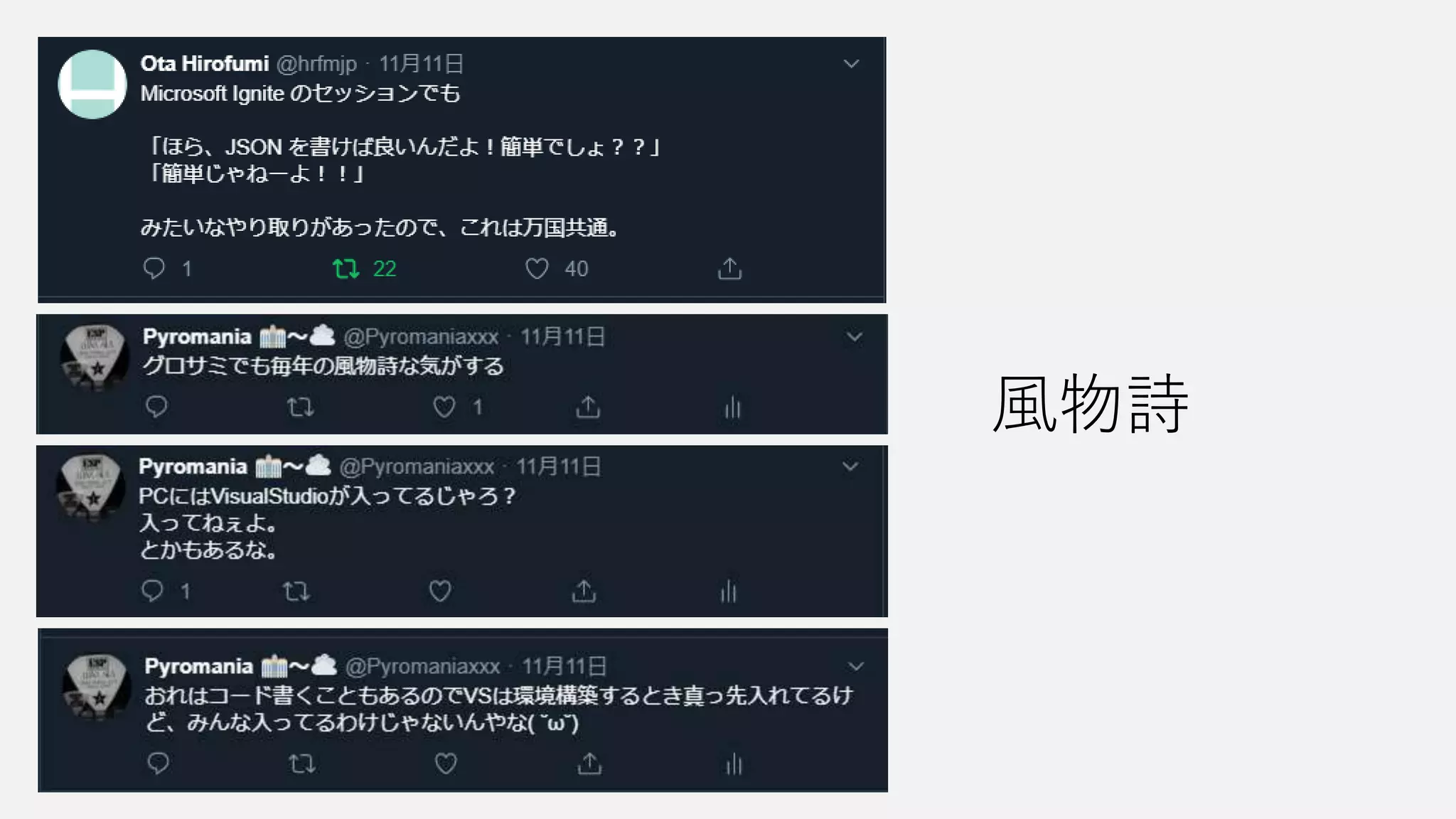
風物詩
4.
今回のお題目 •JSON しか喋らないぞ、覚悟しろ
5.
What is “JSON”
?
6.
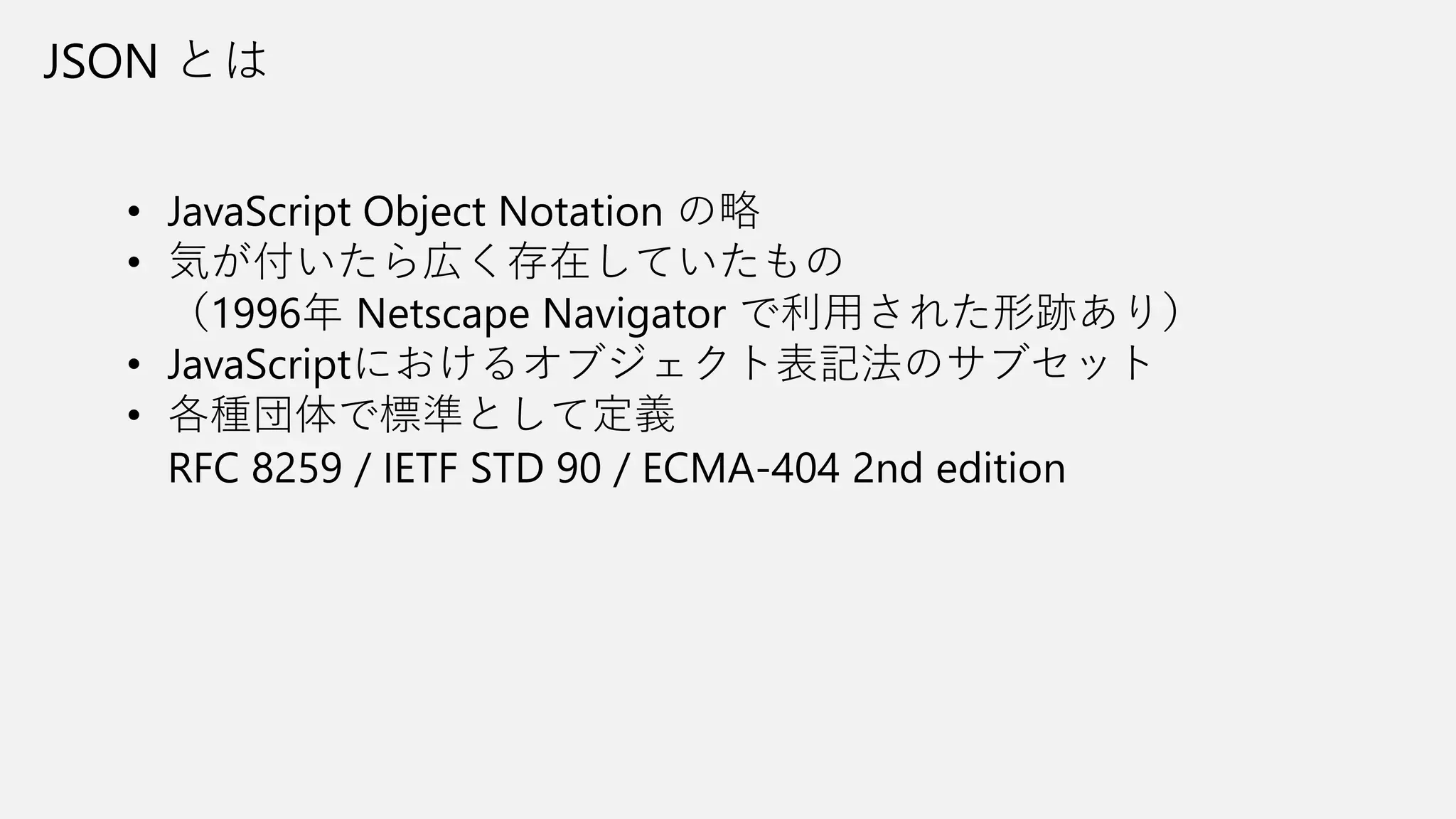
JSON とは • JavaScript
Object Notation の略 • 気が付いたら広く存在していたもの (1996年 Netscape Navigator で利用された形跡あり) • JavaScriptにおけるオブジェクト表記法のサブセット • 各種団体で標準として定義 RFC 8259 / IETF STD 90 / ECMA-404 2nd edition
7.
JSON での記述 • 数値 •
文字列 • 真偽値(true / false) • 配列 • オブジェクト • null 利用できる値の種類 [ “Power Automate”, “Power Apps”, ”Power BI”,”Power Virtual Agents” ] 配列の記述 [ ] でくくると配列となる オブジェクトの記述 { “servicename”: “Power Automate”, “expriredate”: null }, { “servicename”: “Microsoft Flow”, “expriredate”: “2019-11-01T00:00:00Z” } 文字列でキー名 : の後に値を記述 UTF-8 であることが必須 インデントは問わない
8.
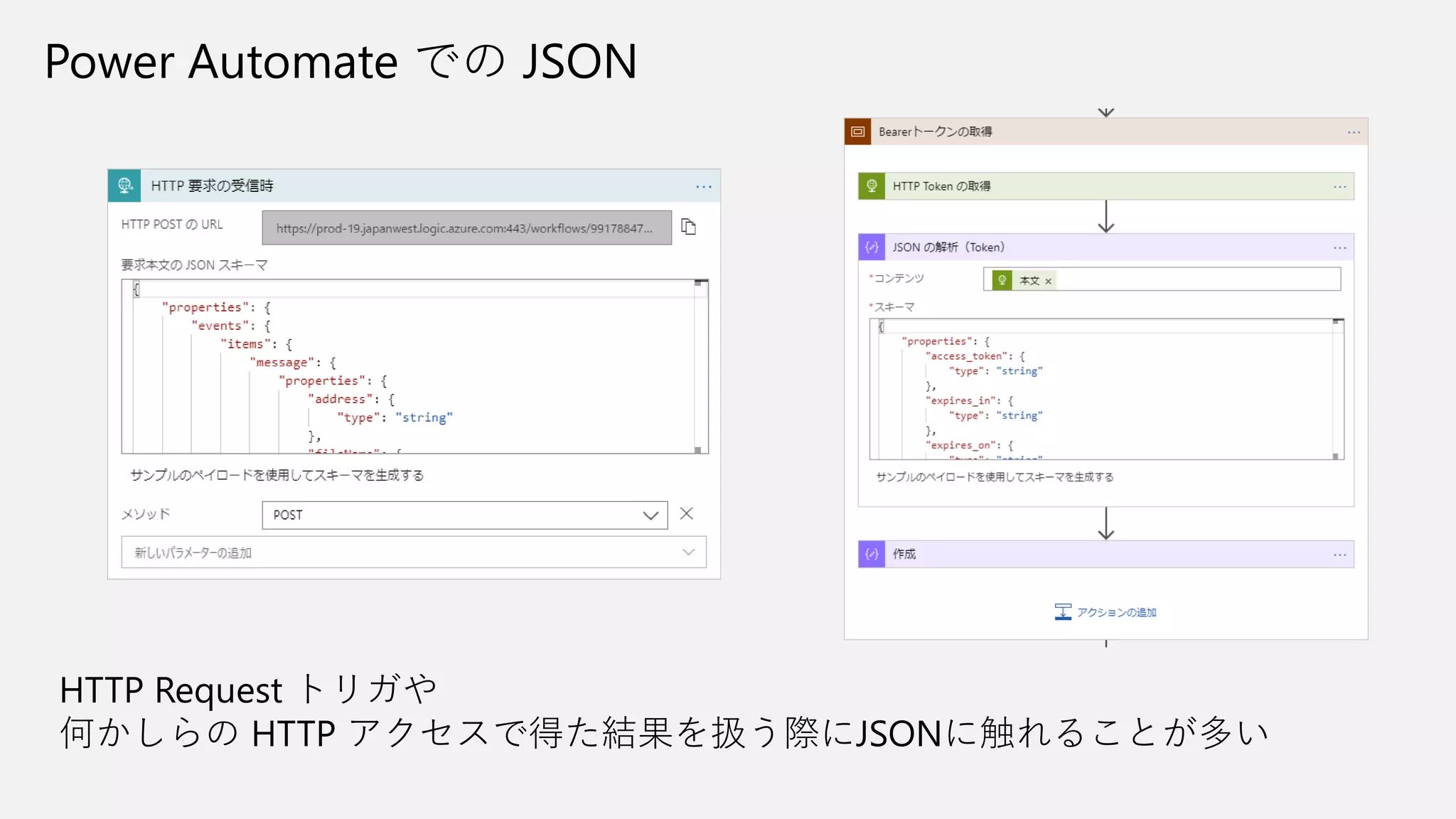
Power Automate での
JSON HTTP Request トリガや 何かしらの HTTP アクセスで得た結果を扱う際にJSONに触れることが多い
9.
How to befriend
“JSON”
10.
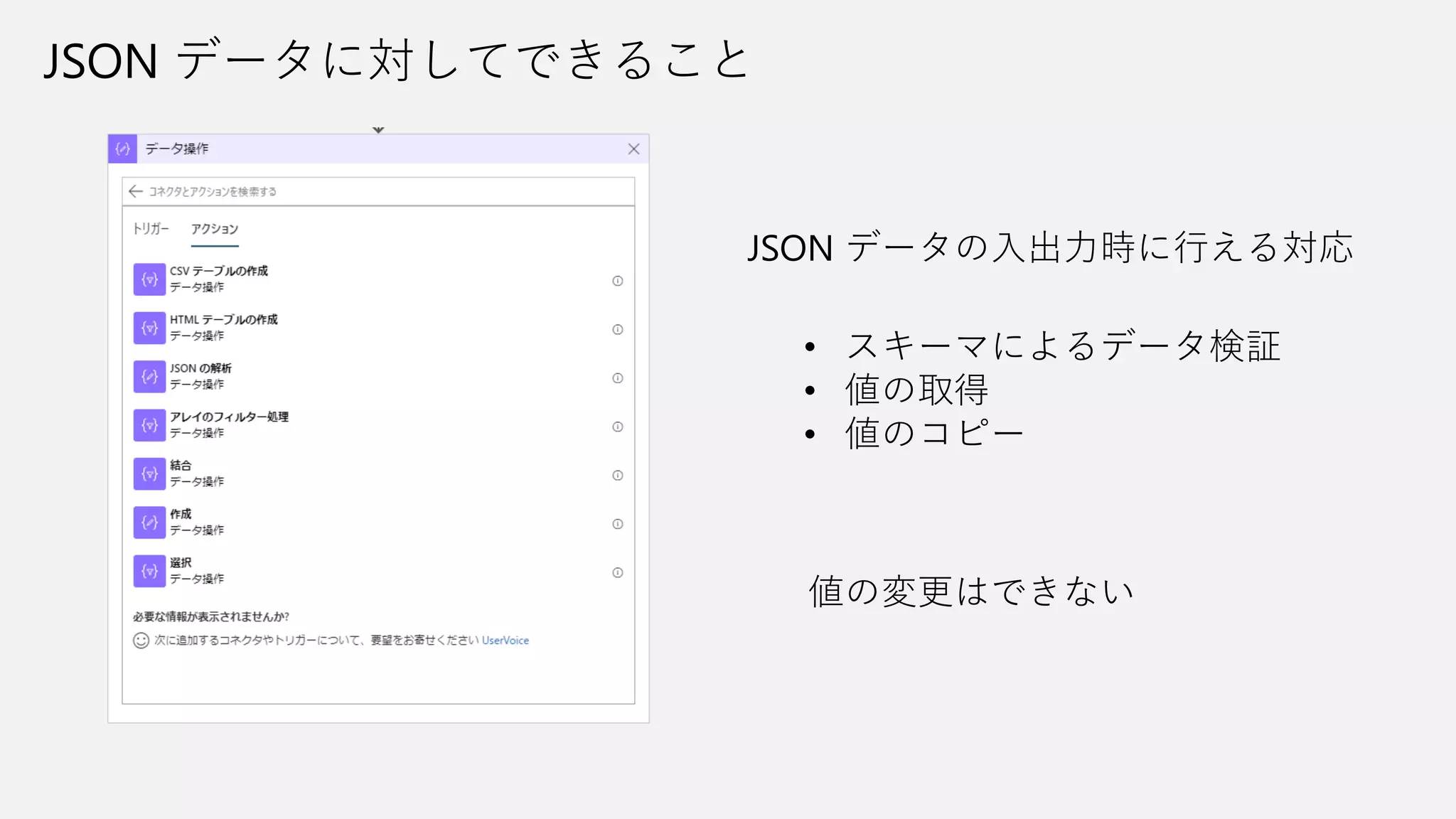
JSON データに対してできること JSON データの入出力時に行える対応 •
スキーマによるデータ検証 • 値の取得 • 値のコピー 値の変更はできない
11.
JSON スキーマの作成 「要求:HTTP Request」トリガ 「応答:HTTP
Response」アクション または 「JSONの解析」アクション 元とするデータがある場合は そのデータからスキーマを生成できる 以前と異なり Required 指定がつくことは減った
12.
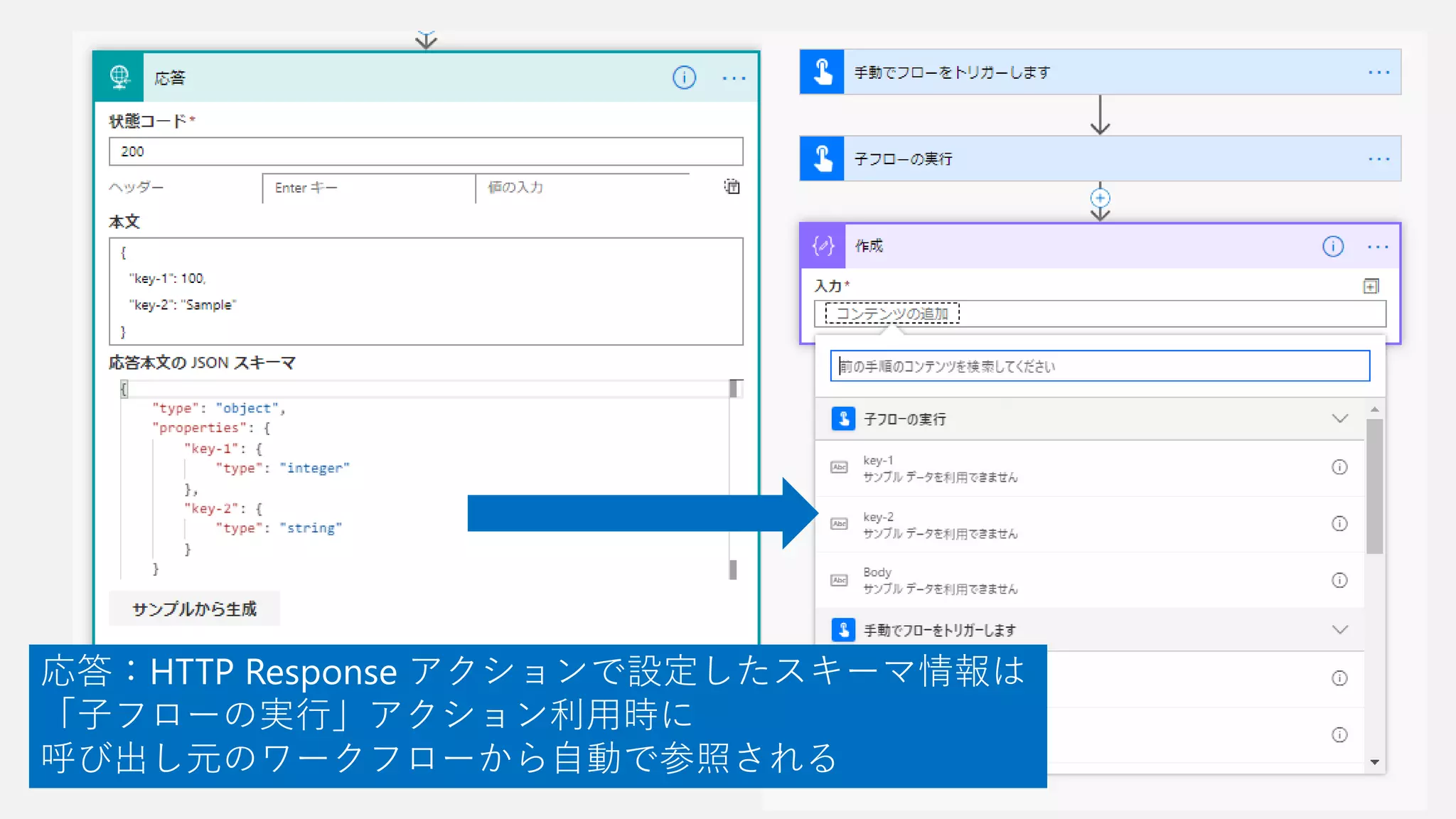
応答:HTTP Response アクションで設定したスキーマ情報は 「子フローの実行」アクション利用時に 呼び出し元のワークフローから自動で参照される
13.
{ “description”: “JSONスキーマを検証するサンプル2”, “type”: “object”, “properties”:
{ “other1”: { “type”: “string”, “enum”: [ “value1”, “value2”, “value3” ] }, “other2”: { “type”: “string” }, "other3": { "type": "string" } }, "required": [ "other1" ] } 「要求:HTTP Request」トリガでの スキーマ設定は呼び出し側の入力項目を ある程度制御できる
14.
「要求:HTTP Request」トリガ でのスキーマ検証オプションをオンにすると 設定したスキーマに一致しないデータを伴った 呼び出しをエラーとしてはじくことが可能
15.
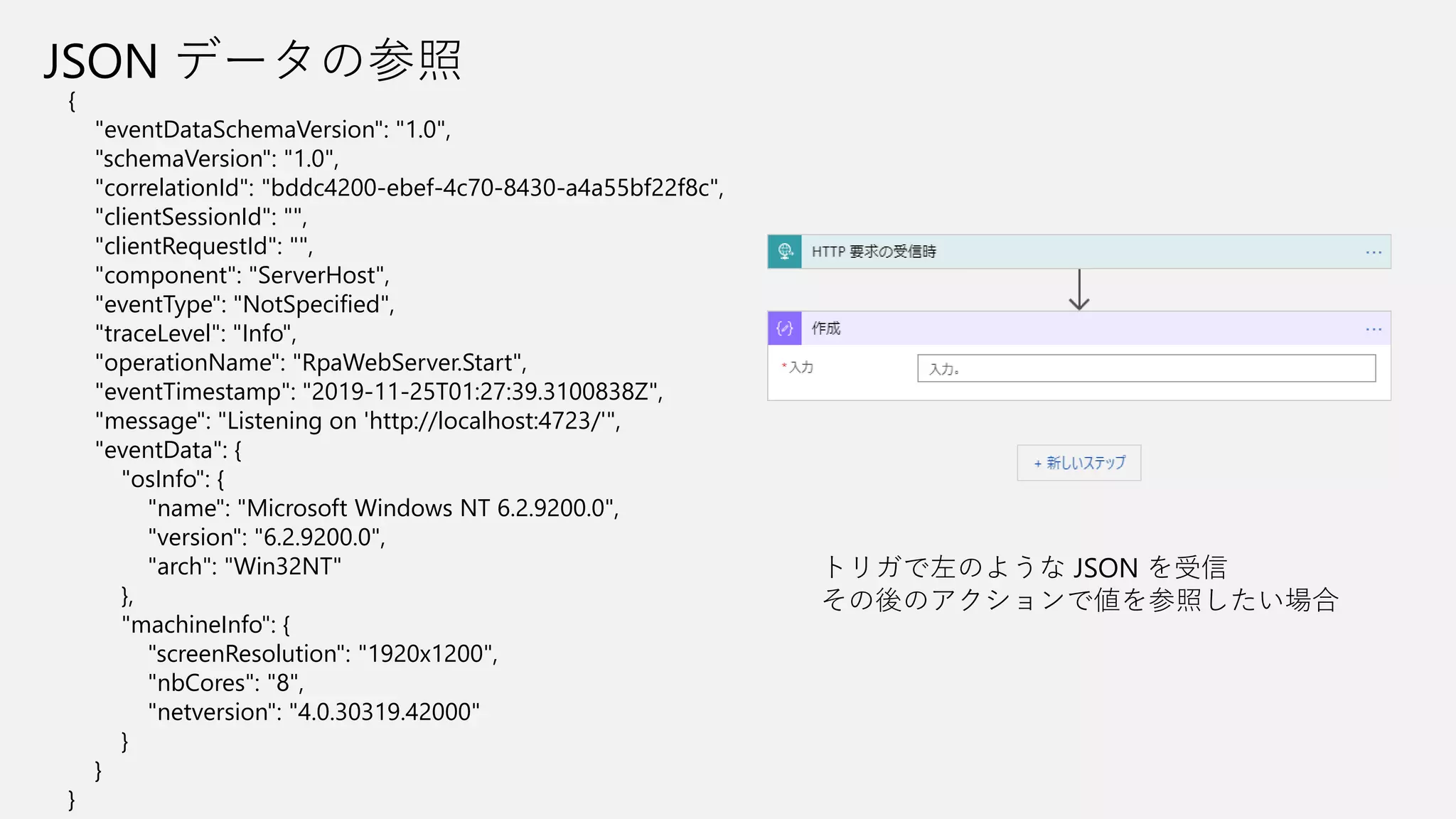
JSON データの参照 { "eventDataSchemaVersion": "1.0", "schemaVersion":
"1.0", "correlationId": "bddc4200-ebef-4c70-8430-a4a55bf22f8c", "clientSessionId": "", "clientRequestId": "", "component": "ServerHost", "eventType": "NotSpecified", "traceLevel": "Info", "operationName": "RpaWebServer.Start", "eventTimestamp": "2019-11-25T01:27:39.3100838Z", "message": "Listening on 'http://localhost:4723/'", "eventData": { "osInfo": { "name": "Microsoft Windows NT 6.2.9200.0", "version": "6.2.9200.0", "arch": "Win32NT" }, "machineInfo": { "screenResolution": "1920x1200", "nbCores": "8", "netversion": "4.0.30319.42000" } } } トリガで左のような JSON を受信 その後のアクションで値を参照したい場合
16.
{ "eventDataSchemaVersion": "1.0", "message": "Listening
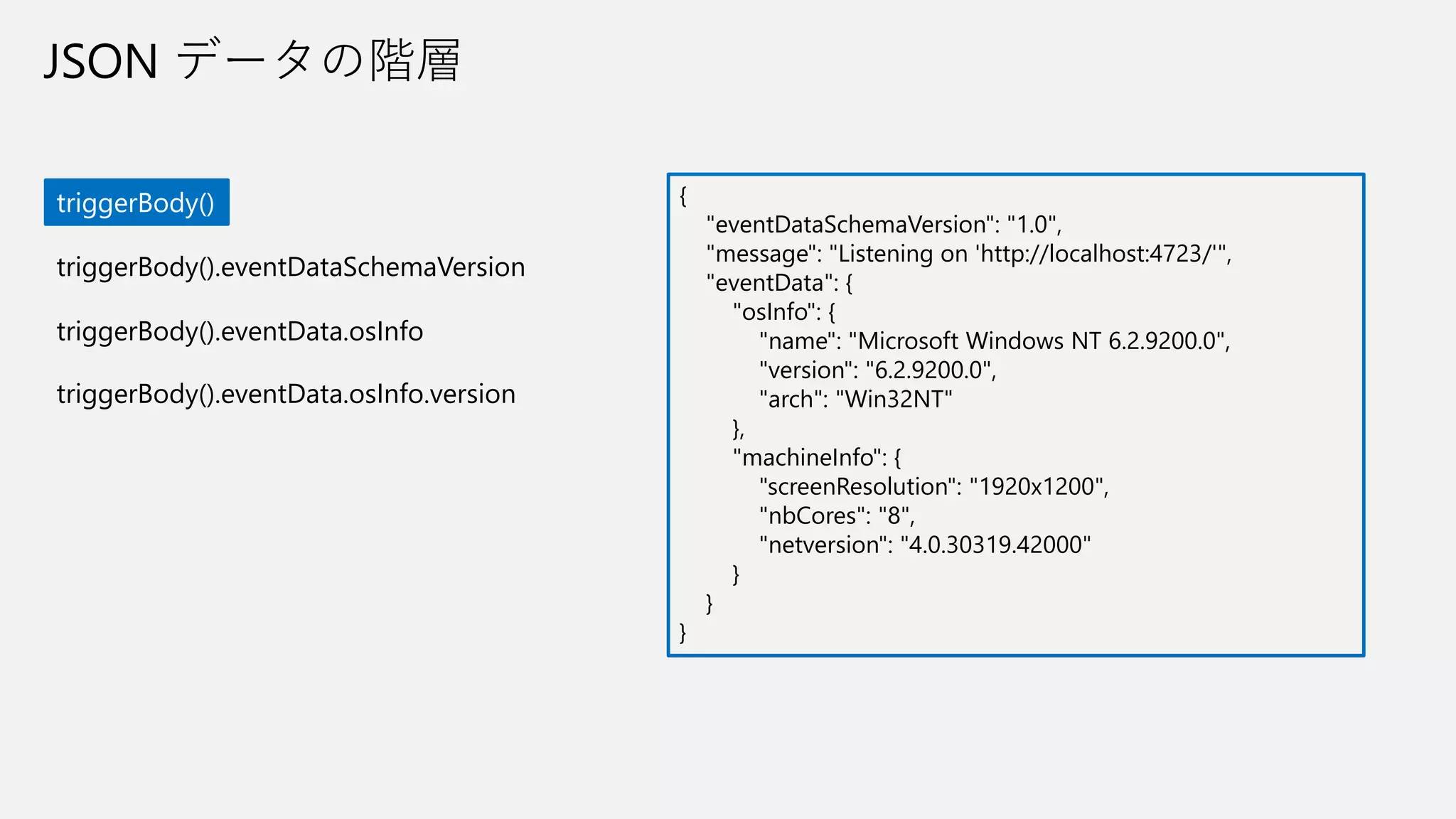
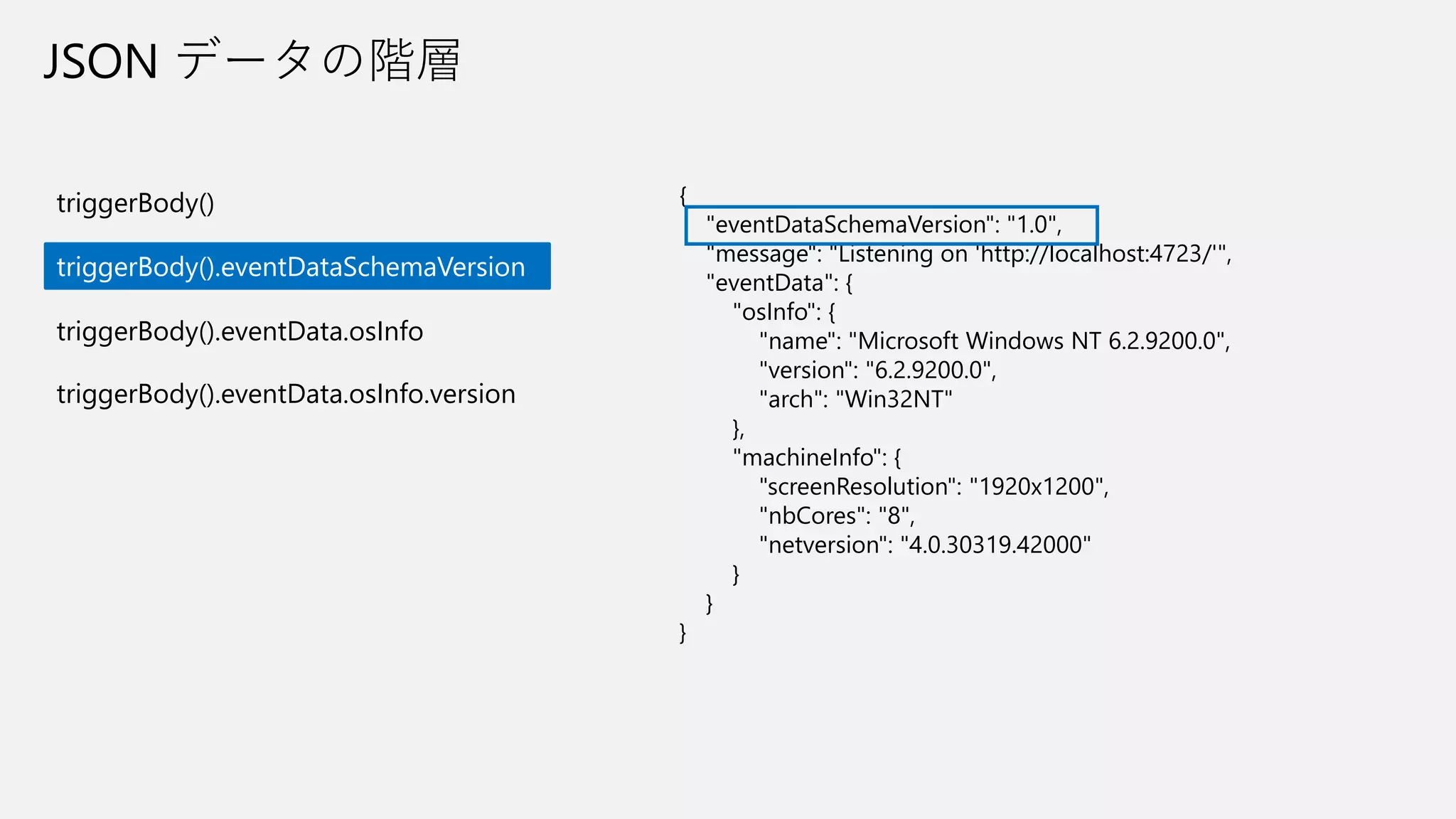
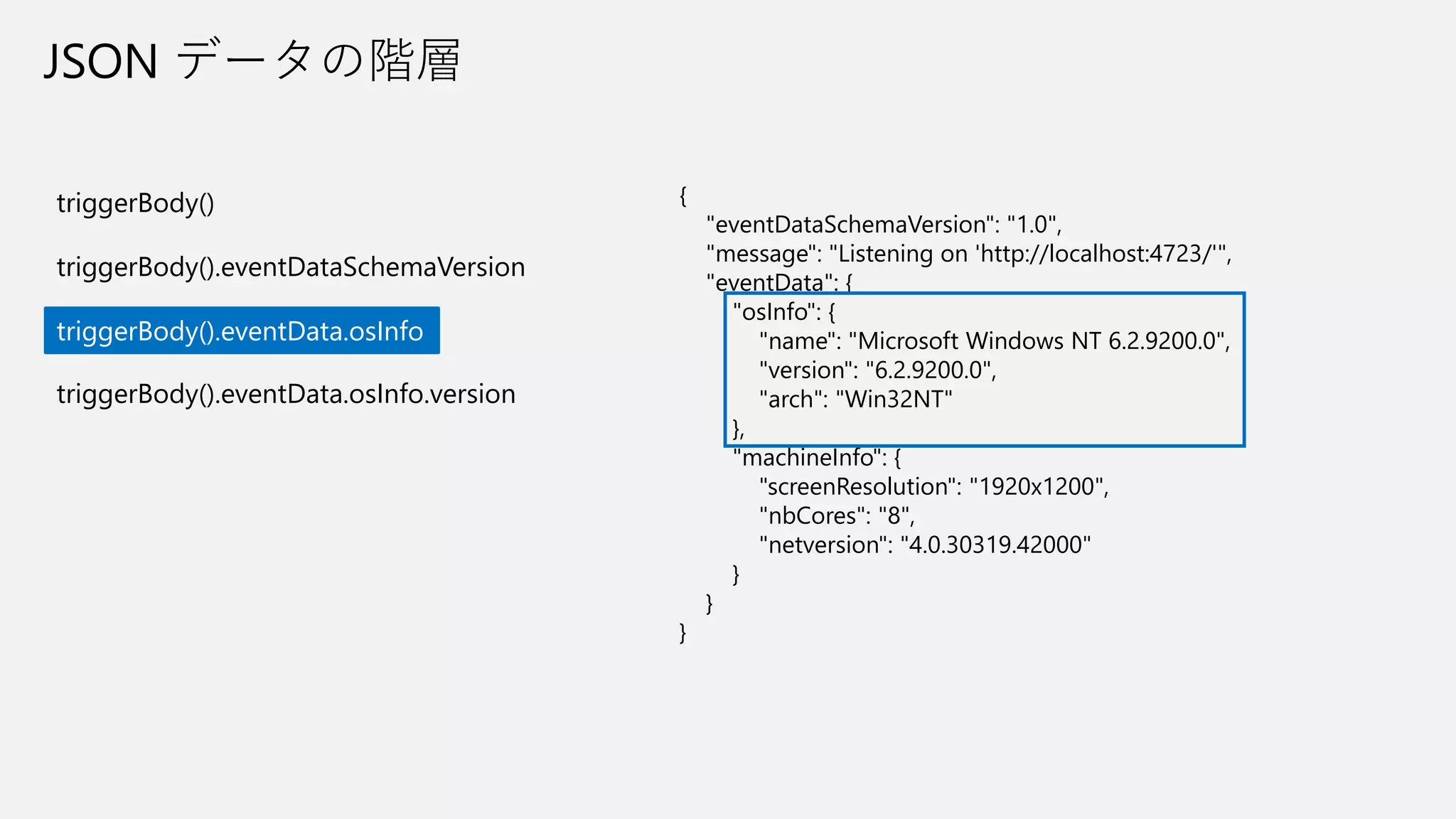
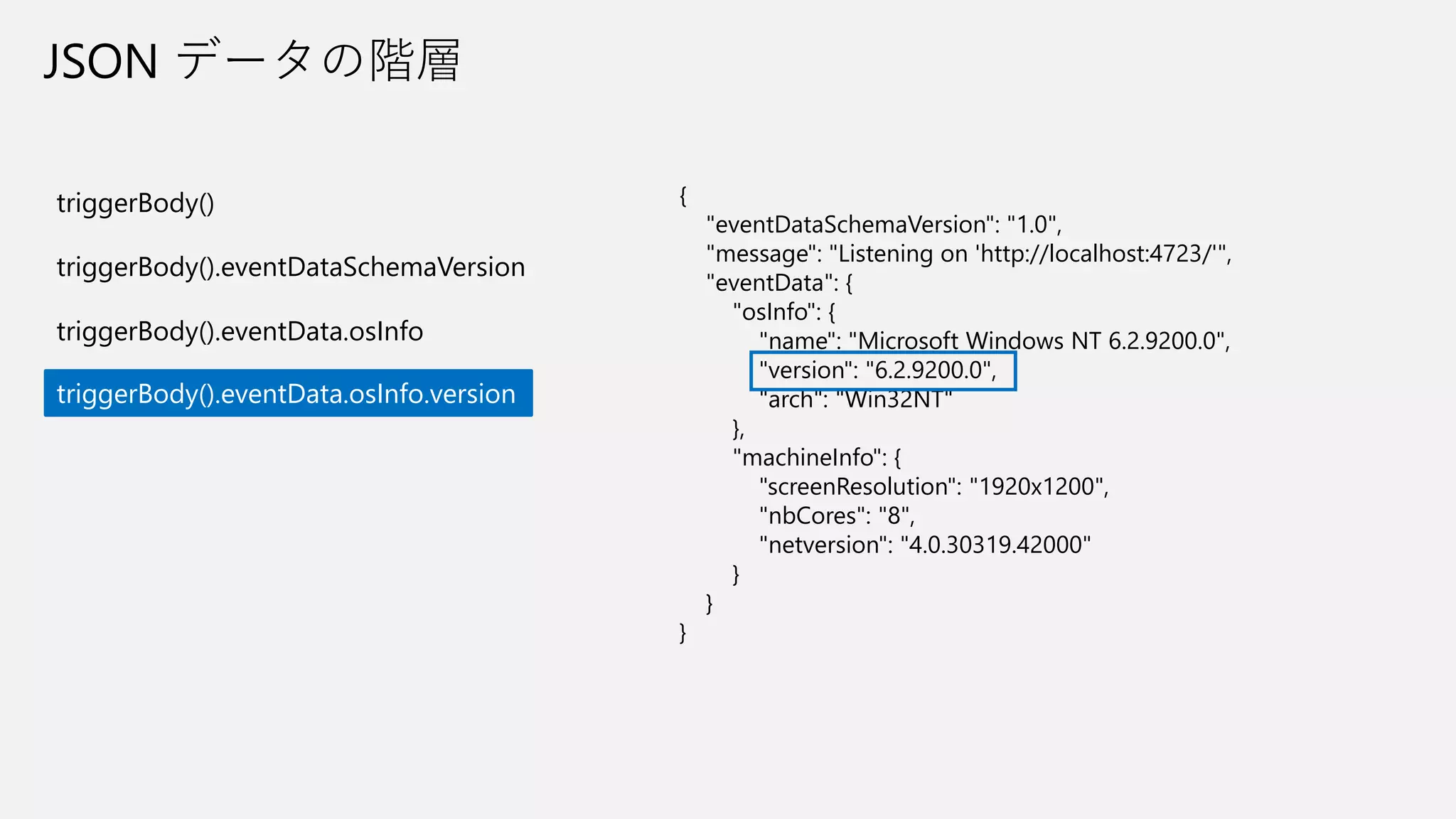
on 'http://localhost:4723/'", "eventData": { "osInfo": { "name": "Microsoft Windows NT 6.2.9200.0", "version": "6.2.9200.0", "arch": "Win32NT" }, "machineInfo": { "screenResolution": "1920x1200", "nbCores": "8", "netversion": "4.0.30319.42000" } } } JSON データの階層 triggerBody() triggerBody().eventDataSchemaVersion triggerBody().eventData.osInfo triggerBody().eventData.osInfo.version
17.
{ "eventDataSchemaVersion": "1.0", "message": "Listening
on 'http://localhost:4723/'", "eventData": { "osInfo": { "name": "Microsoft Windows NT 6.2.9200.0", "version": "6.2.9200.0", "arch": "Win32NT" }, "machineInfo": { "screenResolution": "1920x1200", "nbCores": "8", "netversion": "4.0.30319.42000" } } } JSON データの階層 triggerBody() triggerBody().eventDataSchemaVersion triggerBody().eventData.osInfo triggerBody().eventData.osInfo.version
18.
{ "eventDataSchemaVersion": "1.0", "message": "Listening
on 'http://localhost:4723/'", "eventData": { "osInfo": { "name": "Microsoft Windows NT 6.2.9200.0", "version": "6.2.9200.0", "arch": "Win32NT" }, "machineInfo": { "screenResolution": "1920x1200", "nbCores": "8", "netversion": "4.0.30319.42000" } } } JSON データの階層 triggerBody() triggerBody().eventDataSchemaVersion triggerBody().eventData.osInfo triggerBody().eventData.osInfo.version
19.
{ "eventDataSchemaVersion": "1.0", "message": "Listening
on 'http://localhost:4723/'", "eventData": { "osInfo": { "name": "Microsoft Windows NT 6.2.9200.0", "version": "6.2.9200.0", "arch": "Win32NT" }, "machineInfo": { "screenResolution": "1920x1200", "nbCores": "8", "netversion": "4.0.30319.42000" } } } JSON データの階層 triggerBody() triggerBody().eventDataSchemaVersion triggerBody().eventData.osInfo triggerBody().eventData.osInfo.version
20.
{ "name": "shared_bot", "id": "/providers/Microsoft.PowerApps/apis/shared_bot", "type":
"Microsoft.PowerApps/apis", "properties": { "displayName": "Bot", "iconUri": "https://connectorassets.blob.core.windows.net/assets/BotFramework.png", "iconBrandColor": "#007EE5", "apiEnvironment": "Shared", "isCustomApi": false, "runtimeUrls": [ "https://firstrelease-001.azure-apim.net/apim/bot" ], "primaryRuntimeUrl": "https://firstrelease-001.azure-apim.net/apim/bot", "capabilities": [ "actions" ], "description": "Bot service allows sending and receiving messages through the Microsoft Bot Framework.", "createdTime": "2017-01-12T00:45:42.3934203Z", "changedTime": "2017-11-01T22:26:13.5446789Z", "tier": "Standard", "publisher": "Microsoft" } } triggerBody().properties.capabilities[0] triggerBody()[‘properties’][‘capabilities’][0] JSON データの配列
21.
JSON データの参照 { "eventDataSchemaVersion": "1.0", "schemaVersion":
"1.0", "correlationId": "bddc4200-ebef-4c70-8430-a4a55bf22f8c", "clientSessionId": "", "clientRequestId": "", "component": "ServerHost", "eventType": "NotSpecified", "traceLevel": "Info", "operationName": "RpaWebServer.Start", "eventTimestamp": "2019-11-25T01:27:39.3100838Z", "message": "Listening on 'http://localhost:4723/'", "eventData": { "osInfo": { "name": "Microsoft Windows NT 6.2.9200.0", "version": "6.2.9200.0", "arch": "Win32NT" }, "machineInfo": { "screenResolution": "1920x1200", "nbCores": "8", "netversion": "4.0.30319.42000" } } } eventDataSchemaVersion の参照 triggerBody()[‘eventDataSchemaVersion’] triggerBody().eventDataSchemaVersion キー名を文字列として指定 または . や ? の後に要素名として指定
22.
JSON データの参照 triggerBody()[‘eventDataSchemaVersion’] triggerBody().eventDataSchemaVersion 書き方はどちらでも問題ない triggerBody()?[‘eventDataSchemaVersion’] triggerBody()?eventDataSchemaVersion ? 演算子を使う方が(ワークフローにとって)安全
23.
?演算子 { "eventDataSchemaVersion": "1.0", "schemaVersion": "1.0", "correlationId":
"bddc4200-ebef-4c70-8430-a4a55bf22f8c", "clientSessionId": "", "clientRequestId": "", "component": "ServerHost", "eventType": "NotSpecified", "traceLevel": "Info", "operationName": "RpaWebServer.Start", "eventTimestamp": "2019-11-25T01:27:39.3100838Z", "message": "Listening on 'http://localhost:4723/'", "eventData": { "osInfo": { "name": "Microsoft Windows NT 6.2.9200.0", "version": "6.2.9200.0", "arch": "Win32NT" }, "machineInfo": { "screenResolution": "1920x1200", "nbCores": "8", "netversion": "4.0.30319.42000" } } } タイプミスなどで 存在しない値を指定した場合 triggerBody()[‘machineInfo’] triggerBody(). machineInfo ワークフローの実行時エラーとなり 後続のアクションへ遷移する triggerBody()?[‘machineInfo’] triggerBody()?machineInfo 実行時エラーとはならずに 空文字列(Empty)となる triggerBody().eventData. machineInfo が正しいパス
24.
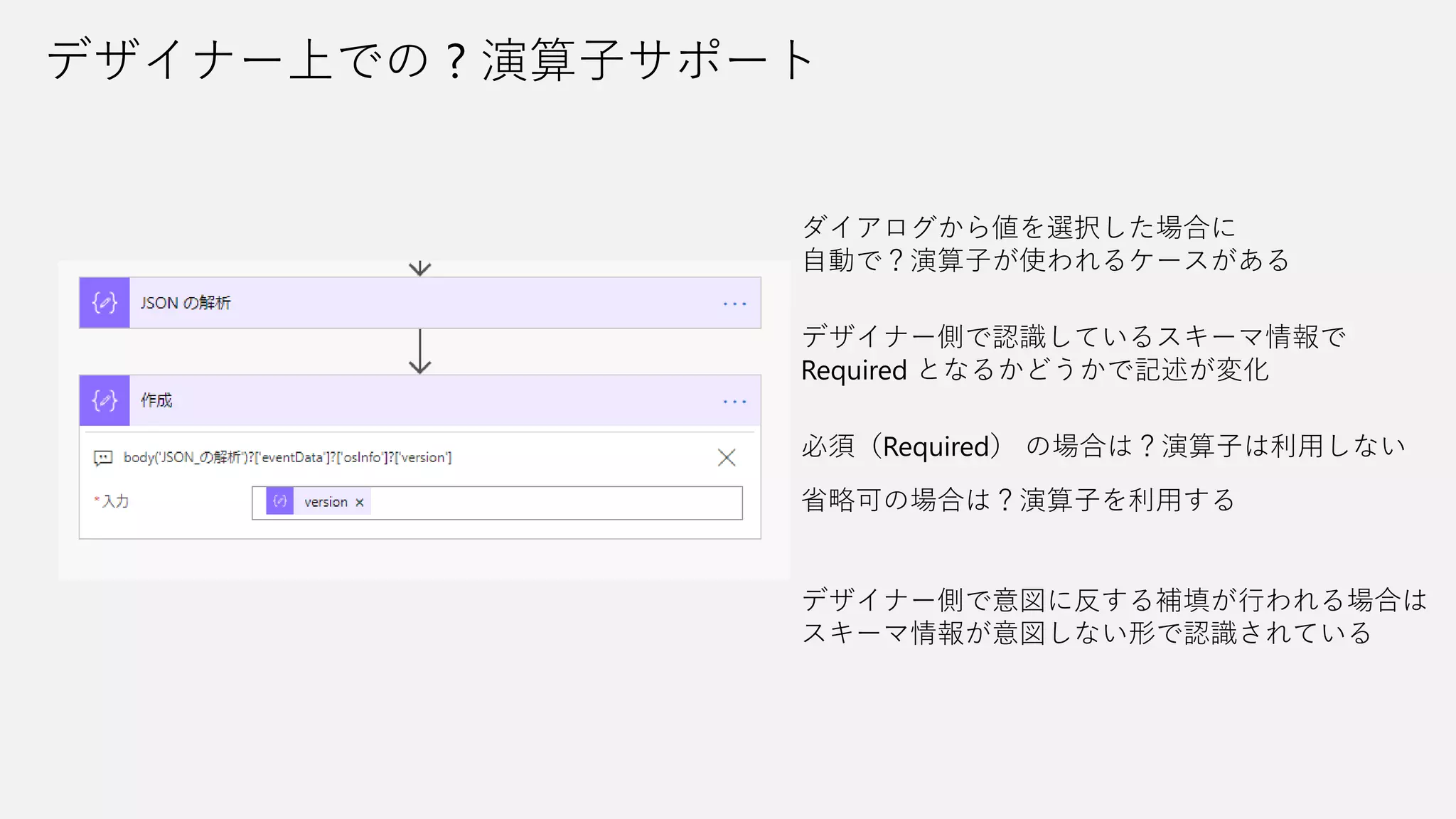
デザイナー上での ? 演算子サポート ダイアログから値を選択した場合に 自動で?演算子が使われるケースがある デザイナー側で認識しているスキーマ情報で Required
となるかどうかで記述が変化 必須(Required) の場合は?演算子は利用しない 省略可の場合は?演算子を利用する デザイナー側で意図に反する補填が行われる場合は スキーマ情報が意図しない形で認識されている
25.
対象のキー名記載 []でキー名を文字列で指定する時に 〇〇〇/×××/△△△~ とパスのように記述が可能 通常の記載とはデザイナー上での表記が 異なりパスが見える形になる Experimental Features 現時点では英語表示に設定した場合に限り 表示が切り替わる 指定することは日本語環境でも利用可能
26.
Value, Type and
Actions
27.
{ "key-1": "2019-12-07T00:00:00.000Z", "key-2": { "key-2-1":
10, "key-2-2": "10“ }, "key-3": [ "1", 1, "2", 2 ] } JSON スキーマ情報ありとなしで挙動が変わるか(日付) スキーマの有り無しは挙動に影響なく 取得した値をもとに純粋に処理が行われる
28.
JSON スキーマ情報ありとなしで挙動が変わるか(数値) スキーマの有り無しは挙動に影響なく 取得した値をもとに純粋に処理が行われる { "key-1": "2019-12-07T00:00:00.000Z", "key-2":
{ "key-2-1": 10, "key-2-2": "10“ }, "key-3": [ "1", 1, "2", 2 ] }
29.
{ "key-1": "2019-12-07T00:00:00.000Z", "key-2": { "key-2-1":
10, "key-2-2": "10“ }, "key-3": [ "1", 1, "2", 2 ] } 配列は値で挙動が変わるか(数値)
30.
{ "key-1": "2019-12-07T00:00:00.000Z", "key-2": { "key-2-1":
10, "key-2-2": "10“ }, "key-3": [ "1", 1, "2", 2 ] } 配列は値で挙動が変わるか(文字/数値) 配列の場合も基本ルールは同じ 取得した値をもとに処理が行われる
31.
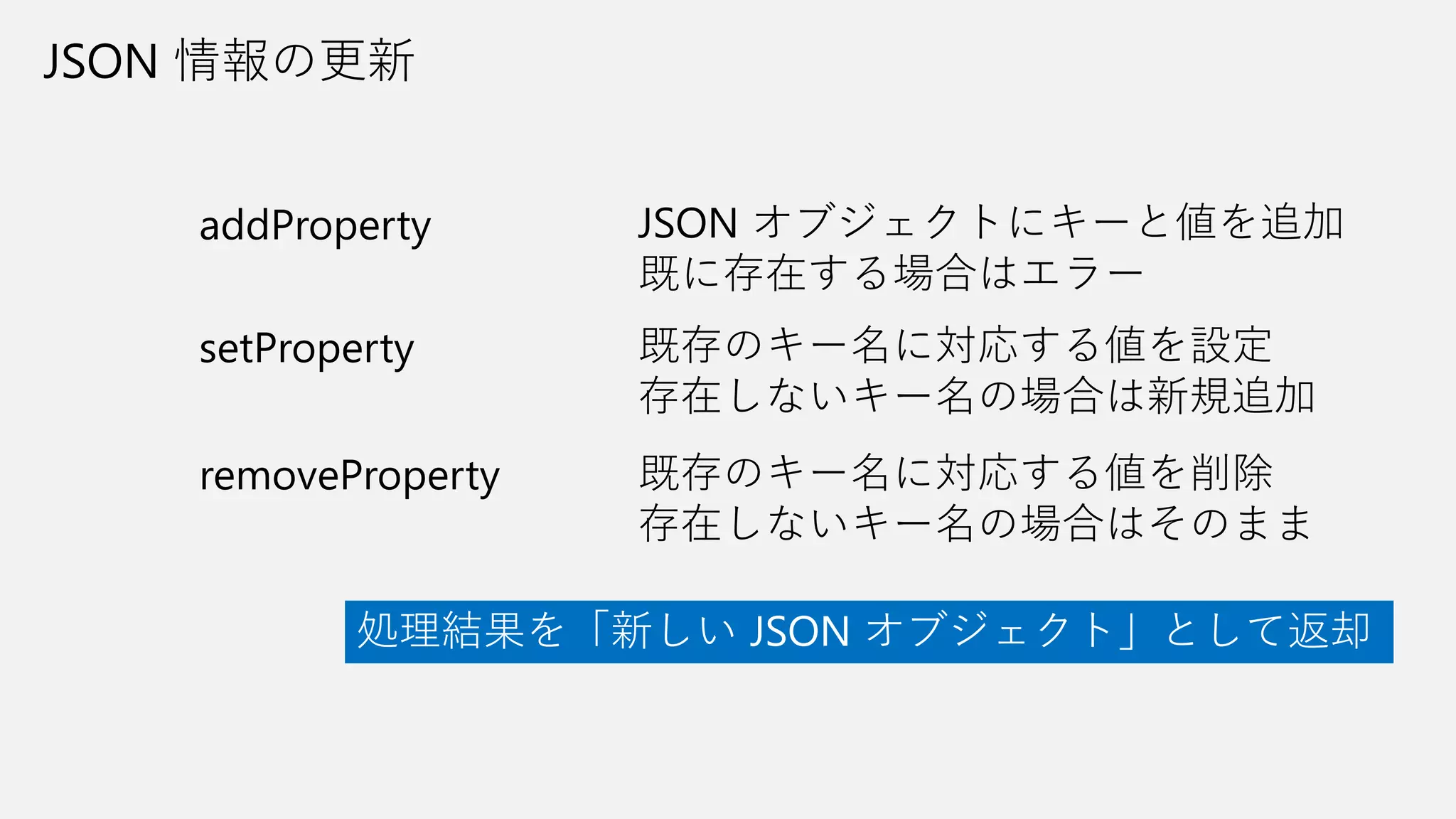
JSON 情報の更新 addProperty setProperty removeProperty JSON オブジェクトにキーと値を追加 既に存在する場合はエラー 既存のキー名に対応する値を設定 存在しないキー名の場合は新規追加 既存のキー名に対応する値を削除 存在しないキー名の場合はそのまま 処理結果を「新しい
JSON オブジェクト」として返却
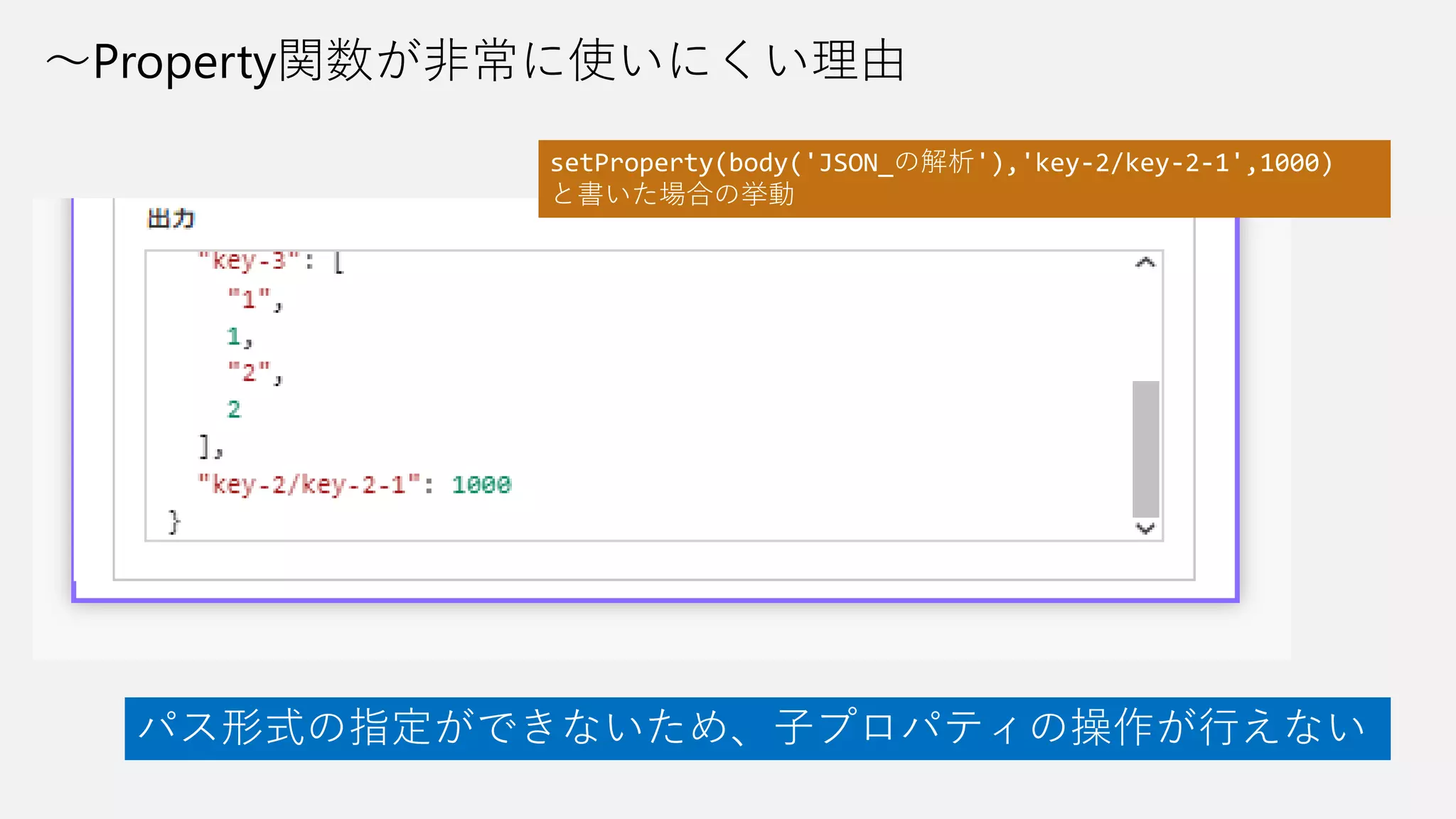
32.
~Property関数が非常に使いにくい理由 パス形式の指定ができないため、子プロパティの操作が行えない setProperty(body('JSON_の解析'),'key-2/key-2-1',1000) と書いた場合の挙動
33.
~Property関数による子プロパティの操作 { "key-1": "2019-12-07T00:00:00.000Z", "key-2": { "key-2-1":
10, "key-2-2": "10“ }, "key-3": [ "1", 1, "2", 2 ] } setProperty(body('JSON_の解析'), 'key-2', setProperty(body('JSON_の解析')?['key-2'], 'key-2-2', '1000' ) ) 子プロパティを書き換える場合は 親プロパティから階層的に記述が必要
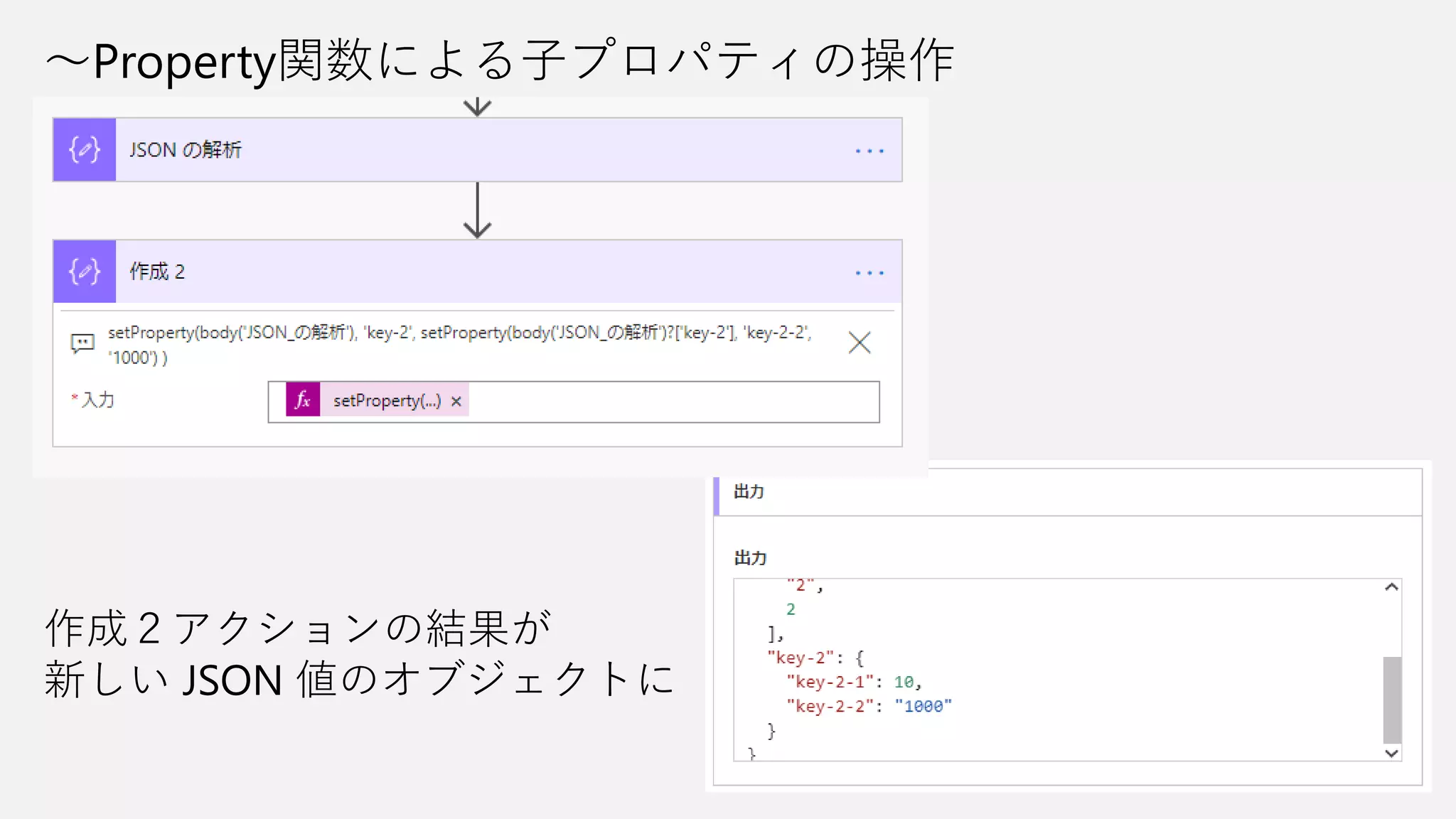
34.
~Property関数による子プロパティの操作 作成2アクションの結果が 新しい JSON 値のオブジェクトに
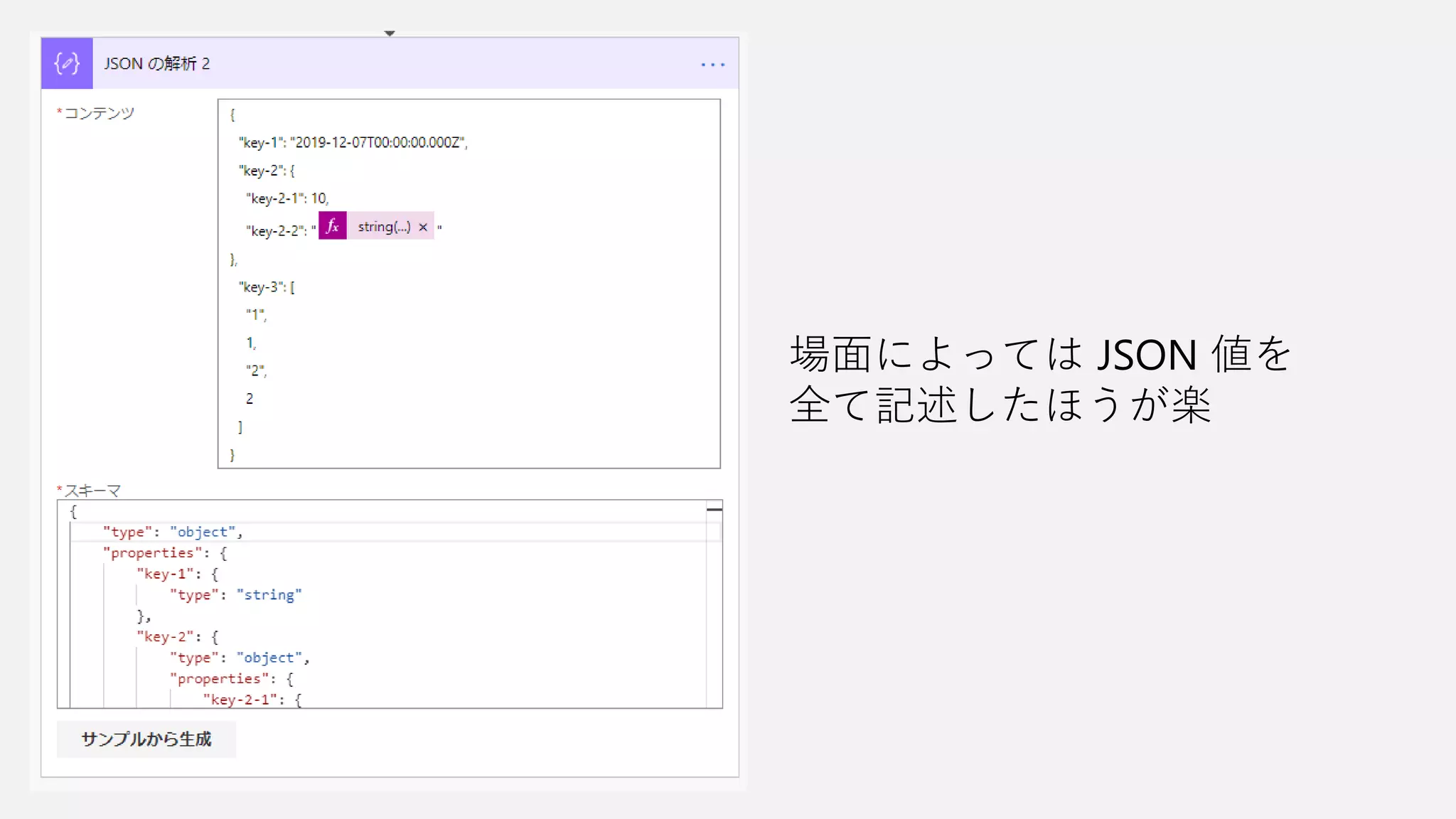
35.
場面によっては JSON 値を 全て記述したほうが楽
36.
JSONデータを自分で作成する データ操作コネクタの 「JSONの解析」 「作成」アクションなどで JSONデータを作成できる 「作成」アクション時は Json 関数を利用する必要がある
37.
JSONデータのスキーマを自分で作成する • きれいな形であることを重要視しない • できるだけ階層構造を利用しない •
データが必要な量、連携できればよい { "key-1": "2019-12-07T00:00:00.000Z", "key-2": { "key-2-1": 10, "key-2-2": "10“ }, "key-3": [ "1", 1, "2", 2 ] } { "key-1": "2019-12-07T00:00:00.000Z", "key-2-1": 10, "key-2-2": "10“, "key-3": [ "1", 1, "2", 2 ] } 見て理解しやすい形は人によって異なるので 最初は気にしないのがベター
38.
まとめ • JSON の基本を理解すると書き方や読み方も思いつく •
~Property 系の関数は残念 • きれいな形にとらわれない
39.
https://aka.ms/logicflowjp-fb Power Automate/Logic Apps
コミュニティ
Download


![JSON での記述
• 数値
• 文字列
• 真偽値(true / false)
• 配列
• オブジェクト
• null
利用できる値の種類 [ “Power Automate”, “Power Apps”,
”Power BI”,”Power Virtual Agents” ]
配列の記述
[ ] でくくると配列となる
オブジェクトの記述
{
“servicename”: “Power Automate”,
“expriredate”: null
},
{
“servicename”: “Microsoft Flow”,
“expriredate”: “2019-11-01T00:00:00Z”
}
文字列でキー名
: の後に値を記述
UTF-8 であることが必須
インデントは問わない](https://image.slidesharecdn.com/20191207vsjson-191207070600/75/JSON-Value-into-Power-Automate-7-2048.jpg)

![{
“description”: “JSONスキーマを検証するサンプル2”,
“type”: “object”,
“properties”: {
“other1”: {
“type”: “string”,
“enum”: [
“value1”,
“value2”,
“value3”
]
},
“other2”: {
“type”: “string”
},
"other3": {
"type": "string"
}
},
"required": [
"other1"
]
}
「要求:HTTP Request」トリガでの
スキーマ設定は呼び出し側の入力項目を
ある程度制御できる](https://image.slidesharecdn.com/20191207vsjson-191207070600/75/JSON-Value-into-Power-Automate-13-2048.jpg)

![{
"name": "shared_bot",
"id": "/providers/Microsoft.PowerApps/apis/shared_bot",
"type": "Microsoft.PowerApps/apis",
"properties": {
"displayName": "Bot",
"iconUri": "https://connectorassets.blob.core.windows.net/assets/BotFramework.png",
"iconBrandColor": "#007EE5",
"apiEnvironment": "Shared",
"isCustomApi": false,
"runtimeUrls": [
"https://firstrelease-001.azure-apim.net/apim/bot"
],
"primaryRuntimeUrl": "https://firstrelease-001.azure-apim.net/apim/bot",
"capabilities": [
"actions"
],
"description": "Bot service allows sending and receiving messages through the Microsoft Bot Framework.",
"createdTime": "2017-01-12T00:45:42.3934203Z",
"changedTime": "2017-11-01T22:26:13.5446789Z",
"tier": "Standard",
"publisher": "Microsoft"
}
}
triggerBody().properties.capabilities[0]
triggerBody()[‘properties’][‘capabilities’][0]
JSON データの配列](https://image.slidesharecdn.com/20191207vsjson-191207070600/75/JSON-Value-into-Power-Automate-20-2048.jpg)
![JSON データの参照
{
"eventDataSchemaVersion": "1.0",
"schemaVersion": "1.0",
"correlationId": "bddc4200-ebef-4c70-8430-a4a55bf22f8c",
"clientSessionId": "",
"clientRequestId": "",
"component": "ServerHost",
"eventType": "NotSpecified",
"traceLevel": "Info",
"operationName": "RpaWebServer.Start",
"eventTimestamp": "2019-11-25T01:27:39.3100838Z",
"message": "Listening on 'http://localhost:4723/'",
"eventData": {
"osInfo": {
"name": "Microsoft Windows NT 6.2.9200.0",
"version": "6.2.9200.0",
"arch": "Win32NT"
},
"machineInfo": {
"screenResolution": "1920x1200",
"nbCores": "8",
"netversion": "4.0.30319.42000"
}
}
}
eventDataSchemaVersion の参照
triggerBody()[‘eventDataSchemaVersion’]
triggerBody().eventDataSchemaVersion
キー名を文字列として指定
または . や ? の後に要素名として指定](https://image.slidesharecdn.com/20191207vsjson-191207070600/75/JSON-Value-into-Power-Automate-21-2048.jpg)
![JSON データの参照
triggerBody()[‘eventDataSchemaVersion’]
triggerBody().eventDataSchemaVersion
書き方はどちらでも問題ない
triggerBody()?[‘eventDataSchemaVersion’]
triggerBody()?eventDataSchemaVersion
? 演算子を使う方が(ワークフローにとって)安全](https://image.slidesharecdn.com/20191207vsjson-191207070600/75/JSON-Value-into-Power-Automate-22-2048.jpg)
![?演算子
{
"eventDataSchemaVersion": "1.0",
"schemaVersion": "1.0",
"correlationId": "bddc4200-ebef-4c70-8430-a4a55bf22f8c",
"clientSessionId": "",
"clientRequestId": "",
"component": "ServerHost",
"eventType": "NotSpecified",
"traceLevel": "Info",
"operationName": "RpaWebServer.Start",
"eventTimestamp": "2019-11-25T01:27:39.3100838Z",
"message": "Listening on 'http://localhost:4723/'",
"eventData": {
"osInfo": {
"name": "Microsoft Windows NT 6.2.9200.0",
"version": "6.2.9200.0",
"arch": "Win32NT"
},
"machineInfo": {
"screenResolution": "1920x1200",
"nbCores": "8",
"netversion": "4.0.30319.42000"
}
}
}
タイプミスなどで
存在しない値を指定した場合
triggerBody()[‘machineInfo’]
triggerBody(). machineInfo
ワークフローの実行時エラーとなり
後続のアクションへ遷移する
triggerBody()?[‘machineInfo’]
triggerBody()?machineInfo
実行時エラーとはならずに
空文字列(Empty)となる
triggerBody().eventData. machineInfo
が正しいパス](https://image.slidesharecdn.com/20191207vsjson-191207070600/75/JSON-Value-into-Power-Automate-23-2048.jpg)
![対象のキー名記載
[]でキー名を文字列で指定する時に
〇〇〇/×××/△△△~
とパスのように記述が可能
通常の記載とはデザイナー上での表記が
異なりパスが見える形になる
Experimental Features
現時点では英語表示に設定した場合に限り
表示が切り替わる
指定することは日本語環境でも利用可能](https://image.slidesharecdn.com/20191207vsjson-191207070600/75/JSON-Value-into-Power-Automate-25-2048.jpg)
![{
"key-1": "2019-12-07T00:00:00.000Z",
"key-2": {
"key-2-1": 10,
"key-2-2": "10“
},
"key-3": [
"1", 1, "2", 2
]
}
JSON スキーマ情報ありとなしで挙動が変わるか(日付)
スキーマの有り無しは挙動に影響なく
取得した値をもとに純粋に処理が行われる](https://image.slidesharecdn.com/20191207vsjson-191207070600/75/JSON-Value-into-Power-Automate-27-2048.jpg)
![JSON スキーマ情報ありとなしで挙動が変わるか(数値)
スキーマの有り無しは挙動に影響なく
取得した値をもとに純粋に処理が行われる
{
"key-1": "2019-12-07T00:00:00.000Z",
"key-2": {
"key-2-1": 10,
"key-2-2": "10“
},
"key-3": [
"1", 1, "2", 2
]
}](https://image.slidesharecdn.com/20191207vsjson-191207070600/75/JSON-Value-into-Power-Automate-28-2048.jpg)
![{
"key-1": "2019-12-07T00:00:00.000Z",
"key-2": {
"key-2-1": 10,
"key-2-2": "10“
},
"key-3": [
"1", 1, "2", 2
]
}
配列は値で挙動が変わるか(数値)](https://image.slidesharecdn.com/20191207vsjson-191207070600/75/JSON-Value-into-Power-Automate-29-2048.jpg)
![{
"key-1": "2019-12-07T00:00:00.000Z",
"key-2": {
"key-2-1": 10,
"key-2-2": "10“
},
"key-3": [
"1", 1, "2", 2
]
}
配列は値で挙動が変わるか(文字/数値)
配列の場合も基本ルールは同じ
取得した値をもとに処理が行われる](https://image.slidesharecdn.com/20191207vsjson-191207070600/75/JSON-Value-into-Power-Automate-30-2048.jpg)
![~Property関数による子プロパティの操作
{
"key-1": "2019-12-07T00:00:00.000Z",
"key-2": {
"key-2-1": 10,
"key-2-2": "10“
},
"key-3": [
"1", 1, "2", 2
]
}
setProperty(body('JSON_の解析'),
'key-2',
setProperty(body('JSON_の解析')?['key-2'],
'key-2-2',
'1000'
)
)
子プロパティを書き換える場合は
親プロパティから階層的に記述が必要](https://image.slidesharecdn.com/20191207vsjson-191207070600/75/JSON-Value-into-Power-Automate-33-2048.jpg)

![JSONデータのスキーマを自分で作成する
• きれいな形であることを重要視しない
• できるだけ階層構造を利用しない
• データが必要な量、連携できればよい
{
"key-1": "2019-12-07T00:00:00.000Z",
"key-2": {
"key-2-1": 10,
"key-2-2": "10“
},
"key-3": [
"1", 1, "2", 2
]
}
{
"key-1": "2019-12-07T00:00:00.000Z",
"key-2-1": 10,
"key-2-2": "10“,
"key-3": [
"1", 1, "2", 2
]
}
見て理解しやすい形は人によって異なるので
最初は気にしないのがベター](https://image.slidesharecdn.com/20191207vsjson-191207070600/75/JSON-Value-into-Power-Automate-37-2048.jpg)