PSAT 8/9 Results Training
February 2018
Agenda
● Learn Where to See Results
● Learn to Link Student College Board and Khan Accounts
● Learn How to Use Khan in Classes
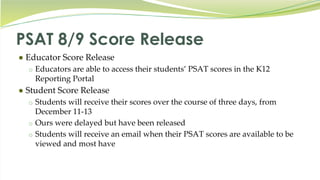
PSAT 8/9 Score Release
● Educator Score Release
o Educators are able to access their students’ PSAT scores in the K12
Reporting Portal
● Student Score Release
o Students will receive their scores over the course of three days, from
December 11-13
o Ours were delayed but have been released
o Students will receive an email when their PSAT scores are available to be
viewed and most have
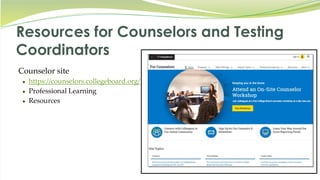
Resources for Counselors and Testing
Coordinators
Counselor site
● https://counselors.collegeboard.org/
● Professional Learning
● Resources
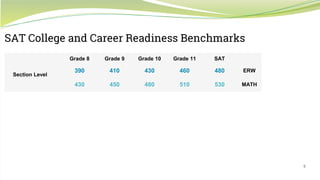
SAT College and Career Readiness Benchmarks
Grade 8 Grade 9 Grade 10 Grade 11 SAT
Section Level
390 410 430 460 480 ERW
430 450 480 510 530 MATH
5
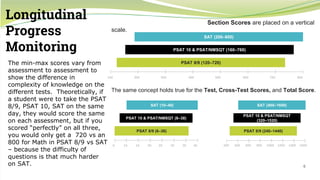
Longitudinal
Progress
Monitoring
Section Scores are placed on a vertical
scale.
The same concept holds true for the Test, Cross-Test Scores, and Total Score.
100 200 300 400 500 600 700 800
SAT (200–800)
PSAT 10 & PSAT/NMSQT (160–760)
PSAT 8/9 (120–720)
6 10 15 20 25 30 35 40
SAT (10–40)
PSAT 10 & PSAT/NMSQT (8–38)
SAT (400–1600)
PSAT 10 & PSAT/NMSQT
(320–1520)
200 400 600 800 1000 1200 1400 1600
PSAT 8/9 (240–1440)PSAT 8/9 (6–36)
6
The min-max scores vary from
assessment to assessment to
show the difference in
complexity of knowledge on the
different tests. Theoretically, if
a student were to take the PSAT
8/9, PSAT 10, SAT on the same
day, they would score the same
on each assessment, but if you
scored “perfectly” on all three,
you would only get a 720 vs an
800 for Math in PSAT 8/9 vs SAT
– because the difficulty of
questions is that much harder
on SAT.
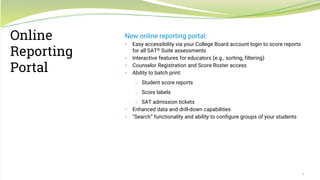
New online reporting portal:
• Easy accessibility via your College Board account login to score reports
for all SAT® Suite assessments
• Interactive features for educators (e.g., sorting, filtering)
• Counselor Registration and Score Roster access
• Ability to batch print:
o Student score reports
o Score labels
o SAT admission tickets
• Enhanced data and drill-down capabilities
• “Search” functionality and ability to configure groups of your students
7
Online
Reporting
Portal
8
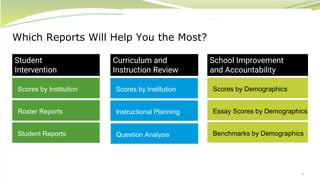
Which Reports Will Help You the Most?
Scores by Institution
Student
Intervention
Curriculum and
Instruction Review
School Improvement
and Accountability
Roster Reports
Student Reports
Scores by Institution
Instructional Planning
Question Analysis
Scores by Demographics
Essay Scores by Demographics
Benchmarks by Demographics
9
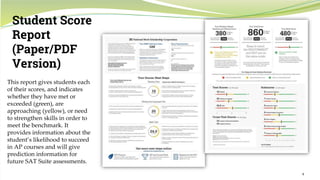
Student Score
Report
(Paper/PDF
Version)
This report gives students each
of their scores, and indicates
whether they have met or
exceeded (green), are
approaching (yellow), or need
to strengthen skills in order to
meet the benchmark. It
provides information about the
student’s likelihood to succeed
in AP courses and will give
prediction information for
future SAT Suite assessments.
10
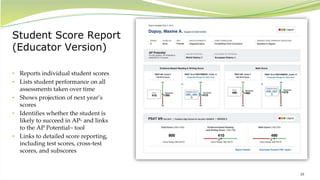
Student Score Report
(Educator Version)
• Reports individual student scores
• Lists student performance on all
assessments taken over time
• Shows projection of next year’s
scores
• Identifies whether the student is
likely to succeed in AP® and links
to the AP PotentialTM tool
• Links to detailed score reporting,
including test scores, cross-test
scores, and subscores
11
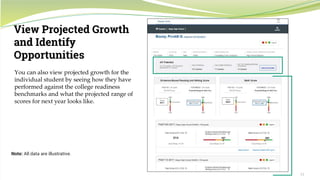
View Projected Growth
and Identify
Opportunities
Note: All data are illustrative.
You can also view projected growth for the
individual student by seeing how they have
performed against the college readiness
benchmarks and what the projected range of
scores for next year looks like.
12
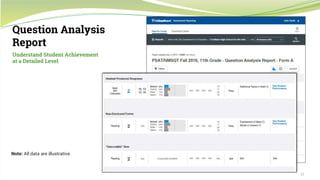
Question Analysis
Report
Note: All data are illustrative.
Understand Student Achievement
at a Detailed Level
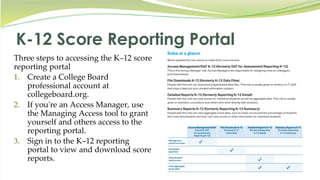
K-12 Score Reporting Portal
Three steps to accessing the K–12 score
reporting portal
1. Create a College Board
professional account at
collegeboard.org.
2. If you're an Access Manager, use
the Managing Access tool to grant
yourself and others access to the
reporting portal.
3. Sign in to the K–12 reporting
portal to view and download score
reports.
14
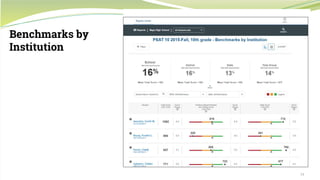
Benchmarks by
Institution
K-12 Score Reporting Portal
● Live demonstration of the reports available in the K-12 Score Reporting
Portal
Student Portal*
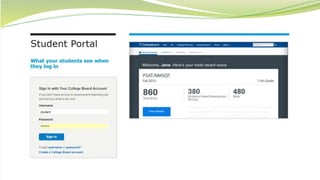
● Demo Site - https://studentscores.collegeboard.org/viewscore
● Logging in to the Student Portal
1. Go to studentscores.collegeboard.org.
2. If they already have a College Board account, they should sign in with their username
and password and click “Sign In” to be taken to their scores.
3. If they don’t have an account, they can create one by clicking “Sign Up” and entering the
required information.
Only the information marked with an asterisk (*) is required.
Your students should now be able to view their scores on all the College Board assessments they’ve taken.
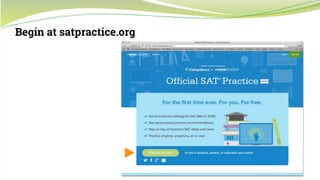
Begin at satpractice.org
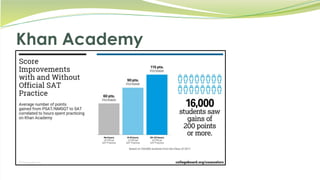
Khan Academy
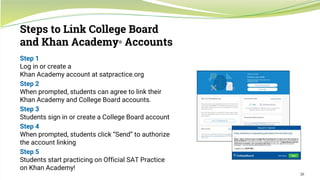
Step 1
Log in or create a
Khan Academy account at satpractice.org
Step 2
When prompted, students can agree to link their
Khan Academy and College Board accounts.
Step 3
Students sign in or create a College Board account
Step 4
When prompted, students click “Send” to authorize
the account linking
Step 5
Students start practicing on Official SAT Practice
on Khan Academy!
20
Steps to Link College Board
and Khan Academy® Accounts
21
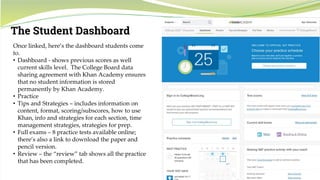
The Student Dashboard
Once linked, here’s the dashboard students come
to.
• Dashboard - shows previous scores as well
current skills level. The College Board data
sharing agreement with Khan Academy ensures
that no student information is stored
permanently by Khan Academy.
• Practice
• Tips and Strategies – includes information on
content, format, scoring/subscores, how to use
Khan, info and strategies for each section, time
management strategies, strategies for prep.
• Full exams – 8 practice tests available online;
there’s also a link to download the paper and
pencil version.
• Review – the “review” tab shows all the practice
that has been completed.
22
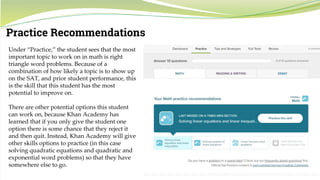
Practice Recommendations
Under “Practice,” the student sees that the most
important topic to work on in math is right
triangle word problems. Because of a
combination of how likely a topic is to show up
on the SAT, and prior student performance, this
is the skill that this student has the most
potential to improve on.
There are other potential options this student
can work on, because Khan Academy has
learned that if you only give the student one
option there is some chance that they reject it
and then quit. Instead, Khan Academy will give
other skills options to practice (in this case
solving quadratic equations and quadratic and
exponential word problems) so that they have
somewhere else to go.
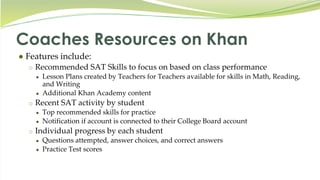
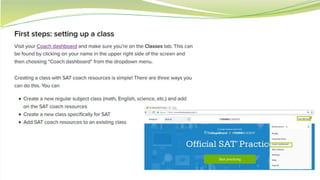
Coaches Resources on Khan
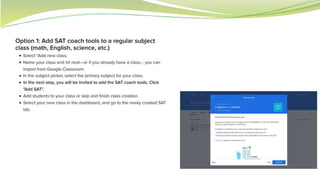
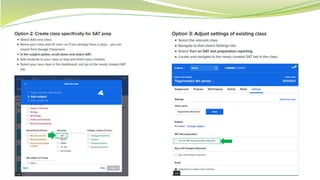
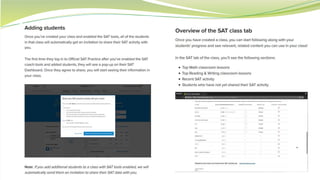
● Features include:
o Recommended SAT Skills to focus on based on class performance
● Lesson Plans created by Teachers for Teachers available for skills in Math, Reading,
and Writing
● Additional Khan Academy content
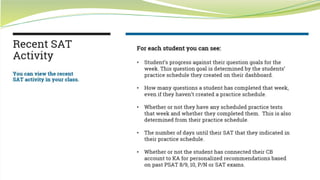
o Recent SAT activity by student
● Top recommended skills for practice
● Notification if account is connected to their College Board account
o Individual progress by each student
● Questions attempted, answer choices, and correct answers
● Practice Test scores
Action Steps for PSAT 8/9 & Khan
● Most importantly, we need students to link their College Board and
Khan accounts. Currently we are only at 51%- Yikes!
○ Please decide on a date as a PLC, provide to Furgione and she will
assure labs/carts are reserved for your.
○ Linked percentages will determine completion of this assignment in
eCampus
● Explore Tools to use in your classes (All 8th Grade ELA & Math)
● Prior to Spring Break, ELA Teachers Review Student Portal Access
and Khan Practice w/ classes
○ Please decide on a date as a PLC, provide to Furgione and she will
assure labs/carts are reserved for your.
Thank you!~ Please Complete the
brief quiz in this module for PD
credit and follow up on action
items.

JHMS PSAT Results Training

  • 1.
    PSAT 8/9 ResultsTraining February 2018
  • 2.
    Agenda ● Learn Whereto See Results ● Learn to Link Student College Board and Khan Accounts ● Learn How to Use Khan in Classes
  • 3.
    PSAT 8/9 ScoreRelease ● Educator Score Release o Educators are able to access their students’ PSAT scores in the K12 Reporting Portal ● Student Score Release o Students will receive their scores over the course of three days, from December 11-13 o Ours were delayed but have been released o Students will receive an email when their PSAT scores are available to be viewed and most have
  • 4.
    Resources for Counselorsand Testing Coordinators Counselor site ● https://counselors.collegeboard.org/ ● Professional Learning ● Resources
  • 5.
    SAT College andCareer Readiness Benchmarks Grade 8 Grade 9 Grade 10 Grade 11 SAT Section Level 390 410 430 460 480 ERW 430 450 480 510 530 MATH 5
  • 6.
    Longitudinal Progress Monitoring Section Scores areplaced on a vertical scale. The same concept holds true for the Test, Cross-Test Scores, and Total Score. 100 200 300 400 500 600 700 800 SAT (200–800) PSAT 10 & PSAT/NMSQT (160–760) PSAT 8/9 (120–720) 6 10 15 20 25 30 35 40 SAT (10–40) PSAT 10 & PSAT/NMSQT (8–38) SAT (400–1600) PSAT 10 & PSAT/NMSQT (320–1520) 200 400 600 800 1000 1200 1400 1600 PSAT 8/9 (240–1440)PSAT 8/9 (6–36) 6 The min-max scores vary from assessment to assessment to show the difference in complexity of knowledge on the different tests. Theoretically, if a student were to take the PSAT 8/9, PSAT 10, SAT on the same day, they would score the same on each assessment, but if you scored “perfectly” on all three, you would only get a 720 vs an 800 for Math in PSAT 8/9 vs SAT – because the difficulty of questions is that much harder on SAT.
  • 7.
    New online reportingportal: • Easy accessibility via your College Board account login to score reports for all SAT® Suite assessments • Interactive features for educators (e.g., sorting, filtering) • Counselor Registration and Score Roster access • Ability to batch print: o Student score reports o Score labels o SAT admission tickets • Enhanced data and drill-down capabilities • “Search” functionality and ability to configure groups of your students 7 Online Reporting Portal
  • 8.
    8 Which Reports WillHelp You the Most? Scores by Institution Student Intervention Curriculum and Instruction Review School Improvement and Accountability Roster Reports Student Reports Scores by Institution Instructional Planning Question Analysis Scores by Demographics Essay Scores by Demographics Benchmarks by Demographics
  • 9.
    9 Student Score Report (Paper/PDF Version) This reportgives students each of their scores, and indicates whether they have met or exceeded (green), are approaching (yellow), or need to strengthen skills in order to meet the benchmark. It provides information about the student’s likelihood to succeed in AP courses and will give prediction information for future SAT Suite assessments.
  • 10.
    10 Student Score Report (EducatorVersion) • Reports individual student scores • Lists student performance on all assessments taken over time • Shows projection of next year’s scores • Identifies whether the student is likely to succeed in AP® and links to the AP PotentialTM tool • Links to detailed score reporting, including test scores, cross-test scores, and subscores
  • 11.
    11 View Projected Growth andIdentify Opportunities Note: All data are illustrative. You can also view projected growth for the individual student by seeing how they have performed against the college readiness benchmarks and what the projected range of scores for next year looks like.
  • 12.
    12 Question Analysis Report Note: Alldata are illustrative. Understand Student Achievement at a Detailed Level
  • 13.
    K-12 Score ReportingPortal Three steps to accessing the K–12 score reporting portal 1. Create a College Board professional account at collegeboard.org. 2. If you're an Access Manager, use the Managing Access tool to grant yourself and others access to the reporting portal. 3. Sign in to the K–12 reporting portal to view and download score reports.
  • 14.
  • 15.
    K-12 Score ReportingPortal ● Live demonstration of the reports available in the K-12 Score Reporting Portal
  • 16.
    Student Portal* ● DemoSite - https://studentscores.collegeboard.org/viewscore ● Logging in to the Student Portal 1. Go to studentscores.collegeboard.org. 2. If they already have a College Board account, they should sign in with their username and password and click “Sign In” to be taken to their scores. 3. If they don’t have an account, they can create one by clicking “Sign Up” and entering the required information. Only the information marked with an asterisk (*) is required. Your students should now be able to view their scores on all the College Board assessments they’ve taken.
  • 18.
  • 19.
  • 20.
    Step 1 Log inor create a Khan Academy account at satpractice.org Step 2 When prompted, students can agree to link their Khan Academy and College Board accounts. Step 3 Students sign in or create a College Board account Step 4 When prompted, students click “Send” to authorize the account linking Step 5 Students start practicing on Official SAT Practice on Khan Academy! 20 Steps to Link College Board and Khan Academy® Accounts
  • 21.
    21 The Student Dashboard Oncelinked, here’s the dashboard students come to. • Dashboard - shows previous scores as well current skills level. The College Board data sharing agreement with Khan Academy ensures that no student information is stored permanently by Khan Academy. • Practice • Tips and Strategies – includes information on content, format, scoring/subscores, how to use Khan, info and strategies for each section, time management strategies, strategies for prep. • Full exams – 8 practice tests available online; there’s also a link to download the paper and pencil version. • Review – the “review” tab shows all the practice that has been completed.
  • 22.
    22 Practice Recommendations Under “Practice,”the student sees that the most important topic to work on in math is right triangle word problems. Because of a combination of how likely a topic is to show up on the SAT, and prior student performance, this is the skill that this student has the most potential to improve on. There are other potential options this student can work on, because Khan Academy has learned that if you only give the student one option there is some chance that they reject it and then quit. Instead, Khan Academy will give other skills options to practice (in this case solving quadratic equations and quadratic and exponential word problems) so that they have somewhere else to go.
  • 23.
    Coaches Resources onKhan ● Features include: o Recommended SAT Skills to focus on based on class performance ● Lesson Plans created by Teachers for Teachers available for skills in Math, Reading, and Writing ● Additional Khan Academy content o Recent SAT activity by student ● Top recommended skills for practice ● Notification if account is connected to their College Board account o Individual progress by each student ● Questions attempted, answer choices, and correct answers ● Practice Test scores
  • 29.
    Action Steps forPSAT 8/9 & Khan ● Most importantly, we need students to link their College Board and Khan accounts. Currently we are only at 51%- Yikes! ○ Please decide on a date as a PLC, provide to Furgione and she will assure labs/carts are reserved for your. ○ Linked percentages will determine completion of this assignment in eCampus ● Explore Tools to use in your classes (All 8th Grade ELA & Math) ● Prior to Spring Break, ELA Teachers Review Student Portal Access and Khan Practice w/ classes ○ Please decide on a date as a PLC, provide to Furgione and she will assure labs/carts are reserved for your.
  • 30.
    Thank you!~ PleaseComplete the brief quiz in this module for PD credit and follow up on action items.