Hussein Salman
Manager @Avanade
@husseinsalmann | http://husseinsalman.com
Deploying Containers on Azure
#GlobalAzure
#WeAreAvanade
#GlobalAzure
#WeAreAvanade
Overview of Microservices
Containers and Docker
Container Orchestrators
Understand main Kubernetes objects
Leverage Azure Services (if time permits)
• Push Docker images into Azure Container Registry
• Deploy application into Azure Kubernetes cluster
Goals
#GlobalAzure
#WeAreAvanade
What are Microservices?
A software architecture style
in which complex applications
are composed of small,
independent processes
communicating with other
using language-agnostic APIs.
These services are small,
highly decoupled and focus
on doing a small task,
facilitating a modular
approach to system-building.
[Figure 1 , martinfowler]
#GlobalAzure
#WeAreAvanade
Why Microservices?
[Figure 2 , Microsoft]
#GlobalAzure
#WeAreAvanade
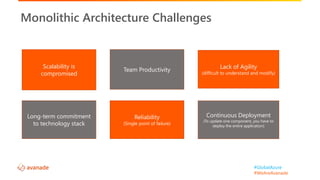
Monolithic Architecture Challenges
Scalability is
compromised
Lack of Agility
(difficult to understand and modify)
Long-term commitment
to technology stack
Continuous Deployment
(To update one component, you have to
deploy the entire application)
Team Productivity
Reliability
(Single point of failure)
#GlobalAzure
#WeAreAvanade
Debugging is difficult
Monitoring/Logging is difficult
Distributed databases make transactions hard
Distributed services adds more network communication
Cluster and orchestration tools overhead
Operational and tooling overhead on dev teams
Increasing Deployment Complexities
What about Microservice Challenges?
#GlobalAzure
#WeAreAvanade
Containers simplifies microservices deployment
#GlobalAzure
#WeAreAvanade
What are Containers?
Containers = Operating System VirtualizationVirtual Machines = Hardware Virtualization
[Figure 3 , Microsoft]
#GlobalAzure
#WeAreAvanade
Why Containers?
[Figure 4 ,flipboard.com]
#GlobalAzure
#WeAreAvanade
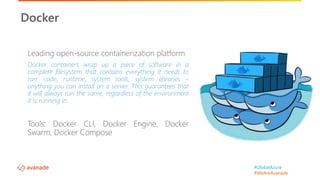
Leading open-source containerization platform
Docker containers wrap up a piece of software in a
complete filesystem that contains everything it needs to
run: code, runtime, system tools, system libraries –
anything you can install on a server. This guarantees that
it will always run the same, regardless of the environment
it is running in.
Tools: Docker CLI, Docker Engine, Docker
Swarm, Docker Compose
Docker
#GlobalAzure
#WeAreAvanade
Docker Architecture
[Figure 5 ,docker.com]
#GlobalAzure
#WeAreAvanade
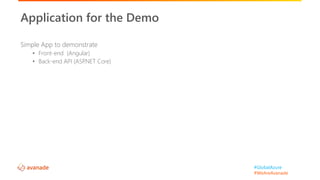
Simple App to demonstrate
• Front-end (Angular)
• Back-end API (ASP.NET Core)
Application for the Demo
Run containerized app locally
Demo 1
#GlobalAzure
#WeAreAvanade
What about other distributed systems challenges?
#GlobalAzure
#WeAreAvanade
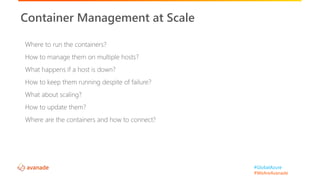
Where to run the containers?
How to manage them on multiple hosts?
What happens if a host is down?
How to keep them running despite of failure?
What about scaling?
How to update them?
Where are the containers and how to connect?
Container Management at Scale
#GlobalAzure
#WeAreAvanade
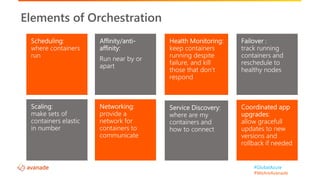
Elements of Orchestration
#GlobalAzure
#WeAreAvanade
#GlobalAzure
#WeAreAvanade
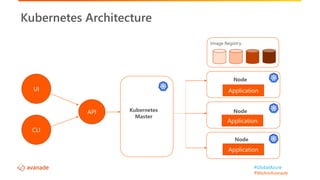
Kubernetes Architecture
Node
Image Registry
Node
Node
UI
CLI
Kubernetes
Master
API
Application
Application
Application
#GlobalAzure
#WeAreAvanade
• Pod
• Replica set
• Deployment
• Service
Kubernetes Key Objects
#GlobalAzure
#WeAreAvanade
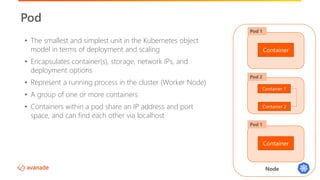
Node
Pod
Container
Pod 1
Container 1
Pod 2
• The smallest and simplest unit in the Kubernetes object
model in terms of deployment and scaling
• Encapsulates container(s), storage, network IPs, and
deployment options
• Represent a running process in the cluster (Worker Node)
• A group of one or more containers
• Containers within a pod share an IP address and port
space, and can find each other via localhost
Container 2
Container
Pod 1
#GlobalAzure
#WeAreAvanade
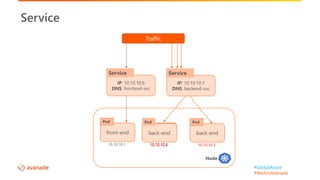
Node
Service
front-end
Pod
10.10.10.1
back-end
Pod
10.10.10.2
back-end
Pod
10.10.10.3
back-end
Pod
10.10.10.4
IP: 10.10.10.6
DNS: frontend-svc
Service
IP: 10.10.10.7
DNS: backend-svc
Service
Traffic
#GlobalAzure
#WeAreAvanade
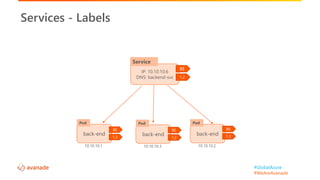
Services - Labels
IP: 10.10.10.6
DNS: backend-svc
Service
back-end
Pod
10.10.10.3
back-end
Pod
10.10.10.2
BE
1.2
BE
1.2
BE
1.2
back-end
Pod
10.10.10.1
BE
1.2
#GlobalAzure
#WeAreAvanade
What about high availability requirements?
#GlobalAzure
#WeAreAvanade
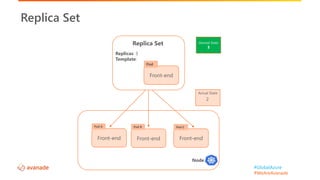
Replica Set
Node
Front-end
Pod B
Front-end
Pod C
Replica Set
Replicas: 3
Template:
Front-end
Pod
Front-end
Pod A
Desired State
3
Actual State
32
#GlobalAzure
#WeAreAvanade
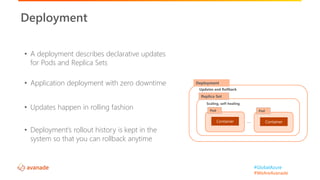
• A deployment describes declarative updates
for Pods and Replica Sets
• Application deployment with zero downtime
• Updates happen in rolling fashion
• Deployment’s rollout history is kept in the
system so that you can rollback anytime
Deployment
Deployment
Updates and Rollback
Replica Set
Pod
Container…
Pod
Container
Scaling, self-healing
#GlobalAzure
#WeAreAvanade
Managed Kubernetes Cluster in Azure:
• Control Plane Is free
• Pay only for worker nodes
• Same software and tooling for regular K8
Easily Integrate with Azure Services:
• Security: RBAC and Azure AD integration
• Azure Monitor
• Virtual network integration
• Azure DevOps
Azure Kubernetes Service (AKS)
#GlobalAzure
#WeAreAvanade
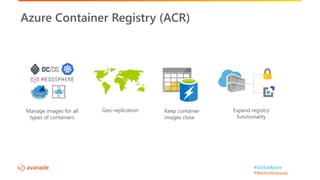
Azure Container Registry (ACR)
Geo-replicationManage images for all
types of containers
Keep container
images close
Expand registry
functionality
#GlobalAzure
#WeAreAvanade
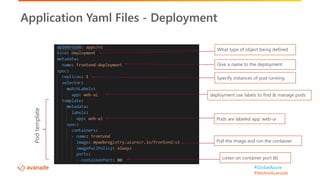
What type of object being defined
Application Yaml Files - Deployment
Pods are labeled app: web-ui
deployment use labels to find & manage pods
Specify instances of pod running
Listen on container port 80
Pull the image and run the container
Podtemplate
Give a name to the deployment
#GlobalAzure
#WeAreAvanade
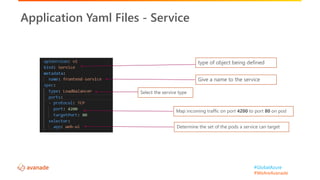
Application Yaml Files - Service
type of object being defined
Give a name to the service
Determine the set of the pods a service can target
us
Map incoming traffic on port 4200 to port 80 on pod
Select the service type
#GlobalAzure
#WeAreAvanade
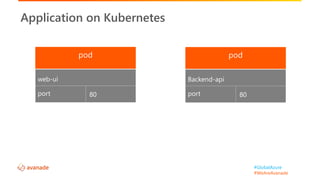
Application on Kubernetes
web-ui
port 80
Backend-api
port 80
#GlobalAzure
#WeAreAvanade
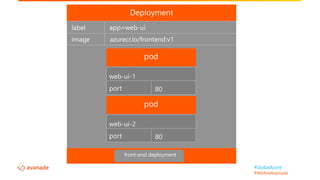
app=web-uilabel
image azurecr.io/frontend:v1
front-end deployment
web-ui-1
port 80
web-ui-2
port 80
#GlobalAzure
#WeAreAvanade
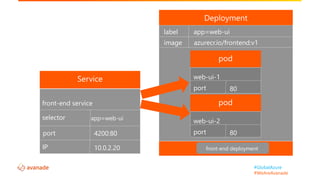
port
app=web-uilabel
image azurecr.io/frontend:v1
web-ui-1
port 80
web-ui-2
port 80
front-end service
selector app=web-ui
port
IP
4200:80
10.0.2.20 front-end deployment
#GlobalAzure
#WeAreAvanade
How it works together?
[Figure 6, Microsoft]
• Push containers into ACR
• Deploy the application
Demo 2 – Run App on AKS
#GlobalAzure
#WeAreAvanade
Name : Hussein Salman
Experience: 12+ years of experience in software development and architecture
Role: Manager/Architect at Avanade
Certifications: PMP, CSM, MCSD, MCSA Cloud and AWS Architect
About Me
http://husseinsalman.com
@husseinsalmann
#GlobalAzure
#WeAreAvanade
Thank You!
@husseinsalmann

Deploying Containers on Azure

Editor's Notes

  • #3 How many developers do we have today? Any Kubernetes guys?
  • #4 There are several architecture style and patterns (monolithic, MVC, SOA, ) you can use to develop you software application, and this is not a software architecture talk, but since we are moving applications to K8, its good to mention one of the mostly adopted architecture in the software industry nowadays. Microservice, you probably have heard about it, if not here is what it is? Microservices is an architectural style to develop a single application as a suite of small service, each running it own process and communicating with lightweight mechanism. Theses services are build around business capabilities, loosely coupled and indecently deployed and scaled.
  • #5 https://docs.microsoft.com/en-us/xamarin/xamarin-forms/enterprise-application-patterns/containerized-microservices
  • #10 Resouce utilization is one of the keys. The containers small footprint compared to VMs. They take up less space and computing resouces. So you can handle more applications since you require fewer VMs and Operating Systems. Briefly, we can optimize infrastructure for greater utilization. You can starts containers instantly in matter of seconds, VMs take minutes to start. Containers suits microservices, especially when there is a traffic demand and you want to handle end user requests in a reasonable time. Portability is also one of the key factors. You can easily Simulating production like enviroments. Build one and deploy many, once you have a containerized app locally it will behave the same anywhere, whether its on different hardward, operating systems, or environment. The containers bundles the app, the libraries and necessary configuration, so need for ops people to understand the interncal details of the app and run into conflict and configure issue. They y just need to concenrtare on what they are good at, infrastustcte and running and monitoring applications in the production Containers isolate software from its environment and ensure that it works uniformly despite the differences between different enviroments.
  • #11  Compose is a tool for defining and running multi-container Docker applications. With Compose, you use a YAML file to configure your application’s services. Then, with a single command, you create and start all the services from your configuration.
  • #12 Docker uses a client-server architecture. The Docker client talks to the Docker daemon, which does the heavy lifting of building, running, and distributing your Docker containers. The Docker client and daemon can run on the same system, or you can connect a Docker client to a remote Docker daemon. The Docker client and daemon communicate using a REST API, over UNIX sockets or a network interface. The Docker daemon (dockerd) listens for Docker API requests and manages Docker objects such as images, containers, networks, and volumes. A daemon can also communicate with other daemons to manage Docker services. The Docker client The Docker client (docker) is the primary way that many Docker users interact with Docker. When you use commands such as docker run, the client sends these commands to dockerd, which carries them out. The docker command uses the Docker API. The Docker client can communicate with more than one daemon. Docker registries A Docker registry stores Docker images. Docker Hub is a public registry that anyone can use, and Docker is configured to look for images on Docker Hub by default. You can even run your own private registry. If you use Docker Datacenter (DDC), it includes Docker Trusted Registry (DTR). When you use the docker pull or docker run commands, the required images are pulled from your configured registry. When you use the docker push command, your image is pushed to your configured registry. IMAGES An image is a read-only template with instructions for creating a Docker container. Often, an image is based on another image, with some additional customization. For example, you may build an image which is based on the ubuntu image, but installs the Apache web server and your application, as well as the configuration details needed to make your application run. You might create your own images or you might only use those created by others and published in a registry. To build your own image, you create a Dockerfile with a simple syntax for defining the steps needed to create the image and run it. Each instruction in a Dockerfile creates a layer in the image. When you change the Dockerfile and rebuild the image, only those layers which have changed are rebuilt. This is part of what makes images so lightweight, small, and fast, when compared to other virtualization technologies. A container is a runnable instance of an image. You can create, start, stop, move, or delete a container using the Docker API or CLI. You can connect a container to one or more networks, attach storage to it, or even create a new image based on its current state. By default, a container is relatively well isolated from other containers and its host machine. You can control how isolated a container’s network, storage, or other underlying subsystems are from other containers or from the host machine. A container is defined by its image as well as any configuration options you provide to it when you create or start it. When a container is removed, any changes to its state that are not stored in persistent storage disappear.
  • #24 A single pod in a high availability requiemetn is insufficient - What if the pods crashes - What if we need to update the application running inside the pod but we cannot afford service interruption
  • #25 Ensures high availability A higher level concept that manages multiple instances of the same pod Defining container images and how many pod instances Responsible for reconciling desired state and self-healing
  • #26 Two deployment strategies: - recreate - rolling update (the default strategy) Take down the older version and replace it by the new once
  • #28  Azure Container Registry allows you to store images for all types of container deployments including DC/OS, Docker Swarm, Kubernetes, and Azure services such as App Service, Batch, Service Fabric, and others Efficiently manage a single registry replicated across multiple regions. Geo-replication enables you to manage global deployments as one entity to simplify operations and management. Reduce network latency and eliminate ingress/egress charges by keeping your Docker registry in the same data center as your deployments. Keep your images safe by authenticating and managing access with Azure Active Directory. Trigger events based on container actions with Webhooks. Both technologies are compatible with standard registries.