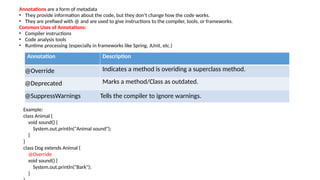
Exception:
• In Java,an exception is unexpected or abnormal situation.
• It is an object which is thrown at runtime.
3.
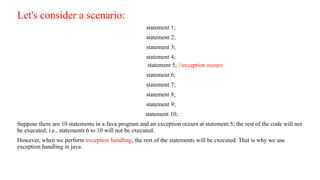
Let's consider ascenario:
statement 1;
statement 2;
statement 3;
statement 4;
statement 5; //exception occurs
statement 6;
statement 7;
statement 8;
statement 9;
statement 10;
Suppose there are 10 statements in a Java program and an exception occurs at statement 5; the rest of the code will not
be executed, i.e., statements 6 to 10 will not be executed.
However, when we perform exception handling, the rest of the statements will be executed. That is why we use
exception handling in java.
4.
Exception Handling
• TheException Handling in Java is one of the powerful mechanism to handle the
runtime errors so that the normal flow of the application can be maintained.
• Avoiding abnormal termination of program in java.
Advantage of Exception Handling:
• The core advantage of exception handling is to maintain the normal flow
of the application.
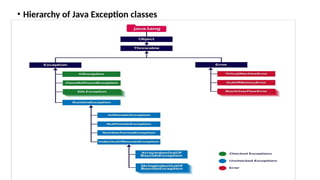
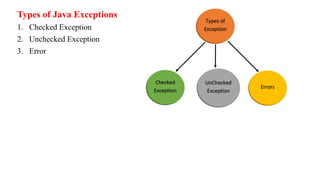
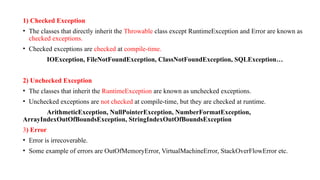
1) Checked Exception
•The classes that directly inherit the Throwable class except RuntimeException and Error are known as
checked exceptions.
• Checked exceptions are checked at compile-time.
IOException, FileNotFoundException, ClassNotFoundException, SQLException…
2) Unchecked Exception
• The classes that inherit the RuntimeException are known as unchecked exceptions.
• Unchecked exceptions are not checked at compile-time, but they are checked at runtime.
ArithmeticException, NullPointerException, NumberFormatException,
ArrayIndexOutOfBoundsException, StringIndexOutOfBoundsException
3) Error
• Error is irrecoverable.
• Some example of errors are OutOfMemoryError, VirtualMachineError, StackOverFlowError etc.
8.
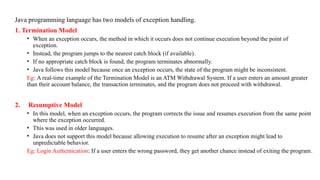
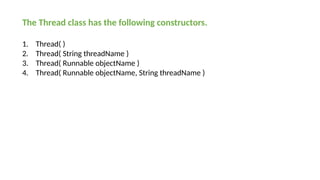
Java programming languagehas two models of exception handling.
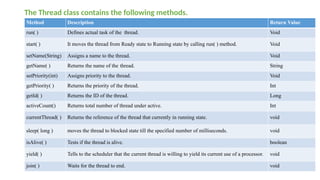
1. Termination Model
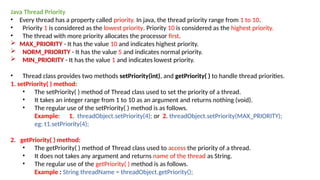
• When an exception occurs, the method in which it occurs does not continue execution beyond the point of
exception.
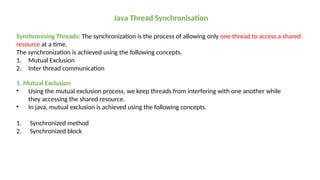
• Instead, the program jumps to the nearest catch block (if available).
• If no appropriate catch block is found, the program terminates abnormally.
• Java follows this model because once an exception occurs, the state of the program might be inconsistent.
Eg: A real-time example of the Termination Model is an ATM Withdrawal System. If a user enters an amount greater
than their account balance, the transaction terminates, and the program does not proceed with withdrawal.
2. Resumptive Model
• In this model, when an exception occurs, the program corrects the issue and resumes execution from the same point
where the exception occurred.
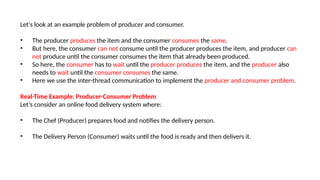
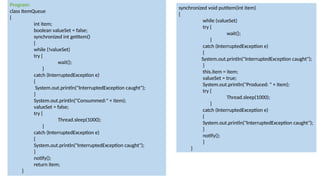
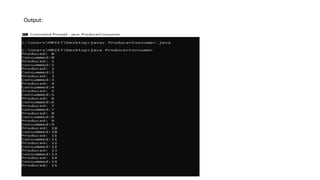
• This was used in older languages.
• Java does not support this model because allowing execution to resume after an exception might lead to
unpredictable behavior.
Eg: Login Authentication: If a user enters the wrong password, they get another chance instead of exiting the program.
9.
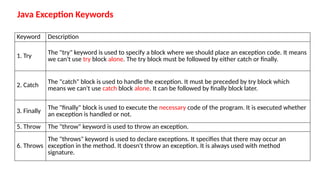
Java Exception Keywords
KeywordDescription
1. Try The "try" keyword is used to specify a block where we should place an exception code. It means
we can't use try block alone. The try block must be followed by either catch or finally.
2. Catch The "catch" block is used to handle the exception. It must be preceded by try block which
means we can't use catch block alone. It can be followed by finally block later.
3. Finally The "finally" block is used to execute the necessary code of the program. It is executed whether
an exception is handled or not.
5. Throw The "throw" keyword is used to throw an exception.
6. Throws
The "throws" keyword is used to declare exceptions. It specifies that there may occur an
exception in the method. It doesn't throw an exception. It is always used with method
signature.
10.
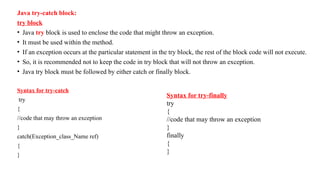
Java try-catch block:
tryblock
• Java try block is used to enclose the code that might throw an exception.
• It must be used within the method.
• If an exception occurs at the particular statement in the try block, the rest of the block code will not execute.
• So, it is recommended not to keep the code in try block that will not throw an exception.
• Java try block must be followed by either catch or finally block.
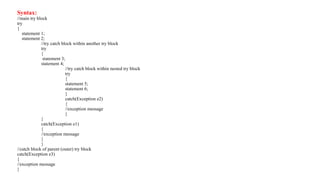
Syntax for try-catch
try
{
//code that may throw an exception
}
catch(Exception_class_Name ref)
{
}
Syntax for try-finally
try
{
//code that may throw an exception
}
finally
{
}
11.
Java catch block
•Java catch block is used to handle the Exception by declaring the type of exception
within the parameter.
• The declared exception must be the parent class exception ( i.e., Exception) or the
generated exception type.
• However, the good approach is to declare the generated type of exception.
• The catch block must be used after the try block only. You can use multiple catch block
with a single try block.
12.
Problem without exceptionhandling
Example 1
public class TryCatchExample1
{
public static void main(String[] args)
{
int data=50/0; //may throw exception
System.out.println("rest of the code");
}
}
Output:
Exception in thread "main" java.lang.ArithmeticException: /
by zero
Solution by exception handling
Example 2
public class TryCatchExample2
{
public static void main(String[] args)
{
try
{
int data=50/0; //may throw exception
} //handling the exception
catch(ArithmeticException e)
{
System.out.println(e);
}
System.out.println("rest of the code");
}
}
Output:
java.lang.ArithmeticException: / by zero
rest of the code
13.
Java Exception HandlingExample
Let's see an example of Java Exception Handling in which we are using a try-catch statement to handle the exception.
Program:
public class JavaExceptionExample1
{
public static void main(String args[])
{
try
{ //code that may raise exception
int data=100/0;
}
catch(ArithmeticException e)
{
System.out.println(e);
}
//rest code of the program
System.out.println("rest of the code...");
}
}
Output:
java.lang.ArithmeticException:/ by zero
rest of the code….
14.
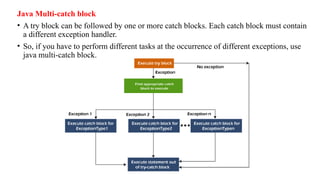
Java Multi-catch block
•A try block can be followed by one or more catch blocks. Each catch block must contain
a different exception handler.
• So, if you have to perform different tasks at the occurrence of different exceptions, use
java multi-catch block.
15.
Program:
public class MultipleCatchBlock1
{
publicstatic void main(String[] args)
{
try
{
int a[]=new int[5];
a[5]=30/0;
}
catch(ArithmeticException e)
{
System.out.println("Arithmetic Exception occurs");
}
catch(ArrayIndexOutOfBoundsException e)
{
System.out.println("ArrayIndexOutOfBounds Exception occurs");
}
catch(Exception e)
{
System.out.println("Parent Exception occurs");
}
System.out.println("rest of the code");
}
}
Output:
Arithmetic Exception occurs
rest of the code
16.
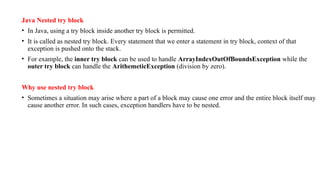
Java Nested tryblock
• In Java, using a try block inside another try block is permitted.
• It is called as nested try block. Every statement that we enter a statement in try block, context of that
exception is pushed onto the stack.
• For example, the inner try block can be used to handle ArrayIndexOutOfBoundsException while the
outer try block can handle the ArithemeticException (division by zero).
Why use nested try block
• Sometimes a situation may arise where a part of a block may cause one error and the entire block itself may
cause another error. In such cases, exception handlers have to be nested.
Java Nested tryExample Program:
public class NestedTryBlock
{
public static void main(String args[])
{ //outer try block
try{ //inner try block 1
try{
System.out.println(“Going to divide by 0");
int b=39/0;
} //catch block of inner try block 1
catch(ArithmeticException e)
{
System.out.println(e);
} //inner try block 2
try{
int a[]=new int[5]; //assigning the value out of array bounds
a[5]=4;
} //catch block of inner try block 2
catch(ArrayIndexOutOfBoundsException e)
{System.out.println(e);
}
System.out.println("other statement");
} //catch block of outer try block
catch(Exception e)
{System.out.println("handled the exception(outer catch)");
}
System.out.println("normal flow..");
}
}
Output:
Going to divide by 0
java.lang.ArithmeticException: / by zero
java.lang.ArrayIndexOutOfBoundsException: 5
other statement
normal flow..
19.
Java throw keyword
•The throw keyword is used in programming languages like Java to explicitly throw an exception during the execution of a program.
• We can throw either checked or unchecked exceptions in Java by throw keyword.
• It is mainly used to throw a custom exception.
• It allows developers to signal that an error or exceptional situation has occurred.
Syntax: throw new ExceptionType("Error message");
Program:
public class Example
{
public static void validate(int age)
{
if (age < 18)
{
throw new IllegalException("Not eligible to vote");
}
else {
System.out.println("You are eligible to vote");
}
}
public static void main(String[] args)
{
validate(16); // This will throw an exception
}
}
20.
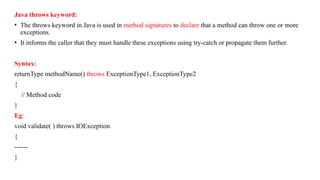
Java throws keyword:
•The throws keyword in Java is used in method signatures to declare that a method can throw one or more
exceptions.
• It informs the caller that they must handle these exceptions using try-catch or propagate them further.
Syntax:
returnType methodName() throws ExceptionType1, ExceptionType2
{
// Method code
}
Eg:
void validate( ) throws IOException
{
------
}
21.
Program:
import java.io.IOException;
public classExample
{
static void checkFile() throws IOException // Method that declares an exception using throws
{
throw new IOException("File not found");
}
public static void main(String[] args)
{
try
{
checkFile(); // Calling the method that throws an exception
}
catch (IOException e)
{
System.out.println("Exception caught: " + e.getMessage());
}
}
}
22.
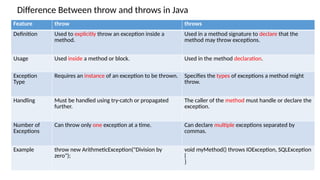
Difference Between throwand throws in Java
Feature throw throws
Definition Used to explicitly throw an exception inside a
method.
Used in a method signature to declare that the
method may throw exceptions.
Usage Used inside a method or block. Used in the method declaration.
Exception
Type
Requires an instance of an exception to be thrown. Specifies the types of exceptions a method might
throw.
Handling Must be handled using try-catch or propagated
further.
The caller of the method must handle or declare the
exception.
Number of
Exceptions
Can throw only one exception at a time. Can declare multiple exceptions separated by
commas.
Example throw new ArithmeticException("Division by
zero");
void myMethod() throws IOException, SQLException
{
}
23.
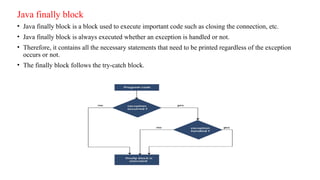
Java finally block
•Java finally block is a block used to execute important code such as closing the connection, etc.
• Java finally block is always executed whether an exception is handled or not.
• Therefore, it contains all the necessary statements that need to be printed regardless of the exception
occurs or not.
• The finally block follows the try-catch block.
24.
Usage of Javafinally program:
class Example
{
public static void main(String args[])
{
try
{
int data=25/5; //below code do not throw any exception
System.out.println(data);
}
catch(ArithmaticException e)
{
System.out.println(“Arithmatic Exception divide ny zero”);
}
finally
{
System.out.println("finally block is always executed");
}
}
}
Output:
5
finally block is always executed
25.
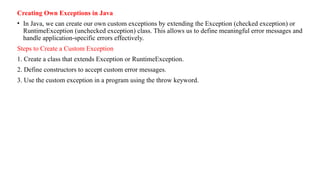
Creating Own Exceptionsin Java
• In Java, we can create our own custom exceptions by extending the Exception (checked exception) or
RuntimeException (unchecked exception) class. This allows us to define meaningful error messages and
handle application-specific errors effectively.
Steps to Create a Custom Exception
1. Create a class that extends Exception or RuntimeException.
2. Define constructors to accept custom error messages.
3. Use the custom exception in a program using the throw keyword.
26.
class InvalidAgeException extendsException // Step 1: Create a custom exception class
{
public InvalidAgeException(String message)
{
super(message);
}
}
public class CustomExceptionExample // Step 2: Use the custom exception in a program
{
static void checkAge(int age) throws InvalidAgeException // Method to check age eligibility
{
if (age < 18)
{
throw new InvalidAgeException("Age must be 18 or above to register.");
}
System.out.println("You are eligible to register.");
}
public static void main(String[ ] args) // Main method
{
try
{
checkAge(16); // This will throw an exception
}
catch (InvalidAgeException e)
{
System.out.println("Exception caught: " + e.getMessage());
}
}
}
Output: Exception caught: Age must be 18 or above to register.
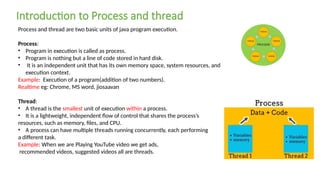
Process and threadare two basic units of java program execution.
Process:
• Program in execution is called as process.
• Program is nothing but a line of code stored in hard disk.
• It is an independent unit that has its own memory space, system resources, and
execution context.
Example: Execution of a program(addition of two numbers).
Realtime eg: Chrome, MS word, jiosaavan
Thread:
• A thread is the smallest unit of execution within a process.
• It is a lightweight, independent flow of control that shares the process’s
resources, such as memory, files, and CPU.
• A process can have multiple threads running concurrently, each performing
a different task.
Example: When we are Playing YouTube video we get ads,
recommended videos, suggested videos all are threads.
Introduction to Process and thread
29.
Characteristics of aThread:
• Lightweight
• Shares Memory
• Faster Execution
• Concurrency
• Independent Execution
Real time example: Gaming Applications: Games use threads for different tasks:
1. One thread for rendering graphics.
2. Another for processing user inputs.
3. A separate thread for game physics and AI.
30.
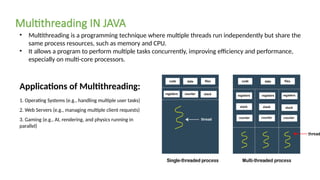
• Multithreading isa programming technique where multiple threads run independently but share the
same process resources, such as memory and CPU.
• It allows a program to perform multiple tasks concurrently, improving efficiency and performance,
especially on multi-core processors.
Multithreading IN JAVA
Applications of Multithreading:
1. Operating Systems (e.g., handling multiple user tasks)
2. Web Servers (e.g., managing multiple client requests)
3. Gaming (e.g., AI, rendering, and physics running in
parallel)
31.
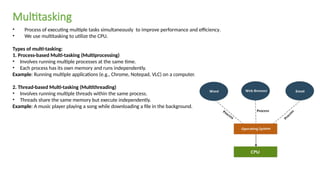
• Process ofexecuting multiple tasks simultaneously to improve performance and efficiency.
• We use multitasking to utilize the CPU.
Types of multi-tasking:
1. Process-based Multi-tasking (Multiprocessing)
• Involves running multiple processes at the same time.
• Each process has its own memory and runs independently.
Example: Running multiple applications (e.g., Chrome, Notepad, VLC) on a computer.
2. Thread-based Multi-tasking (Multithreading)
• Involves running multiple threads within the same process.
• Threads share the same memory but execute independently.
Example: A music player playing a song while downloading a file in the background.
Multitasking
32.
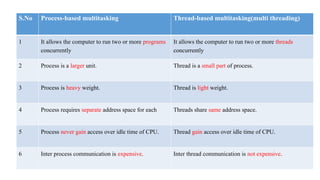
S.No Process-based multitaskingThread-based multitasking(multi threading)
1 It allows the computer to run two or more programs
concurrently
It allows the computer to run two or more threads
concurrently
2 Process is a larger unit. Thread is a small part of process.
3 Process is heavy weight. Thread is light weight.
4 Process requires separate address space for each Threads share same address space.
5 Process never gain access over idle time of CPU. Thread gain access over idle time of CPU.
6 Inter process communication is expensive. Inter thread communication is not expensive.
33.
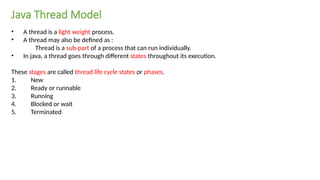
• A threadis a light weight process.
• A thread may also be defined as :
Thread is a sub-part of a process that can run individually.
• In java, a thread goes through different states throughout its execution.
These stages are called thread life cycle states or phases.
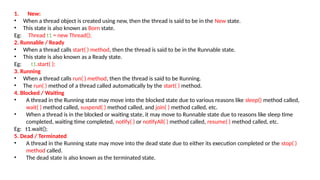
1. New
2. Ready or runnable
3. Running
4. Blocked or wait
5. Terminated
Java Thread Model
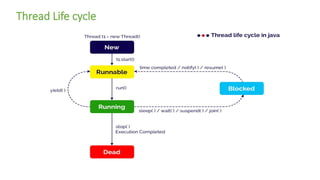
1. New:
• Whena thread object is created using new, then the thread is said to be in the New state.
• This state is also known as Born state.
Eg: Thread t1 = new Thread();
2. Runnable / Ready
• When a thread calls start( ) method, then the thread is said to be in the Runnable state.
• This state is also known as a Ready state.
Eg: t1.start( );
3. Running
• When a thread calls run( ) method, then the thread is said to be Running.
• The run( ) method of a thread called automatically by the start( ) method.
4. Blocked / Waiting
• A thread in the Running state may move into the blocked state due to various reasons like sleep() method called,
wait( ) method called, suspend( ) method called, and join( ) method called, etc.
• When a thread is in the blocked or waiting state, it may move to Runnable state due to reasons like sleep time
completed, waiting time completed, notify( ) or notifyAll( ) method called, resume( ) method called, etc.
Eg: t1.wait();
5. Dead / Terminated
• A thread in the Running state may move into the dead state due to either its execution completed or the stop( )
method called.
• The dead state is also known as the terminated state.
36.
Creating threads injava
• In java, a thread is a lightweight process.
• Every java program executes by a thread called the main thread.
• When a java program gets executed, the main thread created automatically.
• All other threads called from the main thread.
Two methods :
1. Using Thread class (by extending Thread class)
2. Using Runnable interface (by implementing Runnable interface)
37.
1. Using ThreadClass- Extending Thread class
• The java contains a built-in class Thread inside the java.lang package.
• The Thread class contains all the methods that are related to the threads.
To create a thread using Thread class, follow the step given below.
Step-1:
Create a class as a child of Thread class. That means, create a class that extends Thread class.
Step-2:
• Override the run( ) method with the code that is to be executed by the thread.
• The run( ) method must be public while overriding.
Step-3:
Create the object of the newly created class in the main( ) method.
Step-4:
Call the start( ) method on the object created in the above step.
38.
Program:
class child extendsThread
{
public void run()
{
System.out.println("Thread is under Running...");
for(int i=1;i<=10;i++)
{
System.out.println("i="+i);
}
}
}
public class test
{
public static void main(String[] args)
{
child t1=new child();
System.out.println(“Thread is about to start...");
t1.start();
}
}
39.
2. USing RunnableInterface- Implementing Runnable interface
• The java contains a built-in interface Runnable inside the java.lang package.
• The Runnable interface implemented by the Thread class that contains all the methods that are related to the
threads.
To create a thread using Runnable interface, follow the step given below.
Step-1:
Create a class that implements Runnable interface.
Step-2:
• Override the run( ) method with the code that is to be executed by thethread.
• The run( ) method must be public while overriding.
Step-3:
Create the object of the newly created class in the main( ) method.
Step-4:
Create the Thread class object by passing above created object as parameter to the Thread class constructor.
Step-5:
Call the start( ) method on the Thread class object created in the above step.
40.
class MyTask implementsRunnable
{
public void run()
{
System.out.println("Thread is running: " + Thread.currentThread().getName());
}
}
public class Example
{
public static void main(String[] args)
{
MyTask t1= new MyTask(); // Create a task
Thread T1= new Thread(t1); // Create a Thread object and pass the task
T1.start(); // Start the thread
}
}
41.
The Thread classhas the following constructors.
1. Thread( )
2. Thread( String threadName )
3. Thread( Runnable objectName )
4. Thread( Runnable objectName, String threadName )
42.
The Thread classcontains the following methods.
Method Description Return Value
run( ) Defines actual task of the thread. Void
start( ) It moves the thread from Ready state to Running state by calling run( ) method. Void
setName(String) Assigns a name to the thread. Void
getName( ) Returns the name of the thread. String
setPriority(int) Assigns priority to the thread. Void
getPriority( ) Returns the priority of the thread. Int
getId( ) Returns the ID of the thread. Long
activeCount() Returns total number of thread under active. Int
currentThread( ) Returns the reference of the thread that currently in running state. void
sleep( long ) moves the thread to blocked state till the specified number of milliseconds. void
isAlive( ) Tests if the thread is alive. boolean
yield( ) Tells to the scheduler that the current thread is willing to yield its current use of a processor. void
join( ) Waits for the thread to end. void
43.
Java Thread Priority
•Every thread has a property called priority. In java, the thread priority range from 1 to 10.
• Priority 1 is considered as the lowest priority. Priority 10 is considered as the highest priority.
• The thread with more priority allocates the processor first.
MAX_PRIORITY - It has the value 10 and indicates highest priority.
NORM_PRIORITY - It has the value 5 and indicates normal priority.
MIN_PRIORITY - It has the value 1 and indicates lowest priority.
• Thread class provides two methods setPriority(int), and getPriority( ) to handle thread priorities.
1. setPriority( ) method:
• The setPriority( ) method of Thread class used to set the priority of a thread.
• It takes an integer range from 1 to 10 as an argument and returns nothing (void).
• The regular use of the setPriority( ) method is as follows.
Example: 1. threadObject.setPriority(4); or 2. threadObject.setPriority(MAX_PRIORITY);
eg: t1.setPriority(4);
2. getPriority( ) method:
• The getPriority( ) method of Thread class used to access the priority of a thread.
• It does not takes any argument and returns name of the thread as String.
• The regular use of the getPriority( ) method is as follows.
Example : String threadName = threadObject.getPriority();
44.
class child extendsThread
{ public void run()
{
System.out.println("Inside SampleThread");
System.out.println("Current Thread: " + Thread.currentThread().getName());
}
}
public class Example
{
public static void main(String[] args)
{
child t1 = new child();
child t2 = new child();
t1.setName("first");
t2.setName("second");
t1.setPriority(4);
t2.setPriority(Thread.MAX_PRIORITY);
t1.start();
t2.start();
}
}
45.
Java Thread Synchronisation
SynchronisingThreads: The synchronization is the process of allowing only one thread to access a shared
resource at a time.
The synchronization is achieved using the following concepts.
1. Mutual Exclusion
2. Inter thread communication
1. Mutual Exclusion
• Using the mutual exclusion process, we keep threads from interfering with one another while
they accessing the shared resource.
• In java, mutual exclusion is achieved using the following concepts.
1. Synchronized method
2. Synchronized block
46.
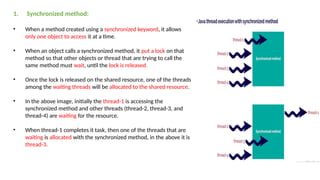
1. Synchronized method:
•When a method created using a synchronized keyword, it allows
only one object to access it at a time.
• When an object calls a synchronized method, it put a lock on that
method so that other objects or thread that are trying to call the
same method must wait, until the lock is released.
• Once the lock is released on the shared resource, one of the threads
among the waiting threads will be allocated to the shared resource.
• In the above image, initially the thread-1 is accessing the
synchronized method and other threads (thread-2, thread-3, and
thread-4) are waiting for the resource.
• When thread-1 completes it task, then one of the threads that are
waiting is allocated with the synchronized method, in the above it is
thread-3.
47.
class Booking
{
private intavailableSeats;
public Booking(int availableSeats)
{
this.availableSeats = availableSeats;
}
public synchronized void bookSeat(int seatsRequested, String name)
{
if (seatsRequested <= availableSeats)
{
System.out.println(seatsRequested + " seat(s) booked for " + name);
availableSeats -= seatsRequested;
}
else
{
System.out.println("Sorry, " + name + ". Not enough seats available.");
}
}
}
class BookingThread extends Thread
{
private Booking b;
private int seatsRequested;
private String name;
public BookingThread(Booking b, int seatsRequested,
String name)
{
this.b= b;
this.seatsRequested = seatsRequested;
this.name = name;
}
@Override20
public void run()
{
b.bookSeat(seatsRequested, name);
}
}
public class Example
{
public static void main(String[] args)
{
Booking b= new Booking(10); // 10 seats available
BookingThread t1= new BookingThread(b, 3, "Ram");
BookingThread t2= new BookingThread(b, 4, "Raghav");
BookingThread t3= new BookingThread(b, 5, "Ravi");
t1.start();
t2.start();
t3.start();
}
}
48.
class Table
{
synchronized voidprint(int n)
{
for(int i = 1; i <= 10; i++)
System.out.println(n + " * " + i + " = " + i*n);
}
}
class Thread1 extends Thread
{
Table t= new Table();
int number;
Thread1 (Table t, int number)
{
this.t= t;
this.number = number;
}
public void run()
{
t.print(number);
}
}
class Thread2 extends Thread
{
Table t= new Table();
int number;
Thread2(Table t, int number)
{
this.t= t;
this.number = number;
}
public void run() {
t.print(number);
}
}
public class Example
{
public static void main(String[] args)
{
Table t= new Table();
Thread1 t1= new Thread1(t, 5);
Thread2 t2 = new Thread2(t, 10);
t1.start();
t2.start();
}
}
49.
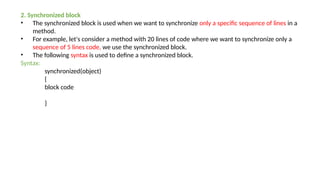
2. Synchronized block
•The synchronized block is used when we want to synchronize only a specific sequence of lines in a
method.
• For example, let's consider a method with 20 lines of code where we want to synchronize only a
sequence of 5 lines code, we use the synchronized block.
• The following syntax is used to define a synchronized block.
Syntax:
synchronized(object)
{
block code
}
50.
class Table
{
void print(intn)
{
synchronized (this)
{
for(int i = 1; i <= 10; i++)
System.out.println(n + " * " + i + " = " + i*n);
}
}
}
class Thread1 extends Thread
{
Table t= new Table();
int number;
Thread1 (Table t, int number)
{
this.t= t;
this.number = number;
}
public void run()
{
t.print(number);
}
}
class Thread2 extends Thread
{
Table t= new Table();
int number;
Thread2(Table t, int number)
{
this.t= t;
this.number = number;
}
public void run() {
t.print(number);
}
}
public class Example
{
public static void main(String[] args)
{
Table t= new Table();
Thread1 t1= new Thread1(t, 5);
Thread2 t2 = new Thread2(t, 10);
t1.start();
t2.start();
}
}
51.
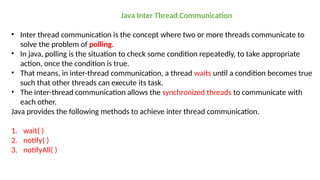
Java Inter ThreadCommunication
• Inter thread communication is the concept where two or more threads communicate to
solve the problem of polling.
• In java, polling is the situation to check some condition repeatedly, to take appropriate
action, once the condition is true.
• That means, in inter-thread communication, a thread waits until a condition becomes true
such that other threads can execute its task.
• The inter-thread communication allows the synchronized threads to communicate with
each other.
Java provides the following methods to achieve inter thread communication.
1. wait( )
2. notify( )
3. notifyAll( )
52.
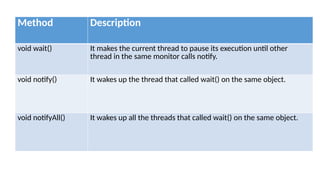
Method Description
void wait()It makes the current thread to pause its execution until other
thread in the same monitor calls notify.
void notify() It wakes up the thread that called wait() on the same object.
void notifyAll() It wakes up all the threads that called wait() on the same object.
53.
Let's look atan example problem of producer and consumer.
• The producer produces the item and the consumer consumes the same.
• But here, the consumer can not consume until the producer produces the item, and producer can
not produce until the consumer consumes the item that already been produced.
• So here, the consumer has to wait until the producer produces the item, and the producer also
needs to wait until the consumer consumes the same.
• Here we use the inter-thread communication to implement the producer and consumer problem.
Real-Time Example: Producer-Consumer Problem
Let’s consider an online food delivery system where:
• The Chef (Producer) prepares food and notifies the delivery person.
• The Delivery Person (Consumer) waits until the food is ready and then delivers it.
Thread Groups:
A ThreadGroup is a way to group multiple threads together so you can manage them as a single unit.
This is helpful when:
• You want to handle multiple threads together (e.g., stop or interrupt them).
• You want better organization in multi-threaded applications.
syntax: ThreadGroup group = new ThreadGroup("MyGroup");
public class ThreadGroupExample
{
public static void main(String[] args)
{
ThreadGroup group = new ThreadGroup("MyThreadGroup");
Runnable task = () -> { System.out.println(Thread.currentThread().getName() + " is running"); };
Thread t1 = new Thread(group, task, "Thread-A");
Thread t2 = new Thread(group, task, "Thread-B");
t1.start();
t2.start();
System.out.println("Active threads: " + group.activeCount());
group.list(); // Print thread group info
}
}
58.
Daemon Thread:
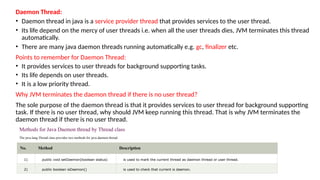
• Daemonthread in java is a service provider thread that provides services to the user thread.
• Its life depend on the mercy of user threads i.e. when all the user threads dies, JVM terminates this thread
automatically.
• There are many java daemon threads running automatically e.g. gc, finalizer etc.
Points to remember for Daemon Thread:
• It provides services to user threads for background supporting tasks.
• Its life depends on user threads.
• It is a low priority thread.
Why JVM terminates the daemon thread if there is no user thread?
The sole purpose of the daemon thread is that it provides services to user thread for background supporting
task. If there is no user thread, why should JVM keep running this thread. That is why JVM terminates the
daemon thread if there is no user thread.
Methods for Java Daemon thread by Thread class
The java.lang.Thread class provides two methods for java daemon thread.
No. Method Description
1) public void setDaemon(boolean status) is used to mark the current thread as daemon thread or user thread.
2) public boolean isDaemon() is used to check that current is daemon.
59.
Program:
public class Testextends Thread
{
public void run()
{
if(Thread.currentThread().isDaemon())
{ //checking for daemon thread
System.out.println("daemon thread work");
}
else
{
System.out.println("user thread work");
}
}
public static void main(String[] args)
{
Test t1=new Test(); //creating thread
Test t2=new Test();
Test t3=new Test();
t1.setDaemon(true); //now t1 is daemon thread
t1.start();//starting threads
t2.start();
t3.start();
}
}
Output
daemon thread work
user thread work
user thread work
60.
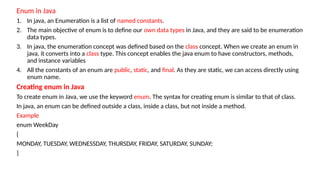
Enum in Java
1.In java, an Enumeration is a list of named constants.
2. The main objective of enum is to define our own data types in Java, and they are said to be enumeration
data types.
3. In java, the enumeration concept was defined based on the class concept. When we create an enum in
java, it converts into a class type. This concept enables the java enum to have constructors, methods,
and instance variables
4. All the constants of an enum are public, static, and final. As they are static, we can access directly using
enum name.
Creating enum in Java
To create enum in Java, we use the keyword enum. The syntax for creating enum is similar to that of class.
In java, an enum can be defined outside a class, inside a class, but not inside a method.
Example
enum WeekDay
{
MONDAY, TUESDAY, WEDNESSDAY, THURSDAY, FRIDAY, SATURDAY, SUNDAY;
}
61.
Program:
enum Day
{
MONDAY, TUESDAY,WEDNESDAY, THURSDAY, FRIDAY, SATURDAY, SUNDAY
}
public class EnumDemo
{
public static void main(String[] args)
{
Day today = Day.WEDNESDAY;
switch (today)
{
case MONDAY:
System.out.println("It's Monday. Let's start the week!");
break;
case WEDNESDAY:
System.out.println("It's Wednesday. Halfway through!");
break;
case FRIDAY:
System.out.println("It's Friday. Weekend is near!");
break;
default:
System.out.println("Just another day: " + today);
}
}
}
Output:
It's Wednesday. Halfway through!
62.
Autoboxing in Java
•In java, the process of converting a primitive type value into its corresponding wrapper class object is called
autoboxing or simply boxing.
For example, converting an int value to an Integer class object.
• The compiler automatically performs the autoboxing when a primitive type value has assigned to an object of the
corresponding wrapper class.
valueOf( ):
Example - Autoboxing
import java.lang.*;
public class AutoBoxingExample
{
public static void main(String[] args)
{
//Auto boxing : primitive to Wrapper
int num = 100;
Integer i = num;
Integer j = Integer.valueOf(num);
System.out.println("num = " + num + ", i = " + i + ", j = " +j);
}
}
63.
Auto un-boxing inJava
• In java, the process of converting an object of a wrapper class type to a primitive type value is called auto un-boxing or simply
unboxing. For example, converting an Integer object to an int value.
• The compiler automatically performs the auto un-boxing when a wrapper class object has assigned to aprimitive type.
• We can also perform auto un-boxing manually using the method intValue( ), which is provided by Integer wrapper class.
Similarly every wrapper class has a method for auto un-boxing.
Example - Auto unboxing
import java.lang.*;
public class AutoUnboxingExample
{
public static void main(String[] args)
{//Auto un-boxing : Wrapper to primitive
Integer num = 200;
int i = num;
int j = num.intValue();
System.out.println("num = " + num + ", i = " + i + ", j = " + j);
}
}
64.
Generics in Java
Thejava generics is a language feature that allows creating methods and class which can handle any type of data values.
The generic programming is a way to write generalized programs, java supports it by java generics.
The java generics allows only non-primitive type, it does not support primitive types like int, float, char, etc.
1. Generic Method
2. Generic Classes
Generic methods in Java
• The java generics allows creating generic methods which can work with a different type of data values.
• Using a generic method, we can create a single method that can be called with arguments of different types. Based on the types of the arguments passed
to the generic method, the compiler handles each method call appropriately.
Example - Generic method
public class GenericMethodExample
{
// Generic method to print any type of object
public static <T> void printArray(T[] array)
{
for (T element : array)
{
System.out.println(element);
}
}
public static void main(String[] args)
{ // Integer array
Integer[] intArray = {1, 2, 3, 4, 5};
System.out.println("Integer Array:");
printArray(intArray); // Calling the generic method
String[] strArray = {"Hello", "Generics", "In", "Java"}; // String array
System.out.println("nString Array:");
printArray(strArray); // Calling the generic method
}
}
Output:
Integer Array:
1
2
3
4
5
String Array:
Hello
Generics
In
Java
65.
Generic Class inJava
In java, a class can be defined as a generic class that allows creating a class that can work with different types.
A generic class declaration looks like a non-generic class declaration, except that the class name is followed by a type parameter
section.
Example - Generic class
class MyBox<T>
{
private T value;
public void setValue(T value)
{
this.value = value;
}
public T getValue()
{
return value;
}
}
public class GenericTest
{
public static void main(String[] args)
{
MyBox<Integer> intBox = new MyBox<>(); // Using Integer type
intBox.setValue(10);
System.out.println("Integer Value: " + intBox.getValue());
MyBox<String> strBox = new MyBox<>(); // Using String type
strBox.setValue("Hello Generics");
System.out.println("String Value: " + strBox.getValue());
}
}
Output:
Integer Value: 10
String Value: Hello
Generics
66.
Annotations are aform of metadata
• They provide information about the code, but they don’t change how the code works.
• They are prefixed with @ and are used to give instructions to the compiler, tools, or frameworks.
Common Uses of Annotations:
• Compiler instructions
• Code analysis tools
• Runtime processing (especially in frameworks like Spring, JUnit, etc.)
Annotation Description
@Override Indicates a method is overiding a superclass method.
@Deprecated Marks a method/Class as outdated.
@SuppressWarnings Tells the compiler to ignore warnings.
Example:
class Animal {
void sound() {
System.out.println("Animal sound");
}
}
class Dog extends Animal {
@Override
void sound() {
System.out.println("Bark");
}
![Problem without exception handling
Example 1
public class TryCatchExample1
{
public static void main(String[] args)
{
int data=50/0; //may throw exception
System.out.println("rest of the code");
}
}
Output:
Exception in thread "main" java.lang.ArithmeticException: /
by zero
Solution by exception handling
Example 2
public class TryCatchExample2
{
public static void main(String[] args)
{
try
{
int data=50/0; //may throw exception
} //handling the exception
catch(ArithmeticException e)
{
System.out.println(e);
}
System.out.println("rest of the code");
}
}
Output:
java.lang.ArithmeticException: / by zero
rest of the code](https://image.slidesharecdn.com/unit-3-251224090436-462b73ad/85/java-programming-notes-notes-unit-3-pptx-12-320.jpg)
![Java Exception Handling Example
Let's see an example of Java Exception Handling in which we are using a try-catch statement to handle the exception.
Program:
public class JavaExceptionExample1
{
public static void main(String args[])
{
try
{ //code that may raise exception
int data=100/0;
}
catch(ArithmeticException e)
{
System.out.println(e);
}
//rest code of the program
System.out.println("rest of the code...");
}
}
Output:
java.lang.ArithmeticException:/ by zero
rest of the code….](https://image.slidesharecdn.com/unit-3-251224090436-462b73ad/85/java-programming-notes-notes-unit-3-pptx-13-320.jpg)
![Program:
public class MultipleCatchBlock1
{
public static void main(String[] args)
{
try
{
int a[]=new int[5];
a[5]=30/0;
}
catch(ArithmeticException e)
{
System.out.println("Arithmetic Exception occurs");
}
catch(ArrayIndexOutOfBoundsException e)
{
System.out.println("ArrayIndexOutOfBounds Exception occurs");
}
catch(Exception e)
{
System.out.println("Parent Exception occurs");
}
System.out.println("rest of the code");
}
}
Output:
Arithmetic Exception occurs
rest of the code](https://image.slidesharecdn.com/unit-3-251224090436-462b73ad/85/java-programming-notes-notes-unit-3-pptx-15-320.jpg)
![Java Nested try Example Program:
public class NestedTryBlock
{
public static void main(String args[])
{ //outer try block
try{ //inner try block 1
try{
System.out.println(“Going to divide by 0");
int b=39/0;
} //catch block of inner try block 1
catch(ArithmeticException e)
{
System.out.println(e);
} //inner try block 2
try{
int a[]=new int[5]; //assigning the value out of array bounds
a[5]=4;
} //catch block of inner try block 2
catch(ArrayIndexOutOfBoundsException e)
{System.out.println(e);
}
System.out.println("other statement");
} //catch block of outer try block
catch(Exception e)
{System.out.println("handled the exception(outer catch)");
}
System.out.println("normal flow..");
}
}
Output:
Going to divide by 0
java.lang.ArithmeticException: / by zero
java.lang.ArrayIndexOutOfBoundsException: 5
other statement
normal flow..](https://image.slidesharecdn.com/unit-3-251224090436-462b73ad/85/java-programming-notes-notes-unit-3-pptx-18-320.jpg)
![Java throw keyword
• The throw keyword is used in programming languages like Java to explicitly throw an exception during the execution of a program.
• We can throw either checked or unchecked exceptions in Java by throw keyword.
• It is mainly used to throw a custom exception.
• It allows developers to signal that an error or exceptional situation has occurred.
Syntax: throw new ExceptionType("Error message");
Program:
public class Example
{
public static void validate(int age)
{
if (age < 18)
{
throw new IllegalException("Not eligible to vote");
}
else {
System.out.println("You are eligible to vote");
}
}
public static void main(String[] args)
{
validate(16); // This will throw an exception
}
}](https://image.slidesharecdn.com/unit-3-251224090436-462b73ad/85/java-programming-notes-notes-unit-3-pptx-19-320.jpg)
![Program:
import java.io.IOException;
public class Example
{
static void checkFile() throws IOException // Method that declares an exception using throws
{
throw new IOException("File not found");
}
public static void main(String[] args)
{
try
{
checkFile(); // Calling the method that throws an exception
}
catch (IOException e)
{
System.out.println("Exception caught: " + e.getMessage());
}
}
}](https://image.slidesharecdn.com/unit-3-251224090436-462b73ad/85/java-programming-notes-notes-unit-3-pptx-21-320.jpg)
![Usage of Java finally program:
class Example
{
public static void main(String args[])
{
try
{
int data=25/5; //below code do not throw any exception
System.out.println(data);
}
catch(ArithmaticException e)
{
System.out.println(“Arithmatic Exception divide ny zero”);
}
finally
{
System.out.println("finally block is always executed");
}
}
}
Output:
5
finally block is always executed](https://image.slidesharecdn.com/unit-3-251224090436-462b73ad/85/java-programming-notes-notes-unit-3-pptx-24-320.jpg)
![class InvalidAgeException extends Exception // Step 1: Create a custom exception class
{
public InvalidAgeException(String message)
{
super(message);
}
}
public class CustomExceptionExample // Step 2: Use the custom exception in a program
{
static void checkAge(int age) throws InvalidAgeException // Method to check age eligibility
{
if (age < 18)
{
throw new InvalidAgeException("Age must be 18 or above to register.");
}
System.out.println("You are eligible to register.");
}
public static void main(String[ ] args) // Main method
{
try
{
checkAge(16); // This will throw an exception
}
catch (InvalidAgeException e)
{
System.out.println("Exception caught: " + e.getMessage());
}
}
}
Output: Exception caught: Age must be 18 or above to register.](https://image.slidesharecdn.com/unit-3-251224090436-462b73ad/85/java-programming-notes-notes-unit-3-pptx-26-320.jpg)
![Program:
class child extends Thread
{
public void run()
{
System.out.println("Thread is under Running...");
for(int i=1;i<=10;i++)
{
System.out.println("i="+i);
}
}
}
public class test
{
public static void main(String[] args)
{
child t1=new child();
System.out.println(“Thread is about to start...");
t1.start();
}
}](https://image.slidesharecdn.com/unit-3-251224090436-462b73ad/85/java-programming-notes-notes-unit-3-pptx-38-320.jpg)
![class MyTask implements Runnable
{
public void run()
{
System.out.println("Thread is running: " + Thread.currentThread().getName());
}
}
public class Example
{
public static void main(String[] args)
{
MyTask t1= new MyTask(); // Create a task
Thread T1= new Thread(t1); // Create a Thread object and pass the task
T1.start(); // Start the thread
}
}](https://image.slidesharecdn.com/unit-3-251224090436-462b73ad/85/java-programming-notes-notes-unit-3-pptx-40-320.jpg)
![class child extends Thread
{ public void run()
{
System.out.println("Inside SampleThread");
System.out.println("Current Thread: " + Thread.currentThread().getName());
}
}
public class Example
{
public static void main(String[] args)
{
child t1 = new child();
child t2 = new child();
t1.setName("first");
t2.setName("second");
t1.setPriority(4);
t2.setPriority(Thread.MAX_PRIORITY);
t1.start();
t2.start();
}
}](https://image.slidesharecdn.com/unit-3-251224090436-462b73ad/85/java-programming-notes-notes-unit-3-pptx-44-320.jpg)
![class Booking
{
private int availableSeats;
public Booking(int availableSeats)
{
this.availableSeats = availableSeats;
}
public synchronized void bookSeat(int seatsRequested, String name)
{
if (seatsRequested <= availableSeats)
{
System.out.println(seatsRequested + " seat(s) booked for " + name);
availableSeats -= seatsRequested;
}
else
{
System.out.println("Sorry, " + name + ". Not enough seats available.");
}
}
}
class BookingThread extends Thread
{
private Booking b;
private int seatsRequested;
private String name;
public BookingThread(Booking b, int seatsRequested,
String name)
{
this.b= b;
this.seatsRequested = seatsRequested;
this.name = name;
}
@Override20
public void run()
{
b.bookSeat(seatsRequested, name);
}
}
public class Example
{
public static void main(String[] args)
{
Booking b= new Booking(10); // 10 seats available
BookingThread t1= new BookingThread(b, 3, "Ram");
BookingThread t2= new BookingThread(b, 4, "Raghav");
BookingThread t3= new BookingThread(b, 5, "Ravi");
t1.start();
t2.start();
t3.start();
}
}](https://image.slidesharecdn.com/unit-3-251224090436-462b73ad/85/java-programming-notes-notes-unit-3-pptx-47-320.jpg)
![class Table
{
synchronized void print(int n)
{
for(int i = 1; i <= 10; i++)
System.out.println(n + " * " + i + " = " + i*n);
}
}
class Thread1 extends Thread
{
Table t= new Table();
int number;
Thread1 (Table t, int number)
{
this.t= t;
this.number = number;
}
public void run()
{
t.print(number);
}
}
class Thread2 extends Thread
{
Table t= new Table();
int number;
Thread2(Table t, int number)
{
this.t= t;
this.number = number;
}
public void run() {
t.print(number);
}
}
public class Example
{
public static void main(String[] args)
{
Table t= new Table();
Thread1 t1= new Thread1(t, 5);
Thread2 t2 = new Thread2(t, 10);
t1.start();
t2.start();
}
}](https://image.slidesharecdn.com/unit-3-251224090436-462b73ad/85/java-programming-notes-notes-unit-3-pptx-48-320.jpg)
![class Table
{
void print(int n)
{
synchronized (this)
{
for(int i = 1; i <= 10; i++)
System.out.println(n + " * " + i + " = " + i*n);
}
}
}
class Thread1 extends Thread
{
Table t= new Table();
int number;
Thread1 (Table t, int number)
{
this.t= t;
this.number = number;
}
public void run()
{
t.print(number);
}
}
class Thread2 extends Thread
{
Table t= new Table();
int number;
Thread2(Table t, int number)
{
this.t= t;
this.number = number;
}
public void run() {
t.print(number);
}
}
public class Example
{
public static void main(String[] args)
{
Table t= new Table();
Thread1 t1= new Thread1(t, 5);
Thread2 t2 = new Thread2(t, 10);
t1.start();
t2.start();
}
}](https://image.slidesharecdn.com/unit-3-251224090436-462b73ad/85/java-programming-notes-notes-unit-3-pptx-50-320.jpg)
![class Producer implements Runnable
{
ItemQueue i;
Producer(ItemQueue i)
{
this.i= i;
new Thread(this, "Producer").start();
}
public void run()
{
int i = 0;
while(true)
{
i.putItem(i++);
}
}
}
class Consumer implements Runnable
{
ItemQueue i;
Consumer(ItemQueue i)
{
this.i= i;
new Thread(this, "Consumer").start();
}
public void run()
{
while(true)
{
i.getItem();
}
}
}
class ProducerConsumer
{
public static void main(String args[])
{
ItemQueue i= new ItemQueue();
new Producer(i);
new Consumer(i);
}
}](https://image.slidesharecdn.com/unit-3-251224090436-462b73ad/85/java-programming-notes-notes-unit-3-pptx-55-320.jpg)
![Thread Groups:
A Thread Group is a way to group multiple threads together so you can manage them as a single unit.
This is helpful when:
• You want to handle multiple threads together (e.g., stop or interrupt them).
• You want better organization in multi-threaded applications.
syntax: ThreadGroup group = new ThreadGroup("MyGroup");
public class ThreadGroupExample
{
public static void main(String[] args)
{
ThreadGroup group = new ThreadGroup("MyThreadGroup");
Runnable task = () -> { System.out.println(Thread.currentThread().getName() + " is running"); };
Thread t1 = new Thread(group, task, "Thread-A");
Thread t2 = new Thread(group, task, "Thread-B");
t1.start();
t2.start();
System.out.println("Active threads: " + group.activeCount());
group.list(); // Print thread group info
}
}](https://image.slidesharecdn.com/unit-3-251224090436-462b73ad/85/java-programming-notes-notes-unit-3-pptx-57-320.jpg)
![Program:
public class Test extends Thread
{
public void run()
{
if(Thread.currentThread().isDaemon())
{ //checking for daemon thread
System.out.println("daemon thread work");
}
else
{
System.out.println("user thread work");
}
}
public static void main(String[] args)
{
Test t1=new Test(); //creating thread
Test t2=new Test();
Test t3=new Test();
t1.setDaemon(true); //now t1 is daemon thread
t1.start();//starting threads
t2.start();
t3.start();
}
}
Output
daemon thread work
user thread work
user thread work](https://image.slidesharecdn.com/unit-3-251224090436-462b73ad/85/java-programming-notes-notes-unit-3-pptx-59-320.jpg)
![Program:
enum Day
{
MONDAY, TUESDAY, WEDNESDAY, THURSDAY, FRIDAY, SATURDAY, SUNDAY
}
public class EnumDemo
{
public static void main(String[] args)
{
Day today = Day.WEDNESDAY;
switch (today)
{
case MONDAY:
System.out.println("It's Monday. Let's start the week!");
break;
case WEDNESDAY:
System.out.println("It's Wednesday. Halfway through!");
break;
case FRIDAY:
System.out.println("It's Friday. Weekend is near!");
break;
default:
System.out.println("Just another day: " + today);
}
}
}
Output:
It's Wednesday. Halfway through!](https://image.slidesharecdn.com/unit-3-251224090436-462b73ad/85/java-programming-notes-notes-unit-3-pptx-61-320.jpg)
![Autoboxing in Java
• In java, the process of converting a primitive type value into its corresponding wrapper class object is called
autoboxing or simply boxing.
For example, converting an int value to an Integer class object.
• The compiler automatically performs the autoboxing when a primitive type value has assigned to an object of the
corresponding wrapper class.
valueOf( ):
Example - Autoboxing
import java.lang.*;
public class AutoBoxingExample
{
public static void main(String[] args)
{
//Auto boxing : primitive to Wrapper
int num = 100;
Integer i = num;
Integer j = Integer.valueOf(num);
System.out.println("num = " + num + ", i = " + i + ", j = " +j);
}
}](https://image.slidesharecdn.com/unit-3-251224090436-462b73ad/85/java-programming-notes-notes-unit-3-pptx-62-320.jpg)
![Auto un-boxing in Java
• In java, the process of converting an object of a wrapper class type to a primitive type value is called auto un-boxing or simply
unboxing. For example, converting an Integer object to an int value.
• The compiler automatically performs the auto un-boxing when a wrapper class object has assigned to aprimitive type.
• We can also perform auto un-boxing manually using the method intValue( ), which is provided by Integer wrapper class.
Similarly every wrapper class has a method for auto un-boxing.
Example - Auto unboxing
import java.lang.*;
public class AutoUnboxingExample
{
public static void main(String[] args)
{//Auto un-boxing : Wrapper to primitive
Integer num = 200;
int i = num;
int j = num.intValue();
System.out.println("num = " + num + ", i = " + i + ", j = " + j);
}
}](https://image.slidesharecdn.com/unit-3-251224090436-462b73ad/85/java-programming-notes-notes-unit-3-pptx-63-320.jpg)
![Generics in Java
The java generics is a language feature that allows creating methods and class which can handle any type of data values.
The generic programming is a way to write generalized programs, java supports it by java generics.
The java generics allows only non-primitive type, it does not support primitive types like int, float, char, etc.
1. Generic Method
2. Generic Classes
Generic methods in Java
• The java generics allows creating generic methods which can work with a different type of data values.
• Using a generic method, we can create a single method that can be called with arguments of different types. Based on the types of the arguments passed
to the generic method, the compiler handles each method call appropriately.
Example - Generic method
public class GenericMethodExample
{
// Generic method to print any type of object
public static <T> void printArray(T[] array)
{
for (T element : array)
{
System.out.println(element);
}
}
public static void main(String[] args)
{ // Integer array
Integer[] intArray = {1, 2, 3, 4, 5};
System.out.println("Integer Array:");
printArray(intArray); // Calling the generic method
String[] strArray = {"Hello", "Generics", "In", "Java"}; // String array
System.out.println("nString Array:");
printArray(strArray); // Calling the generic method
}
}
Output:
Integer Array:
1
2
3
4
5
String Array:
Hello
Generics
In
Java](https://image.slidesharecdn.com/unit-3-251224090436-462b73ad/85/java-programming-notes-notes-unit-3-pptx-64-320.jpg)
![Generic Class in Java
In java, a class can be defined as a generic class that allows creating a class that can work with different types.
A generic class declaration looks like a non-generic class declaration, except that the class name is followed by a type parameter
section.
Example - Generic class
class MyBox<T>
{
private T value;
public void setValue(T value)
{
this.value = value;
}
public T getValue()
{
return value;
}
}
public class GenericTest
{
public static void main(String[] args)
{
MyBox<Integer> intBox = new MyBox<>(); // Using Integer type
intBox.setValue(10);
System.out.println("Integer Value: " + intBox.getValue());
MyBox<String> strBox = new MyBox<>(); // Using String type
strBox.setValue("Hello Generics");
System.out.println("String Value: " + strBox.getValue());
}
}
Output:
Integer Value: 10
String Value: Hello
Generics](https://image.slidesharecdn.com/unit-3-251224090436-462b73ad/85/java-programming-notes-notes-unit-3-pptx-65-320.jpg)