What Is Programmingand Program Development Life Cycle ?
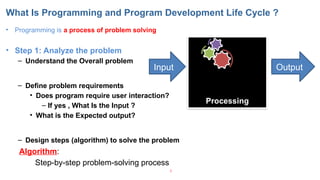
• Programming is a process of problem solving
• Step 1: Analyze the problem
– Understand the Overall problem
– Define problem requirements
• Does program require user interaction?
– If yes , What Is the Input ?
• What is the Expected output?
– Design steps (algorithm) to solve the problem
3
Output
Processing
Input
Algorithm:
Step-by-step problem-solving process
4.
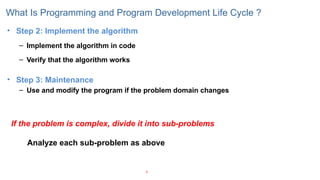
• Step 2:Implement the algorithm
– Implement the algorithm in code
– Verify that the algorithm works
• Step 3: Maintenance
– Use and modify the program if the problem domain changes
4
What Is Programming and Program Development Life Cycle ?
If the problem is complex, divide it into sub-problems
Analyze each sub-problem as above
5.
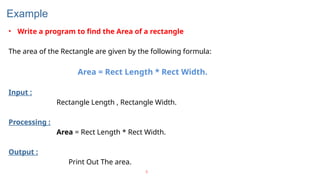
Example
• Write aprogram to find the Area of a rectangle
The area of the Rectangle are given by the following formula:
Area = Rect Length * Rect Width.
Input :
Rectangle Length , Rectangle Width.
Processing :
Area = Rect Length * Rect Width.
Output :
Print Out The area.
5
Processing a JavaProgram
13
Source Code
Create/Modify Source Code
Compile Source Code
i.e., javac Welcome.java
Bytecode
Run Byteode
i.e., java Welcome
Result
If compilation errors
If runtime errors or incorrect result
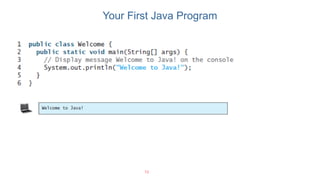
public class Welcome {
public static void main(String[] args) {
System.out.println("Welcome to Java!");
}
}
…
Method Welcome()
0 aload_0
…
Method void main(java.lang.String[])
0 getstatic #2 …
3 ldc #3 <String "Welcome to
Java!">
5 invokevirtual #4 …
8 return
Saved on the disk
stored on the disk
Source code (developed by the programmer)
Byte code (generated by the compiler for JVM
to read and interpret, not for you to understand)
14.
14
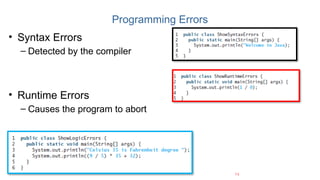
Programming Errors
• SyntaxErrors
– Detected by the compiler
• Runtime Errors
– Causes the program to abort
• Logic Errors
– Produces incorrect result
15.
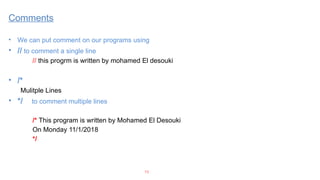
• We canput comment on our programs using
• // to comment a single line
// this progrm is written by mohamed El desouki
• /*
Mulitple Lines
• */ to comment multiple lines
/* This program is written by Mohamed El Desouki
On Monday 11/1/2018
*/
15
Comments
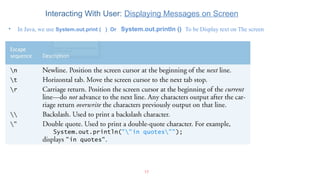
Interacting With User:Displaying Messages on Screen
• In Java, we use System.out.print ( ) Or System.out.println () To be Display text on The screen
17
18.
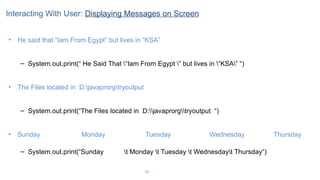
• He saidthat “Iam From Egypt” but lives in “KSA”
– System.out.print(“ He Said That “Iam From Egypt ” but lives in “KSA” “)
• The Files located in D:javaprorgtryoutput
– System.out.print(“The Files located in D:javaprorgtryoutput “)
• Sunday Monday Tuesday Wednesday Thursday
– System.out.print(“Sunday t Monday t Tuesday t Wednesdayt Thursday“)
18
Interacting With User: Displaying Messages on Screen
Java Data Types
22
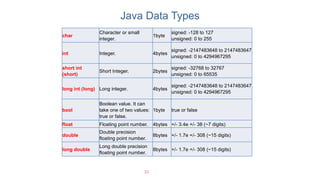
char
Characteror small
integer.
1byte
signed: -128 to 127
unsigned: 0 to 255
int Integer. 4bytes
signed: -2147483648 to 2147483647
unsigned: 0 to 4294967295
short int
(short)
Short Integer. 2bytes
signed: -32768 to 32767
unsigned: 0 to 65535
long int (long) Long integer. 4bytes
signed: -2147483648 to 2147483647
unsigned: 0 to 4294967295
bool
Boolean value. It can
take one of two values:
true or false.
1byte true or false
float Floating point number. 4bytes +/- 3.4e +/- 38 (~7 digits)
double
Double precision
floating point number.
8bytes +/- 1.7e +/- 308 (~15 digits)
long double
Long double precision
floating point number.
8bytes +/- 1.7e +/- 308 (~15 digits)
23.
23
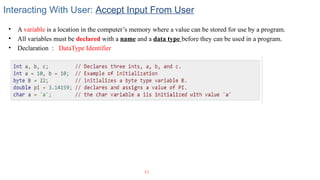
Interacting With User:Accept Input From User
• A variable is a location in the computer’s memory where a value can be stored for use by a program.
• All variables must be declared with a name and a data type before they can be used in a program.
• Declaration : DataType Identifier
24.
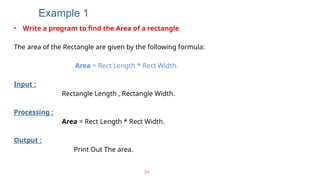
Example 1
• Writea program to find the Area of a rectangle
The area of the Rectangle are given by the following formula:
Area = Rect Length * Rect Width.
Input :
Rectangle Length , Rectangle Width.
Processing :
Area = Rect Length * Rect Width.
Output :
Print Out The area.
24
25.
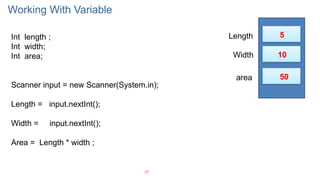
Working With Variable
25
Intlength ;
Int width;
Int area;
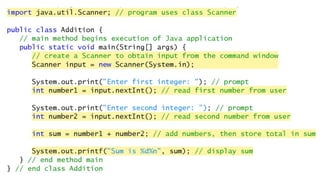
Scanner input = new Scanner(System.in);
Length = input.nextInt();
Width = input.nextInt();
Area = Length * width ;
Length
Width
area
5
10
50
26.
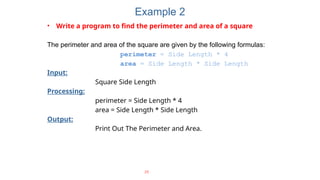
Example 2
• Writea program to find the perimeter and area of a square
The perimeter and area of the square are given by the following formulas:
perimeter = Side Length * 4
area = Side Length * Side Length
Input:
Square Side Length
Processing:
perimeter = Side Length * 4
area = Side Length * Side Length
Output:
Print Out The Perimeter and Area.
26
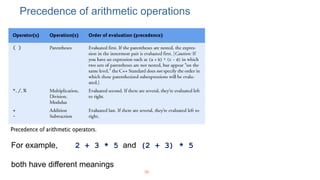
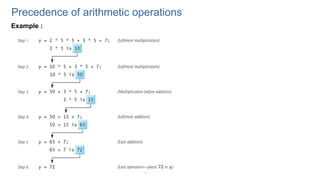
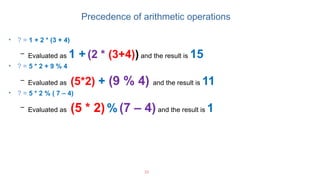
• ? =1 + 2 * (3 + 4)
– Evaluated as 1 + (2 * (3+4)) and the result is 15
• ? = 5 * 2 + 9 % 4
– Evaluated as (5*2) + (9 % 4) and the result is 11
• ? = 5 * 2 % ( 7 – 4)
– Evaluated as (5 * 2) % (7 – 4) and the result is 1
32
Precedence of arithmetic operations
33.
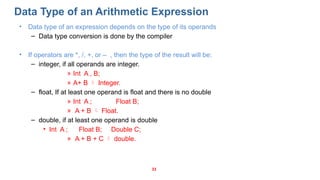
Data Type ofan Arithmetic Expression
• Data type of an expression depends on the type of its operands
– Data type conversion is done by the compiler
• If operators are *, /, +, or – , then the type of the result will be:
– integer, if all operands are integer.
» Int A , B;
» A+ B Integer.
– float, If at least one operand is float and there is no double
» Int A ; Float B;
» A + B Float.
– double, if at least one operand is double
• Int A ; Float B; Double C;
» A + B + C double.
33
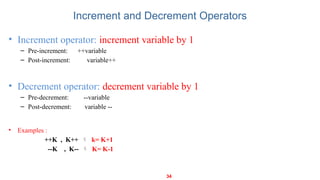
Increment and DecrementOperators
• If the value produced by ++ or – – is not used in an expression, it does not matter whether it is a
pre or a post increment (or decrement).
• When ++ (or – –) is used before the variable name, the computer first increments (or
decrements) the value of the variable and then uses its new value to evaluate the expression.
• When ++ (or – –) is used after the variable name, the computer uses the current value of the
variable to evaluate the expression, and then it increments (or decrements) the value of the
variable.
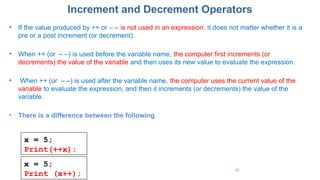
• There is a difference between the following
35
x = 5;
Print(++x);
x = 5;
Print (x++);
36.
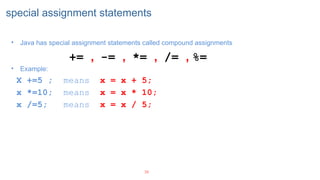
special assignment statements
36
•Java has special assignment statements called compound assignments
+= , -= , *= , /= , %=
• Example:
X +=5 ; means x = x + 5;
x *=10; means x = x * 10;
x /=5; means x = x / 5;
Control Statements
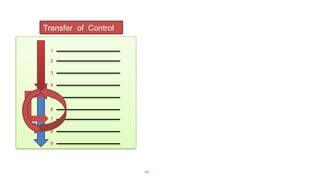
• Normally,statements in a program are executed one after the other in the order in which they’re written.
• This is called sequential execution.
• There are control statements enable you to specify that the next statement to be executed may be other than
the next one in sequence.
• This is called transfer of control.
• The control statements are categorized in almost two groups:
Selection control statements
Repetition control statements
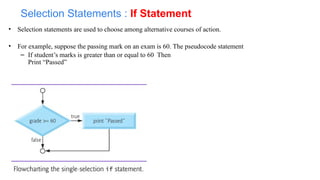
• Selection statementsare used to choose among alternative courses of action.
• For example, suppose the passing mark on an exam is 60. The pseudocode statement
– If student’s marks is greater than or equal to 60 Then
Print “Passed”
Selection Statements : If Statement
42.
42
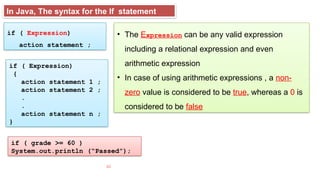
if ( Expression)
actionstatement ;
if ( Expression)
{
action statement 1 ;
action statement 2 ;
.
.
action statement n ;
}
In Java, The syntax for the If statement
if ( grade >= 60 )
System.out.println (“Passed”);
• The Expression can be any valid expression
including a relational expression and even
arithmetic expression
• In case of using arithmetic expressions , a non-
zero value is considered to be true, whereas a 0 is
considered to be false
43.
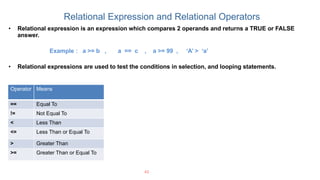
Relational Expression andRelational Operators
43
Operator Means
== Equal To
!= Not Equal To
< Less Than
<= Less Than or Equal To
> Greater Than
>= Greater Than or Equal To
• Relational expression is an expression which compares 2 operands and returns a TRUE or FALSE
answer.
Example : a >= b , a == c , a >= 99 , ‘A’ > ‘a’
• Relational expressions are used to test the conditions in selection, and looping statements.
44.
Example : writea program that accept an integer from the user and in case this integer is even print out
the following message
“This number is even “ .
44
Selection Statements : If Statement
45.
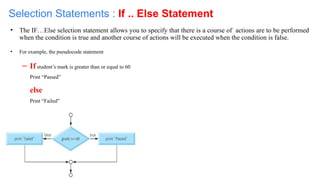
• The IF…Elseselection statement allows you to specify that there is a course of actions are to be performed
when the condition is true and another course of actions will be executed when the condition is false.
• For example, the pseudocode statement
– If student’s mark is greater than or equal to 60
Print “Passed”
else
Print “Failed”
Selection Statements : If .. Else Statement
46.
46
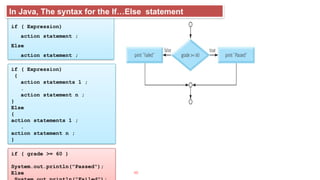
if ( Expression)
actionstatement ;
Else
action statement ;
if ( Expression)
{
action statements 1 ;
.
action statement n ;
}
Else
{
action statements 1 ;
.
action statement n ;
}
In Java, The syntax for the If…Else statement
if ( grade >= 60 )
System.out.println("Passed“);
Else
47.
Example : writea program that accept an integer from the user and
print out whether it is Positive or Negative number.
47
Selection Statements : If – else Statement
Nested If
49
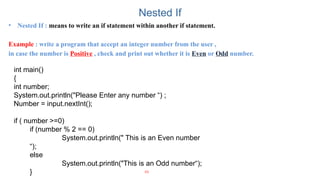
• NestedIf : means to write an if statement within another if statement.
Example : write a program that accept an integer number from the user ,
in case the number is Positive , check and print out whether it is Even or Odd number.
int main()
{
int number;
System.out.println("Please Enter any number “) ;
Number = input.nextInt();
if ( number >=0)
if (number % 2 == 0)
System.out.println(" This is an Even number
“);
else
System.out.println("This is an Odd number“);
}
50.
IF – ElseIF statement
50
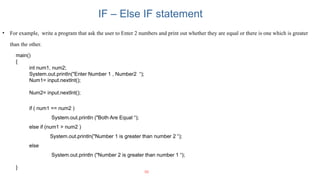
• For example, write a program that ask the user to Enter 2 numbers and print out whether they are equal or there is one which is greater
than the other.
main()
{
int num1, num2;
System.out.println("Enter Number 1 , Number2 “);
Num1= input.nextInt();
Num2= input.nextInt();
if ( num1 == num2 )
System.out.println ("Both Are Equal “);
else if (num1 > num2 )
System.out.println("Number 1 is greater than number 2 “);
else
System.out.println ("Number 2 is greater than number 1 “);
}
51.
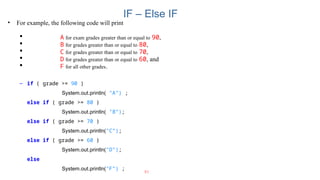
IF – ElseIF
51
• For example, the following code will print
A for exam grades greater than or equal to 90,
B for grades greater than or equal to 80,
C for grades greater than or equal to 70,
D for grades greater than or equal to 60, and
F for all other grades.
– if ( grade >= 90 )
System.out.println( "A“) ;
else if ( grade >= 80 )
System.out.println( "B”);
else if ( grade >= 70 )
System.out.println("C”);
else if ( grade >= 60 )
System.out.println("D”);
else
System.out.println("F“) ;
52.
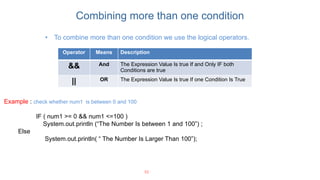
Combining more thanone condition
52
Operator Means Description
&& And The Expression Value Is true If and Only IF both
Conditions are true
|| OR The Expression Value Is true If one Condition Is True
• To combine more than one condition we use the logical operators.
Example : check whether num1 is between 0 and 100
IF ( num1 >= 0 && num1 <=100 )
System.out.println (“The Number Is between 1 and 100”) ;
Else
System.out.println( “ The Number Is Larger Than 100”);
53.
53
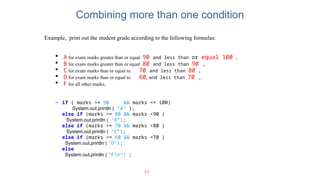
Example, print outthe student grade according to the following formulas:
A for exam marks greater than or equal 90 and less than or equal 100 ,
B for exam marks greater than or equal 80 and less than 90 ,
C for exam marks than or equal to 70 and less than 80 ,
D for exam marks than or equal to 60, and less than 70 ,
F for all other marks.
– if ( marks >= 90 && marks <= 100)
System.out.println ( "A“ );
else if (marks >= 80 && marks <90 )
System.out.println ( "B”);
else if (marks >= 70 && marks <80 )
System.out.println ( "C”);
else if (marks >= 60 && marks <70 )
System.out.println ( "D”);
else
System.out.println ( "Fn“) ;
Combining more than one condition
54.
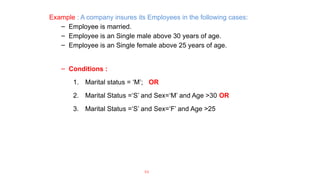
Example : Acompany insures its Employees in the following cases:
– Employee is married.
– Employee is an Single male above 30 years of age.
– Employee is an Single female above 25 years of age.
– Conditions :
1. Marital status = ‘M’; OR
2. Marital Status =‘S’ and Sex=‘M’ and Age >30 OR
3. Marital Status =‘S’ and Sex=‘F’ and Age >25
54
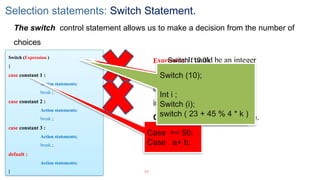
Selection statements: SwitchStatement.
57
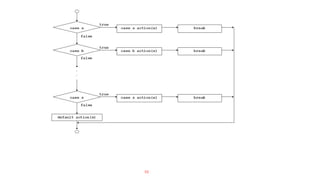
The switch control statement allows us to make a decision from the number of
choices
Switch (Expression )
{
case constant 1 :
Action statements;
break ;
case constant 2 :
Action statements;
break ;
case constant 3 :
Action statements;
break ;
default :
Action statements;
}
Expression It could be an integer
constant like 1, 2 or 3, or an
expression that evaluates to an
integer .
Constant : is a specific value.
Switch (10.0);
float i ;
Switch (i);
switch ( i + j * k )
switch ( 23 + 45 % 4 * k
)
Case >= 50;
Case a+ b;
Switch (10);
Int i ;
Switch (i);
switch ( 23 + 45 % 4 * k )
59
1. The switchStatement
public static void main (String[] args)
{
//Declaration section
Scanner read = new Scanner (System.in);
char grade;
String message;
//input section
grade = read.next().charAt(0);
//processing section
switch (grade)
{
case ‘A’: message = “Excellent”;
break;
case ‘B’: message = “Very Good”;
break;
case ‘C’: message = “Good”;
break;
case ‘D’: message = “Fair”;
break;
case ‘F’: message = “Failed”;
break;
default: message =“The grade is invalid”;
} //end switch
//output section
System.out.println (message);
} //end main
1
2
3
4
5
6
7
8
9
10
11
12
13
14
15
16
17
18
19
20
21
22
23
24
25
26
if (grade == ‘A’)
message = “Excellent”;
Else if (grade == ‘B’)
message = “Very Good”;
else if (grade == ‘C’)
message = “Good”;
else if (grade == ‘D’)
message = “Fair”;
else if (grade == ‘F’)
message = “Fail”;
else message = “The grade is invalid”;
System.out.println (message);
60.
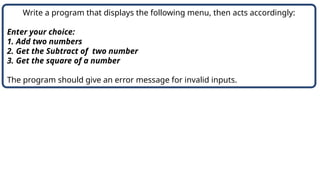
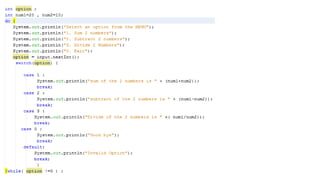
Write a programthat displays the following menu, then acts accordingly:
Enter your choice:
1. Add two numbers
2. Get the Subtract of two number
3. Get the square of a number
The program should give an error message for invalid inputs.
61.
public static voidmain (String[] args)
{
Scanner read = new Scanner (System.in);
int choice, num1, num2, result = -1;
String message = “Invalid input”;
System.out.println (“Enter your choice:”);
System.out.println (“1. Add two numbers”);
System.out.println (“2. Get the double of a positive number”);
System.out.println (“3. Get the square of a number”);
choice = read.nextInt();
//processing section
switch (choice)
{
case 1: System.out.println (“Enter two positive integers”); //prompt
num1 = read.nextInt();
num2 = read.nextInt();
result = num1 + num2; // the value of result is no more equal to -1
break;
case 2: System.out.println (“Enter a positive integer”); //prompt
num1 = read.nextInt();
num2 = read.nextInt();
result = num1 – num2;
break;
case 3: System.out.println (“Enter an integer”); //prompt
num1 = read.nextInt();
result = num1 * num1; // the value of result is no more equal to -1
break;
default: message =“Invalid value of choice”; //no change to “result” result=-1
} //end switch
62.
public static voidmain (String[] args)
{
//Declaration section
Scanner read = new Scanner (System.in);
char letter;
String vowel = “This is a vowel”;
//input section
letter = read.next().charAt(0);
//processing section
switch (letter)
{
case ‘a’:
case ‘e’:
case ‘o’:
case ‘i’:
case ‘u’: System.out.println (vowel);
break;
default: System.out.println (“This is not a vowel”);
} //end switch
} //end main
6
2
When the same action is to be taken for several case labels, then we may write the
program as follows:
This is equivalent to:
if (letter==‘a’) || (letter==‘e’) ||
(letter==‘o’) || (letter==‘i’) ||
(letter==‘u’)
System.out.println (vowel);
63.
6
3
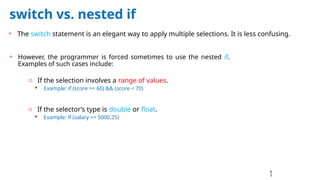
switch vs. nestedif
The switch statement is an elegant way to apply multiple selections. It is less confusing.
However, the programmer is forced sometimes to use the nested if.
Examples of such cases include:
o If the selection involves a range of values.
Example: if (score >= 60) && (score < 70)
o If the selector’s type is double or float.
Example: if (salary == 5000.25)
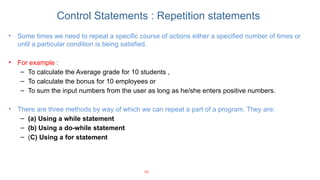
Control Statements :Repetition statements
• Some times we need to repeat a specific course of actions either a specified number of times or
until a particular condition is being satisfied.
• For example :
– To calculate the Average grade for 10 students ,
– To calculate the bonus for 10 employees or
– To sum the input numbers from the user as long as he/she enters positive numbers.
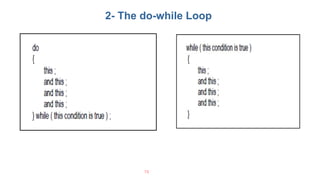
• There are three methods by way of which we can repeat a part of a program. They are:
– (a) Using a while statement
– (b) Using a do-while statement
– (C) Using a for statement
66
67.
67
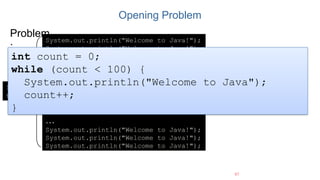
Opening Problem
System.out.println("Welcome toJava!");
System.out.println("Welcome to Java!");
System.out.println("Welcome to Java!");
System.out.println("Welcome to Java!");
System.out.println("Welcome to Java!");
System.out.println("Welcome to Java!");
…
…
…
System.out.println("Welcome to Java!");
System.out.println("Welcome to Java!");
System.out.println("Welcome to Java!");
Problem
:
100
times
int count = 0;
while (count < 100) {
System.out.println("Welcome to Java");
count++;
}
68.
68
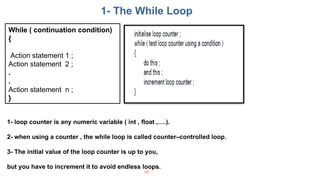
1- The WhileLoop
1- loop counter is any numeric variable ( int , float ,….).
2- when using a counter , the while loop is called counter–controlled loop.
3- The initial value of the loop counter is up to you,
but you have to increment it to avoid endless loops.
While ( continuation condition)
{
Action statement 1 ;
Action statement 2 ;
.
.
Action statement n ;
}
69.
69
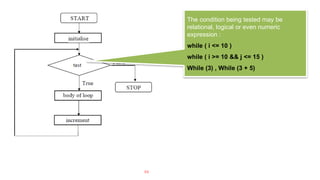
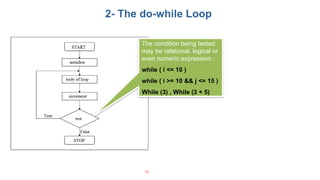
The condition beingtested may be
relational, logical or even numeric
expression :
while ( i <= 10 )
while ( i >= 10 && j <= 15 )
While (3) , While (3 + 5)
70.
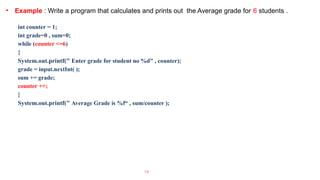
• Example :Write a program that calculates and prints out the Average grade for 6 students .
int counter = 1;
int grade=0 , sum=0;
while (counter <=6)
{
System.out.printf(" Enter grade for student no %d" , counter);
grade = input.nextInt( );
sum += grade;
counter ++;
}
System.out.printf(" Average Grade is %f“ , sum/counter );
70
71.
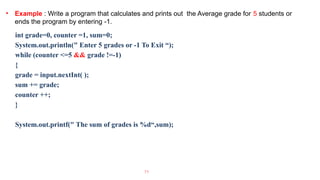
• Example :Write a program that calculates and prints out the Average grade for 5 students or
ends the program by entering -1.
71
int grade=0, counter =1, sum=0;
System.out.println(" Enter 5 grades or -1 To Exit “);
while (counter <=5 && grade !=-1)
{
grade = input.nextInt( );
sum += grade;
counter ++;
}
System.out.printf(" The sum of grades is %d“,sum);
72.
72
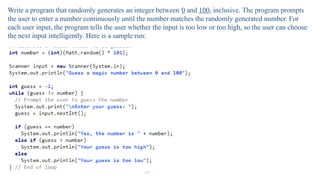
Write a programthat randomly generates an integer between 0 and 100, inclusive. The program prompts
the user to enter a number continuously until the number matches the randomly generated number. For
each user input, the program tells the user whether the input is too low or too high, so the user can choose
the next input intelligently. Here is a sample run:
2- The do-whileLoop
76
The condition being tested
may be relational, logical or
even numeric expression :
while ( i <= 10 )
while ( i >= 10 && j <= 15 )
While (3) , While (3 + 5)
77.
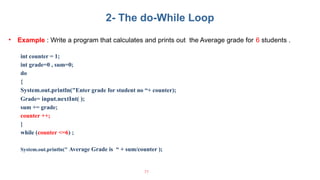
• Example :Write a program that calculates and prints out the Average grade for 6 students .
int counter = 1;
int grade=0 , sum=0;
do
{
System.out.println("Enter grade for student no “+ counter);
Grade= input.nextInt( );
sum += grade;
counter ++;
}
while (counter <=6) ;
System.out.println(" Average Grade is “ + sum/counter );
77
2- The do-While Loop
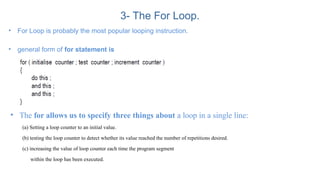
3- The ForLoop.
• For Loop is probably the most popular looping instruction.
• general form of for statement is
• The for allows us to specify three things about a loop in a single line:
(a) Setting a loop counter to an initial value.
(b) testing the loop counter to detect whether its value reached the number of repetitions desired.
(c) increasing the value of loop counter each time the program segment
within the loop has been executed.
82.
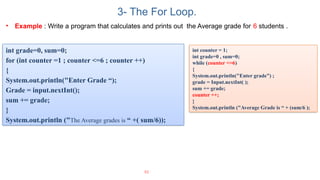
• Example :Write a program that calculates and prints out the Average grade for 6 students .
82
int grade=0, sum=0;
for (int counter =1 ; counter <=6 ; counter ++)
{
System.out.println("Enter Grade “);
Grade = input.nextInt();
sum += grade;
}
System.out.println ("The Average grades is “ +( sum/6));
3- The For Loop.
int counter = 1;
int grade=0 , sum=0;
while (counter <=6)
{
System.out.println("Enter grade”) ;
grade = Input.nextInt( );
sum += grade;
counter ++;
}
System.out.println ("Average Grade is “ + (sum/6 );
83.
83
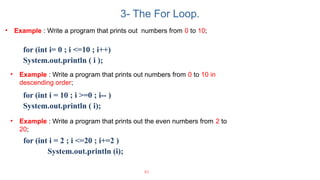
• Example :Write a program that prints out numbers from 0 to 10;
for (int i= 0 ; i <=10 ; i++)
System.out.println ( i );
• Example : Write a program that prints out the even numbers from 2 to
20;
for (int i = 2 ; i <=20 ; i+=2 )
System.out.println (i);
3- The For Loop.
• Example : Write a program that prints out numbers from 0 to 10 in
descending order;
for (int i = 10 ; i >=0 ; i-- )
System.out.println ( i);
84.
84
• Example :Write a program that accepts 10 numbers from the user and prints out the sum of even
numbers and the sum of odd numbers.
3- The For Loop.
85.
85
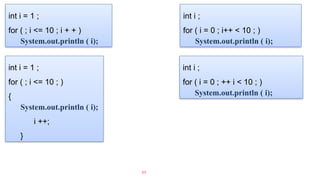
int i =1 ;
for ( ; i <= 10 ; i + + )
System.out.println ( i);
int i = 1 ;
for ( ; i <= 10 ; )
{
System.out.println ( i);
i ++;
}
int i ;
for ( i = 0 ; i++ < 10 ; )
System.out.println ( i);
int i ;
for ( i = 0 ; ++ i < 10 ; )
System.out.println ( i);
86.
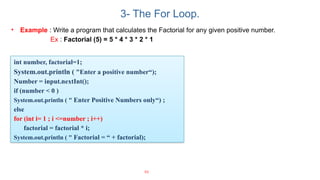
• Example :Write a program that calculates the Factorial for any given positive number.
Ex : Factorial (5) = 5 * 4 * 3 * 2 * 1
86
int number, factorial=1;
System.out.println ( "Enter a positive number“);
Number = input.nextInt();
if (number < 0 )
System.out.println ( " Enter Positive Numbers only“) ;
else
for (int i= 1 ; i <=number ; i++)
factorial = factorial * i;
System.out.println ( " Factorial = “ + factorial);
3- The For Loop.
87.
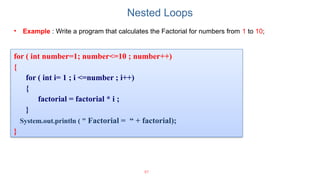
Nested Loops
• Example: Write a program that calculates the Factorial for numbers from 1 to 10;
87
for ( int number=1; number<=10 ; number++)
{
for ( int i= 1 ; i <=number ; i++)
{
factorial = factorial * i ;
}
System.out.println ( " Factorial = “ + factorial);
}
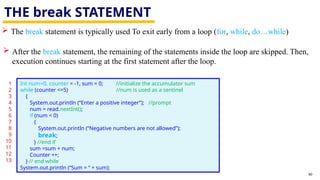
THE break STATEMENT
90
The break statement is typically used To exit early from a loop (for, while, do…while)
After the break statement, the remaining of the statements inside the loop are skipped. Then,
execution continues starting at the first statement after the loop.
1
2
3
4
5
6
7
8
9
10
11
12
13
Int num=0, counter = -1, sum = 0; //initialize the accumulator sum
while (counter <=5) //num is used as a sentinel
{
System.out.println (“Enter a positive integer”); //prompt
num = read.nextInt();
if (num < 0)
{
System.out.println (“Negative numbers are not allowed”);
break;
} //end if
sum =sum + num;
Counter ++;
} // end while
System.out.println (“Sum = “ + sum);
91.
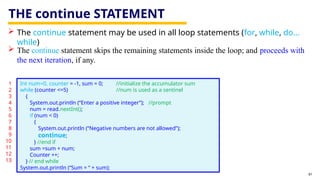
THE continue STATEMENT
91
The continue statement may be used in all loop statements (for, while, do…
while)
The continue statement skips the remaining statements inside the loop; and proceeds with
the next iteration, if any.
1
2
3
4
5
6
7
8
9
10
11
12
13
Int num=0, counter = -1, sum = 0; //initialize the accumulator sum
while (counter <=5) //num is used as a sentinel
{
System.out.println (“Enter a positive integer”); //prompt
num = read.nextInt();
if (num < 0)
{
System.out.println (“Negative numbers are not allowed”);
continue;
} //end if
sum =sum + num;
Counter ++;
} // end while
System.out.println (“Sum = “ + sum);
Java Programming ForBeginners
Course 1
Revision on
Conditional and loop statements
94.
2. ANALYSIS
94
INPUT &OUTPUT
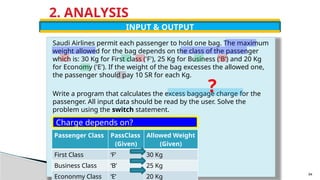
Saudi Airlines permit each passenger to hold one bag. The maximum
weight allowed for the bag depends on the class of the passenger
which is: 30 Kg for First class ('F'), 25 Kg for Business ('B') and 20 Kg
for Economy ('E'). If the weight of the bag excesses the allowed one,
the passenger should pay 10 SR for each Kg.
Write a program that calculates the excess baggage charge for the
passenger. All input data should be read by the user. Solve the
problem using the switch statement.
Charge depends on?
Passenger Class PassClass
(Given)
Allowed Weight
(Given)
First Class ‘F’ 30 Kg
Business Class ‘B’ 25 Kg
Econonmy Class ‘E’ 20 Kg
?
95.
2. ANALYSIS
95
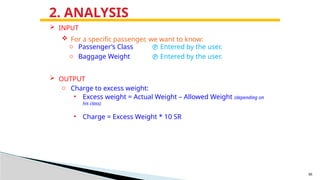
INPUT
oPassenger’s Class Entered by the user.
o Baggage Weight Entered by the user.
OUTPUT
o Charge to excess weight:
• Excess weight = Actual Weight – Allowed Weight (depending on
his class)
• Charge = Excess Weight * 10 SR
For a specific passenger, we want to know:
96.
5. CODE (1)
//import necessary libraries
import java.util.*;
public class passenger
{
// instantiate Scanner object
static Scanner read = new Scanner(System.in);
public static void main (String[] args)
{
// Declaration section
char passClass; // passenger’s class
double bagWeight; // passenger’s bag weight
double excessWeight = 0.0;// passenger’s excess weight
double charge = -1.0; // charge on excess weight
// Input section
System.out.print (“Please enter passenger’s class”);
passClass = read.next().charAt(0); // read passenger’s class
System.out.print (“Please enter passenger’s baggage weight”);
bagWeight = read.nextDouble(); // read baggage weight
// Processing section: charge depends on passClass
switch (passClass)
{
case ‘F’: excessWeight = bagWeight – 30;
break;
1
2
3
4
5
6
7
8
9
10
11
12
13
14
15
16
17
18
19
20
21
22
23 96
97.
5. CODE (2)
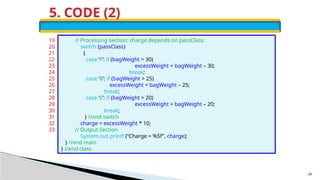
//Processing section: charge depends on passClass
switch (passClass)
{
case ‘F’: if (bagWeight > 30)
excessWeight = bagWeight – 30;
break;
case ‘B’: if (bagWeight > 25)
excessWeight = bagWeight – 25;
break;
case ‘E’: if (bagWeight > 20)
excessWeight = bagWeight – 20;
break;
} //end switch
charge = excessWeight * 10;
// Output Section
System.out.printf (“Charge = %5f”, charge);
} //end main
} //end class
19
20
21
22
23
24
25
26
27
28
29
30
31
32
33
97
98.
5. CODE (3)
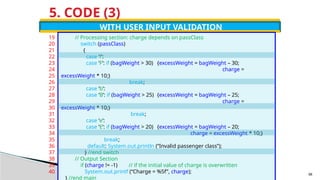
WITHUSER INPUT VALIDATION
// Processing section: charge depends on passClass
switch (passClass)
{
case ‘f’:
case ‘F’: if (bagWeight > 30) {excessWeight = bagWeight – 30;
charge =
excessWeight * 10;}
break;
case ‘b’:
case ‘B’: if (bagWeight > 25) {excessWeight = bagWeight – 25;
charge =
excessWeight * 10;}
break;
case ‘e’:
case ‘E’: if (bagWeight > 20) {excessWeight = bagWeight – 20;
charge = excessWeight * 10;}
break;
default: System.out.println (“Invalid passenger class”);
} //end switch
// Output Section
if (charge != -1) // if the initial value of charge is overwritten
System.out.printf (“Charge = %5f”, charge);
} //end main
19
20
21
22
23
24
25
26
27
28
29
30
31
32
33
34
35
36
37
38
39
40 98
Functions - Methods
•Most computer programs that solve real-world problems include hundreds and even thousands of lines.
• Experience has shown that the best way to develop and maintain a large program is to construct it from
smaller pieces or modules, each of which is more manageable than the original program.
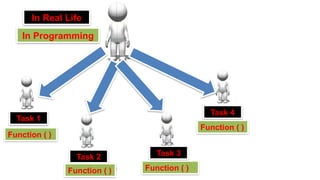
• A Function : is a self-contained block of statements that perform a specific task.
• Using a function is something like hiring a person to do a specific job for you.
101
102.
102
Task 1
Task 2Task 3
Task 4
Function ( )
Function ( ) Function ( )
Function ( )
In Real Life
In Programming
103.
Why to useFunctions ?
• Functions allows to write more manageable units of code.
• Writing functions avoids rewriting the same code over and over.
• Easy maintenance for programs.
Important Tips
1- Don’t try to cram the entire logic in one function. It is a very bad style of programming.
2- Instead, break a program into small units and write functions for each of these isolated subdivisions.
3- Don’t hesitate to write functions that are called only once.
103
104.
104
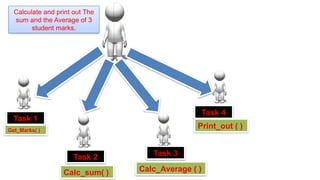
Task 1
Task 2Task 3
Task 4
Get_Marks( )
Calc_sum( ) Calc_Average ( )
Print_out ( )
Calculate and print out The
sum and the Average of 3
student marks.
105.
Functions
105
Function Definition
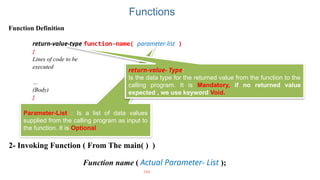
return-value-type function-name(parameter-list )
{
Lines of code to be
executed
…
(Body)
}
Parameter-List : Is a list of data values
supplied from the calling program as input to
the function. It is Optional
return-value- Type:
Is the data type for the returned value from the function to the
calling program. It is Mandatory, if no returned value
expected , we use keyword Void.
2- Invoking Function ( From The main( ) )
Function name ( Actual Parameter- List );
106.
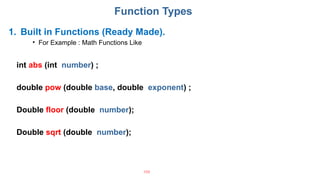
Function Types
1. Builtin Functions (Ready Made).
• For Example : Math Functions Like
106
int abs (int number) ;
double pow (double base, double exponent) ;
Double floor (double number);
Double sqrt (double number);
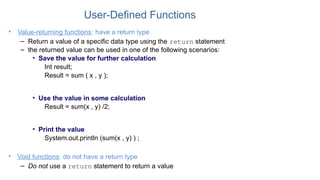
User-Defined Functions
• Value-returningfunctions: have a return type
– Return a value of a specific data type using the return statement
– the returned value can be used in one of the following scenarios:
• Save the value for further calculation
Int result;
Result = sum ( x , y );
• Use the value in some calculation
Result = sum(x , y) /2;
• Print the value
System.out.println (sum(x , y) ) ;
• Void functions: do not have a return type
– Do not use a return statement to return a value
109.
public class methodOneParameter
{
publicstatic void main(String[] args)
{
System.out.println (“Start of Program”); //output line #1
drawLine(); //method calling
Sysetm.out.println(“Welcome to the First lecture in Functions”);
drawLine(); //method calling
System.out.println (“End of Program”);
} //end of main
//method definition: This method draws a line
public static void drawLine( )
{
int i;
for (i=0; i < 10; i++)
System.out.print (‘*’);
System.out.println();
} //end of drawLine
} //end of class
109
110.
public class methodOneParameter
{
publicstatic void main(String[] args)
{
System.out.println (“Start of Program”); //output line #1
drawLine(‘*’); //method calling
Sysetm.out.println(“Welcome to the First lecture in Functions”);
drawLine(‘#’); //method calling
System.out.println (“End of Program”);
} //end of main
//method definition: This method draws a line
public static void drawLine( char ch)
{
int i;
for (i=0; i < 10; i++)
System.out.print (ch);
System.out.println();
} //end of drawLine
} //end of class
110
111.
public class methodOneParameter
{
publicstatic void main(String[] args)
{
System.out.println (“Start of Program”); //output line #1
drawLine(‘*’,15); //method calling
Sysetm.out.println(“Welcome to the First lecture in Functions”);
drawLine(‘#’,20); //method calling
System.out.println (“End of Program”);
} //end of main
//method definition: This method draws a line
public static void drawLine(char ch , integer length )
{
int i;
for (i=0; i < length; i++)
System.out.print (ch);
System.out.println();
} //end of drawLine
} //end of class
111
114
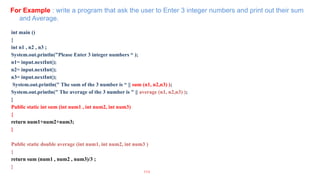
For Example :write a program that ask the user to Enter 3 integer numbers and print out their sum
and Average.
int main ()
{
int n1 , n2 , n3 ;
System.out.println("Please Enter 3 integer numbers “ );
n1= input.nextInt();
n2= input.nextInt();
n3= input.nextInt();
System.out.println(" The sum of the 3 number is “ || sum (n1, n2,n3) );
System.out.println(" The average of the 3 number is " || average (n1, n2,n3) );
}
Public static int sum (int num1 , int num2, int num3)
{
return num1+num2+num3;
}
Public static double average (int num1, int num2, int num3 )
{
return sum (num1 , num2 , num3)/3 ;
}
115.
Scope of avariable
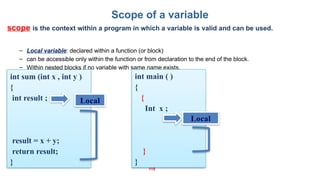
scope is the context within a program in which a variable is valid and can be used.
– Local variable: declared within a function (or block)
– can be accessible only within the function or from declaration to the end of the block.
– Within nested blocks if no variable with same name exists.
115
int main ( )
{
{
Int x ;
}
}
int sum (int x , int y )
{
int result ;
result = x + y;
return result;
}
Local
Local
116.
Scope of avariable
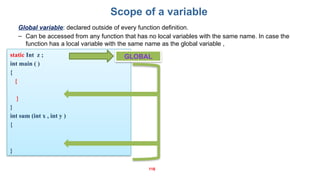
Global variable: declared outside of every function definition.
– Can be accessed from any function that has no local variables with the same name. In case the
function has a local variable with the same name as the global variable ,
116
static Int z ;
int main ( )
{
{
}
}
int sum (int x , int y )
{
}
GLOBAL
117.
117
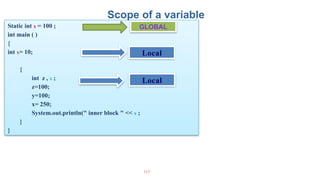
Static int x= 100 ;
int main ( )
{
int x= 10;
{
int z , x ;
z=100;
y=100;
x= 250;
System.out.println(" inner block " << x ;
}
}
Scope of a variable
GLOBAL
Local
Local
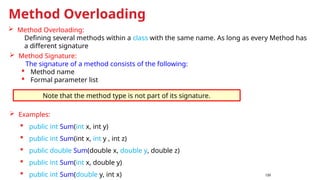
Method Overloading
120
MethodSignature:
The signature of a method consists of the following:
Method name
Formal parameter list
Examples:
public int Sum(int x, int y)
public int Sum(int x, int y , int z)
public double Sum(double x, double y, double z)
public int Sum(int x, double y)
public int Sum(double y, int x)
Note that the method type is not part of its signature.
Method Overloading:
Defining several methods within a class with the same name. As long as every Method has
a different signature
121.
121
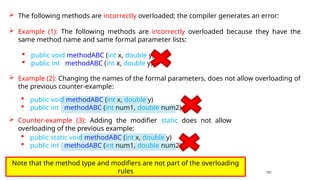
The followingmethods are incorrectly overloaded; the compiler generates an error:
public void methodABC (int x, double y)
public int methodABC (int x, double y)
public void methodABC (int x, double y)
public int methodABC (int num1, double num2)
Example (1): The following methods are incorrectly overloaded because they have the
same method name and same formal parameter lists:
Example (2): Changing the names of the formal parameters, does not allow overloading of
the previous counter-example:
public static void methodABC (int x, double y)
public int methodABC (int num1, double num2)
Counter-example (3): Adding the modifier static does not allow
overloading of the previous example:
Note that the method type and modifiers are not part of the overloading
rules
ARRAY DECLARATION
dataType[ ]arrayName = new datatype [intExp];
SYNTAX
In Java, an array is an object that must be instantiated using the new operator.
arrayName is the reference variable.
dataType is the data type of the array; which is the same type of all elements in the array.
intExp is any expression that evaluates to a positive int type.
intExp represents the size of the array: this is the number of elements in the array.
125.
ARRAY DECLARATION
EXAMPLES
Considerthe following array declaration:
int[] num = new int [5];
From the above statement:
o num is the array name
o num consists of 5 elements
o The type of the elements is int
The memory layout will be as follows:
Address Value
num 0
0
0
0
0
As shown, the array name points to the first element in the array.
The five elements of the array are adjacent in the memory.
Index
0
1
2
3
4
126.
ARRAY DECLARATION
USING CONSTANTSAS SIZES
final int ARRAY_SIZE = 5;
int[] num = new int [ARRAY_SIZE];
double[ ] num = new double[ARRAY_SIZE];
char[ ] x = new char[ARRAY_SIZE];
boolean[ ] flags = new boolean[ARRAY_SIZE];
The size of the array must be of type int.
127.
ARRAY DECLARATION
1
2
USING EXPRESSIONSAS SIZES
final int ARRAY_SIZE = 5;
int[] num = new int[ARRAY_SIZE*5];
The expression may be in terms of an int variable rather than a constant:
int i = 8;
int[] num = new int[i*2-1];
128.
ARRAY DECLARATION
SPECIFYING SIZESDURING EXECUTION
Scanner read = new Scanner(System.in);
int arraySize;
System.out.println (“Enter the size of the array ”);
arraySize = read.nextInt();
int[ ] list = new int [arraySize];
It is not necessary to know the size of the array at compile time.
During program execution, the user may be prompted to enter the size of the
array. The object (array) is then instantiated using this value.
Consider the following example:
129.
INITIALIZATION WITH DECLARATION
Double[ ] sales = {12.25, 24.2, 32.55, 50.33};
An array can also be initialized with specific values when it is
declared:
When initializing arrays during declaration, the size of the array is determined by the number
of initial values in the initializer list within the braces.
ARRAY Initialization
When instantiating an array object, the initial values depend on the array type:
o For numeric types (int, double, etc…) the elements take the value zero by
default.
o For char type, the elements take the value null character (‘’).
o For boolean type, the elements take the value false.
130.
• Accessing arrayElements
Arrayname [element index].
Arrays
• Example: int [] list = new list[10];
list[5] = 34;
System.out.println( list [5]);
131.
• Example :Write a program that ask the user to enter 10 Employee salaries and store
them , then add a bonus of 10 % for each employee and print out the average salary value.
131
132.
132
Example - Writea program that finds the sum and the average of positive integers stored in an
array of integers.
Java Programming ForBeginners
Course 1
One Dimensional Arrays – Part 2
Passing Arrays as a method
Parameters
135.
Passing Array asa parameter to a
method
To pass an array argument to a method, specify the name of the array without any
brackets.
For example, if array ids is declared as
int [] ids = new int[50];
then the method call search ( ids , 100 );
passes the reference of array salaries to method search.
public static int search (int[] list, int target)
{
int index;
for (index = 0; index < list.length; index++)
if (list[index] == target);
return index;
return -1;
} //end search
Main()
{
Int [ ] employee_ids = new int[10];
Int position = Search(imployee_ids , 30);
}
136.
public static voidmain(String[] args)
{
double[] sales = new double[100];
fillArray (sales);
printArray (sales);
}
public static void fillArray(double[ ] list)
{
for (int i=0; i<list.length; i++)
{
System.out.println (“Enter next element: “);
list[i] = read.nextDouble();
} //end for
} //end fillArray
public static void printArray(double[] list)
{
int i;
for (i=0; i < list.length; i++)
System.out.print (list[i] + “ “);
System.out.println();
} //end of printArray
Passing Array as a parameter to a
method
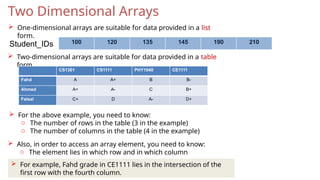
Two Dimensional Arrays
One-dimensional arrays are suitable for data provided in a list
form.
Two-dimensional arrays are suitable for data provided in a table
form.
CS1301 CS1111 PHY1040 CE1111
Fahd A A+ B B-
Ahmed A+ A- C B+
Faisal C+ D A- D+
For the above example, you need to know:
o The number of rows in the table (3 in the example)
o The number of columns in the table (4 in the example)
Also, in order to access an array element, you need to know:
o The element lies in which row and in which column
For example, Fahd grade in CE1111 lies in the intersection of the
first row with the fourth column.
100 120 135 145 190 210
Student_IDs
140.
DECLARATION
rows :indicates the number of rows.
dataType[][] arrayName = new dataType[rows][cols];
SYNTAX
cols: indicates the number of columns.
The following example declares a two-dimensional array marks of 4 rows and 6 columns:
double[][] marks = new double[4][6];
length
Consider thefollowing code segment:
Int [ ][ ] matrix = new int[20][15];
System.out.printf (“Number of rows = %d”, matrix.length);
System.out.printf (“Number of columns = %d”, matrix[0].length);
Number of rows = 20
Number of columns = 15
Output
arrayName.length gives the number of rows.
`gives the number of columns.
143.
INITIALIZATION
The two-dimensionalarray may be initialized as follows:
//Initialize and declare
int[ ][ ] array2 = { {2, 1, 3}, {3, 5, 2}, {4, 2, 2}};
The above example may be depicted as follows:
2 1 3
3 5 2
4 2 2
144.
Let usinitialize the elements of row #2 to 7:
int col;
for (col = 0; col < matrix[2].length; col++)
matrix[2][col] = 7;
When processing a row using a loop, the condition is “the number of columns”, which is
matrix[2].length in this example.
The number of the row is fixed, and the number of the column varies from 0 to
matrix[2].length col is the loop counter.
Let us initialize the elements of col #1 to 5:
int row;
for (row = 0; row < matrix.length; row++)
matrix[row][1] = 5;
145.
145
• Example :Write a program that build a matrix of 5 rows and 3 columns . Ask the use to
enter the values for all the matrix items , print out the sum of all matrix items.
void printMatrix( intmatrix[ ][4], int Rows)
{
int row, col;
for (row = 0; row < Rows ; row++)
{
for (col = 0; col < 4; col++)
System.out.println( setw(5) << matrix [row]
[col] ;
}
System.out.println(“n” ;
}
147
when declaring a two-dimensional array as a formal parameter, you can omit
the size of the first dimension, but not the second;
that is, you must specify the number of columns.
Two dimensional Array as a Parameter to
Function



![Processing a Java Program
13
Source Code
Create/Modify Source Code
Compile Source Code
i.e., javac Welcome.java
Bytecode
Run Byteode
i.e., java Welcome
Result
If compilation errors
If runtime errors or incorrect result
public class Welcome {
public static void main(String[] args) {
System.out.println("Welcome to Java!");
}
}
…
Method Welcome()
0 aload_0
…
Method void main(java.lang.String[])
0 getstatic #2 …
3 ldc #3 <String "Welcome to
Java!">
5 invokevirtual #4 …
8 return
Saved on the disk
stored on the disk
Source code (developed by the programmer)
Byte code (generated by the compiler for JVM
to read and interpret, not for you to understand)](https://image.slidesharecdn.com/javaprogramming-course1-250430203202-f5b226a8/85/Java-Programming-Course-for-beginners-13-320.jpg)




![59
1. The switch Statement
public static void main (String[] args)
{
//Declaration section
Scanner read = new Scanner (System.in);
char grade;
String message;
//input section
grade = read.next().charAt(0);
//processing section
switch (grade)
{
case ‘A’: message = “Excellent”;
break;
case ‘B’: message = “Very Good”;
break;
case ‘C’: message = “Good”;
break;
case ‘D’: message = “Fair”;
break;
case ‘F’: message = “Failed”;
break;
default: message =“The grade is invalid”;
} //end switch
//output section
System.out.println (message);
} //end main
1
2
3
4
5
6
7
8
9
10
11
12
13
14
15
16
17
18
19
20
21
22
23
24
25
26
if (grade == ‘A’)
message = “Excellent”;
Else if (grade == ‘B’)
message = “Very Good”;
else if (grade == ‘C’)
message = “Good”;
else if (grade == ‘D’)
message = “Fair”;
else if (grade == ‘F’)
message = “Fail”;
else message = “The grade is invalid”;
System.out.println (message);](https://image.slidesharecdn.com/javaprogramming-course1-250430203202-f5b226a8/85/Java-Programming-Course-for-beginners-59-320.jpg)
![public static void main (String[] args)
{
Scanner read = new Scanner (System.in);
int choice, num1, num2, result = -1;
String message = “Invalid input”;
System.out.println (“Enter your choice:”);
System.out.println (“1. Add two numbers”);
System.out.println (“2. Get the double of a positive number”);
System.out.println (“3. Get the square of a number”);
choice = read.nextInt();
//processing section
switch (choice)
{
case 1: System.out.println (“Enter two positive integers”); //prompt
num1 = read.nextInt();
num2 = read.nextInt();
result = num1 + num2; // the value of result is no more equal to -1
break;
case 2: System.out.println (“Enter a positive integer”); //prompt
num1 = read.nextInt();
num2 = read.nextInt();
result = num1 – num2;
break;
case 3: System.out.println (“Enter an integer”); //prompt
num1 = read.nextInt();
result = num1 * num1; // the value of result is no more equal to -1
break;
default: message =“Invalid value of choice”; //no change to “result” result=-1
} //end switch](https://image.slidesharecdn.com/javaprogramming-course1-250430203202-f5b226a8/85/Java-Programming-Course-for-beginners-61-320.jpg)
![public static void main (String[] args)
{
//Declaration section
Scanner read = new Scanner (System.in);
char letter;
String vowel = “This is a vowel”;
//input section
letter = read.next().charAt(0);
//processing section
switch (letter)
{
case ‘a’:
case ‘e’:
case ‘o’:
case ‘i’:
case ‘u’: System.out.println (vowel);
break;
default: System.out.println (“This is not a vowel”);
} //end switch
} //end main
6
2
When the same action is to be taken for several case labels, then we may write the
program as follows:
This is equivalent to:
if (letter==‘a’) || (letter==‘e’) ||
(letter==‘o’) || (letter==‘i’) ||
(letter==‘u’)
System.out.println (vowel);](https://image.slidesharecdn.com/javaprogramming-course1-250430203202-f5b226a8/85/Java-Programming-Course-for-beginners-62-320.jpg)





![5. CODE (1)
// import necessary libraries
import java.util.*;
public class passenger
{
// instantiate Scanner object
static Scanner read = new Scanner(System.in);
public static void main (String[] args)
{
// Declaration section
char passClass; // passenger’s class
double bagWeight; // passenger’s bag weight
double excessWeight = 0.0;// passenger’s excess weight
double charge = -1.0; // charge on excess weight
// Input section
System.out.print (“Please enter passenger’s class”);
passClass = read.next().charAt(0); // read passenger’s class
System.out.print (“Please enter passenger’s baggage weight”);
bagWeight = read.nextDouble(); // read baggage weight
// Processing section: charge depends on passClass
switch (passClass)
{
case ‘F’: excessWeight = bagWeight – 30;
break;
1
2
3
4
5
6
7
8
9
10
11
12
13
14
15
16
17
18
19
20
21
22
23 96](https://image.slidesharecdn.com/javaprogramming-course1-250430203202-f5b226a8/85/Java-Programming-Course-for-beginners-96-320.jpg)

![public class methodOneParameter
{
public static void main(String[] args)
{
System.out.println (“Start of Program”); //output line #1
drawLine(); //method calling
Sysetm.out.println(“Welcome to the First lecture in Functions”);
drawLine(); //method calling
System.out.println (“End of Program”);
} //end of main
//method definition: This method draws a line
public static void drawLine( )
{
int i;
for (i=0; i < 10; i++)
System.out.print (‘*’);
System.out.println();
} //end of drawLine
} //end of class
109](https://image.slidesharecdn.com/javaprogramming-course1-250430203202-f5b226a8/85/Java-Programming-Course-for-beginners-109-320.jpg)
![public class methodOneParameter
{
public static void main(String[] args)
{
System.out.println (“Start of Program”); //output line #1
drawLine(‘*’); //method calling
Sysetm.out.println(“Welcome to the First lecture in Functions”);
drawLine(‘#’); //method calling
System.out.println (“End of Program”);
} //end of main
//method definition: This method draws a line
public static void drawLine( char ch)
{
int i;
for (i=0; i < 10; i++)
System.out.print (ch);
System.out.println();
} //end of drawLine
} //end of class
110](https://image.slidesharecdn.com/javaprogramming-course1-250430203202-f5b226a8/85/Java-Programming-Course-for-beginners-110-320.jpg)
![public class methodOneParameter
{
public static void main(String[] args)
{
System.out.println (“Start of Program”); //output line #1
drawLine(‘*’,15); //method calling
Sysetm.out.println(“Welcome to the First lecture in Functions”);
drawLine(‘#’,20); //method calling
System.out.println (“End of Program”);
} //end of main
//method definition: This method draws a line
public static void drawLine(char ch , integer length )
{
int i;
for (i=0; i < length; i++)
System.out.print (ch);
System.out.println();
} //end of drawLine
} //end of class
111](https://image.slidesharecdn.com/javaprogramming-course1-250430203202-f5b226a8/85/Java-Programming-Course-for-beginners-111-320.jpg)



![ARRAY DECLARATION
dataType[ ] arrayName = new datatype [intExp];
SYNTAX
In Java, an array is an object that must be instantiated using the new operator.
arrayName is the reference variable.
dataType is the data type of the array; which is the same type of all elements in the array.
intExp is any expression that evaluates to a positive int type.
intExp represents the size of the array: this is the number of elements in the array.](https://image.slidesharecdn.com/javaprogramming-course1-250430203202-f5b226a8/85/Java-Programming-Course-for-beginners-124-320.jpg)
![ARRAY DECLARATION
EXAMPLES
Consider the following array declaration:
int[] num = new int [5];
From the above statement:
o num is the array name
o num consists of 5 elements
o The type of the elements is int
The memory layout will be as follows:
Address Value
num 0
0
0
0
0
As shown, the array name points to the first element in the array.
The five elements of the array are adjacent in the memory.
Index
0
1
2
3
4](https://image.slidesharecdn.com/javaprogramming-course1-250430203202-f5b226a8/85/Java-Programming-Course-for-beginners-125-320.jpg)
![ARRAY DECLARATION
USING CONSTANTS AS SIZES
final int ARRAY_SIZE = 5;
int[] num = new int [ARRAY_SIZE];
double[ ] num = new double[ARRAY_SIZE];
char[ ] x = new char[ARRAY_SIZE];
boolean[ ] flags = new boolean[ARRAY_SIZE];
The size of the array must be of type int.](https://image.slidesharecdn.com/javaprogramming-course1-250430203202-f5b226a8/85/Java-Programming-Course-for-beginners-126-320.jpg)
![ARRAY DECLARATION
1
2
USING EXPRESSIONS AS SIZES
final int ARRAY_SIZE = 5;
int[] num = new int[ARRAY_SIZE*5];
The expression may be in terms of an int variable rather than a constant:
int i = 8;
int[] num = new int[i*2-1];](https://image.slidesharecdn.com/javaprogramming-course1-250430203202-f5b226a8/85/Java-Programming-Course-for-beginners-127-320.jpg)
![ARRAY DECLARATION
SPECIFYING SIZES DURING EXECUTION
Scanner read = new Scanner(System.in);
int arraySize;
System.out.println (“Enter the size of the array ”);
arraySize = read.nextInt();
int[ ] list = new int [arraySize];
It is not necessary to know the size of the array at compile time.
During program execution, the user may be prompted to enter the size of the
array. The object (array) is then instantiated using this value.
Consider the following example:](https://image.slidesharecdn.com/javaprogramming-course1-250430203202-f5b226a8/85/Java-Programming-Course-for-beginners-128-320.jpg)
![INITIALIZATION WITH DECLARATION
Double [ ] sales = {12.25, 24.2, 32.55, 50.33};
An array can also be initialized with specific values when it is
declared:
When initializing arrays during declaration, the size of the array is determined by the number
of initial values in the initializer list within the braces.
ARRAY Initialization
When instantiating an array object, the initial values depend on the array type:
o For numeric types (int, double, etc…) the elements take the value zero by
default.
o For char type, the elements take the value null character (‘’).
o For boolean type, the elements take the value false.](https://image.slidesharecdn.com/javaprogramming-course1-250430203202-f5b226a8/85/Java-Programming-Course-for-beginners-129-320.jpg)
![• Accessing array Elements
Arrayname [element index].
Arrays
• Example: int [] list = new list[10];
list[5] = 34;
System.out.println( list [5]);](https://image.slidesharecdn.com/javaprogramming-course1-250430203202-f5b226a8/85/Java-Programming-Course-for-beginners-130-320.jpg)

![Passing Array as a parameter to a
method
To pass an array argument to a method, specify the name of the array without any
brackets.
For example, if array ids is declared as
int [] ids = new int[50];
then the method call search ( ids , 100 );
passes the reference of array salaries to method search.
public static int search (int[] list, int target)
{
int index;
for (index = 0; index < list.length; index++)
if (list[index] == target);
return index;
return -1;
} //end search
Main()
{
Int [ ] employee_ids = new int[10];
Int position = Search(imployee_ids , 30);
}](https://image.slidesharecdn.com/javaprogramming-course1-250430203202-f5b226a8/85/Java-Programming-Course-for-beginners-135-320.jpg)
![public static void main(String[] args)
{
double[] sales = new double[100];
fillArray (sales);
printArray (sales);
}
public static void fillArray(double[ ] list)
{
for (int i=0; i<list.length; i++)
{
System.out.println (“Enter next element: “);
list[i] = read.nextDouble();
} //end for
} //end fillArray
public static void printArray(double[] list)
{
int i;
for (i=0; i < list.length; i++)
System.out.print (list[i] + “ “);
System.out.println();
} //end of printArray
Passing Array as a parameter to a
method](https://image.slidesharecdn.com/javaprogramming-course1-250430203202-f5b226a8/85/Java-Programming-Course-for-beginners-136-320.jpg)

![DECLARATION
rows : indicates the number of rows.
dataType[][] arrayName = new dataType[rows][cols];
SYNTAX
cols: indicates the number of columns.
The following example declares a two-dimensional array marks of 4 rows and 6 columns:
double[][] marks = new double[4][6];](https://image.slidesharecdn.com/javaprogramming-course1-250430203202-f5b226a8/85/Java-Programming-Course-for-beginners-140-320.jpg)
![ACCESSING ARRAY ELEMENTS
sales[][0] sales[][1] sales[][2] sales[][3] sales[][4]
sales[0][] 15.0 sales[0][1] sales[0][2] sales[0][3] sales[0][4]
sales[1][] sales[1][0] sales[1][1] 12.0 sales[1][3] sales[1][4]
sales[2][] sales[2][0] 21.0 sales[2][2] 430.0 sales[2][4]
sales[3][] sales[3][0] sales[3][1] sales[3][2] sales[3][3] sales[3][4]
sales[0][0] = 15.0;
sales[1][2] = 12.0;
sales[2][1] = 21.0;
1
2
3
4
arrayName[Row][Col]
SYNTAX](https://image.slidesharecdn.com/javaprogramming-course1-250430203202-f5b226a8/85/Java-Programming-Course-for-beginners-141-320.jpg)
![length
Consider the following code segment:
Int [ ][ ] matrix = new int[20][15];
System.out.printf (“Number of rows = %d”, matrix.length);
System.out.printf (“Number of columns = %d”, matrix[0].length);
Number of rows = 20
Number of columns = 15
Output
arrayName.length gives the number of rows.
`gives the number of columns.](https://image.slidesharecdn.com/javaprogramming-course1-250430203202-f5b226a8/85/Java-Programming-Course-for-beginners-142-320.jpg)
![INITIALIZATION
The two-dimensional array may be initialized as follows:
//Initialize and declare
int[ ][ ] array2 = { {2, 1, 3}, {3, 5, 2}, {4, 2, 2}};
The above example may be depicted as follows:
2 1 3
3 5 2
4 2 2](https://image.slidesharecdn.com/javaprogramming-course1-250430203202-f5b226a8/85/Java-Programming-Course-for-beginners-143-320.jpg)
![ Let us initialize the elements of row #2 to 7:
int col;
for (col = 0; col < matrix[2].length; col++)
matrix[2][col] = 7;
When processing a row using a loop, the condition is “the number of columns”, which is
matrix[2].length in this example.
The number of the row is fixed, and the number of the column varies from 0 to
matrix[2].length col is the loop counter.
Let us initialize the elements of col #1 to 5:
int row;
for (row = 0; row < matrix.length; row++)
matrix[row][1] = 5;](https://image.slidesharecdn.com/javaprogramming-course1-250430203202-f5b226a8/85/Java-Programming-Course-for-beginners-144-320.jpg)

![void printMatrix( int matrix[ ][4], int Rows)
{
int row, col;
for (row = 0; row < Rows ; row++)
{
for (col = 0; col < 4; col++)
System.out.println( setw(5) << matrix [row]
[col] ;
}
System.out.println(“n” ;
}
147
when declaring a two-dimensional array as a formal parameter, you can omit
the size of the first dimension, but not the second;
that is, you must specify the number of columns.
Two dimensional Array as a Parameter to
Function](https://image.slidesharecdn.com/javaprogramming-course1-250430203202-f5b226a8/85/Java-Programming-Course-for-beginners-147-320.jpg)


