Persist and Replay Runtime Data
Using Apache Java Caching
System and Javassist
https://bitbucket.org/wishcoder/jcs.
marketdata.replay/wiki/Home
Ajay Singh | message4ajay@gmail.com | LinkedIn - https://www.linkedin.com/in/ajaysinghonline | Bitbucket - https://bitbucket.org/wishcoder
Persist and Replay Runtime Data
• The ability to persist data created at runtime is
useful when application states and data are
required to be replayed multiple times to
investigate application issues.
• This article demonstrates how to persist
runtime data to disk and load disk persisted
data to replay in new JVM instances.
Ajay Singh | message4ajay@gmail.com | LinkedIn - https://www.linkedin.com/in/ajaysinghonline | Bitbucket - https://bitbucket.org/wishcoder
Apache JCS and Javassist
• JCS is a distributed caching system written in
Java. Indexed Disk Auxiliary Cache is used to
persist data on disk. JCS only persist
Serializable java objects.
• Javassist (Java Programming Assistant) makes
Java bytecode manipulation simple. Javassist
is used to dynamically set values for transient
fields that are not persisted due to transient
nature.
Ajay Singh | message4ajay@gmail.com | LinkedIn - https://www.linkedin.com/in/ajaysinghonline | Bitbucket - https://bitbucket.org/wishcoder
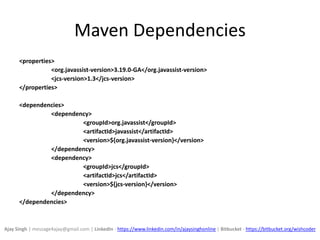
Maven Dependencies
<properties>
<org.javassist-version>3.19.0-GA</org.javassist-version>
<jcs-version>1.3</jcs-version>
</properties>
<dependencies>
<dependency>
<groupId>org.javassist</groupId>
<artifactId>javassist</artifactId>
<version>${org.javassist-version}</version>
</dependency>
<dependency>
<groupId>jcs</groupId>
<artifactId>jcs</artifactId>
<version>${jcs-version}</version>
</dependency>
</dependencies>
Ajay Singh | message4ajay@gmail.com | LinkedIn - https://www.linkedin.com/in/ajaysinghonline | Bitbucket - https://bitbucket.org/wishcoder
Log4j Settings for JCS
<appender name="CONSOLE" class="org.apache.log4j.ConsoleAppender">
<layout class="org.apache.log4j.PatternLayout">
<param name="ConversionPattern" value="%d [%t] %C{1} %p - %m%n"/>
</layout>
</appender>
<logger name="org.apache.jcs">
<!– DEBUG level in dev mode will enable useful logs from JCS jar ->
<!– DON’T PUT THIS IN PRODUCTION ENVIRONMENT ->
<level value="DEBUG"/>
<appender-ref ref="CONSOLE"/>
</logger>
Ajay Singh | message4ajay@gmail.com | LinkedIn - https://www.linkedin.com/in/ajaysinghonline | Bitbucket - https://bitbucket.org/wishcoder
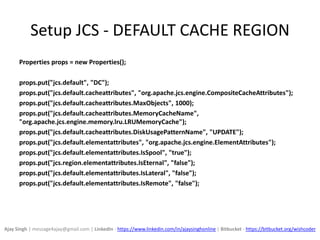
Setup JCS - DEFAULT CACHE REGION
Properties props = new Properties();
props.put("jcs.default", "DC");
props.put("jcs.default.cacheattributes", "org.apache.jcs.engine.CompositeCacheAttributes");
props.put("jcs.default.cacheattributes.MaxObjects", 1000);
props.put("jcs.default.cacheattributes.MemoryCacheName",
"org.apache.jcs.engine.memory.lru.LRUMemoryCache");
props.put("jcs.default.cacheattributes.DiskUsagePatternName", "UPDATE");
props.put("jcs.default.elementattributes", "org.apache.jcs.engine.ElementAttributes");
props.put("jcs.default.elementattributes.IsSpool", "true");
props.put("jcs.region.elementattributes.IsEternal", "false");
props.put("jcs.default.elementattributes.IsLateral", "false");
props.put("jcs.default.elementattributes.IsRemote", "false");
Ajay Singh | message4ajay@gmail.com | LinkedIn - https://www.linkedin.com/in/ajaysinghonline | Bitbucket - https://bitbucket.org/wishcoder
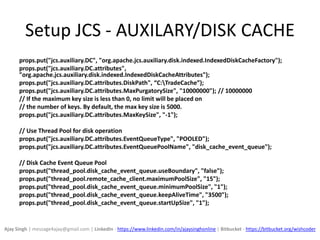
Setup JCS - AUXILARY/DISK CACHE
props.put("jcs.auxiliary.DC", "org.apache.jcs.auxiliary.disk.indexed.IndexedDiskCacheFactory");
props.put("jcs.auxiliary.DC.attributes",
"org.apache.jcs.auxiliary.disk.indexed.IndexedDiskCacheAttributes");
props.put("jcs.auxiliary.DC.attributes.DiskPath", “C:TradeCache”);
props.put("jcs.auxiliary.DC.attributes.MaxPurgatorySize", "10000000"); // 10000000
// If the maximum key size is less than 0, no limit will be placed on
// the number of keys. By default, the max key size is 5000.
props.put("jcs.auxiliary.DC.attributes.MaxKeySize", "-1");
// Use Thread Pool for disk operation
props.put("jcs.auxiliary.DC.attributes.EventQueueType", "POOLED");
props.put("jcs.auxiliary.DC.attributes.EventQueuePoolName", "disk_cache_event_queue");
// Disk Cache Event Queue Pool
props.put("thread_pool.disk_cache_event_queue.useBoundary", "false");
props.put("thread_pool.remote_cache_client.maximumPoolSize", "15");
props.put("thread_pool.disk_cache_event_queue.minimumPoolSize", "1");
props.put("thread_pool.disk_cache_event_queue.keepAliveTime", "3500");
props.put("thread_pool.disk_cache_event_queue.startUpSize", "1");
Ajay Singh | message4ajay@gmail.com | LinkedIn - https://www.linkedin.com/in/ajaysinghonline | Bitbucket - https://bitbucket.org/wishcoder
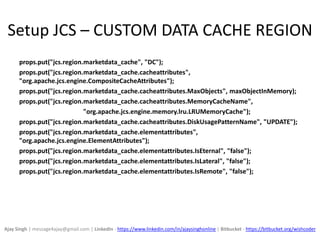
Setup JCS – CUSTOM DATA CACHE REGION
props.put("jcs.region.marketdata_cache", "DC");
props.put("jcs.region.marketdata_cache.cacheattributes",
"org.apache.jcs.engine.CompositeCacheAttributes");
props.put("jcs.region.marketdata_cache.cacheattributes.MaxObjects", maxObjectInMemory);
props.put("jcs.region.marketdata_cache.cacheattributes.MemoryCacheName",
"org.apache.jcs.engine.memory.lru.LRUMemoryCache");
props.put("jcs.region.marketdata_cache.cacheattributes.DiskUsagePatternName", "UPDATE");
props.put("jcs.region.marketdata_cache.elementattributes",
"org.apache.jcs.engine.ElementAttributes");
props.put("jcs.region.marketdata_cache.elementattributes.IsEternal", "false");
props.put("jcs.region.marketdata_cache.elementattributes.IsLateral", "false");
props.put("jcs.region.marketdata_cache.elementattributes.IsRemote", "false");
Ajay Singh | message4ajay@gmail.com | LinkedIn - https://www.linkedin.com/in/ajaysinghonline | Bitbucket - https://bitbucket.org/wishcoder
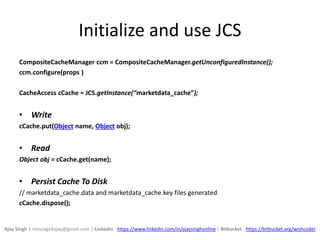
Initialize and use JCS
CompositeCacheManager ccm = CompositeCacheManager.getUnconfiguredInstance();
ccm.configure(props )
CacheAccess cCache = JCS.getInstance(“marketdata_cache”);
• Write
cCache.put(Object name, Object obj);
• Read
Object obj = cCache.get(name);
• Persist Cache To Disk
// marketdata_cache.data and marketdata_cache.key files generated
cCache.dispose();
Ajay Singh | message4ajay@gmail.com | LinkedIn - https://www.linkedin.com/in/ajaysinghonline | Bitbucket - https://bitbucket.org/wishcoder
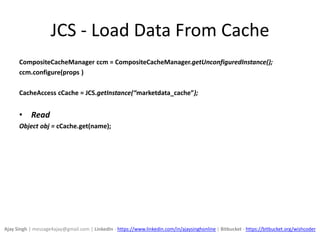
JCS - Load Data From Cache
CompositeCacheManager ccm = CompositeCacheManager.getUnconfiguredInstance();
ccm.configure(props )
CacheAccess cCache = JCS.getInstance(“marketdata_cache”);
• Read
Object obj = cCache.get(name);
Ajay Singh | message4ajay@gmail.com | LinkedIn - https://www.linkedin.com/in/ajaysinghonline | Bitbucket - https://bitbucket.org/wishcoder
Javassist – Inject Transient Data
Javassist (Java Programming Assistant) makes
Java bytecode manipulation simple. Javassist is
used to dynamically set values for transient
fields that are not persisted due to transient
nature.
Ajay Singh | message4ajay@gmail.com | LinkedIn - https://www.linkedin.com/in/ajaysinghonline | Bitbucket - https://bitbucket.org/wishcoder
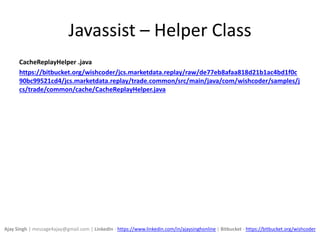
Javassist – Helper Class
CacheReplayHelper .java
https://bitbucket.org/wishcoder/jcs.marketdata.replay/raw/de77eb8afaa818d21b1ac4bd1f0c
90bc99521cd4/jcs.marketdata.replay/trade.common/src/main/java/com/wishcoder/samples/j
cs/trade/common/cache/CacheReplayHelper.java
Ajay Singh | message4ajay@gmail.com | LinkedIn - https://www.linkedin.com/in/ajaysinghonline | Bitbucket - https://bitbucket.org/wishcoder
Javassist – Dynamically Add Setter Method
List<CtMethod> setterMethods = new ArrayList<CtMethod>();
CtClass sourceClass =
ClassPool.getDefault().get("com.wishcoder.samples.jcs.trade.common.data.TickEvent");
CtMethod setSourceMethod = getCacheManager().getMethod(sourceClass,
"setSource", "source",
"com.wishcoder.samples.jcs.trade.common.data.User");
setterMethods.add(setTickBookMethod);
CacheReplayHelper.addSetterMethods(sourceClass, setterMethods);
Class<?>[] userObject = new Class[1];
userObject[0] =
Class.forName("com.wishcoder.samples.jcs.trade.common.data.User");
HashMap<String, Class<?>[]> parameterMap = new HashMap<String,
Class<?>[]>();
parameterMap.put("setSource", userObject);
CacheReplayHelper.prepareNonSerializeSetters("com.wishcoder.samples.jcs.trade.common.data.TickEv
ent",
parameterMap);
Ajay Singh | message4ajay@gmail.com | LinkedIn - https://www.linkedin.com/in/ajaysinghonline | Bitbucket - https://bitbucket.org/wishcoder
Javassist – Set Transient Data
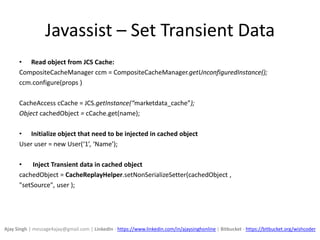
• Read object from JCS Cache:
CompositeCacheManager ccm = CompositeCacheManager.getUnconfiguredInstance();
ccm.configure(props )
CacheAccess cCache = JCS.getInstance(“marketdata_cache”);
Object cachedObject = cCache.get(name);
• Initialize object that need to be injected in cached object
User user = new User(‘1’, ‘Name’);
• Inject Transient data in cached object
cachedObject = CacheReplayHelper.setNonSerializeSetter(cachedObject ,
"setSource", user );
Ajay Singh | message4ajay@gmail.com | LinkedIn - https://www.linkedin.com/in/ajaysinghonline | Bitbucket - https://bitbucket.org/wishcoder
Wiki and Source Repository
https://bitbucket.org/wishcoder/jcs.marketdata.replay/wiki/Home
Ajay Singh | message4ajay@gmail.com | LinkedIn - https://www.linkedin.com/in/ajaysinghonline | Bitbucket - https://bitbucket.org/wishcoder
Useful Links
• Log4J
• Java
• Java MigLayout
• Javassist
• Apache Java Caching System - JCS
Ajay Singh | message4ajay@gmail.com | LinkedIn - https://www.linkedin.com/in/ajaysinghonline | Bitbucket - https://bitbucket.org/wishcoder
Questions?
Ajay Singh | message4ajay@gmail.com
LinkedIn - https://www.linkedin.com/in/ajaysinghonline
Bitbucket - https://bitbucket.org/wishcoder
Slideshare - http://www.slideshare.net/ajaysingh672
Ajay Singh | message4ajay@gmail.com | LinkedIn - https://www.linkedin.com/in/ajaysinghonline | Bitbucket - https://bitbucket.org/wishcoder

Java - Persist and Replay Runtime Data

  • 1.
    Persist and ReplayRuntime Data Using Apache Java Caching System and Javassist https://bitbucket.org/wishcoder/jcs. marketdata.replay/wiki/Home Ajay Singh | message4ajay@gmail.com | LinkedIn - https://www.linkedin.com/in/ajaysinghonline | Bitbucket - https://bitbucket.org/wishcoder
  • 2.
    Persist and ReplayRuntime Data • The ability to persist data created at runtime is useful when application states and data are required to be replayed multiple times to investigate application issues. • This article demonstrates how to persist runtime data to disk and load disk persisted data to replay in new JVM instances. Ajay Singh | message4ajay@gmail.com | LinkedIn - https://www.linkedin.com/in/ajaysinghonline | Bitbucket - https://bitbucket.org/wishcoder
  • 3.
    Apache JCS andJavassist • JCS is a distributed caching system written in Java. Indexed Disk Auxiliary Cache is used to persist data on disk. JCS only persist Serializable java objects. • Javassist (Java Programming Assistant) makes Java bytecode manipulation simple. Javassist is used to dynamically set values for transient fields that are not persisted due to transient nature. Ajay Singh | message4ajay@gmail.com | LinkedIn - https://www.linkedin.com/in/ajaysinghonline | Bitbucket - https://bitbucket.org/wishcoder
  • 4.
  • 5.
    Log4j Settings forJCS <appender name="CONSOLE" class="org.apache.log4j.ConsoleAppender"> <layout class="org.apache.log4j.PatternLayout"> <param name="ConversionPattern" value="%d [%t] %C{1} %p - %m%n"/> </layout> </appender> <logger name="org.apache.jcs"> <!– DEBUG level in dev mode will enable useful logs from JCS jar -> <!– DON’T PUT THIS IN PRODUCTION ENVIRONMENT -> <level value="DEBUG"/> <appender-ref ref="CONSOLE"/> </logger> Ajay Singh | message4ajay@gmail.com | LinkedIn - https://www.linkedin.com/in/ajaysinghonline | Bitbucket - https://bitbucket.org/wishcoder
  • 6.
    Setup JCS -DEFAULT CACHE REGION Properties props = new Properties(); props.put("jcs.default", "DC"); props.put("jcs.default.cacheattributes", "org.apache.jcs.engine.CompositeCacheAttributes"); props.put("jcs.default.cacheattributes.MaxObjects", 1000); props.put("jcs.default.cacheattributes.MemoryCacheName", "org.apache.jcs.engine.memory.lru.LRUMemoryCache"); props.put("jcs.default.cacheattributes.DiskUsagePatternName", "UPDATE"); props.put("jcs.default.elementattributes", "org.apache.jcs.engine.ElementAttributes"); props.put("jcs.default.elementattributes.IsSpool", "true"); props.put("jcs.region.elementattributes.IsEternal", "false"); props.put("jcs.default.elementattributes.IsLateral", "false"); props.put("jcs.default.elementattributes.IsRemote", "false"); Ajay Singh | message4ajay@gmail.com | LinkedIn - https://www.linkedin.com/in/ajaysinghonline | Bitbucket - https://bitbucket.org/wishcoder
  • 7.
    Setup JCS -AUXILARY/DISK CACHE props.put("jcs.auxiliary.DC", "org.apache.jcs.auxiliary.disk.indexed.IndexedDiskCacheFactory"); props.put("jcs.auxiliary.DC.attributes", "org.apache.jcs.auxiliary.disk.indexed.IndexedDiskCacheAttributes"); props.put("jcs.auxiliary.DC.attributes.DiskPath", “C:TradeCache”); props.put("jcs.auxiliary.DC.attributes.MaxPurgatorySize", "10000000"); // 10000000 // If the maximum key size is less than 0, no limit will be placed on // the number of keys. By default, the max key size is 5000. props.put("jcs.auxiliary.DC.attributes.MaxKeySize", "-1"); // Use Thread Pool for disk operation props.put("jcs.auxiliary.DC.attributes.EventQueueType", "POOLED"); props.put("jcs.auxiliary.DC.attributes.EventQueuePoolName", "disk_cache_event_queue"); // Disk Cache Event Queue Pool props.put("thread_pool.disk_cache_event_queue.useBoundary", "false"); props.put("thread_pool.remote_cache_client.maximumPoolSize", "15"); props.put("thread_pool.disk_cache_event_queue.minimumPoolSize", "1"); props.put("thread_pool.disk_cache_event_queue.keepAliveTime", "3500"); props.put("thread_pool.disk_cache_event_queue.startUpSize", "1"); Ajay Singh | message4ajay@gmail.com | LinkedIn - https://www.linkedin.com/in/ajaysinghonline | Bitbucket - https://bitbucket.org/wishcoder
  • 8.
    Setup JCS –CUSTOM DATA CACHE REGION props.put("jcs.region.marketdata_cache", "DC"); props.put("jcs.region.marketdata_cache.cacheattributes", "org.apache.jcs.engine.CompositeCacheAttributes"); props.put("jcs.region.marketdata_cache.cacheattributes.MaxObjects", maxObjectInMemory); props.put("jcs.region.marketdata_cache.cacheattributes.MemoryCacheName", "org.apache.jcs.engine.memory.lru.LRUMemoryCache"); props.put("jcs.region.marketdata_cache.cacheattributes.DiskUsagePatternName", "UPDATE"); props.put("jcs.region.marketdata_cache.elementattributes", "org.apache.jcs.engine.ElementAttributes"); props.put("jcs.region.marketdata_cache.elementattributes.IsEternal", "false"); props.put("jcs.region.marketdata_cache.elementattributes.IsLateral", "false"); props.put("jcs.region.marketdata_cache.elementattributes.IsRemote", "false"); Ajay Singh | message4ajay@gmail.com | LinkedIn - https://www.linkedin.com/in/ajaysinghonline | Bitbucket - https://bitbucket.org/wishcoder
  • 9.
    Initialize and useJCS CompositeCacheManager ccm = CompositeCacheManager.getUnconfiguredInstance(); ccm.configure(props ) CacheAccess cCache = JCS.getInstance(“marketdata_cache”); • Write cCache.put(Object name, Object obj); • Read Object obj = cCache.get(name); • Persist Cache To Disk // marketdata_cache.data and marketdata_cache.key files generated cCache.dispose(); Ajay Singh | message4ajay@gmail.com | LinkedIn - https://www.linkedin.com/in/ajaysinghonline | Bitbucket - https://bitbucket.org/wishcoder
  • 10.
    JCS - LoadData From Cache CompositeCacheManager ccm = CompositeCacheManager.getUnconfiguredInstance(); ccm.configure(props ) CacheAccess cCache = JCS.getInstance(“marketdata_cache”); • Read Object obj = cCache.get(name); Ajay Singh | message4ajay@gmail.com | LinkedIn - https://www.linkedin.com/in/ajaysinghonline | Bitbucket - https://bitbucket.org/wishcoder
  • 11.
    Javassist – InjectTransient Data Javassist (Java Programming Assistant) makes Java bytecode manipulation simple. Javassist is used to dynamically set values for transient fields that are not persisted due to transient nature. Ajay Singh | message4ajay@gmail.com | LinkedIn - https://www.linkedin.com/in/ajaysinghonline | Bitbucket - https://bitbucket.org/wishcoder
  • 12.
    Javassist – HelperClass CacheReplayHelper .java https://bitbucket.org/wishcoder/jcs.marketdata.replay/raw/de77eb8afaa818d21b1ac4bd1f0c 90bc99521cd4/jcs.marketdata.replay/trade.common/src/main/java/com/wishcoder/samples/j cs/trade/common/cache/CacheReplayHelper.java Ajay Singh | message4ajay@gmail.com | LinkedIn - https://www.linkedin.com/in/ajaysinghonline | Bitbucket - https://bitbucket.org/wishcoder
  • 13.
    Javassist – DynamicallyAdd Setter Method List<CtMethod> setterMethods = new ArrayList<CtMethod>(); CtClass sourceClass = ClassPool.getDefault().get("com.wishcoder.samples.jcs.trade.common.data.TickEvent"); CtMethod setSourceMethod = getCacheManager().getMethod(sourceClass, "setSource", "source", "com.wishcoder.samples.jcs.trade.common.data.User"); setterMethods.add(setTickBookMethod); CacheReplayHelper.addSetterMethods(sourceClass, setterMethods); Class<?>[] userObject = new Class[1]; userObject[0] = Class.forName("com.wishcoder.samples.jcs.trade.common.data.User"); HashMap<String, Class<?>[]> parameterMap = new HashMap<String, Class<?>[]>(); parameterMap.put("setSource", userObject); CacheReplayHelper.prepareNonSerializeSetters("com.wishcoder.samples.jcs.trade.common.data.TickEv ent", parameterMap); Ajay Singh | message4ajay@gmail.com | LinkedIn - https://www.linkedin.com/in/ajaysinghonline | Bitbucket - https://bitbucket.org/wishcoder
  • 14.
    Javassist – SetTransient Data • Read object from JCS Cache: CompositeCacheManager ccm = CompositeCacheManager.getUnconfiguredInstance(); ccm.configure(props ) CacheAccess cCache = JCS.getInstance(“marketdata_cache”); Object cachedObject = cCache.get(name); • Initialize object that need to be injected in cached object User user = new User(‘1’, ‘Name’); • Inject Transient data in cached object cachedObject = CacheReplayHelper.setNonSerializeSetter(cachedObject , "setSource", user ); Ajay Singh | message4ajay@gmail.com | LinkedIn - https://www.linkedin.com/in/ajaysinghonline | Bitbucket - https://bitbucket.org/wishcoder
  • 15.
    Wiki and SourceRepository https://bitbucket.org/wishcoder/jcs.marketdata.replay/wiki/Home Ajay Singh | message4ajay@gmail.com | LinkedIn - https://www.linkedin.com/in/ajaysinghonline | Bitbucket - https://bitbucket.org/wishcoder
  • 16.
    Useful Links • Log4J •Java • Java MigLayout • Javassist • Apache Java Caching System - JCS Ajay Singh | message4ajay@gmail.com | LinkedIn - https://www.linkedin.com/in/ajaysinghonline | Bitbucket - https://bitbucket.org/wishcoder
  • 17.
    Questions? Ajay Singh |message4ajay@gmail.com LinkedIn - https://www.linkedin.com/in/ajaysinghonline Bitbucket - https://bitbucket.org/wishcoder Slideshare - http://www.slideshare.net/ajaysingh672 Ajay Singh | message4ajay@gmail.com | LinkedIn - https://www.linkedin.com/in/ajaysinghonline | Bitbucket - https://bitbucket.org/wishcoder