Securing Java EE apps
using WildFly Elytron
Jan Kalina, WildFly Elytron team
Red Hat
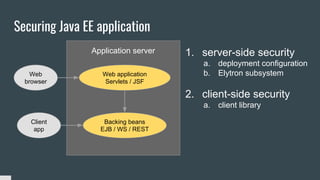
Securing Java EE application
Backing beans
EJB / WS / REST
Web application
Servlets / JSF
Web
browser
Client
app
Application server 1. server-side security
a. deployment configuration
b. Elytron subsystem
2. client-side security
a. client library
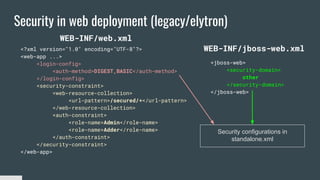
Security in web deployment (legacy/elytron)
<?xml version="1.0" encoding="UTF-8"?>
<web-app ...>
<login-config>
<auth-method>DIGEST,BASIC</auth-method>
</login-config>
<security-constraint>
<web-resource-collection>
<url-pattern>/secured/*</url-pattern>
</web-resource-collection>
<auth-constraint>
<role-name>Admin</role-name>
<role-name>Adder</role-name>
</auth-constraint>
</security-constraint>
</web-app>
<jboss-web>
<security-domain>
other
</security-domain>
</jboss-web>
WEB-INF/jboss-web.xml
WEB-INF/web.xml
Security configurations in
standalone.xml
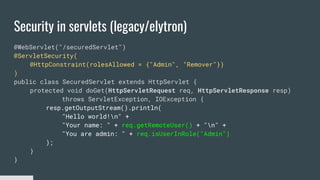
Security in servlets (legacy/elytron)
@WebServlet("/securedServlet")
@ServletSecurity(
@HttpConstraint(rolesAllowed = {"Admin", "Remover"})
)
public class SecuredServlet extends HttpServlet {
protected void doGet(HttpServletRequest req, HttpServletResponse resp)
throws ServletException, IOException {
resp.getOutputStream().println(
"Hello world!n" +
"Your name: " + req.getRemoteUser() + "n" +
"You are admin: " + req.isUserInRole("Admin")
);
}
}
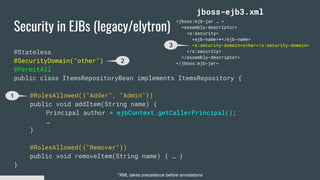
Security in EJBs (legacy/elytron)
@Stateless
@SecurityDomain("other")
@PermitAll
public class ItemsRepositoryBean implements ItemsRepository {
@RolesAllowed({"Adder", "Admin"})
public void addItem(String name) {
Principal author = ejbContext.getCallerPrincipal();
…
}
@RolesAllowed({"Remover"})
public void removeItem(String name) { … }
}
<jboss:ejb-jar … >
<assembly-descriptor>
<s:security>
<ejb-name>*</ejb-name>
<s:security-domain>other</s:security-domain>
</s:security>
</assembly-descriptor>
</jboss:ejb-jar>
jboss-ejb3.xml
*XML takes precedence before annotations
1
2
3
Legacy security
security domain
[web]
security domain
[EJB]
security-domain
[security subsystem]
authentication
login-module Users
authorization
policy-module
accessing user is Joe
and has admin role
admin is permitted
to remove items
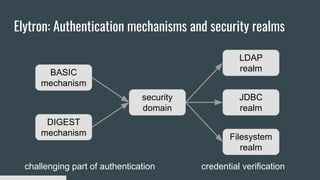
Elytron: Authentication mechanisms and security realms
BASIC
mechanism
DIGEST
mechanism
security
domain
LDAP
realm
JDBC
realm
Filesystem
realm
challenging part of authentication credential verification
Using Elytron
security domain
[web]
security domain
[EJB]
application-security-domain
[undertow subsystem]
http-authentication-factory
application-security-domain
[ejb3 subsystem]
sasl-authentication-factory
security-domain
Http-connector
[remoting subsystem]
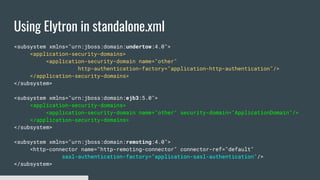
Using Elytron in standalone.xml
<subsystem xmlns="urn:jboss:domain:undertow:4.0">
<application-security-domains>
<application-security-domain name="other"
http-authentication-factory="application-http-authentication"/>
</application-security-domains>
</subsystem>
<subsystem xmlns="urn:jboss:domain:ejb3:5.0">
<application-security-domains>
<application-security-domain name="other" security-domain="ApplicationDomain"/>
</application-security-domains>
</subsystem>
<subsystem xmlns="urn:jboss:domain:remoting:4.0">
<http-connector name="http-remoting-connector" connector-ref="default"
sasl-authentication-factory="application-sasl-authentication"/>
</subsystem>
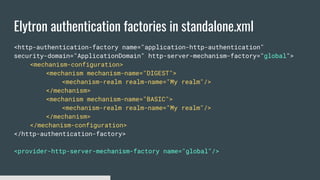
Elytron authentication factories in standalone.xml
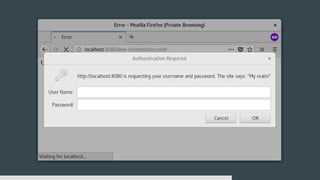
<http-authentication-factory name="application-http-authentication"
security-domain="ApplicationDomain" http-server-mechanism-factory="global">
<mechanism-configuration>
<mechanism mechanism-name="DIGEST">
<mechanism-realm realm-name="My realm"/>
</mechanism>
<mechanism mechanism-name="BASIC">
<mechanism-realm realm-name="My realm"/>
</mechanism>
</mechanism-configuration>
</http-authentication-factory>
<provider-http-server-mechanism-factory name="global"/>
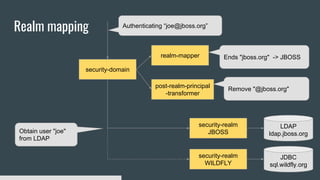
Realm mapping
security-domain
security-realm
JBOSS
LDAP
ldap.jboss.org
security-realm
WILDFLY
JDBC
sql.wildfly.org
Authenticating “joe@jboss.org”
realm-mapper
post-realm-principal
-transformer
Ends "jboss.org" -> JBOSS
Remove "@jboss.org"
Obtain user "joe"
from LDAP
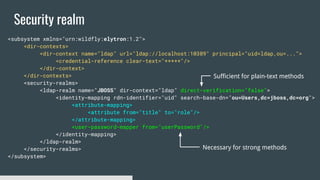
Security realm
<subsystem xmlns="urn:wildfly:elytron:1.2">
<dir-contexts>
<dir-context name="ldap" url="ldap://localhost:10389" principal="uid=ldap,ou=...">
<credential-reference clear-text="*****"/>
</dir-context>
</dir-contexts>
<security-realms>
<ldap-realm name="JBOSS" dir-context="ldap" direct-verification="false">
<identity-mapping rdn-identifier="uid" search-base-dn="ou=Users,dc=jboss,dc=org">
<attribute-mapping>
<attribute from="title" to="role"/>
</attribute-mapping>
<user-password-mapper from="userPassword"/>
</identity-mapping>
</ldap-realm>
</security-realms>
</subsystem>
Sufficient for plain-text methods
Necessary for strong methods
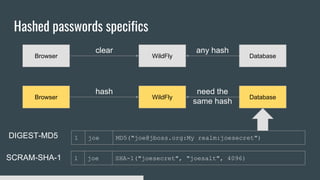
Hashed passwords specifics
Browser WildFly Database
clear any hash
Browser WildFly Database
hash need the
same hash
1 joe MD5("joe@jboss.org:My realm:joesecret")
1 joe SHA-1("joesecret", "joesalt", 4096)
DIGEST-MD5
SCRAM-SHA-1
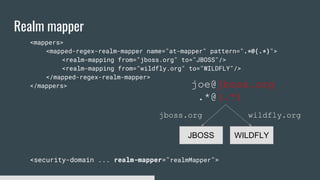
Realm mapper
<mappers>
<mapped-regex-realm-mapper name="at-mapper" pattern=".*@(.*)">
<realm-mapping from="jboss.org" to="JBOSS"/>
<realm-mapping from="wildfly.org" to="WILDFLY"/>
</mapped-regex-realm-mapper>
</mappers>
<security-domain ... realm-mapper="realmMapper">
joe@jboss.org
.*@(.*)
JBOSS WILDFLY
wildfly.orgjboss.org
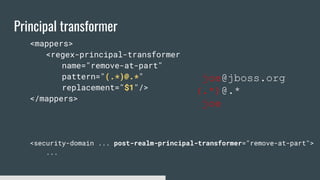
Principal transformer
<mappers>
<regex-principal-transformer
name="remove-at-part"
pattern="(.*)@.*"
replacement="$1"/>
</mappers>
<security-domain ... post-realm-principal-transformer="remove-at-part">
...
joe@jboss.org
(.*)@.*
joe
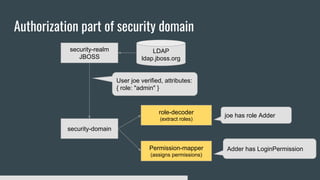
Authorization part of security domain
security-domain
security-realm
JBOSS
LDAP
ldap.jboss.org
User joe verified, attributes:
{ role: "admin" }
role-decoder
(extract roles)
joe has role Adder
Permission-mapper
(assigns permissions)
Adder has LoginPermission
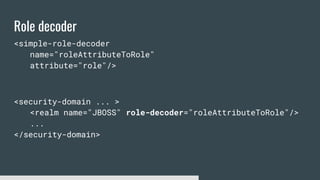
Role decoder
<simple-role-decoder
name="roleAttributeToRole"
attribute="role"/>
<security-domain ... >
<realm name="JBOSS" role-decoder="roleAttributeToRole"/>
...
</security-domain>
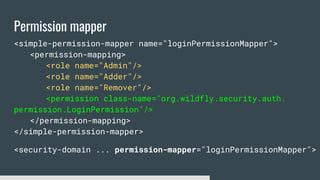
Permission mapper
<simple-permission-mapper name="loginPermissionMapper">
<permission-mapping>
<role name="Admin"/>
<role name="Adder"/>
<role name="Remover"/>
<permission class-name="org.wildfly.security.auth.
permission.LoginPermission"/>
</permission-mapping>
</simple-permission-mapper>
<security-domain ... permission-mapper="loginPermissionMapper">
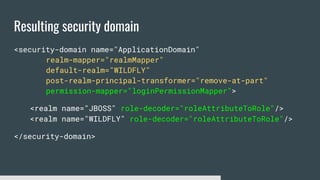
Resulting security domain
<security-domain name="ApplicationDomain"
realm-mapper="realmMapper"
default-realm="WILDFLY"
post-realm-principal-transformer="remove-at-part"
permission-mapper="loginPermissionMapper">
<realm name="JBOSS" role-decoder="roleAttributeToRole"/>
<realm name="WILDFLY" role-decoder="roleAttributeToRole"/>
</security-domain>
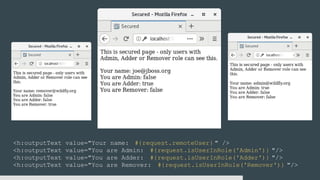
<h:outputText value="Your name: #{request.remoteUser} " />
<h:outputText value="You are Admin: #{request.isUserInRole('Admin')} "/>
<h:outputText value="You are Adder: #{request.isUserInRole('Adder')} "/>
<h:outputText value="You are Remover: #{request.isUserInRole('Remover')} "/>
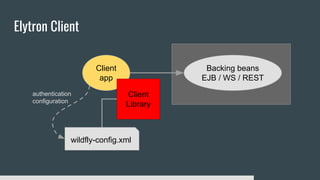
Elytron Client
Backing beans
EJB / WS / REST
Client
app
Client
Library
wildfly-config.xml
authentication
configuration
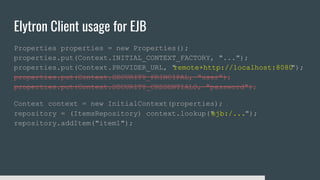
Elytron Client usage for EJB
Properties properties = new Properties();
properties.put(Context.INITIAL_CONTEXT_FACTORY, "...");
properties.put(Context.PROVIDER_URL, "remote+http://localhost:8080");
properties.put(Context.SECURITY_PRINCIPAL, "user");
properties.put(Context.SECURITY_CREDENTIALS, "password");
Context context = new InitialContext(properties);
repository = (ItemsRepository) context.lookup("ejb:/...");
repository.addItem("item1");
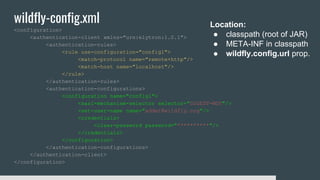
wildfly-config.xml
<configuration>
<authentication-client xmlns="urn:elytron:1.0.1">
<authentication-rules>
<rule use-configuration="config1">
<match-protocol name="remote+http"/>
<match-host name="localhost"/>
</rule>
</authentication-rules>
<authentication-configurations>
<configuration name="config1">
<sasl-mechanism-selector selector="DIGEST-MD5"/>
<set-user-name name="adder@wildfly.org"/>
<credentials>
<clear-password password="**********"/>
</credentials>
</configuration>
</authentication-configurations>
</authentication-client>
</configuration>
Location:
● classpath (root of JAR)
● META-INF in classpath
● wildfly.config.url prop.
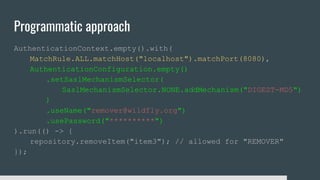
Programmatic approach
AuthenticationContext.empty().with(
MatchRule.ALL.matchHost("localhost").matchPort(8080),
AuthenticationConfiguration.empty()
.setSaslMechanismSelector(
SaslMechanismSelector.NONE.addMechanism("DIGEST-MD5")
)
.useName("remover@wildfly.org")
.usePassword("**********")
).run(() -> {
repository.removeItem("item3"); // allowed for "REMOVER"
});
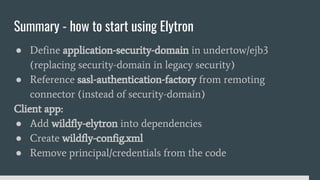
Summary - how to start using Elytron
● Define application-security-domain in undertow/ejb3
(replacing security-domain in legacy security)
● Reference sasl-authentication-factory from remoting
connector (instead of security-domain)
Client app:
● Add wildfly-elytron into dependencies
● Create wildfly-config.xml
● Remove principal/credentials from the code
Securing Java EE apps using WildFly Elytron
Jan Kalina
Red Hat
Demo application:
https://github.com/hkalina/devconf-elytron-demo

Securing Java EE apps using WildFly Elytron

  • 1.
    Securing Java EEapps using WildFly Elytron Jan Kalina, WildFly Elytron team Red Hat
  • 2.
    Securing Java EEapplication Backing beans EJB / WS / REST Web application Servlets / JSF Web browser Client app Application server 1. server-side security a. deployment configuration b. Elytron subsystem 2. client-side security a. client library
  • 3.
    Security in webdeployment (legacy/elytron) <?xml version="1.0" encoding="UTF-8"?> <web-app ...> <login-config> <auth-method>DIGEST,BASIC</auth-method> </login-config> <security-constraint> <web-resource-collection> <url-pattern>/secured/*</url-pattern> </web-resource-collection> <auth-constraint> <role-name>Admin</role-name> <role-name>Adder</role-name> </auth-constraint> </security-constraint> </web-app> <jboss-web> <security-domain> other </security-domain> </jboss-web> WEB-INF/jboss-web.xml WEB-INF/web.xml Security configurations in standalone.xml
  • 4.
    Security in servlets(legacy/elytron) @WebServlet("/securedServlet") @ServletSecurity( @HttpConstraint(rolesAllowed = {"Admin", "Remover"}) ) public class SecuredServlet extends HttpServlet { protected void doGet(HttpServletRequest req, HttpServletResponse resp) throws ServletException, IOException { resp.getOutputStream().println( "Hello world!n" + "Your name: " + req.getRemoteUser() + "n" + "You are admin: " + req.isUserInRole("Admin") ); } }
  • 5.
    Security in EJBs(legacy/elytron) @Stateless @SecurityDomain("other") @PermitAll public class ItemsRepositoryBean implements ItemsRepository { @RolesAllowed({"Adder", "Admin"}) public void addItem(String name) { Principal author = ejbContext.getCallerPrincipal(); … } @RolesAllowed({"Remover"}) public void removeItem(String name) { … } } <jboss:ejb-jar … > <assembly-descriptor> <s:security> <ejb-name>*</ejb-name> <s:security-domain>other</s:security-domain> </s:security> </assembly-descriptor> </jboss:ejb-jar> jboss-ejb3.xml *XML takes precedence before annotations 1 2 3
  • 6.
    Legacy security security domain [web] securitydomain [EJB] security-domain [security subsystem] authentication login-module Users authorization policy-module accessing user is Joe and has admin role admin is permitted to remove items
  • 7.
    Elytron: Authentication mechanismsand security realms BASIC mechanism DIGEST mechanism security domain LDAP realm JDBC realm Filesystem realm challenging part of authentication credential verification
  • 8.
    Using Elytron security domain [web] securitydomain [EJB] application-security-domain [undertow subsystem] http-authentication-factory application-security-domain [ejb3 subsystem] sasl-authentication-factory security-domain Http-connector [remoting subsystem]
  • 9.
    Using Elytron instandalone.xml <subsystem xmlns="urn:jboss:domain:undertow:4.0"> <application-security-domains> <application-security-domain name="other" http-authentication-factory="application-http-authentication"/> </application-security-domains> </subsystem> <subsystem xmlns="urn:jboss:domain:ejb3:5.0"> <application-security-domains> <application-security-domain name="other" security-domain="ApplicationDomain"/> </application-security-domains> </subsystem> <subsystem xmlns="urn:jboss:domain:remoting:4.0"> <http-connector name="http-remoting-connector" connector-ref="default" sasl-authentication-factory="application-sasl-authentication"/> </subsystem>
  • 10.
    Elytron authentication factoriesin standalone.xml <http-authentication-factory name="application-http-authentication" security-domain="ApplicationDomain" http-server-mechanism-factory="global"> <mechanism-configuration> <mechanism mechanism-name="DIGEST"> <mechanism-realm realm-name="My realm"/> </mechanism> <mechanism mechanism-name="BASIC"> <mechanism-realm realm-name="My realm"/> </mechanism> </mechanism-configuration> </http-authentication-factory> <provider-http-server-mechanism-factory name="global"/>
  • 11.
  • 12.
    Security realm <subsystem xmlns="urn:wildfly:elytron:1.2"> <dir-contexts> <dir-contextname="ldap" url="ldap://localhost:10389" principal="uid=ldap,ou=..."> <credential-reference clear-text="*****"/> </dir-context> </dir-contexts> <security-realms> <ldap-realm name="JBOSS" dir-context="ldap" direct-verification="false"> <identity-mapping rdn-identifier="uid" search-base-dn="ou=Users,dc=jboss,dc=org"> <attribute-mapping> <attribute from="title" to="role"/> </attribute-mapping> <user-password-mapper from="userPassword"/> </identity-mapping> </ldap-realm> </security-realms> </subsystem> Sufficient for plain-text methods Necessary for strong methods
  • 13.
    Hashed passwords specifics BrowserWildFly Database clear any hash Browser WildFly Database hash need the same hash 1 joe MD5("joe@jboss.org:My realm:joesecret") 1 joe SHA-1("joesecret", "joesalt", 4096) DIGEST-MD5 SCRAM-SHA-1
  • 14.
    Realm mapper <mappers> <mapped-regex-realm-mapper name="at-mapper"pattern=".*@(.*)"> <realm-mapping from="jboss.org" to="JBOSS"/> <realm-mapping from="wildfly.org" to="WILDFLY"/> </mapped-regex-realm-mapper> </mappers> <security-domain ... realm-mapper="realmMapper"> joe@jboss.org .*@(.*) JBOSS WILDFLY wildfly.orgjboss.org
  • 15.
  • 16.
    Authorization part ofsecurity domain security-domain security-realm JBOSS LDAP ldap.jboss.org User joe verified, attributes: { role: "admin" } role-decoder (extract roles) joe has role Adder Permission-mapper (assigns permissions) Adder has LoginPermission
  • 17.
    Role decoder <simple-role-decoder name="roleAttributeToRole" attribute="role"/> <security-domain ...> <realm name="JBOSS" role-decoder="roleAttributeToRole"/> ... </security-domain>
  • 18.
    Permission mapper <simple-permission-mapper name="loginPermissionMapper"> <permission-mapping> <rolename="Admin"/> <role name="Adder"/> <role name="Remover"/> <permission class-name="org.wildfly.security.auth. permission.LoginPermission"/> </permission-mapping> </simple-permission-mapper> <security-domain ... permission-mapper="loginPermissionMapper">
  • 19.
    Resulting security domain <security-domainname="ApplicationDomain" realm-mapper="realmMapper" default-realm="WILDFLY" post-realm-principal-transformer="remove-at-part" permission-mapper="loginPermissionMapper"> <realm name="JBOSS" role-decoder="roleAttributeToRole"/> <realm name="WILDFLY" role-decoder="roleAttributeToRole"/> </security-domain>
  • 21.
    <h:outputText value="Your name:#{request.remoteUser} " /> <h:outputText value="You are Admin: #{request.isUserInRole('Admin')} "/> <h:outputText value="You are Adder: #{request.isUserInRole('Adder')} "/> <h:outputText value="You are Remover: #{request.isUserInRole('Remover')} "/>
  • 22.
    Elytron Client Backing beans EJB/ WS / REST Client app Client Library wildfly-config.xml authentication configuration
  • 23.
    Elytron Client usagefor EJB Properties properties = new Properties(); properties.put(Context.INITIAL_CONTEXT_FACTORY, "..."); properties.put(Context.PROVIDER_URL, "remote+http://localhost:8080"); properties.put(Context.SECURITY_PRINCIPAL, "user"); properties.put(Context.SECURITY_CREDENTIALS, "password"); Context context = new InitialContext(properties); repository = (ItemsRepository) context.lookup("ejb:/..."); repository.addItem("item1");
  • 24.
    wildfly-config.xml <configuration> <authentication-client xmlns="urn:elytron:1.0.1"> <authentication-rules> <rule use-configuration="config1"> <match-protocolname="remote+http"/> <match-host name="localhost"/> </rule> </authentication-rules> <authentication-configurations> <configuration name="config1"> <sasl-mechanism-selector selector="DIGEST-MD5"/> <set-user-name name="adder@wildfly.org"/> <credentials> <clear-password password="**********"/> </credentials> </configuration> </authentication-configurations> </authentication-client> </configuration> Location: ● classpath (root of JAR) ● META-INF in classpath ● wildfly.config.url prop.
  • 25.
  • 27.
    Summary - howto start using Elytron ● Define application-security-domain in undertow/ejb3 (replacing security-domain in legacy security) ● Reference sasl-authentication-factory from remoting connector (instead of security-domain) Client app: ● Add wildfly-elytron into dependencies ● Create wildfly-config.xml ● Remove principal/credentials from the code
  • 28.
    Securing Java EEapps using WildFly Elytron Jan Kalina Red Hat Demo application: https://github.com/hkalina/devconf-elytron-demo