Objects and Classes
Lecture-7
8/30/2013 1
Objects
• An object represents an entity in the real world
that can be distinctly identified. For example, a
student, a desk, a circle, a button, and even a
loan can all be viewed as objects. An object has
a unique identity, state, and behaviour.
• The state of an object (also known as its
properties or attributes) is represented by data
fields with their current values. A circle object, for
example, has a data field radius, which is the
property that characterizes a circle.
8/30/2013 2
Objects
• The behaviour of an object (also known as its
actions) is defined by methods. To invoke a
method on an object is to ask the object to
perform an action. For example, you may define
a method named getArea() for circle objects. A
circle object may invoke getArea() to return its
area.
8/30/2013 3
Classes
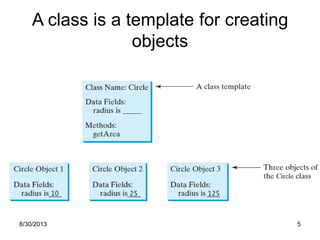
• A class is a template, blueprint, or contract
that defines what an object’s data fields
and methods will be. An object is an
instance of a class. You can create many
instances of a class. Creating an instance
is referred to as instantiation.
8/30/2013 4
A class is a template for creating
objects
8/30/2013 5
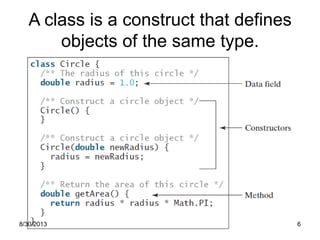
A class is a construct that defines
objects of the same type.
8/30/2013 6
Constructors
• A class provides methods of a special type,
known as constructors, which are invoked to
create a new object. A constructor can perform
any action, but constructors are designed to
perform initializing actions, such as initializing
the data fields of objects.
8/30/2013 7
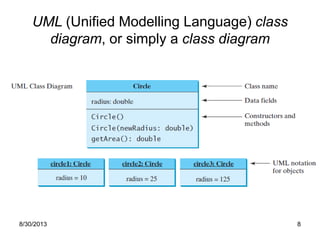
UML (Unified Modelling Language) class
diagram, or simply a class diagram
8/30/2013 8
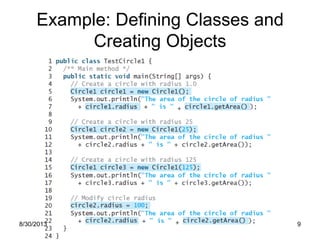
Example: Defining Classes and
Creating Objects
8/30/2013 9
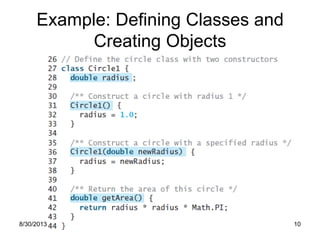
Example: Defining Classes and
Creating Objects
8/30/2013 10
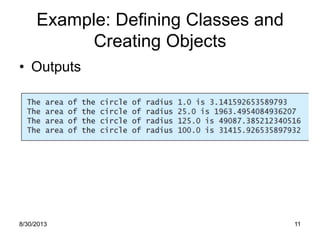
Example: Defining Classes and
Creating Objects
• Outputs
8/30/2013 11
Strings
• Constructing a String
– String message = new String("Welcome to Java");
or
– String message = "Welcome to Java";
• You can also create a string from an array of
characters.
– char[] charArray = {'G', 'o', 'o', 'd', ' ', 'D', 'a', 'y'};
String message = new String(charArray);
8/30/2013 12
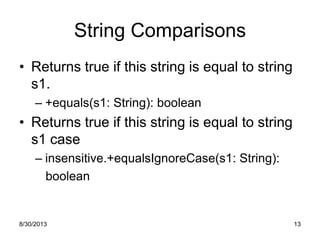
String Comparisons
• Returns true if this string is equal to string
s1.
– +equals(s1: String): boolean
• Returns true if this string is equal to string
s1 case
– insensitive.+equalsIgnoreCase(s1: String):
boolean
8/30/2013 13
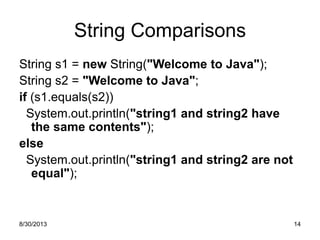
String Comparisons
String s1 = new String("Welcome to Java");
String s2 = "Welcome to Java";
if (s1.equals(s2))
System.out.println("string1 and string2 have
the same contents");
else
System.out.println("string1 and string2 are not
equal");
8/30/2013 14
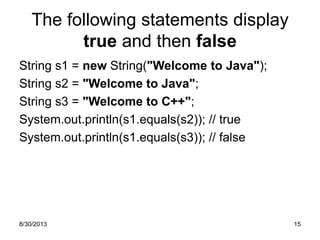
The following statements display
true and then false
String s1 = new String("Welcome to Java");
String s2 = "Welcome to Java";
String s3 = "Welcome to C++";
System.out.println(s1.equals(s2)); // true
System.out.println(s1.equals(s3)); // false
8/30/2013 15
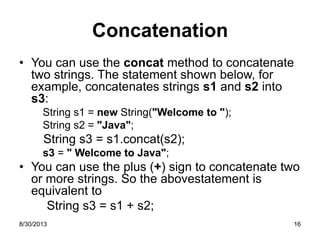
Concatenation
• You can use the concat method to concatenate
two strings. The statement shown below, for
example, concatenates strings s1 and s2 into
s3:
String s1 = new String("Welcome to ");
String s2 = "Java";
String s3 = s1.concat(s2);
s3 = " Welcome to Java";
• You can use the plus (+) sign to concatenate two
or more strings. So the abovestatement is
equivalent to
String s3 = s1 + s2;
8/30/2013 16
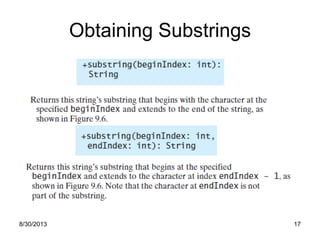
Obtaining Substrings
8/30/2013 17
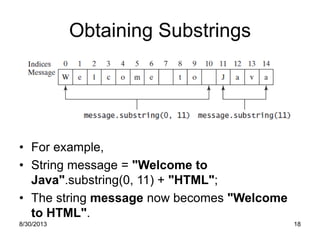
Obtaining Substrings
• For example,
• String message = "Welcome to
Java".substring(0, 11) + "HTML";
• The string message now becomes "Welcome
to HTML".
8/30/2013 18
8/30/2013 19
8/30/2013 20
replaceAll
• For example, the following statement returns a
new string that replaces $, +, or # in "a+b$#c"
with the string NNN.
String s = "a+b$#c".replaceAll("[$+#]", "NNN");
System.out.println(s);
• Here the regular expression [$+#] specifies a
pattern that matches $, +, or #. So, the output is
aNNNbNNNNNNc.
8/30/2013 21
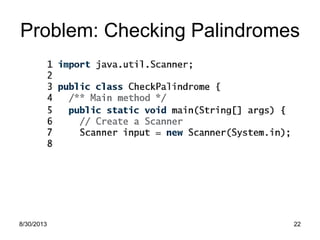
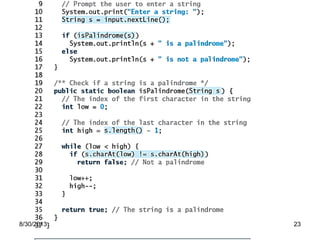
Problem: Checking Palindromes
8/30/2013 22
8/30/2013 23
END
8/30/2013 24

Java lecture 7 1

  • 1.
  • 2.
    Objects • An objectrepresents an entity in the real world that can be distinctly identified. For example, a student, a desk, a circle, a button, and even a loan can all be viewed as objects. An object has a unique identity, state, and behaviour. • The state of an object (also known as its properties or attributes) is represented by data fields with their current values. A circle object, for example, has a data field radius, which is the property that characterizes a circle. 8/30/2013 2
  • 3.
    Objects • The behaviourof an object (also known as its actions) is defined by methods. To invoke a method on an object is to ask the object to perform an action. For example, you may define a method named getArea() for circle objects. A circle object may invoke getArea() to return its area. 8/30/2013 3
  • 4.
    Classes • A classis a template, blueprint, or contract that defines what an object’s data fields and methods will be. An object is an instance of a class. You can create many instances of a class. Creating an instance is referred to as instantiation. 8/30/2013 4
  • 5.
    A class isa template for creating objects 8/30/2013 5
  • 6.
    A class isa construct that defines objects of the same type. 8/30/2013 6
  • 7.
    Constructors • A classprovides methods of a special type, known as constructors, which are invoked to create a new object. A constructor can perform any action, but constructors are designed to perform initializing actions, such as initializing the data fields of objects. 8/30/2013 7
  • 8.
    UML (Unified ModellingLanguage) class diagram, or simply a class diagram 8/30/2013 8
  • 9.
    Example: Defining Classesand Creating Objects 8/30/2013 9
  • 10.
    Example: Defining Classesand Creating Objects 8/30/2013 10
  • 11.
    Example: Defining Classesand Creating Objects • Outputs 8/30/2013 11
  • 12.
    Strings • Constructing aString – String message = new String("Welcome to Java"); or – String message = "Welcome to Java"; • You can also create a string from an array of characters. – char[] charArray = {'G', 'o', 'o', 'd', ' ', 'D', 'a', 'y'}; String message = new String(charArray); 8/30/2013 12
  • 13.
    String Comparisons • Returnstrue if this string is equal to string s1. – +equals(s1: String): boolean • Returns true if this string is equal to string s1 case – insensitive.+equalsIgnoreCase(s1: String): boolean 8/30/2013 13
  • 14.
    String Comparisons String s1= new String("Welcome to Java"); String s2 = "Welcome to Java"; if (s1.equals(s2)) System.out.println("string1 and string2 have the same contents"); else System.out.println("string1 and string2 are not equal"); 8/30/2013 14
  • 15.
    The following statementsdisplay true and then false String s1 = new String("Welcome to Java"); String s2 = "Welcome to Java"; String s3 = "Welcome to C++"; System.out.println(s1.equals(s2)); // true System.out.println(s1.equals(s3)); // false 8/30/2013 15
  • 16.
    Concatenation • You canuse the concat method to concatenate two strings. The statement shown below, for example, concatenates strings s1 and s2 into s3: String s1 = new String("Welcome to "); String s2 = "Java"; String s3 = s1.concat(s2); s3 = " Welcome to Java"; • You can use the plus (+) sign to concatenate two or more strings. So the abovestatement is equivalent to String s3 = s1 + s2; 8/30/2013 16
  • 17.
  • 18.
    Obtaining Substrings • Forexample, • String message = "Welcome to Java".substring(0, 11) + "HTML"; • The string message now becomes "Welcome to HTML". 8/30/2013 18
  • 19.
  • 20.
  • 21.
    replaceAll • For example,the following statement returns a new string that replaces $, +, or # in "a+b$#c" with the string NNN. String s = "a+b$#c".replaceAll("[$+#]", "NNN"); System.out.println(s); • Here the regular expression [$+#] specifies a pattern that matches $, +, or #. So, the output is aNNNbNNNNNNc. 8/30/2013 21
  • 22.
  • 23.
  • 24.