Java goes wild 
Lesson 1: Introduction to Java 
Thierry Wasylczenko
After this course ... 
You will: 
• Know what is the JDK/JRE 
• Be able to set up your development environment 
• Know how to compile and run a Java program 
2
Agenda 
• Bascis 
• How does all of this work? 
• Developer’s environment 
3
Basics 
Success is neither magical nor mysterious. Success is the natural 
consequence of consistently applying the basic fundamentals. 
Jim Rohn “ 
4
Basics 
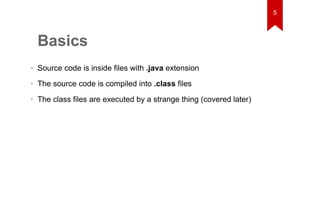
• Source code is inside files with .java extension 
• The source code is compiled into .class files 
• The class files are executed by a strange thing (covered later) 
5
A Java file 
public class Foo { 
public static void main(String[] args) { 
System.out.println("Hello World!"); 
} 
} 
6
How do I get class files? 
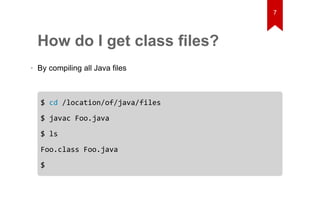
• By compiling all Java files 
$ cd /location/of/java/files 
$ javac Foo.java 
$ ls 
Foo.class Foo.java 
$ 
7
How do I run it? 
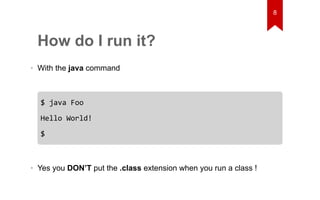
• With the java command 
$ java Foo 
Hello World! 
$ 
• Yes you DON’T put the .class extension when you run a class ! 
8
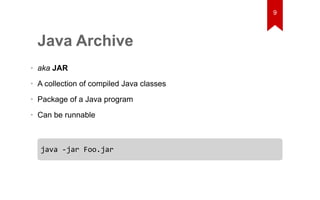
Java Archive 
• aka JAR 
• A collection of compiled Java classes 
• Package of a Java program 
• Can be runnable 
java -jar Foo.jar 
9
That's 
freaking 
AWESOME !
That’s awesome dude. But how 
does all of this work? 
You “ 
11
12 
How does all of this work? 
It is not the beauty of a building you should look at; it's the construction 
of the foundation that will stand the test of time. 
David Allan Coe “
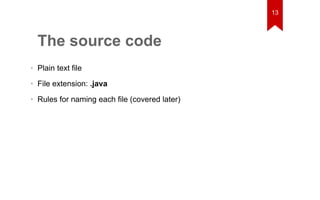
The source code 
• Plain text file 
• File extension: .java 
• Rules for naming each file (covered later) 
13
The bytecode 
14 
• Result of compilation 
• Something in between the source code and the machine’s language 
• Interpreted by the Java Virtual Machine
The Java Virtual Machine 
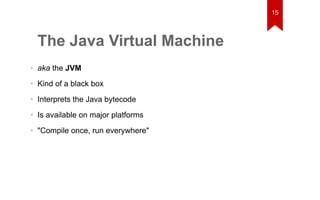
• aka the JVM 
• Kind of a black box 
• Interprets the Java bytecode 
• Is available on major platforms 
• "Compile once, run everywhere" 
15
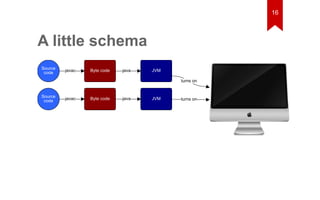
A little schema 
Source 
code 
Source 
code 
Byte code JVM 
Byte code JVM 
turns on 
turns on 
java 
java 
javac 
javac 
16
Well man, you’re talking about 
JVM, javac, bytecode and cool 
stuff. But how do I set them up? 
You “ 
17
18 
Developer's environment 
When people think about computer science, they imagine people with 
pocket protectors and thick glasses who code all night. 
Marissa Mayer “
Java Development Kit 
• aka JDK 
• Provides tools 
• javac: java compiler 
• javadoc: generates the documentation 
• ... 
• Includes a Java Runtime Environment 
19
Java Runtime Environment 
• aka JRE 
• Provides tools: 
• java: for running Java applications 
• ... 
20
JAVA_HOME 
• An environment variable 
• Points to the JDK installation 
• Required by some tools such as: 
• IDEs 
• build tools (maven, gradle, ...) 
• ... 
• Used to update the PATH variable 
21
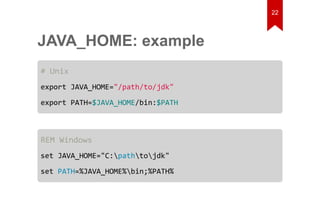
JAVA_HOME: example 
# Unix 
export JAVA_HOME="/path/to/jdk" 
export PATH=$JAVA_HOME/bin:$PATH 
REM Windows 
set JAVA_HOME="C:pathtojdk" 
set PATH=%JAVA_HOME%bin;%PATH% 
22
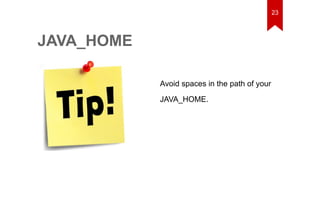
Avoid spaces in the path of your 
JAVA_HOME. 
JAVA_HOME 
23
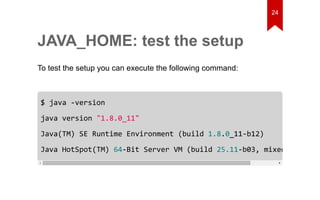
JAVA_HOME: test the setup 
To test the setup you can execute the following command: 
24 
$ java -version 
java version "1.8.0_11" 
Java(TM) SE Runtime Environment (build 1.8.0_11-b12) 
Java HotSpot(TM) 64-Bit Server VM (build 25.11-b03, mixed mode)
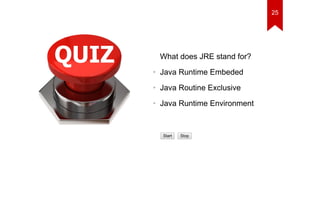
What does JRE stand for? 
• Java Runtime Embeded 
• Java Routine Exclusive 
• Java Runtime Environment 
Start Stop 
25
What is the correct command to 
execute a Java program? 
• java Foo.java 
• java Foo 
• java Foo.class 
Start Stop 
26
1. Set the JAVA_HOME in your 
environment 
2. Verify your setup 
Practice #1 
27
Practice #2 
Given the following code: 
public class Foo { 
public static void main(String[] args) { 
System.out.println("Hello World!"); 
} 
} 
28
1. Copy it in your favorite editor 
2. Save the file as Foo.java 
3. Compile it 
4. Run it 
Practice #2 
29
30
31 
Appendix
Appendix 
• Java Code conventions 
• Not maintained since 1997, may not be accurate 
32

Java goes wild, lesson 1

  • 1.
    Java goes wild Lesson 1: Introduction to Java Thierry Wasylczenko
  • 2.
    After this course... You will: • Know what is the JDK/JRE • Be able to set up your development environment • Know how to compile and run a Java program 2
  • 3.
    Agenda • Bascis • How does all of this work? • Developer’s environment 3
  • 4.
    Basics Success isneither magical nor mysterious. Success is the natural consequence of consistently applying the basic fundamentals. Jim Rohn “ 4
  • 5.
    Basics • Sourcecode is inside files with .java extension • The source code is compiled into .class files • The class files are executed by a strange thing (covered later) 5
  • 6.
    A Java file public class Foo { public static void main(String[] args) { System.out.println("Hello World!"); } } 6
  • 7.
    How do Iget class files? • By compiling all Java files $ cd /location/of/java/files $ javac Foo.java $ ls Foo.class Foo.java $ 7
  • 8.
    How do Irun it? • With the java command $ java Foo Hello World! $ • Yes you DON’T put the .class extension when you run a class ! 8
  • 9.
    Java Archive •aka JAR • A collection of compiled Java classes • Package of a Java program • Can be runnable java -jar Foo.jar 9
  • 10.
  • 11.
    That’s awesome dude.But how does all of this work? You “ 11
  • 12.
    12 How doesall of this work? It is not the beauty of a building you should look at; it's the construction of the foundation that will stand the test of time. David Allan Coe “
  • 13.
    The source code • Plain text file • File extension: .java • Rules for naming each file (covered later) 13
  • 14.
    The bytecode 14 • Result of compilation • Something in between the source code and the machine’s language • Interpreted by the Java Virtual Machine
  • 15.
    The Java VirtualMachine • aka the JVM • Kind of a black box • Interprets the Java bytecode • Is available on major platforms • "Compile once, run everywhere" 15
  • 16.
    A little schema Source code Source code Byte code JVM Byte code JVM turns on turns on java java javac javac 16
  • 17.
    Well man, you’retalking about JVM, javac, bytecode and cool stuff. But how do I set them up? You “ 17
  • 18.
    18 Developer's environment When people think about computer science, they imagine people with pocket protectors and thick glasses who code all night. Marissa Mayer “
  • 19.
    Java Development Kit • aka JDK • Provides tools • javac: java compiler • javadoc: generates the documentation • ... • Includes a Java Runtime Environment 19
  • 20.
    Java Runtime Environment • aka JRE • Provides tools: • java: for running Java applications • ... 20
  • 21.
    JAVA_HOME • Anenvironment variable • Points to the JDK installation • Required by some tools such as: • IDEs • build tools (maven, gradle, ...) • ... • Used to update the PATH variable 21
  • 22.
    JAVA_HOME: example #Unix export JAVA_HOME="/path/to/jdk" export PATH=$JAVA_HOME/bin:$PATH REM Windows set JAVA_HOME="C:pathtojdk" set PATH=%JAVA_HOME%bin;%PATH% 22
  • 23.
    Avoid spaces inthe path of your JAVA_HOME. JAVA_HOME 23
  • 24.
    JAVA_HOME: test thesetup To test the setup you can execute the following command: 24 $ java -version java version "1.8.0_11" Java(TM) SE Runtime Environment (build 1.8.0_11-b12) Java HotSpot(TM) 64-Bit Server VM (build 25.11-b03, mixed mode)
  • 25.
    What does JREstand for? • Java Runtime Embeded • Java Routine Exclusive • Java Runtime Environment Start Stop 25
  • 26.
    What is thecorrect command to execute a Java program? • java Foo.java • java Foo • java Foo.class Start Stop 26
  • 27.
    1. Set theJAVA_HOME in your environment 2. Verify your setup Practice #1 27
  • 28.
    Practice #2 Giventhe following code: public class Foo { public static void main(String[] args) { System.out.println("Hello World!"); } } 28
  • 29.
    1. Copy itin your favorite editor 2. Save the file as Foo.java 3. Compile it 4. Run it Practice #2 29
  • 30.
  • 31.
  • 32.
    Appendix • JavaCode conventions • Not maintained since 1997, may not be accurate 32