Introduction of JavaFx
Prem Chand Mali
About Me
SCJP/OCJP - Oracle Certified Java Programmer
MCP:70-480 - Specialist certification in HTML5
with JavaScript and CSS3 Exam
Skills : Java, Swings, Springs,
Hibernate, JavaFX, Jquery,
prototypeJS, ExtJS.
Connect Me :
Facebook : https://www.facebook.com/prem.c.mali
LinkedIn: http://www.linkedin.com/in/premmali
Twitter: https://twitter.com/prem_mali
Google+ : https://plus.google.com/106150245941317924019/about/p/pub
Contact Me :
Email : premchandm@mindfiresolutions.com / prem.c.mali@gmail.com
Skype: mfsi_premchandm
Agenda


Event Handling.



Property and Bindings



WebView and MediaPlayer



Shapes



Bind event on shapes



Q&A
Event Handling


What is an event ?



Event types



Event targets



Event delivery process
What is an event ?
Event is occurrence which happens in application with or
without participation of human.


JavaFx events are instance of javafx.event.Event or
subclass of Event.




Event has following three properties.
– Event type : Type of event
– Source : Origin of the event, source changes as the
event is passed along the chain.
Target: No on which the action occurred
Event Type


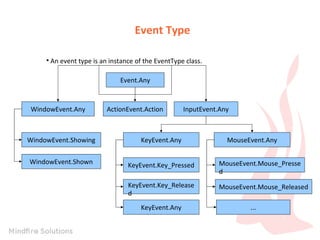
An event type is an instance of the EventType class.
Event.Any

WindowEvent.Any

ActionEvent.Action

InputEvent.Any

WindowEvent.Showing

KeyEvent.Any

WindowEvent.Shown

KeyEvent.Key_Pressed

MouseEvent.Mouse_Presse
d

KeyEvent.Key_Release
d

MouseEvent.Mouse_Released

KeyEvent.Any

MouseEvent.Any

...
Event Target
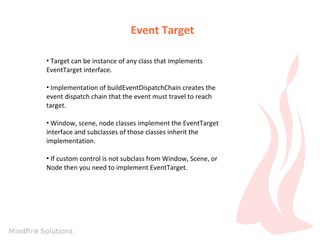
• Target can be instance of any class that implements
EventTarget interface.
• Implementation of buildEventDispatchChain creates the
event dispatch chain that the event must travel to reach
target.
• Window, scene, node classes implement the EventTarget
interface and subclasses of those classes inherit the
implementation.
• If custom control is not subclass from Window, Scene, or
Node then you need to implement EventTarget.
Event delivery process
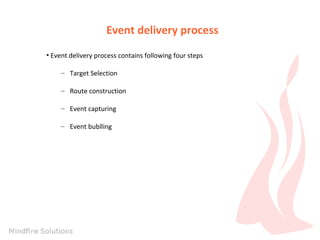
• Event delivery process contains following four steps
– Target Selection
– Route construction
– Event capturing
– Event bublling
Properties and Binding
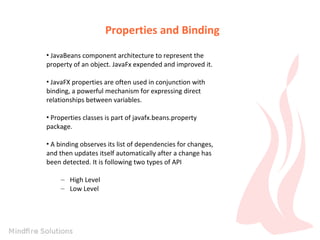
• JavaBeans component architecture to represent the
property of an object. JavaFx expended and improved it.
• JavaFX properties are often used in conjunction with
binding, a powerful mechanism for expressing direct
relationships between variables.
• Properties classes is part of javafx.beans.property
package.
• A binding observes its list of dependencies for changes,
and then updates itself automatically after a change has
been detected. It is following two types of API
– High Level
– Low Level
Properties and Binding


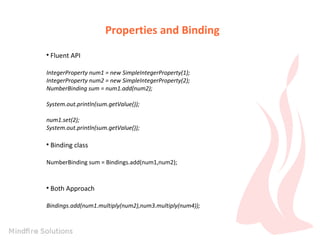
Fluent API

IntegerProperty num1 = new SimpleIntegerProperty(1);
IntegerProperty num2 = new SimpleIntegerProperty(2);
NumberBinding sum = num1.add(num2);
System.out.println(sum.getValue());
num1.set(2);
System.out.println(sum.getValue());


Binding class

NumberBinding sum = Bindings.add(num1,num2);



Both Approach

Bindings.add(num1.multiply(num2),num3.multiply(num4));
Properties and Buinding


Low Level API example

DoubleBinding db = new DoubleBinding() {
{
super.bind(a, b, c, d);
}
@Override
protected double computeValue() {
return (a.get() * b.get()) + (c.get() * d.get());
}
};
WebView
The WebView component is based on WebKit, an open
source web browser engine. It supports Cascading Style
Sheets (CSS), JavaScript, Document Object Model (DOM),
and HTML5.


It enables you to perform following tasks.
–
–
–
–
–
–

Render HTML content from local and remote URLs
Obtain Web history
Execute JavaScript commands
Perform upcalls from JavaScript to JavaFX
Manage web pop-up windows
Apply effects to the embedded browser
Media
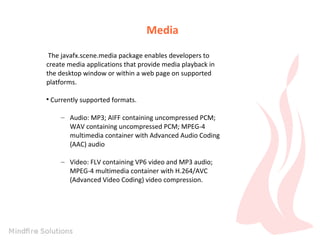
The javafx.scene.media package enables developers to
create media applications that provide media playback in
the desktop window or within a web page on supported
platforms.


Currently supported formats.
– Audio: MP3; AIFF containing uncompressed PCM;
WAV containing uncompressed PCM; MPEG-4
multimedia container with Advanced Audio Coding
(AAC) audio
– Video: FLV containing VP6 video and MP3 audio;
MPEG-4 multimedia container with H.264/AVC
(Advanced Video Coding) video compression.
Media
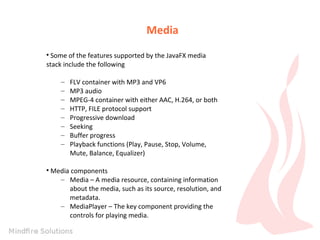
Some of the features supported by the JavaFX media
stack include the following


–
–
–
–
–
–
–
–



FLV container with MP3 and VP6
MP3 audio
MPEG-4 container with either AAC, H.264, or both
HTTP, FILE protocol support
Progressive download
Seeking
Buffer progress
Playback functions (Play, Pause, Stop, Volume,
Mute, Balance, Equalizer)

Media components
– Media – A media resource, containing information
about the media, such as its source, resolution, and
metadata.
– MediaPlayer – The key component providing the
controls for playing media.
Media
Media components
– MediaView – A Node object to support animation,
translucency, and effects
Shapes
• JavaFx also provided capability to draw following shapes
on scene.
– Circle
– Rectangle
– Ellipse
– Line
– Polygon
– etc
Events on Shapes
• JavaFx Shape API also provide capability to add event on
Shapes.
For example :
rect.setOnMouseClicked(new
EventHandler<MouseEvent>() {
@Override
public void handle(MouseEvent event) {
Color color = (((Color)
rect.getFill()).equals(Color.RED))
? Color.BROWN : Color.RED;
rect.setFill(color);
}
});
Q&A

Java FX Part2

  • 1.
  • 2.
    About Me SCJP/OCJP -Oracle Certified Java Programmer MCP:70-480 - Specialist certification in HTML5 with JavaScript and CSS3 Exam Skills : Java, Swings, Springs, Hibernate, JavaFX, Jquery, prototypeJS, ExtJS. Connect Me : Facebook : https://www.facebook.com/prem.c.mali LinkedIn: http://www.linkedin.com/in/premmali Twitter: https://twitter.com/prem_mali Google+ : https://plus.google.com/106150245941317924019/about/p/pub Contact Me : Email : premchandm@mindfiresolutions.com / prem.c.mali@gmail.com Skype: mfsi_premchandm
  • 3.
    Agenda  Event Handling.  Property andBindings  WebView and MediaPlayer  Shapes  Bind event on shapes  Q&A
  • 4.
    Event Handling  What isan event ?  Event types  Event targets  Event delivery process
  • 5.
    What is anevent ? Event is occurrence which happens in application with or without participation of human.  JavaFx events are instance of javafx.event.Event or subclass of Event.   Event has following three properties. – Event type : Type of event – Source : Origin of the event, source changes as the event is passed along the chain. Target: No on which the action occurred
  • 6.
    Event Type  An eventtype is an instance of the EventType class. Event.Any WindowEvent.Any ActionEvent.Action InputEvent.Any WindowEvent.Showing KeyEvent.Any WindowEvent.Shown KeyEvent.Key_Pressed MouseEvent.Mouse_Presse d KeyEvent.Key_Release d MouseEvent.Mouse_Released KeyEvent.Any MouseEvent.Any ...
  • 7.
    Event Target • Targetcan be instance of any class that implements EventTarget interface. • Implementation of buildEventDispatchChain creates the event dispatch chain that the event must travel to reach target. • Window, scene, node classes implement the EventTarget interface and subclasses of those classes inherit the implementation. • If custom control is not subclass from Window, Scene, or Node then you need to implement EventTarget.
  • 8.
    Event delivery process •Event delivery process contains following four steps – Target Selection – Route construction – Event capturing – Event bublling
  • 9.
    Properties and Binding •JavaBeans component architecture to represent the property of an object. JavaFx expended and improved it. • JavaFX properties are often used in conjunction with binding, a powerful mechanism for expressing direct relationships between variables. • Properties classes is part of javafx.beans.property package. • A binding observes its list of dependencies for changes, and then updates itself automatically after a change has been detected. It is following two types of API – High Level – Low Level
  • 10.
    Properties and Binding  FluentAPI IntegerProperty num1 = new SimpleIntegerProperty(1); IntegerProperty num2 = new SimpleIntegerProperty(2); NumberBinding sum = num1.add(num2); System.out.println(sum.getValue()); num1.set(2); System.out.println(sum.getValue());  Binding class NumberBinding sum = Bindings.add(num1,num2);  Both Approach Bindings.add(num1.multiply(num2),num3.multiply(num4));
  • 11.
    Properties and Buinding  LowLevel API example DoubleBinding db = new DoubleBinding() { { super.bind(a, b, c, d); } @Override protected double computeValue() { return (a.get() * b.get()) + (c.get() * d.get()); } };
  • 12.
    WebView The WebView componentis based on WebKit, an open source web browser engine. It supports Cascading Style Sheets (CSS), JavaScript, Document Object Model (DOM), and HTML5.  It enables you to perform following tasks. – – – – – – Render HTML content from local and remote URLs Obtain Web history Execute JavaScript commands Perform upcalls from JavaScript to JavaFX Manage web pop-up windows Apply effects to the embedded browser
  • 13.
    Media The javafx.scene.media packageenables developers to create media applications that provide media playback in the desktop window or within a web page on supported platforms.  Currently supported formats. – Audio: MP3; AIFF containing uncompressed PCM; WAV containing uncompressed PCM; MPEG-4 multimedia container with Advanced Audio Coding (AAC) audio – Video: FLV containing VP6 video and MP3 audio; MPEG-4 multimedia container with H.264/AVC (Advanced Video Coding) video compression.
  • 14.
    Media Some of thefeatures supported by the JavaFX media stack include the following  – – – – – – – –  FLV container with MP3 and VP6 MP3 audio MPEG-4 container with either AAC, H.264, or both HTTP, FILE protocol support Progressive download Seeking Buffer progress Playback functions (Play, Pause, Stop, Volume, Mute, Balance, Equalizer) Media components – Media – A media resource, containing information about the media, such as its source, resolution, and metadata. – MediaPlayer – The key component providing the controls for playing media.
  • 15.
    Media Media components – MediaView– A Node object to support animation, translucency, and effects
  • 16.
    Shapes • JavaFx alsoprovided capability to draw following shapes on scene. – Circle – Rectangle – Ellipse – Line – Polygon – etc
  • 17.
    Events on Shapes •JavaFx Shape API also provide capability to add event on Shapes. For example : rect.setOnMouseClicked(new EventHandler<MouseEvent>() { @Override public void handle(MouseEvent event) { Color color = (((Color) rect.getFill()).equals(Color.RED)) ? Color.BROWN : Color.RED; rect.setFill(color); } });
  • 18.