Java Basics
Omid Sohrabi
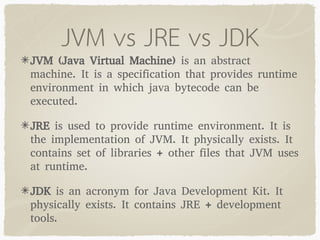
JVM vs JRE vs JDK
JVM (Java Virtual Machine) is an abstract
machine. It is a specification that provides runtime
environment in which java bytecode can be
executed.
JRE is used to provide runtime environment. It is
the implementation of JVM. It physically exists. It
contains set of libraries + other files that JVM uses
at runtime.
JDK is an acronym for Java Development Kit. It
physically exists. It contains JRE + development
tools.
JVM vs JRE vs JDK
JVM
Function of java virtual machine
The bytecode is generated by java compiler in a JVM
understandable format.
As a programmer we develop a java application and
when we compile a java program, the compiler will
generate .class (dot class) file.
The .class file contains byte code (Special java
instructions).
To execute a java program we take the help of JVM (java
virtual machine) to the JVM we have to provide .class
file as the input.
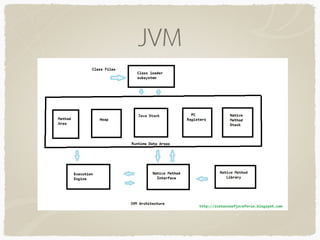
JVM
JVM
1.Method Area:
• Java Virtual Machine Method Area can be used for
storing all the class code and method code.
• All classes bytecode is loaded and stored in this run
time area , and all static variables are created in this
area.
JVM
2.Heap Memory:
• JVM Heap Area can be used for storing all the objects that are
created.
• It is the main memory of JVM , all objects of classes :- non
static variables memory are created in this run time area.
• This runtime area memory is finite memory.
• This area can be configured at the time of setting up of
runtime environment using non standard option like
• This can be expandable by its own , depending on the object
creation.
• Method area and Heap area both are sharable memory areas.
JVM
JVM
JVM
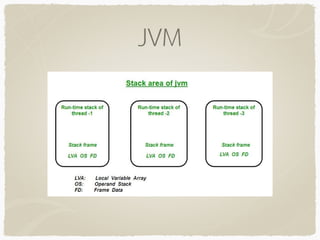
3.Java Stack:
• For every thread, JVM creates a separate stack at the
time of thread creation. The memory for a Java Virtual
Machine stack does not need to be contiguous. The
Java virtual machine only performs two operations
directly on Java Stacks: it pushes and pops frames
• After completing all method calls the stack becomes
empty and that empty stack is destroyed by the JVM
just before terminating the thread.
Java
OOP:
• Object orientation is built on the foundations of
encapsulation, abstraction, inheritance, and
polymorphism
interface
• Apart from the inherited behavior, in interface the
derived class specializes its behavior by adding to or
overriding base class behavior.
Java
Access Modifiers
• Access modifiers determine the level of visibility
• Public , Private, Protected , Default
• One significant difference between these two access modifiers arises
when we talk about a subclass belonging to another package than its
superclass. In this case, protected members are accessible in the
subclass, whereas default members are not.
NOTE
• Use the explicit thisqualifier when accessing fields inside instance
methods or constructors to avoid ambiguity in referring to variable
names.
Override & Overload
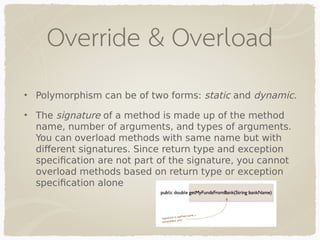
• Polymorphism can be of two forms: static and dynamic.
• The signature of a method is made up of the method
name, number of arguments, and types of arguments.
You can overload methods with same name but with
different signatures. Since return type and exception
specification are not part of the signature, you cannot
overload methods based on return type or exception
specification alone
Nonaccess modifiers
Nonaccess modifiers change the default behavior of a Java
class and its members.
Abstract, static, final, synchronized, native ,...
A synchronized method can’t be accessed by multiple
threads
A native method calls and makes use of libraries and
methods implemented in other programming languages
such as C or C++. You can’t mark classes, interfaces, or
variables with this modifier.
Abstract
An abstract class can’t be instantiated
An abstract class may or may not define an abstract method. But a
concrete class can’t define an abstract method.
An interface is an abstract entity by default. The Java compiler
automatically adds the keyword abstract to the definition of an
interface. Thus, adding the keyword abstract to the definition of an
interface is redundant.
Final
The keyword final can be used with the declaration of a class,
variable, or method. It can’t be used with the declaration of an
interface.
A class that’s marked final can’t be extended by another class
A final variable can’t be reassigned a value. It can be assigned a
value only once
A final method defined in a base class can’t be overridden by a
derived class
Static
static variables belong to a class. They’re common to all instances
of a class and aren’t unique to any instance of a class
A static variable is shared by all the objects of a class.
static methods aren’t associated with objects and can’t use any of
the instance variables of a class. You can define static methods to
access or manipulate static variables
Static
Neither static methods nor static variables can access the non-
static variables and methods of a class. But the reverse is true:
non- static variables and methods can access
You can’t prefix the definition of a top-level class or an interface
with the keyword static. A top-level class or interface is one that
isn’t defined within another class or interface.
Data Types
Primitive vs. Reference
conversion
a primitive variable contains its value, and conversion of a primitive
variable means irreversible changes in its value
casting a reference variable doesn’t touch the object it refers to,
but only labels this object in another way, expanding or narrowing
opportunities to work with it
A reference is like a remote control to an object. The remote control
has more or fewer buttons depending on its type, and the object
itself is stored in a heap. When we do casting, we change the type
of the remote control but don’t change the object itself.
Primitive vs. Reference
Upcastingis casting a subtype to a supertype, upward to the
inheritance tree
Unlike upcasting, downcasting can fail if the actual object type is
not the target object type
Primitive vs. Reference
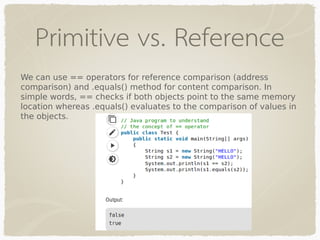
We can use == operators for reference comparison (address
comparison) and .equals() method for content comparison. In
simple words, == checks if both objects point to the same memory
location whereas .equals() evaluates to the comparison of values in
the objects.
Variables
Variables can have multiple scopes: class, instance, local, and
method parameters.
Instance variables are defined and accessible within an object.
They’re accessible to all the instance methods of a class.
Class variables are shared by all the objects of a class—they can be
accessed even if there are no objects of the class
Local and instance variables can be defined using the same name.
In a method,
if a local variable exists with the same name as an instance
variable, the local variable takes precedence
NOTE
When you pass a primitive variable to a method, its value remains
the same after the execution of the method. This doesn’t change,
regardless of whether the method reassigns the primitive to
another variable or modifies it.

Java Basics Presentation

  • 1.
  • 2.
    JVM vs JREvs JDK JVM (Java Virtual Machine) is an abstract machine. It is a specification that provides runtime environment in which java bytecode can be executed. JRE is used to provide runtime environment. It is the implementation of JVM. It physically exists. It contains set of libraries + other files that JVM uses at runtime. JDK is an acronym for Java Development Kit. It physically exists. It contains JRE + development tools.
  • 3.
    JVM vs JREvs JDK
  • 4.
    JVM Function of javavirtual machine The bytecode is generated by java compiler in a JVM understandable format. As a programmer we develop a java application and when we compile a java program, the compiler will generate .class (dot class) file. The .class file contains byte code (Special java instructions). To execute a java program we take the help of JVM (java virtual machine) to the JVM we have to provide .class file as the input.
  • 5.
  • 6.
    JVM 1.Method Area: • JavaVirtual Machine Method Area can be used for storing all the class code and method code. • All classes bytecode is loaded and stored in this run time area , and all static variables are created in this area.
  • 7.
    JVM 2.Heap Memory: • JVMHeap Area can be used for storing all the objects that are created. • It is the main memory of JVM , all objects of classes :- non static variables memory are created in this run time area. • This runtime area memory is finite memory. • This area can be configured at the time of setting up of runtime environment using non standard option like • This can be expandable by its own , depending on the object creation. • Method area and Heap area both are sharable memory areas.
  • 8.
  • 9.
  • 10.
    JVM 3.Java Stack: • Forevery thread, JVM creates a separate stack at the time of thread creation. The memory for a Java Virtual Machine stack does not need to be contiguous. The Java virtual machine only performs two operations directly on Java Stacks: it pushes and pops frames • After completing all method calls the stack becomes empty and that empty stack is destroyed by the JVM just before terminating the thread.
  • 11.
    Java OOP: • Object orientationis built on the foundations of encapsulation, abstraction, inheritance, and polymorphism interface • Apart from the inherited behavior, in interface the derived class specializes its behavior by adding to or overriding base class behavior.
  • 12.
    Java Access Modifiers • Accessmodifiers determine the level of visibility • Public , Private, Protected , Default • One significant difference between these two access modifiers arises when we talk about a subclass belonging to another package than its superclass. In this case, protected members are accessible in the subclass, whereas default members are not. NOTE • Use the explicit thisqualifier when accessing fields inside instance methods or constructors to avoid ambiguity in referring to variable names.
  • 13.
    Override & Overload •Polymorphism can be of two forms: static and dynamic. • The signature of a method is made up of the method name, number of arguments, and types of arguments. You can overload methods with same name but with different signatures. Since return type and exception specification are not part of the signature, you cannot overload methods based on return type or exception specification alone
  • 14.
    Nonaccess modifiers Nonaccess modifierschange the default behavior of a Java class and its members. Abstract, static, final, synchronized, native ,... A synchronized method can’t be accessed by multiple threads A native method calls and makes use of libraries and methods implemented in other programming languages such as C or C++. You can’t mark classes, interfaces, or variables with this modifier.
  • 15.
    Abstract An abstract classcan’t be instantiated An abstract class may or may not define an abstract method. But a concrete class can’t define an abstract method. An interface is an abstract entity by default. The Java compiler automatically adds the keyword abstract to the definition of an interface. Thus, adding the keyword abstract to the definition of an interface is redundant.
  • 16.
    Final The keyword finalcan be used with the declaration of a class, variable, or method. It can’t be used with the declaration of an interface. A class that’s marked final can’t be extended by another class A final variable can’t be reassigned a value. It can be assigned a value only once A final method defined in a base class can’t be overridden by a derived class
  • 17.
    Static static variables belongto a class. They’re common to all instances of a class and aren’t unique to any instance of a class A static variable is shared by all the objects of a class. static methods aren’t associated with objects and can’t use any of the instance variables of a class. You can define static methods to access or manipulate static variables
  • 18.
    Static Neither static methodsnor static variables can access the non- static variables and methods of a class. But the reverse is true: non- static variables and methods can access You can’t prefix the definition of a top-level class or an interface with the keyword static. A top-level class or interface is one that isn’t defined within another class or interface.
  • 19.
  • 20.
    Primitive vs. Reference conversion aprimitive variable contains its value, and conversion of a primitive variable means irreversible changes in its value casting a reference variable doesn’t touch the object it refers to, but only labels this object in another way, expanding or narrowing opportunities to work with it A reference is like a remote control to an object. The remote control has more or fewer buttons depending on its type, and the object itself is stored in a heap. When we do casting, we change the type of the remote control but don’t change the object itself.
  • 21.
    Primitive vs. Reference Upcastingiscasting a subtype to a supertype, upward to the inheritance tree Unlike upcasting, downcasting can fail if the actual object type is not the target object type
  • 22.
    Primitive vs. Reference Wecan use == operators for reference comparison (address comparison) and .equals() method for content comparison. In simple words, == checks if both objects point to the same memory location whereas .equals() evaluates to the comparison of values in the objects.
  • 23.
    Variables Variables can havemultiple scopes: class, instance, local, and method parameters. Instance variables are defined and accessible within an object. They’re accessible to all the instance methods of a class. Class variables are shared by all the objects of a class—they can be accessed even if there are no objects of the class Local and instance variables can be defined using the same name. In a method, if a local variable exists with the same name as an instance variable, the local variable takes precedence
  • 24.
    NOTE When you passa primitive variable to a method, its value remains the same after the execution of the method. This doesn’t change, regardless of whether the method reassigns the primitive to another variable or modifies it.