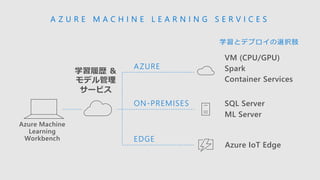
Azure Machine
Learning
Workbench
A ZU R E M A C H I N E L E A R N I N G S E R V I C E S
VM (CPU/GPU)
Spark
Container Services
SQL Server
ML Server
ON-PREMISES
EDGE
Azure IoT Edge
学習とデプロイの選択肢
AZURE
学習履歴 &
モデル管理
サービス
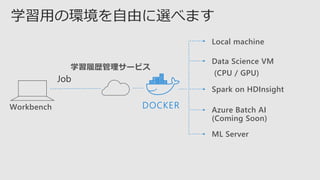
Local machine
Data ScienceVM
(CPU / GPU)
Spark on HDInsight
Azure Batch AI
(Coming Soon)
ML Server
学習用の環境を自由に選べます
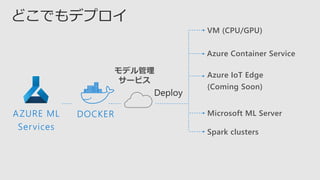
Workbench DOCKER
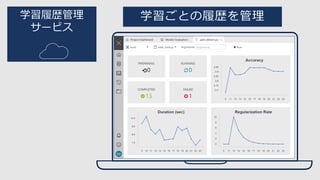
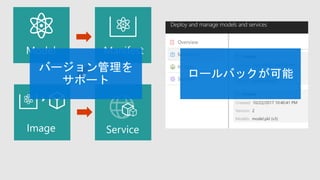
学習履歴管理サービス
28.
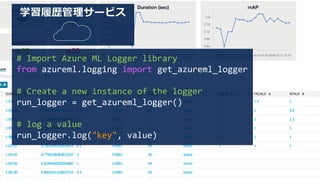
学習履歴管理サービス
# Import AzureML Logger library
from azureml.logging import get_azureml_logger
# Create a new instance of the logger
run_logger = get_azureml_logger()
# log a value
run_logger.log("key", value)
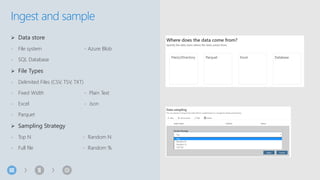
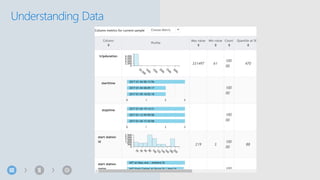
➢ Data store
-File system - Azure Blob
- SQL Database
➢ File Types
- Delimited Files (CSV, TSV, TXT)
- Fixed Width - Plain Text
- Excel - Json
- Parquet
➢ Sampling Strategy
- Top N - Random N
- Full file - Random %
Ingest and sample
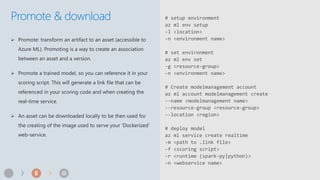
Promote & download# setup environment
az ml env setup
-l <location>
-n <environment name>
# set environment
az ml env set
-g <resource-group>
-n <environment name>
# Create modelmanagement account
az ml account modelmanagement create
--name <modelmanagement name>
--resource-group <resource-group>
--location <region>
# deploy model
az ml service create realtime
-m <path to .link file>
-f <scoring script>
-r <runtime (spark-py|python)>
–n <webservice name>





![192.128.138.20 - - [16/Oct/2016 16:22:33 -0200] "GET /images/picture.gif HTTP/1.1" 234
343 www.yahoo.com "http://www.example.com/" "Mozilla/4.0 (compatible; MSIE 4)" "-"
log1 log2 log3 log4 log5 log6 log7
192.128.138.20 16/Oct/2016 16:22:33 -0200 GET images/picture.gif HTTP
IIS ログ](https://image.slidesharecdn.com/techsummit2017pdfmai003-171116035458/85/Japan-Tech-summit-2017-MAI-003-24-320.jpg)





![[Japan Tech summit 2017] MAI 003](https://image.slidesharecdn.com/techsummit2017pdfmai003-171116035458/85/Japan-Tech-summit-2017-MAI-003-55-320.jpg)
![[Japan Tech summit 2017] DAL 005](https://cdn.slidesharecdn.com/ss_thumbnails/techsummit2017pdfdal005-171127040522-thumbnail.jpg?width=640&height=640&fit=bounds)
![[Japan Tech summit 2017] DEP 007](https://cdn.slidesharecdn.com/ss_thumbnails/techsummit2017pdfdep007-171116035105-thumbnail.jpg?width=640&height=640&fit=bounds)
![[Japan Tech summit 2017] SEC 009](https://cdn.slidesharecdn.com/ss_thumbnails/techsummit2017pdfsec009-171116035457-thumbnail.jpg?width=640&height=640&fit=bounds)
![[Japan Tech summit 2017] APP 001](https://cdn.slidesharecdn.com/ss_thumbnails/techsummit2017pdfapp001-171115031546-thumbnail.jpg?width=640&height=640&fit=bounds)
![[Japan Tech summit 2017] CLD 019](https://cdn.slidesharecdn.com/ss_thumbnails/techsummit2017pdfcld019-171115032130-thumbnail.jpg?width=640&height=640&fit=bounds)
![[Japan Tech summit 2017] CLD 003](https://cdn.slidesharecdn.com/ss_thumbnails/techsummit2017pdfcld003-171115032051-thumbnail.jpg?width=640&height=640&fit=bounds)
![[Japan Tech summit 2017] CLD 015](https://cdn.slidesharecdn.com/ss_thumbnails/techsummit2017pdfcld015-171115032124-thumbnail.jpg?width=640&height=640&fit=bounds)
![[Japan Tech summit 2017] DEP 009](https://cdn.slidesharecdn.com/ss_thumbnails/techsummit2017pdfdep009-171116035108-thumbnail.jpg?width=640&height=640&fit=bounds)
![[Japan Tech summit 2017] DEP 005](https://cdn.slidesharecdn.com/ss_thumbnails/techsummit2017pdfdep005-171116035106-thumbnail.jpg?width=640&height=640&fit=bounds)
![[Japan Tech summit 2017] DAL 006](https://cdn.slidesharecdn.com/ss_thumbnails/techsummit2017pdfdal006-171115033148-thumbnail.jpg?width=640&height=640&fit=bounds)
![[Japan Tech summit 2017] DAL 003](https://cdn.slidesharecdn.com/ss_thumbnails/techsummit2017pdfdal003-171115033147-thumbnail.jpg?width=640&height=640&fit=bounds)
![[Japan Tech summit 2017] CLD 016](https://cdn.slidesharecdn.com/ss_thumbnails/techsummit2017pdfcld016-171115032128-thumbnail.jpg?width=640&height=640&fit=bounds)
![[Japan Tech summit 2017] DAL 001](https://cdn.slidesharecdn.com/ss_thumbnails/techsummit2017pdfdal001-171115033146-thumbnail.jpg?width=640&height=640&fit=bounds)

![[Japan Tech summit 2017] APP 003](https://cdn.slidesharecdn.com/ss_thumbnails/techsummit2017pdfapp003-171115031648-thumbnail.jpg?width=640&height=640&fit=bounds)
![[Japan Tech summit 2017] SEC 005](https://cdn.slidesharecdn.com/ss_thumbnails/techsummit2017pdfsec005-171116035502-thumbnail.jpg?width=640&height=640&fit=bounds)
![[Japan Tech summit 2017] CLD 014](https://cdn.slidesharecdn.com/ss_thumbnails/techsummit2017pdfcld014-171115032121-thumbnail.jpg?width=640&height=640&fit=bounds)
![[Japan Tech summit 2017] CLD 007](https://cdn.slidesharecdn.com/ss_thumbnails/techsummit2017pdfcld007-171115032107-thumbnail.jpg?width=640&height=640&fit=bounds)
![[Japan Tech summit 2017] CLD 021](https://cdn.slidesharecdn.com/ss_thumbnails/techsummit2017pdfcld021-171115032133-thumbnail.jpg?width=640&height=640&fit=bounds)
![[Japan Tech summit 2017] CLD 005](https://cdn.slidesharecdn.com/ss_thumbnails/techsummit2017pdfcld005-171115032102-thumbnail.jpg?width=640&height=640&fit=bounds)
![[Japan Tech summit 2017] PRD 002](https://cdn.slidesharecdn.com/ss_thumbnails/techsummit2017pdfprd002-171115033455-thumbnail.jpg?width=640&height=640&fit=bounds)
![[Japan Tech summit 2017] PRD 007](https://cdn.slidesharecdn.com/ss_thumbnails/techsummit2017pdfprd007-171115033456-thumbnail.jpg?width=640&height=640&fit=bounds)
![[Japan Tech summit 2017] CLD 006](https://cdn.slidesharecdn.com/ss_thumbnails/techsummit2017pdfcld006-171115032103-thumbnail.jpg?width=640&height=640&fit=bounds)
![[Japan Tech summit 2017] SPL 005](https://cdn.slidesharecdn.com/ss_thumbnails/techsummit2017pdfspl005-171116035846-thumbnail.jpg?width=640&height=640&fit=bounds)

![[Japan Tech summit 2017] PRD 009](https://cdn.slidesharecdn.com/ss_thumbnails/techsummit2017pdfprd009-171115033453-thumbnail.jpg?width=640&height=640&fit=bounds)
![[Japan Tech summit 2017] CLD 008](https://cdn.slidesharecdn.com/ss_thumbnails/techsummit2017pdfcld008-171115032110-thumbnail.jpg?width=640&height=640&fit=bounds)
![[Japan Tech summit 2017] APP 006](https://cdn.slidesharecdn.com/ss_thumbnails/techsummit2017pdfapp006-171127040530-thumbnail.jpg?width=640&height=640&fit=bounds)
![[Japan Tech summit 2017] DEP 008](https://cdn.slidesharecdn.com/ss_thumbnails/techsummit2017pdfdep008-171116035107-thumbnail.jpg?width=640&height=640&fit=bounds)
![[Japan Tech summit 2017] SEC 006](https://cdn.slidesharecdn.com/ss_thumbnails/techsummit2017pdfsec006-171116035456-thumbnail.jpg?width=640&height=640&fit=bounds)
![[Japan Tech summit 2017] SEC 004](https://cdn.slidesharecdn.com/ss_thumbnails/techsummit2017pdfsec004-171116035501-thumbnail.jpg?width=640&height=640&fit=bounds)
![[Japan Tech summit 2017] DAL 002](https://cdn.slidesharecdn.com/ss_thumbnails/techsummit2017pdfdal002-171115033147-thumbnail.jpg?width=640&height=640&fit=bounds)
![[Japan Tech summit 2017] PRD 011](https://cdn.slidesharecdn.com/ss_thumbnails/techsummit2017pdfprd011-171116071451-thumbnail.jpg?width=640&height=640&fit=bounds)
![[Japan Tech summit 2017] PRD 005](https://cdn.slidesharecdn.com/ss_thumbnails/techsummit2017pdfprd005-171116071452-thumbnail.jpg?width=640&height=640&fit=bounds)
![[Japan Tech summit 2017] DAL 008](https://cdn.slidesharecdn.com/ss_thumbnails/techsummit2017pdfdal008-171115033146-thumbnail.jpg?width=640&height=640&fit=bounds)
![[Japan Tech summit 2017] SEC 003](https://cdn.slidesharecdn.com/ss_thumbnails/techsummit2017pdfsec003-171116035500-thumbnail.jpg?width=640&height=640&fit=bounds)
![[Japan Tech summit 2017] DEP 001](https://cdn.slidesharecdn.com/ss_thumbnails/techsummit2017pdfdep001-171116035108-thumbnail.jpg?width=640&height=640&fit=bounds)
![[Japan Tech summit 2017] SPL 002](https://cdn.slidesharecdn.com/ss_thumbnails/techsummit2017pdfspl002-171116035845-thumbnail.jpg?width=640&height=640&fit=bounds)
![[Japan Tech summit 2017] SEC 001](https://cdn.slidesharecdn.com/ss_thumbnails/techsummit2017pdfsec001-171116035455-thumbnail.jpg?width=640&height=640&fit=bounds)
![[Japan Tech summit 2017] MAI 005](https://cdn.slidesharecdn.com/ss_thumbnails/techsummit2017pdfmai005-171116071451-thumbnail.jpg?width=640&height=640&fit=bounds)
![[Japan Tech summit 2017] DEP 003](https://cdn.slidesharecdn.com/ss_thumbnails/techsummit2017pdfdep003-171116035105-thumbnail.jpg?width=640&height=640&fit=bounds)
![[Japan Tech summit 2017] MAI 006](https://cdn.slidesharecdn.com/ss_thumbnails/techsummit2017pdfmai006-171115034124-thumbnail.jpg?width=640&height=640&fit=bounds)
![[Japan Tech summit 2017] SPL 004](https://cdn.slidesharecdn.com/ss_thumbnails/techsummit2017pdfspl004-171116035845-thumbnail.jpg?width=640&height=640&fit=bounds)
![[Japan Tech summit 2017] MAI 001](https://cdn.slidesharecdn.com/ss_thumbnails/techsummit2017pdfmai001-171115034129-thumbnail.jpg?width=640&height=640&fit=bounds)
![[Japan Tech summit 2017] DEP 02](https://cdn.slidesharecdn.com/ss_thumbnails/techsummit2017pdfdep002-171116035109-thumbnail.jpg?width=640&height=640&fit=bounds)
![[Japan Tech summit 2017] SEC 007](https://cdn.slidesharecdn.com/ss_thumbnails/techsummit2017pdfsec007-171116035457-thumbnail.jpg?width=640&height=640&fit=bounds)
![[Japan Tech summit 2017] SEC 012](https://cdn.slidesharecdn.com/ss_thumbnails/techsummit2017pdfsec012-171116071451-thumbnail.jpg?width=640&height=640&fit=bounds)
![[Japan Tech summit 2017] PRD 001](https://cdn.slidesharecdn.com/ss_thumbnails/techsummit2017pdfprd001-171116035459-thumbnail.jpg?width=640&height=640&fit=bounds)


![[Developers Festa Sapporo 2018] Azure AI ~Microsoft AzureでのAI開発のイマ~](https://cdn.slidesharecdn.com/ss_thumbnails/20181117devfestasapporoazureaipublic-181119035506-thumbnail.jpg?width=640&height=640&fit=bounds)

![[Microsoft Tech Summit 2018] Azure Machine Learning サービスと Azure Databricks で実...](https://cdn.slidesharecdn.com/ss_thumbnails/20181107techsummitazuremldatabricks-181108015121-thumbnail.jpg?width=640&height=640&fit=bounds)


