+
JUnit for Android
Tool review
Rectangle++

Matt Porter
JUnit
History
 Junit is a unit testing tool for Java. Junit can also be used to test
android projects that are written in java, and can be very useful to
make sure your code is correct.
 Website http://junit.org

 Developers: Kent Beck, Erich Gamma, David Saff, Mike Clark

 Release date: September 4 2002 v1.0

 Current stable release 4.11 November 14, 2012

+
JUnit

Android

Monkey Tool
MonkeyRunner

Comparison

uiautomatorviewer

 Pros
 Written in Java, no need to learn new
language(monkeyrunner)
 Used in eclipse. No need to download anything
new(uiautomatorviewer)
 Test cases are as thorough as you make them, just doesn’t test
for crashes. (monkeytool)

 Cons
 You have to write your own tests, time consuming(pay testers)
 Internal, deploys with .apk (uiautomatorviewer)
 Can only test on devices you have available(utest)

+
JUnit
 Sustainability
 On the Tool’s end, it is a very popular tool and is very
sustainable with new release every few years.
 On the developers end maintain the JUnit code is
easy because it is written in java, and can be easily
ran right in eclipse. Tests are only as thorough as you
make it. The higher coverage you want, the harder it
becomes to maintain.

 Performance
 Great Performance. Again, Tests are as thorough as
you make it. The higher coverage you want, the
harder it becomes to maintain, but the better
performance you will have and the better your code
is tested.

 Pricing
 Free!!!

+
JUnit
Benefit/cost analysis
 Unit testing is a great way to test each function
and make sure your code is stable.
 JUnit is the easiest way to thoroughly test your
code. And is a widely accepted way of testing.

 JUnit is also free, which makes it even more used,
which makes more resources for information on
Junit.

+
JUnit
Compatibility
 Our team will definitely be using JUnit for our
application. Everyone will be able to use it
because it is written in java, which is the same
language we are developing in and everyone
know. There is no extra software to download
comes with android sdk so it can be used by
everyone.

+
JUnit

Set up tutorial
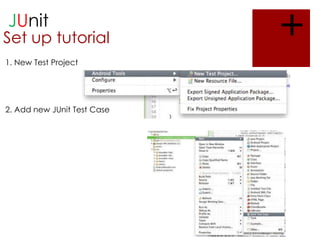
1. New Test Project

2. Add new JUnit Test Case

+
JUnit

Set up tutorial
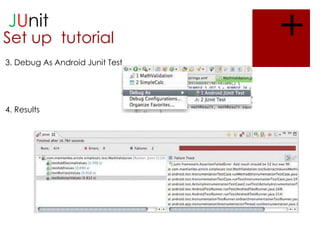
3. Debug As Android Junit Test

4. Results

+
JUnit
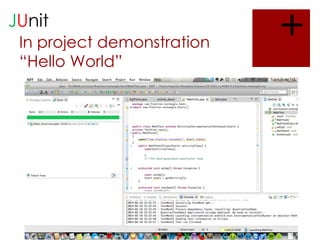
In project demonstration
“Hello World”

+

J unit android

  • 1.
    + JUnit for Android Toolreview Rectangle++ Matt Porter
  • 2.
    JUnit History  Junit isa unit testing tool for Java. Junit can also be used to test android projects that are written in java, and can be very useful to make sure your code is correct.  Website http://junit.org  Developers: Kent Beck, Erich Gamma, David Saff, Mike Clark  Release date: September 4 2002 v1.0  Current stable release 4.11 November 14, 2012 +
  • 3.
    JUnit Android Monkey Tool MonkeyRunner Comparison uiautomatorviewer  Pros Written in Java, no need to learn new language(monkeyrunner)  Used in eclipse. No need to download anything new(uiautomatorviewer)  Test cases are as thorough as you make them, just doesn’t test for crashes. (monkeytool)  Cons  You have to write your own tests, time consuming(pay testers)  Internal, deploys with .apk (uiautomatorviewer)  Can only test on devices you have available(utest) +
  • 4.
    JUnit  Sustainability  Onthe Tool’s end, it is a very popular tool and is very sustainable with new release every few years.  On the developers end maintain the JUnit code is easy because it is written in java, and can be easily ran right in eclipse. Tests are only as thorough as you make it. The higher coverage you want, the harder it becomes to maintain.  Performance  Great Performance. Again, Tests are as thorough as you make it. The higher coverage you want, the harder it becomes to maintain, but the better performance you will have and the better your code is tested.  Pricing  Free!!! +
  • 5.
    JUnit Benefit/cost analysis  Unittesting is a great way to test each function and make sure your code is stable.  JUnit is the easiest way to thoroughly test your code. And is a widely accepted way of testing.  JUnit is also free, which makes it even more used, which makes more resources for information on Junit. +
  • 6.
    JUnit Compatibility  Our teamwill definitely be using JUnit for our application. Everyone will be able to use it because it is written in java, which is the same language we are developing in and everyone know. There is no extra software to download comes with android sdk so it can be used by everyone. +
  • 7.
    JUnit Set up tutorial 1.New Test Project 2. Add new JUnit Test Case +
  • 8.
    JUnit Set up tutorial 3.Debug As Android Junit Test 4. Results +
  • 9.