jQuery UI


Inbal Geffen
Installing jQuery UI


Go to : http://jqueryui.com/download/

 ● Choose all the features you want in the library (leave all)

 ● Choose a theme or design your own theme

 ● Click download

 ● Drag the js library to your project (copy)

 ● In your file add both jQuery and jQuery UI files
   <script src="js/jquery-1.8.3.js"></script>
   <script src="js/jquery-ui-1.9.2.custom.min.js"></script>


Inbal Geffen
jQuery UI Features


Interactions
Add basic mouse-based behaviors to any element.
You can create sortable lists, resizable elements, drag & drop behaviors and more with
just a few lines or code.
Interactions also make great building blocks for more complex widgets and
applications.

What kind of interactions are available?

 ●    Draggable
 ●    Droppable
 ●    Resizable
 ●    Selectable
 ●    Sortable

Inbal Geffen
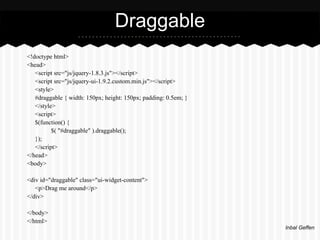
Draggable
<!doctype html>
<head>
   <script src="js/jquery-1.8.3.js"></script>
   <script src="js/jquery-ui-1.9.2.custom.min.js"></script>
   <style>
   #draggable { width: 150px; height: 150px; padding: 0.5em; }
   </style>
   <script>
   $(function() {
          $( "#draggable" ).draggable();
   });
   </script>
</head>
<body>

<div id="draggable" class="ui-widget-content">
   <p>Drag me around</p>
</div>

</body>
</html>
                                                                 Inbal Geffen
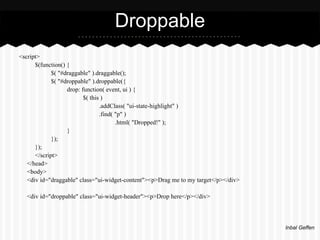
Droppable
<script>
      $(function() {
             $( "#draggable" ).draggable();
             $( "#droppable" ).droppable({
                   drop: function( event, ui ) {
                          $( this )
                                 .addClass( "ui-state-highlight" )
                                 .find( "p" )
                                        .html( "Dropped!" );
                   }
             });
      });
      </script>
   </head>
   <body>
   <div id="draggable" class="ui-widget-content"><p>Drag me to my target</p></div>

  <div id="droppable" class="ui-widget-header"><p>Drop here</p></div>


                                                                                     Inbal Geffen
jQuery UI Features


Widgets

Full-featured UI controls that bring the richness of desktop applications to the Web.

 ● Accordion
 ●    Autocomplete
 ●    Button
 ●    Datepicker
 ●    Dialog
 ●    Menu
 ●    Progressbar
 ●    Slider
 ●    Spinner
 ●    Tabs
 ●    Tooltip

Inbal Geffen
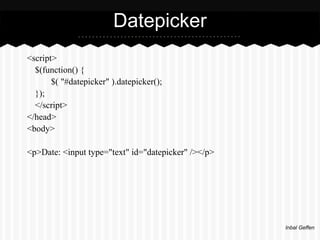
Datepicker
<script>
  $(function() {
       $( "#datepicker" ).datepicker();
  });
  </script>
</head>
<body>

<p>Date: <input type="text" id="datepicker" /></p>


                                                     Inbal Geffen
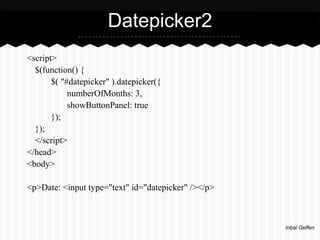
Datepicker2
<script>
  $(function() {
       $( "#datepicker" ).datepicker({
            numberOfMonths: 3,
            showButtonPanel: true
       });
  });
  </script>
</head>
<body>

<p>Date: <input type="text" id="datepicker" /></p>


                                                     Inbal Geffen
jQuery UI Features


Effects


 ●    Effect
 ●    Visibility
      ○ Show
      ○ Hide
      ○ Toggle
 ●    Class Animation
      ○ Add Class
      ○ Remove Class
      ○ Toggle Class
      ○ Switch Class
 ●    Color Animation


Inbal Geffen
jQuery UI Features

function runEffect() {
                  var selectedEffect = $( "#effectTypes" ).val(); //get effect type
                  var options = {};        // most effect types need no options passed by default
                  if ( selectedEffect === "scale" ) { // some effects have required parameters
                           options = { percent: 0 };
                  } else if ( selectedEffect === "transfer" ) {
                           options = { to: "#button", className: "ui-effects-transfer" };
                  } else if ( selectedEffect === "size" ) {
                           options = { to: { width: 200, height: 60 } };
                  }

                   // run the effect
                   $( "#effect" ).effect( selectedEffect, options, 500, callback );
           };

           // callback function to bring a hidden box back
           function callback() {
                    setTimeout(function() {
                           $( "#effect" ).removeAttr( "style" ).hide().fadeIn();
                    }, 1000 );
           };


                                                                                                    Inbal Geffen

J queryui

  • 1.
  • 2.
    Installing jQuery UI Goto : http://jqueryui.com/download/ ● Choose all the features you want in the library (leave all) ● Choose a theme or design your own theme ● Click download ● Drag the js library to your project (copy) ● In your file add both jQuery and jQuery UI files <script src="js/jquery-1.8.3.js"></script> <script src="js/jquery-ui-1.9.2.custom.min.js"></script> Inbal Geffen
  • 3.
    jQuery UI Features Interactions Addbasic mouse-based behaviors to any element. You can create sortable lists, resizable elements, drag & drop behaviors and more with just a few lines or code. Interactions also make great building blocks for more complex widgets and applications. What kind of interactions are available? ● Draggable ● Droppable ● Resizable ● Selectable ● Sortable Inbal Geffen
  • 4.
    Draggable <!doctype html> <head> <script src="js/jquery-1.8.3.js"></script> <script src="js/jquery-ui-1.9.2.custom.min.js"></script> <style> #draggable { width: 150px; height: 150px; padding: 0.5em; } </style> <script> $(function() { $( "#draggable" ).draggable(); }); </script> </head> <body> <div id="draggable" class="ui-widget-content"> <p>Drag me around</p> </div> </body> </html> Inbal Geffen
  • 5.
    Droppable <script> $(function() { $( "#draggable" ).draggable(); $( "#droppable" ).droppable({ drop: function( event, ui ) { $( this ) .addClass( "ui-state-highlight" ) .find( "p" ) .html( "Dropped!" ); } }); }); </script> </head> <body> <div id="draggable" class="ui-widget-content"><p>Drag me to my target</p></div> <div id="droppable" class="ui-widget-header"><p>Drop here</p></div> Inbal Geffen
  • 6.
    jQuery UI Features Widgets Full-featuredUI controls that bring the richness of desktop applications to the Web. ● Accordion ● Autocomplete ● Button ● Datepicker ● Dialog ● Menu ● Progressbar ● Slider ● Spinner ● Tabs ● Tooltip Inbal Geffen
  • 7.
    Datepicker <script> $(function(){ $( "#datepicker" ).datepicker(); }); </script> </head> <body> <p>Date: <input type="text" id="datepicker" /></p> Inbal Geffen
  • 8.
    Datepicker2 <script> $(function(){ $( "#datepicker" ).datepicker({ numberOfMonths: 3, showButtonPanel: true }); }); </script> </head> <body> <p>Date: <input type="text" id="datepicker" /></p> Inbal Geffen
  • 9.
    jQuery UI Features Effects ● Effect ● Visibility ○ Show ○ Hide ○ Toggle ● Class Animation ○ Add Class ○ Remove Class ○ Toggle Class ○ Switch Class ● Color Animation Inbal Geffen
  • 10.
    jQuery UI Features functionrunEffect() { var selectedEffect = $( "#effectTypes" ).val(); //get effect type var options = {}; // most effect types need no options passed by default if ( selectedEffect === "scale" ) { // some effects have required parameters options = { percent: 0 }; } else if ( selectedEffect === "transfer" ) { options = { to: "#button", className: "ui-effects-transfer" }; } else if ( selectedEffect === "size" ) { options = { to: { width: 200, height: 60 } }; } // run the effect $( "#effect" ).effect( selectedEffect, options, 500, callback ); }; // callback function to bring a hidden box back function callback() { setTimeout(function() { $( "#effect" ).removeAttr( "style" ).hide().fadeIn(); }, 1000 ); }; Inbal Geffen