INTRODUCTION TO CLOUD COMPUTING
Cloud Computing:
Cloud computing is the delivery of computing services over the internet, allowing
users to access resources like servers, storage, and applications without the need for
local hardware or software.
Cloud computing is also referred to as Internet-based computing.
Cloud computing is the services provided on the Internet to store a vast amount of
data in one place and can be used from anywhere and from any place. This minimizes
the cost of the physical installation of the data centers and servers.
Some examples of cloud computing are,
Dropbox - It is a one-stop solution for all the services like file storage, sharing, and
managing the system.
Microsoft Azure - It provides a wide range of services like the backup of data and any
sudden recovery from any type of disaster.
This model offers benefits like,
Scalability: Cloud services can be quickly scaled up or down to meet fluctuating
demands.
Cost-effectiveness: Pay-as-you-go pricing model reduces upfront investment and
operational costs.
Accessibility: Resources can be accessed from anywhere with an internet connection.
Flexibility: Organizations can choose from a variety of cloud services and service
models to meet their specific needs.
Service models:
Infrastructure as a Service (IaaS): Provides access to computing infrastructure,
including servers, storage, and networking.
Platform as a Service (PaaS): Offers a platform for developing and deploying
applications.
Software as a Service (SaaS): Delivers software applications as a service, accessible
over the internet.
Common examples:
Email services (like Gmail), online storage (like Google Drive), video streaming (like
Netflix), and cloud-based software applications are all examples of cloud computing.
Types of cloud computing:
● Public cloud: Infrastructure and services are offered to the general public by
providers like Amazon Web Services, Microsoft Azure, and Google Cloud.
● Private cloud: Infrastructure and services are dedicated to a single organization.
● Hybrid cloud: Combines public and private cloud environments.
● Community cloud: Shared by several organizations with common interests or
requirements.
CHARACTERISTICS OF CLOUD COMPUTING
1. On-demand self-service: A consumer can unilaterally provision computing
capabilities, such as server time and network storage, as needed automatically
without requiring human interaction with each service provider.
2. Broad network access: Capabilities are available over the network and
accessed through standard mechanisms that promote use by heterogeneous thin
or thick client platforms (e.g., mobile phones, tablets, laptops and workstations)
3. Resource pooling: The provider's computing resources are pooled to serve
multiple consumers using a multi-tenant model, with different physical and
virtual resources dynamically assigned and reassigned according to consumer
demand. There is a sense of location independence in that the customer generally
has no control or knowledge over the exact location of the provided resources but
may be able to specify location at a higher level of abstraction (e.g., country,
state or datacenter). Examples of resources include storage, processing, memory
and network bandwidth.
4. Rapid elasticity: Capabilities can be elastically provisioned and released, in
some cases automatically, to scale rapidly outward and inward commensurate
with demand. To the consumer, the capabilities available for provisioning often
appear to be unlimited and can be appropriated in any quantity at any time.
5. Measured service: Cloud systems automatically control and optimize
resource use by leveraging a metering capability at some level of abstraction
appropriate to the type of service (e.g., storage, processing, bandwidth and
active user accounts). Resource usage can be monitored, controlled and
reported, providing transparency for the provider and consumer.
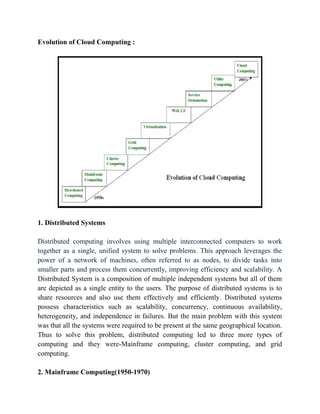
Evolution of Cloud Computing :
1. Distributed Systems
Distributed computing involves using multiple interconnected computers to work
together as a single, unified system to solve problems. This approach leverages the
power of a network of machines, often referred to as nodes, to divide tasks into
smaller parts and process them concurrently, improving efficiency and scalability. A
Distributed System is a composition of multiple independent systems but all of them
are depicted as a single entity to the users. The purpose of distributed systems is to
share resources and also use them effectively and efficiently. Distributed systems
possess characteristics such as scalability, concurrency, continuous availability,
heterogeneity, and independence in failures. But the main problem with this system
was that all the systems were required to be present at the same geographical location.
Thus to solve this problem, distributed computing led to three more types of
computing and they were-Mainframe computing, cluster computing, and grid
computing.
2. Mainframe Computing(1950-1970)
Mainframes which first came into existence in 1951 are highly powerful and reliable
computing machines. These are responsible for handling large data such as massive
input-output operations. Even today these are used for bulk processing tasks such as
online transactions etc. These systems have almost no downtime with high fault
tolerance. After distributed computing, these increased the processing capabilities of
the system. But these were very expensive. To reduce this cost, cluster computing
came as an alternative to mainframe technology.
3. Cluster Computing(1980-1990)
In the 1980s, cluster computing came as an alternative to mainframe computing. Each
machine in the cluster was connected to each other by a network with high bandwidth.
These were way cheaper than those mainframe systems. These were equally capable
of high computations. Also, new nodes could easily be added to the cluster if it was
required. Thus, the problem of the cost was solved to some extent but the problem
related to geographical restrictions still pertained. To solve this, the concept of grid
computing was introduced.
4. Grid Computing(1990-2000)
In the 1990s, the concept of grid computing was introduced. It means that different
systems were placed at entirely different geographical locations and these all were
connected via the internet. These systems belonged to different organizations and thus
the grid consisted of heterogeneous nodes. Although it solved some problems, new
problems emerged as the distance between the nodes increased. The main problem
which was encountered was the low availability of high bandwidth connectivity and
with it other network associated issues. Thus. Cloud computing is often referred to as
"Successor of grid computing".
5. Utility Computing(Late 1990-2000)
Utility Computing is a computing model that defines service provisioning techniques
for services such as compute services along with other major services such as storage,
infrastructure, etc which are provisioned on a pay-per-use basis.
6. Virtualization(1980-Present)
Virtualization is the process of running a virtual instance of a computer system in a
layer abstracted from the actual hardware. Virtualization was introduced nearly 40
years back. It refers to the process of creating a virtual layer over the hardware which
allows the user to run multiple instances simultaneously on the hardware. It is a key
technology used in cloud computing. It is the base on which major cloud computing
services such as Amazon EC2, VMware vCloud, etc work on. Hardware virtualization
is still one of the most common types of virtualization.
7. Web 2.0
Web 2.0 is the interface through which the cloud computing services interact with the
clients. It is because of Web 2.0 that we have interactive and dynamic web pages. It
also increases flexibility among web pages. Popular examples of web 2.0 include
Google Maps, Facebook, Twitter, etc. Needless to say, social media is possible
because of this technology only. It gained major popularity in 2004.
8. Service Orientation
A service orientation acts as a reference model for cloud computing. It supports low-
cost, flexible, and evolvable applications. Two important concepts were introduced in
this computing model. These were Quality of Service (QoS) which also includes the
SLA (Service Level Agreement) and Software as a Service (SaaS).
9. Cloud Computing
Cloud Computing means storing and accessing the data and programs on remote
servers that are hosted on the internet instead of the computer’s hard drive or local
server. Cloud computing is also referred to as Internet-based computing, it is a
technology where the resource is provided as a service through the Internet to the
user. The data that is stored can be files, images, documents, or any other storable
document.
Network Centric Computing:
Net-Centric: Net-Centric is a way to manage your data, applications, and
infrastructure in the cloud. Net-centric cloud computing can be considered an
evolution of Software as a Service (SaaS). It leverages the power of the Internet to
provide an environment for data, applications, and infrastructure on demand. It allows
you to manage everything from one interface without worrying about hardware or
server management issues.
The term net-centric combines network-based computing with its integration of
various types of information technology resources - servers, storage devices, servers,
computers - into centralized repositories that are served using standard Web-based
protocols such as HTTP or HTTPS via a global computer communications network
like the internet.
Net-centric computing allows organizations to focus on their core business needs
without limiting themselves by software or hardware limitations imposed on their
infrastructure. In other words, when an organization adopts net-centric principles, they
are able to completely virtualize its IT footprint while still being able to take
advantage of modern networking technologies like LANs and WANs.
Net-centric cloud computing service is a combination of IaaS, PaaS, and SaaS. What
this means is that instead of buying hardware and software for your own data center,
you buy it from the cloud provider. This gives you the ability to move your data to the
cloud and access it from anywhere.
Net-centric computing service allows you to centralize your applications with a single
interface. It provides fully managed services according to user's specific requirements,
which are invoked in real-time as needed rather than being provided on-demand or
already provisioned for use. The concept of net-centric computing enables multiple
distributed clients to access a single entity's applications in real-time.
Benefits of Net-Centric Computing:
Net-centric computing allows organizations to effectively manage their IT
infrastructure via a unified application that is more flexible and easier to maintain
without the added overhead of operating multiple hardware platforms. In turn,
organizations of all sizes can now enjoy the same benefits that larger more traditional
enterprises are able to with their own data centers. The net-centric virtualization
platform establishes a single management point for security, performance, and
capacity, as well as cloud applications and services.
Network Centric Content:
Network-centric content, more widely known as Content-Centric Networking (CCN)
or Information-Centric Networking (ICN), is a networking paradigm that shifts the
focus from where data is located to what the data is.
Instead of using IP addresses tied to hosts, CCN routes data by its name. A user issues
an Interest packet asking for specific content (e.g., /videos/cats/123.mp4). Routers
forward based on name-prefix matching and return a Content Object containing the
data and a cryptographic signature
Each CCN-enabled node includes:
● Content Store (Cache): Temporarily holds popular content.
● Pending Interest Table (PIT): Tracks outstanding requests and return paths.
● Forwarding Information Base (FIB): Routes Interests toward potential data
sources. Routers also automatically cache passing content, so subsequent
requests may be served locally, reducing latency and bandwidth use
Benefits
● Built-in caching & multicast: Reduces redundant data fetches and improves
scalability.
● Data-centric security: Content Objects are cryptographically signed, ensuring
integrity and provenance regardless of source
● Resilient and flexible: Ideal for mobile, IoT, or intermittently connected
environments—content can come from multiple sources and still remain
verifiable
ORIGIN OF CLOUD COMPUTING
Cloud computing, the delivery of computing services over the internet, has
transformed the way businesses and individuals access and utilize technology. Its
origins can be traced back to the 1950s when the concept of time-sharing emerged,
allowing multiple users to share access to a single mainframe computer. This
innovation laid the groundwork for the development of cloud computing by
demonstrating the feasibility of shared computing resources.
In the 1960s, the advent of ARPANET, the precursor to the internet, further advanced
the concept of interconnected computing systems. This period also saw the
popularization of time-sharing through Remote Job Entry (RJE), allowing users to
submit jobs to operators to run on mainframes. These developments set the stage for
the evolution of cloud computing by facilitating remote access to computing
resources.
The term "cloud computing" began to gain traction in the 1990s. In 1993, companies
like General Magic and AT&T used the cloud symbol to describe their distributed
computing platforms, marking one of the earliest uses of the term in this context. This
period also saw the rise of virtual private networks (VPNs), which allowed businesses
to securely connect to remote data centers over the internet.
The commercialization of cloud computing began in the early 2000s. In 2002,
Amazon launched Amazon Web Services (AWS), offering infrastructure services that
allowed developers to build applications independently. In 2006, AWS introduced
Amazon Elastic Compute Cloud (EC2), providing scalable computing capacity in the
cloud. This development enabled businesses to rent computing resources as needed,
reducing the need for significant upfront investment in hardware.
Since then, cloud computing has continued to evolve, with major companies like
Microsoft, Google, and IBM launching their own cloud platforms, such as Microsoft
Azure, Google Cloud, and IBM Cloud. These platforms offer a range of services,
including computing power, storage, and machine learning tools, catering to various
business needs.
1950s–1960s: The Dawn of Shared Computing
1950s: Mainframe computers emerge, primarily used by large organizations.
1960s: The concept of time-sharing is introduced, allowing multiple users to access a
single mainframe computer simultaneously. This idea laid the groundwork for future
cloud computing models.
1960s–1980s: Networking and Distributed Computing
1969: The development of ARPANET (the precursor to the internet) begins,
facilitating the interconnection of computers and enabling remote access to resources.
1980s: The rise of distributed computing allows tasks to be processed across multiple
machines, enhancing computational efficiency and laying the foundation for cloud
services.
1990s: The Advent of the Cloud Metaphor
1993: General Magic and AT&T use the term "cloud" to describe their distributed
computing platforms, marking one of the earliest uses of the term in this context.
1996: Compaq's internal documents reference "cloud computing," indicating the
term's growing recognition in the tech industry.
2000s: Commercialization and Standardization
2002: Amazon launches Amazon Web Services (AWS), providing developers with
access to Amazon's technology infrastructure.
2006: AWS introduces Elastic Compute Cloud (EC2) and Simple Storage Service
(S3), offering scalable computing and storage solutions.
2008: Google announces Google App Engine, allowing developers to build and host
applications on Google's infrastructure.
2008: Microsoft unveils Azure at the Professional Developers Conference, later
launching it as Windows Azure in 2010.
en.wikipedia.org
2010s: Expansion and Diversification
2010: Google Cloud Storage is launched, expanding Google's cloud offerings.
2011: Google Cloud SQL is introduced, providing managed relational databases.
2012: Google Compute Engine enters preview, offering Infrastructure as a Service
(IaaS).
2014: Google announces Kubernetes, an open-source container orchestration
platform, and later contributes it to the Cloud Native Computing Foundation.
2016: Google acquires Apigee, enhancing its API management capabilities.
2020s: Maturity and Innovation
2020: The COVID-19 pandemic accelerates the adoption of cloud computing as
businesses and educational institutions shift to remote operations.
2021: Cloud computing continues to evolve with advancements in artificial
intelligence, machine learning, and edge computing, further integrating into various
industries.
BASIC CONCEPTS AND TERMINOLOGY
Cloud refers to a vast network of computers, servers, and data centers that are
distributed globally
Computing refers to the act of using computers or computational systems to solve
problems, process data, and perform various tasks
Cloud Computing: The delivery of computing services—including servers, storage,
databases, networking, software, and analytics—over the internet (the cloud), offering
faster innovation, flexible resources, and economies of scale.
Virtualization: The process of creating virtual versions of physical resources, such as
servers and storage devices, enabling more efficient utilization and management of
hardware.
On-Demand Self-Service: Users can provision and manage computing resources as
needed, without requiring human intervention from the service provider.
Scalability: The ability to adjust resources to meet changing demands, allowing
systems to scale up or down efficiently.
Pay-As-You-Go: A pricing model where users pay only for the resources they use,
avoiding the need for large upfront investments in hardware.
Infrastructure as a Service (IaaS): Provides virtualized computing resources over
the internet. Users can rent virtual machines, storage, and networking components.
Platform as a Service (PaaS): Offers a platform allowing customers to develop, run,
and manage applications without dealing with the underlying infrastructure.
Software as a Service (SaaS): Delivers software applications over the internet,
eliminating the need for installation and maintenance on local devices.
Public Cloud: Cloud resources are owned and operated by third-party providers and
delivered over the internet.
Private Cloud: Cloud infrastructure is used exclusively by a single organization,
offering greater control and security.
reddit.com
Hybrid Cloud: Combines public and private clouds, allowing data and applications to
be shared between them.
Community Cloud: Shared infrastructure is used by several organizations with
common concerns, such as security or compliance requirements.
Multitenancy: A single instance of a software application serves multiple tenants,
with each tenant's data isolated and invisible to others.
Elasticity: The ability to automatically adjust resources to meet demand, ensuring
optimal performance and cost-efficiency.
Service Level Agreement (SLA): A contract that outlines the expected level of
service, including performance metrics and responsibilities.
API (Application Programming Interface): A set of rules and protocols that allow
different software applications to communicate with each other.
Data centre: The data center is the collection of servers where the application to
which you subscribe is housed. It could be a large room in the basement of your
building or a room full of servers on the other side of the world that you access via the
Internet. A growing trend in the IT world is virtualizing servers. That is, software can
be installed allowing multiple instances of virtual servers to be used. In this way, you
can have half a dozen virtual servers running on one physical server.
Software deployment, also known as application deployment, is the process of
making a software system or application available for use on a system. It involves
installing, configuring, updating, and enabling the software.
Scalability is about a system’s capacity to grow or shrink to meet long-term demand.
It’s typically planned in advance and reflects architectural decisions—like whether an
application can handle more users, data, or transactions as it grows. Scalability
ensures that a system can increase its performance and resource capacity without
needing to be redesigned.
Elasticity, on the other hand, is the real-time adjustment of resources in response to
workload changes. It’s about automatically scaling up during high demand and scaling
down when demand drops, often within minutes or seconds. Elasticity is what enables
pay-as-you-go efficiency—it’s ideal for workloads with fluctuating usage patterns,
like web applications or batch jobs.
Private on-premises clouds are managed and maintained by a company's own data
centre and do not share services with other organisations. The major benefits of using
an on-premises private cloud include greater sense of security, flexibility and higher
performance.
CLOUD SERVICE MODELS
A cloud service model refers to the way cloud computing services are offered,
allowing users to access and utilize computing resources over the internet. These
models provide different levels of control, responsibility, and management for IT
resources, enabling users to choose the most suitable approach based on their needs.
In general, Cloud Computing Models are widely classified into 4 types. They are as
follows:
1. IaaS (Infrastructure as a Service)
It provides scalable and virtualized computing resources like servers, storage, and
networking over the internet.
In this service, users can have full control over the infrastructure, having
customization and management access of virtual machines, storage, and networking
components.
Example: Imagine you want to start a website. Instead of buying you own server, you
rent on a cloud provider's server. You use their storage and networking, but you
control what runs on it-like your website or app.
Advantages of IaaS:
● Cost-Effective: Eliminates capital expense and reduces ongoing cost and IaaS
customers pay on a per-user basis, typically by the hour, week, or month.
● Website hosting: Running websites using IaaS can be less expensive than
traditional web hosting.
● Security: The IaaS Cloud Provider may provide better security than your
existing software.
● Maintenance: There is no need to manage the underlying data center or the
introduction of new releases of the development or underlying software. This is
all handled by the IaaS Cloud Provider.
Disadvantages of laaS :
● Limited control over infrastructure: IaaS providers typically manage the
underlying infrastructure and take care of maintenance and updates, but this can
also mean that users have less control over the environment and may not be
able to make certain customizations.
● Security concerns: Users are responsible for securing their own data and
applications, which can be a significant undertaking.
● Limited access: Cloud computing may not be accessible in certain regions and
countries due to legal policies.
2. PaaS (Platform as a Service)
PaaS is a type of cloud service that gives developers the tools they need to build and
launch apps online without setting up any hardware and software themselves.
It provides a platform and an environment for developers to build, deploy, and
manage applications without dealing with the underlying infrastructure.
It offers tools and services such as development frameworks, databases, and
middleware, streamlining the application development lifecycle.
Advantages of PaaS:
Simple and convenient for users: It provides much of the infrastructure and other IT
services, which users can access anywhere via a web browser.
Cost-Effective: It charges for the services provided on a per-use basis thus eliminating
the expenses one may have for on-premises hardware and software.
Efficiently managing the lifecycle: It is designed to support the complete web
application lifecycle: building, testing, deploying, managing, and updating.
Efficiency: It allows for higher-level programming with reduced complexity thus, the
overall development of the application can be more effective.
Disadvantages of Paas:
Limited control over infrastructure: PaaS providers typically manage the underlying
infrastructure and take care of maintenance and updates, but this can also mean that
users have less control over the environment and may not be able to make certain
customizations.
Dependence on the provider: Users are dependent on the PaaS provider for the
availability, scalability, and reliability of the platform, which can be a risk if the
provider experiences outages or other issues.
Limited flexibility: PaaS solutions may not be able to accommodate certain types of
workloads or applications, which can limit the value of the solution for certain
organizations.
3. SaaS (Software as a Service)
SaaS delivers software applications over the internet on a subscription basis. It
eliminates the need for users to install, maintain, or update the software locally.
With this service users can access the applications from any device with an internet
connection, enabling flexibility and accessibility.
SaaS is usually offered on pay-as-you-go basis, and you can access it from any device
with internet. It's also called web-based-software or on-demand software because
you can use it anytime, anywhere, without setup.
Example : Using Google Docs, You don't need to install it. You just open your
browser, log in, and start using it. Google stores your work and keeps the software
updated. You just use it when you need it.
Advantages of SaaS
● Cost-effective: Pay only for what you use.
● Reduced time: Users can run most SaaS apps directly from their web browser
without needing to download and install any software. This reduces the time
spent in installation and configuration and can reduce the issues that can get in
the way of the software deployment.
● Accessibility: Data from anywhere.
● Automatic updates: Rather than purchasing new software, customers rely on a
SaaS provider to automatically perform the updates.
● Scalability: It allows the users to access the services and features on-demand.
The various companies providing Software as a service are Cloud9 Analytics,
Salesforce.com, Cloud Switch, Microsoft Office 365, Big Commerce, Eloqua,
dropBox, and Cloud Tran.
Disadvantages of Saas :
● Limited customization: SaaS solutions are typically not as customizable as on-
premises software, meaning that users may have to work within the constraints
of the SaaS provider's platform and may not be able to tailor the software to
their specific needs.
● Dependence on internet connectivity: SaaS solutions are typically cloud-based,
which means that they require a stable internet connection to function properly.
This can be problematic for users in areas with poor connectivity or for those
who need to access the software in offline environments.
● Security concerns: SaaS providers are responsible for maintaining the security
of the data stored on their servers, but there is still a risk of data breaches or
other security incidents.
● Limited control over data: SaaS providers may have access to a user's data,
which can be a concern for organizations that need to maintain strict control
over their data for regulatory or other reasons.
4. Serverless Computing
Serverless computing provides abstracts for server management, facilitating
developers to focus completely on developing and deploying code without managing
servers.
It automatically scales the resources based on demand, reducing the operational
overhead and costs, and enabling rapid development and deployment of applications.
Difference Between IaaS, PaaS, SaaS And Serverless
CLOUD DEPLOYMENT MODEL
A cloud deployment model defines where cloud resources are hosted, who manages
them, and how they are accessed. Different types of cloud computing deployment
models are described below.
● Public Cloud
● Private Cloud
● Hybrid Cloud
● Community Cloud
● Multi-Cloud
Public cloud: As the name suggests, this type of cloud deployment model supports all
users who want to make use of a computing resource, such as hardware (OS, CPU,
memory, storage) or software (application server, database) on a subscription basis.
Most common uses of public clouds are for application development and testing, non-
mission-critical tasks such as file-sharing, and e-mail service.
Private cloud True to its name, a private cloud is typically infrastructure used by a
single organization. Such infrastructure may be managed by the organization itself to
support various user groups, or it could be managed by a service provider that takes
care of it either on-site or off-site. Private clouds are more expensive than public
clouds due to the capital expenditure involved in acquiring and maintaining them.
However, private clouds are better able to address the security and privacy concerns
of organizations today.
Hybrid cloud In a hybrid cloud, an organization makes use of interconnected private
and public cloud infrastructure. Many organizations make use of this model when
they need to scale up their IT infrastructure rapidly, such as when leveraging public
clouds to supplement the capacity available within a private cloud. For example, if an
online retailer needs more computing resources to run its Web applications during the
holiday season it may attain those resources via public clouds.
Community cloud This deployment model supports multiple organizations sharing
computing resources that are part of a community; examples include universities
cooperating in certain areas of research, or police departments within a country or
state sharing computing resources. Access to a community cloud environment is
typically restricted to the members of the community.
MULTI CLOUD:
"Multi-cloud" means multiple public clouds. A company that uses a multi-cloud
deployment incorporates multiple public clouds from more than one cloud provider.
Instead of a business using one vendor for cloud hosting, storage, and the full
application stack, in a multi-cloud configuration they use several.
Multi-cloud deployments have a number of uses. A multi-cloud deployment can
leverage multiple IaaS (infrastructure-as-a-service) vendors, or it could use a different
vendor for IaaS, PaaS (platform-as-a-service), and SaaS (software-as-a-service)
services. Multi-cloud can be purely for the purpose of redundancy and system backup,
or it can incorporate different cloud vendors for different services.
Most businesses that move to the cloud will end up with some kind of multi-cloud
deployment.
CLOUD SERVICE PROVIDERS
A cloud service provider, or CSP, is an IT company that provides on-demand, scalable
computing resources like computing power, data storage, or applications over the
internet.
The list of prominent cloud service providers, often referred to as the "Big Three" and
others:
Amazon Web Services (AWS) continues to lead the global cloud market with around
31–33% market share, driven by its extensive portfolio of over 200 services—
including EC2, S3, Lambda, SageMaker, and Bedrock—across 35 regions and 114
availability zones. AWS is heavily investing in AI infrastructure, custom chips like
Trainium and Graviton, and green energy, positioning itself as the go-to platform for
enterprises seeking scale, innovation, and sustainability—though its pricing
complexity and regulatory scrutiny remain challenges .
Microsoft Azure holds about 22–24% of the market, distinguishing itself through
deep integration with Microsoft software (Office 365, Active Directory), and excels in
hybrid-cloud environments via Azure Arc and Stack . With over 600 services and
strong compliance credentials, Azure is a top choice for enterprises aiming to unify
on-prem and cloud systems seamlessly.
Google Cloud Platform (GCP) captures around 11–13% market share, fueled by
rapid growth in AI, analytics, and Kubernetes managed services. GCP’s strengths lie
in BigQuery, Vertex AI, open-source support, and cost-effective sustained-use pricing
—appealing to developers and data-driven organizations .
Alibaba Cloud ranks as the leading cloud provider in China and APAC, with global
market share near 4%. It continues to grow with AI-driven services like Qwen and
stays competitive through regional compliance and integration with Alibaba’s e-
commerce ecosystem—though international expansion faces regulatory and trust
hurdles .
Oracle Cloud Infrastructure (OCI), with roughly 3% global share, is leveraging its
strength in databases and ERP solutions. OCI recently reported a 52% increase in
cloud infrastructure revenue and projects 70% YoY growth, fueled by AI
partnerships and large-scale data center investments .
IBM Cloud (~2% share) stands out in hybrid and multi-cloud environments, using
RedHat OpenShift, Watson AI, and bare-metal services to support complex,
regulation-driven enterprise workloads .
Tencent Cloud also holds around 2% globally and about 15% in China, with a
focus on gaming, media, AI/IoT services, and recent Middle East expansion .
DigitalOcean is a developer-oriented cloud provider offering simple VPS/IaaS
solutions with transparent pricing, favored by startups and small teams for web
application deployment.
Red Hat, through OpenShift and Advanced Cluster Management, enables open-
source-driven hybrid and edge cloud deployments, supporting remote and on-prem
Kubernetes applications .
Salesforce dominates in CRM via its SaaS Sales, Service, Marketing Clouds, and
extensions such as Pardot and Tableau—serving enterprise-level customer-
engagement scenarios .
VMware offers virtualization-led multi-cloud services through VMware Cloud,
enabling lift-and-shift strategies across private, public, and hybrid environments.
OVHcloud positions itself as Europe’s top sovereign cloud alternative, compliant
with GDPR and aimed at organizations seeking European-based, reliable
infrastructure .
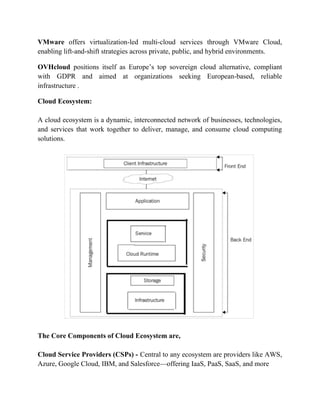
Cloud Ecosystem:
A cloud ecosystem is a dynamic, interconnected network of businesses, technologies,
and services that work together to deliver, manage, and consume cloud computing
solutions.
The Core Components of Cloud Ecosystem are,
Cloud Service Providers (CSPs) - Central to any ecosystem are providers like AWS,
Azure, Google Cloud, IBM, and Salesforce—offering IaaS, PaaS, SaaS, and more
Cloud Consumers - These are individuals, enterprises, or apps that use cloud services
to run applications, store data, or perform compute tasks
Partners & Integrators - Includes consultants, systems integrators, ISVs
(independent software vendors), resellers, certified partners, and infrastructure
specialists who build, connect, or secure cloud environments
Third-Party Services & Marketplaces - SaaS apps, PaaS tools, security, analytics,
or DevOps offerings listed in marketplaces (e.g. AWS Marketplace, Azure
Marketplace) that enhance or extend core services .
Tools & Orchestration - Technologies like CI/CD platforms, container management
(e.g. Kubernetes), serverless frameworks, and monitoring/security tools that support
deployment, automation, and governance .
AMAZON WEB SERVICES
Amazon Web Services offers a broad set of global cloud-based products including
compute, storage, databases, analytics, networking, mobile, developer tools,
management tools, IoT, security, and enterprise applications: on-demand, available in
seconds, with pay-as-you-go pricing. From data warehousing to deployment tools,
directories to content delivery, over 200 AWS services are available.
In 2006, Amazon Web Services (AWS) began offering IT infrastructure services to
businesses as web services—now commonly known as cloud computing.
Amazon Athena :
Amazon Athena is an interactive query service that makes it easy to analyze data in
Amazon S3 using standard SQL. Athena is serverless, so there is no infrastructure to
manage, and you pay only for the queries that you run. Athena is easy to use. Simply
point to your data in Amazon S3, define the schema, and start querying using standard
SQL. Most results are delivered within seconds. With Athena, there’s no need for
complex extract, transform, and load (ETL) jobs to prepare your data for analysis.
This makes it easy for anyone with SQL skills to quickly analyze large-scale datasets.
Amazon EMR :
Amazon EMR is the industry-leading cloud big data platform for processing vast
amounts of data using open source tools such as Apache Spark, Apache Hive, Apache
HBase, Apache Flink, Apache Hudi, and Presto. Amazon EMR makes it easy to set
up, operate, and scale your big data environments by automating time-consuming
tasks such as provisioning capacity and tuning clusters.
Amazon Kinesis:
Amazon Kinesis makes it easy to collect, process, and analyze real-time, streaming
data so you can get timely insights and react quickly to new information.
AWS Glue :
AWS Glue is a fully managed extract, transform, and load (ETL) service that makes it
easy for customers to prepare and load their data for analytics.
AWS B2B Data Interchange:
AWS B2B Data Interchange (B2Bi) automates the transformation of Electronic Data
Interchange (EDI) documents into JSON and XML formats to simplify your
downstream data integrations. Businesses use EDI documents to exchange
transactional data with trading partners, such as suppliers and end customers, using
standardized formats such as X12.
Alexa for Business :
Alexa for Business is a service that enables organizations and employees to use Alexa
to get more work done. With Alexa for Business, employees can use Alexa as their
intelligent assistant to be more productive in meeting rooms, at their desks, and even
with the Alexa devices they already have at home.
Amazon SES:
Amazon Simple Email Service (Amazon SES) is a cost-effective, flexible, and
scalable email service that enables developers to send mail from within any
application.
MICROSOFT AZURE
Microsoft Azure, formerly known as Windows Azure, is Microsoft's public cloud
computing platform. It provides a broad range of cloud services, including compute,
analytics, storage and networking.
Microsoft charges for Azure on a pay-as-you-go (PAYG) basis, meaning subscribers
receive a bill each month that only charges them for the specific resources and
services they have used.
Azure includes many services in its cloud computing platform,
Compute services :
This includes the Azure Virtual Machines—both Linux and Windows, Cloud
Services, App Services (Web Apps, Mobile Apps, Logic Apps, API Apps, and
Function Apps), Batch (for large-scale parallel and batch compute jobs), RemoteApp,
Service Fabric, and the Azure Container Service. Data services This includes
Microsoft Azure Storage (comprised of the Blob, Queue, Table, and Azure Files
services), Azure SQL Database, DocumentDB, StorSimple, and the Redis Cache.
Application services:
This includes services that you can use to help build and operate your applications,
such as Azure Active Directory (Azure AD), Service Bus for connecting distributed
systems, HDInsight for processing big data, Azure Scheduler, and Azure Media
Services.
Network services:
This includes Azure features such as Virtual Networks, ExpressRoute, Azure DNS,
Azure Traffic Manager, and the Azure Content Delivery Network.
Microsoft Office 365 is a prototypical model of a SaaS offering. Subscribers pay a
monthly or annual subscription fee, and they get Exchange as a Service (online and/or
desktop Outlook), Storage as a Service (OneDrive), and the rest of the Microsoft
Office Suite (online, the desktop version, or both). Other examples of SaaS include
Dropbox, WordPress, and Amazon Kindle.
GOOGLE CLOUDS
Google Cloud Platform (GCP) offers a wide array of services categorized into
Compute, Storage, Networking, Data Analytics, Machine Learning, and more.
Here's a more detailed list of some prominent GCP services:
Compute:
Compute Engine: Virtual machines for running applications.
Google Kubernetes Engine (GKE): Managed Kubernetes service for container
orchestration.
Cloud Run: Serverless platform for running containers.
App Engine: Platform-as-a-Service (PaaS) for building web applications.
Cloud Functions: Serverless function-as-a-service.
Storage:
Cloud Storage: Object storage service for storing data.
Persistent Disk: Block storage for Compute Engine instances.
Memorystore: Managed database services (Redis, Memcache).
Filestore: Managed file storage for Compute Engine.
Networking:
Virtual Private Cloud (VPC): Create and manage your own network.
Cloud Load Balancing: Distribute traffic across multiple instances.
Cloud DNS: DNS service for managing domains.
Data Analytics:
BigQuery: Fully-managed, serverless data warehouse for large-scale analytics.
Dataflow: Fully-managed service for data processing pipelines.
Cloud Dataproc: Managed Hadoop and Spark service.
Cloud Composer: Managed workflow orchestration service.
Looker: Business intelligence and analytics platform.
Machine Learning:
Vertex AI: End-to-end AI platform for building and deploying models.
AutoML: Suite of machine learning tools for building custom models.
TensorFlow: Open-source machine learning framework.
Cloud Vision API: Analyze images for content.
Cloud Speech-to-Text: Transcribe spoken language into text.
Dialogflow: Platform for building conversational interfaces.
Other Notable Services:
Google Cloud SQL: Managed relational database service.
Cloud Spanner: Globally distributed, scalable database.
Cloud Bigtable: NoSQL database for large-scale applications.
Cloud Datastore: NoSQL database for mobile and web applications.
Apigee: API management platform.
Cloud Identity and Access Management (IAM): Manage access control to GCP
resources.
Security Command Center: Unified security management and threat detection.
Cloud KMS: Key Management Service.
Cloud Functions: Serverless platform for running functions.
SERVICE LEVEL AGREEMENTS AND COMPLIANCE LEVEL
AGREEMENTS
In cloud computing, Service Level Agreements (SLAs) define performance
expectations and commitments between providers and users, while Compliance Level
Agreements (CLAs) ensure adherence to legal and regulatory requirements. SLAs
focus on service quality and uptime, while CLAs prioritize compliance with industry
regulations.
Service Level Agreements Lifecycle
Discover service provider:
This step involves identifying a service provider that can meet the needs of the
organization and has the capability to provide the required service. This can be done
through research, requesting proposals, or reaching out to vendors.
Define SLA:
In this step, the service level requirements are defined and agreed upon between the
service provider and the organization. This includes defining the service level
objectives, metrics, and targets that will be used to measure the performance of the
service provider.
Establish Agreement:
After the service level requirements have been defined, an agreement is established
between the organization and the service provider outlining the terms and conditions
of the service. This agreement should include the SLA, any penalties for non-
compliance, and the process for monitoring and reporting on the service level
objectives.
Monitor SLA violation:
This step involves regularly monitoring the service level objectives to ensure that the
service provider is meeting their commitments. If any violations are identified, they
should be reported and addressed in a timely manner.
Terminate SLA:
If the service provider is unable to meet the service level objectives, or if the
organization is not satisfied with the service provided, the SLA can be terminated.
This can be done through mutual agreement or through the enforcement of penalties
for non-compliance.
Enforce penalties for SLA Violation:
If the service provider is found to be in violation of the SLA, penalties can be imposed
as outlined in the agreement. These penalties can include financial penalties, reduced
service level objectives, or termination of the agreement.
Advantages of SLA :
Improved communication: A better framework for communication between the
service provider and the client is established through SLAs, which explicitly outline
the degree of service that a customer may anticipate. This can make sure that
everyone is talking about the same things when it comes to service expectations.
Increased accountability: SLAs give customers a way to hold service providers
accountable if their services fall short of the agreed-upon standard. They also hold
service providers responsible for delivering a specific level of service.
Better alignment with business goals: SLAs make sure that the service being given
is in line with the goals of the client by laying down the performance goals and
service level requirements that the service provider must satisfy.
Reduced downtime: SLAs can help to limit the effects of service disruptions by
creating explicit protocols for issue management and resolution.
Better cost management: By specifying the level of service that the customer can
anticipate and providing a way to track and evaluate performance, SLAs can help to
limit costs. Making sure the consumer is getting the best value for their money can be
made easier by doing this.
COMPLIANCE LEVEL AGREEMENT
In cloud computing, "Compliance Level Agreements" essentially refer to the
contractual commitments made by cloud service providers (CSPs) to ensure they
adhere to specific regulatory standards, industry mandates, and best practices related
to security, privacy, and operational reliability. These agreements, often incorporating
Service Level Agreements (SLAs), outline the expected service quality and
performance, including how the cloud provider will meet compliance requirements.
Key Components of Compliance Level Agreements:
Service Level Agreements (SLAs):
Outline specific service levels, including availability, uptime, response times, and
other performance metrics.
Compliance Scope:
Specifies the regulatory standards and industry best practices that the cloud provider is
committed to adhering to.
Security Measures:
Describes the security controls, protocols, and procedures implemented by the CSP to
protect data and infrastructure.
Data Protection:
Details how the cloud provider handles data (storage, processing, access, deletion) and
ensures compliance with data privacy regulations.
Auditing and Reporting:
Outlines the processes for auditing compliance, reporting on compliance status, and
addressing any non-compliance issues.
Remediation:
Specifies the actions the CSP will take if they fail to meet compliance requirements or
if a breach occurs.
RESPONSIBILITY SHARING BETWEEN USER AND SERVICE
PROVIDER:
CSP Responsibilities:
The CSP is accountable for securing the underlying cloud infrastructure, including
hardware, networking, software, virtualization, and physical security of the data
centers. They are responsible for maintaining the overall security posture of the cloud
environment.
Customer Responsibilities:
Customers are responsible for securing their data, applications, and the configurations
they deploy within the cloud. This includes managing access controls, encrypting
data, securing their applications, and implementing appropriate security settings for
their workloads.
Relationship between IaaS, PaaS, and SaaS:
The level of responsibility shared between the CSP and the customer varies depending
on the cloud service model (IaaS, PaaS, or SaaS). In IaaS, the customer has more
control and responsibility over the infrastructure, while in PaaS and SaaS, the CSP
manages more aspects of the platform and applications.
Shared Responsibility in Practice:
The shared responsibility model ensures a collaborative approach to cloud security,
leveraging the expertise of both the CSP and the customer. This approach minimizes
security risks and helps ensure that cloud resources are protected against threats and
vulnerabilities.
Compliance:
Compliance in the cloud also mirrors the shared responsibility model. While the CSP
has responsibilities related to the underlying infrastructure, the customer is ultimately
responsible for meeting compliance requirements related to their data, applications,
and configurations.
USER CHALLENGES AND EXPERIENCE
Cloud computing offers numerous benefits, but users also face challenges. These
include security concerns, managing costs, navigating multi-cloud environments,
ensuring performance, and maintaining interoperability and flexibility.
Some key challenges and their impact on user experience:
1. Security and Privacy:
Challenge:
Data breaches, unauthorized access, and potential data loss are major concerns when
storing data in the cloud.
Impact:
Users may be hesitant to use cloud services if they fear their data is at risk, leading to
reduced adoption and trust in cloud providers.
Mitigation:
Robust security measures, strong authentication protocols, and regular security audits
can help alleviate these concerns.
2. Cost Management:
Challenge:
Unpredictable costs, especially with pay-as-you-go models, can lead to overspending.
Impact:
Businesses may struggle to budget effectively for cloud services, leading to
unexpected expenses and potentially impacting profitability.
Mitigation:
Monitoring resource usage, optimizing cloud deployments, and using cost
optimization tools can help manage cloud costs.
3. Multi-Cloud Environments:
Challenge:
Managing and integrating data and applications across multiple cloud platforms can
be complex and time-consuming.
Impact:
It can lead to increased administrative overhead, potential conflicts between different
cloud environments, and challenges in maintaining consistency across platforms.
Mitigation:
Implementing a cloud management platform, standardizing cloud infrastructure, and
developing a multi-cloud strategy can help streamline multi-cloud operations.
4. Performance Challenges:
Challenge:
Network latency, server outages, and resource contention can impact application
performance.
Impact:
Slower response times, application downtime, and a poor user experience can frustrate
users and lead to reduced productivity.
Mitigation:
Choosing a cloud provider with a reliable infrastructure, optimizing application code,
and using caching mechanisms can improve performance.
5. Interoperability and Flexibility:
Challenge:
Difficulty in migrating applications and data between different cloud providers, and
limitations in integrating cloud services with existing systems can limit flexibility.
Impact:
Organizations may become locked into a specific cloud provider, making it difficult to
switch or adopt new technologies.
Mitigation:
Using open standards and cloud-native technologies, and developing a cloud-agnostic
architecture can enhance interoperability and flexibility.
6. Dependence on Network:
Challenge:
Cloud services rely heavily on internet connectivity, and network outages or
slowdowns can disrupt operations.
Impact:
Users may experience downtime, slow performance, or even be unable to access
applications and data.
Mitigation:
Using high-bandwidth connections, implementing redundancy in network
infrastructure, and having backup plans in case of network disruptions can mitigate
these risks.
7. Lack of Knowledge and Expertise:
Challenge:
Many organizations lack the internal expertise to manage and maintain cloud
environments effectively.
Impact:
This can lead to misconfigurations, security vulnerabilities, and inefficient use of
cloud resources.
Mitigation:
Investing in cloud training and certifications, hiring skilled cloud professionals, and
partnering with cloud service providers can help address this challenge.
8. Reliability and Availability:
Challenge:
Ensuring that cloud services are available and reliable, especially during peak demand
or unexpected events, can be challenging.
Impact:
Downtime and service disruptions can impact productivity and business operations.
Mitigation:
Using redundant systems, implementing disaster recovery plans, and choosing a cloud
provider with a proven track record of reliability can help ensure service availability.
SOFTWARE LICENCING
On-demand, pay-as-per-use, and short-range licensing models are termed as cloud
computing licensing models
Enterprise wide Model – In this model, an independent software vendor (ISV)
licenses software to a complete enterprise. This category of license involves
installation and utilization of software by personnel of the enterprise. Enterprise
licenses are not proposed to be consumed by service providers for reselling the
software to the client. Many providers have comprehended this requirement and have
delivered licenses especially for service providers.
Concurrent Users Model – In this model, the client purchases a pool of licenses.
Licenses can be checked concurrently which depend on the category of software
involved. Check-in and Check-out of license is instinctive, bound to a web session or
the working of an application. Generally, it is applied via application hooks which
summons a license manager service. This kind of licensing works the same in the
cloud like it works in private networks, on condition that the license terms allows. In
multi-client cloud service, it can be expected to sub-categorized the license pool to
impose allocations to the clients which may not be reinforced by license manager
software.
Ownership – Copyright Holder Model – In this model, top Cloud service vendors
usually prefer a combination of free or open-source software and software from
domestic development projects. Corporations that own the copyrights either over
construction or purchase can use the software for any purpose they want.
Named User Model – In this model, a license is bound to a particular client. That
client is licensed to deploy the software on any kind of device and on a number of
devices simultaneously. Generally, licenses are knotted to the internal service
directory of the organization, but cloud-based services use internet identity vendors.
Named user licenses are traded to an organization as a pool many times which can
then be allocated and migrated as per need.
Site-Wide Model – In this model, Site licenses are exchanged and rely on the general
size of the site of the client. The premise is that the site is responsive to a local area
network (LAN) or network within an organization and the software can be installed
from an open source and can be used on this network. Cloud computing openly
abstracts physical sites and network restrictions make this kind of license an
inconvenient fit for cloud computing.
Token Based Model – In this model, a physical license key, like only a readable drive
or dongle, must be connected to the host executing the software. It is beneficial for the
clients as the key can migrate from one machine to another easily. As clouds and most
virtualized infrastructure do not permit access to servers to the clients, this type of
service is not very convenient.
Host ID-Based Model – In this model, more than one server hardware components are
queried which generates a unique host ID. Client gets a license key from the provider
that is knotted to the host ID. It doesn’t function well in cloud-based systems due to
various reasons. Mostly in the cloud, hardware is abstracted from the clients. Even if a
host ID can be created for the physical device, the virtual server may be transferred to
another hardware as a function to manage the cloud. Clouds have a schema
compatible with automated provisioning and flexible scaling, which cannot be
achieved if the software provider is contacted every time a host is transferred or
supplied.
Free Open Source Model – In this model, Corporates can get the software from open-
source project sites rather than from a paid commercial provider. This kind of
licensing is good for cloud service vendors as well as consumers. There is no
manipulation of the customers as it is open-source, any client or consumer can use it
as well as no boundaries of number of users, location or size of the hardware. Leading
internet service providers have composed open source software both as client and the
provider. In order to prosper, commercial independent software vendors must deliver
unique attributes and quality to worth their cost, while also approving licensing
models that scale up and down for utilization in the cloud.

Basics of Cloud Computing - Cloud Ecosystem

  • 1.
    INTRODUCTION TO CLOUDCOMPUTING Cloud Computing: Cloud computing is the delivery of computing services over the internet, allowing users to access resources like servers, storage, and applications without the need for local hardware or software. Cloud computing is also referred to as Internet-based computing. Cloud computing is the services provided on the Internet to store a vast amount of data in one place and can be used from anywhere and from any place. This minimizes the cost of the physical installation of the data centers and servers. Some examples of cloud computing are, Dropbox - It is a one-stop solution for all the services like file storage, sharing, and managing the system. Microsoft Azure - It provides a wide range of services like the backup of data and any sudden recovery from any type of disaster. This model offers benefits like, Scalability: Cloud services can be quickly scaled up or down to meet fluctuating demands. Cost-effectiveness: Pay-as-you-go pricing model reduces upfront investment and operational costs. Accessibility: Resources can be accessed from anywhere with an internet connection. Flexibility: Organizations can choose from a variety of cloud services and service models to meet their specific needs. Service models:
  • 2.
    Infrastructure as aService (IaaS): Provides access to computing infrastructure, including servers, storage, and networking. Platform as a Service (PaaS): Offers a platform for developing and deploying applications. Software as a Service (SaaS): Delivers software applications as a service, accessible over the internet. Common examples: Email services (like Gmail), online storage (like Google Drive), video streaming (like Netflix), and cloud-based software applications are all examples of cloud computing. Types of cloud computing: ● Public cloud: Infrastructure and services are offered to the general public by providers like Amazon Web Services, Microsoft Azure, and Google Cloud. ● Private cloud: Infrastructure and services are dedicated to a single organization. ● Hybrid cloud: Combines public and private cloud environments. ● Community cloud: Shared by several organizations with common interests or requirements. CHARACTERISTICS OF CLOUD COMPUTING
  • 3.
    1. On-demand self-service:A consumer can unilaterally provision computing capabilities, such as server time and network storage, as needed automatically without requiring human interaction with each service provider. 2. Broad network access: Capabilities are available over the network and accessed through standard mechanisms that promote use by heterogeneous thin or thick client platforms (e.g., mobile phones, tablets, laptops and workstations) 3. Resource pooling: The provider's computing resources are pooled to serve multiple consumers using a multi-tenant model, with different physical and virtual resources dynamically assigned and reassigned according to consumer demand. There is a sense of location independence in that the customer generally has no control or knowledge over the exact location of the provided resources but may be able to specify location at a higher level of abstraction (e.g., country, state or datacenter). Examples of resources include storage, processing, memory and network bandwidth. 4. Rapid elasticity: Capabilities can be elastically provisioned and released, in some cases automatically, to scale rapidly outward and inward commensurate with demand. To the consumer, the capabilities available for provisioning often appear to be unlimited and can be appropriated in any quantity at any time. 5. Measured service: Cloud systems automatically control and optimize resource use by leveraging a metering capability at some level of abstraction appropriate to the type of service (e.g., storage, processing, bandwidth and active user accounts). Resource usage can be monitored, controlled and reported, providing transparency for the provider and consumer.
  • 4.
    Evolution of CloudComputing : 1. Distributed Systems Distributed computing involves using multiple interconnected computers to work together as a single, unified system to solve problems. This approach leverages the power of a network of machines, often referred to as nodes, to divide tasks into smaller parts and process them concurrently, improving efficiency and scalability. A Distributed System is a composition of multiple independent systems but all of them are depicted as a single entity to the users. The purpose of distributed systems is to share resources and also use them effectively and efficiently. Distributed systems possess characteristics such as scalability, concurrency, continuous availability, heterogeneity, and independence in failures. But the main problem with this system was that all the systems were required to be present at the same geographical location. Thus to solve this problem, distributed computing led to three more types of computing and they were-Mainframe computing, cluster computing, and grid computing. 2. Mainframe Computing(1950-1970)
  • 5.
    Mainframes which firstcame into existence in 1951 are highly powerful and reliable computing machines. These are responsible for handling large data such as massive input-output operations. Even today these are used for bulk processing tasks such as online transactions etc. These systems have almost no downtime with high fault tolerance. After distributed computing, these increased the processing capabilities of the system. But these were very expensive. To reduce this cost, cluster computing came as an alternative to mainframe technology. 3. Cluster Computing(1980-1990) In the 1980s, cluster computing came as an alternative to mainframe computing. Each machine in the cluster was connected to each other by a network with high bandwidth. These were way cheaper than those mainframe systems. These were equally capable of high computations. Also, new nodes could easily be added to the cluster if it was required. Thus, the problem of the cost was solved to some extent but the problem related to geographical restrictions still pertained. To solve this, the concept of grid computing was introduced. 4. Grid Computing(1990-2000) In the 1990s, the concept of grid computing was introduced. It means that different systems were placed at entirely different geographical locations and these all were connected via the internet. These systems belonged to different organizations and thus the grid consisted of heterogeneous nodes. Although it solved some problems, new problems emerged as the distance between the nodes increased. The main problem which was encountered was the low availability of high bandwidth connectivity and with it other network associated issues. Thus. Cloud computing is often referred to as "Successor of grid computing". 5. Utility Computing(Late 1990-2000) Utility Computing is a computing model that defines service provisioning techniques for services such as compute services along with other major services such as storage, infrastructure, etc which are provisioned on a pay-per-use basis.
  • 6.
    6. Virtualization(1980-Present) Virtualization isthe process of running a virtual instance of a computer system in a layer abstracted from the actual hardware. Virtualization was introduced nearly 40 years back. It refers to the process of creating a virtual layer over the hardware which allows the user to run multiple instances simultaneously on the hardware. It is a key technology used in cloud computing. It is the base on which major cloud computing services such as Amazon EC2, VMware vCloud, etc work on. Hardware virtualization is still one of the most common types of virtualization. 7. Web 2.0 Web 2.0 is the interface through which the cloud computing services interact with the clients. It is because of Web 2.0 that we have interactive and dynamic web pages. It also increases flexibility among web pages. Popular examples of web 2.0 include Google Maps, Facebook, Twitter, etc. Needless to say, social media is possible because of this technology only. It gained major popularity in 2004. 8. Service Orientation A service orientation acts as a reference model for cloud computing. It supports low- cost, flexible, and evolvable applications. Two important concepts were introduced in this computing model. These were Quality of Service (QoS) which also includes the SLA (Service Level Agreement) and Software as a Service (SaaS). 9. Cloud Computing Cloud Computing means storing and accessing the data and programs on remote servers that are hosted on the internet instead of the computer’s hard drive or local server. Cloud computing is also referred to as Internet-based computing, it is a technology where the resource is provided as a service through the Internet to the user. The data that is stored can be files, images, documents, or any other storable document. Network Centric Computing:
  • 7.
    Net-Centric: Net-Centric isa way to manage your data, applications, and infrastructure in the cloud. Net-centric cloud computing can be considered an evolution of Software as a Service (SaaS). It leverages the power of the Internet to provide an environment for data, applications, and infrastructure on demand. It allows you to manage everything from one interface without worrying about hardware or server management issues. The term net-centric combines network-based computing with its integration of various types of information technology resources - servers, storage devices, servers, computers - into centralized repositories that are served using standard Web-based protocols such as HTTP or HTTPS via a global computer communications network like the internet. Net-centric computing allows organizations to focus on their core business needs without limiting themselves by software or hardware limitations imposed on their infrastructure. In other words, when an organization adopts net-centric principles, they are able to completely virtualize its IT footprint while still being able to take advantage of modern networking technologies like LANs and WANs. Net-centric cloud computing service is a combination of IaaS, PaaS, and SaaS. What this means is that instead of buying hardware and software for your own data center, you buy it from the cloud provider. This gives you the ability to move your data to the cloud and access it from anywhere. Net-centric computing service allows you to centralize your applications with a single interface. It provides fully managed services according to user's specific requirements, which are invoked in real-time as needed rather than being provided on-demand or already provisioned for use. The concept of net-centric computing enables multiple distributed clients to access a single entity's applications in real-time. Benefits of Net-Centric Computing: Net-centric computing allows organizations to effectively manage their IT infrastructure via a unified application that is more flexible and easier to maintain without the added overhead of operating multiple hardware platforms. In turn,
  • 8.
    organizations of allsizes can now enjoy the same benefits that larger more traditional enterprises are able to with their own data centers. The net-centric virtualization platform establishes a single management point for security, performance, and capacity, as well as cloud applications and services. Network Centric Content: Network-centric content, more widely known as Content-Centric Networking (CCN) or Information-Centric Networking (ICN), is a networking paradigm that shifts the focus from where data is located to what the data is. Instead of using IP addresses tied to hosts, CCN routes data by its name. A user issues an Interest packet asking for specific content (e.g., /videos/cats/123.mp4). Routers forward based on name-prefix matching and return a Content Object containing the data and a cryptographic signature Each CCN-enabled node includes: ● Content Store (Cache): Temporarily holds popular content. ● Pending Interest Table (PIT): Tracks outstanding requests and return paths. ● Forwarding Information Base (FIB): Routes Interests toward potential data sources. Routers also automatically cache passing content, so subsequent requests may be served locally, reducing latency and bandwidth use Benefits ● Built-in caching & multicast: Reduces redundant data fetches and improves scalability. ● Data-centric security: Content Objects are cryptographically signed, ensuring integrity and provenance regardless of source ● Resilient and flexible: Ideal for mobile, IoT, or intermittently connected environments—content can come from multiple sources and still remain verifiable
  • 9.
    ORIGIN OF CLOUDCOMPUTING Cloud computing, the delivery of computing services over the internet, has transformed the way businesses and individuals access and utilize technology. Its origins can be traced back to the 1950s when the concept of time-sharing emerged, allowing multiple users to share access to a single mainframe computer. This innovation laid the groundwork for the development of cloud computing by demonstrating the feasibility of shared computing resources. In the 1960s, the advent of ARPANET, the precursor to the internet, further advanced the concept of interconnected computing systems. This period also saw the popularization of time-sharing through Remote Job Entry (RJE), allowing users to submit jobs to operators to run on mainframes. These developments set the stage for the evolution of cloud computing by facilitating remote access to computing resources. The term "cloud computing" began to gain traction in the 1990s. In 1993, companies like General Magic and AT&T used the cloud symbol to describe their distributed computing platforms, marking one of the earliest uses of the term in this context. This period also saw the rise of virtual private networks (VPNs), which allowed businesses to securely connect to remote data centers over the internet. The commercialization of cloud computing began in the early 2000s. In 2002, Amazon launched Amazon Web Services (AWS), offering infrastructure services that allowed developers to build applications independently. In 2006, AWS introduced Amazon Elastic Compute Cloud (EC2), providing scalable computing capacity in the cloud. This development enabled businesses to rent computing resources as needed, reducing the need for significant upfront investment in hardware. Since then, cloud computing has continued to evolve, with major companies like Microsoft, Google, and IBM launching their own cloud platforms, such as Microsoft Azure, Google Cloud, and IBM Cloud. These platforms offer a range of services, including computing power, storage, and machine learning tools, catering to various business needs. 1950s–1960s: The Dawn of Shared Computing
  • 10.
    1950s: Mainframe computersemerge, primarily used by large organizations. 1960s: The concept of time-sharing is introduced, allowing multiple users to access a single mainframe computer simultaneously. This idea laid the groundwork for future cloud computing models. 1960s–1980s: Networking and Distributed Computing 1969: The development of ARPANET (the precursor to the internet) begins, facilitating the interconnection of computers and enabling remote access to resources. 1980s: The rise of distributed computing allows tasks to be processed across multiple machines, enhancing computational efficiency and laying the foundation for cloud services. 1990s: The Advent of the Cloud Metaphor 1993: General Magic and AT&T use the term "cloud" to describe their distributed computing platforms, marking one of the earliest uses of the term in this context. 1996: Compaq's internal documents reference "cloud computing," indicating the term's growing recognition in the tech industry. 2000s: Commercialization and Standardization 2002: Amazon launches Amazon Web Services (AWS), providing developers with access to Amazon's technology infrastructure. 2006: AWS introduces Elastic Compute Cloud (EC2) and Simple Storage Service (S3), offering scalable computing and storage solutions. 2008: Google announces Google App Engine, allowing developers to build and host applications on Google's infrastructure. 2008: Microsoft unveils Azure at the Professional Developers Conference, later launching it as Windows Azure in 2010.
  • 11.
    en.wikipedia.org 2010s: Expansion andDiversification 2010: Google Cloud Storage is launched, expanding Google's cloud offerings. 2011: Google Cloud SQL is introduced, providing managed relational databases. 2012: Google Compute Engine enters preview, offering Infrastructure as a Service (IaaS). 2014: Google announces Kubernetes, an open-source container orchestration platform, and later contributes it to the Cloud Native Computing Foundation. 2016: Google acquires Apigee, enhancing its API management capabilities. 2020s: Maturity and Innovation 2020: The COVID-19 pandemic accelerates the adoption of cloud computing as businesses and educational institutions shift to remote operations. 2021: Cloud computing continues to evolve with advancements in artificial intelligence, machine learning, and edge computing, further integrating into various industries. BASIC CONCEPTS AND TERMINOLOGY Cloud refers to a vast network of computers, servers, and data centers that are distributed globally Computing refers to the act of using computers or computational systems to solve problems, process data, and perform various tasks Cloud Computing: The delivery of computing services—including servers, storage, databases, networking, software, and analytics—over the internet (the cloud), offering faster innovation, flexible resources, and economies of scale.
  • 12.
    Virtualization: The processof creating virtual versions of physical resources, such as servers and storage devices, enabling more efficient utilization and management of hardware. On-Demand Self-Service: Users can provision and manage computing resources as needed, without requiring human intervention from the service provider. Scalability: The ability to adjust resources to meet changing demands, allowing systems to scale up or down efficiently. Pay-As-You-Go: A pricing model where users pay only for the resources they use, avoiding the need for large upfront investments in hardware. Infrastructure as a Service (IaaS): Provides virtualized computing resources over the internet. Users can rent virtual machines, storage, and networking components. Platform as a Service (PaaS): Offers a platform allowing customers to develop, run, and manage applications without dealing with the underlying infrastructure. Software as a Service (SaaS): Delivers software applications over the internet, eliminating the need for installation and maintenance on local devices. Public Cloud: Cloud resources are owned and operated by third-party providers and delivered over the internet. Private Cloud: Cloud infrastructure is used exclusively by a single organization, offering greater control and security. reddit.com Hybrid Cloud: Combines public and private clouds, allowing data and applications to be shared between them. Community Cloud: Shared infrastructure is used by several organizations with common concerns, such as security or compliance requirements.
  • 13.
    Multitenancy: A singleinstance of a software application serves multiple tenants, with each tenant's data isolated and invisible to others. Elasticity: The ability to automatically adjust resources to meet demand, ensuring optimal performance and cost-efficiency. Service Level Agreement (SLA): A contract that outlines the expected level of service, including performance metrics and responsibilities. API (Application Programming Interface): A set of rules and protocols that allow different software applications to communicate with each other. Data centre: The data center is the collection of servers where the application to which you subscribe is housed. It could be a large room in the basement of your building or a room full of servers on the other side of the world that you access via the Internet. A growing trend in the IT world is virtualizing servers. That is, software can be installed allowing multiple instances of virtual servers to be used. In this way, you can have half a dozen virtual servers running on one physical server. Software deployment, also known as application deployment, is the process of making a software system or application available for use on a system. It involves installing, configuring, updating, and enabling the software. Scalability is about a system’s capacity to grow or shrink to meet long-term demand. It’s typically planned in advance and reflects architectural decisions—like whether an application can handle more users, data, or transactions as it grows. Scalability ensures that a system can increase its performance and resource capacity without needing to be redesigned. Elasticity, on the other hand, is the real-time adjustment of resources in response to workload changes. It’s about automatically scaling up during high demand and scaling down when demand drops, often within minutes or seconds. Elasticity is what enables pay-as-you-go efficiency—it’s ideal for workloads with fluctuating usage patterns, like web applications or batch jobs.
  • 14.
    Private on-premises cloudsare managed and maintained by a company's own data centre and do not share services with other organisations. The major benefits of using an on-premises private cloud include greater sense of security, flexibility and higher performance. CLOUD SERVICE MODELS A cloud service model refers to the way cloud computing services are offered, allowing users to access and utilize computing resources over the internet. These models provide different levels of control, responsibility, and management for IT resources, enabling users to choose the most suitable approach based on their needs. In general, Cloud Computing Models are widely classified into 4 types. They are as follows: 1. IaaS (Infrastructure as a Service)
  • 15.
    It provides scalableand virtualized computing resources like servers, storage, and networking over the internet. In this service, users can have full control over the infrastructure, having customization and management access of virtual machines, storage, and networking components. Example: Imagine you want to start a website. Instead of buying you own server, you rent on a cloud provider's server. You use their storage and networking, but you control what runs on it-like your website or app. Advantages of IaaS: ● Cost-Effective: Eliminates capital expense and reduces ongoing cost and IaaS customers pay on a per-user basis, typically by the hour, week, or month. ● Website hosting: Running websites using IaaS can be less expensive than traditional web hosting. ● Security: The IaaS Cloud Provider may provide better security than your existing software. ● Maintenance: There is no need to manage the underlying data center or the introduction of new releases of the development or underlying software. This is all handled by the IaaS Cloud Provider. Disadvantages of laaS : ● Limited control over infrastructure: IaaS providers typically manage the underlying infrastructure and take care of maintenance and updates, but this can also mean that users have less control over the environment and may not be able to make certain customizations. ● Security concerns: Users are responsible for securing their own data and applications, which can be a significant undertaking. ● Limited access: Cloud computing may not be accessible in certain regions and countries due to legal policies. 2. PaaS (Platform as a Service)
  • 16.
    PaaS is atype of cloud service that gives developers the tools they need to build and launch apps online without setting up any hardware and software themselves. It provides a platform and an environment for developers to build, deploy, and manage applications without dealing with the underlying infrastructure. It offers tools and services such as development frameworks, databases, and middleware, streamlining the application development lifecycle. Advantages of PaaS: Simple and convenient for users: It provides much of the infrastructure and other IT services, which users can access anywhere via a web browser. Cost-Effective: It charges for the services provided on a per-use basis thus eliminating the expenses one may have for on-premises hardware and software. Efficiently managing the lifecycle: It is designed to support the complete web application lifecycle: building, testing, deploying, managing, and updating. Efficiency: It allows for higher-level programming with reduced complexity thus, the overall development of the application can be more effective. Disadvantages of Paas: Limited control over infrastructure: PaaS providers typically manage the underlying infrastructure and take care of maintenance and updates, but this can also mean that users have less control over the environment and may not be able to make certain customizations. Dependence on the provider: Users are dependent on the PaaS provider for the availability, scalability, and reliability of the platform, which can be a risk if the provider experiences outages or other issues. Limited flexibility: PaaS solutions may not be able to accommodate certain types of workloads or applications, which can limit the value of the solution for certain organizations. 3. SaaS (Software as a Service) SaaS delivers software applications over the internet on a subscription basis. It eliminates the need for users to install, maintain, or update the software locally. With this service users can access the applications from any device with an internet connection, enabling flexibility and accessibility.
  • 17.
    SaaS is usuallyoffered on pay-as-you-go basis, and you can access it from any device with internet. It's also called web-based-software or on-demand software because you can use it anytime, anywhere, without setup. Example : Using Google Docs, You don't need to install it. You just open your browser, log in, and start using it. Google stores your work and keeps the software updated. You just use it when you need it. Advantages of SaaS ● Cost-effective: Pay only for what you use. ● Reduced time: Users can run most SaaS apps directly from their web browser without needing to download and install any software. This reduces the time spent in installation and configuration and can reduce the issues that can get in the way of the software deployment. ● Accessibility: Data from anywhere. ● Automatic updates: Rather than purchasing new software, customers rely on a SaaS provider to automatically perform the updates. ● Scalability: It allows the users to access the services and features on-demand. The various companies providing Software as a service are Cloud9 Analytics, Salesforce.com, Cloud Switch, Microsoft Office 365, Big Commerce, Eloqua, dropBox, and Cloud Tran. Disadvantages of Saas : ● Limited customization: SaaS solutions are typically not as customizable as on- premises software, meaning that users may have to work within the constraints of the SaaS provider's platform and may not be able to tailor the software to their specific needs. ● Dependence on internet connectivity: SaaS solutions are typically cloud-based, which means that they require a stable internet connection to function properly. This can be problematic for users in areas with poor connectivity or for those who need to access the software in offline environments. ● Security concerns: SaaS providers are responsible for maintaining the security of the data stored on their servers, but there is still a risk of data breaches or other security incidents.
  • 18.
    ● Limited controlover data: SaaS providers may have access to a user's data, which can be a concern for organizations that need to maintain strict control over their data for regulatory or other reasons. 4. Serverless Computing Serverless computing provides abstracts for server management, facilitating developers to focus completely on developing and deploying code without managing servers. It automatically scales the resources based on demand, reducing the operational overhead and costs, and enabling rapid development and deployment of applications. Difference Between IaaS, PaaS, SaaS And Serverless CLOUD DEPLOYMENT MODEL
  • 19.
    A cloud deploymentmodel defines where cloud resources are hosted, who manages them, and how they are accessed. Different types of cloud computing deployment models are described below. ● Public Cloud ● Private Cloud ● Hybrid Cloud ● Community Cloud ● Multi-Cloud Public cloud: As the name suggests, this type of cloud deployment model supports all users who want to make use of a computing resource, such as hardware (OS, CPU, memory, storage) or software (application server, database) on a subscription basis. Most common uses of public clouds are for application development and testing, non- mission-critical tasks such as file-sharing, and e-mail service. Private cloud True to its name, a private cloud is typically infrastructure used by a single organization. Such infrastructure may be managed by the organization itself to support various user groups, or it could be managed by a service provider that takes
  • 20.
    care of iteither on-site or off-site. Private clouds are more expensive than public clouds due to the capital expenditure involved in acquiring and maintaining them. However, private clouds are better able to address the security and privacy concerns of organizations today. Hybrid cloud In a hybrid cloud, an organization makes use of interconnected private and public cloud infrastructure. Many organizations make use of this model when they need to scale up their IT infrastructure rapidly, such as when leveraging public clouds to supplement the capacity available within a private cloud. For example, if an online retailer needs more computing resources to run its Web applications during the holiday season it may attain those resources via public clouds.
  • 21.
    Community cloud Thisdeployment model supports multiple organizations sharing computing resources that are part of a community; examples include universities cooperating in certain areas of research, or police departments within a country or state sharing computing resources. Access to a community cloud environment is typically restricted to the members of the community.
  • 22.
    MULTI CLOUD: "Multi-cloud" meansmultiple public clouds. A company that uses a multi-cloud deployment incorporates multiple public clouds from more than one cloud provider. Instead of a business using one vendor for cloud hosting, storage, and the full application stack, in a multi-cloud configuration they use several. Multi-cloud deployments have a number of uses. A multi-cloud deployment can leverage multiple IaaS (infrastructure-as-a-service) vendors, or it could use a different vendor for IaaS, PaaS (platform-as-a-service), and SaaS (software-as-a-service) services. Multi-cloud can be purely for the purpose of redundancy and system backup, or it can incorporate different cloud vendors for different services. Most businesses that move to the cloud will end up with some kind of multi-cloud deployment.
  • 23.
    CLOUD SERVICE PROVIDERS Acloud service provider, or CSP, is an IT company that provides on-demand, scalable computing resources like computing power, data storage, or applications over the internet. The list of prominent cloud service providers, often referred to as the "Big Three" and others: Amazon Web Services (AWS) continues to lead the global cloud market with around 31–33% market share, driven by its extensive portfolio of over 200 services— including EC2, S3, Lambda, SageMaker, and Bedrock—across 35 regions and 114 availability zones. AWS is heavily investing in AI infrastructure, custom chips like Trainium and Graviton, and green energy, positioning itself as the go-to platform for enterprises seeking scale, innovation, and sustainability—though its pricing complexity and regulatory scrutiny remain challenges . Microsoft Azure holds about 22–24% of the market, distinguishing itself through deep integration with Microsoft software (Office 365, Active Directory), and excels in hybrid-cloud environments via Azure Arc and Stack . With over 600 services and
  • 24.
    strong compliance credentials,Azure is a top choice for enterprises aiming to unify on-prem and cloud systems seamlessly. Google Cloud Platform (GCP) captures around 11–13% market share, fueled by rapid growth in AI, analytics, and Kubernetes managed services. GCP’s strengths lie in BigQuery, Vertex AI, open-source support, and cost-effective sustained-use pricing —appealing to developers and data-driven organizations . Alibaba Cloud ranks as the leading cloud provider in China and APAC, with global market share near 4%. It continues to grow with AI-driven services like Qwen and stays competitive through regional compliance and integration with Alibaba’s e- commerce ecosystem—though international expansion faces regulatory and trust hurdles . Oracle Cloud Infrastructure (OCI), with roughly 3% global share, is leveraging its strength in databases and ERP solutions. OCI recently reported a 52% increase in cloud infrastructure revenue and projects 70% YoY growth, fueled by AI partnerships and large-scale data center investments . IBM Cloud (~2% share) stands out in hybrid and multi-cloud environments, using RedHat OpenShift, Watson AI, and bare-metal services to support complex, regulation-driven enterprise workloads . Tencent Cloud also holds around 2% globally and about 15% in China, with a focus on gaming, media, AI/IoT services, and recent Middle East expansion . DigitalOcean is a developer-oriented cloud provider offering simple VPS/IaaS solutions with transparent pricing, favored by startups and small teams for web application deployment. Red Hat, through OpenShift and Advanced Cluster Management, enables open- source-driven hybrid and edge cloud deployments, supporting remote and on-prem Kubernetes applications . Salesforce dominates in CRM via its SaaS Sales, Service, Marketing Clouds, and extensions such as Pardot and Tableau—serving enterprise-level customer- engagement scenarios .
  • 25.
    VMware offers virtualization-ledmulti-cloud services through VMware Cloud, enabling lift-and-shift strategies across private, public, and hybrid environments. OVHcloud positions itself as Europe’s top sovereign cloud alternative, compliant with GDPR and aimed at organizations seeking European-based, reliable infrastructure . Cloud Ecosystem: A cloud ecosystem is a dynamic, interconnected network of businesses, technologies, and services that work together to deliver, manage, and consume cloud computing solutions. The Core Components of Cloud Ecosystem are, Cloud Service Providers (CSPs) - Central to any ecosystem are providers like AWS, Azure, Google Cloud, IBM, and Salesforce—offering IaaS, PaaS, SaaS, and more
  • 26.
    Cloud Consumers -These are individuals, enterprises, or apps that use cloud services to run applications, store data, or perform compute tasks Partners & Integrators - Includes consultants, systems integrators, ISVs (independent software vendors), resellers, certified partners, and infrastructure specialists who build, connect, or secure cloud environments Third-Party Services & Marketplaces - SaaS apps, PaaS tools, security, analytics, or DevOps offerings listed in marketplaces (e.g. AWS Marketplace, Azure Marketplace) that enhance or extend core services . Tools & Orchestration - Technologies like CI/CD platforms, container management (e.g. Kubernetes), serverless frameworks, and monitoring/security tools that support deployment, automation, and governance . AMAZON WEB SERVICES Amazon Web Services offers a broad set of global cloud-based products including compute, storage, databases, analytics, networking, mobile, developer tools, management tools, IoT, security, and enterprise applications: on-demand, available in seconds, with pay-as-you-go pricing. From data warehousing to deployment tools, directories to content delivery, over 200 AWS services are available. In 2006, Amazon Web Services (AWS) began offering IT infrastructure services to businesses as web services—now commonly known as cloud computing. Amazon Athena : Amazon Athena is an interactive query service that makes it easy to analyze data in Amazon S3 using standard SQL. Athena is serverless, so there is no infrastructure to manage, and you pay only for the queries that you run. Athena is easy to use. Simply point to your data in Amazon S3, define the schema, and start querying using standard SQL. Most results are delivered within seconds. With Athena, there’s no need for complex extract, transform, and load (ETL) jobs to prepare your data for analysis. This makes it easy for anyone with SQL skills to quickly analyze large-scale datasets.
  • 27.
    Amazon EMR : AmazonEMR is the industry-leading cloud big data platform for processing vast amounts of data using open source tools such as Apache Spark, Apache Hive, Apache HBase, Apache Flink, Apache Hudi, and Presto. Amazon EMR makes it easy to set up, operate, and scale your big data environments by automating time-consuming tasks such as provisioning capacity and tuning clusters. Amazon Kinesis: Amazon Kinesis makes it easy to collect, process, and analyze real-time, streaming data so you can get timely insights and react quickly to new information. AWS Glue : AWS Glue is a fully managed extract, transform, and load (ETL) service that makes it easy for customers to prepare and load their data for analytics. AWS B2B Data Interchange: AWS B2B Data Interchange (B2Bi) automates the transformation of Electronic Data Interchange (EDI) documents into JSON and XML formats to simplify your downstream data integrations. Businesses use EDI documents to exchange transactional data with trading partners, such as suppliers and end customers, using standardized formats such as X12. Alexa for Business : Alexa for Business is a service that enables organizations and employees to use Alexa to get more work done. With Alexa for Business, employees can use Alexa as their intelligent assistant to be more productive in meeting rooms, at their desks, and even with the Alexa devices they already have at home. Amazon SES:
  • 28.
    Amazon Simple EmailService (Amazon SES) is a cost-effective, flexible, and scalable email service that enables developers to send mail from within any application. MICROSOFT AZURE Microsoft Azure, formerly known as Windows Azure, is Microsoft's public cloud computing platform. It provides a broad range of cloud services, including compute, analytics, storage and networking. Microsoft charges for Azure on a pay-as-you-go (PAYG) basis, meaning subscribers receive a bill each month that only charges them for the specific resources and services they have used. Azure includes many services in its cloud computing platform, Compute services : This includes the Azure Virtual Machines—both Linux and Windows, Cloud Services, App Services (Web Apps, Mobile Apps, Logic Apps, API Apps, and Function Apps), Batch (for large-scale parallel and batch compute jobs), RemoteApp, Service Fabric, and the Azure Container Service. Data services This includes Microsoft Azure Storage (comprised of the Blob, Queue, Table, and Azure Files services), Azure SQL Database, DocumentDB, StorSimple, and the Redis Cache. Application services: This includes services that you can use to help build and operate your applications, such as Azure Active Directory (Azure AD), Service Bus for connecting distributed systems, HDInsight for processing big data, Azure Scheduler, and Azure Media Services. Network services: This includes Azure features such as Virtual Networks, ExpressRoute, Azure DNS, Azure Traffic Manager, and the Azure Content Delivery Network.
  • 29.
    Microsoft Office 365is a prototypical model of a SaaS offering. Subscribers pay a monthly or annual subscription fee, and they get Exchange as a Service (online and/or desktop Outlook), Storage as a Service (OneDrive), and the rest of the Microsoft Office Suite (online, the desktop version, or both). Other examples of SaaS include Dropbox, WordPress, and Amazon Kindle. GOOGLE CLOUDS Google Cloud Platform (GCP) offers a wide array of services categorized into Compute, Storage, Networking, Data Analytics, Machine Learning, and more. Here's a more detailed list of some prominent GCP services: Compute: Compute Engine: Virtual machines for running applications. Google Kubernetes Engine (GKE): Managed Kubernetes service for container orchestration. Cloud Run: Serverless platform for running containers. App Engine: Platform-as-a-Service (PaaS) for building web applications. Cloud Functions: Serverless function-as-a-service. Storage: Cloud Storage: Object storage service for storing data. Persistent Disk: Block storage for Compute Engine instances. Memorystore: Managed database services (Redis, Memcache). Filestore: Managed file storage for Compute Engine. Networking: Virtual Private Cloud (VPC): Create and manage your own network. Cloud Load Balancing: Distribute traffic across multiple instances. Cloud DNS: DNS service for managing domains. Data Analytics:
  • 30.
    BigQuery: Fully-managed, serverlessdata warehouse for large-scale analytics. Dataflow: Fully-managed service for data processing pipelines. Cloud Dataproc: Managed Hadoop and Spark service. Cloud Composer: Managed workflow orchestration service. Looker: Business intelligence and analytics platform. Machine Learning: Vertex AI: End-to-end AI platform for building and deploying models. AutoML: Suite of machine learning tools for building custom models. TensorFlow: Open-source machine learning framework. Cloud Vision API: Analyze images for content. Cloud Speech-to-Text: Transcribe spoken language into text. Dialogflow: Platform for building conversational interfaces. Other Notable Services: Google Cloud SQL: Managed relational database service. Cloud Spanner: Globally distributed, scalable database. Cloud Bigtable: NoSQL database for large-scale applications. Cloud Datastore: NoSQL database for mobile and web applications. Apigee: API management platform. Cloud Identity and Access Management (IAM): Manage access control to GCP resources. Security Command Center: Unified security management and threat detection. Cloud KMS: Key Management Service. Cloud Functions: Serverless platform for running functions. SERVICE LEVEL AGREEMENTS AND COMPLIANCE LEVEL AGREEMENTS In cloud computing, Service Level Agreements (SLAs) define performance expectations and commitments between providers and users, while Compliance Level Agreements (CLAs) ensure adherence to legal and regulatory requirements. SLAs focus on service quality and uptime, while CLAs prioritize compliance with industry regulations.
  • 31.
    Service Level AgreementsLifecycle Discover service provider: This step involves identifying a service provider that can meet the needs of the organization and has the capability to provide the required service. This can be done through research, requesting proposals, or reaching out to vendors. Define SLA: In this step, the service level requirements are defined and agreed upon between the service provider and the organization. This includes defining the service level objectives, metrics, and targets that will be used to measure the performance of the service provider. Establish Agreement: After the service level requirements have been defined, an agreement is established between the organization and the service provider outlining the terms and conditions of the service. This agreement should include the SLA, any penalties for non- compliance, and the process for monitoring and reporting on the service level objectives. Monitor SLA violation: This step involves regularly monitoring the service level objectives to ensure that the service provider is meeting their commitments. If any violations are identified, they should be reported and addressed in a timely manner. Terminate SLA: If the service provider is unable to meet the service level objectives, or if the organization is not satisfied with the service provided, the SLA can be terminated. This can be done through mutual agreement or through the enforcement of penalties for non-compliance.
  • 32.
    Enforce penalties forSLA Violation: If the service provider is found to be in violation of the SLA, penalties can be imposed as outlined in the agreement. These penalties can include financial penalties, reduced service level objectives, or termination of the agreement. Advantages of SLA : Improved communication: A better framework for communication between the service provider and the client is established through SLAs, which explicitly outline the degree of service that a customer may anticipate. This can make sure that everyone is talking about the same things when it comes to service expectations. Increased accountability: SLAs give customers a way to hold service providers accountable if their services fall short of the agreed-upon standard. They also hold service providers responsible for delivering a specific level of service. Better alignment with business goals: SLAs make sure that the service being given is in line with the goals of the client by laying down the performance goals and service level requirements that the service provider must satisfy.
  • 33.
    Reduced downtime: SLAscan help to limit the effects of service disruptions by creating explicit protocols for issue management and resolution. Better cost management: By specifying the level of service that the customer can anticipate and providing a way to track and evaluate performance, SLAs can help to limit costs. Making sure the consumer is getting the best value for their money can be made easier by doing this. COMPLIANCE LEVEL AGREEMENT In cloud computing, "Compliance Level Agreements" essentially refer to the contractual commitments made by cloud service providers (CSPs) to ensure they adhere to specific regulatory standards, industry mandates, and best practices related to security, privacy, and operational reliability. These agreements, often incorporating Service Level Agreements (SLAs), outline the expected service quality and performance, including how the cloud provider will meet compliance requirements. Key Components of Compliance Level Agreements: Service Level Agreements (SLAs): Outline specific service levels, including availability, uptime, response times, and other performance metrics. Compliance Scope: Specifies the regulatory standards and industry best practices that the cloud provider is committed to adhering to. Security Measures: Describes the security controls, protocols, and procedures implemented by the CSP to protect data and infrastructure. Data Protection: Details how the cloud provider handles data (storage, processing, access, deletion) and ensures compliance with data privacy regulations. Auditing and Reporting:
  • 34.
    Outlines the processesfor auditing compliance, reporting on compliance status, and addressing any non-compliance issues. Remediation: Specifies the actions the CSP will take if they fail to meet compliance requirements or if a breach occurs. RESPONSIBILITY SHARING BETWEEN USER AND SERVICE PROVIDER: CSP Responsibilities: The CSP is accountable for securing the underlying cloud infrastructure, including hardware, networking, software, virtualization, and physical security of the data centers. They are responsible for maintaining the overall security posture of the cloud environment. Customer Responsibilities: Customers are responsible for securing their data, applications, and the configurations they deploy within the cloud. This includes managing access controls, encrypting data, securing their applications, and implementing appropriate security settings for their workloads. Relationship between IaaS, PaaS, and SaaS: The level of responsibility shared between the CSP and the customer varies depending on the cloud service model (IaaS, PaaS, or SaaS). In IaaS, the customer has more control and responsibility over the infrastructure, while in PaaS and SaaS, the CSP manages more aspects of the platform and applications. Shared Responsibility in Practice: The shared responsibility model ensures a collaborative approach to cloud security, leveraging the expertise of both the CSP and the customer. This approach minimizes
  • 35.
    security risks andhelps ensure that cloud resources are protected against threats and vulnerabilities. Compliance: Compliance in the cloud also mirrors the shared responsibility model. While the CSP has responsibilities related to the underlying infrastructure, the customer is ultimately responsible for meeting compliance requirements related to their data, applications, and configurations. USER CHALLENGES AND EXPERIENCE Cloud computing offers numerous benefits, but users also face challenges. These include security concerns, managing costs, navigating multi-cloud environments, ensuring performance, and maintaining interoperability and flexibility. Some key challenges and their impact on user experience: 1. Security and Privacy: Challenge: Data breaches, unauthorized access, and potential data loss are major concerns when storing data in the cloud. Impact: Users may be hesitant to use cloud services if they fear their data is at risk, leading to reduced adoption and trust in cloud providers. Mitigation: Robust security measures, strong authentication protocols, and regular security audits can help alleviate these concerns. 2. Cost Management: Challenge: Unpredictable costs, especially with pay-as-you-go models, can lead to overspending. Impact:
  • 36.
    Businesses may struggleto budget effectively for cloud services, leading to unexpected expenses and potentially impacting profitability. Mitigation: Monitoring resource usage, optimizing cloud deployments, and using cost optimization tools can help manage cloud costs. 3. Multi-Cloud Environments: Challenge: Managing and integrating data and applications across multiple cloud platforms can be complex and time-consuming. Impact: It can lead to increased administrative overhead, potential conflicts between different cloud environments, and challenges in maintaining consistency across platforms. Mitigation: Implementing a cloud management platform, standardizing cloud infrastructure, and developing a multi-cloud strategy can help streamline multi-cloud operations. 4. Performance Challenges: Challenge: Network latency, server outages, and resource contention can impact application performance. Impact: Slower response times, application downtime, and a poor user experience can frustrate users and lead to reduced productivity. Mitigation: Choosing a cloud provider with a reliable infrastructure, optimizing application code, and using caching mechanisms can improve performance. 5. Interoperability and Flexibility: Challenge: Difficulty in migrating applications and data between different cloud providers, and limitations in integrating cloud services with existing systems can limit flexibility. Impact:
  • 37.
    Organizations may becomelocked into a specific cloud provider, making it difficult to switch or adopt new technologies. Mitigation: Using open standards and cloud-native technologies, and developing a cloud-agnostic architecture can enhance interoperability and flexibility. 6. Dependence on Network: Challenge: Cloud services rely heavily on internet connectivity, and network outages or slowdowns can disrupt operations. Impact: Users may experience downtime, slow performance, or even be unable to access applications and data. Mitigation: Using high-bandwidth connections, implementing redundancy in network infrastructure, and having backup plans in case of network disruptions can mitigate these risks. 7. Lack of Knowledge and Expertise: Challenge: Many organizations lack the internal expertise to manage and maintain cloud environments effectively. Impact: This can lead to misconfigurations, security vulnerabilities, and inefficient use of cloud resources. Mitigation: Investing in cloud training and certifications, hiring skilled cloud professionals, and partnering with cloud service providers can help address this challenge. 8. Reliability and Availability: Challenge: Ensuring that cloud services are available and reliable, especially during peak demand or unexpected events, can be challenging.
  • 38.
    Impact: Downtime and servicedisruptions can impact productivity and business operations. Mitigation: Using redundant systems, implementing disaster recovery plans, and choosing a cloud provider with a proven track record of reliability can help ensure service availability. SOFTWARE LICENCING On-demand, pay-as-per-use, and short-range licensing models are termed as cloud computing licensing models Enterprise wide Model – In this model, an independent software vendor (ISV) licenses software to a complete enterprise. This category of license involves installation and utilization of software by personnel of the enterprise. Enterprise licenses are not proposed to be consumed by service providers for reselling the software to the client. Many providers have comprehended this requirement and have delivered licenses especially for service providers. Concurrent Users Model – In this model, the client purchases a pool of licenses. Licenses can be checked concurrently which depend on the category of software involved. Check-in and Check-out of license is instinctive, bound to a web session or the working of an application. Generally, it is applied via application hooks which summons a license manager service. This kind of licensing works the same in the cloud like it works in private networks, on condition that the license terms allows. In multi-client cloud service, it can be expected to sub-categorized the license pool to impose allocations to the clients which may not be reinforced by license manager software. Ownership – Copyright Holder Model – In this model, top Cloud service vendors usually prefer a combination of free or open-source software and software from domestic development projects. Corporations that own the copyrights either over construction or purchase can use the software for any purpose they want. Named User Model – In this model, a license is bound to a particular client. That client is licensed to deploy the software on any kind of device and on a number of devices simultaneously. Generally, licenses are knotted to the internal service
  • 39.
    directory of theorganization, but cloud-based services use internet identity vendors. Named user licenses are traded to an organization as a pool many times which can then be allocated and migrated as per need. Site-Wide Model – In this model, Site licenses are exchanged and rely on the general size of the site of the client. The premise is that the site is responsive to a local area network (LAN) or network within an organization and the software can be installed from an open source and can be used on this network. Cloud computing openly abstracts physical sites and network restrictions make this kind of license an inconvenient fit for cloud computing. Token Based Model – In this model, a physical license key, like only a readable drive or dongle, must be connected to the host executing the software. It is beneficial for the clients as the key can migrate from one machine to another easily. As clouds and most virtualized infrastructure do not permit access to servers to the clients, this type of service is not very convenient. Host ID-Based Model – In this model, more than one server hardware components are queried which generates a unique host ID. Client gets a license key from the provider that is knotted to the host ID. It doesn’t function well in cloud-based systems due to various reasons. Mostly in the cloud, hardware is abstracted from the clients. Even if a host ID can be created for the physical device, the virtual server may be transferred to another hardware as a function to manage the cloud. Clouds have a schema compatible with automated provisioning and flexible scaling, which cannot be achieved if the software provider is contacted every time a host is transferred or supplied. Free Open Source Model – In this model, Corporates can get the software from open- source project sites rather than from a paid commercial provider. This kind of licensing is good for cloud service vendors as well as consumers. There is no manipulation of the customers as it is open-source, any client or consumer can use it as well as no boundaries of number of users, location or size of the hardware. Leading internet service providers have composed open source software both as client and the provider. In order to prosper, commercial independent software vendors must deliver unique attributes and quality to worth their cost, while also approving licensing models that scale up and down for utilization in the cloud.