UNIT 2- CLIENT SIDE PROGRAMMING
1
CS8651 - INTERNET
PROGRAMMING
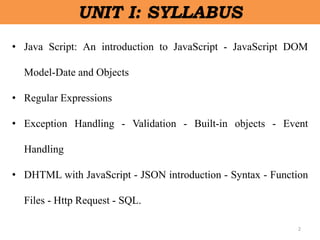
• Java Script: An introduction to JavaScript - JavaScript DOM
Model-Date and Objects
• Regular Expressions
• Exception Handling - Validation - Built-in objects - Event
Handling
• DHTML with JavaScript - JSON introduction - Syntax - Function
Files - Http Request - SQL.
2
UNIT I: SYLLABUS
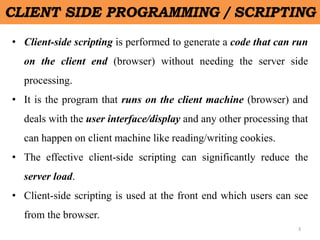
• Client-side scripting is performed to generate a code that can run
on the client end (browser) without needing the server side
processing.
• It is the program that runs on the client machine (browser) and
deals with the user interface/display and any other processing that
can happen on client machine like reading/writing cookies.
• The effective client-side scripting can significantly reduce the
server load.
• Client-side scripting is used at the front end which users can see
from the browser.
3
CLIENT SIDE PROGRAMMING / SCRIPTING
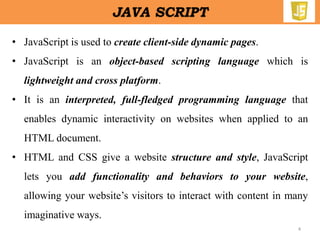
• JavaScript is used to create client-side dynamic pages.
• JavaScript is an object-based scripting language which is
lightweight and cross platform.
• It is an interpreted, full-fledged programming language that
enables dynamic interactivity on websites when applied to an
HTML document.
• HTML and CSS give a website structure and style, JavaScript
lets you add functionality and behaviors to your website,
allowing your website’s visitors to interact with content in many
imaginative ways.
4
JAVA SCRIPT
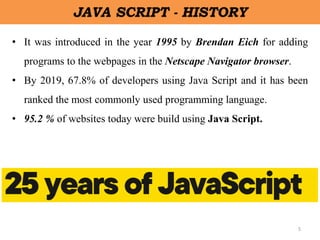
• It was introduced in the year 1995 by Brendan Eich for adding
programs to the webpages in the Netscape Navigator browser.
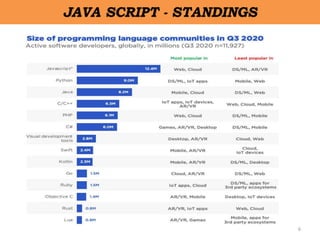
• By 2019, 67.8% of developers using Java Script and it has been
ranked the most commonly used programming language.
• 95.2 % of websites today were build using Java Script.
5
JAVA SCRIPT - HISTORY
6
JAVA SCRIPT - STANDINGS
7
JAVA SCRIPT - FEATURES
• Client - side validation.
• User Notifications.
• Simple Client-side Calculations.
• Greater Control.
• Platform Independent.
• Handling Dates and Time.
8
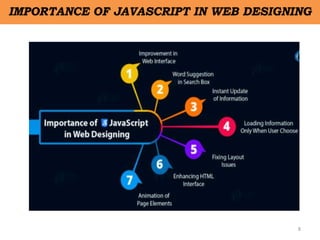
IMPORTANCE OF JAVASCRIPT IN WEB DESIGNING
9
IMPORTANCE OF JAVASCRIPT IN WEB DESIGNING
• Improvement in Web Interface -
• Word Suggestion in Search Box - Autocomplete
• Instant Update of Information
• Loading Information Only When User Choose
• Enhancing HTML Interface
• Animation of Page Elements
10
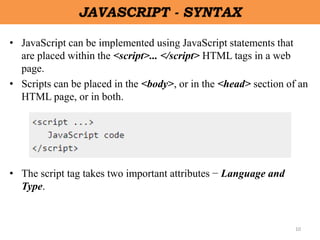
JAVASCRIPT - SYNTAX
• JavaScript can be implemented using JavaScript statements that
are placed within the <script>... </script> HTML tags in a web
page.
• Scripts can be placed in the <body>, or in the <head> section of an
HTML page, or in both.
• The script tag takes two important attributes − Language and
Type.
11
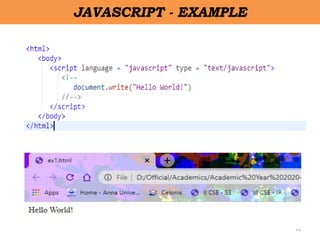
JAVASCRIPT - EXAMPLE
12
JAVASCRIPT - SYNTAX
• Statements in JavaScript are generally followed by a semicolon
character.
• But, semi colon is not mandatory, if the statements are used in
separate lines.
13
JAVASCRIPT - CONDITIONAL STATEMENTS
• JavaScript supports conditional statements which are
used to perform different actions based on different
conditions.
• JavaScript supports the following forms of Conditional
Statements statement
–if statement
–if…else statement
–if….else if…..statement
14
IF STATEMENT
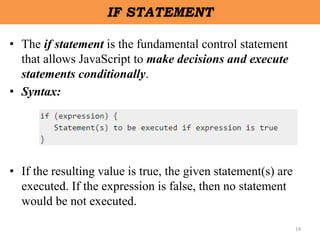
• The if statement is the fundamental control statement
that allows JavaScript to make decisions and execute
statements conditionally.
• Syntax:
• If the resulting value is true, the given statement(s) are
executed. If the expression is false, then no statement
would be not executed.
15
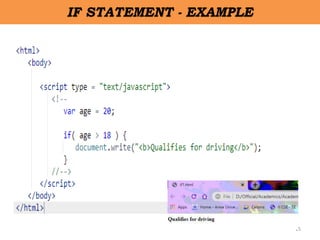
IF STATEMENT - EXAMPLE
16
IF…ELSE STATEMENT
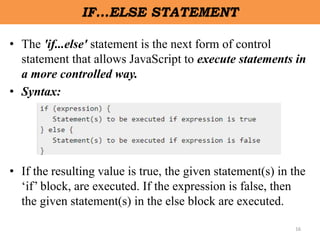
• The 'if...else' statement is the next form of control
statement that allows JavaScript to execute statements in
a more controlled way.
• Syntax:
• If the resulting value is true, the given statement(s) in the
‘if’ block, are executed. If the expression is false, then
the given statement(s) in the else block are executed.
17
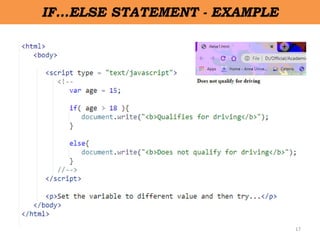
IF…ELSE STATEMENT - EXAMPLE
18
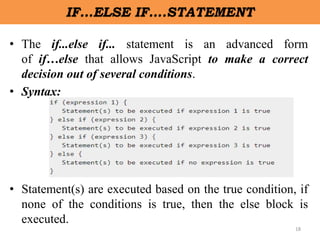
IF…ELSE IF….STATEMENT
• The if...else if... statement is an advanced form
of if…else that allows JavaScript to make a correct
decision out of several conditions.
• Syntax:
• Statement(s) are executed based on the true condition, if
none of the conditions is true, then the else block is
executed.
19
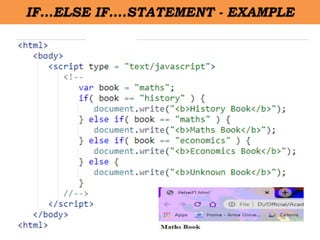
IF…ELSE IF….STATEMENT - EXAMPLE
20
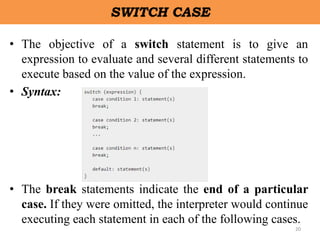
SWITCH CASE
• The objective of a switch statement is to give an
expression to evaluate and several different statements to
execute based on the value of the expression.
• Syntax:
• The break statements indicate the end of a particular
case. If they were omitted, the interpreter would continue
executing each statement in each of the following cases.
21
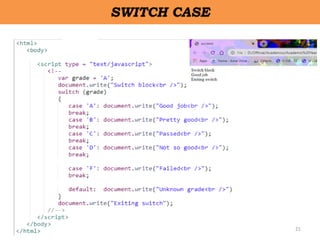
SWITCH CASE
22
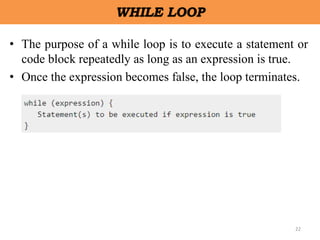
WHILE LOOP
• The purpose of a while loop is to execute a statement or
code block repeatedly as long as an expression is true.
• Once the expression becomes false, the loop terminates.
23
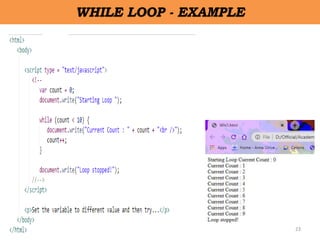
WHILE LOOP - EXAMPLE
24
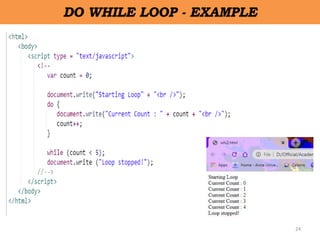
DO WHILE LOOP - EXAMPLE
25
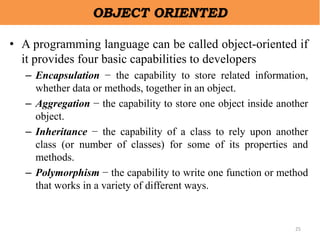
OBJECT ORIENTED
• A programming language can be called object-oriented if
it provides four basic capabilities to developers
– Encapsulation − the capability to store related information,
whether data or methods, together in an object.
– Aggregation − the capability to store one object inside another
object.
– Inheritance − the capability of a class to rely upon another
class (or number of classes) for some of its properties and
methods.
– Polymorphism − the capability to write one function or method
that works in a variety of different ways.
26
OBJECTS
• A JavaScript object is an entity having state and
behaviour (properties and method).
• For example: car, pen, bike, chair, glass, keyboard,
monitor etc.
• JavaScript is an object-based language. Everything is an
object in JavaScript.
• JavaScript is template based not class based. Here, we
don't create class to get the object. But, we direct create
objects.
27
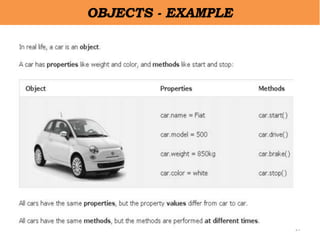
OBJECTS - EXAMPLE
28
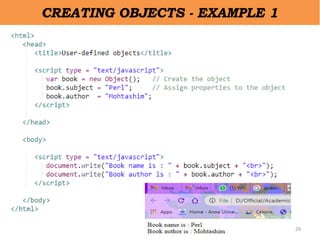
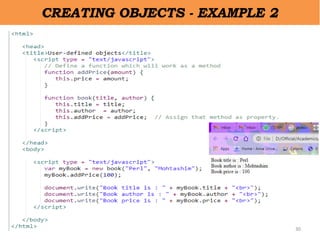
CREATING OBJECTS IN JAVASCRIPT
• There are 3 ways to create objects.
– By object literal
• var person = {firstName:"John", lastName:"Doe",
age:50, eyeColor:"blue"};
– By creating instance of Object directly (using new keyword)
• var objectname=new Object();
– Using Object Constructor [this operator]
• var myBook = new book("Perl", "Mohtashim");
29
CREATING OBJECTS - EXAMPLE 1
30
CREATING OBJECTS - EXAMPLE 2
31
DOM MODEL-DATE AND OBJECTS
• The DOM defines a standard for accessing documents.
• The W3C Document Object Model (DOM) is a platform
and language-neutral interface that allows programs and
scripts to dynamically access and update the content,
structure, and style of a document.
• Every web page resides inside a browser window which
can be considered as an object.
• A Document object represents the HTML document that
is displayed in that window.
• The way a document content is accessed and modified is
called the Document Object Model, or DOM.
32
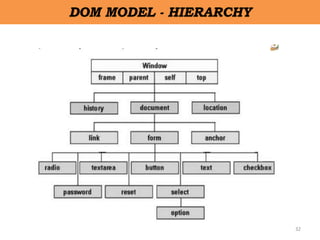
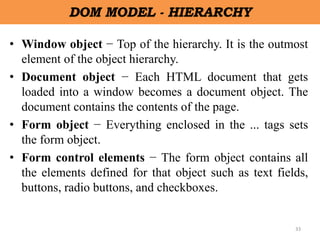
DOM MODEL - HIERARCHY
33
DOM MODEL - HIERARCHY
• Window object − Top of the hierarchy. It is the outmost
element of the object hierarchy.
• Document object − Each HTML document that gets
loaded into a window becomes a document object. The
document contains the contents of the page.
• Form object − Everything enclosed in the ... tags sets
the form object.
• Form control elements − The form object contains all
the elements defined for that object such as text fields,
buttons, radio buttons, and checkboxes.
34
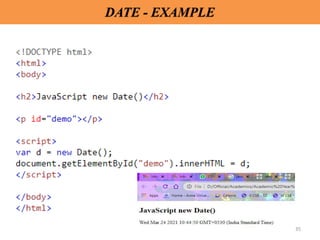
DATE
• The JavaScript date object can be used to get year,
month and day. You can display a timer on the webpage
by the help of JavaScript date object.
• 4 variant of Date constructor to create date object.
– new Date( )
– new Date(milliseconds)
– new Date(datestring)
– new Date(year,month,date[,hour,minute,second,millisecond])
35
DATE - EXAMPLE
36
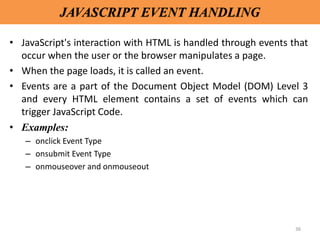
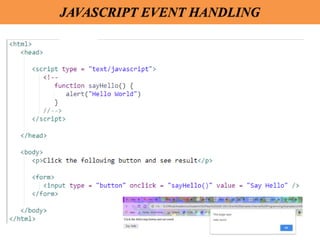
JAVASCRIPT EVENT HANDLING
• JavaScript's interaction with HTML is handled through events that
occur when the user or the browser manipulates a page.
• When the page loads, it is called an event.
• Events are a part of the Document Object Model (DOM) Level 3
and every HTML element contains a set of events which can
trigger JavaScript Code.
• Examples:
– onclick Event Type
– onsubmit Event Type
– onmouseover and onmouseout
37
JAVASCRIPT EVENT HANDLING
38
JAVASCRIPT - ERRORS & EXCEPTION HANDLING
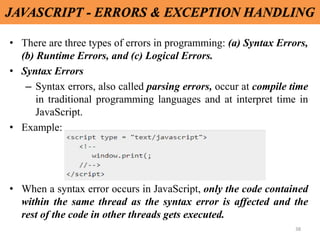
• There are three types of errors in programming: (a) Syntax Errors,
(b) Runtime Errors, and (c) Logical Errors.
• Syntax Errors
– Syntax errors, also called parsing errors, occur at compile time
in traditional programming languages and at interpret time in
JavaScript.
• Example:
• When a syntax error occurs in JavaScript, only the code contained
within the same thread as the syntax error is affected and the
rest of the code in other threads gets executed.
39
JAVASCRIPT - ERRORS & EXCEPTION HANDLING
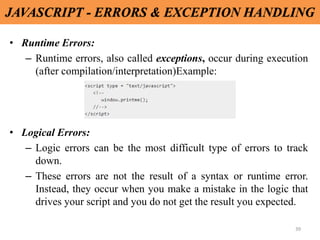
• Runtime Errors:
– Runtime errors, also called exceptions, occur during execution
(after compilation/interpretation)Example:
• Logical Errors:
– Logic errors can be the most difficult type of errors to track
down.
– These errors are not the result of a syntax or runtime error.
Instead, they occur when you make a mistake in the logic that
drives your script and you do not get the result you expected.
40
JAVASCRIPT - ERRORS & EXCEPTION HANDLING
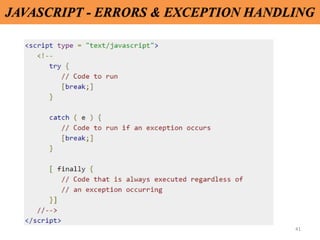
• JavaScript has added exception handling capabilities.
• JavaScript implements the try...catch...finally construct as well as
the throw operator to handle exceptions.
• The try statement lets you test a block of code for errors.
• The catch statement lets you handle the error.
• The throw statement lets you create custom errors.
• The finally statement lets you execute code, after try and catch,
regardless of the result.
41
JAVASCRIPT - ERRORS & EXCEPTION HANDLING
42
JAVASCRIPT - ERRORS & EXCEPTION HANDLING
• JavaScript has added exception handling capabilities.
• JavaScript implements the try...catch...finally construct as well as
the throw operator to handle exceptions.
• The try statement lets you test a block of code for errors.
• The catch statement lets you handle the error.
• The throw statement lets you create custom errors.
• The finally statement lets you execute code, after try and catch,
regardless of the result.
43
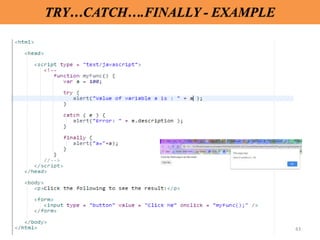
TRY…CATCH….FINALLY - EXAMPLE
44
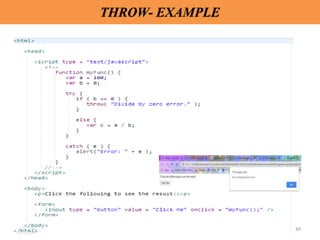
THROW- EXAMPLE
45
JSON - JAVASCRIPT OBJECT NOTATION
• JSON or JavaScript Object Notation is a lightweight text-based
open standard designed for human-readable data interchange.
• It has been extended from the JavaScript scripting language.
• It is used while writing JavaScript based applications that
includes browser extensions and websites.
• JSON format is used for serializing and transmitting structured
data over network connection.
• Web services and APIs use JSON format to provide public data.

IP Unit 2.pptx

  • 1.
    UNIT 2- CLIENTSIDE PROGRAMMING 1 CS8651 - INTERNET PROGRAMMING
  • 2.
    • Java Script:An introduction to JavaScript - JavaScript DOM Model-Date and Objects • Regular Expressions • Exception Handling - Validation - Built-in objects - Event Handling • DHTML with JavaScript - JSON introduction - Syntax - Function Files - Http Request - SQL. 2 UNIT I: SYLLABUS
  • 3.
    • Client-side scriptingis performed to generate a code that can run on the client end (browser) without needing the server side processing. • It is the program that runs on the client machine (browser) and deals with the user interface/display and any other processing that can happen on client machine like reading/writing cookies. • The effective client-side scripting can significantly reduce the server load. • Client-side scripting is used at the front end which users can see from the browser. 3 CLIENT SIDE PROGRAMMING / SCRIPTING
  • 4.
    • JavaScript isused to create client-side dynamic pages. • JavaScript is an object-based scripting language which is lightweight and cross platform. • It is an interpreted, full-fledged programming language that enables dynamic interactivity on websites when applied to an HTML document. • HTML and CSS give a website structure and style, JavaScript lets you add functionality and behaviors to your website, allowing your website’s visitors to interact with content in many imaginative ways. 4 JAVA SCRIPT
  • 5.
    • It wasintroduced in the year 1995 by Brendan Eich for adding programs to the webpages in the Netscape Navigator browser. • By 2019, 67.8% of developers using Java Script and it has been ranked the most commonly used programming language. • 95.2 % of websites today were build using Java Script. 5 JAVA SCRIPT - HISTORY
  • 6.
    6 JAVA SCRIPT -STANDINGS
  • 7.
    7 JAVA SCRIPT -FEATURES • Client - side validation. • User Notifications. • Simple Client-side Calculations. • Greater Control. • Platform Independent. • Handling Dates and Time.
  • 8.
  • 9.
    9 IMPORTANCE OF JAVASCRIPTIN WEB DESIGNING • Improvement in Web Interface - • Word Suggestion in Search Box - Autocomplete • Instant Update of Information • Loading Information Only When User Choose • Enhancing HTML Interface • Animation of Page Elements
  • 10.
    10 JAVASCRIPT - SYNTAX •JavaScript can be implemented using JavaScript statements that are placed within the <script>... </script> HTML tags in a web page. • Scripts can be placed in the <body>, or in the <head> section of an HTML page, or in both. • The script tag takes two important attributes − Language and Type.
  • 11.
  • 12.
    12 JAVASCRIPT - SYNTAX •Statements in JavaScript are generally followed by a semicolon character. • But, semi colon is not mandatory, if the statements are used in separate lines.
  • 13.
    13 JAVASCRIPT - CONDITIONALSTATEMENTS • JavaScript supports conditional statements which are used to perform different actions based on different conditions. • JavaScript supports the following forms of Conditional Statements statement –if statement –if…else statement –if….else if…..statement
  • 14.
    14 IF STATEMENT • Theif statement is the fundamental control statement that allows JavaScript to make decisions and execute statements conditionally. • Syntax: • If the resulting value is true, the given statement(s) are executed. If the expression is false, then no statement would be not executed.
  • 15.
  • 16.
    16 IF…ELSE STATEMENT • The'if...else' statement is the next form of control statement that allows JavaScript to execute statements in a more controlled way. • Syntax: • If the resulting value is true, the given statement(s) in the ‘if’ block, are executed. If the expression is false, then the given statement(s) in the else block are executed.
  • 17.
  • 18.
    18 IF…ELSE IF….STATEMENT • Theif...else if... statement is an advanced form of if…else that allows JavaScript to make a correct decision out of several conditions. • Syntax: • Statement(s) are executed based on the true condition, if none of the conditions is true, then the else block is executed.
  • 19.
  • 20.
    20 SWITCH CASE • Theobjective of a switch statement is to give an expression to evaluate and several different statements to execute based on the value of the expression. • Syntax: • The break statements indicate the end of a particular case. If they were omitted, the interpreter would continue executing each statement in each of the following cases.
  • 21.
  • 22.
    22 WHILE LOOP • Thepurpose of a while loop is to execute a statement or code block repeatedly as long as an expression is true. • Once the expression becomes false, the loop terminates.
  • 23.
  • 24.
  • 25.
    25 OBJECT ORIENTED • Aprogramming language can be called object-oriented if it provides four basic capabilities to developers – Encapsulation − the capability to store related information, whether data or methods, together in an object. – Aggregation − the capability to store one object inside another object. – Inheritance − the capability of a class to rely upon another class (or number of classes) for some of its properties and methods. – Polymorphism − the capability to write one function or method that works in a variety of different ways.
  • 26.
    26 OBJECTS • A JavaScriptobject is an entity having state and behaviour (properties and method). • For example: car, pen, bike, chair, glass, keyboard, monitor etc. • JavaScript is an object-based language. Everything is an object in JavaScript. • JavaScript is template based not class based. Here, we don't create class to get the object. But, we direct create objects.
  • 27.
  • 28.
    28 CREATING OBJECTS INJAVASCRIPT • There are 3 ways to create objects. – By object literal • var person = {firstName:"John", lastName:"Doe", age:50, eyeColor:"blue"}; – By creating instance of Object directly (using new keyword) • var objectname=new Object(); – Using Object Constructor [this operator] • var myBook = new book("Perl", "Mohtashim");
  • 29.
  • 30.
  • 31.
    31 DOM MODEL-DATE ANDOBJECTS • The DOM defines a standard for accessing documents. • The W3C Document Object Model (DOM) is a platform and language-neutral interface that allows programs and scripts to dynamically access and update the content, structure, and style of a document. • Every web page resides inside a browser window which can be considered as an object. • A Document object represents the HTML document that is displayed in that window. • The way a document content is accessed and modified is called the Document Object Model, or DOM.
  • 32.
    32 DOM MODEL -HIERARCHY
  • 33.
    33 DOM MODEL -HIERARCHY • Window object − Top of the hierarchy. It is the outmost element of the object hierarchy. • Document object − Each HTML document that gets loaded into a window becomes a document object. The document contains the contents of the page. • Form object − Everything enclosed in the ... tags sets the form object. • Form control elements − The form object contains all the elements defined for that object such as text fields, buttons, radio buttons, and checkboxes.
  • 34.
    34 DATE • The JavaScriptdate object can be used to get year, month and day. You can display a timer on the webpage by the help of JavaScript date object. • 4 variant of Date constructor to create date object. – new Date( ) – new Date(milliseconds) – new Date(datestring) – new Date(year,month,date[,hour,minute,second,millisecond])
  • 35.
  • 36.
    36 JAVASCRIPT EVENT HANDLING •JavaScript's interaction with HTML is handled through events that occur when the user or the browser manipulates a page. • When the page loads, it is called an event. • Events are a part of the Document Object Model (DOM) Level 3 and every HTML element contains a set of events which can trigger JavaScript Code. • Examples: – onclick Event Type – onsubmit Event Type – onmouseover and onmouseout
  • 37.
  • 38.
    38 JAVASCRIPT - ERRORS& EXCEPTION HANDLING • There are three types of errors in programming: (a) Syntax Errors, (b) Runtime Errors, and (c) Logical Errors. • Syntax Errors – Syntax errors, also called parsing errors, occur at compile time in traditional programming languages and at interpret time in JavaScript. • Example: • When a syntax error occurs in JavaScript, only the code contained within the same thread as the syntax error is affected and the rest of the code in other threads gets executed.
  • 39.
    39 JAVASCRIPT - ERRORS& EXCEPTION HANDLING • Runtime Errors: – Runtime errors, also called exceptions, occur during execution (after compilation/interpretation)Example: • Logical Errors: – Logic errors can be the most difficult type of errors to track down. – These errors are not the result of a syntax or runtime error. Instead, they occur when you make a mistake in the logic that drives your script and you do not get the result you expected.
  • 40.
    40 JAVASCRIPT - ERRORS& EXCEPTION HANDLING • JavaScript has added exception handling capabilities. • JavaScript implements the try...catch...finally construct as well as the throw operator to handle exceptions. • The try statement lets you test a block of code for errors. • The catch statement lets you handle the error. • The throw statement lets you create custom errors. • The finally statement lets you execute code, after try and catch, regardless of the result.
  • 41.
    41 JAVASCRIPT - ERRORS& EXCEPTION HANDLING
  • 42.
    42 JAVASCRIPT - ERRORS& EXCEPTION HANDLING • JavaScript has added exception handling capabilities. • JavaScript implements the try...catch...finally construct as well as the throw operator to handle exceptions. • The try statement lets you test a block of code for errors. • The catch statement lets you handle the error. • The throw statement lets you create custom errors. • The finally statement lets you execute code, after try and catch, regardless of the result.
  • 43.
  • 44.
  • 45.
    45 JSON - JAVASCRIPTOBJECT NOTATION • JSON or JavaScript Object Notation is a lightweight text-based open standard designed for human-readable data interchange. • It has been extended from the JavaScript scripting language. • It is used while writing JavaScript based applications that includes browser extensions and websites. • JSON format is used for serializing and transmitting structured data over network connection. • Web services and APIs use JSON format to provide public data.