JAVA  I/O STREAMS NETWORK PROGRAMMING
PART 1 – INPUT/OUTPUT STREAMS Stream concepts Input Streams Output Streams Reader Writer Object Serialization Object Input Stream Object Output Stream
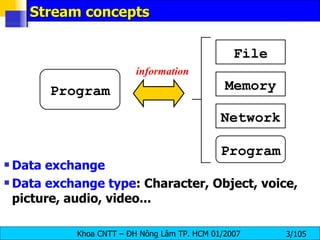
Stream concepts Data exchange Data exchange type : Character, Object, voice, picture, audio, video... Program File Memory Network Program information
Stream Stream: dòng thông tin giữa 2 tác nhân (mức cao) một dãy tuần tự các byte (mức thấp) Một stream được gắn với một nguồn (source), hay một đích (destination) Stream operations: open stream close stream  read write seek Input stream : support reading functions Output stream : support writing functions Filter stream : buffer
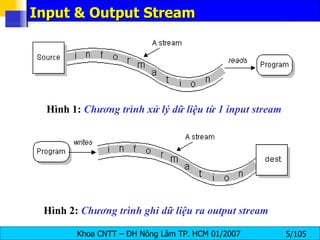
Input & Output Stream Hình 1:  Chương trình xử lý dữ liệu từ 1 input stream Hình 2:   Chương trình ghi dữ liệu ra output stream
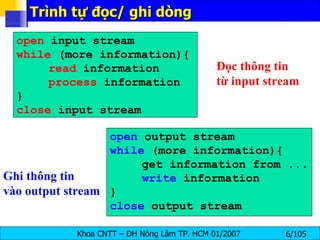
Trình tự đọc/ ghi dòng open  input stream while  (more information){ read  information process  information } close  input stream open  output stream while  (more information){ get information from ... write  information } close  output stream Đọc thông tin  từ input stream Ghi thông tin  vào output stream
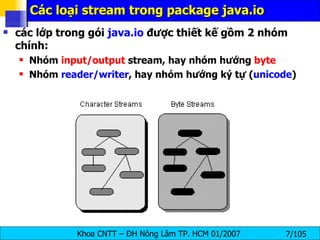
Các loại stream trong package java.io các lớp trong gói  java.io  được thiết kế gồm 2 nhóm  chính: Nhóm  input/output  stream, hay nhóm hướng  byte Nhóm  reader/writer , hay nhóm hướng ký tự ( unicode )
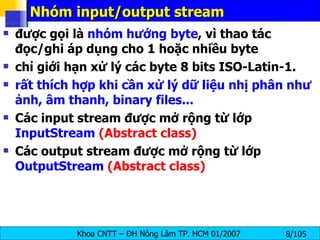
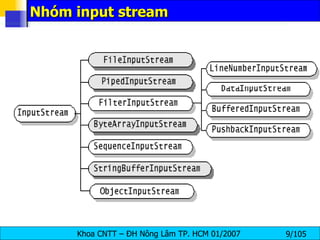
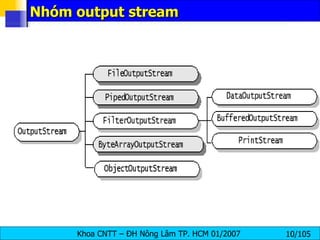
Nhóm input/output stream được gọi là  nhóm hướng byte , vì thao tác đọc/ghi áp dụng cho 1 hoặc nhiều byte chỉ giới hạn xử lý các byte 8 bits ISO-Latin-1 . rất thích hợp khi cần xử lý dữ liệu nhị phân như ảnh, âm thanh, binary files... Các input stream được mở rộng từ lớp  InputStream  (Abstract class) Các output stream được mở rộng từ lớp  OutputStream  (Abstract class)
Nhóm input stream
Nhóm output stream
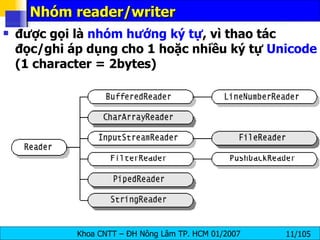
Nhóm reader/writer được gọi là  nhóm hướng ký tự , vì thao tác đọc/ghi áp dụng cho 1 hoặc nhiều ký tự  Unicode  (1 character = 2bytes)
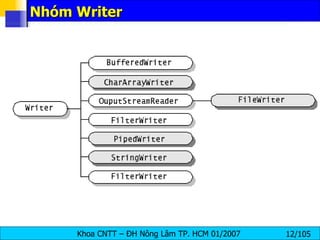
Nhóm Writer
Các loại các stream (tt) java IO cũng cung cấp cách thức kết gắn stream với các loại tác nhân khác như bộ nhớ, file ... Các lớp  InputStreamReader  và  OutputStreamWriter  cung cấp sự chuyển đổi giữa  stream  và  reader/writer Xem bảng phân loại tóm tắt để biết thêm chi tiết
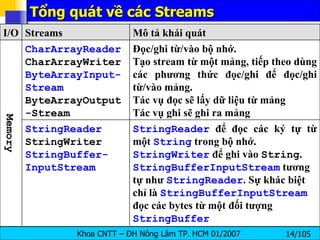
Tổng quát về các Streams StringReader  để đọc các ký tự từ một  String  trong bộ nhớ.  StringWriter  để ghi vào  String . StringBufferInputStream  tương tự như  StringReader . Sự khác biệt chỉ là  StringBufferInputStream  đọc các bytes từ một đối tượng  StringBuffer StringReader StringWriter StringBuffer- InputStream Đọc/ghi từ/vào bộ nhớ. Tạo stream từ một mảng, tiếp theo dùng các phương thức đọc/ghi để đọc/ghi từ/vào mảng. Tác vụ đọc sẽ lấy dữ liệu từ mảng Tác vụ ghi sẽ ghi ra mảng CharArrayReader CharArrayWriter ByteArrayInput- Stream ByteArrayOutput-Stream Memory Mô tả khái quát Streams I/O
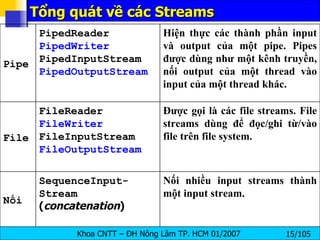
Tổng quát về các Streams Nối nhiều input streams thành một input stream. SequenceInput- Stream ( concatenation ) Nối Được gọi là các file streams. File streams dùng để đọc/ghi từ/vào file trên file system. FileReader FileWriter FileInputStream FileOutputStream File Hiện thực các thành phần input và output của một pipe. Pipes được dùng như một kênh truyền, nối output của một thread vào input của một thread khác. PipedReader PipedWriter PipedInputStream PipedOutputStream Pipe
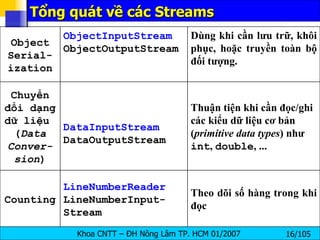
Tổng quát về các Streams Theo dõi số hàng trong khi đọc LineNumberReader  LineNumberInput- Stream Counting Thuận tiện khi cần đọc/ghi các kiểu dữ liệu cơ bản ( primitive data types ) như  int ,  double , ...  DataInputStream DataOutputStream Chuyển đổi dạng dữ liệu  ( Data Conver-sion ) Dùng khi cần lưu trữ, khôi phục, hoặc truyền toàn bộ đối tượng. ObjectInputStream ObjectOutputStream Object Serial- ization
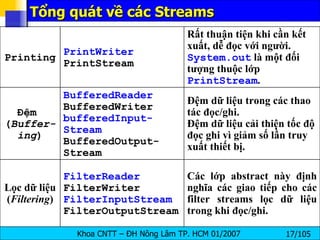
Tổng quát về các Streams Các lớp abstract này định nghĩa các giao tiếp cho các filter streams lọc dữ liệu trong khi đọc/ghi. FilterReader FilterWriter FilterInputStream FilterOutputStream Lọc dữ liệu ( Filtering ) Đệm dữ liệu trong các thao tác đọc/ghi. Đệm dữ liệu cải thiện tốc độ đọc ghi vì giảm số lần truy xuất thiết bị. BufferedReader BufferedWriter bufferedInput-Stream BufferedOutput-Stream Đệm  ( Buffer-ing ) Rất thuận tiện khi cần kết xuất, dễ đọc với người.  System.out  là một đối tượng thuộc lớp  PrintStream . PrintWriter PrintStream Printing
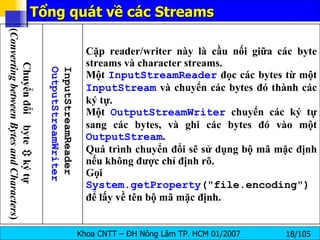
Tổng quát về các Streams Cặp reader/writer này là cầu nối giữa các byte streams và character streams. Một  InputStreamReader  đọc các bytes từ một  InputStream  và chuyển các bytes đó thành các ký tự. Một  OutputStreamWriter  chuyển các ký tự sang các bytes, và ghi các bytes đó vào một  OutputStream . Quá trình chuyển đổi sẽ sử dụng bộ mã mặc định nếu không được chỉ định rõ. Gọi  System.getProperty ("file.encoding")  để lấy về tên bộ mã mặc định. InputStreamReader OutputStreamWriter Chuyển đổi  byte    ký tự  ( Converting between Bytes and Characters )
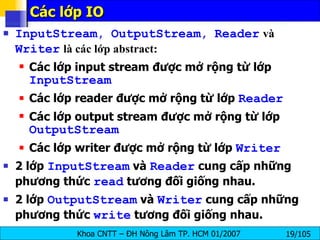
Các lớp IO  InputStream ,  OutputStream ,  Reader   và   Writer   là các lớp abstract: Các lớp input stream được mở rộng từ lớp  InputStream Các lớp reader được mở rộng từ lớp  Reader Các lớp output stream được mở rộng từ lớp  OutputStream Các lớp writer được mở rộng từ lớp  Writer 2 lớp  InputStream  và  Reader  cung cấp những phương thức  read  tương đối giống nhau. 2 lớp  OutputStream  và  Writer  cung cấp những phương thức  write  tương đối giống nhau.
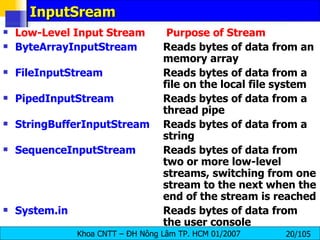
InputSream Low-Level Input Stream  Purpose of Stream ByteArrayInputStream   Reads bytes of data from an  memory array FileInputStream   Reads bytes of data from a  file on the local file system PipedInputStream   Reads bytes of data from a  thread pipe StringBufferInputStream   Reads bytes of data from a  string SequenceInputStream Reads bytes of data from  two or more low-level  streams, switching from one  stream to the next when the  end of the stream is reached System.in   Reads bytes of data from  the user console
The java.io.InputStream Class int available()  throws java.io.IOException— returns the number of bytes currently available for reading.  void close()  throws java.io.IOException— closes the input stream and frees any resources (such as file handles or file locks) associated with the input stream. int read()  throws java.io.IOException— returns the next byte of data from the stream. When the end of the stream is reached, a value of –1 is returned. int read(byte[] byteArray)  throws java.io.IOException— reads a sequence of bytes and places them in the specified byte array. This method returns the number of bytes successfully read, or –1 if the end of the stream has been reached. int read(byte[] byteArray, int offset, int length)  throws java.io.IOException, java.lang.IndexOutOfBoundsException— reads a sequence of bytes, placing them in the specified array at the specified offset, and for the specified length, if possible.
The java.io.InputStream Class long skip(long amount)  throws java.io.IOException— reads, but ignores, the specified amount of bytes. These bytes are discarded, and the position of the input  stream is updated. The skip method returns the number of bytes skipped over, which may be less than the requested amount. The following code fragment reads 10 bytes from the InputStream  in  and stores them in the byte array  input . However, if end of stream is detected, the loop is terminated early: byte[] input = new byte[10]; for (int i = 0; i < input.length; i++) { int b = in.read( ); if (b == -1) break; input[i] = (byte) b; }
The java.io.InputStream Class For example, you may try to  read 1 024 bytes  from a network connection, when  only 512 have actually  arrived from the server. The rest are still in transit. They'll arrive eventually, but they aren't available now.  byte[] input = new byte[1024]; int bytesRead = in.read(input); It attempts to  read 1 024 bytes  from the InputStream in into the array input. However, if  only 512 bytes are available ,  then bytesRead will be set to 512 . To guarantee that all the bytes you want are actually read, you must place the read in a loop that reads repeatedly until the array is filled. int bytesRead = 0; int bytesToRead = 1024; byte[] input = new byte[bytesToRead]; while (bytesRead < bytesToRead) { bytesRead += in.read(input, bytesRead, bytesToRead - bytesRead); }
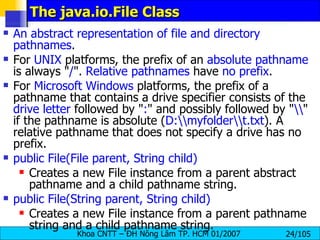
The java.io.File Class An abstract representation of file and directory pathnames .  For  UNIX  platforms, the prefix of an  absolute pathname  is always &quot; / &quot;.  Relative pathnames  have  no prefix .  For  Microsoft Windows  platforms, the prefix of a pathname that contains a drive specifier consists of the  drive letter  followed by &quot; : &quot; and possibly followed by &quot; \\ &quot; if the pathname is absolute ( D:\\myfolder\\t.txt ). A relative pathname that does not specify a drive has no prefix.  public File(File parent, String child)   Creates a new File instance from a parent abstract pathname and a child pathname string.  public File(String parent, String child)   Creates a new File instance from a parent pathname string and a child pathname string.
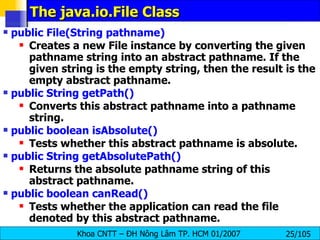
The java.io.File Class public File(String pathname)   Creates a new File instance by converting the given pathname string into an abstract pathname. If the given string is the empty string, then the result is the empty abstract pathname. public String getPath()  Converts this abstract pathname into a pathname string. public boolean isAbsolute()   Tests whether this abstract pathname is absolute.  public String getAbsolutePath()   Returns the absolute pathname string of this abstract pathname.  public boolean canRead()   Tests whether the application can read the file denoted by this abstract pathname.
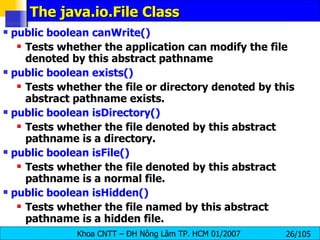
The java.io.File Class public boolean canWrite()   Tests whether the application can modify the file denoted by this abstract pathname public boolean exists()  Tests whether the file or directory denoted by this abstract pathname exists.  public boolean isDirectory()   Tests whether the file denoted by this abstract pathname is a directory.  public boolean isFile()  Tests whether the file denoted by this abstract pathname is a normal file. public boolean isHidden()  Tests whether the file named by this abstract pathname is a hidden file.
The java.io.File Class public long length()   Returns the length (the zise in Kbyte) of the file denoted by this abstract pathname. The return value is unspecified if this pathname denotes a directory.  public boolean delete()  Deletes the file or directory denoted by this abstract pathname. If this pathname denotes a directory, then the directory must be empty in order to be deleted.  public String[] list()  Returns an array of strings naming the files and directories in the directory denoted by this abstract pathname.  public String[] list(FilenameFilter filter)   Returns an array of strings naming the files and directories in the directory denoted by this abstract pathname that satisfy the specified filter. The behavior of this method is the same as that of the list() method, except that the strings in the returned array must satisfy the filter. If the given filter is null then all names are accepted.
The java.io.File Class public File[] listFiles()   Returns an array of abstract pathnames denoting the files in the directory denoted by this abstract pathname.  public File[] listFiles(FilenameFilter filter)   Returns an array of abstract pathnames denoting the files and directories in the directory denoted by this abstract pathname that satisfy the specified filter. public boolean mkdir()   Creates the directory named by this abstract pathname.  public boolean mkdirs()   Creates the directory named by this abstract pathname, including any necessary but nonexistent parent directories. Note that if this operation fails it may have succeeded in creating some of the necessary parent directories.
The java.io.File Class // List of all files in D: with extention tgz import java.io.*; import java.util.*; public class DLister { public static void main(String[] args) { File path = new File(&quot;D:\\&quot;); String[] list; list = path.list(new DirFilter(&quot;.tgz&quot;)); for(int i = 0; i < list.length; i++) System.out.println(list[i]); } } class DirFilter implements FilenameFilter { String afn; DirFilter(String afn) { this.afn = afn; } public boolean accept(File dir, String name)  { String f = new File(name).getName(); return f.indexOf(afn) != -1; } }
Exercise public  boolean   deleteDir (String  path ) public  boolean   find (String  path , String  filePattern )  public  boolean   find (String  path , String  pattern )
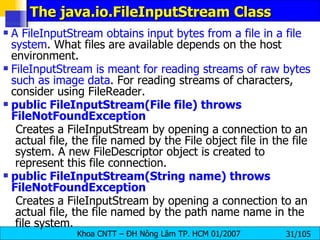
The java.io.FileInputStream Class A FileInputStream obtains input bytes from a file in a file system . What files are available depends on the host environment.  FileInputStream is meant for reading streams of raw bytes such as image data . For reading streams of characters, consider using FileReader.  public FileInputStream(File file) throws FileNotFoundException   Creates a FileInputStream by opening a connection to an actual file, the file named by the File object file in the file system. A new FileDescriptor object is created to represent this file connection.  public FileInputStream(String name) throws FileNotFoundException   Creates a FileInputStream by opening a connection to an actual file, the file named by the path name name in the file system.
The java.io.FileInputStream Class public int read() throws IOException   Reads a byte of data from this input stream. This method blocks if no input is yet available. Returns: the next byte of data, or -1 if the end of the file is reached.  public int read(byte[] b) throws IOException public int read(byte[] b, int off, int len)  Reads up to b.length bytes of data from this input stream into an array of bytes. This method blocks until some input is available.  Parameters:   b  - the buffer into which the data is read.  off  - the start offset of the data.  len  - the maximum number of bytes read.  Returns : the total number of bytes read into the buffer, or -1 if there is no more data because the end of the file has been reached.
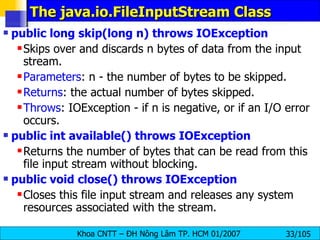
The java.io.FileInputStream Class public long skip(long n) throws IOException   Skips over and discards n bytes of data from the input stream.  Parameters : n - the number of bytes to be skipped.  Returns : the actual number of bytes skipped.  Throws : IOException - if n is negative, or if an I/O error occurs. public int available() throws IOException   Returns the number of bytes that can be read from this file input stream without blocking.  public void close() throws IOException   Closes this file input stream and releases any system resources associated with the stream.
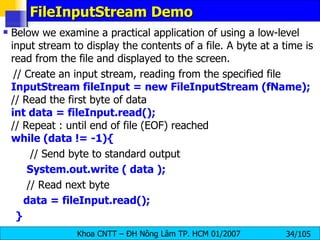
FileInputStream Demo Below we examine a practical application of using a low-level input stream to display the contents of a file. A byte at a time is read from the file and displayed to the screen. // Create an input stream, reading from the specified file InputStream fileInput = new FileInputStream (fName); // Read the first byte of data int data = fileInput.read(); // Repeat : until end of file (EOF) reached while (data != -1){ // Send byte to standard output System.out.write ( data ); // Read next byte data = fileInput.read(); }
FileInputStreamDemo import java.io.*; public class FileInputStreamDemo{ public static void main(String args[]){   if (args.length != 1){   System.err.println (&quot;Syntax - FileInputStreamDemo file&quot;);   return;   }   try{   InputStream fileInput = new FileInputStream( args[0] );   int data = fileInput.read();   while (data != -1){ System.out.write ( data ); data = fileInput.read();   }   // Close the file   fileInput.close(); } catch (IOException ioe){ System.err.println (&quot;I/O error - &quot; + ioe); }}}
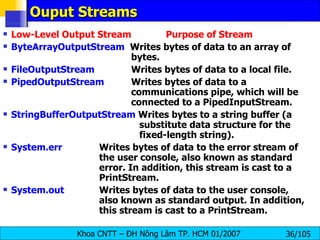
Ouput Streams Low-Level Output Stream  Purpose of Stream ByteArrayOutputStream   Writes bytes of data to an array of  bytes. FileOutputStream     Writes bytes of data to a local file. PipedOutputStream   Writes bytes of data to a  communications pipe, which will be  connected to a PipedInputStream. StringBufferOutputStream  Writes bytes to a string buffer (a    substitute data structure for the    fixed-length string). System.err     Writes bytes of data to the error stream of  the user console, also known as standard  error. In addition, this stream is cast to a  PrintStream. System.out   Writes bytes of data to the user console,  also known as standard output. In addition,  this stream is cast to a PrintStream.
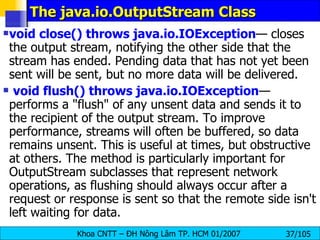
The java.io.OutputStream Class void close() throws java.io.IOException — closes the output stream, notifying the other side that the stream has ended. Pending data that has not yet been sent will be sent, but no more data will be delivered. void flush() throws java.io.IOException — performs a &quot;flush&quot; of any unsent data and sends it to the recipient of the output stream. To improve performance, streams will often be buffered, so data remains unsent. This is useful at times, but obstructive at others. The method is particularly important for OutputStream subclasses that represent network operations, as flushing should always occur after a request or response is sent so that the remote side isn't left waiting for data.
The java.io.OutputStream Class void write(int byte) throws java.io.IOException  writes the specified byte. This is an abstract method, overridden by OutputStream subclasses. void write(byte[] byteArray)   throws java.io.IOException  writes the contents of the byte array to the output stream. The entire contents of the array (barring any error) will be written. void write(byte[] byteArray, int offset, int length) throws java.io.IOException  writes the contents of a subset of the byte array to the output stream. This method allows developers to specify just how much of an array is sent, and which part, as opposed to the  OutputStream.write(byte[] byteArray)  method, which sends the entire contents of an array.
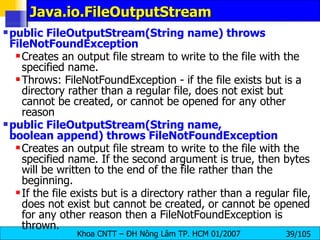
Java.io.FileOutputStream  public FileOutputStream(String name) throws FileNotFoundException   Creates an output file stream to write to the file with the specified name. Throws: FileNotFoundException - if the file exists but is a directory rather than a regular file, does not exist but cannot be created, or cannot be opened for any other reason  public FileOutputStream(String name, boolean append) throws FileNotFoundException   Creates an output file stream to write to the file with the specified name. If the second argument is true, then bytes will be written to the end of the file rather than the beginning.  If the file exists but is a directory rather than a regular file, does not exist but cannot be created, or cannot be opened for any other reason then a FileNotFoundException is thrown.
Java.io.FileOutputStream public FileOutputStream(File file) throws FileNotFoundException   Creates a file output stream to write to the file represented by the specified File object public FileOutputStream(File file, boolean append) throws FileNotFoundException public void write(int b) throws IOException   Writes the specified byte to this file output stream. Implements the write method of OutputStream.  public void write(byte[] b) throws IOException   Writes b.length bytes from the specified byte array to this file output stream.  public void write(byte[] b, int off, int len) throws IOException   Writes len bytes from the specified byte array starting at offset off to this file output stream.  public void close() throws IOException  Closes this file output stream and releases any system resources associated with this stream. This file output stream may no longer be used for writing bytes.
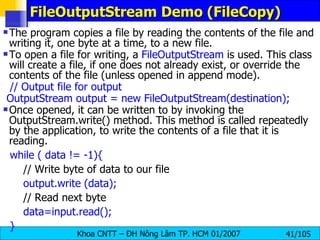
FileOutputStream Demo (FileCopy) The program copies a file by reading the contents of the file and writing it, one byte at a time, to a new file. To open a file for writing, a  FileOutputStream  is used. This class will create a file, if one does not already exist, or override the contents of the file (unless opened in append mode). // Output file for output OutputStream output = new FileOutputStream(destination); Once opened, it can be written to by invoking the OutputStream.write() method. This method is called repeatedly by the application, to write the contents of a file that it is reading. while ( data != -1){ // Write byte of data to our file output.write (data); // Read next byte data=input.read(); }
FileOutputStream Demo (FileCopy) import java.io.*; public class FileOutputStreamDemo{ public static void main(String args[]){ // Two parameters are required, the source and destination if (args.length != 2){   System.err.println(&quot;Syntax - FileOutputStreamDemo src dest&quot;);   return; } String source = args[0]; String destination = args[1]; try{ // Open source file for input InputStream input = new FileInputStream( source ); System.out.println (&quot;Opened &quot; +source + &quot; for reading.&quot;); // Output file for output OutputStream output = new FileOutputStream(destination); System.out.println (&quot;Opened &quot; +destination + &quot; for writing.&quot;);
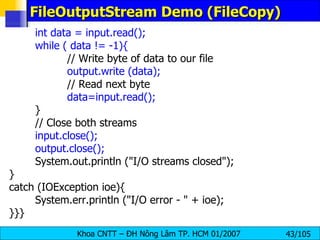
FileOutputStream Demo (FileCopy) int data = input.read(); while ( data != -1){ // Write byte of data to our file output.write (data); // Read next byte data=input.read(); } // Close both streams input.close(); output.close(); System.out.println (&quot;I/O streams closed&quot;); } catch (IOException ioe){ System.err.println (&quot;I/O error - &quot; + ioe); }}}
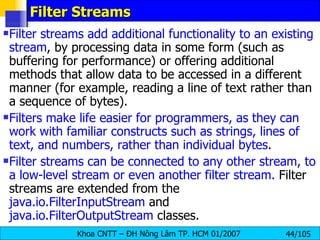
Filter Streams Filter streams add additional functionality to an existing stream , by processing data in some form (such as buffering for performance) or offering additional methods that allow data to be accessed in a different manner (for example, reading a line of text rather than a sequence of bytes).  Filters make life easier for programmers, as they can work with familiar constructs such as strings, lines of text, and numbers, rather than individual bytes . Filter streams can be connected to any other stream, to a low-level stream or even another filter stream.  Filter streams are extended from the  java.io.FilterInputStream  and  java.io.FilterOutputStream  classes.
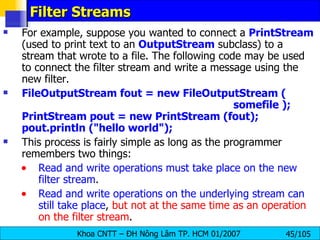
Filter Streams For example, suppose you wanted to connect a  PrintStream  (used to print text to an  OutputStream  subclass) to a stream that wrote to a file. The following code may be used to connect the filter stream and write a message using the new filter. FileOutputStream fout = new FileOutputStream (    somefile ); PrintStream pout = new PrintStream (fout); pout.println (&quot;hello world&quot;); This process is fairly simple as long as the programmer remembers two things: Read and write operations must take place on the new filter stream . Read and write operations on the underlying stream can still take place ,  but not at the same time as an operation on the filter stream .
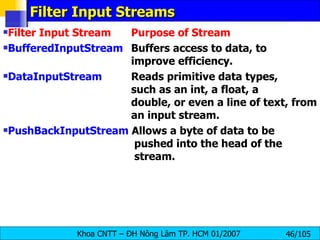
Filter Input Streams Filter Input Stream  Purpose of Stream BufferedInputStream   Buffers access to data, to  improve efficiency. DataInputStream   Reads primitive data types,  such as an int, a float, a  double, or even a line of text, from  an input stream. PushBackInputStream  Allows a byte of data to be   pushed into the head of the   stream.
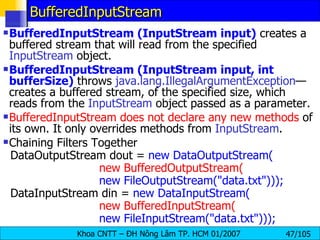
BufferedInputStream BufferedInputStream (InputStream input)  creates a buffered stream that will read from the specified  InputStream  object. BufferedInputStream (InputStream input, int bufferSize)  throws  java.lang.IllegalArgumentException — creates a buffered stream, of the specified size, which reads from the  InputStream  object passed as a parameter.  BufferedInputStream does not declare any new methods  of its own. It only overrides methods from  InputStream . Chaining Filters Together DataOutputStream dout =  new DataOutputStream( new BufferedOutputStream( new FileOutputStream(&quot;data.txt&quot;))); DataInputStream din =  new DataInputStream( new BufferedInputStream( new FileInputStream(&quot;data.txt&quot;)));
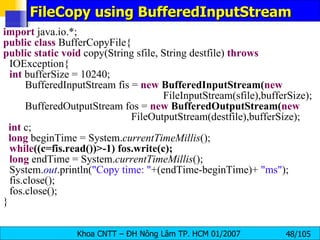
FileCopy using BufferedInputStream import  java.io.*; public   class  BufferCopyFile{ public   static   void  copy(String sfile, String destfile)  throws  IOException{ int  bufferSize = 10240; BufferedInputStream fis =  new   BufferedInputStream( new   FileInputStream(sfile),bufferSize); BufferedOutputStream fos =  new   BufferedOutputStream( new   FileOutputStream(destfile),bufferSize); int  c; long  beginTime = System. currentTimeMillis (); while ((c=fis.read())>-1) fos.write(c); long  endTime = System. currentTimeMillis (); System. out .println( &quot;Copy time: &quot; +(endTime-beginTime)+  &quot;ms&quot; ); fis.close(); fos.close(); }
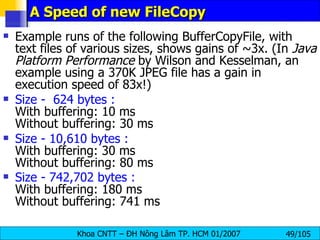
A Speed of new FileCopy  Example runs of the following BufferCopyFile, with text files of various sizes, shows gains of ~3x. (In  Java Platform Performance  by Wilson and Kesselman, an example using a 370K JPEG file has a gain in execution speed of 83x!)  Size -  624 bytes :  With buffering: 10 ms  Without buffering: 30 ms  Size - 10,610 bytes :   With buffering: 30 ms  Without buffering: 80 ms  Size - 742,702 bytes :  With buffering: 180 ms  Without buffering: 741 ms
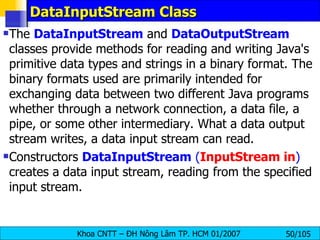
DataInputStream Class The  DataInputStream  and  DataOutputStream  classes provide methods for reading and writing Java's primitive data types and strings in a binary format. The binary formats used are primarily intended for exchanging data between two different Java programs whether through a network connection, a data file, a pipe, or some other intermediary. What a data output stream writes, a data input stream can read. Constructors  DataInputStream   ( InputStream in )  creates a data input stream, reading from the specified input stream.
DataInputStream Class public final int read(byte[] b)  throws IOException   Reads some number of bytes from the contained input stream and stores them into the buffer array b. This method blocks until input data is available, end of file is detected, or an exception is thrown.  public final int read(byte[] b, int off, int len)  throws IOException   Reads up to len bytes of data from the contained input stream into an array of bytes. This method blocks until input data is available, end of file is detected, or an exception is thrown.  public final int skipBytes(int n)  public final boolean readBoolean()  public final byte readByte()  : signed 8-bit byte  public final int readUnsignedByte()  : an unsigned 8-bit number
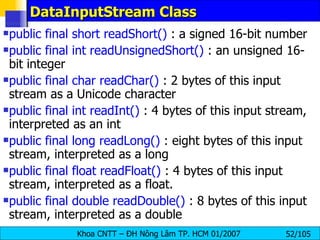
DataInputStream Class public final short readShort()  : a signed 16-bit number public final int readUnsignedShort()  : an unsigned 16-bit integer  public final char readChar()  : 2 bytes of this input stream as a Unicode character  public final int readInt()  : 4 bytes of this input stream, interpreted as an int  public final long readLong()  : eight bytes of this input stream, interpreted as a long  public final float readFloat()  : 4 bytes of this input stream, interpreted as a float.  public final double readDouble()  : 8 bytes of this input stream, interpreted as a double
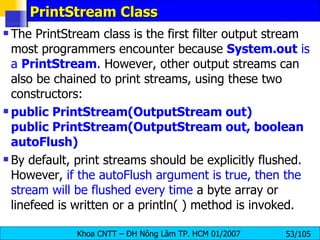
PrintStream Class The PrintStream class is the first filter output stream most programmers encounter because  System.out  is a  PrintStream . However, other output streams can also be chained to print streams, using these two constructors: public PrintStream(OutputStream out) public PrintStream(OutputStream out, boolean autoFlush) By default, print streams should be explicitly flushed. However,  if the autoFlush argument is true, then the stream will be flushed every time  a byte array or linefeed is written or a println( ) method is invoked.
PrintStream Class void print(boolean value) — prints a boolean value. void print(char character)—  prints a character value. void print(char[] charArray)—  prints an array of characters. void print(double doubleValue)—  prints a double value. void print(float floatValue)—  prints a float value. void print(int intValue)—  prints an int value. void print(long longValue)—  prints a long value. void print(Object obj)—  prints the value of the specified object's toString() method. void print(String string)—  prints a string's contents. void println()—  sends a line separator (such as '\n'). This value is system dependent and determined by the value of the system property &quot;line.separator.&quot;
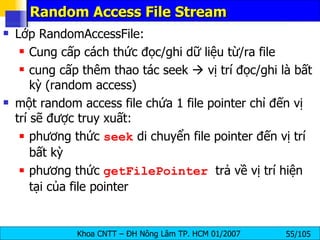
Random Access File Stream Lớp RandomAccessFile: Cung cấp cách thức đọc/ghi dữ liệu từ/ra file cung cấp thêm thao tác seek    vị trí đọc/ghi là bất kỳ (random access) một random access file chứa 1 file pointer chỉ đến vị trí sẽ được truy xuất: phương thức  seek  di chuyển file pointer đến vị trí bất kỳ phương thức  getFilePointer   trả về vị trí hiện tại của file pointer
Random Access File Stream
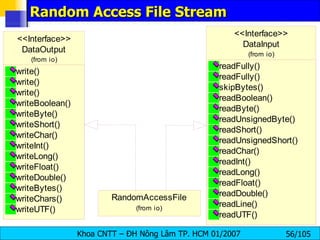
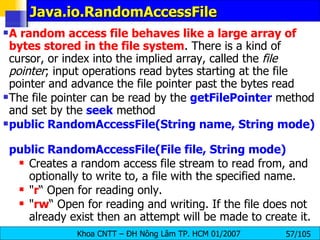
Java.io.RandomAccessFile  A random access file behaves like a large array of bytes stored in the file system . There is a kind of cursor, or index into the implied array, called the  file pointer ; input operations read bytes starting at the file pointer and advance the file pointer past the bytes read  The file pointer can be read by the  getFilePointer   method and set by the  seek   method  public RandomAccessFile(String name, String mode)  public RandomAccessFile(File file, String mode)   Creates a random access file stream to read from, and optionally to write to, a file with the specified name. &quot; r “ Open for reading only.  &quot; rw “ Open for reading and writing. If the file does not already exist then an attempt will be made to create it.
Java.io.RandomAccessFile public int read() throws IOException   Reads a byte of data from this file. The byte is returned as an integer in the range 0 to 255 (0x00-0x0ff). This method blocks if no input is yet available. public int read(byte[] b, int off, int len) throws IOException   Reads up to len bytes of data from this file into an array of bytes. This method blocks until at least one byte of input is available.  public int read(byte[] b) throws IOException   Reads up to b.length bytes of data from this file into an array of bytes. This method blocks until at least one byte of input is available.  public long getFilePointer() throws IOException   Returns the current offset in this file.
Java.io.RandomAccessFile public void write(int b) throws IOException   Writes the specified byte to this file. The write starts at the current file pointer.  public void write(byte[] b) throws IOException   Writes b.length bytes from the specified byte array to this file, starting at the current file pointer.  public void write(byte[] b, int off, int len) throws …   Writes len bytes from the specified byte array starting at offset off to this file public void seek(long pos) throws IOException   Sets the file-pointer offset, measured from the beginning of this file, at which the next read or write occurs. The offset may be set beyond the end of the file. Setting the offset beyond the end of the file does not change the file length. The file length will change only by writing after the offset has been set beyond the end of the file.
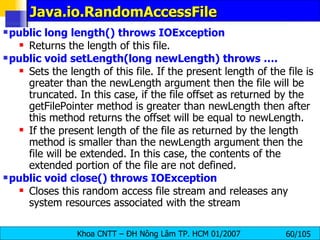
Java.io.RandomAccessFile public long length() throws IOException  Returns the length of this file.  public void setLength(long newLength) throws ….   Sets the length of this file. If the present length of the file is greater than the newLength argument then the file will be truncated. In this case, if the file offset as returned by the getFilePointer method is greater than newLength then after this method returns the offset will be equal to newLength.  If the present length of the file as returned by the length method is smaller than the newLength argument then the file will be extended. In this case, the contents of the extended portion of the file are not defined.  public void close() throws IOException  Closes this random access file stream and releases any system resources associated with the stream
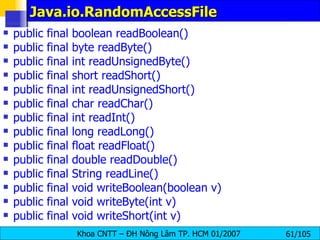
Java.io.RandomAccessFile public final boolean readBoolean()  public final byte readByte() public final int readUnsignedByte()  public final short readShort()  public final int readUnsignedShort()  public final char readChar()  public final int readInt()  public final long readLong()  public final float readFloat()   public final double readDouble()  public final String readLine() public final void writeBoolean(boolean v)  public final void writeByte(int v)  public final void writeShort(int v)
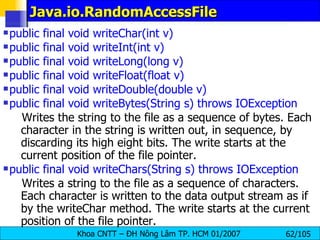
Java.io.RandomAccessFile public final void writeChar(int v)  public final void writeInt(int v)  public final void writeLong(long v)  public final void writeFloat(float v)  public final void writeDouble(double v)  public final void writeBytes(String s) throws IOException   Writes the string to the file as a sequence of bytes. Each character in the string is written out, in sequence, by discarding its high eight bits. The write starts at the current position of the file pointer.  public final void writeChars(String s) throws IOException   Writes a string to the file as a sequence of characters. Each character is written to the data output stream as if by the writeChar method. The write starts at the current position of the file pointer.
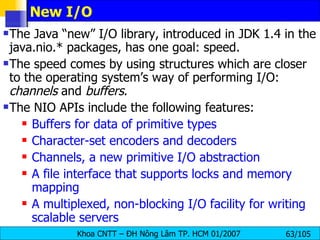
New I/O The Java “new” I/O library, introduced in JDK 1.4 in the java.nio.* packages, has one goal: speed. The speed comes by using structures which are closer to the operating system’s way of performing I/O:  channels  and  buffers . The NIO APIs include the following features:  Buffers for data of primitive types  Character-set encoders and decoders Channels, a new primitive I/O abstraction  A file interface that supports locks and memory mapping  A multiplexed, non-blocking I/O facility for writing scalable servers
java.nio.ByteBuffer  public static ByteBuffer allocate(int capacity)   Allocates a new byte buffer. The new buffer's position will be zero, its limit will be its capacity public abstract byte get()   Relative  get  method. Reads the byte at this buffer's current position, and then increments the position.  public abstract ByteBuffer put(byte b)   Relative  put  method   (optional operation) . Writes the given byte into this buffer at the current position, and then increments the position. public abstract byte get(int index)   Absolute  get  method. Reads the byte at the given index.  public abstract ByteBuffer put(int index, byte b)   Absolute  put  method   (optional operation) . Writes the given byte into this buffer at the given index.  public ByteBuffer get(byte[] dst, int offset, int length)   Relative bulk  get  method. Otherwise, this method copies length bytes from this buffer into the given array, starting at the current position of this buffer and at the given offset in the array. The position of this buffer is then incremented by length.
java.nio.ByteBuffer public ByteBuffer get(byte[] dst)   Relative bulk  get  method. This method transfers bytes from this buffer into the given destination array. public ByteBuffer put(ByteBuffer src)   Relative bulk  put  method   (optional operation) . This method transfers the bytes remaining in the given source buffer into this buffer. If there are more bytes remaining in the source buffer than in this buffer, that is, if src.remaining() > remaining(), then no bytes are transferred and a BufferOverflowException is thrown. public ByteBuffer put(byte[] src, int offset, int length)   Relative bulk  put  method   (optional operation) . this method copies length bytes from the given array into this buffer, starting at the given offset in the array and at the current position of this buffer. The position of this buffer is then incremented by length.  public final ByteBuffer put(byte[] src)   Relative bulk  put  method   (optional operation) . This method transfers the entire content of the given source byte array into this buffer. public final byte[] array()   Returns the byte array that backs this buffer   (optional operation) .
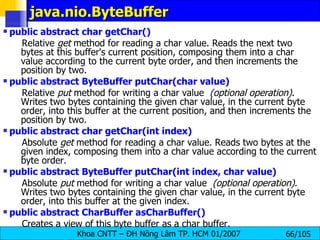
java.nio.ByteBuffer public abstract char getChar()   Relative  get  method for reading a char value. Reads the next two bytes at this buffer's current position, composing them into a char value according to the current byte order, and then increments the position by two.  public abstract ByteBuffer putChar(char value)   Relative  put  method for writing a char value   (optional operation) . Writes two bytes containing the given char value, in the current byte order, into this buffer at the current position, and then increments the position by two.  public abstract char getChar(int index)   Absolute  get  method for reading a char value. Reads two bytes at the given index, composing them into a char value according to the current byte order.  public abstract ByteBuffer putChar(int index, char value)   Absolute  put  method for writing a char value   (optional operation) . Writes two bytes containing the given char value, in the current byte order, into this buffer at the given index. public abstract CharBuffer asCharBuffer()   Creates a view of this byte buffer as a char buffer.
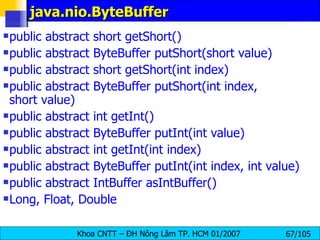
java.nio.ByteBuffer public abstract short getShort()  public abstract ByteBuffer putShort(short value)  public abstract short getShort(int index) public abstract ByteBuffer putShort(int index, short value)  public abstract int getInt() public abstract ByteBuffer putInt(int value)  public abstract int getInt(int index)  public abstract ByteBuffer putInt(int index, int value)  public abstract IntBuffer asIntBuffer() Long, Float, Double
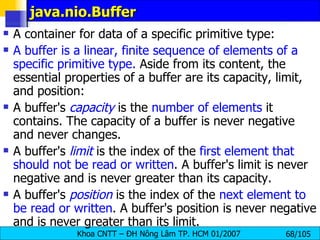
java.nio.Buffer A container for data of a specific primitive type:  A buffer is a linear, finite sequence of elements of a specific primitive type.  Aside from its content, the essential properties of a buffer are its capacity, limit, and position:  A buffer's  capacity  is the  number of elements  it contains. The capacity of a buffer is never negative and never changes.  A buffer's   limit  is the index of the  first element that should not be read or written . A buffer's limit is never negative and is never greater than its capacity.  A buffer's  position  is the index of the  next element to be read or written . A buffer's position is never negative and is never greater than its limit.
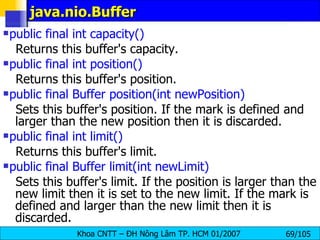
java.nio.Buffer public final int capacity()   Returns this buffer's capacity.  public final int position()  Returns this buffer's position.  public final Buffer position(int newPosition)   Sets this buffer's position. If the mark is defined and larger than the new position then it is discarded. public final int limit()   Returns this buffer's limit.  public final Buffer limit(int newLimit)   Sets this buffer's limit. If the position is larger than the new limit then it is set to the new limit. If the mark is defined and larger than the new limit then it is discarded.
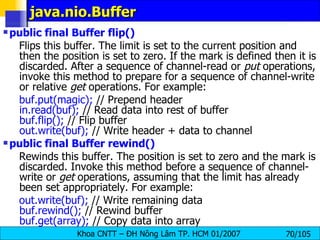
java.nio.Buffer public final Buffer flip()   Flips this buffer. The limit is set to the current position and then the position is set to zero. If the mark is defined then it is discarded. After a sequence of channel-read or  put  operations, invoke this method to prepare for a sequence of channel-write or relative  get  operations. For example:  buf.put(magic);  // Prepend header  in.read(buf);  // Read data into rest of buffer  buf.flip();  // Flip buffer  out.write(buf);  // Write header + data to channel public final Buffer rewind()   Rewinds this buffer. The position is set to zero and the mark is discarded. Invoke this method before a sequence of channel-write or  get  operations, assuming that the limit has already been set appropriately. For example:  out.write(buf);  // Write remaining data  buf.rewind();  // Rewind buffer  buf.get(array);  // Copy data into array
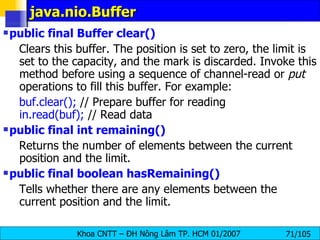
java.nio.Buffer public final Buffer clear()   Clears this buffer. The position is set to zero, the limit is set to the capacity, and the mark is discarded. Invoke this method before using a sequence of channel-read or  put  operations to fill this buffer. For example:  buf.clear();  // Prepare buffer for reading  in.read(buf);  // Read data public final int remaining()   Returns the number of elements between the current position and the limit.  public final boolean hasRemaining()   Tells whether there are any elements between the current position and the limit.
java.nio.channels.FileChannel  This class does not define methods for opening existing files or for creating new ones; such methods may be added in a future release. In this release a file channel can be obtained from an existing  FileInputStream, FileOutputStream,  or  RandomAccessFile  object by invoking that object's getChannel method, which returns a file channel that is connected to the same underlying file.  public abstract int read(ByteBuffer dst)  public abstract long read(ByteBuffer[] dsts, int offset, int length)  public abstract int write(ByteBuffer src)  public abstract long write(ByteBuffer[] srcs, int offset, int length)  public abstract long position()  public abstract FileChannel position(long newPosition)
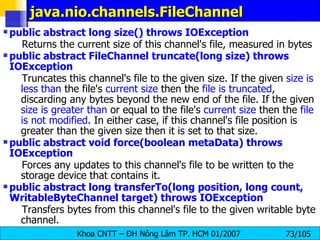
java.nio.channels.FileChannel  public abstract long size() throws IOException   Returns the current size of this channel's file, measured in bytes  public abstract FileChannel truncate(long size) throws IOException   Truncates this channel's file to the given size. If the given  size is less than  the file's  current size  then the  file is truncated , discarding any bytes beyond the new end of the file. If the given  size is greater than  or equal to the file's  current size  then the  file is not modified . In either case, if this channel's file position is greater than the given size then it is set to that size.  public abstract void force(boolean metaData) throws IOException   Forces any updates to this channel's file to be written to the storage device that contains it.  public abstract long transferTo(long position, long count, WritableByteChannel target) throws IOException   Transfers bytes from this channel's file to the given writable byte channel.
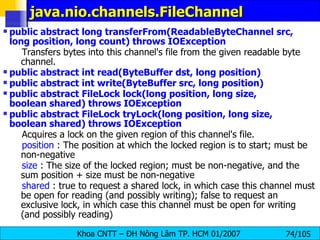
java.nio.channels.FileChannel  public abstract long transferFrom(ReadableByteChannel src, long position, long count) throws IOException   Transfers bytes into this channel's file from the given readable byte channel.  public abstract int read(ByteBuffer dst, long position)  public abstract int write(ByteBuffer src, long position)  public abstract FileLock lock(long position, long size, boolean shared) throws IOException  public abstract FileLock tryLock(long position, long size, boolean shared) throws IOException   Acquires a lock on the given region of this channel's file.  position  : The position at which the locked region is to start; must be non-negative  size  : The size of the locked region; must be non-negative, and the sum position + size must be non-negative  shared  : true to request a shared lock, in which case this channel must be open for reading (and possibly writing); false to request an exclusive lock, in which case this channel must be open for writing (and possibly reading)
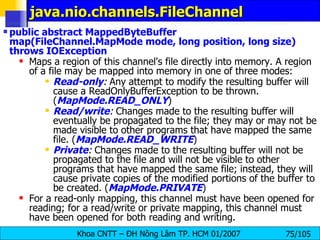
java.nio.channels.FileChannel  public abstract MappedByteBuffer map(FileChannel.MapMode mode, long position, long size) throws IOException   Maps a region of this channel's file directly into memory. A region of a file may be mapped into memory in one of three modes:  Read-only :  Any attempt to modify the resulting buffer will cause a ReadOnlyBufferException to be thrown. ( MapMode.READ_ONLY )  Read/write :  Changes made to the resulting buffer will eventually be propagated to the file; they may or may not be made visible to other programs that have mapped the same file. ( MapMode.READ_WRITE )  Private :  Changes made to the resulting buffer will not be propagated to the file and will not be visible to other programs that have mapped the same file; instead, they will cause private copies of the modified portions of the buffer to be created. ( MapMode.PRIVATE )  For a read-only mapping, this channel must have been opened for reading; for a read/write or private mapping, this channel must have been opened for both reading and writing.
java.nio.channels.FileChannel  import java.io.*; import java.nio.*; import java.nio.channels.*; public class ChannelCopy { private static final int BSIZE = 1024; public static void main(String[] args) throws Exception { FileChannel in  = new FileInputStream(&quot;data.pdf&quot;). getChannel(), out  = new FileOutputStream(&quot;data1.pdf&quot;). getChannel(); ByteBuffer buffer = ByteBuffer.allocate(BSIZE);   while(in.read(buffer) != -1) { buffer.flip();  // Prepare for writing out.write(buffer); buffer.clear();  // Prepare for reading } System.out.println(“Done &quot;); in.close(); out.close(); }}
java.nio.channels.FileChannel  import java.io.*; import java.nio.*; import java.nio.channels.*; public class TransferTo { public static void main(String[] args) throws Exception { FileChannel    in  = new FileInputStream(&quot;data.pdf &quot;).getChannel(), out  = new FileOutputStream(&quot;data1.pdf&quot;). getChannel(); in.transferTo(0, in.size(), out); System.out.println(“Done &quot;); in.close(); out.close(); } }
CRC without Memory-Mapped file import java.io.*; import java.util.zip.*; // This program computes the CRC checksum of a file, using an  // input stream. public class CRC { public static void main(String[] args) throws IOException { InputStream in = new FileInputStream(&quot;data.pdf&quot;); CRC32 crc = new CRC32(); int c; long start = System.currentTimeMillis(); while((c = in.read()) != -1) crc.update(c); long end = System.currentTimeMillis(); System.out.println(Long.toHexString(crc.getValue())); System.out.println((end - start) + &quot; milliseconds&quot;); } }
CRC with Memory-Mapped file import java.io.*; import java.nio.*; import java.nio.channels.*; import java.util.zip.*; //compute the CRC checksum of a file, using  a memory-mapped file. public class NIOCRC { public static void main(String[] args) throws Exception { FileInputStream in = new FileInputStream(&quot;data.pdf&quot;); FileChannel channel = in.getChannel(); CRC32 crc = new CRC32(); long start = System.currentTimeMillis(); MappedByteBuffer buffer = channel.map( FileChannel.MapMode.READ_ONLY, 0, (int)channel.size()); while (buffer.hasRemaining())  crc.update(buffer.get()); long end = System.currentTimeMillis(); System.out.println(Long.toHexString(crc.getValue())); System.out.println((end - start) + &quot; milliseconds&quot;); }}
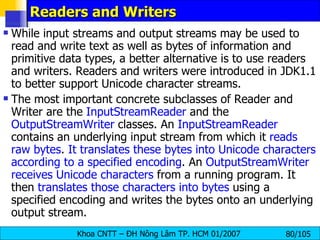
Readers and Writers While input streams and output streams may be used to read and write text as well as bytes of information and primitive data types, a better alternative is to use readers and writers. Readers and writers were introduced in JDK1.1 to better support Unicode character streams. The most important concrete subclasses of Reader and Writer are the  InputStreamReader  and the  OutputStreamWriter  classes. An  InputStreamReader  contains an underlying input stream from which it  reads raw bytes .  It translates these bytes into Unicode characters according to a specified encoding . An  OutputStreamWriter   receives Unicode characters  from a running program. It then  translates those characters into bytes  using a specified encoding and writes the bytes onto an underlying output stream.
Writers Like OutputStream, the  Writer class is never used directly , only polymorphically through one of its subclasses. It has five write( ) methods as well as a flush( ) and a close( ) method: protected Writer( ) protected Writer(Object lock) public abstract void write(char[] text, int offset, int length) throws IOException public void write(int c) throws IOException public void write(char[] text) throws IOException public void write(String s) throws IOException public void write(String s, int offset, int length) throws IOException public abstract void flush( ) throws IOException public abstract void close( ) throws IOException
Writers char[] network = {'N', 'e', 't', 'w', 'o', 'r', 'k'}; w.write(network, 0, network.length); The same task can be accomplished with these other methods as well: for (int i = 0; i < network.length; i++) w.write(network[i]); w.write(&quot;Network&quot;); w.write(&quot;Network&quot;, 0, 7); If it's using  big-endian Unicode , then it will write these  14 bytes  (shown here in hexadecimal) in this order: 00 4E 00 65 00 74 00 77 00 6F 00 72 00 6B On the other hand, if w uses  little-endian Unicode , this sequence of  14 bytes  is written: 4E 00 65 00 74 00 77 00 6F 00 72 00 6B 00 If uses Latin-1,  UTF-8 , or MacRoman, this sequence of seven bytes is written: 4E 65 74 77 6F 72 6B
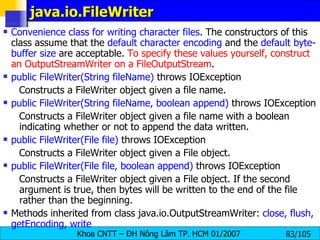
java.io.FileWriter  Convenience class for writing character files . The constructors of this class assume that the  default character encoding  and the  default byte-buffer size  are acceptable.  To specify these values yourself, construct an OutputStreamWriter on a FileOutputStream .  public FileWriter(String fileName)  throws IOException  Constructs a FileWriter object given a file name.  public FileWriter(String fileName, boolean append)  throws IOException  Constructs a FileWriter object given a file name with a boolean indicating whether or not to append the data written. public FileWriter(File file)  throws IOException  Constructs a FileWriter object given a File object.  public FileWriter(File file, boolean append)  throws IOException  Constructs a FileWriter object given a File object. If the second argument is true, then bytes will be written to the end of the file rather than the beginning.  Methods inherited from class java.io.OutputStreamWriter:  close, flush, getEncoding, write
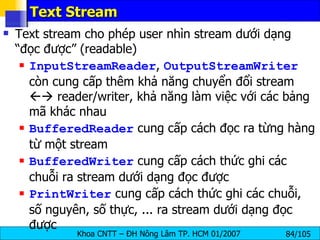
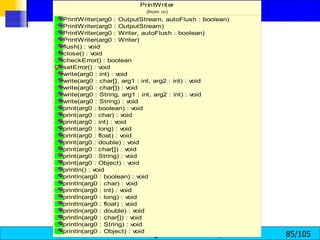
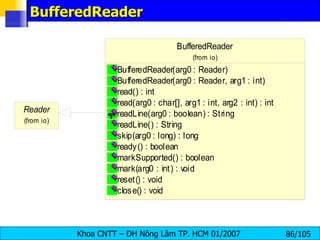
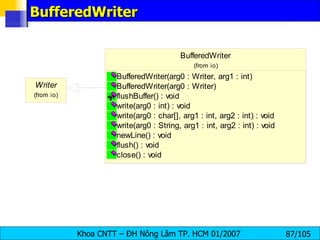
Text Stream Text stream cho phép user nhìn stream dưới dạng “đọc được” (readable) InputStreamReader ,  OutputStreamWriter  còn cung cấp thêm khả năng chuyển đổi stream    reader/writer, khả năng làm việc với các bảng mã khác nhau BufferedReader  cung cấp cách đọc ra từng hàng từ một stream BufferedWriter  cung cấp cách thức ghi các chuỗi ra stream dưới dạng đọc được PrintWriter  cung cấp cách thức ghi các chuỗi, số nguyên, số thực, ... ra stream dưới dạng đọc được
 
BufferedReader
BufferedWriter
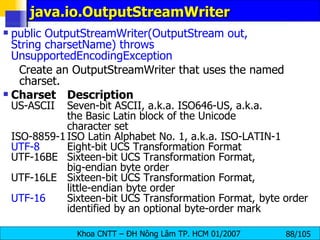
java.io.OutputStreamWriter  public OutputStreamWriter(OutputStream out, String charsetName)   throws UnsupportedEncodingException   Create an OutputStreamWriter that uses the named charset.  Charset Description US-ASCII Seven-bit ASCII, a.k.a. ISO646-US, a.k.a.  the Basic Latin block of the Unicode  character set ISO-8859-1 ISO Latin Alphabet No. 1, a.k.a. ISO-LATIN-1 UTF-8 Eight-bit UCS Transformation Format UTF-16BE Sixteen-bit UCS Transformation Format,  big-endian byte order UTF-16LE Sixteen-bit UCS Transformation Format,  little-endian byte order UTF-16 Sixteen-bit UCS Transformation Format,  byte order  identified by an optional byte-order mark
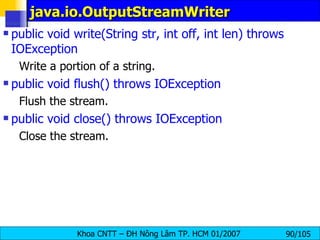
java.io.OutputStreamWriter public OutputStreamWriter(OutputStream out)   Create an OutputStreamWriter that uses the  default character encoding .  public OutputStreamWriter(OutputStream out, CharsetEncoder enc)   Create an OutputStreamWriter that uses the given charset encoder.  public String getEncoding()   Return the name of the character encoding being used by this stream.  public void write(int c) throws IOException   Write a single character.  public void write(char[] cbuf, int off, int len) throws IOException   Write a portion of an array of characters.
java.io.OutputStreamWriter public void write(String str, int off, int len)   throws IOException  Write a portion of a string.  public void flush()   throws IOException   Flush the stream.  public void close()   throws IOException   Close the stream.
OutputStreamWriter demo import java.io.*; public class OutputStreamToWriterDemo{ public static void main(String args[]){ try{ OutputStream  output  = new FileOutputStream(&quot;utf8.txt&quot;); // Create an OutputStreamWriter OutputStreamWriter writer = new OutputStreamWriter  (output,&quot;UTF-8&quot;); // Write to file using a writer writer.write (&quot;Phạm Văn Tính&quot;); // Flush and close the writer, to ensure it is written writer.flush(); writer.close(); } catch (IOException ioe){ System.err.println (&quot;I/O error : &quot; + ioe); }}}
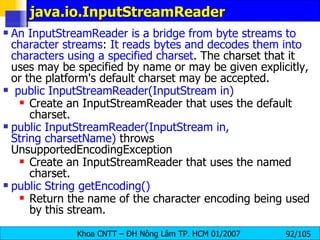
java.io.InputStreamReader  An InputStreamReader is a bridge from byte streams to character streams :  It reads bytes and decodes them into characters using a specified charset . The charset that it uses may be specified by name or may be given explicitly, or the platform's default charset may be accepted. public InputStreamReader(InputStream in)  Create an InputStreamReader that uses the default charset.  public InputStreamReader(InputStream in, String charsetName)  throws UnsupportedEncodingException  Create an InputStreamReader that uses the named charset.  public String getEncoding()  Return the name of the character encoding being used by this stream.
java.io.InputStreamReader  public int read()  throws IOException  Read a single character. public int read(char[] cbuf, int offset, int length)  throws IOException  Read characters into a portion of an array.  public boolean ready()  throws IOException  Tell whether this stream is ready to be read. An InputStreamReader is ready if its input buffer is not empty, or if bytes are available to be read from the underlying byte stream.  public void close()  throws IOException
Charset Translation  public class InputStreamReaderDemo { public static void main(String args[]){ try{ OutputStream output = new FileOutputStream(&quot;utf8_16.txt&quot;); // Create an OutputStreamWriter OutputStreamWriter writer = new OutputStreamWriter (output,  &quot;UTF-16&quot;); InputStream input = new FileInputStream(&quot;utf8.txt&quot;); InputStreamReader reader = new InputStreamReader(input,  &quot;UTF-8&quot;);   char[] buff = new char[100]; // Write to file using a writer int rNumber = reader.read(buff); System.out.println(&quot;Number of char: &quot;+rNumber); writer.write(buff,0,rNumber); // Flush and close the writer, to ensure it is written writer.flush();  writer.close();  reader.close();  } catch (IOException ioe){ System.err.println (&quot;I/O error : &quot; + ioe); }}}
Complete example Student List
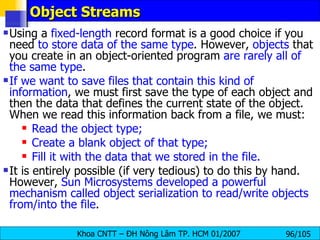
Object Streams Using a  fixed-length  record format is a good choice if you need  to store data of the same type . However,  objects  that you create in an object-oriented program  are rarely all of the same type . If we want to save files that contain this kind of information , we must first save the type of each object and then the data that defines the current state of the object. When we read this information back from a file, we must: Read the object type; Create a blank object of that type; Fill it with the data that we stored in the file. It is entirely possible (if very tedious) to do this by hand. However,  Sun Microsystems developed a powerful mechanism called object serialization to read/write objects from/into the file .
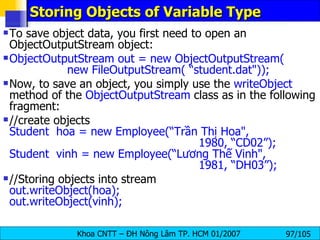
Storing Objects of Variable Type  To save object data, you first need to open an ObjectOutputStream object: ObjectOutputStream out = new ObjectOutputStream( new FileOutputStream( “student.dat&quot;));   Now, to save an object, you simply use the  writeObject  method of the  ObjectOutputStream  class as in the following fragment: //create objects Student  hoa = new Employee(“Trần Thị Hoa&quot;,  1980, “CD02”);  Student  vinh = new Employee(“Lương Thế Vinh&quot;,  1981, “DH03”); //Storing objects into stream  out.writeObject(hoa);  out.writeObject(vinh);
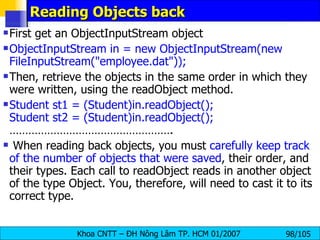
Reading Objects back First get an ObjectInputStream object  ObjectInputStream in = new ObjectInputStream(new FileInputStream(&quot;employee.dat&quot;));  Then, retrieve the objects in the same order in which they were written, using the readObject method. Student st1 = (Student)in.readObject();  Student st2 = (Student)in.readObject();  ……………………………………………. When reading back objects, you must  carefully keep track of the number of objects that were saved , their order, and their types. Each call to readObject reads in another object of the type Object. You, therefore, will need to cast it to its correct type.
Serializable interface you need to make to any class that you want to save and restore in an object stream. The class must implement the Serializable interface : class Employee implements   Serializable  { . . . }  The  Serializable  interface has no methods, so you don't need to change your classes in any way. To make a class serializable, you do not need to do anything else .  Writing an array is done with a single operation: Student[] stList = new Student[3];  . . .  out.writeObject(stList);  Similarly, reading in the result is done with a single operation. However, we must apply a cast to the return value of the readObject method: Student[] newStList = (Student[])in.readObject();
Student List using Object Streams public class SerialStudent  implements   Serializable { private String name; private int age; private String cl; public SerialStudent(String n, int a, String c){ name = n; age = a; cl = c; } public String getName() {  return name;  } public int getAge() {  return age;  } public String getCl(){  return cl;  } public String toString() { return getClass().getName()  + &quot;[Name=&quot; + name   + &quot;,Age=&quot; + age  + &quot;,Class=&quot; + cl  + &quot;]&quot;; } public void exportData(PrintWriter out){ out.println(name + &quot;|&quot; + age + &quot;|&quot; + cl); }}
Student List using Object Streams   public class SerialTest { public static void main(String[] args) { SerialStudent[] st = new SerialStudent[3]; st[0] = new SerialStudent(&quot;Phạm Thị Mỹ Hạnh&quot;, 20, &quot;TC02&quot;); st[1] = new SerialStudent(&quot;Trần Thị Hoa&quot;, 18, &quot;CD02&quot;); st[2] = new SerialStudent(&quot;Nguyễn Vãn Vệ&quot;, 19, &quot;DH03&quot;); try { // save all students records to the file studentemployee.dat ObjectOutputStream  out  = new  ObjectOutputStream (new FileOutputStream(&quot;SerialStudent.dat&quot;)); out.writeObject(st); out.close(); // retrieve all records into a new array ObjectInputStream in = new ObjectInputStream(new   FileInputStream(&quot;SerialStudent.dat&quot;)); try{   SerialStudent[] newSt = (SerialStudent[])in.readObject();   // print the newly read student records   for (int i = 0; i < newSt.length; i++)  System.out.println(newSt[i]);   } catch ( ClassNotFoundException e ) {}; in.close(); …………………………………………… ..
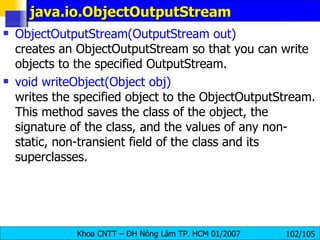
java.io.ObjectOutputStream   ObjectOutputStream(OutputStream out) creates an ObjectOutputStream so that you can write objects to the specified OutputStream. void writeObject(Object obj) writes the specified object to the ObjectOutputStream. This method saves the class of the object, the signature of the class, and the values of any non-static, non-transient field of the class and its superclasses.
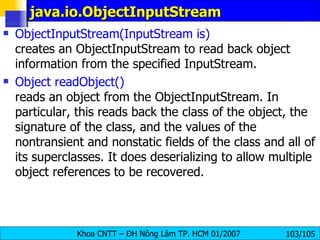
java.io.ObjectInputStream  ObjectInputStream(InputStream is) creates an ObjectInputStream to read back object information from the specified InputStream. Object readObject() reads an object from the ObjectInputStream. In particular, this reads back the class of the object, the signature of the class, and the values of the nontransient and nonstatic fields of the class and all of its superclasses. It does deserializing to allow multiple object references to be recovered.
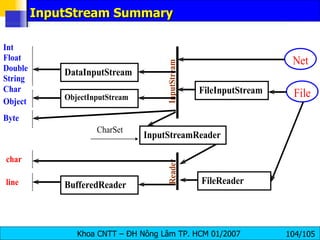
InputStream Summary
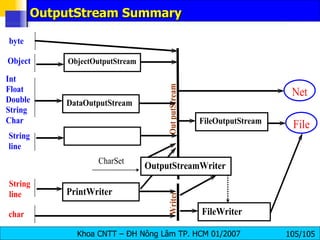
OutputStream Summary

Io Streams

  • 1.
    JAVA I/OSTREAMS NETWORK PROGRAMMING
  • 2.
    PART 1 –INPUT/OUTPUT STREAMS Stream concepts Input Streams Output Streams Reader Writer Object Serialization Object Input Stream Object Output Stream
  • 3.
    Stream concepts Dataexchange Data exchange type : Character, Object, voice, picture, audio, video... Program File Memory Network Program information
  • 4.
    Stream Stream: dòngthông tin giữa 2 tác nhân (mức cao) một dãy tuần tự các byte (mức thấp) Một stream được gắn với một nguồn (source), hay một đích (destination) Stream operations: open stream close stream read write seek Input stream : support reading functions Output stream : support writing functions Filter stream : buffer
  • 5.
    Input & OutputStream Hình 1: Chương trình xử lý dữ liệu từ 1 input stream Hình 2: Chương trình ghi dữ liệu ra output stream
  • 6.
    Trình tự đọc/ghi dòng open input stream while (more information){ read information process information } close input stream open output stream while (more information){ get information from ... write information } close output stream Đọc thông tin từ input stream Ghi thông tin vào output stream
  • 7.
    Các loại streamtrong package java.io các lớp trong gói java.io được thiết kế gồm 2 nhóm chính: Nhóm input/output stream, hay nhóm hướng byte Nhóm reader/writer , hay nhóm hướng ký tự ( unicode )
  • 8.
    Nhóm input/output streamđược gọi là nhóm hướng byte , vì thao tác đọc/ghi áp dụng cho 1 hoặc nhiều byte chỉ giới hạn xử lý các byte 8 bits ISO-Latin-1 . rất thích hợp khi cần xử lý dữ liệu nhị phân như ảnh, âm thanh, binary files... Các input stream được mở rộng từ lớp InputStream (Abstract class) Các output stream được mở rộng từ lớp OutputStream (Abstract class)
  • 9.
  • 10.
  • 11.
    Nhóm reader/writer đượcgọi là nhóm hướng ký tự , vì thao tác đọc/ghi áp dụng cho 1 hoặc nhiều ký tự Unicode (1 character = 2bytes)
  • 12.
  • 13.
    Các loại cácstream (tt) java IO cũng cung cấp cách thức kết gắn stream với các loại tác nhân khác như bộ nhớ, file ... Các lớp InputStreamReader và OutputStreamWriter cung cấp sự chuyển đổi giữa stream và reader/writer Xem bảng phân loại tóm tắt để biết thêm chi tiết
  • 14.
    Tổng quát vềcác Streams StringReader để đọc các ký tự từ một String trong bộ nhớ. StringWriter để ghi vào String . StringBufferInputStream tương tự như StringReader . Sự khác biệt chỉ là StringBufferInputStream đọc các bytes từ một đối tượng StringBuffer StringReader StringWriter StringBuffer- InputStream Đọc/ghi từ/vào bộ nhớ. Tạo stream từ một mảng, tiếp theo dùng các phương thức đọc/ghi để đọc/ghi từ/vào mảng. Tác vụ đọc sẽ lấy dữ liệu từ mảng Tác vụ ghi sẽ ghi ra mảng CharArrayReader CharArrayWriter ByteArrayInput- Stream ByteArrayOutput-Stream Memory Mô tả khái quát Streams I/O
  • 15.
    Tổng quát vềcác Streams Nối nhiều input streams thành một input stream. SequenceInput- Stream ( concatenation ) Nối Được gọi là các file streams. File streams dùng để đọc/ghi từ/vào file trên file system. FileReader FileWriter FileInputStream FileOutputStream File Hiện thực các thành phần input và output của một pipe. Pipes được dùng như một kênh truyền, nối output của một thread vào input của một thread khác. PipedReader PipedWriter PipedInputStream PipedOutputStream Pipe
  • 16.
    Tổng quát vềcác Streams Theo dõi số hàng trong khi đọc LineNumberReader LineNumberInput- Stream Counting Thuận tiện khi cần đọc/ghi các kiểu dữ liệu cơ bản ( primitive data types ) như int , double , ... DataInputStream DataOutputStream Chuyển đổi dạng dữ liệu ( Data Conver-sion ) Dùng khi cần lưu trữ, khôi phục, hoặc truyền toàn bộ đối tượng. ObjectInputStream ObjectOutputStream Object Serial- ization
  • 17.
    Tổng quát vềcác Streams Các lớp abstract này định nghĩa các giao tiếp cho các filter streams lọc dữ liệu trong khi đọc/ghi. FilterReader FilterWriter FilterInputStream FilterOutputStream Lọc dữ liệu ( Filtering ) Đệm dữ liệu trong các thao tác đọc/ghi. Đệm dữ liệu cải thiện tốc độ đọc ghi vì giảm số lần truy xuất thiết bị. BufferedReader BufferedWriter bufferedInput-Stream BufferedOutput-Stream Đệm ( Buffer-ing ) Rất thuận tiện khi cần kết xuất, dễ đọc với người. System.out là một đối tượng thuộc lớp PrintStream . PrintWriter PrintStream Printing
  • 18.
    Tổng quát vềcác Streams Cặp reader/writer này là cầu nối giữa các byte streams và character streams. Một InputStreamReader đọc các bytes từ một InputStream và chuyển các bytes đó thành các ký tự. Một OutputStreamWriter chuyển các ký tự sang các bytes, và ghi các bytes đó vào một OutputStream . Quá trình chuyển đổi sẽ sử dụng bộ mã mặc định nếu không được chỉ định rõ. Gọi System.getProperty (&quot;file.encoding&quot;) để lấy về tên bộ mã mặc định. InputStreamReader OutputStreamWriter Chuyển đổi byte  ký tự ( Converting between Bytes and Characters )
  • 19.
    Các lớp IO InputStream , OutputStream , Reader và Writer là các lớp abstract: Các lớp input stream được mở rộng từ lớp InputStream Các lớp reader được mở rộng từ lớp Reader Các lớp output stream được mở rộng từ lớp OutputStream Các lớp writer được mở rộng từ lớp Writer 2 lớp InputStream và Reader cung cấp những phương thức read tương đối giống nhau. 2 lớp OutputStream và Writer cung cấp những phương thức write tương đối giống nhau.
  • 20.
    InputSream Low-Level InputStream Purpose of Stream ByteArrayInputStream Reads bytes of data from an memory array FileInputStream Reads bytes of data from a file on the local file system PipedInputStream Reads bytes of data from a thread pipe StringBufferInputStream Reads bytes of data from a string SequenceInputStream Reads bytes of data from two or more low-level streams, switching from one stream to the next when the end of the stream is reached System.in Reads bytes of data from the user console
  • 21.
    The java.io.InputStream Classint available() throws java.io.IOException— returns the number of bytes currently available for reading. void close() throws java.io.IOException— closes the input stream and frees any resources (such as file handles or file locks) associated with the input stream. int read() throws java.io.IOException— returns the next byte of data from the stream. When the end of the stream is reached, a value of –1 is returned. int read(byte[] byteArray) throws java.io.IOException— reads a sequence of bytes and places them in the specified byte array. This method returns the number of bytes successfully read, or –1 if the end of the stream has been reached. int read(byte[] byteArray, int offset, int length) throws java.io.IOException, java.lang.IndexOutOfBoundsException— reads a sequence of bytes, placing them in the specified array at the specified offset, and for the specified length, if possible.
  • 22.
    The java.io.InputStream Classlong skip(long amount) throws java.io.IOException— reads, but ignores, the specified amount of bytes. These bytes are discarded, and the position of the input stream is updated. The skip method returns the number of bytes skipped over, which may be less than the requested amount. The following code fragment reads 10 bytes from the InputStream in and stores them in the byte array input . However, if end of stream is detected, the loop is terminated early: byte[] input = new byte[10]; for (int i = 0; i < input.length; i++) { int b = in.read( ); if (b == -1) break; input[i] = (byte) b; }
  • 23.
    The java.io.InputStream ClassFor example, you may try to read 1 024 bytes from a network connection, when only 512 have actually arrived from the server. The rest are still in transit. They'll arrive eventually, but they aren't available now. byte[] input = new byte[1024]; int bytesRead = in.read(input); It attempts to read 1 024 bytes from the InputStream in into the array input. However, if only 512 bytes are available , then bytesRead will be set to 512 . To guarantee that all the bytes you want are actually read, you must place the read in a loop that reads repeatedly until the array is filled. int bytesRead = 0; int bytesToRead = 1024; byte[] input = new byte[bytesToRead]; while (bytesRead < bytesToRead) { bytesRead += in.read(input, bytesRead, bytesToRead - bytesRead); }
  • 24.
    The java.io.File ClassAn abstract representation of file and directory pathnames . For UNIX platforms, the prefix of an absolute pathname is always &quot; / &quot;. Relative pathnames have no prefix . For Microsoft Windows platforms, the prefix of a pathname that contains a drive specifier consists of the drive letter followed by &quot; : &quot; and possibly followed by &quot; \\ &quot; if the pathname is absolute ( D:\\myfolder\\t.txt ). A relative pathname that does not specify a drive has no prefix. public File(File parent, String child) Creates a new File instance from a parent abstract pathname and a child pathname string. public File(String parent, String child) Creates a new File instance from a parent pathname string and a child pathname string.
  • 25.
    The java.io.File Classpublic File(String pathname) Creates a new File instance by converting the given pathname string into an abstract pathname. If the given string is the empty string, then the result is the empty abstract pathname. public String getPath() Converts this abstract pathname into a pathname string. public boolean isAbsolute() Tests whether this abstract pathname is absolute. public String getAbsolutePath() Returns the absolute pathname string of this abstract pathname. public boolean canRead() Tests whether the application can read the file denoted by this abstract pathname.
  • 26.
    The java.io.File Classpublic boolean canWrite() Tests whether the application can modify the file denoted by this abstract pathname public boolean exists() Tests whether the file or directory denoted by this abstract pathname exists. public boolean isDirectory() Tests whether the file denoted by this abstract pathname is a directory. public boolean isFile() Tests whether the file denoted by this abstract pathname is a normal file. public boolean isHidden() Tests whether the file named by this abstract pathname is a hidden file.
  • 27.
    The java.io.File Classpublic long length() Returns the length (the zise in Kbyte) of the file denoted by this abstract pathname. The return value is unspecified if this pathname denotes a directory. public boolean delete() Deletes the file or directory denoted by this abstract pathname. If this pathname denotes a directory, then the directory must be empty in order to be deleted. public String[] list() Returns an array of strings naming the files and directories in the directory denoted by this abstract pathname. public String[] list(FilenameFilter filter) Returns an array of strings naming the files and directories in the directory denoted by this abstract pathname that satisfy the specified filter. The behavior of this method is the same as that of the list() method, except that the strings in the returned array must satisfy the filter. If the given filter is null then all names are accepted.
  • 28.
    The java.io.File Classpublic File[] listFiles() Returns an array of abstract pathnames denoting the files in the directory denoted by this abstract pathname. public File[] listFiles(FilenameFilter filter) Returns an array of abstract pathnames denoting the files and directories in the directory denoted by this abstract pathname that satisfy the specified filter. public boolean mkdir() Creates the directory named by this abstract pathname. public boolean mkdirs() Creates the directory named by this abstract pathname, including any necessary but nonexistent parent directories. Note that if this operation fails it may have succeeded in creating some of the necessary parent directories.
  • 29.
    The java.io.File Class// List of all files in D: with extention tgz import java.io.*; import java.util.*; public class DLister { public static void main(String[] args) { File path = new File(&quot;D:\\&quot;); String[] list; list = path.list(new DirFilter(&quot;.tgz&quot;)); for(int i = 0; i < list.length; i++) System.out.println(list[i]); } } class DirFilter implements FilenameFilter { String afn; DirFilter(String afn) { this.afn = afn; } public boolean accept(File dir, String name) { String f = new File(name).getName(); return f.indexOf(afn) != -1; } }
  • 30.
    Exercise public boolean deleteDir (String path ) public boolean find (String path , String filePattern ) public boolean find (String path , String pattern )
  • 31.
    The java.io.FileInputStream ClassA FileInputStream obtains input bytes from a file in a file system . What files are available depends on the host environment. FileInputStream is meant for reading streams of raw bytes such as image data . For reading streams of characters, consider using FileReader. public FileInputStream(File file) throws FileNotFoundException Creates a FileInputStream by opening a connection to an actual file, the file named by the File object file in the file system. A new FileDescriptor object is created to represent this file connection. public FileInputStream(String name) throws FileNotFoundException Creates a FileInputStream by opening a connection to an actual file, the file named by the path name name in the file system.
  • 32.
    The java.io.FileInputStream Classpublic int read() throws IOException Reads a byte of data from this input stream. This method blocks if no input is yet available. Returns: the next byte of data, or -1 if the end of the file is reached. public int read(byte[] b) throws IOException public int read(byte[] b, int off, int len) Reads up to b.length bytes of data from this input stream into an array of bytes. This method blocks until some input is available. Parameters: b - the buffer into which the data is read. off - the start offset of the data. len - the maximum number of bytes read. Returns : the total number of bytes read into the buffer, or -1 if there is no more data because the end of the file has been reached.
  • 33.
    The java.io.FileInputStream Classpublic long skip(long n) throws IOException Skips over and discards n bytes of data from the input stream. Parameters : n - the number of bytes to be skipped. Returns : the actual number of bytes skipped. Throws : IOException - if n is negative, or if an I/O error occurs. public int available() throws IOException Returns the number of bytes that can be read from this file input stream without blocking. public void close() throws IOException Closes this file input stream and releases any system resources associated with the stream.
  • 34.
    FileInputStream Demo Belowwe examine a practical application of using a low-level input stream to display the contents of a file. A byte at a time is read from the file and displayed to the screen. // Create an input stream, reading from the specified file InputStream fileInput = new FileInputStream (fName); // Read the first byte of data int data = fileInput.read(); // Repeat : until end of file (EOF) reached while (data != -1){ // Send byte to standard output System.out.write ( data ); // Read next byte data = fileInput.read(); }
  • 35.
    FileInputStreamDemo import java.io.*;public class FileInputStreamDemo{ public static void main(String args[]){ if (args.length != 1){ System.err.println (&quot;Syntax - FileInputStreamDemo file&quot;); return; } try{ InputStream fileInput = new FileInputStream( args[0] ); int data = fileInput.read(); while (data != -1){ System.out.write ( data ); data = fileInput.read(); } // Close the file fileInput.close(); } catch (IOException ioe){ System.err.println (&quot;I/O error - &quot; + ioe); }}}
  • 36.
    Ouput Streams Low-LevelOutput Stream Purpose of Stream ByteArrayOutputStream Writes bytes of data to an array of bytes. FileOutputStream Writes bytes of data to a local file. PipedOutputStream Writes bytes of data to a communications pipe, which will be connected to a PipedInputStream. StringBufferOutputStream Writes bytes to a string buffer (a substitute data structure for the fixed-length string). System.err Writes bytes of data to the error stream of the user console, also known as standard error. In addition, this stream is cast to a PrintStream. System.out Writes bytes of data to the user console, also known as standard output. In addition, this stream is cast to a PrintStream.
  • 37.
    The java.io.OutputStream Classvoid close() throws java.io.IOException — closes the output stream, notifying the other side that the stream has ended. Pending data that has not yet been sent will be sent, but no more data will be delivered. void flush() throws java.io.IOException — performs a &quot;flush&quot; of any unsent data and sends it to the recipient of the output stream. To improve performance, streams will often be buffered, so data remains unsent. This is useful at times, but obstructive at others. The method is particularly important for OutputStream subclasses that represent network operations, as flushing should always occur after a request or response is sent so that the remote side isn't left waiting for data.
  • 38.
    The java.io.OutputStream Classvoid write(int byte) throws java.io.IOException writes the specified byte. This is an abstract method, overridden by OutputStream subclasses. void write(byte[] byteArray) throws java.io.IOException writes the contents of the byte array to the output stream. The entire contents of the array (barring any error) will be written. void write(byte[] byteArray, int offset, int length) throws java.io.IOException writes the contents of a subset of the byte array to the output stream. This method allows developers to specify just how much of an array is sent, and which part, as opposed to the OutputStream.write(byte[] byteArray) method, which sends the entire contents of an array.
  • 39.
    Java.io.FileOutputStream publicFileOutputStream(String name) throws FileNotFoundException Creates an output file stream to write to the file with the specified name. Throws: FileNotFoundException - if the file exists but is a directory rather than a regular file, does not exist but cannot be created, or cannot be opened for any other reason public FileOutputStream(String name, boolean append) throws FileNotFoundException Creates an output file stream to write to the file with the specified name. If the second argument is true, then bytes will be written to the end of the file rather than the beginning. If the file exists but is a directory rather than a regular file, does not exist but cannot be created, or cannot be opened for any other reason then a FileNotFoundException is thrown.
  • 40.
    Java.io.FileOutputStream public FileOutputStream(File file)throws FileNotFoundException Creates a file output stream to write to the file represented by the specified File object public FileOutputStream(File file, boolean append) throws FileNotFoundException public void write(int b) throws IOException Writes the specified byte to this file output stream. Implements the write method of OutputStream. public void write(byte[] b) throws IOException Writes b.length bytes from the specified byte array to this file output stream. public void write(byte[] b, int off, int len) throws IOException Writes len bytes from the specified byte array starting at offset off to this file output stream. public void close() throws IOException Closes this file output stream and releases any system resources associated with this stream. This file output stream may no longer be used for writing bytes.
  • 41.
    FileOutputStream Demo (FileCopy)The program copies a file by reading the contents of the file and writing it, one byte at a time, to a new file. To open a file for writing, a FileOutputStream is used. This class will create a file, if one does not already exist, or override the contents of the file (unless opened in append mode). // Output file for output OutputStream output = new FileOutputStream(destination); Once opened, it can be written to by invoking the OutputStream.write() method. This method is called repeatedly by the application, to write the contents of a file that it is reading. while ( data != -1){ // Write byte of data to our file output.write (data); // Read next byte data=input.read(); }
  • 42.
    FileOutputStream Demo (FileCopy)import java.io.*; public class FileOutputStreamDemo{ public static void main(String args[]){ // Two parameters are required, the source and destination if (args.length != 2){ System.err.println(&quot;Syntax - FileOutputStreamDemo src dest&quot;); return; } String source = args[0]; String destination = args[1]; try{ // Open source file for input InputStream input = new FileInputStream( source ); System.out.println (&quot;Opened &quot; +source + &quot; for reading.&quot;); // Output file for output OutputStream output = new FileOutputStream(destination); System.out.println (&quot;Opened &quot; +destination + &quot; for writing.&quot;);
  • 43.
    FileOutputStream Demo (FileCopy)int data = input.read(); while ( data != -1){ // Write byte of data to our file output.write (data); // Read next byte data=input.read(); } // Close both streams input.close(); output.close(); System.out.println (&quot;I/O streams closed&quot;); } catch (IOException ioe){ System.err.println (&quot;I/O error - &quot; + ioe); }}}
  • 44.
    Filter Streams Filterstreams add additional functionality to an existing stream , by processing data in some form (such as buffering for performance) or offering additional methods that allow data to be accessed in a different manner (for example, reading a line of text rather than a sequence of bytes). Filters make life easier for programmers, as they can work with familiar constructs such as strings, lines of text, and numbers, rather than individual bytes . Filter streams can be connected to any other stream, to a low-level stream or even another filter stream. Filter streams are extended from the java.io.FilterInputStream and java.io.FilterOutputStream classes.
  • 45.
    Filter Streams Forexample, suppose you wanted to connect a PrintStream (used to print text to an OutputStream subclass) to a stream that wrote to a file. The following code may be used to connect the filter stream and write a message using the new filter. FileOutputStream fout = new FileOutputStream ( somefile ); PrintStream pout = new PrintStream (fout); pout.println (&quot;hello world&quot;); This process is fairly simple as long as the programmer remembers two things: Read and write operations must take place on the new filter stream . Read and write operations on the underlying stream can still take place , but not at the same time as an operation on the filter stream .
  • 46.
    Filter Input StreamsFilter Input Stream Purpose of Stream BufferedInputStream Buffers access to data, to improve efficiency. DataInputStream Reads primitive data types, such as an int, a float, a double, or even a line of text, from an input stream. PushBackInputStream Allows a byte of data to be pushed into the head of the stream.
  • 47.
    BufferedInputStream BufferedInputStream (InputStreaminput) creates a buffered stream that will read from the specified InputStream object. BufferedInputStream (InputStream input, int bufferSize) throws java.lang.IllegalArgumentException — creates a buffered stream, of the specified size, which reads from the InputStream object passed as a parameter. BufferedInputStream does not declare any new methods of its own. It only overrides methods from InputStream . Chaining Filters Together DataOutputStream dout = new DataOutputStream( new BufferedOutputStream( new FileOutputStream(&quot;data.txt&quot;))); DataInputStream din = new DataInputStream( new BufferedInputStream( new FileInputStream(&quot;data.txt&quot;)));
  • 48.
    FileCopy using BufferedInputStreamimport java.io.*; public class BufferCopyFile{ public static void copy(String sfile, String destfile) throws IOException{ int bufferSize = 10240; BufferedInputStream fis = new BufferedInputStream( new FileInputStream(sfile),bufferSize); BufferedOutputStream fos = new BufferedOutputStream( new FileOutputStream(destfile),bufferSize); int c; long beginTime = System. currentTimeMillis (); while ((c=fis.read())>-1) fos.write(c); long endTime = System. currentTimeMillis (); System. out .println( &quot;Copy time: &quot; +(endTime-beginTime)+ &quot;ms&quot; ); fis.close(); fos.close(); }
  • 49.
    A Speed ofnew FileCopy Example runs of the following BufferCopyFile, with text files of various sizes, shows gains of ~3x. (In Java Platform Performance by Wilson and Kesselman, an example using a 370K JPEG file has a gain in execution speed of 83x!) Size -  624 bytes : With buffering: 10 ms Without buffering: 30 ms Size - 10,610 bytes : With buffering: 30 ms Without buffering: 80 ms Size - 742,702 bytes : With buffering: 180 ms Without buffering: 741 ms
  • 50.
    DataInputStream Class The DataInputStream and DataOutputStream classes provide methods for reading and writing Java's primitive data types and strings in a binary format. The binary formats used are primarily intended for exchanging data between two different Java programs whether through a network connection, a data file, a pipe, or some other intermediary. What a data output stream writes, a data input stream can read. Constructors DataInputStream ( InputStream in ) creates a data input stream, reading from the specified input stream.
  • 51.
    DataInputStream Class publicfinal int read(byte[] b) throws IOException Reads some number of bytes from the contained input stream and stores them into the buffer array b. This method blocks until input data is available, end of file is detected, or an exception is thrown. public final int read(byte[] b, int off, int len) throws IOException Reads up to len bytes of data from the contained input stream into an array of bytes. This method blocks until input data is available, end of file is detected, or an exception is thrown. public final int skipBytes(int n) public final boolean readBoolean() public final byte readByte() : signed 8-bit byte public final int readUnsignedByte() : an unsigned 8-bit number
  • 52.
    DataInputStream Class publicfinal short readShort() : a signed 16-bit number public final int readUnsignedShort() : an unsigned 16-bit integer public final char readChar() : 2 bytes of this input stream as a Unicode character public final int readInt() : 4 bytes of this input stream, interpreted as an int public final long readLong() : eight bytes of this input stream, interpreted as a long public final float readFloat() : 4 bytes of this input stream, interpreted as a float. public final double readDouble() : 8 bytes of this input stream, interpreted as a double
  • 53.
    PrintStream Class ThePrintStream class is the first filter output stream most programmers encounter because System.out is a PrintStream . However, other output streams can also be chained to print streams, using these two constructors: public PrintStream(OutputStream out) public PrintStream(OutputStream out, boolean autoFlush) By default, print streams should be explicitly flushed. However, if the autoFlush argument is true, then the stream will be flushed every time a byte array or linefeed is written or a println( ) method is invoked.
  • 54.
    PrintStream Class voidprint(boolean value) — prints a boolean value. void print(char character)— prints a character value. void print(char[] charArray)— prints an array of characters. void print(double doubleValue)— prints a double value. void print(float floatValue)— prints a float value. void print(int intValue)— prints an int value. void print(long longValue)— prints a long value. void print(Object obj)— prints the value of the specified object's toString() method. void print(String string)— prints a string's contents. void println()— sends a line separator (such as '\n'). This value is system dependent and determined by the value of the system property &quot;line.separator.&quot;
  • 55.
    Random Access FileStream Lớp RandomAccessFile: Cung cấp cách thức đọc/ghi dữ liệu từ/ra file cung cấp thêm thao tác seek  vị trí đọc/ghi là bất kỳ (random access) một random access file chứa 1 file pointer chỉ đến vị trí sẽ được truy xuất: phương thức seek di chuyển file pointer đến vị trí bất kỳ phương thức getFilePointer trả về vị trí hiện tại của file pointer
  • 56.
  • 57.
    Java.io.RandomAccessFile Arandom access file behaves like a large array of bytes stored in the file system . There is a kind of cursor, or index into the implied array, called the file pointer ; input operations read bytes starting at the file pointer and advance the file pointer past the bytes read The file pointer can be read by the getFilePointer method and set by the seek method public RandomAccessFile(String name, String mode) public RandomAccessFile(File file, String mode) Creates a random access file stream to read from, and optionally to write to, a file with the specified name. &quot; r “ Open for reading only. &quot; rw “ Open for reading and writing. If the file does not already exist then an attempt will be made to create it.
  • 58.
    Java.io.RandomAccessFile public intread() throws IOException Reads a byte of data from this file. The byte is returned as an integer in the range 0 to 255 (0x00-0x0ff). This method blocks if no input is yet available. public int read(byte[] b, int off, int len) throws IOException Reads up to len bytes of data from this file into an array of bytes. This method blocks until at least one byte of input is available. public int read(byte[] b) throws IOException Reads up to b.length bytes of data from this file into an array of bytes. This method blocks until at least one byte of input is available. public long getFilePointer() throws IOException Returns the current offset in this file.
  • 59.
    Java.io.RandomAccessFile public voidwrite(int b) throws IOException Writes the specified byte to this file. The write starts at the current file pointer. public void write(byte[] b) throws IOException Writes b.length bytes from the specified byte array to this file, starting at the current file pointer. public void write(byte[] b, int off, int len) throws … Writes len bytes from the specified byte array starting at offset off to this file public void seek(long pos) throws IOException Sets the file-pointer offset, measured from the beginning of this file, at which the next read or write occurs. The offset may be set beyond the end of the file. Setting the offset beyond the end of the file does not change the file length. The file length will change only by writing after the offset has been set beyond the end of the file.
  • 60.
    Java.io.RandomAccessFile public longlength() throws IOException Returns the length of this file. public void setLength(long newLength) throws …. Sets the length of this file. If the present length of the file is greater than the newLength argument then the file will be truncated. In this case, if the file offset as returned by the getFilePointer method is greater than newLength then after this method returns the offset will be equal to newLength. If the present length of the file as returned by the length method is smaller than the newLength argument then the file will be extended. In this case, the contents of the extended portion of the file are not defined. public void close() throws IOException Closes this random access file stream and releases any system resources associated with the stream
  • 61.
    Java.io.RandomAccessFile public finalboolean readBoolean() public final byte readByte() public final int readUnsignedByte() public final short readShort() public final int readUnsignedShort() public final char readChar() public final int readInt() public final long readLong() public final float readFloat() public final double readDouble() public final String readLine() public final void writeBoolean(boolean v) public final void writeByte(int v) public final void writeShort(int v)
  • 62.
    Java.io.RandomAccessFile public finalvoid writeChar(int v) public final void writeInt(int v) public final void writeLong(long v) public final void writeFloat(float v) public final void writeDouble(double v) public final void writeBytes(String s) throws IOException Writes the string to the file as a sequence of bytes. Each character in the string is written out, in sequence, by discarding its high eight bits. The write starts at the current position of the file pointer. public final void writeChars(String s) throws IOException Writes a string to the file as a sequence of characters. Each character is written to the data output stream as if by the writeChar method. The write starts at the current position of the file pointer.
  • 63.
    New I/O TheJava “new” I/O library, introduced in JDK 1.4 in the java.nio.* packages, has one goal: speed. The speed comes by using structures which are closer to the operating system’s way of performing I/O: channels and buffers . The NIO APIs include the following features: Buffers for data of primitive types Character-set encoders and decoders Channels, a new primitive I/O abstraction A file interface that supports locks and memory mapping A multiplexed, non-blocking I/O facility for writing scalable servers
  • 64.
    java.nio.ByteBuffer publicstatic ByteBuffer allocate(int capacity) Allocates a new byte buffer. The new buffer's position will be zero, its limit will be its capacity public abstract byte get() Relative get method. Reads the byte at this buffer's current position, and then increments the position. public abstract ByteBuffer put(byte b) Relative put method   (optional operation) . Writes the given byte into this buffer at the current position, and then increments the position. public abstract byte get(int index) Absolute get method. Reads the byte at the given index. public abstract ByteBuffer put(int index, byte b) Absolute put method   (optional operation) . Writes the given byte into this buffer at the given index. public ByteBuffer get(byte[] dst, int offset, int length) Relative bulk get method. Otherwise, this method copies length bytes from this buffer into the given array, starting at the current position of this buffer and at the given offset in the array. The position of this buffer is then incremented by length.
  • 65.
    java.nio.ByteBuffer public ByteBufferget(byte[] dst) Relative bulk get method. This method transfers bytes from this buffer into the given destination array. public ByteBuffer put(ByteBuffer src) Relative bulk put method   (optional operation) . This method transfers the bytes remaining in the given source buffer into this buffer. If there are more bytes remaining in the source buffer than in this buffer, that is, if src.remaining() > remaining(), then no bytes are transferred and a BufferOverflowException is thrown. public ByteBuffer put(byte[] src, int offset, int length) Relative bulk put method   (optional operation) . this method copies length bytes from the given array into this buffer, starting at the given offset in the array and at the current position of this buffer. The position of this buffer is then incremented by length. public final ByteBuffer put(byte[] src) Relative bulk put method   (optional operation) . This method transfers the entire content of the given source byte array into this buffer. public final byte[] array() Returns the byte array that backs this buffer   (optional operation) .
  • 66.
    java.nio.ByteBuffer public abstractchar getChar() Relative get method for reading a char value. Reads the next two bytes at this buffer's current position, composing them into a char value according to the current byte order, and then increments the position by two. public abstract ByteBuffer putChar(char value) Relative put method for writing a char value   (optional operation) . Writes two bytes containing the given char value, in the current byte order, into this buffer at the current position, and then increments the position by two. public abstract char getChar(int index) Absolute get method for reading a char value. Reads two bytes at the given index, composing them into a char value according to the current byte order. public abstract ByteBuffer putChar(int index, char value) Absolute put method for writing a char value   (optional operation) . Writes two bytes containing the given char value, in the current byte order, into this buffer at the given index. public abstract CharBuffer asCharBuffer() Creates a view of this byte buffer as a char buffer.
  • 67.
    java.nio.ByteBuffer public abstractshort getShort() public abstract ByteBuffer putShort(short value) public abstract short getShort(int index) public abstract ByteBuffer putShort(int index, short value) public abstract int getInt() public abstract ByteBuffer putInt(int value) public abstract int getInt(int index) public abstract ByteBuffer putInt(int index, int value) public abstract IntBuffer asIntBuffer() Long, Float, Double
  • 68.
    java.nio.Buffer A containerfor data of a specific primitive type: A buffer is a linear, finite sequence of elements of a specific primitive type. Aside from its content, the essential properties of a buffer are its capacity, limit, and position: A buffer's capacity is the number of elements it contains. The capacity of a buffer is never negative and never changes. A buffer's limit is the index of the first element that should not be read or written . A buffer's limit is never negative and is never greater than its capacity. A buffer's position is the index of the next element to be read or written . A buffer's position is never negative and is never greater than its limit.
  • 69.
    java.nio.Buffer public finalint capacity() Returns this buffer's capacity. public final int position() Returns this buffer's position. public final Buffer position(int newPosition) Sets this buffer's position. If the mark is defined and larger than the new position then it is discarded. public final int limit() Returns this buffer's limit. public final Buffer limit(int newLimit) Sets this buffer's limit. If the position is larger than the new limit then it is set to the new limit. If the mark is defined and larger than the new limit then it is discarded.
  • 70.
    java.nio.Buffer public finalBuffer flip() Flips this buffer. The limit is set to the current position and then the position is set to zero. If the mark is defined then it is discarded. After a sequence of channel-read or put operations, invoke this method to prepare for a sequence of channel-write or relative get operations. For example: buf.put(magic); // Prepend header in.read(buf); // Read data into rest of buffer buf.flip(); // Flip buffer out.write(buf); // Write header + data to channel public final Buffer rewind() Rewinds this buffer. The position is set to zero and the mark is discarded. Invoke this method before a sequence of channel-write or get operations, assuming that the limit has already been set appropriately. For example: out.write(buf); // Write remaining data buf.rewind(); // Rewind buffer buf.get(array); // Copy data into array
  • 71.
    java.nio.Buffer public finalBuffer clear() Clears this buffer. The position is set to zero, the limit is set to the capacity, and the mark is discarded. Invoke this method before using a sequence of channel-read or put operations to fill this buffer. For example: buf.clear(); // Prepare buffer for reading in.read(buf); // Read data public final int remaining() Returns the number of elements between the current position and the limit. public final boolean hasRemaining() Tells whether there are any elements between the current position and the limit.
  • 72.
    java.nio.channels.FileChannel Thisclass does not define methods for opening existing files or for creating new ones; such methods may be added in a future release. In this release a file channel can be obtained from an existing FileInputStream, FileOutputStream, or RandomAccessFile object by invoking that object's getChannel method, which returns a file channel that is connected to the same underlying file. public abstract int read(ByteBuffer dst) public abstract long read(ByteBuffer[] dsts, int offset, int length) public abstract int write(ByteBuffer src) public abstract long write(ByteBuffer[] srcs, int offset, int length) public abstract long position() public abstract FileChannel position(long newPosition)
  • 73.
    java.nio.channels.FileChannel publicabstract long size() throws IOException Returns the current size of this channel's file, measured in bytes public abstract FileChannel truncate(long size) throws IOException Truncates this channel's file to the given size. If the given size is less than the file's current size then the file is truncated , discarding any bytes beyond the new end of the file. If the given size is greater than or equal to the file's current size then the file is not modified . In either case, if this channel's file position is greater than the given size then it is set to that size. public abstract void force(boolean metaData) throws IOException Forces any updates to this channel's file to be written to the storage device that contains it. public abstract long transferTo(long position, long count, WritableByteChannel target) throws IOException Transfers bytes from this channel's file to the given writable byte channel.
  • 74.
    java.nio.channels.FileChannel publicabstract long transferFrom(ReadableByteChannel src, long position, long count) throws IOException Transfers bytes into this channel's file from the given readable byte channel. public abstract int read(ByteBuffer dst, long position) public abstract int write(ByteBuffer src, long position) public abstract FileLock lock(long position, long size, boolean shared) throws IOException public abstract FileLock tryLock(long position, long size, boolean shared) throws IOException Acquires a lock on the given region of this channel's file. position : The position at which the locked region is to start; must be non-negative size : The size of the locked region; must be non-negative, and the sum position + size must be non-negative shared : true to request a shared lock, in which case this channel must be open for reading (and possibly writing); false to request an exclusive lock, in which case this channel must be open for writing (and possibly reading)
  • 75.
    java.nio.channels.FileChannel publicabstract MappedByteBuffer map(FileChannel.MapMode mode, long position, long size) throws IOException Maps a region of this channel's file directly into memory. A region of a file may be mapped into memory in one of three modes: Read-only : Any attempt to modify the resulting buffer will cause a ReadOnlyBufferException to be thrown. ( MapMode.READ_ONLY ) Read/write : Changes made to the resulting buffer will eventually be propagated to the file; they may or may not be made visible to other programs that have mapped the same file. ( MapMode.READ_WRITE ) Private : Changes made to the resulting buffer will not be propagated to the file and will not be visible to other programs that have mapped the same file; instead, they will cause private copies of the modified portions of the buffer to be created. ( MapMode.PRIVATE ) For a read-only mapping, this channel must have been opened for reading; for a read/write or private mapping, this channel must have been opened for both reading and writing.
  • 76.
    java.nio.channels.FileChannel importjava.io.*; import java.nio.*; import java.nio.channels.*; public class ChannelCopy { private static final int BSIZE = 1024; public static void main(String[] args) throws Exception { FileChannel in = new FileInputStream(&quot;data.pdf&quot;). getChannel(), out = new FileOutputStream(&quot;data1.pdf&quot;). getChannel(); ByteBuffer buffer = ByteBuffer.allocate(BSIZE); while(in.read(buffer) != -1) { buffer.flip(); // Prepare for writing out.write(buffer); buffer.clear(); // Prepare for reading } System.out.println(“Done &quot;); in.close(); out.close(); }}
  • 77.
    java.nio.channels.FileChannel importjava.io.*; import java.nio.*; import java.nio.channels.*; public class TransferTo { public static void main(String[] args) throws Exception { FileChannel in = new FileInputStream(&quot;data.pdf &quot;).getChannel(), out = new FileOutputStream(&quot;data1.pdf&quot;). getChannel(); in.transferTo(0, in.size(), out); System.out.println(“Done &quot;); in.close(); out.close(); } }
  • 78.
    CRC without Memory-Mappedfile import java.io.*; import java.util.zip.*; // This program computes the CRC checksum of a file, using an // input stream. public class CRC { public static void main(String[] args) throws IOException { InputStream in = new FileInputStream(&quot;data.pdf&quot;); CRC32 crc = new CRC32(); int c; long start = System.currentTimeMillis(); while((c = in.read()) != -1) crc.update(c); long end = System.currentTimeMillis(); System.out.println(Long.toHexString(crc.getValue())); System.out.println((end - start) + &quot; milliseconds&quot;); } }
  • 79.
    CRC with Memory-Mappedfile import java.io.*; import java.nio.*; import java.nio.channels.*; import java.util.zip.*; //compute the CRC checksum of a file, using a memory-mapped file. public class NIOCRC { public static void main(String[] args) throws Exception { FileInputStream in = new FileInputStream(&quot;data.pdf&quot;); FileChannel channel = in.getChannel(); CRC32 crc = new CRC32(); long start = System.currentTimeMillis(); MappedByteBuffer buffer = channel.map( FileChannel.MapMode.READ_ONLY, 0, (int)channel.size()); while (buffer.hasRemaining()) crc.update(buffer.get()); long end = System.currentTimeMillis(); System.out.println(Long.toHexString(crc.getValue())); System.out.println((end - start) + &quot; milliseconds&quot;); }}
  • 80.
    Readers and WritersWhile input streams and output streams may be used to read and write text as well as bytes of information and primitive data types, a better alternative is to use readers and writers. Readers and writers were introduced in JDK1.1 to better support Unicode character streams. The most important concrete subclasses of Reader and Writer are the InputStreamReader and the OutputStreamWriter classes. An InputStreamReader contains an underlying input stream from which it reads raw bytes . It translates these bytes into Unicode characters according to a specified encoding . An OutputStreamWriter receives Unicode characters from a running program. It then translates those characters into bytes using a specified encoding and writes the bytes onto an underlying output stream.
  • 81.
    Writers Like OutputStream,the Writer class is never used directly , only polymorphically through one of its subclasses. It has five write( ) methods as well as a flush( ) and a close( ) method: protected Writer( ) protected Writer(Object lock) public abstract void write(char[] text, int offset, int length) throws IOException public void write(int c) throws IOException public void write(char[] text) throws IOException public void write(String s) throws IOException public void write(String s, int offset, int length) throws IOException public abstract void flush( ) throws IOException public abstract void close( ) throws IOException
  • 82.
    Writers char[] network= {'N', 'e', 't', 'w', 'o', 'r', 'k'}; w.write(network, 0, network.length); The same task can be accomplished with these other methods as well: for (int i = 0; i < network.length; i++) w.write(network[i]); w.write(&quot;Network&quot;); w.write(&quot;Network&quot;, 0, 7); If it's using big-endian Unicode , then it will write these 14 bytes (shown here in hexadecimal) in this order: 00 4E 00 65 00 74 00 77 00 6F 00 72 00 6B On the other hand, if w uses little-endian Unicode , this sequence of 14 bytes is written: 4E 00 65 00 74 00 77 00 6F 00 72 00 6B 00 If uses Latin-1, UTF-8 , or MacRoman, this sequence of seven bytes is written: 4E 65 74 77 6F 72 6B
  • 83.
    java.io.FileWriter Convenienceclass for writing character files . The constructors of this class assume that the default character encoding and the default byte-buffer size are acceptable. To specify these values yourself, construct an OutputStreamWriter on a FileOutputStream . public FileWriter(String fileName) throws IOException Constructs a FileWriter object given a file name. public FileWriter(String fileName, boolean append) throws IOException Constructs a FileWriter object given a file name with a boolean indicating whether or not to append the data written. public FileWriter(File file) throws IOException Constructs a FileWriter object given a File object. public FileWriter(File file, boolean append) throws IOException Constructs a FileWriter object given a File object. If the second argument is true, then bytes will be written to the end of the file rather than the beginning. Methods inherited from class java.io.OutputStreamWriter: close, flush, getEncoding, write
  • 84.
    Text Stream Textstream cho phép user nhìn stream dưới dạng “đọc được” (readable) InputStreamReader , OutputStreamWriter còn cung cấp thêm khả năng chuyển đổi stream  reader/writer, khả năng làm việc với các bảng mã khác nhau BufferedReader cung cấp cách đọc ra từng hàng từ một stream BufferedWriter cung cấp cách thức ghi các chuỗi ra stream dưới dạng đọc được PrintWriter cung cấp cách thức ghi các chuỗi, số nguyên, số thực, ... ra stream dưới dạng đọc được
  • 85.
  • 86.
  • 87.
  • 88.
    java.io.OutputStreamWriter publicOutputStreamWriter(OutputStream out, String charsetName) throws UnsupportedEncodingException Create an OutputStreamWriter that uses the named charset. Charset Description US-ASCII Seven-bit ASCII, a.k.a. ISO646-US, a.k.a. the Basic Latin block of the Unicode character set ISO-8859-1 ISO Latin Alphabet No. 1, a.k.a. ISO-LATIN-1 UTF-8 Eight-bit UCS Transformation Format UTF-16BE Sixteen-bit UCS Transformation Format, big-endian byte order UTF-16LE Sixteen-bit UCS Transformation Format, little-endian byte order UTF-16 Sixteen-bit UCS Transformation Format, byte order identified by an optional byte-order mark
  • 89.
    java.io.OutputStreamWriter public OutputStreamWriter(OutputStream out) Create an OutputStreamWriter that uses the default character encoding . public OutputStreamWriter(OutputStream out, CharsetEncoder enc) Create an OutputStreamWriter that uses the given charset encoder. public String getEncoding() Return the name of the character encoding being used by this stream. public void write(int c) throws IOException Write a single character. public void write(char[] cbuf, int off, int len) throws IOException Write a portion of an array of characters.
  • 90.
    java.io.OutputStreamWriter public voidwrite(String str, int off, int len) throws IOException Write a portion of a string. public void flush() throws IOException Flush the stream. public void close() throws IOException Close the stream.
  • 91.
    OutputStreamWriter demo importjava.io.*; public class OutputStreamToWriterDemo{ public static void main(String args[]){ try{ OutputStream output = new FileOutputStream(&quot;utf8.txt&quot;); // Create an OutputStreamWriter OutputStreamWriter writer = new OutputStreamWriter (output,&quot;UTF-8&quot;); // Write to file using a writer writer.write (&quot;Phạm Văn Tính&quot;); // Flush and close the writer, to ensure it is written writer.flush(); writer.close(); } catch (IOException ioe){ System.err.println (&quot;I/O error : &quot; + ioe); }}}
  • 92.
    java.io.InputStreamReader AnInputStreamReader is a bridge from byte streams to character streams : It reads bytes and decodes them into characters using a specified charset . The charset that it uses may be specified by name or may be given explicitly, or the platform's default charset may be accepted. public InputStreamReader(InputStream in) Create an InputStreamReader that uses the default charset. public InputStreamReader(InputStream in, String charsetName) throws UnsupportedEncodingException Create an InputStreamReader that uses the named charset. public String getEncoding() Return the name of the character encoding being used by this stream.
  • 93.
    java.io.InputStreamReader publicint read() throws IOException Read a single character. public int read(char[] cbuf, int offset, int length) throws IOException Read characters into a portion of an array. public boolean ready() throws IOException Tell whether this stream is ready to be read. An InputStreamReader is ready if its input buffer is not empty, or if bytes are available to be read from the underlying byte stream. public void close() throws IOException
  • 94.
    Charset Translation public class InputStreamReaderDemo { public static void main(String args[]){ try{ OutputStream output = new FileOutputStream(&quot;utf8_16.txt&quot;); // Create an OutputStreamWriter OutputStreamWriter writer = new OutputStreamWriter (output, &quot;UTF-16&quot;); InputStream input = new FileInputStream(&quot;utf8.txt&quot;); InputStreamReader reader = new InputStreamReader(input, &quot;UTF-8&quot;); char[] buff = new char[100]; // Write to file using a writer int rNumber = reader.read(buff); System.out.println(&quot;Number of char: &quot;+rNumber); writer.write(buff,0,rNumber); // Flush and close the writer, to ensure it is written writer.flush(); writer.close(); reader.close(); } catch (IOException ioe){ System.err.println (&quot;I/O error : &quot; + ioe); }}}
  • 95.
  • 96.
    Object Streams Usinga fixed-length record format is a good choice if you need to store data of the same type . However, objects that you create in an object-oriented program are rarely all of the same type . If we want to save files that contain this kind of information , we must first save the type of each object and then the data that defines the current state of the object. When we read this information back from a file, we must: Read the object type; Create a blank object of that type; Fill it with the data that we stored in the file. It is entirely possible (if very tedious) to do this by hand. However, Sun Microsystems developed a powerful mechanism called object serialization to read/write objects from/into the file .
  • 97.
    Storing Objects ofVariable Type To save object data, you first need to open an ObjectOutputStream object: ObjectOutputStream out = new ObjectOutputStream( new FileOutputStream( “student.dat&quot;)); Now, to save an object, you simply use the writeObject method of the ObjectOutputStream class as in the following fragment: //create objects Student hoa = new Employee(“Trần Thị Hoa&quot;, 1980, “CD02”); Student vinh = new Employee(“Lương Thế Vinh&quot;, 1981, “DH03”); //Storing objects into stream out.writeObject(hoa); out.writeObject(vinh);
  • 98.
    Reading Objects backFirst get an ObjectInputStream object ObjectInputStream in = new ObjectInputStream(new FileInputStream(&quot;employee.dat&quot;)); Then, retrieve the objects in the same order in which they were written, using the readObject method. Student st1 = (Student)in.readObject(); Student st2 = (Student)in.readObject(); ……………………………………………. When reading back objects, you must carefully keep track of the number of objects that were saved , their order, and their types. Each call to readObject reads in another object of the type Object. You, therefore, will need to cast it to its correct type.
  • 99.
    Serializable interface youneed to make to any class that you want to save and restore in an object stream. The class must implement the Serializable interface : class Employee implements Serializable { . . . } The Serializable interface has no methods, so you don't need to change your classes in any way. To make a class serializable, you do not need to do anything else . Writing an array is done with a single operation: Student[] stList = new Student[3]; . . . out.writeObject(stList); Similarly, reading in the result is done with a single operation. However, we must apply a cast to the return value of the readObject method: Student[] newStList = (Student[])in.readObject();
  • 100.
    Student List usingObject Streams public class SerialStudent implements Serializable { private String name; private int age; private String cl; public SerialStudent(String n, int a, String c){ name = n; age = a; cl = c; } public String getName() { return name; } public int getAge() { return age; } public String getCl(){ return cl; } public String toString() { return getClass().getName() + &quot;[Name=&quot; + name + &quot;,Age=&quot; + age + &quot;,Class=&quot; + cl + &quot;]&quot;; } public void exportData(PrintWriter out){ out.println(name + &quot;|&quot; + age + &quot;|&quot; + cl); }}
  • 101.
    Student List usingObject Streams public class SerialTest { public static void main(String[] args) { SerialStudent[] st = new SerialStudent[3]; st[0] = new SerialStudent(&quot;Phạm Thị Mỹ Hạnh&quot;, 20, &quot;TC02&quot;); st[1] = new SerialStudent(&quot;Trần Thị Hoa&quot;, 18, &quot;CD02&quot;); st[2] = new SerialStudent(&quot;Nguyễn Vãn Vệ&quot;, 19, &quot;DH03&quot;); try { // save all students records to the file studentemployee.dat ObjectOutputStream out = new ObjectOutputStream (new FileOutputStream(&quot;SerialStudent.dat&quot;)); out.writeObject(st); out.close(); // retrieve all records into a new array ObjectInputStream in = new ObjectInputStream(new FileInputStream(&quot;SerialStudent.dat&quot;)); try{ SerialStudent[] newSt = (SerialStudent[])in.readObject(); // print the newly read student records for (int i = 0; i < newSt.length; i++) System.out.println(newSt[i]); } catch ( ClassNotFoundException e ) {}; in.close(); …………………………………………… ..
  • 102.
    java.io.ObjectOutputStream ObjectOutputStream(OutputStream out) creates an ObjectOutputStream so that you can write objects to the specified OutputStream. void writeObject(Object obj) writes the specified object to the ObjectOutputStream. This method saves the class of the object, the signature of the class, and the values of any non-static, non-transient field of the class and its superclasses.
  • 103.
    java.io.ObjectInputStream ObjectInputStream(InputStreamis) creates an ObjectInputStream to read back object information from the specified InputStream. Object readObject() reads an object from the ObjectInputStream. In particular, this reads back the class of the object, the signature of the class, and the values of the nontransient and nonstatic fields of the class and all of its superclasses. It does deserializing to allow multiple object references to be recovered.
  • 104.
  • 105.