Chapter 09: Deploying HBase
HBase IN ACTION
by Nick Dimiduk et. al.
Overview: Deploying HBase
Planning your cluster
Deploying software
Distributions
Configuration
Managing the daemons
Summary
09/24/15
9.1 Planning your cluster
 Planning an HBase cluster includes planning the underlying Hadoop
cluster.
 This section will highlight the considerations to keep in mind when
choosing hardware and how the roles (HBase Master,
RegionServers, ZooKeeper, and so on) should be deployed on the
cluster.
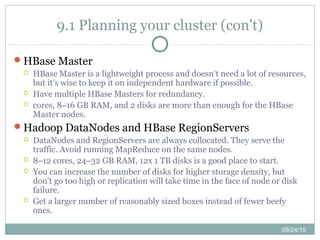
 Prototype cluster
 A prototype cluster is one that doesn’t have strict SLAs, and it’s okay for it to
go
 down.
 Collocate the HBase Master with the Hadoop NameNode and JobTracker on
the same node.
 It typically has fewer than 10 nodes.
 It’s okay to collocate multiple services on a single node in a prototype cluster.
 4–6 cores, 24–32 GB RAM, and 4 disks per node should be a good place to
start.
09/24/15
9.1 Planning your cluster (con't)
 Small production cluster (10–20 servers) : Generally, you shouldn’t have
fewer than 10 nodes in a production HBase cluster.
 Fewer than 10 slave nodes is hard to make operationalize.
 Consider relatively better hardware for the Master nodes if you’re
deploying a production cluster. Dual power supplies and perhaps RAID
are the order of the day.
 Small production clusters with not much traffic/workload can have
services collocated.
 A single HBase Master is okay for small clusters.
 A single ZooKeeper is okay for small clusters and can be collocated with
the HBase Master. If the host running the NameNode and JobTracker is
beefy enough, put ZooKeeper and HBase Master on it too. This will save
you having to buy an extra machine.
 A single HBase Master and ZooKeeper limits serviceability.
Hbase Course
Data Manipulation at Scale: Systems and Algorit
Using HBase for Real-time Access to Your Big Da
09/24/15
9.1 Planning your cluster (con't)
Medium production cluster (up to ~50 servers)
 Up to 50 nodes, possibly in production, would fall in this category.
 We recommend that you not collocate HBase and MapReduce for
performance reasons. If you do collocate, deploy NameNode and
JobTracker on separate hardware.
 Three ZooKeeper and three HBase Master nodes should be deployed,
especially if this is a production system. You don’t need three HBase
Masters and can do with two; but given that you already have three
ZooKeeper nodes and are sharing ZooKeeper and HBase Master, it
doesn’t hurt to have a third Master.
 Don’t cheap out on the hardware for the NameNode and Secondary
NameNodes.
09/24/15
9.1 Planning your cluster (con't)
Large production cluster (>~50 servers)
 Everything for the medium-sized cluster holds true, except that you may
need five ZooKeeper instances that can also collocate with HBase
Masters.
 Make sure NameNode and Secondary NameNode have enough memory,
depending on the storage capacity of the cluster.
Hadoop Master nodes
 Have redundancy at the hardware level for the various components:
NICs, RAID disks
 There is enough RAM to be able to address the entire namespace :
Namenode
 The Secondary NameNode should have the same hardware as the
NameNode.
09/24/15
9.1 Planning your cluster (con't)
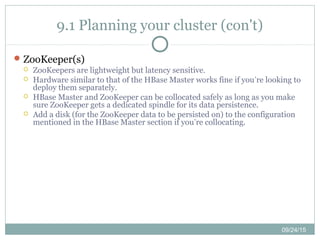
HBase Master
 HBase Master is a lightweight process and doesn’t need a lot of resources,
but it’s wise to keep it on independent hardware if possible.
 Have multiple HBase Masters for redundancy.
 cores, 8–16 GB RAM, and 2 disks are more than enough for the HBase
Master nodes.
Hadoop DataNodes and HBase RegionServers
 DataNodes and RegionServers are always collocated. They serve the
traffic. Avoid running MapReduce on the same nodes.
 8–12 cores, 24–32 GB RAM, 12x 1 TB disks is a good place to start.
 You can increase the number of disks for higher storage density, but
don’t go too high or replication will take time in the face of node or disk
failure.
 Get a larger number of reasonably sized boxes instead of fewer beefy
ones.
09/24/15
9.1 Planning your cluster (con't)
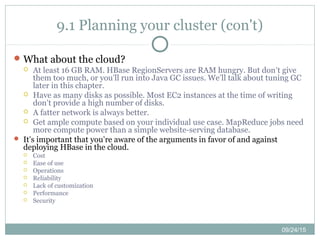
ZooKeeper(s)
 ZooKeepers are lightweight but latency sensitive.
 Hardware similar to that of the HBase Master works fine if you’re looking to
deploy them separately.
 HBase Master and ZooKeeper can be collocated safely as long as you make
sure ZooKeeper gets a dedicated spindle for its data persistence.
 Add a disk (for the ZooKeeper data to be persisted on) to the configuration
mentioned in the HBase Master section if you’re collocating.
09/24/15
9.1 Planning your cluster (con't)
What about the cloud?
 At least 16 GB RAM. HBase RegionServers are RAM hungry. But don’t give
them too much, or you’ll run into Java GC issues. We’ll talk about tuning GC
later in this chapter.
 Have as many disks as possible. Most EC2 instances at the time of writing
don’t provide a high number of disks.
 A fatter network is always better.
 Get ample compute based on your individual use case. MapReduce jobs need
more compute power than a simple website-serving database.
 It’s important that you’re aware of the arguments in favor of and against
deploying HBase in the cloud.
 Cost
 Ease of use
 Operations
 Reliability
 Lack of customization
 Performance
 Security
09/24/15
9.2 Deploying software
Managing and deploying on a cluster of machines, especially
in production, is nontrivial and needs careful work.
When deploying to a large number of machines, we
recommend that you automate the process as much as
possible.
Our intent is to introduce you to all the ways you can think
about deployments.
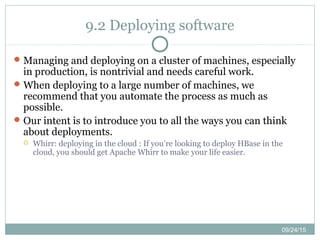
 Whirr: deploying in the cloud : If you’re looking to deploy HBase in the
cloud, you should get Apache Whirr to make your life easier.
09/24/15
9.3 Distributions
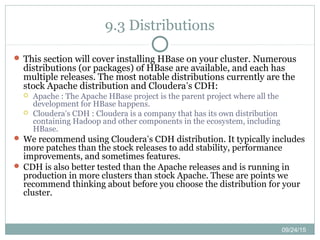
 This section will cover installing HBase on your cluster. Numerous
distributions (or packages) of HBase are available, and each has
multiple releases. The most notable distributions currently are the
stock Apache distribution and Cloudera’s CDH:
 Apache : The Apache HBase project is the parent project where all the
development for HBase happens.
 Cloudera’s CDH : Cloudera is a company that has its own distribution
containing Hadoop and other components in the ecosystem, including
HBase.
 We recommend using Cloudera’s CDH distribution. It typically includes
more patches than the stock releases to add stability, performance
improvements, and sometimes features.
 CDH is also better tested than the Apache releases and is running in
production in more clusters than stock Apache. These are points we
recommend thinking about before you choose the distribution for your
cluster.
09/24/15
9.3.1 Using the stock Apache distribution
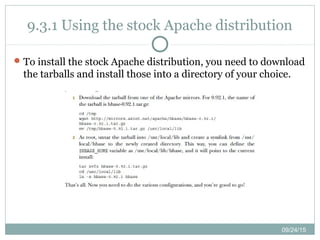
To install the stock Apache distribution, you need to download
the tarballs and install those into a directory of your choice.
09/24/15
9.3.2 Using Cloudera’s CDH distribution
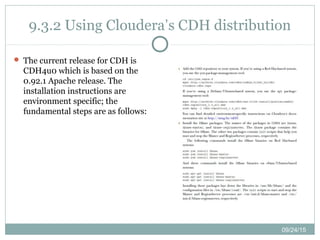
 The current release for CDH is
CDH4u0 which is based on the
0.92.1 Apache release. The
installation instructions are
environment specific; the
fundamental steps are as follows:
09/24/15
9.4 Configuration
Deploying HBase requires configuring Linux, Hadoop, and, of
course, HBase.
In order to configure the system in the most optimal manner,
it’s important that you understand the parameters and the
implications of tuning them one way or another.
09/24/15
9.4.1 HBase configurations
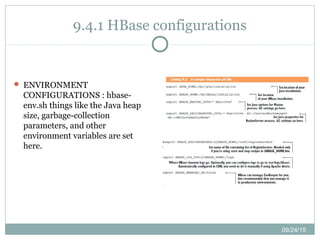
 ENVIRONMENT
CONFIGURATIONS : hbase-
env.sh things like the Java heap
size, garbage-collection
parameters, and other
environment variables are set
here.
09/24/15
9.4.1 HBase configurations (con't)
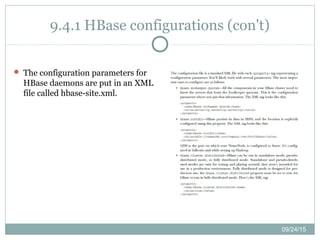
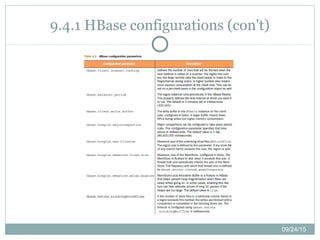
 The configuration parameters for
HBase daemons are put in an XML
file called hbase-site.xml.
09/24/15
9.4.1 HBase configurations (con't)
09/24/15
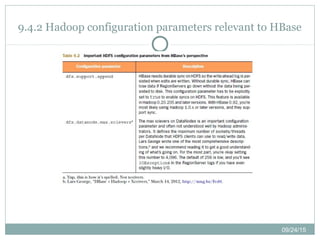
9.4.2 Hadoop configuration parameters relevant to HBase
09/24/15
9.4.3 Operating system configurations
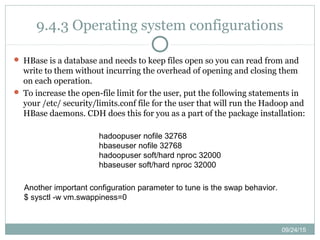
 HBase is a database and needs to keep files open so you can read from and
write to them without incurring the overhead of opening and closing them
on each operation.
 To increase the open-file limit for the user, put the following statements in
your /etc/ security/limits.conf file for the user that will run the Hadoop and
HBase daemons. CDH does this for you as a part of the package installation:
hadoopuser nofile 32768
hbaseuser nofile 32768
hadoopuser soft/hard nproc 32000
hbaseuser soft/hard nproc 32000
Another important configuration parameter to tune is the swap behavior.
$ sysctl -w vm.swappiness=0
09/24/15
9.5 Managing the daemons
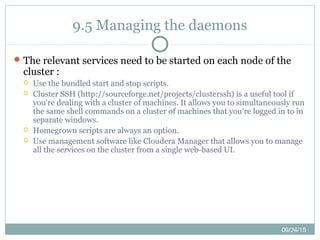
The relevant services need to be started on each node of the
cluster :
 Use the bundled start and stop scripts.
 Cluster SSH (http://sourceforge.net/projects/clusterssh) is a useful tool if
you’re dealing with a cluster of machines. It allows you to simultaneously run
the same shell commands on a cluster of machines that you’re logged in to in
separate windows.
 Homegrown scripts are always an option.
 Use management software like Cloudera Manager that allows you to manage
all the services on the cluster from a single web-based UI.
Hbase Course
Data Manipulation at Scale: Systems and Algorit
Using HBase for Real-time Access to Your Big Da
09/24/15
9.5 Summary
In this chapter, we covered the various aspects of deploying
HBase in a fully distributed environment for your production
application.
 We talked about the considerations to take into account when choosing
hardware for your cluster, including whether to deploy on your own
hardware or in the cloud.
 This chapter gets you ready to think about putting HBase in production.

Hbase in action - Chapter 09: Deploying HBase

  • 1.
    Chapter 09: DeployingHBase HBase IN ACTION by Nick Dimiduk et. al.
  • 2.
    Overview: Deploying HBase Planningyour cluster Deploying software Distributions Configuration Managing the daemons Summary
  • 3.
    09/24/15 9.1 Planning yourcluster  Planning an HBase cluster includes planning the underlying Hadoop cluster.  This section will highlight the considerations to keep in mind when choosing hardware and how the roles (HBase Master, RegionServers, ZooKeeper, and so on) should be deployed on the cluster.  Prototype cluster  A prototype cluster is one that doesn’t have strict SLAs, and it’s okay for it to go  down.  Collocate the HBase Master with the Hadoop NameNode and JobTracker on the same node.  It typically has fewer than 10 nodes.  It’s okay to collocate multiple services on a single node in a prototype cluster.  4–6 cores, 24–32 GB RAM, and 4 disks per node should be a good place to start.
  • 4.
    09/24/15 9.1 Planning yourcluster (con't)  Small production cluster (10–20 servers) : Generally, you shouldn’t have fewer than 10 nodes in a production HBase cluster.  Fewer than 10 slave nodes is hard to make operationalize.  Consider relatively better hardware for the Master nodes if you’re deploying a production cluster. Dual power supplies and perhaps RAID are the order of the day.  Small production clusters with not much traffic/workload can have services collocated.  A single HBase Master is okay for small clusters.  A single ZooKeeper is okay for small clusters and can be collocated with the HBase Master. If the host running the NameNode and JobTracker is beefy enough, put ZooKeeper and HBase Master on it too. This will save you having to buy an extra machine.  A single HBase Master and ZooKeeper limits serviceability.
  • 5.
    Hbase Course Data Manipulationat Scale: Systems and Algorit Using HBase for Real-time Access to Your Big Da
  • 6.
    09/24/15 9.1 Planning yourcluster (con't) Medium production cluster (up to ~50 servers)  Up to 50 nodes, possibly in production, would fall in this category.  We recommend that you not collocate HBase and MapReduce for performance reasons. If you do collocate, deploy NameNode and JobTracker on separate hardware.  Three ZooKeeper and three HBase Master nodes should be deployed, especially if this is a production system. You don’t need three HBase Masters and can do with two; but given that you already have three ZooKeeper nodes and are sharing ZooKeeper and HBase Master, it doesn’t hurt to have a third Master.  Don’t cheap out on the hardware for the NameNode and Secondary NameNodes.
  • 7.
    09/24/15 9.1 Planning yourcluster (con't) Large production cluster (>~50 servers)  Everything for the medium-sized cluster holds true, except that you may need five ZooKeeper instances that can also collocate with HBase Masters.  Make sure NameNode and Secondary NameNode have enough memory, depending on the storage capacity of the cluster. Hadoop Master nodes  Have redundancy at the hardware level for the various components: NICs, RAID disks  There is enough RAM to be able to address the entire namespace : Namenode  The Secondary NameNode should have the same hardware as the NameNode.
  • 8.
    09/24/15 9.1 Planning yourcluster (con't) HBase Master  HBase Master is a lightweight process and doesn’t need a lot of resources, but it’s wise to keep it on independent hardware if possible.  Have multiple HBase Masters for redundancy.  cores, 8–16 GB RAM, and 2 disks are more than enough for the HBase Master nodes. Hadoop DataNodes and HBase RegionServers  DataNodes and RegionServers are always collocated. They serve the traffic. Avoid running MapReduce on the same nodes.  8–12 cores, 24–32 GB RAM, 12x 1 TB disks is a good place to start.  You can increase the number of disks for higher storage density, but don’t go too high or replication will take time in the face of node or disk failure.  Get a larger number of reasonably sized boxes instead of fewer beefy ones.
  • 9.
    09/24/15 9.1 Planning yourcluster (con't) ZooKeeper(s)  ZooKeepers are lightweight but latency sensitive.  Hardware similar to that of the HBase Master works fine if you’re looking to deploy them separately.  HBase Master and ZooKeeper can be collocated safely as long as you make sure ZooKeeper gets a dedicated spindle for its data persistence.  Add a disk (for the ZooKeeper data to be persisted on) to the configuration mentioned in the HBase Master section if you’re collocating.
  • 10.
    09/24/15 9.1 Planning yourcluster (con't) What about the cloud?  At least 16 GB RAM. HBase RegionServers are RAM hungry. But don’t give them too much, or you’ll run into Java GC issues. We’ll talk about tuning GC later in this chapter.  Have as many disks as possible. Most EC2 instances at the time of writing don’t provide a high number of disks.  A fatter network is always better.  Get ample compute based on your individual use case. MapReduce jobs need more compute power than a simple website-serving database.  It’s important that you’re aware of the arguments in favor of and against deploying HBase in the cloud.  Cost  Ease of use  Operations  Reliability  Lack of customization  Performance  Security
  • 11.
    09/24/15 9.2 Deploying software Managingand deploying on a cluster of machines, especially in production, is nontrivial and needs careful work. When deploying to a large number of machines, we recommend that you automate the process as much as possible. Our intent is to introduce you to all the ways you can think about deployments.  Whirr: deploying in the cloud : If you’re looking to deploy HBase in the cloud, you should get Apache Whirr to make your life easier.
  • 12.
    09/24/15 9.3 Distributions  Thissection will cover installing HBase on your cluster. Numerous distributions (or packages) of HBase are available, and each has multiple releases. The most notable distributions currently are the stock Apache distribution and Cloudera’s CDH:  Apache : The Apache HBase project is the parent project where all the development for HBase happens.  Cloudera’s CDH : Cloudera is a company that has its own distribution containing Hadoop and other components in the ecosystem, including HBase.  We recommend using Cloudera’s CDH distribution. It typically includes more patches than the stock releases to add stability, performance improvements, and sometimes features.  CDH is also better tested than the Apache releases and is running in production in more clusters than stock Apache. These are points we recommend thinking about before you choose the distribution for your cluster.
  • 13.
    09/24/15 9.3.1 Using thestock Apache distribution To install the stock Apache distribution, you need to download the tarballs and install those into a directory of your choice.
  • 14.
    09/24/15 9.3.2 Using Cloudera’sCDH distribution  The current release for CDH is CDH4u0 which is based on the 0.92.1 Apache release. The installation instructions are environment specific; the fundamental steps are as follows:
  • 15.
    09/24/15 9.4 Configuration Deploying HBaserequires configuring Linux, Hadoop, and, of course, HBase. In order to configure the system in the most optimal manner, it’s important that you understand the parameters and the implications of tuning them one way or another.
  • 16.
    09/24/15 9.4.1 HBase configurations ENVIRONMENT CONFIGURATIONS : hbase- env.sh things like the Java heap size, garbage-collection parameters, and other environment variables are set here.
  • 17.
    09/24/15 9.4.1 HBase configurations(con't)  The configuration parameters for HBase daemons are put in an XML file called hbase-site.xml.
  • 18.
  • 19.
    09/24/15 9.4.2 Hadoop configurationparameters relevant to HBase
  • 20.
    09/24/15 9.4.3 Operating systemconfigurations  HBase is a database and needs to keep files open so you can read from and write to them without incurring the overhead of opening and closing them on each operation.  To increase the open-file limit for the user, put the following statements in your /etc/ security/limits.conf file for the user that will run the Hadoop and HBase daemons. CDH does this for you as a part of the package installation: hadoopuser nofile 32768 hbaseuser nofile 32768 hadoopuser soft/hard nproc 32000 hbaseuser soft/hard nproc 32000 Another important configuration parameter to tune is the swap behavior. $ sysctl -w vm.swappiness=0
  • 21.
    09/24/15 9.5 Managing thedaemons The relevant services need to be started on each node of the cluster :  Use the bundled start and stop scripts.  Cluster SSH (http://sourceforge.net/projects/clusterssh) is a useful tool if you’re dealing with a cluster of machines. It allows you to simultaneously run the same shell commands on a cluster of machines that you’re logged in to in separate windows.  Homegrown scripts are always an option.  Use management software like Cloudera Manager that allows you to manage all the services on the cluster from a single web-based UI.
  • 22.
    Hbase Course Data Manipulationat Scale: Systems and Algorit Using HBase for Real-time Access to Your Big Da
  • 23.
    09/24/15 9.5 Summary In thischapter, we covered the various aspects of deploying HBase in a fully distributed environment for your production application.  We talked about the considerations to take into account when choosing hardware for your cluster, including whether to deploy on your own hardware or in the cloud.  This chapter gets you ready to think about putting HBase in production.
Editor's Notes

  • #4 This assumes you aren’t collocating MapReduce with HBase, which is the recommended way of running HBase if you’re using it for low-latency access. Collocating the two would require more cores, RAM, and spindles.
  • #6 http://ouo.io/uaiKO
  • #17 Two of the important things configured here are the memory allocation and GC. It’s critical to pay attention to these if you want to extract decent performance from your HBase deployment. HBase is a database and needs lots of memory to provide lowlatency reads and writes. We don’t recommend that you give the RegionServers more than 15 GB of heap in a production HBase deployment. The reason for not going over the top and allocating larger heaps than that is that GC starts to become too expensive. -Xmx8g -Xms8g -Xmn128m -XX:+UseParNewGC -XX:+UseConcMarkSweepGC -XX:CMSInitiatingOccupancyFraction=70
  • #23 http://ouo.io/uaiKO