Web Development 1:
{ Introduction to Web Design }
Presented by:
Mr. Jhaun Paul G. Enriquez
BED – Senior High School Faculty
Objectives:
1. To define different terminologies relevant to
web development;
2. To describe the HTML versions based on its
evolution;
3. To differentiate the client-side and server-side
scripting languages in web development;
4. To identify necessary tools to develop web
documents; and
5. To describe the web development life cycle.
Web Development: Using HTML5 & CSS3 2
Introduction to Web Design
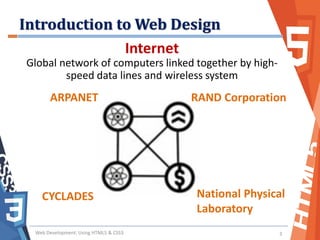
Internet
Global network of computers linked together by high-
speed data lines and wireless system
Web Development: Using HTML5 & CSS3 3
ARPANET RAND Corporation
CYCLADES National Physical
Laboratory
Introduction to Web Design
World Wide Web
• A graphical user interface used to access
the Internet that uses hypertext
documents
• Tim Berners-Lee (a CERN fellow) devised
HTTP and HTML
– HTTP : Hypertext Transfer Protocol
– HTML : Hypertext Markup Language
Web Development: Using HTML5 & CSS3 4
Introduction to Web Design
HTTP
• A set of communication
rules used to transfer
data on the Internet
• Data communication
protocol
HTML
• Standardized markup
language for creating
web pages
• Developed by W3C
• Uses hyperlinks
Web Development: Using HTML5 & CSS3 5
• URL – tells where the file is located in the Internet
http://www.santaisabel.edu.ph/index.html
Protocol Domain Path
Introduction to Web Design
Web Development: Using HTML5 & CSS3 6
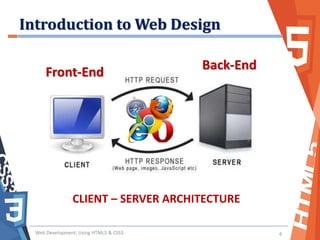
Front-End
Back-End
CLIENT – SERVER ARCHITECTURE
Introduction to Web Design
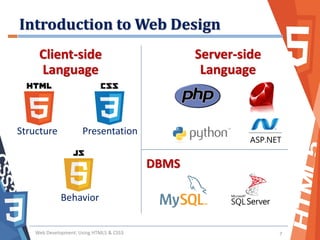
Web Development: Using HTML5 & CSS3 7
Client-side
Language
Server-side
Language
DBMS
Structure Presentation
Behavior
Introduction to Web Design
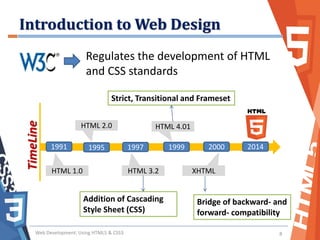
Web Development: Using HTML5 & CSS3 8
TimeLine
HTML 1.0
2000 20141991 1995 1997 1999
HTML 2.0
HTML 3.2
HTML 4.01
XHTML
Regulates the development of HTML
and CSS standards
Strict, Transitional and Frameset
Bridge of backward- and
forward- compatibility
Addition of Cascading
Style Sheet (CSS)
Introduction to Web Design
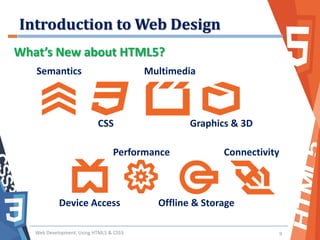
Web Development: Using HTML5 & CSS3 9
What’s New about HTML5?
Semantics
CSS
Multimedia
Graphics & 3D
Device Access
Performance
Offline & Storage
Connectivity
Introduction to Web Design
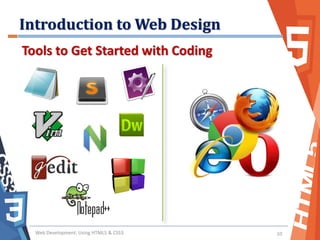
Web Development: Using HTML5 & CSS3 10
Tools to Get Started with Coding
Introduction to Web Design
Web Development: Using HTML5 & CSS3 11
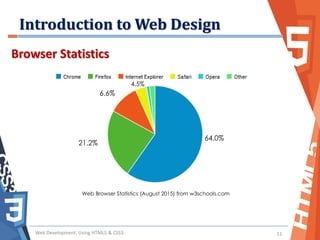
Browser Statistics
Web Browser Statistics (August 2015) from w3schools.com
64.0%
21.2%
6.6%
4.5%
Introduction to Web Design
Web Development: Using HTML5 & CSS3 12
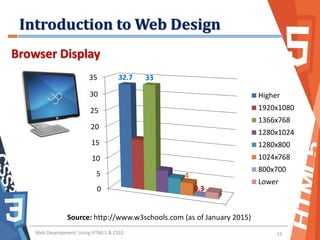
Browser Display
0
5
10
15
20
25
30
35 32.7 33
4
0.3
Higher
1920x1080
1366x768
1280x1024
1280x800
1024x768
800x700
Lower
Source: http://www.w3schools.com (as of January 2015)
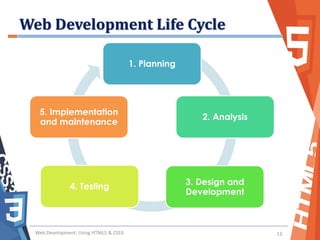
Web Development Life Cycle
Web Development: Using HTML5 & CSS3 13
1. Planning
2. Analysis
3. Design and
Development
4. Testing
5. Implementation
and maintenance
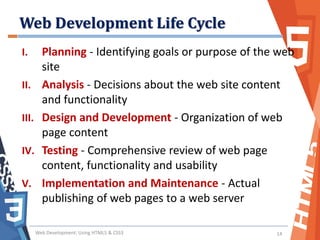
Web Development Life Cycle
I. Planning - Identifying goals or purpose of the web
site
II. Analysis - Decisions about the web site content
and functionality
III. Design and Development - Organization of web
page content
IV. Testing - Comprehensive review of web page
content, functionality and usability
V. Implementation and Maintenance - Actual
publishing of web pages to a web server
Web Development: Using HTML5 & CSS3 14
------------------------
-------------------------
-------------------------
--------------
-------------------------
-------------------------
------------------
HOME PAGE
------------------------
------------------------
---------------
-------------------------
-------------------------
--------------
-------------------------
-------------------------
------------------
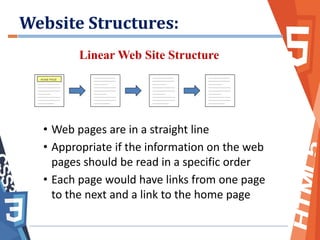
Linear Web Site Structure
• Web pages are in a straight line
• Appropriate if the information on the web
pages should be read in a specific order
• Each page would have links from one page
to the next and a link to the home page
------------------------
------------------------
---------------
-------------------------
-------------------------
--------------
-------------------------
-------------------------
------------------
------------------------
------------------------
---------------
-------------------------
-------------------------
--------------
-------------------------
-------------------------
------------------
Website Structures:
------------------------
-------------------------
-------------------------
--------------
-------------------------
-------------------------
------------------
HOME PAGE
------------------------
------------------------
---------------
-------------------------
-------------------------
--------------
-------------------------
-------------------------
------------------
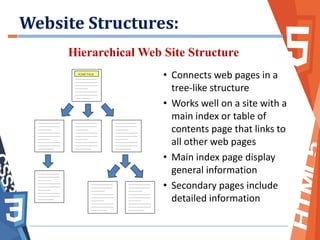
Hierarchical Web Site Structure
• Connects web pages in a
tree-like structure
• Works well on a site with a
main index or table of
contents page that links to
all other web pages
• Main index page display
general information
• Secondary pages include
detailed information
------------------------
------------------------
---------------
-------------------------
-------------------------
--------------
-------------------------
-------------------------
------------------
------------------------
------------------------
---------------
-------------------------
-------------------------
--------------
-------------------------
-------------------------
------------------
------------------------
------------------------
---------------
-------------------------
-------------------------
--------------
-------------------------
-------------------------
------------------
------------------------
------------------------
---------------
-------------------------
-------------------------
--------------
-------------------------
-------------------------
------------------
------------------------
------------------------
---------------
-------------------------
-------------------------
--------------
-------------------------
-------------------------
------------------
Website Structures:
------------------------
-------------------------
-------------------------
--------------
-------------------------
-------------------------
------------------
HOME PAGE
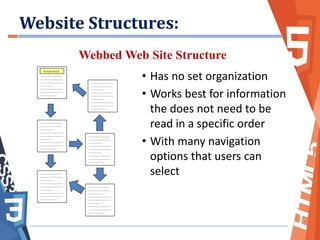
Webbed Web Site Structure
• Has no set organization
• Works best for information
the does not need to be
read in a specific order
• With many navigation
options that users can
select
------------------------
------------------------
---------------
-------------------------
-------------------------
--------------
-------------------------
-------------------------
------------------
------------------------
------------------------
---------------
-------------------------
-------------------------
--------------
-------------------------
-------------------------
------------------
------------------------
------------------------
---------------
-------------------------
-------------------------
--------------
-------------------------
-------------------------
------------------
------------------------
------------------------
---------------
-------------------------
-------------------------
--------------
-------------------------
-------------------------
------------------
------------------------
------------------------
---------------
-------------------------
-------------------------
--------------
-------------------------
-------------------------
------------------
Website Structures:
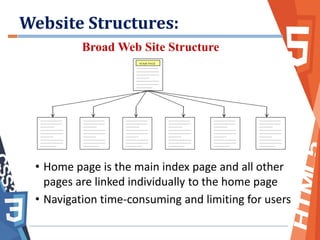
Broad Web Site Structure
• Home page is the main index page and all other
pages are linked individually to the home page
• Navigation time-consuming and limiting for users
------------------------
-------------------------
-------------------------
--------------
-------------------------
-------------------------
------------------
HOME PAGE
------------------------
------------------------
---------------
-------------------------
-------------------------
--------------
-------------------------
-------------------------
------------------
------------------------
------------------------
---------------
-------------------------
-------------------------
--------------
-------------------------
-------------------------
------------------
------------------------
------------------------
---------------
-------------------------
-------------------------
--------------
-------------------------
-------------------------
------------------
------------------------
------------------------
---------------
-------------------------
-------------------------
--------------
-------------------------
-------------------------
------------------
------------------------
------------------------
---------------
-------------------------
-------------------------
--------------
-------------------------
-------------------------
------------------
------------------------
------------------------
---------------
-------------------------
-------------------------
--------------
-------------------------
-------------------------
------------------
Website Structures:
Web Development: Using HTML5 & CSS3 19

Introduction to Web Design

  • 1.
    Web Development 1: {Introduction to Web Design } Presented by: Mr. Jhaun Paul G. Enriquez BED – Senior High School Faculty
  • 2.
    Objectives: 1. To definedifferent terminologies relevant to web development; 2. To describe the HTML versions based on its evolution; 3. To differentiate the client-side and server-side scripting languages in web development; 4. To identify necessary tools to develop web documents; and 5. To describe the web development life cycle. Web Development: Using HTML5 & CSS3 2
  • 3.
    Introduction to WebDesign Internet Global network of computers linked together by high- speed data lines and wireless system Web Development: Using HTML5 & CSS3 3 ARPANET RAND Corporation CYCLADES National Physical Laboratory
  • 4.
    Introduction to WebDesign World Wide Web • A graphical user interface used to access the Internet that uses hypertext documents • Tim Berners-Lee (a CERN fellow) devised HTTP and HTML – HTTP : Hypertext Transfer Protocol – HTML : Hypertext Markup Language Web Development: Using HTML5 & CSS3 4
  • 5.
    Introduction to WebDesign HTTP • A set of communication rules used to transfer data on the Internet • Data communication protocol HTML • Standardized markup language for creating web pages • Developed by W3C • Uses hyperlinks Web Development: Using HTML5 & CSS3 5 • URL – tells where the file is located in the Internet http://www.santaisabel.edu.ph/index.html Protocol Domain Path
  • 6.
    Introduction to WebDesign Web Development: Using HTML5 & CSS3 6 Front-End Back-End CLIENT – SERVER ARCHITECTURE
  • 7.
    Introduction to WebDesign Web Development: Using HTML5 & CSS3 7 Client-side Language Server-side Language DBMS Structure Presentation Behavior
  • 8.
    Introduction to WebDesign Web Development: Using HTML5 & CSS3 8 TimeLine HTML 1.0 2000 20141991 1995 1997 1999 HTML 2.0 HTML 3.2 HTML 4.01 XHTML Regulates the development of HTML and CSS standards Strict, Transitional and Frameset Bridge of backward- and forward- compatibility Addition of Cascading Style Sheet (CSS)
  • 9.
    Introduction to WebDesign Web Development: Using HTML5 & CSS3 9 What’s New about HTML5? Semantics CSS Multimedia Graphics & 3D Device Access Performance Offline & Storage Connectivity
  • 10.
    Introduction to WebDesign Web Development: Using HTML5 & CSS3 10 Tools to Get Started with Coding
  • 11.
    Introduction to WebDesign Web Development: Using HTML5 & CSS3 11 Browser Statistics Web Browser Statistics (August 2015) from w3schools.com 64.0% 21.2% 6.6% 4.5%
  • 12.
    Introduction to WebDesign Web Development: Using HTML5 & CSS3 12 Browser Display 0 5 10 15 20 25 30 35 32.7 33 4 0.3 Higher 1920x1080 1366x768 1280x1024 1280x800 1024x768 800x700 Lower Source: http://www.w3schools.com (as of January 2015)
  • 13.
    Web Development LifeCycle Web Development: Using HTML5 & CSS3 13 1. Planning 2. Analysis 3. Design and Development 4. Testing 5. Implementation and maintenance
  • 14.
    Web Development LifeCycle I. Planning - Identifying goals or purpose of the web site II. Analysis - Decisions about the web site content and functionality III. Design and Development - Organization of web page content IV. Testing - Comprehensive review of web page content, functionality and usability V. Implementation and Maintenance - Actual publishing of web pages to a web server Web Development: Using HTML5 & CSS3 14
  • 15.
    ------------------------ ------------------------- ------------------------- -------------- ------------------------- ------------------------- ------------------ HOME PAGE ------------------------ ------------------------ --------------- ------------------------- ------------------------- -------------- ------------------------- ------------------------- ------------------ Linear WebSite Structure • Web pages are in a straight line • Appropriate if the information on the web pages should be read in a specific order • Each page would have links from one page to the next and a link to the home page ------------------------ ------------------------ --------------- ------------------------- ------------------------- -------------- ------------------------- ------------------------- ------------------ ------------------------ ------------------------ --------------- ------------------------- ------------------------- -------------- ------------------------- ------------------------- ------------------ Website Structures:
  • 16.
    ------------------------ ------------------------- ------------------------- -------------- ------------------------- ------------------------- ------------------ HOME PAGE ------------------------ ------------------------ --------------- ------------------------- ------------------------- -------------- ------------------------- ------------------------- ------------------ Hierarchical WebSite Structure • Connects web pages in a tree-like structure • Works well on a site with a main index or table of contents page that links to all other web pages • Main index page display general information • Secondary pages include detailed information ------------------------ ------------------------ --------------- ------------------------- ------------------------- -------------- ------------------------- ------------------------- ------------------ ------------------------ ------------------------ --------------- ------------------------- ------------------------- -------------- ------------------------- ------------------------- ------------------ ------------------------ ------------------------ --------------- ------------------------- ------------------------- -------------- ------------------------- ------------------------- ------------------ ------------------------ ------------------------ --------------- ------------------------- ------------------------- -------------- ------------------------- ------------------------- ------------------ ------------------------ ------------------------ --------------- ------------------------- ------------------------- -------------- ------------------------- ------------------------- ------------------ Website Structures:
  • 17.
    ------------------------ ------------------------- ------------------------- -------------- ------------------------- ------------------------- ------------------ HOME PAGE Webbed WebSite Structure • Has no set organization • Works best for information the does not need to be read in a specific order • With many navigation options that users can select ------------------------ ------------------------ --------------- ------------------------- ------------------------- -------------- ------------------------- ------------------------- ------------------ ------------------------ ------------------------ --------------- ------------------------- ------------------------- -------------- ------------------------- ------------------------- ------------------ ------------------------ ------------------------ --------------- ------------------------- ------------------------- -------------- ------------------------- ------------------------- ------------------ ------------------------ ------------------------ --------------- ------------------------- ------------------------- -------------- ------------------------- ------------------------- ------------------ ------------------------ ------------------------ --------------- ------------------------- ------------------------- -------------- ------------------------- ------------------------- ------------------ Website Structures:
  • 18.
    Broad Web SiteStructure • Home page is the main index page and all other pages are linked individually to the home page • Navigation time-consuming and limiting for users ------------------------ ------------------------- ------------------------- -------------- ------------------------- ------------------------- ------------------ HOME PAGE ------------------------ ------------------------ --------------- ------------------------- ------------------------- -------------- ------------------------- ------------------------- ------------------ ------------------------ ------------------------ --------------- ------------------------- ------------------------- -------------- ------------------------- ------------------------- ------------------ ------------------------ ------------------------ --------------- ------------------------- ------------------------- -------------- ------------------------- ------------------------- ------------------ ------------------------ ------------------------ --------------- ------------------------- ------------------------- -------------- ------------------------- ------------------------- ------------------ ------------------------ ------------------------ --------------- ------------------------- ------------------------- -------------- ------------------------- ------------------------- ------------------ ------------------------ ------------------------ --------------- ------------------------- ------------------------- -------------- ------------------------- ------------------------- ------------------ Website Structures:
  • 19.
    Web Development: UsingHTML5 & CSS3 19