Introduction to Structured
Streaming
Next Generation Streaming API for Spark
https://github.com/phatak-dev/spark2.0-examples/tree/master/src/main/scala/co
m/madhukaraphatak/examples/sparktwo/streaming
● Madhukara Phatak
● Big data consultant and
trainer at datamantra.io
● Consult in Hadoop, Spark
and Scala
● www.madhukaraphatak.com
Agenda
● Evolution in Stream Processing
● Drawbacks of DStream API
● Introduction to Structured Streaming
● Understanding Source and Sinks
● Stateful stream applications
● Handling State recovery
● Joins
● Window API
Evolution of Stream Processing
Stream as Fast Batch Processing
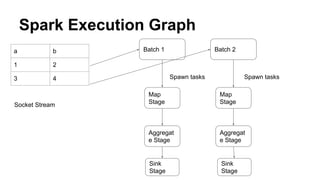
● Stream processing viewed as low latency batch
processing
● Storm took stateless per message and spark took
minibatch approach
● Focused on mostly stateless / limited state workloads
● Reconciled using Lamda architecture
● Less features and less powerful API compared to the
batch system
● Ex : Storm, Spark DStream API
Drawbacks of Stream as Fast Batch
● Handling state for long time and efficiently is a
challenge in these systems
● Lambda architecture forces the duplication of efforts in
stream and batch
● As the API is limited, doing any kind of complex
operation takes lot of effort
● No clear abstractions for handling stream specific
interactions like late events, event time, state recovery
etc
Stream as the default abstraction
● Stream becomes the default abstraction on which both
stream processing and batch processing is built
● Batch processing is looked at as bounded stream
processing
● Supports most of the advanced stream processing
constructs out of the box
● Strong state API’s
● In par with functionalities of Batch API
● Ex : Flink, Beam
Challenges with Stream as default
● Stream as abstraction makes it hard to combine stream
with batch data
● Stream abstraction works well for piping based API’s
like map, flatMap but challenging for SQL
● Stream abstraction also sometimes make it difficult to
map it to structured world as in the platform level it’s
viewed as byte stream
● There are efforts like flink SQL but we have to wait how
it turns out
Drawbacks of DStream API
Tied to Minibatch execution
● DStream API looks stream as fast batch processing in
both API and runtime level
● Batch time integral part of the API which makes it
minibatch only API
● Batch time dicates how different abstractions of API like
window and state will behave
RDDs based API
● DStream API is based on RDD API which is deprecated
for user API’s in Spark 2.0
● As DStream API uses RDD, it doesn’t get benefit of the
all runtime improvements happened in spark sql
● Difficult to combine in batch API’s as they use Dataset
abstraction
● Running SQL queries over stream are awkward and not
straight forward
Limited support for Time abstraction
● Only supports the concept of Processing time
● No support for ingestion time and event time
● As batch time is defined at application level, there is no
framework level construct to handle late events
● Windowing other than time, is not possible
Introduction to Structured Streaming
Stream as the infinite table
● In structured streaming, a stream is modeled as an
infinite table aka infinite Dataset
● As we are using structured abstraction, it’s called
structured streaming API
● All input sources, stream transformations and output
sinks modeled as Dataset
● As Dataset is underlying abstraction, stream
transformations are represented using SQL and Dataset
DSL
Advantage of Stream as infinite table
● Structured data analysis is first class not layered over
the unstructured runtime
● Easy to combine with batch data as both use same
Dataset abstraction
● Can use full power of SQL language to express stateful
stream operations
● Benefits from SQL optimisations learnt over decades
● Easy to learn and maintain
Source and Sinks API
Reading from Socket
● Socket is built in source for structured streaming
● As with DStream API, we can read socket by specifying
hostname and port
● Returns a DataFrame with single column called value
● Using console as the sink to write the output
● Once we have setup source and sink, we use query
interface to start the execution
● Ex : SocketReadExample
Questions from DStream users
● Where is batch time? Or how frequently this is going to
run?
● awaitTermination is on query not on session? Does
that mean we can have multiple queries running
parallely?
● We didn't specify local[2], how does that work?
● As this program using Dataframe, how does the schema
inference works?
Flink vs Spark stream processing
● Spark run as soon as possible may sound like per event
processing but it’s not
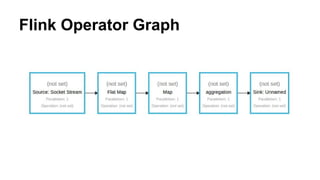
● In flink, all the operations like map / flatMap will be
running as processes and data will be streamed through
it
● But in spark asap, tasks are launched for given batch
and destroyed once it’s completed
● So spark still does minibatch but with much lower
latency.
Flink Operator Graph
Spark Execution Graph
a b
1 2
3 4
Batch 1
Map
Stage
Aggregat
e Stage
Spawn tasks
Batch 2
Map
Stage
Aggregat
e Stage
Sink
Stage
Sink
Stage
Spawn tasks
Socket Stream
Independence from Execution Model
● Even though current structured streaming runtime is
minibatch, API doesn’t dictate the nature of runtime
● Structured Streaming API is built in such a way that
query execution model can be change in future
● Already plan for continuous processing mode to bring
structured streaming in par with flink per message
semantics
● https://issues.apache.org/jira/browse/SPARK-20928
Socket Minibatch
● In last example, we used asap trigger.
● We can mimic the DStream mini batch behaviour by
changing the trigger API
● Trigger is specified for the query, as it determines the
frequency for query execution
● In this example, we create a 5 second trigger, which will
create a batch for every 5 seconds
● Ex : SocketMiniBatchExample
Word count on Socket Stream
● Once we know how to read from a source, we can do
operations on the same
● In this example, we will do word count using Dataframe
and Dataset API’s
● We will be using Dataset API’s for data
cleanup/preparation and Dataframe API to define the
aggregations
● Ex : SocketWordCount
Understanding State
Stateful operations
● In last example, we observed that spark remembers the
state across batches
● In structured streaming, all aggregations are stateful
● Developer needs to choose output mode complete so
that aggregations are always up to date
● Spark internally uses the both disk and memory state
store for remembering state
● No more complicated state management in application
code
Understanding output mode
● Output mode defines what’s the dataframe seen by the
sink after each batch
● APPEND signifies sink only sees the records from last
batch
● UPDATE signifies sink sees all the changed records
across the batches
● COMPLETE signifies sink sess complete output for
every batch
● Depending on operations, we need to choose output
mode
Stateless aggregations
● Most of the stream applications benefit from default
statefulness
● But sometime we need aggregations done on batch
data rather on complete data
● Helpful for porting existing DStream code to structured
streaming code
● Spark exposes flatMapGroups API to define the
stateless aggregations
Stateless wordcount
● In this example, we will define word count on a batch
data
● Batch is defined for 5 seconds.
● Rather than using groupBy and count API’s we will use
groupByKey and flatMapGroups API
● flatMapGroups defines operations to be done on each
group
● We will be using output mode APPEND
● Ex : StatelessWordCount
Limitations of flatMapGroups
● flatMapGroups will be slower than groupBy and count
as it doesn’t support partial aggregations
● flatMapGroups can be used only with output mode
APPEND as output size of the function is unbounded
● flatMapGroups needs grouping done using Dataset API
not using Dataframe API
Checkpoint and state recovery
● Building stateful applications comes with additional
responsibility of checkpointing the state for safe
recovery
● Checkpointing is achieved by writing state of the
application to a HDFS compatible storage
● Checkpointing is specific for queries. So you can mix
and match stateless and stateful queries in same
application
● Ex : RecoverableAggregation
Working with Files
File streams
● Structured Streaming has excellent support for the file
based streams
● Supports file types like csv, json,parquet out of the box
● Schema inference is not supported
● Picking up new files on arrival is same as DStream file
stream API
● Ex : FileStreamExample
Joins with static data
● As Dataset is common abstraction across batch and
stream API’s , we can easily enrich structured stream
with static data
● As both have schema built in, spark can use the catalyst
optimiser to optimise joins between files and streams
● In our example,we will be enriching sales stream with
customer data
● Ex : StreamJoin
References
● http://blog.madhukaraphatak.com/categories/introductio
n-structured-streaming/
● https://databricks.com/blog/2017/01/19/real-time-stream
ing-etl-structured-streaming-apache-spark-2-1.html
● https://flink.apache.org/news/2016/05/24/stream-sql.htm
l

Introduction to Structured streaming

  • 1.
    Introduction to Structured Streaming NextGeneration Streaming API for Spark https://github.com/phatak-dev/spark2.0-examples/tree/master/src/main/scala/co m/madhukaraphatak/examples/sparktwo/streaming
  • 2.
    ● Madhukara Phatak ●Big data consultant and trainer at datamantra.io ● Consult in Hadoop, Spark and Scala ● www.madhukaraphatak.com
  • 3.
    Agenda ● Evolution inStream Processing ● Drawbacks of DStream API ● Introduction to Structured Streaming ● Understanding Source and Sinks ● Stateful stream applications ● Handling State recovery ● Joins ● Window API
  • 4.
  • 5.
    Stream as FastBatch Processing ● Stream processing viewed as low latency batch processing ● Storm took stateless per message and spark took minibatch approach ● Focused on mostly stateless / limited state workloads ● Reconciled using Lamda architecture ● Less features and less powerful API compared to the batch system ● Ex : Storm, Spark DStream API
  • 6.
    Drawbacks of Streamas Fast Batch ● Handling state for long time and efficiently is a challenge in these systems ● Lambda architecture forces the duplication of efforts in stream and batch ● As the API is limited, doing any kind of complex operation takes lot of effort ● No clear abstractions for handling stream specific interactions like late events, event time, state recovery etc
  • 7.
    Stream as thedefault abstraction ● Stream becomes the default abstraction on which both stream processing and batch processing is built ● Batch processing is looked at as bounded stream processing ● Supports most of the advanced stream processing constructs out of the box ● Strong state API’s ● In par with functionalities of Batch API ● Ex : Flink, Beam
  • 8.
    Challenges with Streamas default ● Stream as abstraction makes it hard to combine stream with batch data ● Stream abstraction works well for piping based API’s like map, flatMap but challenging for SQL ● Stream abstraction also sometimes make it difficult to map it to structured world as in the platform level it’s viewed as byte stream ● There are efforts like flink SQL but we have to wait how it turns out
  • 9.
  • 10.
    Tied to Minibatchexecution ● DStream API looks stream as fast batch processing in both API and runtime level ● Batch time integral part of the API which makes it minibatch only API ● Batch time dicates how different abstractions of API like window and state will behave
  • 11.
    RDDs based API ●DStream API is based on RDD API which is deprecated for user API’s in Spark 2.0 ● As DStream API uses RDD, it doesn’t get benefit of the all runtime improvements happened in spark sql ● Difficult to combine in batch API’s as they use Dataset abstraction ● Running SQL queries over stream are awkward and not straight forward
  • 12.
    Limited support forTime abstraction ● Only supports the concept of Processing time ● No support for ingestion time and event time ● As batch time is defined at application level, there is no framework level construct to handle late events ● Windowing other than time, is not possible
  • 13.
  • 14.
    Stream as theinfinite table ● In structured streaming, a stream is modeled as an infinite table aka infinite Dataset ● As we are using structured abstraction, it’s called structured streaming API ● All input sources, stream transformations and output sinks modeled as Dataset ● As Dataset is underlying abstraction, stream transformations are represented using SQL and Dataset DSL
  • 15.
    Advantage of Streamas infinite table ● Structured data analysis is first class not layered over the unstructured runtime ● Easy to combine with batch data as both use same Dataset abstraction ● Can use full power of SQL language to express stateful stream operations ● Benefits from SQL optimisations learnt over decades ● Easy to learn and maintain
  • 16.
  • 17.
    Reading from Socket ●Socket is built in source for structured streaming ● As with DStream API, we can read socket by specifying hostname and port ● Returns a DataFrame with single column called value ● Using console as the sink to write the output ● Once we have setup source and sink, we use query interface to start the execution ● Ex : SocketReadExample
  • 18.
    Questions from DStreamusers ● Where is batch time? Or how frequently this is going to run? ● awaitTermination is on query not on session? Does that mean we can have multiple queries running parallely? ● We didn't specify local[2], how does that work? ● As this program using Dataframe, how does the schema inference works?
  • 19.
    Flink vs Sparkstream processing ● Spark run as soon as possible may sound like per event processing but it’s not ● In flink, all the operations like map / flatMap will be running as processes and data will be streamed through it ● But in spark asap, tasks are launched for given batch and destroyed once it’s completed ● So spark still does minibatch but with much lower latency.
  • 20.
  • 21.
    Spark Execution Graph ab 1 2 3 4 Batch 1 Map Stage Aggregat e Stage Spawn tasks Batch 2 Map Stage Aggregat e Stage Sink Stage Sink Stage Spawn tasks Socket Stream
  • 22.
    Independence from ExecutionModel ● Even though current structured streaming runtime is minibatch, API doesn’t dictate the nature of runtime ● Structured Streaming API is built in such a way that query execution model can be change in future ● Already plan for continuous processing mode to bring structured streaming in par with flink per message semantics ● https://issues.apache.org/jira/browse/SPARK-20928
  • 23.
    Socket Minibatch ● Inlast example, we used asap trigger. ● We can mimic the DStream mini batch behaviour by changing the trigger API ● Trigger is specified for the query, as it determines the frequency for query execution ● In this example, we create a 5 second trigger, which will create a batch for every 5 seconds ● Ex : SocketMiniBatchExample
  • 24.
    Word count onSocket Stream ● Once we know how to read from a source, we can do operations on the same ● In this example, we will do word count using Dataframe and Dataset API’s ● We will be using Dataset API’s for data cleanup/preparation and Dataframe API to define the aggregations ● Ex : SocketWordCount
  • 25.
  • 26.
    Stateful operations ● Inlast example, we observed that spark remembers the state across batches ● In structured streaming, all aggregations are stateful ● Developer needs to choose output mode complete so that aggregations are always up to date ● Spark internally uses the both disk and memory state store for remembering state ● No more complicated state management in application code
  • 27.
    Understanding output mode ●Output mode defines what’s the dataframe seen by the sink after each batch ● APPEND signifies sink only sees the records from last batch ● UPDATE signifies sink sees all the changed records across the batches ● COMPLETE signifies sink sess complete output for every batch ● Depending on operations, we need to choose output mode
  • 28.
    Stateless aggregations ● Mostof the stream applications benefit from default statefulness ● But sometime we need aggregations done on batch data rather on complete data ● Helpful for porting existing DStream code to structured streaming code ● Spark exposes flatMapGroups API to define the stateless aggregations
  • 29.
    Stateless wordcount ● Inthis example, we will define word count on a batch data ● Batch is defined for 5 seconds. ● Rather than using groupBy and count API’s we will use groupByKey and flatMapGroups API ● flatMapGroups defines operations to be done on each group ● We will be using output mode APPEND ● Ex : StatelessWordCount
  • 30.
    Limitations of flatMapGroups ●flatMapGroups will be slower than groupBy and count as it doesn’t support partial aggregations ● flatMapGroups can be used only with output mode APPEND as output size of the function is unbounded ● flatMapGroups needs grouping done using Dataset API not using Dataframe API
  • 31.
    Checkpoint and staterecovery ● Building stateful applications comes with additional responsibility of checkpointing the state for safe recovery ● Checkpointing is achieved by writing state of the application to a HDFS compatible storage ● Checkpointing is specific for queries. So you can mix and match stateless and stateful queries in same application ● Ex : RecoverableAggregation
  • 32.
  • 33.
    File streams ● StructuredStreaming has excellent support for the file based streams ● Supports file types like csv, json,parquet out of the box ● Schema inference is not supported ● Picking up new files on arrival is same as DStream file stream API ● Ex : FileStreamExample
  • 34.
    Joins with staticdata ● As Dataset is common abstraction across batch and stream API’s , we can easily enrich structured stream with static data ● As both have schema built in, spark can use the catalyst optimiser to optimise joins between files and streams ● In our example,we will be enriching sales stream with customer data ● Ex : StreamJoin
  • 35.