Introduction to Ruby on Rails 
(aka: Rails for you) 
Go Frendi Gunawan
About Me 
● Go Frendi Gunawan 
● Developer of No-CMS and Kokoropy 
● Lecturer at STIKI Malang 
● Starting a startup business 
● http://gofrendiasgard.github.io
Ruby 
● A fully OOP programming language 
● Created by Yukihiro Matsumoto (Matz) 
● Influenced by Python, Perl, dan Java 
● Easy to write 
● A bit hard to read 
● Easy and fun to learn (http://tryruby.org) 
● Has interactive console called “irb” 
● Has package control library called “gem”
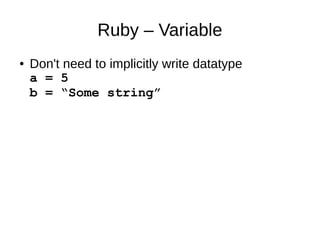
Ruby – Variable 
● Don't need to implicitly write datatype 
a = 5 
b = “Some string”
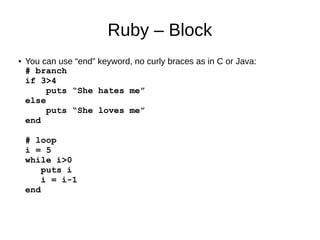
Ruby – Block 
● You can use “end” keyword, no curly braces as in C or Java: 
# branch 
if 3>4 
puts “She hates me” 
else 
puts “She loves me” 
end 
# loop 
i = 5 
while i>0 
puts i 
i = i-1 
end
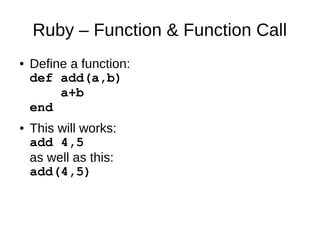
Ruby – Function & Function Call 
● Define a function: 
def add(a,b) 
a+b 
end 
● This will works: 
add 4,5 
as well as this: 
add(4,5)
Ruby – Everything is object 
● No primitive datatype like java 
● This will yield “Hello world!”: 
“!dlrow elloH”.reverse 
A string like “!dlrow elloH” has reverse method, you don't even need to 
put it in a variable 
● This will yield 8: 
7.next 
● This will blow up your mind: 
[1,2,3,4,5].each{|num| puts num+1} 
It is like foreach in php. You iterate through the array, put each element 
into a local variable called “num” and print num+1 into the screen.
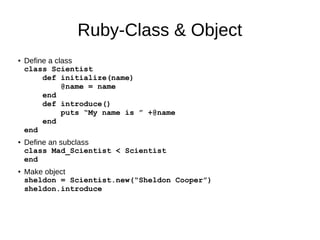
Ruby-Class & Object 
● Define a class 
class Scientist 
def initialize(name) 
@name = name 
end 
def introduce() 
puts “My name is ” +@name 
end 
end 
● Define an subclass 
class Mad_Scientist < Scientist 
end 
● Make object 
sheldon = Scientist.new(“Sheldon Cooper”) 
sheldon.introduce
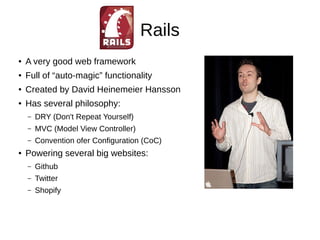
Rails 
● A very good web framework 
● Full of “auto-magic” functionality 
● Created by David Heinemeier Hansson 
● Has several philosophy: 
– DRY (Don't Repeat Yourself) 
– MVC (Model View Controller) 
– Convention ofer Configuration (CoC) 
● Powering several big websites: 
– Github 
– Twitter 
– Shopify
Installing Rails 
● If you are using linux or Mac, you can follow 
installation steps in 
http://rubyonrails.org/download/ 
FYI: you can even use apt-get in ubuntu. 
● Windows user simply use this: 
http://railsftw.bryanbibat.net/ to save all the pain 
of compiling things.
Starting Rails 
● Open rails console, type this: 
rails new YOUR_APP_NAME 
● Rails will generate several files & folders for you. Basically, 
you only need to take attention on: 
– config 
– app/models 
– app/controllers 
– app/models 
● Type rails s and fire your browser to 
http://localhost:3000
Scaffolding – Rails's best feature 
● Scaffold articles 
– Rails g scaffold articles title:string 
body:text 
● Do “migration” (aka: create your database without 
touching it) 
– rake db:migrate 
● Fire your browser to http://localhost:3000/articles 
and it is.
Use bootstrap themes (1) 
● Add some gems first. Open 
YOUR_APP_NAME/Gemfiles, add this: 
– gem 'therubyracer' 
– gem 'less-rails' 
– gem 'twitter-bootstrap-rails' 
● Install the gems 
– bundle install
Use bootstrap themes (2) 
● install bootstrap 
– rails g bootstrap:install 
● Override Layout 
– rails g bootstrap:layout application 
fixed -f 
● Override article's theme 
– rails g bootstrap:themed articles -f 
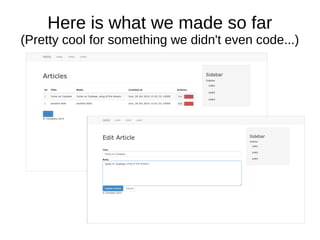
● See the result
Here is what we made so far 
(Pretty cool for something we didn't even code...)
Tips and Tricks 
● If you want to change the view manually, just go 
to app/views folder 
● If you want articles to be your homepage, then 
you can modify config/routes.rb and add 
this: 
– root :to => "articles#index"
Further reading 
● http://tryruby.org/ 
● http://railsforzombies.org/ 
● http://guides.rubyonrails.org/getting_started.html
Conclusion 
● You have see how Ruby-on-Rails can help you 
develop application (or at least prototype) 
easily. 
● Rails is a great framework, it is very simple to 
make a working CRUD application. However, 
deeper understanding about the language and 
the framework is required if you want to build a 
serious application
Thank you 
ありがとう

Introduction to rails

  • 1.
    Introduction to Rubyon Rails (aka: Rails for you) Go Frendi Gunawan
  • 2.
    About Me ●Go Frendi Gunawan ● Developer of No-CMS and Kokoropy ● Lecturer at STIKI Malang ● Starting a startup business ● http://gofrendiasgard.github.io
  • 3.
    Ruby ● Afully OOP programming language ● Created by Yukihiro Matsumoto (Matz) ● Influenced by Python, Perl, dan Java ● Easy to write ● A bit hard to read ● Easy and fun to learn (http://tryruby.org) ● Has interactive console called “irb” ● Has package control library called “gem”
  • 4.
    Ruby – Variable ● Don't need to implicitly write datatype a = 5 b = “Some string”
  • 5.
    Ruby – Block ● You can use “end” keyword, no curly braces as in C or Java: # branch if 3>4 puts “She hates me” else puts “She loves me” end # loop i = 5 while i>0 puts i i = i-1 end
  • 6.
    Ruby – Function& Function Call ● Define a function: def add(a,b) a+b end ● This will works: add 4,5 as well as this: add(4,5)
  • 7.
    Ruby – Everythingis object ● No primitive datatype like java ● This will yield “Hello world!”: “!dlrow elloH”.reverse A string like “!dlrow elloH” has reverse method, you don't even need to put it in a variable ● This will yield 8: 7.next ● This will blow up your mind: [1,2,3,4,5].each{|num| puts num+1} It is like foreach in php. You iterate through the array, put each element into a local variable called “num” and print num+1 into the screen.
  • 8.
    Ruby-Class & Object ● Define a class class Scientist def initialize(name) @name = name end def introduce() puts “My name is ” +@name end end ● Define an subclass class Mad_Scientist < Scientist end ● Make object sheldon = Scientist.new(“Sheldon Cooper”) sheldon.introduce
  • 9.
    Rails ● Avery good web framework ● Full of “auto-magic” functionality ● Created by David Heinemeier Hansson ● Has several philosophy: – DRY (Don't Repeat Yourself) – MVC (Model View Controller) – Convention ofer Configuration (CoC) ● Powering several big websites: – Github – Twitter – Shopify
  • 10.
    Installing Rails ●If you are using linux or Mac, you can follow installation steps in http://rubyonrails.org/download/ FYI: you can even use apt-get in ubuntu. ● Windows user simply use this: http://railsftw.bryanbibat.net/ to save all the pain of compiling things.
  • 11.
    Starting Rails ●Open rails console, type this: rails new YOUR_APP_NAME ● Rails will generate several files & folders for you. Basically, you only need to take attention on: – config – app/models – app/controllers – app/models ● Type rails s and fire your browser to http://localhost:3000
  • 12.
    Scaffolding – Rails'sbest feature ● Scaffold articles – Rails g scaffold articles title:string body:text ● Do “migration” (aka: create your database without touching it) – rake db:migrate ● Fire your browser to http://localhost:3000/articles and it is.
  • 13.
    Use bootstrap themes(1) ● Add some gems first. Open YOUR_APP_NAME/Gemfiles, add this: – gem 'therubyracer' – gem 'less-rails' – gem 'twitter-bootstrap-rails' ● Install the gems – bundle install
  • 14.
    Use bootstrap themes(2) ● install bootstrap – rails g bootstrap:install ● Override Layout – rails g bootstrap:layout application fixed -f ● Override article's theme – rails g bootstrap:themed articles -f ● See the result
  • 15.
    Here is whatwe made so far (Pretty cool for something we didn't even code...)
  • 16.
    Tips and Tricks ● If you want to change the view manually, just go to app/views folder ● If you want articles to be your homepage, then you can modify config/routes.rb and add this: – root :to => "articles#index"
  • 17.
    Further reading ●http://tryruby.org/ ● http://railsforzombies.org/ ● http://guides.rubyonrails.org/getting_started.html
  • 18.
    Conclusion ● Youhave see how Ruby-on-Rails can help you develop application (or at least prototype) easily. ● Rails is a great framework, it is very simple to make a working CRUD application. However, deeper understanding about the language and the framework is required if you want to build a serious application
  • 19.