Introduction to Matlab
By: TARUN GEHLOT
Outline:
❑ What is Matlab?
■ Matlab Screen
■ Variables, array, matrix, indexing
■ Operators (Arithmetic, relational, logical )
■ Display Facilities
■ Flow Control
■ Using of M-File
■ Writing User Defined Functions
■ Conclusion
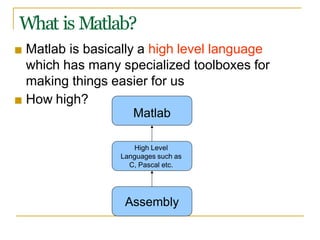
What is Matlab?
Assembly
High Level
Languages such as
C, Pascal etc.
■ Matlab is basically a high level language
which has many specialized toolboxes for
making things easier for us
■ How high?
Matlab
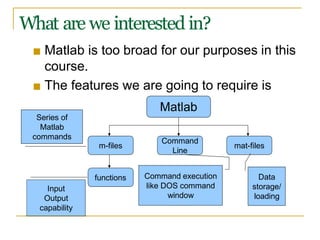
What are we interested in?
■ Matlab is too broad for our purposes in this
course.
■ The features we are going to require is
Matlab
Command
Line
m-files
functions
mat-files
Command execution
like DOS command
window
Series of
Matlab
commands
Input
Output
capability
Data
storage/
loading
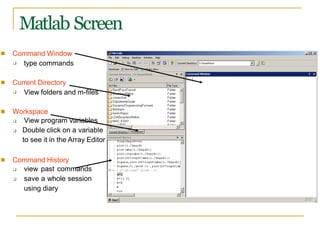
Matlab Screen
■ Command Window
❑ type commands
■ Current Directory
❑ View folders and m-files
■ Workspace
❑ View program variables
Double click on a variable
to see it in the Array Editor
❑
■ Command History
❑
❑
view past commands
save a whole session
using diary
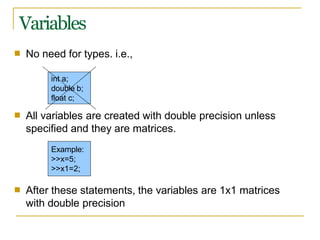
Variables
■ No need for types. i.e.,
■ All variables are created with double precision unless
specified and they are matrices.
■ After these statements, the variables are 1x1 matrices
with double precision
int a;
double b;
float c;
Example:
>>x=5;
>>x1=2;
Array, Matrix
■ a vector x = [1 2 5 1]
x =
■ a matrix
1 2 5 1
x = [1 2 3; 5 1 4; 3 2 -1]
x =
1 2 3
5 1 4
3 2 -1
■ transpose y = x’ y =
1
2
5
1
Long Array, Matrix
■ t =1:10
t =
1 2 3 4 5 6 7 8 9 10
k =2:-0.5:-1
■
k =
2 1.5 1 0.5 0 -0.5 -1
B = [1:4; 5:8]
■
x =
1
5
2
6
3
7
4
8
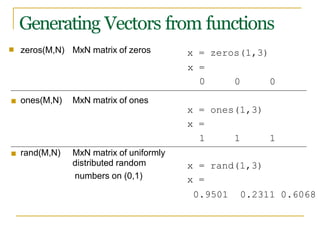
Generating Vectors from functions
■ zeros(M,N) MxN matrix of zeros
x =
0 0 0
■ ones(M,N) MxN matrix of ones
x = ones(1,3)
x =
1 1 1
■ rand(M,N) MxN matrix of uniformly
distributed random x = rand(1,3)
numbers on (0,1) x =
x = zeros(1,3)
0.9501 0.2311 0.6068
Matrix Index
■
■
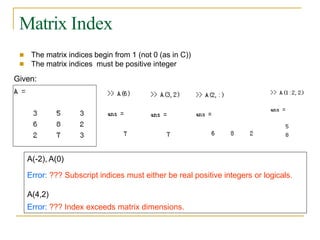
The matrix indices begin from 1 (not 0 (as in C))
The matrix indices must be positive integer
Given:
A(-2), A(0)
Error: ??? Subscript indices must either be real positive integers or logicals.
A(4,2)
Error: ??? Index exceeds matrix dimensions.
Concatenation of Matrices
■ x =
A =
[1 2], y
[ x y]
= [4 5], z=[ 0 0]
1 2 4 5
B = [x ; y]
1 2
4 5
C = [x y ;z]
Error:
??? Error using ==> vertcat CAT arguments dimensions are not consistent.
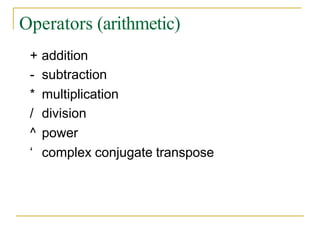
Operators (arithmetic)
+ addition
- subtraction
* multiplication
/ division
^ power
‘ complex conjugate transpose
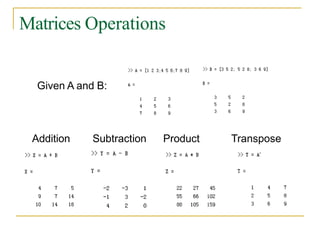
Matrices Operations
Given A and B:
Addition Subtraction Product Transpose
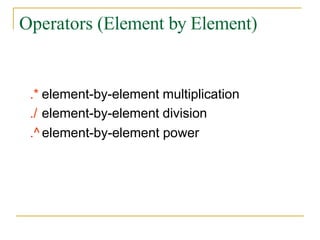
Operators (Element by Element)
.* element-by-element multiplication
./ element-by-element division
.^ element-by-element power
The use of “.” – “Element” Operation
K= x^2
Erorr:
??? Error using ==> mpower Matrix must be square.
B=x*y
Erorr:
??? Error using ==> mtimes Inner matrix dimensions must agree.
A = [1 2 3; 5 1 4; 3 2 1]
A =
1 2 3
5 1 4
3 2 -1
y = A(3 ,:)
y=
3 4 -1
b = x .* y
b=
3 8 -3
c = x . / y
c=
0.33 0.5 -3
d = x .^2
d=
1 4 9
x = A(1,:)
x=
1 2 3
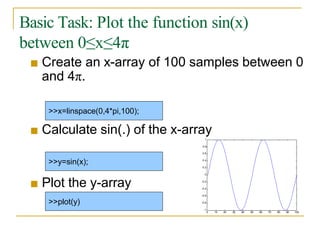
Basic Task: Plot the function sin(x)
between 0≤x≤4π
■ Create an x-array of 100 samples between 0
and 4π.
■ Calculate sin(.) of the x-array
■ Plot the y-array
>>x=linspace(0,4*pi,100);
>>y=sin(x);
>>plot(y)
0 10 20 30 40 50 60 70 80 90 100
-1
-0.8
-0.6
-0.4
-0.2
0
0.2
0.4
0.6
1
0.8
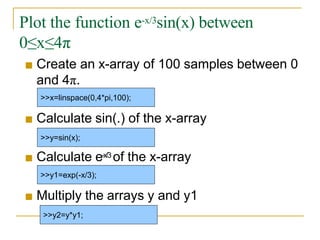
Plot the function e-x/3sin(x) between
0≤x≤4π
■ Create an x-array of 100 samples between 0
and 4π.
■ Calculate sin(.) of the x-array
■ Calculate e-x/3 of the x-array
■ Multiply the arrays y and y1
>>x=linspace(0,4*pi,100);
>>y=sin(x);
>>y1=exp(-x/3);
>>y2=y*y1;
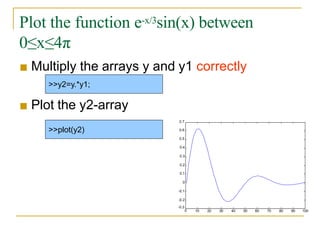
Plot the function e-x/3sin(x) between
0≤x≤4π
■ Multiply the arrays y and y1 correctly
■ Plot the y2-array
>>y2=y.*y1;
>>plot(y2)
10 20 30 40 50 60 70 80 90 100
-0.3
0
0.4
0.3
0.2
0.1
0
-0.1
-0.2
0.5
0.6
0.7
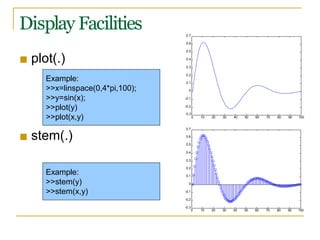
Display Facilities
■ plot(.)
■ stem(.)
Example:
>>x=linspace(0,4*pi,100);
>>y=sin(x);
>>plot(y)
>>plot(x,y)
Example:
>>stem(y)
>>stem(x,y)
0 10 20 30 40 50 60 70 80 90 100
-0.3
-0.2
-0.1
0
0.1
0.2
0.5
0.4
0.3
0.6
0.7
10 20 30 40 50 60 70 80 90 100
-0.3
0
-0.2
-0.1
0
0.1
0.2
0.3
0.4
0.5
0.7
0.6
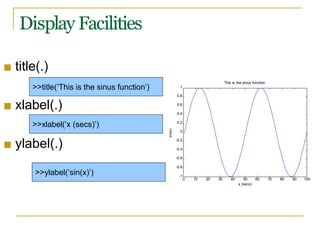
Display Facilities
■ title(.)
■ xlabel(.)
■ ylabel(.)
>>title(‘This is the sinus function’)
>>xlabel(‘x (secs)’)
>>ylabel(‘sin(x)’)
0 10 20 30 70 80 90 100
-1
40 50 60
x (secs)
-0.8
-0.6
-0.4
-0.2
0
0.2
0.4
0.6
0.8
1
This is the sinus function
sin(x)
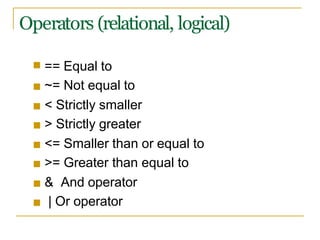
Operators (relational, logical)
■ == Equal to
■ ~= Not equal to
■ < Strictly smaller
■ > Strictly greater
■ <= Smaller than or equal to
■ >= Greater than equal to
■ & And operator
■ | Or operator
Flow Control
■ if
■ for
■ while
■ break
■ ….
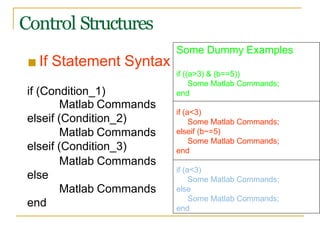
Control Structures
■ If Statement Syntax
if (Condition_1)
Matlab Commands
elseif (Condition_2)
Matlab Commands
elseif (Condition_3)
Matlab Commands
else
Matlab Commands
end
Some Dummy Examples
if ((a>3) & (b==5))
Some Matlab Commands;
end
if (a<3)
Some Matlab Commands;
elseif (b~=5)
Some Matlab Commands;
end
if (a<3)
Some Matlab Commands;
else
Some Matlab Commands;
end
■ For loop syntax
Some Dummy Examples
for i=1:100
Some Matlab Commands;
end
for i=Index_Array
Matlab Commands
for j=1:3:200
Some Matlab Commands;
end
end for m=13:-0.2:-21
Some Matlab Commands;
end
for k=[0.1 0.3 -13 12 7 -9.3]
Some Matlab Commands;
end
Control Structures
Control Structures
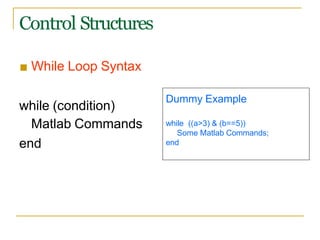
■ While Loop Syntax
while (condition)
Matlab Commands
end
Dummy Example
while ((a>3) & (b==5))
Some Matlab Commands;
end
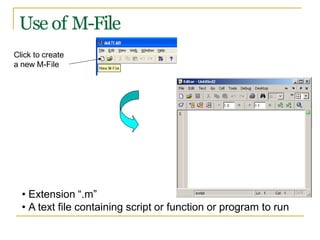
Use of M-File
Click to create
a new M-File
• Extension “.m”
• A text file containing script or function or program to run
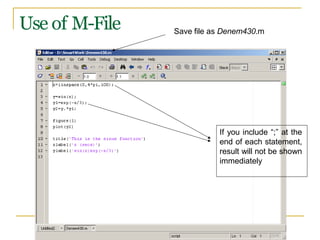
Use of M-File
If you include “;” at the
end of each statement,
result will not be shown
immediately
Save file as Denem430.m
Writing User Defined Functions
■ Functions are m-files which can be executed by
specifying some inputs and supply some desired outputs.
The code telling the Matlab that an m-file is actually a
function is
■
■ You should write this command at the beginning of the
m-file and you should save the m-file with a file name
same as the function name
function out1=functionname(in1)
function out1=functionname(in1,in2,in3)
function [out1,out2]=functionname(in1,in2)
Writing User Defined Functions
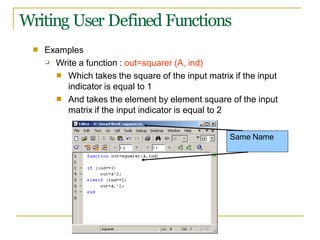
■ Examples
❑ Write a function : out=squarer (A, ind)
■ Which takes the square of the input matrix if the input
indicator is equal to 1
And takes the element by element square of the input
matrix if the input indicator is equal to 2
■
Same Name
Writing User Defined Functions
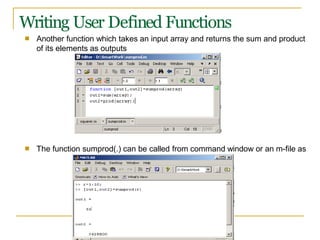
■ Another function which takes an input array and returns the sum and product
of its elements as outputs
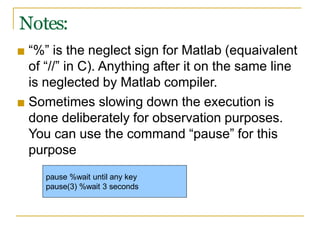
■ The function sumprod(.) can be called from command window or an m-file as
Notes:
■ “%” is the neglect sign for Matlab (equaivalent
of “//” in C). Anything after it on the same line
is neglected by Matlab compiler.
■ Sometimes slowing down the execution is
done deliberately for observation purposes.
You can use the command “pause” for this
purpose
pause %wait until any key
pause(3) %wait 3 seconds
Useful Commands
■ The two commands used most by Matlab
users are
>>help functionname
>>lookfor keyword
Questions
■?
■?
■?
■?
■?
Thank You…

introduction to matlab.pptx

  • 1.
  • 2.
    Outline: ❑ What isMatlab? ■ Matlab Screen ■ Variables, array, matrix, indexing ■ Operators (Arithmetic, relational, logical ) ■ Display Facilities ■ Flow Control ■ Using of M-File ■ Writing User Defined Functions ■ Conclusion
  • 3.
    What is Matlab? Assembly HighLevel Languages such as C, Pascal etc. ■ Matlab is basically a high level language which has many specialized toolboxes for making things easier for us ■ How high? Matlab
  • 4.
    What are weinterested in? ■ Matlab is too broad for our purposes in this course. ■ The features we are going to require is Matlab Command Line m-files functions mat-files Command execution like DOS command window Series of Matlab commands Input Output capability Data storage/ loading
  • 5.
    Matlab Screen ■ CommandWindow ❑ type commands ■ Current Directory ❑ View folders and m-files ■ Workspace ❑ View program variables Double click on a variable to see it in the Array Editor ❑ ■ Command History ❑ ❑ view past commands save a whole session using diary
  • 6.
    Variables ■ No needfor types. i.e., ■ All variables are created with double precision unless specified and they are matrices. ■ After these statements, the variables are 1x1 matrices with double precision int a; double b; float c; Example: >>x=5; >>x1=2;
  • 7.
    Array, Matrix ■ avector x = [1 2 5 1] x = ■ a matrix 1 2 5 1 x = [1 2 3; 5 1 4; 3 2 -1] x = 1 2 3 5 1 4 3 2 -1 ■ transpose y = x’ y = 1 2 5 1
  • 8.
    Long Array, Matrix ■t =1:10 t = 1 2 3 4 5 6 7 8 9 10 k =2:-0.5:-1 ■ k = 2 1.5 1 0.5 0 -0.5 -1 B = [1:4; 5:8] ■ x = 1 5 2 6 3 7 4 8
  • 9.
    Generating Vectors fromfunctions ■ zeros(M,N) MxN matrix of zeros x = 0 0 0 ■ ones(M,N) MxN matrix of ones x = ones(1,3) x = 1 1 1 ■ rand(M,N) MxN matrix of uniformly distributed random x = rand(1,3) numbers on (0,1) x = x = zeros(1,3) 0.9501 0.2311 0.6068
  • 10.
    Matrix Index ■ ■ The matrixindices begin from 1 (not 0 (as in C)) The matrix indices must be positive integer Given: A(-2), A(0) Error: ??? Subscript indices must either be real positive integers or logicals. A(4,2) Error: ??? Index exceeds matrix dimensions.
  • 11.
    Concatenation of Matrices ■x = A = [1 2], y [ x y] = [4 5], z=[ 0 0] 1 2 4 5 B = [x ; y] 1 2 4 5 C = [x y ;z] Error: ??? Error using ==> vertcat CAT arguments dimensions are not consistent.
  • 12.
    Operators (arithmetic) + addition -subtraction * multiplication / division ^ power ‘ complex conjugate transpose
  • 13.
    Matrices Operations Given Aand B: Addition Subtraction Product Transpose
  • 14.
    Operators (Element byElement) .* element-by-element multiplication ./ element-by-element division .^ element-by-element power
  • 15.
    The use of“.” – “Element” Operation K= x^2 Erorr: ??? Error using ==> mpower Matrix must be square. B=x*y Erorr: ??? Error using ==> mtimes Inner matrix dimensions must agree. A = [1 2 3; 5 1 4; 3 2 1] A = 1 2 3 5 1 4 3 2 -1 y = A(3 ,:) y= 3 4 -1 b = x .* y b= 3 8 -3 c = x . / y c= 0.33 0.5 -3 d = x .^2 d= 1 4 9 x = A(1,:) x= 1 2 3
  • 16.
    Basic Task: Plotthe function sin(x) between 0≤x≤4π ■ Create an x-array of 100 samples between 0 and 4π. ■ Calculate sin(.) of the x-array ■ Plot the y-array >>x=linspace(0,4*pi,100); >>y=sin(x); >>plot(y) 0 10 20 30 40 50 60 70 80 90 100 -1 -0.8 -0.6 -0.4 -0.2 0 0.2 0.4 0.6 1 0.8
  • 17.
    Plot the functione-x/3sin(x) between 0≤x≤4π ■ Create an x-array of 100 samples between 0 and 4π. ■ Calculate sin(.) of the x-array ■ Calculate e-x/3 of the x-array ■ Multiply the arrays y and y1 >>x=linspace(0,4*pi,100); >>y=sin(x); >>y1=exp(-x/3); >>y2=y*y1;
  • 18.
    Plot the functione-x/3sin(x) between 0≤x≤4π ■ Multiply the arrays y and y1 correctly ■ Plot the y2-array >>y2=y.*y1; >>plot(y2) 10 20 30 40 50 60 70 80 90 100 -0.3 0 0.4 0.3 0.2 0.1 0 -0.1 -0.2 0.5 0.6 0.7
  • 19.
    Display Facilities ■ plot(.) ■stem(.) Example: >>x=linspace(0,4*pi,100); >>y=sin(x); >>plot(y) >>plot(x,y) Example: >>stem(y) >>stem(x,y) 0 10 20 30 40 50 60 70 80 90 100 -0.3 -0.2 -0.1 0 0.1 0.2 0.5 0.4 0.3 0.6 0.7 10 20 30 40 50 60 70 80 90 100 -0.3 0 -0.2 -0.1 0 0.1 0.2 0.3 0.4 0.5 0.7 0.6
  • 20.
    Display Facilities ■ title(.) ■xlabel(.) ■ ylabel(.) >>title(‘This is the sinus function’) >>xlabel(‘x (secs)’) >>ylabel(‘sin(x)’) 0 10 20 30 70 80 90 100 -1 40 50 60 x (secs) -0.8 -0.6 -0.4 -0.2 0 0.2 0.4 0.6 0.8 1 This is the sinus function sin(x)
  • 21.
    Operators (relational, logical) ■== Equal to ■ ~= Not equal to ■ < Strictly smaller ■ > Strictly greater ■ <= Smaller than or equal to ■ >= Greater than equal to ■ & And operator ■ | Or operator
  • 22.
    Flow Control ■ if ■for ■ while ■ break ■ ….
  • 23.
    Control Structures ■ IfStatement Syntax if (Condition_1) Matlab Commands elseif (Condition_2) Matlab Commands elseif (Condition_3) Matlab Commands else Matlab Commands end Some Dummy Examples if ((a>3) & (b==5)) Some Matlab Commands; end if (a<3) Some Matlab Commands; elseif (b~=5) Some Matlab Commands; end if (a<3) Some Matlab Commands; else Some Matlab Commands; end
  • 24.
    ■ For loopsyntax Some Dummy Examples for i=1:100 Some Matlab Commands; end for i=Index_Array Matlab Commands for j=1:3:200 Some Matlab Commands; end end for m=13:-0.2:-21 Some Matlab Commands; end for k=[0.1 0.3 -13 12 7 -9.3] Some Matlab Commands; end Control Structures
  • 25.
    Control Structures ■ WhileLoop Syntax while (condition) Matlab Commands end Dummy Example while ((a>3) & (b==5)) Some Matlab Commands; end
  • 26.
    Use of M-File Clickto create a new M-File • Extension “.m” • A text file containing script or function or program to run
  • 27.
    Use of M-File Ifyou include “;” at the end of each statement, result will not be shown immediately Save file as Denem430.m
  • 28.
    Writing User DefinedFunctions ■ Functions are m-files which can be executed by specifying some inputs and supply some desired outputs. The code telling the Matlab that an m-file is actually a function is ■ ■ You should write this command at the beginning of the m-file and you should save the m-file with a file name same as the function name function out1=functionname(in1) function out1=functionname(in1,in2,in3) function [out1,out2]=functionname(in1,in2)
  • 29.
    Writing User DefinedFunctions ■ Examples ❑ Write a function : out=squarer (A, ind) ■ Which takes the square of the input matrix if the input indicator is equal to 1 And takes the element by element square of the input matrix if the input indicator is equal to 2 ■ Same Name
  • 30.
    Writing User DefinedFunctions ■ Another function which takes an input array and returns the sum and product of its elements as outputs ■ The function sumprod(.) can be called from command window or an m-file as
  • 31.
    Notes: ■ “%” isthe neglect sign for Matlab (equaivalent of “//” in C). Anything after it on the same line is neglected by Matlab compiler. ■ Sometimes slowing down the execution is done deliberately for observation purposes. You can use the command “pause” for this purpose pause %wait until any key pause(3) %wait 3 seconds
  • 32.
    Useful Commands ■ Thetwo commands used most by Matlab users are >>help functionname >>lookfor keyword
  • 33.
  • 34.