Introduction to Kotlin
for Java developer
Shuhei Shogen
1
Kotlin
• https://kotlinlang.org/
• Developed by JetBrains Inc.
• Official release (1.0): Feb 15, 2016
• Latest release: 1.3.50
2
Overview of Kotlin
• Statically typed(静的型付け)
• Multi-paradigm
• Object-oriented lang && functional lang
• One of JVM langs
• Mainly designed to be run on JVM (Java virtual machine)
• Other JVM langs: Java, Scala, Groovy, Closure etc.
• An official language in Android development (since 2017)
3
Why Kotlin?
https://kotlinlang.org/ (as of 2019/09/03)
4
Concise(簡潔)
• Free from boilerplates in Java
• Data class
• Simplify writing POJO
• Type inference(型推論)
• Compiler will guess the type of a variable
• Named / Default arguments(名前付き/デフォルト引数)
• if / switch / try expression
• Easier APIs on Collections
• String template(テンプレート文字列)
• Scope function(スコープ関数)
• Maybe more...
5
Data class
data class POJO(
val num: Int = -1,
val str: String = ""
)
// "data" keyword adds
// 1. (Primary) constructor
// 2. getter / setter for all fields
// 3. equals() / hashCode()
// to allow it to compare its value
// 4. toString()
val pojo = POJO()
println(pojo) // POJO(num=-1, str=)
println(pojo.num) // -1
val pojo2 = POJO(-1, "")
println(pojo == pojo2) // true
public class POJO {
private Integer num;
private String str;
public POJO() {
this.num = -1;
this.str = "";
}
public POJO(Integer num, String str) {
this.num = num;
this.str = str;
}
public Integer getNum() {
return num;
}
public void setNum(Integer num) {
this.num = num;
}
// getter / setter for str
@Override
public boolean equals(Object o) {
// equals()
}
@Override
public int hashCode() {
// hashCode()
}
@Override
public String toString() {
return "POJO{" +
"num=" + num +
", str='" + str + ''' +
'}';
}
}
Java Kotlin
6
Safe
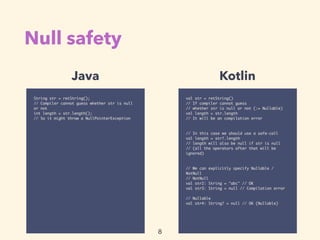
• Null safety
• Avoid NullPointerException (and null-check hell)
• Detect the possibility of null in compilation time
• Nullable types: Accept null
• NotNull types: Not accept null
• val / var keywords
• val: Guarantee the variable will not be modified (:= immutable)
7
Null safety
val str = retString()
// If compiler cannot guess
// whether str is null or not (:= Nullable)
val length = str.length
// It will be an compilation error
// In this case we should use a safe-call
val length = str?.length
// length will also be null if str is null
// (all the operators after that will be
ignored)
// We can explicitly specify Nullable /
NotNull
// NotNull
val str2: String = "abc" // OK
val str3: String = null // Compilation error
// Nullable
val str4: String? = null // OK (Nullable)
String str = retString();
// Compiler cannot guess whether str is null
or not
int length = str.length();
// So it might throw a NullPointerException
Java Kotlin
8
Smart Cast
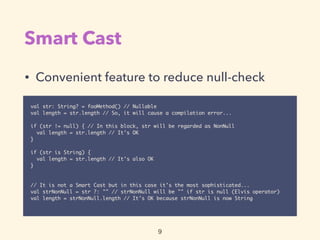
• Convenient feature to reduce null-check
val str: String? = fooMethod() // Nullable
val length = str.length // So, it will cause a compilation error...
if (str != null) { // In this block, str will be regarded as NonNull
val length = str.length // It's OK
}
if (str is String) {
val length = str.length // It's also OK
}
// It is not a Smart Cast but in this case it's the most sophisticated...
val strNonNull = str ?: "" // strNonNull will be "" if str is null (Elvis operator)
val length = strNonNull.length // It's OK because strNonNull is now String
9
Interoperable(相互運用性)
• Most of JVM assets are available in Kotlin
• Libraries (incl. Java libraries)
• CI/CD tools
• Monitoring tools
• etc…
10
Tool-friendly
• IDE
• Eclipse
• IntelliJ IDEA (incl. Android Studio)
• Unit testing
• JUnit
• KotlinTest
• Build tool
• Maven
• Gradle
• Static analysis
• ktlint
• SonarQube
• Web FW
• Spring Framework
• Support Kotlin since 5.0
• https://docs.spring.io/
spring/docs/current/
spring-framework-
reference/
languages.html#kotlin
• Spring Initializr: https://
start.spring.io/
• Ktor
11
Pros and Cons

(compared with Java)
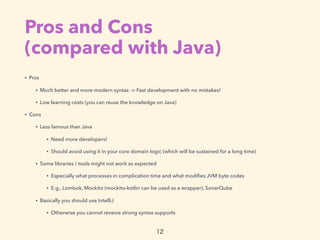
• Pros
• Much better and more modern syntax -> Fast development with no mistakes!
• Low learning costs (you can reuse the knowledge on Java)
• Cons
• Less famous than Java
• Need more developers!
• Should avoid using it in your core domain logic (which will be sustained for a long time)
• Some libraries / tools might not work as expected
• Especially what processes in complication time and what modifies JVM byte codes
• E.g., Lombok, Mockito (mockito-kotlin can be used as a wrapper), SonarQube
• Basically you should use IntelliJ
• Otherwise you cannot receive strong syntax supports
12
How to learn it?
• Tutorial
• https://kotlinlang.org/docs/tutorials/
• Kotlin Koans (Drills for beginners)
• https://try.kotlinlang.org/#/Kotlin%20Koans/
Introduction/Hello,%20world!/Task.kt
• Awesome Kotlin (useful info)
• https://github.com/KotlinBy/awesome-kotlin
13

Introduction to Kotlin for Java developer

  • 1.
    Introduction to Kotlin forJava developer Shuhei Shogen 1
  • 2.
    Kotlin • https://kotlinlang.org/ • Developedby JetBrains Inc. • Official release (1.0): Feb 15, 2016 • Latest release: 1.3.50 2
  • 3.
    Overview of Kotlin •Statically typed(静的型付け) • Multi-paradigm • Object-oriented lang && functional lang • One of JVM langs • Mainly designed to be run on JVM (Java virtual machine) • Other JVM langs: Java, Scala, Groovy, Closure etc. • An official language in Android development (since 2017) 3
  • 4.
  • 5.
    Concise(簡潔) • Free fromboilerplates in Java • Data class • Simplify writing POJO • Type inference(型推論) • Compiler will guess the type of a variable • Named / Default arguments(名前付き/デフォルト引数) • if / switch / try expression • Easier APIs on Collections • String template(テンプレート文字列) • Scope function(スコープ関数) • Maybe more... 5
  • 6.
    Data class data classPOJO( val num: Int = -1, val str: String = "" ) // "data" keyword adds // 1. (Primary) constructor // 2. getter / setter for all fields // 3. equals() / hashCode() // to allow it to compare its value // 4. toString() val pojo = POJO() println(pojo) // POJO(num=-1, str=) println(pojo.num) // -1 val pojo2 = POJO(-1, "") println(pojo == pojo2) // true public class POJO { private Integer num; private String str; public POJO() { this.num = -1; this.str = ""; } public POJO(Integer num, String str) { this.num = num; this.str = str; } public Integer getNum() { return num; } public void setNum(Integer num) { this.num = num; } // getter / setter for str @Override public boolean equals(Object o) { // equals() } @Override public int hashCode() { // hashCode() } @Override public String toString() { return "POJO{" + "num=" + num + ", str='" + str + ''' + '}'; } } Java Kotlin 6
  • 7.
    Safe • Null safety •Avoid NullPointerException (and null-check hell) • Detect the possibility of null in compilation time • Nullable types: Accept null • NotNull types: Not accept null • val / var keywords • val: Guarantee the variable will not be modified (:= immutable) 7
  • 8.
    Null safety val str= retString() // If compiler cannot guess // whether str is null or not (:= Nullable) val length = str.length // It will be an compilation error // In this case we should use a safe-call val length = str?.length // length will also be null if str is null // (all the operators after that will be ignored) // We can explicitly specify Nullable / NotNull // NotNull val str2: String = "abc" // OK val str3: String = null // Compilation error // Nullable val str4: String? = null // OK (Nullable) String str = retString(); // Compiler cannot guess whether str is null or not int length = str.length(); // So it might throw a NullPointerException Java Kotlin 8
  • 9.
    Smart Cast • Convenientfeature to reduce null-check val str: String? = fooMethod() // Nullable val length = str.length // So, it will cause a compilation error... if (str != null) { // In this block, str will be regarded as NonNull val length = str.length // It's OK } if (str is String) { val length = str.length // It's also OK } // It is not a Smart Cast but in this case it's the most sophisticated... val strNonNull = str ?: "" // strNonNull will be "" if str is null (Elvis operator) val length = strNonNull.length // It's OK because strNonNull is now String 9
  • 10.
    Interoperable(相互運用性) • Most ofJVM assets are available in Kotlin • Libraries (incl. Java libraries) • CI/CD tools • Monitoring tools • etc… 10
  • 11.
    Tool-friendly • IDE • Eclipse •IntelliJ IDEA (incl. Android Studio) • Unit testing • JUnit • KotlinTest • Build tool • Maven • Gradle • Static analysis • ktlint • SonarQube • Web FW • Spring Framework • Support Kotlin since 5.0 • https://docs.spring.io/ spring/docs/current/ spring-framework- reference/ languages.html#kotlin • Spring Initializr: https:// start.spring.io/ • Ktor 11
  • 12.
    Pros and Cons
 (comparedwith Java) • Pros • Much better and more modern syntax -> Fast development with no mistakes! • Low learning costs (you can reuse the knowledge on Java) • Cons • Less famous than Java • Need more developers! • Should avoid using it in your core domain logic (which will be sustained for a long time) • Some libraries / tools might not work as expected • Especially what processes in complication time and what modifies JVM byte codes • E.g., Lombok, Mockito (mockito-kotlin can be used as a wrapper), SonarQube • Basically you should use IntelliJ • Otherwise you cannot receive strong syntax supports 12
  • 13.
    How to learnit? • Tutorial • https://kotlinlang.org/docs/tutorials/ • Kotlin Koans (Drills for beginners) • https://try.kotlinlang.org/#/Kotlin%20Koans/ Introduction/Hello,%20world!/Task.kt • Awesome Kotlin (useful info) • https://github.com/KotlinBy/awesome-kotlin 13