From Java to Kotlin
lessons learned converting the Android rentals owner app
Android rentals owner app
Vacation Rentals Owner App by TripAdvisor

Easy to manage your TripAdvisor vacation rental.
All of the important features on your owner dashboard are now available in your pocket.
Confirm bookings, send quotes, and respond to guests from wherever you are.
Update your calendar in a snap.
Quickly see who is checking in next, and when your payment arrives.
Take photos and upload them to your listing
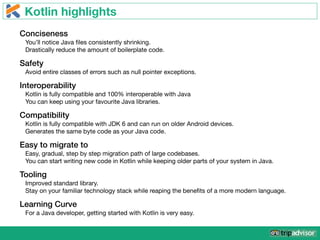
Kotlin highlights
Conciseness
You’ll notice Java files consistently shrinking.

Drastically reduce the amount of boilerplate code.
Safety
Avoid entire classes of errors such as null pointer exceptions.
Interoperability
Kotlin is fully compatible and 100% interoperable with Java

You can keep using your favourite Java libraries.
Compatibility
Kotlin is fully compatible with JDK 6 and can run on older Android devices.

Generates the same byte code as your Java code.
Easy to migrate to
Easy, gradual, step by step migration path of large codebases.

You can start writing new code in Kotlin while keeping older parts of your system in Java.
Tooling
Improved standard library.

Stay on your familiar technology stack while reaping the benefits of a more modern language.
Learning Curve
For a Java developer, getting started with Kotlin is very easy.
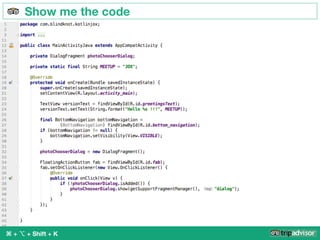
Show me the code
⌘ + ⌥ + Shift + K
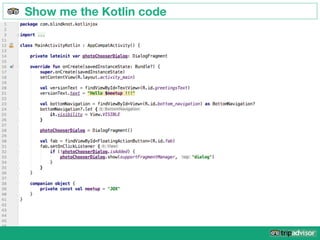
Show me the Kotlin code
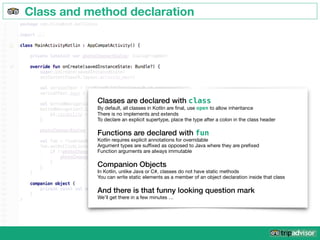
Class and method declaration
Classes are declared with class

By default, all classes in Kotlin are final, use open to allow inheritance

There is no implements and extends

To declare an explicit supertype, place the type after a colon in the class header

Functions are declared with fun

Kotlin requires explicit annotations for overridable

Argument types are suffixed as opposed to Java where they are prefixed

Function arguments are always immutable

Companion Objects
In Kotlin, unlike Java or C#, classes do not have static methods

You can write static elements as a member of an object declaration inside that class

And there is that funny looking question mark
We’ll get there in a few minutes …
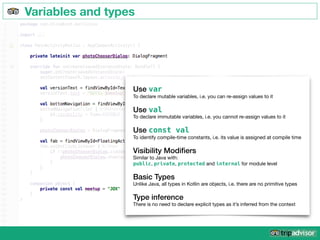
Variables and types
Use var

To declare mutable variables, i.e. you can re-assign values to it

Use val

To declare immutable variables, i.e. you cannot re-assign values to it

Use const val
To identify compile-time constants, i.e. its value is assigned at compile time

Visibility Modifiers
Similar to Java with:

public, private, protected and internal for module level

Basic Types
Unlike Java, all types in Kotlin are objects, i.e. there are no primitive types

Type inference
There is no need to declare explicit types as it’s inferred from the context
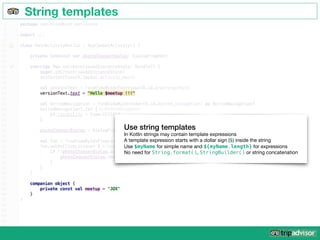
String templates
Use string templates
In Kotlin strings may contain template expressions

A template expression starts with a dollar sign ($) inside the string

Use $myName for simple name and ${myName.length} for expressions

No need for String.format(), StringBuilder() or string concatenation
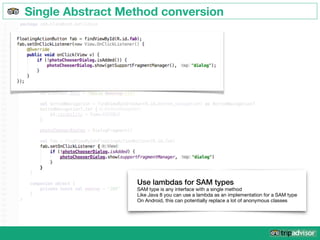
Single Abstract Method conversion
Use lambdas for SAM types
SAM type is any interface with a single method

Like Java 8 you can use a lambda as an implementation for a SAM type

On Android, this can potentially replace a lot of anonymous classes
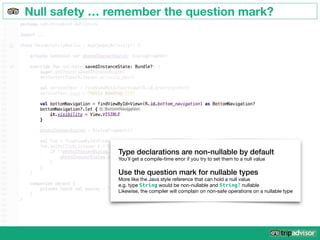
Null safety … remember the question mark?
Type declarations are non-nullable by default
You’ll get a compile-time error if you try to set them to a null value

Use the question mark for nullable types
More like the Java style reference that can hold a null value

e.g. type String would be non-nullable and String? nullable

Likewise, the compiler will complain on non-safe operations on a nullable type
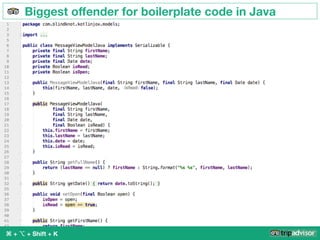
Biggest offender for boilerplate code in Java
⌘ + ⌥ + Shift + K
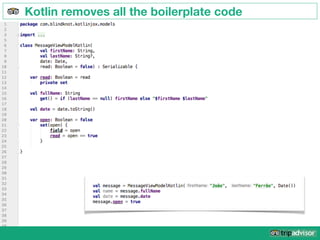
Kotlin removes all the boilerplate code
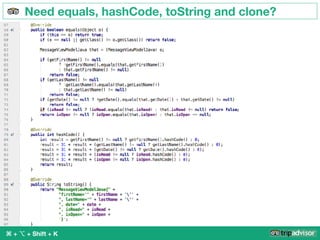
Need equals, hashCode, toString and clone?
⌘ + ⌥ + Shift + K
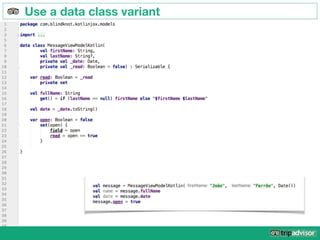
Use a data class variant
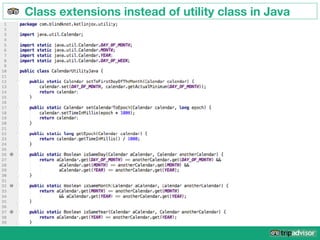
Class extensions instead of utility class in Java
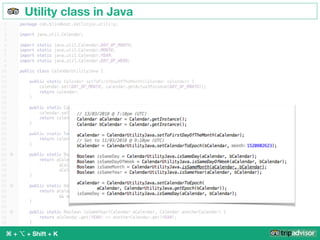
Utility class in Java
⌘ + ⌥ + Shift + K
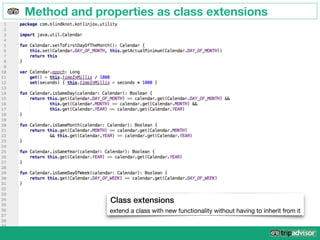
Method and properties as class extensions
Class extensions
extend a class with new functionality without having to inherit from it
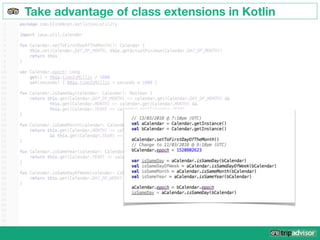
Take advantage of class extensions in Kotlin
Avoid the cost of conversion
Our app crashed more than usual
after releasing ~20% of the code converted
and is now crashing less than ever
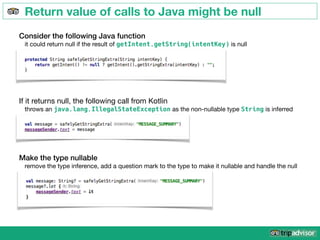
Return value of calls to Java might be null
Consider the following Java function
it could return null if the result of getIntent.getString(intentKey) is null
If it returns null, the following call from Kotlin

throws an java.lang.IllegalStateException as the non-nullable type String is inferred
Make the type nullable
remove the type inference, add a question mark to the type to make it nullable and handle the null
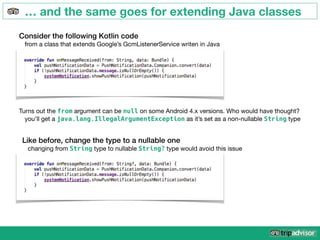
… and the same goes for extending Java classes
Consider the following Kotlin code
from a class that extends Google’s GcmListenerService writen in Java
Turns out the from argument can be null on some Android 4.x versions. Who would have thought?

you’ll get a java.lang.IllegalArgumentException as it’s set as a non-nullable String type
Like before, change the type to a nullable one
changing from String type to nullable String? type would avoid this issue
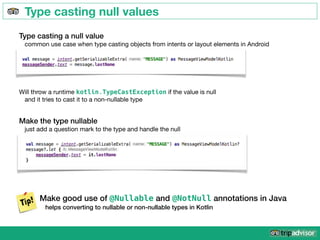
Type casting null values
Type casting a null value
common use case when type casting objects from intents or layout elements in Android
Make the type nullable
just add a question mark to the type and handle the null
Will throw a runtime kotlin.TypeCastException if the value is null

and it tries to cast it to a non-nullable type
Make good use of @Nullable and @NotNull annotations in Java
helps converting to nullable or non-nullable types in Kotlin
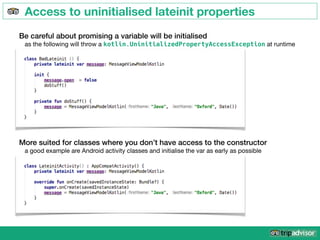
Access to uninitialised lateinit properties
Be careful about promising a variable will be initialised
as the following will throw a kotlin.UninitializedPropertyAccessException at runtime
More suited for classes where you don’t have access to the constructor
a good example are Android activity classes and initialise the var as early as possible
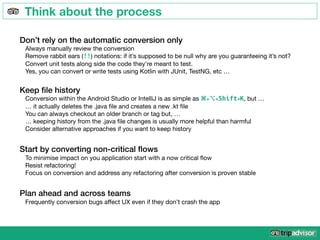
Think about the process
Keep file history
Conversion within the Android Studio or IntelliJ is as simple as ⌘+⌥+Shift+K, but …

… it actually deletes the .java file and creates a new .kt file

You can always checkout an older branch or tag but, …

… keeping history from the .java file changes is usually more helpful than harmful

Consider alternative approaches if you want to keep history
Don’t rely on the automatic conversion only
Always manually review the conversion

Remove rabbit ears (!!) notations: if it’s supposed to be null why are you guaranteeing it’s not? 

Convert unit tests along side the code they’re meant to test.

Yes, you can convert or write tests using Kotlin with JUnit, TestNG, etc …
Start by converting non-critical flows
To minimise impact on you application start with a now critical flow

Resist refactoring!

Focus on conversion and address any refactoring after conversion is proven stable
Plan ahead and across teams
Frequently conversion bugs affect UX even if they don’t crash the app
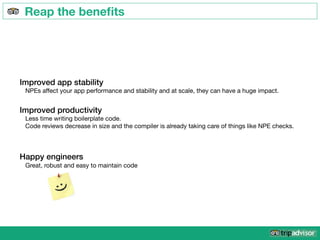
Reap the benefits
Improved app stability
NPEs affect your app performance and stability and at scale, they can have a huge impact.
Improved productivity
Less time writing boilerplate code.

Code reviews decrease in size and the compiler is already taking care of things like NPE checks.
Happy engineers
Great, robust and easy to maintain code

From Java to Kotlin

  • 1.
    From Java toKotlin lessons learned converting the Android rentals owner app
  • 2.
    Android rentals ownerapp Vacation Rentals Owner App by TripAdvisor Easy to manage your TripAdvisor vacation rental. All of the important features on your owner dashboard are now available in your pocket. Confirm bookings, send quotes, and respond to guests from wherever you are. Update your calendar in a snap. Quickly see who is checking in next, and when your payment arrives. Take photos and upload them to your listing
  • 3.
    Kotlin highlights Conciseness You’ll noticeJava files consistently shrinking. Drastically reduce the amount of boilerplate code. Safety Avoid entire classes of errors such as null pointer exceptions. Interoperability Kotlin is fully compatible and 100% interoperable with Java You can keep using your favourite Java libraries. Compatibility Kotlin is fully compatible with JDK 6 and can run on older Android devices. Generates the same byte code as your Java code. Easy to migrate to Easy, gradual, step by step migration path of large codebases. You can start writing new code in Kotlin while keeping older parts of your system in Java. Tooling Improved standard library. Stay on your familiar technology stack while reaping the benefits of a more modern language. Learning Curve For a Java developer, getting started with Kotlin is very easy.
  • 4.
    Show me thecode ⌘ + ⌥ + Shift + K
  • 5.
    Show me theKotlin code
  • 6.
    Class and methoddeclaration Classes are declared with class By default, all classes in Kotlin are final, use open to allow inheritance There is no implements and extends To declare an explicit supertype, place the type after a colon in the class header Functions are declared with fun Kotlin requires explicit annotations for overridable Argument types are suffixed as opposed to Java where they are prefixed Function arguments are always immutable Companion Objects In Kotlin, unlike Java or C#, classes do not have static methods You can write static elements as a member of an object declaration inside that class And there is that funny looking question mark We’ll get there in a few minutes …
  • 7.
    Variables and types Usevar To declare mutable variables, i.e. you can re-assign values to it Use val To declare immutable variables, i.e. you cannot re-assign values to it Use const val To identify compile-time constants, i.e. its value is assigned at compile time Visibility Modifiers Similar to Java with: public, private, protected and internal for module level Basic Types Unlike Java, all types in Kotlin are objects, i.e. there are no primitive types Type inference There is no need to declare explicit types as it’s inferred from the context
  • 8.
    String templates Use stringtemplates In Kotlin strings may contain template expressions A template expression starts with a dollar sign ($) inside the string Use $myName for simple name and ${myName.length} for expressions No need for String.format(), StringBuilder() or string concatenation
  • 9.
    Single Abstract Methodconversion Use lambdas for SAM types SAM type is any interface with a single method Like Java 8 you can use a lambda as an implementation for a SAM type On Android, this can potentially replace a lot of anonymous classes
  • 10.
    Null safety …remember the question mark? Type declarations are non-nullable by default You’ll get a compile-time error if you try to set them to a null value Use the question mark for nullable types More like the Java style reference that can hold a null value
 e.g. type String would be non-nullable and String? nullable Likewise, the compiler will complain on non-safe operations on a nullable type
  • 11.
    Biggest offender forboilerplate code in Java ⌘ + ⌥ + Shift + K
  • 12.
    Kotlin removes allthe boilerplate code
  • 13.
    Need equals, hashCode,toString and clone? ⌘ + ⌥ + Shift + K
  • 14.
    Use a dataclass variant
  • 15.
    Class extensions insteadof utility class in Java
  • 16.
    Utility class inJava ⌘ + ⌥ + Shift + K
  • 17.
    Method and propertiesas class extensions Class extensions extend a class with new functionality without having to inherit from it
  • 18.
    Take advantage ofclass extensions in Kotlin
  • 19.
    Avoid the costof conversion Our app crashed more than usual after releasing ~20% of the code converted and is now crashing less than ever
  • 20.
    Return value ofcalls to Java might be null Consider the following Java function it could return null if the result of getIntent.getString(intentKey) is null If it returns null, the following call from Kotlin throws an java.lang.IllegalStateException as the non-nullable type String is inferred Make the type nullable remove the type inference, add a question mark to the type to make it nullable and handle the null
  • 21.
    … and thesame goes for extending Java classes Consider the following Kotlin code from a class that extends Google’s GcmListenerService writen in Java Turns out the from argument can be null on some Android 4.x versions. Who would have thought? you’ll get a java.lang.IllegalArgumentException as it’s set as a non-nullable String type Like before, change the type to a nullable one changing from String type to nullable String? type would avoid this issue
  • 22.
    Type casting nullvalues Type casting a null value common use case when type casting objects from intents or layout elements in Android Make the type nullable just add a question mark to the type and handle the null Will throw a runtime kotlin.TypeCastException if the value is null and it tries to cast it to a non-nullable type Make good use of @Nullable and @NotNull annotations in Java helps converting to nullable or non-nullable types in Kotlin
  • 23.
    Access to uninitialisedlateinit properties Be careful about promising a variable will be initialised as the following will throw a kotlin.UninitializedPropertyAccessException at runtime More suited for classes where you don’t have access to the constructor a good example are Android activity classes and initialise the var as early as possible
  • 24.
    Think about theprocess Keep file history Conversion within the Android Studio or IntelliJ is as simple as ⌘+⌥+Shift+K, but … … it actually deletes the .java file and creates a new .kt file You can always checkout an older branch or tag but, … … keeping history from the .java file changes is usually more helpful than harmful Consider alternative approaches if you want to keep history Don’t rely on the automatic conversion only Always manually review the conversion Remove rabbit ears (!!) notations: if it’s supposed to be null why are you guaranteeing it’s not? Convert unit tests along side the code they’re meant to test. Yes, you can convert or write tests using Kotlin with JUnit, TestNG, etc … Start by converting non-critical flows To minimise impact on you application start with a now critical flow Resist refactoring! Focus on conversion and address any refactoring after conversion is proven stable Plan ahead and across teams Frequently conversion bugs affect UX even if they don’t crash the app
  • 25.
    Reap the benefits Improvedapp stability NPEs affect your app performance and stability and at scale, they can have a huge impact. Improved productivity Less time writing boilerplate code. Code reviews decrease in size and the compiler is already taking care of things like NPE checks. Happy engineers Great, robust and easy to maintain code