Kotlin
Getting Started in Kotlin
By:
Sudhanshu Vohra
Let’s talk about: The Good Old Java
 Java has been the native language to develop Android Applications
 Java is hybrid language (Compiled + Interpreted)
a. Java code is first compiled into .class file (byte code)
b. Byte code is run on Java Virtual Machine (interpreter)
 Android platform mainly supports features from Java 6 (current Version is
Java 8), lacks “modern features”
 Android applications can be developed using any languages which run on the
JVM and generate byte code. Eg: Scala, Groovy and KOTLIN!
The new hero in town: Kotlin
 Developed in 2011, a JVM based language developed by JetBrains (IntelliJ IDE)
 Created by keeping in mind Java Developers, and IntelliJ as main
development IDE
 Extension for source code .kt
What unique features Kotlin brings to
the table?
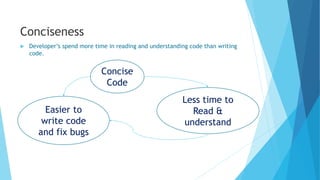
Conciseness
 Developer’s spend more time in reading and understanding code than writing
code.
Less time to
Read &
understand
Easier to
write code
and fix bugs
Concise
Code
 Kotlin excellent design as compared to Java.
1. Syntax clearly expresses the intent of the code without requirement of boiler
plate code to specify how.
2. Standard boilerplate (getters, setters and constructor parameter assigning to
fields is implicit to Kotlin i.e. we don’t have write that
3. Kotlin let’s us replace long and repetitive sections of code with library
method calls
Conciseness (cont.)
Safety
 No language can prevent all possible errors, but Kotlin does a better job over
Java.
 There is always a trade-off between safety and performance, like adding
annotations would increase the safety decrease the runtime performance.
 Kotlin has better safety features with smaller overall cost.
 Kotlin insures type safety by automatically inferring the types.
 Kotlin has type system which keeps track of all the nullables and non-nulls
and forbid operations that can lead to NullPointerException.
Interoperablity: My personal favourite
 So Kotlin is great but do I have to first learn it completely and then start
developing android applications ?
 Well the good news is no.
• Have a Java Project ? You can just incrementally add Kotlin files to it.
• Both can co-exist in the same project without any problems(interoperability)
• Java can be called from Kotlin and Kotlin can be called Java.
 Kotlin classes and methods can be called exactly like regular Java classes and
methods.
 Kotlin can also extend Java Libraries.
Pragmatics
 Kotlin is pragmatic language, i.e. it is practical and designed to solve-real
world problems
 It was designed to reduce the complexity of the language and easier to learn
by relying on familiar concepts
 It had an aim to highlight importance of IDE i.e. intelliJ
i. Tools automatically detect code patterns
ii. Suggests concise constructs
iii. Offering code fixes for us
Kotlin Features
 Statically typed language
 It is both Object Oriented and Functional
1. Supports Inheritance, polymorphism and Generics
2. Lambda expressions, immutability first class functions, do not have to
declare anonymous inner class
 Lambdas (High Order Functions)
1. Referred as anonymous functions and can replaces anonymous classes
2. Functions returning functions
 Null Safety, Kotlin can have NullPointerExceptions when:
1. An explicit call to throw NullPointerException()
2. External Java code caused it
 Extension Functions and Operator Overloading
1. Extension functions are used to extend from Java Collections Package
 Generics, passing types.
1. Generics is opposite to polymorphism
2. Similar to C++ template
 Data Classes
Features that Java has but Kotlin
doesn’t
 Checked Exceptions
 Static members
 Non-private fields(no public data)
 Primitive types that are not classes
Thank you

Kotlin

  • 1.
    Kotlin Getting Started inKotlin By: Sudhanshu Vohra
  • 2.
    Let’s talk about:The Good Old Java  Java has been the native language to develop Android Applications  Java is hybrid language (Compiled + Interpreted) a. Java code is first compiled into .class file (byte code) b. Byte code is run on Java Virtual Machine (interpreter)  Android platform mainly supports features from Java 6 (current Version is Java 8), lacks “modern features”  Android applications can be developed using any languages which run on the JVM and generate byte code. Eg: Scala, Groovy and KOTLIN!
  • 3.
    The new heroin town: Kotlin  Developed in 2011, a JVM based language developed by JetBrains (IntelliJ IDE)  Created by keeping in mind Java Developers, and IntelliJ as main development IDE  Extension for source code .kt
  • 4.
    What unique featuresKotlin brings to the table?
  • 5.
    Conciseness  Developer’s spendmore time in reading and understanding code than writing code. Less time to Read & understand Easier to write code and fix bugs Concise Code
  • 6.
     Kotlin excellentdesign as compared to Java. 1. Syntax clearly expresses the intent of the code without requirement of boiler plate code to specify how. 2. Standard boilerplate (getters, setters and constructor parameter assigning to fields is implicit to Kotlin i.e. we don’t have write that 3. Kotlin let’s us replace long and repetitive sections of code with library method calls Conciseness (cont.)
  • 7.
    Safety  No languagecan prevent all possible errors, but Kotlin does a better job over Java.  There is always a trade-off between safety and performance, like adding annotations would increase the safety decrease the runtime performance.  Kotlin has better safety features with smaller overall cost.  Kotlin insures type safety by automatically inferring the types.  Kotlin has type system which keeps track of all the nullables and non-nulls and forbid operations that can lead to NullPointerException.
  • 8.
    Interoperablity: My personalfavourite  So Kotlin is great but do I have to first learn it completely and then start developing android applications ?  Well the good news is no. • Have a Java Project ? You can just incrementally add Kotlin files to it. • Both can co-exist in the same project without any problems(interoperability) • Java can be called from Kotlin and Kotlin can be called Java.  Kotlin classes and methods can be called exactly like regular Java classes and methods.  Kotlin can also extend Java Libraries.
  • 9.
    Pragmatics  Kotlin ispragmatic language, i.e. it is practical and designed to solve-real world problems  It was designed to reduce the complexity of the language and easier to learn by relying on familiar concepts  It had an aim to highlight importance of IDE i.e. intelliJ i. Tools automatically detect code patterns ii. Suggests concise constructs iii. Offering code fixes for us
  • 10.
    Kotlin Features  Staticallytyped language  It is both Object Oriented and Functional 1. Supports Inheritance, polymorphism and Generics 2. Lambda expressions, immutability first class functions, do not have to declare anonymous inner class  Lambdas (High Order Functions) 1. Referred as anonymous functions and can replaces anonymous classes 2. Functions returning functions  Null Safety, Kotlin can have NullPointerExceptions when: 1. An explicit call to throw NullPointerException() 2. External Java code caused it
  • 11.
     Extension Functionsand Operator Overloading 1. Extension functions are used to extend from Java Collections Package  Generics, passing types. 1. Generics is opposite to polymorphism 2. Similar to C++ template  Data Classes
  • 12.
    Features that Javahas but Kotlin doesn’t  Checked Exceptions  Static members  Non-private fields(no public data)  Primitive types that are not classes
  • 13.