JSP – JavaServerPages

Sistemi Informativi Aziendali – A.A. 2011/2012
Sommario
       Basic JSP
       Advanced JSP tags
       Java Beans
       MVC pattern


    2                       Sistemi Informativi Aziendali   A.A. 2010/2011
Basic JSP

JSP – JavaServerPages
The J2EE presentation tier
       Servlets
           Java classes that handle requests by producing responses (e.g.,
            HTTP requests and responses)
       JavaServer Pages (JSP)
           HTML-like pages with some dynamic content.
           Translated into servlets automatically
       JSP Standard Tag Library (JSTL)
           Set of standard components for JSP
            Used inside JSP pages.


    4                                  Sistemi Informativi Aziendali   A.A. 2010/2011
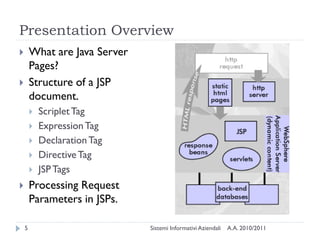
Presentation Overview
       What are Java Server
        Pages?
       Structure of a JSP
        document.
           Scriplet Tag
           Expression Tag
           Declaration Tag
           Directive Tag
           JSP Tags
       Processing Request
        Parameters in JSPs.

    5                          Sistemi Informativi Aziendali   A.A. 2010/2011
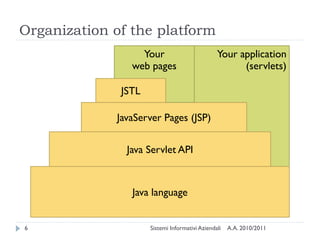
Organization of the platform
                  Your                          Your application
                web pages                             (servlets)

              JSTL

             JavaServer Pages (JSP)

               Java Servlet API


                Java language


6                    Sistemi Informativi Aziendali   A.A. 2010/2011
What is JSP?
       Java based technology that simplifies the developing of
        dynamic web sites
       JSP pages are HTML pages with embedded code that
        allows to access data from Java code running on the
        server
       JSP provides separation of HTML presentation logic from
        the application logic.


    7                            Sistemi Informativi Aziendali   A.A. 2010/2011
Why use JSP Technology?
       Provides an extensive infrastructure for:
           Tracking sessions.
           Managing cookies.
           Reading and sending HTML headers.
           Parsing and decoding HTML form data.
       Efficient:
           Every request for a JSP is handled by a simple Java thread
       Scalable
           Easy integration with other backend services


    8                                  Sistemi Informativi Aziendali   A.A. 2010/2011
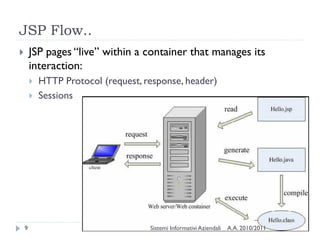
JSP Flow..
       JSP pages ―live‖ within a container that manages its
        interaction:
           HTTP Protocol (request, response, header)
           Sessions


    9                                Sistemi Informativi Aziendali   A.A. 2010/2011
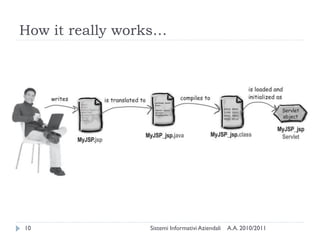
How it really works…


10               Sistemi Informativi Aziendali   A.A. 2010/2011
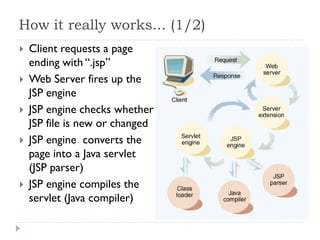
How it really works... (1/2)
   Client requests a page
    ending with ―.jsp‖
   Web Server fires up the
    JSP engine
   JSP engine checks whether
    JSP file is new or changed
   JSP engine converts the
    page into a Java servlet
    (JSP parser)
   JSP engine compiles the
    servlet (Java compiler)
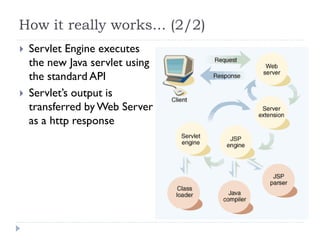
How it really works... (2/2)
   Servlet Engine executes
    the new Java servlet using
    the standard API
   Servlet‘s output is
    transferred by Web Server
    as a http response
Structure of a JSP file
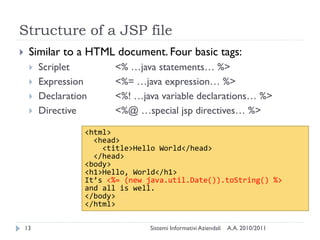
    Similar to a HTML document. Four basic tags:
        Scriplet        <% …java statements… %>
        Expression      <%= …java expression… %>
        Declaration     <%! …java variable declarations… %>
        Directive       <%@ …special jsp directives… %>

                   <html>
                     <head>
                       <title>Hello World</head>
                     </head>
                   <body>
                   <h1>Hello, World</h1>
                   It’s <%= (new java.util.Date()).toString() %>
                   and all is well.
                   </body>
                   </html>

    13                           Sistemi Informativi Aziendali   A.A. 2010/2011
Scriptlet Tag
      Two forms:
          <% any java code %>
          <jsp:scriptlet> ... </jsp:scriptlet>
              (XML form)
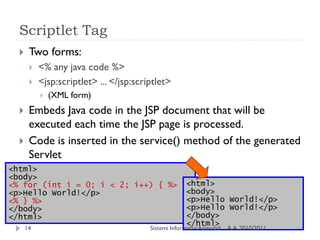
      Embeds Java code in the JSP document that will be
       executed each time the JSP page is processed.
      Code is inserted in the service() method of the generated
       Servlet
<html>
<body>
<% for (int i = 0; i < 2; i++) { %>                    <html>
<p>Hello World!</p>                                    <body>
<% } %>                                                <p>Hello World!</p>
</body>                                                <p>Hello World!</p>
</html>                                                </body>
                                                       </html>
      14                                 Sistemi Informativi Aziendali   A.A. 2010/2011
Expression Tag
      <%= expr %>
      <jsp:expression> expr </jsp:expression>
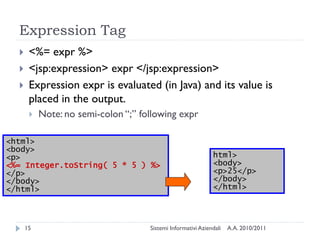
      Expression expr is evaluated (in Java) and its value is
       placed in the output.
          Note: no semi-colon ―;‖ following expr

<html>
<body>
<p>                                                           html>
<%= Integer.toString( 5 * 5 ) %>                              <body>
</p>                                                          <p>25</p>
</body>                                                       </body>
</html>                                                       </html>


      15                             Sistemi Informativi Aziendali   A.A. 2010/2011
Declaration Tag
    <%! declaration %>
    <jsp:declaration> declaration(s)</jsp:declaration>
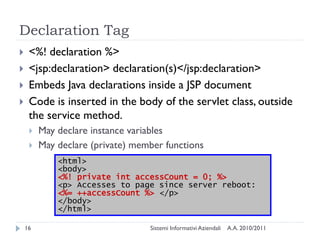
    Embeds Java declarations inside a JSP document
    Code is inserted in the body of the servlet class, outside
     the service method.
        May declare instance variables
        May declare (private) member functions
             <html>
             <body>
             <%! private int accessCount = 0; %>
             <p> Accesses to page since server reboot:
             <%= ++accessCount %> </p>
             </body>
             </html>

    16                            Sistemi Informativi Aziendali   A.A. 2010/2011
Warning!
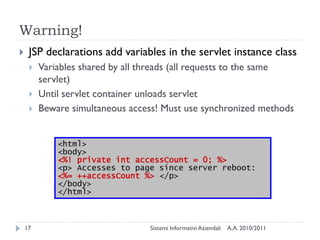
    JSP declarations add variables in the servlet instance class
        Variables shared by all threads (all requests to the same
         servlet)
        Until servlet container unloads servlet
        Beware simultaneous access! Must use synchronized methods


             <html>
             <body>
             <%! private int accessCount = 0; %>
             <p> Accesses to page since server reboot:
             <%= ++accessCount %> </p>
             </body>
             </html>


    17                           Sistemi Informativi Aziendali   A.A. 2010/2011
Directive Tag
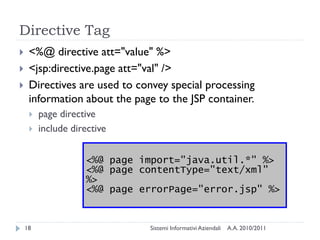
    <%@ directive att="value" %>
    <jsp:directive.page att="val" />
    Directives are used to convey special processing
     information about the page to the JSP container.
        page directive
        include directive


                    <%@ page import="java.util.*" %>
                    <%@ page contentType="text/xml"
                    %>
                    <%@ page errorPage="error.jsp" %>


    18                        Sistemi Informativi Aziendali   A.A. 2010/2011
The JSP @page Directive
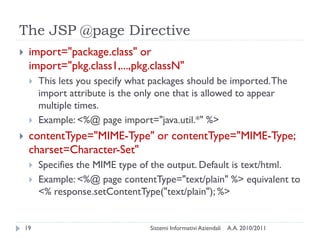
    import="package.class" or
     import="pkg.class1,...,pkg.classN"
        This lets you specify what packages should be imported. The
         import attribute is the only one that is allowed to appear
         multiple times.
        Example: <%@ page import="java.util.*" %>
    contentType="MIME-Type" or contentType="MIME-Type;
     charset=Character-Set"
        Specifies the MIME type of the output. Default is text/html.
        Example: <%@ page contentType="text/plain" %> equivalent to
         <% response.setContentType("text/plain"); %>


    19                             Sistemi Informativi Aziendali   A.A. 2010/2011
The JSP @page Directive
    session="true|false"
        A value of true (the default) indicates that the predefined
         variable session (of type HttpSession) should be bound to the
         existing session if one exists, otherwise a new session should
         be created and bound to it.
        A value of false indicates that no sessions will be used, and
         attempts to access the variable session will result in errors at
         the time the JSP page is translated into a servlet.


    20                               Sistemi Informativi Aziendali   A.A. 2010/2011
The JSP @page Directive
    errorPage="url"
        This specifies a JSP page that should process any Throwables
         thrown but not caught in the current page.
    isErrorPage="true|false"
        This indicates whether or not the current page can act as the
         error page for another JSP page. The default is false.


    21                             Sistemi Informativi Aziendali   A.A. 2010/2011
The JSP @page Directive
    isThreadSafe="true|false"
        A value of true (the default) indicates normal servlet
         processing, where multiple requests can be processed
         simultaneously with a single servlet instance, under the
         assumption that the author synchronized access to instance
         variables.
        A value of false indicates that the servlet should implement
         SingleThreadModel, with requests either delivered serially or
         with simultaneous requests being given separate servlet
         instances.
            Don‘t use it, since it reduces performance!


    22                                   Sistemi Informativi Aziendali   A.A. 2010/2011
The JSP @page Directive
    buffer="sizekb|none"
        This specifies the buffer size for the jspWriter out. The default
         is server-specific, but must be at least 8kb.
    autoflush="true|false"
        A value of true, the default, indicates that the buffer should be
         flushed when it is full.
        A value of false, rarely used, indicates that an exception should
         be thrown when the buffer overflows.
        A value of false is illegal when also using buffer="none".


    23                               Sistemi Informativi Aziendali   A.A. 2010/2011
The JSP @page Directive
    extends="package.class"
        This indicates the superclass of servlet that will be generated.
         Use this with extreme caution, since the server may be using a
         custom superclass already.
    info="message"
        This defines a string that can be retrieved via the getServletInfo
         method.
    language="java"
        Java is both the default and the only legal choice.


    24                               Sistemi Informativi Aziendali   A.A. 2010/2011
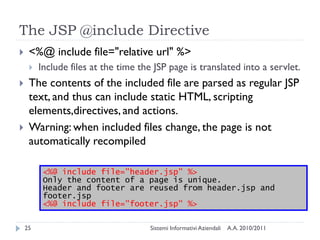
The JSP @include Directive
    <%@ include file="relative url" %>
        Include files at the time the JSP page is translated into a servlet.
    The contents of the included file are parsed as regular JSP
     text, and thus can include static HTML, scripting
     elements,directives, and actions.
    Warning: when included files change, the page is not
     automatically recompiled

          <%@ include file="header.jsp" %>
          Only the content of a page is unique.
          Header and footer are reused from header.jsp and
          footer.jsp
          <%@ include file="footer.jsp" %>

    25                                Sistemi Informativi Aziendali   A.A. 2010/2011
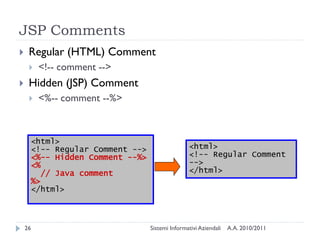
JSP Comments
    Regular (HTML) Comment
        <!-- comment -->
    Hidden (JSP) Comment
        <%-- comment --%>


     <html>
     <!-- Regular Comment -->                  <html>
     <%-- Hidden Comment --%>                  <!-- Regular Comment
     <%                                        -->
        // Java comment                        </html>
     %>
     </html>


    26                          Sistemi Informativi Aziendali   A.A. 2010/2011
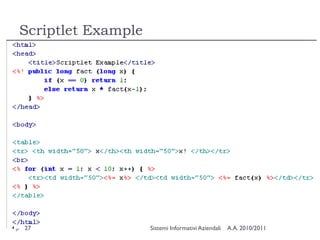
Scriptlet Example


27                  Sistemi Informativi Aziendali   A.A. 2010/2011
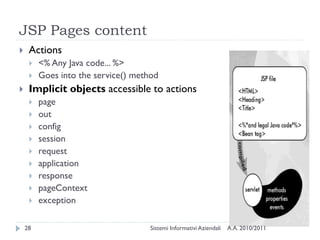
JSP Pages content
    Actions
        <% Any Java code... %>
        Goes into the service() method
    Implicit objects accessible to actions
        page
        out
        config
        session
        request
        application
        response
        pageContext
        exception

    28                               Sistemi Informativi Aziendali   A.A. 2010/2011
Implicit Objects
    request
        The HttpServletRequest parameter
        Mainly used for getting request parameters
    response
        The HttpServletResponse parameter
        Rarely used in JSP (directives already to the work for us...)
    out
        The PrintWriter associated to the response (buffered)
        out.println()
        Not much used... just escape to HTML
            %>html code<%

    29                               Sistemi Informativi Aziendali   A.A. 2010/2011
Request object- getting parameters
    String getParameter(String name)
        Returns the value of a request parameter as a String, or null if the
         parameter does not exist.
    Map getParameterMap()
        Returns a java.util.Map of the parameters
    Enumeration getParameterNames()
        Returns an Enumeration of String objects containing the names of
         the parameters
    String[] getParameterValues(String name)
        Returns an array of String objects containing all of the values the
         given request parameter has, or null if the parameter does not exist.
    More methods: http://java.sun.com/javaee/5/docs/api/
        HttpServletRequest, ServletRequest

    30                                 Sistemi Informativi Aziendali   A.A. 2010/2011
Implicit Objects (will be used with
JavaBeans)
    session
        The HttpSession object associated to the request
        Created automatically
    application
        The ServletContext object
        Used to share variables across all servlets in the application
        getAttribute and setAttribute methods
    config
        The ServletConfig object
    pageContext
        The PageContext object
        Used for sharing JavaBeans

    31                                Sistemi Informativi Aziendali   A.A. 2010/2011
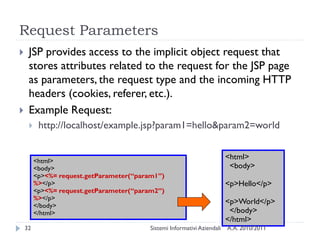
Request Parameters
    JSP provides access to the implicit object request that
     stores attributes related to the request for the JSP page
     as parameters, the request type and the incoming HTTP
     headers (cookies, referer, etc.).
    Example Request:
         http://localhost/example.jsp?param1=hello&param2=world


         <html>
                                                                          <html>
         <body>                                                            <body>
         <p><%= request.getParameter(“param1”)
         %></p>                                                           <p>Hello</p>
         <p><%= request.getParameter(“param2”)
         %></p>
         </body>
                                                                          <p>World</p>
         </html>                                                           </body>
                                                                          </html>
    32                                    Sistemi Informativi Aziendali   A.A. 2010/2011
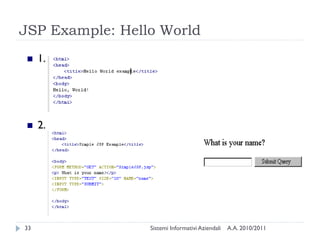
JSP Example: Hello World
    1.


    2.


33               Sistemi Informativi Aziendali   A.A. 2010/2011
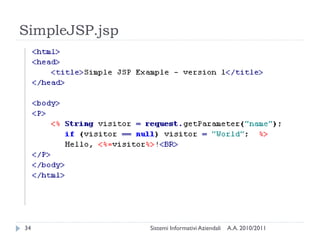
SimpleJSP.jsp


34              Sistemi Informativi Aziendali   A.A. 2010/2011
JSP Expression Language ${el}

               JSP – JavaServerPages
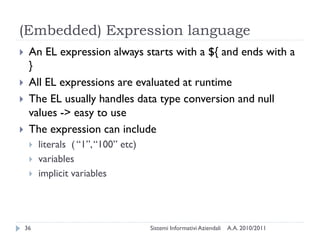
(Embedded) Expression language
    An EL expression always starts with a ${ and ends with a
     }
    All EL expressions are evaluated at runtime
    The EL usually handles data type conversion and null
     values -> easy to use
    The expression can include
        literals ( ―1‖, ―100‖ etc)
        variables
        implicit variables


    36                                Sistemi Informativi Aziendali   A.A. 2010/2011
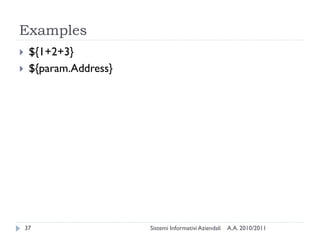
Examples
    ${1+2+3}
    ${param.Address}


    37                  Sistemi Informativi Aziendali   A.A. 2010/2011
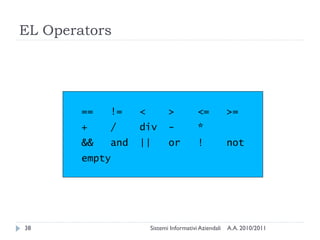
EL Operators


        ==   !=    <          >           <=           >=
        +    /     div        -           *
        &&   and   ||         or          !            not
        empty


38                     Sistemi Informativi Aziendali   A.A. 2010/2011
JSP Implicit Objects
    In JSP, need to be able to access information about the
     environment in which the page is running e.g. the parameters
     passed in a request for a form, the browser type of the user
     etc.
    Implicit objects are a set of Java objects that the JSP Container
     makes available to developers in each page. These objects may
     be accessed as built-in variables via scripting elements
    The JSTL EL allows these objects to be accessed as ‗Implicit
     Variables‘
    Implicit variable are just pre-agreed fixed variable names that
     can be used in JSTL Expressions
        Think of as ―variables that are automatically available to your JSP
         page‖


    39                                 Sistemi Informativi Aziendali   A.A. 2010/2011
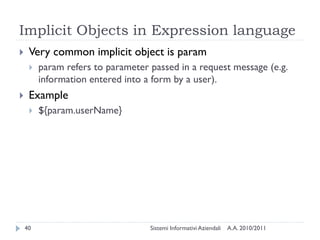
Implicit Objects in Expression language
    Very common implicit object is param
        param refers to parameter passed in a request message (e.g.
         information entered into a form by a user).
    Example
        ${param.userName}


    40                             Sistemi Informativi Aziendali   A.A. 2010/2011
Advanced JSP tags

     Introduzione al corso
JSP Action elements
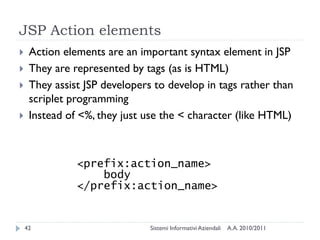
    Action elements are an important syntax element in JSP
    They are represented by tags (as is HTML)
    They assist JSP developers to develop in tags rather than
     scriplet programming
    Instead of <%, they just use the < character (like HTML)


               <prefix:action_name>
                   body
               </prefix:action_name>


    42                         Sistemi Informativi Aziendali   A.A. 2010/2011
JSP Action elements
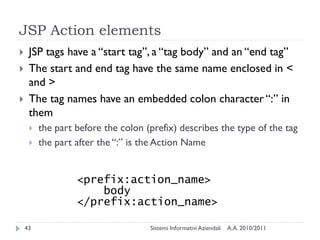
    JSP tags have a ―start tag‖, a ―tag body‖ and an ―end tag‖
    The start and end tag have the same name enclosed in <
     and >
    The tag names have an embedded colon character ―:‖ in
     them
        the part before the colon (prefix) describes the type of the tag
        the part after the ―:‖ is the Action Name


                  <prefix:action_name>
                      body
                  </prefix:action_name>

    43                              Sistemi Informativi Aziendali   A.A. 2010/2011
JSP Action elements
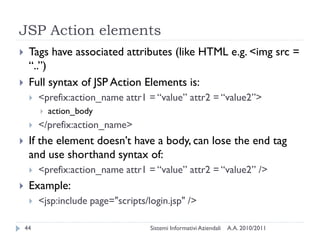
    Tags have associated attributes (like HTML e.g. <img src =
     ―..‖)
    Full syntax of JSP Action Elements is:
        <prefix:action_name attr1 = ―value‖ attr2 = ―value2‖>
            action_body
        </prefix:action_name>
    If the element doesn‘t have a body, can lose the end tag
     and use shorthand syntax of:
        <prefix:action_name attr1 = ―value‖ attr2 = ―value2‖ />
    Example:
        <jsp:include page="scripts/login.jsp" />

    44                               Sistemi Informativi Aziendali   A.A. 2010/2011
JSP Action Elements
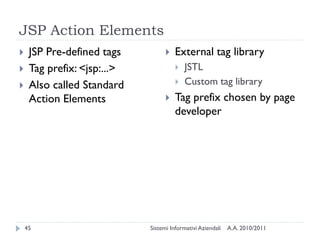
    JSP Pre-defined tags             External tag library
    Tag prefix: <jsp:...>                JSTL
    Also called Standard                 Custom tag library
     Action Elements                  Tag prefix chosen by page
                                       developer


    45                       Sistemi Informativi Aziendali   A.A. 2010/2011
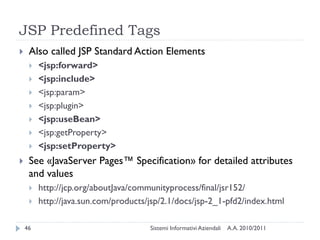
JSP Predefined Tags
    Also called JSP Standard Action Elements
        <jsp:forward>
        <jsp:include>
        <jsp:param>
        <jsp:plugin>
        <jsp:useBean>
        <jsp:getProperty>
        <jsp:setProperty>
    See «JavaServer Pages™ Specification» for detailed attributes
     and values
        http://jcp.org/aboutJava/communityprocess/final/jsr152/
        http://java.sun.com/products/jsp/2.1/docs/jsp-2_1-pfd2/index.html

    46                                Sistemi Informativi Aziendali   A.A. 2010/2011
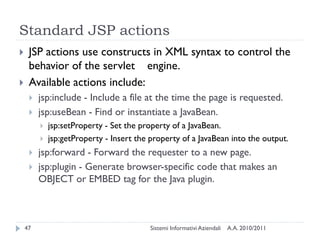
Standard JSP actions
    JSP actions use constructs in XML syntax to control the
     behavior of the servlet engine.
    Available actions include:
        jsp:include - Include a file at the time the page is requested.
        jsp:useBean - Find or instantiate a JavaBean.
            jsp:setProperty - Set the property of a JavaBean.
            jsp:getProperty - Insert the property of a JavaBean into the output.
        jsp:forward - Forward the requester to a new page.
        jsp:plugin - Generate browser-specific code that makes an
         OBJECT or EMBED tag for the Java plugin.


    47                                   Sistemi Informativi Aziendali   A.A. 2010/2011
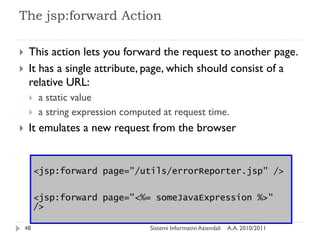
The jsp:forward Action

    This action lets you forward the request to another page.
    It has a single attribute, page, which should consist of a
     relative URL:
        a static value
        a string expression computed at request time.
    It emulates a new request from the browser


         <jsp:forward page="/utils/errorReporter.jsp" />

         <jsp:forward page="<%= someJavaExpression %>"
         />

    48                             Sistemi Informativi Aziendali   A.A. 2010/2011
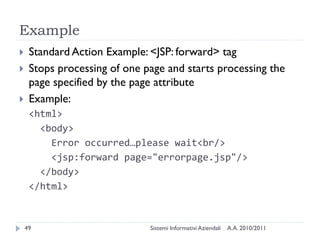
Example
    Standard Action Example: <JSP: forward> tag
    Stops processing of one page and starts processing the
     page specified by the page attribute
    Example:
     <html>
       <body>
         Error occurred…please wait<br/>
         <jsp:forward page="errorpage.jsp"/>
       </body>
     </html>


    49                        Sistemi Informativi Aziendali   A.A. 2010/2011
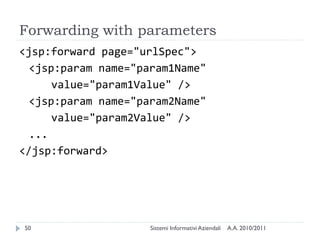
Forwarding with parameters
<jsp:forward page="urlSpec">
  <jsp:param name="param1Name"
      value="param1Value" />
  <jsp:param name="param2Name"
      value="param2Value" />
  ...
</jsp:forward>


50                   Sistemi Informativi Aziendali   A.A. 2010/2011
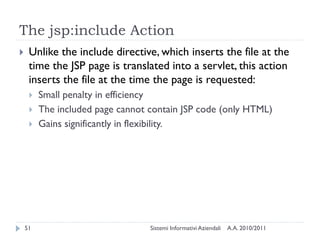
The jsp:include Action
    Unlike the include directive, which inserts the file at the
     time the JSP page is translated into a servlet, this action
     inserts the file at the time the page is requested:
        Small penalty in efficiency
        The included page cannot contain JSP code (only HTML)
        Gains significantly in flexibility.


    51                            Sistemi Informativi Aziendali   A.A. 2010/2011
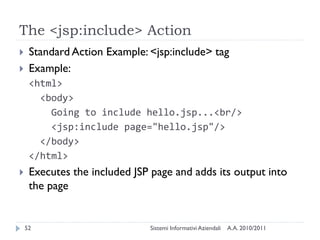
The <jsp:include> Action
    Standard Action Example: <jsp:include> tag
    Example:
     <html>
       <body>
         Going to include hello.jsp...<br/>
         <jsp:include page="hello.jsp"/>
       </body>
     </html>
    Executes the included JSP page and adds its output into
     the page


    52                        Sistemi Informativi Aziendali   A.A. 2010/2011
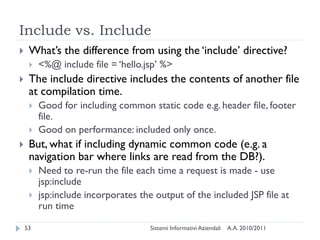
Include vs. Include
    What‘s the difference from using the ‗include‘ directive?
        <%@ include file = ‗hello.jsp‘ %>
    The include directive includes the contents of another file
     at compilation time.
        Good for including common static code e.g. header file, footer
         file.
        Good on performance: included only once.
    But, what if including dynamic common code (e.g. a
     navigation bar where links are read from the DB?).
        Need to re-run the file each time a request is made - use
         jsp:include
        jsp:include incorporates the output of the included JSP file at
         run time

    53                               Sistemi Informativi Aziendali   A.A. 2010/2011
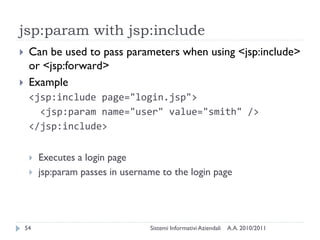
jsp:param with jsp:include
    Can be used to pass parameters when using <jsp:include>
     or <jsp:forward>
    Example
     <jsp:include page="login.jsp">
       <jsp:param name="user" value="smith" />
     </jsp:include>


        Executes a login page
        jsp:param passes in username to the login page


    54                             Sistemi Informativi Aziendali   A.A. 2010/2011
JavaBeans

Introduzione al corso
Java Beans
    Java Beans are reusable components. They are used to
     separate Business logic from the Presentation logic.
    Internally, a bean is just an instance of a class.
    JSP‘s provide three basic tags for working with Beans:
        <jsp:useBean >
        <jsp:setProperty>
        <jsp:getProperty>


    56                         Sistemi Informativi Aziendali   A.A. 2010/2011
The BEAN structure
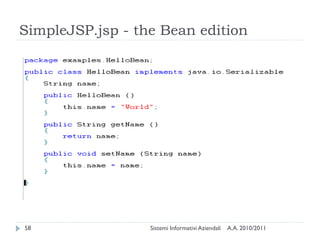
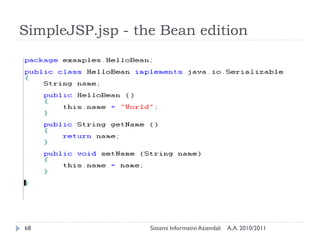
    The Java BEAN is not much different from a Java program.
    The main differences are the signature methods being
     used in a bean.
    For passing parameters to a bean, there has to be a
     corresponding get/set method for every parameter.
    The class should be serializable (able to persistently save
     and restore its state)
    It should have a no-argument constructor


    57                         Sistemi Informativi Aziendali   A.A. 2010/2011
SimpleJSP.jsp - the Bean edition


58                Sistemi Informativi Aziendali   A.A. 2010/2011
The jsp:useBean Action
    This action lets you load in a JavaBean to be used in the
     JSP page.
    This is a a very useful capability because it lets you exploit
     the reusability of Java classes without sacrificing the
     convenience that JSP adds over servlets alone.
    The simplest syntax for specifying that a bean should be
     used is:
    <jsp:useBean id="name" class="package.class" />


    59                          Sistemi Informativi Aziendali   A.A. 2010/2011
Java Beans
    To use a bean in a JSP page, three attributes must be
     supplied
        an id, which provides a local name for the bean
            Creates a ―variable‖ used to access the bean
        the bean's class name, which is used to instantiate the bean if it
         does not exit
            Suggestion: always use packages to help Tomcat find the class!
        a scope, which specifies the lifetime of the bean.
<jsp:useBean id="bean name"
  class="bean class"
  scope = "page | request | session
  |application" />
    60                                   Sistemi Informativi Aziendali   A.A. 2010/2011
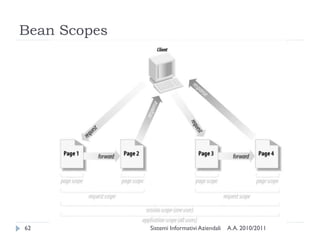
Bean Scopes
    There are four scopes available: page, request, session, and
     application.
        A page-scoped bean is available only within the JSP page and is
         destroyed when the page has finished generating its output for
         the request. By default all beans have page scope
        A request-scoped bean is destroyed when the response is
         sent.
        A session-scoped bean is destroyed when the session is
         destroyed.
        An application-scoped bean is destroyed when the web
         application is destroyed.


    61                              Sistemi Informativi Aziendali   A.A. 2010/2011
Bean Scopes


62            Sistemi Informativi Aziendali   A.A. 2010/2011
jsp:setProperty / jsp:getProperty

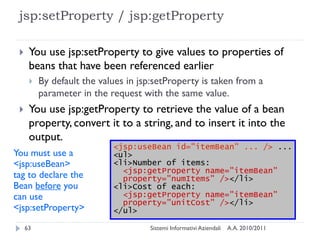
     You use jsp:setProperty to give values to properties of
      beans that have been referenced earlier
         By default the values in jsp:setProperty is taken from a
          parameter in the request with the same value.
     You use jsp:getProperty to retrieve the value of a bean
      property, convert it to a string, and to insert it into the
      output.
                            <jsp:useBean id="itemBean" ... /> ...
You must use a              <ul>
<jsp:useBean>               <li>Number of items:
                              <jsp:getProperty name="itemBean"
tag to declare the            property="numItems" /></li>
Bean before you             <li>Cost of each:
can use                       <jsp:getProperty name="itemBean"
                              property="unitCost" /></li>
<jsp:setProperty>           </ul>

     63                              Sistemi Informativi Aziendali   A.A. 2010/2011
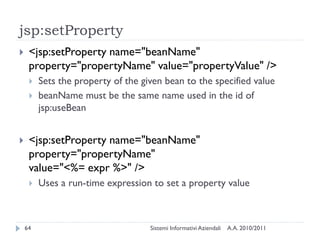
jsp:setProperty
    <jsp:setProperty name="beanName"
     property="propertyName" value="propertyValue" />
        Sets the property of the given bean to the specified value
        beanName must be the same name used in the id of
         jsp:useBean


    <jsp:setProperty name="beanName"
     property="propertyName"
     value="<%= expr %>" />
        Uses a run-time expression to set a property value


    64                              Sistemi Informativi Aziendali   A.A. 2010/2011
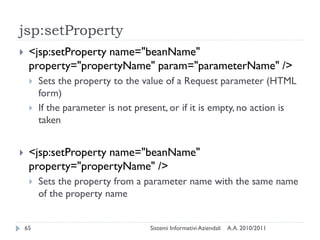
jsp:setProperty
    <jsp:setProperty name="beanName"
     property="propertyName" param="parameterName" />
        Sets the property to the value of a Request parameter (HTML
         form)
        If the parameter is not present, or if it is empty, no action is
         taken


    <jsp:setProperty name="beanName"
     property="propertyName" />
        Sets the property from a parameter name with the same name
         of the property name


    65                              Sistemi Informativi Aziendali   A.A. 2010/2011
jsp:setProperty
    <jsp:setProperty name="beanName" property="*" />
        Automatically tries to set all (not-empty) Request parameters


    66                             Sistemi Informativi Aziendali   A.A. 2010/2011
jsp:getProperty
    <jsp:getProperty name="beanName"
     property="propertyName" />
        Gets the property from the given bean
        beanName must be the same name used in the id of
         jsp:useBean
        The value will be converted to a String and inserted in the
         HTML page


    67                              Sistemi Informativi Aziendali   A.A. 2010/2011
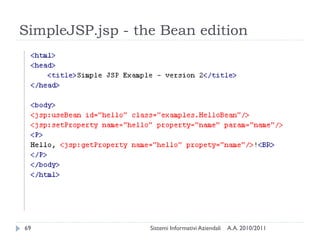
SimpleJSP.jsp - the Bean edition


68                Sistemi Informativi Aziendali   A.A. 2010/2011
SimpleJSP.jsp - the Bean edition


69                Sistemi Informativi Aziendali   A.A. 2010/2011
MVC

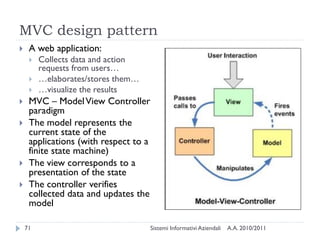
Introduzione al corso
MVC design pattern
    A web application:
        Collects data and action
         requests from users…
        …elaborates/stores them…
        …visualize the results
    MVC – Model View Controller
     paradigm
    The model represents the
     current state of the
     applications (with respect to a
     finite state machine)
    The view corresponds to a
     presentation of the state
    The controller verifies
     collected data and updates the
     model

    71                                 Sistemi Informativi Aziendali   A.A. 2010/2011
MVC
    Applications that present lots of data to the user, often
     wish to separate data (Model) and user interface (View)
     concerns
    Changing the user interface do not impact the data
     handling, and that the data can be reorganized without
     changing the user interface.
    The MVC design pattern solves this problem by
     decoupling data access and business logic from data
     presentation and user interaction.


    72                         Sistemi Informativi Aziendali   A.A. 2010/2011
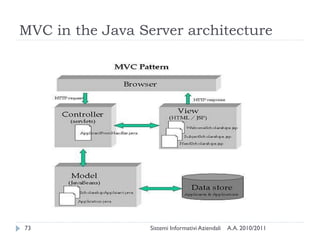
MVC in the Java Server architecture


73                Sistemi Informativi Aziendali   A.A. 2010/2011
MVC with JSP only


                                                   [JavaServer Pages, 3rd Edition]
74              Sistemi Informativi Aziendali   A.A. 2010/2011
MVC with JSP and servlets


                                                    [JavaServer Pages, 3rd Edition]
75               Sistemi Informativi Aziendali   A.A. 2010/2011
MVC in J2EE: JSP, Servlet, EJB


                                                    [JavaServer Pages, 3rd Edition]
76               Sistemi Informativi Aziendali   A.A. 2010/2011
Serving static files


                                                           [Head First Servlets and Jsp]
77                     Sistemi Informativi Aziendali   A.A. 2010/2011
Serving dynamic content, the MVC way


                                                     [Head First Servlets and Jsp]
78               Sistemi Informativi Aziendali   A.A. 2010/2011
Model persistence in MVC
    Request-scope persistence
        Elaborating user form data
    Session-scope persistence
        Remembering login levels and security
        Storing user data, user preferences
        Storing shopping carts, or other lightweight and non-historical
         information
    Application-scope persistence
        Configuration parameters
        Generally available information (e.g., maintenance mode)
    Permanent persistence: storing in the DBMS

    79                                Sistemi Informativi Aziendali   A.A. 2010/2011
When the DB is the model
    JavaBean components encapsulate all database access
    Query methods
        Execute queries and store query results within the bean
        Perform checks and return validity values
        Mainly used by the controller component
        E.g., user.insertNewUser(), user.checkLogin(), user.fullUserList()
    Result access methods
        Return the java objects (or collections) of the query
        Mainly used by the view component
        E.g., user.getUserData(), user.getFullUserList()


    80                               Sistemi Informativi Aziendali   A.A. 2010/2011
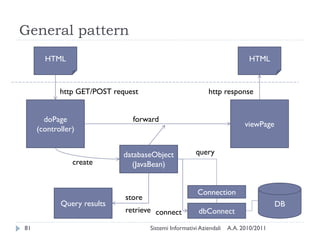
General pattern
       HTML                                                                 HTML


            http GET/POST request                           http response


       doPage                  forward
                                                                           viewPage
     (controller)


                             databaseObject            query
                create         (JavaBean)


                                                        Connection
                             store
            Query results                                                             DB
                             retrieve connect           dbConnect

81                                   Sistemi Informativi Aziendali   A.A. 2010/2011
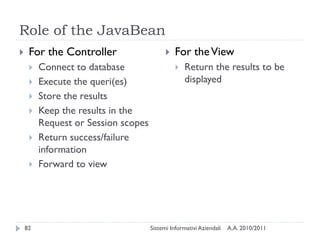
Role of the JavaBean
    For the Controller                       For the View
        Connect to database                      Return the results to be
        Execute the queri(es)                     displayed
        Store the results
        Keep the results in the
         Request or Session scopes
        Return success/failure
         information
        Forward to view


    82                               Sistemi Informativi Aziendali   A.A. 2010/2011
Suggestions
    One JavaBean for every database entity
        One for every table, except for relationship tables
        Some high-level entities are mapped to 2+ tables: only one
         bean
    CrUD: Create / Update / Delete methods
        High level interface in the bean
        Mapped to low level concrete SQL queries
        Error check and validation before/after query
    Other query methods
        Store the results in a collection (eg., List, Map)
        Keep the results until the bean scope expires

    83                                Sistemi Informativi Aziendali   A.A. 2010/2011
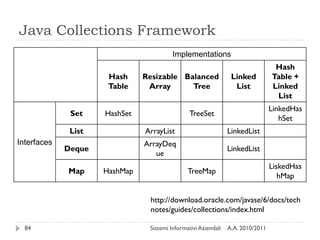
Java Collections Framework
                                         Implementations
                                                                                  Hash
                      Hash     Resizable Balanced                Linked          Table +
                      Table     Array      Tree                   List           Linked
                                                                                  List
                                                                                 LinkedHas
              Set    HashSet                    TreeSet
                                                                                    hSet
              List             ArrayList                        LinkedList
Interfaces                     ArrayDeq
             Deque                                              LinkedList
                                  ue
                                                                                 LiskedHas
             Map     HashMap                   TreeMap
                                                                                    hMap

                                http://download.oracle.com/javase/6/docs/tech
                                notes/guides/collections/index.html

  84                            Sistemi Informativi Aziendali   A.A. 2010/2011
Caching
    A request-scoped bean does no caching of the data
     returned
        Data is used once by the view, then discarded
    A session- or application-scoped bean might implement
     caching policies
        Reducing queries to get information by reusing previous results
        Reducing queries to add/modify information by delaying update
         operations
        Critical: maintaining consistency between DB contents and
         bean results
    Best managed by existing ORM [Object-Relationan
     Mapping] frameworks (e.g., Hibernate)

    85                              Sistemi Informativi Aziendali   A.A. 2010/2011
Licenza d’uso
    Queste diapositive sono distribuite con licenza Creative Commons
     ―Attribuzione - Non commerciale - Condividi allo stesso modo 2.5
     Italia (CC BY-NC-SA 2.5)‖
    Sei libero:
        di riprodurre, distribuire, comunicare al pubblico, esporre in pubblico,
         rappresentare, eseguire e recitare quest'opera
        di modificare quest'opera
    Alle seguenti condizioni:
        Attribuzione — Devi attribuire la paternità dell'opera agli autori originali
         e in modo tale da non suggerire che essi avallino te o il modo in cui tu
         usi l'opera.
        Non commerciale — Non puoi usare quest'opera per fini commerciali.
        Condividi allo stesso modo — Se alteri o trasformi quest'opera, o se la
         usi per crearne un'altra, puoi distribuire l'opera risultante solo con una
         licenza identica o equivalente a questa.
    http://creativecommons.org/licenses/by-nc-sa/2.5/it/

    86                                   Sistemi Informativi Aziendali   A.A. 2010/2011

Introduction to JSP pages

  • 1.
    JSP – JavaServerPages SistemiInformativi Aziendali – A.A. 2011/2012
  • 2.
    Sommario  Basic JSP  Advanced JSP tags  Java Beans  MVC pattern 2 Sistemi Informativi Aziendali A.A. 2010/2011
  • 3.
    Basic JSP JSP –JavaServerPages
  • 4.
    The J2EE presentationtier  Servlets  Java classes that handle requests by producing responses (e.g., HTTP requests and responses)  JavaServer Pages (JSP)  HTML-like pages with some dynamic content.  Translated into servlets automatically  JSP Standard Tag Library (JSTL)  Set of standard components for JSP  Used inside JSP pages. 4 Sistemi Informativi Aziendali A.A. 2010/2011
  • 5.
    Presentation Overview  What are Java Server Pages?  Structure of a JSP document.  Scriplet Tag  Expression Tag  Declaration Tag  Directive Tag  JSP Tags  Processing Request Parameters in JSPs. 5 Sistemi Informativi Aziendali A.A. 2010/2011
  • 6.
    Organization of theplatform Your Your application web pages (servlets) JSTL JavaServer Pages (JSP) Java Servlet API Java language 6 Sistemi Informativi Aziendali A.A. 2010/2011
  • 7.
    What is JSP?  Java based technology that simplifies the developing of dynamic web sites  JSP pages are HTML pages with embedded code that allows to access data from Java code running on the server  JSP provides separation of HTML presentation logic from the application logic. 7 Sistemi Informativi Aziendali A.A. 2010/2011
  • 8.
    Why use JSPTechnology?  Provides an extensive infrastructure for:  Tracking sessions.  Managing cookies.  Reading and sending HTML headers.  Parsing and decoding HTML form data.  Efficient:  Every request for a JSP is handled by a simple Java thread  Scalable  Easy integration with other backend services 8 Sistemi Informativi Aziendali A.A. 2010/2011
  • 9.
    JSP Flow..  JSP pages ―live‖ within a container that manages its interaction:  HTTP Protocol (request, response, header)  Sessions 9 Sistemi Informativi Aziendali A.A. 2010/2011
  • 10.
    How it reallyworks… 10 Sistemi Informativi Aziendali A.A. 2010/2011
  • 11.
    How it reallyworks... (1/2)  Client requests a page ending with ―.jsp‖  Web Server fires up the JSP engine  JSP engine checks whether JSP file is new or changed  JSP engine converts the page into a Java servlet (JSP parser)  JSP engine compiles the servlet (Java compiler)
  • 12.
    How it reallyworks... (2/2)  Servlet Engine executes the new Java servlet using the standard API  Servlet‘s output is transferred by Web Server as a http response
  • 13.
    Structure of aJSP file  Similar to a HTML document. Four basic tags:  Scriplet <% …java statements… %>  Expression <%= …java expression… %>  Declaration <%! …java variable declarations… %>  Directive <%@ …special jsp directives… %> <html> <head> <title>Hello World</head> </head> <body> <h1>Hello, World</h1> It’s <%= (new java.util.Date()).toString() %> and all is well. </body> </html> 13 Sistemi Informativi Aziendali A.A. 2010/2011
  • 14.
    Scriptlet Tag  Two forms:  <% any java code %>  <jsp:scriptlet> ... </jsp:scriptlet>  (XML form)  Embeds Java code in the JSP document that will be executed each time the JSP page is processed.  Code is inserted in the service() method of the generated Servlet <html> <body> <% for (int i = 0; i < 2; i++) { %> <html> <p>Hello World!</p> <body> <% } %> <p>Hello World!</p> </body> <p>Hello World!</p> </html> </body> </html> 14 Sistemi Informativi Aziendali A.A. 2010/2011
  • 15.
    Expression Tag  <%= expr %>  <jsp:expression> expr </jsp:expression>  Expression expr is evaluated (in Java) and its value is placed in the output.  Note: no semi-colon ―;‖ following expr <html> <body> <p> html> <%= Integer.toString( 5 * 5 ) %> <body> </p> <p>25</p> </body> </body> </html> </html> 15 Sistemi Informativi Aziendali A.A. 2010/2011
  • 16.
    Declaration Tag  <%! declaration %>  <jsp:declaration> declaration(s)</jsp:declaration>  Embeds Java declarations inside a JSP document  Code is inserted in the body of the servlet class, outside the service method.  May declare instance variables  May declare (private) member functions <html> <body> <%! private int accessCount = 0; %> <p> Accesses to page since server reboot: <%= ++accessCount %> </p> </body> </html> 16 Sistemi Informativi Aziendali A.A. 2010/2011
  • 17.
    Warning!  JSP declarations add variables in the servlet instance class  Variables shared by all threads (all requests to the same servlet)  Until servlet container unloads servlet  Beware simultaneous access! Must use synchronized methods <html> <body> <%! private int accessCount = 0; %> <p> Accesses to page since server reboot: <%= ++accessCount %> </p> </body> </html> 17 Sistemi Informativi Aziendali A.A. 2010/2011
  • 18.
    Directive Tag  <%@ directive att="value" %>  <jsp:directive.page att="val" />  Directives are used to convey special processing information about the page to the JSP container.  page directive  include directive <%@ page import="java.util.*" %> <%@ page contentType="text/xml" %> <%@ page errorPage="error.jsp" %> 18 Sistemi Informativi Aziendali A.A. 2010/2011
  • 19.
    The JSP @pageDirective  import="package.class" or import="pkg.class1,...,pkg.classN"  This lets you specify what packages should be imported. The import attribute is the only one that is allowed to appear multiple times.  Example: <%@ page import="java.util.*" %>  contentType="MIME-Type" or contentType="MIME-Type; charset=Character-Set"  Specifies the MIME type of the output. Default is text/html.  Example: <%@ page contentType="text/plain" %> equivalent to <% response.setContentType("text/plain"); %> 19 Sistemi Informativi Aziendali A.A. 2010/2011
  • 20.
    The JSP @pageDirective  session="true|false"  A value of true (the default) indicates that the predefined variable session (of type HttpSession) should be bound to the existing session if one exists, otherwise a new session should be created and bound to it.  A value of false indicates that no sessions will be used, and attempts to access the variable session will result in errors at the time the JSP page is translated into a servlet. 20 Sistemi Informativi Aziendali A.A. 2010/2011
  • 21.
    The JSP @pageDirective  errorPage="url"  This specifies a JSP page that should process any Throwables thrown but not caught in the current page.  isErrorPage="true|false"  This indicates whether or not the current page can act as the error page for another JSP page. The default is false. 21 Sistemi Informativi Aziendali A.A. 2010/2011
  • 22.
    The JSP @pageDirective  isThreadSafe="true|false"  A value of true (the default) indicates normal servlet processing, where multiple requests can be processed simultaneously with a single servlet instance, under the assumption that the author synchronized access to instance variables.  A value of false indicates that the servlet should implement SingleThreadModel, with requests either delivered serially or with simultaneous requests being given separate servlet instances.  Don‘t use it, since it reduces performance! 22 Sistemi Informativi Aziendali A.A. 2010/2011
  • 23.
    The JSP @pageDirective  buffer="sizekb|none"  This specifies the buffer size for the jspWriter out. The default is server-specific, but must be at least 8kb.  autoflush="true|false"  A value of true, the default, indicates that the buffer should be flushed when it is full.  A value of false, rarely used, indicates that an exception should be thrown when the buffer overflows.  A value of false is illegal when also using buffer="none". 23 Sistemi Informativi Aziendali A.A. 2010/2011
  • 24.
    The JSP @pageDirective  extends="package.class"  This indicates the superclass of servlet that will be generated. Use this with extreme caution, since the server may be using a custom superclass already.  info="message"  This defines a string that can be retrieved via the getServletInfo method.  language="java"  Java is both the default and the only legal choice. 24 Sistemi Informativi Aziendali A.A. 2010/2011
  • 25.
    The JSP @includeDirective  <%@ include file="relative url" %>  Include files at the time the JSP page is translated into a servlet.  The contents of the included file are parsed as regular JSP text, and thus can include static HTML, scripting elements,directives, and actions.  Warning: when included files change, the page is not automatically recompiled <%@ include file="header.jsp" %> Only the content of a page is unique. Header and footer are reused from header.jsp and footer.jsp <%@ include file="footer.jsp" %> 25 Sistemi Informativi Aziendali A.A. 2010/2011
  • 26.
    JSP Comments  Regular (HTML) Comment  <!-- comment -->  Hidden (JSP) Comment  <%-- comment --%> <html> <!-- Regular Comment --> <html> <%-- Hidden Comment --%> <!-- Regular Comment <% --> // Java comment </html> %> </html> 26 Sistemi Informativi Aziendali A.A. 2010/2011
  • 27.
    Scriptlet Example 27 Sistemi Informativi Aziendali A.A. 2010/2011
  • 28.
    JSP Pages content  Actions  <% Any Java code... %>  Goes into the service() method  Implicit objects accessible to actions  page  out  config  session  request  application  response  pageContext  exception 28 Sistemi Informativi Aziendali A.A. 2010/2011
  • 29.
    Implicit Objects  request  The HttpServletRequest parameter  Mainly used for getting request parameters  response  The HttpServletResponse parameter  Rarely used in JSP (directives already to the work for us...)  out  The PrintWriter associated to the response (buffered)  out.println()  Not much used... just escape to HTML  %>html code<% 29 Sistemi Informativi Aziendali A.A. 2010/2011
  • 30.
    Request object- gettingparameters  String getParameter(String name)  Returns the value of a request parameter as a String, or null if the parameter does not exist.  Map getParameterMap()  Returns a java.util.Map of the parameters  Enumeration getParameterNames()  Returns an Enumeration of String objects containing the names of the parameters  String[] getParameterValues(String name)  Returns an array of String objects containing all of the values the given request parameter has, or null if the parameter does not exist.  More methods: http://java.sun.com/javaee/5/docs/api/  HttpServletRequest, ServletRequest 30 Sistemi Informativi Aziendali A.A. 2010/2011
  • 31.
    Implicit Objects (willbe used with JavaBeans)  session  The HttpSession object associated to the request  Created automatically  application  The ServletContext object  Used to share variables across all servlets in the application  getAttribute and setAttribute methods  config  The ServletConfig object  pageContext  The PageContext object  Used for sharing JavaBeans 31 Sistemi Informativi Aziendali A.A. 2010/2011
  • 32.
    Request Parameters  JSP provides access to the implicit object request that stores attributes related to the request for the JSP page as parameters, the request type and the incoming HTTP headers (cookies, referer, etc.).  Example Request:  http://localhost/example.jsp?param1=hello&param2=world <html> <html> <body> <body> <p><%= request.getParameter(“param1”) %></p> <p>Hello</p> <p><%= request.getParameter(“param2”) %></p> </body> <p>World</p> </html> </body> </html> 32 Sistemi Informativi Aziendali A.A. 2010/2011
  • 33.
    JSP Example: HelloWorld  1.  2. 33 Sistemi Informativi Aziendali A.A. 2010/2011
  • 34.
    SimpleJSP.jsp 34 Sistemi Informativi Aziendali A.A. 2010/2011
  • 35.
    JSP Expression Language${el} JSP – JavaServerPages
  • 36.
    (Embedded) Expression language  An EL expression always starts with a ${ and ends with a }  All EL expressions are evaluated at runtime  The EL usually handles data type conversion and null values -> easy to use  The expression can include  literals ( ―1‖, ―100‖ etc)  variables  implicit variables 36 Sistemi Informativi Aziendali A.A. 2010/2011
  • 37.
    Examples  ${1+2+3}  ${param.Address} 37 Sistemi Informativi Aziendali A.A. 2010/2011
  • 38.
    EL Operators == != < > <= >= + / div - * && and || or ! not empty 38 Sistemi Informativi Aziendali A.A. 2010/2011
  • 39.
    JSP Implicit Objects  In JSP, need to be able to access information about the environment in which the page is running e.g. the parameters passed in a request for a form, the browser type of the user etc.  Implicit objects are a set of Java objects that the JSP Container makes available to developers in each page. These objects may be accessed as built-in variables via scripting elements  The JSTL EL allows these objects to be accessed as ‗Implicit Variables‘  Implicit variable are just pre-agreed fixed variable names that can be used in JSTL Expressions  Think of as ―variables that are automatically available to your JSP page‖ 39 Sistemi Informativi Aziendali A.A. 2010/2011
  • 40.
    Implicit Objects inExpression language  Very common implicit object is param  param refers to parameter passed in a request message (e.g. information entered into a form by a user).  Example  ${param.userName} 40 Sistemi Informativi Aziendali A.A. 2010/2011
  • 41.
    Advanced JSP tags Introduzione al corso
  • 42.
    JSP Action elements  Action elements are an important syntax element in JSP  They are represented by tags (as is HTML)  They assist JSP developers to develop in tags rather than scriplet programming  Instead of <%, they just use the < character (like HTML) <prefix:action_name> body </prefix:action_name> 42 Sistemi Informativi Aziendali A.A. 2010/2011
  • 43.
    JSP Action elements  JSP tags have a ―start tag‖, a ―tag body‖ and an ―end tag‖  The start and end tag have the same name enclosed in < and >  The tag names have an embedded colon character ―:‖ in them  the part before the colon (prefix) describes the type of the tag  the part after the ―:‖ is the Action Name <prefix:action_name> body </prefix:action_name> 43 Sistemi Informativi Aziendali A.A. 2010/2011
  • 44.
    JSP Action elements  Tags have associated attributes (like HTML e.g. <img src = ―..‖)  Full syntax of JSP Action Elements is:  <prefix:action_name attr1 = ―value‖ attr2 = ―value2‖>  action_body  </prefix:action_name>  If the element doesn‘t have a body, can lose the end tag and use shorthand syntax of:  <prefix:action_name attr1 = ―value‖ attr2 = ―value2‖ />  Example:  <jsp:include page="scripts/login.jsp" /> 44 Sistemi Informativi Aziendali A.A. 2010/2011
  • 45.
    JSP Action Elements  JSP Pre-defined tags  External tag library  Tag prefix: <jsp:...>  JSTL  Also called Standard  Custom tag library Action Elements  Tag prefix chosen by page developer 45 Sistemi Informativi Aziendali A.A. 2010/2011
  • 46.
    JSP Predefined Tags  Also called JSP Standard Action Elements  <jsp:forward>  <jsp:include>  <jsp:param>  <jsp:plugin>  <jsp:useBean>  <jsp:getProperty>  <jsp:setProperty>  See «JavaServer Pages™ Specification» for detailed attributes and values  http://jcp.org/aboutJava/communityprocess/final/jsr152/  http://java.sun.com/products/jsp/2.1/docs/jsp-2_1-pfd2/index.html 46 Sistemi Informativi Aziendali A.A. 2010/2011
  • 47.
    Standard JSP actions  JSP actions use constructs in XML syntax to control the behavior of the servlet engine.  Available actions include:  jsp:include - Include a file at the time the page is requested.  jsp:useBean - Find or instantiate a JavaBean.  jsp:setProperty - Set the property of a JavaBean.  jsp:getProperty - Insert the property of a JavaBean into the output.  jsp:forward - Forward the requester to a new page.  jsp:plugin - Generate browser-specific code that makes an OBJECT or EMBED tag for the Java plugin. 47 Sistemi Informativi Aziendali A.A. 2010/2011
  • 48.
    The jsp:forward Action  This action lets you forward the request to another page.  It has a single attribute, page, which should consist of a relative URL:  a static value  a string expression computed at request time.  It emulates a new request from the browser <jsp:forward page="/utils/errorReporter.jsp" /> <jsp:forward page="<%= someJavaExpression %>" /> 48 Sistemi Informativi Aziendali A.A. 2010/2011
  • 49.
    Example  Standard Action Example: <JSP: forward> tag  Stops processing of one page and starts processing the page specified by the page attribute  Example: <html> <body> Error occurred…please wait<br/> <jsp:forward page="errorpage.jsp"/> </body> </html> 49 Sistemi Informativi Aziendali A.A. 2010/2011
  • 50.
    Forwarding with parameters <jsp:forwardpage="urlSpec"> <jsp:param name="param1Name" value="param1Value" /> <jsp:param name="param2Name" value="param2Value" /> ... </jsp:forward> 50 Sistemi Informativi Aziendali A.A. 2010/2011
  • 51.
    The jsp:include Action  Unlike the include directive, which inserts the file at the time the JSP page is translated into a servlet, this action inserts the file at the time the page is requested:  Small penalty in efficiency  The included page cannot contain JSP code (only HTML)  Gains significantly in flexibility. 51 Sistemi Informativi Aziendali A.A. 2010/2011
  • 52.
    The <jsp:include> Action  Standard Action Example: <jsp:include> tag  Example: <html> <body> Going to include hello.jsp...<br/> <jsp:include page="hello.jsp"/> </body> </html>  Executes the included JSP page and adds its output into the page 52 Sistemi Informativi Aziendali A.A. 2010/2011
  • 53.
    Include vs. Include  What‘s the difference from using the ‗include‘ directive?  <%@ include file = ‗hello.jsp‘ %>  The include directive includes the contents of another file at compilation time.  Good for including common static code e.g. header file, footer file.  Good on performance: included only once.  But, what if including dynamic common code (e.g. a navigation bar where links are read from the DB?).  Need to re-run the file each time a request is made - use jsp:include  jsp:include incorporates the output of the included JSP file at run time 53 Sistemi Informativi Aziendali A.A. 2010/2011
  • 54.
    jsp:param with jsp:include  Can be used to pass parameters when using <jsp:include> or <jsp:forward>  Example <jsp:include page="login.jsp"> <jsp:param name="user" value="smith" /> </jsp:include>  Executes a login page  jsp:param passes in username to the login page 54 Sistemi Informativi Aziendali A.A. 2010/2011
  • 55.
  • 56.
    Java Beans  Java Beans are reusable components. They are used to separate Business logic from the Presentation logic.  Internally, a bean is just an instance of a class.  JSP‘s provide three basic tags for working with Beans:  <jsp:useBean >  <jsp:setProperty>  <jsp:getProperty> 56 Sistemi Informativi Aziendali A.A. 2010/2011
  • 57.
    The BEAN structure  The Java BEAN is not much different from a Java program.  The main differences are the signature methods being used in a bean.  For passing parameters to a bean, there has to be a corresponding get/set method for every parameter.  The class should be serializable (able to persistently save and restore its state)  It should have a no-argument constructor 57 Sistemi Informativi Aziendali A.A. 2010/2011
  • 58.
    SimpleJSP.jsp - theBean edition 58 Sistemi Informativi Aziendali A.A. 2010/2011
  • 59.
    The jsp:useBean Action  This action lets you load in a JavaBean to be used in the JSP page.  This is a a very useful capability because it lets you exploit the reusability of Java classes without sacrificing the convenience that JSP adds over servlets alone.  The simplest syntax for specifying that a bean should be used is:  <jsp:useBean id="name" class="package.class" /> 59 Sistemi Informativi Aziendali A.A. 2010/2011
  • 60.
    Java Beans  To use a bean in a JSP page, three attributes must be supplied  an id, which provides a local name for the bean  Creates a ―variable‖ used to access the bean  the bean's class name, which is used to instantiate the bean if it does not exit  Suggestion: always use packages to help Tomcat find the class!  a scope, which specifies the lifetime of the bean. <jsp:useBean id="bean name" class="bean class" scope = "page | request | session |application" /> 60 Sistemi Informativi Aziendali A.A. 2010/2011
  • 61.
    Bean Scopes  There are four scopes available: page, request, session, and application.  A page-scoped bean is available only within the JSP page and is destroyed when the page has finished generating its output for the request. By default all beans have page scope  A request-scoped bean is destroyed when the response is sent.  A session-scoped bean is destroyed when the session is destroyed.  An application-scoped bean is destroyed when the web application is destroyed. 61 Sistemi Informativi Aziendali A.A. 2010/2011
  • 62.
    Bean Scopes 62 Sistemi Informativi Aziendali A.A. 2010/2011
  • 63.
    jsp:setProperty / jsp:getProperty  You use jsp:setProperty to give values to properties of beans that have been referenced earlier  By default the values in jsp:setProperty is taken from a parameter in the request with the same value.  You use jsp:getProperty to retrieve the value of a bean property, convert it to a string, and to insert it into the output. <jsp:useBean id="itemBean" ... /> ... You must use a <ul> <jsp:useBean> <li>Number of items: <jsp:getProperty name="itemBean" tag to declare the property="numItems" /></li> Bean before you <li>Cost of each: can use <jsp:getProperty name="itemBean" property="unitCost" /></li> <jsp:setProperty> </ul> 63 Sistemi Informativi Aziendali A.A. 2010/2011
  • 64.
    jsp:setProperty  <jsp:setProperty name="beanName" property="propertyName" value="propertyValue" />  Sets the property of the given bean to the specified value  beanName must be the same name used in the id of jsp:useBean  <jsp:setProperty name="beanName" property="propertyName" value="<%= expr %>" />  Uses a run-time expression to set a property value 64 Sistemi Informativi Aziendali A.A. 2010/2011
  • 65.
    jsp:setProperty  <jsp:setProperty name="beanName" property="propertyName" param="parameterName" />  Sets the property to the value of a Request parameter (HTML form)  If the parameter is not present, or if it is empty, no action is taken  <jsp:setProperty name="beanName" property="propertyName" />  Sets the property from a parameter name with the same name of the property name 65 Sistemi Informativi Aziendali A.A. 2010/2011
  • 66.
    jsp:setProperty  <jsp:setProperty name="beanName" property="*" />  Automatically tries to set all (not-empty) Request parameters 66 Sistemi Informativi Aziendali A.A. 2010/2011
  • 67.
    jsp:getProperty  <jsp:getProperty name="beanName" property="propertyName" />  Gets the property from the given bean  beanName must be the same name used in the id of jsp:useBean  The value will be converted to a String and inserted in the HTML page 67 Sistemi Informativi Aziendali A.A. 2010/2011
  • 68.
    SimpleJSP.jsp - theBean edition 68 Sistemi Informativi Aziendali A.A. 2010/2011
  • 69.
    SimpleJSP.jsp - theBean edition 69 Sistemi Informativi Aziendali A.A. 2010/2011
  • 70.
  • 71.
    MVC design pattern  A web application:  Collects data and action requests from users…  …elaborates/stores them…  …visualize the results  MVC – Model View Controller paradigm  The model represents the current state of the applications (with respect to a finite state machine)  The view corresponds to a presentation of the state  The controller verifies collected data and updates the model 71 Sistemi Informativi Aziendali A.A. 2010/2011
  • 72.
    MVC  Applications that present lots of data to the user, often wish to separate data (Model) and user interface (View) concerns  Changing the user interface do not impact the data handling, and that the data can be reorganized without changing the user interface.  The MVC design pattern solves this problem by decoupling data access and business logic from data presentation and user interaction. 72 Sistemi Informativi Aziendali A.A. 2010/2011
  • 73.
    MVC in theJava Server architecture 73 Sistemi Informativi Aziendali A.A. 2010/2011
  • 74.
    MVC with JSPonly [JavaServer Pages, 3rd Edition] 74 Sistemi Informativi Aziendali A.A. 2010/2011
  • 75.
    MVC with JSPand servlets [JavaServer Pages, 3rd Edition] 75 Sistemi Informativi Aziendali A.A. 2010/2011
  • 76.
    MVC in J2EE:JSP, Servlet, EJB [JavaServer Pages, 3rd Edition] 76 Sistemi Informativi Aziendali A.A. 2010/2011
  • 77.
    Serving static files [Head First Servlets and Jsp] 77 Sistemi Informativi Aziendali A.A. 2010/2011
  • 78.
    Serving dynamic content,the MVC way [Head First Servlets and Jsp] 78 Sistemi Informativi Aziendali A.A. 2010/2011
  • 79.
    Model persistence inMVC  Request-scope persistence  Elaborating user form data  Session-scope persistence  Remembering login levels and security  Storing user data, user preferences  Storing shopping carts, or other lightweight and non-historical information  Application-scope persistence  Configuration parameters  Generally available information (e.g., maintenance mode)  Permanent persistence: storing in the DBMS 79 Sistemi Informativi Aziendali A.A. 2010/2011
  • 80.
    When the DBis the model  JavaBean components encapsulate all database access  Query methods  Execute queries and store query results within the bean  Perform checks and return validity values  Mainly used by the controller component  E.g., user.insertNewUser(), user.checkLogin(), user.fullUserList()  Result access methods  Return the java objects (or collections) of the query  Mainly used by the view component  E.g., user.getUserData(), user.getFullUserList() 80 Sistemi Informativi Aziendali A.A. 2010/2011
  • 81.
    General pattern HTML HTML http GET/POST request http response doPage forward viewPage (controller) databaseObject query create (JavaBean) Connection store Query results DB retrieve connect dbConnect 81 Sistemi Informativi Aziendali A.A. 2010/2011
  • 82.
    Role of theJavaBean  For the Controller  For the View  Connect to database  Return the results to be  Execute the queri(es) displayed  Store the results  Keep the results in the Request or Session scopes  Return success/failure information  Forward to view 82 Sistemi Informativi Aziendali A.A. 2010/2011
  • 83.
    Suggestions  One JavaBean for every database entity  One for every table, except for relationship tables  Some high-level entities are mapped to 2+ tables: only one bean  CrUD: Create / Update / Delete methods  High level interface in the bean  Mapped to low level concrete SQL queries  Error check and validation before/after query  Other query methods  Store the results in a collection (eg., List, Map)  Keep the results until the bean scope expires 83 Sistemi Informativi Aziendali A.A. 2010/2011
  • 84.
    Java Collections Framework Implementations Hash Hash Resizable Balanced Linked Table + Table Array Tree List Linked List LinkedHas Set HashSet TreeSet hSet List ArrayList LinkedList Interfaces ArrayDeq Deque LinkedList ue LiskedHas Map HashMap TreeMap hMap http://download.oracle.com/javase/6/docs/tech notes/guides/collections/index.html 84 Sistemi Informativi Aziendali A.A. 2010/2011
  • 85.
    Caching  A request-scoped bean does no caching of the data returned  Data is used once by the view, then discarded  A session- or application-scoped bean might implement caching policies  Reducing queries to get information by reusing previous results  Reducing queries to add/modify information by delaying update operations  Critical: maintaining consistency between DB contents and bean results  Best managed by existing ORM [Object-Relationan Mapping] frameworks (e.g., Hibernate) 85 Sistemi Informativi Aziendali A.A. 2010/2011
  • 86.
    Licenza d’uso  Queste diapositive sono distribuite con licenza Creative Commons ―Attribuzione - Non commerciale - Condividi allo stesso modo 2.5 Italia (CC BY-NC-SA 2.5)‖  Sei libero:  di riprodurre, distribuire, comunicare al pubblico, esporre in pubblico, rappresentare, eseguire e recitare quest'opera  di modificare quest'opera  Alle seguenti condizioni:  Attribuzione — Devi attribuire la paternità dell'opera agli autori originali e in modo tale da non suggerire che essi avallino te o il modo in cui tu usi l'opera.  Non commerciale — Non puoi usare quest'opera per fini commerciali.  Condividi allo stesso modo — Se alteri o trasformi quest'opera, o se la usi per crearne un'altra, puoi distribuire l'opera risultante solo con una licenza identica o equivalente a questa.  http://creativecommons.org/licenses/by-nc-sa/2.5/it/ 86 Sistemi Informativi Aziendali A.A. 2010/2011