TRAINING
SESSION ON GIT
AND GITHUB
A developer’s best friend
Agenda
WHAT IS GIT?
WHAT IS GITHUB?
INSTALLATION OF GIT
CONFIGURING GIT
CONNECTING GIT WITH
GITHUB
GIT/ GITHUB WORKFLOW
PULL AND PUSH
BRANCHING
MERGING AND REBASING
FORKING
EXTENSIVE FEATURES OF
GITHUB
What is Git?
Version Control System
Allows you to see changes
you make to your code
Revert any change to your
code
NOT GITHUB!!!
BACK TO AGENDA PAGE
So then, what
is Github?
Github.com is a website that
hosts your repositories
Sharing of codebases among
teams to easily fork or clone
repos to a local machine
Sharing of codebases among
teams to easily fork or clone
repos to a local machine
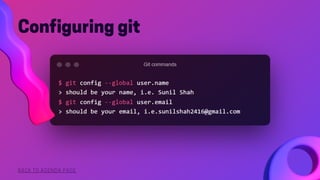
Configuring git
BACK TO AGENDA PAGE
To fix add the desired value in
quotes after the command
BACK TO AGENDA PAGE
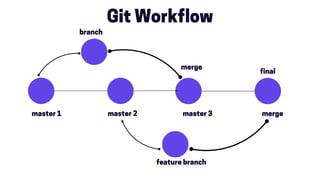
Git Workflow
master 1 master 2
final
master 3
branch
merge
feature branch
merge
BACK TO AGENDA PAGE
Connecting git
with Github
From your project directory, run `git init` to
initialize a git repository
Go to Github, and create a new repository with
the name of your project.
Follow the instructions on Github to connect
your initialized git repository to the remote
server on Github.
*Please Note: you must have files in your
project directory to commit in order to push
anything to your remote server
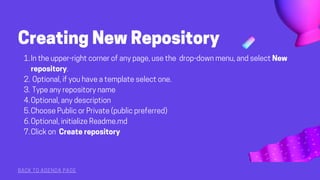
Creating New Repository
BACK TO AGENDA PAGE
In the upper-right corner of any page, use the drop-down menu, and select New
repository.
Optional, if you have a template select one.
Type any repository name
Optional, any description
Choose Public or Private (public preferred)
Optional, initialize Readme.md
Click on Create repository
1.
2.
3.
4.
5.
6.
7.
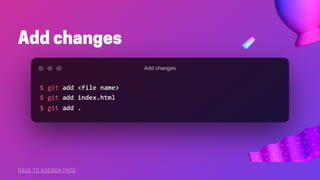
Add changes
BACK TO AGENDA PAGE
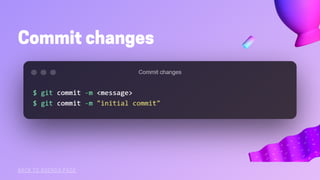
Commit changes
BACK TO AGENDA PAGE
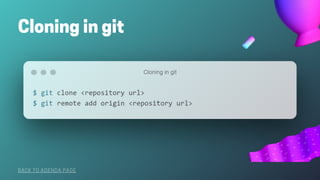
Cloning in git
BACK TO AGENDA PAGE
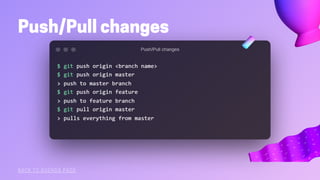
Push/Pull changes
BACK TO AGENDA PAGE
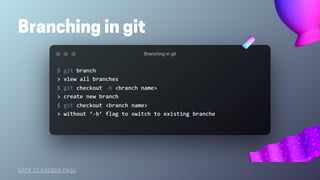
Branching in git
BACK TO AGENDA PAGE
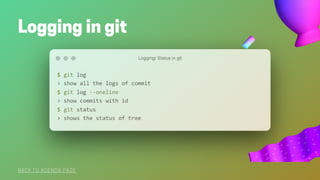
Logging in git
BACK TO AGENDA PAGE
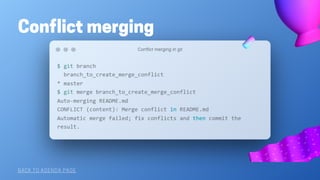
Conflict merging
BACK TO AGENDA PAGE
Github Code
BACK TO AGENDA PAGE
Issues
Pull requests
Projects tab
Features in Github
Introduction to git and github.pdf

Introduction to git and github.pdf

  • 1.
    TRAINING SESSION ON GIT ANDGITHUB A developer’s best friend
  • 2.
    Agenda WHAT IS GIT? WHATIS GITHUB? INSTALLATION OF GIT CONFIGURING GIT CONNECTING GIT WITH GITHUB GIT/ GITHUB WORKFLOW PULL AND PUSH BRANCHING MERGING AND REBASING FORKING EXTENSIVE FEATURES OF GITHUB
  • 3.
    What is Git? VersionControl System Allows you to see changes you make to your code Revert any change to your code NOT GITHUB!!!
  • 4.
    BACK TO AGENDAPAGE So then, what is Github? Github.com is a website that hosts your repositories Sharing of codebases among teams to easily fork or clone repos to a local machine Sharing of codebases among teams to easily fork or clone repos to a local machine
  • 5.
  • 6.
    To fix addthe desired value in quotes after the command BACK TO AGENDA PAGE
  • 7.
    Git Workflow master 1master 2 final master 3 branch merge feature branch merge
  • 8.
    BACK TO AGENDAPAGE Connecting git with Github From your project directory, run `git init` to initialize a git repository Go to Github, and create a new repository with the name of your project. Follow the instructions on Github to connect your initialized git repository to the remote server on Github. *Please Note: you must have files in your project directory to commit in order to push anything to your remote server
  • 9.
    Creating New Repository BACKTO AGENDA PAGE In the upper-right corner of any page, use the drop-down menu, and select New repository. Optional, if you have a template select one. Type any repository name Optional, any description Choose Public or Private (public preferred) Optional, initialize Readme.md Click on Create repository 1. 2. 3. 4. 5. 6. 7.
  • 10.
  • 11.
  • 12.
    Cloning in git BACKTO AGENDA PAGE
  • 13.
  • 14.
    Branching in git BACKTO AGENDA PAGE
  • 15.
    Logging in git BACKTO AGENDA PAGE
  • 16.
  • 17.
    Github Code BACK TOAGENDA PAGE Issues Pull requests Projects tab Features in Github