Decision Model & Notation 
(DMN) 
An Introduction 
Max Tay, OCEB® Business Advanced, CBPP® 
© 2014 Max Tay, MaxConsilium Pty Ltd
Decision Model & Notation 
(DMN) 
 A common notation for decision models 
developed by Object Management Group, for 
user from both business and technical 
including: 
◦ business analysts designing decision models; 
◦ technical developers automating the decisions in 
processes; and 
◦ business people who manage and monitor those 
decisions. 
 Its purpose is to provide the constructs that are 
needed to model decisions in diagrams, 
accurately defined by business analysts, and 
optionally automated. 
 It is designed to be useable alongside BPMN. 
© 2014 Max Tay, MaxConsilium Pty Ltd
Basic Concepts 
In the context of DMN, a decision is an act of: 
 determining an output value, 
 based on a number of input values, 
 using logic defining how the output is determined 
from the inputs. 
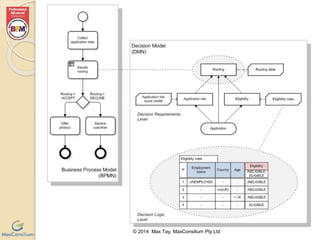
Decision model is defined in two levels: 
 Decision requirements level 
◦ define the decisions to be made, the 
interrelationships, and the required components for 
the decision logic. 
 Decision logic level 
◦ define the required decisions in some form of logic 
representation at sufficient detail enabling validation 
and/or automation. 
© 2014 Max Tay, MaxConsilium Pty Ltd
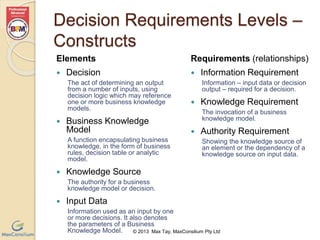
Decision Requirements Levels – 
Constructs 
Elements 
© 2013 Max Tay, MaxConsilium Pty Ltd 
 Decision 
The act of determining an output 
from a number of inputs, using 
decision logic which may reference 
one or more business knowledge 
models. 
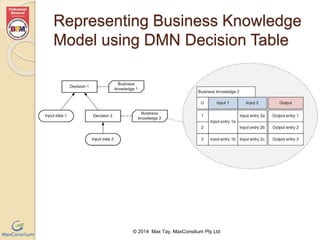
 Business Knowledge 
Model 
A function encapsulating business 
knowledge, in the form of business 
rules, decision table or analytic 
model. 
 Knowledge Source 
The authority for a business 
knowledge model or decision. 
 Input Data 
Information used as an input by one 
or more decisions. It also denotes 
the parameters of a Business 
Knowledge Model. 
Requirements (relationships) 
 Information Requirement 
Information – input data or decision 
output – required for a decision. 
 Knowledge Requirement 
The invocation of a business 
knowledge model. 
 Authority Requirement 
Showing the knowledge source of 
an element or the dependency of a 
knowledge source on input data.
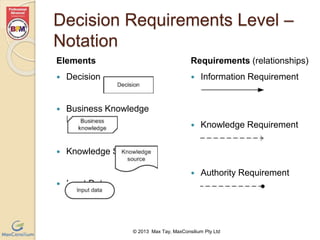
Decision Requirements Level – 
Notation 
Elements 
© 2013 Max Tay, MaxConsilium Pty Ltd 
 Decision 
 Business Knowledge 
Model 
 Knowledge Source 
 Input Data 
Requirements (relationships) 
 Information Requirement 
 Knowledge Requirement 
 Authority Requirement
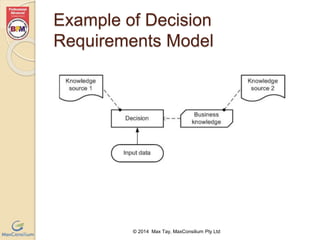
Example of Decision 
Requirements Model 
© 2014 Max Tay, MaxConsilium Pty Ltd
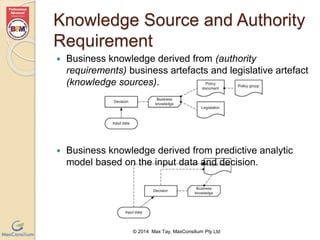
Knowledge Source and Authority 
Requirement 
 Business knowledge derived from (authority 
requirements) business artefacts and legislative artefact 
(knowledge sources). 
 Business knowledge derived from predictive analytic 
model based on the input data and decision. 
© 2014 Max Tay, MaxConsilium Pty Ltd
Decision Requirements Models – 
DRG and DRD 
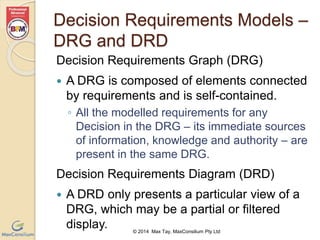
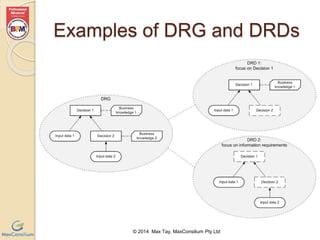
Decision Requirements Graph (DRG) 
 A DRG is composed of elements connected 
by requirements and is self-contained. 
◦ All the modelled requirements for any 
Decision in the DRG – its immediate sources 
of information, knowledge and authority – are 
present in the same DRG. 
Decision Requirements Diagram (DRD) 
 A DRD only presents a particular view of a 
DRG, which may be a partial or filtered 
display. 
© 2014 Max Tay, MaxConsilium Pty Ltd
Examples of DRG and DRDs 
© 2014 Max Tay, MaxConsilium Pty Ltd
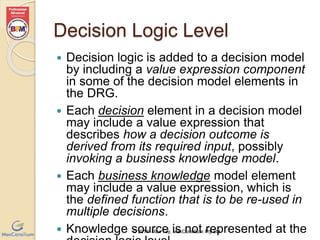
Decision Logic Level 
 Decision logic is added to a decision model 
by including a value expression component 
in some of the decision model elements in 
the DRG. 
 Each decision element in a decision model 
may include a value expression that 
describes how a decision outcome is 
derived from its required input, possibly 
invoking a business knowledge model. 
 Each business knowledge model element 
may include a value expression, which is 
the defined function that is to be re-used in 
multiple decisions. 
 Knowledge source is not represented at the 
© 2014 Max Tay, MaxConsilium Pty Ltd 
decision logic level.
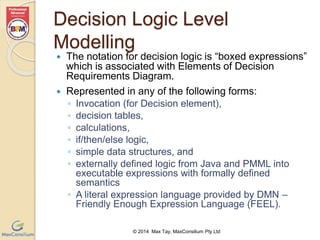
Decision Logic Level 
Modelling 
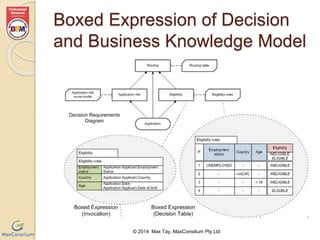
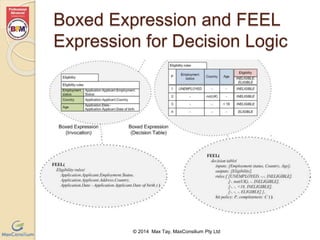
 The notation for decision logic is “boxed expressions” 
which is associated with Elements of Decision 
Requirements Diagram. 
 Represented in any of the following forms: 
◦ Invocation (for Decision element), 
◦ decision tables, 
◦ calculations, 
◦ if/then/else logic, 
◦ simple data structures, and 
◦ externally defined logic from Java and PMML into 
executable expressions with formally defined 
semantics 
◦ A literal expression language provided by DMN – 
Friendly Enough Expression Language (FEEL). 
© 2014 Max Tay, MaxConsilium Pty Ltd
Boxed Expression of Decision 
and Business Knowledge Model 
© 2014 Max Tay, MaxConsilium Pty Ltd
Boxed Expression and FEEL 
Expression for Decision Logic 
© 2014 Max Tay, MaxConsilium Pty Ltd
Representing Business Knowledge 
Model using DMN Decision Table 
© 2014 Max Tay, MaxConsilium Pty Ltd
DMN Decision Table 
 A DMN decision table consists of: 
◦ name, 
◦ set of inputs, each input optionally associated with a 
type and list of input values, 
◦ set of outputs, each output optionally associated with 
a type and list of output values, 
◦ list of rules in rows or columns of the table, where 
each rule is composed of the specific input entries 
and output entries of the table row (or column). 
 Input values for the rules must be exclusive, i.e. input 
values do not overlap. 
 A decision table is complete when the list of rules 
contain all possible combinations of input values. 
◦ An incomplete table may specify a default output. 
© 2014 Max Tay, MaxConsilium Pty Ltd
Syntax of DMN Decision 
Table 
Input expression 1 Input expression 2 Output name 
value 1a, value 1b value 2a, value 2b value 3a, value 3b 
1 value 1a value 2a value 3a 
2 value 1b value 2b value 3b 
© 2014 Max Tay, MaxConsilium Pty Ltd 
Decision name 
HC 
Name of 
Decision Table 
Rule 
number 
Set of Inputs 
Output(s) 
Multiple output 
columns allowed 
Double line between inputs 
section and outputs section, and 
between inputs/outputs headers 
and the rule entry cells. 
Lists of expected values 
(optional) 
Hit 
policy 
Completeness 
indicator
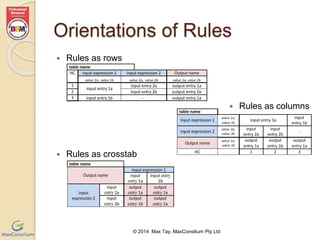
Orientations of Rules 
© 2014 Max Tay, MaxConsilium Pty Ltd 
 Rules as rows 
 Rules as columns 
 Rules as crosstab
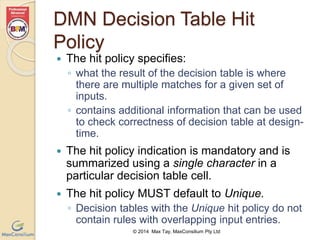
DMN Decision Table Hit 
Policy 
 The hit policy specifies: 
◦ what the result of the decision table is where 
there are multiple matches for a given set of 
inputs. 
◦ contains additional information that can be used 
to check correctness of decision table at design-time. 
 The hit policy indication is mandatory and is 
summarized using a single character in a 
particular decision table cell. 
 The hit policy MUST default to Unique. 
◦ Decision tables with the Unique hit policy do not 
contain rules with overlapping input entries. 
© 2014 Max Tay, MaxConsilium Pty Ltd
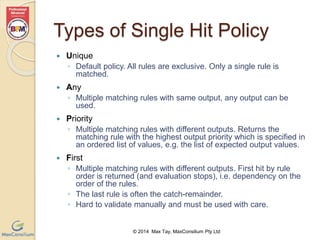
Types of Single Hit Policy 
© 2014 Max Tay, MaxConsilium Pty Ltd 
 Unique 
◦ Default policy. All rules are exclusive. Only a single rule is 
matched. 
 Any 
◦ Multiple matching rules with same output, any output can be 
used. 
 Priority 
◦ Multiple matching rules with different outputs. Returns the 
matching rule with the highest output priority which is specified in 
an ordered list of values, e.g. the list of expected output values. 
 First 
◦ Multiple matching rules with different outputs. First hit by rule 
order is returned (and evaluation stops), i.e. dependency on the 
order of the rules. 
◦ The last rule is often the catch-remainder. 
◦ Hard to validate manually and must be used with care.
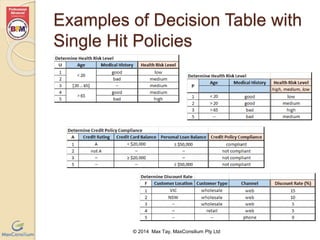
Examples of Decision Table with 
Single Hit Policies 
© 2014 Max Tay, MaxConsilium Pty Ltd
Types of Multiple Hit Policy for 
Single Output Decision Table 
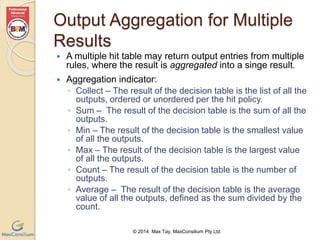
 No order 
◦ Returns all hits in a unique list in arbitrary 
order. 
 Output order 
◦ Returns all hits in decreasing priority 
order. 
◦ Output priorities are specified in an 
ordered list of values. 
 Rule order 
◦ Returns all hits in rule order, i.e. 
dependency on the order of the rules. 
© 2014 Max Tay, MaxConsilium Pty Ltd
Output Aggregation for Multiple 
Results 
 A multiple hit table may return output entries from multiple 
rules, where the result is aggregated into a singe result. 
 Aggregation indicator: 
◦ Collect – The result of the decision table is the list of all the 
outputs, ordered or unordered per the hit policy. 
◦ Sum – The result of the decision table is the sum of all the 
outputs. 
◦ Min – The result of the decision table is the smallest value 
of all the outputs. 
◦ Max – The result of the decision table is the largest value 
of all the outputs. 
◦ Count – The result of the decision table is the number of 
outputs. 
◦ Average – The result of the decision table is the average 
value of all the outputs, defined as the sum divided by the 
count. 
© 2014 Max Tay, MaxConsilium Pty Ltd
Examples of Decision Table with 
Multiple Hit Policies 
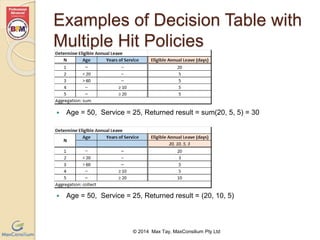
 Age = 50, Service = 25, Returned result = sum(20, 5, 5) = 30 
 Age = 50, Service = 25, Returned result = (20, 10, 5) 
© 2014 Max Tay, MaxConsilium Pty Ltd
Examples of Decision Table with 
Multiple Hit Policies (cont’) 
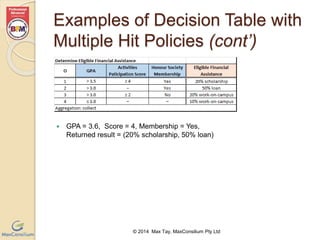
 GPA = 3.6, Score = 4, Membership = Yes, 
Returned result = (20% scholarship, 50% loan) 
© 2014 Max Tay, MaxConsilium Pty Ltd
More on Hit Policies 
 Decision tables with multiple output 
columns support only the following hit 
policies: Unique, Any, First, No order, 
and Rule order. 
 Crosstab tables are unique and complete 
by definition and therefore do not need a 
hit policy indication. 
 In tables with First or Rule order hit 
policy, the order of the rules influence the 
output, and therefore must be used with 
care. 
© 2014 Max Tay, MaxConsilium Pty Ltd
© 2014 Max Tay, MaxConsilium Pty Ltd 
FEEL 
 If you are interested in FEEL, see 
Section 10 of the specification. 
 Official specification is available at: 
http://www.omg.org/spec/DMN/Current 
 View article on my blog: 
http://blog.maxconsilium.com/2014/09/intro 
duction-to-decision-model-notation.html
© 2014 Max Tay, MaxConsilium Pty Ltd

Introduction to DMN

  • 1.
    Decision Model &Notation (DMN) An Introduction Max Tay, OCEB® Business Advanced, CBPP® © 2014 Max Tay, MaxConsilium Pty Ltd
  • 2.
    Decision Model &Notation (DMN)  A common notation for decision models developed by Object Management Group, for user from both business and technical including: ◦ business analysts designing decision models; ◦ technical developers automating the decisions in processes; and ◦ business people who manage and monitor those decisions.  Its purpose is to provide the constructs that are needed to model decisions in diagrams, accurately defined by business analysts, and optionally automated.  It is designed to be useable alongside BPMN. © 2014 Max Tay, MaxConsilium Pty Ltd
  • 3.
    Basic Concepts Inthe context of DMN, a decision is an act of:  determining an output value,  based on a number of input values,  using logic defining how the output is determined from the inputs. Decision model is defined in two levels:  Decision requirements level ◦ define the decisions to be made, the interrelationships, and the required components for the decision logic.  Decision logic level ◦ define the required decisions in some form of logic representation at sufficient detail enabling validation and/or automation. © 2014 Max Tay, MaxConsilium Pty Ltd
  • 4.
    © 2014 MaxTay, MaxConsilium Pty Ltd
  • 5.
    Decision Requirements Levels– Constructs Elements © 2013 Max Tay, MaxConsilium Pty Ltd  Decision The act of determining an output from a number of inputs, using decision logic which may reference one or more business knowledge models.  Business Knowledge Model A function encapsulating business knowledge, in the form of business rules, decision table or analytic model.  Knowledge Source The authority for a business knowledge model or decision.  Input Data Information used as an input by one or more decisions. It also denotes the parameters of a Business Knowledge Model. Requirements (relationships)  Information Requirement Information – input data or decision output – required for a decision.  Knowledge Requirement The invocation of a business knowledge model.  Authority Requirement Showing the knowledge source of an element or the dependency of a knowledge source on input data.
  • 6.
    Decision Requirements Level– Notation Elements © 2013 Max Tay, MaxConsilium Pty Ltd  Decision  Business Knowledge Model  Knowledge Source  Input Data Requirements (relationships)  Information Requirement  Knowledge Requirement  Authority Requirement
  • 7.
    Example of Decision Requirements Model © 2014 Max Tay, MaxConsilium Pty Ltd
  • 8.
    Knowledge Source andAuthority Requirement  Business knowledge derived from (authority requirements) business artefacts and legislative artefact (knowledge sources).  Business knowledge derived from predictive analytic model based on the input data and decision. © 2014 Max Tay, MaxConsilium Pty Ltd
  • 9.
    Decision Requirements Models– DRG and DRD Decision Requirements Graph (DRG)  A DRG is composed of elements connected by requirements and is self-contained. ◦ All the modelled requirements for any Decision in the DRG – its immediate sources of information, knowledge and authority – are present in the same DRG. Decision Requirements Diagram (DRD)  A DRD only presents a particular view of a DRG, which may be a partial or filtered display. © 2014 Max Tay, MaxConsilium Pty Ltd
  • 10.
    Examples of DRGand DRDs © 2014 Max Tay, MaxConsilium Pty Ltd
  • 11.
    Decision Logic Level  Decision logic is added to a decision model by including a value expression component in some of the decision model elements in the DRG.  Each decision element in a decision model may include a value expression that describes how a decision outcome is derived from its required input, possibly invoking a business knowledge model.  Each business knowledge model element may include a value expression, which is the defined function that is to be re-used in multiple decisions.  Knowledge source is not represented at the © 2014 Max Tay, MaxConsilium Pty Ltd decision logic level.
  • 12.
    Decision Logic Level Modelling  The notation for decision logic is “boxed expressions” which is associated with Elements of Decision Requirements Diagram.  Represented in any of the following forms: ◦ Invocation (for Decision element), ◦ decision tables, ◦ calculations, ◦ if/then/else logic, ◦ simple data structures, and ◦ externally defined logic from Java and PMML into executable expressions with formally defined semantics ◦ A literal expression language provided by DMN – Friendly Enough Expression Language (FEEL). © 2014 Max Tay, MaxConsilium Pty Ltd
  • 13.
    Boxed Expression ofDecision and Business Knowledge Model © 2014 Max Tay, MaxConsilium Pty Ltd
  • 14.
    Boxed Expression andFEEL Expression for Decision Logic © 2014 Max Tay, MaxConsilium Pty Ltd
  • 15.
    Representing Business Knowledge Model using DMN Decision Table © 2014 Max Tay, MaxConsilium Pty Ltd
  • 16.
    DMN Decision Table  A DMN decision table consists of: ◦ name, ◦ set of inputs, each input optionally associated with a type and list of input values, ◦ set of outputs, each output optionally associated with a type and list of output values, ◦ list of rules in rows or columns of the table, where each rule is composed of the specific input entries and output entries of the table row (or column).  Input values for the rules must be exclusive, i.e. input values do not overlap.  A decision table is complete when the list of rules contain all possible combinations of input values. ◦ An incomplete table may specify a default output. © 2014 Max Tay, MaxConsilium Pty Ltd
  • 17.
    Syntax of DMNDecision Table Input expression 1 Input expression 2 Output name value 1a, value 1b value 2a, value 2b value 3a, value 3b 1 value 1a value 2a value 3a 2 value 1b value 2b value 3b © 2014 Max Tay, MaxConsilium Pty Ltd Decision name HC Name of Decision Table Rule number Set of Inputs Output(s) Multiple output columns allowed Double line between inputs section and outputs section, and between inputs/outputs headers and the rule entry cells. Lists of expected values (optional) Hit policy Completeness indicator
  • 18.
    Orientations of Rules © 2014 Max Tay, MaxConsilium Pty Ltd  Rules as rows  Rules as columns  Rules as crosstab
  • 19.
    DMN Decision TableHit Policy  The hit policy specifies: ◦ what the result of the decision table is where there are multiple matches for a given set of inputs. ◦ contains additional information that can be used to check correctness of decision table at design-time.  The hit policy indication is mandatory and is summarized using a single character in a particular decision table cell.  The hit policy MUST default to Unique. ◦ Decision tables with the Unique hit policy do not contain rules with overlapping input entries. © 2014 Max Tay, MaxConsilium Pty Ltd
  • 20.
    Types of SingleHit Policy © 2014 Max Tay, MaxConsilium Pty Ltd  Unique ◦ Default policy. All rules are exclusive. Only a single rule is matched.  Any ◦ Multiple matching rules with same output, any output can be used.  Priority ◦ Multiple matching rules with different outputs. Returns the matching rule with the highest output priority which is specified in an ordered list of values, e.g. the list of expected output values.  First ◦ Multiple matching rules with different outputs. First hit by rule order is returned (and evaluation stops), i.e. dependency on the order of the rules. ◦ The last rule is often the catch-remainder. ◦ Hard to validate manually and must be used with care.
  • 21.
    Examples of DecisionTable with Single Hit Policies © 2014 Max Tay, MaxConsilium Pty Ltd
  • 22.
    Types of MultipleHit Policy for Single Output Decision Table  No order ◦ Returns all hits in a unique list in arbitrary order.  Output order ◦ Returns all hits in decreasing priority order. ◦ Output priorities are specified in an ordered list of values.  Rule order ◦ Returns all hits in rule order, i.e. dependency on the order of the rules. © 2014 Max Tay, MaxConsilium Pty Ltd
  • 23.
    Output Aggregation forMultiple Results  A multiple hit table may return output entries from multiple rules, where the result is aggregated into a singe result.  Aggregation indicator: ◦ Collect – The result of the decision table is the list of all the outputs, ordered or unordered per the hit policy. ◦ Sum – The result of the decision table is the sum of all the outputs. ◦ Min – The result of the decision table is the smallest value of all the outputs. ◦ Max – The result of the decision table is the largest value of all the outputs. ◦ Count – The result of the decision table is the number of outputs. ◦ Average – The result of the decision table is the average value of all the outputs, defined as the sum divided by the count. © 2014 Max Tay, MaxConsilium Pty Ltd
  • 24.
    Examples of DecisionTable with Multiple Hit Policies  Age = 50, Service = 25, Returned result = sum(20, 5, 5) = 30  Age = 50, Service = 25, Returned result = (20, 10, 5) © 2014 Max Tay, MaxConsilium Pty Ltd
  • 25.
    Examples of DecisionTable with Multiple Hit Policies (cont’)  GPA = 3.6, Score = 4, Membership = Yes, Returned result = (20% scholarship, 50% loan) © 2014 Max Tay, MaxConsilium Pty Ltd
  • 26.
    More on HitPolicies  Decision tables with multiple output columns support only the following hit policies: Unique, Any, First, No order, and Rule order.  Crosstab tables are unique and complete by definition and therefore do not need a hit policy indication.  In tables with First or Rule order hit policy, the order of the rules influence the output, and therefore must be used with care. © 2014 Max Tay, MaxConsilium Pty Ltd
  • 27.
    © 2014 MaxTay, MaxConsilium Pty Ltd FEEL  If you are interested in FEEL, see Section 10 of the specification.  Official specification is available at: http://www.omg.org/spec/DMN/Current  View article on my blog: http://blog.maxconsilium.com/2014/09/intro duction-to-decision-model-notation.html
  • 28.
    © 2014 MaxTay, MaxConsilium Pty Ltd