Presented By:
Umang Goyal & Alka Vats
User Forms & API
Integration
Lack of etiquette and manners is a huge turn off.
KnolX Etiquettes
Punctuality
Respect Knolx session
timings, you are requested
not to join sessions after a 5
minutes threshold post the
session start time.
Feedback
Make sure to submit a
constructive feedback for all
sessions as it is very helpful
for the presenter.
Silent Mode
Keep your mobile devices in
silent mode, feel free to
move out of session in case
you need to attend an
urgent call.
Avoid Disturbance
Avoid unwanted chit chat
during the session.
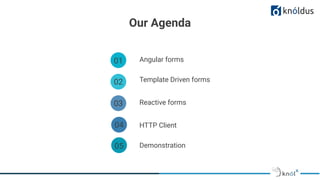
Our Agenda
01 Angular forms
02 Template Driven forms
03 Reactive forms
04 HTTP Client
05 Demonstration
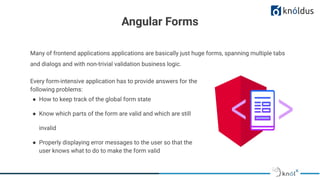
Many of frontend applications applications are basically just huge forms, spanning multiple tabs
and dialogs and with non-trivial validation business logic.
Angular Forms
Every form-intensive application has to provide answers for the
following problems:
● How to keep track of the global form state
● Know which parts of the form are valid and which are still
invalid
● Properly displaying error messages to the user so that the
user knows what to do to make the form valid
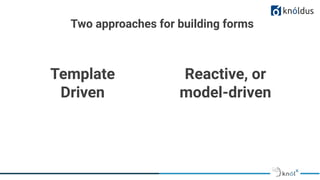
Template
Driven
Two approaches for building forms
Reactive, or
model-driven
Angular forms Building Blocks
FormControl
Tracks the value and
validation status of
an individual form
control.
FormGroup
Tracks the value and
validity state of a
group of
FormControl
instances.
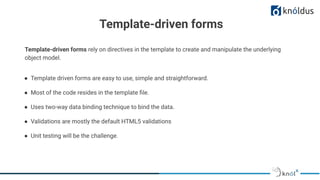
● Template driven forms are easy to use, simple and straightforward.
● Most of the code resides in the template file.
● Uses two-way data binding technique to bind the data.
● Validations are mostly the default HTML5 validations
● Unit testing will be the challenge.
Template-driven forms rely on directives in the template to create and manipulate the underlying
object model.
Template-driven forms
How to use template driven forms:
Step 1 : Import and add FormModules in out application module
import {FormsModule} from "@angular/forms";
@NgModule({
declarations: [App],
imports: [BrowserModule, FormsModule],
bootstrap: [App]
})
export class AppModule {}
By including this FormsModule in your application,
Angular will now already apply a NgForm directive to
every <form> HTML template element implicitly
How to use template driven forms:
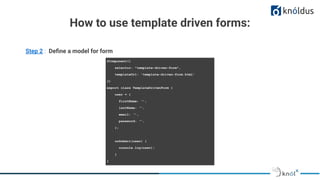
Step 2 : Define a model for form
@Component({
selector: "template-driven-form",
templateUrl: 'template-driven-form.html'
})
export class TemplateDrivenForm {
user = {
firstName: ‘’,
lastName: ‘’,
email: ‘’,
password: ‘’,
};
onSubmit(user) {
console.log(user);
}
}
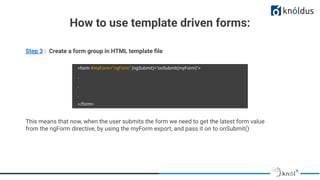
Step 3 : Create a form group in HTML template file
<form #myForm="ngForm" (ngSubmit)="onSubmit(myForm)">
.
.
.
</form>
This means that now, when the user submits the form we need to get the latest form value
from the ngForm directive, by using the myForm export, and pass it on to onSubmit()
How to use template driven forms:
Step 4 : Create a form group in HTML template file
<div class="form-group">
<label for="email">Email</label>
<input
type="text"
name="email"
required email
[(ngModel)]="model.email"
#email="ngModel"
[ngClass]="{ 'is-invalid': myForm.submitted && email.invalid }"
class="form-control"
/>
<div *ngIf="myForm.submitted && email.invalid" class="invalid-feedback">
<div *ngIf="email.errors.required">Email is required</div>
<div *ngIf="email.errors.email">Email must be a valid email address</div>
</div>
</div>
</div>
- The NgModel directive reconciles
value changes in the attached
form element with changes in the
data model, allowing you to
respond to user input with input
validation and error handling.
- You must define a name attribute
for that element. Angular uses the
assigned name to register the
element with the NgForm
directive attached to the parent
<form> element.
How to use template driven forms:
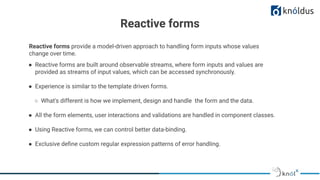
Reactive forms
Reactive forms provide a model-driven approach to handling form inputs whose values
change over time.
● Reactive forms are built around observable streams, where form inputs and values are
provided as streams of input values, which can be accessed synchronously.
● Experience is similar to the template driven forms.
○ What's different is how we implement, design and handle the form and the data.
● All the form elements, user interactions and validations are handled in component classes.
● Using Reactive forms, we can control better data-binding.
● Exclusive define custom regular expression patterns of error handling.
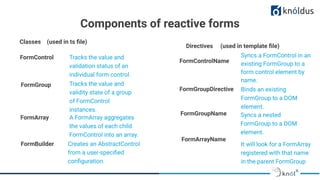
Components of reactive forms
Tracks the value and
validation status of an
individual form control.
Tracks the value and
validity state of a group
of FormControl
instances.
A FormArray aggregates
the values of each child
FormControl into an array.
Creates an AbstractControl
from a user-specified
configuration.
FormControl
FormGroup
FormArray
FormBuilder
Syncs a FormControl in an
existing FormGroup to a
form control element by
name.
Binds an existing
FormGroup to a DOM
element.
Syncs a nested
FormGroup to a DOM
element.
It will look for a FormArray
registered with that name
in the parent FormGroup
FormControlName
FormGroupDirective
FormGroupName
FormArrayName
Classes (used in ts file)
Directives (used in template file)
Steps to build the reactive driven forms are as follows:
How to use reactive forms:
import { ReactiveFormsModule } from
'@angular/forms';
@NgModule({
imports: [
// other imports ...
ReactiveFormsModule
],
})
export class AppModule { }
Step 1 : Import and add ReactiveFormModules in our application module
How to use reactive forms:
Step 2 : Create a form group instance with form control instances
@Component({
selector: 'app-reactive-form',
templateUrl: './reactive-form.component.html'
})
export class ReactiveFormComponent {
loginForm = new FormGroup({
firstName: new FormControl('', [Validator.required]),
address: new FormGroup({
street: new FormControl(''),
zip: new FormControl('', [Validator.minLength(6), Validator.pattern(/[0-9]/)])
})
});
}
How to use reactive forms:
username: new FormControl(
{value: ‘’, disabled: false},
[Validators.required, Validators.minLength],
[VerifyUsername]
)
Form control state
Validators
Async Validators
Step 3 : Associate the form in model to view
<form [formGroup]="loginForm" (ngSubmit)=”onSubmit()”>
<label for="first-name">First Name: </label>
<input id="first-name" type="text"
formControlName="firstName">
..
..
..
<input type="button" value=”submit”> Submit
</form>
How to use reactive forms:
DEMO
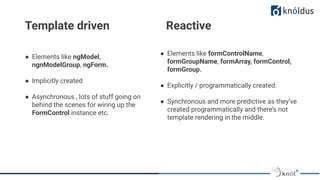
Template driven Reactive
● Elements like ngModel,
ngnModelGroup, ngForm.
● Implicitly created
● Asynchronous , lots of stuff going on
behind the scenes for wiring up the
FormControl instance etc.
● Elements like formControlName,
formGroupName, formArray, formControl,
formGroup.
● Explicitly / programmatically created.
● Synchronous and more predictive as they’ve
created programmatically and there’s not
template rendering in the middle.
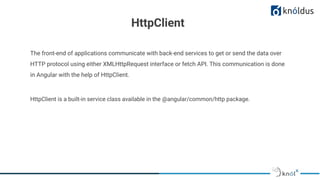
HttpClient
The front-end of applications communicate with back-end services to get or send the data over
HTTP protocol using either XMLHttpRequest interface or fetch API. This communication is done
in Angular with the help of HttpClient.
HttpClient is a built-in service class available in the @angular/common/http package.
HttpClient
● Provides typed request and response objects
● Intercepts request and response
● Supports RxJS observable-based APIs (An observable is a unique object similar to Promise and it
helps to manage async code)
● Supports streamlined error handling
● JSON API is an assumed default and no longer needs to explicitly parsed
● Performs the GET, POST, PUT, DELETE operations
● Contains testability features
Features
Making a GET request
Step 1 : Import and add HttpClientModule in out application module
@NgModule({
declarations: [App],
imports: [BrowserModule, HttpClientModule],
bootstrap: [App]
})
export class AppModule {}
Step 2 : Inject the HttpClient service as a dependency of an application service class
@Injectable({
provideIn: ‘root’
})
export class ConfigService {
constructor(private http: HttpClient) { }
}
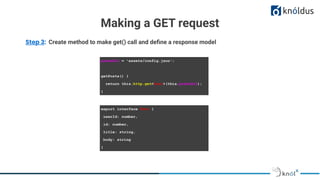
Making a GET request
Step 3: Create method to make get() call and define a response model
postsUrl = 'assets/config.json';
getPosts() {
return this.http.get<Post>(this.postsUrl);
}
export interface Post {
userId: number,
id: number,
title: string,
body: string
}
Making a GET request
Step 3: Create method to make get() call and define a response model
export class PostsComponent {
posts = []
constructor(private appService: AppService)
getPosts() {
this.appService.getPosts()
.subscribe((data: Post) => {
this.posts = data
});
}
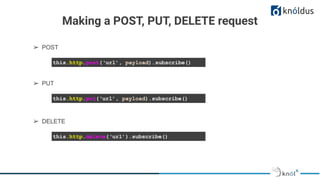
Making a POST, PUT, DELETE request
this.http.post(‘url’, payload).subscribe()
➢ POST
this.http.put(‘url’, payload).subscribe()
➢ PUT
this.http.delete(‘url’).subscribe()
➢ DELETE
DEMO
Resources
https://angular.io/guide/forms-overview
https://angular.io/guide/reactive-forms
https://angular.io/guide/form-validation
https://angular.io/guide/http
Thank You !
Get in touch with us:
Lorem Studio, Lord Building
D4456, LA, USA

User Forms & API integration

  • 1.
    Presented By: Umang Goyal& Alka Vats User Forms & API Integration
  • 2.
    Lack of etiquetteand manners is a huge turn off. KnolX Etiquettes Punctuality Respect Knolx session timings, you are requested not to join sessions after a 5 minutes threshold post the session start time. Feedback Make sure to submit a constructive feedback for all sessions as it is very helpful for the presenter. Silent Mode Keep your mobile devices in silent mode, feel free to move out of session in case you need to attend an urgent call. Avoid Disturbance Avoid unwanted chit chat during the session.
  • 3.
    Our Agenda 01 Angularforms 02 Template Driven forms 03 Reactive forms 04 HTTP Client 05 Demonstration
  • 4.
    Many of frontendapplications applications are basically just huge forms, spanning multiple tabs and dialogs and with non-trivial validation business logic. Angular Forms Every form-intensive application has to provide answers for the following problems: ● How to keep track of the global form state ● Know which parts of the form are valid and which are still invalid ● Properly displaying error messages to the user so that the user knows what to do to make the form valid
  • 5.
    Template Driven Two approaches forbuilding forms Reactive, or model-driven
  • 6.
    Angular forms BuildingBlocks FormControl Tracks the value and validation status of an individual form control. FormGroup Tracks the value and validity state of a group of FormControl instances.
  • 7.
    ● Template drivenforms are easy to use, simple and straightforward. ● Most of the code resides in the template file. ● Uses two-way data binding technique to bind the data. ● Validations are mostly the default HTML5 validations ● Unit testing will be the challenge. Template-driven forms rely on directives in the template to create and manipulate the underlying object model. Template-driven forms
  • 8.
    How to usetemplate driven forms: Step 1 : Import and add FormModules in out application module import {FormsModule} from "@angular/forms"; @NgModule({ declarations: [App], imports: [BrowserModule, FormsModule], bootstrap: [App] }) export class AppModule {} By including this FormsModule in your application, Angular will now already apply a NgForm directive to every <form> HTML template element implicitly
  • 9.
    How to usetemplate driven forms: Step 2 : Define a model for form @Component({ selector: "template-driven-form", templateUrl: 'template-driven-form.html' }) export class TemplateDrivenForm { user = { firstName: ‘’, lastName: ‘’, email: ‘’, password: ‘’, }; onSubmit(user) { console.log(user); } }
  • 10.
    Step 3 :Create a form group in HTML template file <form #myForm="ngForm" (ngSubmit)="onSubmit(myForm)"> . . . </form> This means that now, when the user submits the form we need to get the latest form value from the ngForm directive, by using the myForm export, and pass it on to onSubmit() How to use template driven forms:
  • 11.
    Step 4 :Create a form group in HTML template file <div class="form-group"> <label for="email">Email</label> <input type="text" name="email" required email [(ngModel)]="model.email" #email="ngModel" [ngClass]="{ 'is-invalid': myForm.submitted && email.invalid }" class="form-control" /> <div *ngIf="myForm.submitted && email.invalid" class="invalid-feedback"> <div *ngIf="email.errors.required">Email is required</div> <div *ngIf="email.errors.email">Email must be a valid email address</div> </div> </div> </div> - The NgModel directive reconciles value changes in the attached form element with changes in the data model, allowing you to respond to user input with input validation and error handling. - You must define a name attribute for that element. Angular uses the assigned name to register the element with the NgForm directive attached to the parent <form> element. How to use template driven forms:
  • 12.
    Reactive forms Reactive formsprovide a model-driven approach to handling form inputs whose values change over time. ● Reactive forms are built around observable streams, where form inputs and values are provided as streams of input values, which can be accessed synchronously. ● Experience is similar to the template driven forms. ○ What's different is how we implement, design and handle the form and the data. ● All the form elements, user interactions and validations are handled in component classes. ● Using Reactive forms, we can control better data-binding. ● Exclusive define custom regular expression patterns of error handling.
  • 13.
    Components of reactiveforms Tracks the value and validation status of an individual form control. Tracks the value and validity state of a group of FormControl instances. A FormArray aggregates the values of each child FormControl into an array. Creates an AbstractControl from a user-specified configuration. FormControl FormGroup FormArray FormBuilder Syncs a FormControl in an existing FormGroup to a form control element by name. Binds an existing FormGroup to a DOM element. Syncs a nested FormGroup to a DOM element. It will look for a FormArray registered with that name in the parent FormGroup FormControlName FormGroupDirective FormGroupName FormArrayName Classes (used in ts file) Directives (used in template file)
  • 14.
    Steps to buildthe reactive driven forms are as follows: How to use reactive forms: import { ReactiveFormsModule } from '@angular/forms'; @NgModule({ imports: [ // other imports ... ReactiveFormsModule ], }) export class AppModule { } Step 1 : Import and add ReactiveFormModules in our application module
  • 15.
    How to usereactive forms: Step 2 : Create a form group instance with form control instances @Component({ selector: 'app-reactive-form', templateUrl: './reactive-form.component.html' }) export class ReactiveFormComponent { loginForm = new FormGroup({ firstName: new FormControl('', [Validator.required]), address: new FormGroup({ street: new FormControl(''), zip: new FormControl('', [Validator.minLength(6), Validator.pattern(/[0-9]/)]) }) }); }
  • 16.
    How to usereactive forms: username: new FormControl( {value: ‘’, disabled: false}, [Validators.required, Validators.minLength], [VerifyUsername] ) Form control state Validators Async Validators
  • 17.
    Step 3 :Associate the form in model to view <form [formGroup]="loginForm" (ngSubmit)=”onSubmit()”> <label for="first-name">First Name: </label> <input id="first-name" type="text" formControlName="firstName"> .. .. .. <input type="button" value=”submit”> Submit </form> How to use reactive forms:
  • 18.
  • 19.
    Template driven Reactive ●Elements like ngModel, ngnModelGroup, ngForm. ● Implicitly created ● Asynchronous , lots of stuff going on behind the scenes for wiring up the FormControl instance etc. ● Elements like formControlName, formGroupName, formArray, formControl, formGroup. ● Explicitly / programmatically created. ● Synchronous and more predictive as they’ve created programmatically and there’s not template rendering in the middle.
  • 20.
    HttpClient The front-end ofapplications communicate with back-end services to get or send the data over HTTP protocol using either XMLHttpRequest interface or fetch API. This communication is done in Angular with the help of HttpClient. HttpClient is a built-in service class available in the @angular/common/http package.
  • 21.
    HttpClient ● Provides typedrequest and response objects ● Intercepts request and response ● Supports RxJS observable-based APIs (An observable is a unique object similar to Promise and it helps to manage async code) ● Supports streamlined error handling ● JSON API is an assumed default and no longer needs to explicitly parsed ● Performs the GET, POST, PUT, DELETE operations ● Contains testability features Features
  • 22.
    Making a GETrequest Step 1 : Import and add HttpClientModule in out application module @NgModule({ declarations: [App], imports: [BrowserModule, HttpClientModule], bootstrap: [App] }) export class AppModule {} Step 2 : Inject the HttpClient service as a dependency of an application service class @Injectable({ provideIn: ‘root’ }) export class ConfigService { constructor(private http: HttpClient) { } }
  • 23.
    Making a GETrequest Step 3: Create method to make get() call and define a response model postsUrl = 'assets/config.json'; getPosts() { return this.http.get<Post>(this.postsUrl); } export interface Post { userId: number, id: number, title: string, body: string }
  • 24.
    Making a GETrequest Step 3: Create method to make get() call and define a response model export class PostsComponent { posts = [] constructor(private appService: AppService) getPosts() { this.appService.getPosts() .subscribe((data: Post) => { this.posts = data }); }
  • 25.
    Making a POST,PUT, DELETE request this.http.post(‘url’, payload).subscribe() ➢ POST this.http.put(‘url’, payload).subscribe() ➢ PUT this.http.delete(‘url’).subscribe() ➢ DELETE
  • 26.
  • 27.
  • 28.
    Thank You ! Getin touch with us: Lorem Studio, Lord Building D4456, LA, USA