
Presented by On Ramp
Android
Do Androids dream of electric sheep?
Understanding the Android platform
A developers perspective
1 May 2013 Presented by On Ramp
Presented by On Ramp
Objective
Provide a high level conceptual
model for understanding how to
build Android Applications
1 May 2013 Presented by On Ramp
Presented by On Ramp
About Me
● South African open source solutions integrator,
– Java developer,
– Drupal developer,
– Loves Linux,
● On Ramp
– Ethiopian Company
● Linux, Java, Android training and development house
●
Specialising in mobile telecoms space
1 May 2013 Presented by On Ramp
Presented by On Ramp
Agenda
● Android Architecture
● Supported Languages
● Dalvik VM
● Development Environments
● Components – Building Blocks
● High Level Overview
1 May 2013 Presented by On Ramp
Presented by On Ramp
Agenda
● Important concepts
– Intents
– Activities, Services, Content
Providers & Broadcast Receivers
– Resources
1 May 2013 Presented by On Ramp
Presented by On Ramp
What is
Android?
Android is a software stack for
mobile devices that includes an
operating system, middleware and
key applications
1 May 2013 Presented by On Ramp
Presented by On Ramp
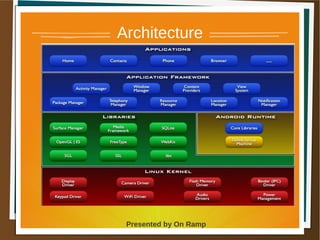
Architecture
1 May 2013 Presented by On Ramp
Presented by On Ramp
Architecture
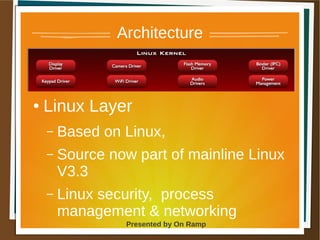
● Linux Layer
– Based on Linux,
– Source now part of mainline Linux
V3.3
– Linux security, process
management & networking
1 May 2013 Presented by On Ramp
Presented by On Ramp
Architecture
● Linux Layer
– Each app has its own Linux user,
– All files and resources owned by
app user,
– Other processes, app cannot
access other app's files/resources
1 May 2013 Presented by On Ramp
Presented by On Ramp
Architecture
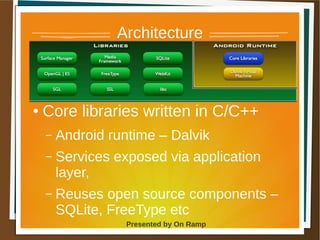
● Core libraries written in C/C++
– Android runtime – Dalvik
– Services exposed via application
layer,
– Reuses open source components –
SQLite, FreeType etc
1 May 2013 Presented by On Ramp
Presented by On Ramp
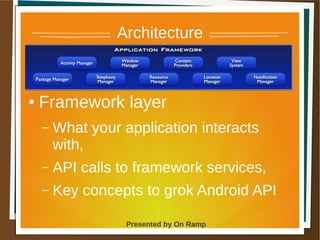
Architecture
● Framework layer
– What your application interacts
with,
– API calls to framework services,
– Key concepts to grok Android API
1 May 2013 Presented by On Ramp
Presented by On Ramp
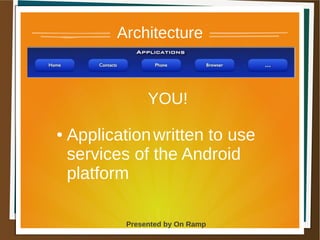
Architecture
YOU!
● Applicationwritten to use
services of the Android
platform
1 May 2013 Presented by On Ramp
Presented by On Ramp
Supported
Languages
● Android applications can be
written in
– Java
● Supports a subset of Java API,
● Can use most Java libraries,
– C/C++ using native
development kit
● Should only be when
performance is an issue.
1 May 2013 Presented by On Ramp
Presented by On Ramp
Supported
Languages
– C/C++ using native development kit
● Used to write components called from
Java
1 May 2013 Presented by On Ramp
Presented by On Ramp
Supported
Languages
● Second Class Citizens
– Scripting languages via Scripting
Layer for Android
– Javascript, Ruby, Python,LUA, Perl
– HTML 5 Apps
● Important – Phonegap etc
1 May 2013 Presented by On Ramp
Presented by On Ramp
Dalvik
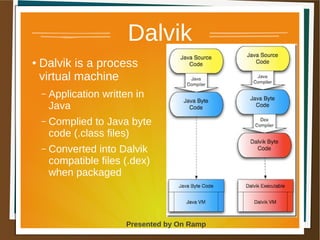
● Dalvik is a process
virtual machine
– Application written in
Java
– Complied to Java byte
code (.class files)
– Converted into Dalvik
compatible files (.dex)
when packaged
1 May 2013 Presented by On Ramp
Presented by On Ramp
Dalvik
● Why Dalvik?
– More compact & memory efficient
than .class files
– Each application runs in its own
process,
– Each process gets it own VM
– Packaging (apk) files are zipped
.dex files
1 May 2013 Presented by On Ramp
Presented by On Ramp
Development
Environments
● Android SDK,
– Debugger
● (ADB – Andorid Debugger Bridge)
– Libraries
– Emulator
● Supported IDE – Eclipse
– ADT plugin
1 May 2013 Presented by On Ramp
Presented by On Ramp
Development
Environments
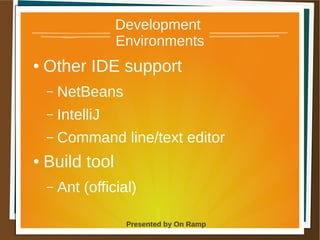
● Other IDE support
– NetBeans
– IntelliJ
– Command line/text editor
● Build tool
– Ant (official)
1 May 2013 Presented by On Ramp
Presented by On Ramp
Development
Environments
● Build tool
– Maven (support from
springsource)
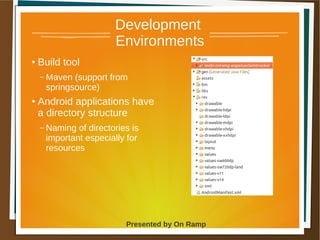
● Android applications have
a directory structure
– Naming of directories is
important especially for
resources
1 May 2013 Presented by On Ramp
Presented by On Ramp
Core
Components● Activities
– UI Layer
– Similar to UI controller for web apps
● Services
– Provides services to other applications, no ui, run in
background
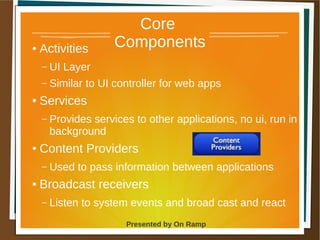
● Content Providers
– Used to pass information between applications
● Broadcast receivers
– Listen to system events and broad cast and react
1 May 2013 Presented by On Ramp
Presented by On Ramp
Core
Components
● Notifications
– System notifications
1 May 2013 Presented by On Ramp
Presented by On Ramp
High Level
Overview
● Different from web or desktop
applications,
● Android in control of/manages
application,
– Constrained environment,
– Memory management,
– Power usage etc
1 May 2013 Presented by On Ramp
Presented by On Ramp
High Level
Overview
● Components interact with one
another indirectly.
● Android controls creation, life
cycle of components
1 May 2013 Presented by On Ramp
Presented by On Ramp
High Level
Understanding
● Applications can use components
from other apps,
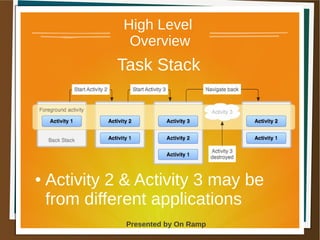
● Task Stack -
– Android places UI components
(Activities), maybe from different
apps, onto a task stack, as user
navigates through an application
1 May 2013 Presented by On Ramp
Presented by On Ramp
High Level
Overview
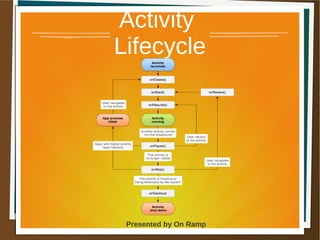
● Component life cycle controlled by
platform,
● Platform provides life cycle methods to
allow components to react to changes in
life cycle
– onStart
– onResume
– onPause etc
1 May 2013 Presented by On Ramp
Presented by On Ramp
High Level
Overview
● Activity 2 & Activity 3 may be
from different applications
Task Stack
1 May 2013 Presented by On Ramp
Presented by On Ramp
High Level
Overview
● How does your activity request
new component from Android?
– API calls
– Via Intents
● Define what you would like to have
happen next,
● Pass data to next activity
● Receive data back
1 May 2013 Presented by On Ramp
Presented by On Ramp
Intents
● Intents
– can be specific -i.e require specific
class or
– Ask for any activity that provides
required service
● e.g view web page
1 May 2013 Presented by On Ramp
Presented by On Ramp
Intents
● Intent made up of
– Action: view web page,place call
– Category: what attribute the
component must have for your
action e.g must display home
screen
– Extra: data to pass between
components
1 May 2013 Presented by On Ramp
Presented by On Ramp
Components
Data Sharing
● How do components pass data
between each other?
– Bundles/Extra = can add data that
needs to be transferred with Intent
1 May 2013 Presented by On Ramp
Presented by On Ramp
Summary
UI
components
belong to a
task
Platform creates
components on
you behalf
API used to
request
component
creation
Components
have a life
cycle
Components
are building
blocks for
your app
Other apps
may use
your
components
1 May 2013 Presented by On Ramp
Presented by On Ramp
Android
Where to start?
Start coding Activity components
1 May 2013 Presented by On Ramp
Presented by On Ramp
Activities
● Main entry point for application,
● Configures user interface and
handles events,
● Each activity has one window in
which to draw,
1 May 2013 Presented by On Ramp
Presented by On Ramp
Activities
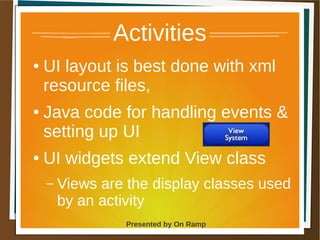
● UI layout is best done with xml
resource files,
● Java code for handling events &
setting up UI
● UI widgets extend View class
– Views are the display classes used
by an activity
1 May 2013 Presented by On Ramp
Presented by On Ramp
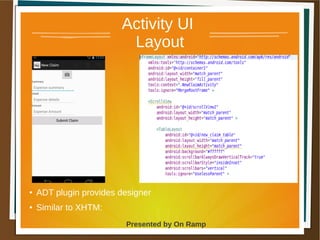
Activity UI
Layout
●
ADT plugin provides designer
● Similar to XHTM:
1 May 2013 Presented by On Ramp
Presented by On Ramp
Activity
Lifecycle
1 May 2013 Presented by On Ramp
Presented by On Ramp
Activities
Screen Flow
● Flow between activities or
screens is not direct,
● Application framework handles
this for you
● You ask framework to create
next screen you wish to display
1 May 2013 Presented by On Ramp
Presented by On Ramp
Activities
Screen Flow
● API Calls -
– startActivity(Intent)
– startActivityForResult(Intent)
1 May 2013 Presented by On Ramp
Presented by On Ramp
Resources
● Resources are static content
● Resources are managed by
generated code
● Layout definitions
● Images
● String constants
● Resource ids
1 May 2013 Presented by On Ramp
Presented by On Ramp
Resources
● Resources are defined in
● xml files,
● Images in folders
– Resources directory = res
– Naming of directories is important
1 May 2013 Presented by On Ramp
Presented by On Ramp
Application
Configuration
● Applications are groupings of
components
– Activities,
– Services
– Broadcast receivers
– Content provider
1 May 2013 Presented by On Ramp
Presented by On Ramp
Application
Configuration
● Apps are defined via manifest.xml
– <application> defines
● launcher activity for app,
● what intents your components are created to
handle
– <uses-permission> to identify what services
your application requires access to
1 May 2013 Presented by On Ramp
Presented by On Ramp
Security
● Linux layer
– process level security,
– File level security
● Application layer
– Request permission from user to
access services
– manifest.xml <use-permission>
1 May 2013 Presented by On Ramp
Presented by On Ramp
Contact Info
● On Ramp Web Site
– http://www.onramp.mobi
● Social Networks -
– Twitter @mxc4
– G+ MClarke4
● Email:
– support@onramp.mobi
– mark@onramp.mobi

Introduction to Android Development

  • 1.
    Presented by OnRamp Android Do Androids dream of electric sheep? Understanding the Android platform A developers perspective
  • 2.
    1 May 2013Presented by On Ramp Presented by On Ramp Objective Provide a high level conceptual model for understanding how to build Android Applications
  • 3.
    1 May 2013Presented by On Ramp Presented by On Ramp About Me ● South African open source solutions integrator, – Java developer, – Drupal developer, – Loves Linux, ● On Ramp – Ethiopian Company ● Linux, Java, Android training and development house ● Specialising in mobile telecoms space
  • 4.
    1 May 2013Presented by On Ramp Presented by On Ramp Agenda ● Android Architecture ● Supported Languages ● Dalvik VM ● Development Environments ● Components – Building Blocks ● High Level Overview
  • 5.
    1 May 2013Presented by On Ramp Presented by On Ramp Agenda ● Important concepts – Intents – Activities, Services, Content Providers & Broadcast Receivers – Resources
  • 6.
    1 May 2013Presented by On Ramp Presented by On Ramp What is Android? Android is a software stack for mobile devices that includes an operating system, middleware and key applications
  • 7.
    1 May 2013Presented by On Ramp Presented by On Ramp Architecture
  • 8.
    1 May 2013Presented by On Ramp Presented by On Ramp Architecture ● Linux Layer – Based on Linux, – Source now part of mainline Linux V3.3 – Linux security, process management & networking
  • 9.
    1 May 2013Presented by On Ramp Presented by On Ramp Architecture ● Linux Layer – Each app has its own Linux user, – All files and resources owned by app user, – Other processes, app cannot access other app's files/resources
  • 10.
    1 May 2013Presented by On Ramp Presented by On Ramp Architecture ● Core libraries written in C/C++ – Android runtime – Dalvik – Services exposed via application layer, – Reuses open source components – SQLite, FreeType etc
  • 11.
    1 May 2013Presented by On Ramp Presented by On Ramp Architecture ● Framework layer – What your application interacts with, – API calls to framework services, – Key concepts to grok Android API
  • 12.
    1 May 2013Presented by On Ramp Presented by On Ramp Architecture YOU! ● Applicationwritten to use services of the Android platform
  • 13.
    1 May 2013Presented by On Ramp Presented by On Ramp Supported Languages ● Android applications can be written in – Java ● Supports a subset of Java API, ● Can use most Java libraries, – C/C++ using native development kit ● Should only be when performance is an issue.
  • 14.
    1 May 2013Presented by On Ramp Presented by On Ramp Supported Languages – C/C++ using native development kit ● Used to write components called from Java
  • 15.
    1 May 2013Presented by On Ramp Presented by On Ramp Supported Languages ● Second Class Citizens – Scripting languages via Scripting Layer for Android – Javascript, Ruby, Python,LUA, Perl – HTML 5 Apps ● Important – Phonegap etc
  • 16.
    1 May 2013Presented by On Ramp Presented by On Ramp Dalvik ● Dalvik is a process virtual machine – Application written in Java – Complied to Java byte code (.class files) – Converted into Dalvik compatible files (.dex) when packaged
  • 17.
    1 May 2013Presented by On Ramp Presented by On Ramp Dalvik ● Why Dalvik? – More compact & memory efficient than .class files – Each application runs in its own process, – Each process gets it own VM – Packaging (apk) files are zipped .dex files
  • 18.
    1 May 2013Presented by On Ramp Presented by On Ramp Development Environments ● Android SDK, – Debugger ● (ADB – Andorid Debugger Bridge) – Libraries – Emulator ● Supported IDE – Eclipse – ADT plugin
  • 19.
    1 May 2013Presented by On Ramp Presented by On Ramp Development Environments ● Other IDE support – NetBeans – IntelliJ – Command line/text editor ● Build tool – Ant (official)
  • 20.
    1 May 2013Presented by On Ramp Presented by On Ramp Development Environments ● Build tool – Maven (support from springsource) ● Android applications have a directory structure – Naming of directories is important especially for resources
  • 21.
    1 May 2013Presented by On Ramp Presented by On Ramp Core Components● Activities – UI Layer – Similar to UI controller for web apps ● Services – Provides services to other applications, no ui, run in background ● Content Providers – Used to pass information between applications ● Broadcast receivers – Listen to system events and broad cast and react
  • 22.
    1 May 2013Presented by On Ramp Presented by On Ramp Core Components ● Notifications – System notifications
  • 23.
    1 May 2013Presented by On Ramp Presented by On Ramp High Level Overview ● Different from web or desktop applications, ● Android in control of/manages application, – Constrained environment, – Memory management, – Power usage etc
  • 24.
    1 May 2013Presented by On Ramp Presented by On Ramp High Level Overview ● Components interact with one another indirectly. ● Android controls creation, life cycle of components
  • 25.
    1 May 2013Presented by On Ramp Presented by On Ramp High Level Understanding ● Applications can use components from other apps, ● Task Stack - – Android places UI components (Activities), maybe from different apps, onto a task stack, as user navigates through an application
  • 26.
    1 May 2013Presented by On Ramp Presented by On Ramp High Level Overview ● Component life cycle controlled by platform, ● Platform provides life cycle methods to allow components to react to changes in life cycle – onStart – onResume – onPause etc
  • 27.
    1 May 2013Presented by On Ramp Presented by On Ramp High Level Overview ● Activity 2 & Activity 3 may be from different applications Task Stack
  • 28.
    1 May 2013Presented by On Ramp Presented by On Ramp High Level Overview ● How does your activity request new component from Android? – API calls – Via Intents ● Define what you would like to have happen next, ● Pass data to next activity ● Receive data back
  • 29.
    1 May 2013Presented by On Ramp Presented by On Ramp Intents ● Intents – can be specific -i.e require specific class or – Ask for any activity that provides required service ● e.g view web page
  • 30.
    1 May 2013Presented by On Ramp Presented by On Ramp Intents ● Intent made up of – Action: view web page,place call – Category: what attribute the component must have for your action e.g must display home screen – Extra: data to pass between components
  • 31.
    1 May 2013Presented by On Ramp Presented by On Ramp Components Data Sharing ● How do components pass data between each other? – Bundles/Extra = can add data that needs to be transferred with Intent
  • 32.
    1 May 2013Presented by On Ramp Presented by On Ramp Summary UI components belong to a task Platform creates components on you behalf API used to request component creation Components have a life cycle Components are building blocks for your app Other apps may use your components
  • 33.
    1 May 2013Presented by On Ramp Presented by On Ramp Android Where to start? Start coding Activity components
  • 34.
    1 May 2013Presented by On Ramp Presented by On Ramp Activities ● Main entry point for application, ● Configures user interface and handles events, ● Each activity has one window in which to draw,
  • 35.
    1 May 2013Presented by On Ramp Presented by On Ramp Activities ● UI layout is best done with xml resource files, ● Java code for handling events & setting up UI ● UI widgets extend View class – Views are the display classes used by an activity
  • 36.
    1 May 2013Presented by On Ramp Presented by On Ramp Activity UI Layout ● ADT plugin provides designer ● Similar to XHTM:
  • 37.
    1 May 2013Presented by On Ramp Presented by On Ramp Activity Lifecycle
  • 38.
    1 May 2013Presented by On Ramp Presented by On Ramp Activities Screen Flow ● Flow between activities or screens is not direct, ● Application framework handles this for you ● You ask framework to create next screen you wish to display
  • 39.
    1 May 2013Presented by On Ramp Presented by On Ramp Activities Screen Flow ● API Calls - – startActivity(Intent) – startActivityForResult(Intent)
  • 40.
    1 May 2013Presented by On Ramp Presented by On Ramp Resources ● Resources are static content ● Resources are managed by generated code ● Layout definitions ● Images ● String constants ● Resource ids
  • 41.
    1 May 2013Presented by On Ramp Presented by On Ramp Resources ● Resources are defined in ● xml files, ● Images in folders – Resources directory = res – Naming of directories is important
  • 42.
    1 May 2013Presented by On Ramp Presented by On Ramp Application Configuration ● Applications are groupings of components – Activities, – Services – Broadcast receivers – Content provider
  • 43.
    1 May 2013Presented by On Ramp Presented by On Ramp Application Configuration ● Apps are defined via manifest.xml – <application> defines ● launcher activity for app, ● what intents your components are created to handle – <uses-permission> to identify what services your application requires access to
  • 44.
    1 May 2013Presented by On Ramp Presented by On Ramp Security ● Linux layer – process level security, – File level security ● Application layer – Request permission from user to access services – manifest.xml <use-permission>
  • 45.
    1 May 2013Presented by On Ramp Presented by On Ramp Contact Info ● On Ramp Web Site – http://www.onramp.mobi ● Social Networks - – Twitter @mxc4 – G+ MClarke4 ● Email: – support@onramp.mobi – mark@onramp.mobi