C++ Programming:
Control Structures I
(Selection)
Control Structures
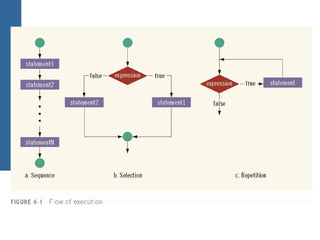
• A computer can proceed:
− In sequence
− Selectively (branch) - making a choice
− Repetitively (iteratively) - looping
• Some statements are executed only if certain
conditions are met
• A condition is represented by a logical
(Boolean) expression that can be true or false
• A condition is met if it evaluates to true
Relational Operators
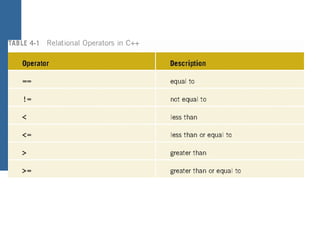
• Relational operators:
− Allow comparisons
− Require two operands (binary)
− Return 1 if expression is true, 0 otherwise
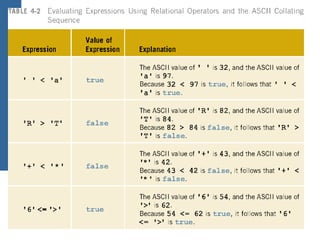
• Comparing values of different data types may
produce unpredictable results
− For example, 8 < '5' should not be done
• Any nonzero value is treated as true
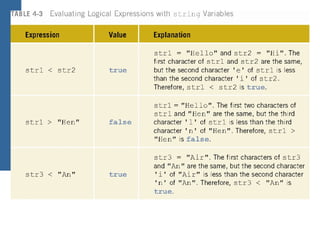
Comparing string Types
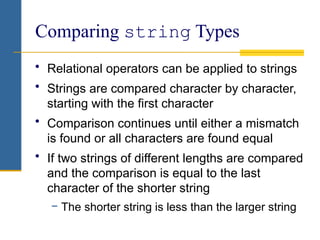
• Relational operators can be applied to strings
• Strings are compared character by character,
starting with the first character
• Comparison continues until either a mismatch
is found or all characters are found equal
• If two strings of different lengths are compared
and the comparison is equal to the last
character of the shorter string
− The shorter string is less than the larger string
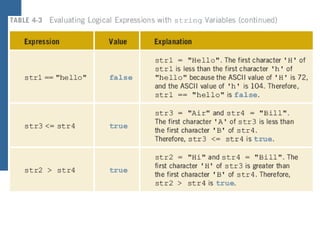
string Comparison Example
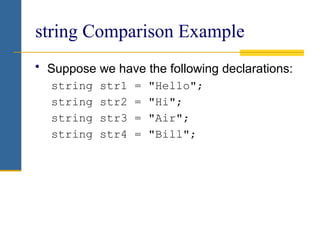
• Suppose we have the following declarations:
string str1 = "Hello";
string str2 = "Hi";
string str3 = "Air";
string str4 = "Bill";
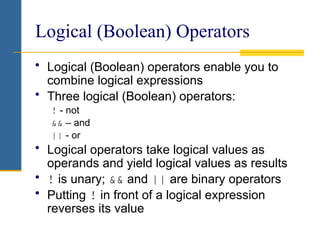
Logical (Boolean) Operators
• Logical (Boolean) operators enable you to
combine logical expressions
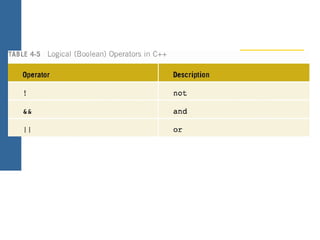
• Three logical (Boolean) operators:
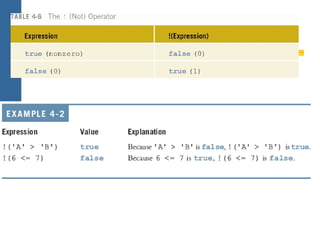
! - not
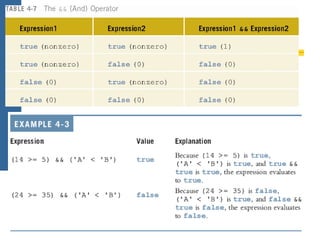
&& – and
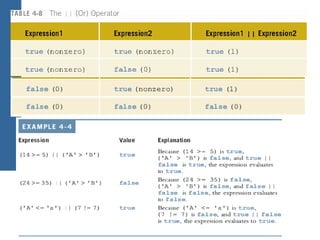
|| - or
• Logical operators take logical values as
operands and yield logical values as results
• ! is unary; && and || are binary operators
• Putting ! in front of a logical expression
reverses its value
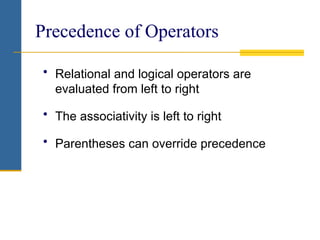
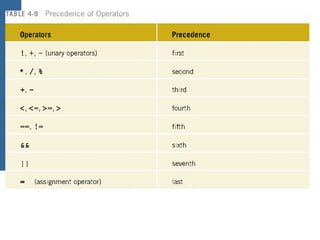
Precedence of Operators
• Relational and logical operators are
evaluated from left to right
• The associativity is left to right
• Parentheses can override precedence
Logical (Boolean) Expressions
(continued)
• Logical expressions can be unpredictable
• The following expression appears to
represent a comparison of 0, num, and 10:
0 <= num <= 10
• It always evaluates true because 0 <= num
evaluates to either 0 or 1, and 0 <= 10 is
true and 1 <= 10 is true
• A correct way to write this expression is:
0 <= num && num <= 10
One-Way (if) Selection
• The syntax of one-way selection is:
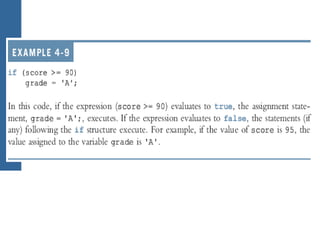
if (expression)
statement
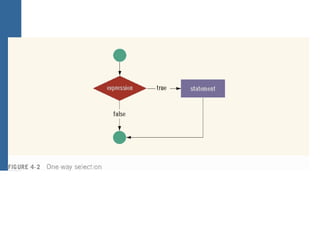
• Statement is executed if the value of the
expression is true
• Statement is bypassed if the value is false;
program goes to the next statement
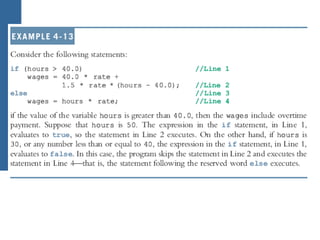
Two-Way (if…else) Selection
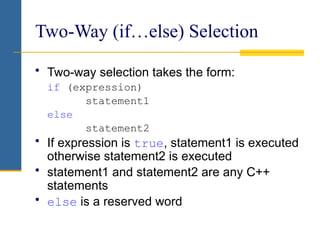
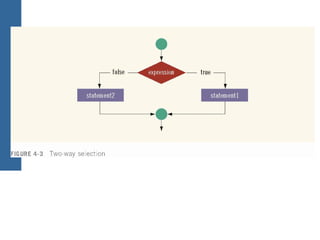
• Two-way selection takes the form:
if (expression)
statement1
else
statement2
• If expression is true, statement1 is executed
otherwise statement2 is executed
• statement1 and statement2 are any C++
statements
• else is a reserved word
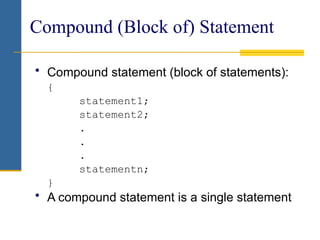
Compound (Block of) Statement
• Compound statement (block of statements):
{
statement1;
statement2;
.
.
.
statementn;
}
• A compound statement is a single statement
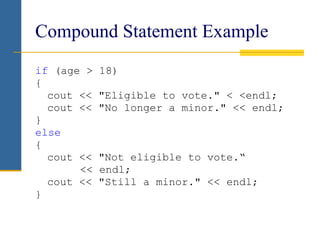
Compound Statement Example
if (age > 18)
{
cout << "Eligible to vote." < <endl;
cout << "No longer a minor." << endl;
}
else
{
cout << "Not eligible to vote.“
<< endl;
cout << "Still a minor." << endl;
}
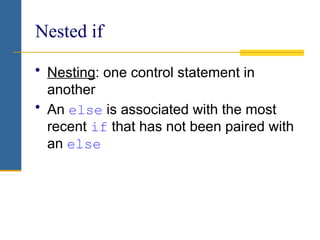
Nested if
• Nesting: one control statement in
another
• An else is associated with the most
recent if that has not been paired with
an else
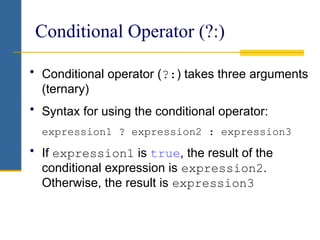
Conditional Operator (?:)
• Conditional operator (?:) takes three arguments
(ternary)
• Syntax for using the conditional operator:
expression1 ? expression2 : expression3
• If expression1 is true, the result of the
conditional expression is expression2.
Otherwise, the result is expression3
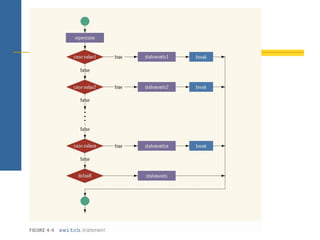
switch Structures
• switch structure: alternate to if-else
• switch expression is evaluated first
• Value of the expression determines which
corresponding action is taken
• Expression is sometimes called the selector
switch Structures (continued)
• Expression value can be only integral
• Its value determines which statement is
selected for execution
• A particular case value should appear only
once
C++ Programming: From Problem Analysis to Program Design, Third Edition 34
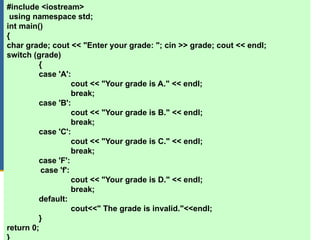
#include <iostream>
using namespace std;
int main()
{
char grade; cout << "Enter your grade: "; cin >> grade; cout << endl;
switch (grade)
{
case 'A':
cout << "Your grade is A." << endl;
break;
case 'B':
cout << "Your grade is B." << endl;
break;
case 'C':
cout << "Your grade is C." << endl;
break;
case 'F':
case 'f':
cout << "Your grade is D." << endl;
break;
default:
cout<<" The grade is invalid."<<endl;
}
return 0;
}
switch Structures (continued)
• One or more statements may follow a case
label
• Braces are not needed to turn multiple
statements into a single compound statement
• The break statement may or may not appear
after each statement
• switch, case, break, and default are
reserved words
Summary
• Control structures alter normal control flow
• Most common control structures are selection
and repetition
• Relational operators: ==, <, <=, >, >=, !=
• Logical expressions evaluate to 1 (true) or 0
(false)
• Logical operators: ! (not), && (and), || (or)
Summary (continued)
• Two selection structures: one-way selection
and two-way selection
• The expression in an if or if...else
structure is usually a logical expression
• No else statement in C++. Every else has
a related if
• A sequence of statements enclosed between
braces, { and }, is called a compound
statement or block of statements
Summary (continued)
• Using assignment in place of the equality
operator creates a semantic error
• switch structure handles multiway selection
• break statement ends switch statement

intro to CONTROL STRUCTURES 1 for C++.pptx

  • 1.
  • 2.
    Control Structures • Acomputer can proceed: − In sequence − Selectively (branch) - making a choice − Repetitively (iteratively) - looping • Some statements are executed only if certain conditions are met • A condition is represented by a logical (Boolean) expression that can be true or false • A condition is met if it evaluates to true
  • 3.
    Relational Operators • Relationaloperators: − Allow comparisons − Require two operands (binary) − Return 1 if expression is true, 0 otherwise • Comparing values of different data types may produce unpredictable results − For example, 8 < '5' should not be done • Any nonzero value is treated as true
  • 7.
    Comparing string Types •Relational operators can be applied to strings • Strings are compared character by character, starting with the first character • Comparison continues until either a mismatch is found or all characters are found equal • If two strings of different lengths are compared and the comparison is equal to the last character of the shorter string − The shorter string is less than the larger string
  • 8.
    string Comparison Example •Suppose we have the following declarations: string str1 = "Hello"; string str2 = "Hi"; string str3 = "Air"; string str4 = "Bill";
  • 11.
    Logical (Boolean) Operators •Logical (Boolean) operators enable you to combine logical expressions • Three logical (Boolean) operators: ! - not && – and || - or • Logical operators take logical values as operands and yield logical values as results • ! is unary; && and || are binary operators • Putting ! in front of a logical expression reverses its value
  • 16.
    Precedence of Operators •Relational and logical operators are evaluated from left to right • The associativity is left to right • Parentheses can override precedence
  • 18.
    Logical (Boolean) Expressions (continued) •Logical expressions can be unpredictable • The following expression appears to represent a comparison of 0, num, and 10: 0 <= num <= 10 • It always evaluates true because 0 <= num evaluates to either 0 or 1, and 0 <= 10 is true and 1 <= 10 is true • A correct way to write this expression is: 0 <= num && num <= 10
  • 19.
    One-Way (if) Selection •The syntax of one-way selection is: if (expression) statement • Statement is executed if the value of the expression is true • Statement is bypassed if the value is false; program goes to the next statement
  • 23.
    Two-Way (if…else) Selection •Two-way selection takes the form: if (expression) statement1 else statement2 • If expression is true, statement1 is executed otherwise statement2 is executed • statement1 and statement2 are any C++ statements • else is a reserved word
  • 26.
    Compound (Block of)Statement • Compound statement (block of statements): { statement1; statement2; . . . statementn; } • A compound statement is a single statement
  • 27.
    Compound Statement Example if(age > 18) { cout << "Eligible to vote." < <endl; cout << "No longer a minor." << endl; } else { cout << "Not eligible to vote.“ << endl; cout << "Still a minor." << endl; }
  • 28.
    Nested if • Nesting:one control statement in another • An else is associated with the most recent if that has not been paired with an else
  • 30.
    Conditional Operator (?:) •Conditional operator (?:) takes three arguments (ternary) • Syntax for using the conditional operator: expression1 ? expression2 : expression3 • If expression1 is true, the result of the conditional expression is expression2. Otherwise, the result is expression3
  • 31.
    switch Structures • switchstructure: alternate to if-else • switch expression is evaluated first • Value of the expression determines which corresponding action is taken • Expression is sometimes called the selector
  • 32.
    switch Structures (continued) •Expression value can be only integral • Its value determines which statement is selected for execution • A particular case value should appear only once
  • 34.
    C++ Programming: FromProblem Analysis to Program Design, Third Edition 34 #include <iostream> using namespace std; int main() { char grade; cout << "Enter your grade: "; cin >> grade; cout << endl; switch (grade) { case 'A': cout << "Your grade is A." << endl; break; case 'B': cout << "Your grade is B." << endl; break; case 'C': cout << "Your grade is C." << endl; break; case 'F': case 'f': cout << "Your grade is D." << endl; break; default: cout<<" The grade is invalid."<<endl; } return 0; }
  • 35.
    switch Structures (continued) •One or more statements may follow a case label • Braces are not needed to turn multiple statements into a single compound statement • The break statement may or may not appear after each statement • switch, case, break, and default are reserved words
  • 36.
    Summary • Control structuresalter normal control flow • Most common control structures are selection and repetition • Relational operators: ==, <, <=, >, >=, != • Logical expressions evaluate to 1 (true) or 0 (false) • Logical operators: ! (not), && (and), || (or)
  • 37.
    Summary (continued) • Twoselection structures: one-way selection and two-way selection • The expression in an if or if...else structure is usually a logical expression • No else statement in C++. Every else has a related if • A sequence of statements enclosed between braces, { and }, is called a compound statement or block of statements
  • 38.
    Summary (continued) • Usingassignment in place of the equality operator creates a semantic error • switch structure handles multiway selection • break statement ends switch statement