Programming Fundamentals
SHAHBAZ NAZEER
Control Structure
Books
 Deitel & Deitel :– C++ How to Program
 Robert Lafore : Object-Oriented Programming in C++
 IT Series : Object Oriented Programming Using C++
 shahabaznazeer@gcuf.edu.pk
Control Structures
 Control Structures are just a way to specify flow of control in programs.
 Any algorithm or program can be more clear and understood if they
use self-contained modules called as logic or control structures.
 It basically analyzes and chooses in which direction a program flows
based on certain parameters or conditions.
 There are four basic types of logic, or flow of control, known as:
1. Sequence logic, or sequential flow
2. Selection logic, or conditional flow
3. Iteration logic, or repetitive flow
4. Function Call
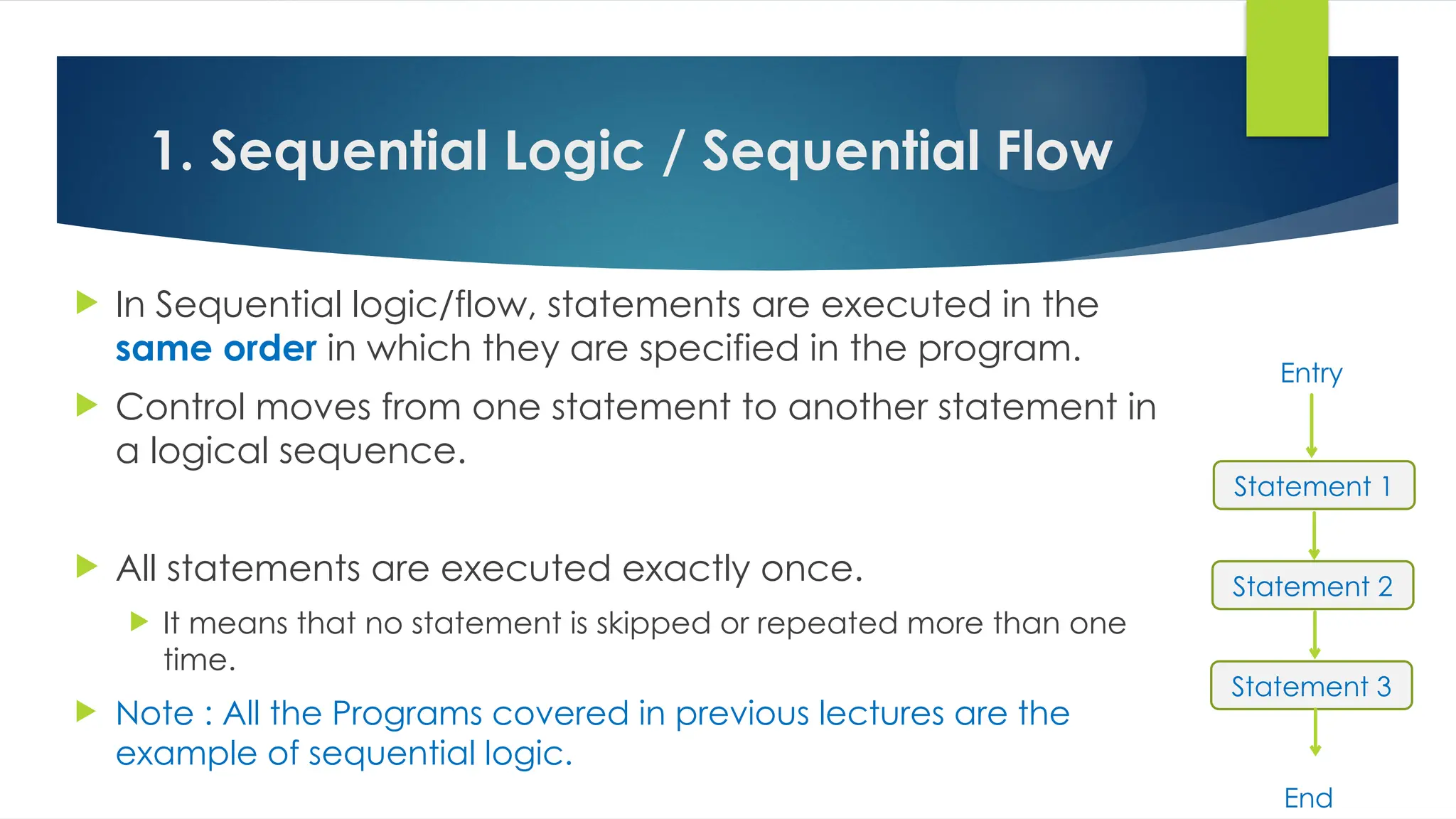
1. Sequential Logic / Sequential Flow
 In Sequential logic/flow, statements are executed in the
same order in which they are specified in the program.
 Control moves from one statement to another statement in
a logical sequence.
 All statements are executed exactly once.
 It means that no statement is skipped or repeated more than one
time.
 Note : All the Programs covered in previous lectures are the
example of sequential logic.
Statement 1
Statement 2
Statement 3
Entry
End
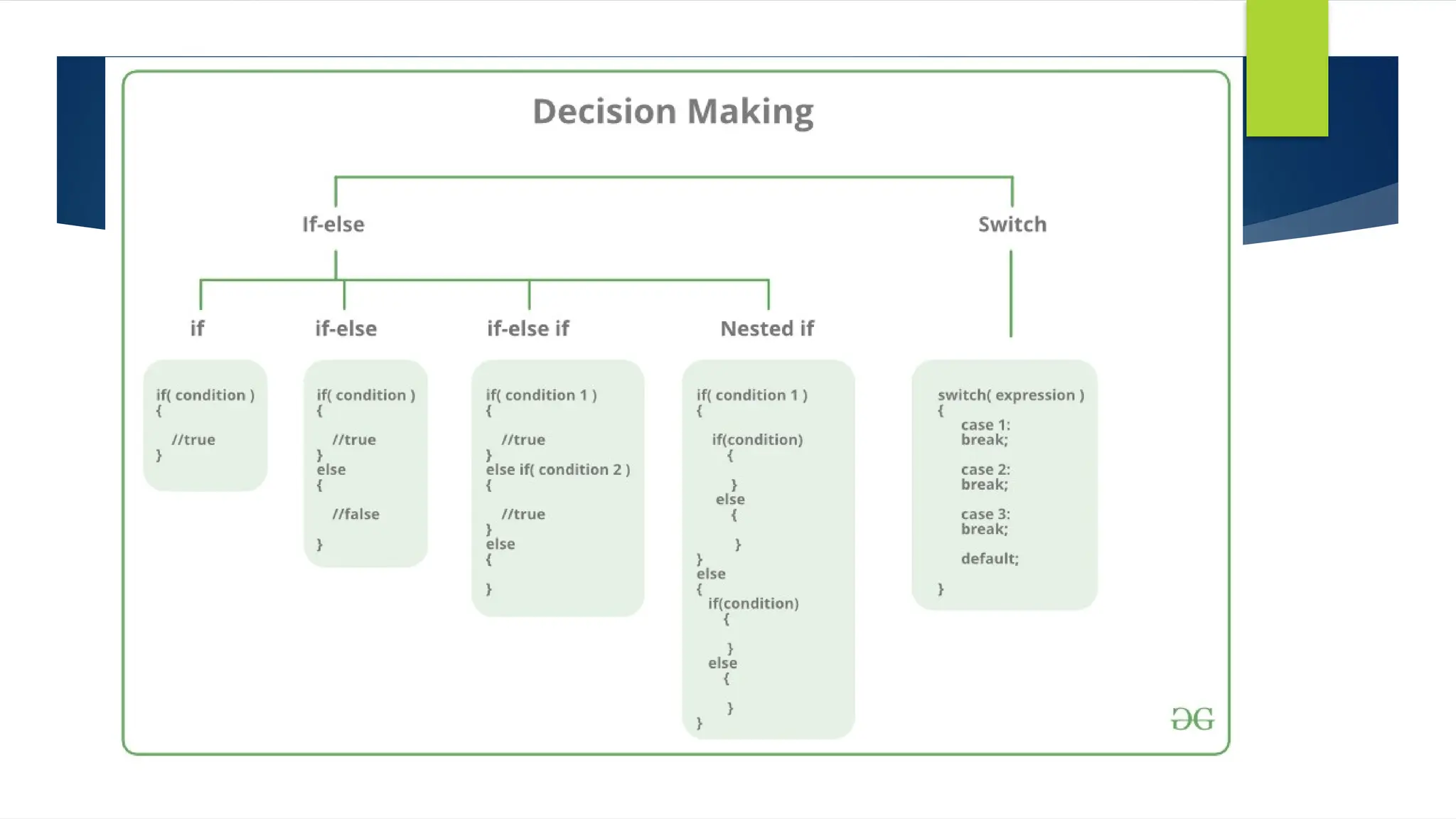
2. Selection logic, or conditional flow
 A Selection Structure selects a statement or block of statements to
execute on the basis of a condition.
 Statement(s) are executed or ignored on the basis of a condition.
 Statement(s) are executed if the condition is True.
 Statement(s) are ignored if the condition is False.
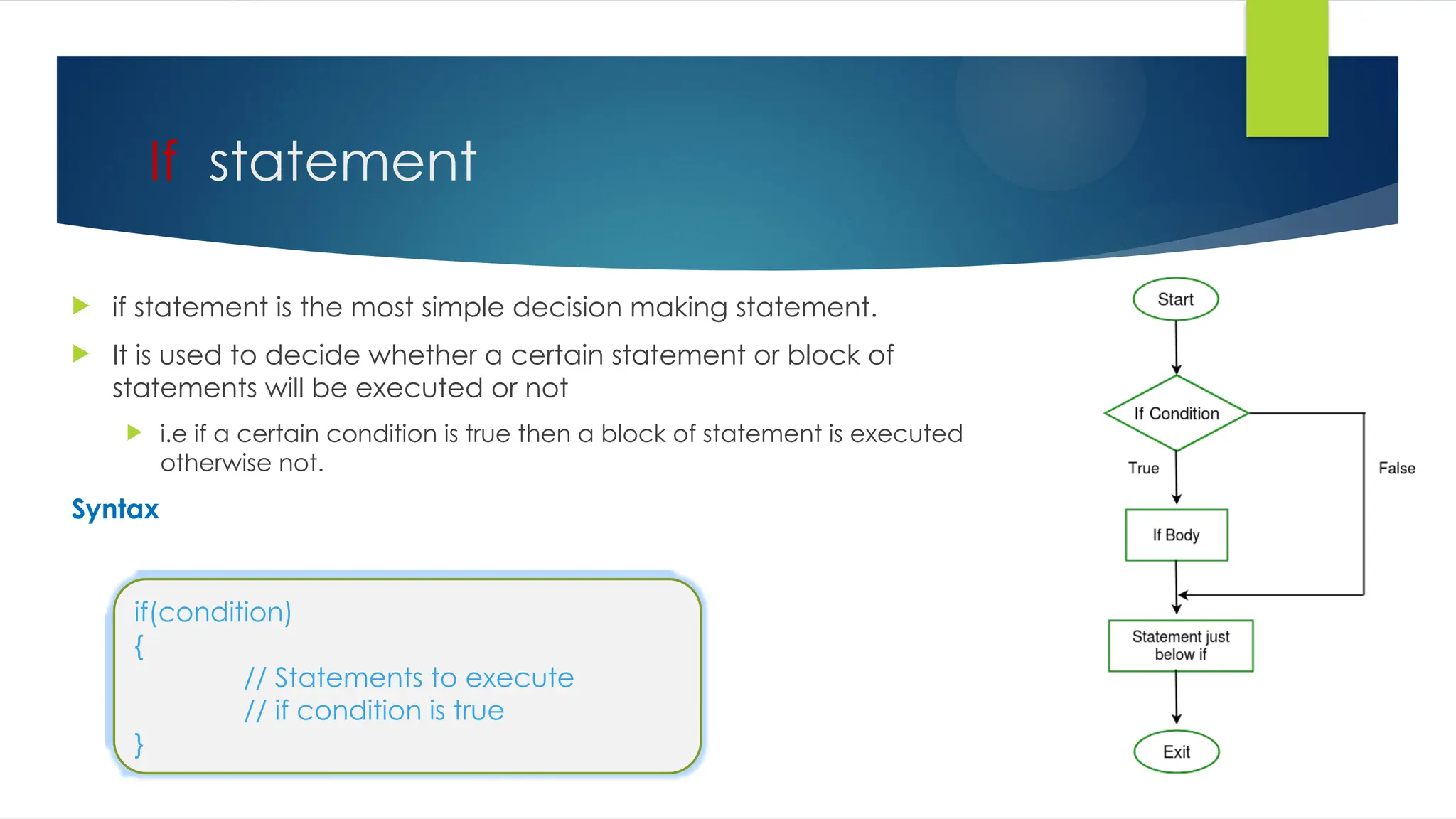
If statement
 if statement is the most simple decision making statement.
 It is used to decide whether a certain statement or block of
statements will be executed or not
 i.e if a certain condition is true then a block of statement is executed
otherwise not.
Syntax
if(condition)
{
// Statements to execute
// if condition is true
}
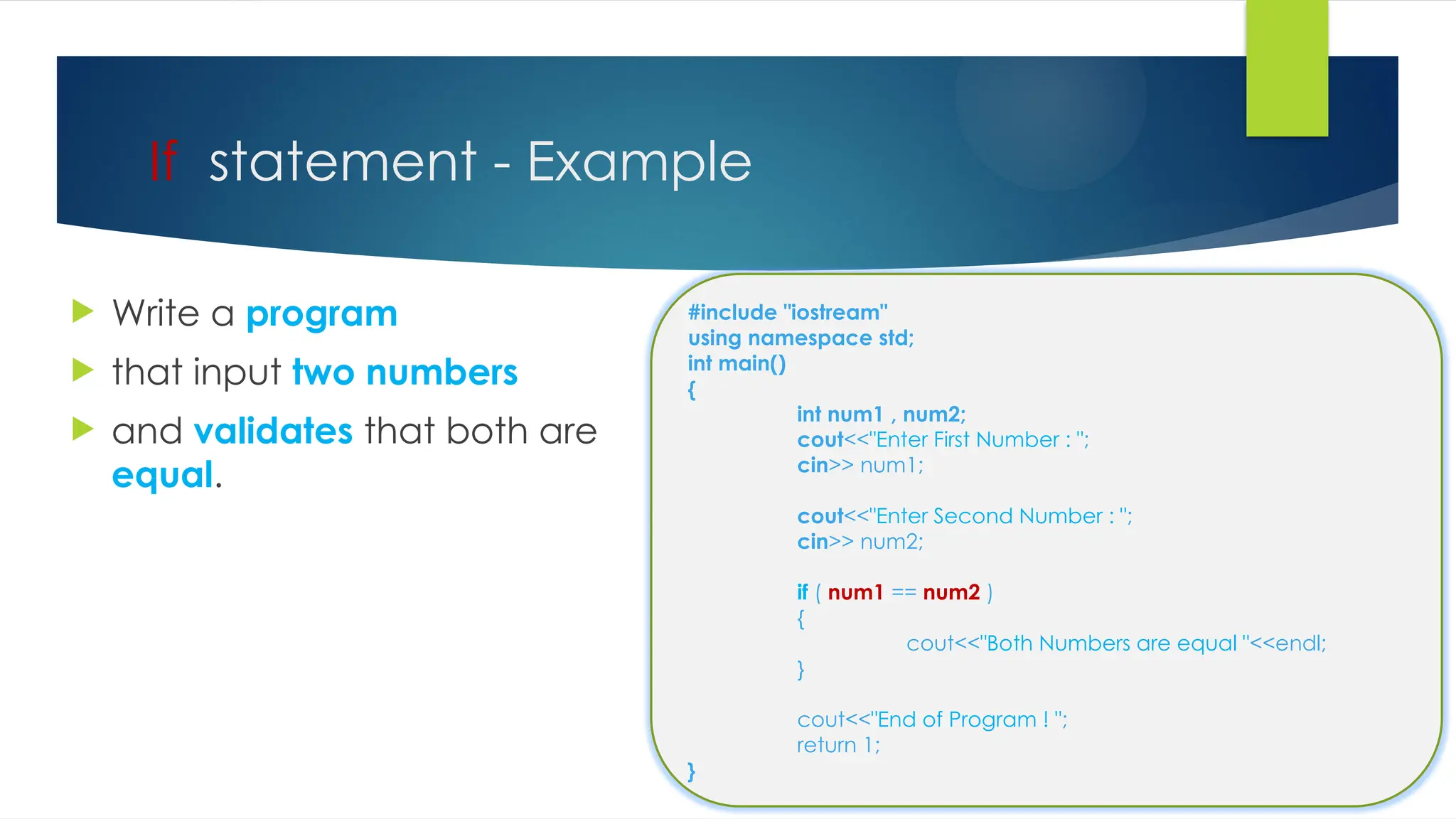
If statement - Example
 Write a program
 that input two numbers
 and validates that both are
equal.
#include "iostream"
using namespace std;
int main()
{
int num1 , num2;
cout<<"Enter First Number : ";
cin>> num1;
cout<<"Enter Second Number : ";
cin>> num2;
if ( num1 == num2 )
{
cout<<"Both Numbers are equal "<<endl;
}
cout<<"End of Program ! ";
return 1;
}
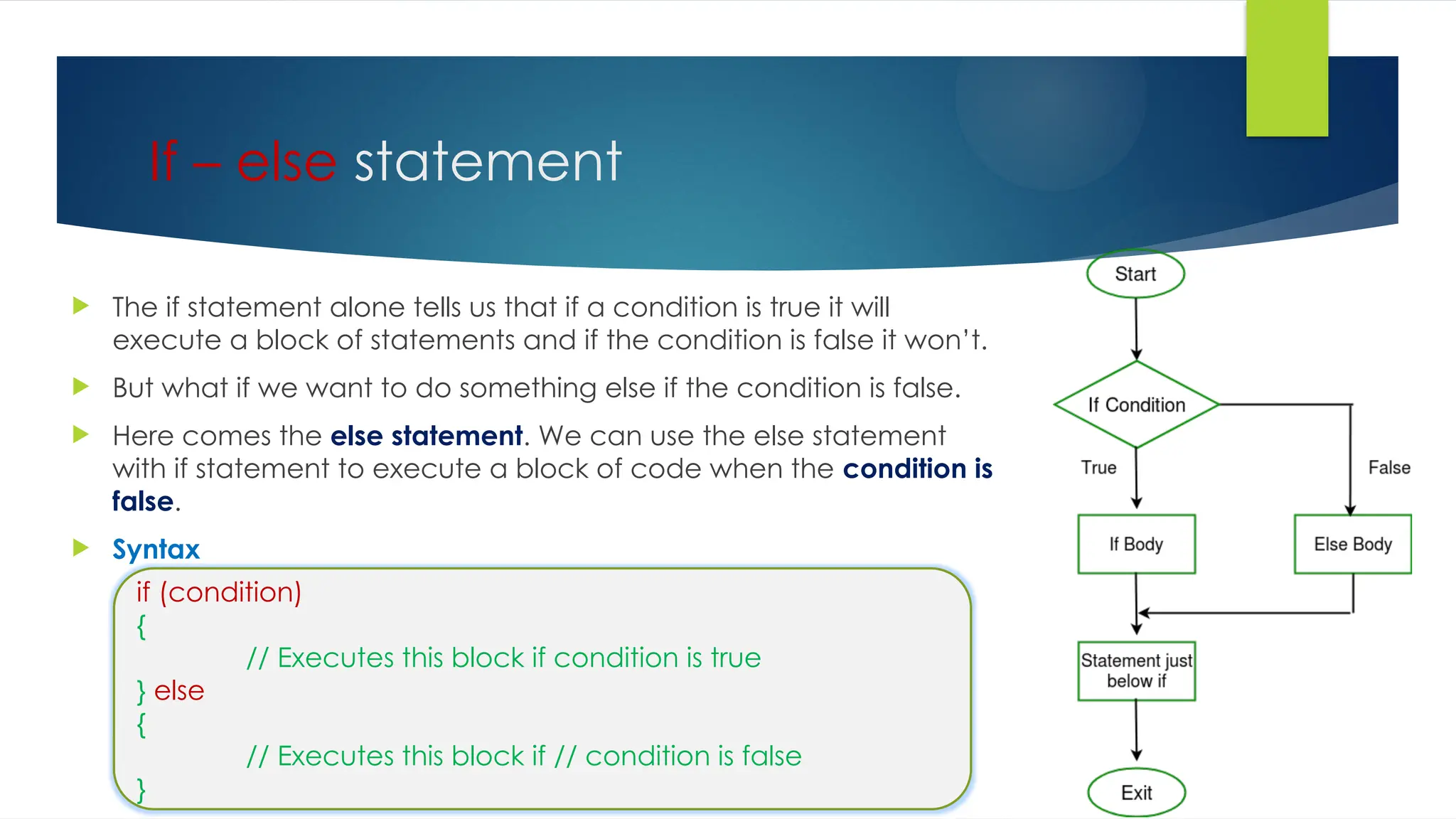
If – else statement
 The if statement alone tells us that if a condition is true it will
execute a block of statements and if the condition is false it won’t.
 But what if we want to do something else if the condition is false.
 Here comes the else statement. We can use the else statement
with if statement to execute a block of code when the condition is
false.
 Syntax
if (condition)
{
// Executes this block if condition is true
} else
{
// Executes this block if // condition is false
}
If – else statement - Example
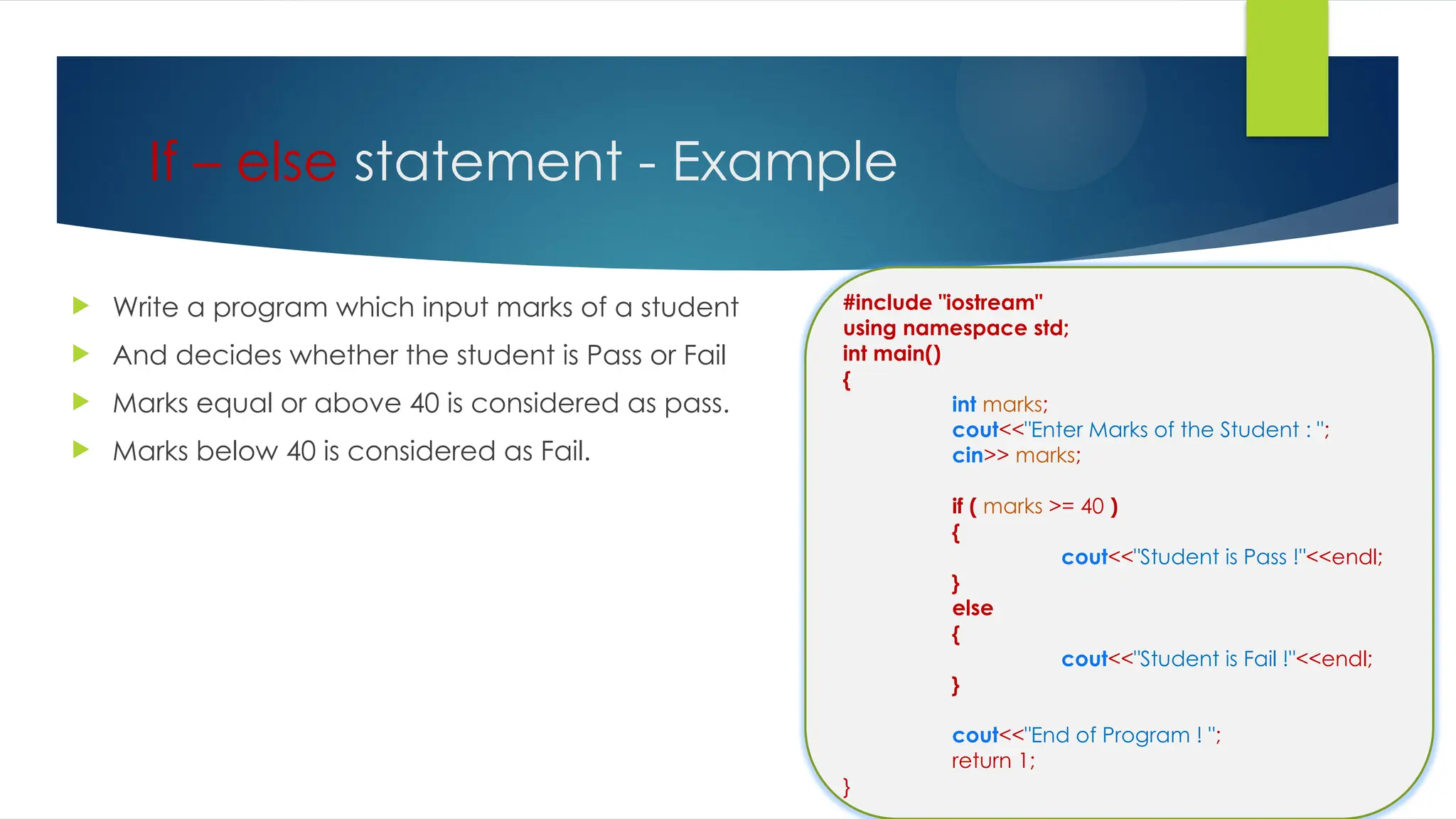
 Write a program which input marks of a student
 And decides whether the student is Pass or Fail
 Marks equal or above 40 is considered as pass.
 Marks below 40 is considered as Fail.
#include "iostream"
using namespace std;
int main()
{
int marks;
cout<<"Enter Marks of the Student : ";
cin>> marks;
if ( marks >= 40 )
{
cout<<"Student is Pass !"<<endl;
}
else
{
cout<<"Student is Fail !"<<endl;
}
cout<<"End of Program ! ";
return 1;
}
Conditional or Ternary Operator (?:)
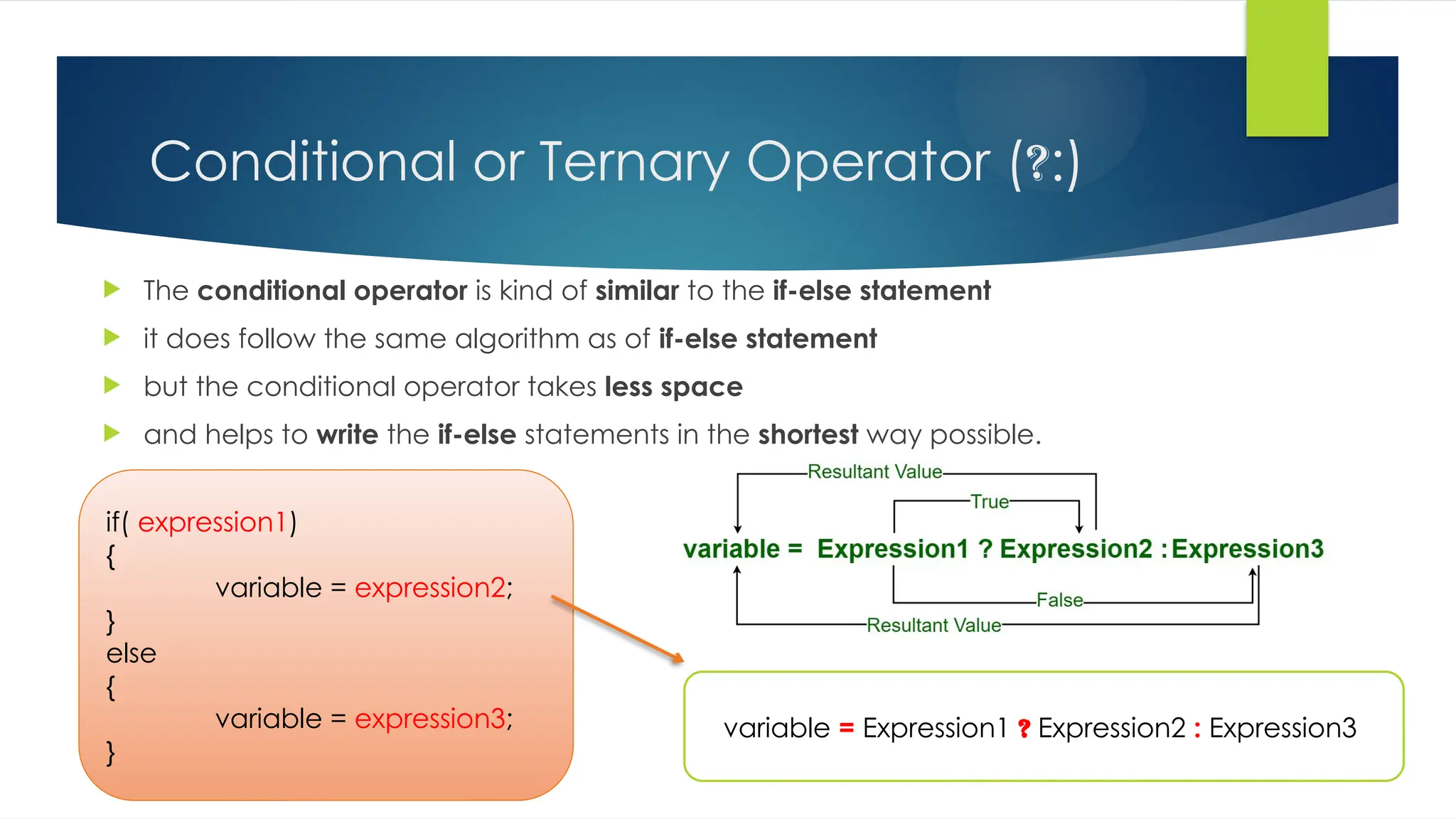
 The conditional operator is kind of similar to the if-else statement
 it does follow the same algorithm as of if-else statement
 but the conditional operator takes less space
 and helps to write the if-else statements in the shortest way possible.
variable = Expression1 ? Expression2 : Expression3
if( expression1)
{
variable = expression2;
}
else
{
variable = expression3;
}
Conditional or Ternary Operator (?:)
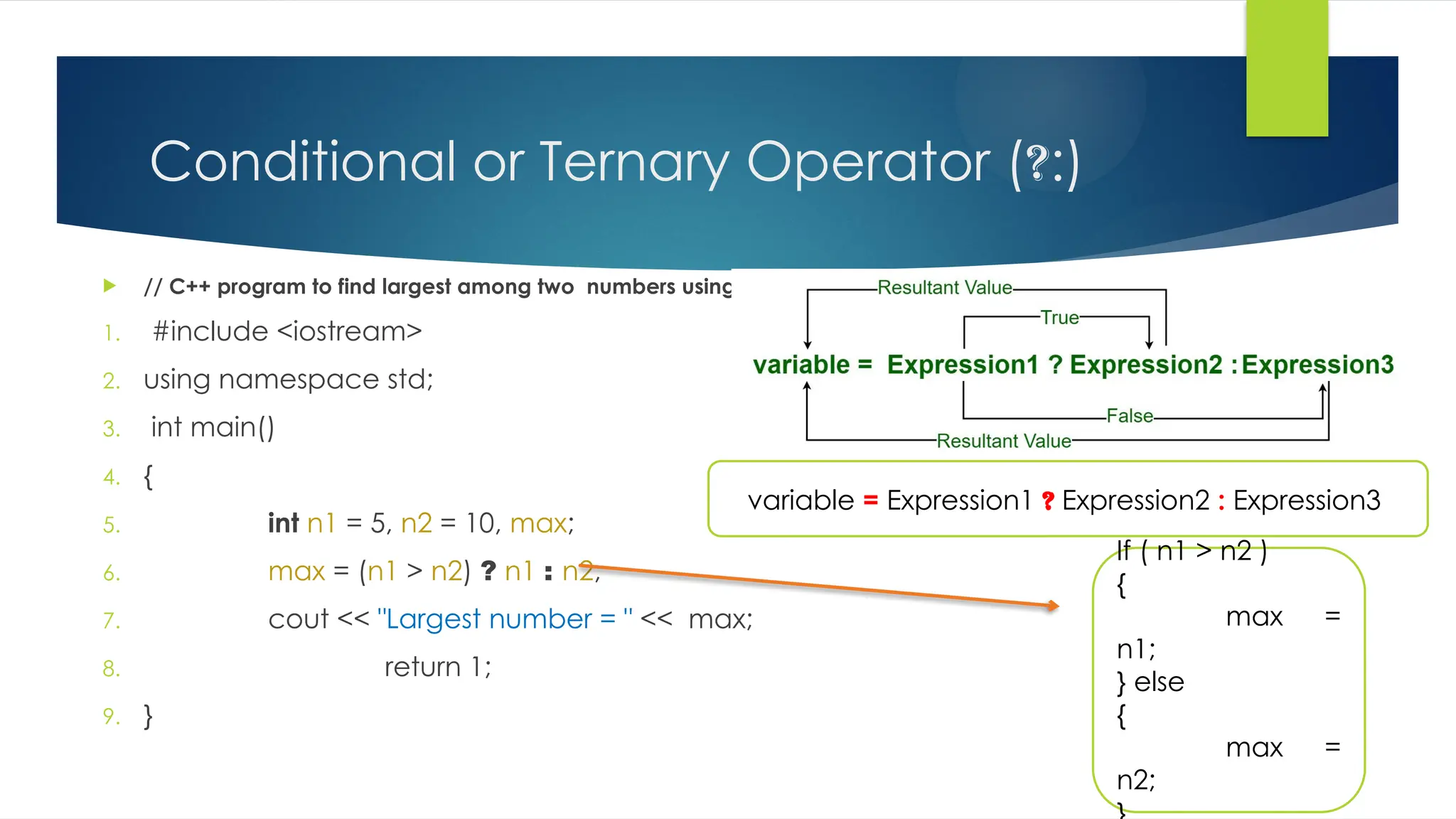
 // C++ program to find largest among two numbers using ternary operator
1. #include <iostream>
2. using namespace std;
3. int main()
4. {
5. int n1 = 5, n2 = 10, max;
6. max = (n1 > n2) ? n1 : n2;
7. cout << "Largest number = " << max;
8. return 1;
9. }
variable = Expression1 ? Expression2 : Expression3
If ( n1 > n2 )
{
max =
n1;
} else
{
max =
n2;
Nested if statement
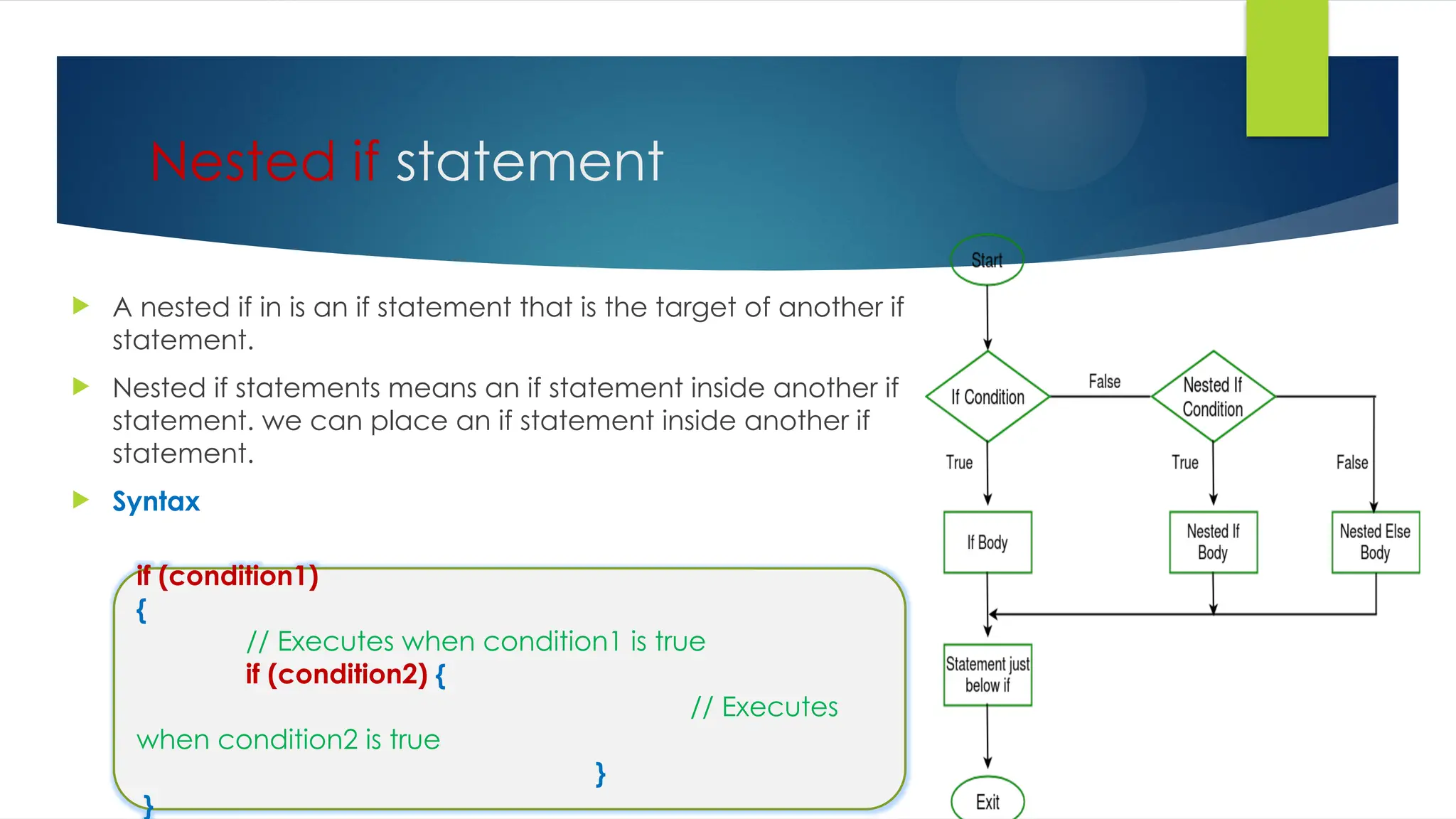
 A nested if in is an if statement that is the target of another if
statement.
 Nested if statements means an if statement inside another if
statement. we can place an if statement inside another if
statement.
 Syntax
if (condition1)
{
// Executes when condition1 is true
if (condition2) {
// Executes
when condition2 is true
}
}
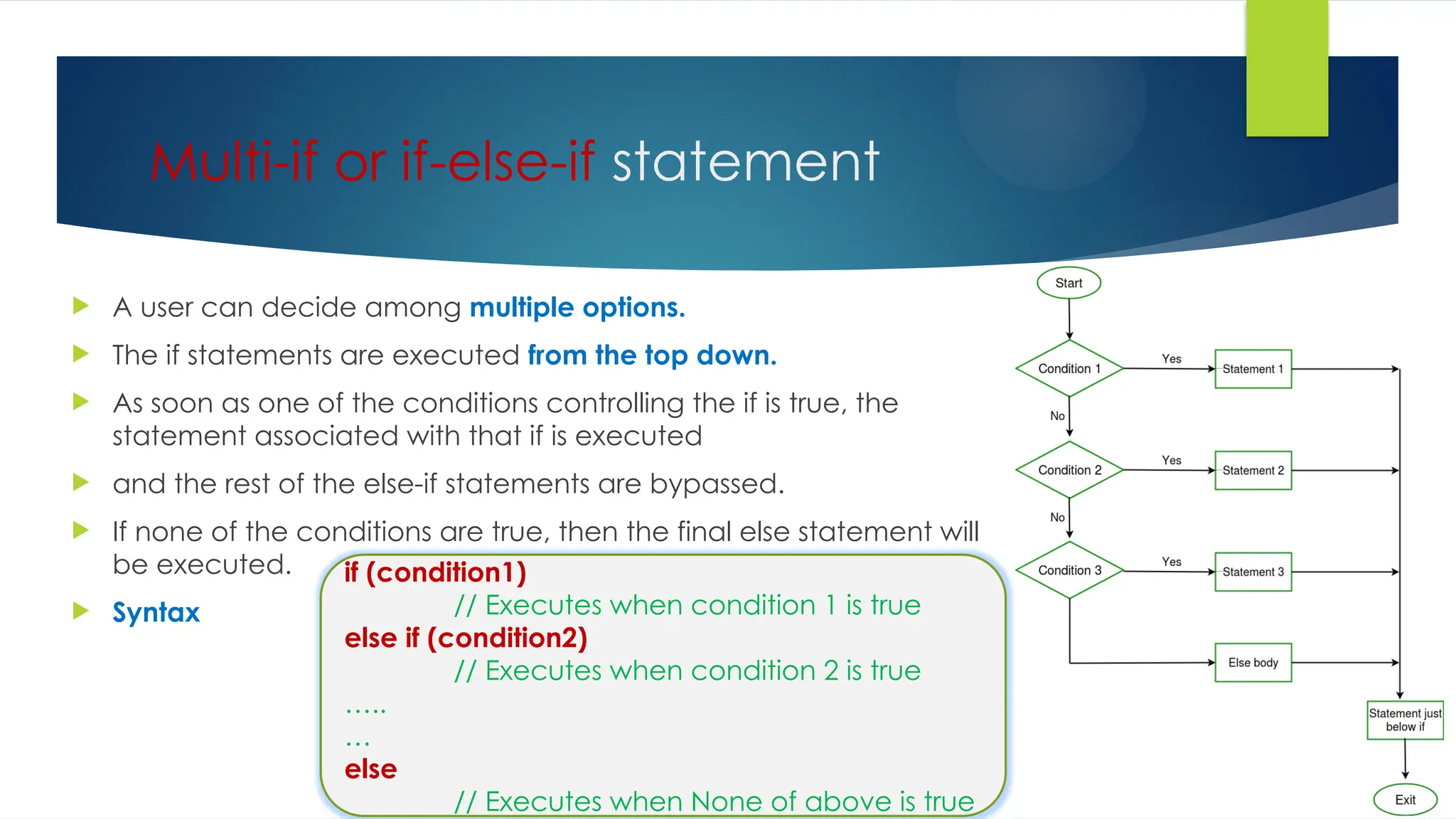
Multi-if or if-else-if statement
 A user can decide among multiple options.
 The if statements are executed from the top down.
 As soon as one of the conditions controlling the if is true, the
statement associated with that if is executed
 and the rest of the else-if statements are bypassed.
 If none of the conditions are true, then the final else statement will
be executed.
 Syntax
if (condition1)
// Executes when condition 1 is true
else if (condition2)
// Executes when condition 2 is true
…..
…
else
// Executes when None of above is true
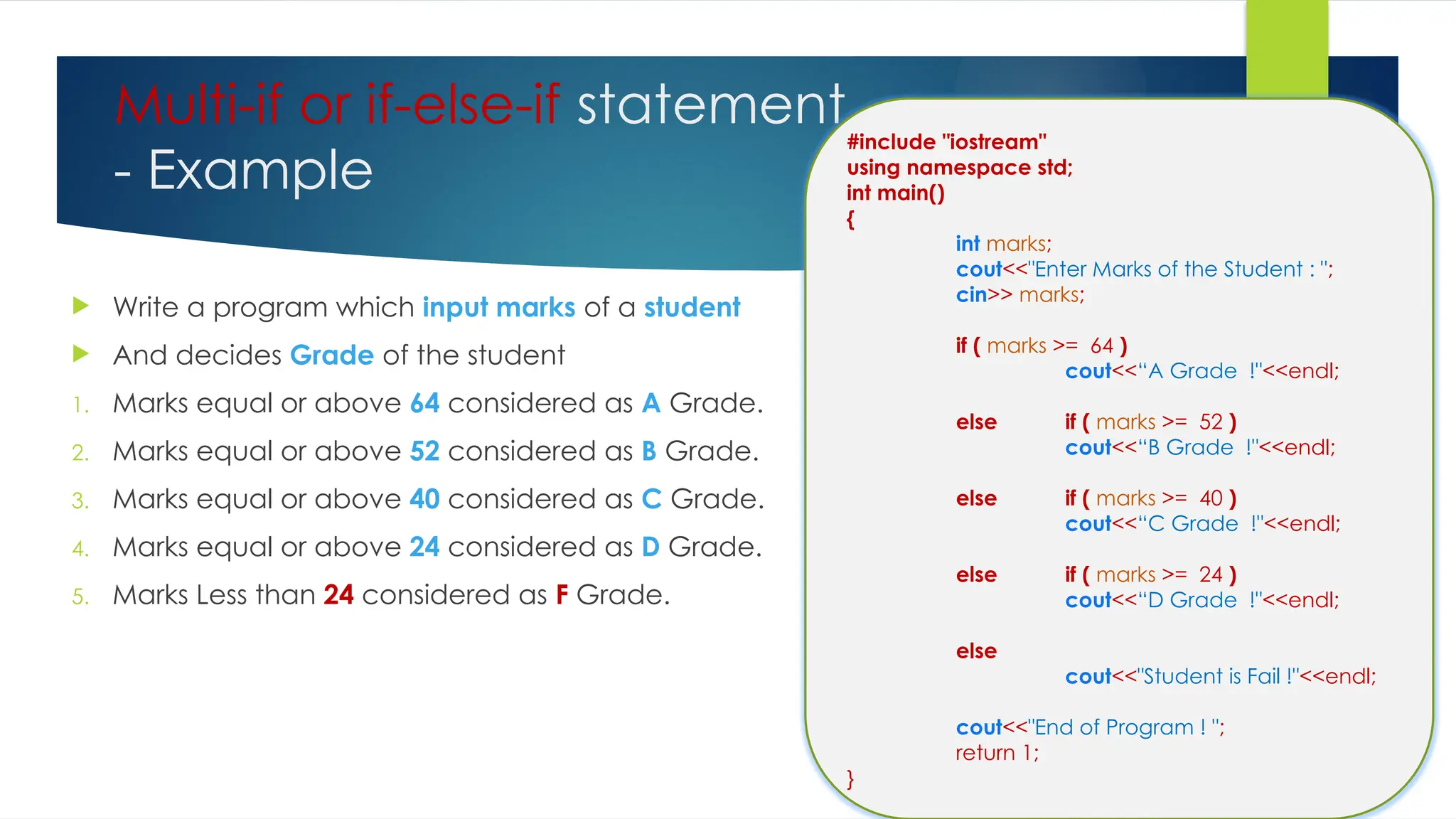
Multi-if or if-else-if statement
- Example
 Write a program which input marks of a student
 And decides Grade of the student
1. Marks equal or above 64 considered as A Grade.
2. Marks equal or above 52 considered as B Grade.
3. Marks equal or above 40 considered as C Grade.
4. Marks equal or above 24 considered as D Grade.
5. Marks Less than 24 considered as F Grade.
#include "iostream"
using namespace std;
int main()
{
int marks;
cout<<"Enter Marks of the Student : ";
cin>> marks;
if ( marks >= 64 )
cout<<“A Grade !"<<endl;
else if ( marks >= 52 )
cout<<“B Grade !"<<endl;
else if ( marks >= 40 )
cout<<“C Grade !"<<endl;
else if ( marks >= 24 )
cout<<“D Grade !"<<endl;
else
cout<<"Student is Fail !"<<endl;
cout<<"End of Program ! ";
return 1;
}
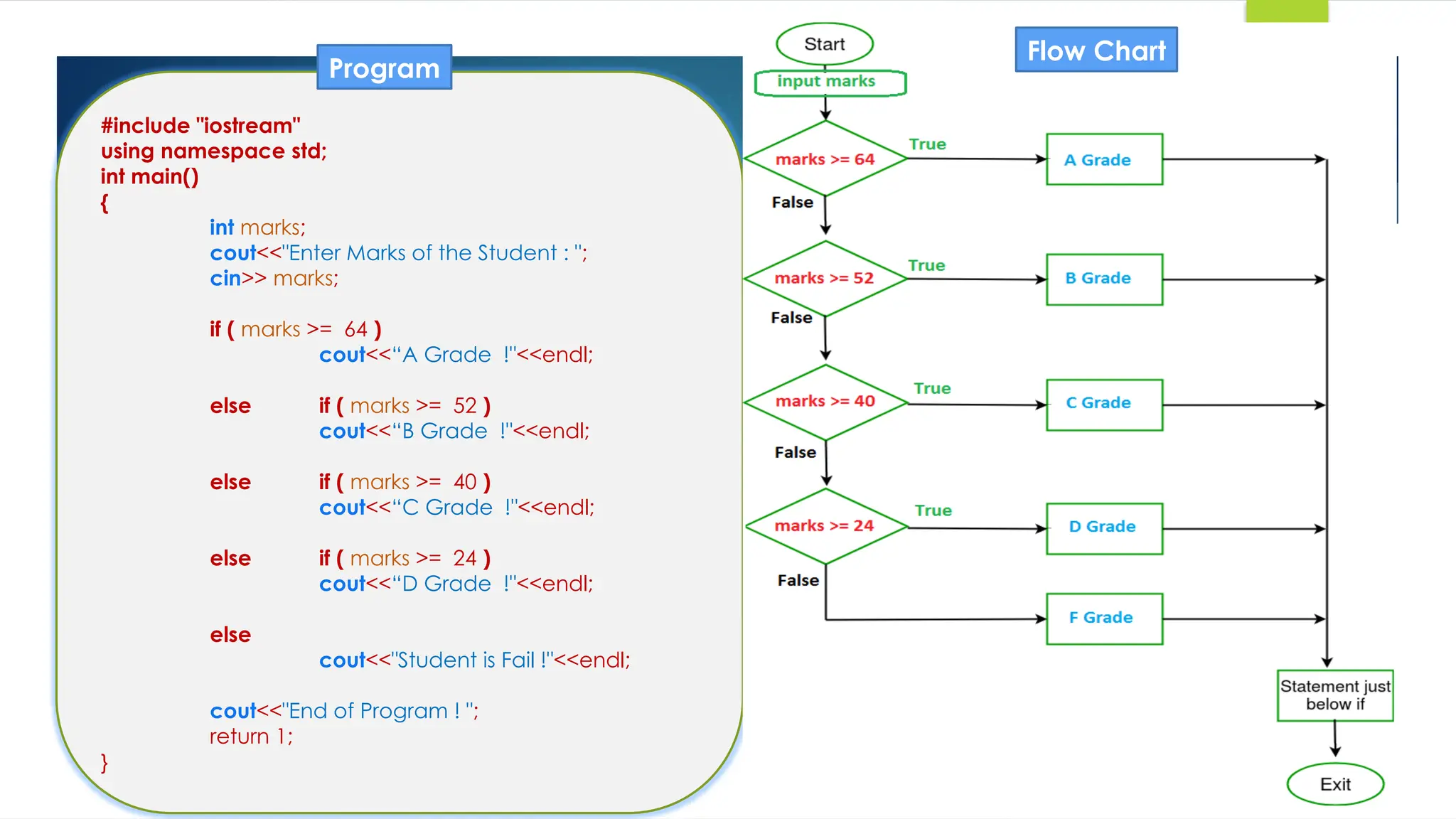
#include "iostream"
using namespace std;
int main()
{
int marks;
cout<<"Enter Marks of the Student : ";
cin>> marks;
if ( marks >= 64 )
cout<<“A Grade !"<<endl;
else if ( marks >= 52 )
cout<<“B Grade !"<<endl;
else if ( marks >= 40 )
cout<<“C Grade !"<<endl;
else if ( marks >= 24 )
cout<<“D Grade !"<<endl;
else
cout<<"Student is Fail !"<<endl;
cout<<"End of Program ! ";
return 1;
}
Flow Chart
Program
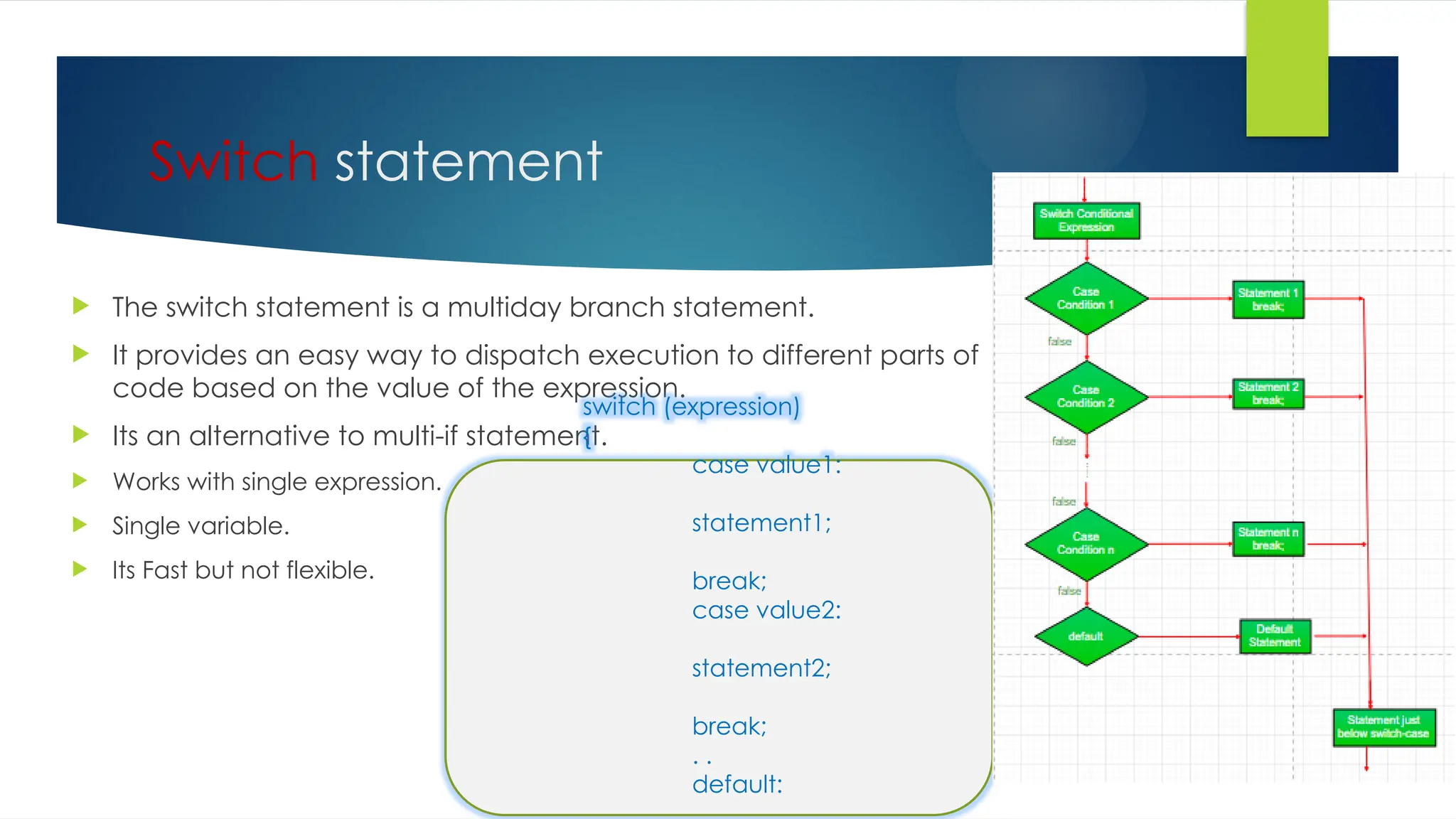
Switch statement
 The switch statement is a multiday branch statement.
 It provides an easy way to dispatch execution to different parts of
code based on the value of the expression.
 Its an alternative to multi-if statement.
 Works with single expression.
 Single variable.
 Its Fast but not flexible.
switch (expression)
{
case value1:
statement1;
break;
case value2:
statement2;
break;
. .
default:
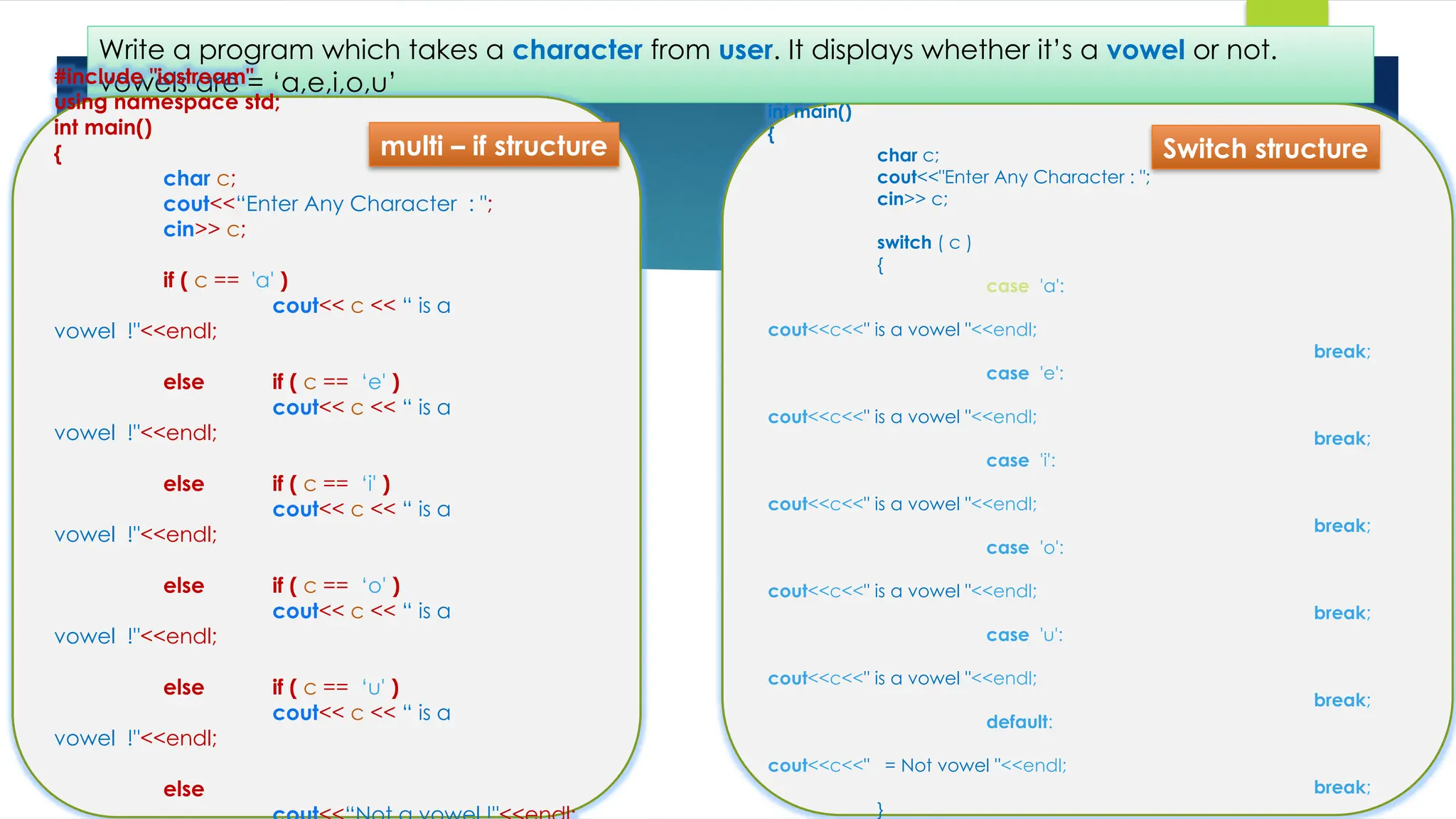
#include "iostream"
using namespace std;
int main()
{
char c;
cout<<"Enter Any Character : ";
cin>> c;
switch ( c )
{
case 'a':
cout<<c<<" is a vowel "<<endl;
break;
case 'e':
cout<<c<<" is a vowel "<<endl;
break;
case 'i':
cout<<c<<" is a vowel "<<endl;
break;
case 'o':
cout<<c<<" is a vowel "<<endl;
break;
case 'u':
cout<<c<<" is a vowel "<<endl;
break;
default:
cout<<c<<" = Not vowel "<<endl;
break;
}
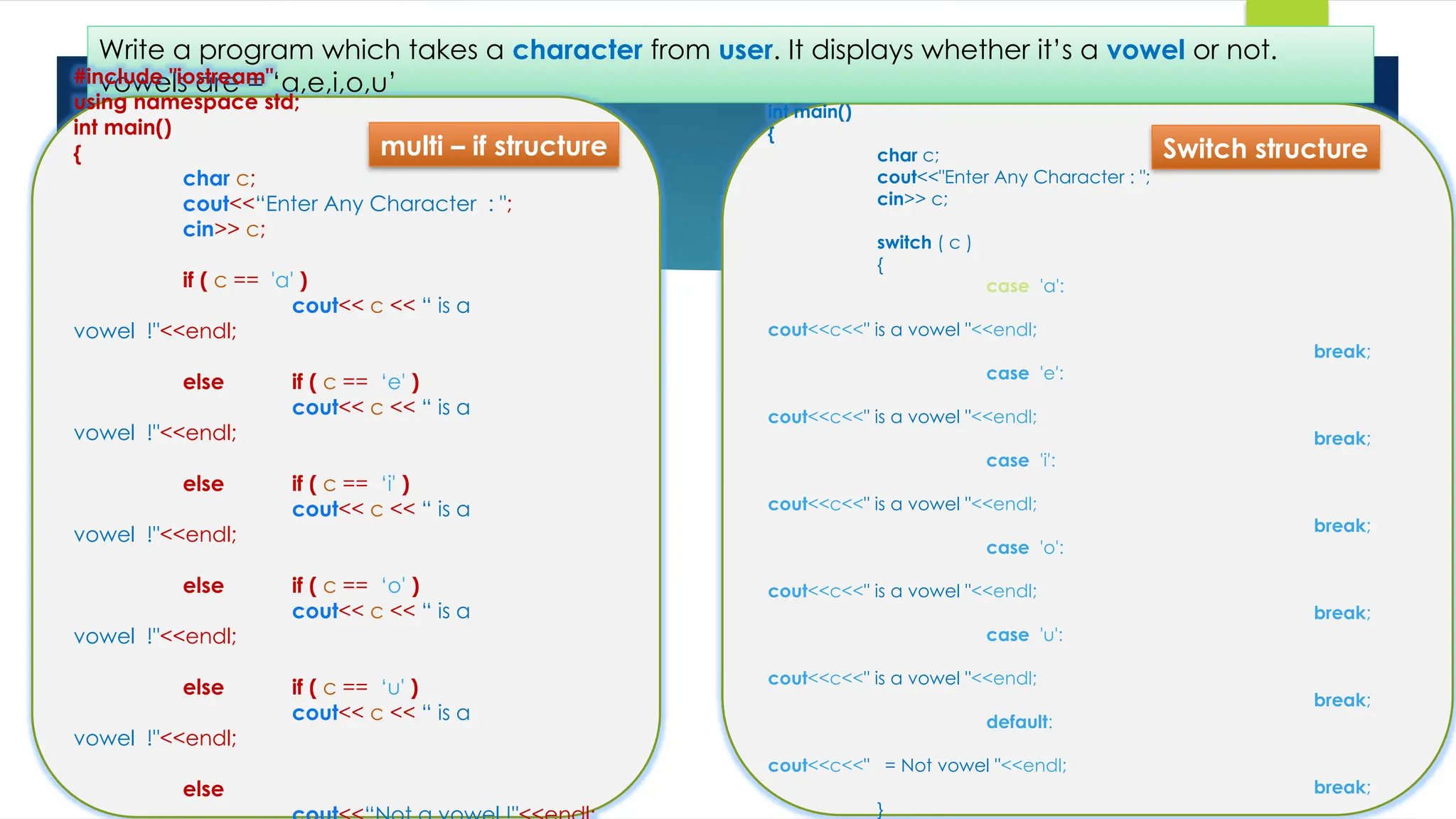
Write a program which takes a character from user. It displays whether it’s a vowel or not.
vowels are = ‘a,e,i,o,u’
#include "iostream"
using namespace std;
int main()
{
char c;
cout<<“Enter Any Character : ";
cin>> c;
if ( c == 'a' )
cout<< c << “ is a
vowel !"<<endl;
else if ( c == ‘e' )
cout<< c << “ is a
vowel !"<<endl;
else if ( c == ‘i' )
cout<< c << “ is a
vowel !"<<endl;
else if ( c == ‘o' )
cout<< c << “ is a
vowel !"<<endl;
else if ( c == ‘u' )
cout<< c << “ is a
vowel !"<<endl;
else
multi – if structure Switch structure
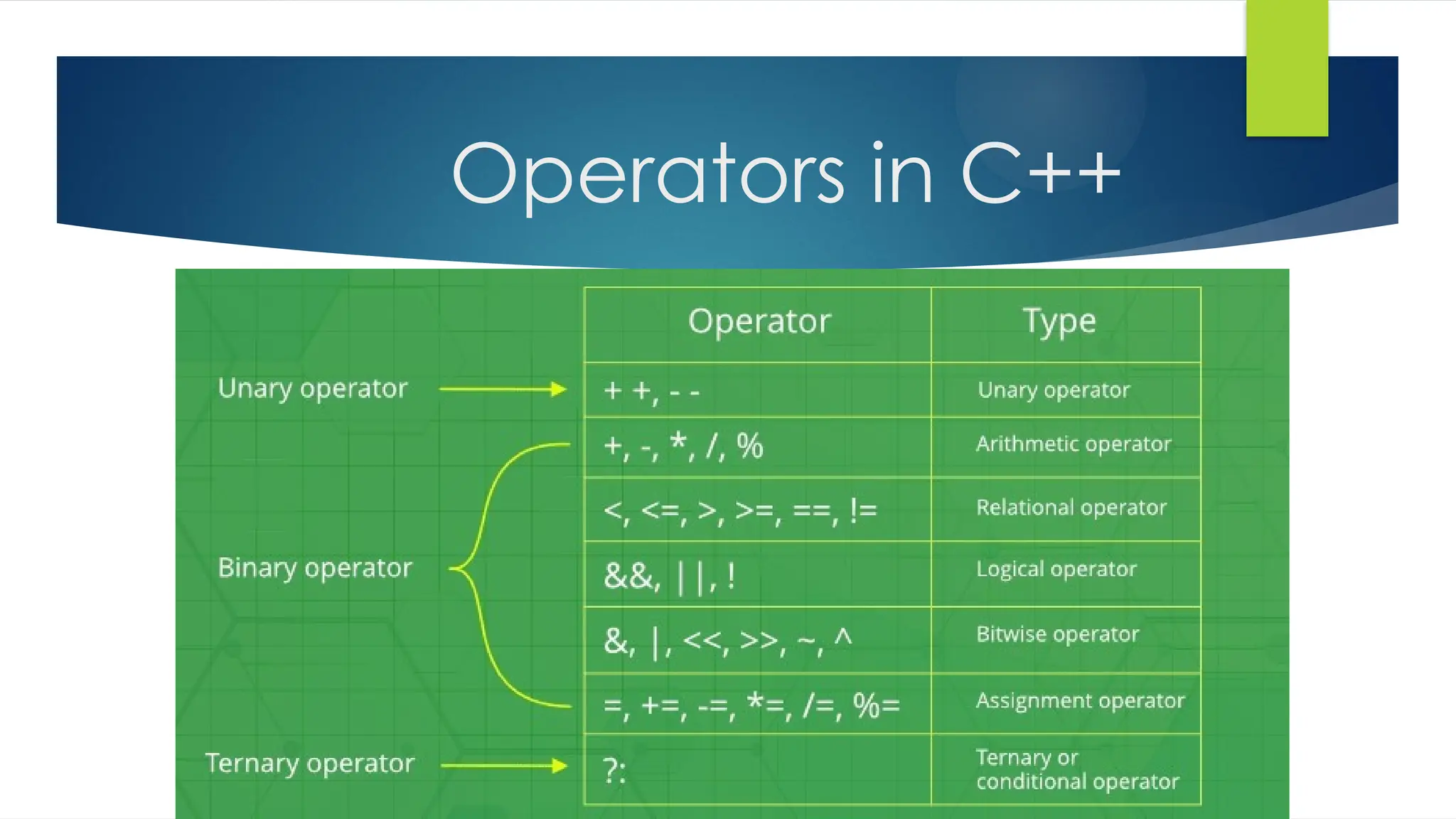
Operators in C++
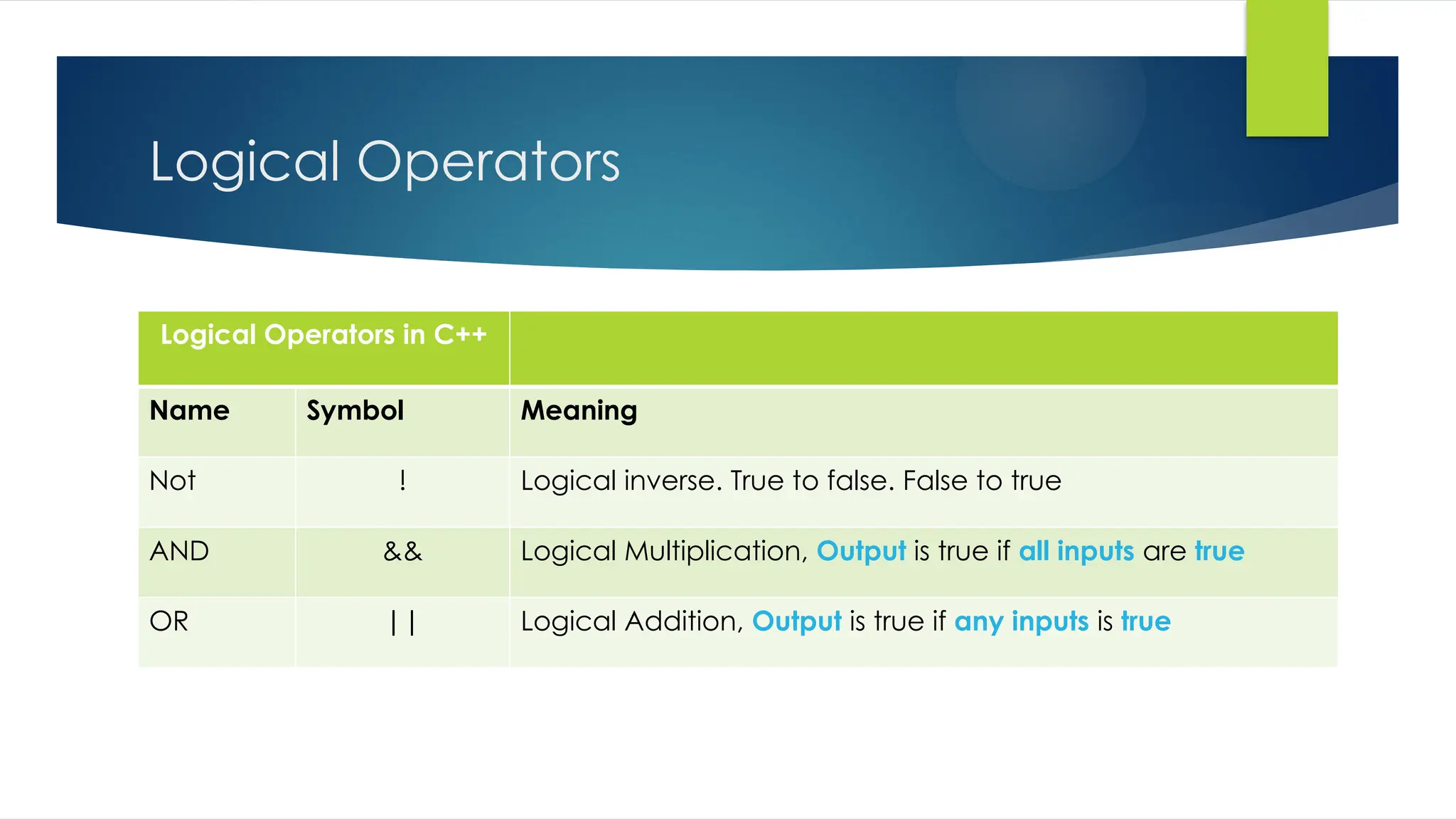
Logical Operators
Logical Operators in C++
Name Symbol Meaning
Not ! Logical inverse. True to false. False to true
AND && Logical Multiplication, Output is true if all inputs are true
OR || Logical Addition, Output is true if any inputs is true
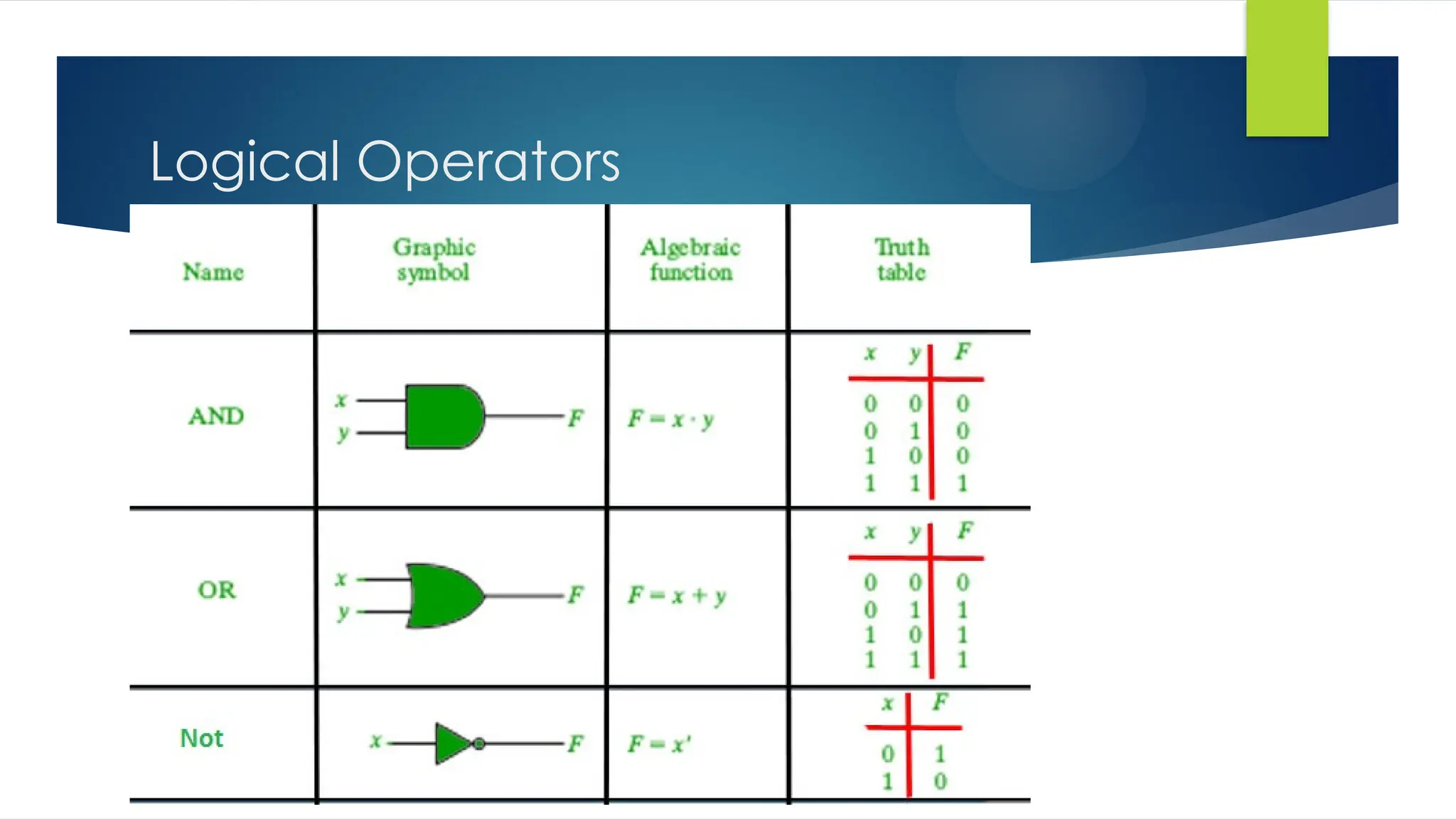
Logical Operators
#include "iostream"
using namespace std;
int main()
{
char c;
cout<<"Enter Any Character : ";
cin>> c;
switch ( c )
{
case 'a':
cout<<c<<" is a vowel "<<endl;
break;
case 'e':
cout<<c<<" is a vowel "<<endl;
break;
case 'i':
cout<<c<<" is a vowel "<<endl;
break;
case 'o':
cout<<c<<" is a vowel "<<endl;
break;
case 'u':
cout<<c<<" is a vowel "<<endl;
break;
default:
cout<<c<<" = Not vowel "<<endl;
break;
}
Write a program which takes a character from user. It displays whether it’s a vowel or not.
vowels are = ‘a,e,i,o,u’
#include "iostream"
using namespace std;
int main()
{
char c;
cout<<“Enter Any Character : ";
cin>> c;
if ( c == 'a' )
cout<< c << “ is a
vowel !"<<endl;
else if ( c == ‘e' )
cout<< c << “ is a
vowel !"<<endl;
else if ( c == ‘i' )
cout<< c << “ is a
vowel !"<<endl;
else if ( c == ‘o' )
cout<< c << “ is a
vowel !"<<endl;
else if ( c == ‘u' )
cout<< c << “ is a
vowel !"<<endl;
else
multi – if structure Switch structure
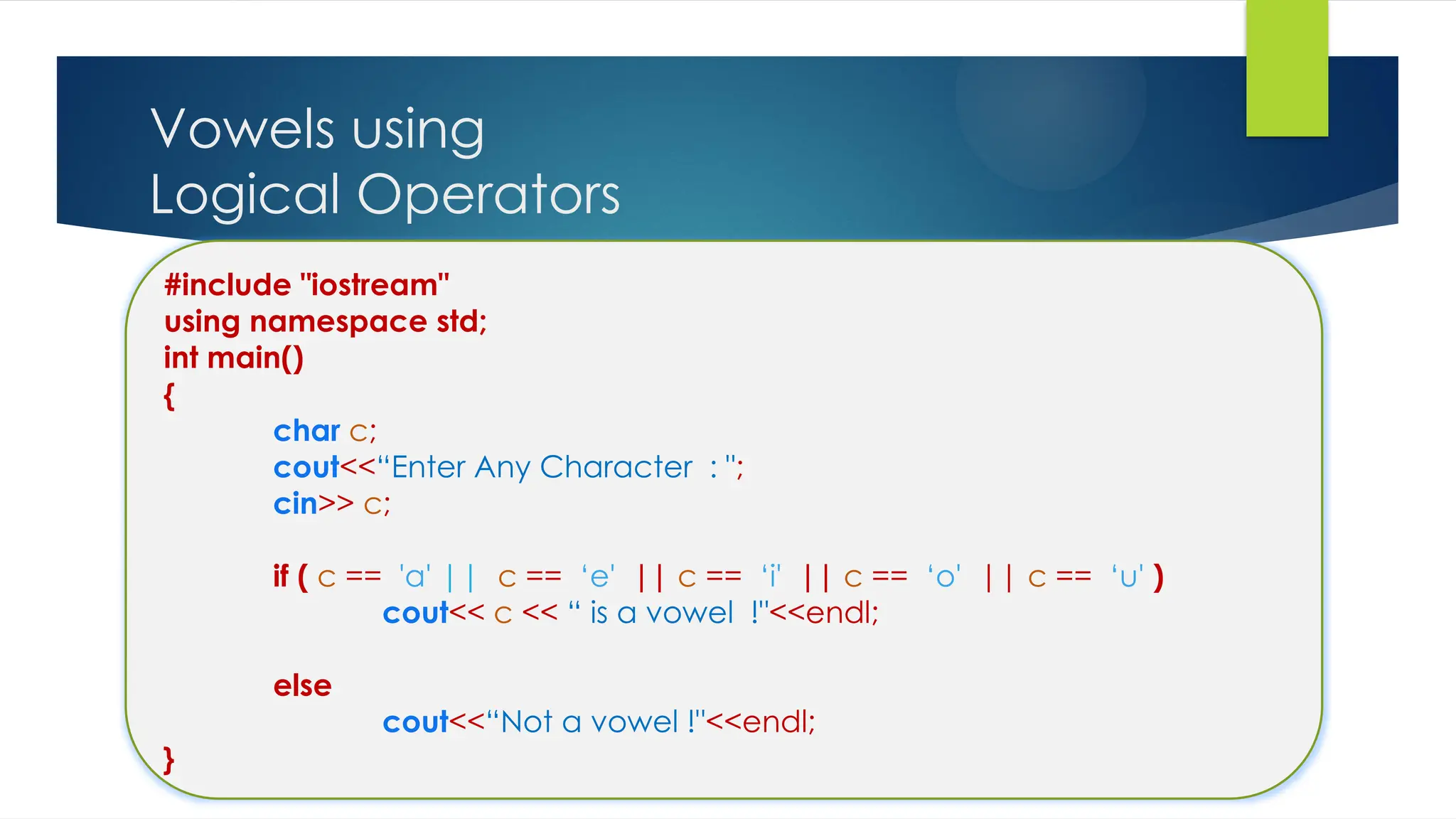
Vowels using
Logical Operators
#include "iostream"
using namespace std;
int main()
{
char c;
cout<<“Enter Any Character : ";
cin>> c;
if ( c == 'a' || c == ‘e' || c == ‘i' || c == ‘o' || c == ‘u' )
cout<< c << “ is a vowel !"<<endl;
else
cout<<“Not a vowel !"<<endl;
}
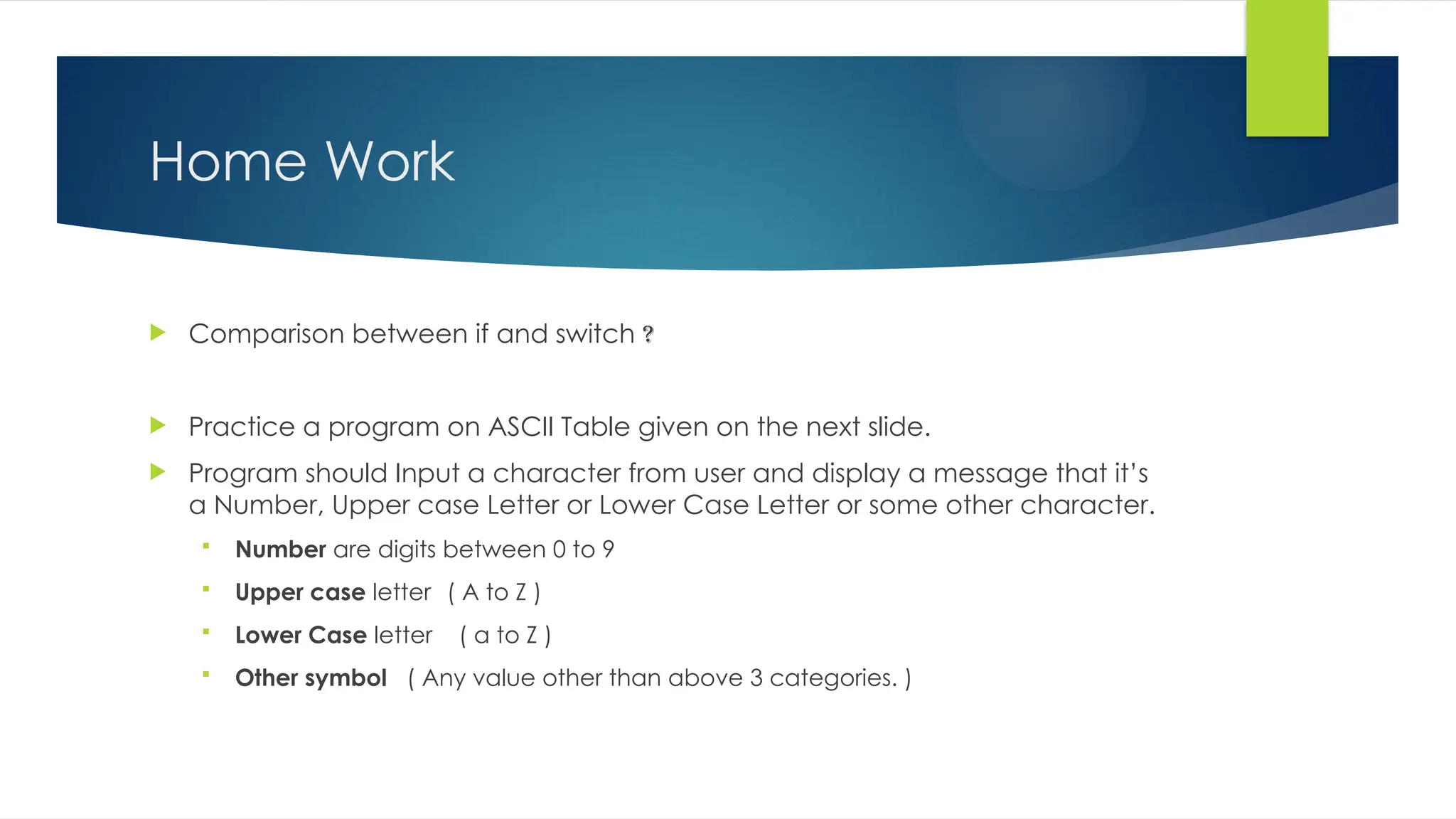
Home Work
 Comparison between if and switch ?
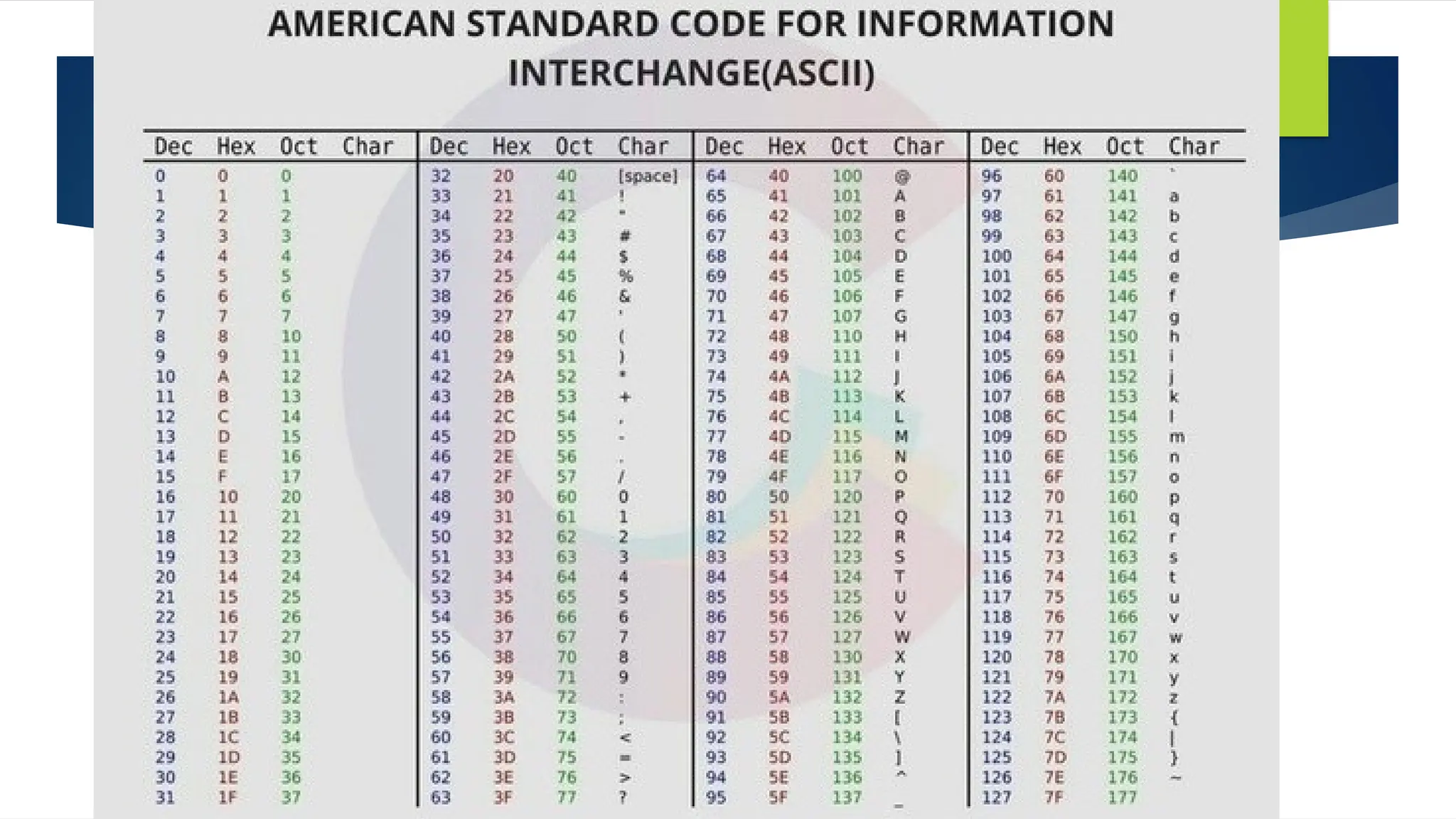
 Practice a program on ASCII Table given on the next slide.
 Program should Input a character from user and display a message that it’s
a Number, Upper case Letter or Lower Case Letter or some other character.
 Number are digits between 0 to 9
 Upper case letter ( A to Z )
 Lower Case letter ( a to Z )
 Other symbol ( Any value other than above 3 categories. )
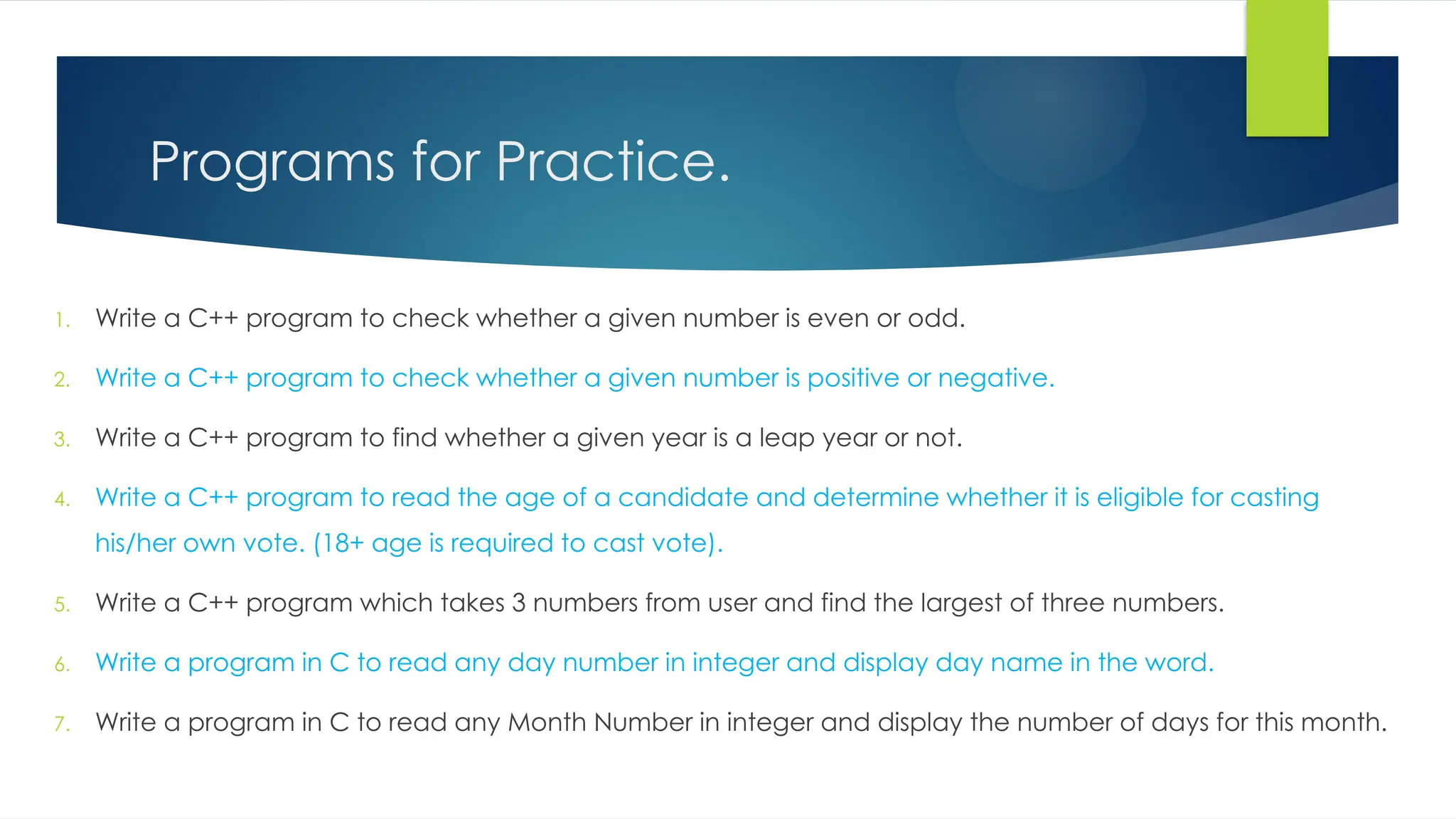
Programs for Practice.
1. Write a C++ program to check whether a given number is even or odd.
2. Write a C++ program to check whether a given number is positive or negative.
3. Write a C++ program to find whether a given year is a leap year or not.
4. Write a C++ program to read the age of a candidate and determine whether it is eligible for casting
his/her own vote. (18+ age is required to cast vote).
5. Write a C++ program which takes 3 numbers from user and find the largest of three numbers.
6. Write a program in C to read any day number in integer and display day name in the word.
7. Write a program in C to read any Month Number in integer and display the number of days for this month.
3 Conditional Structure - if and switch (1).pptx

3 Conditional Structure - if and switch (1).pptx

  • 1.
  • 2.
    Books  Deitel &Deitel :– C++ How to Program  Robert Lafore : Object-Oriented Programming in C++  IT Series : Object Oriented Programming Using C++  shahabaznazeer@gcuf.edu.pk
  • 3.
    Control Structures  ControlStructures are just a way to specify flow of control in programs.  Any algorithm or program can be more clear and understood if they use self-contained modules called as logic or control structures.  It basically analyzes and chooses in which direction a program flows based on certain parameters or conditions.  There are four basic types of logic, or flow of control, known as: 1. Sequence logic, or sequential flow 2. Selection logic, or conditional flow 3. Iteration logic, or repetitive flow 4. Function Call
  • 4.
    1. Sequential Logic/ Sequential Flow  In Sequential logic/flow, statements are executed in the same order in which they are specified in the program.  Control moves from one statement to another statement in a logical sequence.  All statements are executed exactly once.  It means that no statement is skipped or repeated more than one time.  Note : All the Programs covered in previous lectures are the example of sequential logic. Statement 1 Statement 2 Statement 3 Entry End
  • 5.
    2. Selection logic,or conditional flow  A Selection Structure selects a statement or block of statements to execute on the basis of a condition.  Statement(s) are executed or ignored on the basis of a condition.  Statement(s) are executed if the condition is True.  Statement(s) are ignored if the condition is False.
  • 7.
    If statement  ifstatement is the most simple decision making statement.  It is used to decide whether a certain statement or block of statements will be executed or not  i.e if a certain condition is true then a block of statement is executed otherwise not. Syntax if(condition) { // Statements to execute // if condition is true }
  • 8.
    If statement -Example  Write a program  that input two numbers  and validates that both are equal. #include "iostream" using namespace std; int main() { int num1 , num2; cout<<"Enter First Number : "; cin>> num1; cout<<"Enter Second Number : "; cin>> num2; if ( num1 == num2 ) { cout<<"Both Numbers are equal "<<endl; } cout<<"End of Program ! "; return 1; }
  • 9.
    If – elsestatement  The if statement alone tells us that if a condition is true it will execute a block of statements and if the condition is false it won’t.  But what if we want to do something else if the condition is false.  Here comes the else statement. We can use the else statement with if statement to execute a block of code when the condition is false.  Syntax if (condition) { // Executes this block if condition is true } else { // Executes this block if // condition is false }
  • 10.
    If – elsestatement - Example  Write a program which input marks of a student  And decides whether the student is Pass or Fail  Marks equal or above 40 is considered as pass.  Marks below 40 is considered as Fail. #include "iostream" using namespace std; int main() { int marks; cout<<"Enter Marks of the Student : "; cin>> marks; if ( marks >= 40 ) { cout<<"Student is Pass !"<<endl; } else { cout<<"Student is Fail !"<<endl; } cout<<"End of Program ! "; return 1; }
  • 11.
    Conditional or TernaryOperator (?:)  The conditional operator is kind of similar to the if-else statement  it does follow the same algorithm as of if-else statement  but the conditional operator takes less space  and helps to write the if-else statements in the shortest way possible. variable = Expression1 ? Expression2 : Expression3 if( expression1) { variable = expression2; } else { variable = expression3; }
  • 12.
    Conditional or TernaryOperator (?:)  // C++ program to find largest among two numbers using ternary operator 1. #include <iostream> 2. using namespace std; 3. int main() 4. { 5. int n1 = 5, n2 = 10, max; 6. max = (n1 > n2) ? n1 : n2; 7. cout << "Largest number = " << max; 8. return 1; 9. } variable = Expression1 ? Expression2 : Expression3 If ( n1 > n2 ) { max = n1; } else { max = n2;
  • 13.
    Nested if statement A nested if in is an if statement that is the target of another if statement.  Nested if statements means an if statement inside another if statement. we can place an if statement inside another if statement.  Syntax if (condition1) { // Executes when condition1 is true if (condition2) { // Executes when condition2 is true } }
  • 14.
    Multi-if or if-else-ifstatement  A user can decide among multiple options.  The if statements are executed from the top down.  As soon as one of the conditions controlling the if is true, the statement associated with that if is executed  and the rest of the else-if statements are bypassed.  If none of the conditions are true, then the final else statement will be executed.  Syntax if (condition1) // Executes when condition 1 is true else if (condition2) // Executes when condition 2 is true ….. … else // Executes when None of above is true
  • 15.
    Multi-if or if-else-ifstatement - Example  Write a program which input marks of a student  And decides Grade of the student 1. Marks equal or above 64 considered as A Grade. 2. Marks equal or above 52 considered as B Grade. 3. Marks equal or above 40 considered as C Grade. 4. Marks equal or above 24 considered as D Grade. 5. Marks Less than 24 considered as F Grade. #include "iostream" using namespace std; int main() { int marks; cout<<"Enter Marks of the Student : "; cin>> marks; if ( marks >= 64 ) cout<<“A Grade !"<<endl; else if ( marks >= 52 ) cout<<“B Grade !"<<endl; else if ( marks >= 40 ) cout<<“C Grade !"<<endl; else if ( marks >= 24 ) cout<<“D Grade !"<<endl; else cout<<"Student is Fail !"<<endl; cout<<"End of Program ! "; return 1; }
  • 16.
    #include "iostream" using namespacestd; int main() { int marks; cout<<"Enter Marks of the Student : "; cin>> marks; if ( marks >= 64 ) cout<<“A Grade !"<<endl; else if ( marks >= 52 ) cout<<“B Grade !"<<endl; else if ( marks >= 40 ) cout<<“C Grade !"<<endl; else if ( marks >= 24 ) cout<<“D Grade !"<<endl; else cout<<"Student is Fail !"<<endl; cout<<"End of Program ! "; return 1; } Flow Chart Program
  • 17.
    Switch statement  Theswitch statement is a multiday branch statement.  It provides an easy way to dispatch execution to different parts of code based on the value of the expression.  Its an alternative to multi-if statement.  Works with single expression.  Single variable.  Its Fast but not flexible. switch (expression) { case value1: statement1; break; case value2: statement2; break; . . default:
  • 18.
    #include "iostream" using namespacestd; int main() { char c; cout<<"Enter Any Character : "; cin>> c; switch ( c ) { case 'a': cout<<c<<" is a vowel "<<endl; break; case 'e': cout<<c<<" is a vowel "<<endl; break; case 'i': cout<<c<<" is a vowel "<<endl; break; case 'o': cout<<c<<" is a vowel "<<endl; break; case 'u': cout<<c<<" is a vowel "<<endl; break; default: cout<<c<<" = Not vowel "<<endl; break; } Write a program which takes a character from user. It displays whether it’s a vowel or not. vowels are = ‘a,e,i,o,u’ #include "iostream" using namespace std; int main() { char c; cout<<“Enter Any Character : "; cin>> c; if ( c == 'a' ) cout<< c << “ is a vowel !"<<endl; else if ( c == ‘e' ) cout<< c << “ is a vowel !"<<endl; else if ( c == ‘i' ) cout<< c << “ is a vowel !"<<endl; else if ( c == ‘o' ) cout<< c << “ is a vowel !"<<endl; else if ( c == ‘u' ) cout<< c << “ is a vowel !"<<endl; else multi – if structure Switch structure
  • 19.
  • 20.
    Logical Operators Logical Operatorsin C++ Name Symbol Meaning Not ! Logical inverse. True to false. False to true AND && Logical Multiplication, Output is true if all inputs are true OR || Logical Addition, Output is true if any inputs is true
  • 21.
  • 22.
    #include "iostream" using namespacestd; int main() { char c; cout<<"Enter Any Character : "; cin>> c; switch ( c ) { case 'a': cout<<c<<" is a vowel "<<endl; break; case 'e': cout<<c<<" is a vowel "<<endl; break; case 'i': cout<<c<<" is a vowel "<<endl; break; case 'o': cout<<c<<" is a vowel "<<endl; break; case 'u': cout<<c<<" is a vowel "<<endl; break; default: cout<<c<<" = Not vowel "<<endl; break; } Write a program which takes a character from user. It displays whether it’s a vowel or not. vowels are = ‘a,e,i,o,u’ #include "iostream" using namespace std; int main() { char c; cout<<“Enter Any Character : "; cin>> c; if ( c == 'a' ) cout<< c << “ is a vowel !"<<endl; else if ( c == ‘e' ) cout<< c << “ is a vowel !"<<endl; else if ( c == ‘i' ) cout<< c << “ is a vowel !"<<endl; else if ( c == ‘o' ) cout<< c << “ is a vowel !"<<endl; else if ( c == ‘u' ) cout<< c << “ is a vowel !"<<endl; else multi – if structure Switch structure
  • 23.
    Vowels using Logical Operators #include"iostream" using namespace std; int main() { char c; cout<<“Enter Any Character : "; cin>> c; if ( c == 'a' || c == ‘e' || c == ‘i' || c == ‘o' || c == ‘u' ) cout<< c << “ is a vowel !"<<endl; else cout<<“Not a vowel !"<<endl; }
  • 24.
    Home Work  Comparisonbetween if and switch ?  Practice a program on ASCII Table given on the next slide.  Program should Input a character from user and display a message that it’s a Number, Upper case Letter or Lower Case Letter or some other character.  Number are digits between 0 to 9  Upper case letter ( A to Z )  Lower Case letter ( a to Z )  Other symbol ( Any value other than above 3 categories. )
  • 25.
    Programs for Practice. 1.Write a C++ program to check whether a given number is even or odd. 2. Write a C++ program to check whether a given number is positive or negative. 3. Write a C++ program to find whether a given year is a leap year or not. 4. Write a C++ program to read the age of a candidate and determine whether it is eligible for casting his/her own vote. (18+ age is required to cast vote). 5. Write a C++ program which takes 3 numbers from user and find the largest of three numbers. 6. Write a program in C to read any day number in integer and display day name in the word. 7. Write a program in C to read any Month Number in integer and display the number of days for this month.