By Philip Peng, 2011-01-12
For PennApps Mobile 2011, University of Pennsylvania
All images used in this belong to their rightful owners (not me).
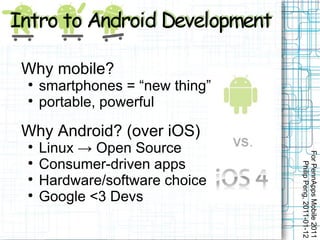
Why mobile?

    smartphones = “new thing”

    portable, powerful

Why Android? (over iOS)

    Linux → Open Source


                                For PennApps Mobile 2011

    Consumer-driven apps


                                   Philip Peng, 2011-01-12

    Hardware/software choice

    Google <3 Devs
For PennApps Mobile 2011
   Philip Peng, 2011-01-12
For PennApps Mobile 2011
                                    Philip Peng, 2011-01-12
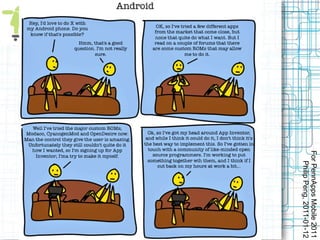
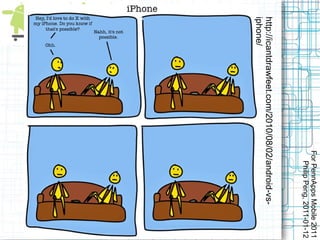
http://icantdrawfeet.com/2010/08/02/android-vs-
iphone/
Overview

    Java

    Eclipse

    Hello World

    Activity Cycle

    Try API Demos

    Stopwatch Example


                                      For PennApps Mobile 2011

    Logcat/DDMS Debugging


                                         Philip Peng, 2011-01-12

    Market Publishing and more...

    Beats and Useful Resource Links
Android Java

   Linux, but apps in Java

   Dalvik Virtual Machine – DVM

   .apk format ← Eclipse

   Standard java.* packages

   Custom graphics/UI code

   NDK – C/C++ for ARM


                                     For PennApps Mobile 2011
                                        Philip Peng, 2011-01-12
  (OpenGL ES 2.0, libraries, etc.)
For PennApps Mobile 2011
   Philip Peng, 2011-01-12
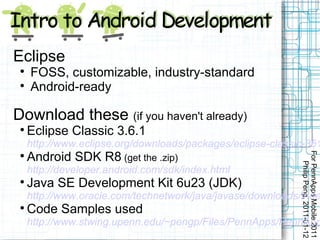
Eclipse
 
     FOSS, customizable, industry-standard
 
     Android-ready

Download these (if you haven't already)
 
     Eclipse Classic 3.6.1
     http://www.eclipse.org/downloads/packages/eclipse-classic-361
     Android SDK R8 (get the .zip)


                                                             For PennApps Mobile 2011
 


                                                                Philip Peng, 2011-01-12
     http://developer.android.com/sdk/index.html
 
     Java SE Development Kit 6u23 (JDK)
     http://www.oracle.com/technetwork/java/javase/downloads/inde
 
     Code Samples used
     http://www.stwing.upenn.edu/~pengp/Files/PennApps/PennApp
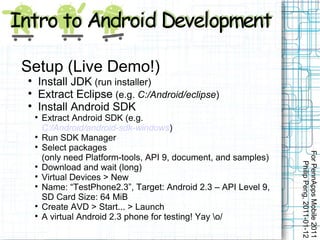
Setup (Live Demo!)

        Install JDK (run installer)

        Extract Eclipse (e.g. C:/Android/eclipse)

        Install Android SDK
    
        Extract Android SDK (e.g.
        C:/Android/android-sdk-windows)
    
        Run SDK Manager
    
        Select packages


                                                                   For PennApps Mobile 2011
        (only need Platform-tools, API 9, document, and samples)


                                                                      Philip Peng, 2011-01-12
    
        Download and wait (long)
    
        Virtual Devices > New
    
        Name: “TestPhone2.3”, Target: Android 2.3 – API Level 9,
        SD Card Size: 64 MiB
    
        Create AVD > Start... > Launch
    
        A virtual Android 2.3 phone for testing! Yay o/
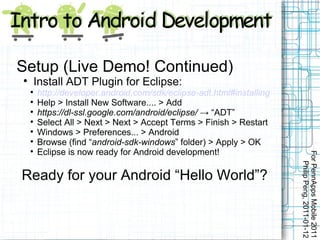
Setup (Live Demo! Continued)

        Install ADT Plugin for Eclipse:
    
        http://developer.android.com/sdk/eclipse-adt.html#installing
    
        Help > Install New Software.... > Add
    
        https://dl-ssl.google.com/android/eclipse/ → “ADT”
    
        Select All > Next > Next > Accept Terms > Finish > Restart
    
        Windows > Preferences... > Android
    
        Browse (find “android-sdk-windows” folder) > Apply > OK
    
        Eclipse is now ready for Android development!


                                                                       For PennApps Mobile 2011
                                                                          Philip Peng, 2011-01-12
Ready for your Android “Hello World”?
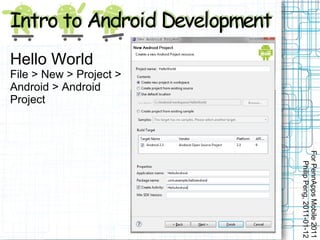
Hello World
File > New > Project >
Android > Android
Project


                         For PennApps Mobile 2011
                            Philip Peng, 2011-01-12
Hello World
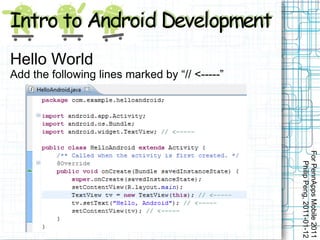
Add the following lines marked by “// <-----”


                                                For PennApps Mobile 2011
                                                   Philip Peng, 2011-01-12
For PennApps Mobile 2011
                                               Philip Peng, 2011-01-12
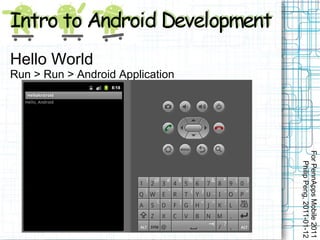
          Run > Run > Android Application
Hello World
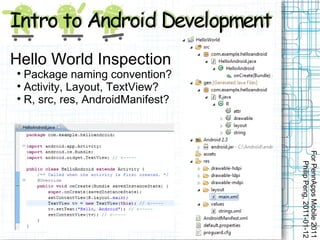
Hello World Inspection

  Package naming convention?

  Activity, Layout, TextView?

  R, src, res, AndroidManifest?


                                  For PennApps Mobile 2011
                                     Philip Peng, 2011-01-12
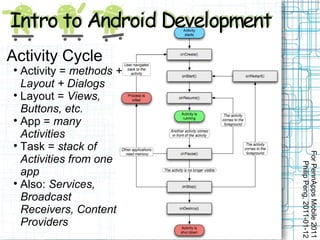
Activity Cycle

  Activity = methods +
  Layout + Dialogs

  Layout = Views,
  Buttons, etc.

  App = many
  Activities

  Task = stack of


                         For PennApps Mobile 2011
  Activities from one


                            Philip Peng, 2011-01-12
  app

  Also: Services,
  Broadcast
  Receivers, Content
  Providers
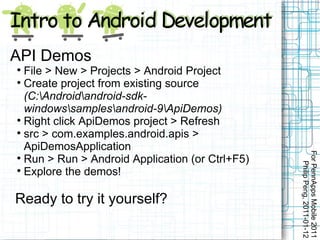
API Demos

  File > New > Projects > Android Project

  Create project from existing source
  (C:Androidandroid-sdk-
  windowssamplesandroid-9ApiDemos)

  Right click ApiDemos project > Refresh

  src > com.examples.android.apis >
  ApiDemosApplication


                                                 For PennApps Mobile 2011

  Run > Run > Android Application (or Ctrl+F5)


                                                    Philip Peng, 2011-01-12

  Explore the demos!

Ready to try it yourself?
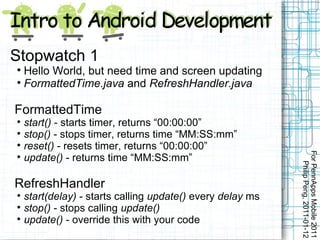
Stopwatch 1

  Hello World, but need time and screen updating

  FormattedTime.java and RefreshHandler.java

FormattedTime

    start() - starts timer, returns “00:00:00”

    stop() - stops timer, returns time “MM:SS:mm”

    reset() - resets timer, returns “00:00:00”


                                                            For PennApps Mobile 2011

    update() - returns time “MM:SS:mm”


                                                               Philip Peng, 2011-01-12
RefreshHandler

    start(delay) - starts calling update() every delay ms

    stop() - stops calling update()

    update() - override this with your code
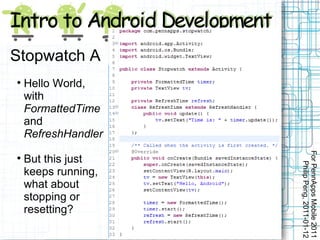
Stopwatch A

    Hello World,
    with
    FormattedTime
    and
    RefreshHandler


                     For PennApps Mobile 2011

    But this just


                        Philip Peng, 2011-01-12
    keeps running,
    what about
    stopping or
    resetting?
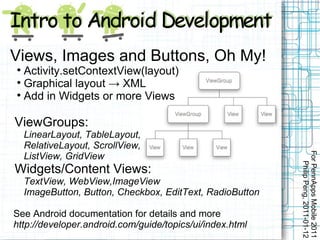
Views, Images and Buttons, Oh My!

  Activity.setContextView(layout)

  Graphical layout → XML

  Add in Widgets or more Views

ViewGroups:
    LinearLayout, TableLayout,
    RelativeLayout, ScrollView,


                                                           For PennApps Mobile 2011
    ListView, GridView


                                                              Philip Peng, 2011-01-12
Widgets/Content Views:
    TextView, WebView,ImageView
    ImageButton, Button, Checkbox, EditText, RadioButton

See Android documentation for details and more
http://developer.android.com/guide/topics/ui/index.html
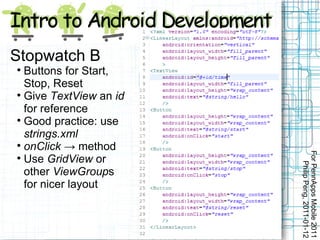
Stopwatch B

  Buttons for Start,
  Stop, Reset

  Give TextView an id
  for reference

  Good practice: use
  strings.xml

  onClick → method


                        For PennApps Mobile 2011

  Use GridView or


                           Philip Peng, 2011-01-12
  other ViewGroups
  for nicer layout
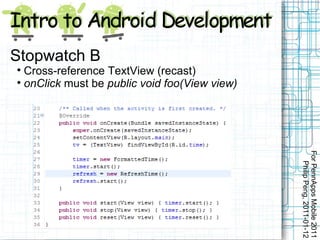
Stopwatch B

  Cross-reference TextView (recast)

  onClick must be public void foo(View view)


                                               For PennApps Mobile 2011
                                                  Philip Peng, 2011-01-12
For PennApps Mobile 2011
                                           Philip Peng, 2011-01-12
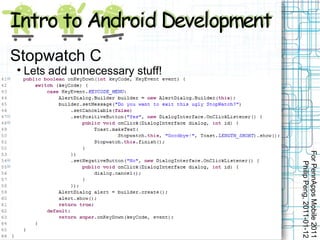
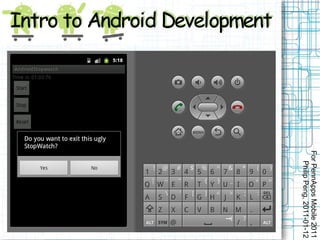
          Lets add unnecessary stuff!
Stopwatch C
                
For PennApps Mobile 2011
   Philip Peng, 2011-01-12
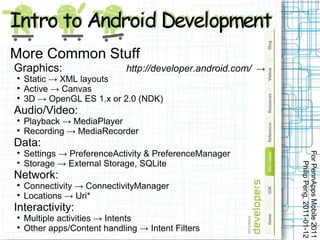
More Common Stuff
Graphics:                    http://developer.android.com/ →

    Static → XML layouts

    Active → Canvas

    3D → OpenGL ES 1.x or 2.0 (NDK)
Audio/Video:

    Playback → MediaPlayer

    Recording → MediaRecorder
Data:
    Settings → PreferenceActivity & PreferenceManager


                                                               For PennApps Mobile 2011



    Storage → External Storage, SQLite


                                                                  Philip Peng, 2011-01-12
Network:

    Connectivity → ConnectivityManager

    Locations → Uri*
Interactivity:

    Multiple activities → Intents

    Other apps/Content handling → Intent Filters
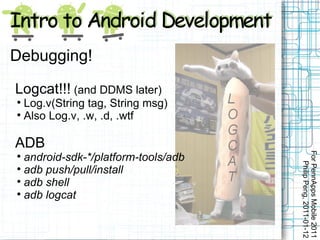
Debugging!

Logcat!!! (and DDMS later)

  Log.v(String tag, String msg)

  Also Log.v, .w, .d, .wtf

ADB


                                     For PennApps Mobile 2011

  android-sdk-*/platform-tools/adb


                                        Philip Peng, 2011-01-12

  adb push/pull/install

  adb shell

  adb logcat
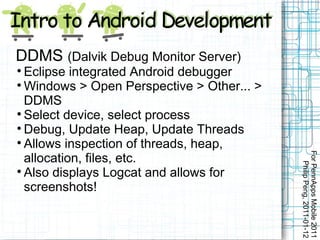
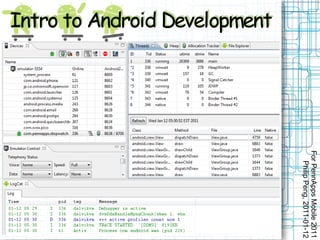
DDMS (Dalvik Debug Monitor Server)

  Eclipse integrated Android debugger

  Windows > Open Perspective > Other... >
  DDMS

  Select device, select process

  Debug, Update Heap, Update Threads

  Allows inspection of threads, heap,


                                            For PennApps Mobile 2011
  allocation, files, etc.


                                               Philip Peng, 2011-01-12

  Also displays Logcat and allows for
  screenshots!
For PennApps Mobile 2011
   Philip Peng, 2011-01-12
Market and Actual Testing?

  Windows > Android SDK & AVD Manager

  Available packages > Third party Add-ons

  Google Usb Driver and Market Licensing

On your actual phone:

  MENU > Settings > Applications >


                                             For PennApps Mobile 2011
  Development > USB debugging ON


                                                Philip Peng, 2011-01-12

  Plug in, compile and run your Android
  app, select your actual phone (or might
  auto-select)
Publishing on the Market

  http://market.android.com/publish/Home

  http://developer.android.com/guide/publishing/publis

  $25 one-time fee for a developer account

  Make money back via either paid app or
  advertisements (AdMob)

  Compare to iOS's $99/YEAR and content


                                                  For PennApps Mobile 2011
  filtering/approval-based system


                                                     Philip Peng, 2011-01-12

  Need to make sure to check support for
  different screen sizes, Android OS
  (current is 2.3 but lots still run 1.5/1.6),
  etc. in AndroidManifest.xml file
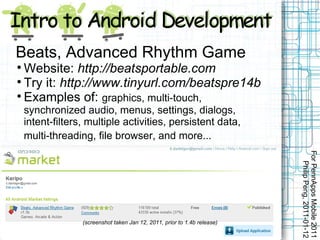
Beats, Advanced Rhythm Game

  Website: http://beatsportable.com

  Try it: http://www.tinyurl.com/beatspre14b

  Examples of: graphics, multi-touch,
    synchronized audio, menus, settings, dialogs,
    intent-filters, multiple activities, persistent data,
    multi-threading, file browser, and more...


                                                                           For PennApps Mobile 2011
                                                                              Philip Peng, 2011-01-12
                  (screenshot taken Jan 12, 2011, prior to 1.4b release)
•Useful Links/Resources

    #android-dev at freenode.irc.net

    Android Developers
    http://developer.android.com/index.html
        • Dev Guide = fundamentals
        • Reference = Google's Javadocs
        • Resources = Tips and conventions
        • Blog = Newest updates, code examples

    android-developers@googlegroups.com


                                                             For PennApps Mobile 2011
    http://www.mail-archive.com/android-developers@googlegroups.com


                                                                Philip Peng, 2011-01-12

    StackOverflow – public Q&A
    http://stackoverflow.com/questions/tagged/android

    anddev.org – forums with lots of tutorials
    http://www.anddev.org/

    App Inventor Beta – Google's test project
    http://appinventor.googlelabs.com/about/index.html
For PennApps Mobile 2011
                                                 Philip Peng, 2011-01-12
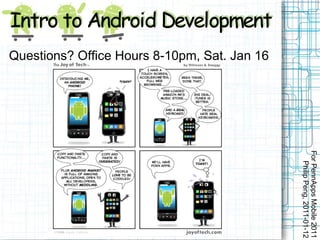
Questions? Office Hours 8-10pm, Sat. Jan 16

Intro to Android Development by Philip Peng

  • 1.
    By Philip Peng,2011-01-12 For PennApps Mobile 2011, University of Pennsylvania All images used in this belong to their rightful owners (not me).
  • 2.
    Why mobile?  smartphones = “new thing”  portable, powerful Why Android? (over iOS)  Linux → Open Source For PennApps Mobile 2011  Consumer-driven apps Philip Peng, 2011-01-12  Hardware/software choice  Google <3 Devs
  • 3.
    For PennApps Mobile2011 Philip Peng, 2011-01-12
  • 4.
    For PennApps Mobile2011 Philip Peng, 2011-01-12 http://icantdrawfeet.com/2010/08/02/android-vs- iphone/
  • 5.
    Overview  Java  Eclipse  Hello World  Activity Cycle  Try API Demos  Stopwatch Example For PennApps Mobile 2011  Logcat/DDMS Debugging Philip Peng, 2011-01-12  Market Publishing and more...  Beats and Useful Resource Links
  • 6.
    Android Java  Linux, but apps in Java  Dalvik Virtual Machine – DVM  .apk format ← Eclipse  Standard java.* packages  Custom graphics/UI code  NDK – C/C++ for ARM For PennApps Mobile 2011 Philip Peng, 2011-01-12 (OpenGL ES 2.0, libraries, etc.)
  • 7.
    For PennApps Mobile2011 Philip Peng, 2011-01-12
  • 8.
    Eclipse  FOSS, customizable, industry-standard  Android-ready Download these (if you haven't already)  Eclipse Classic 3.6.1 http://www.eclipse.org/downloads/packages/eclipse-classic-361 Android SDK R8 (get the .zip) For PennApps Mobile 2011  Philip Peng, 2011-01-12 http://developer.android.com/sdk/index.html  Java SE Development Kit 6u23 (JDK) http://www.oracle.com/technetwork/java/javase/downloads/inde  Code Samples used http://www.stwing.upenn.edu/~pengp/Files/PennApps/PennApp
  • 9.
    Setup (Live Demo!)  Install JDK (run installer)  Extract Eclipse (e.g. C:/Android/eclipse)  Install Android SDK  Extract Android SDK (e.g. C:/Android/android-sdk-windows)  Run SDK Manager  Select packages For PennApps Mobile 2011 (only need Platform-tools, API 9, document, and samples) Philip Peng, 2011-01-12  Download and wait (long)  Virtual Devices > New  Name: “TestPhone2.3”, Target: Android 2.3 – API Level 9, SD Card Size: 64 MiB  Create AVD > Start... > Launch  A virtual Android 2.3 phone for testing! Yay o/
  • 10.
    Setup (Live Demo!Continued)  Install ADT Plugin for Eclipse:  http://developer.android.com/sdk/eclipse-adt.html#installing  Help > Install New Software.... > Add  https://dl-ssl.google.com/android/eclipse/ → “ADT”  Select All > Next > Next > Accept Terms > Finish > Restart  Windows > Preferences... > Android  Browse (find “android-sdk-windows” folder) > Apply > OK  Eclipse is now ready for Android development! For PennApps Mobile 2011 Philip Peng, 2011-01-12 Ready for your Android “Hello World”?
  • 11.
    Hello World File >New > Project > Android > Android Project For PennApps Mobile 2011 Philip Peng, 2011-01-12
  • 12.
    Hello World Add thefollowing lines marked by “// <-----” For PennApps Mobile 2011 Philip Peng, 2011-01-12
  • 13.
    For PennApps Mobile2011 Philip Peng, 2011-01-12 Run > Run > Android Application Hello World
  • 14.
    Hello World Inspection  Package naming convention?  Activity, Layout, TextView?  R, src, res, AndroidManifest? For PennApps Mobile 2011 Philip Peng, 2011-01-12
  • 15.
    Activity Cycle  Activity = methods + Layout + Dialogs  Layout = Views, Buttons, etc.  App = many Activities  Task = stack of For PennApps Mobile 2011 Activities from one Philip Peng, 2011-01-12 app  Also: Services, Broadcast Receivers, Content Providers
  • 16.
    API Demos  File > New > Projects > Android Project  Create project from existing source (C:Androidandroid-sdk- windowssamplesandroid-9ApiDemos)  Right click ApiDemos project > Refresh  src > com.examples.android.apis > ApiDemosApplication For PennApps Mobile 2011  Run > Run > Android Application (or Ctrl+F5) Philip Peng, 2011-01-12  Explore the demos! Ready to try it yourself?
  • 17.
    Stopwatch 1  Hello World, but need time and screen updating  FormattedTime.java and RefreshHandler.java FormattedTime  start() - starts timer, returns “00:00:00”  stop() - stops timer, returns time “MM:SS:mm”  reset() - resets timer, returns “00:00:00” For PennApps Mobile 2011  update() - returns time “MM:SS:mm” Philip Peng, 2011-01-12 RefreshHandler  start(delay) - starts calling update() every delay ms  stop() - stops calling update()  update() - override this with your code
  • 18.
    Stopwatch A  Hello World, with FormattedTime and RefreshHandler For PennApps Mobile 2011  But this just Philip Peng, 2011-01-12 keeps running, what about stopping or resetting?
  • 19.
    Views, Images andButtons, Oh My!  Activity.setContextView(layout)  Graphical layout → XML  Add in Widgets or more Views ViewGroups: LinearLayout, TableLayout, RelativeLayout, ScrollView, For PennApps Mobile 2011 ListView, GridView Philip Peng, 2011-01-12 Widgets/Content Views: TextView, WebView,ImageView ImageButton, Button, Checkbox, EditText, RadioButton See Android documentation for details and more http://developer.android.com/guide/topics/ui/index.html
  • 20.
    Stopwatch B  Buttons for Start, Stop, Reset  Give TextView an id for reference  Good practice: use strings.xml  onClick → method For PennApps Mobile 2011  Use GridView or Philip Peng, 2011-01-12 other ViewGroups for nicer layout
  • 21.
    Stopwatch B  Cross-reference TextView (recast)  onClick must be public void foo(View view) For PennApps Mobile 2011 Philip Peng, 2011-01-12
  • 22.
    For PennApps Mobile2011 Philip Peng, 2011-01-12 Lets add unnecessary stuff! Stopwatch C 
  • 23.
    For PennApps Mobile2011 Philip Peng, 2011-01-12
  • 24.
    More Common Stuff Graphics: http://developer.android.com/ →  Static → XML layouts  Active → Canvas  3D → OpenGL ES 1.x or 2.0 (NDK) Audio/Video:  Playback → MediaPlayer  Recording → MediaRecorder Data: Settings → PreferenceActivity & PreferenceManager For PennApps Mobile 2011   Storage → External Storage, SQLite Philip Peng, 2011-01-12 Network:  Connectivity → ConnectivityManager  Locations → Uri* Interactivity:  Multiple activities → Intents  Other apps/Content handling → Intent Filters
  • 25.
    Debugging! Logcat!!! (and DDMSlater)  Log.v(String tag, String msg)  Also Log.v, .w, .d, .wtf ADB For PennApps Mobile 2011  android-sdk-*/platform-tools/adb Philip Peng, 2011-01-12  adb push/pull/install  adb shell  adb logcat
  • 26.
    DDMS (Dalvik DebugMonitor Server)  Eclipse integrated Android debugger  Windows > Open Perspective > Other... > DDMS  Select device, select process  Debug, Update Heap, Update Threads  Allows inspection of threads, heap, For PennApps Mobile 2011 allocation, files, etc. Philip Peng, 2011-01-12  Also displays Logcat and allows for screenshots!
  • 27.
    For PennApps Mobile2011 Philip Peng, 2011-01-12
  • 28.
    Market and ActualTesting?  Windows > Android SDK & AVD Manager  Available packages > Third party Add-ons  Google Usb Driver and Market Licensing On your actual phone:  MENU > Settings > Applications > For PennApps Mobile 2011 Development > USB debugging ON Philip Peng, 2011-01-12  Plug in, compile and run your Android app, select your actual phone (or might auto-select)
  • 29.
    Publishing on theMarket  http://market.android.com/publish/Home  http://developer.android.com/guide/publishing/publis  $25 one-time fee for a developer account  Make money back via either paid app or advertisements (AdMob)  Compare to iOS's $99/YEAR and content For PennApps Mobile 2011 filtering/approval-based system Philip Peng, 2011-01-12  Need to make sure to check support for different screen sizes, Android OS (current is 2.3 but lots still run 1.5/1.6), etc. in AndroidManifest.xml file
  • 30.
    Beats, Advanced RhythmGame  Website: http://beatsportable.com  Try it: http://www.tinyurl.com/beatspre14b  Examples of: graphics, multi-touch, synchronized audio, menus, settings, dialogs, intent-filters, multiple activities, persistent data, multi-threading, file browser, and more... For PennApps Mobile 2011 Philip Peng, 2011-01-12 (screenshot taken Jan 12, 2011, prior to 1.4b release)
  • 31.
    •Useful Links/Resources  #android-dev at freenode.irc.net  Android Developers http://developer.android.com/index.html • Dev Guide = fundamentals • Reference = Google's Javadocs • Resources = Tips and conventions • Blog = Newest updates, code examples  android-developers@googlegroups.com For PennApps Mobile 2011 http://www.mail-archive.com/android-developers@googlegroups.com Philip Peng, 2011-01-12  StackOverflow – public Q&A http://stackoverflow.com/questions/tagged/android  anddev.org – forums with lots of tutorials http://www.anddev.org/  App Inventor Beta – Google's test project http://appinventor.googlelabs.com/about/index.html
  • 32.
    For PennApps Mobile2011 Philip Peng, 2011-01-12 Questions? Office Hours 8-10pm, Sat. Jan 16