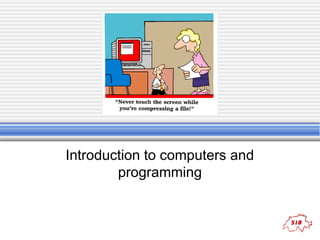
Introduction to computers and
programming
Content
• Hardware
• Information storage
 RAM, ROM
 HD, DVD

• Display

 Images
 Characters (fonts)

• File system/type
 Encryption
 Compression

• Network

 Protocols
 Packets

• Programming
 Algorithm
 Pseudocode
 Flowchart

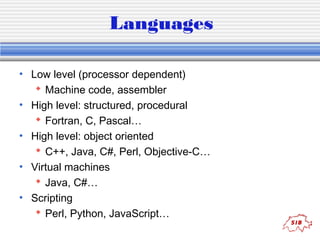
• Languages
• Source code
 Example
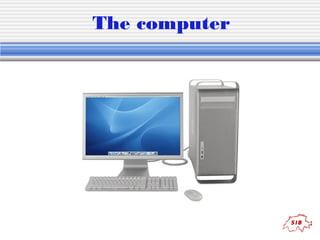
The computer
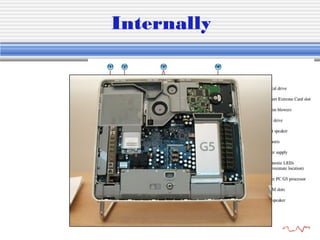
Internally
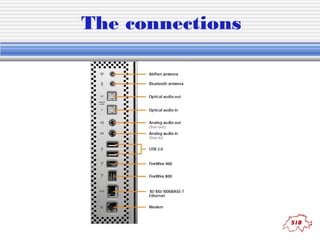
The connections
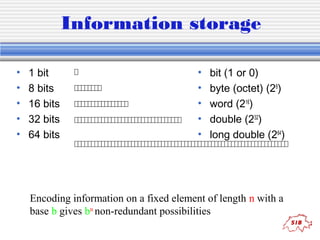
Information storage
•
•
•
•
•

1 bit
8 bits
16 bits
32 bits
64 bits

•
•
•
•
•

bit (1 or 0)
byte (octet) (28)
word (216)
double (232)
long double (264)

Encoding information on a fixed element of length n with a
base b gives bn non-redundant possibilities
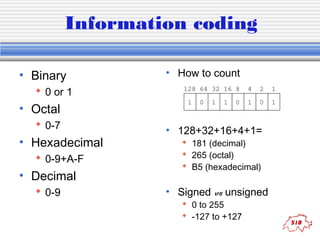
Information coding
• Binary
 0 or 1

• Octal
 0-7

• Hexadecimal
 0-9+A-F

• Decimal
 0-9

• How to count
128 64 32 16 8
1

0

1

1

0

4

2

1

1

0

1

• 128+32+16+4+1=
 181 (decimal)
 265 (octal)
 B5 (hexadecimal)

• Signed vs unsigned
 0 to 255
 -127 to +127
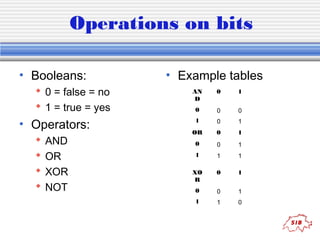
Operations on bits
• Booleans:
 0 = false = no
 1 = true = yes

• Operators:





AND
OR
XOR
NOT

• Example tables
AN
D

0

1

0

0

0

1

0

1

OR

0

1

0

0

1

1

1

1

XO
R

0

1

0

0

1

1

1

0
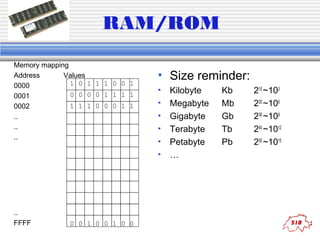
RAM/ROM
Memory mapping
Address
Values
1 0 1 1 1 0 0 1
0000
0 0 0 0 1 1 1 1
0001
1 1 1 0 0 0 1 1
0002
..
..
..

..
FFFF

0 0 1 0 0 1 0 0

• Size reminder:
•
•
•
•
•
•

Kilobyte
Megabyte
Gigabyte
Terabyte
Petabyte
…

Kb
Mb
Gb
Tb
Pb

210 ~103
220 ~106
230 ~109
240 ~1012
250 ~1015
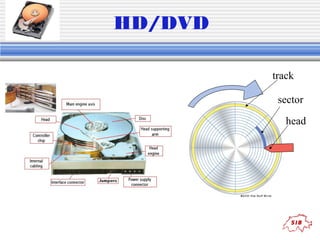
HD/DVD
track
sector
head
QuickTime™ et un
décompresseur TIFF (non compressé)
sont requis pour visionner cette image.

•
•
•
•

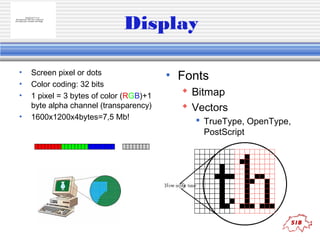
Display

Screen pixel or dots
Color coding: 32 bits
1 pixel = 3 bytes of color (RGB)+1
byte alpha channel (transparency)
1600x1200x4bytes=7,5 Mb!

• Fonts
 Bitmap
 Vectors
 TrueType, OpenType,
PostScript
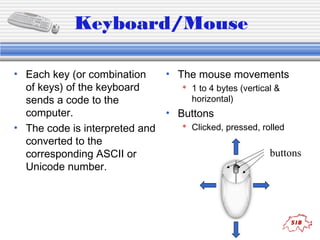
Keyboard/Mouse
• Each key (or combination
• The mouse movements
 1 to 4 bytes (vertical &
of keys) of the keyboard
horizontal)
sends a code to the
• Buttons
computer.
 Clicked, pressed, rolled
• The code is interpreted and
converted to the
buttons
corresponding ASCII or
Unicode number.
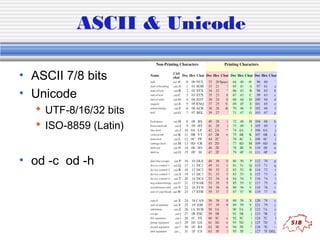
ASCII & Unicode
• ASCII 7/8 bits
• Unicode
 UTF-8/16/32 bits
 ISO-8859 (Latin)

• od -c od -h

•
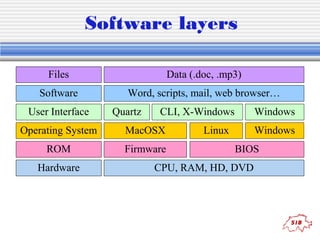
Software layers
Files

Data (.doc, .mp3)

Software

Word, scripts, mail, web browser…

User Interface

Quartz

CLI, X-Windows

Operating System

MacOSX

ROM

Firmware

Hardware

Windows
Windows

Linux

BIOS

CPU, RAM, HD, DVD
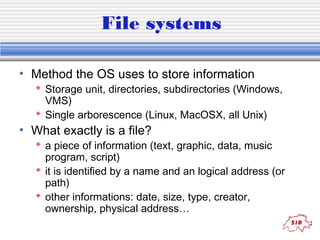
File systems
• Method the OS uses to store information

 Storage unit, directories, subdirectories (Windows,
VMS)
 Single arborescence (Linux, MacOSX, all Unix)

• What exactly is a file?

 a piece of information (text, graphic, data, music
program, script)
 it is identified by a name and an logical address (or
path)
 other informations: date, size, type, creator,
ownership, physical address…
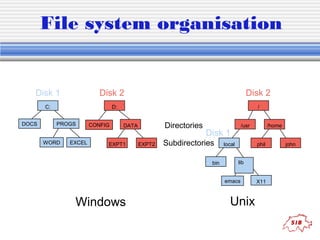
File system organisation

Disk 1

Disk 2

C:
DOCS

Disk 2

D:
PROGS

WORD

EXCEL

CONFIG

/

Directories

DATA

EXPT1

EXPT2

/usr

Disk 1

Subdirectories
bin

local

phil
lib

emacs

Windows

/home

Unix

X11

john
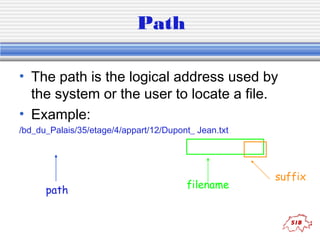
Path
• The path is the logical address used by
the system or the user to locate a file.
• Example:
/bd_du_Palais/35/etage/4/appart/12/Dupont_ Jean.txt

path

filename

suffix
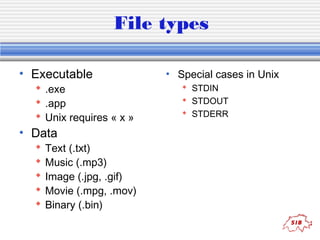
File types
• Executable

 .exe
 .app
 Unix requires « x »

• Data






Text (.txt)
Music (.mp3)
Image (.jpg, .gif)
Movie (.mpg, .mov)
Binary (.bin)

• Special cases in Unix
 STDIN
 STDOUT
 STDERR
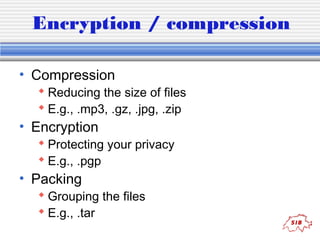
Encryption / compression
• Compression

 Reducing the size of files
 E.g., .mp3, .gz, .jpg, .zip

• Encryption

 Protecting your privacy
 E.g., .pgp

• Packing

 Grouping the files
 E.g., .tar
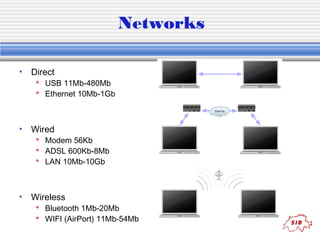
Networks
• Direct

 USB 11Mb-480Mb
 Ethernet 10Mb-1Gb

• Wired

 Modem 56Kb
 ADSL 600Kb-8Mb
 LAN 10Mb-10Gb

• Wireless

 Bluetooth 1Mb-20Mb
 WIFI (AirPort) 11Mb-54Mb
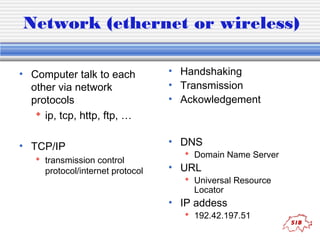
Network (ethernet or wireless)
• Computer talk to each
other via network
protocols
 ip, tcp, http, ftp, …

• Handshaking
• Transmission
• Ackowledgement

• TCP/IP

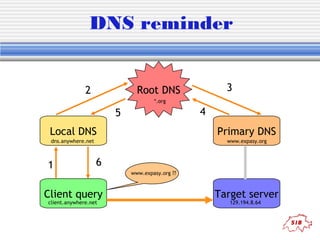
• DNS

 transmission control
protocol/internet protocol

 Domain Name Server

• URL

 Universal Resource
Locator

• IP addess

 192.42.197.51
DNS reminder
3

Root DNS

2

*.org

4

5
Local DNS

Primary DNS

dns.anywhere.net

www.expasy.org

1

6

Client query
client.anywhere.net

www.expasy.org ??

Target server
129.194.8.64
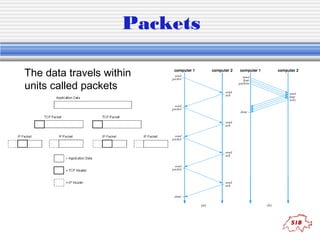
Packets
The data travels within
units called packets
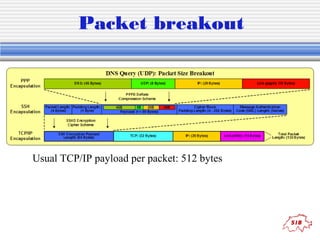
Packet breakout

Usual TCP/IP payload per packet: 512 bytes
Introduction to programming
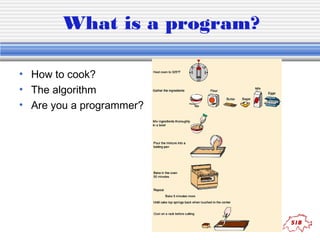
What is a program?
• How to cook?
• The algorithm
• Are you a programmer?
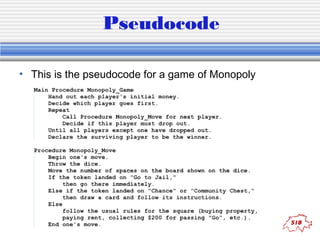
Pseudocode
• This is the pseudocode for a game of Monopoly
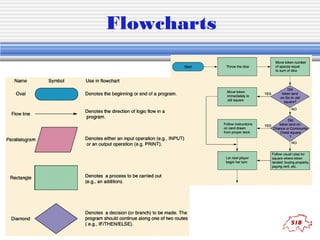
Flowcharts
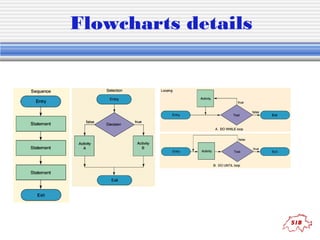
Flowcharts details
Languages
• Low level (processor dependent)
 Machine code, assembler
• High level: structured, procedural
 Fortran, C, Pascal…
• High level: object oriented
 C++, Java, C#, Perl, Objective-C…
• Virtual machines
 Java, C#…
• Scripting
 Perl, Python, JavaScript…
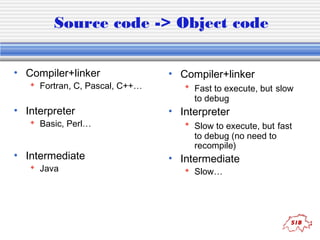
Source code -> Object code
• Compiler+linker

 Fortran, C, Pascal, C++…

• Interpreter

 Basic, Perl…

• Intermediate
 Java

• Compiler+linker
 Fast to execute, but slow
to debug

• Interpreter
 Slow to execute, but fast
to debug (no need to
recompile)

• Intermediate
 Slow…
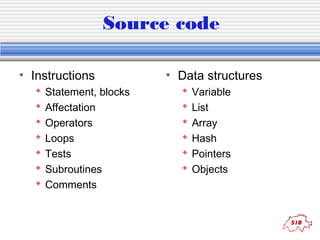
Source code
• Instructions








Statement, blocks
Affectation
Operators
Loops
Tests
Subroutines
Comments

• Data structures







Variable
List
Array
Hash
Pointers
Objects
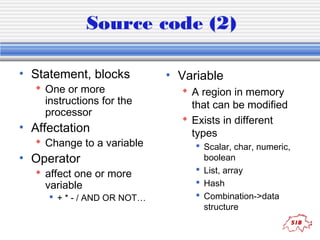
Source code (2)
• Statement, blocks

 One or more
instructions for the
processor

• Affectation

 Change to a variable

• Operator

 affect one or more
variable

 + * - / AND OR NOT…

• Variable
 A region in memory
that can be modified
 Exists in different
types
 Scalar, char, numeric,
boolean
 List, array
 Hash
 Combination->data
structure
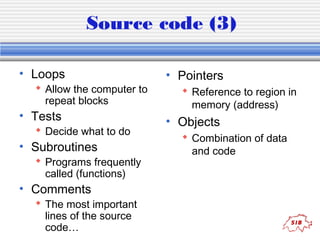
Source code (3)
• Loops

 Allow the computer to
repeat blocks

• Tests

 Decide what to do

• Subroutines

 Programs frequently
called (functions)

• Comments

 The most important
lines of the source
code…

• Pointers
 Reference to region in
memory (address)

• Objects
 Combination of data
and code
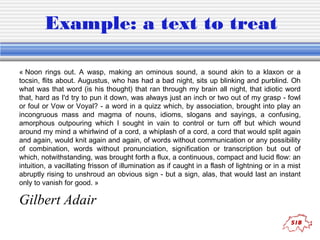
Example: a text to treat
« Noon rings out. A wasp, making an ominous sound, a sound akin to a klaxon or a
tocsin, flits about. Augustus, who has had a bad night, sits up blinking and purblind. Oh
what was that word (is his thought) that ran through my brain all night, that idiotic word
that, hard as I'd try to pun it down, was always just an inch or two out of my grasp - fowl
or foul or Vow or Voyal? - a word in a quizz which, by association, brought into play an
incongruous mass and magma of nouns, idioms, slogans and sayings, a confusing,
amorphous outpouring which I sought in vain to control or turn off but which wound
around my mind a whirlwind of a cord, a whiplash of a cord, a cord that would split again
and again, would knit again and again, of words without communication or any possibility
of combination, words without pronunciation, signification or transcription but out of
which, notwithstanding, was brought forth a flux, a continuous, compact and lucid flow: an
intuition, a vacillating frisson of illumination as if caught in a flash of lightning or in a mist
abruptly rising to unshroud an obvious sign - but a sign, alas, that would last an instant
only to vanish for good. »

Gilbert Adair
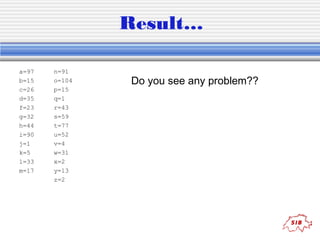
Result…
a=97
b=15
c=26
d=35
f=23
g=32
h=44
i=90
j=1
k=5
l=33
m=17

n=91
o=104
p=15
q=1
r=43
s=59
t=77
u=52
v=4
w=31
x=2
y=13
z=2

Do you see any problem??
Try with this:
« The quick brown fox, jumps
over the lazy dog. »
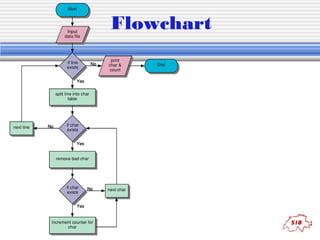
Flowchart
Source code example
#!/usr/bin/perl -w

# essential line of all perl scripts

$filename = "avoid.txt"; # affect « avoid.txt » to the variable $filename
# open the file, or exit
open(FILE, $filename) || die "Cannot open file ‘$filename’nn";
@text = <FILE>; # add each line of the file to an array
close FILE;
foreach $line (@text) { # read one line from the array into $line and repeat for each line
@table = split(//,$line); # read each character of the line in an array
while ($char=pop(@table)) { # read one character of the array 'table' and repeat for all
$char =~ s/[^a-z]//; # keep only the alphabetical character a to z
if ($char) {
# check if the character exists and execute the block
$count{$char}++; # if yes, increment by one the hash 'count'
}
}
}
# print each character and its number of occurence one per line
foreach $c (keys %count) {
print "$c=$count{$c}n";
}
exit; # quit the program
Tips
• Think about your
problem
• Create a flowchart
• Create the
pseudocode
• Verify the memory
used by your
variables
• Write the code

• Test the code
 For all the possible
functions or cases (if
possible)
 Give it to users as a
beta (if not possibe)
 Sell it (if you work for
Microsoft©… ;-)

• Debug
Summary of the week
• Monday
 Intro computers &
programming
 Intro Unix
 Tutorial Unix

• Tuesday
 Intro Perl
 Regexp & Perl In-liners

• Wednesday

 Object Oriented
programming
 BioPerl
 EMBOSS

• Thursday

 Database indexing
 BLAST
 HTML & cgi-bin

• Friday

 Finish exercises
 Users questions
Unix
• Next presentation…

Vassilios alias
UnixMan!!!

Intro computer fundamentals

  • 1.
  • 2.
    Content • Hardware • Informationstorage  RAM, ROM  HD, DVD • Display  Images  Characters (fonts) • File system/type  Encryption  Compression • Network  Protocols  Packets • Programming  Algorithm  Pseudocode  Flowchart • Languages • Source code  Example
  • 3.
  • 4.
  • 5.
  • 6.
    Information storage • • • • • 1 bit 8bits 16 bits 32 bits 64 bits • • • • • bit (1 or 0) byte (octet) (28) word (216) double (232) long double (264) Encoding information on a fixed element of length n with a base b gives bn non-redundant possibilities
  • 7.
    Information coding • Binary 0 or 1 • Octal  0-7 • Hexadecimal  0-9+A-F • Decimal  0-9 • How to count 128 64 32 16 8 1 0 1 1 0 4 2 1 1 0 1 • 128+32+16+4+1=  181 (decimal)  265 (octal)  B5 (hexadecimal) • Signed vs unsigned  0 to 255  -127 to +127
  • 8.
    Operations on bits •Booleans:  0 = false = no  1 = true = yes • Operators:     AND OR XOR NOT • Example tables AN D 0 1 0 0 0 1 0 1 OR 0 1 0 0 1 1 1 1 XO R 0 1 0 0 1 1 1 0
  • 9.
    RAM/ROM Memory mapping Address Values 1 01 1 1 0 0 1 0000 0 0 0 0 1 1 1 1 0001 1 1 1 0 0 0 1 1 0002 .. .. .. .. FFFF 0 0 1 0 0 1 0 0 • Size reminder: • • • • • • Kilobyte Megabyte Gigabyte Terabyte Petabyte … Kb Mb Gb Tb Pb 210 ~103 220 ~106 230 ~109 240 ~1012 250 ~1015
  • 10.
  • 11.
    QuickTime™ et un décompresseurTIFF (non compressé) sont requis pour visionner cette image. • • • • Display Screen pixel or dots Color coding: 32 bits 1 pixel = 3 bytes of color (RGB)+1 byte alpha channel (transparency) 1600x1200x4bytes=7,5 Mb! • Fonts  Bitmap  Vectors  TrueType, OpenType, PostScript
  • 12.
    Keyboard/Mouse • Each key(or combination • The mouse movements  1 to 4 bytes (vertical & of keys) of the keyboard horizontal) sends a code to the • Buttons computer.  Clicked, pressed, rolled • The code is interpreted and converted to the buttons corresponding ASCII or Unicode number.
  • 13.
    ASCII & Unicode •ASCII 7/8 bits • Unicode  UTF-8/16/32 bits  ISO-8859 (Latin) • od -c od -h •
  • 14.
    Software layers Files Data (.doc,.mp3) Software Word, scripts, mail, web browser… User Interface Quartz CLI, X-Windows Operating System MacOSX ROM Firmware Hardware Windows Windows Linux BIOS CPU, RAM, HD, DVD
  • 15.
    File systems • Methodthe OS uses to store information  Storage unit, directories, subdirectories (Windows, VMS)  Single arborescence (Linux, MacOSX, all Unix) • What exactly is a file?  a piece of information (text, graphic, data, music program, script)  it is identified by a name and an logical address (or path)  other informations: date, size, type, creator, ownership, physical address…
  • 16.
    File system organisation Disk1 Disk 2 C: DOCS Disk 2 D: PROGS WORD EXCEL CONFIG / Directories DATA EXPT1 EXPT2 /usr Disk 1 Subdirectories bin local phil lib emacs Windows /home Unix X11 john
  • 17.
    Path • The pathis the logical address used by the system or the user to locate a file. • Example: /bd_du_Palais/35/etage/4/appart/12/Dupont_ Jean.txt path filename suffix
  • 18.
    File types • Executable .exe  .app  Unix requires « x » • Data      Text (.txt) Music (.mp3) Image (.jpg, .gif) Movie (.mpg, .mov) Binary (.bin) • Special cases in Unix  STDIN  STDOUT  STDERR
  • 19.
    Encryption / compression •Compression  Reducing the size of files  E.g., .mp3, .gz, .jpg, .zip • Encryption  Protecting your privacy  E.g., .pgp • Packing  Grouping the files  E.g., .tar
  • 20.
    Networks • Direct  USB11Mb-480Mb  Ethernet 10Mb-1Gb • Wired  Modem 56Kb  ADSL 600Kb-8Mb  LAN 10Mb-10Gb • Wireless  Bluetooth 1Mb-20Mb  WIFI (AirPort) 11Mb-54Mb
  • 21.
    Network (ethernet orwireless) • Computer talk to each other via network protocols  ip, tcp, http, ftp, … • Handshaking • Transmission • Ackowledgement • TCP/IP • DNS  transmission control protocol/internet protocol  Domain Name Server • URL  Universal Resource Locator • IP addess  192.42.197.51
  • 22.
    DNS reminder 3 Root DNS 2 *.org 4 5 LocalDNS Primary DNS dns.anywhere.net www.expasy.org 1 6 Client query client.anywhere.net www.expasy.org ?? Target server 129.194.8.64
  • 23.
    Packets The data travelswithin units called packets
  • 24.
    Packet breakout Usual TCP/IPpayload per packet: 512 bytes
  • 25.
  • 26.
    What is aprogram? • How to cook? • The algorithm • Are you a programmer?
  • 27.
    Pseudocode • This isthe pseudocode for a game of Monopoly
  • 28.
  • 29.
  • 30.
    Languages • Low level(processor dependent)  Machine code, assembler • High level: structured, procedural  Fortran, C, Pascal… • High level: object oriented  C++, Java, C#, Perl, Objective-C… • Virtual machines  Java, C#… • Scripting  Perl, Python, JavaScript…
  • 31.
    Source code ->Object code • Compiler+linker  Fortran, C, Pascal, C++… • Interpreter  Basic, Perl… • Intermediate  Java • Compiler+linker  Fast to execute, but slow to debug • Interpreter  Slow to execute, but fast to debug (no need to recompile) • Intermediate  Slow…
  • 32.
    Source code • Instructions        Statement,blocks Affectation Operators Loops Tests Subroutines Comments • Data structures       Variable List Array Hash Pointers Objects
  • 33.
    Source code (2) •Statement, blocks  One or more instructions for the processor • Affectation  Change to a variable • Operator  affect one or more variable  + * - / AND OR NOT… • Variable  A region in memory that can be modified  Exists in different types  Scalar, char, numeric, boolean  List, array  Hash  Combination->data structure
  • 34.
    Source code (3) •Loops  Allow the computer to repeat blocks • Tests  Decide what to do • Subroutines  Programs frequently called (functions) • Comments  The most important lines of the source code… • Pointers  Reference to region in memory (address) • Objects  Combination of data and code
  • 35.
    Example: a textto treat « Noon rings out. A wasp, making an ominous sound, a sound akin to a klaxon or a tocsin, flits about. Augustus, who has had a bad night, sits up blinking and purblind. Oh what was that word (is his thought) that ran through my brain all night, that idiotic word that, hard as I'd try to pun it down, was always just an inch or two out of my grasp - fowl or foul or Vow or Voyal? - a word in a quizz which, by association, brought into play an incongruous mass and magma of nouns, idioms, slogans and sayings, a confusing, amorphous outpouring which I sought in vain to control or turn off but which wound around my mind a whirlwind of a cord, a whiplash of a cord, a cord that would split again and again, would knit again and again, of words without communication or any possibility of combination, words without pronunciation, signification or transcription but out of which, notwithstanding, was brought forth a flux, a continuous, compact and lucid flow: an intuition, a vacillating frisson of illumination as if caught in a flash of lightning or in a mist abruptly rising to unshroud an obvious sign - but a sign, alas, that would last an instant only to vanish for good. » Gilbert Adair
  • 36.
  • 37.
  • 38.
    Source code example #!/usr/bin/perl-w # essential line of all perl scripts $filename = "avoid.txt"; # affect « avoid.txt » to the variable $filename # open the file, or exit open(FILE, $filename) || die "Cannot open file ‘$filename’nn"; @text = <FILE>; # add each line of the file to an array close FILE; foreach $line (@text) { # read one line from the array into $line and repeat for each line @table = split(//,$line); # read each character of the line in an array while ($char=pop(@table)) { # read one character of the array 'table' and repeat for all $char =~ s/[^a-z]//; # keep only the alphabetical character a to z if ($char) { # check if the character exists and execute the block $count{$char}++; # if yes, increment by one the hash 'count' } } } # print each character and its number of occurence one per line foreach $c (keys %count) { print "$c=$count{$c}n"; } exit; # quit the program
  • 39.
    Tips • Think aboutyour problem • Create a flowchart • Create the pseudocode • Verify the memory used by your variables • Write the code • Test the code  For all the possible functions or cases (if possible)  Give it to users as a beta (if not possibe)  Sell it (if you work for Microsoft©… ;-) • Debug
  • 40.
    Summary of theweek • Monday  Intro computers & programming  Intro Unix  Tutorial Unix • Tuesday  Intro Perl  Regexp & Perl In-liners • Wednesday  Object Oriented programming  BioPerl  EMBOSS • Thursday  Database indexing  BLAST  HTML & cgi-bin • Friday  Finish exercises  Users questions
  • 41.