Copyright © 2006 by The McGraw-Hill Companies, Inc. All rights reserved.McGraw-Hill Technology Education
Introduction to Computers
INSTRUCTOR:INSTRUCTOR:
DR SHAFIULLAH SOOMRODR SHAFIULLAH SOOMRO
s.soomro@quest.edu.pks.soomro@quest.edu.pk
COURSE SLIDE WEB PAGE :COURSE SLIDE WEB PAGE :
HTTPS://WWW.SLIDESHARE.NET/SAFISOOMROHTTPS://WWW.SLIDESHARE.NET/SAFISOOMRO
TEXTBOOKS:TEXTBOOKS:
UCUC -- UNDERSTANDING COMPUTERS (2000UNDERSTANDING COMPUTERS (2000
ED.)ED.)
Copyright © 2006 by The McGraw-Hill Companies, Inc. All rights reserved.McGraw-Hill Technology Education
Chapter 4B
Printing
4B-3
Commonly Used Printers
• Impact printers
– Generate output by striking the paper
– Uses an inked ribbon
• Non-impact printers
– Use methods other than force
– Tend to be quiet and fast
4B-4
Commonly Used Printers
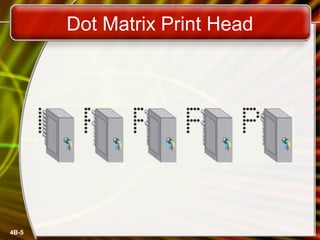
• Dot matrix printers
– Impact printer
– Used to print to multi-sheet pages
– Print head strikes inked ribbon
– Line printers
– Band printers
– Speed measured in characters per second
4B-5
Dot Matrix Print Head
4B-6
Commonly Used Printers
• Ink-jet printers
– Non-impact printer
– Inexpensive home printer
– Color output common using CMYK
• Cyan, magenta, yellow, black
– Sprays ink onto paper
– Speed measured in pages per minute
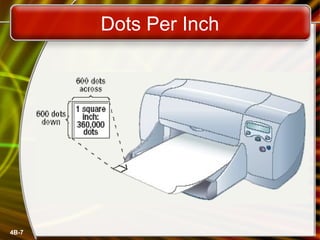
– Quality expressed as dots per inch
4B-7
Dots Per Inch
4B-8
Commonly Used Printers
• Laser printer
– Non-impact printer
– Produces high quality documents
– Color or black and white
– Print process
• Laser draws text on page
• Toner sticks to text
• Toner melted to page
– Speed measured in pages per minute
– Quality expressed as dots per inch
4B-9
Commonly Used Printers
• All-in-one peripherals
– Scanner, copier, printer and fax
– Popular in home offices
– Prices are very reasonable
4B-10
Comparing Printers
• Determine what you need
• Determine what you can spend
• Initial cost
• Cost of operating
• Image quality
• Speed
4B-11
High-Quality Printers
• Special purpose printers
– Used by a print shop
– Output is professional grade
– Prints to a variety of surfaces
4B-12
High-Quality Printers
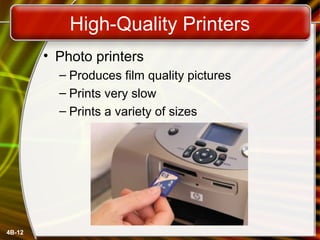
• Photo printers
– Produces film quality pictures
– Prints very slow
– Prints a variety of sizes
4B-13
High-Quality Printers
• Thermal wax printers
– Produces bold color output
– Color generated by melting wax
– Colors do not bleed
– Operation costs are low
– Output is slow
4B-14
High-Quality Printers
• Dye sublimation printers
– Produces realistic output
– Very high quality
– Color is produced by evaporating ink
– Operation costs are high
– Output is very slow
4B-15
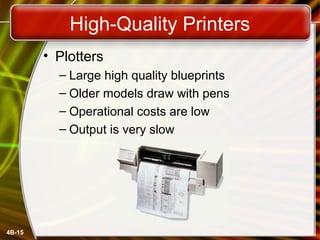
High-Quality Printers
• Plotters
– Large high quality blueprints
– Older models draw with pens
– Operational costs are low
– Output is very slow
Copyright © 2006 by The McGraw-Hill Companies, Inc. All rights reserved.McGraw-Hill Technology Education
Chapter 4B
End of Chapter

Intro ch 04_b

  • 1.
    Copyright © 2006by The McGraw-Hill Companies, Inc. All rights reserved.McGraw-Hill Technology Education Introduction to Computers INSTRUCTOR:INSTRUCTOR: DR SHAFIULLAH SOOMRODR SHAFIULLAH SOOMRO s.soomro@quest.edu.pks.soomro@quest.edu.pk COURSE SLIDE WEB PAGE :COURSE SLIDE WEB PAGE : HTTPS://WWW.SLIDESHARE.NET/SAFISOOMROHTTPS://WWW.SLIDESHARE.NET/SAFISOOMRO TEXTBOOKS:TEXTBOOKS: UCUC -- UNDERSTANDING COMPUTERS (2000UNDERSTANDING COMPUTERS (2000 ED.)ED.)
  • 2.
    Copyright © 2006by The McGraw-Hill Companies, Inc. All rights reserved.McGraw-Hill Technology Education Chapter 4B Printing
  • 3.
    4B-3 Commonly Used Printers •Impact printers – Generate output by striking the paper – Uses an inked ribbon • Non-impact printers – Use methods other than force – Tend to be quiet and fast
  • 4.
    4B-4 Commonly Used Printers •Dot matrix printers – Impact printer – Used to print to multi-sheet pages – Print head strikes inked ribbon – Line printers – Band printers – Speed measured in characters per second
  • 5.
  • 6.
    4B-6 Commonly Used Printers •Ink-jet printers – Non-impact printer – Inexpensive home printer – Color output common using CMYK • Cyan, magenta, yellow, black – Sprays ink onto paper – Speed measured in pages per minute – Quality expressed as dots per inch
  • 7.
  • 8.
    4B-8 Commonly Used Printers •Laser printer – Non-impact printer – Produces high quality documents – Color or black and white – Print process • Laser draws text on page • Toner sticks to text • Toner melted to page – Speed measured in pages per minute – Quality expressed as dots per inch
  • 9.
    4B-9 Commonly Used Printers •All-in-one peripherals – Scanner, copier, printer and fax – Popular in home offices – Prices are very reasonable
  • 10.
    4B-10 Comparing Printers • Determinewhat you need • Determine what you can spend • Initial cost • Cost of operating • Image quality • Speed
  • 11.
    4B-11 High-Quality Printers • Specialpurpose printers – Used by a print shop – Output is professional grade – Prints to a variety of surfaces
  • 12.
    4B-12 High-Quality Printers • Photoprinters – Produces film quality pictures – Prints very slow – Prints a variety of sizes
  • 13.
    4B-13 High-Quality Printers • Thermalwax printers – Produces bold color output – Color generated by melting wax – Colors do not bleed – Operation costs are low – Output is slow
  • 14.
    4B-14 High-Quality Printers • Dyesublimation printers – Produces realistic output – Very high quality – Color is produced by evaporating ink – Operation costs are high – Output is very slow
  • 15.
    4B-15 High-Quality Printers • Plotters –Large high quality blueprints – Older models draw with pens – Operational costs are low – Output is very slow
  • 16.
    Copyright © 2006by The McGraw-Hill Companies, Inc. All rights reserved.McGraw-Hill Technology Education Chapter 4B End of Chapter

Editor's Notes

  • #5 Teaching Tip Figure 4B.5 on page 163 provides an excellent rendering of how the print head works. Be sure to refer to the image as you teach.
  • #7 Insider information Nearly all of the electronics for the printer is kept in the ink cartridge. Thus, when the cartridge is replaced the printing components of the printer are replaced. Refilling cartridges is OK, but should not be reused more than 2-3 times.
  • #9 Insider information The laser printer works on a similar process to a photocopier. The first photocopier as we know it today was invented in Astoria NY in 1938 by Chester Carlson and Otto Kornei.