Integration
Architecture
FrameworkGuidance, Checklist and Best Practices
JAN 2018 YAOHUA (IVAN) CHEN
Agenda
Introduction
◦ Logical Common Components
◦ Business Purposes
◦ Integration Building Blocks
◦ Design criteria: Macro/Strategic and Micro/Solution levels
CRS Integration Architecture Framework
◦ Design Patterns
◦ Guidance Matrix
◦ Checklist
◦ Best Practices
Q & A
Appendix
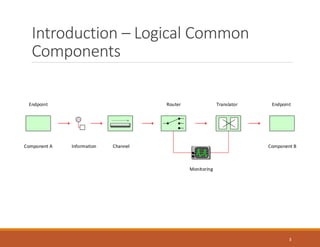
Introduction – Logical Common
Components
3
Component A Component BInformation Channel
Router TranslatorEndpoint Endpoint
Monitoring
Introduction – Business Purposes
Business Information Sharing
Business Process Execution
Business Data (Profile) Management
Business Service Delivery
4
Introduction - Integration Building
Blocks
Trigger Types
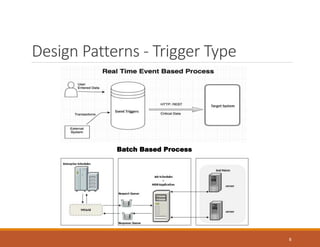
◦ Real time (Event based)
◦ Batch (Scheduling based)
Connection Types
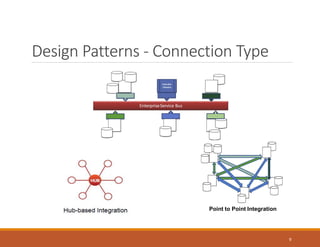
◦ Point to Point
◦ Hub based
◦ Service Bus based (e.g. Pub/sub)
Data Transfer Types
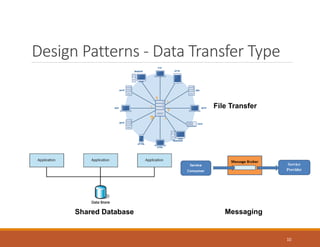
◦ Messaging
◦ Data Messaging
◦ Remote Procedure Call (RPC) or Remote Procedure Invocation (RPI)
◦ File Transfer
◦ Shared Database
5
Introduction – Design Criteria:
Macro/Strategic Level
Architecture Environments (Contactless/NFC Mobile Environment is out of scope)
◦ Integrated Enterprise Environment
◦ Federated Enterprise Environment
◦ Extended Enterprise (B2B & B2C) Environment
◦ Isolated Local Environment
Organization Data Management
◦ Data Standards, Protocol (e.g. EDI) and Models
◦ Data Lifecycle Management Models
Communication Protocols
◦ Standard Protocols
◦ Compression and Security
Quality of Services
◦ Monitoring Systems
◦ Security and Access Models and Standards
6
Introduction – Design Criteria:
Micro/Solution Level
Business Purpose: business needs/requirements
Architecture Environment: the types of enterprise architecture environment in organization
Implementation Complexity: complex process flow or transformation logics implementation
Data Management: MDM, data quality and meta data management
Communication: synchronous vs. asynchronous & one way vs. two way
Economy: project cost, operational cost
Data Volume: data transaction volume per time
Frequency: intervals between an integration occurs
Latency: travel time of messages
Security: data protection
Standard Protocol or Format: standard network protocol or file format
Reliability: likelihood of failures
Flexibility: ease to react on changing requirements (decoupling)
Support and Maintenance: control of data flow, logging and error handling
7
Design Patterns - Trigger Type
8
Batch Based Process
Design Patterns - Connection Type
9
Point to Point Integration
Design Patterns - Data Transfer Type
10
File Transfer
Shared Database Messaging
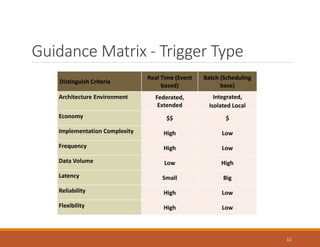
Guidance Matrix - Trigger Type
11
Distinguish Criteria
Real Time (Event
based)
Batch (Scheduling
base)
Architecture Environment Federated,
Extended
Integrated,
Isolated Local
Economy $$ $
Implementation Complexity High Low
Frequency High Low
Data Volume Low High
Latency Small Big
Reliability High Low
Flexibility High Low
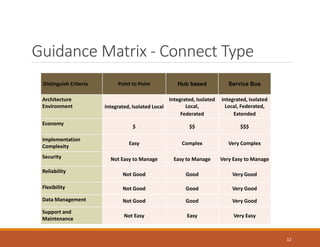
Guidance Matrix - Connect Type
12
Distinguish Criteria Point to Point Hub based Service Bus
Architecture
Environment Integrated, Isolated Local
Integrated, Isolated
Local,
Federated
Integrated, Isolated
Local, Federated,
Extended
Economy
$ $$ $$$
Implementation
Complexity
Easy Complex Very Complex
Security Not Easy to Manage Easy to Manage Very Easy to Manage
Reliability
Not Good Good Very Good
Flexibility Not Good Good Very Good
Data Management Not Good Good Very Good
Support and
Maintenance
Not Easy Easy Very Easy
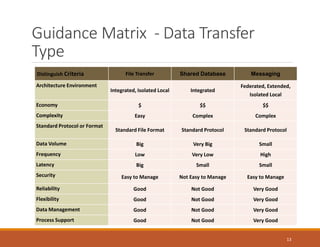
Guidance Matrix - Data Transfer
Type
13
Distinguish Criteria File Transfer Shared Database Messaging
Architecture Environment
Integrated, Isolated Local Integrated
Federated, Extended,
Isolated Local
Economy $ $$ $$
Complexity Easy Complex Complex
Standard Protocol or Format
Standard File Format Standard Protocol Standard Protocol
Data Volume Big Very Big Small
Frequency Low Very Low High
Latency Big Small Small
Security Easy to Manage Not Easy to Manage Easy to Manage
Reliability Good Not Good Very Good
Flexibility Good Not Good Very Good
Data Management Good Not Good Very Good
Process Support Good Not Good Very Good
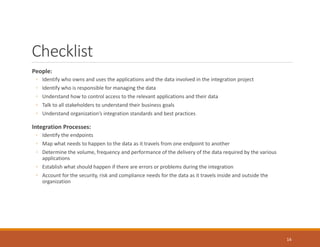
Checklist
People:
◦ Identify who owns and uses the applications and the data involved in the integration project
◦ Identify who is responsible for managing the data
◦ Understand how to control access to the relevant applications and their data
◦ Talk to all stakeholders to understand their business goals
◦ Understand organization’s integration standards and best practices
Integration Processes:
◦ Identify the endpoints
◦ Map what needs to happen to the data as it travels from one endpoint to another
◦ Determine the volume, frequency and performance of the delivery of the data required by the various
applications
◦ Establish what should happen if there are errors or problems during the integration
◦ Account for the security, risk and compliance needs for the data as it travels inside and outside the
organization
14
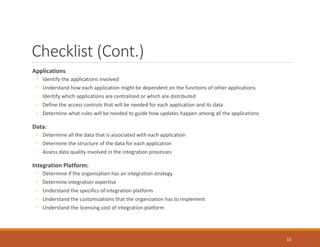
Checklist (Cont.)
Applications:
◦ Identify the applications involved
◦ Understand how each application might be dependent on the functions of other applications
◦ Identify which applications are centralized or which are distributed
◦ Define the access controls that will be needed for each application and its data
◦ Determine what rules will be needed to guide how updates happen among all the applications
Data:
◦ Determine all the data that is associated with each application
◦ Determine the structure of the data for each application
◦ Assess data quality involved in the integration processes
Integration Platform:
◦ Determine if the organization has an integration strategy
◦ Determine integration expertise
◦ Understand the specifics of integration platform
◦ Understand the customizations that the organization has to implement
◦ Understand the licensing cost of Integration platform
15
Best Practices
Separation of peoples’ concerns/components
Scalability of the integration is primal
Minimize dependency and process chaining
Use service oriented architecture
Use Enterprise service bus and micro services
Consider notification hubs or standard notification framework
Careful to use real-time synchronization
Consider process scheduling to activate synchronization
Prepare failure detection and fault tolerance
Leverage rule based logic evaluation and action dispatcher
Leverage of technologies of parallel computing and multiple agents
Use open ended integration platform
16
Questions & Answers
17
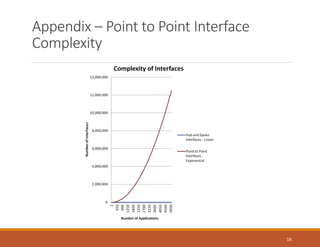
Appendix – Point to Point Interface
Complexity
18
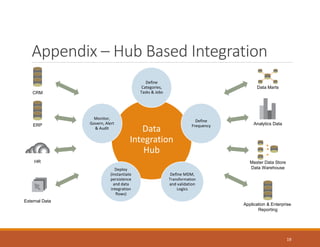
Appendix – Hub Based Integration
19
Data
Integration
Hub
Define
Categories,
Tasks & Jobs
Define
Frequency
Define MDM,
Transformation
and validation
Logics
Deploy
(Instantiate
persistence
and data
integration
flows)
Monitor,
Govern, Alert
& Audit
HR
External Data
CRM
ERP
Data Marts
Master Data Store
Data Warehouse
Analytics Data
Application & Enterprise
Reporting
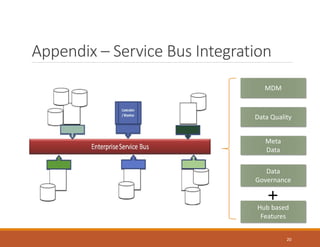
Appendix – Service Bus Integration
20
MDM
Data Quality
Meta
Data
Data
Governance
Hub based
Features
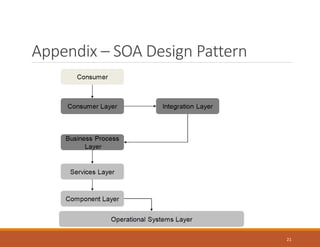
Appendix – SOA Design Pattern
21
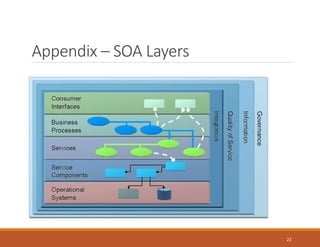
Appendix – SOA Layers
22
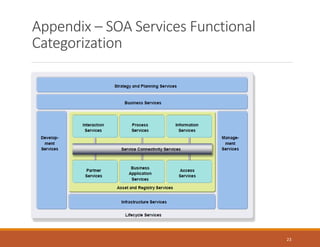
Appendix – SOA Services Functional
Categorization
23

Integration architecture framework

  • 1.
    Integration Architecture FrameworkGuidance, Checklist andBest Practices JAN 2018 YAOHUA (IVAN) CHEN
  • 2.
    Agenda Introduction ◦ Logical CommonComponents ◦ Business Purposes ◦ Integration Building Blocks ◦ Design criteria: Macro/Strategic and Micro/Solution levels CRS Integration Architecture Framework ◦ Design Patterns ◦ Guidance Matrix ◦ Checklist ◦ Best Practices Q & A Appendix
  • 3.
    Introduction – LogicalCommon Components 3 Component A Component BInformation Channel Router TranslatorEndpoint Endpoint Monitoring
  • 4.
    Introduction – BusinessPurposes Business Information Sharing Business Process Execution Business Data (Profile) Management Business Service Delivery 4
  • 5.
    Introduction - IntegrationBuilding Blocks Trigger Types ◦ Real time (Event based) ◦ Batch (Scheduling based) Connection Types ◦ Point to Point ◦ Hub based ◦ Service Bus based (e.g. Pub/sub) Data Transfer Types ◦ Messaging ◦ Data Messaging ◦ Remote Procedure Call (RPC) or Remote Procedure Invocation (RPI) ◦ File Transfer ◦ Shared Database 5
  • 6.
    Introduction – DesignCriteria: Macro/Strategic Level Architecture Environments (Contactless/NFC Mobile Environment is out of scope) ◦ Integrated Enterprise Environment ◦ Federated Enterprise Environment ◦ Extended Enterprise (B2B & B2C) Environment ◦ Isolated Local Environment Organization Data Management ◦ Data Standards, Protocol (e.g. EDI) and Models ◦ Data Lifecycle Management Models Communication Protocols ◦ Standard Protocols ◦ Compression and Security Quality of Services ◦ Monitoring Systems ◦ Security and Access Models and Standards 6
  • 7.
    Introduction – DesignCriteria: Micro/Solution Level Business Purpose: business needs/requirements Architecture Environment: the types of enterprise architecture environment in organization Implementation Complexity: complex process flow or transformation logics implementation Data Management: MDM, data quality and meta data management Communication: synchronous vs. asynchronous & one way vs. two way Economy: project cost, operational cost Data Volume: data transaction volume per time Frequency: intervals between an integration occurs Latency: travel time of messages Security: data protection Standard Protocol or Format: standard network protocol or file format Reliability: likelihood of failures Flexibility: ease to react on changing requirements (decoupling) Support and Maintenance: control of data flow, logging and error handling 7
  • 8.
    Design Patterns -Trigger Type 8 Batch Based Process
  • 9.
    Design Patterns -Connection Type 9 Point to Point Integration
  • 10.
    Design Patterns -Data Transfer Type 10 File Transfer Shared Database Messaging
  • 11.
    Guidance Matrix -Trigger Type 11 Distinguish Criteria Real Time (Event based) Batch (Scheduling base) Architecture Environment Federated, Extended Integrated, Isolated Local Economy $$ $ Implementation Complexity High Low Frequency High Low Data Volume Low High Latency Small Big Reliability High Low Flexibility High Low
  • 12.
    Guidance Matrix -Connect Type 12 Distinguish Criteria Point to Point Hub based Service Bus Architecture Environment Integrated, Isolated Local Integrated, Isolated Local, Federated Integrated, Isolated Local, Federated, Extended Economy $ $$ $$$ Implementation Complexity Easy Complex Very Complex Security Not Easy to Manage Easy to Manage Very Easy to Manage Reliability Not Good Good Very Good Flexibility Not Good Good Very Good Data Management Not Good Good Very Good Support and Maintenance Not Easy Easy Very Easy
  • 13.
    Guidance Matrix -Data Transfer Type 13 Distinguish Criteria File Transfer Shared Database Messaging Architecture Environment Integrated, Isolated Local Integrated Federated, Extended, Isolated Local Economy $ $$ $$ Complexity Easy Complex Complex Standard Protocol or Format Standard File Format Standard Protocol Standard Protocol Data Volume Big Very Big Small Frequency Low Very Low High Latency Big Small Small Security Easy to Manage Not Easy to Manage Easy to Manage Reliability Good Not Good Very Good Flexibility Good Not Good Very Good Data Management Good Not Good Very Good Process Support Good Not Good Very Good
  • 14.
    Checklist People: ◦ Identify whoowns and uses the applications and the data involved in the integration project ◦ Identify who is responsible for managing the data ◦ Understand how to control access to the relevant applications and their data ◦ Talk to all stakeholders to understand their business goals ◦ Understand organization’s integration standards and best practices Integration Processes: ◦ Identify the endpoints ◦ Map what needs to happen to the data as it travels from one endpoint to another ◦ Determine the volume, frequency and performance of the delivery of the data required by the various applications ◦ Establish what should happen if there are errors or problems during the integration ◦ Account for the security, risk and compliance needs for the data as it travels inside and outside the organization 14
  • 15.
    Checklist (Cont.) Applications: ◦ Identifythe applications involved ◦ Understand how each application might be dependent on the functions of other applications ◦ Identify which applications are centralized or which are distributed ◦ Define the access controls that will be needed for each application and its data ◦ Determine what rules will be needed to guide how updates happen among all the applications Data: ◦ Determine all the data that is associated with each application ◦ Determine the structure of the data for each application ◦ Assess data quality involved in the integration processes Integration Platform: ◦ Determine if the organization has an integration strategy ◦ Determine integration expertise ◦ Understand the specifics of integration platform ◦ Understand the customizations that the organization has to implement ◦ Understand the licensing cost of Integration platform 15
  • 16.
    Best Practices Separation ofpeoples’ concerns/components Scalability of the integration is primal Minimize dependency and process chaining Use service oriented architecture Use Enterprise service bus and micro services Consider notification hubs or standard notification framework Careful to use real-time synchronization Consider process scheduling to activate synchronization Prepare failure detection and fault tolerance Leverage rule based logic evaluation and action dispatcher Leverage of technologies of parallel computing and multiple agents Use open ended integration platform 16
  • 17.
  • 18.
    Appendix – Pointto Point Interface Complexity 18
  • 19.
    Appendix – HubBased Integration 19 Data Integration Hub Define Categories, Tasks & Jobs Define Frequency Define MDM, Transformation and validation Logics Deploy (Instantiate persistence and data integration flows) Monitor, Govern, Alert & Audit HR External Data CRM ERP Data Marts Master Data Store Data Warehouse Analytics Data Application & Enterprise Reporting
  • 20.
    Appendix – ServiceBus Integration 20 MDM Data Quality Meta Data Data Governance Hub based Features
  • 21.
    Appendix – SOADesign Pattern 21
  • 22.
  • 23.
    Appendix – SOAServices Functional Categorization 23