Deep Learning
Workshop
Pouya Ahmadvand
Winter, 2016
Pouya.ahmadvand@gmail.com 1/43
Deep Learning in the Real World!
#Deep Learning has become the most popular approach for developing
Artificial Intelligence (AI) – machines that perceive and understand
the world.
#The focus is currently on specific perceptual tasks, and there are
many successes.
#Today, some of the world`s largest internet companies, as well as
foremost research institutions (e.g. Google, Facebook, Microsoft ,
etc.) are using deep learning in research and production.
2/43
Pouya Ahmadvand, Deep Learning Workshop ,Shahid Rajaei Teacher Training University, 5 March 2016
http//:www.nvidia.com
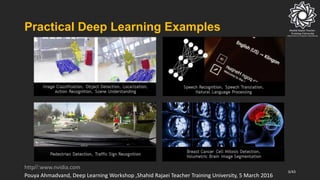
Practical Deep Learning Examples
3/43
Pouya Ahmadvand, Deep Learning Workshop ,Shahid Rajaei Teacher Training University, 5 March 2016
http//:www.nvidia.com
Deep Learning Advantages
# Robust :
• No need to design the features ahead of time – features are
automatically learned to be optimal for the task at hand
• Robustness to natural variations in the data is automatically learned
# Generalizable :
• The same neural net approach can be used for many different
applications and data types
# Scalable :
• Performance improves with more data, method is massively
parallelizable
4/43
Pouya Ahmadvand, Deep Learning Workshop ,Shahid Rajaei Teacher Training University, 5 March 2016
http//:www.nvidia.com
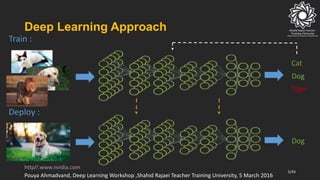
Deep Learning Approach
5/43
Cat
Dog
Tiger
Dog
Train :
Deploy :
Pouya Ahmadvand, Deep Learning Workshop ,Shahid Rajaei Teacher Training University, 5 March 2016
http//:www.nvidia.com
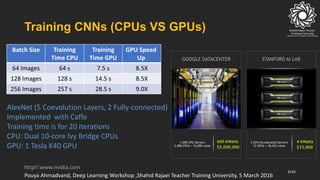
Training CNNs (CPUs VS GPUs)
GPU Speed
Up
Training
Time GPU
Training
Time CPU
Batch Size
8.5X7.5 s64 s64 Images
8.5X14.5 s128 s128 Images
9.0X28.5 s257 s256 Images
AlexNet (5 Coevolution Layers, 2 Fully-connected)
Implemented with Caffe
Training time is for 20 iterations
CPU: Dual 10-core Ivy Bridge CPUs
GPU: 1 Tesla K40 GPU
6/43
Pouya Ahmadvand, Deep Learning Workshop ,Shahid Rajaei Teacher Training University, 5 March 2016
http//:www.nvidia.com
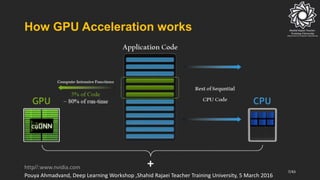
How GPU Acceleration works
7/43
Pouya Ahmadvand, Deep Learning Workshop ,Shahid Rajaei Teacher Training University, 5 March 2016
http//:www.nvidia.com
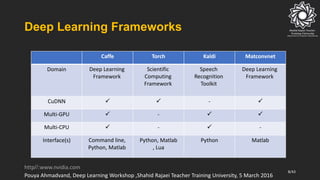
Deep Learning Frameworks
MatconvnetKaldiTorchCaffe
Deep Learning
Framework
Speech
Recognition
Toolkit
Scientific
Computing
Framework
Deep Learning
Framework
Domain
-CuDNN
-Multi-GPU
--Multi-CPU
MatlabPythonPython, Matlab
, Lua
Command line,
Python, Matlab
Interface(s)
8/43
Pouya Ahmadvand, Deep Learning Workshop ,Shahid Rajaei Teacher Training University, 5 March 2016
http//:www.nvidia.com
Caffe Framework
#Caffe :
• Caffe is a deep learning framework made with expression, speed,
and modularity in mind. It is developed by the Berkeley Vision and
Learning Center (BVLC) and by community contributors. Yangqing
Jia created the project during his PhD at UC Berkeley. Caffe is
released under the BSD 2-Clause license.
http://caffe.berkeleyvision.org
9/43
Pouya Ahmadvand, Deep Learning Workshop ,Shahid Rajaei Teacher Training University, 5 March 2016
Caffe Framework
# Why Caffe ?
# Expressive architecture: encourages application and innovation. Models and optimization are
defined by configuration without hard-coding. Switch between CPU and GPU by setting a single
flag to train on a GPU machine then deploy to commodity clusters or mobile devices.
# Extensible code: fosters active development. In Caffe’s first year, it has been forked by over 1,000
developers and had many significant changes contributed back. Thanks to these contributors the
framework tracks the state-of-the-art in both code and models.
# Speed: makes Caffe perfect for research experiments and industry deployment. Caffe can process
over 60M images per day with a single NVIDIA K40 GPU. That’s 1 ms/image for inference and 4
ms/image for learning. We believe that Caffe is the fastest convnet implementation available.
# Community: Caffe already powers academic research projects, startup prototypes, and even
large-scale industrial applications in vision, speech, and multimedia.
10/43
Pouya Ahmadvand, Deep Learning Workshop ,Shahid Rajaei Teacher Training University, 5 March 2016
http://caffe.berkeleyvision.org
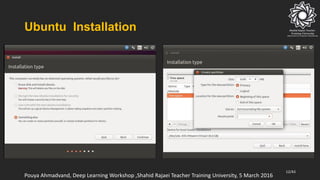
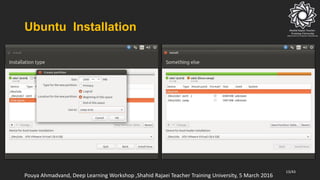
Ubuntu Installation
#What you need :
• A flash with at least 8GB space
• At least 40GB unallocated space at the end of your hard drive
#What you must to do :
• Make the flash bootable by using Rufus software
• Reboot your system and boot from the bootabled flash
11/43
Pouya Ahmadvand, Deep Learning Workshop ,Shahid Rajaei Teacher Training University, 5 March 2016
Ubuntu Installation
12/43
Pouya Ahmadvand, Deep Learning Workshop ,Shahid Rajaei Teacher Training University, 5 March 2016
Ubuntu Installation
13/43
Pouya Ahmadvand, Deep Learning Workshop ,Shahid Rajaei Teacher Training University, 5 March 2016
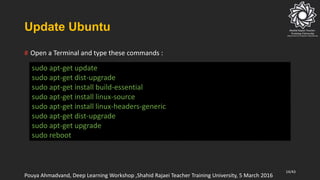
Update Ubuntu
sudo apt-get update
sudo apt-get dist-upgrade
sudo apt-get install build-essential
sudo apt-get install linux-source
sudo apt-get install linux-headers-generic
sudo apt-get dist-upgrade
sudo apt-get upgrade
sudo reboot
# Open a Terminal and type these commands :
14/43
Pouya Ahmadvand, Deep Learning Workshop ,Shahid Rajaei Teacher Training University, 5 March 2016
CUDA
# CUDA is a parallel computing platform and application programming
interface (API) model created by NVIDIA. It allows software developers to use a
CUDA-enabled graphics processing unit (GPU) for general purpose processing –
an approach known as GPGPU. The CUDA platform is a software layer that gives
direct access to the GPU's virtual instruction set and parallel computational
elements.
# The CUDA platform is designed to work with programming languages such
as C, C++ and Fortran. When it was first introduced by NVIDIA, the name CUDA
was an acronym for Compute Unified Device Architecture, but NVIDIA
subsequently dropped the use of the acronym.
15/43
Pouya Ahmadvand, Deep Learning Workshop ,Shahid Rajaei Teacher Training University, 5 March 2016
http//:www.wikipedia.com
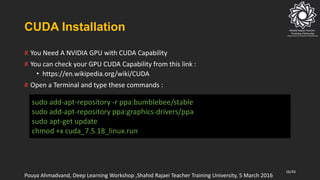
CUDA Installation
# You Need A NVIDIA GPU with CUDA Capability
# You can check your GPU CUDA Capability from this link :
• https://en.wikipedia.org/wiki/CUDA
# Open a Terminal and type these commands :
sudo add-apt-repository -r ppa:bumblebee/stable
sudo add-apt-repository ppa:graphics-drivers/ppa
sudo apt-get update
chmod +x cuda_7.5.18_linux.run
16/43
Pouya Ahmadvand, Deep Learning Workshop ,Shahid Rajaei Teacher Training University, 5 March 2016
CUDA Installation
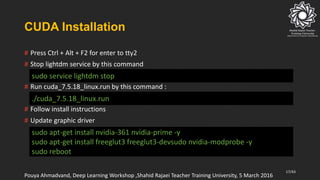
# Press Ctrl + Alt + F2 for enter to tty2
# Stop lightdm service by this command
# Run cuda_7.5.18_linux.run by this command :
# Follow install instructions
# Update graphic driver
sudo service lightdm stop
./cuda_7.5.18_linux.run
sudo apt-get install nvidia-361 nvidia-prime -y
sudo apt-get install freeglut3 freeglut3-devsudo nvidia-modprobe -y
sudo reboot
17/43
Pouya Ahmadvand, Deep Learning Workshop ,Shahid Rajaei Teacher Training University, 5 March 2016
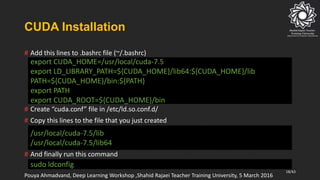
CUDA Installation
# Add this lines to .bashrc file (~/.bashrc)
# Create “cuda.conf” file in /etc/ld.so.conf.d/
# Copy this lines to the file that you just created
# And finally run this command
export CUDA_HOME=/usr/local/cuda-7.5
export LD_LIBRARY_PATH=${CUDA_HOME}/lib64:${CUDA_HOME}/lib
PATH=${CUDA_HOME}/bin:${PATH}
export PATH
export CUDA_ROOT=${CUDA_HOME}/bin
/usr/local/cuda-7.5/lib
/usr/local/cuda-7.5/lib64
sudo ldconfig
18/43
Pouya Ahmadvand, Deep Learning Workshop ,Shahid Rajaei Teacher Training University, 5 March 2016
Break
19/43
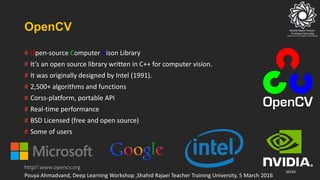
OpenCV
# Open-source Computer Vison Library
# It’s an open source library written in C++ for computer vision.
# It was originally designed by Intel (1991).
# 2,500+ algorithms and functions
# Corss-platform, portable API
# Real-time performance
# BSD Licensed (free and open source)
# Some of users
20/43
Pouya Ahmadvand, Deep Learning Workshop ,Shahid Rajaei Teacher Training University, 5 March 2016
http//:www.opencv.org
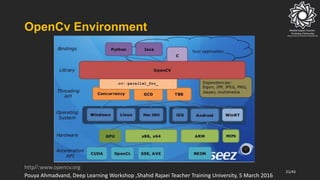
OpenCv Environment
21/43
Pouya Ahmadvand, Deep Learning Workshop ,Shahid Rajaei Teacher Training University, 5 March 2016
http//:www.opencv.org
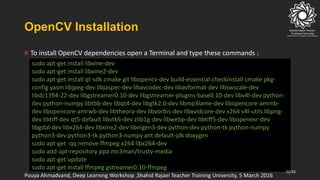
OpenCV Installation
sudo apt-get install libxine-dev
sudo apt-get install libxine2-dev
sudo apt-get install qt-sdk cmake git libopencv-dev build-essential checkinstall cmake pkg-
config yasm libjpeg-dev libjasper-dev libavcodec-dev libavformat-dev libswscale-dev
libdc1394-22-dev libgstreamer0.10-dev libgstreamer-plugins-base0.10-dev libv4l-dev python-
dev python-numpy libtbb-dev libqt4-dev libgtk2.0-dev libmp3lame-dev libopencore-amrnb-
dev libopencore-amrwb-dev libtheora-dev libvorbis-dev libxvidcore-dev x264 v4l-utils libpng-
dev libtiff-dev qt5-default libvtk6-dev zlib1g-dev libwebp-dev libtiff5-dev libopenexr-dev
libgdal-dev libx264-dev libxine2-dev libeigen3-dev python-dev python-tk python-numpy
python3-dev python3-tk python3-numpy ant default-jdk doxygen
sudo apt-get -qq remove ffmpeg x264 libx264-dev
sudo add-apt-repository ppa:mc3man/trusty-media
sudo apt-get update
sudo apt-get install ffmpeg gstreamer0.10-ffmpeg
# To install OpenCV dependencies open a Terminal and type these commands :
22/43
Pouya Ahmadvand, Deep Learning Workshop ,Shahid Rajaei Teacher Training University, 5 March 2016
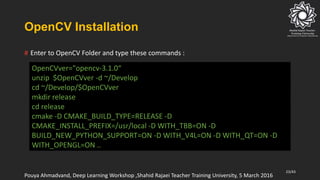
OpenCV Installation
OpenCVver="opencv-3.1.0“
unzip $OpenCVver -d ~/Develop
cd ~/Develop/$OpenCVver
mkdir release
cd release
cmake -D CMAKE_BUILD_TYPE=RELEASE -D
CMAKE_INSTALL_PREFIX=/usr/local -D WITH_TBB=ON -D
BUILD_NEW_PYTHON_SUPPORT=ON -D WITH_V4L=ON -D WITH_QT=ON -D
WITH_OPENGL=ON ..
# Enter to OpenCV Folder and type these commands :
23/43
Pouya Ahmadvand, Deep Learning Workshop ,Shahid Rajaei Teacher Training University, 5 March 2016
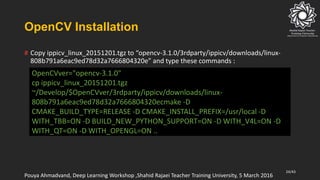
OpenCV Installation
OpenCVver="opencv-3.1.0"
cp ippicv_linux_20151201.tgz
~/Develop/$OpenCVver/3rdparty/ippicv/downloads/linux-
808b791a6eac9ed78d32a7666804320ecmake -D
CMAKE_BUILD_TYPE=RELEASE -D CMAKE_INSTALL_PREFIX=/usr/local -D
WITH_TBB=ON -D BUILD_NEW_PYTHON_SUPPORT=ON -D WITH_V4L=ON -D
WITH_QT=ON -D WITH_OPENGL=ON ..
# Copy ippicv_linux_20151201.tgz to “opencv-3.1.0/3rdparty/ippicv/downloads/linux-
808b791a6eac9ed78d32a7666804320e” and type these commands :
24/43
Pouya Ahmadvand, Deep Learning Workshop ,Shahid Rajaei Teacher Training University, 5 March 2016
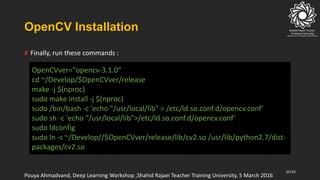
OpenCV Installation
OpenCVver="opencv-3.1.0“
cd ~/Develop/$OpenCVver/release
make -j $(nproc)
sudo make install -j $(nproc)
sudo /bin/bash -c 'echo "/usr/local/lib" > /etc/ld.so.conf.d/opencv.conf‘
sudo sh -c 'echo "/usr/local/lib">/etc/ld.so.conf.d/opencv.conf‘
sudo ldconfig
sudo ln -s ~/Develop//$OpenCVver/release/lib/cv2.so /usr/lib/python2.7/dist-
packages/cv2.so
# Finally, run these commands :
25/43
Pouya Ahmadvand, Deep Learning Workshop ,Shahid Rajaei Teacher Training University, 5 March 2016
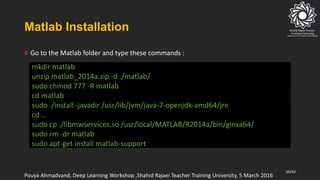
Matlab Installation
mkdir matlab
unzip matlab_2014a.zip -d ./matlab/
sudo chmod 777 -R matlab
cd matlab
sudo ./install -javadir /usr/lib/jvm/java-7-openjdk-amd64/jre
cd ..
sudo cp ./libmwservices.so /usr/local/MATLAB/R2014a/bin/glnxa64/
sudo rm -dr matlab
sudo apt-get install matlab-support
# Go to the Matlab folder and type these commands :
26/43
Pouya Ahmadvand, Deep Learning Workshop ,Shahid Rajaei Teacher Training University, 5 March 2016
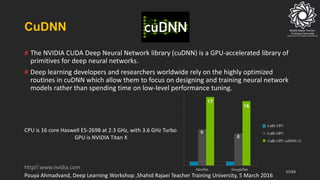
CuDNN
# The NVIDIA CUDA Deep Neural Network library (cuDNN) is a GPU-accelerated library of
primitives for deep neural networks.
# Deep learning developers and researchers worldwide rely on the highly optimized
routines in cuDNN which allow them to focus on designing and training neural network
models rather than spending time on low-level performance tuning.
CPU is 16 core Haswell E5-2698 at 2.3 GHz, with 3.6 GHz Turbo
GPU is NVIDIA Titan X
27/43
Pouya Ahmadvand, Deep Learning Workshop ,Shahid Rajaei Teacher Training University, 5 March 2016
http//:www.nvidia.com
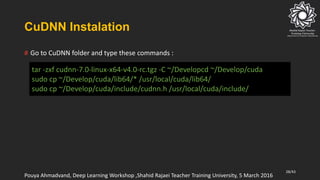
CuDNN Instalation
tar -zxf cudnn-7.0-linux-x64-v4.0-rc.tgz -C ~/Developcd ~/Develop/cuda
sudo cp ~/Develop/cuda/lib64/* /usr/local/cuda/lib64/
sudo cp ~/Develop/cuda/include/cudnn.h /usr/local/cuda/include/
# Go to CuDNN folder and type these commands :
28/43
Pouya Ahmadvand, Deep Learning Workshop ,Shahid Rajaei Teacher Training University, 5 March 2016
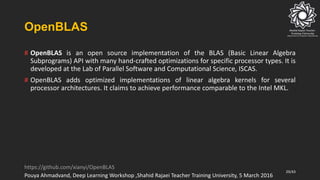
OpenBLAS
# OpenBLAS is an open source implementation of the BLAS (Basic Linear Algebra
Subprograms) API with many hand-crafted optimizations for specific processor types. It is
developed at the Lab of Parallel Software and Computational Science, ISCAS.
# OpenBLAS adds optimized implementations of linear algebra kernels for several
processor architectures. It claims to achieve performance comparable to the Intel MKL.
29/43
Pouya Ahmadvand, Deep Learning Workshop ,Shahid Rajaei Teacher Training University, 5 March 2016
https://github.com/xianyi/OpenBLAS
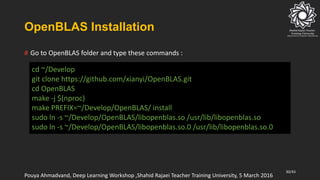
OpenBLAS Installation
cd ~/Develop
git clone https://github.com/xianyi/OpenBLAS.git
cd OpenBLAS
make -j $(nproc)
make PREFIX=~/Develop/OpenBLAS/ install
sudo ln -s ~/Develop/OpenBLAS/libopenblas.so /usr/lib/libopenblas.so
sudo ln -s ~/Develop/OpenBLAS/libopenblas.so.0 /usr/lib/libopenblas.so.0
# Go to OpenBLAS folder and type these commands :
30/43
Pouya Ahmadvand, Deep Learning Workshop ,Shahid Rajaei Teacher Training University, 5 March 2016
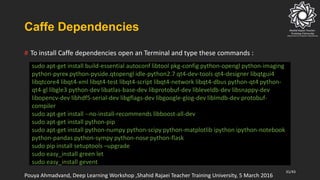
Caffe Dependencies
sudo apt-get install build-essential autoconf libtool pkg-config python-opengl python-imaging
python-pyrex python-pyside.qtopengl idle-python2.7 qt4-dev-tools qt4-designer libqtgui4
libqtcore4 libqt4-xml libqt4-test libqt4-script libqt4-network libqt4-dbus python-qt4 python-
qt4-gl libgle3 python-dev libatlas-base-dev libprotobuf-dev libleveldb-dev libsnappy-dev
libopencv-dev libhdf5-serial-dev libgflags-dev libgoogle-glog-dev liblmdb-dev protobuf-
compiler
sudo apt-get install --no-install-recommends libboost-all-dev
sudo apt-get install python-pip
sudo apt-get install python-numpy python-scipy python-matplotlib ipython ipython-notebook
python-pandas python-sympy python-nose python-flask
sudo pip install setuptools –upgrade
sudo easy_install green let
sudo easy_install gevent
# To install Caffe dependencies open an Terminal and type these commands :
31/43
Pouya Ahmadvand, Deep Learning Workshop ,Shahid Rajaei Teacher Training University, 5 March 2016
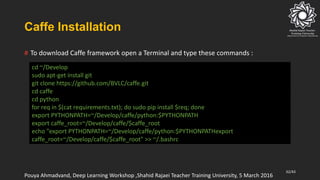
Caffe Installation
cd ~/Develop
sudo apt-get install git
git clone https://github.com/BVLC/caffe.git
cd caffe
cd python
for req in $(cat requirements.txt); do sudo pip install $req; done
export PYTHONPATH=~/Develop/caffe/python:$PYTHONPATH
export caffe_root=~/Develop/caffe/$caffe_root
echo "export PYTHONPATH=~/Develop/caffe/python:$PYTHONPATHexport
caffe_root=~/Develop/caffe/$caffe_root" >> ~/.bashrc
# To download Caffe framework open a Terminal and type these commands :
32/43
Pouya Ahmadvand, Deep Learning Workshop ,Shahid Rajaei Teacher Training University, 5 March 2016
Caffe Installation
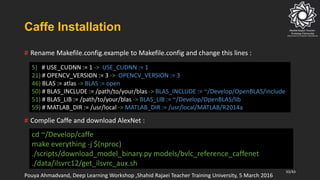
5) # USE_CUDNN := 1 -> USE_CUDNN := 1
21) # OPENCV_VERSION := 3 -> OPENCV_VERSION := 3
46) BLAS := atlas -> BLAS := open
50) # BLAS_INCLUDE := /path/to/your/blas -> BLAS_INCLUDE := ~/Develop/OpenBLAS/include
51) # BLAS_LIB := /path/to/your/blas -> BLAS_LIB := ~/Develop/OpenBLAS/lib
59) # MATLAB_DIR := /usr/local -> MATLAB_DIR := /usr/local/MATLAB/R2014a
# Rename Makefile.config.example to Makefile.config and change this lines :
# Complie Caffe and download AlexNet :
cd ~/Develop/caffe
make everything -j $(nproc)
./scripts/download_model_binary.py models/bvlc_reference_caffenet
./data/ilsvrc12/get_ilsvrc_aux.sh
33/43
Pouya Ahmadvand, Deep Learning Workshop ,Shahid Rajaei Teacher Training University, 5 March 2016
Break
34/43
Design and Train your Network
35/43
Step :
Collect your Data
36/43
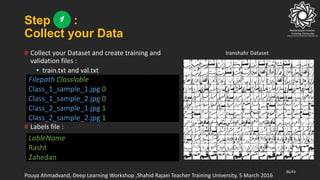
Iranshahr Dataset# Collect your Dataset and create training and
validation files :
• train.txt and val.txt
# Labels file :
Filepath Classlable
Class_1_sample_1.jpg 0
Class_1_sample_2.jpg 0
Class_2_sample_1.jpg 1
Class_2_sample_2.jpg 1
LableName
Rasht
Zahedan
Pouya Ahmadvand, Deep Learning Workshop ,Shahid Rajaei Teacher Training University, 5 March 2016
1
Step :
Create LMDB Database
2
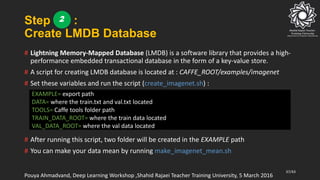
# Lightning Memory-Mapped Database (LMDB) is a software library that provides a high-
performance embedded transactional database in the form of a key-value store.
# A script for creating LMDB database is located at : CAFFE_ROOT/examples/imagenet
# Set these variables and run the script (create_imagenet.sh) :
# After running this script, two folder will be created in the EXAMPLE path
# You can make your data mean by running make_imagenet_mean.sh
37/43
EXAMPLE= export path
DATA= where the train.txt and val.txt located
TOOLS= Caffe tools folder path
TRAIN_DATA_ROOT= where the train data located
VAL_DATA_ROOT= where the val data located
Pouya Ahmadvand, Deep Learning Workshop ,Shahid Rajaei Teacher Training University, 5 March 2016
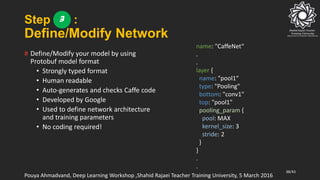
Step :
Define/Modify Network
# Define/Modify your model by using
Protobuf model format
• Strongly typed format
• Human readable
• Auto-generates and checks Caffe code
• Developed by Google
• Used to define network architecture
and training parameters
• No coding required!
38/43
name: "CaffeNet“
.
.
layer {
name: "pool1“
type: "Pooling"
bottom: "conv1"
top: "pool1"
pooling_param {
pool: MAX
kernel_size: 3
stride: 2
}
}
.
.
Pouya Ahmadvand, Deep Learning Workshop ,Shahid Rajaei Teacher Training University, 5 March 2016
3
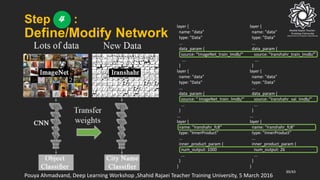
Step :
Define/Modify Network
39/43
layer {
name: "data"
type: "Data"
...
data_param {
source: "Iranshahr_train_lmdb/"
...
}
layer {
name: "data"
type: "Data"
...
data_param {
source: "Iranshahr_val_lmdb/"
...
}
...
layer {
name: "Iranshahr_fc8"
type: "InnerProduct"
...
inner_product_param {
num_output: 26
...
}
}
layer {
name: "data"
type: "Data"
...
data_param {
source: “ImageNet_train_lmdb/"
...
}
layer {
name: "data"
type: "Data"
...
data_param {
source: " ImageNet_train_lmdb/"
...
}
...
layer {
name: "Iranshahr_fc8"
type: "InnerProduct"
...
inner_product_param {
num_output: 1000
...
}
}
Pouya Ahmadvand, Deep Learning Workshop ,Shahid Rajaei Teacher Training University, 5 March 2016
4
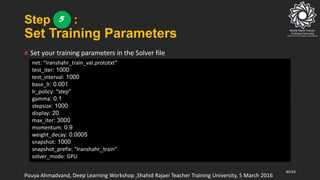
Step :
Set Training Parameters
# Set your training parameters in the Solver file
40/43
net: “Iranshahr_train_val.prototxt”
test_iter: 1000
test_interval: 1000
base_lr: 0.001
lr_policy: “step”
gamma: 0.1
stepsize: 1000
display: 20
max_iter: 3000
momentum: 0.9
weight_decay: 0.0005
snapshot: 1000
snapshot_prefix: “Iranshahr_train”
solver_mode: GPU
Pouya Ahmadvand, Deep Learning Workshop ,Shahid Rajaei Teacher Training University, 5 March 2016
5
Step :
Train the network
# Run Train.py for training the network :
41/43
solverPath = './solver.prototxt‘
wightsPath = './bvlc_reference_caffenet.caffemodel‘
niter = 1000
caffe.set_device(0)
caffe.set_mode_gpu()
solver = caffe.SGDSolver(solverPath)
solver.net.copy_from(wightsPath)
for it in range(niter):
solver.step(1)
print 'iter %d, finetune_loss=%f' % (it, solver.net.blobs['loss'].data)
print 'done'
Pouya Ahmadvand, Deep Learning Workshop ,Shahid Rajaei Teacher Training University, 5 March 2016
6
Step :
Test the network
# Run Test.py for testing the network :
42/43
….
net = caffe.Classifier(MODEL_FILE, PRETRAINED,
mean=np.load(PROJECT_PATH + 'ilsvrc_2012_mean.npy').mean(1).mean(1),
channel_swap=(2,1,0),
raw_scale=255,
image_dims=(256, 256))
caffe.set_mode_gpu()
…
input_image = caffe.io.load_image(TEST_FOLDER+files[i])
prediction = net.predict([input_image])
print 'class :', classes[i],' predicted class:', prediction[0].argmax()
Pouya Ahmadvand, Deep Learning Workshop ,Shahid Rajaei Teacher Training University, 5 March 2016
7
Thank You
43/43

instruction of install Caffe on ubuntu

  • 1.
    Deep Learning Workshop Pouya Ahmadvand Winter,2016 Pouya.ahmadvand@gmail.com 1/43
  • 2.
    Deep Learning inthe Real World! #Deep Learning has become the most popular approach for developing Artificial Intelligence (AI) – machines that perceive and understand the world. #The focus is currently on specific perceptual tasks, and there are many successes. #Today, some of the world`s largest internet companies, as well as foremost research institutions (e.g. Google, Facebook, Microsoft , etc.) are using deep learning in research and production. 2/43 Pouya Ahmadvand, Deep Learning Workshop ,Shahid Rajaei Teacher Training University, 5 March 2016 http//:www.nvidia.com
  • 3.
    Practical Deep LearningExamples 3/43 Pouya Ahmadvand, Deep Learning Workshop ,Shahid Rajaei Teacher Training University, 5 March 2016 http//:www.nvidia.com
  • 4.
    Deep Learning Advantages #Robust : • No need to design the features ahead of time – features are automatically learned to be optimal for the task at hand • Robustness to natural variations in the data is automatically learned # Generalizable : • The same neural net approach can be used for many different applications and data types # Scalable : • Performance improves with more data, method is massively parallelizable 4/43 Pouya Ahmadvand, Deep Learning Workshop ,Shahid Rajaei Teacher Training University, 5 March 2016 http//:www.nvidia.com
  • 5.
    Deep Learning Approach 5/43 Cat Dog Tiger Dog Train: Deploy : Pouya Ahmadvand, Deep Learning Workshop ,Shahid Rajaei Teacher Training University, 5 March 2016 http//:www.nvidia.com
  • 6.
    Training CNNs (CPUsVS GPUs) GPU Speed Up Training Time GPU Training Time CPU Batch Size 8.5X7.5 s64 s64 Images 8.5X14.5 s128 s128 Images 9.0X28.5 s257 s256 Images AlexNet (5 Coevolution Layers, 2 Fully-connected) Implemented with Caffe Training time is for 20 iterations CPU: Dual 10-core Ivy Bridge CPUs GPU: 1 Tesla K40 GPU 6/43 Pouya Ahmadvand, Deep Learning Workshop ,Shahid Rajaei Teacher Training University, 5 March 2016 http//:www.nvidia.com
  • 7.
    How GPU Accelerationworks 7/43 Pouya Ahmadvand, Deep Learning Workshop ,Shahid Rajaei Teacher Training University, 5 March 2016 http//:www.nvidia.com
  • 8.
    Deep Learning Frameworks MatconvnetKaldiTorchCaffe DeepLearning Framework Speech Recognition Toolkit Scientific Computing Framework Deep Learning Framework Domain -CuDNN -Multi-GPU --Multi-CPU MatlabPythonPython, Matlab , Lua Command line, Python, Matlab Interface(s) 8/43 Pouya Ahmadvand, Deep Learning Workshop ,Shahid Rajaei Teacher Training University, 5 March 2016 http//:www.nvidia.com
  • 9.
    Caffe Framework #Caffe : •Caffe is a deep learning framework made with expression, speed, and modularity in mind. It is developed by the Berkeley Vision and Learning Center (BVLC) and by community contributors. Yangqing Jia created the project during his PhD at UC Berkeley. Caffe is released under the BSD 2-Clause license. http://caffe.berkeleyvision.org 9/43 Pouya Ahmadvand, Deep Learning Workshop ,Shahid Rajaei Teacher Training University, 5 March 2016
  • 10.
    Caffe Framework # WhyCaffe ? # Expressive architecture: encourages application and innovation. Models and optimization are defined by configuration without hard-coding. Switch between CPU and GPU by setting a single flag to train on a GPU machine then deploy to commodity clusters or mobile devices. # Extensible code: fosters active development. In Caffe’s first year, it has been forked by over 1,000 developers and had many significant changes contributed back. Thanks to these contributors the framework tracks the state-of-the-art in both code and models. # Speed: makes Caffe perfect for research experiments and industry deployment. Caffe can process over 60M images per day with a single NVIDIA K40 GPU. That’s 1 ms/image for inference and 4 ms/image for learning. We believe that Caffe is the fastest convnet implementation available. # Community: Caffe already powers academic research projects, startup prototypes, and even large-scale industrial applications in vision, speech, and multimedia. 10/43 Pouya Ahmadvand, Deep Learning Workshop ,Shahid Rajaei Teacher Training University, 5 March 2016 http://caffe.berkeleyvision.org
  • 11.
    Ubuntu Installation #What youneed : • A flash with at least 8GB space • At least 40GB unallocated space at the end of your hard drive #What you must to do : • Make the flash bootable by using Rufus software • Reboot your system and boot from the bootabled flash 11/43 Pouya Ahmadvand, Deep Learning Workshop ,Shahid Rajaei Teacher Training University, 5 March 2016
  • 12.
    Ubuntu Installation 12/43 Pouya Ahmadvand,Deep Learning Workshop ,Shahid Rajaei Teacher Training University, 5 March 2016
  • 13.
    Ubuntu Installation 13/43 Pouya Ahmadvand,Deep Learning Workshop ,Shahid Rajaei Teacher Training University, 5 March 2016
  • 14.
    Update Ubuntu sudo apt-getupdate sudo apt-get dist-upgrade sudo apt-get install build-essential sudo apt-get install linux-source sudo apt-get install linux-headers-generic sudo apt-get dist-upgrade sudo apt-get upgrade sudo reboot # Open a Terminal and type these commands : 14/43 Pouya Ahmadvand, Deep Learning Workshop ,Shahid Rajaei Teacher Training University, 5 March 2016
  • 15.
    CUDA # CUDA isa parallel computing platform and application programming interface (API) model created by NVIDIA. It allows software developers to use a CUDA-enabled graphics processing unit (GPU) for general purpose processing – an approach known as GPGPU. The CUDA platform is a software layer that gives direct access to the GPU's virtual instruction set and parallel computational elements. # The CUDA platform is designed to work with programming languages such as C, C++ and Fortran. When it was first introduced by NVIDIA, the name CUDA was an acronym for Compute Unified Device Architecture, but NVIDIA subsequently dropped the use of the acronym. 15/43 Pouya Ahmadvand, Deep Learning Workshop ,Shahid Rajaei Teacher Training University, 5 March 2016 http//:www.wikipedia.com
  • 16.
    CUDA Installation # YouNeed A NVIDIA GPU with CUDA Capability # You can check your GPU CUDA Capability from this link : • https://en.wikipedia.org/wiki/CUDA # Open a Terminal and type these commands : sudo add-apt-repository -r ppa:bumblebee/stable sudo add-apt-repository ppa:graphics-drivers/ppa sudo apt-get update chmod +x cuda_7.5.18_linux.run 16/43 Pouya Ahmadvand, Deep Learning Workshop ,Shahid Rajaei Teacher Training University, 5 March 2016
  • 17.
    CUDA Installation # PressCtrl + Alt + F2 for enter to tty2 # Stop lightdm service by this command # Run cuda_7.5.18_linux.run by this command : # Follow install instructions # Update graphic driver sudo service lightdm stop ./cuda_7.5.18_linux.run sudo apt-get install nvidia-361 nvidia-prime -y sudo apt-get install freeglut3 freeglut3-devsudo nvidia-modprobe -y sudo reboot 17/43 Pouya Ahmadvand, Deep Learning Workshop ,Shahid Rajaei Teacher Training University, 5 March 2016
  • 18.
    CUDA Installation # Addthis lines to .bashrc file (~/.bashrc) # Create “cuda.conf” file in /etc/ld.so.conf.d/ # Copy this lines to the file that you just created # And finally run this command export CUDA_HOME=/usr/local/cuda-7.5 export LD_LIBRARY_PATH=${CUDA_HOME}/lib64:${CUDA_HOME}/lib PATH=${CUDA_HOME}/bin:${PATH} export PATH export CUDA_ROOT=${CUDA_HOME}/bin /usr/local/cuda-7.5/lib /usr/local/cuda-7.5/lib64 sudo ldconfig 18/43 Pouya Ahmadvand, Deep Learning Workshop ,Shahid Rajaei Teacher Training University, 5 March 2016
  • 19.
  • 20.
    OpenCV # Open-source ComputerVison Library # It’s an open source library written in C++ for computer vision. # It was originally designed by Intel (1991). # 2,500+ algorithms and functions # Corss-platform, portable API # Real-time performance # BSD Licensed (free and open source) # Some of users 20/43 Pouya Ahmadvand, Deep Learning Workshop ,Shahid Rajaei Teacher Training University, 5 March 2016 http//:www.opencv.org
  • 21.
    OpenCv Environment 21/43 Pouya Ahmadvand,Deep Learning Workshop ,Shahid Rajaei Teacher Training University, 5 March 2016 http//:www.opencv.org
  • 22.
    OpenCV Installation sudo apt-getinstall libxine-dev sudo apt-get install libxine2-dev sudo apt-get install qt-sdk cmake git libopencv-dev build-essential checkinstall cmake pkg- config yasm libjpeg-dev libjasper-dev libavcodec-dev libavformat-dev libswscale-dev libdc1394-22-dev libgstreamer0.10-dev libgstreamer-plugins-base0.10-dev libv4l-dev python- dev python-numpy libtbb-dev libqt4-dev libgtk2.0-dev libmp3lame-dev libopencore-amrnb- dev libopencore-amrwb-dev libtheora-dev libvorbis-dev libxvidcore-dev x264 v4l-utils libpng- dev libtiff-dev qt5-default libvtk6-dev zlib1g-dev libwebp-dev libtiff5-dev libopenexr-dev libgdal-dev libx264-dev libxine2-dev libeigen3-dev python-dev python-tk python-numpy python3-dev python3-tk python3-numpy ant default-jdk doxygen sudo apt-get -qq remove ffmpeg x264 libx264-dev sudo add-apt-repository ppa:mc3man/trusty-media sudo apt-get update sudo apt-get install ffmpeg gstreamer0.10-ffmpeg # To install OpenCV dependencies open a Terminal and type these commands : 22/43 Pouya Ahmadvand, Deep Learning Workshop ,Shahid Rajaei Teacher Training University, 5 March 2016
  • 23.
    OpenCV Installation OpenCVver="opencv-3.1.0“ unzip $OpenCVver-d ~/Develop cd ~/Develop/$OpenCVver mkdir release cd release cmake -D CMAKE_BUILD_TYPE=RELEASE -D CMAKE_INSTALL_PREFIX=/usr/local -D WITH_TBB=ON -D BUILD_NEW_PYTHON_SUPPORT=ON -D WITH_V4L=ON -D WITH_QT=ON -D WITH_OPENGL=ON .. # Enter to OpenCV Folder and type these commands : 23/43 Pouya Ahmadvand, Deep Learning Workshop ,Shahid Rajaei Teacher Training University, 5 March 2016
  • 24.
    OpenCV Installation OpenCVver="opencv-3.1.0" cp ippicv_linux_20151201.tgz ~/Develop/$OpenCVver/3rdparty/ippicv/downloads/linux- 808b791a6eac9ed78d32a7666804320ecmake-D CMAKE_BUILD_TYPE=RELEASE -D CMAKE_INSTALL_PREFIX=/usr/local -D WITH_TBB=ON -D BUILD_NEW_PYTHON_SUPPORT=ON -D WITH_V4L=ON -D WITH_QT=ON -D WITH_OPENGL=ON .. # Copy ippicv_linux_20151201.tgz to “opencv-3.1.0/3rdparty/ippicv/downloads/linux- 808b791a6eac9ed78d32a7666804320e” and type these commands : 24/43 Pouya Ahmadvand, Deep Learning Workshop ,Shahid Rajaei Teacher Training University, 5 March 2016
  • 25.
    OpenCV Installation OpenCVver="opencv-3.1.0“ cd ~/Develop/$OpenCVver/release make-j $(nproc) sudo make install -j $(nproc) sudo /bin/bash -c 'echo "/usr/local/lib" > /etc/ld.so.conf.d/opencv.conf‘ sudo sh -c 'echo "/usr/local/lib">/etc/ld.so.conf.d/opencv.conf‘ sudo ldconfig sudo ln -s ~/Develop//$OpenCVver/release/lib/cv2.so /usr/lib/python2.7/dist- packages/cv2.so # Finally, run these commands : 25/43 Pouya Ahmadvand, Deep Learning Workshop ,Shahid Rajaei Teacher Training University, 5 March 2016
  • 26.
    Matlab Installation mkdir matlab unzipmatlab_2014a.zip -d ./matlab/ sudo chmod 777 -R matlab cd matlab sudo ./install -javadir /usr/lib/jvm/java-7-openjdk-amd64/jre cd .. sudo cp ./libmwservices.so /usr/local/MATLAB/R2014a/bin/glnxa64/ sudo rm -dr matlab sudo apt-get install matlab-support # Go to the Matlab folder and type these commands : 26/43 Pouya Ahmadvand, Deep Learning Workshop ,Shahid Rajaei Teacher Training University, 5 March 2016
  • 27.
    CuDNN # The NVIDIACUDA Deep Neural Network library (cuDNN) is a GPU-accelerated library of primitives for deep neural networks. # Deep learning developers and researchers worldwide rely on the highly optimized routines in cuDNN which allow them to focus on designing and training neural network models rather than spending time on low-level performance tuning. CPU is 16 core Haswell E5-2698 at 2.3 GHz, with 3.6 GHz Turbo GPU is NVIDIA Titan X 27/43 Pouya Ahmadvand, Deep Learning Workshop ,Shahid Rajaei Teacher Training University, 5 March 2016 http//:www.nvidia.com
  • 28.
    CuDNN Instalation tar -zxfcudnn-7.0-linux-x64-v4.0-rc.tgz -C ~/Developcd ~/Develop/cuda sudo cp ~/Develop/cuda/lib64/* /usr/local/cuda/lib64/ sudo cp ~/Develop/cuda/include/cudnn.h /usr/local/cuda/include/ # Go to CuDNN folder and type these commands : 28/43 Pouya Ahmadvand, Deep Learning Workshop ,Shahid Rajaei Teacher Training University, 5 March 2016
  • 29.
    OpenBLAS # OpenBLAS isan open source implementation of the BLAS (Basic Linear Algebra Subprograms) API with many hand-crafted optimizations for specific processor types. It is developed at the Lab of Parallel Software and Computational Science, ISCAS. # OpenBLAS adds optimized implementations of linear algebra kernels for several processor architectures. It claims to achieve performance comparable to the Intel MKL. 29/43 Pouya Ahmadvand, Deep Learning Workshop ,Shahid Rajaei Teacher Training University, 5 March 2016 https://github.com/xianyi/OpenBLAS
  • 30.
    OpenBLAS Installation cd ~/Develop gitclone https://github.com/xianyi/OpenBLAS.git cd OpenBLAS make -j $(nproc) make PREFIX=~/Develop/OpenBLAS/ install sudo ln -s ~/Develop/OpenBLAS/libopenblas.so /usr/lib/libopenblas.so sudo ln -s ~/Develop/OpenBLAS/libopenblas.so.0 /usr/lib/libopenblas.so.0 # Go to OpenBLAS folder and type these commands : 30/43 Pouya Ahmadvand, Deep Learning Workshop ,Shahid Rajaei Teacher Training University, 5 March 2016
  • 31.
    Caffe Dependencies sudo apt-getinstall build-essential autoconf libtool pkg-config python-opengl python-imaging python-pyrex python-pyside.qtopengl idle-python2.7 qt4-dev-tools qt4-designer libqtgui4 libqtcore4 libqt4-xml libqt4-test libqt4-script libqt4-network libqt4-dbus python-qt4 python- qt4-gl libgle3 python-dev libatlas-base-dev libprotobuf-dev libleveldb-dev libsnappy-dev libopencv-dev libhdf5-serial-dev libgflags-dev libgoogle-glog-dev liblmdb-dev protobuf- compiler sudo apt-get install --no-install-recommends libboost-all-dev sudo apt-get install python-pip sudo apt-get install python-numpy python-scipy python-matplotlib ipython ipython-notebook python-pandas python-sympy python-nose python-flask sudo pip install setuptools –upgrade sudo easy_install green let sudo easy_install gevent # To install Caffe dependencies open an Terminal and type these commands : 31/43 Pouya Ahmadvand, Deep Learning Workshop ,Shahid Rajaei Teacher Training University, 5 March 2016
  • 32.
    Caffe Installation cd ~/Develop sudoapt-get install git git clone https://github.com/BVLC/caffe.git cd caffe cd python for req in $(cat requirements.txt); do sudo pip install $req; done export PYTHONPATH=~/Develop/caffe/python:$PYTHONPATH export caffe_root=~/Develop/caffe/$caffe_root echo "export PYTHONPATH=~/Develop/caffe/python:$PYTHONPATHexport caffe_root=~/Develop/caffe/$caffe_root" >> ~/.bashrc # To download Caffe framework open a Terminal and type these commands : 32/43 Pouya Ahmadvand, Deep Learning Workshop ,Shahid Rajaei Teacher Training University, 5 March 2016
  • 33.
    Caffe Installation 5) #USE_CUDNN := 1 -> USE_CUDNN := 1 21) # OPENCV_VERSION := 3 -> OPENCV_VERSION := 3 46) BLAS := atlas -> BLAS := open 50) # BLAS_INCLUDE := /path/to/your/blas -> BLAS_INCLUDE := ~/Develop/OpenBLAS/include 51) # BLAS_LIB := /path/to/your/blas -> BLAS_LIB := ~/Develop/OpenBLAS/lib 59) # MATLAB_DIR := /usr/local -> MATLAB_DIR := /usr/local/MATLAB/R2014a # Rename Makefile.config.example to Makefile.config and change this lines : # Complie Caffe and download AlexNet : cd ~/Develop/caffe make everything -j $(nproc) ./scripts/download_model_binary.py models/bvlc_reference_caffenet ./data/ilsvrc12/get_ilsvrc_aux.sh 33/43 Pouya Ahmadvand, Deep Learning Workshop ,Shahid Rajaei Teacher Training University, 5 March 2016
  • 34.
  • 35.
    Design and Trainyour Network 35/43
  • 36.
    Step : Collect yourData 36/43 Iranshahr Dataset# Collect your Dataset and create training and validation files : • train.txt and val.txt # Labels file : Filepath Classlable Class_1_sample_1.jpg 0 Class_1_sample_2.jpg 0 Class_2_sample_1.jpg 1 Class_2_sample_2.jpg 1 LableName Rasht Zahedan Pouya Ahmadvand, Deep Learning Workshop ,Shahid Rajaei Teacher Training University, 5 March 2016 1
  • 37.
    Step : Create LMDBDatabase 2 # Lightning Memory-Mapped Database (LMDB) is a software library that provides a high- performance embedded transactional database in the form of a key-value store. # A script for creating LMDB database is located at : CAFFE_ROOT/examples/imagenet # Set these variables and run the script (create_imagenet.sh) : # After running this script, two folder will be created in the EXAMPLE path # You can make your data mean by running make_imagenet_mean.sh 37/43 EXAMPLE= export path DATA= where the train.txt and val.txt located TOOLS= Caffe tools folder path TRAIN_DATA_ROOT= where the train data located VAL_DATA_ROOT= where the val data located Pouya Ahmadvand, Deep Learning Workshop ,Shahid Rajaei Teacher Training University, 5 March 2016
  • 38.
    Step : Define/Modify Network #Define/Modify your model by using Protobuf model format • Strongly typed format • Human readable • Auto-generates and checks Caffe code • Developed by Google • Used to define network architecture and training parameters • No coding required! 38/43 name: "CaffeNet“ . . layer { name: "pool1“ type: "Pooling" bottom: "conv1" top: "pool1" pooling_param { pool: MAX kernel_size: 3 stride: 2 } } . . Pouya Ahmadvand, Deep Learning Workshop ,Shahid Rajaei Teacher Training University, 5 March 2016 3
  • 39.
    Step : Define/Modify Network 39/43 layer{ name: "data" type: "Data" ... data_param { source: "Iranshahr_train_lmdb/" ... } layer { name: "data" type: "Data" ... data_param { source: "Iranshahr_val_lmdb/" ... } ... layer { name: "Iranshahr_fc8" type: "InnerProduct" ... inner_product_param { num_output: 26 ... } } layer { name: "data" type: "Data" ... data_param { source: “ImageNet_train_lmdb/" ... } layer { name: "data" type: "Data" ... data_param { source: " ImageNet_train_lmdb/" ... } ... layer { name: "Iranshahr_fc8" type: "InnerProduct" ... inner_product_param { num_output: 1000 ... } } Pouya Ahmadvand, Deep Learning Workshop ,Shahid Rajaei Teacher Training University, 5 March 2016 4
  • 40.
    Step : Set TrainingParameters # Set your training parameters in the Solver file 40/43 net: “Iranshahr_train_val.prototxt” test_iter: 1000 test_interval: 1000 base_lr: 0.001 lr_policy: “step” gamma: 0.1 stepsize: 1000 display: 20 max_iter: 3000 momentum: 0.9 weight_decay: 0.0005 snapshot: 1000 snapshot_prefix: “Iranshahr_train” solver_mode: GPU Pouya Ahmadvand, Deep Learning Workshop ,Shahid Rajaei Teacher Training University, 5 March 2016 5
  • 41.
    Step : Train thenetwork # Run Train.py for training the network : 41/43 solverPath = './solver.prototxt‘ wightsPath = './bvlc_reference_caffenet.caffemodel‘ niter = 1000 caffe.set_device(0) caffe.set_mode_gpu() solver = caffe.SGDSolver(solverPath) solver.net.copy_from(wightsPath) for it in range(niter): solver.step(1) print 'iter %d, finetune_loss=%f' % (it, solver.net.blobs['loss'].data) print 'done' Pouya Ahmadvand, Deep Learning Workshop ,Shahid Rajaei Teacher Training University, 5 March 2016 6
  • 42.
    Step : Test thenetwork # Run Test.py for testing the network : 42/43 …. net = caffe.Classifier(MODEL_FILE, PRETRAINED, mean=np.load(PROJECT_PATH + 'ilsvrc_2012_mean.npy').mean(1).mean(1), channel_swap=(2,1,0), raw_scale=255, image_dims=(256, 256)) caffe.set_mode_gpu() … input_image = caffe.io.load_image(TEST_FOLDER+files[i]) prediction = net.predict([input_image]) print 'class :', classes[i],' predicted class:', prediction[0].argmax() Pouya Ahmadvand, Deep Learning Workshop ,Shahid Rajaei Teacher Training University, 5 March 2016 7
  • 43.