Installing Active Directory on
Windows Server 2008 R2
• Active Directory, introduced with the Windows 2000 server is a
directory service, which stores information about the network
components, authenticates network users, and enforces
security policies. It works by tracking “objects,” which can be
users, services, resources, or systems, and then resolving their
names to the actual objects. The advantages of Active Directory
are the better security management, easier administration,
easier assignment of permissions to object, and the use of
single source that can find any object on the network
• Active directory has several different components and the
active directory service is closely integrated with the domain
name system (DNS). The directory service in windows server
2008 and later is called active directory domain services
(ADDS).
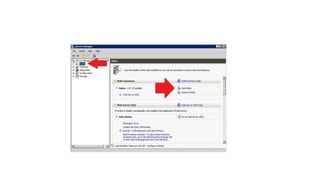
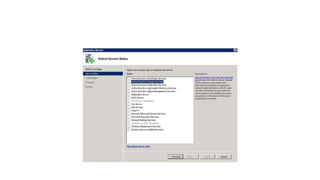
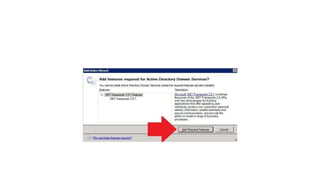
• Installing active directory domain services (adds) in windows
2008 r2
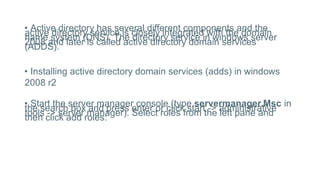
• Start the server manager console (type servermanager.Msc in
the search box and press enter or click start -> administrative
tools -> server manager). Select roles from the left pane and
then click add roles:
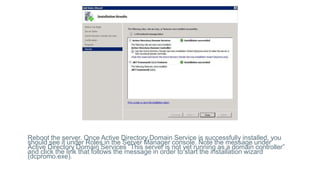
Reboot the server. Once Active Directory Domain Service is successfully installed, you
should see it under Roles in the Server Manager console. Note the message under
Active Directory Domain Services “This server is not yet running as a domain controller”
and click the link that follows the message in order to start the installation wizard
(dcpromo.exe).

Installing Active Directory (ADDS)s.pptx

  • 1.
    Installing Active Directoryon Windows Server 2008 R2
  • 2.
    • Active Directory,introduced with the Windows 2000 server is a directory service, which stores information about the network components, authenticates network users, and enforces security policies. It works by tracking “objects,” which can be users, services, resources, or systems, and then resolving their names to the actual objects. The advantages of Active Directory are the better security management, easier administration, easier assignment of permissions to object, and the use of single source that can find any object on the network
  • 3.
    • Active directoryhas several different components and the active directory service is closely integrated with the domain name system (DNS). The directory service in windows server 2008 and later is called active directory domain services (ADDS). • Installing active directory domain services (adds) in windows 2008 r2 • Start the server manager console (type servermanager.Msc in the search box and press enter or click start -> administrative tools -> server manager). Select roles from the left pane and then click add roles:
  • 8.
    Reboot the server.Once Active Directory Domain Service is successfully installed, you should see it under Roles in the Server Manager console. Note the message under Active Directory Domain Services “This server is not yet running as a domain controller” and click the link that follows the message in order to start the installation wizard (dcpromo.exe).