UNIT-V
I/O Interface Unit, Types of ports (I/O port, Network
Port, USB port, Serial and Parallel Port), Concept of I/O
bus, Isolated I/O versus Memory-Mapped I/O.
Memory Hierarchy, Main Memory (RAM and ROM
chips, Logical and Physical Addresses, Memory
Address Map, Memory Connection to
CPU),Associative Memory, Cache Memory,DMA
Transfer,modes of data transfer.
Introduction to Ports
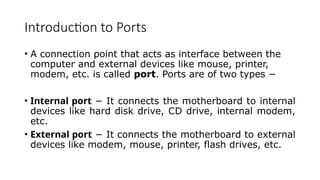
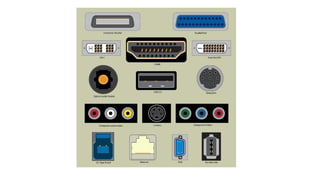
• A connection point that acts as interface between the
computer and external devices like mouse, printer,
modem, etc. is called port. Ports are of two types −
• Internal port − It connects the motherboard to internal
devices like hard disk drive, CD drive, internal modem,
etc.
• External port − It connects the motherboard to external
devices like modem, mouse, printer, flash drives, etc.
Serial Port
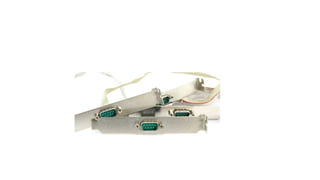
• Serial ports transmit data sequentially one bit at a time.
So they need only one wire to transmit 8 bits. However
it also makes them slower. Serial ports are usually 9-pin
or 25-pin male connectors. They are also known as
COM (communication) ports or RS323C ports.
Parallel Port
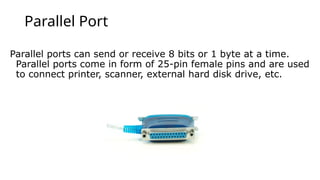
Parallel ports can send or receive 8 bits or 1 byte at a time.
Parallel ports come in form of 25-pin female pins and are used
to connect printer, scanner, external hard disk drive, etc.
USB Port
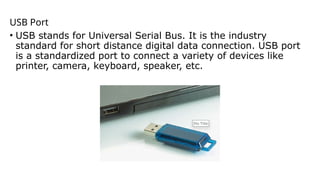
• USB stands for Universal Serial Bus. It is the industry
standard for short distance digital data connection. USB port
is a standardized port to connect a variety of devices like
printer, camera, keyboard, speaker, etc.
PS-2 Port
• PS/2 stands for Personal System/2. It is a female 6-pin
port standard that connects to the male mini-DIN cable.
PS/2 was introduced by IBM to connect mouse and
keyboard to personal computers. This port is now
mostly obsolete, though some systems compatible with
IBM may have this port.
Infrared Port
Infrared port is a port that enables wireless exchange of data
within a radius of 10m. Two devices that have infrared ports
are placed facing each other so that beams of infrared lights
can be used to share data.
Bluetooth Port
Bluetooth is a telecommunication specification that
facilitates wireless connection between phones, computers
and other digital devices over short range wireless
connection. Bluetooth port enables synchronization
between Bluetooth-enabled devices. There are two types of
Bluetooth ports −
• Incoming − It is used to receive connection from Bluetooth
devices.
• Outgoing − It is used to request connection to other
Bluetooth devices.
• Memory Hierarchy
• Main Memory
• Auxiliary Memory
• Associative Memory
• Cache Memory
• Virtual Memory
• Memory Management Hardware
MEMORY ORGANIZATION
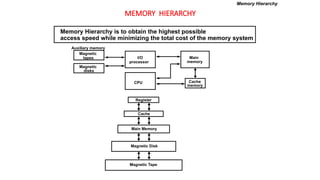
MEMORY HIERARCHY
Magnetic
tapes
Magnetic
disks
I/O
processor
CPU
Main
memory
Cache
memory
Auxiliary memory
Register
Cache
Main Memory
Magnetic Disk
Magnetic Tape
Memory Hierarchy is to obtain the highest possible
access speed while minimizing the total cost of the memory system
Memory Hierarchy
MAIN MEMORY
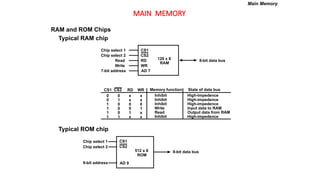
RAM and ROM Chips
Typical RAM chip
Typical ROM chip
Chip select 1
Chip select 2
Read
Write
7-bit address
CS1
CS2
RD
WR
AD 7
128 x 8
RAM
8-bit data bus
CS1 CS2 RD WR
0 0 x x
0 1 x x
1 0 0 0
1 0 0 1
1 0 1 x
1 1 x x
Memory function
Inhibit
Inhibit
Inhibit
Write
Read
Inhibit
State of data bus
High-impedence
High-impedence
High-impedence
Input data to RAM
Output data from RAM
High-impedence
Chip select 1
Chip select 2
9-bit address
CS1
CS2
AD 9
512 x 8
ROM
8-bit data bus
Main Memory
MEMORY ADDRESS MAP
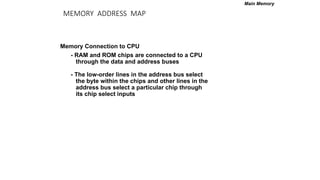
Memory Connection to CPU
- RAM and ROM chips are connected to a CPU
through the data and address buses
- The low-order lines in the address bus select
the byte within the chips and other lines in the
address bus select a particular chip through
its chip select inputs
Main Memory
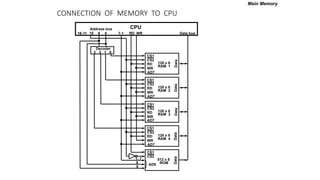
CONNECTION OF MEMORY TO CPU
Main Memory
}
CS1
CS2
RD
WR
AD7
128 x 8
RAM 1
CS1
CS2
RD
WR
AD7
128 x 8
RAM 2
CS1
CS2
RD
WR
AD7
128 x 8
RAM 3
CS1
CS2
RD
WR
AD7
128 x 8
RAM 4
Decoder
3 2 1 0
WR
RD
9 8 7-1
10
16-11
Address bus
Data bus
CPU
CS1
CS2
512 x 8
ROM
AD9
1- 7
9
8
Data
Data
Data
Data
Data
Auxiliary Memory
• An Auxiliary memory is known as the lowest-cost, highest-capacity
and slowest-access storage in a computer system. It is where
programs and data are kept for long-term storage or when not in
immediate use. The most common examples of auxiliary memories
are magnetic tapes and magnetic disks.
Magnetic Disks
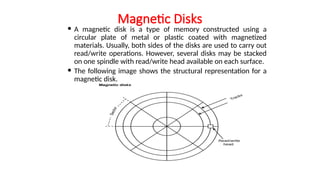
 A magnetic disk is a type of memory constructed using a
circular plate of metal or plastic coated with magnetized
materials. Usually, both sides of the disks are used to carry out
read/write operations. However, several disks may be stacked
on one spindle with read/write head available on each surface.
 The following image shows the structural representation for a
magnetic disk.
Magnetic Tape
 Magnetic tape is a storage medium that allows data archiving,
collection, and backup for different kinds of data. The magnetic tape is
constructed using a plastic strip coated with a magnetic recording
medium.
 The bits are recorded as magnetic spots on the tape along several
tracks. Usually, seven or nine bits are recorded simultaneously to form a
character together with a parity bit.
 Magnetic tape units can be halted, started to move forward or in
reverse, or can be rewound. However, they cannot be started or
stopped fast enough between individual characters. For this reason,
information is recorded in blocks referred to as records.
Associative Memory
 in associative memory can be considered as a memory unit
whose stored data can be identified for access by the content of
the data itself rather than by an address or memory location.
 Associative memory is often referred to as Content Addressable
Memory (CAM).
 When a write operation is performed on associative memory,
no address or memory location is given to the word. The
memory itself is capable of finding an empty unused location to
store the word.
 On the other hand, when the word is to be read from an
associative memory, the content of the word, or part of the
word, is specified. The words which match the specified content
are located by the memory and are marked for reading.
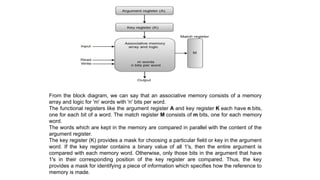
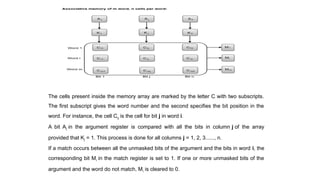
 The following diagram shows the block representation of an
Associative memory.
From the block diagram, we can say that an associative memory consists of a memory
array and logic for 'm' words with 'n' bits per word.
The functional registers like the argument register A and key register K each have n bits,
one for each bit of a word. The match register M consists of m bits, one for each memory
word.
The words which are kept in the memory are compared in parallel with the content of the
argument register.
The key register (K) provides a mask for choosing a particular field or key in the argument
word. If the key register contains a binary value of all 1's, then the entire argument is
compared with each memory word. Otherwise, only those bits in the argument that have
1's in their corresponding position of the key register are compared. Thus, the key
provides a mask for identifying a piece of information which specifies how the reference to
memory is made.
The cells present inside the memory array are marked by the letter C with two subscripts.
The first subscript gives the word number and the second specifies the bit position in the
word. For instance, the cell Cij is the cell for bit j in word i.
A bit Aj in the argument register is compared with all the bits in column j of the array
provided that Kj = 1. This process is done for all columns j = 1, 2, 3......, n.
If a match occurs between all the unmasked bits of the argument and the bits in word i, the
corresponding bit Mi in the match register is set to 1. If one or more unmasked bits of the
argument and the word do not match, Mi is cleared to 0.
Cache Memory
• The data or contents of the main memory that are
used frequently by CPU are stored in the cache
memory so that the processor can easily access that
data in a shorter time. Whenever the CPU needs to
access memory, it first checks the cache memory. If the
data is not found in cache memory, then the CPU
moves into the main memory.
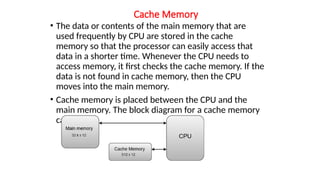
• Cache memory is placed between the CPU and the
main memory. The block diagram for a cache memory
can be represented as:
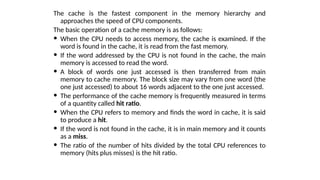
The cache is the fastest component in the memory hierarchy and
approaches the speed of CPU components.
The basic operation of a cache memory is as follows:
 When the CPU needs to access memory, the cache is examined. If the
word is found in the cache, it is read from the fast memory.
 If the word addressed by the CPU is not found in the cache, the main
memory is accessed to read the word.
 A block of words one just accessed is then transferred from main
memory to cache memory. The block size may vary from one word (the
one just accessed) to about 16 words adjacent to the one just accessed.
 The performance of the cache memory is frequently measured in terms
of a quantity called hit ratio.
 When the CPU refers to memory and finds the word in cache, it is said
to produce a hit.
 If the word is not found in the cache, it is in main memory and it counts
as a miss.
 The ratio of the number of hits divided by the total CPU references to
memory (hits plus misses) is the hit ratio.
Virtual Memory
 Virtual memory is the separation of logical memory from
physical memory. This separation provides large virtual memory
for programmers when only small physical memory is available.
 Virtual memory is used to give programmers the illusion that
they have a very large memory even though the computer has a
small main memory. It makes the task of programming easier
because the programmer no longer needs to worry about the
amount of physical memory available
 the virtual memory model provides decoupling of addresses
used by the program (virtual) and the memory addresses
(physical). Therefore, the definition of virtual memory can be
stated as, “ The conceptual separation of user logical
memory from physical memory in order to have large virtual
memory on a small physical memory”. It gives an illusion of
infinite storage, though the memory size is limited to the size
of the virtual address.

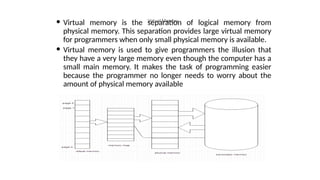
 Even though the programs generate virtual addresses, these
addresses cannot be used to access the physical memory.
Therefore, the virtual to physical address translation has to
be done. This is done by the memory management unit
(MMU). The mapping is a dynamic operation, which means
that every address is translated immediately as a word is
referenced by the CPU.
Input output interface its types and memory

  • 1.
    UNIT-V I/O Interface Unit,Types of ports (I/O port, Network Port, USB port, Serial and Parallel Port), Concept of I/O bus, Isolated I/O versus Memory-Mapped I/O. Memory Hierarchy, Main Memory (RAM and ROM chips, Logical and Physical Addresses, Memory Address Map, Memory Connection to CPU),Associative Memory, Cache Memory,DMA Transfer,modes of data transfer.
  • 11.
    Introduction to Ports •A connection point that acts as interface between the computer and external devices like mouse, printer, modem, etc. is called port. Ports are of two types − • Internal port − It connects the motherboard to internal devices like hard disk drive, CD drive, internal modem, etc. • External port − It connects the motherboard to external devices like modem, mouse, printer, flash drives, etc.
  • 13.
    Serial Port • Serialports transmit data sequentially one bit at a time. So they need only one wire to transmit 8 bits. However it also makes them slower. Serial ports are usually 9-pin or 25-pin male connectors. They are also known as COM (communication) ports or RS323C ports.
  • 15.
    Parallel Port Parallel portscan send or receive 8 bits or 1 byte at a time. Parallel ports come in form of 25-pin female pins and are used to connect printer, scanner, external hard disk drive, etc.
  • 16.
    USB Port • USBstands for Universal Serial Bus. It is the industry standard for short distance digital data connection. USB port is a standardized port to connect a variety of devices like printer, camera, keyboard, speaker, etc.
  • 17.
    PS-2 Port • PS/2stands for Personal System/2. It is a female 6-pin port standard that connects to the male mini-DIN cable. PS/2 was introduced by IBM to connect mouse and keyboard to personal computers. This port is now mostly obsolete, though some systems compatible with IBM may have this port.
  • 18.
    Infrared Port Infrared portis a port that enables wireless exchange of data within a radius of 10m. Two devices that have infrared ports are placed facing each other so that beams of infrared lights can be used to share data.
  • 19.
    Bluetooth Port Bluetooth isa telecommunication specification that facilitates wireless connection between phones, computers and other digital devices over short range wireless connection. Bluetooth port enables synchronization between Bluetooth-enabled devices. There are two types of Bluetooth ports − • Incoming − It is used to receive connection from Bluetooth devices. • Outgoing − It is used to request connection to other Bluetooth devices.
  • 20.
    • Memory Hierarchy •Main Memory • Auxiliary Memory • Associative Memory • Cache Memory • Virtual Memory • Memory Management Hardware MEMORY ORGANIZATION
  • 21.
    MEMORY HIERARCHY Magnetic tapes Magnetic disks I/O processor CPU Main memory Cache memory Auxiliary memory Register Cache MainMemory Magnetic Disk Magnetic Tape Memory Hierarchy is to obtain the highest possible access speed while minimizing the total cost of the memory system Memory Hierarchy
  • 22.
    MAIN MEMORY RAM andROM Chips Typical RAM chip Typical ROM chip Chip select 1 Chip select 2 Read Write 7-bit address CS1 CS2 RD WR AD 7 128 x 8 RAM 8-bit data bus CS1 CS2 RD WR 0 0 x x 0 1 x x 1 0 0 0 1 0 0 1 1 0 1 x 1 1 x x Memory function Inhibit Inhibit Inhibit Write Read Inhibit State of data bus High-impedence High-impedence High-impedence Input data to RAM Output data from RAM High-impedence Chip select 1 Chip select 2 9-bit address CS1 CS2 AD 9 512 x 8 ROM 8-bit data bus Main Memory
  • 23.
    MEMORY ADDRESS MAP MemoryConnection to CPU - RAM and ROM chips are connected to a CPU through the data and address buses - The low-order lines in the address bus select the byte within the chips and other lines in the address bus select a particular chip through its chip select inputs Main Memory
  • 24.
    CONNECTION OF MEMORYTO CPU Main Memory } CS1 CS2 RD WR AD7 128 x 8 RAM 1 CS1 CS2 RD WR AD7 128 x 8 RAM 2 CS1 CS2 RD WR AD7 128 x 8 RAM 3 CS1 CS2 RD WR AD7 128 x 8 RAM 4 Decoder 3 2 1 0 WR RD 9 8 7-1 10 16-11 Address bus Data bus CPU CS1 CS2 512 x 8 ROM AD9 1- 7 9 8 Data Data Data Data Data
  • 25.
    Auxiliary Memory • AnAuxiliary memory is known as the lowest-cost, highest-capacity and slowest-access storage in a computer system. It is where programs and data are kept for long-term storage or when not in immediate use. The most common examples of auxiliary memories are magnetic tapes and magnetic disks.
  • 26.
    Magnetic Disks  Amagnetic disk is a type of memory constructed using a circular plate of metal or plastic coated with magnetized materials. Usually, both sides of the disks are used to carry out read/write operations. However, several disks may be stacked on one spindle with read/write head available on each surface.  The following image shows the structural representation for a magnetic disk.
  • 27.
    Magnetic Tape  Magnetictape is a storage medium that allows data archiving, collection, and backup for different kinds of data. The magnetic tape is constructed using a plastic strip coated with a magnetic recording medium.  The bits are recorded as magnetic spots on the tape along several tracks. Usually, seven or nine bits are recorded simultaneously to form a character together with a parity bit.  Magnetic tape units can be halted, started to move forward or in reverse, or can be rewound. However, they cannot be started or stopped fast enough between individual characters. For this reason, information is recorded in blocks referred to as records.
  • 28.
    Associative Memory  inassociative memory can be considered as a memory unit whose stored data can be identified for access by the content of the data itself rather than by an address or memory location.  Associative memory is often referred to as Content Addressable Memory (CAM).  When a write operation is performed on associative memory, no address or memory location is given to the word. The memory itself is capable of finding an empty unused location to store the word.  On the other hand, when the word is to be read from an associative memory, the content of the word, or part of the word, is specified. The words which match the specified content are located by the memory and are marked for reading.  The following diagram shows the block representation of an Associative memory.
  • 29.
    From the blockdiagram, we can say that an associative memory consists of a memory array and logic for 'm' words with 'n' bits per word. The functional registers like the argument register A and key register K each have n bits, one for each bit of a word. The match register M consists of m bits, one for each memory word. The words which are kept in the memory are compared in parallel with the content of the argument register. The key register (K) provides a mask for choosing a particular field or key in the argument word. If the key register contains a binary value of all 1's, then the entire argument is compared with each memory word. Otherwise, only those bits in the argument that have 1's in their corresponding position of the key register are compared. Thus, the key provides a mask for identifying a piece of information which specifies how the reference to memory is made.
  • 30.
    The cells presentinside the memory array are marked by the letter C with two subscripts. The first subscript gives the word number and the second specifies the bit position in the word. For instance, the cell Cij is the cell for bit j in word i. A bit Aj in the argument register is compared with all the bits in column j of the array provided that Kj = 1. This process is done for all columns j = 1, 2, 3......, n. If a match occurs between all the unmasked bits of the argument and the bits in word i, the corresponding bit Mi in the match register is set to 1. If one or more unmasked bits of the argument and the word do not match, Mi is cleared to 0.
  • 31.
    Cache Memory • Thedata or contents of the main memory that are used frequently by CPU are stored in the cache memory so that the processor can easily access that data in a shorter time. Whenever the CPU needs to access memory, it first checks the cache memory. If the data is not found in cache memory, then the CPU moves into the main memory. • Cache memory is placed between the CPU and the main memory. The block diagram for a cache memory can be represented as:
  • 32.
    The cache isthe fastest component in the memory hierarchy and approaches the speed of CPU components. The basic operation of a cache memory is as follows:  When the CPU needs to access memory, the cache is examined. If the word is found in the cache, it is read from the fast memory.  If the word addressed by the CPU is not found in the cache, the main memory is accessed to read the word.  A block of words one just accessed is then transferred from main memory to cache memory. The block size may vary from one word (the one just accessed) to about 16 words adjacent to the one just accessed.  The performance of the cache memory is frequently measured in terms of a quantity called hit ratio.  When the CPU refers to memory and finds the word in cache, it is said to produce a hit.  If the word is not found in the cache, it is in main memory and it counts as a miss.  The ratio of the number of hits divided by the total CPU references to memory (hits plus misses) is the hit ratio.
  • 33.
    Virtual Memory  Virtualmemory is the separation of logical memory from physical memory. This separation provides large virtual memory for programmers when only small physical memory is available.  Virtual memory is used to give programmers the illusion that they have a very large memory even though the computer has a small main memory. It makes the task of programming easier because the programmer no longer needs to worry about the amount of physical memory available
  • 34.
     the virtualmemory model provides decoupling of addresses used by the program (virtual) and the memory addresses (physical). Therefore, the definition of virtual memory can be stated as, “ The conceptual separation of user logical memory from physical memory in order to have large virtual memory on a small physical memory”. It gives an illusion of infinite storage, though the memory size is limited to the size of the virtual address.   Even though the programs generate virtual addresses, these addresses cannot be used to access the physical memory. Therefore, the virtual to physical address translation has to be done. This is done by the memory management unit (MMU). The mapping is a dynamic operation, which means that every address is translated immediately as a word is referenced by the CPU.