Understanding Computer
hardware components
SAHASRA REDDY-
1084
Computer hardware components:
• Motherboard
• CPU
• RAM
• Hard Drive
• Keyboard
• Mouse
• Monitor
• Speakers
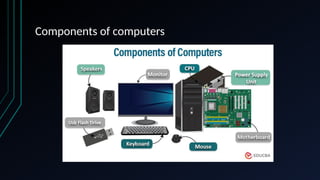
Components of computers
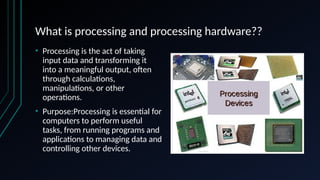
What is processing and processing hardware??
• Processing is the act of taking
input data and transforming it
into a meaningful output, often
through calculations,
manipulations, or other
operations.
• Purpose:Processing is essential for
computers to perform useful
tasks, from running programs and
applications to managing data and
controlling other devices.
What is Memory?
• Memory refers to the electronic components
that store data and instructions for quick access
by the processor, acting as a temporary
workspace for the computer's operations.
• Types of Memory:
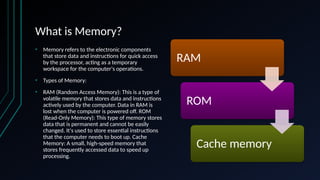
• RAM (Random Access Memory): This is a type of
volatile memory that stores data and instructions
actively used by the computer. Data in RAM is
lost when the computer is powered off. ROM
(Read-Only Memory): This type of memory stores
data that is permanent and cannot be easily
changed. It's used to store essential instructions
that the computer needs to boot up. Cache
Memory: A small, high-speed memory that
stores frequently accessed data to speed up
processing.
RAM
ROM
Cache memory
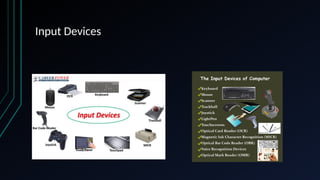
WHAT ARE INPUT DEVICES??
INPUT DEVICES ARE DEVICES THAT ALLOW YOU TO ENTER DATA
INTO A COMPUTER, SUCH AS A KEYBOARD, MOUSE, OR MICROPHONE.
INPUT DEVICES SEND DATA AND CONTROL SIGNALS TO A COMPUTER. FOR
EXAMPLE, WHEN YOU PRESS A KEY ON YOUR KEYBOARD, THE KEYBOARD
SENDS A SIGNAL TO YOUR COMPUTER. WHEN YOU MOVE YOUR MOUSE, IT
SENDS SIGNALS TO YOUR COMPUTER ABOUT THE DIRECTION OF THE
MOVEMENT. INPUT CAN BE ANYTHING FROM SIMPLE TEXT TO
COMPLICATED IMAGES AND AUDIO RECORDINGS.
EXAMPLES:
-MOUSE
-MICROPHONE
-SCANNER
-JOYSTICK
Input Devices
Motherboard:
motherboard is a computer's main circuit board that connects all the internal components. It's the
central communications hub that allows components to communicate with each other. A
motherboard is made of strong, non-conductive material, usually plasticThin metal lines, called
traces, are printed on it to connect the different partsIt also has sockets and slots where other
components can be plugged in.
Other names for a motherboard Mainboard,Main circuit board,MB,Mobo,Base board,System
board,Logic board (in Apple computers)
CONCLUSION
• Computers are important tools that have changed the way society
works, and are now an integral part of our lives.
• Computers are developing day by day.We can expect computers to
serve us more in the future.
THANK YOU

Understanding Computer hardware components.pptx

  • 1.
  • 2.
    Computer hardware components: •Motherboard • CPU • RAM • Hard Drive • Keyboard • Mouse • Monitor • Speakers
  • 3.
  • 4.
    What is processingand processing hardware?? • Processing is the act of taking input data and transforming it into a meaningful output, often through calculations, manipulations, or other operations. • Purpose:Processing is essential for computers to perform useful tasks, from running programs and applications to managing data and controlling other devices.
  • 5.
    What is Memory? •Memory refers to the electronic components that store data and instructions for quick access by the processor, acting as a temporary workspace for the computer's operations. • Types of Memory: • RAM (Random Access Memory): This is a type of volatile memory that stores data and instructions actively used by the computer. Data in RAM is lost when the computer is powered off. ROM (Read-Only Memory): This type of memory stores data that is permanent and cannot be easily changed. It's used to store essential instructions that the computer needs to boot up. Cache Memory: A small, high-speed memory that stores frequently accessed data to speed up processing. RAM ROM Cache memory
  • 6.
    WHAT ARE INPUTDEVICES?? INPUT DEVICES ARE DEVICES THAT ALLOW YOU TO ENTER DATA INTO A COMPUTER, SUCH AS A KEYBOARD, MOUSE, OR MICROPHONE. INPUT DEVICES SEND DATA AND CONTROL SIGNALS TO A COMPUTER. FOR EXAMPLE, WHEN YOU PRESS A KEY ON YOUR KEYBOARD, THE KEYBOARD SENDS A SIGNAL TO YOUR COMPUTER. WHEN YOU MOVE YOUR MOUSE, IT SENDS SIGNALS TO YOUR COMPUTER ABOUT THE DIRECTION OF THE MOVEMENT. INPUT CAN BE ANYTHING FROM SIMPLE TEXT TO COMPLICATED IMAGES AND AUDIO RECORDINGS. EXAMPLES: -MOUSE -MICROPHONE -SCANNER -JOYSTICK
  • 7.
  • 8.
    Motherboard: motherboard is acomputer's main circuit board that connects all the internal components. It's the central communications hub that allows components to communicate with each other. A motherboard is made of strong, non-conductive material, usually plasticThin metal lines, called traces, are printed on it to connect the different partsIt also has sockets and slots where other components can be plugged in. Other names for a motherboard Mainboard,Main circuit board,MB,Mobo,Base board,System board,Logic board (in Apple computers)
  • 10.
    CONCLUSION • Computers areimportant tools that have changed the way society works, and are now an integral part of our lives. • Computers are developing day by day.We can expect computers to serve us more in the future.
  • 11.