INFORMATICS
PRACTICES
A Text Book on
Shiksha Kendra, 2, Community Centre, Preet Vihar, Delhi-110 092 India
CLASS XI
A text book on Informatics Practices, Class XI.
PRICE : Rs.
FIRST EDITION 2010 CBSE, India
COPIES:
PUBLISHED BY : The Secretary, Central Board of Secondary
Education, Shiksha Kendra, 2, Community Centre, Preet Vihar,
Delhi-110092
DESIGN, LAYOUT : Multi Graphics, 5745/81, Reghar Pura, Karol Bagh,
New Delhi-110005, Phone : 25783846
PRINTED BY :
ii
"This book or part thereof may not be reproduced by
any person or agency in any manner."
ForewordForeword
Information and Communication Technology has permeated in every walk of life
affecting the technology fields such as launching satellites, managing businesses across
the globe and also enabling social networking. The convergence of computer,
communication and content technologies, being known as ICT, have attracted attention
of academia, business, government and communities to use it for innovative profitable
propositions. Year by year it is becoming simpler to use devices such as desktop, palm
top,iPod,etc.
21st century is characterized with the emergence of knowledge based society wherein
ICT plays a pivotal role. In its vision, the National Policy on ICT in School Education by
MHRD, Govt. of India, states "The ICT policy in School Education aims at preparing
youth to participate creatively in the establishment, sustenance and growth of a
knowledge society leading to all around socio economic development of the nation and
global competitiveness". The policy envisages three stages of ICT implementations at
school level - ICT literacy and Competency Enhancement, ICT enabled teaching-
learning, andintroductionofICTrelated elective subjectsat SeniorSecondarylevel.
With this backdrop a major paradigm shift is imperative in imparting ICT-enabled
instructions, collaborative learning, multidisciplinary problem-solving and promoting
critical thinking skills as envisaged in the National curriculum framework 2005.
Foundation of these skills is laid at school level. Armed with such skills it is expected that
a student will transform knowledge into easy to use systems to the ultimate benefit of the
societyat large.
Syllabus of Informatics Practices has been revisited accordingly with a focus on generic
concepts with domain specific practical experiments and projects to ensure conceptual
knowledge with practical skills. The societal impact of ICT have been discussed. A new
Unit on IT Applications has been added to enhance understanding of the above tools and
techniques to solve real life problems by designing both front end and back end with
proper data connectivity. Introduction of Open Standards and Open Source to promote
Vendor Neutrality of tools. Creativity and Collaborative Learning/Programming is also
anaddedfeature.
Specifically, a Unit on Networking and Open Standards is introduced in place of
Business Computing. For IDE based programming, Java is introduced in place of VB.
Relational Database Management System is dealt with using My SQL in place of SQL &
PL/SQLusingOracle.
The CBSE had been recommending different books in the past. With a total overhauling
of the course on Informatics Practices it has ventured to bring out a comprehensive text
bookforallunitsforthe firsttime.
I am happy to release Part-1 of Informatics Practices for Class - XI. I would like to express
my deep appreciation to the text book development team for their contribution and to
the convener of the team, Prof. Om Vikas who aptly steered this activity. Appreciation is
also due to Mrs. C Gurumurthy, Director (Academic) and Dr.(Smt) Srijata Das,
Education Officer, for planning, coordinating and executing this initiative and bringing
outthispublication.
It is hoped that all students and teachers will benefit by making best use of this
publication.Theirfeedbackwillbe highly appreciatedforfurther improvement.
VINEET JOSHI
CHAIRMAN
Hkkjrdklafo/ku
ewydÙkZO;
mísf'kdk
Hkkx4d
51d-ewydÙkZO;&Hkkjrds izR;sdukxfjddk;gdÙkZO;gksxkfdog&
(d)lafo/kudkikyudjs vkSjmlds vkn'kksZa]laLFkkvksa]jk"VªèotvkSjjk"Vªxkudkvknjdjs_
([k)Lora=krkds fy,gekjs jk"Vªh;vkanksyudks izsfjrdjus okys mPpvkn'kksZa dks ân;esa latks,j[ks vkSjmudkikyudjs_
(x)HkkjrdhizHkqrk],drkvkSjv[kaMrkdhj{kkdjs vkSjmls v{kq..kj[ks_
(?k)ns'kdhj{kkdjs vkSjvkg~okufd,tkus ijjk"Vª dhlsokdjs_
(Ä)Hkkjrds lHkhyksxksa esa lejlrkvkSjlekuHkzkr`RodhHkkoukdkfuekZ.kdjs tks /eZ]Hkk"kkvkSjizns'k;koxZ ijvk/kfjrlHkh
HksnHkkols ijs gksa],slhizFkkvksa dkR;kxdjs tks fL=k;ksa ds lEekuds fo#¼gSa_
(p)gekjhlkekfldlaLÑfrdhxkSjo'kkyhijaijkdkegÙole>s vkSjmldkijh{k.kdjs_
(N)izkÑfrdi;kZoj.kdhftlds varxZrou]>hy]unh]vkSjoU;thogSa]j{kkdjs vkSjmldklao/Zudjs rFkkizkf.kek=kds izfr
n;kHkkoj[ks_
(t)oSKkfudn`f"Vdks.k]ekuooknvkSjKkuktZurFkklq/kjdhHkkoukdkfodkldjs_
(>)lkoZtfudlaifÙkdks lqjf{krj[ks vkSjfgalkls nwjjgs_
(×k)O;fDrxrvkSjlkewfgdxfrfof/;ksa ds lHkh{ks=kksa esa mRd"kZ dhvksjc<+us dklrriz;kldjs ftlls jk"Vª fujarjc<+rs gq,iz;Ru
vkSjmiyfC/dhubZ mapkb;ksa dks Nw ysA
ge]Hkkjrds yksx]Hkkjrdks ,d^¹lEiw.kZ izHkqRo&laiUulektoknhiaFkfujis{kyksdra=kkRedx.kjkT;ºcukus ds fy,]rFkk
mlds leLrukxfjdksa dks%
lkekftd]vkfFkZdvkSjjktuSfrdU;k;]
fopkj]vfHkO;fDr]fo'okl]/eZ
vkSjmiklukdhLora=krk]
izfr"BkvkSjvoljdhlerk
2
izkIrdjkus ds fy,]rFkkmulcesa]O;fDrdhxfjekvkSj¹jk"Vª dh,drkvkSjv[k.Mrkºlqfuf'pr
djus okyhca/qrkc<+kus ds fy,n`<+ladYigksdjviuhbllafo/kulHkkesa vktrkjh[k26uoEcj]1949bZñdks ,rn~}kjkbl
lafo/kudks vaxhÑr]vf/fu;fervkSjvkRekfiZrdjrs gSaA
1-lafo/ku(c;kyhloka la'kks/u)vf/fu;e]1976dh/kjk2}kjk(3-1-1977)ls ¶izHkqRo&laiUuyksdra=kkRedx.kjkT;¸ds LFkkuijizfrLFkkfirA
2-lafo/ku(c;kyhloka la'kks/u)vf/fu;e]1976dh/kjk2}kjk(3-1-1977ls)]¶jk"Vª dh,drk¸ds LFkkuijizfrLFkkfirA
THE CONSTITUTION OF INDIA
PREAMBLE
1
WE, THE PEOPLE OF INDIA, having solemnly resolved to constitute India into a
SOVEREIGN SOCIALIST SECULAR DEMOCRATIC REPUBLIC and to secure to all its citizens :
JUSTICE, social, economic and political;
LIBERTY of thought, expression, belief, faith and worship;
EQUALITY of status and of opportunity; and to promote among them all
2
FRATERNITY assuring the dignity of the individual and the [unity and integrity of the Nation];
IN OUR CONSTITUENT ASSEMBLY this twenty-sixth day of November, 1949, do HEREBY TO
OURSELVES THIS CONSTITUTION.
THE CONSTITUTION OF INDIA
Chapter IV A
Fundamental Duties
ARTICLE 51A
Fundamental Duties - It shall be the duty of every citizen of India-
(a) to abide by the Constitution and respect its ideals and institutions, the National Flag and the
National Anthem;
(b) to cherish and follow the noble ideals which inspired our national struggle for freedom;
(c) to uphold and protect the sovereignty, unity and integrity of India;
(d) to defend the country and render national service when called upon to do so;
(e) To promote harmony and the spirit of common brotherhood amongst all the people of India
transcending religious, linguistic and regional or sectional diversities; to renounce practices
derogatory to the dignity of women;
(f) to value and preserve the rich heritage of our composite culture;
(g) to protect and improve the natural environment including forests, lakes, rivers, wild life and to
have compassion for living creatures;
(h) to develop the scientific temper, humanism and the spirit of inquiry and reform;
(i) to safeguard public property and to abjure violence;
(j) to strive towards excellence in all spheres of individual and collective activity so that the nation
constantly rises to higher levels of endeavour and achievement.
1. Subs, by the Constitution (Forty-Second Amendment) Act. 1976, sec. 2, for "Sovereign Democratic Republic (w.e.f.
3.1.1977)
2. Subs, by the Constitution (Forty-Second Amendment) Act. 1976, sec. 2, for "unity of the Nation (w.e.f. 3.1.1977)
PrefacePreface
Computers have permeated in every sector of economy. Computer technology has been
rapidly changing exhibiting exponential performance improvements. The
developments may be categorized in three phases. The first phase of computing focused
on mainframes to solve specific problems. A single vendor provide a fully integrated
system. The second phase of Middleware segments focused on computer architecture
and operating system techniques to support run-time programming with platform
independence and to increase application programmers' productivity. Client could
separately buy servers, Operating Systems, middleware, storage, etc. The third phase of
web browsers led to emergence of connected computer systems and computing
platforms. Key factors included TCP/IP and Ethernet as standard communication
protocols and affordable PCs. IT service industry grew that led to outsourcing IT
operations. This delivery model is now being challenged by another model of cloud
computing.
Information Technology that refers to the convergence of computer, communication and
content technologies plays catalytic role in emergence of new socio-economic
applications. Need of introducing IT to all the students opting different combinations of
courses was felt. Informatics Practices was introduced as motivational course carrying
case studies aiming to build problem-solving skills. The curriculum was revisited so as
to make students better prepared for career in various industries requiring IT tools and
applications.RecommendationsofNCF 2005 havealsobeen taken intoconsideration.
Need for preparing an authentic book to follow in the class-room was also felt.
Accordingly CBSE initiated the endeavor. This is a beginning with praparing for class-XI
Part-1 ofthe intendedbookonInformaticspractices.
Characteristicsofthe bookbasedonthe revisedcurriculumare:
a) Introduction to Open Standards and Open Source aims at Vendor Neutrality
oftools,Creative computingandCollaborative Learningenvironment.
(b) Presentation ofvariousconceptsisinthe formofconversationwith students.
(c) Development of Front End Interface, Back End Database and connectivity of
both has been dealt with in such a manner that the student gets a complete feel
ofApplicationDevelopment.
(d) Generic concepts with specific examples help the student to relate IT tools and
itsapplicationsinrealsense.
(e) Annexures are added to clarify some concepts in details, which will be useful
tothe teachersaswell asto the advancedlearners.
I am happy to be associated with this endeavor. Expert colleagues -Mr Mukesh Kumar,
Ms Gurpreet Kaur, Ms Nancy Sehgal, Ms Divya Jain, Ms Ritu Arora, Mr Gautam Sarkar-
put untiring efforts in authoring and patiently improvising the chapters with case study
based approach for better comprehension. They also contributed for preparing
Annexures appropriately linking with the content for evaluation purpose. Comments of
Dr. MPS Bhatia were valuable in improvising the presentation. From time to time
Mrs. C Gurumuthy, Director (Academics) at CBSE gave ideas on motivating students to
study and interconnect concepts and apply them in real life situations. I extend my
sincerethanks tothem.
Thanks are due to Dr. Srijata Das, Education Officer at CBSE for well directed
coordination of the meetings. Her constant persuasion to meet the time target made it
possibleto get the bookreadyintime.
Without undaunted support of Shri Vineet Joshi, Chairman CBSE, a new initiative of
writing such a book would have been impossible. On behalf of my team members and
myself,Iextend ourprofoundthanks to him.
Prof. Om Vikas (Convener)
Former Director, IIITM, Gwalior
ACKNOWLEDGEMENTSACKNOWLEDGEMENTS
Shri Vineet Joshi, Chairman, CBSE
Smt. Chitralekha Gurumurthy, Director (Academics)
•
•
•
•
•
•
•
•
Mukesh Kumar, DPS, RK Puram, Delhi
Mrs. Nancy Sehgal, Mata Jai Kaur Public School, Ashok Vihar, Delhi
Mrs. Gurpreet Kaur, GD Goenka School, Vasant Kunj, Delhi
Mrs. Divya Jain, Apeejay, Noida
Mrs. Ritu Arora, DPS, Gurgaon.
Mr. Gautam Sarkar, Modern School, Barakhamba Road, New Delhi
DEVELOPMENT TEAM
CONVENOR & EDITOR
CBSE ADVISORS
Prof. Om Vikas, Former Director, IIITM, Gwalior•
MEMBER COORDINATOR
Dr. Srijata Das, Education Officer, CBSE, Delhi•
HARDWARE CONCEPTS
CONTENTSCONTENTS
INFORMATICS PRACTICES
1
1
SOFTWARE CONCEPTS &
PRODUCTIVITY TOOLS
INFORMATION SECURITY
AND SOCIAL NETWORKING
GETTING STARTED WITH
IDE PROGRAMMING
PROGRAMMING
FUNDAMENTALS
CONTROL STRUCTURES
PROGRAMMING
GUIDELINES
INTRODUCTION
TO MYSQL
19
40
57
99
126
183
195
2 10
3 11
4
5
6
7
8
MYSQL
208
9
FUNCTIONS IN MYSQL
SAMPLE APPLICATIONS-
CASE STUDIES
254
275
ANNEXURE
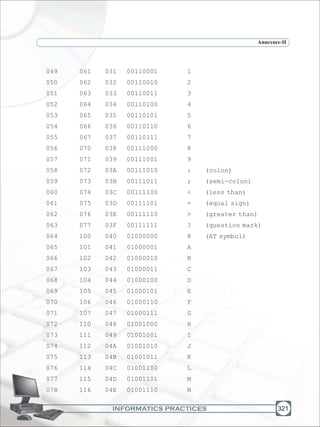
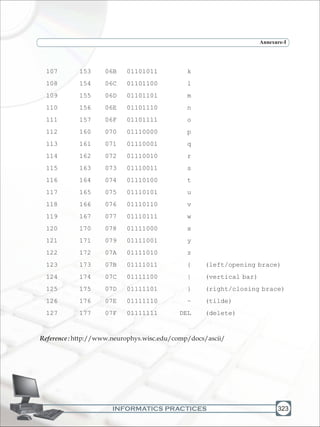
1 BINARY CODES 313
2 AMERICAN STANDARD
CODE FOR INFORMATION
INTERCHARGE (ASCII) 319
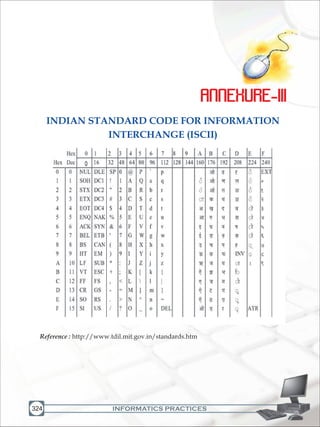
3 INDIAN STANDARD CODE
FOR INFORMATION
INTERCHANGE (ISCII) 324
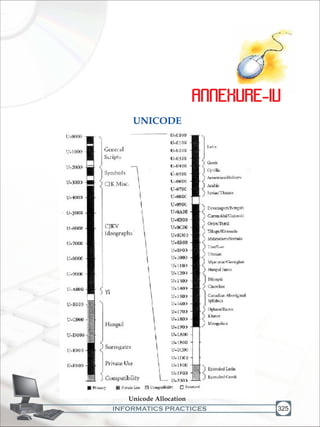
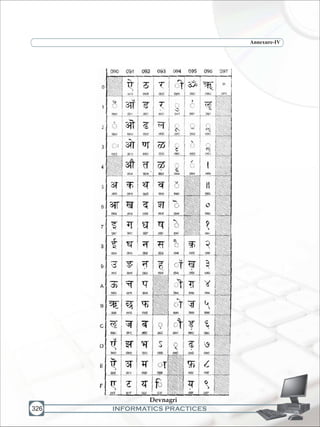
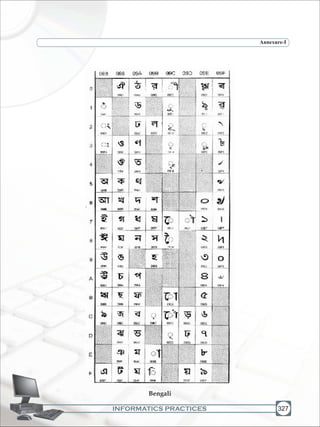
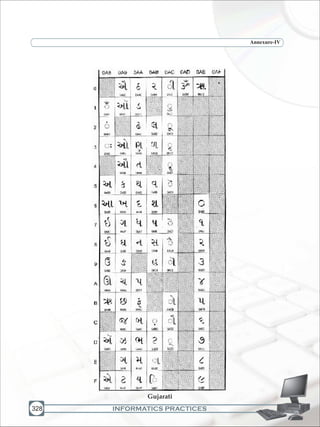
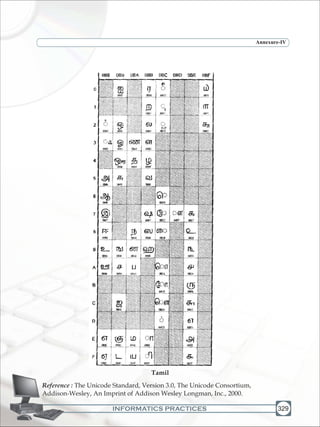
4 UNICODE 325
5 INSTALLATION OF
NETBEANS IDE 330
1INFORMATICS PRACTICES
1
Learningobjectives
v
v
v
v
v
Afterlearningthischapterthestudentswillbeableto:
understandfunctionalunitsofcomputer
learnabout variousinputdevices
learnaboutvariousoutputdevices
learnabout secondarystoragedevices
understanddataandinstructionflowusingcommunicationbusesandports
Our present day life is so automatic that most of the tasks are accomplished with a click
of a button. Washing has been taken over by washing machines, cooking by microwaves,
conventional banking has been replaced by ATMs etc. In every sphere of life, machines
dominatehumanefforts.Haveyou everwonderedwhatmechanismworksbehindthese
machines? In fact, in all these machines, a click of button starts a process inside the
machine which sometimes can be very complex one. It does exactly what is required as it
follows a predefined work flow based on which button has been pressed. Let us take the
case of cash withdrawal from a bank ATM. The user is required to press only a few
buttons to authenticate his identity and the amount he wishes to withdraw. Then within
seconds the money pops out of the ATM. During this process, the inside working of bank
ATM is beyond imagination of the user. Broadly speaking, the ATM receives certain data
from the user, processes it and gives the output (money). This is exactly what a computer
does.Formally,acomputercanbedefinedasfollows:
A computer is an electronic device that processes input data and produces result
(output)accordingtoasetofinstructionscalledprogram.
Hardware Concepts
INFORMATICS PRACTICES
Hardware ConceptsChapter-1
2
Acomputerperformsbasicallyfivemajorfunctionsirrespectiveofitssizeandmake.
It acceptsdataorinstructionsbywayofinput
It storesdata
It processesdataasrequiredbytheuser
It controlsoperationsofacomputer
It givesresultsintheformofoutput
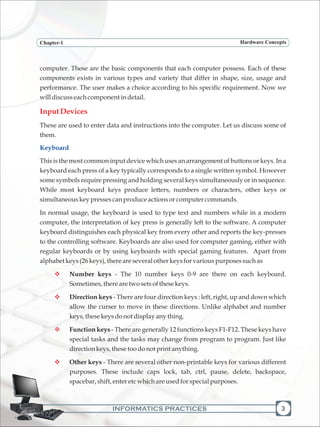
In order to carry out the operations mentioned above the computer allocates the task
amongitsvariousfunctionalunits.
v
v
v
v
v
Input
Devices
CPU
CU Output
Devices
ALU
Memory
Main/Primary
Memory
Data Paths Control Signals
Figure 1.1 Block diagram of functional units of a computer
The above diagram describes the basic layout of a computer. A computer receives data
and instructions through "Input Devices" which get processed in Central Processing
Unit, "CPU" and the result is shown through "Output Devices". The "Main / primary
Memory" and "Secondary / Auxiliary Memory" are used to store data inside the
Secondary/Auxiliary
INFORMATICS PRACTICES
Hardware Concepts
computer. These are the basic components that each computer possess. Each of these
components exists in various types and variety that differ in shape, size, usage and
performance. The user makes a choice according to his specific requirement. Now we
willdiscusseachcomponentindetail.
These are used to enter data and instructions into the computer. Let us discuss some of
them.
This is the most common input device which uses an arrangement of buttons or keys. In a
keyboard each press of a key typically corresponds to a single written symbol. However
some symbols require pressing and holding several keys simultaneously or in sequence.
While most keyboard keys produce letters, numbers or characters, other keys or
simultaneouskeypressescanproduceactionsorcomputercommands.
In normal usage, the keyboard is used to type text and numbers while in a modern
computer, the interpretation of key press is generally left to the software. A computer
keyboard distinguishes each physical key from every other and reports the key-presses
to the controlling software. Keyboards are also used for computer gaming, either with
regular keyboards or by using keyboards with special gaming features. Apart from
alphabetkeys(26keys),thereareseveralotherkeysforvariouspurposessuchas
Number keys - The 10 number keys 0-9 are there on each keyboard.
Sometimes,therearetwosetsofthesekeys.
Direction keys - There are four direction keys : left, right, up and down which
allow the curser to move in these directions. Unlike alphabet and number
keys,thesekeysdonotdisplayanything.
Function keys - There are generally 12 functions keys F1-F12. These keys have
special tasks and the tasks may change from program to program. Just like
directionkeys,thesetoodonotprintanything.
Other keys - There are several other non-printable keys for various different
purposes. These include caps lock, tab, ctrl, pause, delete, backspace,
spacebar,shift,enteretcwhichareusedforspecialpurposes.
InputDevices
v
v
v
v
Keyboard
3
Chapter-1
INFORMATICS PRACTICES
Chapter-1 Hardware Concepts
4
Whenever a key is pressed, a specific signal is transmitted to the computer. The
keyboard uses a crossbar network to identify every key. When a key is pressed, an
electrical contact is formed. These electric signals are transmitted to a microcontroller in
a coded form to the computer describing the character which corresponds to that key.
The theory of codes in itself is a vast field of study. However, in Appendices I, II, III and
IVwehavediscussedthemostcommoncodesnamelyBCD,ASCII,ISCIIandUnicode.
All programs and software were mostly text-based. With the subsequent GUI based
operating systems, more application based software were evolved and in addition to
keyboard, more sophisticated input devices were also evolved such as mouse, joystick,
scanneretc.Wediscussthesedevicesbelow.
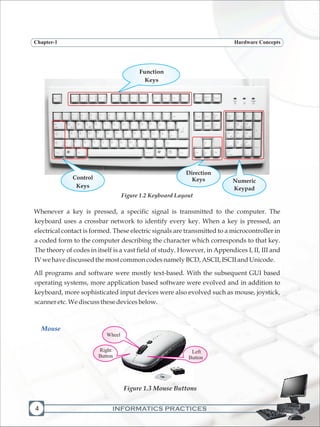
Figure 1.2 Keyboard Layout
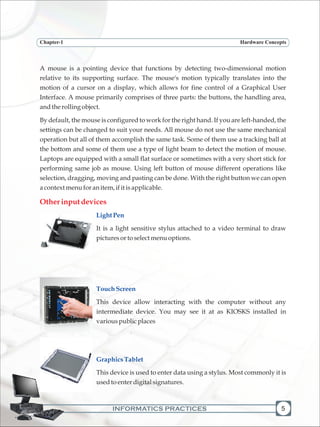
Figure 1.3 Mouse Buttons
Mouse
Numeric
Keypad
Function
Keys
Control
Keys
Direction
Keys
Right
Button
Wheel
Left
Button
INFORMATICS PRACTICES
A mouse is a pointing device that functions by detecting two-dimensional motion
relative to its supporting surface. The mouse's motion typically translates into the
motion of a cursor on a display, which allows for fine control of a Graphical User
Interface. A mouse primarily comprises of three parts: the buttons, the handling area,
andtherollingobject.
By default, the mouse is configured to work for the right hand. If you are left-handed, the
settings can be changed to suit your needs. All mouse do not use the same mechanical
operation but all of them accomplish the same task. Some of them use a tracking ball at
the bottom and some of them use a type of light beam to detect the motion of mouse.
Laptops are equipped with a small flat surface or sometimes with a very short stick for
performing same job as mouse. Using left button of mouse different operations like
selection, dragging, moving and pasting can be done. With the right button we can open
acontextmenuforanitem,ifitisapplicable.
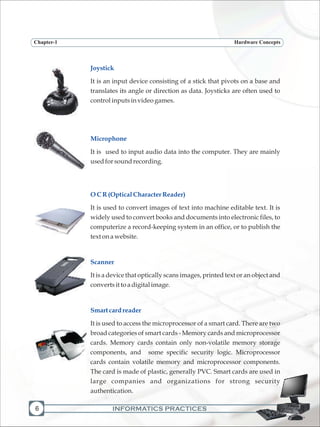
It is a light sensitive stylus attached to a video terminal to draw
picturesortoselectmenuoptions.
This device allow interacting with the computer without any
intermediate device. You may see it at as KIOSKS installed in
variouspublicplaces
This device is used to enter data using a stylus. Most commonly it is
usedtoenterdigitalsignatures.
Otherinputdevices
LightPen
TouchScreen
GraphicsTablet
5
Chapter-1 Hardware Concepts
INFORMATICS PRACTICES
Chapter-1
6
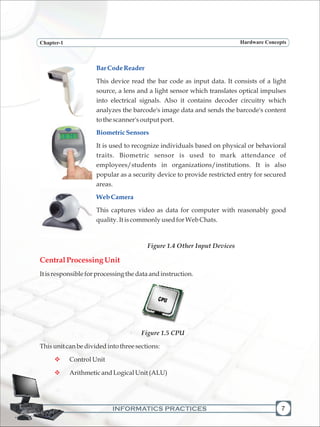
Joystick
Microphone
OCR(OpticalCharacterReader)
Scanner
Smartcardreader
It is an input device consisting of a stick that pivots on a base and
translates its angle or direction as data. Joysticks are often used to
controlinputsinvideogames.
It is used to input audio data into the computer. They are mainly
usedforsoundrecording.
It is used to convert images of text into machine editable text. It is
widely used to convert books and documents into electronic files, to
computerize a record-keeping system in an office, or to publish the
text onawebsite.
It is a device that optically scans images, printed text or an object and
convertsittoadigitalimage.
It is used to access the microprocessor of a smart card. There are two
broad categories of smart cards - Memory cards and microprocessor
cards. Memory cards contain only non-volatile memory storage
components, and some specific security logic. Microprocessor
cards contain volatile memory and microprocessor components.
The card is made of plastic, generally PVC. Smart cards are used in
large companies and organizations for strong security
authentication.
Hardware Concepts
INFORMATICS PRACTICES
Chapter-1
BarCodeReader
BiometricSensors
WebCamera
This device read the bar code as input data. It consists of a light
source, a lens and a light sensor which translates optical impulses
into electrical signals. Also it contains decoder circuitry which
analyzes the barcode's image data and sends the barcode's content
tothescanner'soutputport.
It is used to recognize individuals based on physical or behavioral
traits. Biometric sensor is used to mark attendance of
employees/students in organizations/institutions. It is also
popular as a security device to provide restricted entry for secured
areas.
This captures video as data for computer with reasonably good
quality.ItiscommonlyusedforWebChats.
Figure 1.4 Other Input Devices
Itisresponsibleforprocessingthedataandinstruction.
Figure 1.5 CPU
Thisunitcanbedividedintothreesections:
ControlUnit
ArithmeticandLogicalUnit(ALU)
CentralProcessingUnit
v
v
7
Hardware Concepts
INFORMATICS PRACTICES
Chapter-1
8
ControlUnit
ArithmeticandLogicalUnit
PrimaryMemory Unit
RAM
Thisunitcoordinatesvariousoperationsofthecomputerlike,
It directsthesequenceofoperations
It interprets the instructions of a program in storage unit and produces signals
toexecutetheinstructions
It directstheflowofdataandinstructionsinthecomputersystem
This unit is responsible for performing various Arithmetic operation of addition,
subtraction, multiplication, division and relational operations such as equal to , greater
than,lessthan,greaterthanornotequaltoandlogicaloperationetc.
Themainorprimarymemorystoresinformation(instructionanddata)
Thememoryunitisdividedinto:
RandomAccessMemory(RAM)
ReadOnlyMemory(ROM)
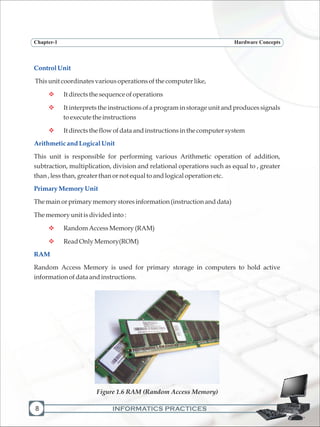
Random Access Memory is used for primary storage in computers to hold active
informationofdataandinstructions.
v
v
v
v
v
Figure 1.6 RAM (Random Access Memory)
Hardware Concepts
INFORMATICS PRACTICES
Chapter-1
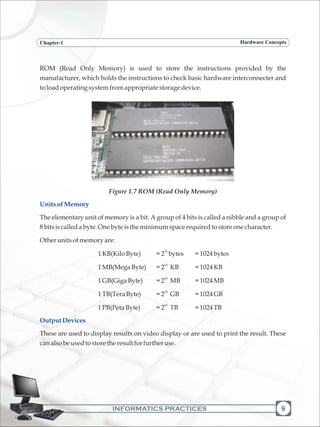
ROM (Read Only Memory) is used to store the instructions provided by the
manufacturer, which holds the instructions to check basic hardware interconnecter and
toloadoperatingsystemfromappropriatestoragedevice.
Figure 1.7 ROM (Read Only Memory)
The elementary unit of memory is a bit. A group of 4 bits is called a nibble and a group of
8bitsiscalledabyte.Onebyteistheminimumspacerequiredtostoreonecharacter.
Otherunitsofmemoryare:
10
1KB(KiloByte) =2 bytes =1024bytes
10
1MB(MegaByte) =2 KB =1024KB
10
1GB(GigaByte) =2 MB =1024MB
10
1TB(TeraByte) =2 GB =1024GB
10
1PB(PetaByte) =2 TB =1024TB
These are used to display results on video display or are used to print the result. These
canalsobeusedtostoretheresultforfurtheruse.
UnitsofMemory
OutputDevices
9
Hardware Concepts
INFORMATICS PRACTICES
Chapter-1
10
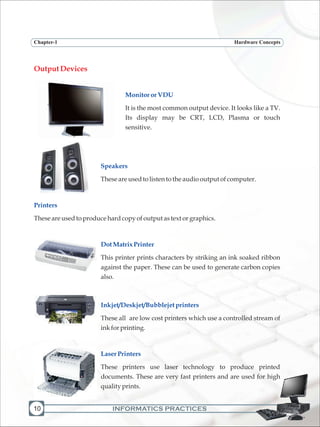
OutputDevices
MonitororVDU
Speakers
Printers
DotMatrixPrinter
Inkjet/Deskjet/Bubblejetprinters
LaserPrinters
It is the most common output device. It looks like a TV.
Its display may be CRT, LCD, Plasma or touch
sensitive.
Theseareusedtolistentotheaudiooutputofcomputer.
Theseareusedtoproducehardcopyofoutputastext orgraphics.
This printer prints characters by striking an ink soaked ribbon
against the paper. These can be used to generate carbon copies
also.
These all are low cost printers which use a controlled stream of
inkforprinting.
These printers use laser technology to produce printed
documents. These are very fast printers and are used for high
qualityprints.
Hardware Concepts
INFORMATICS PRACTICES
Chapter-1
Plotters
CommunicationBus
AddressBus
DataBus
ControlBus
Moreaboutcommunicationbus
These are used to print graphics. It is mainly used in computer-
aideddesigning.
In computer architecture, a bus is a system that transfers data between computer
componentsorbetweencomputers.
This is a system of bus, which is used to specify the address of a memory location. The
width of a bus determines the number of memory locations that can be addressed. For
64
exampleasystemwith64-bitaddressbuscanaddress2 memorylocations.
This system of bus is a medium, which transfer the data from one place to another in a
computersystem.
This system of bus carries the signals that give the report about the status of a device. For
ex one wire of bus indicates whether the CPU is currently reading or writing from the
mainmemory.
11
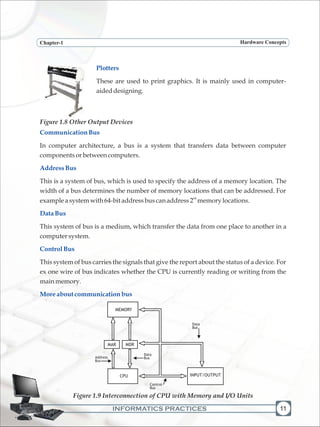
Figure 1.9 Interconnection of CPU with Memory and I/O Units
Hardware Concepts
Figure 1.8 Other Output Devices
MEMORY
Data
Bus
Data
BusAddress
Bus
Control
Bus
MAR MDR
CPU INPUT/OUTPUT
INFORMATICS PRACTICES
Chapter-1
12
Instructions to be executed by a CPU are retrieved from main memory, interpreted by it
and executed. CPU is connected to main memory by a set of parallel wires called
Address Bus, which carries address bits to the MAR (Memory Address Register) and the
Data Bus, which carries data/instructions from CPU to MDR (Memory Data Register) of
main memory. The control bus carries instructions to carry out operations such as
Read/Write from or to memory and also input/output operations. Number of parallel
wires is called bus width. If MAR has 24 bits( to address upto 16 MB memory) then the
address bus width is 24. The size of data bus from memory to CPU equals number of bits
in an instruction also called CPU word length. Most of the processors used in PCs have a
word length of 32 bits and thus the data bus width is 32 bits. The instruction width of I A -
64 by Intel is 128 and thus the data bus width is 128 bits. The number of bits in the control
bus is normally around 16. This connection of buses, namely Address bus, Data bus and
Control bus is called - System Bus. The bus standards allow diverse manufacturers of
variousperipheraldevicestodesigndevicestoeasilyconnecttoPCs.
The CPU, memory and integrated circuits to connect I/O units to the CPU and main
memory are all mounted on what is called a motherboard. The motherboard also has a
ROM where a program called BIOS (Basic Input Output System) is stored to control all
theperipheraldevicesconnectedtoacomputer.
A motherboard has a set of connection points called ports to connect units such as disk,
VDU, keyboard etc. In a parallel port databits are transmitted in parallel (16 or 32 bits
simultaneously) to peripherals via a set of parallel wires ( called ribbon cables). Serial
ports transmit single bits serially, one after another. Faster peripherals such as hard disk
are connected to parallel ports. Slower devices such as keyboard are connected to serial
port.AstandardserialportisknownasUniversalSerialBus(USB)
A communication port is mounted in a slot on the computer for easy
plugging/unplugging ofaperipheraldevice.
Through this port the information travels in and out one bit at a time. Serial ports come in
the form of 9-pin or 25-pin male connector. These ports are often known as
communication (COM) port. Mouse, modem etc. are connected using serial port though
nowmostlytheyarebeenreplacedbyUSBport.
CommunicationPorts
SerialPort
Hardware Concepts
INFORMATICS PRACTICES
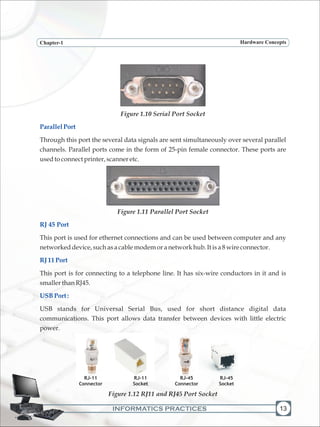
Figure 1.10 Serial Port Socket
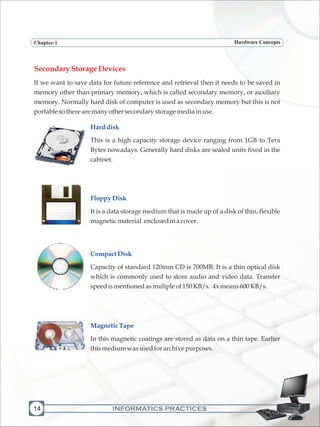
Through this port the several data signals are sent simultaneously over several parallel
channels. Parallel ports come in the form of 25-pin female connector. These ports are
usedtoconnectprinter,scanneretc.
Figure 1.11 Parallel Port Socket
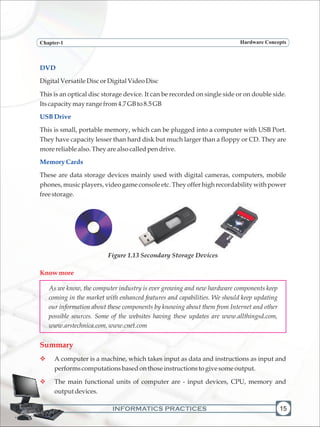
This port is used for ethernet connections and can be used between computer and any
networkeddevice,suchasacablemodemoranetworkhub.Itisa8wireconnector.
This port is for connecting to a telephone line. It has six-wire conductors in it and is
smallerthanRJ45.
USB stands for Universal Serial Bus, used for short distance digital data
communications. This port allows data transfer between devices with little electric
power.
Figure 1.12 RJ11 and RJ45 Port Socket
ParallelPort
RJ 45 Port
RJ11Port
USBPort:
13
Hardware ConceptsChapter-1
RJ-11
Connector
RJ-11
Socket
RJ-45
Connector
RJ-45
Socket
INFORMATICS PRACTICES14
SecondaryStorageDevices
If we want to save data for future reference and retrieval then it needs to be saved in
memory other than primary memory, which is called secondary memory, or auxiliary
memory. Normally hard disk of computer is used as secondary memory but this is not
portablesotherearemanyothersecondarystoragemediainuse.
This is a high capacity storage device ranging from 1GB to Tera
Bytes nowadays. Generally hard disks are sealed units fixed in the
cabinet.
It is a data storage medium that is made up of a disk of thin, flexible
magneticmaterial enclosedinacover.
Capacity of standard 120mm CD is 700MB. It is a thin optical disk
which is commonly used to store audio and video data. Transfer
speedismentionedasmulipleof150KB/s. 4xmeans600KB/s.
In this magnetic coatings are stored as data on a thin tape. Earlier
thismediumwasusedforarchivepurposes.
Harddisk
FloppyDisk
CompactDisk
MagneticTape
Hardware ConceptsChapter-1
INFORMATICS PRACTICES
DVD
USBDrive
Memory Cards
DigitalVersatileDiscorDigitalVideoDisc
This is an optical disc storage device. It can be recorded on single side or on double side.
Itscapacitymayrangefrom4.7GBto8.5GB
This is small, portable memory, which can be plugged into a computer with USB Port.
They have capacity lesser than hard disk but much larger than a floppy or CD. They are
morereliablealso.Theyarealsocalledpendrive.
These are data storage devices mainly used with digital cameras, computers, mobile
phones, music players, video game console etc. They offer high recordability with power
freestorage.
Figure 1.13 Secondary Storage Devices
As we know, the computer industry is ever growing and new hardware components keep
coming in the market with enhanced features and capabilities. We should keep updating
our information about these components by knowing about them from Internet and other
possible sources. Some of the websites having these updates are www.allthingsd.com,
www.arstechnica.com, www.cnet.com
A computer is a machine, which takes input as data and instructions as input and
performscomputationsbasedonthoseinstructionstogivesomeoutput.
The main functional units of computer are - input devices, CPU, memory and
outputdevices.
Knowmore
Summary
v
v
15
Hardware ConceptsChapter-1
INFORMATICS PRACTICES16
v
v
v
v
v
v
MultipleChoiceQuestions
There are various input and output devices for receiving input and for giving
output.
CPUis dividedintoALUandCU.
PrimarymemoryisdividedintoRAMandROM.
Communicationbusisusedtotransferdatabetweencomputerandperipherals.
Differentportsareusedtoconnectperipheralstoacomputer.
Forfuturereferenceandpermanentstoragesecondarydevicesareused.
1) Whentheelectricalpowerisdisruptedorcutoff, dataandprogramsarelostin
A. ROM
B. harddisk
C. RAM
D. secondarystorage
2) ReadOnlyMemory (ROM)
i. Is volatile
ii. Is programmable
iii. Ismountedonthemotherboard
iv. Containsthebootstraploader
A. iandiii
B. i,iiandiv
C. ii,iiiandiv
D. iiiandiv
3) CD-ROMstandsfor
A. CompactableReadOnlyMemory
B. CompactDataReadOnlyMemory
Hardware ConceptsChapter-1
INFORMATICS PRACTICES
C. CompactableDiskReadOnlyMemory
D. CompactDiskReadOnlyMemory
4) ALUis
A. ArithmeticLogicUnit
B. ArrayLogicUnit
C. ApplicationLogicUnit
D. Noneoftheabove
5) MICRstandsfor
A. MagneticInkCharacterReader
B. MagneticInkCodeReader
C. MagneticInkCasesReader
D. Noneoftheabove
6) Whichoperationisnotperformedbycomputer
A. Inputting
B. Processing
C. Controlling
D. Understanding
7) Pick the one that is used for logical operations or comparisons such as less than
equaltoorgreater than.
A. ArithmeticandLogicUnit
B. ControlUnit
C. Bothofabove
D. Noneoftheabove
8) Whichofthefollowingisasecondarymemory device?
A. Keyboard
B. Disk
17
Hardware ConceptsChapter-1
INFORMATICS PRACTICES
Hardware ConceptsChapter-1
18
C. ALU
D. Alloftheabove
9) The difference between RAM and Secondary Storage is that RAM is … and
SecondaryStorageis…
A. Temporary,permanent
B. Permanent,temporary
C. Slow,fast
D. Allofabove
1) I saved my document on the hard drive 5 minutes ago. I have continued to work.
Whereisthelatestcopyofmywork?
2) Whyis itnecessarytouseROMinacomputer?
3) Whatisthefunctionofabus?
4) Explaintheblockdiagramofacomputer.
5) Pairthefollowingequivalentunits
4 7
10GB,1GB,1000MB,10MB,10 KB,10 KB
6) Suppose your uncle has to buy a computer and he has asked you for help. What all
components and specifications would you suggest him. Make a table similar to the
onegivenbelow(threeentriesaredonetohelpyou)
RAM 4GB
HardDisk 260GB
Monitor 17"
Exercises
COMPONENT SPECIFICATION
INFORMATICS PRACTICES 19
2
LearningObjectives
v
v
v
v
v
v
Afterstudyingthislessonthestudentswillbeableto:
understandtheimportanceofbinarylanguage
appreciatetheneedandimportanceofanOperating System
identify different types of software - utility, general purpose application
software,specificpurposeapplicationsoftwareanddevelopertools
perform basic operations in word processor, spreadsheet tool, presentation
toolanddatabasetool
differentiatebetweeninterpreter,compilerandassembler
understand the various components of an Integrated Development
Environment
We are all familiar with the fact that the computer is a programmable electronic
device that performs mathematical calculations and logical operations and can
especially process, store and retrieve large amounts of data very quickly. The
computer has hardware components and software that help us work with the
computer. Hardware is one that is tangible. The storage devices (Hard disk, CD's
etc.), mouse, keyboard, CPU and display devices (Monitor) are Hardware.
Computer instructions that can be stored electronically is Software. In this chapter
wewilldiscussmoreaboutsoftwareanditsdifferenttypes.
Computer being an electronic device, understands only electric pulses i.e. whether the
electricity is flowing through a circuit or not. We denote these two states of pulses
(electricity flowing & not flowing) by 1 and 0, and thus computer understands a
language that consists of only two 'characters' namely 1 and 0. This special language is
Introduction
Software Concepts &
Productivity Tools
INFORMATICS PRACTICES
Chapter-2 Software Concepts & Productivity Tools
20
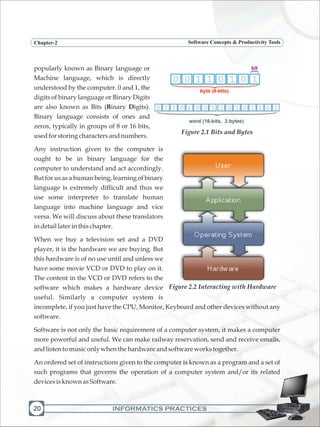
popularly known as Binary language or
Machine language, which is directly
understood by the computer. 0 and 1, the
digits of binary language or Binary Digits
are also known as Bits (Binary Digits).
Binary language consists of ones and
zeros, typically in groups of 8 or 16 bits,
usedforstoringcharactersandnumbers.
Any instruction given to the computer is
ought to be in binary language for the
computer to understand and act accordingly.
But for us as a human being, learning of binary
language is extremely difficult and thus we
use some interpreter to translate human
language into machine language and vice
versa. We will discuss about these translators
indetaillaterinthischapter.
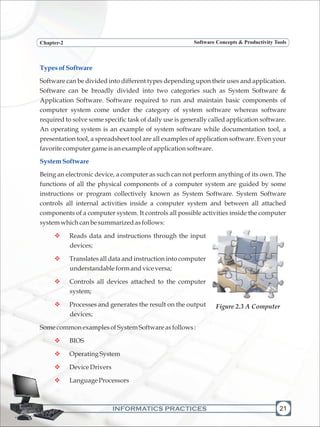
When we buy a television set and a DVD
player, it is the hardware we are buying. But
this hardware is of no use until and unless we
have some movie VCD or DVD to play on it.
The content in the VCD or DVD refers to the
software which makes a hardware device
useful. Similarly a computer system is
incomplete, if you just have the CPU, Monitor, Keyboard and other devices without any
software.
Software is not only the basic requirement of a computer system, it makes a computer
more powerful and useful. We can make railway reservation, send and receive emails,
andlistentomusiconlywhenthehardwareandsoftwareworkstogether.
An ordered set of instructions given to the computer is known as a program and a set of
such programs that governs the operation of a computer system and/or its related
devicesisknownasSoftware.
Figure 2.1 Bits and Bytes
Figure 2.2 Interacting with Hardware
INFORMATICS PRACTICES
Chapter-2 Software Concepts & Productivity Tools
TypesofSoftware
SystemSoftware
Software can be divided into different types depending upon their uses and application.
Software can be broadly divided into two categories such as System Software &
Application Software. Software required to run and maintain basic components of
computer system come under the category of system software whereas software
required to solve some specific task of daily use is generally called application software.
An operating system is an example of system software while documentation tool, a
presentation tool, a spreadsheet tool are all examples of application software. Even your
favoritecomputergameisanexampleofapplicationsoftware.
Being an electronic device, a computer as such can not perform anything of its own. The
functions of all the physical components of a computer system are guided by some
instructions or program collectively known as System Software. System Software
controls all internal activities inside a computer system and between all attached
components of a computer system. It controls all possible activities inside the computer
systemwhichcanbesummarizedasfollows:
Reads data and instructions through the input
devices;
Translates all data and instruction into computer
understandableformandviceversa;
Controls all devices attached to the computer
system;
Processes and generates the result on the output
devices;
SomecommonexamplesofSystemSoftwareasfollows:
BIOS
OperatingSystem
DeviceDrivers
LanguageProcessors
v
v
v
v
v
v
v
v
21
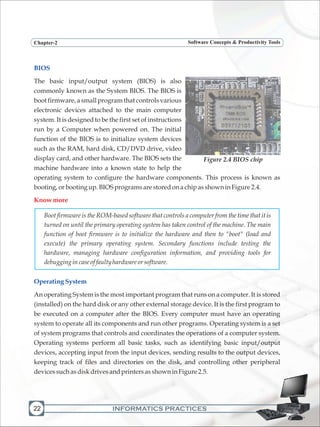
Figure 2.3 A Computer
INFORMATICS PRACTICES
Chapter-2 Software Concepts & Productivity Tools
22
BIOS
OperatingSystem
The basic input/output system (BIOS) is also
commonly known as the System BIOS. The BIOS is
boot firmware, a small program that controls various
electronic devices attached to the main computer
system. It is designed to be the first set of instructions
run by a Computer when powered on. The initial
function of the BIOS is to initialize system devices
such as the RAM, hard disk, CD/DVD drive, video
display card, and other hardware. The BIOS sets the
machine hardware into a known state to help the
operating system to configure the hardware components. This process is known as
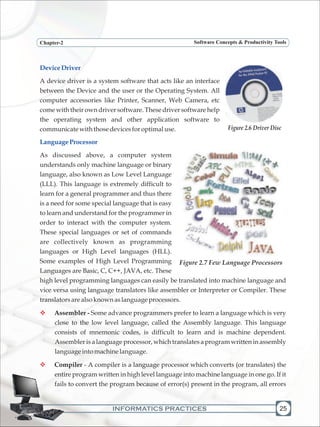
booting,orbootingup.BIOSprogramsarestoredonachipasshowninFigure2.4.
Boot firmware is the ROM-based software that controls a computer from the time that it is
turned on until the primary operating system has taken control of the machine. The main
function of boot firmware is to initialize the hardware and then to "boot" (load and
execute) the primary operating system. Secondary functions include testing the
hardware, managing hardware configuration information, and providing tools for
debuggingincaseoffaultyhardwareorsoftware.
An operating System is the most important program that runs on a computer. It is stored
(installed) on the hard disk or any other external storage device. It is the first program to
be executed on a computer after the BIOS. Every computer must have an operating
system to operate all its components and run other programs. Operating system is a set
of system programs that controls and coordinates the operations of a computer system.
Operating systems perform all basic tasks, such as identifying basic input/output
devices, accepting input from the input devices, sending results to the output devices,
keeping track of files and directories on the disk, and controlling other peripheral
devicessuchasdiskdrivesandprintersasshowninFigure2.5.
Knowmore
Figure 2.4 BIOS chip
INFORMATICS PRACTICES
Chapter-2 Software Concepts & Productivity Tools
Needfor anOperatingSystem
MajorFunctionsofanOperatingSystem
Operating system provides a software platform, on top of which, other programs, called
application programs are run. The application programs must be written to run on the
environment of a particular operating system. Our choice of operating system, therefore,
depends to a great extent on the CPU and the other attached devices and the applications
we want to run. For PCs, some of the most popular operating systems are Microsoft
Windows,Linux,MacOS,Solaris,BOSS,etc.
Figure 2.5 Components controlled by an Operating System
Thefunctionsofanoperatingsystemcanbebroadlyoutlinedasfollows:
Communicatewithhardwareandtheattacheddevices[DeviceManager]
Managedifferenttypesofmemories[MemoryManager]
Provideauserinterface[InterfaceManager]
Provideastructureforaccessinganapplication[ProgramManager]
v
v
v
v
23
INFORMATICS PRACTICES
Chapter-2 Software Concepts & Productivity Tools
24
v
v
v
v
v
v
v
Knowmore
v
v
v
Enableuserstomanipulateprogramsanddata[TaskManager]
Managethefiles,foldersanddirectorysystemsonacomputer[FileManager]
ProvidebasicnetworkingstructureforLANandInternet[NetworkManager]
A smart OS also provides a minimal security to the computer system through
authorization (user name) and authentications (password) [Security
manager]
Following types of operating system are generally available and used depending upon
theprimarypurposeandapplicationandthetypeofhardwareattachedtothecomputer:
Single User: Allows one user to operate the computer and run different
programs on the computer. MS DOS is a common example of single user
operatingsystem.
Multi-user: Allows two or more users to run programs at the same time on a
single computer system. Unix, Linux, Windows are common examples of
multiuseroperatingsystem.
Real time: Responds to input instantly. Real-time operating systems are
commonly found and used in robotics, complex multimedia and animation,
communications and has various military and government uses. LYNX and
WindowsCEareexamplesofrealtimeoperatingsystems.
Apart from the above general categories, an Operating System can also be categorized
as:
Multiprocessing: Supports allocating programs on more than one CPU
(processor).
Multitasking:Allowsmorethanoneprogram(task)torunconcurrently.
Multithreading:Allowsdifferentpartsofasingleprogramtorunsimultaneously.
TypesofOperatingsystem
INFORMATICS PRACTICES
Chapter-2 Software Concepts & Productivity Tools
DeviceDriver
Language Processor
A device driver is a system software that acts like an interface
between the Device and the user or the Operating System. All
computer accessories like Printer, Scanner, Web Camera, etc
come with their own driver software. These driver software help
the operating system and other application software to
communicatewiththosedevicesforoptimaluse.
As discussed above, a computer system
understands only machine language or binary
language, also known as Low Level Language
(LLL). This language is extremely difficult to
learn for a general programmer and thus there
is a need for some special language that is easy
to learn and understand for the programmer in
order to interact with the computer system.
These special languages or set of commands
are collectively known as programming
languages or High Level languages (HLL).
Some examples of High Level Programming
Languages are Basic, C, C++, JAVA, etc. These
high level programming languages can easily be translated into machine language and
vice versa using language translators like assembler or Interpreter or Compiler. These
translatorsarealsoknownaslanguageprocessors.
Assembler - Some advance programmers prefer to learn a language which is very
close to the low level language, called the Assembly language. This language
consists of mnemonic codes, is difficult to learn and is machine dependent.
Assembler is a language processor, which translates a program written in assembly
languageintomachinelanguage.
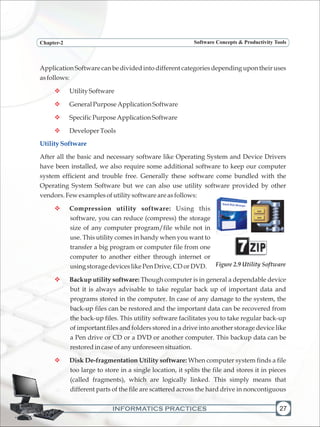
Compiler - A compiler is a language processor which converts (or translates) the
entire program written in high level language into machine language in one go. If it
fails to convert the program because of error(s) present in the program, all errors
v
v
25
Figure 2.6 Driver Disc
Figure 2.7 Few Language Processors
INFORMATICS PRACTICES
Chapter-2 Software Concepts & Productivity Tools
26
are reported together along with the line numbers for debugging. After all the
errors are removed, the program can be recompiled to obtain the object program.
After the compilation process is completed, the object program can directly be
executed,withouttheinterventionofthecompilerthussavingmemory.
Figure2.8ConversionofaSourceCodetoObjectCode
Interpreter - This language processor converts a high level language program into
machine language line by line as well as executes it. If there is any error in the
program, translation and execution stops and the error is reported for debugging.
The conversion and execution resumes only after that error is rectified. This is a
slow process and consumes high memory as the interpreter is also required to
execute the correct code along with reporting the errors, but is very useful for
debugging and thus suitable for novice programmer. Debugging is the process of
removingallerrorsfromacomputerprogram.
Apex Language Processor, developed by Centre for Development of Advanced
Computing(CDAC), is a multilingual word processor running under DOS and UNIX
thatallowstypingofallIndianscripts throughthecommonINSCRIPTkeyboardoverlay.
Application software is a set of programs to carry out a specific task like word processor,
spreadsheet, presentation tools, library management software, railway reservation,
antivirus software, etc. Generally an application software can perform only one specific
job and can not be used for something else. For instance, a library management software
can not be used for railway reservation system or a word processing software is
generallynotusedasaspreadsheet.
v
Knowmore
ApplicationSoftware
SOURCE CODE
written in
High Level Language
OBJECT PROGRAM
in
Machine Language
COMPILER
INFORMATICS PRACTICES
Chapter-2 Software Concepts & Productivity Tools
Application Software can be divided into different categories depending upon their uses
asfollows:
UtilitySoftware
GeneralPurposeApplicationSoftware
SpecificPurposeApplicationSoftware
DeveloperTools
After all the basic and necessary software like Operating System and Device Drivers
have been installed, we also require some additional software to keep our computer
system efficient and trouble free. Generally these software come bundled with the
Operating System Software but we can also use utility software provided by other
vendors.Fewexamplesofutilitysoftwareareasfollows:
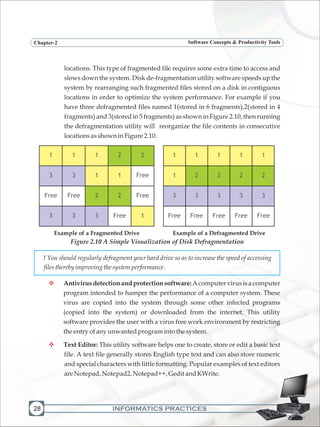
Compression utility software: Using this
software, you can reduce (compress) the storage
size of any computer program/file while not in
use. This utility comes in handy when you want to
transfer a big program or computer file from one
computer to another either through internet or
usingstoragedeviceslikePenDrive,CDorDVD.
Backup utility software: Though computer is in general a dependable device
but it is always advisable to take regular back up of important data and
programs stored in the computer. In case of any damage to the system, the
back-up files can be restored and the important data can be recovered from
the back-up files. This utility software facilitates you to take regular back-up
of important files and folders stored in a drive into another storage device like
a Pen drive or CD or a DVD or another computer. This backup data can be
restoredincaseofanyunforeseensituation.
Disk De-fragmentation Utility software: When computer system finds a file
too large to store in a single location, it splits the file and stores it in pieces
(called fragments), which are logically linked. This simply means that
different parts of the file are scattered across the hard drive in noncontiguous
v
v
v
v
v
v
v
UtilitySoftware
27
Figure 2.9 Utility Software
INFORMATICS PRACTICES
Chapter-2 Software Concepts & Productivity Tools
28
locations. This type of fragmented file requires some extra time to access and
slows down the system. Disk de-fragmentation utility software speeds up the
system by rearranging such fragmented files stored on a disk in contiguous
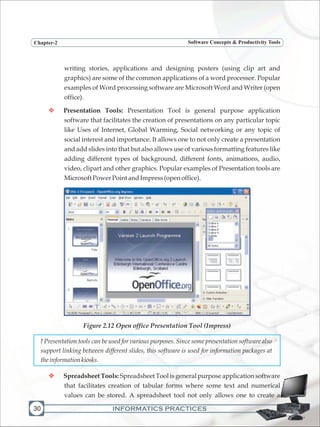
locations in order to optimize the system performance. For example if you
have three defragmented files named 1(stored in 6 fragments),2(stored in 4
fragments) and 3(stored in 5 fragments) as shown in Figure 2.10, then running
the defragmentation utility will reorganize the file contents in consecutive
locationsasshowninFigure2.10.
! You should regularly defragment your hard drive so as to increase the speed of accessing
filestherebyimprovingthesystemperformance.
Antivirusdetectionandprotectionsoftware:Acomputervirusisacomputer
program intended to hamper the performance of a computer system. These
virus are copied into the system through some other infected programs
(copied into the system) or downloaded from the internet. This utility
software provides the user with a virus free work environment by restricting
theentryofanyunwanted programintothesystem.
Text Editor: This utility software helps one to create, store or edit a basic text
file. A text file generally stores English type text and can also store numeric
and special characters with little formatting. Popular examples of text editors
areNotepad,Notepad2,Notepad++,GeditandKWrite.
v
v
1 1 1 2 2
3 3 1 1 Free
Free Free 2 2 Free
3 3 3 Free 1
1 1 1 1 1
1 2 2 2 2
3 3 3 3 3
Free Free Free Free Free
Example of a Fragmented Drive Example of a Defragmented Drive
Figure 2.10 A Simple Visualization of Disk Defragmentation
INFORMATICS PRACTICES
Chapter-2 Software Concepts & Productivity Tools
Knowmore
v
A text editor (like notepad) is where you simply make some quick changes to the
text. Remember that you can not do much formatting with text editors. Whichever
font or formatting style you use in the document stays throughout the document;
youcannotchangefontsorformatswithinthedocument.
A word processor (like MS Word), on the other hand has a variety of options to
format text within the document like inserting special symbols, changing colors,
line spacing, tables and a whole lot of other things that you can not do with a
normaltext editor.
Some of the application software are designed for general day to day applications and
uses.Someofthesepopulargeneralpurposeapplicationsoftwaresarediscussedbelow:
Word Processor: Word Processor is general purpose application software that
facilitates the creation of text documents with extensive formatting. The user
can not only create a document and add lines into it but can also use different
types of fonts of various sizes along with features like underlining or making
a certain part of the text bold. One can also add clipart and other graphics into
the document. Therefore we can use word processing software for various
tasks from writing a simple document to designing special art effect.
Preparing a common letter for different addressee (using mail merge feature),
GeneralPurposeApplicationSoftware
29
Figure 2.11 Open Office Word Processor (Writer)
Open Office Writer
INFORMATICS PRACTICES
Chapter-2 Software Concepts & Productivity Tools
30
writing stories, applications and designing posters (using clip art and
graphics) are some of the common applications of a word processor. Popular
examples of Word processing software are Microsoft Word and Writer (open
office).
Presentation Tools: Presentation Tool is general purpose application
software that facilitates the creation of presentations on any particular topic
like Uses of Internet, Global Warming, Social networking or any topic of
social interest and importance. It allows one to not only create a presentation
and add slides into that but also allows use of various formatting features like
adding different types of background, different fonts, animations, audio,
video, clipart and other graphics. Popular examples of Presentation tools are
MicrosoftPowerPointandImpress(openoffice).
Figure 2.12 Open office Presentation Tool (Impress)
! Presentation tools can be used for various purposes. Since some presentation software also
support linking between different slides, this software is used for information packages at
theinformationkiosks.
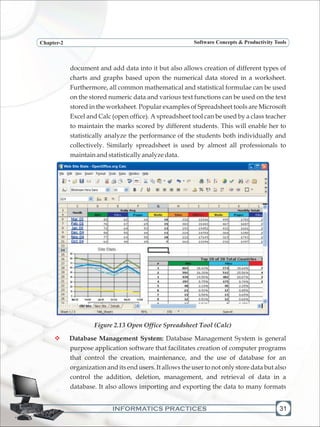
Spreadsheet Tools: Spreadsheet Tool is general purpose application software
that facilitates creation of tabular forms where some text and numerical
values can be stored. A spreadsheet tool not only allows one to create a
v
v
INFORMATICS PRACTICES
Chapter-2 Software Concepts & Productivity Tools
document and add data into it but also allows creation of different types of
charts and graphs based upon the numerical data stored in a worksheet.
Furthermore, all common mathematical and statistical formulae can be used
on the stored numeric data and various text functions can be used on the text
stored in the worksheet. Popular examples of Spreadsheet tools are Microsoft
Excel and Calc (open office). A spreadsheet tool can be used by a class teacher
to maintain the marks scored by different students. This will enable her to
statistically analyze the performance of the students both individually and
collectively. Similarly spreadsheet is used by almost all professionals to
maintainandstatisticallyanalyzedata.
Figure 2.13 Open Office Spreadsheet Tool (Calc)
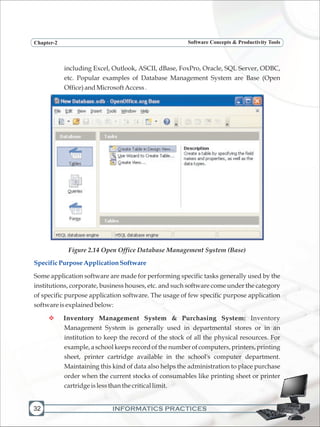
Database Management System: Database Management System is general
purpose application software that facilitates creation of computer programs
that control the creation, maintenance, and the use of database for an
organization and its end users. It allows the user to not only store data but also
control the addition, deletion, management, and retrieval of data in a
database. It also allows importing and exporting the data to many formats
v
31
Web Site Stats - OpenOffice.org Calc
INFORMATICS PRACTICES
Chapter-2 Software Concepts & Productivity Tools
32
including Excel, Outlook, ASCII, dBase, FoxPro, Oracle, SQL Server, ODBC,
etc. Popular examples of Database Management System are Base (Open
Office)andMicrosoftAccess.
Figure 2.14 Open Office Database Management System (Base)
Some application software are made for performing specific tasks generally used by the
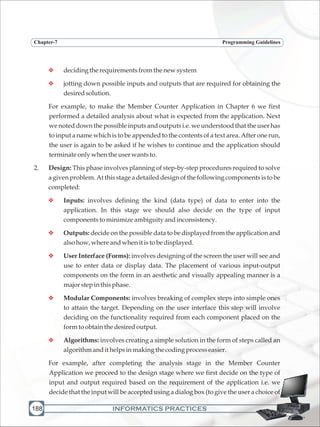
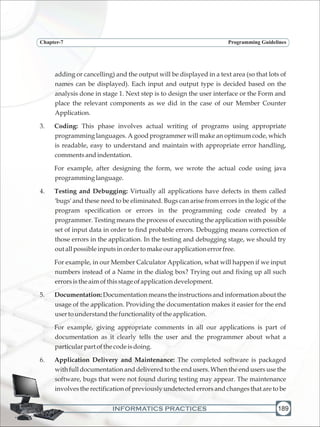
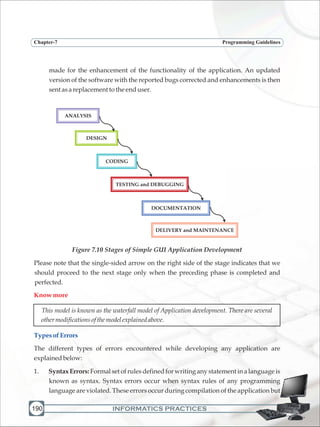
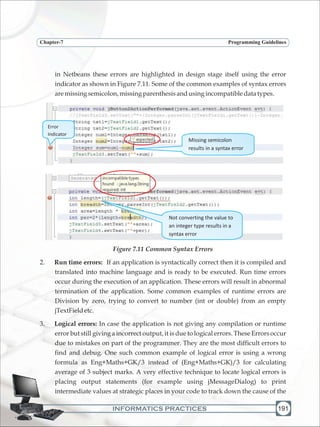
institutions, corporate, business houses, etc. and such software come under the category
of specific purpose application software. The usage of few specific purpose application
softwareisexplainedbelow:
Inventory Management System & Purchasing System: Inventory
Management System is generally used in departmental stores or in an
institution to keep the record of the stock of all the physical resources. For
example, a school keeps record of the number of computers, printers, printing
sheet, printer cartridge available in the school's computer department.
Maintaining this kind of data also helps the administration to place purchase
order when the current stocks of consumables like printing sheet or printer
cartridgeislessthanthecriticallimit.
SpecificPurposeApplicationSoftware
v
INFORMATICS PRACTICES
Chapter-2 Software Concepts & Productivity Tools
v
v
v
v
v
v
Payroll Management System: Payroll Management System software is used
by all modern organizations to encompass every employee of the
organization who receives a regular wage or other compensation. All
different payment methods are calculated by the payroll software and the
appropriatepaychecksareissued.
Hotel Management: Hotel Management software refers to management
techniques used in the hotel sector. These can include hotel administration,
accounts, billing, marketing, housekeeping, front office or front desk
management,foodandbeveragemanagement,cateringandmaintenance.
Reservation System: Commonly seen at railway reservation offices, this
software helps the concerned department to automatically check the
availability of the seats or berths of any train for any particular date with
incomparable speed. Now a days using the internet and this software one can
bookorreserveticketsofanytrainforanydateswithinnotime.
Report Card Generator: This software is commonly used in schools by the
examination department to prepare and generate the report card of students.
It performs all possible mathematical calculations and checks whether a
student can be promoted to the next class or not. It can also be used to
calculatetheclasswiserankingofastudent.
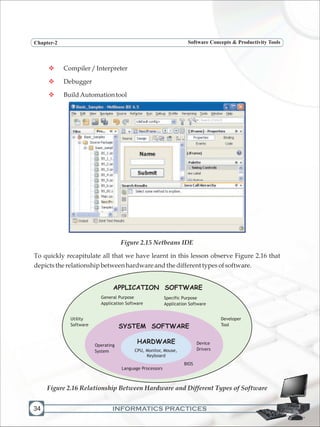
When a programmer starts the process of writing a program to develop software for any
type of application, he/she requires a series of software developing tools like code
editor, debugger and compiler. A platform where all these software developing tools are
bundledintoapackageisknownasIntegratedDevelopmentEnvironment(IDE).
An Integrated Development Environment (IDE) is an application program that consists
of all required software developing tools required for developing software as part of a
singleinterface.Ittypicallyconsistsofthefollowingtools:
SourceCodeEditor
GraphicalUserInterface(GUI)builder
Developertools
IntegratedDevelopmentEnvironment
33
INFORMATICS PRACTICES
Chapter-2 Software Concepts & Productivity Tools
34
v
v
v
Compiler/Interpreter
Debugger
BuildAutomationtool
Figure 2.15 Netbeans IDE
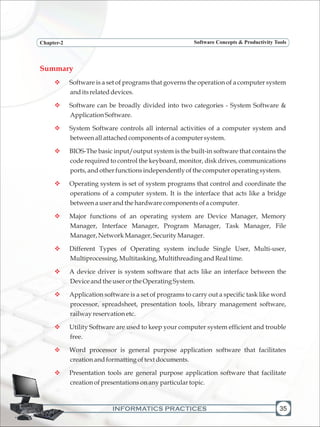
To quickly recapitulate all that we have learnt in this lesson observe Figure 2.16 that
depictstherelationshipbetweenhardwareandthedifferenttypesofsoftware.
APPLICATION SOFTWARE
Utility
Software
Developer
Tool
General Purpose
Application Software
Specific Purpose
Application Software
SYSTEM SOFTWARE
Operating
System
Device
Drivers
BIOS
Language Processors
HARDWARE
CPU, Monitor, Mouse,
Keyboard
Figure 2.16 Relationship Between Hardware and Different Types of Software
INFORMATICS PRACTICES
Chapter-2 Software Concepts & Productivity Tools
Summary
v
v
v
v
v
v
v
v
v
v
v
v
Software is a set of programs that governs the operation of a computer system
anditsrelateddevices.
Software can be broadly divided into two categories - System Software &
ApplicationSoftware.
System Software controls all internal activities of a computer system and
betweenallattachedcomponentsofacomputersystem.
BIOS-The basic input/output system is the built-in software that contains the
code required to control the keyboard, monitor, disk drives, communications
ports,andotherfunctionsindependentlyofthecomputeroperatingsystem.
Operating system is set of system programs that control and coordinate the
operations of a computer system. It is the interface that acts like a bridge
betweenauserandthehardwarecomponentsofacomputer.
Major functions of an operating system are Device Manager, Memory
Manager, Interface Manager, Program Manager, Task Manager, File
Manager,NetworkManager,SecurityManager.
Different Types of Operating system include Single User, Multi-user,
Multiprocessing,Multitasking,MultithreadingandRealtime.
A device driver is system software that acts like an interface between the
DeviceandtheuserortheOperatingSystem.
Application software is a set of programs to carry out a specific task like word
processor, spreadsheet, presentation tools, library management software,
railwayreservationetc.
Utility Software are used to keep your computer system efficient and trouble
free.
Word processor is general purpose application software that facilitates
creationandformattingoftext documents.
Presentation tools are general purpose application software that facilitate
creationofpresentationsonanyparticulartopic.
35
INFORMATICS PRACTICES
Chapter-2 Software Concepts & Productivity Tools
36
v
v
v
v
v
MultipleChoiceQuestions
Spreadsheet is general purpose application software that facilitates creation
of worksheets that stores text and numerical data in tabular form. Performing
basicstatisticalanalysisincludinggraphsisthemainutilityofthissoftware.
Debugging istheprocessofremovingallerrorsfromaprogram.
An interpreter converts as well as executes a high level language program into
machinelanguagelinebyline.
A compiler is a language processor which converts (or translates) the entire
programwritteninhighlevellanguageintomachinelanguageinonego.
An Integrated Development Environment (IDE) is a platform or an
application program that consists of all required software developing tools
required for developing an application at one place. The various tools are
arrangedasseparatewindowsintegratedintoonebigenvironment.
1. Interpreter converts a HLL program into machine language by converting and
executing:
a) Inonego
b) linebyline
c) GroupofFivelines
d) Noneoftheabove
2. Which of the following Operating System is suitable for handling more than one
useratonetime?
a) MultiprocessingOS
b) Multiuser OS
c) Multiprogram OS
d) MultiprogrammingOS
3. Calculatorisa
a) Package
b) UtilitySoftware
INFORMATICS PRACTICES
Chapter-2 Software Concepts & Productivity Tools
c) Customizedsoftware
d) DeveloperTool
4. Abitstandsfor
a) BooleanDigit
b) BinaryDigit
c) BinaryDecimal
d) ByteDigit
5. Whichofthefollowingisnotanapplicationsoftware:
a) WordProcessor
b) AntiVirusProgram
c) OperatingSystem
d) RailwayReservationSystem
6. Whichofthefollowingisnotanutilitysoftware:
a) TextEditor
b) AntiVirusProgram
c) Compressionsoftware
d) RailwayReservationSystem
7. WhichofthefollowingisnotacomponentofOpenOffice:
a) Word
b) Impress
c) Calc
d) Writer
8. Aprogram writteninhighlevellanguageisknownas:
a) SourceProgram
b) MainProgram
c) ObjectProgram
d) ImageProgram
37
INFORMATICS PRACTICES
Chapter-2 Software Concepts & Productivity Tools
38
Exercises
LabExercises
1. Whatdoyoumeanbyabitandabyte?
2. DefinethetermSoftware.
3. Explain the relationship between hardware and software with the help of a suitable
example.
4. Whatarethemaintypesofsoftware?Explainwithappropriateexamples.
5. DefinethetermSystemSoftware.
6. WhatdoyoumeanbyBIOS?
7. Writedownthefourmajorfunctionsofanoperatingsystem.
8. Differentiatebetweenthefollowing:
a) Singleuser&MultiuserOS
b) Compiler&Interpreter
9. Writeshortnote :
a) UtilitySoftware b) DeviceDriver
10. Giveanyfourexamples,whereyouusewordprocessingsoftware.
11. Whatdoyoumeanbypresentationsoftware?
12. WhataretheusesofPayrollManagementSystem?
13. Explaindifferenttypesoflanguageprocessors.
14. ExplainthedifferenttypesofOperating System.
15. DefinethetermApplicationsoftware.
16. ExplainthetermIntegratedDevelopmentEnvironment.
1. Write an essay on "Role of ICT in Education" in a word processor with suitable
formattingandsaveit.
2. Create a presentation on "Global Warming" with suitable custom animation and
slidetranisitions.
INFORMATICS PRACTICES
Chapter-2 Software Concepts & Productivity Tools
39
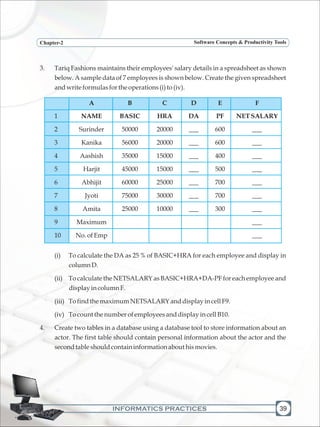
3. Tariq Fashions maintains their employees' salary details in a spreadsheet as shown
below. A sample data of 7 employees is shown below. Create the given spreadsheet
andwriteformulasfortheoperations(i)to(iv).
A B C D E F
1 NAME BASIC HRA DA PF NETSALARY
2 Surinder 50000 20000 ___ 600 ___
3 Kanika 56000 20000 ___ 600 ___
4 Aashish 35000 15000 ___ 400 ___
5 Harjit 45000 15000 ___ 500 ___
6 Abhijit 60000 25000 ___ 700 ___
7 Jyoti 75000 30000 ___ 700 ___
8 Amita 25000 10000 ___ 300 ___
9 Maximum ___
10 No.ofEmp ___
(i) To calculate the DA as 25 % of BASIC+HRA for each employee and display in
columnD.
(ii) To calculate the NETSALARY as BASIC+HRA+DA-PF for each employee and
displayincolumnF.
(iii) TofindthemaximumNETSALARYanddisplayincellF9.
(iv) TocountthenumberofemployeesanddisplayincellB10.
4. Create two tables in a database using a database tool to store information about an
actor. The first table should contain personal information about the actor and the
secondtableshouldcontaininformationabouthismovies.
INFORMATICS PRACTICES40
LearningObjectives
v
v
v
v
v
v
v
Afterlearningthischapterthestudentswillbeableto:
co-createknowledgeincollaboration
understandthethreatstoacomputersystem
learn about Virus, Worm, Trojan Horse and their effects on a computer
system
useAnti-virusandothermeasurestoprotectcomputer
applydesktopsecurityinvolvingcookiesandfirewalls
understandaboutCyberCrimeandCyberPolice
learnaboutSocialnetworking
One day, Nalin received a strange email from his very good friend asking him to lend
some money. In that mail his friend wrote that he is very far away from his place and has
been trapped in some financial crisis. So he requested Nalin to transfer some amount of
money to some specified bank. Nalin could not believe it and decided to first call up his
friend and verify. And this was a wise thought as when he called up his friend he told
him that everything is fine at his end. He also told Nalin that his email account password
has been hacked by someone and now that person is sending the same mail to all the
peopleinhiscontactlist.Thisisjustanexampleofcybercrime.
Crime has always been an unpleasant and unavoidable ingredient of our society. In the
past couple of decades, computers and internet have dominated our society. We depend
on computer and internet for communication, banking, finance, examination and many
other serious matters. Computers have become virtual lockers used to store our secrets.
Since computer is an essential and important part of our lives, crime cannot spare it too.
Every day criminals evolve new methods to invade our virtual lockers or even our
privacy created in or via computers. The crimes which involve computers are termed as
cyber crimes. In this chapter, we focus on some of the common threats to a computer
systemandexplaincertainmeansofhowonecandealwiththesethreats.
3 Information Security
and Social Networking
INFORMATICS PRACTICES
Chapter-3 Information Security and Social Networking
41
ThreatstoaComputerSystem
v
v
v
v
v
v
Information security commonly refers to as CIA (short form of Confidentiality, Integrity
and Authentication), protects our computer from any unauthorized access and
maintainsthesystemresources.Precisely,
Confidentiality ensures protection of the computer system from any
unauthorizedaccess
Integrityensuresthatinformationstoredinthecomputerisprotected
Authenticationensurestheauthenticity oftheauthorizeduser
CIA can be weakened or broken in many ways. Some of the possible attacks are the
following:
Viruses
Worms
Trojans
We will explain below these threats in details and possible measures to be taken to
preventthesesituations.
Viruses are computer programs developed to copy themselves and infect other files
stored on the computer. These are malicious programs that move from computer to
computer by attaching themselves to files or boot records of disks and diskettes. Virus
can automatically be transferred from one computer to another when its host is taken to
the target computer, for example an user can sent it through a network or the internet, or
carried it on a removable storage medium such as CD, DVD, USB pen drive or Memory
Cards.
Viruses can cause destruction to the entire file system which in result would need to
reinstall and reload the whole system again. They can also create effected sectors on the
disk destroying one or more files and part of some programs. Viruses also lesser the
space on the hard disk by duplicating and attaching itself to various files. Through these
viruses,systemgetshang-upandtheentiresystemstopsworking.
Viruses
INFORMATICS PRACTICES
Chapter-3 Information Security and Social Networking
42
These days' viruses are spread through email attachments and other programs that can
be downloaded from the internet. A virus acts like an agent that travels from one file to
anotheronthesamecomputerthroughaninfectedfile.
The first ever virus named "Creeper" was first detected on ARPANET, in the early 1970s.
It was an experimental self-replicating program written by Bob Thomas at BBN
Technologies. Creeper infected some DEC PDP-10 computers running on the TENEX
operating system. Via the ARPANET, Creeper copied itself to the remote systems where
thefollowingmessagewasdisplaced:
"I'mthecreeper,catchmeifyoucan!"
Tocounteritseffect,aprogramcalled"Reaper"wascreated.
It is a program made to replicate automatically. A worm replicates continuously until
the entire hard disk space and memory are eaten up and it may do so without any user
intervention. This kind of self replicating programs spread over the entire hard disk and
memoryconsequentlyandslowdownthesystem.
Unlike a virus, a worm does not need to attach itself to an existing executable program or
code. Worms harm to a computer or a computer network by consuming bandwidth and
slow down the network speed whereas viruses almost always corrupt or modify files on
a targeted computer. After the worm has infected a system, it can propagate to other
systems via internet or while copying files from one system to another without user
interaction. The nasty result is a worm traversing through the Internet in a matter of
hours,infectingnumerousmachines.
The destruction from a worm is less alarming than a virus in the sense that worm does
notcorruptotherfiles.Itonlyeatsupthememory.
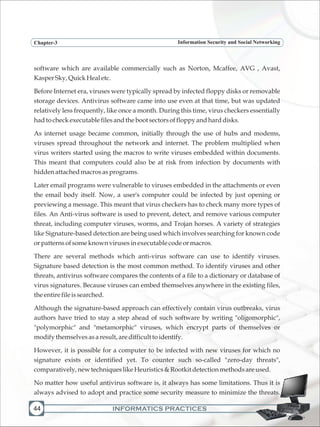
The term Trojan is derived from the Trojan Horse story in Greek mythology. Trojan
horse is virtually a harmless program in itself. Like a virus or a worm, it neither corrupts
other files on the system nor takes up the memory part. Nevertheless, the effect of a
Trojan could be even more dangerous. In fact, at the backend, these programs perform
some malicious activities like upload (send) some security files and information from the
computer and at the same time download some unwanted files onto the computer. This
Worms
Trojan
INFORMATICS PRACTICES
Chapter-3 Information Security and Social Networking
43
way not only it slows own the network speed but also uploads (sends) some non
shareable information to other computers like our user name, password, emails, credit
card details and other secured information over the network. They are generally
transferredbyemails,attachmentsandfreeware&sharewaresoftware.
Trojan horses are designed to allow a hacker to target a remote computer system. Once a
Trojan horse has been installed on a target computer system, it is possible for a hacker to
access it remotely and perform various operations and it may do so without any user
interventionattheremoteend.
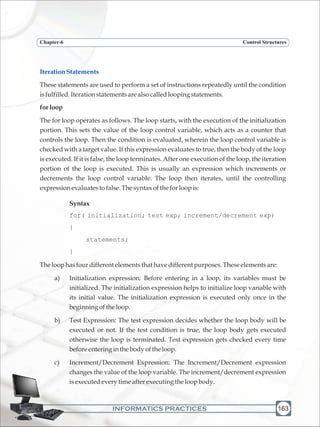
There are many ways in which a Trojan Horse can propagate. The most common of them
is through email attachments. Unintentionally, a user can download some Trojan from
the internet as a freeware with the assumption of utility software. Other sources for
Trojanhorsearethechatsoftwareandemailmanager.
With the help of Trojan, harms that could be done by a hacker on a target computer
systemare:
Datatheft(e.g.passwords,creditcardinformation,etc.)
Installationofunwantedsoftware
Downloadingoruploadingoffiles
Modificationordeletionoffiles
Keystrokelogging
Viewingtheuser'sscreen
Wastingcomputerstoragespace
Crashingthecomputer
As explained earlier, virus, worm and Trojan are all different in some sense but a
common user calls all of them by the term "virus" only. Thus when we talk about anti-
virustools,thesetoolstakecareofwormandTrojanaswellalongwithviruses.
Anti-Virus tools not only remove virus and other infected threats from our computer
system but at the same time also protect our systems from data loss, destruction and
attack of any external threats like virus, worm and Trojan. There are many anti-virus
v
v
v
v
v
v
v
v
Anti-VirusTools
INFORMATICS PRACTICES
Chapter-3 Information Security and Social Networking
44
software which are available commercially such as Norton, Mcaffee, AVG , Avast,
KasperSky,QuickHealetc.
Before Internet era, viruses were typically spread by infected floppy disks or removable
storage devices. Antivirus software came into use even at that time, but was updated
relatively less frequently, like once a month. During this time, virus checkers essentially
hadtocheckexecutablefilesandthebootsectorsoffloppyandharddisks.
As internet usage became common, initially through the use of hubs and modems,
viruses spread throughout the network and internet. The problem multiplied when
virus writers started using the macros to write viruses embedded within documents.
This meant that computers could also be at risk from infection by documents with
hiddenattachedmacrosasprograms.
Later email programs were vulnerable to viruses embedded in the attachments or even
the email body itself. Now, a user's computer could be infected by just opening or
previewing a message. This meant that virus checkers has to check many more types of
files. An Anti-virus software is used to prevent, detect, and remove various computer
threat, including computer viruses, worms, and Trojan horses. A variety of strategies
like Signature-based detection are being used which involves searching for known code
orpatternsofsomeknownvirusesinexecutablecodeormacros.
There are several methods which anti-virus software can use to identify viruses.
Signature based detection is the most common method. To identify viruses and other
threats, antivirus software compares the contents of a file to a dictionary or database of
virus signatures. Because viruses can embed themselves anywhere in the existing files,
theentirefileissearched.
Although the signature-based approach can effectively contain virus outbreaks, virus
authors have tried to stay a step ahead of such software by writing "oligomorphic",
"polymorphic" and "metamorphic" viruses, which encrypt parts of themselves or
modifythemselvesasaresult,aredifficulttoidentify.
However, it is possible for a computer to be infected with new viruses for which no
signature exists or identified yet. To counter such so-called "zero-day threats",
comparatively,newtechniqueslikeHeuristics&Rootkitdetectionmethodsareused.
No matter how useful antivirus software is, it always has some limitations. Thus it is
always advised to adopt and practice some security measure to minimize the threats.
INFORMATICS PRACTICES
Chapter-3 Information Security and Social Networking
45
Somecommonsecuritymeasuresaregivenbelow:
Acomputershouldbeusedonlybyauthorizedusers[userlogin];
Passwordshouldbechangedregularly;
Passwordshouldnotbeshared;
Always be careful about some suspicious person who might see your
passwordwhiletyping;
Scanyourcomputerregularlywithanti-virussoftware;
Regularlyupdate yourantivirussoftware;
Restricteduseofremovablestoragedevices,especiallyUSBPenDrive;
Properlyconfiguretheemail-filteroption;
Neverdownloadanyemailattachmentfromanunknownsender;
Avoidevenbrowseemailsentbysomeunknownsender;
Musttakebackupofthecomputersystemregularly;
Preferably use sky drive (online storage) to have additional copies of
important documents so that in case of natural calamities, at least your
importantdocumentsaresafe;
Using anti-virus software is one way to counter computer threats. Moreover, these
software are used after a virus has attacked the computer. There are ways and measures
by which we can restrict viruses to enter into the computer. These measures collectively
come under "Desktop security" which includes software authorization, authentication,
firewalls, encrypted channels, anti-virus tools and user education. It is a mechanism
through which we can stop entry of viruses and other threats into our computer system
and also restrict the access of unauthorized users to protect our system file and folders.
Weexplainbelowsomeofthesemeasures.
It is a code which can be set to log on to a computer access to its resources. Although
setting a username is not mandatory, but it must be set for each user so that only the
authorizedoneshavetheaccess.
v
v
v
v
v
v
v
v
v
v
v
v
DesktopSecurity
Username
INFORMATICS PRACTICES
Chapter-3 Information Security and Social Networking
46
Password
CAPTCHA(TellingHumansandComputersApartAutomatically)
A password is a secret code or string of characters that is used to authenticate or confirm,
to prove identity or permission to access to a resource. It is used in combination with the
username. It should be kept secret. There are software which can encrypt your
passwords. Thus a password should be strong enough. Following points must be taken
careofwhiledecidingapassword:
Must contain alphabets (preferably a mix of lowercase and uppercase), digits
andsomespecialcharacters;
Always prefer a non dictionary word attached with some digits and special
characters;
Passwordsmustbechangedatleastafterevery30days;
Shouldnotcontaintheuser'susername;
Should not contain any word, name or number related to the user's identity
likebirthdetailsornamesoffamilymembers;
Nopasswordshouldbere-usedforaperiodof1year.
A CAPTCHA is a program that protects websites against bots by generating and grading
tests that humans can pass but current computer programs cannot. For example,
humans can read distorted text as the one shown below, but current computer programs
can't:
Figure 3.1 A CAPTCHA Screen
The term CAPTCHA (for Completely Automated Public Turing Test To Tell Computers
and Humans Apart) was coined in 2000 by Luis von Ahn, Manuel Blum, Nicholas
HopperandJohnLangfordofCarnegieMellonUniversity.
v
v
v
v
v
v
INFORMATICS PRACTICES
Chapter-3 Information Security and Social Networking
47
NetworkSecurity
FileAccessPermission
Firewall
The network security (or information security) is to provide protection to the computer
system from the hackers (intruders). Network security focuses on protecting data
resources from external attack and also from simple mistakes made by the users within
an organization. Network security also designs computer network infrastructure,
policies and rules adopted by the network administrator to protect the network and the
network-shareable resources from. The security system also monitor consistently and
continuouslytheeffectivenessofallthesecuritymeasure.
In a computer network or even in the internet, some files or documents are made
shareable and some are made public. The protected sharable files and documents are
shared among few users or even by a group having the access rights. Access rights are
generally decided and given by the owner of the file or the network administrator. Thus
the three types of users can access a file or a folder i.e. Owner, user having access rights,
orallotherusers.
A firewall is a technique used in a secured computer system or network to block
unauthorized access and allow only the authorized user. Firewalls can be implemented
in either hardware or software, or a combination of both. It is a device or set of devices or
software running on a computer, which is configured to permit or deny computer
Figure 3.2 Firewall
Firewall
LAN
WAN
INFORMATICS PRACTICES48
applications and set of other software based upon a set of rules and other criteria
designed by the network administrator. It also inspects network traffic passing through
it,anddeniesorpermitspassage.
It is normally placed between a protected network (usually a LAN) and an unprotected
network (usually WAN or Internet) and acts like a gate to protect all resources to ensure
that nothing goes out without permission and nothing unwanted comes in into the
system.
Firewalls are frequently used to prevent unauthorized Internet users from accessing
private networks connected to the Internet, especially intranets. All messages entering
or leaving the intranet pass through the firewall, which examines each message and
blocksthose thatdonotmeetthespecifiedsecuritycriteria.
In case of Cyber Crime, a digital signature plays a significant role to ensure authenticity
and thus protect security of a computer system. A digital signature is a method for
proving the authenticity of a message or document or attachment or software sent
through email. Digital signatures are commonly used for software distribution, financial
DigitalSignature
Figure 3.3
Chapter-3 Information Security and Social Networking
INFORMATICS PRACTICES
Chapter-3 Information Security and Social Networking
49
transactions, and in other cases where forgery and tampering is possible. A valid digital
signature gives a recipient enough reason to believe that the message was created by the
known sender, is completely safe and authentic and that it was not modified (got
infected).
A digital certificate (also known as a public key certificate or identity certificate) is an
electronic document which uses a digital signature to bind together a public key or
password required for decode and encoded document with an authentic identity such as
the name of a person or an organization, their phone numbers or address, and so forth.
The certificate can be used to verify that a public key belongs to an authorized individual
ororganization.
A cookie (also known as a web cookie, browser cookie, and HTTP cookie) is a small bit of
text or a file that accompanies requests and pages as they go between the web server and
browser. The cookie is sent as an header by a web server to a web browser and then sent
back by the browser each time it accesses that server. Cookies help web sites to store
information about visitors. Some cookies thus may violate privacy concerns. For
example, when a user visits your site, you can use cookies to store user preferences or
other information like password, address, date of birth etc.(Many sites ask first-time
visitors to fill in a form about themselves before they get access to the site). When the user
visits your web site another time, the application can retrieve the information it stored
earlier. A cookie can also be used for authentication, session tracking (state
maintenance), storing site preferences, shopping cart contents, the identifier for a server-
based session, or anything else that can be accomplished through storing textual data. As
text, cookies are not executable. Since they are not executed, they cannot replicate
themselves and not harm the computer directly. However, due to the fact that the
browser reads and sends cookies to the web server, they can be used as spyware. Today,
most of the browsers ask users whether to accept cookies or not, but rejecting cookies
makessomewebsitesunusable.
As remarked in the beginning of this chapter, Cyber crime (or Computer crime) refers to
anycrime whereinthecomputeriseitheratooloratarget orboth.
DigitalCertificate
Cookies
CybercrimeandCyberpolice
INFORMATICS PRACTICES
Chapter-3 Information Security and Social Networking
50
SomeformsoftheCyberCrimeare:
CreatinganddistributingSpamMails
Hacking
FraudthroughInternetorintranet
SendingObsceneorOffensivemessages
CreatingWebsiteswithObsceneorOffensivecontent
Harassmentthroughemailsandwebmessages
Drugtraffickingthroughinternetandintranet
Cyberterrorism
The propagation of a virus, worm or Trojan is one of the common means of making cyber
crime. What is the legal aspect in such situations of cyber crimes and how to counter
them? First of all, like traditional crimes such as theft, fraud, forgery, defamation and
mischief, cyber crimes are also treated criminal in nature and are subject of the Indian
Penal Code. Information Technology Act (or The IT Act) is a set of recent legal
enactments, currently existing in India, which provide legal support to the computer
users against the cyber crime. These laws have been described as "paper laws" for
"paperlessenvironment".
The cyber police work as a detector to detect the cyber crime. They have the right in
respect of all the offences committed under TITA (The Information Technology Act
2000)CentralAct.No.21of2000orcrimerelatedtoIntellectualpropertyrights.
The Information technology Act 2000 has been substantially amended through the
Information Technology Amendment Act 2008 which was passed by the two houses of the
Indian Parliament on December 23,and 24, 2008. It got the Presidential assent on February
5,2009andwasnotifiedforeffectiveness onOctober27,2009.
v
v
v
v
v
v
v
v
KnowMore
CyberLawofIndia
INFORMATICS PRACTICES
Chapter-3 Information Security and Social Networking
51
SocialNetworking
Rahul moved to a new locality two months back. After spending whole day in the office
when he used to come back home he felt lonely and started missing his old pals and
family. Like all other human beings he also needed a social life so that after office he
could relax and interact with buddies. Then one day one of his colleagues suggested him
to go to a club in his area where he can find people with varied interests. On his
colleague's advice Rahul went to the club. There he found a group of people playing
snooker, another group just gossiping and chatting and yet another group involved in
various other activities. Rahul has always been a good player of chess so he headed
towards that group and became a part of it. And now he is very happy and doesn't feel
lonely. Also he has found the contact number of one of his school time friend whom one
of the club members knows, so now he in touch with him also. A common activity just
brings two people together but afterwards they share all their thoughts, happiness and
sorrows. In today's life people are so occupied that they hardly get time to go to a club but
they also need a social circle and since most of the time they are online so nothing like
having a friends group available on computer only. And social networking sites on
internetprovideaplatformforthis.
Initially social networking was an initiative to
communicate amongst known and unknown users
working over network worldwide. It has now turned into a
much matured area to explore and exploit experiences and
expertise of individuals sitting miles and miles away from
each other. It gives a common platform to find people of
varied interests and social backgrounds. Number of
people utilize the services of social networking sites as a
common place to develop group projects on various
subjects. It also helps to find out alumni and old friends. And also allows you to contact
and start fresh conversations. It creates an extended network by connecting friends of
friends and further enabling the empowerment of knowledge and resources.Someof the
commonsocialnetworkingsitesareFacebook,Twitter,Netlog,Hi5,Orkutetc.
Although the idea of online social networking sounds very useful but there is certain
element of risk and danger involved in it. Through networking you not only
communicate with your known ones but also to strangers and revealing your personal
Figure 3.4
INFORMATICS PRACTICES
Chapter-3 Information Security and Social Networking
52
details to strangers can sometimes be very dangerous. Sometimes a stranger may
pretend to be someone which he is not in reality. But then this type is risk is involved in
real world too. Every day, for the business purpose or otherwise, one has to meet and
interact with many unknown people. In such situations we use our wisdom to calculate
how much of ourselves to reveal before him. Similarly, while interacting online, one
should use his inner voice to react accordingly. The other type of risk involved in social
networking is hacking. Even if you are interacting with known people, your information
and personal details can be hacked by hackers. So one has to be cautious and supply only
minimumrequireddetails.
There are some common threats pertaining to these sites which are shared along with the
precautionsbelow:
Threat: Unknown users on internet can misuse your personal information disclosed by you on
youraccount.
Precaution: Do not reveal personal information to strangers. Have restricted and brief
conversations only.
Threat:Lotofabusiveandunwanted contentmaybepresent onsuch socialnetworkingsites.
Precaution: All the service providers of such sites are very proactive and careful about such
things.Soasanethicaluser youshouldreportittotheservice providerimmediately.*
Threat:Fakeidentityofsomeoneknowntoyouorsomeonefamous.
Precaution: As soon as you come across a user with a fake identity on such sites, you should
immediatelyreportaboutthesametoservice provider.*
*Note:Thesemattersaretakenveryseriouslyandacteduponbyserviceproviders.
Information security popularly refers to CIA, which means Confidentiality,
IntegrityandAuthentication.
A computer virus is a computer program that can copy itself and infect a
computer.
A computer worm is a self-replicating computer program. It uses a computer
networktosendcopiesofitselftoothercomputersonthenetwork.
Summary
v
v
v
INFORMATICS PRACTICES
Chapter-3 Information Security and Social Networking
53
v
v
v
v
v
v
v
v
v
MultipleChoiceQuestions
A Trojan, also referred to as a Trojan horse, is non-self-replicating program
that appears to perform a desirable function for the user but instead facilitates
unauthorizedaccesstotheuser'scomputersystem.
Anti-VirusesSoftwarearethevirusdetectionandthreatprotectiontools.
Usernameandpasswordareusedtoauthenticateanauthorizeduser.
A firewall is used for network security to block unauthorized access and to
inspectnetworktraffic.
A digital signature is an additional barrier for important communications like
financialtransactionsetc.
A digital certificate is an electronic document which uses a digital signature to
bind together a public key or password required to decode and encoded
documentwithanauthenticidentity.
A cookie is a small bit of text or a file that accompanies requests and pages as
theygobetweenthewebserverandbrowser.
Cybercrimereferstoanycrimethatinvolvesacomputerandanetwork.
The IT Act or Information Technology Act is a set of recent legal enactments,
currently existence in India, which provide legal support to the computer
usersagainstthecybercrime.
1. Whichofthefollowingisnotathreat?
a) Trojan
b) Virus
c) Bug
d) Warm
2. Virusestransferredleastthrough:
a) Internet
b) USBDrive
c) Cookies
d) DVD
INFORMATICS PRACTICES
Chapter-3 Information Security and Social Networking
54
3. UnderwhichActcyberpoliceworks.
a) CentralAct1998
b) ActNo.21
c) ActNo.21of2000
d) noneoftheabove.
4. Networksecurityisusedtoprotectsystemfrom:
a) Hackers
b) Hardwarefailure
c) SoftwarePiracy
d) Alloftheabove
5. ____________is a hidden code in a program for example in a game or spreadsheet
thatlookssafetoexecutebuthassomehiddensideeffectsalso.
a) Worms
b) Trojan
c) Encapsulation
d) Noneoftheabove.
6. Whichofthefollowingisnotananti-virus:
a) Avast
b) Norton
c) AVG
d) Spamming
1. Whatdoyoumeanbysecurityofacomputersystem?
2. Whatisacomputervirus?
3. Howdoesavirusaffectacomputersystem?
Exercise
INFORMATICS PRACTICES
Chapter-3 Information Security and Social Networking
55
4. Howvirusesaredetected?
5. Howdoesaviruspropagatefromonecomputertoanother?
6. Namethefirstcomputervirus.
7. Whatisaworm?
8. Differentiatebetweenavirusandaworm.
9. Howdoesawormpropagate?
10. WhatisthedangerofaTrojan Horse?
11. Whatismeantbyaspyware?
12. HowdoesTrojansupportspyware?
13. Defineantivirussoftware?
14. Whatdoyoumeanbyasignatureinrespectofcomputervirus?
15. Writeanyfoursafetymeasureyoufollowtoprotectyourcomputer.
16. Howdoauthorizationandauthenticationimplementincomputers?
17. Mention any four rules you follow when you decide your next password for your
email-idaccount.
18. DefinethetermFirewallincomputers.
19. Howdoesfirewallwork?
20. CompareDigitalSignatureanddigitalcertificate.
21. ExplaintheusageofDigitalSignature.
22. Whatisacookie?
23. Whatiscybercrime?Givefourexamples.
24. HowCyberPoliceWorks?
25. NamethecyberactinIndia.
INFORMATICS PRACTICES
Chapter-3 Information Security and Social Networking
56
References
1. http://www.captcha.net
2. http://www.cyberlawsindia.net
3. http://www.mit.gov.in
INFORMATICS PRACTICES 57
4
LearningObjectives
v
v
v
v
v
v
v
Afterstudyingthislessonthestudentswillbeableto:
createaproject
createanewform
appreciate the concept and importance of a Graphical User Interface and an
IntegratedDevelopmentEnvironment
understand the need and use of components like Button, Text Field, Labels,
PasswordField,TextAreaandRadioButtons.
addcomponentstotheformandchangethepropertiesofthecomponents
attachcodewithcomponentsoftheform
develop small applications involving simple calculations with integers and
decimalnumbers.
In our day to day life, we have to give information innumerable times like fill up bank
deposit slips to deposit money or type in username and password to sign in to our mail
account and many more. Forms are means to accept data (input) from us and respond as
soon as we perform an action like clicking on a button or submitting the form. Have you
ever wondered how they are created and wanted to create them yourselves? Well, our
journey is a quest in this direction. This chapter deals with teaching the basic process of
designingformsinNetbeansandusingthemtoperformsimplemanipulationsusingJava.
Observe Figure 4.1 carefully. We all may have come across some of the following but
have we ever given a thought about what these are? Let us try and analyze their utility.
The Google window displayed returns names of websites matching the search text
entered by the user in the input area. The Gmail window displayed helps one to log in to
Introduction
Getting Started with
IDE Programming
INFORMATICS PRACTICES
Chapter-4 Getting Started with IDE Programming
58
their mail account and view their inbox based on the username and password entered by
the user. The IRCTC window displayed helps the user to log in to the Indian Railway site
tobooktrainticketsorretrievespecifictraininformation.
Figure 4.1 Common Ways to Accept Input
From the above discussion we infer that all these are means of entering data. The data
entered may be sent to some external agent for processing or simply stored somewhere.
Such means of collecting data are known as forms. Forms are used to accept data (input)
from users and respond to actions like clicking on a button. In the above figure, the
enclosed area is used to accept input and clicking on the button results in some output.
Now that we understand what a form is, let us start with a little fun and try to create our
very own form. Since this will be our first application so we will do something very
simple. We will create a form with a single button and on the click of this button, we will
simply exit from the application. We will use Netbeans to create this form, so first start
Netbeans (Refer to Appendix 5 for installation and starting of Netbeans). Since all
development in the Netbeans takes place within projects, we first need to create a new
project within which we will store codes and other related files. The project will act as a
storageplaceforalltheformsandcodescreatedbyus.
Input Area
Input Area
Input Area
INFORMATICS PRACTICES
Chapter-4 Getting Started with IDE Programming
59
CreatinganewProject
CreatinganewForm
Tocreateanewapplicationprojectcalled"Book":
1. Choose File > New Project. Alternately, click the New Project icon in the
toolbar.
2. From the Categories pane select Java and in the Projects pane, choose Java
Application.ClickNext.
3. Enter a name (in this case Book) in the Project Name field and specify the
project location by clicking on the Browse button. By default the project is
saved in the NetBeansProjects folder in My Documents and so this is the
defaultProjectlocationdisplayedinthisfield.
4. Ensure that the Set as Main Project checkbox is selected and clear the Create
MainClassfield.
5. ClickFinish.
Netbeans creates the Book folder on your system in the designated location. This folder
will contain all of the associated files of the project. The next step is to create a form. To
proceed with building our form, we need to create a container within which we will
place the other required components of the form like a button. For all our applications we
willchoosetheJFrameFormasthecontainertoplaceothercomponents.
TocreateaJFrameFormcontainer:
1. In the Projects window, right-click the Book node and choose New > JFrame
FormasshowninFigure4.2.
2. EnterFormExample1astheClassName.Thiswillbethenameofyourform.
3. Enter Book as the package. This should be the name given while creating the
Project.
4. ClickFinish.
INFORMATICS PRACTICES
Chapter-4 Getting Started with IDE Programming
60
Figure 4.2 Adding a new JFrame Form
Netbeans creates The Form Example1 form within the application and opens the form in
theBuilder. Nowwearereadytoaddcomponentstoourform.
WewanttoaddabuttonsofollowthegivenstepstoaddaJButtontotheform:
1. In the Palette window, select the JButton component from the Swing Controls
category(displayedinFigure4.3).
2. Move the cursor over the Form. When the guidelines appear (as displayed in
Figure 4.3) indicating that the JButton is positioned in the desired location,
clicktoplacethebutton.
The JButton is added to the form as displayed in Figure 4.3. Note that as soon as the
button is added on the form, a corresponding node representing the component is added
totheInspectorwindow.
AddingaButtonComponenttoaForm
INFORMATICS PRACTICES
Chapter-4 Getting Started with IDE Programming
61
Figure 4.3 Adding a Button and Understanding the Different Windows
After placing the button, the next step is to write a code to exit from the application on the
click of this button. To do the same, double click on the button to attach a code with the
event i.e. click of the button. Double clicking on the component opens up the source
window and places the cursor on the point where code is to be added. Note that certain
code is pre generated and cannot be changed. In the Source window add the single code
lineasshowninFigure4.4.
AttachingCodetoaForm Component
n
The Inspector window displays a tree
hierarchy of all components contained in the
currently opened form. Displayed items
include visual components and containers,
such as buttons, labels, menus, and panels, as
well as non-visual components such as timers
The Design Area is the
place where we add
all the components of
the form like the button
The Swing Controls
Palette contains all the
components that can
be added to the form
The Projects window shows
a logical view of important
project contents. Note that
single project can have
multiple forms
The jButto
Guidelines
INFORMATICS PRACTICES
Chapter-4 Getting Started with IDE Programming
62
Figure 4.4 Code to exit from an application
When we click the Source button, the application's Java source code in the Editor is
displayed with sections of code that are automatically generated by the Netbeans Builder
indicated by gray/blue areas, called Guarded Blocks. Guarded blocks are protected areas
that are not editable in Source view. Note that we can only edit code appearing in the white
areasoftheEditorwheninSource view.
Now that the code for the first application is ready let us test our first application. To
execute the application simply select Run>Run File or press Shift+F6 as shown in Figure
4.5.
Knowmore
ExecutingaFile
The first two lines are
automatically generated
Use these tabs to switch
between the two views
Code added by
the programmer
Figure 4.5 Executing a File
INFORMATICS PRACTICES
Chapter-4 Getting Started with IDE Programming
63
On executing the first example, the window shown in Figure 4.6 will appear. Click on the
buttonandobservetheresult.
Figure 4.6 Simple Button Application
As soon as we click on the button, the application ends and we return back to the
Netbeans design window. So what did we learn? We learnt that the one line of code
system.exit(0)causestheapplicationtoterminatesuccessfully.
Every object placed on a form supports one or more events that recognize when anything
happens to the object. For example, a button placed on the form can be clicked, can be double
clicked, can be activated or can be deactivated. To know more about the events associated
withthedifferentobjectsrefer toAppendix1.
Isn't it simple? Just one button and one line of code and a wonderful achievement -
Closing an application. Did you ever think it was that simple? Well now you know that
programming is not really tough. Let us test our observation. Go back and carefully
observe Figures 4.3 and 4.4 once again. What do you notice? Did you notice that the
window in which the form has been designed is different from the window in which we
have written the code? Let us understand this carefully. The window in which we have
designed our form is called the Design window and the window in which we have
written the code is called the Source window. We can easily switch between the two
viewsbysimplyclickingontherelevanttabasdisplayedinFigure4.4.
We have had an interesting start towards building our very first form and also learnt to
write code.Now let us quickly recap the basic steps used while developing the above
applicationbeforemovingon.
Knowmore
INFORMATICS PRACTICES
Chapter-4 Getting Started with IDE Programming
64
QuickRecap-StepsfordevelopingaSimpleapplication
Step1: CreateanewProject
Step2: AddaJFrameform
Step3: Add the desired component from the Palette window using drag and drop
feature
Step4: Associatecodewiththecomponentbydoubleclickingthecomponent.
Step5: Addthesourcecode.
Step6: TesttheformbypressingShift+F6.
The above form looks good but it would have looked great if the button had shown the
text STOP instead of jButton1. The text STOP on the button would have easily explained
to the user that clicking the button will stop the application run. So now let us try and
achievethis.
Each component of our application including the form has certain attributes associated
with it. The Properties Window displays the names and values of the attributes
(properties) of the currently selected component. We can edit the values of most
propertiesinthePropertieswindow.
ChangingPropertiesofComponents
Figure 4.7: Using the text property of a button to change the display text
INFORMATICS PRACTICES
Chapter-4 Getting Started with IDE Programming
65
We want to change the text displayed on the button. There are four ways of doing the
sameinthedesignview:
Select the button component by clicking on it. In the Properties window
highlight the text property and type STOP in the textbox adjacent to it as
displayedinFigure4.7.
Alternatively select the object. Left click on the button to highlight the display
text. TypeSTOPandpressEnter.
Select the object > Press F2 - to make the display text editable. Type in the new
text andpressEnter.
Right click on the button component and select Edit Text from the Drop down menu to
makethedisplaytext editable.Typeinthenewtext andpressEnter.
Using the Properties window, it is also possible to change the Font and Foreground
propertyofthebuttonasdisplayedinFigure4.8
v
v
v
Font property: to change
the text writing style
Foreground property: to
change the text color
Text property: to change
the display text
Figure 4.8 Changing Properties of a Button Using the Properties Window
INFORMATICS PRACTICES
Chapter-4 Getting Started with IDE Programming
66
Now when we execute the file the button with the changed text appears as shown in
Figure4.9.
Figure 4.9 The Button with an Appropriate Display Text
! Whenever there is a change in the display text of a component, the new name is displayed
and the component's height and width gets adjusted as a result of the change. Use the resize
handlestoincrease thesizeofthecomponentaccordingtoyourrequirement.
Now, that we are comfortable with the creation process, let us experiment further and try
to display a message on the click of the button. Follow the same process to create a fresh
form with a simple button as shown in Figure 4.10. Modify the properties of the button as
desiredandchangethetext propertyto"WishMe".
DisplayingaMessageinaDialogBox
Figure 4.10 A Button with Modified Properties
INFORMATICS PRACTICES
Chapter-4 Getting Started with IDE Programming
67
Knowmore
In graphical user interfaces, a dialog box is a special window, used in user interfaces to
display information to the user, or to get a response if needed. They are so-called because
they form a dialog between the computer and the user - either informing the user of
something, or requesting input from the user, or both. It provides controls that allows the
programmertospecifyhowtocarryoutanaction.
SwitchtothesourcewindowandaddthesinglelinecodeasshowninFigure4.11.
Figure 4.11 Code to Display a Message on the Click of a Button
As soon as you enter the single line code given above, an error indicator and the error
message "cannot find symbol" will be displayed. This error simply means that the
JOptionPane component is missing from our application. To fix this error we need to add
this component. Left click on the error indicator to display a menu with 3 different
options and select the option Add import for javax.swing.JOptionPane from the menu as
showninFigure4.12.
INFORMATICS PRACTICES
Chapter-4 Getting Started with IDE Programming
Error
Indicator
Select the option to add the
JOptionPane component
The error message regarding
the missing component
68
Figure 4.12 Adding the JOptionPane Component
Now execute the file by pressing Shift+F6. Click on the button to see the message. The
executionisshowninFigure4.13
Figure 4.13 Displaying a Message in a dialog Box on the Click of a Button
In this example we learnt that the showMessageDialog method can be used to display a
specifiedmessageinaDialogbox.Tillnowwehavelearnthowtouse:
theDesignWindowtocreateaFormandaddcomponentstoit
thePalettetoaddSwingControlsontheform
the Inspector window to view the hierarchical relation among the different
components
thePropertiesWindowtochangetheattributes ofaselectedcomponent
v
v
v
v
INFORMATICS PRACTICES
Chapter-4 Getting Started with IDE Programming
69
So before proceeding further, let us take a minute to further familiarize ourselves with
these different parts of the Netbeans Builder interface. It is important to familiarize
ourselves with the Netbeans Interface as it allows us to communicate with the different
partsofNetbeanseasilyandmakes ourtaskeasier.
As experienced above, Netbeans is a GUI. A GUI is an acronym for the term Graphical
User Interface. It is known as a GUI as it allows us to interact with the various
components through visual elements including pictures, graphical icons, symbols and
visual indicators. For example to add a button we simply have to drag the button icon
from the Swing Controls tab in the Palette. Similarly as we are writing code, small visual
indicators appear informing us about the errors in the code. The Netbeans GUI Builder's
various windows include four main components as displayed in Figure 4.14. These
componentsareexplainedbelow:
1. Design Area. The GUI Builder's primary window for creating and editing
Java GUI forms. The toolbar's Source and Design toggle buttons enable us to
view the source code or a graphical view of its GUI components. The
additional toolbar buttons provide convenient access to common commands,
such as aligning components, setting component auto-resizing behaviour,
andpreviewingforms.
2. Inspector. Provides a graphic representation of all the components, both
visual and non-visual, in our application as a tree hierarchy. The Inspector
also provides visual feedback about what component in the tree is currently
being edited in the GUI Builderas well as allowsus to organize componentsin
theavailablepanels.
3. Palette. Contains a customizable list of available components containing tabs
for JFC/Swing, AWT, and JavaBeans components, as well as layout
managers. In addition, we can create, remove, and rearrange the categories
displayedinthePaletteusingthecustomizer.
4. Properties Window. Displays the properties of the component currently
selected in the GUI Builder, Inspector window, Projects window, or Files
window.
FamiliarizingwiththeNetbeansGUIInterface
INFORMATICS PRACTICES
Chapter-4 Getting Started with IDE Programming
70
Figure 4.14 Netbeans GUI Interface
The GUI Builder makes it possible to build professional-looking GUIs without an
intimate understanding of layout managers. We can lay out our forms by simply placing
components where we want them. Another interesting feature of Netbeans is that it
provides comprehensive facilities for software development. It is very helpful as it
maximizes the programmer productivity by providing tightly-knit components with
similar user interfaces. This kind of an environment where all the tools required for
developing an application are available in a single place is known as an Integrated
Development Environment or simply IDE. Using an Integrated Development
Environment (IDE) for developing applications saves our time by managing windows,
settings, and data. In addition, an IDE can store repetitive tasks through macros and
abbreviations. Drag-and-drop features make creating graphical user interface (GUI)
components or accessing databases easy, and highlighted code and debugging features
alertustoerrorsinourcode.
12 34
Components: 1. Design Area 2. Inspector Window 3. Palette 4. Properties Window
INFORMATICS PRACTICES
Chapter-4 Getting Started with IDE Programming
71
Knowmore
Because the NetBeans IDE is open source, it is undergoing continual improvement, you
may notice slight differences between the screen captures in this book and the latest
download. This book is based on NetBeans 6.5 and may vary slightly from later versions as
theybecomeavailable.Youcandownloadthelatestversionfromhttp://netbeans.org/
Great, now that we are comfortable with the interface, let us get back to the
programming journey. In the last example we had displayed a message on the click of a
button. Now what next? All the previous examples had only one component. Let us now
delve further and try adding more than one component to our form. Adding more
components means that we will have multiple code lines. So, first let us try and add more
of similar components i.e. more buttons. So we will design a application with 3 separate
buttonsanddisplayadifferentmessageontheclickofallthethreebuttons.
Thinkwhatshouldbethefirststep?
Right, the first step is to add a new form and then we will add three buttons on the newly
created form. Drag and drop three buttons from the Swing Controls tab to complete the
form design as shown in Figure 4.15. Don't forget to change the properties and use the
resizehandletomaketheformappearexactlyasshownintheFigure4.15.
AddingMoreComponentstoaForm
Figure 4.15 A Form with three buttons
INFORMATICS PRACTICES
Chapter-4 Getting Started with IDE Programming
72
Now,justthinkhowtoassociatedifferentcodewitheachofthethreebuttons.
Remember, double clicking on a particular button opens up the source window with the
cursor placed at the point where code is to be added. So just do the same for all three
buttons. Double click on each of the three buttons one by one and keep on adding the
relevant code for each one of them. We are going to use the commands we have already
learntinourpreviousexamplesto:
Displaythemessage"GoodMorning"ontheclickoftheMorningbutton
Displaythemessage"GoodEvening"ontheclickoftheEveningbutton
Endtheapplicationonthe clickoftheSTOPbutton.
ThecompletecodeforallthreebuttonsisdisplayedinFigure4.16
Figure 4.16 Code to Add Functionality to the Form designed in Figure 4.15
Now execute the Example and observe the result of clicking Morning and Evening
Buttons.OneoftheoutputsisdisplayedinFigure4.17
v
v
v
INFORMATICS PRACTICES
Chapter-4 Getting Started with IDE Programming
73
Figure 4.17 Clicking on the Morning button displays the message "Good Morning"
! As we create applications and add to them new objects such as buttons and textboxes, they
are automatically assigned names such as jButton1, jButton2 and so on by the IDE. But it is
good practice to give names that better match the functionality, such as BExit and
BMorning. Remember that objects on the same form cannot have same name, but two forms
mightcontainobjectswiththesamename.
UsingaTextFieldComponenttoDisplayMessages
Text Field displaying
the message
Clicking on the Morning
button displays the
message in the text field
Three buttons
on the form
Figure 4.18 Display message in a Text Field on the click of a button
INFORMATICS PRACTICES
Chapter-4 Getting Started with IDE Programming
74
In all the above examples we have displayed all the messages in dialog boxes. But In real
life applications we might have to display messages in Text fields too. So we will try and
learn about the text field component in our next example. The Text Field component is a
text inputfieldinwhichuserscanentersinglelineoftext.
We will make a slight modification to the above example by displaying the message in a
text field rather than in the dialog window. First, make an attempt to design the form
displayed in Figure 4.18 by dragging a Text Field component from the Swing Control
Palette to our previous form. Now changing the strategy a bit, let us first look at the
sample run of the form designed as shown in Figure 4.18. On the click of the Morning
button, the message "Good Morning" should be displayed in the Text Field and similarly
on the click of the Evening button, the message "Good Evening" should be displayed in
theTextField.
Think how to achieve this. Don't worry we are providing the solution in the Figure 4.19.
Butgivinga thoughtandtryingisimportant.
Letusbreakthesuspenseandlookat thecodinggivenbelow:
Figure 4.19: Code to Display message in a Text Field on the click of a Button
The above code introduces us to a new method called setText(). This method is used to
change the display text of a component (label, text field or button) during run time. The
syntaxofthismethodisgivenbelow:
INFORMATICS PRACTICES
Chapter-4 Getting Started with IDE Programming
75
Syntax:
component.setText("text")
The"text" isthedisplaytext tobeshownforthementionedcomponent.
Do you remember how we can change the display text of a component during design
time? Look at the Figure 4.20 which displays a list of a few editable properties of a Text
Fieldcomponentandtrytofindanansweroftheabovequestion.
Figure 4. 20 Few Text Field Properties
In the above example we used a text field to simply display a message but in real life
applications, we use a text field to accept input from the user. So in the next example we
will use two text fields, one to accept input and a second one to display a message. Let us
UsingaTextFieldComponenttoAcceptInput
Font pr operty: to change
the text writing style
Horizontal Alignment: to
change the horizontal
placement of the text.
Set to Center to display
the text in the center
Text property: to change
the display text at design
time. Has been set to
blank to display an e mpty
text field initially
INFORMATICS PRACTICES
Chapter-4 Getting Started with IDE Programming
76
first design the form as displayed in the Figure 4.21. The purpose of this form is to accept
the name of the user in the Text Field placed at the top and then display a personalized
greeting (greeting along with the name of the user) in the Text Field placed at the bottom.
Just like there is the setText() method to change the display text of a component at run
time, there is a getText() method to retrieve the display text of a component (label, text
field or button) at run time. Think how we can make use of this method in our above
statedproblem.
Figure 4.21 Form Design to Display a Personalized Time Based Greeting on the Click
of a Button
Observe the Figure 4.21 carefully. What is new for us in this form? First we have used a
new component - a label and second is the difference between the two text fields. A label
is a component which is used to display simple text or as a label for another component.
Can you spot what is the difference between the two text fields? One of them has a white
background while the other has the same background colour as the form. The difference
inthe backgroundcolourtellsusthat oneofthe text fieldiseditable whilethe otherisnot.
In simple words editable means that the user can change the text displayed in the text
field at run time. The text field at the top has to accept the name of the user and the text
field at the bottom has to display the greeting. So which one should be editable?
ButtonsLabels
Text Fields
INFORMATICS PRACTICES
Chapter-4 Getting Started with IDE Programming
77
Obviously the one which has to accept the input should be editable. So, the one with the
white background is editable while the other is not. Figure 4.22 displays the properties of
both the text fields. Can you guess which property is used to control the editing nature of
atext field?
Figure 4.22 Setting Text Field Properties
The editable property is used to control the editing nature of a text field at run time.
Therefore the first text Field's check box is selected (indicating that it can be edited at run
time) while the second one is non-editable. Now select the label components one by one
andchangetheirpropertiesusingthePropertieswindowasshowninFigure4.23
Figure 4.23 Few Properties of the Label Component
Font property: to change
the text writing style
Horizontal Alignment: to
change the horizontal
placement of the text.
Set to Center to display
the text in the center of
the label
Text property: to change
the display text at design
time.
INFORMATICS PRACTICES
Chapter-4 Getting Started with IDE Programming
78
After completing the designing of the form, now we are ready to add the code.
Remember that we had to use the getText() method in our code. Again double click on
the three separate buttons one by one to attach relevant code to each one of them.
ObservethecodinggiveninFigure4.24andtrytofigureoutwhat'shappening.
The code teaches us another useful method - getText(). This is used to return the text
contained in the referred text component. It is generally used to retrieve the value typed
bytheuserinatextbox orlabel.Thesyntaxforthismethodisgivenbelow:
Syntax:
jtextField1.getText()
Thiscommandisusedtoretrievethevalueofthetext FieldnamedjtextField1.
Let us now understand the code. We want to display the message in the second text field
alongwiththenameoftheuserwhichhasbeenenteredinthefirsttext field.
jTextField1.getText()
retrievesthenameenteredbytheuserinthefirsttext fieldusinggetText().
"GoodMorning"+jTextField1.getText()
The message "Good Morning" is concatenated with the name retrieved from
thefirsttext fieldusingthe+symbol.
jTextField2.setText("GoodMorning"+jTextField1.getText())
The display text of the second text field is set to the concatenated message
usingsetText().
v
v
v
Figure 4.24 Code to Display Personalized Time Based Greeting on Click of
a Button using the string concatenator operator (+)
INFORMATICS PRACTICES
Chapter-4 Getting Started with IDE Programming
79
Figure 4.25 displays an alternative method of concatenating the message and the
contentsofthetext field.
Figure 4.25 Code to Display Personalized Time Based Greeting on Click of a Button
using concat() method
This alternate uses the concat() method to add the two strings together. The syntax of this
methodis:
Syntax:
string1.concat(string2)
Thiswillresultinaddingthestring2attheendofthestring1.Forexample:
"sham".concat("poo")returnsshampoo
and
"to".concat("get").concat("her") returnstogether
Finally, our code is ready for execution. Figure 4.26 displays the output when the user
entersthenameandclicksontheMorningbutton.
Figure 4.26 Execution of Time Based Personalized Greeting Code
INFORMATICS PRACTICES
Chapter-4 Getting Started with IDE Programming
80
HandlingtheRadioButtonComponent
By now we have completely familiarized ourselves with the working of text field,
buttons, labels and message box. Let us now delve further and try to explore the utility of
other components. Let us first try and modify the above example a bit. Supposing
instead of displaying a message, we need to display the title of the user (Mr. or Ms.) along
with the name input in the textbox. How to go about it? The simple answer would be to
accept the title in a separate textbox and then concatenate it with the name. But do you
think it is the right approach? Using the textbox for accepting the title will cause
ambiguity thereby making the code complex as we will have to cater to the different
inputs. Different users will have different ways of entering the title. Some might write
MR. or some might write Mr. or some might write MR (without the dot). Then how do we
avoid this ambiguity? A simple solution is to use a radio button component to accept the
gender input. Radio buttons are groups of buttons in which, by convention, only one
buttonatatimecanbeselected.Firstdesigntheformwiththefollowingcomponents:
oneeditabletext fieldtoacceptthename
agroupof2radiobuttonstoacceptthegender
onenon-editabletext field todisplaythenamealongwiththetitle
appropriatelabelstodirecttheuser
As a first step drag a text field from the Swing Control tab of the Palette. Next drag and
place two radio buttons as shown in the following figure. Remember that out of several
radio buttons belonging to a group, only one can be selected. Therefore, the next step is to
associate the two radio buttons to each other. This is achieved by linking both the radio
buttons with a ButtonGroup. For each group of radio buttons, we need to create a
ButtonGroup instance and add each radio button to it. It is necessary to associate all the
radio buttons in a group to one ButtonGroup. The ButtonGroup takes care of unselecting
the previously selected button when the user selects another button in the group. So drag
a Button Group component from the Swing Controls tab and drop it anywhere on the
form. This is an invisible component which is just used to associate several radio buttons.
Now to associate them to same button group, select the first radio button and edit the
buttonGroup property of this radio button using the Properties Window as shown in
Figure 4.27. Repeat the same procedure for the second radio button of this group to
associate them to same button group. Select the same Button Group from the drop down
menuinthebuttonGrouppropertyforthesecondradiobutton.
v
v
v
v
INFORMATICS PRACTICES
Chapter-4 Getting Started with IDE Programming
81
Figure 4.27 Associating First Radio Button with a buttonGroup
After both the radio buttons have been associated together, clicking on any one of them
will show an association between them informing us that they belong to a group as
showninFigure4.28.
Figure 4.28 Radio Buttons belonging to a Button Group
Add one more non-editable text field to display the name along with the title. Double
click on each of the two radio buttons one by one to associate them with the appropriate
codedisplayedinFigure4.29.
Unassociated
Button
Associating a
radio button to
a buttonGroup
Link lines
showing
the association
INFORMATICS PRACTICES
Chapter-4 Getting Started with IDE Programming
82
Figure 4.29 Associating Code with the Radio Buttons
Nowexecutetheprogramandseetheoutput.OnesampleoutputisshowninFigure4.30
Figure 4.30 Sample Execution of Displaying Name with Title
! We should generally initialize a group of radio buttons so that one is selected. However,
there is no compulsion regarding this rule - a group of radio buttons can have no initial
selection.Oncetheuser hasmadeaselection,exactlyonebuttonisselected fromthenon.
The text field allows the user to enter a single line of text only. If we want to accept
multiline input or want to display multiline output, then what do we do? The Text Area
component is a solution for this problem. This component allows us to accept multiline
input from the user or display multiple lines of information. This component
automatically adds vertical or horizontal scroll bars as and when required during run
time. Utilizing the concept of Text Area, let us design an application which accepts
names of two people and displays a short message about Friendship or Colleagues
dependinguponwhichbuttonisclicked.
UsingtheTextAreaComponent
INFORMATICS PRACTICES
Chapter-4 Getting Started with IDE Programming
83
Design the form shown in Figure 4.32(a). One new component - the Text Area has been
addedwhiletherestofthecomponentsarefamiliar.
Write the code as shown in Figure 4.31 for the two buttons. Add the code for the STOP
button.
Figure 4.31 Code for displaying Multiline Text in a Text Area on the click of a Button
Now observe the Figures 4.32 (a), (b) and (c) carefully. These figures show the sample
output of the code given in Figure 4.31. Try to point out the difference in the output
pattern.
Text Area
Figure 4.32(a) First Sample Run of the Text Area Application
INFORMATICS PRACTICES
Chapter-4 Getting Started with IDE Programming
84
The main difference in the three sample output windows is about the way the text has
been displayed. In the first sample, the text is displayed without any wrapping and so
only part of the message is visible. To see the remaining part of the message, the user will
have to use the scrollbars. In the second sample, the text is displayed using line wrap
without any word wrap. Due to this words are broken although the entire message is
visible.
Figure 4.32(b) Second Sample Run of the Text Area Application
In the third sample, the text is
displayed using both line wrap
and word wrap which ensures that
no words are broken and also all
the lines are neatly wrapped. Let
us first understand the exact
meaning of line wrap and word
wrap and then we will learn how
to change these properties. In text
display, line wrap is the feature of
continuing on a new line when a
line is full, such that each line fits in
the viewable window, allowing
text to be read from top to bottom
withoutanyhorizontalscrolling.
Figure 4.32(c) Third Sample Run of
the Text Area Application
INFORMATICS PRACTICES
Chapter-4 Getting Started with IDE Programming
85
On the other hand, Word wrap is a feature which allows text to be carried over to the next
line so that it will stay within a set of defined margins without breaking the words. These
propertiescanbesetatdesigntimeusingthePropertiesWindowasshowninFigure4.33
The 'n' is a non printable character that is used to cause explicit line breaks. It can be used
with any of the methods which are used to display text like setText() and
showMessageDialog.
Knowmore
Both properties selected
results in proper word
and line wrap and as a
result the entire text is
visible Figure 4.32(c)
Only line wrap being
selected results in
broken words being
displayed as lines are
adjusted in the
margins Figure
Both properties not
selected results in no
wrap and as a result
the entire text is not
visible Figure 4.32(a)
Figure 4.33 Setting the lineWrap and wrapStyleWord Properties to Study their Effect
INFORMATICS PRACTICES
Chapter-4 Getting Started with IDE Programming
86
HandlingaPasswordFieldComponent
Now the question arises that what should be done if we want that the text input by the
user should not be displayed as characters but as special characters (so that it is not
readable by anyone)? The answer is simple. Use the Password Field instead of the
normal text field. This component allows confidential input like passwords which are
single line. Let us design a simple application which displays a simple message when the
user inputs a user name and password. Figure 4.34 displays the sample run of the
application. Remember that no checking is being done, rather a simple message is to be
displayed on the click of the LOGIN button and the application should be terminated on
theclickoftheCANCELbutton.(ValidationswillbedealtwithinClassXII).
Figure 4.34 Sample run of the Password Application
Figure 4.35 displays the code to display the message on the click of the LOGIN button.
AddthecodefortheCANCELbuttonalsoyourself.
Figure 4.34 Sample run of the Password Application
Text Field
INFORMATICS PRACTICES
Chapter-4 Getting Started with IDE Programming
87
WritingCodefor Performing SimpleCalculationsInvolvingIntegers
Hope all the components explained above are clear along with their usage and
properties. In all the previous examples we have been doing text manipulation. Let us
now do some simple computations and calculations. Design the form as shown in Figure
4.36.Theformcomponentsare:
1editabletext fieldtoinputthepriceperApple
1non-editabletext fieldtodisplaytheamounttobepaid
3 buttons, one for calculating and displaying the price of one dozen apples,
one for calculating and displaying the price of two dozen apples and one to
exitoutoftheapplication.
2labelstoguidetheuser whatinformationistobeadded.
Figure 4.36 Price Calculator
Let us first analyze the problem so that we can easily write the one line code required for
allthreebuttons.
The first button with the "One Dozen" display text has to calculate the price of
one dozen apples and display it in the second text field. To calculate the price
of one dozen apples, we need to know the price of one apple. This is given in
the first text field. So we need to retrieve the value of the first text field. Which
method should we use to retrieve this value? Think. After retrieving the value
we will simply multiply it by 12 and display the answer in the second text
field.Whichmethodshouldweusetodisplaytheanswer?Think.
v
v
v
v
v
INFORMATICS PRACTICES
Chapter-4 Getting Started with IDE Programming
88
v
v
v
v
v
v
The second button with the "Two Dozen" display text has to calculate the price
of two dozen apples and display it in the second text field. So the process
remains similar to the first button but only while calculating we will multiply
thepriceofoneappleby24anddisplaytheanswerinthesecondtext field.
The third button with the "STOP" display text has to simply end the
application.Whichmethodshouldweuseforthispurpose?
If you have been able to give an answer for the above three questions then enter the code
foreachbuttonseparatelyasshowninFigure4.37elsegobackandtrytorevisealittle.
Figure 4.37 Code for the Price Calculator Application
Thecodehasintroducedustotwonewmethods:
Integer.toString()-usedtoconvertanIntegervaluetoStringtype
Integer.parseInt()-toconvertavaluetoIntegertype
We are already familiar with setText() and getText() so now we are ready to understand
thecode.
jTextField1.getText()
retrieves the value entered by the user in the first text field using getText().
This value by default is treated as a string i.e. a group of characters and not as a
number
12*Integer.parseInt(jTextField1.getText())
The string value needs to be converted to an integer number and this is
achieved using the parseInt() method. After converting it to a number it is
multipliedby12
INFORMATICS PRACTICES
Chapter-4 Getting Started with IDE Programming
89
Integer.toString(12*Integer.parseInt(jTextField1.getText()))
The value calculated is a number which is to be displayed in a text field. So
before displaying it needs to be converted to a string type and this is achieved
usingthetoString()method.
jTextField2.setText(Integer.toString(12 *Integer.parseInt(jTextField1.getText())))
The converted value needs to be displayed in the second text field. This is
achievedusingthesetText()method.
Now test your code and enjoy the result of your hardwork. A sample run is shown in
Figure4.36.
Let us now do some simple calculations involving numbers with decimals (called double
injava).DesigntheformasshowninFigure4.38.
Figure 4.38 Amount Calculator using Numbers with Decimals
Theformcomponentsare:
2editabletext fieldstoinputthepriceandquantity
1non-editabletext fieldtodisplaytheamounttobepaid
2 buttons, one for calculating and displaying the amount payable and one to
exitoutoftheapplication.
3labelstoguidetheuser whatinformationistobeinputanddisplayed
Let us first analyze the problem so that we can easily write the single line code required
fortheCalculateAmountbutton.
v
v
v
v
v
v
WritingCodefor Performing SimpleCalculationsInvolvingNumberswithdecimals
INFORMATICS PRACTICES
Chapter-4 Getting Started with IDE Programming
90
v
v
v
The first button with the "Calculate Amount" display text has to calculate the
total amount to be paid and display it in the third text field at the bottom of the
screen. To calculate the amount, we need to know the price of one item and
also the quantity of the item purchased. These values are given in the first and
the second text field respectively. So we need to retrieve these value from the
two text fields. Remember that these values will be by default string type so
we need to convert them to a suitable type (in this case double) so as to be able
to perform calculations on them. After retrieving the value we will simply
multiply the two values and convert the value so obtained to string and
displaytheanswerinthethirdtext field.
NowaddthecodeforthefirstbuttonasgivenintheFigure4.39
Figure 4.39 Code for the Amount Calculator Using Numbers with Decimals
Thecodehasintroducedustoonenewmethod:
Double.parseDouble()-toconvertavaluetoDoubletype
We are already familiar with setText(), getText()and toString() so now we are ready to
understandthecode.
jTextField1.getText() andjTextField2.getText()
retrieves the value entered by the user in the first and second text fields
respectively using getText(). These values by default are treated as strings i.e.
agroupofcharactersandnotasnumbers
Double.parseDouble(jTextField1.getText()) and
Double.parseDouble(jTextField2.getText())
INFORMATICS PRACTICES
Chapter-4 Getting Started with IDE Programming
91
v
v
v
The string values need to be converted to numbers with decimals and this is
achieved using the parseDouble() method. After converting both the values
theyaremultipliedtogetthetotalamountpayable.
Double.toString(Double.parseDouble(jTextField1.getText())
*Double.parseDouble(jTextField2.getText()))
The value calculated is a number with decimals which is to be displayed in a
text field. So before displaying it needs to be converted to a string type and
thisisachievedusingthetoString()method.
jTextField3.setText(Double.toString(Double.parseDouble(jTextField1.getText())
*Double.parseDouble(jTextField2.getText()))
The converted value is displayed in the third text field using the setText()
method.
Now before proceeding to the next chapter let us quickly recap the relation between a
Project, Form and Components. Remember each project can have multiple forms and
thisfactisclearfromtheProjectswindowasshowninFigure4.40.
Figure 4.40 Project Window Showing Multiple Forms
Further each form can have one or more elements - some of which may be visible and
some invisible. The visible components are all shown under the Frame Component and
the non-visible components are part of Other components. The relation of these
componentsisclearfromtheInspectorwindowasshowninFigure4.41
Multiple Forms
under one Project
Project Name
INFORMATICS PRACTICES
Chapter-4 Getting Started with IDE Programming
Button element
Text Field element
Label element
Invisible button Group element
is under the Other Components
Visible elements
are all shown under
JFrame component
92
Figure 4.41 Inspector Window Showing Different Components
As we have learnt above, each application is treated as a Project in Netbeans and it can
have one or more forms. Each form can have one or more components and this relation
betweenaProject,formandcomponentsisdepictedinFigure4.42.
Figure 4.42 Relation Between Project, Form and Components
In the last two examples we have used the concept of String, Integer and Double. We
know these are different types of values and we need to understand them further. The
next chapter aims at dealing with these in detail. In the process the next chapter will also
introduceustothenewcomponentslikeradiobuttonsandbuttongroup.
FORM 1
FORM 2
FORM 3
PROJECT
Component1
Component1
Component2
Component1
INFORMATICS PRACTICES
Chapter-4 Getting Started with IDE Programming
93
Summary
v
v
v
v
v
v
v
v
v
v
v
v
Forms are used to accept data (input) and submit data to an external agent for
processing.
AprojectinNetbeansactsasastorageplaceforalltheformsandcodescreated
inoneapplication
A JFrame Form acts as a container to place other components like the button,
text fieldandtext area
The Palette Window contains a customizable list of available components
containing tabs for JFC/Swing, AWT, and JavaBeans components, as well as
layoutmanagers.
The Swing Controls can be differentiated from other components as they are
precededwitha'j'likejButtonandjTextField
TheSourcetabisusedtoviewtheJavasourcecode
TheDesigntabisusedtodesigntheform
The Properties Window is used to display and edit the attributes of the
currentlyselectedcomponent
To execute a single file of an application press Shift +F6 or select Run>Run
File
GUI is an acronym for Graphical User Interface which is an interface that
allows us to interact with the various components through visual elements
includingpictures,graphicalicons,symbolsandvisualindicators
The Netbeans IDE consists of The Design Area, the Inspector Window, the
PaletteandthePropertiesWindow
IDE is an acronym for Integrated Development Environment which is a work
environment that integrates all tools necessary for Application Development
andmakesthemavailableaspartofoneenvironment
INFORMATICS PRACTICES
Chapter-4 Getting Started with IDE Programming
94
v
v
v
v
v
v
A Desktop application creates a template that provides basic application
infrastructure such as a menu bar, persisting of window state, and status bar.
With this template, you can also generate code to create a GUI interface for a
databasetable(whichwewilllearninclassXII).
The various swing components learnt include a button, text field, label, text
area,radiobutton,passwordfield
All radio buttons working together must be associated with a single
ButtonGroup.TheButtonGroupisaninvisiblecomponent
Thegeneralsyntaxofexecutinganymethodis:
object.method(arguments)
Forexample:
1. Integer.parseInt("10")
In this example Integer is the object, parseInt() the method and 10 is the
argumentsupplied.
2. jTextField1.setText("Welcome")
In this example jTextField1 is the object, setText() the method and "Welcome"
is theargumentsupplied.
The concat() method or the string concatenation symbol(+) may be used to
addtwostrings together
A brief summary of all the methods learnt in this chapter is given in the table
below:
INFORMATICS PRACTICES
Chapter-4 Getting Started with IDE Programming
95
Method Syntax Usage
exit() System.exit(0) To successfully terminate an
application
showMessageDialog() JOptionPane.showMessageDialog To display a specified message
(parentComponent,message) in a dialog box
setText() component.setText("text") To change the display text of a
component (label, text field or
button) during run time
getText() component.getText() To retrieve the display text of a
component (label, text field or
button) at run time
concat() string1.concat(string2) To concatenate (add) string2 at
theendofthestring1
toString() Integer.toString(number) To convert an Integer value to
Stringtype
parseInt() Integer.parseInt(string) To convert a string value to
Integertype
parseDouble() Double.parseDouble(string) To convert a string value to type
Double
INFORMATICS PRACTICES
Chapter-4 Getting Started with IDE Programming
96
MultipleChoiceQuestions
1. TheForm isdesignedinthe
a) Inspectorwindow
b) Designwindow
c) Palettewindow
d) Propertieswindow
2. TheSwingControlscomponentsarecontainedinthe
a) Designwindow
b) Inspectorwindow
c) Propertieswindow
d) Palettewindow
3. Themostsuitablecomponenttoacceptmultilinetextis:
a) TextField
b) PasswordField
c) TextArea
d) Alloftheabove
4. Whatwillbetheoutputofthefollowingcommand?
Learning.concat("Java")
a) Learning Java
b) LearningJava
c) JavaLearning
d) Java Learning
e) Willresultinanerror
INFORMATICS PRACTICES
Chapter-4 Getting Started with IDE Programming
97
5. Whatwillbetheoutputofthefollowingcommand?
"Learning".concat("Java")
a) Learning Java
b) LearningJava
c) JavaLearning
d) Java Learning
1. Explainthefollowingterms:
a) IDE
b) InspectorWindow
c) Form
2. Explaintheusageofthefollowingmethodswiththehelpofanexample:
a) setText()
b) toString()
c) concat()
3. Differentiatebetween:
a) TextfieldandTextareacomponents
b) TextfieldandPasswordfieldcomponents
c) parseInt()andparseDouble()methods
d) DesignandSourcetabs
a) Design a GUI desktop application in java to accept the name and favourite
sport in two text fields and display an appropriate message including the
name and favourite sport in a dialog box using the concat() method. The
application must have an exit button to end the application and appropriate
labels.
Exercises
LabExercises
INFORMATICS PRACTICES
Chapter-4 Getting Started with IDE Programming
98
b) Design a GUI desktop application in java to accept age category using radio
buttons and display an appropriate age based message in a text area on
selection of a radio button. The application must have an exit button to end
theapplicationandappropriatelabels.
c) Design a GUI desktop application in java to accept weight in Kilograms in a
text field and convert it into grams and milligrams on the click of two separate
buttons. Display the result in a second text field. The application must have an
exitbuttontoendtheapplicationandappropriatelabels.
d) Design a GUI desktop application in java to accept temperature in Celsius in a
text field and display temperature in Fahrenheit in another text field on the
click of a button. The application must have an exit button to end the
applicationandappropriatelabels.
INFORMATICS PRACTICES 99
5
LearningObjectives
v
v
v
v
v
Afterstudyingthislessonthestudentswillbeableto:
declare,initializeandassignvaluestovariables.
writesimpleapplicationsusingvariables.
understandtheconceptandusageofdifferentdatatypes.
appreciate the importance and usage of Arithmetic and Assignment
operators.
develop simpleapplicationsusingdifferentdatatypes,
In the previous chapter, we developed GUI applications with some simple arithmetic
operations. Now, we will introduce the concept of variables, which will simplify our efforts
of performing complex arithmetic operations. Variables, as the name suggests are those
identifiers, which can vary, i.e. can have different values. In programming, variables help
us to hold values for some input coming from the user or to hold intermediate result of
some calculation or the final result of an operation. In simple terms, variables are like
containers that can be used to store whatever values are needed for a specific computation.
However, as different materials require different containers, similarly different data types
are required to associate the variables to store different types of values. This chapter will
giveusagoodideaofvariablesand variousdatatypes.
Programming Fundamentals
INFORMATICS PRACTICES
Programming FundamentalsChapter-5
100
Variables
ObservetheformgiveninFigure5.1carefullyandtrytoanalyzetheproblem.
Figure 5.1 A Simple Form to Calculate Total Number of Fruits
After observing the above form, it is clear that we are accepting the number of apples,
bananas and oranges in three separate text fields and calculating the total number of
fruits by simply adding the three values on the click of a button. The total number of
fruits is then displayed in a separate text field. The single line code for this simple
applicationisgiveninFigure5.2.
Figure 5.2 Code to Add Values Accepted in Three Text Fields and Display Result in
Fourth Text Field
The Title property of
the JFrame has been
set to Fruit Calculator
jTextField4.setText
(
Integer.toString
(
Integer.parseInt(jTextField1.getText())
+Integer.parseInt(jTextField2.getText())
+Integer.parseInt(jTextField3.getText())
)
);
This code can be written in a
single line but has been
written in 3 lines for better
readability and understanding
INFORMATICS PRACTICES
Now imagine a situation where we have to calculate the total of 20 such fruits. Our one
line of code will become very cumbersome and difficult to understand. To avoid such
cumbersome code we need to use some containers, which can store the values entered by
the user in the different text fields. These values need to be stored only till we add them
up. So we need to modify the code given above. To test the same we first need to design
theformandthenassociatecodewiththeclickofthebutton.
Let us first talk about the design of the form. Add a new JFrame form. Go to the
Properties tab in the Palette Window and change the title property of the Form as shown
intheFigure5.3.
Figure 5.3 Changing the Properties of the JFrame Form Component
Nowaddthefollowingcomponentsontheform:
threeeditabletext fieldstoacceptthenumberofapples,bananasandoranges
two buttons - one to calculate & display the total number of fruits and one to
exitfromtheapplication
onenon-editabletext fieldtodisplaythetotalnumberoffruits
appropriatelabelstodirecttheuser
Change the properties of the components as learnt in the previous chapter so that the
form looks exactly like the one displayed in Figure 5.1. The next step is to associate code
with the button with display text "Number of Fruits". Double click on the button in the
design window to reach the point in the source window where the code needs to be
written. Rewrite the code given in Figure 5.2 using the concept of containers as shown in
Figure5.4.
v
v
v
v
101
defaultCloseOperation property:
is used to set the action to be
performed when the user
attempts to close the form
title property: is used to change
the text displayed in the Title bar
of the form window
Chapter-5 Programming Fundamentals
INFORMATICS PRACTICES
Programming FundamentalsChapter-5
102
Figure 5.4 Code for Calculating Total Number of Fruits Using the Concept of
Variables
While converting string type of data captured from Text Fields to numbers using
Integer.parseInt for Integer values and Double.parseDouble for real numbers (i.e. double
type values), remember to put some default numeric value (in most of the cases, it will be 0)
toavoidrun-timeerror.
How many containers did we use to solve the above problem? We used four containers.
Three of them were used to store the number of individual fruits and the fourth one was
used to store the total number of fruits. These four containers need to be identified using
separate names. In the beginning of the program, the containers were empty but during
the execution, we changed their initial values and allocated different values to them.
Such containers are called variables. From the above exercise we infer that these
containers/variableshavefourspecialcharacteristics:
1. Theyhaveaname.
2. Theyarecapableofstoringvalues.
3. Theyprovidetemporarystorage.
4. Theyarecapableofchangingtheirvaluesduringprogramexecution.
Thus, variables are named temporary storage areas capable of storing values, which can
change during the execution of the program. Remember, variables are declared within
the code that uses them. In the above code the values are entered by the user in the three
textFields and then these values are assigned (stored) to the variables Apples, Bananas
and Oranges after converting the values to type Integer using the ParseInt() method. The
statementusedtoassignthevaluesis:
KnowMore
INFORMATICS PRACTICES
Chapter-5 Programming Fundamentals
Apples=Integer.ParseInt(jTextField1.getText());
In this case the value entered in jTextField1 is assigned to variable Apples. Similarly,
values entered in jTextField2 is stored in the variables called Bananas and value entered
in jTextField3 is stored in the variables called Oranges. The sum total is stored in the
variableFruitsusingthestatement:
Fruits=Apples+Bananas+Oranges;
Again observe the code given in Figure 5.4 closely and try to find out one extra
characteristic about the variables. Note that they all have been used to store numbers
without decimals. What if we change the application above to find the total marks
obtained by a student? In that case the variables will store numbers with decimals. What
if we change the above application to accept the first name, middle name and last name
of the user and want to display the full name in the fourth text field? In that case the
variables will have to store groups of characters. What do we learn from this? We learn a
new characteristic of these variables - each variable can store a specific type of data. The
type of data that a variable is capable of storing guides us about how to handle that
particular variable and also informs us about what can be done with these variables. So
each variable has a specific data type, which determines the kind of value they can store,
and also specifies what can be done with these variables. Each programming language
has a set of data types that can be used according to the need of the programmer. Now
that we are clear about the facts why we need variables and the use of data types, let us
try and understand the different data types available in java. In the above example all
four variables- Apples, Bananas, Oranges and Fruits are integer type variables as they
are storing numbers without decimals. In the code given in Figure 5.4 can you point out
thekeyword,whichidentifiesthesevariablesasintegernumbers?
The keyword used to identify the variables as integers is int. These are variables without
decimals. Similarly we have data types for handling other varieties of data. The different
types of data that we enter need different type of handling. These different types of data
can be manipulated through specific data types. The data types that we have used till
now can be classified as Numeric data types. Java offers us with other types of data as
enumeratedbelow:
Datatypestatesthewaythevaluesofthattypearestored,andtherangeforthattype.
DataTypes
103
INFORMATICS PRACTICES
Programming FundamentalsChapter-5
104
i) Numeric Data Types: These data types are used to store integer values only i.e.
wholenumbersonly.ThestoragesizeandrangeislistedinFigure5.5below:
7 7 8
byte 1 byte(8 bits) -128 to 127(-2 to +(2 -1)) (2 ) = 256 byte rollno;
15 15 16
short 2 bytes(16 bits) -32768 to 32767(-2 to +(2 -1)) (2 )= 65,536 short rate;
31 31 32
int 4 bytes(32 bits) -2 to +(2 -1) (2 ) = int num1;
42,94,967,296
63 63 64
long 8 bytes (64 bits) -2 to +(2 -1) (2 ) = long
1.84467441 amount;
19
× 10
Figure 5.5 Numeric Data Types
The decision about which numeric data type to use should be based on the range of
values that a variable can take. For example, to store small values like roll number
of students in a class, we should use byte whereas to store admission number of the
students in a primary school we may use short as there will be more than 128
students. Similarly, to store large numbers like Roll number of students sitting for a
public exam, we should use int. The value assigned to any variable must be in the
correct range; otherwise we will receive an error. This means that if we assign a
value lower than -128 or higher than 127 to a byte variable, the program will result
inanerror.
ii) Floating Data Types: These data types are used to store numbers having decimal
pointsi.e.theycanstorenumbershavingfractionalvalues.
-38
float Single precision 4 bytes (3.4x10 ) to float average;
-38
floating point (32 bits) +(3.4x10 )
-38
double Double precision 8 bytes (1.8x10 ) to double principal;
-38
floating point (64 bits) +(1.8x10 )
Figure 5.6 Floating Data Types
Name Size Range Values Example
Name Description Size Range Example
INFORMATICS PRACTICES
Chapter-5 Programming Fundamentals
Though both float and double are used to store numbers having fractional values but for
better accuracy,wenormallyusedoubleinsteadoffloat.
! All numeric data types can store negative as well as positive numbers.
iii) Character Data Types: These data types are used to store characters. Character data
types can store any type of values - numbers, characters and special characters.
When we want to store a single character, we use char data type and when we want
to store a group of characters we use string data type. For example to store grades
(A, B, C, D, E) of a student we will use char type but to store name of a student, we
will use string type. The char data type value is always enclosed inside ' ' (single
quotes),whereasastringdatatypevalueisenclosedin""(doublequotes).
ThisbecomesclearfromtheexamplegiveninFigure5.7:
Figure 5.7 Handling Character and String Data Types
We have learnt that variables are capable of storing values, which we need to use. To
reference a variable, it should have a name. Moreover, variables in java can only accept a
value that matches its data type. So before we use a variable we must decide on its name
and its data type. Giving this information to the language compiler is called variable
declaration. Thus, the declaration of a variable tells us about the name of the variable
which is necessary to reference it, the type of data it will store and optionally an initial
value.Givenbelowaresomecommonlyusedwaysofvariabledeclaration.
DeclarationExample Comment
intApples; SimpledeclarationofanintegervariablenamedApples.
floatSum=4; Declaration of a float variable named Sum which has an
initialvalueof4.0.
VariableDeclaration
105
private void jButton1ActionPerformed(java.awt.event.ActionEvent
evt) {
char Grade='A';
jTextField1.setText(""+Grade);
String Message="Your Grade is Good";
jTextField2.setText(Message);
}
char variable initialised
using single quotes
string variable initialized
using double quotes
INFORMATICS PRACTICES
Programming FundamentalsChapter-5
106
VariableNamingConventions
As mentioned above, each variable needs to have a name so that it can be referenced
anywhere during the application. Each programming language has its own set of rules
for naming variables. The rules and conventions for naming variables in Java are
summarizedbelow:
Variablenamesarecasesensitive.
Keywords or words, which have special meaning in java, should not be used
asthevariablenames.
Variablenamesshouldbeshortandmeaningful.
All variable names must begin with a letter, an underscore(_) or a dollar
sign($). The convention is to always use a letter and avoid starting variable
nameswithunderscore(_)anddollarsign($).
After the first initial letter, variable names may contain letters and digits (0 to
9)and(_,$),butnospacesorspecialcharactersareallowed.
Using the above conventions and rules following is an indicative list of acceptable and
unacceptablevariablenames.
AcceptableVariableNames-Grade,Test_Grade,TestGrade
UnacceptableVariableNames-Grade(Test),2ndTestGrade,TestGrade,Grade_Test#2
Trytojustifywhythesevariablenamesareunacceptable.
! Java variable names are case sensitive, so sum1 and SUM1 aren't the same variable.
Letusquicklyrecaptheconceptslearntabove:
Tostorevaluestemporarilyweneedspecialcontainerscalledvariables.
Eachvariablemusthaveaname,adatatypeandavalueofthespecifictype.
Eachvariablemustbedeclaredbeforeitcanbeused.
The name of the variable should be decided according to specific rules and
conventions.
The data type should be decided depending upon the type of the value a
variablehastostore.
v
v
v
v
v
v
v
v
v
v
INFORMATICS PRACTICES
Chapter-5 Programming Fundamentals
SimpleApplicationsUsingtheConceptofVariables
Now, let us get back to developing applications to practically understand all the
concepts learnt above. First let us develop a simple application to learn the use and
handling of char data type. Suppose we want to display the message entered by the user
surrounded by four different characters. See the sample execution of the application as
showninFigure5.8.
Figure 5.8 Handling Character Variables
As is clear from the sample run, we need to concatenate the message and the selected
character depending upon the button clicked by the user. Let us now design the
application:
First add a new JFrame form and set its title property to "Magic Text". Design the form as
showninFigure5.8withthefollowingcomponents:
oneeditabletext fieldtoacceptthemessage
five buttons - four to concatenate message with different characters and one to
exitfromtheapplication
onenon-editabletext fieldtodisplaytheconcatenatedmessage
appropriatelabelstodirecttheuser
Change the properties of the components as learnt in the previous chapter so that the
form looks exactly like the one displayed in Figure 5.8. The next step is to associate code
with the all the buttons. Double click on the buttons one by one in the design window to
v
v
v
v
107
Message
surrounded by the
selected character
–‘#’on click of the
appropriate button
INFORMATICS PRACTICES
Programming FundamentalsChapter-5
108
reach at the point in the source window where the code needs to be written. Add the code
foreachofthebuttonsasshowninFigure5.9.
Now try to develop a similar application with four buttons to perform the basic
mathematical operations of addition, subtraction, multiplication and division of any
twonumbersenteredbytheuser. Firstdesigntheformwiththefollowingcomponents:
twoeditabletext fieldstoacceptthetwonumbers.
four buttons to decide the operation, one button to reset the fields and one
buttontoexitoutoftheapplication.
onenon-editabletext fieldtodisplaytheresult.
appropriatelabelstodirecttheuser.
v
v
v
v
private void jButton1ActionPerformed(java.awt.event.ActionEvent evt) {
// Concatenate * to the text in jtextField1:
char Star;
Star='*';
jTextField2.setText(Star+jTextField1.getText()+Star);
}
private void jButton2ActionPerformed(java.awt.event.ActionEvent evt) {
// Concatenate # to the text in jtextField1:
char Hash;
Hash='#';
jTextField2.setText(Hash+jTextField1.getText()+Hash);
}
private void jButton3ActionPerformed(java.awt.event.ActionEvent evt) {
// Concatenate % to the text in jtextField1:
char Percent;
Percent='%';
jTextField2.setText(Percent+jTextField1.getText()+Percent);
}
private void jButton4ActionPerformed(java.awt.event.ActionEvent evt) {
// Concatenate “ to the text in jtextField1:
char Quotes;
Quotes='"';
jTextField2.setText(Quotes+jTextField1.getText()+Quotes);
}
private void jButton5ActionPerformed(java.awt.event.ActionEvent evt) {
//To STOP the application:
System.exit(0);
}
INFORMATICS PRACTICES
Chapter-5 Programming Fundamentals
When the user enters two numbers and
clicks on the + button, the sum of the
numbers is displayed in the jtextField3
which has been disabled (by setting its
editable property to false) as shown in
Figure5.10.
When the user clicks on the RESET
button the contents of all the Text Fields
arecleared.
Figure5.10ASimpleCalculator Showing Addition ofTwoNumbers
When the user enters two numbers and
clicks on the X button, the product of the
numbers is displayed in the jtextField3
asshownfigure5.11.
Similarly try out the effect of clicking on
theothertwobuttons.
Now write the code for each button of
the basic calculator as shown in Figure
5.12
Figure5.11ASimpleCalculator Showing Product ofTwoNumbers
109
private void jButton1ActionPerformed(java.awt.event.ActionEvent evt) {
// Code to add Number1 and Number2:
double Number1,Number2,Result;
Number1=Double.parseDouble(jTextField1.getText());
Number2=Double.parseDouble(jTextField2.getText());
Result=Number1+Number2;
jTextField3.setText(Double.toString(Result));
}
INFORMATICS PRACTICES
Programming FundamentalsChapter-5
110
private void jButton2ActionPerformed(java.awt.event.ActionEvent evt)
{
// Code to subtract Number2 from Number1:
double Number1,Number2,Result;
Number1=Double.parseDouble(jTextField1.getText());
Number2=Double.parseDouble(jTextField2.getText());
Result=Number1-Number2;
jTextField3.setText(Double.toString(Result));
}
private void jButton3ActionPerformed(java.awt.event.ActionEvent evt)
{
// Code to multiply Number1 and Number2:
double Number1,Number2,Result;
Number1=Double.parseDouble(jTextField1.getText());
Number2=Double.parseDouble(jTextField2.getText());
Result=Number1*Number2;
jTextField3.setText(Double.toString(Result));
}
private void jButton4ActionPerformed(java.awt.event.ActionEvent evt)
{
// Code to divide Number1 by Number2:
double Number1,Number2,Result;
Number1=Double.parseDouble(jTextField1.getText());
Number2=Double.parseDouble(jTextField2.getText());
Result=Number1/Number2;
jTextField3.setText(Double.toString(Result));
}
private void jButton5ActionPerformed(java.awt.event.ActionEvent evt)
{
// Code to clear the contents of the text field:
jTextField1.setText("");
jTextField2.setText("");
jTextField3.setText("");
}
private void jButton6ActionPerformed(java.awt.event.ActionEvent evt)
{
System.exit(0);
}
Figure 5.12 Code for Basic Calculator
INFORMATICS PRACTICES
Chapter-5 Programming Fundamentals
Let us now understand the code. We want to display the result of a computation
involving numbers entered in the first and second text field in the third text field based
on the button clicked. So only the operator is being changed while the basic steps of
computation remain the same. So we will explain one (coding for the first button) in
detailhere:
doubleNumber1,Number2,Result;
declaresthreevariablesoftypedouble
Number1=Double.parseDouble(jTextField1.getText());and
Number2=Double.parseDouble(jTextField2.getText());
retrieves the value entered by the user in the first and second text field using
getText(). These values by default are treated as strings i.e. a group of
characters and not as a number so the string values need to be converted to a
double type and this is achieved using the parseDouble() method. After
converting it to a double type the values are assigned to the variables declared
inthefirstlineofcode
Result=Number1+Number2;
The two values stored in the variables are added and the calculated value is
storedinthevariableResult.
jTextField3.setText(Double.toString(Result));
The value stored in the variable Result is of type double so it is first converted
to type string using the toString() method and then the display text of the third
text fieldissettotheconvertedvalueusingsetText().
The working of the other three buttons (second, third and fourth) is similar to the one
explained above. We are already familiar with the working of the STOP button so let us
giveaquicklooktothecodingoftheRESETbutton
jTextField1.setText(""); and
jTextField2.setText(""); and
jTextField3.setText("");
The display text of all the three buttons is set to an empty string (i.e. blank)
usingthesetText()method.
v
v
v
v
v
111
INFORMATICS PRACTICES
Programming FundamentalsChapter-5
112
! While writing commands, variable names are always given without quotes.
In all the applications developed so far
we have used a single type of data and
done simple calculations. Next let us
explore the use of multiple data types
and using these data types try to
performcomplexcalculations.
Observe the form shown in Figure 5.13
anddesignasimilarform.
Figure5.13SimpleInterestCalculator
The aim of the application is to accept the principal amount, rate and time in three
separate text fields and calculate the simple interest on the click of a button. The
calculated interest is displayed in a disabled text field. The coding for the same is given in
Figure5.14.
private void jButton1ActionPerformed(java.awt.event.ActionEvent evt)
{
double Principal,Rate,SInterest;
byte Time; //Expected value not more than 127 Years
Principal=Double.parseDouble(jTextField1.getText());
Rate=Double.parseDouble(jTextField2.getText());
Time=Byte.parseByte(jTextField3.getText());
SInterest=(Principal*Rate*Time)/100; //Formula to calculate SI
jTextField4.setText(Double.toString(SInterest));
}
private void jButton2ActionPerformed(java.awt.event.ActionEvent evt)
{
System.exit(0);
}
Figure 5.14 Code for Simple Interest Calculator
INFORMATICS PRACTICES
Chapter-5 Programming Fundamentals
The above example introduces us to the usage of multiple data types like byte and
double in a single application and also teaches us how to handle complex calculations
like multiplying Principal, Rate and Time and dividing the result by 100. Did you
observe anything common in all the programs we have developed in this chapter?
Think.
In all the programs we have done till now we have used various symbols such as +, - *, /
and =. Each of these are used to perform specific operations like addition, subtraction,
multiplication, division and assignment. Such symbols that perform specific operations
on data are called operators. Operators are symbols that manipulate, combine or
compare variables. Each programming language has a specific set of operators. We are
going to study about two types of operators here: arithmetic operators and assignment
operators.
One of the most common operator is the assignment operator "=" which is used to assign
a value to a variable. We assign the value given on the right hand side to the variable
specified on the left hand side. The value on the right hand side can be a number or an
arithmeticexpression.Forexample:
intsum=0;
intprime=4*5;
These operators perform addition, subtraction, multiplication, and division. These
symbols are similar to mathematical symbols. The only symbol that is different is "%",
whichdividesoneoperandbyanotherandreturnstheremainderasitsresult.
+ additiveoperator(alsousedforStringconcatenationexplainedinChapter4)
- subtractionoperator
* multiplicationoperator
/ divisionoperator
% remainderoperator
Operators
AssignmentOperator
ArithmeticOperators
113
INFORMATICS PRACTICES
Programming FundamentalsChapter-5
114
ThecodegiveninFigure5.15displaystheuseofarithmeticandassignment operators.
Figure 5.15 Usage of Arithmetic and Assignment operators
Now to summarize all that we have learnt in these two chapters let us design an Area
CalculatorApplication.LookattheformdesigndisplayedinFigure5.16
Followthestepsenumeratedbelowtodesigntheform:
1. AddanewJFrameFormandchangeitstitlepropertytoAreaCalculator.
2. Add three radio buttons on the form - Set the text of each of them as "CIRCLE",
"SQUARE"and"RECTANGLE"
3. AddaButtonGroupintheform.
4. AssociateallthreeRadioButtonswiththisButtonGroup.
5. AddTwoLabels-settheirinitialTextas""i.e.EmptyString.
private void jButton1ActionPerformed(java.awt.event.ActionEvent evt)
{
int result = 4 + 8; // result is now 12
jTextField5.setText(Integer.toString(result));
result = result – 8; // result is now 4
jTextField6.setText(Integer.toString(result));
result = result * 5; // result is now 20
jTextField7.setText(Integer.toString(result));
result = result / 5; // result is now 4
jTextField8.setText(Integer.toString(result));
result = result % 3; // result is now 1
jTextField9.setText(Integer.toString(result));
}
Figure 5.16 Designing the Form for Area Calculator
INFORMATICS PRACTICES
Chapter-5 Programming Fundamentals
6. Add Two TextFields - set their initial Text as "", Set Editable property as false, Set
Border property as "(No Border)" by selecting the option from the menu that pops
upbyclickingontheoptionbutton(..)asshowninFigure5.17.
Figure 5.17 Setting the Border Property of a Text Field
7. Add Three Buttons - Set the text of each of them as "Area of CIRCLE", "Area of
SQUARE"and"AreaofRECTANGLE"andSettheirEnablepropertyasfalse.
8. AddthirdLabel-SetitsTextas"Area".
9. Add third TextField - Set its Text as "" i.e. Empty String and Set its Editable property
asfalse.
10. Onebyoneclickonallthethreeradiobuttonstoassociatecodewiththem:
a. Click on the Radio Button 1 (CIRCLE) and write the CODE as mentioned in
RadioButton1CodeshowninFigure5.18.
115
INFORMATICS PRACTICES
Programming FundamentalsChapter-5
116
b. Click on the Radio Button 2 (SQUARE) and write the CODE as mentioned in
RadioButton2CodeshowninFigure5.18.
c. Click on the Radio Button 3 (RECTANGLE) and write the CODE as
mentionedinRadioButton3CodeshowninFigure5.18.
private void jRadioButton1ActionPerformed(java.awt.event.ActionEvent
evt) {
//To set visible label1 and prompt the user for radius:
jLabel1.setVisible(true);
jLabel1.setText("Radius");
jLabel2.setVisible(false);
jTextField1.setEditable(true);
jTextField1.setText("");
jTextField2.setEditable(false);
jTextField3.setText("");
jButton1.setEnabled(true);
jButton2.setEnabled(false);
jButton3.setEnabled(false);
}
private void jRadioButton2ActionPerformed(java.awt.event.ActionEvent
evt) {
//To set visible label1 and prompt the user for Side:
jLabel1.setVisible(true);
jLabel1.setText("Side");
jLabel2.setVisible(false);
jTextField1.setEditable(true);
jTextField1.setText("");
jTextField2.setEditable(false);
jTextField3.setText("");
jButton1.setEnabled(false);
jButton2.setEnabled(true);
jButton3.setEnabled(false);
}
INFORMATICS PRACTICES
Chapter-5 Programming Fundamentals
117
Figure 5.19 Code for the Buttons of the Area Calculator
Now execute the application and try all options. The initial form and a sample run with
thecircleoptionselectedisshowninFigure5.20(a)&Figure5.20(b).
Note how the visibility, border, enabled and editable properties can be used to make an
applicationmorepresentableandappropriate.
private void jButton2ActionPerformed(java.awt.event.ActionEvent evt)
{
//To calculate area of Square :
double Side,Area;
Side=Double.parseDouble(jTextField1.getText());
Area=Side*Side;
jTextField3.setText(Double.toString(Area));
}
private void jButton3ActionPerformed(java.awt.event.ActionEvent evt)
{
//To calculate area of Rectangle :
double Length,Breadth,Area;
Length=Double.parseDouble(jTextField1.getText());
Breadth=Double.parseDouble(jTextField2.getText());
Area=Length*Breadth;
jTextField3.setText(Double.toString(Area));
}
private void jButton4ActionPerformed(java.awt.event.ActionEvent evt)
{
//To exit the application :
System.exit(0);
}
Figure 5.20(a) Area Calculator Initial Run
INFORMATICS PRACTICES
Programming FundamentalsChapter-5
118
Figure 5.18 Code for the Radio Buttons of the Area Calculator
11. Onebyoneclickonallthethreebuttonstoassociatecodewiththem:
a. Click on the Button 1 (Area of CIRCLE) and write the CODE as mentioned in
Button1CodeshowninFigure5.19
b. Click on the Button 2 (Area of SQUARE) and write the CODE as mentioned in
Button2CodeshowninFigure5.19
c. Click on the Button 3 (Area of RECTANGLE) and write the CODE as
mentionedinButton3CodeshowninFigure5.19
d. Click on the Button 4 (STOP) and write the CODE as mentioned in Button4
CodeshowninFigure5.19.
private void jRadioButton3ActionPerformed(java.awt.event.ActionEvent
evt) {
//To set visible label1 and prompt the user for length & breadth:
jLabel1.setVisible(true);
jLabel1.setText("Length");
jLabel2.setVisible(true);
jLabel2.setText("Breadth");
jTextField1.setEditable(true);
jTextField1.setText("");
jTextField2.setEditable(true);
jTextField2.setText("");
jTextField3.setText("");
jButton1.setEnabled(false);
jButton2.setEnabled(false);
jButton3.setEnabled(true);
}
private void jButton1ActionPerformed(java.awt.event.ActionEvent evt)
{
//To calculate area of Circle :
double Radius,Area;
Radius=Double.parseDouble(jTextField1.getText());
Area=3.1416*Radius*Radius;
jTextField3.setText(Double.toString(Area));
}
INFORMATICS PRACTICES
Chapter-5 Programming Fundamentals
Figure 5.20(b) Area Calculator Showing the Area of Circle
At times, when the size of a text field is not big enough to hold the result of a
complicated arithmetic operation, clicking inside the text field and scrolling will
help you to see the entire content of it. For example, if a number
3456789.123456235463 is the result obtained, it will be seen as 456235463 . Now,
by clicking inside this text field 456235463 and scrolling inside you will be able
to see the remaining portion of the content 3456789.1 in the text field. "|"
insidethetext fieldisindicatingthepositionofcursor.
Observing the code closely will tell us that we have learnt the following new things in the
developmentofthisapplication:
1. The setVisible() method - to set the visibility of a component at run time.
setVisible(true) implies that the component is visible and setVisible(false) implies
thatthecomponentishidden.
2. The setEditable() method - to set the editing property of a component at run time.
The setEditable(true) implies that the contents of this component can be changed at
run time and setEditable(false) implies that the contents of this component cannot
bechangedatruntime.
3. The setEnabled() method - to set the enabled property of a component at run time.
The setEnabled(true) implies that this component can trigger a reaction at run time
and setEnabled (false) implies that this component cannot trigger a reaction at run
time.
KnowMore
119
No border property
selected for the
textfield
Only relevant
components are
visible and enabled
depending upon the
option selected
INFORMATICS PRACTICES
Programming FundamentalsChapter-5
120
In both the previous chapters we have been executing all the part of the code associated
with a component in sequence- as they appear one after the other. What happens when
we do not want the code to be executed in sequence or do not want certain code to be
executedatall?Thefollowingchapterwillhelpusinunderstandinghowtoachievethis.
Variablesarenamedtemporarystoragelocations.
Variable names in java are case sensitive. That means in the same application
SumandSUMcanbetreatedastwodifferentvariables.
Data Types define the way the values are stored, the range of the values and
theoperationsthatcanbeperformedonthattype.
Numericdatatypescanstorepositiveaswellasnegativevalues.
Assignmentoperatorisusedtoassignavalue.
Arithmetic operators are used to perform addition, subtraction,
multiplicationanddivision.
Some of the components for which the setVisible() method is applicable are
button, textArea, textField, label, CheckBox, RadioButton, ListBox and
Hidden.
A brief summary about all the methods learnt in this lesson is given in the
tablebelow:
Summary
v
v
v
v
v
v
v
v
INFORMATICS PRACTICES
Chapter-5 Programming Fundamentals
Method Syntax Usage
setVisible() component.setVisible(boolean) To set the visibility of a
component at run time.
setVisible(true) implies that
the component is visible and
setVisible(false) implies that
the component is hidden.
setEditable() component.setEditable(boolean) To set the editing property of a
component at run time. The
setEditable(true) implies that
the contents of this component
can be changed at run time
and setEditable(false) implies
that the contents of this
component cannot be changed
at run time.
setEnabled() component.setEnabled(boolean) To set the enabled property of
a component at run time. The
setEnabled(true) implies that
this component can trigger a
reaction at run time and
setEnabled (false) implies that
this component cannot trigger
a reaction at run time.
121
INFORMATICS PRACTICES
Programming FundamentalsChapter-5
122
MultipleChoiceQuestions
1. Thestorageprovidedbyvariablesis:
a) temporary
b) permanent
c) volatile
d) noneoftheabove
2. Whichofthefollowingisavalidvariablename:
a) 3firstname
b) Integer
c) Char
d) Number1
3. Whichofthefollowingstatementsrefertothesamevariablename?
i) Amount=20 ii) amount=20 iii) Amount="20" iv) Amount=20
a) Bothi)&ii)
b) Bothi)&iv)
c) Bothii)&iii)
d) Alloftheabove
4. Whatwillbetheoutputofthefollowingcodesegment:
StringfirstName="Johua";
StringlastName ="Yacomo";
StringfullName =firstName+lastName;
jTextField1.setText("Full Name:");
jTextField2.setText(fullName);
a) FullName:
INFORMATICS PRACTICES
Chapter-5 Programming Fundamentals
b) FullName
JohuaYacomo
c) JohuaYacomo
fullName
d) FullName:
JohuaYacomo
5. To print the value of a variable "x" of type int, which of the following expressions
canbeused:
i) jTextField1.setText("x="+x);
ii) jTextField1.setText("x="+"x"));
iii) jTextField1.setText("x="+Integer.toString(x));
iv) jTextField1.setText(x=+"x");
a) Bothi)&ii)
b) Onlyi)
c) Bothi)andiii)
d) Onlyiii)
1. WhatisaVariable?
2. Whyaredatatypesimportant?
3. ExplainNumericdatatypeswiththehelpofanexample.
4. Howarekeywordsdifferentfromvariablenames?
5. IsJavacasesensitive?Whatismeantbycasesensitive?
6. Isastringcontainingasinglecharactersameasachar?
7. Explaintheuseofdifferentoperatorswiththehelpofanexample.
Exercises
123
INFORMATICS PRACTICES
Programming FundamentalsChapter-5
124
LabExercises
a) Design a GUI desktop application in java to accept the side of a square in a text field
and calculate the area and perimeter of the square. Display the results in two
separate text fields. Add appropriate labels and an exit button to end the
application.
b) Design a GUI desktop application in java to accept marks in 5 subjects in five text
fields and calculate the total and average marks. Display the results in separate text
fields, which are disabled. Add appropriate labels and an exit button to end the
application.
c) Design a GUI desktop application in java to accept sales of a company for four
quarters in text fields. Calculate the total yearly sale and display the same in a
dialogbox.Addappropriatelabelsandanexitbuttontoendtheapplication.
d) Design a GUI desktop application in java to accept length in kilometers in a text
field and display the converted length in meters in a second text field which is
disabled.Addappropriatelabelsandanexitbuttontoendtheapplication.
e) Design a GUI desktop application in java to accept two numbers in a in a text field
and interchange the values of first number and second number using a temporary
variable.Addappropriatelabelsandanexitbuttontoendtheapplication.
f) Writethecodeforthefollowing application
[Hint :Tc = (5/9)*(Tf-32) and Tf = (9/5)*Tc+32 where Tc = temperature in degrees
Celsius,Tf=temperatureindegreesFahrenheit]
INFORMATICS PRACTICES
Chapter-5 Programming Fundamentals
g) Writethecodeforthefollowingapplication:
[Hint : Area of Rectangle=Length*Breadth and Perimeter of
Rectangle=2*(Length+Breadth)]
h) Writethecodeforthefollowingapplication:
[Hint:SI[Interest]=(P×R×T)/100andAmount=Principle+SI]
125
INFORMATICS PRACTICES
6 Control Structures
LearningObjectives
v
v
v
v
v
v
Afterstudyingthislessonthestudentswillbeableto:
understandtheconceptandusageofselectionandIterationstatements.
appreciatetheneedanduseofRelationalandLogicaloperators.
analyzetheproblem,decideandevaluateconditions.
understand the need to use the Check Box, List and Combo Box
components.
design simple applications using the various selection control structures
inanapplication.
develop applications integrating GUI components and iterative control
structures.
In all the applications that we have designed so far, the execution of the programs followed
a sequence. All the commands or statements were executed from the beginning to the end,
one after the other. But if we want to govern the flow of control in a program then we will
require control statements. Control statements control the order in which the statements
are executed. This chapter will introduce us to the two main categories of control
statements namelySelectionstatements andIterationstatements
126
INFORMATICS PRACTICES
Chapter-6 Control Structures
SelectionStatements
ObservetheformexecutiongiveninFigure6.1carefullyandtrytoanalyzetheproblem.
Figure 6.1 Sample Run of The Vote Eligibility Checker Application
Observing the sample run of the above application, it is clear that we have designed an
application where we are accepting the age from the user and we want to validate
whether the person is eligible to vote or not. We are accepting the age of the user in a text
field and testing whether the age entered by the user is greater than 18 or not. If the age is
greater than 18 then the message "You are eligible to VOTE" is displayed. In such
situations when we have to take action on the basis of outcome of a condition, we need to
use a Selection statement. Design the form and set the properties of the components so
thattheformlooksexactlyliketheonedisplayedinfigure6.1.
Let us now try to write the code for the "Check Eligibility To Vote" button as given in
Figure6.2.ThecodefortheSTOPbuttonisthesameaslearntinpreviouschapters.
Figure 6.2 Code for the Vote Eligibility Checker Application
Letusnowunderstandthesinglelinecodeindetail.
Integer.parseInt(jTextField1.getText())
private void jButton1ActionPerformed(java.awt.event.ActionEvent evt)
{
// Code to check eligibility to vote:
if (Integer.parseInt(jTextField1.getText())>=18)
JOptionPane.showMessageDialog(null,"You are eligible To VOTE");
}
127
INFORMATICS PRACTICES
Control StructuresChapter-6
128
retrieves the value entered by the user in the text field using getText().This
value by default is treated as a string and not as a number so it needs to be
convertedtoanintegertypeandthisisachievedusingtheparseInt()method.
if(Integer.parseInt(jTextField1.getText()) >=18)
check whether the value retrieved from the text field is greater than or equal to
18 or not. The if statement is used to check the condition and if the condition
evaluatestotruethenwespecifywhatactionistobetaken
if(Integer.parseInt(jTextField1.getText()) >=18)
JOptionPane.showMessageDialog(null,"YouareeligibletoVOTE")
This if statement is used to check whether the value retrieved from the text
field is greater than or equal to 18 or not and if it is then it displays the message
"YouareeligibletoVOTE"usingtheshowMessageDialog()method.
Can you guess what will happen if the condition evaluates to false in the above
application? Understanding the if statement completely will help us answer this
question.
The if statement allows selection (decision making) depending upon the outcome of a
condition. If the condition evaluates to true then the statement immediately following if
will be executed and otherwise if the condition evaluates to false then the statements
following the else clause will be executed. Thus, if statement is a selection construct as
the execution of statements is based on a test condition. The selection statements are also
calledconditionalstatementsordecisioncontrolstatements.
Thesyntaxofifstatementisasshown below:
Syntax:
if(conditionalexpression)
{
StatementBlock;
}
else
v
v
v
SimpleifStatement
INFORMATICS PRACTICES
Chapter-6 Control Structures
{
StatementBlock;
}
! Do not use a semicolon after the parenthesis of the conditional expression of the if statement.
Therearecertainpointsworthrememberingabouttheifstatementasoutlinedbelow:
Theconditionalexpressionisalwaysenclosedinparenthesis.
The conditional expression may be a simple expression or a compound
expression.
Each statement block may have a single or multiple statements to be executed.
In case there is a single statement to be executed then it is not mandatory to
enclose it in curly braces ({}) but if there are multiple statements then they
mustbeenclosedincurlybraces({})
The else clause is optional and needs to be included only when some action is
tobetakenifthetestconditionevaluatestofalse.
After familiarizing with the if statement, can you now understand what will happen in
the above application if the Age entered by the user is less than 18? Well in that case, the
user will not get any message because we have not included the else clause in our code
above. So, let us re-write the program to take care of both the cases i.e. Age>= 18 as well
asAge<18.ThemodifiedcodeforthisapplicationisgiveninFigure6.3.
Figure 6.3 Code for the Vote Eligibility Checker Application (with else Condition)
v
v
v
v
private void jButton1ActionPerformed(java.awt.event.ActionEvent
evt) {
// Code to check eligibility to vote with else condition:
if (Integer.parseInt(jTextField1.getText())>=18)
JOptionPane.showMessageDialog(null,"You are eligible To
VOTE");
else
JOptionPane.showMessageDialog(null,"You are NOT eligible To
VOTE");
}
129
INFORMATICS PRACTICES
Control StructuresChapter-6
130
Now, if the user enters the Age as 12, which is less than 18, then the message "You are
NOTeligibleToVOTE"getsdisplayedasshowninFigure6.4.
Figure 6.4 Sample Run of The Eligibility Checker Application when condition
evaluates to false
Observethefollowinglineextractedfromtheabovecodecarefully:
if(Integer.parseInt(jTextField1.getText())>=18)
In the above application we have used an operator >= to establish a relation between the
value input by the user and the number 18. Such operators are called relational
operators.
! if statement requires curly parenthesis {} for writing more than one number of statements
inastatementblock.
If your are comparing two values for equality and one is a constant, put the constant on the
left side of the boolean statement. This will prevent accidental assigning of the constant
value to the other variable if a single "=" is typed instead of the intended "==". The
compilers often donot catch this error and itcan leadtovery strange problemsthatare very
difficulttotrackdownasshownin thefollowingexample.
if(x=true) //assignsthevaluetrue tothevariablex. Thetrueclauseisalways
//executed, notwhatwasintended.
if(true=x) //Alwaysgenerates acompilererror like"attempttoassignvaluetoa
// constant",error caughtrightaway.
Knowmore
INFORMATICS PRACTICES
Chapter-6 Control Structures
131
RelationalOperator
Operator Meaning Usage
A relational operator is used to test for some kind of relation between two entities. A
mathematical expression created using a relational operator forms a relational
expression or a condition. The following table lists the various relational operators and
theirusage:
== equalto Testswhethertwovaluesareequal.
!= notequalto Testswhethertwovaluesareunequal.
> greaterthan Tests if the value of the left expression is
greaterthanthatoftheright.
< lessthan Tests if the value of the left expression is less
thanthatoftheright.
>= greaterthanorequalto Tests if the value of the left expression is
greaterthanorequaltothatoftheright.
<= lessthanorequalto Tests if the value of the left expression is less
thanorequaltothatoftheright.
Let us now design another application similar to the Vote Eligibility Checker, to further
consolidate our understanding of the if statement. The Scholarship Eligibility
application is to be developed to check whether a student is eligible for a scholarship or
not. The student will be eligible for scholarship only if he/she scores more than or equal
to 75 marks in aggregate. In this application, the message will be displayed in the text
areainsteadofthedialogboxasshowninFigure6.5.
Tooltip text displayed
as soon as the text
field gains focus
Figure 6.5 Sample Run of the Scholarship Eligibility Application
when condition evaluates to false
INFORMATICS PRACTICES
Control StructuresChapter-6
132
In Figure 6.5 we can see that a message (Enter Marks out of 100) is displayed when we
execute the application. To guide the user about the type of input that is required from
them,thetoolTipTextpropertyofthejTextFieldhasbeenused.
The showMessageDialog() method can use null as well as this as the first parameter. Using
this ensures that the message window is displayed on top of the window executing the
method. On the other hand using null ensures that the message window is displayed in the
centre ofthescreen irrespective ofthewindowexecuting themethod.Trydoingityourself.
The tooltip text is the text that appears when the user moves the cursor over a
component, without clicking it. The tooltip generally appears in a small "hover box" with
information about the component being hovered over. The property can be set using the
PropertiesWindowofthejTextFieldcomponentasdisplayedinFigure6.6
Knowmore
ToolTipText
Font property: to change the
text writing style
Horizontal Alignment: to
change the horizontal
placement of the text. Set to
Right to display the number
being input in the right
toolTipText property: specify
or change the tooltip text
Figure 6.6 Changing the Properties of the JTextField Component
INFORMATICS PRACTICES
Chapter-6 Control Structures
133
ThecodefortheapplicationisasgivenbelowinFigure6.7:
Figure 6.7 Code for the Scholarship Eligibility Application
Letusnowunderstandthecodeindetail.
If(Integer.parseInt(jTextField1.getText()) >=75)
jTextArea1.setText("Congratulation!nYouGettheSCHOLARSHIP!!")
check whether the value retrieved from the text field is greater than or equal to
75 or not. The if statement is used to check the condition and if the condition
evaluates to true then the message is displayed in the text area using the
setText()method.The'n'isusedtoexplicitlyinsertalinebreak.
else
jTextArea1.setText("WorkHard!n"+
"MakesurethatyouGettheSCHOLARSHIPinthenextExam!!")
if the test condition evaluates to false i.e. in case aggregate marks are less than
75, then two messages - "Work Hard!" and "Make sure that you Get the
SCHOLARSHIP in the next Exam!!" are concatenated (using + operator) and
displayed in the text area using the setText() method. The 'n' is used to
explicitlyinsertalinebreak.
private void jButton1ActionPerformed(java.awt.event.ActionEvent evt)
{
// Code to check eligibility for scholarship:
if (Integer.parseInt(jTextField1.getText())>=75)
jTextArea1.setText("Congratulation!nYou Get the
SCHOLARSHIP!!");
else
jTextArea1.setText("Work Hard!n" +
"Make sure that you Get the SCHOLARSHIP in the next Exam!!");
}
v
v
INFORMATICS PRACTICES
Control StructuresChapter-6
134
After understanding the code clearly, we can easily predict that on entering aggregate
marks as 89 the message "Congratulation! You Get the SCHOLARSHIP" gets displayed
inthetext areaasshowninFigure6.8.
Figure 6.8 Sample Run of the Scholarship Eligibility Application when condition
evaluates to true.
In both the applications above, a single test condition was taken based on the input
acceptedinatext field.Whatwillwedoiftherearemultipleconditionstobechecked?
Let us now develop another application called the Week Day Finder in which we will
learn how to use if statement when we have multiple test conditions. The Week Day
Finder will display the name of the week in a disabled text field depending upon the day
selected by the user. The days are displayed as radio button options, which have to be
selected. So, the form will have 7 radio buttons and depending on the button selected the
dayoftheweekwillbedisplayed.
Selecting Day
One results in
displaying
Monday in the
text Field
Figure 6.9 Sample Run of the Week Day Finder
INFORMATICS PRACTICES
Chapter-6 Control Structures
Design the form as shown in Figure 6.9. and set the properties of the components
according to the functionality required as shown in Figure 6.9. Monday is displayed
whentheradiobuttoncorrespondingtoDayOneisselectedasshowninFigure6.9asitis
the first day of the week. If we select the radio button corresponding to Day Six then
Saturdayisdisplayed,asitisthesixthdayoftheweek.
It is clear from the above form that we have to test for multiple conditions. If
jRadioButton1 is selected then Monday will be displayed and if jRadioButton2 is
selected then Tuesday will be displayed and so on. All the select conditions will be
checked from top to bottom and wherever the condition evaluates to true, the statements
corresponding to that jRadioButton will get executed. What happens in case none of the
jRadioButtonisselected?
After understanding the working let us now write the code for the Week Day Finder
applicationasshowninFigure6.10.
Figure 6.10 Code for the Week Day Finder Application
The above code introduces us to a new method called isSelected(). This method is used to
check whether a particular radio button is selected or not. The syntax of this method is
givenbelow:
private void jButton1ActionPerformed(java.awt.event.ActionEvent evt)
{
// To find the day of the week
if (jRadioButton1.isSelected())
jTextField1.setText("Monday");
else if (jRadioButton2.isSelected())
jTextField1.setText("Tuesday");
else if (jRadioButton3.isSelected())
jTextField1.setText("Wednesday");
else if (jRadioButton4.isSelected())
jTextField1.setText("Thursday");
else if (jRadioButton5.isSelected())
jTextField1.setText("Friday");
else if (jRadioButton6.isSelected())
jTextField1.setText("Saturday");
else if (jRadioButton7.isSelected())
jTextField1.setText("Sunday");
else
jTextField1.setText("Day - Not Selected");
}
135
INFORMATICS PRACTICES
Control StructuresChapter-6
136
Syntax:
jRadioButton.isSelected()
This method returns a boolean value i.e. true or false. The true indicates that the radio
buttonisselectedandfalseindicatesthattheradiobuttonisnotselected.
Let us now understand the code in detail. Since the code in each subsequent else is almost
thesameexceptthedisplaytext,sowewilltryandunderstandthefirstthreelines.
if(jRadioButton1.isSelected())
checkwhetherthefirstradiobuttonisselectedornot
if(jRadioButton1.isSelected())
jTextField1.setText("Monday")
Display"Monday"inthetext fieldifthefirstradiobuttonisselected
if(jRadioButton1.isSelected())
jTextField1.setText("Monday")
elseif(jRadioButton2.isSelected())
If the first radio button is not selected then check whether the second radio
buttonisselectedornot
Note that to handle multiple conditions, we have used a series of if-else statements. Such
a if else statement is called nested if else statement. In this form the if statement checks
each of the conditions one by one from top to bottom until it finds one that is true. In case
none of the conditions are true then the statement corresponding to the last else is
executed. Therefore, in case none of the jRadioButton is selected then "Day - Not
Selected"willbedisplayed.
Nestedifelse
These control structures are used to test for multiple conditions as against the simple if
statement which can be used to test a single condition. The syntax of nested if else is as
follows:
v
v
v
INFORMATICS PRACTICES
Chapter-6 Control Structures
Syntax:
if (conditional expression1)
{
statements1;
}
else if (conditional expression2)
{
statements2;
}
else if (conditional expression3)
{
statements3;
}
else
{
statements4;
}
Firstly, the conditional expression1 will be tested, if the condition evaluates to true then
the statements1 block will be executed but if it evaluates to false then conditional
expression2 will be tested. If the conditional expression2 evaluates to true then the
statements2 block will be executed and so on. Whenever a condition is false, the program
will continue examining the subsequent conditions until it finds the true one. On finding
a true condition, its corresponding statement block is executed, and then the control is
transferred outside the if statement. If none of the condition is true then the statement
correspondingtoelsewillbeexecuted.
We have used radio buttons in the application designed above. Well radio buttons are a
way of visually providing the user several choices and allow him to select one of the
choices (the radio buttons belong to a group allowing the user to select single option).
But the radio button occupies lot of space. So if there are too many options then it is
advisable to use Combo box as they help save space and are less cumbersome to design
as compared to radio button. But supposing we want to allow the user to select multiple
options like while selecting favourite sports or ordering multiple food items in a
restaurant. In such cases, we will use components like check box and list. The list is a
preferred option over check box in situations wherever multiple options are required to
137
INFORMATICS PRACTICES
Control StructuresChapter-6
138
be selected from a large number of known set of options as they help save space and are
less cumbersome to design as compared to check boxes. Now we will study each of these
three components (Check Box, List and Combo box) one by one and side by side design
applicationstounderstandtheworkingofeach.
Check boxes are similar to radio buttons but their selection model is different. Each
Check box component works independently of each other and so the user can select any
number of check boxes from an interface. A group of radio buttons, on the other hand,
can have only one button selected. A Check box can be added from the Swing Control
menuasshowninFigure6.11.
Figure 6.11 Check Box Element of the Swing Control
! The Add() Property is used to add a button (radio button or check box) to the button group
atruntime.
The properties window is used to change the properties of a Checkbox as shown in
Figure6.12.
CheckBox
font Property: to change
the writing style
buttonGroup Property: to
associate different check
box to a single group
selected Property: to by
default select a check box
Figure 6.12 Common Properties of the JCheckBox Component
INFORMATICS PRACTICES
Chapter-6 Control Structures
!Arectangle withatickmarkmeanscheckboxisselected.
Somecommonlyusedmethodsofcheckboxcontrolareasfollows:
getText() Returnsthetext displayedbythecheckbox
setText(Strings) Sets the text displayed by the check box to the String value
specifiedinparenthesis.
isSelected() Returns the state of check box - true if selected else returns
false.
setSelected() Sets the state of the button - true if the button is selected,
otherwisesetsittofalse.
Now let us try and develop a Sports Charges
application to learn manipulation of check
boxes. Design a form as shown in Figure 6.15.
The aim of the application is to calculate the total
charges payable by the user based on the sports
selected. Note that all the text fields are disabled
because they are just displaying the results and
are not accepting any input from the user. The
input is being taken in the form of selection of
check boxes. On the selection of a particular sport
check box, its charges are displayed in the
Method Description
139
Multiple check
boxes have
been selected
Figure 6.13 Aligning Check Box Figure 6.14 Selecting Multiple Check Boxes
Figure 6.15 Form for the Sports Charges Application
INFORMATICS PRACTICES
Control StructuresChapter-6
140
adjacent text field and on the click of the Calculate Charges button, the charges for all the
selectedsportsareaddedanddisplayedinthetext field.
! The check box components by default work independent of each other and so the user can
select any number of checkboxes on an interface. But if the check boxes are grouped together
under one single ButtonGroup then the check box component works like a radio button
allowingonlyonesingleselection.
NowdoubleclickonthetwobuttonsandenterthecodeasshowninFigure6.16
private void jButton1ActionPerformed(java.awt.event.ActionEvent
evt) {
double Amount=0;
if (jCheckBox1.isSelected())//Foot Ball Charges
{
jTextField1.setText("2500");
Amount=Amount+2500;
}
if (jCheckBox2.isSelected())//Volley Ball Charges
{
jTextField2.setText("1500");
Amount=Amount+1500;
}
if (jCheckBox3.isSelected())//Cricket Charges
{
jTextField3.setText("2000");
Amount=Amount+2000;
}
if (jCheckBox4.isSelected())//Badminton Charges
{
jTextField4.setText("3000");
Amount=Amount+3000;
}
if (jCheckBox5.isSelected())//Table Tennis Charges
{
jTextField5.setText("3500");
Amount=Amount+3500;
}
jTextField6.setText(Double.toString(Amount));
}
INFORMATICS PRACTICES
Chapter-6 Control Structures
private void jButton2ActionPerformed(java.awt.event.ActionEvent
evt) {
System.exit(0);
}
Figure 6.16 Code for the Sports Charges Application
Let us now understand the code in detail. Since the code in each if is almost the same
excepttheamountbeingadded,sowewillunderstandasingleifblock.
doubleAmount=0;
DeclareavariablenamedAmountoftypedoubleandinitializeitto0.
if(jCheckBox1.isSelected())
checkwhetherthefirstcheckboxisselectedornot
if(jCheckBox1.isSelected())
{ jTextField1.setText("2500");
Amount=Amount+2500;}
If the first checkbox is selected then display the coaching charges for the
selected sport in the adjacent text field using the setText() method and then
add these charges to the variable amount to calculate the total amount
payable.
jTextField6.setText(Double.toString(Amount))
The variable Amount contains the total amount which is a number. To display
it in the text field, it needs to be converted to a string. This is achieved using the
toString() method. It is then displayed in the text field using the setText()
method. The calculated Amount is displayed outside all the if statements
because we want to display it only once after the user has selected all the
possible options. If we want to display the total amount after each selection
thenweneedtoincludethisstatementinsideeachifstatement.
The expression [Amount = Amount + 3500;] can also be written as [Amount+=3500;]. In
thesameway-=,*=and/=canalsobeused tosimplifytheexpressions
v
v
v
v
Knowmore
141
INFORMATICS PRACTICES
Control StructuresChapter-6
142
List
A List(also called list box) component displays a list of
values/options from which single or multiple
values/items can be selected. When we place a list on
JFrame form the default model property of the list
(default values in the list) has values as Item1, Item2
and so on as shown in Figure 6.17. The selectionMode
property is set to MULTIPLE_INTERVAL by default
ensuring that a user can select multiple items from the
list. These properties can be changed using the
propertieswindowasshowninFigure6.18
Figure 6.18 Common Properties of the List Component
As shown in the figure 6.18, the selectionMode property has three possible values. The
usageofeachofthesevaluesisexplainedbelow:
SINGLEimpliesthatListboxwillallowonlyasinglevaluetobeselected.
SINGLE_INTERVAL implies that List box allows single continuous selection
ofoptionsusingshiftkeyofkeyboard(i.e.valueswhichoccurinsuccession).
MULTIPLE_INTERVAL implies that List box allows multiple selections of
optionsusingctrl keyofkeyboard.
The model property is used to change the choices displayed in the list. The values can be
updated by clicking on the ellipsis(..) next to the property in the properties window as
displayedinFigure6.19.
v
v
v
Figure 6.17 Default Values
of a List
font Property: to change the
text writing style
model Property: to change the
choices displayed in the list
selectionMode Property:to
change the selection mode to
specify whether single or
multiple selections are allowed
INFORMATICS PRACTICES
Chapter-6 Control Structures
Figure 6.19 Modifying the Model Property
Modifying the model property of the jList component
results in a change in the values displayed in the list as
showninFigure6.20.
Let us now design an application Restra Order using
the food list created to help us understand how to use a
list component in an application. Design the form as
shown in the Figure 6.21. The form consists of a list, a
button, a text field and two labels - one for explaining the selection process and one for
indicatingthatthepayableamountisinrupees.
The aim of the application is to allow the user to place an order for multiple items
displayed in the list and display the bill amount in the text field which will be calculated
onthebasisoftheitemsselected.ThemenuoptionsareshowninFigure6.21.
143
Figure 6.20 A simple List
Figure 6.21 Form Design of Restra Order Application
INFORMATICS PRACTICES
Control StructuresChapter-6
144
When the user clicks on the Click to Order button the total amount is calculated and
displayed in the text field along with the price message boxes for each individual item
orderedasshowninfigure6.22.
Figure 6.22 Sample Run of the Restra Order Application
! Items/Values in a list have an index value associated with them. First
Item/Value in the list has the index 0, second item/value has index 1 and so on.
Thus,theindexofanitemisonelessthanitspositioninthelist.
! If there is one statment, many programs use braces to make the code more robust.
This is a safer practice because any later addition of a statement to one of the
clauses will require braces. If you don't have the braces with multiple statements,
the compiler may not give any error message, but your code will not do what is
expected.
Letusnowwritethecodefortheaboveapplicationasshowninfigure6.23.
INFORMATICS PRACTICES
Chapter-6 Control Structures
private void jButton1ActionPerformed(java.awt.event.ActionEvent
evt) {
int Total=0;
//Bhel Puri, Pasta, Pizza, Burger, Pav Bhaji, Chhole Kulche,
Chowmein
if (jList1.isSelectedIndex(0)==true)
{
Total=Total+150;
JOptionPane.showMessageDialog(this,"Bhel Puri Ordered
Rs.150");
}
if (jList1.isSelectedIndex(1)==true)
{
Total=Total+300;
JOptionPane.showMessageDialog(this,"Pasta Ordered
Rs.300");
}
if (jList1.isSelectedIndex(2)==true)
{
Total=Total+200;
JOptionPane.showMessageDialog(this,"Pizza Ordered
Rs.200");
}
if (jList1.isSelectedIndex(3)==true)
{
Total=Total+180;
JOptionPane.showMessageDialog(this,"Burger Ordered
Rs.180");
}
if (jList1.isSelectedIndex(4)==true)
{
Total=Total+220;
JOptionPane.showMessageDialog(this,"Pav Bhaji Ordered
Rs.220");
}
if (jList1.isSelectedIndex(5)==true)
{
145
INFORMATICS PRACTICES
Control StructuresChapter-6
146
Total=Total+260;
JOptionPane.showMessageDialog(this,
"Chhole Kulche Ordered
Rs.260");
}
if (jList1.isSelectedIndex(6)==true)
{
Total=Total+260;
JOptionPane.showMessageDialog(this,"Chowmein Ordered
Rs.260");
}
jTextField1.setText(Integer.toString(Total));
Figure 6.23 Code for the Restra Order Application
The above code introduces us to a new method - isSelectedIndex() method. This method
is used to check whether the index specified in the parenthesis has been selected or not.
Thesyntaxofthismethodisgivenbelow:
Syntax:
jList.isSelectedIndex(int num)
The num is an integer value and represents the index value to be checked. The index
numbering starts at 0. This method returns a boolean value i.e. true or false. The true
indicates that the value at the specified index is selected and false indicates that the value
isnotselected.
Now let us understand the code in detail. The code for checking the List items selection is
similarsowewillconcentrateonunderstandingoneofthemandthelastline.
intTotal=0
Declare a variable of type integer to store the total amount payable by the user
and initialize it to 0. This variable has been initialized to 0 as initially the user
hasnotselectedanyitemandsothetotalamountpayablebyhimis0.
if(jList1.isSelectedIndex(0)==true)
checkwhetherthefirstoptioninthelistisselectedornot
if(jList1.isSelectedIndex(0)==true)
v
v
INFORMATICS PRACTICES
Chapter-6 Control Structures
{
Total=Total+150;
JOptionPane.showMessageDialog(this,"BhelPuriOrderedRs.150");
}
If the first option in the list is selected, then the rate of the selected item is
added to the total rate. A message is then displayed with the name of the
selecteditemanditsrate.
jTextField1.setText(Integer.toString(Total));
After the check is evaluated for all the items, the total amount to be paid by the
customer is displayed in the text field using the setText() method. The total
amount is an integer value so before displaying the value it is converted to a
stringtypeusingthetoString()method.
CommonlyusedmethodsofListcontrolareasfollows:
getSelectedValue() Returns the selected value when only a single item
is selected. If multiple items are selected then it
returns the first selected value. Returns null in
casenoitemisselected
isSelectedIndex(intindex) Returnstrueifspecifiedindexisselected.
This control is used to display a list of choices from which the user can choose a single
option. The difference between combo box and list box control is that a list box control
allows user to make one or more selections whereas a combo box control allows the user
tomakesingleselection.
Figure 6.24 A simple Combo Box
v
v
Method Description
ComboBox
147
INFORMATICS PRACTICES
Control StructuresChapter-6
148
When we place a combo box on the JFrame form by default it shows Item1 as the first
value as shown in Figure 6.24. A Combo box appears like a text field with a drop down
listarrow.
The common properties of the Combo Box can be edited using the properties window as
showninFigure6.25.
Figure 6.25 Common Properties of the Combo Box Component
The default values displayed in a combo box are Item1, Item 2 and so on. These can be
edited by clicking on the ellipse(…) next to the values. Let us create a combo box having
the name of cities. Drag the Combo Box component from the Swing Controls tab and
then type the items that we want to be displayed in the combo box by clicking on the
modelpropertyellipsebutton.ThenewvalueswetypedinareshowninFigure6.26.
font property: to change the text
writingstyle
selectedIndex property: specify the
positionofthedefaultitem
selectedItem property: specify the item
tobedisplayedbydefault
toolTipText property: specify or change
thetooltiptext
model property: to change the choices
displayedinthecombobox
Figure 6.26 Modifying the model Property of a Combo Box
INFORMATICS PRACTICES
Chapter-6 Control Structures
Now Bangalore is the first value in the model property therefore on the form Bangalore
willbedisplayedwithadropdownlistarrowasshowninFigure6.27.
Let us design an application called City Highlights to learn the usage of combo box.
Design a simple form with a combo box (containing names of 5 cities) and a button with
display text as "Know More". The required functionality is that on executing the
application City Highlights, the user should select a particular city and click on the
button to view some additional information about the city. Sample run of the application
isshowninFigure6.27.
Figure 6.27 Sample Run of the City Highlights Application
149
INFORMATICS PRACTICES
Control StructuresChapter-6
150
ThecodefortheCityHighlightsapplicationisasshowninFigure6.28.
private void jButton1ActionPerformed
(java.awt.event.ActionEvent evt) {
if (jComboBox1.getSelectedIndex()==0)
JOptionPane.showMessageDialog(this,jComboBox1.getSelectedIte
m()+
" - Known as Silicon Valley of
India");
else if (jComboBox1.getSelectedIndex()==1)
JOptionPane.showMessageDialog(this,jComboBox1.getSelectedI
tem()+
" - Capital City of India");
else if (jComboBox1.getSelectedIndex()==2)
JOptionPane.showMessageDialog(this,jComboBox1.getSelectedI
tem()+
" - Known for broad Industrial
Base");
else if (jComboBox1.getSelectedIndex()==3)
JOptionPane.showMessageDialog(this,
jComboBox1.getSelectedItem()+
" - Known for literary, artistic and revolutionary heritage");
else if (jComboBox1.getSelectedIndex()==4)
JOptionPane.showMessageDialog(this,jComboBox1.getSelectedI
tem()+
" - Known for hub of Bollywood");
}
Figure 6.28 Code for the City Highlights Application using if else if
This code introduces us to two new methods, the getSelectedIndex() method and the
getSelectedItem() method. The syntax and usage of each of these methods is explained
below:
INFORMATICS PRACTICES
Chapter-6 Control Structures
1. getSelectedIndex() - This method is used to return the index of the selected item. If
an item is selected only then will the getSelectedIndex method return a value else it
returns-1.Thesyntaxofthismethodisgivenbelow:
Syntax:
jComboBox.getSelectedIndex()
2. getSelectedItem() - This method is used to return the selected item. The syntax of
thismethosisgivenbelow:
Syntax:
jComboBox.getSelectedItem()
Nowletusunderstandthecodeindetail.
if(jComboBox1.getSelectedIndex()==0)
Checks whether the item stored at the first position is selected or not using the
getSelectedIndex()method
if(jComboBox1.getSelectedIndex()==0)
JOptionPane.showMessageDialog(this,jComboBox1.getSelectedItem()+
"-KnownasSiliconValleyofIndia");
If the item stored at the first position is selected then the name of the item is
retrieved using the getSelectedItem() method and is concatenated with a
message using the concatenation operator(+). The concatenated message is
thendisplayedinadialogboxusingtheshowMessageDialog()method.
if(jComboBox1.getSelectedIndex()==0)
JOptionPane.showMessageDialog(this,jComboBox1.getSelectedItem()+
"-KnownasSiliconValleyofIndia");
elseif(jComboBox1.getSelectedIndex()==1)
If the item stored in first position is not selected then it checks for the item
storedinthesecondpositionandfollowsthesameprocedure.
v
v
v
151
INFORMATICS PRACTICES
Control StructuresChapter-6
152
As is clear from the previous two applications, the nested if else becomes difficult to read
and understand as the number of testing conditions goes on increasing. So we introduce
a new selection statement - the switch statement. Figure 6.29 shows the code of City
Highlights application using switch statement. Observe the code carefully and try to
understandthecode.
! While deciding between using an if statement and a switch statement always remember
that although switch is easier to read but it can only be used to test for equality. The if
statementontheotherhandcantestforequalityaswellasinequality
private void jButton1ActionPerformed(java.awt.event.ActionEvent
evt) {
switch (jComboBox1.getSelectedIndex())
{
case 0:JOptionPane.showMessageDialog(this,
jComboBox1.getSelectedItem()+
" - Known as Silicon Valley of India");
break;
case 1:JOptionPane.showMessageDialog(this,
jComboBox1.getSelectedItem()+
" - Capital City of India");
break;
case 2:JOptionPane.showMessageDialog(this,
jComboBox1.getSelectedItem()+
" - Known for broad Industrial Base");
break;
case 3:JOptionPane.showMessageDialog(this,
jComboBox1.getSelectedItem()+
" - Known for literary, artistic and revolutionary
heritage");
break;
case 4:JOptionPane.showMessageDialog(this,
jComboBox1.getSelectedItem()+
" - Known for hub of Bollywood");
break;
default:JOptionPane.showMessageDialog(this,"No City Selected");
}
}
Figure 6.29 Code for the City Highlights Application using switch
INFORMATICS PRACTICES
Chapter-6 Control Structures
In the above code, we match the value of the test expression
jComboBox1.getSelectedIndex()) with the values written in the different case
statements. On finding a match, the statement corresponding to that case gets executed.
In case none of the case values match the value of the test expression, then the statement
correspondingtothedefaultclauseisexecuted.
This selection statement allows us to test the value of an expression with a series of
character or integer values. On finding a matching value the control jumps to the
statement pertaining to that value and the statement is executed, till the break statement
is encountered or the end of switch is reached. The expression must either evaluate to an
integer value or a character value. It cannot be a String or a real number. The syntax of the
switchstatementisasfollows:
switch (Variable/Expression)
{
case Value1:statements1 ;
break ;
case Value2:statements2 ;
break ;
default:statements3 ;
}
!Alwaysincludeadefaultclauseinyourswitchstatement.
After understanding the working of switch statement, let us now develop a discount
calculator using the switch statement. Design the form as shown in Figure 6.30. The
Customer is given a discount on the Bill Amount depending upon the Customer Type
selectedfromthecombobox.Discountiscalculatedasfollows:
Platinum 30%
Gold 20%
Silver 10%
NewCustomer NoDiscount
SwitchStatement
CustomerType Discount
153
INFORMATICS PRACTICES
Control StructuresChapter-6
154
When the application is executed the discount amount is deducted from the Bill Amount
dependingupontheCustomerTypeselectedbytheuser.
When Customer Type is Silver the customer gets a discount of 10% as shown in figure
6.30.
When Customer Type is Gold the customer gets a discount of 20% and when Customer
TypeisPlatinumthecustomergetsadiscountof30%ontheBillAmount.
Figure 6.30 Discount of 10% for Customer Type Silver
Letusnowwritethecodeforthediscountcalculatorasshownin6.31.
private void jButton1ActionPerformed(java.awt.event.ActionEvent evt)
{
// Code to calculate discount depending upon customer type:
double FinalAmount=0;
double BillAmount = Double.parseDouble(jTextField1.getText());
switch(jComboBox1.getSelectedIndex())
{
case 0: FinalAmount=BillAmount; //No Discount for new customer
break;
case 1: FinalAmount=0.90*BillAmount; //10% Discount for silver
break;
case 2: FinalAmount=0.80*BillAmount; //20% Discount for gold
break;
case 3: FinalAmount=0.70*BillAmount;//30% Discountfor platinum
break;
default:FinalAmount=BillAmount;
}
jTextField2.setText(Double.toString(FinalAmount));
}
Selected Customer
Type is Silver and
therefore only 10%
discount is given
INFORMATICS PRACTICES
Chapter-6 Control Structures
private void jButton2ActionPerformed(java.awt.event.ActionEvent evt)
{
// To exit the application:
System.exit(0);
}
Figure 6.31 Code for Discount Calculator Using switch Statement
Nowletusunderstandthecodeindetail.
doubleFinalAmount=0;
DeclareavariableFinalAmountoftypedoubleandinitializeitto0.
doubleBillAmount=Double.parseDouble(jTextField1.getText());
Declare a variable BillAmount of type double and initialize it with the value
retrieved from the text field (using the getText() method) after converting it to
typedouble(usingtheparseDouble()method)
switch(jComboBox1.getSelectedIndex())
The index of the selected item is retrieved using the getSelectedIndex()
method and on the basis of this value the control is transferred using switch
statement
case1:FinalAmount=0.90*BillAmount;
If the second value in the combo box is selected then the FinalAmount is
calculatedbymultiplyingtheBillAmountby0.90(togiveadiscountof10%)
break;
Stop the execution of the switch statement and transfer the control to the
statement immediately following the closing brace of the switch statement. It
hastobeincludedasthelaststatementofeachcase.
default:FinalAmount=BillAmount
When getSelectedIndex() is not equal to either 1,2 or 3 then the code moves to
defaultstatementandnodiscountisgiventothecustomer.
In all the above applications, the test condition was a simple expression. Now let us
develop another application, the Grade Calculator Application, where we will learn
v
v
v
v
v
v
155
INFORMATICS PRACTICES
Control StructuresChapter-6
156
how to handle a complex test condition. We will calculate grade and check eligibility for
an Achiever's Award. If marks in General Knowledge and Analytical Skills are greater
than 90 then the child is eligible for Achiever's award. The rules for finding grade are as
follows:
Above80 A
Between79.9and70 B
Between69.9and60 C
Between59.9and50 D
Below50 E
ThefirststepistodesignaformasshowninFigure6.32withthefollowingcomponents:
3enabledtext fieldstoacceptthemarksin3subjectswithappropriatelabels
3 disabled text fields to display the total, the grade and an indicator for
achieversaward
2 enabled buttons, one to calculate the Total marks and one to exit from the
application
1 disabled button to find the grade which will be enabled during run time
whenthetotaliscalculated.
Marks Grade
v
v
v
v
Note that the
jButton2 is by
default disabled
Figure6.32 Design of the Grade Calculator Application
INFORMATICS PRACTICES
Chapter-6 Control Structures
Observe the sample executions of the Grade Calculator to understand the functionality
requiredbeforewritingthecode.
When the application is executed and the
user enters marks greater than 100 either for
English, Analytical Skills or General
Knowledge, a message box asking the user
to re-enter the marks is to be displayed as
showninFigure6.33.
When the user enters valid marks, and clicks
on the Calculate Total button, the total is
displayed in the adjacent text field and the
Find Grade button is enabled as shown in
Figure6.34.
Figure 6.34 Effect of Clicking on the Calculate Total Button of the Grade Calculator
On clicking the Find Grade button, firstly a check is performed to find out whether the
child is eligible for Achiever's award and an appropriate message is displayed and a * is
displayed in the text field adjacent to the EXIT button as shown in Figure 6.35. Then the
grade is calculated according to the criteria mentioned above and is displayed in the
adjacenttext field.
157
Figure 6.33 Error Handling Message
On clicking the Calculate
Total button, the Total is
displayed
On clicking the
Calculate Total
button, the Find
Grade button is
enabled
INFORMATICS PRACTICES
Control StructuresChapter-6
158
OnclickingtheEXITbuttontheapplicationwillterminate.
Figure 6.35 Grade and eligibility for Achiever's award displayed
Since the code requires us to join many conditions so we will use a few operators like ||
and&&.Letusunderstandtheirusagebrieflybeforewritingthecode.
if(English>100||ASkills>100||GK>100)
JOptionPane.showMessageDialog(this,"Re-EnterMarks(Outof100)");
Check if the marks input by the user for any of the subjects are greater than 100
or not an if they are then display the message "Re-Enter Marks (Out of 100).
Since we have to display the error message if the marks of even one subject are
out of limit so we have used the || operator which means OR. So in simple
english it means if marks of English are >100 or marks of ASkills >100 or
marks of GK > 100, then display the error message. So the message will be
displayedevenifonlyone conditionevaluatestotrue.
if(ASkills>=90&&GK>=90)
{
JOptionPane.showMessageDialog(this,"**SelectedforAchiever'sAward**");
jTextField6.setText("*");
}
v
INFORMATICS PRACTICES
Chapter-6 Control Structures
Check if the marks of ASkills and GK are both >= 90 or not. If they are then
display the message "** Selected for Achiever's Award **" and also display a
"*" in the text field. Since we have to check that both the marks should be
greater than 90 so we have use the && operator which in simple English
means AND. So the condition will evaluate to true only if both the conditions
aresatisfied.
LetusnowwritethecodefortheGradecalculatorapplicationasshowninFigure6.38
private void jButton1ActionPerformed(java.awt.event.ActionEvent
evt) {
// Variable Declaration and assignment operations
int Total,English,ASkills,GK;
English=Integer.parseInt(jTextField1.getText());
ASkills=Integer.parseInt(jTextField2.getText());
GK=Integer.parseInt(jTextField3.getText());
//Validation of Entered Marks
if (English>100 || ASkills>100 || GK>100)
JOptionPane.showMessageDialog
(this,"Re-Enter Marks (Out of 100)");
else
{
Total=English+ASkills+GK;
jTextField4.setText(Integer.toString(Total));
jButton2.setEnabled(true);
}
}
private void jButton2ActionPerformed(java.awt.event.ActionEvent
evt) {
// Variable Declaration and assignment operations
char Grade;
int ASkills,GK,Total;
ASkills=Integer.parseInt(jTextField2.getText());
GK=Integer.parseInt(jTextField3.getText());
Total=Integer.parseInt(jTextField1.getText());
v
159
INFORMATICS PRACTICES
Control StructuresChapter-6
160
//Decision for Achiever's Award
if (ASkills>=90 && GK>=90 )
{
JOptionPane.showMessageDialog
(this,"** Selected for Achiever's Award **");
jTextField6.setText("*");
}
//Finding Grade
if (Total>=80)
jTextField5.setText("A");
else if (Total>=70)
jTextField5.setText("B");
else if (Total>=60)
jTextField5.setText("C");
else if (Total>=50)
jTextField5.setText("D");
else
jTextField5.setText("E");
}
private void jButton3ActionPerformed(java.awt.event.ActionEvent
evt) {
// To Exit from application
System.exit(0);
}
Figure 6.38 Code for the Grade Calculator Application
Since in this application we had to test for multiple conditions in a if statement, so we had
to join the conditions using some operators. Such conditions that are formed by joining
simple conditions are called complex conditions and they are usually joined using the
logicaloperators.
A logical operator denotes a logical operation. Logical operators and relational operators
areusedtogethertoformacomplexcondition.Logicaloperatorsare:
LogicalOperator
INFORMATICS PRACTICES
Chapter-6 Control Structures
&& a>10&&b<8 aandbarebothtrue
|| a>10||b<8 Eitheraorbistrue
! !a Aisfalse
Now we are quite thorough with the working of the conditional statements. Let us now
develop a Natural Number printer wherein we accept a number from the user and print
allthenaturalnumberstillthatnumberasshownintheFigure6.39.
Can you imagine what is happening
in this example? We are simply going
on concatenating a new natural
number to the old contents. How
many times we are concatenating
depends on the last number input by
the user. But are we actually going to
repeatedly write the same command
multiple times? The answer is no. We
are simply going to use Iteration
statements as displayed in the code in
Figure6.40.
private void jButton1ActionPerformed(java.awt.event.ActionEvent
evt) {
// Code to print natural numbers :
int LastNumber=Integer.parseInt(jTextField1.getText());
for (int I=1;I<=LastNumber;I++)
jTextArea1.setText(jTextArea1.getText()+
" "+Integer.toString(I));
}
private void
jButton2ActionPerformed(java.awt.event.ActionEvent evt) {
// To Exit from the application
System.exit(0);
}
Operator Use Meaning
161
Figure 6.39 Sample Run of the Natural Number Printer
INFORMATICS PRACTICES
Control StructuresChapter-6
162
Figure6.40CodefortheNaturalNumberPrinterApplicationusingforloop
In this example we have used the Iteration statement - for loop which is the only new
concept introduced in this code. Let us understand the code in detail and later we will
lookattheworkingandcompletesyntaxoftheforloop.
intLastNumber=Integer.parseInt(jTextField1.getText());
A variable named LastNumber is declared which is of type integer. This
variableneedstocontainthelastnumberoftheserieswhichhasbeeninputby
the user. The value input by the user in the text field is retrieved using the
getText() method. This value is a string and so is converted to an integer value
using the parseInt() method. After conversion it is assigned to the variable
LastNumber.
for(intI=1;I<=LastNumber;I++)
The loop control variable is defined and initialized to 1 (int I=1). The loop
iterates till the test condition I<=LastNumber evaluates to true and each time
at the end of the loop, the loop control variable is incremented by 1 (due to
I++).
for(intI=1;I<=LastNumber;I++)
jTextArea1.setText(jTextArea1.getText()+""+Integer.toString(I));
Every time the loop executes we convert the number I to a string using the
toString() method. This is concatenated with the previous contents of the text
area which are retrieved using the getText() method. The empty string (" ") is
concatenated in between the two contents to leave a blank space between each
consecutive number displayed. Finally the concatenated string is displayed
inthetext areausingthesetText()method.
! When you declare a variable inside a for loop, there is one important point to remember:
the scope of that variable ends when the for statement ends. (That is, the scope of the
variableislimitedtothescopeofforloop.)
Nowletuslookatthesyntaxandworkingoftheforloopindetail.
v
v
v
INFORMATICS PRACTICES
Chapter-6 Control Structures
IterationStatements
These statements are used to perform a set of instructions repeatedly until the condition
isfulfilled.Iterationstatementsarealsocalledloopingstatements.
for loop
The for loop operates as follows. The loop starts, with the execution of the initialization
portion. This sets the value of the loop control variable, which acts as a counter that
controls the loop. Then the condition is evaluated, wherein the loop control variable is
checked with a target value. If this expression evaluates to true, then the body of the loop
is executed. If it is false, the loop terminates. After one execution of the loop, the iteration
portion of the loop is executed. This is usually an expression which increments or
decrements the loop control variable. The loop then iterates, until the controlling
expressionevaluatestofalse.Thesyntaxoftheforloopis:
Syntax
for( initialization; test exp; increment/decrement exp)
{
statements;
}
Theloophasfourdifferentelementsthathavedifferentpurposes.Theseelementsare:
a) Initialization expression: Before entering in a loop, its variables must be
initialized. The initialization expression helps to initialize loop variable with
its initial value. The initialization expression is executed only once in the
beginningoftheloop.
b) Test Expression: The test expression decides whether the loop body will be
executed or not. If the test condition is true, the loop body gets executed
otherwise the loop is terminated. Test expression gets checked every time
beforeenteringinthebodyoftheloop.
c) Increment/Decrement Expression: The Increment/Decrement expression
changes the value of the loop variable. The increment/decrement expression
isexecutedeverytimeafterexecutingtheloopbody.
163
INFORMATICS PRACTICES
Control StructuresChapter-6
164
d) The Body of the loop: The statements, which are executed repeatedly till the
testexpressionevaluatestofalseformthebodyoftheloop.
The three expressions inside the round braces of for loop are optional. Using this
factaninfiniteloopcanbecreatedasfollows:
for(;;)//infiniteloop
{
//Yourcodegoeshere
}
In the above code while changing the value of the loop variable, we have used an
operator namely ++. This operator is used to simply increment the loop variable by 1.
Suchoperators,whichworkonasingleoperand,arecalledunaryoperators.
The unary operators perform different kind of operations on a single operand .The
operations performed are increasing/decreasing a value, negating a value/ expression,
orinvertingabooleanvalue.
+ Unaryplusoperator indicatespositivevalue num=+1;
- Unaryminusoperator negatesanexpression num=-num;
++ Incrementoperator incrementsavalueby1 num=++num;
-- Decrementoperator decrementsavalueby1 num=--num;
The increment/decrement (++,--) operators can be a prefix or a postfix. In a pre
increment/decrement expression (++ x or -- x), an operator is applied before an operand
while in a post increment/decrement expression (x++ or x --) an operator is applied after
an operand. In both conditions 1 is added to the value of the variable and the result is
stored back to the variable. However, in a prefix expression, value is incremented first
Knowmore
UnaryOperators
Symbol NameoftheOperator Operation Example
Increment/DecrementOperators
INFORMATICS PRACTICES
Chapter-6 Control Structures
then this new value is restored back to the variable. In postfix expression the current
valueisassignedtoavariablethenitisincrementedby 1andrestoredbacktotheoriginal
variable. The working of the pre increment and post increment is illustrated in Figure
6.41
int Number=1000;
Number++; //Post increment in an independent statement
OR
int Number=1000;
++Number; //Pre increment in an independent statement
//will have the same meaning
------------------------------------------------------------
int Total=50,Number=10;
Total=Total + Number++; //post increment -
//first the Total is increased by the
//current value of Number and then
//Number is incremented by 1
//So, after execution of the expression
//Total will be 60 and Number will be 11
------------------------------------------------------------
int Total=50,Number=10;
Total=Total + ++Number; //pre-increment -
//first the Number gets incremented
//by 1 and then gets added to Total
//So, after execution of the expression
//Total will be 61 and Number will be 11
Figure 6.41 Working of pre increment and post increment
165
INFORMATICS PRACTICES
Control StructuresChapter-6
166
Let us now develop another application to print even numbers or odd numbers
depending on the option selected by the user. If the user does not select any option a
message is displayed to the user prompting the user to select either even or odd numbers
asshowninFigure6.42.
Figure 6.42 Displaying an error message
Whenthe userentersanumberinthe text fieldandselectsthe oddnumbersradiobutton,
all odd numbers till the number entered by the user are displayed as shown in Figure
6.43. Similarly, if the user selects the even numbers radio button, all even numbers till the
numberenteredbytheuserwillbedisplayedinthetext area.
Odd numbers
till 50 are
displayed
Figure 6.43 Sample run of the Even Odd Number Printer Application
INFORMATICS PRACTICES
Chapter-6 Control Structures
The RESET button should clear both the text fields and also deselect both the radio
buttons. The STOP button should terminate the application. Let us now write the code
foreachofthethreebuttonsasshowninFigure6.44.
private void jButton1ActionPerformed(
java.awt.event.ActionEvent evt) {
int LastNumber=Integer.parseInt(jTextField1.getText());
if (jRadioButton1.isSelected()) //Even Numbers required
{
for (int I=2;I<=LastNumber;I+=2)
jTextArea1.setText(jTextArea1.getText()+
" " +Integer.toString(I));
}
else if (jRadioButton2.isSelected())//Odd Numbers required
{
for (int I=1;I<=LastNumber;I+=2)
jTextArea1.setText(jTextArea1.getText()+
" " +Integer.toString(I));
}
else
JOptionPane.showMessageDialog(this,
"Click to select [Even] or [Odd] Option");
}
private void jButton2ActionPerformed
(java.awt.event.ActionEvent evt) {
// Code for Reset button :
jTextField1.setText("");
jRadioButton1.setSelected(false);
jRadioButton2.setSelected(false);
jTextArea1.setText("");
}
private void
jButton3ActionPerformed(java.awt.event.ActionEvent evt)
{
System.exit(0);
}
Figure 6.44 Code for the Even Odd Number Printer Application
167
INFORMATICS PRACTICES
Control StructuresChapter-6
168
The above code introduces us to a new method setSelected(). This method is used to set
the selection status of a radio button or a check box. The syntax for this method is given
below:
Syntax
jRadioButton.setSelected(Boolean b)
Since the method has to set the state so it needs a boolean value to be supplied. The value
bshouldbetrueifthebuttonistobeselectedandfalseifthebuttonistobedeselected.
Also note the way in which the loop control variable has been incremented. The
statement used is I +=2 which is equivalent to writing I = I + 2. This simply means that the
loop control variable is incremented by 2 each time and this has been done to reach the
successive odd or even number. The explanation of each line of the above code is left as
anexercise.
Now we will learn another two loop statements named while loop and do while loop.
The working of both these loops is similar though there is a slight difference between.
Observe the code given in Figure 6.40 for the Natural Number Printer Application and
then observe the codes given below in Figure 6.45 and Figure 6.46 for the same
application.
private void jButton1ActionPerformed
(java.awt.event.ActionEvent evt) {
int LastNumber=Integer.parseInt(jTextField1.getText());
int i=1 ; // loop variable initialized
while(i<=LastNumber)
{
jTextArea1.setText(jTextArea1.getText()+""+Integer.toString
(I));
i=i+1;
}
}
private void
jButton2ActionPerformed(java.awt.event.ActionEvent evt) {
System.exit(0);
}
Figure 6.45 Code for Natural Number Application using while Loop
INFORMATICS PRACTICES
Chapter-6 Control Structures
private void jButton1ActionPerformed(java.awt.event.ActionEvent
evt) {
int LastNumber=Integer.parseInt(jTextField1.getText());
int i=1 ; // loop variable initialized
do
{
jTextArea1.setText(jTextArea1.getText()+""+Integer.toString(I)
);
i=i+1;
} while(i<=LastNumber)
}
private void
jButton2ActionPerformed(java.awt.event.ActionEvent evt) {
System.exit(0);
}
Figure 6.46 Code for Natural Number Application using do while Loop
On close observation we will see three major differences in the code using for loop and
theothertwoloopswhichareenumeratedbelow:
1. The loop control variable is declared and initialized outside the loop for both
variations.
2. The for keyword has been replaced by the while keyword in the first case and
the test condition immediately follows the while keyword. In the second case
the for keyword is replaced with do keyword in the beginning of the loop
body and the while keyword has been added at the end of the loop body.
Againthetestconditionimmediatelyfollowsthewhilekeyword.
3. Theloopcontrolvariablehasbeenincrementedinsidetheloopinbothcases.
The rest of the code remains exactly the same. Now let us first understand the syntax of
the while statement and the do while statement and then we will develop an application
tounderstandwhenwewillpreferwhileoverforloop.
The while loop is an entry-controlled loop. It means that the loop condition is tested
before executing the loop body. If the loop condition is initially false, for the first
iteration, then loop may not execute even once. The main characteristic of the while loop
whileStatement
169
INFORMATICS PRACTICES
Control StructuresChapter-6
170
is that it can be used in both cases i.e. when the number of iterations is known as well as
whenitisunknown.Thesyntaxofthewhileloopisasfollows:
Syntax
while(testexpression)
{
loopbody
}
The loop-body can contain a single statement, a compound statement or an empty
statement. The loop iterates till the test expression evaluates to true. When the
expression becomes false, the program control passes to the statement following the
loop. Remember that in while loop, a loop control variable should be initialized before
the loop begins and the loop variable should be updated inside the body of the while
loop(elseitwillbecomeanendlessloop).
In the do while loop, the test occurs at the end of the loop. This ensures that the do while
loop executes the statements included in the loop body at least once. After the first
execution of the statement, it evaluates the test expression. If the expression evaluates to
true, then it executes the statements of the loop body again. It will go on executing the
statements as long as the condition is true. Once the condition becomes false, the loop
will terminate. Do while loop is an exit controlled loop. Like if and while statements, the
condition being checked must be included between parenthesis. The do while statement
mustendwithasemicolon.Thesyntaxoftheloopisasfollows:
Syntax
do
{
loopbody
}while(testexpression);
dowhileStatement
INFORMATICS PRACTICES
Chapter-6 Control Structures
The difference between do-while and while is that do-while evaluates its expression at
the end of the loop instead of at the beginning. Therefore, the statements within the do
blockarealwaysexecutedatleastonce.
Let us now develop a Member Counter application in which we accept names from the
user and display these names in the text area on the click of a button as shown in Figure
6.47. The first step is to analyze the problem. When the user clicks on the button Click to
START an input dialog box prompts the user to enter the Member Name. After entering
the member name, when the user clicks on OK the member name is added to the text area
and the total number of the members is displayed in the Members Counter text field as
shown in Figure 6.48. The user is then asked to confirm whether he wants to continue or
not. If the user clicks on Yes then the Enter Member Name dialog box again prompts the
user for a new member name. The Member name entered is then appended in the Text
AreaasshowninFigure6.48.
171
Figure 6.48 Sample Run of Member Counter Explaining the Flow of Operation
INFORMATICS PRACTICES
Control StructuresChapter-6
172
The process continues till the user terminates by clicking on the No button in the "More
Names"dialogbox.
Now think, Can we use for loop for this application? The answer is no because for is a
deterministic loop in which the number of iterations should be pre known. So we may
use the while loop or the do while instead. Since we want the application to run atleast
oncesowewillusethedowhileloop.
LetusenterthecodefortheClicktoSTARTbuttonasshowninFigure6.49.
Figure 6.49 Code for the Members Counter Application
The above code introduces us to two new methods namely, showInputDialog() and
showConfirmDialog().Theuseofboththemethodsisexplainedbelow:
showInputDialog() - This method is used to accept a value from the user using a Dialog
Window along with an appropriate message to guide the user about what has to be
private void jButton1ActionPerformed(java.awt.event.ActionEvent evt)
{
int More,CountName=0;
String Name;
do
{
//Asking the User to Enter Name of new member
Name=JOptionPane.showInputDialog("Enter Member Name");
//Adding New Name in the List
Name=Name+"n"+jTextArea1.getText();
//Displaying new List of Names in TextArea
jTextArea1.setText(Name);
//Incrementing in the count of members
CountName=CountName+1;
//Re-Displaying the count of Members
jTextField1.setText(Integer.toString(CountName));
//Confirm if more names to added or not
More=JOptionPane.showConfirmDialog(this,
"More Names","Confirm",JOptionPane.YES_NO_OPTION);
}
while (More==0);
}
INFORMATICS PRACTICES
Chapter-6 Control Structures
entered. The method returns the value input by the user and so can be used on the right
sideofanassignmentstatement.
Name=JOptionPane.showInputDialog("Enter Member Name");
showConfirmDialog() - This method is used to display a message in a Dialog window
and prompts the user to select [YES] or [NO]. The method returns 0 if the user clicks on
Yesandreturns1iftheuserclicksonNointheDialogWindow.
More=JOptionPane.showConfirmDialog(this,
"More Names","Confirm",JOptionPane.YES_NO_OPTION);
Letusnowunderstandthecodeindetail.
intMore,CountName=0;
Declare two integer variables named More (which stores whether the user
wishes to continue or not) and CountName (which stores the total number of
members)andinitializeCountNameto0.
StringName;
Declare a string variable called Name to store the name input by the user.
(Laterthissamevariableisusedtostoreallthenamesofthetext area)
Name=JOptionPane.showInputDialog("EnterMemberName");
The name accepted from the user using a dialog box is stored in the variable
name
Name=Name+"n"+jTextArea1.getText();
Retrieve the value of the text area using the getText() method (The text area
contains all the previous member names) . Then concatenate this value with
the name accepted from the user. The "n" is used so that each name appears
onaseparateline.
jTextArea1.setText(Name);
The concatenated string containing all the member names (variable Name) is
displayedinthetext areausingthesetText()method
CountName=CountName+1;
v
v
v
v
v
173
INFORMATICS PRACTICES
Control StructuresChapter-6
174
Thecountervariablecontainingthetotalmembercountisincrementedbyone
jTextField1.setText(Integer.toString(CountName));
The variable CountName is a numeric value so it is converted to a string using
the toString() methodandthen the value isdisplayedin the text fieldusing the
setText()method
More=JOptionPane.showConfirmDialog(null,
"MoreNames","Confirm",JOptionPane.YES_NO_OPTION);
Asktheusertoconfirmiftheapplicationistocontinue
while(More==0);
Continue the iteration till the user selects No from the confirm dialog box.
When the user selects No, value returned is 1 and so the variable More
becomesone,therebyterminatingtheloop
A programstatementcanexecuteinthreeways:sequence,selection,iteration.
Selection statements test conditions and selectively execute code depending
ontheoutcomeofthetestcondition.
The if statement tests a condition. If the condition evaluates to true, the
statements in the if part are executed. If the condition is false then the
statementsinelsepartgetexecuted.
Nestedifstatements-Thesestatementsareusedtotestmultipleconditions.
RadioButton control is used to give user a facility to select or deselect an
option. RadioButton controls are dependent on each other (when used as a
part of single ButtonGroup), so user can have an option to select only one
RadioButton, which are part of the same ButtonGroup. Remember,
ButtonGroups when dragged into the form, are invisible swing controls on
the form, we require to make RadioButton part of a ButtonGroup from the
propertywindow.
Check box control is used to give user facility to select or deselect one or more
v
v
v
v
Summary
v
v
v
v
v
v
INFORMATICS PRACTICES
Chapter-6 Control Structures
than one option. Check box controls work independent of each other so user
can select any number of checkboxes on an interface (when they are not part of
asingleButtonGroup).
Comboboxcontrolsareusedtoselectanoptionfromalistofchoices.
List box controls are used to select an option/multiple option from a list of
choices.
A switch is a multiple branch selection statement that can be used as a
replacementforifstatementstestingmultipleconditions.
Iterationstatementsrepeatasetofstatementstillatestconditionissatisfied.
forandwhileloopsareentrycontrolledloop.
dowhileisanexampleofexitcontrolledloop.
A brief summary about all the methods learnt in this lesson is given in the
tablebelow:
isSelected() component.isSelected() To check whether a particular
radio button or checkbox is
selectedornot.
setSelected() component.setSelected Sets the state of the button at
(Booleanb) run time. setSelected(true)
should be used if the button is
to be set as selected, otherwise
usesetSelected(false).
isSelectedIndex() component.isSelectedIndex To check whether the index
(intnum) specified in the parenthesis
has been selected or not. The
num is an integer value and
represents the index value to
be checked. The index
numberingstartsat0.
v
v
v
v
v
v
v
Method Syntax Usage
175
INFORMATICS PRACTICES
Control StructuresChapter-6
176
getSelectedValue() Component.getSelected Returns the selected value
Value() when only a single item is
selected. If multiple items are
selected then it returns the
first selected value. Returns
nullincasenoitemisselected
getSelectedIndex() component.getSelected To return the index of the
Index() selected item. If an item is
selected only then will the
getSelectedIndex method
return a value else it returns -
1.
getSelectedItem() component.getSelectedItem() Toreturntheselecteditem.
showInputDialog() Object.showInputDialog To accept a value from the
("text") user using a Dialog Window
along with an appropriate
message to guide the user
aboutwhathastobeentered.
showConfirm object.showConfirmDialog To display a message in a
Dialog() (Componentparent Dialog window and prompts
Component, Object the user to select [YES] or
message,Stringtitle,int [NO]. The method returns 0
optionType) if the user clicks on Yes and
returns 1 if the user clicks on
NointheDialogWindow.
INFORMATICS PRACTICES
Chapter-6 Control Structures
MultipleChoiceQuestions
1. Whichofthefollowingisaselectionconstruct?
a. dowhile Loop b. forLoop
c. whileLoop d. Noneofthese
2. Iftherearetwoormore possibleoptionsthenwecanuse:
a. simpleifstatement b. nestedifstatement
c. whileloop d. Noneoftheabove
3. Aloopthatneverendsiscalleda:
a. continueloop b. infiniteloop
c. circleloop d. Noneofthese
4. Statementsinablockstatementareenclosedin:
a. ()Roundbraces b. []squarebraces
c. {}Curlybraces d. Noneofthese
5. Agroupofstatementswhichgetexecutedbasedonaconditioniscalled:
a. selection b. sequential
c. iteration d. noneofthese
6. Whichofthefollowingisanexitcontrolledloop?
a. forloop b. dowhile Loop
c. whileloop d. noneofthese
7. Howmanytimes,thefollowingloopgetsexecuted?
i=0;
while (i> 20)
{
//Statements
}
177
INFORMATICS PRACTICES
Control StructuresChapter-6
178
a. Zeronumberoftimes b. Infinitenumberoftimes
c. Once d. noneofthese
8. Howmanytimes,thefollowingloopgetsexecuted?
i=0;
do
{
//Statements
}while (i> 20);
a. Zeronumberoftimes b. Infinitenumberoftimes
c. Once d. noneofthese
1. Whatisthedifferencebetweenselectionandrepetition?
2. Whatisthepurposeofifstatement?Describethedifferentformsofifstatement.
3. Whatisthepurposeofdefaultclauseinaswitchstatement?
4. Whatisthemaindifferencebetweenawhileloopandadowhileloop?
5. WhatwillbethecontentofjTextField1afterexecutingthefollowingcode:
int Num = 6;
Num = Num + 1;
if ( Num > 5)
jTextField1.setText(Integer.toString(Num));
else
jTextField1.setText(Integer.toString(Num+5));
6. What will be the corresponding outputs of the following code segment if the
possibleinputsinthejTextField1are:
(i) 10 (ii) 20 (iii)30 (iv) 40 (v) 50
Exercises
INFORMATICS PRACTICES
Chapter-6 Control Structures
String str = jTextField1.getText();
Number = Integer.parseInt(str);
Switch (Number)
{
case 10:jTextField1.setText("Ten Thousand");break;
case 20:jTextField1.setText ("Twenty Thousand");
case 30:jTextField1.setText ("Thirty Thousand"); break;
case 40:jTextField1.setText ("Forty Thousand");
default:jTextField1.setText ("Not enough!!!");
}
7. Find theoutputofthefollowingcode:
int First = 7;
int Second = 73;
First++;
if (First+Second > 90)
jlabel1.setText("value is 90 ");
else
jlabel1.setText("value is not 90 ");
int Number1 = 7,Number2=8;
int Second = 73;
if (Number1>0 || Number2>5)
if (Number1>7)
jTextField1.setText("Code Worked");
else
jTextField1.setText("Code MightWork");
else
jTextField1.setText("Code will not Work");
179
INFORMATICS PRACTICES
Control StructuresChapter-6
180
8. Whatisthemaindifferencebetweenacomboboxandalistbox?
9. Howmanytimeswillthefollowingloopgetexecuted?
x = 5;
y = 36;
while ( x <= y)
{
x+=6;
}
10. WhatwillbethecontentofthejTextArea1afterexecutingthefollowingcode?
int Num = 1;
do
{
jTextArea1.setText(Integer.toString(++Num) + "n");
Num = Num + 1;
}while(Num<=10)
11. Explaintheuseoffor statementalongwithitssyntax.
12. Whatarerelationaloperators?Explainwiththehelpofsuitableexamples.
DesignGUIapplicationsfor thefollowing:
1. Develop an application to take input from user in a radio button out of the two
referring to Area or Perimeter of a circle. Print the Area or Perimeter in a TextField
forthevalueofRadiusenteredinanotherTextField.
2. Develop an application to take an input in TextField for a number. If the number is
eventhenDisplayitssquareotherwiseitscubeinaMessageBox.
3. Develop an application to calculate area of a circle, a rectangle or a triangle
depending upon the user's choice (from a set of Radio Buttons). Accept the desired
inputRadiusORLength-BredthORSideaspertheoptionselectedbytheuser.
LabExercises
INFORMATICS PRACTICES
Chapter-6 Control Structures
4. An electronic shop has announced the following seasonal discounts on the
purchaseofcertainitems
0-25000 5% 10%
25001-50000 10% 20%
Morethan50000 15% 30%
Develop an application based on the above criteria, to input amount of purchase and the
typeofpurchase(TVorMusicSystemusingJRadioButton) byacustomer.
Compute and print the net amount to be paid by a customer along with his name
acceptedinatext field.
[Hint:Discount=(Discountrate/100)*Amountofpurchase
Netamount=amountofpurchase-discount).]
5. DefineaGUIapplicationtocreatealistboxClassNamewiththefollowingvalues.
XIIA
XIIB
XIIC
XIID
Write a program to print the names of the class teacher according to the class
selectedbasedonthefollowinginformation
XIIA Purnimasingh
XIIB SuruchiOberoi
XIIC Manjula
XIID AnitaMisra
PurchaseAmountInRs DiscountonTV DiscountonMusicSystem
ClassName
ClassName ClassTeacher
181
INFORMATICS PRACTICES
Control StructuresChapter-6
182
6. Design a GUI application as shown below: On selecting the radio button and
clicking the Set Alignment button the alignment of the text on the button gets
changedtoLeft,RightorCentre.
[Hint use the setHorizontalAlignment method. To set the alignment to right we can
usesetHorizontalAlignment(SwingConstants.RIGHT).
INFORMATICS PRACTICES 183INFORMATICS PRACTICES
7 Programming Guidelines
LearningObjectives
v
v
v
v
v
Afterstudyingthislessonthestudentswillbeableto:
appreciate the importance of understanding and analyzing a problem
appropriatelybeforebeginningwiththeapplicationdevelopment.
understandaboutsomeoftheGUIapplicationguidelines.
demonstrateefficientprogramdevelopmentpractices.
befamiliarwithandunderstandthestagesofapplicationdevelopment.
identifydifferenttypesoferrors.
GUI Programming uses a simplified approach to programming. In GUI Programming,
most of the components are predefined in a generic way to be adapted and incorporated
according to the needs or requirements of the application. It provides a very comfortable feel
to the programmer to develop applications without getting into complicated and
cumbersome logic and commands. Most of the GUI tools are developed to provide
simplified approach to programming and provide enormous inbuilt functionality to the
programmer. This chapter will help the readers to learn how to utilize GUI tools to develop
programsforvariousapplicationsinefficientandeffectivemanner.
Somegoodapplicationdevelopmentguidelinesare:
1. Understand the need of the application
beforestartingthedevelopment.
2. Find out all possible inputs, which are
required to produce the desired result or
results.
GUIApplicationDevelopmentGuidelines
Figure 7.1 Ambiguities caused in
User Input due to a Textfield
INFORMATICS PRACTICES
Programming GuidelinesChapter-7
184
3. Make sure that the user provides appropriate information with minimum
efforts to avoid ambiguity in data. The same can be done by appropriately
deciding on the various input components - maximize use of radio button,
checkbox, combo box, and list. Wherever possible avoid use of text field and
text areaforacceptinginputsfromtheusertoreduceambiguity.
4. Radio Button should be used wherever one of the
option out of limited number of known set of
options are required to be taken from the user. For
example, for accepting gender (Male or Female),
marital status (Single or Married), for accepting
membership type (Monthly, Annual or Lifetime)
etc.
5. Checkbox should be used wherever multiple
options are required to be selected from a limited
number of known set of options. For example, for
accepting multiple hobbies (Swimming, Singing,
Dancing, Debating), for accepting food order in a
restaurant (Pizza, Burger, Channa Kulcha, Pao
Bhaji,Chowmein)etc.
6. Combo box should be used wherever only one of
the option from a large number of known set of
options is required to be taken from the user. For
example, selecting state, selecting marital status,
selectingschoolsetc.
Figure 7.2 Avoiding Ambiguity by using Combo Box
Figure 7.3 Radio button
Figure 7.4 Checkbox
Figure 7.5 Combobox
INFORMATICS PRACTICES
7. List should be used wherever multiple options are
required to be selected from a large number of
known set of options. For example, selecting
multiple food items from a menu containing five or
morenumberofitems.
8. It is advisable to use List and Combo box when there are too many options as
they help save space and are less cumbersome to design as compared to radio
buttonandcheckbox.
9. Options in a list or a combo box may be displayed in alphabetical order so that
it is easier for the user to locate the appropriate option or may be displayed
according to the probability of choice. For example, to take input of name of a
state the names should be displayed according to alphabetical order, to take
input of employee designation the highest level should be put at last and the
lowest level should be put at top. The explanation for this is since there are
more employees at lower levels as compared to higher levels, the probability
of choosing the lower level is more. In short the most probable answer should
beatthetop.
10. It is advisable to use appropriate labels for each input and output options to
helptheusertocorrectlyinterpretthem.
11. While writing the code do not use variable names as A, B, C etc. Instead use
meaningful names and follow naming conventions. All the variables and
constants must be named according to the naming conventions. They make
the code easier to read, understand and maintain. For example a variable
storing total marks should be named as Total. Similarly a variable holding
costpricemaybenamedasCP.
12. Ensure Clarity of expressions. All the expressions should be easy to
understand for the user. There should not be a compromise to reduce the
statementsbyloosingtheirclarity.
13. The conditional construct if..else should be preferred when there are very few
alternative execution paths to choose from and also when decisions are to be
made based on ranges of values or conditions. For example, to show gender
basedtitleetc.
185
Chapter-7 Programming Guidelines
Figure 7.6 List
INFORMATICS PRACTICES
Programming GuidelinesChapter-7
186
14. The switch construct should be used when there are too many alternative
execution paths and decisions is based only on a single integer or enumerated
value(countablevalue).Forexample,toshowweekdaybasedmessageetc.
15. For repeating code a known number of times, the for loop is the best choice
and when the number of iterations is not preknown, use the while or the
do..while loop. When you want to test a condition at the end of the loop to see
whether some block should be repeated, the do..while statement should be
preferred. For example to sum 10 numbers for loop is the best whereas to
acceptpassword,thedo..whileisthebest.
16. Use appropriate comments. Comments are very essential for providing
internal documentation of a program. Comments can be used to explain the
various complicated steps of the program thereby making the program more
understandable for the user. In Java single line comments begin with '//' and
multiple lines of comments are enclosed between '/*' and '*/' (quotes are not
tobeincluded).
Figure 7.7 Adding Comments
17. Insert blank lines and blank spaces where necessary to separate logical group
ofstatements.
18. Proper indentation must be used to highlight nesting of constructs like if,
selectorloops.
19. Avoid using Free formatting styles. In Java we can type any number of
statements in the same line separated by a; (semi colon). This is called free
Single line
comment
Multiple line
comment
INFORMATICS PRACTICES
Chapter-7 Programming Guidelines
formatting style but it makes program less readable and difficult to debug. So
weshouldavoiditandinsteadPrettyprinting shouldbeencouraged.
Figure 7.8 Coding using Free formatting styles is difficult to read and debug
Prettyprinting is the formatting of a program to make it more readable. These
formatting conventions usually consist of changes in positioning, spacing,
color, contrast, size and similar modifications intended to make the content
easier to view, read and understand. Prettyprinters for programming
language source code are sometimes called code beautifiers or syntax
highlighters. Netbeans supports prettyprinting and the shortcut key to
formatanysourcecodeinNetbeansisAlt+Shift+F.
Figure7.9 Coding using PrettyPrinting formatting style is easy to read and debug
20. The application must be reliable. It must be capable of handling situations like
wrong input or no input. It should display proper error messages in case of
sucherrors.
21. The application should be portable. It should be able to run on different
platforms.
Variousstepsinvolvedinthedevelopmentofanewapplicationareasfollows:
1. Analysis:Thisphaseinvolvesthefollowingsteps:
indepthunderstandingoftheproblem
StagesofaSimpleGUIApplicationDevelopment
v
187
INFORMATICS PRACTICES
Programming GuidelinesChapter-7
188
decidingtherequirementsfromthenewsystem
jotting down possible inputs and outputs that are required for obtaining the
desiredsolution.
For example, to make the Member Counter Application in Chapter 6 we first
performed a detailed analysis about what is expected from the application. Next
we noted down the possible inputs and outputs i.e. we understood that the user has
to input a name which is to be appended to the contents of a text area. After one run,
the user is again to be asked if he wishes to continue and the application should
terminateonlywhentheuserwantsto.
2. Design: This phase involves planning of step-by-step procedures required to solve
a given problem. At this stage a detailed design of the following componentsis to be
completed:
Inputs: involves defining the kind (data type) of data to enter into the
application. In this stage we should also decide on the type of input
componentstominimizeambiguityandinconsistency.
Outputs: decide on the possible data to be displayed from the application and
alsohow,whereandwhenitistobedisplayed.
User Interface (Forms): involves designing of the screen the user will see and
use to enter data or display data. The placement of various input-output
components on the form in an aesthetic and visually appealing manner is a
majorstepinthisphase.
Modular Components: involves breaking of complex steps into simple ones
to attain the target. Depending on the user interface this step will involve
deciding on the functionality required from each component placed on the
formtoobtainthedesiredoutput.
Algorithms: involves creating a simple solution in the form of steps called an
algorithmandithelpsinmakingthecodingprocesseasier.
For example, after completing the analysis stage in the Member Counter
Application we proceed to the design stage where we first decide on the type of
input and output required based on the requirement of the application i.e. we
decide that the input will be accepted using a dialog box (to give the user a choice of
v
v
v
v
v
v
v
INFORMATICS PRACTICES
Chapter-7 Programming Guidelines
adding or cancelling) and the output will be displayed in a text area (so that lots of
names can be displayed). Each input and output type is decided based on the
analysis done in stage 1. Next step is to design the user interface or the Form and
place the relevant components as we did in the case of our Member Counter
Application.
3. Coding: This phase involves actual writing of programs using appropriate
programming languages. A good programmer will make an optimum code, which
is readable, easy to understand and maintain with appropriate error handling,
commentsandindentation.
For example, after designing the form, we wrote the actual code using java
programminglanguage.
4. Testing and Debugging: Virtually all applications have defects in them called
'bugs' and these need to be eliminated. Bugs can arise from errors in the logic of the
program specification or errors in the programming code created by a
programmer. Testing means the process of executing the application with possible
set of input data in order to find probable errors. Debugging means correction of
those errors in the application. In the testing and debugging stage, we should try
outallpossibleinputsinordertomakeourapplicationerrorfree.
For example, in our Member Calculator Application, what will happen if we input
numbers instead of a Name in the dialog box? Trying out and fixing up all such
errorsistheaimofthisstageofapplicationdevelopment.
5. Documentation: Documentation means the instructions and information about the
usage of the application. Providing the documentation makes it easier for the end
usertounderstandthefunctionalityoftheapplication.
For example, giving appropriate comments in all our applications is part of
documentation as it clearly tells the user and the programmer about what a
particularpartofthecodeisdoing.
6. Application Delivery and Maintenance: The completed software is packaged
with full documentation and delivered to the end users. When the end users use the
software, bugs that were not found during testing may appear. The maintenance
involves the rectification of previously undetected errors and changes that are to be
189
INFORMATICS PRACTICES
Programming GuidelinesChapter-7
190
made for the enhancement of the functionality of the application. An updated
version of the software with the reported bugs corrected and enhancements is then
sentas areplacementtotheenduser.
Figure 7.10 Stages of Simple GUI Application Development
Please note that the single-sided arrow on the right side of the stage indicates that we
should proceed to the next stage only when the preceding phase is completed and
perfected.
This model is known as the waterfall model of Application development. There are several
othermodificationsofthemodelexplainedabove.
The different types of errors encountered while developing any application are
explainedbelow:
1. Syntax Errors: Formal set of rules defined for writing any statement in a language is
known as syntax. Syntax errors occur when syntax rules of any programming
language are violated. These errors occur during compilation of the application but
Knowmore
TypesofErrors
ANALYSIS
DESIGN
CODING
TESTING and DEBUGGING
DOCUMENTATION
DELIVERY and MAINTENANCE
INFORMATICS PRACTICES
Chapter-7 Programming Guidelines
in Netbeans these errors are highlighted in design stage itself using the error
indicator as shown in Figure 7.11. Some of the common examples of syntax errors
aremissingsemicolon,missingparenthesisandusingincompatibledatatypes.
Figure 7.11 Common Syntax Errors
2. Run time errors: If an application is syntactically correct then it is compiled and
translated into machine language and is ready to be executed. Run time errors
occur during the execution of an application. These errors will result in abnormal
termination of the application. Some common examples of runtime errors are
Division by zero, trying to convert to number (int or double) from an empty
jTextFieldetc.
3. Logical errors: In case the application is not giving any compilation or runtime
error but still giving a incorrect output, it is due to logical errors. These Errors occur
due to mistakes on part of the programmer. They are the most difficult errors to
find and debug. One such common example of logical error is using a wrong
formula as Eng+Maths+GK/3 instead of (Eng+Maths+GK)/3 for calculating
average of 3 subject marks. A very effective technique to locate logical errors is
placing output statements (for example using jMessageDialog) to print
intermediate values at strategic places in your code to track down the cause of the
191
Missing semicolon
results in a syntax error
Not converting the value to
an integer type results in a
syntax error
Error
Indicator
INFORMATICS PRACTICES
Programming GuidelinesChapter-7
192
error during testing phase. Once tested with sample data, these output statements
mustberemoved.
Run time errors are also called exceptions, and handling such errors in the application is
called exception handling. In java exception handling is done using try{ } and catch{ }
blocks. Statements that can raise an error are placed inside the try{ } block and its
handlingcodeiswritteninsidethecatch{}block.
While designing the form for a GUI, make sure that the user provides appropriate
informationwithminimumeffortstoavoidambiguityindata.
Decide on the type of input components and constructs carefully after
understandingtheneedoftheapplication
Use blank lines, appropriate comments and proper indentation to make a program
morereadable
Preferprettyprinting formattingstyleoverfreeformattingstyles
Stages of a GUI application development includes Analysis, Design, Coding,
Testing and Debugging, Documentation and Application Delivery and
Maintenance
Common types of errors encountered in an application are syntax errors, run time
errorsandlogicalerrors
Runtimeerrorsarealsocalledexceptions
Writing code to handle run time errors in a java application is called exception
handling
ExceptionHandling
Summary
v
v
v
v
v
v
v
v
INFORMATICS PRACTICES
Chapter-7 Programming Guidelines
MultipleChoiceQuestions
1. ____________ is the process of translating a task into a series of commands that a
computerwillusetoperform thattask.
A. Projectdesign
B. Installation
C. SystemsAnalysis
D. Coding
2. Translating the problem statement into a series of sequential steps describing
whattheapplicationmustdoisknownas:
A. Coding.
B. Debugging.
C. Creatingthealgorithm.
D. Writingthedocumentation
3. Which of the following component is the best suited to accept the country of the
user?
A. List
B. Combobox
C. Radiobutton
D. Checkbox
4. Which type of loop is best suited to check whether the password input by the
useriscorrectanddisplayan error message?
A. for
B. do..while
C. while
D. Alloftheabove
193
INFORMATICS PRACTICES
Programming GuidelinesChapter-7
194
5. Whichconstructwillyouusetofindthesumofthefirst10naturalnumbers?
A. switchstatement
B. forloop
C. if..elsestatement
D. Noneoftheabove
6. Whichofthefollowingisnotagoodprogramming guideline?
A. Addinglotsofcomments
B. Usingprettyprinting
C. Usingtext fieldstoacceptinputofmaritalstatus
D. Designingvisuallyappealingforms
1. Excessive comments add time to the execution of your program. (True/False).
Justifyyouranswer.
2. Differentiatebetweencompiletimeandruntimeerrors.
3. Whicherrorishardertolocateandwhy?
4. Explainthefollowingterms:
a) Exceptionhandling
b) Syntax
c) Portability
d) Prettyprinting
e) Syntaxerror
5. The code given below will give an error on execution if the value entered in t2 is 0.
Identifythetypeoftheerrorandmodifythecodetohandlesuchanerror.
inta,b,c;
a=Intger.parseInt(t1.getText());
b=Intger.parseInt(t2.getText());
c=a/b;
Exercises
INFORMATICS PRACTICES 195INFORMATION PRACTICES
8 Introduction to MySQL
LearningObjectives
v
v
v
v
v
v
v
v
Afterstudyingthislessonthestudentswillbeableto
Statewhatadatabaseis.
Expresstherelationshipbetweenadatabaseandtable
RecognizedifferentpartsofatablelikeRowandColumn.
Define DBMS related terms like Primary key, Candidate key, Alternate key
etc.
ListthefunctionsofaDBMS.
WriteexamplesofpopularDBMSsoftware.
StatewhatisMySQL.
InstallMySQLinacomputer.
Most of us keep diaries to store details like names, addresses, birthdays of our
friends. Teachers keep marks registers to keep track of marks secured by their
students. A shopkeeper keeps details of customers who frequently visit his /her
shop in a register. These all are examples of paper-based databases. A database is
an organized collection of related data. However, generally, when we use the term
'database' we think of a computerized database. In this lesson, let us study more
aboutsuchdatabasesandnumeroustasksthatwecandoonthem.
These days computerized databases can be seen being used
almost everywhere. The police force uses various computerized
databases to help them track criminals and solve crimes. A
library stores details of all their books, in a computerized
database. When we want to know if a book is in stock, we cannot
only look it up, but can also check when it is due to be returned.
INFORMATICS PRACTICES
Introduction to MySQLChapter-8
196
The database also records details of all the borrowers, what books they currently have
borrowedandwhentheyaredueback.
To create and maintain a database on a computer, we need a database program, called a
Database management system, or DBMS. Database Management System is a software
that enables users to create and maintain databases. Examples of popular DBMSs are
MySQL,PostgreSQL,MicrosoftAccess,Oracle,MicrosoftSQLServer,DB2andSybase.
storedatainastructuredway.
querythedatabase(thatis, askquestionsaboutthedata)
sortandmanipulatethedatainthedatabase
validatethedataenteredandcheckforinconsistencies
produce flexible reports, both on screen and on paper, that make it easy to
comprehendtheinformationstoredinthedatabase.
Relational Databases store data or information in tables. A table is similar to a
spreadsheet where data is stored in rows and columns. A table refers to a two
dimensional representation of data using rows and columns. For example, consider the
followingtablenamedCustomerwithdetailsaboutcustomers:
101 Prachi Mehra 145, Mahatma Avenue, 9178908767
Delhi
102 Vinay Ahlurkar 76-A/32, Adarsh Nagar, 9278906351
Delhi
103 Venu Magalam C-6, Kanthi Nagar, 9323764561
Delhi
104 Neeza Ali B-6-B,Fateh Nagar, 9143347330
Meerut
WhatisDatabaseManagementSystem(DBMS)?
ADBMSgivesustoolsto:
TablesinaDatabase
Table:Customer
Customer_ID FirstName LastName Address TelephoneNo
v
v
v
v
v
Column Row
INFORMATICS PRACTICES
Chapter-8 Introduction to MySQL
The horizontal subset of the Table is known as a Row/Tuple. Each row represents a
record, which is a collection of data about a particular person, place or thing. The vertical
subset of the Table is known as a Column/Attribute. The term field is also often used for
column. Each column has a unique name and the content within it must be of the same
type.
In the database named Learner shown below, the data is organized into separate tables.
Once the tables have been set up, a relationship can be created to link them together.
Such a database that stores data in separate tables that are related through the use of a
commoncolumniscalledaRelationaldatabase.
RelationalDatabase
197
StudentName StudentID
K.S. Lakshmi 84
Ankita Matta 100
Himali Shah 92
Arushi Goel 106
StudentID Activity
84 Swimming
84 Dancing
92 Tennis
100 Golf
100 Cricket
106 Squash
Activity Cost
Swimming 2000.00
Dancing 1500.00
Tennis 900.00
Golf 1500.00
Cricket 2000.00
Squash 2500.00
Student table Database : Learner
Participant table
Activity table
INFORMATICS PRACTICES
Introduction to MySQLChapter-8
198
RDBMSTerminology:
Admission_No RollNo Name Class Sec Dues
Primarykey
When you got admission in the school, you were given an Admission number. The
Admission number assigned to you was not assigned to any other student of your school
(it is unique). When patients go to a hospital, each patient is given a unique patient
number. When you go to open an account in the bank, you are given a unique account
number. Admission number, Patient number, Account number are all examples of
Primary key. A primary key is a field in a table that is unique for each record. Every
database table should have a column or a group of columns designated as the primary
key.Thevaluethiskeyholdsshouldbeuniqueforeachrecordinthetable.
Some more examples of Primary key are: Accession Number of a Book in the Book table,
Employee ID of an employee in the Employee Table, Item Code of an item in the Stock
table,FlightNumberofaflightintheFlightMasterTable,etc.
The purpose of a primary key is to uniquely identify each record in a table.
Candidatekey
In a table, there may be more than one field that uniquely identifies a record. All such
fields are called candidate keys. A Candidate key is an attribute (or set of attributes) that
uniquely identifies a row. A Primary Key is one of the candidate keys. A table may have
morethanonecandidatekeysbutdefinitelyhasoneandonlyoneprimarykey.
Example: Consider the following Table, RollNo and Admission_no both may be used to
uniquelyidentifyeachrowinthisTable,sobotharecandidatekeys.
2301 1 SimranChadha 11 A 23
1501 2 AjayKartik 11 B 15
1678 3 VanshayChawla 11 A 20
7003 4 VibhorMadan 11 C 15
AlternateKey:
Only one of the Candidate keys is selected as the primary key of a table. All other
INFORMATICS PRACTICES
Chapter-8 Introduction to MySQL
candidate keys are called Alternate keys. In the above example, if we use one of the
candidate keys, say, Admission_No as the Primary Key, the other Candidate Key RollNo
istheAlternateKeyandvice-versa.
The software required to manipulate relational databases is known as Relational
Database Management System (RDBMS) . Popular RDBMSs include MySQL, Oracle,
Sybase,DB2,MSSQLServer.
MySQL is a relational database management system (RDBMS). It is pronounced as "My
Sequel". MySQL was originally founded and developed in Sweden by David Axmark,
AllanLarssonandMichaelWidenius,whohadworkedtogethersincethe1980s.
MySQL is released under an open-source license so it is customizable. It
requiresnocostorpaymentforitsusage.
MySQLhassuperiorspeed,iseasytouse andisreliable.
MySQLusesastandardformofthewell-knownANSI-SQLstandards.
MySQL is a platform independent application which works on many
operating systems like Windows, UNIX, LINUX etc. and has compatibility
withmanylanguagesincludingJAVA,C++,PHP,PERL,etc.
MySQLisaneasytoinstallRDBMSandiscapableofhandlinglargedatasets.
Since MySQL is released under an open-source license, it does not require any cost or
payment for its usage. Any one can download this software from specific location on
Internet. If you want to download, follow the following steps. The step for two most
popularOSplatform,WindowsandLinux arediscussedhere.
InstallationfileforMySQLmaybedownloadedfromthelink:
http://dev.mysql.com/downloads/mysql/5.1.html#downloads
(Choose appropriate download link as per the operating system)
Introductionto MySQL:
Characteristicsof MySQL:
DOWNLOADING MySQL [WindowsEnvironment]:
v
v
v
v
v
199
INFORMATICS PRACTICES
Introduction to MySQLChapter-8
200
Click on the "Download" button
for the Community Server and
choose from the list of supported
platforms (i.e., operating
systems that it will run on),
which include 32-bit and 64-bit
Windows, several different
Linux, Solaris, Mac OS X, and a
fewothers.
After the installation file has finished downloading, double-click it, which begins the
MySQLSetupWizard.
Atthewelcomedialogbox,clickthe"Next" button.
INSTALLINGMySQL:
INFORMATICS PRACTICES
Chapter-8 Introduction to MySQL
The MySQL Setup Wizard
allows us to choose the
installation directory on the
computer, and whether or not to
have optional components
installed. In the "Setup Type"
dialog box, choose "Typical"
from the three options. MySQL
will be installed in the default
d i r e c t o r y , " C :  P r o g r a m
FilesMySQLMySQL Server.
Clickthe"Next" button.
NowitisreadytoinstallMySQL'sfiles.Clickthe"Install"button.
AftertheSetupiscomplete,weshouldconfigurethenewserver.
201
INFORMATICS PRACTICES
Introduction to MySQLChapter-8
202
CONFIGURING MySQL:
At the initial Server Instance Configuration Wizard dialog box, click the "Next" button.
Keep selecting the default options provided in subsequent windows. If the configuration
does not encounter any errors, then information will be prompted that the configuration
file was created, MySQL server was installed and started, and the security settings
applied.
Note: In the process of configuration of MySQL, a prompt for password will be
displayed - Here you should enter a password and remember this password, as it will be
requiredeachtimetostartMySQL
INFORMATICS PRACTICES
Chapter-8 Introduction to MySQL
TestingMySQL:
DownloadingMySQL[LinuxEnvironment]:
FollowthestepstostartMySQL
Start> Programs>MySQL>….>MySQL Command Line Client
OR
Gotothefolder
C:Program FilesMySQLMySQL Server 5.1bin [Assuming C: drive
as the drive having MySQL]
AndClickonthefile
MySQL.EXE
MySQL will prompt a message to provide password (it requires the same password
whichwasenteredduringtheinstallation)
Enter Password:****
Welcome to the MySQL monitor. Commands end with ; or g.
Your MySQL connection id is 4
Server version: 5.0.51a-community-nt MySQL Community Edition
(GPL)
Type 'help;' or 'h' for help. Type 'c' to clear the buffer.
Mysql>
ToexitfromMySQL,typeQUITorEXIT
Mysql>QUIT
The above steps ensure successful installation and configuration of MySQL database
server. Next time in the MySQL prompt, one can create and use databases, create tables
andexecuteSQLqueries.
Installationofthebinaryversionof MySQL,release4.0.20,torunonLinuxisasfollows:
InstallationfileforMySQLmaybedownloadedfromthelink:
203
INFORMATICS PRACTICES
Introduction to MySQLChapter-8
204
http://dev.mysql.com/downloads/mysql/5.1.html#downloads
(Choose appropriate download link as per the desired operating system)
# cd /usr/local
# groupadd mysql
# useradd -c "MySQL Software Owner" -g mysql mysql
# passwd mysql
Changing password for user mysql.
password: all authentication tokens updated successfully.
Unzipthefilesandchangethedirectorytomysql
# cd mysql
# scripts/mysql_install_db --user=mysql
Preparing db table
Preparing host table
Preparing user table
Preparing func table
. . .
. . .
. . .
The latest information about MySQL is available on the web at
http://www.mysql.com
Support MySQL by buying support/licenses at
https://order.mysql.com
CreateMySQLUserAccount:
InstallingBinaryVersion:
INFORMATICS PRACTICES
Chapter-8 Introduction to MySQL
StartandStopTheDatabaseSoftware:
StoppingtheMySQLDatabase
Starting the MySQL Database
# su -
# cd /usr/local/mysql
# bin/mysqld_safe --user=mysql &
Startingmysqlddaemonwithdatabasesfrom/usr/local/mysql/data
# su -
# cd /usr/local/mysql
# bin/mysqladmin -u root shutdown
040803 23:36:27 mysqld ended
[1]+ Done bin/mysqld_safe --user=mysql
Visit the following website to find a vast list of free and open source softwares
available:
http://en.wikipedia.org/wiki/List_of_free_and_open_source_software_packages
Adatabaseisanorganisedcollectionofdata.
Dataisstoredinarelationaldatabaseinoneormoretables.
AgroupofrowsandcolumnsformsaTable.
ThehorizontalsubsetofaTableisknownasaRow/Tuple.
TheverticalsubsetofaTableisknownasaColumn/Attribute.
A Candidate key is an attribute (or a set of attributes) that uniquely identifies a
row.APrimaryKeyisoneofthecandidatekeys.
Only one of the Candidate keys is selected as the primary key of a table. All
othercandidatekeysarecalledAlternatekeys.
Knowmore
Summary
v
v
v
v
v
v
v
205
INFORMATICS PRACTICES
Introduction to MySQLChapter-8
206
MultipleChoiceQuestions
1. A relation can have only one ________ key and may have more than one _______
keys.
a) Primary,Candidate
b) Candidate,Alternate
c) Candidate,Primary
d) Alternate,Candidate
2. Theverticalsubsetofatableisknownas:
a) Tuple
b) Row
c) Attribute
d) Relation
3. Ifsoftwareisreleasedunderopensource,itmeans:
a) Itisexpensive.
b) Itssourcecodeisavailabletotheuser.
c) Itbelongstoacompany.
d) ItisaDBMS.
4. Which of the following columns in a Student table can be used as the primary
key?
a) Class
b) Section
c) FirstName
d) AdmissionNo
5. Atupleisalsoknownasa___________________________.
a) table
b) relation
c) row
d) field
INFORMATICS PRACTICES
Chapter-8 Introduction to MySQL
6. Anattributeisalsoknownasa_________________________.
a) table
b) relation
c) row
d) column
7. A field or a combination of fields in a table that has a unique value for each row is
called:
a) Candidatekey.
b) Foreignkey.
c) Mainkey.
d) Alternatekey.
1. Answerthefollowingquestions:
a) Definethefollowingterms:
i) Database
ii) Table
iii) Primarykey
iv) Candidatekey
v) Alternatekey
b) WhatistherelationshipbetweenaDatabaseandaTable?
c) WhatisDBMS?WritenamesofanytwoDBMSs.
d) Howisdataorganizedinatable?
e) WhatisaPrimarykey?Whatisitspurposeinatable?
f) WhatisMySQL?
2. Distinguishbetweenthefollowingpairs
a) RowandColumn
b) PrimarykeyandCandidatekey.
Exercises
207
INFORMATICS PRACTICES
9 MySQL
LearningObjectives
v
v
v
v
v
v
v
v
v
v
Afterstudyingthislessonthestudentswillbeableto:
StatecategoriesofSQLstatements.
Createadatabase
Createatable.
Addrowstoatable.
Retrievedatainvariouswaysfromtableusing SELECTstatement.
Displaydatainasortedwayusing ORDERBYclause.
Modifydatastoredinatable.
Viewstructureofatable
Modifystructureoftable
Deleterowsfromatable
In the previous lesson, you have learnt that Relational Databases use tables to store data.
A table simply refers to a two dimensional representation of data using columns and rows.
MySQL lets us manipulate and manage these tables in an efficient way. We have learnt
that MySQL is a Relational Database Management System. In this lesson we will learn
about SQL (Structured Query Language).It is a Standard language used for accessing
andmanipulatingrelationaldatabases.
Ms. Sujata is a Class teacher of Class XI. She wants to store data of her students i.e. Names
and marks secured, in a database. A database is used to house data in the form of tables.
SheusesaCREATEDATABASEstatementtocreateanewdatabasenamedSchool.
208
INFORMATICS PRACTICES
Chapter-9 MySQL
209
mysql> CREATE DATABASE School;
Once the above mentioned statement gets executed, a database with the name School is
created on her system. Now she has to open the database to work on it. For this USE
statementisrequired.SheopenstheSchooldatabase:
mysql> USE School;
Database Changed
Now,MySQLpromptcanacceptanyqueryrelatedtothedatabaseSchool.
! SemicolonisstandardwaytoendSQLstatement.
After creating a database, the next step is creation of tables in the database. For this
CREATE TABLEstatementisused.
Syntax:
CREATE TABLE <TableName>(<ColumnName1> <Data Type1>,
<ColumnName2> <Data Type2>,… ,<ColumnNameN> <Data TypeN>);
Since Ms. Sujata is just learning, she initially creates a simple table named Learner with
onlytwocolumnsRollNoandNameintheSchooldatabase.
Todothis,sheentersthefollowingstatement:
mysql> CREATE TABLE Learner
(
RollNo INTEGER,
Name VARCHAR(25)
);
Creatingatable
Statement
entered by
user
Display by
system
INFORMATICS PRACTICES
MySQLChapter-9
210
!
Give meaningful name to a table. If a table will store information about
students,nameit STUDENTS,notAbcorPerson.
Table names and column names are not case sensitive. For example,
STUDENTSistreatedthesameasSTuDentsorstudents.
WewillstudyabouttheCREATETABLEstatementindetaillaterinthislesson.
What if Ms. Sujata wants to see the names of all the tables in the database? At any point of
time, she can view names of all the tables contained in the current database by using
SHOWTABLESstatementasshownbelow:
mysql> SHOW TABLES;
+------------------+
| Tables_in_school |
+------------------+
| Learner |
|------------------+
1 row in set (0.00 sec)
Once the table named Learner is created, Ms. Sujata would like to add data of students in
the table, which is also known as populating table with rows. To add row(s) in the table
she uses theINSERTINTOstatement:
Syntax:
INSERT INTO <TableName>
VALUES (<Value1>,<Value2>,… ,<ValueN>);
v
v
INFORMATICS PRACTICES
Chapter-9 MySQL
211
Sheinserts4rows:
mysql> INSERT INTO Learner VALUES (14,'Aruna Asaf Ali');
mysql> INSERT INTO Learner VALUES (12,'Tarun Sinha');
mysql> INSERT INTO Learner VALUES (16,'John Fedrick');
mysql> INSERT INTO Learner VALUES (10,'Yogi Raj Desai');
!In INSERTstatement:
Character,dateandTimedatashouldbeenclosedinQuotes.
Numericvaluesshouldnotbeenclosedinquotes.
Now that she has added 4 rows in the table, she wants to view the contents of the table.
How can she do that? To view the contents of the table, she uses the following SELECT
statement.Inthesimplestway,SELECTstatementisusedlikethis:
Syntax:
SELECT * FROM <TableName>;
So,shetypesthestatement:
mysql> SELECT * FROM Learner;
+---------------------------+
|RollNo | Name |
+---------------------------+
| 14 | Aruna Asaf Ali |
| 12 | Tarun Sinha |
| 16 | John Fedrick |
| 10 | Yogi Raj Desai |
+---------------------------+
Intheabovestatement,FROMclausestateswhichtabletolookinfordata.
Any time to know the database currently in use, the SELECT DATABASE() statement
canbeused.
INFORMATICS PRACTICES
MySQLChapter-9
212
mysql> SELECT DATABASE();
DATABASE()
school
1 row in set (0.0 sec)
! Statements in MySQL are not case sensitive. It means select DATABASE(); or
SELECTDATABASE();or SELECTdatabase();wouldallworkthesameway.
Keyword: A keyword refers to a special word that has a special meaning to SQL. For
example,SELECTandFROMarekeywords.
Clause : A clause is a portion of an SQL statement. Each clause is identified by a
keyword.
Forexample,considerthestatement
SELECT name FROM Learner;
Here SELECT name is a clause. SELECT is a statement as well as a clause. SELECT clause
is everything from keyword SELECT until keyword FROM. SELECT statement is the
entirecommand.
FROM Learner is a FROM clause, which specifies the table from which data has to be
selected.
Statement: Astatementisacombinationoftwoormore clauses.Forexample,
SELECT name FROM Learner;
isastatement.
SomeTerminologies
INFORMATICS PRACTICES
Chapter-9 MySQL
213
MySQLDataTypes
Class DataType Description Example
Well, before we learn more about making a table, there is one thing we need to
understand first: Data Types. They indicate the type of data that you are storing in a
given table column. So, what are the different Data Types available in MySQL? Here is a
listofsomeofthemostcommononesandwhattypeofvaluestheyhold:
Text CHAR(size) A fixed-length string from 1 to 255 'Maths'
characters in length right-padded "TexT"
with spaces to the specified length
when stored.
Values must be enclosed in single
quotes or double quotes.
VARCHAR(size) A variable-length string from 1 to 'Computer'
255 characters in length; for example "Me and u"
VARCHAR(25).Values must be
enclosed in single quotes or double
quotes.
Numeric DECIMAL(size,d) It can represent number with or 17.32
without the fractional part. The 345
maximum number of digits may be
specified in the size parameter. The
maximum number of digits to the
right of the decimal point is
specified in the d parameter
INT It is used for storing integer values. 76
Or INTEGER You can specify a width upto 11
digits.
INFORMATICS PRACTICES
MySQLChapter-9
214
Date DATE It represents the date including '2009-07-
day, month and year 02'
TIME() TIME It represents time.
Format: HH:MM:SS
Note: The supported range is from
'-838:59:59' to '838:59:59'
SQLcommandscanbeclassifiedinto thefollowingcategories:
1. DataDefinitionLanguage(DDL)Commands
The DDL part of SQL permits database tables to be created or deleted. It also defines
indices (keys), specifies links between tables, and imposes constraints on tables.
ExamplesofDDLcommandsinSQLare:
CREATEDATABASE-createsanewdatabase
CREATETABLE-createsanewtable
ALTERTABLE-modifiesatable
DROPTABLE-deletesatable
2. TheDataManipulationLanguage(DML)Commands
The query and update commands form the DML part of SQL: Examples of DDL
commandsare:
SELECT-extractsdatafromatable
UPDATE-updatesdatainatable
DELETE-deletesdatafromatable
INSERTINTO-insertsnewdataintoatable
Ms. Sujata feels good that she has successfully created a table named Learner with 2
columns using CREATE TABLE statement. She now creates a table named Student with
Categories ofSQLCommands
CREATETABLE
v
v
v
v
v
v
v
v
INFORMATICS PRACTICES
Chapter-9 MySQL
215
four columns. When tables are created its columns are named, data types and sizes are
suppliedforeachcolumn.Whilecreatingatableatleastonecolumnmustbespecified.
Syntax:
CREATE TABLE <table-name> (< column name><data type> [ <size>],
(< column name><data type> [ <size>], …);
Example:
mysql> USE school;
Database changed
mysql> CREATE TABLE Student(
Rollno INTEGER,
Name VARCHAR(25),
Gender CHAR(1),
Marks1 DECIMAL(4,1));
Query OK, 0 rows affected (0.16 sec)
! If table Student already exists in database school, then the error message "Table
Student alreadyexists"isdisplayed.
Each column in the table is given a unique name. In the example above the column
names are Rollno, Name etc. This doesn't mean each column that is named has to be
unique within the entire database. It only has to be unique within the table where it
exists.Alsonoticethatthenamesdonotuseanyspaces.
!When naming tables and columns be sure to keep it simple with letters and numbers.
Spaces and symbols are invalid characters except for underscore(_). Column names like
first_name,last_name,emailarevalidcolumnnames.
The DESCRIBE statement can be used to see the structure of a table as indicated in the
Create Statement. It displays the Column names, their data types, whether Column must
containdata,whethertheColumnisaPrimarykeyetc.
ViewingStructureofTable
INFORMATICS PRACTICES
MySQLChapter-9
216
Syntax:
DESCRIBE <table name>;
OR
DESC <table name>;
mysql> DESCRIBE Student;
+--------+--------------+------+-----+---------+-------+
| Field | Type | Null | Key | Default | Extra |
+--------+--------------+------+-----+---------+-------+
| Rollno | int(11) | YES | | NULL | |
| Name | varchar(25) | YES | | NULL | |
| Gender | char(1) | YES | | NULL | |
| Marks1 | decimal(4,1) | YES | | NULL | |
+--------+--------------+------+-----+---------+-------+
4 rows in set (0.01 sec)
Ms.Sujataaddssome rowsintheStudenttableusingtheINSERTINTOstatement:
INSERT INTO Student VALUES (1,'Siddharth Sehgal','M',93);
INSERT INTO Student VALUES (2,'Gurpreet Kaur','F',91);
INSERT INTO Student VALUES (3,'Monica Rana','F',93);
INSERT INTO Student VALUES (4,'Jatinder Sen','M',78);
INSERT INTO Student VALUES (5,'George Jacob','M',76);
INSERT INTO Student VALUES (6,'Deepa Bhandari','F',77);
INSERT INTO Student VALUES (7,'Akshay Nath','M',65);
When we create a table we define its structure. We can also change its structure i.e. add,
removeorchangeitscolumn(s)usingtheALTERTABLEstatement.
Syntax:
ALTER TABLE <table_name> ADD/DROP <column_name> [datatype];
ALTER TABLE <table> MODIFY <column> <new_definition>;
ChangingStructureoftable
Statement
entered by
user
Output shown
by system
INFORMATICS PRACTICES
Chapter-9 MySQL
217
Example:
Ms.SujataaddsacolumnnamedGames.
mysql> ALTER TABLE Student ADD Games VARCHAR(20);
Now she wants to check the structure of the table to see that the new column Games is
added.
mysql> DESCRIBE Student;
+--------+--------------+------+-----+---------+-------+
| Field | Type | Null | Key | Default | Extra |
+--------+--------------+------+-----+---------+-------+
| Rollno | int(11) | YES | | NULL | |
| Name | varchar(25) | YES | | NULL | |
| Gender | char(1) | YES | | NULL | |
| Marks1 | decimal(4,1) | YES | | NULL | |
| Games | varchar(20) | YES | | NULL | |
+--------+--------------+------+-----+---------+-------+
5 rows in set (0.00 sec)
After execution of the above ALTER TABLE statement, the Games column is added and
aNULLvalueisassignedtoalltherowsinthiscolumn.
mysql> SELECT * FROM Student;
+--------+------------------+--------+--------+-------+
| Rollno | Name | Gender | Marks1 | Games |
+--------+------------------+--------+--------+-------+
| 1 | Siddharth Sehgal | M | 93.0 | NULL |
| 2 | Gurpreet Kaur | F | 91.0 | NULL |
| 3 | Monica Rana | F | 93.0 | NULL |
| 4 | Jatinder Sen | M | 78.0 | NULL |
| 5 | George Jacob | M | 76.0 | NULL |
| 6 | Deepa Bhandari | F | 77.0 | NULL |
| 7 | Akshay Nath | M | 65.0 | NULL |
+--------+------------------+--------+--------+-------+
INFORMATICS PRACTICES
MySQLChapter-9
218
Now, suppose we want to change the newly added Games column to hold integers(in
placeofcharacterdata)usingALTERTABLEstatement:
mysql> ALTER TABLE Student MODIFY games INTEGER;
TodeleteacolumnofatabletheALTERTABLEstatementisusedwithDropclause.
Ms.SujatadeletestheGamescolumnusingtheALTERTABLEstatement:
mysql> ALTER TABLE Student DROP Games;
mysql> DESC student;
+--------+--------------+------+-----+---------+-------+
| Field | Type | Null | Key | Default | Extra |
+--------+--------------+------+-----+---------+-------+
| Rollno | int(11) | YES | | NULL | |
| Name | varchar(25) | YES | | NULL | |
| Gender | char(1) | YES | | NULL | |
| Marks1 | decimal(4,1) | YES | | NULL | |
+--------+--------------+------+-----+---------+-------+
4 rows in set (0.00 sec)
TheabovedisplayshowsthatGames columnisremovedfromthetable.
!Theword"DESC"canalsobeusedinplaceof"DESCRIBE"
TheSELECTstatementisusedtofetchdatafromoneormoredatabasetables.
HereisthesyntaxofSELECTstatementtoretrieveasinglecolumnfrom atable:
Syntax:
SELECT <column name> FROM <table name>;
RetrievingInformation withSELECTStatement
RetrievingSingleColumn
INFORMATICS PRACTICES
Chapter-9 MySQL
219
Example:
Ms. Sujata wants to display Roll numbers of all her students. She uses the following
statement:
mysql> SELECT Rollno FROM Student;
+---------- +
| Rollno |
+---------- +
| 1 |
| 2 |
| 3 |
| 4 |
| 5 |
| 6 |
| 7 |
+---------- +
7 rows in set (0.00 sec)
Wecandisplaymorethanonecolumn(s)fromatableusingSELECTstatement:
Syntax:
SELECT <column name1>,<column name2> FROM <table name>;
Example:
Now,Ms.Sujatadisplaystwocolumns:Rollnumbersandnamesofallthestudents.
mysql> SELECT Rollno, Name FROM Student;
+----------+------------------+
| Rollno | Name |
+----------+------------------+
| 1 | Siddharth Sehgal |
| 2 | Gurpreet Kaur |
RetrievingMultipleColumns
INFORMATICS PRACTICES
MySQLChapter-9
220
| 3 | Monica Rana |
| 4 | Jatinder Sen |
| 5 | George Jacob |
| 6 | Deepa Bhandari |
| 7 | Akshay Nath |
+----------+------------------+
7 rows in set (0.00 sec)
We can display columns in any order by specifying the columns in that order in SELECT
statement . The following statement displays Names first and then Roll numbers from
thetableStudent.
mysql> SELECT Name,Rollno FROM Student;
+------------------+--------+
| Name | Rollno |
+------------------+--------+
| Siddharth Sehgal | 1 |
| Gurpreet Kaur | 2 |
| Monica Rana | 3 |
| Jatinder Sen | 4 |
| George Jacob | 5 |
| Deepa Bhandari | 6 |
| Akshay Nath | 7 |
+------------------+--------+
7 rows in set (0.00 sec)
In the Output, notice that the first column displaying names is left-justified and the
second column displaying roll numbers is right justified. The format of output follows
thepatternthatcharacterdataisleftjustifiedandnumericdataisrightjustified.
ChangingtheorderofdisplayofColumns
INFORMATICS PRACTICES
Chapter-9 MySQL
221
RetrievingallColumns
Eliminatingduplicatevalues
To see all the columns of the table, we can write * in place of names of all the columns.
Thecolumnsaredisplayedintheorderinwhichtheyarestoredinthetable.
Ms.Sujatausesthefollowingstatementtoseeallthecolumnsofhertable:
mysql> SELECT * FROM Student;
+--------+------------------+--------+--------+
| Rollno | Name | Gender | Marks1 |
+--------+------------------+--------+--------+
| 1 | Siddharth Sehgal | M | 93.0 |
| 2 | Gurpreet Kaur | F | 91.0 |
| 3 | Monica Rana | F | 93.0 |
| 4 | Jatinder Sen | M | 78.0 |
| 5 | George Jacob | M | 76.0 |
| 6 | Deepa Bhandari | F | 77.0 |
| 7 | Akshay Nath | M | 65.0 |
+--------+------------------+--------+--------+
7 rows in set (0.00 sec)
!Theasterisk(*)means"All".SELECT*meansdisplayallcolumns
By default data is displayed from all the rows of the table, even if the data in the result is
duplicated. Using the keyword DISTINCT, the duplicate values can be eliminated in the
result. When DISTINCT keyword is specified, only one instance of the duplicated data is
shown. The following query without the DISTINCT keyword shows 7 rows while the
same query with DISTINCT keyword shows 6 rows as duplicate data 93 is displayed
onlyonce.
INFORMATICS PRACTICES
MySQLChapter-9
222
mysql> SELECT Marks1 FROM Student;
+--------+
| Marks1 |
+--------+
| 93.0 |
| 91.0 |
| 93.0 |
| 78.0 |
| 76.0 |
| 77.0 |
| 65.0 |
+--------+
7 rows in set (0.00 sec)
mysql> SELECT DISTINCT Marks1 FROM Student;
+--------+
| Marks1 |
+--------+
| 93.0 |
| 91.0 |
| 78.0 |
| 76.0 |
| 77.0 |
| 65.0 |
+--------+
6 rows in set (0.00 sec)
93 displayed twice
INFORMATICS PRACTICES
Chapter-9 MySQL
223
RetrievingDataFrom AllRows
UsingArithmeticOperatorswith SELECT
Operator Whatitdoes
If we write the keyword ALL in place of DISTINCT, then the result of SELECT query
displays all the values including duplicate values. The output is the same as what we get
whenwedonotwriteDISTINCTkeywordintheSELECTquery.
Arithmetic operators perform mathematical calculations. In SQL the following
arithmeticoperatorsareused:
+ Addition
- Subtraction
* Multiplication
/ Division
% Modulus(orremainder)
Modulusoperator(%)returnstheremainderofadivision.
We can perform simple arithmetic computations on data using SELECT statement. Ms.
Sujata thinks what if all my students had secured 5 marks more. She enters the following
statementtodisplaymarksofallstudentsincreasedby5.
mysql> SELECT Marks1+5 FROM Student;
+----------+
| Marks1+5 |
+----------+
| 98.0 |
| 96.0 |
| 98.0 |
| 83.0 |
| 81.0 |
| 82.0 |
| 70.0 |
+----------+
7 rows in set (0.02 sec)
INFORMATICS PRACTICES
MySQLChapter-9
224
Marks1 column is displayed increased by 5. The actual values are not increased in the
table.
Herearesomemoreexamples:
mysql> SELECT Name,Marks1+0.05*Marks1 FROM Student ;
mysql> SELECT Name,Marks1-10 FROM Student ;
mysql> SELECT Name,Marks1/2 FROM Student ;
! Using these operators on tables does not create new columns in the tables or change the
actualdatavalues.Theresults ofthecalculationsappearonlyintheoutput.
In the above examples, arithmetic calculations were based on Student table. Arithmetic
calculations may not always be based on tables. For example when we want to compute
7*3+1,thereisnotabletobereferenced.InsuchqueriesnoFROMclauseisused:
mysql> SELECT 7*3+1;
+-------+
| 7*3+1 |
+-------+
| 22 |
+-------+
1 row in set (0.09 sec)
mysql> SELECT 71+34;
+-------+
| 71+34 |
+-------+
| 105 |
+-------+
1 row in set (0.00 sec)
INFORMATICS PRACTICES
Chapter-9 MySQL
225
UsingColumnAlias
Till now, we have seen that when the result of an SQL statement is displayed, the
heading displayed at the top of column is same as the column name in the table or the
arithmeticoperationbeingdoneontheColumn.
While displaying marks from the table Student, Ms. Sujata wants the output to display a
column heading (for Marks) that is easier to understand and is more meaningful and
presentable like "Marks Secured" instead of Marks1. Column alias lets different name
(heading) to appear for a column than the actual one in the output. She enters the
statementlikethis:
mysql> SELECT Marks1 AS "Marks Secured" FROM Student;
+---------------+
| Marks Secured |
+---------------+
| 93.0 |
| 91.0 |
| 93.0 |
| 78.0 |
| 76.0 |
| 77.0 |
| 65.0 |
+---------------+
7 rows in set (0.00 sec)
Notice that the column Marks1 has been given the column heading "Marks Secured" . If a
column alias consists of more than one word ,then it should be enclosed in quotes as in
"MarksSecured",otherwiseerrormessageisdisplayed.
! Using Column Alias does not rename a column. It simply displays a different
columnnameintheoutput.
The AS keyword between the column name and alias is optional. We can also
write SELECT Marks1 "Marks Secured" FROM Student;
INFORMATICS PRACTICES
MySQLChapter-9
226
PuttingtextinQueryoutput
Retrievingspecificrows-WHEREclause
Can Ms. Sujata make the query output more presentable by inserting items such as
symbolsortext inthequeryoutput?Yes.Shecan.Sheusesthefollowingstatement.
mysql> SELECT Rollno,Name,'has secured marks',marks1 FROM
student;
+--------+------------------+-------------------+--------+
| Rollno | Name | has secured marks | marks1 |
+--------+------------------+-------------------+--------+
| 1 | Siddharth Sehgal | has secured marks | 93.0 |
| 2 | Gurpreet Kaur | has secured marks | 91.0 |
| 3 | Monica Rana | has secured marks | 93.0 |
| 4 | Jatinder Sen | has secured marks | 78.0 |
| 5 | George Jacob | has secured marks | 76.0 |
| 6 | Deepa Bhandari | has secured marks | 77.0 |
| 7 | Akshay Nath | has secured marks | 65.0 |
+--------+------------------+-------------------+--------+
7 rows in set (0.00 sec)
Thetext 'hassecuredmarks'isdisplayedwitheveryrowofthetable.
Tables usually contain many rows. Mostly, we do not want to display all the rows of a
table. Certain rows can be displayed based on the criteria for selection of rows using the
keyword WHERE. The WHERE clause is used to filter records. It is used to extract only
thoserecordsthatfulfillaspecifiedcriterion.
Syntax:
SELECT <column name1> [,<column name> ,….] FROM <table name>
WHERE <condition>;
Ms. Sujata wants to display the names and marks of all those students who have secured
marksabove80,sheenters:
INFORMATICS PRACTICES
Chapter-9 MySQL
227
mysql> SELECT Name,Marks1 FROM Student WHERE Marks1 > 80;
+------------------+----------+
| Name | Marks1 |
+------------------+----------+
| Siddharth Sehgal | 93.0 |
| Gurpreet Kaur | 91.0 |
| Monica Rana | 93.0 |
+------------------+----------+
3 rows in set (0.00 sec)
She thinks "What would be the marks of my students if they were increased by 5 for all
thosestudentswhosecuredmarksbelow80?"Sheentersthestatement:
mysql> SELECT Name,Marks1+5 FROM Student WHERE marks1 <80;
+----------------+----------+
| Name | Marks1+5 |
+----------------+----------+
| Jatinder Sen | 83.0 |
| George Jacob | 81.0 |
| Deepa Bhandari | 82.0 |
| Akshay Nath | 70.0 |
+----------------+----------+
4 rows in set (0.00 sec)
Ms. Sujata has used the relational operator "<" in the statement entered above. Relational
operators are used to compare two values. The result of the comparison is True or False.
They are used with WHERE clause. Given below are all the relational operators used in
MySQLalongwiththeirfunctions:
RelationalOperators
INFORMATICS PRACTICES
MySQLChapter-9
228
Operator Whatitdoes
= Equalto
> Greaterthan
< Lessthan
>= Greaterthanorequalto
<= Lessthan orequalto
!= or<> Notequalto
Sheentersthefollowingstatementtoseethedetailsofstudentswhohavesecuredatleast
93marks.
mysql> SELECT * FROM Student WHERE Marks1>=93;
+--------+------------------+--------+--------+
| Rollno | Name | Gender | Marks1 |
+--------+------------------+--------+--------+
| 1 | Siddharth Sehgal | M | 93.0 |
| 3 | Monica Rana | F | 93.0 |
+--------+------------------+--------+--------+
2 rows in set (0.06 sec)
! When we use relational operators with character data type, < means earlier in the
alphabet and > means later in the alphabet. 'Aman' < 'Ayan' as 'm' comes before 'y'
inalphabet.
Somemoreexamplesofqueriesinvolvingrelationalexpressions:
mysql> SELECT Name,Marks1 FROM Student WHERE Marks1 <60;
mysql> SELECT * FROM Student WHERE Name = 'Gurpreet Kaur';
mysql> SELECT RollNo,Marks1 FROM Student WHERE Rollno <=3;
mysql> SELECT RollNo,Marks1 FROM Student WHERE Rollno <>3;
mysql> SELECT RollNo,Marks1 FROM Student WHERE Name <>'Mani
Kumar';
INFORMATICS PRACTICES
Chapter-9 MySQL
229
LogicalOperators
OR, AND, NOT logical operators are used in SQL. Logical operators OR and AND are
used to connect relational expressions in the WHERE clause. If any of the comparisons
are true, OR returns TRUE. AND requires both conditions to be true in order to return
TRUE. NOT negates a condition. If a condition returns a True value, adding NOT causes
theconditiontoreturnaFalsevalueandviceversa.
The symbol || can be used in place of OR, && can be used in place of AND, ! can be used
inplaceofNOToperator.
Ms. Sujata uses the following statement (with Logical operator AND) to display Roll
numbersandnamesofstudentswhohavesecuredmarksabove70butbelow80.
mysql> SELECT Rollno, Name,Marks1 FROM Student WHERE Marks1 >
70 AND Marks1 < 80;
+--------+----------------+--------+
| Rollno | Name | Marks1 |
+--------+----------------+--------+
| 4 | Jatinder Sen | 78.0 |
| 5 | George Jacob | 76.0 |
| 6 | Deepa Bhandari | 77.0 |
+--------+----------------+--------+
3 rows in set (0.01 sec)
SomeexampleofSQLstatementswithLogicaloperators areshownbelow.
mysql> SELECT Empnumber, EmpName FROM Employee WHERE
Department = 'Accoumts' OR Department = 'Personnel';
mysql> SELECT Empnumber, EmpName FROM Employee WHERE
Department = 'Accoumts' AND Designation = 'Manager';
mysql> SELECT Empnumber, EmpName FROM Employee WHERE
NOT(Designation = 'Manager');
mysql> SELECT Name,TotalMarks FROM Candidate WHERE
writtenmarks>80 || Interviewmarks>10;
SELECT Name,TotalMarks FROM Candidate WHERE
writtenmarks>80 && Interviewmarks>10;
INFORMATICS PRACTICES
MySQLChapter-9
230
UsingParenthesisinWHEREclause
ConditionbasedonRange
Sometimes we have to write a criterion using a combination of AND and OR. The
parentheses not only help us visually see how things are grouped together but they also
lettheDBMSknowexactlywhattodo.
SELECT *
FROM Emp
WHERE first_name='Amit' AND (last_name='Sharma' OR
last_name='Verma');
So, how does that work? It simply states that we are looking for anyone with the first
name as Amit and the last name as Sharma or Verma. They must have the first name as
AmitbutcanhavethelastnameaseitherSharmaorVerma.
The BETWEEN operator defines the range of values within which the column values
must fall into to make the condition true. The range includes both the upper and lower
values.
Ms. Sujata uses the following statement to display roll numbers and marks of students
whohavesecuredmarksintherange70to80(including70and80).
mysql> SELECT Rollno,Name,Marks1 FROM Student WHERE Marks1
BETWEEN 70 AND 80;
+--------+----------------+--------+
| Rollno | Name | Marks1 |
+--------+----------------+--------+
| 4 | Jatinder Sen | 78.0 |
| 5 | George Jacob | 76.0 |
| 6 | Deepa Bhandari | 77.0 |
+--------+----------------+--------+
3 rows in set (0.06 sec)
The following statement displays roll numbers and marks of students who have secured
marksotherthantheonesintherange70to80(including70and80).
INFORMATICS PRACTICES
Chapter-9 MySQL
231
mysql> SELECT Rollno,Name,Marks1 FROM Student WHERE Marks1
NOT BETWEEN 70 AND 80;
! BETWEEN displays all values between the lower and the upper values including
thelowerandtheuppervalues.
To display marks in the range 70 to 80, Ms. Sujata could have used the following
statementtogivethesameoutputastheoneusingBETWEENoperator.
mysql> SELECT Rollno,Name,Marks1 FROM Student WHERE Marks1>=70
AND Marks1<=80;
The IN operator selects values that match any value in the given list of values .If we want
to display data of Students whose marks are 68 or 76 or 78, we can use the IN operator
likethis:
mysql> SELECT Rollno, Name, Marks1 FROM Student WHERE Marks1 IN
(68,76,78);
+-------------+---------------------+--------------+
|Rollno |Name |Marks1 |
+-------------+---------------------+--------------+
| 4 |JatinderSen | 78.0 |
| 5 |GeorgeJacob | 76.0 |
+-------------+---------------------+--------------+
2rowsinset(0.00sec)
In an Employee table, to display rows where State is 'DELHI' or 'MUMBAI' or 'UP', we
writethequerylikethis:
SELECT * FROM Employee WHERE State IN ('DELHI','MUMBAI','UP');
In an Employee table, to display all rows except those that have State as 'DELHI' or
'MUMBAI'or'UP',wewritethequerylikethis:
ConditionbasedonaList
INFORMATICS PRACTICES
MySQLChapter-9
232
SELECT * FROM Employee WHERE State NOT IN
('DELHI','MUMBAI','UP');
Till now Ms. Sujata's table Student has 7 rows. She wants to populate it with some more
rows.SheusesthefollowingINSERTINTOstatement.
INSERT INTO Student VALUES (8,'Samdisha Sen','F',76);
INSERT INTO Student VALUES (9,'Geeta Sen Sharma','F',91);
INSERT INTO Student VALUES (10,'Geet Kadamb','M',66);
INSERT INTO Student VALUES (11,'Aman Ali','M',92);
INSERT INTO Student VALUES (12,'Ayan Ali','M',87);
She checks that the table has the new rows inserted by using the following SELECT
statement:
SELECT * FROM Student;
+--------+------------------+--------+--------+
| Rollno | name | Gender | Marks1 |
+--------+------------------+--------+--------+
| 1 | Siddharth Sehgal | M | 93 |
| 2 | Gurpreet Kaur | F | 91 |
| 3 | Monica Rana | F | 93 |
| 4 | Jatinder Sen | M | 78 |
| 5 | George Jacob | M | 76 |
| 6 | Deepa Bhandari | F | 77 |
| 7 | Akshay Nath | M | 65 |
| 8 | Samdisha Sen | F | 76 |
| 9 | Geeta Sen Sharma | F | 91 |
| 10 | Geet Kadamb | M | 66 |
| 11 | Aman Ali | M | 92 |
| 12 | Ayan Ali | M | 87 |
+--------+------------------+--------+--------+
12 rows in set (0.00 sec)
INFORMATICS PRACTICES
Chapter-9 MySQL
233
Conditionbasedonpatternmatches
Sometimes while trying to remember somebody's name, you remember a part of his/her
name but not the exact name. In such cases, MySQL has wildcards to help you out. % and
_ aretwowildcardcharacters.The percent(%)symbolisusedtorepresentany sequence
of zero or more characters. The underscore (_) symbol is used to represent a single
character.
LIKE clause is used to fetch data which matches the specified pattern from a table. The
LIKE clause tells the DBMS that we won't be doing a strict comparison like = or < or > but
wewillbeusingwildcardsinourcomparison.
Syntax:
SELECT <column name>, [<column name>…]
WHERE <column name> LIKE Pattern [AND [OR]] <Condition2>;
For example, Ms. Sujata wants to display details of students who have their names
endingwith'Sen',sheenters:
mysql> SELECT * FROM Student WHERE Name LIKE '%Sen';
+--------+--------------+--------+----------+
| Rollno | Name | Gender | Marks1 |
+--------+--------------+--------+----------+
| 4 | Jatinder Sen | M | 78.0 |
| 8 | Samdisha Sen | F | 76.0 |
+--------+--------------+--------+----------+
2 rows in set (0.00 sec)
TodisplayrowsfromthetableStudentwithnamesstartingwith'G',sheenters:
mysql> SELECT * FROM Student WHERE Name LIKE 'G%';
+--------+------------------+--------+----------+
| Rollno | name | Gender | Marks1 |
+--------+------------------+--------+----------+
| 2 | Gurpreet Kaur | F | 91.0 |
INFORMATICS PRACTICES
MySQLChapter-9
234
| 5 | George Jacob | M | 76.0 |
| 9 | Geeta Sen Sharma | F | 91.0 |
| 10 | Geet Kadamb | M | 66.0 |
+--------+------------------+--------+----------+
4 rows in set (0.02 sec)
Todisplayrows thathavenamesstartingwith'G'andendingwith'b',sheenters:
mysql> SELECT * FROM Student WHERE Name LIKE 'G%b';
+----------+------------------+-------------+-----------+
| Rollno | name | Gender | Marks1 |
+----------+------------------+-------------+-----------+
| 5 | George Jacob | M | 76.0 |
| 10 | Geet Kadamb | M | 66.0 |
+----------+------------------+-------------+-----------+
2 rows in set (0.00 sec)
To display rows from the table Student that have 'Sen' anywhere in their names, she
enters:
mysql> SELECT * FROM Student WHERE Name LIKE '%Sen%';
+----------+------------------+-------------+-----------+
| Rollno | name | Gender | Marks1 |
+----------+------------------+-------------+-----------+
| 4 | Jatinder Sen | M | 78 |
| 8 | Samdisha Sen | F | 76 |
| 9 | Geeta Sen Sharma | F | 91 |
+----------+------------------+-------------+-----------+
3 rows in set (0.00 sec)
INFORMATICS PRACTICES
Chapter-9 MySQL
235
To display rows that have names starting with 'A' and then having any 4 characters and
endingwith'Ali',sheusesunderscorewildcardlikethis:
mysql> SELECT * FROM Student WHERE Name LIKE 'A_ _ _ _ Ali';
+----------+------------------+-------------+-----------+
| Rollno | name | Gender | Marks1 |
+----------+------------------+-------------+-----------+
| 11 | Aman Ali | M | 92.0 |
| 12 | Ayan Ali | M | 87.0 |
+----------+------------------+-------------+-----------+
2 rows in set (0.00 sec)
'Am%'matchesanystringstartingwithAm.
'%Singh%'matchesanystringcontaining'Singh'
'%a'matchesanystringending with'a'
'___'matchesanystringthatisexactly3characterslong.
'__%'matchesanystringthathasatleast2characters.
'_ _ _ g' matches any string that is 4 characters long with any 3 characters in the
beginningbut'g'asthe4thcharacter.
The keyword NOT LIKE is used to select the rows that do not match the specified
pattern.
TodisplayrowsfromthetableStudentthathavenamesnotstartingwith'G',sheenters:
mysql> SELECT * FROM Student WHERE Name NOT LIKE 'G%';
All the operators have precedence. Precedence is the order in which different operators
are evaluated in the same expression. When evaluating an expression containing
Somemore examples
PrecedenceofOperators
INFORMATICS PRACTICES
MySQLChapter-9
236
multiple operators, operators with higher precedence are evaluated before evaluating
those with lower precedence. Operators with equal precedence are evaluated from left to
right within the expression. Parenthesis can be used to change the preference of an
operator. Various operators in descending order of precedence (top to bottom) are listed
below:
!
- (unary minus)
^
*, /, DIV, %, MOD
-, +
=, <=>, >=, >, <=, <, <>, !=, IS, LIKE, IN
BETWEEN,
NOT
&&, AND
||, OR
Sometimes, you don't know the represent value for a column. In a table, you can store
these unknowns as NULL. NULL means a value that is unavailable, unassigned,
unknown or inapplicable. NULL is not the same as zero or a space or any other
character..InatableNULLissearchedforusingISNULLkeywords.
SELECT * FROM Student WHERE Name IS NULL;
SELECT * FROM Employee WHERE Commission IS NULL;
NOTNULLvaluesinatablecanbesearchedusingISNOTNULL.
SELECT * FROM Employee WHERE Commission IS NOT NULL;
!
If any column value involved in an arithmetic expression is NULL, the result of
thearithmeticexpressionisalsoNULL.
NULL
INFORMATICS PRACTICES
Chapter-9 MySQL
237
SortingtheResults-ORDERBY
The result obtained using SELECT statement is displayed in the order in which the rows
were entered in the table using the INSERT INTO statement. The results of the SELECT
statement can be displayed in the ascending or descending values of a single column or
multiplecolumnsusingORDERBYclause.
SELECT <column name>, [<column name>…]
[WHERE <Condition list>]
ORDER BY <column name>;
Now, Ms. Sujata wants to display data of students in ascending order of their marks, she
entersthefollowingstatement:
mysql> SELECT * FROM Student ORDER BY Marks1;
+--------+------------------+--------+--------+
| Rollno | Name | Gender | Marks1 |
+--------+------------------+--------+--------+
| 7 | Akshay Nath | M | 65.0 |
| 10 | Geet Kadamb | M | 66.0 |
| 8 | Samdisha Sen | F | 76.0 |
| 5 | George Jacob | M | 76.0 |
| 6 | Deepa Bhandari | F | 77.0 |
| 4 | Jatinder Sen | M | 78.0 |
| 12 | Ayan Ali | M | 87.0 |
| 9 | Geeta Sen Sharma | F | 91.0 |
| 2 | Gurpreet Kaur | F | 91.0 |
| 11 | Aman Ali | M | 92.0 |
| 3 | Monica Rana | F | 93.0 |
| 1 | Siddharth Sehgal | M | 93.0 |
+--------+------------------+--------+--------+
12 rows in set (0.08 sec)
INFORMATICS PRACTICES
MySQLChapter-9
238
Similarly, to display data of students in ascending order of their names (meaning
alphabeticallysortedonnames),sheusesthefollowingstatement:
mysql> SELECT * FROM Student ORDER BY Name;
+--------+------------------+--------+--------+
| Rollno | Name | Gender | Marks1 |
+--------+------------------+--------+--------+
| 7 | Akshay Nath | M | 65.0 |
| 11 | Aman Ali | M | 92.0 |
| 12 | Ayan Ali | M | 87.0 |
| 6 | Deepa Bhandari | F | 77.0 |
| 10 | Geet Kadamb | M | 66.0 |
| 9 | Geeta Sen Sharma | F | 91.0 |
| 5 | George Jacob | M | 76.0 |
| 2 | Gurpreet Kaur | F | 91.0 |
| 4 | Jatinder Sen | M | 78.0 |
| 3 | Monica Rana | F | 93.0 |
| 8 | Samdisha Sen | F | 76.0 |
| 1 | Siddharth Sehgal | M | 93.0 |
+--------+------------------+--------+--------+
12 rows in set (0.00 sec)
To display data in descending order, DESC keyword is used in ORDER BY clause.
HoweveritisnotnecessarytospecifyASCforascendingorderasitisthedefaultorder.
Ms. Sujata uses the following statement to display details of her students in descending
orderofmarks.
mysql> SELECT * FROM Student ORDER BY Marks1 DESC;
+--------+------------------+--------+--------+
| Rollno | Name | Gender | Marks1 |
+--------+------------------+--------+--------+
| 1 | Siddharth Sehgal | M | 93.0 |
| 3 | Monica Rana | F | 93.0 |
| 11 | Aman Ali | M | 92.0 |
INFORMATICS PRACTICES
Chapter-9 MySQL
239
| 2 | Gurpreet Kaur | F | 91.0 |
| 9 | Geeta Sen Sharma | F | 91.0 |
| 12 | Ayan Ali | M | 87.0 |
| 4 | Jatinder Sen | M | 78.0 |
| 6 | Deepa Bhandari | F | 77.0 |
| 8 | Samdisha Sen | F | 76.0 |
| 5 | George Jacob | M | 76.0 |
| 10 | Geet Kadamb | M | 66.0 |
| 7 | Akshay Nath | M | 65.0 |
+--------+------------------+--------+--------+
12 rows in set (0.00 sec)
Ms. Sujata wants to display all the rows of the table Student in ascending order of
Marks1. But if several students have the same value for Marks1, for them she wants the
displaytobeinascendingorderofnames.
Shecanorderresultsonmorethanonecolumnlikethis:
mysql> SELECT * FROM Student ORDER BY Marks1,Name;
+--------+------------------+--------+--------+
| Rollno | Name | Gender | Marks1 |
+--------+------------------+--------+--------+
| 7 | Akshay Nath | M | 65.0 |
| 10 | Geet Kadamb | M | 66.0 |
| 5 | George Jacob | M | 76.0 |
| 8 | Samdisha Sen | F | 76.0 |
| 6 | Deepa Bhandari | F | 77.0 |
| 4 | Jatinder Sen | M | 78.0 |
| 12 | Ayan Ali | M | 87.0 |
| 9 | Geeta Sen Sharma | F | 91.0 |
| 2 | Gurpreet Kaur | F | 91.0 |
| 11 | Aman Ali | M | 92.0 |
| 3 | Monica Rana | F | 93.0 |
| 1 | Siddharth Sehgal | M | 93.0 |
+--------+------------------+--------+--------+
12 rows in set (0.00 sec)
INFORMATICS PRACTICES
MySQLChapter-9
240
The following statement displays rows in descending order of marks but if several
students have the same value for marks, for them the display is in ascending order of
names.
mysql> SELECT * FROM Student ORDER BY Marks1 DESC,Name;
Ms. Sujata wants to display details of students who have secured marks above 90 in
ascendingorderofnames.Sheusesthefollowingstatement:
mysql> SELECT * FROM Student WHERE Marks1 > 90 ORDER BY Name;
+--------+------------------+--------+--------+
| Rollno | Name | Gender | Marks1 |
+--------+------------------+--------+--------+
| 11 | Aman Ali | M | 92.0 |
| 9 | Geeta Sen Sharma | F | 91.0 |
| 2 | Gurpreet Kaur | F | 91.0 |
| 3 | Monica Rana | F | 93.0 |
| 1 | Siddharth Sehgal | M | 93.0 |
+--------+------------------+--------+--------+
5 rows in set (0.02 sec)
She can also write ORDER BY 2 in place of ORDER BY Name as Name is the second
column.
If a Column alias is defined on a column, we can use it for displaying rows in an
ascendingordescendingorderusingORDERBYclause:
mysql> SELECT Name, Marks1 AS Total
FROM Student
ORDER BY Total;
SortingonColumnAlias
Column Alias
Column Alias
INFORMATICS PRACTICES
Chapter-9 MySQL
241
MoreAboutInsertingRows
We have already used the INSERT INTO statement to add new rows to a table. It requires
threevalues:
thenameofthetable
thenamesofthecolumnsinthetablewhichhavetobepopulated(optional)
correspondingvaluesforthecolumns.
Syntax:
INSERT INTO <tablename>[<column list>] VALUES (<value>, <value>
…);
Ms.SujatausesthefollowingstatementtoaddarowtohertablenamedStudent.
mysql> INSERT INTO Student VALUES (13,'Mani Kumar','M',97);
Query OK, 1 row affected (0.06 sec)
In the above example note that the column names for which data values are populated
are not specified. We can omit the column names if values have to be inserted for every
column in a table but in such a case the data values for each column must match exactly
the default order in which they appear in the table (as shown in the DESCRIBE
statement),andavaluemustbeprovidedforeachcolumn.
Ms. Sujata could have explicitly specified all the column names of the table or specific
columns for which data is to be inserted and the corresponding data values for those
columnslikethis:
INSERT INTO Student(Rollno,Name,Gender,Marks1) VALUES
(13,'Mani Kumar','M',97);
Query OK, 1 row affected (0.06 sec)
Ms. Sujata wants to insert a row for Student with roll number 14 who secured 45 marks.
She however does not have that student's name. The following INSERT INTO statement
inserts values for specific columns namely Rollno and Marks1. Those columns that are
not specified in the list will have the default values (if defined) else NULLs will be
inserted.
v
v
v
INFORMATICS PRACTICES
MySQLChapter-9
242
mysql> INSERT INTO Student(Rollno,Marks1) VALUES (14,45);
Query OK, 1 row affected (0.05 sec)
Since values are provided only for Roll number and marks, Ms. Sujata uses the SELECT
statement and notices the word NULL displayed for Name and Gender for Roll number
14:
mysql> SELECT * FROM Student WHERE Rollno =14;
+--------+------+--------+----------+
| Rollno | name | Gender | Marks1 |
+--------+------+--------+----------+
| 14 | NULL | NULL | 45.0 |
+--------+------+--------+----------+
1 row in set (0.00 sec)
We have learnt that if a column can hold NULL values, it can be omitted from the
INSERT INTO statement. INSERT INTO statement will automatically insert a null value
inthatcolumn.ThisiscalledImplicitlyinsertingaNULLvalue.
mysql> INSERT INTO Student(Rollno,Name,Gender)
Values(15,'Charvi Chanana','F');
Query OK, 1 row affected (0.11 sec)
In the above INSERT INTO statement Marks1 column is omitted, therefore NULL value
willbeinsertedforit.
We can also explicitly add NULL value by using the NULL keyword in the VALUES list
forthosecolumnsthatcanholdnullvalues.
mysql> INSERT INTO Student Values(14,'Siddharth
Sehgal','M',NULL);
Query OK, 1 row affected (0.11 sec)
ExplicitlyInsertingNULLValues
INFORMATICS PRACTICES
Chapter-9 MySQL
243
! A NULL value means no value has been entered for that column i.e. the value for that
columnisnotknown.
InsertingDateValues
The default way to store a date in MySQL is with the type DATE. Below is the format of a
DATE.
YYYY-MM-DD
To insert the current date into a table, MySQL's built-in function CURDATE() can be
usedinthequery. Followingaresomeexamplesofinsertingdatevalues.
mysql> INSERT INTO my_table (idate) VALUES (19970505);
mysql> INSERT INTO my_table (idate) VALUES ('97-05-05');
mysql> INSERT INTO my_table (idate) VALUES ('1997.05.05');
mysql> INSERT INTO my_table (idate) VALUES ('0000-00-00');
!WhileInsertingdata:
Textvaluesmustbeenclosedinquotes.
Standarddateformatis"yyyy-mm-dd".
Standardtimeformatis"hh:mm:ss".
Quotesarerequiredaroundthestandarddateandtimeformats.
In the table student, Ms. Sujata entered a student's marks as 93. Suppose, that student
found out that one of her answers was unchecked and got her marks increased by 1. How
would Ms. Sujata change it in the table? She can use the UPDATE statement to modify
existingdatainthetable.
(a) Syntax:
UPDATE <table_name>
SET <column name> = <value>, [ <column name> = <value>, …]
[WHERE <condn>];
v
v
v
v
UPDATESTATEMENT
INFORMATICS PRACTICES
MySQLChapter-9
244
The statement can be used to update one or more columns together. WHERE clause
helpsinupdationofparticularrowsinatable.
Thefollowingstatementsetsthemarks(Mark1)ofalltherowsto94.
UPDATE Student SET Marks1 = 94;
The following statement sets the marks(Mark1) of the row with name as 'Monica Rana' to
94.
mysql> UPDATE Student SET Marks1 = 94 WHERE name =
'Monica Rana';
Query OK, 1 row affected (0.03 sec)
Rows matched: 1 Changed: 1 Warnings: 0
Themarksdisplayedfromthetableshows94marksnow:
mysql> SELECT Name,Marks1 FROM Student WHERE Name =
'Monica Rana';
Output:
+---------------+--------+
| Name | Marks1 |
+---------------+--------+
| Monica Rana | 94 |
+---------------+--------+
1 row in set (0.00 sec)
What if Ms. Sujata wants to change the name and marks both at the same time? Multiple
columns can also be updated at one time. The following statement changes the name to
"Chhavi Chanana"andMarksto90fortherollnumber15.
mysql> UPDATE Student SET name = 'Chhavi Chanana',
Marks1= 90 WHERE Rollno = 15;
Output:
Query OK , 1 row affected (0.8 sec)
INFORMATICS PRACTICES
Chapter-9 MySQL
245
DELETESTATEMENT
Sometimes students leave school or an employee leaves an organization. Their rows
have to be deleted from the table. Deleting data from a table is very simple. DELETE
statement is used to delete rows from a table. DELETE removes the entire row, not the
individual column values. Care must be taken while using this statement as accidentally
importantdatamaygetdeleted.
Syntax:
mysql> DELETE FROM < tablename> [ Where < condn>];
One of the students with Roll number 14 has left the school and Ms. Sujata wants to
delete his/her row. She uses the following statement to delete the row with roll number
14.
mysql> DELETE FROM Student WHERE Rollno = 14;
Query OK, 1 row affected (0.03 sec)
DELETE statement can be used to delete all rows of the table also . The following
statementcanbeusedtodeletealltherowsfromStudenttable.
mysql> DELETE from Student;
mysql > Select * FROM Student;
+--------+---------+--------+-------+
|Rollno | Name | Gender |Marks1 |
+--------+---------+--------+-------+
| | | | |
+--------+---------+--------+-------+
0 row in set (0.01 sec)
The MySQL database management system contains an enormous amount of
functionality and power. Using a simple set of statements for inserting, retrieving,
deleting and updating data, we can develop quite a useful set of databases and
tables.
TolearnmoreaboutMySQLyoumayvisitthewebsite:
http://www.mysqltutorial.org
Knowmore
INFORMATICS PRACTICES
MySQLChapter-9
246
Summary
1. CREATE DATABASEstatementisusedtocreateanewdatabase.
2. CREATE TABLEstatementisusedtocreateanewtable.
3. INSERTINTOstatementisusedtoinsertanewrowinatable.
4. TheSELECTstatementisusedtofetchdatafromoneormoredatabasetables.
5. SELECT*meansdisplayallcolumns.
6. TheWHEREclauseisusedtoselectspecificrows.
7. TheDESCRIBEstatementisusedtoseethestructureofatable.
8. We can change the structure of a table ie. add, remove or change its column(s)
usingtheALTERTABLEstatement.
9. ThekeywordDISTINCTisusedtoeliminateredundantdatafromdisplay.
10. (a) Logical operators OR and AND are used to connect relational expressions in
theWHEREclause.
(b) LogicaloperatorNOTisusedtonegateacondition.
11. The BETWEEN operator defines the range of values that the column values must
fallintotomaketheconditiontrue.
12. TheINoperatorselectsvaluesthatmatchanyvalueinthegivenlistofvalues.
13. % and _ are two wild card characters. The percent (%) symbol is used to represent
any sequence of zero or more characters. The underscore (_) symbol is used to
representasinglecharacter.
14. NULL represents a value that is unavailable, unassigned, unknown or
inapplicable.
15. The results of the SELECT statement can be displayed in the ascending or
descendingorderofasinglecolumnorcolumnsusingORDERBYclause.
16. UPDATEstatementisusedtomodifyexistingdatainatable.
17. DELETEstatementisusedtodeleterowsfromatable.
INFORMATICS PRACTICES
Chapter-9 MySQL
247
MultipleChoicequestions
1. Whichstatementisusedtoextractdatafrom atable?
A. SELECT
B. DISPLAY
C. READ
D. EXTRACT
2. Howdoyouselectallthecolumnsfrom atablenamed"Employee"?
A. SELECT [all] FROM Employee;
B. SELECT Employee;
C. SELECT * BY Employee;
D. SELECT * FROM Employee ;
3. Howdoyouselectacolumnnamed"IName"from atablenamed"Inventory"?
A. SELECT Inventory FROM Iname;
B. DISPLAY Iname FROM Inventory;
C. SELECT Iname FROM Inventory;
D. SELECT Iname, Inventory FROM Iname;
4. Whichofthefollowingarevalidcolumnnames?
A. MarksEng
B. 66_Marks
C. Marks_Eng
D. #Eng_Marks
5. SELECTstatementcanbeusedtoperform thesefunctions.
A. Insertrowsintoatable.
B. Chooseanddisplaycolumnsfromatable.
C. Modifydatainatable.
D. Selectanddisplaystructureofatable
INFORMATICS PRACTICES
MySQLChapter-9
248
6. Which statementisusedtoinsertnewdatainatable?
A. ADDRECORD
B. INSERTRECORD
C. INSERTINTO
D. INSERTROW
7. How would you display all those rows from a table named "Friends" where the
value ofthecolumn"Hobbies"is"SWIMMING"
A. SELECT ALL FROM Friends WHERE Hobbies IS 'SWIMMING';
B. SELECT * FROM Friends WHERE Hobbies='SWIMMING';
C. SELECT * FROM Friends WHERE Hobbies = 'Swimming" ;
D. SELECT ALL FROM Friends WHERE Hobbies 'SWIMMING' ;
8. Whichstatementisusedtomodifydatainatable?
A. CHANGE
B. MODIFY
C. UPDATE
D. SAVE AS
9. WhichSQLstatementisusedtodeletedatafrom atable?
A. DELETE
B. DROP
C. TRUNCATE
D. REMOVE
10. How do you select all the rows from a table named "Student" where the value of
thecolumn"FName"startswith "G"?
A. SELECT * FROM Student WHERE FName LIKE 'G_' ;
B. SELECT * FROM Student WHERE FName='G';
C. SELECT * FROM Student WHERE FName LIKE 'G%' ;
D. SELECT * WHERE Student WHERE FName='%G%' ;
INFORMATICS PRACTICES
Chapter-9 MySQL
249
11. The OR operator displays a record if ANY of the conditions listed are true. The
ANDoperatordisplaysarecordifALLoftheconditionslistedaretrue
A. False
B. True
12. Whichkeyword isusedtoreturnonlydifferentvaluesinacolumn?
A. DIFFERENT
B. EXCLUSIVE
C. DISTINCT
D. UNIQUE
13. WhichSQLkeyword(s)is/are usedtosorttherowsintheoutput:
A. SORTED ORDER
B. SORT
C. SORT BY
D. ORDER BY
14. How would you return all the rows from a table named "Item" sorted in
descendingorderonthecolumn"IName"?
A. SELECT * FROM Item SORT 'IName' DESC;
B. SELECT * FROM Item ORDER BY IName DESC ;
C. SELECT * FROM Item ORDER IName DESC ;
D. SELECT * FROM Item SORT BY 'IName' DESC ;
15. How canyouinsertanewrowintothe"Store"table?
A. INSERT (1,'Abc Rice') INTO Store;
B. INSERT VALUES (1,'Abc Rice') INTO Store ;
C. INSERT INTO Store VALUES (1,'Abc Rice');
D. ADD ROW Store values(1,'Abc Rice');
INFORMATICS PRACTICES
MySQLChapter-9
250
16. Which statement is appropriate to change the first name "Madhur" to "Mridul" in
the"FName"columninthe'Student'table?
A. UPDATEStudentSETFName='Mridul'WHEREFName='Madhur';
B. MODIFYStudentSETFName='Madhur'INTOFName='Mridul;
C. UPDATEStudentSETFName='Madhur'INTOFName='Mridul';
D. UPDATEStudentSETFName='Madhur'WHEREFName='Mridul';
17. Howcanyoudeletetherowswithmarks below33inthe'Student'Table?
A. DELETEFROMStudentWHEREmarks<=33;
B. DELETEmarks<33FROMStudent;
C. DELETEROWmarks<33FROMStudent;
D. DELETEFROMStudentWHEREmarks<33;
Answerthefollowingquestions.
a) Define thefollowingterms:
i) Keyword ii) Clause iii) Statement
b) Which statementisusedtoselectadatabaseandmakeitcurrent?
c) Howisadatabaserelatedtotable(s)?
d) Write SQL statement to view names of all the tables contained in the current
database
e) Whichkeywordisusedtoeliminateredundantdata?
f) In INSERT INTO statement, while giving data values, how should text values be
supplied?
g) What is NULL? What happens when you perform arithmetic calculations on NULL
values?
h) WriteSQLstatementtodisplaytheresultofarithmeticexpression78*2onscreen?
Exercises
INFORMATICS PRACTICES
Chapter-9 MySQL
251
i) Isthereanydifferenceintheoutputofthefollowingstatements:
Select * from Emp;
SELECT * FROM EMP;
j) List two categories into which MySQL statements can be categorized. Give
examplesof2statementsineachcategory.
k) Write the minimum number of column(s) that must be specified while creating a
tableusingCREATETABLEstatement.
l) What happens if you give a CREATE TABLE statement to create a table named
'Item'and atablenamed'Item'alreadyexists?
m) Write any 4 things that are displayed when you display the structure of a table
usingDESCRIBEstatement.
n) ConsiderthefollowingINSERTINTOstatement:
INSERT INTO Emp(Empid,Salary) VALUES ('I201',25000);
WhatvaluesareassignedtothecolumnsEmpidandSalaryrespectively?
o) In which order are the columns displayed when we give a SELECT ___________
statement?
p) What is the difference in the output of SELECT statement if we write the keyword
ALLinplaceofDISTINCT?
q) WhatisthepurposeofaColumnAlias?
r) WritethepurposeofthefollowingSELECTstatement?
SELECT Itemcode,IName AS "Item Title" FROM Item;
s) WhatdoestheModulusarithmeticoperatordo?
t) ListsixrelationaloperatorsusedinSQL.
u) Howareoperatorswithequalpriorityevaluatedinanexpression?
v) Whichstatementisusedtomodifydatainatable?
w) Whichstatementisusedtoremoveacolumnfromatable?
x) Whatisthepurposeof"ORDERBY"clause?
INFORMATICS PRACTICES
MySQLChapter-9
252
y) What value is assigned to a Nullable field if its value is not assigned in the INSERT
INTOstatement?
1. Consider the following table named "GYM" with details about Fitness products
beingsoldinthestore.
TableName:GYM
PrCodestoresCodesofProducts
PrNamestoresnamesofProducts
(UnitPriceisinRs.)
P101 CrossTrainer 25000 AvonFitness
P102 TreadMill 32000 AGFitline
P103 MassageChair 20000 FitExpress
P104 VibrationTrainer 22000 AvonFitness
P105 Bike 13000 FitExpress
WriteSQLstatementstodothefollowing:
a) Displaythenamesofalltheproductsinthestore.
b) Displaythenamesandunitpriceofalltheproductsinthestore
c) DisplaythenamesofalltheproductswithunitpricelessthanRs.20000.00
d) Displaydetailsofalltheproductswithunitpriceintherange20000to30000
e) Displaynamesofallproductsbythemanufacturer"Fit Express"
f) Displayallrowssortedindescendingorderofunitprice.
g) Add a new row for product with the details: "P106","Vibro Exerciser", 23000,
manufacturer:"AvonFitness".
h) Change the Unit Price data of all the rows by applying a 10% discount
reductiononalltheproducts.
i) Displaydetailsofallproductswithmanufacturernamestartingwith"A"
LabExercise
PrCode PrName UnitPrice Manufacturer
INFORMATICS PRACTICES
Chapter-9 MySQL
253
2. ConsiderthefollowingtablesEmployeeandDepartment.
Employee
101 Sharma Amit Sales
102 Arora Shiv Personnel
103 Lakshmi KS Accounts
104 Rajlani Shivika Accounts
105 Thakral Satvik Sales
Department
101 Sales 200000
102 Personnel 150000
104 Accounts 300000
WriteSQLstatementstodothefollowing:
a) Displaythelastnamesandfirstnamesofallemployees.
b) DisplaytheDepartmentnamesofallemployees,withoutduplicates.
c) Displayallthedetailsofemployeeswith lastnameas"Lakshmi".
d) Displayallthedetailsofemployeeswhoselastnameis""Rajlani"or"Sharma".
e) Displaythecodesandfirstnamesofallemployeesof'Accounts'department.
f) Displaydepartmentnamesofdepartmentswithbudgetabove18000.
g) DisplayallthedetailsofemployeeswhoseFirstnamebeginswith "S".
h) Display department details(from Department table) in descending order of
Budgetamount.
i) Change the Department name "Sales" to "Marketing" everywhere in the table
"Employee"and"Department"
j) AddanewrowwithappropriatedatavaluesinDepartmenttable.
k) CreatethetableDepartmentwithcolumnsofappropriatedatatypes.
ECode LastName FirstName Department
DepCode DepName Budget
INFORMATICS PRACTICES
Functions in MySQL
LearningObjectives
Functions
v
v
v
Afterstudyingthislessonthestudentswillbeableto
Distinguishbetweentwotypesoffunctions.
State the syntax and working of most of the Numeric, String and date/Time
functions.
Functions are a powerful feature of SQL. Using these functions, we can find sum of
values stored in a column or convert all characters of a name to lowercase or round off
salaries in a column to two decimal places and so on. MySQL supports many
functions to manipulate data. We can broadly categorize functions into two types:
SingleRowfunctionsandMultipleRowFunctions.
SingleRowfunctions MultipleRowFunctions
Single row functions operate on a single value to return a single
value. They can accept one or more arguments but return only one result per row. When
applied on a table, they return a single result for every row of the queried table. They are
furthercategorizedinto:
Numericfunctions
Stringfunctions
DateandTimefunctions
Multiple row functions
operate on a set of rows to return a single value. Examples include SUM(), AVG() and
COUNT().
(Note:MultipleRowfunctionswillbediscussedindetailinClassXII)
Single-row functions:
Multiple Row Functions (also called Aggregate Functions):
254
INFORMATICS PRACTICES 255
Chapter-10 Functions in MySQL
Let us consider the following table named Employee with 5 rows. We will be referring to
itinourlessontolearnaboutFunctions.
CREATE TABLE Employee(
id int,
first_name VARCHAR(15),
last_name VARCHAR(15),
date_join DATE,
salary DECIMAL(8,2),
city VARCHAR(10)
);
TherowsinEmployeetableareasfollows:
mysql> SELECT * FROM Employee;
+----+------------+-----------+------------+----------+---------+
| id | first_name | last_name | date_join | salary | city |
+----+------------+-----------+------------+----------+---------+
| 1 | Amit | Sharma | 1996-07-25 | 25000.00 | Delhi |
| 2 | Deeksha | Verma | 1995-06-27 | 30000.00 | Pune |
| 3 | Navkiran | Ahluwalia | 1990-02-20 | 32000.50 | Delhi |
| 4 | Mamta | Sharma | 1989-08-18 | 37500.50 | Mumbai |
| 5 | Bhawna | Ahlurkar | 2010-03-01 | 42389.50 | Chennai |
+----+------------+-----------+------------+----------+---------+
5 rows in set (0.00 sec)
MySQL numeric functions perform operations on numeric values and return
numeric values. The following table tells us about the numeric functions of MySQL
andwhattheydo.
A) NumericFunctions:
INFORMATICS PRACTICES
Functions in MySQLChapter-10
256
Sno Name&Syntax Description Example
1 POWER(X,Y) Returns the value a)mysql> SELECT POW(2,4);
or of X raised to the Result: 16
POW(X,Y) power of Y. b)mysql> SELECT POW(2,-2);
Result: 0.25
c)mysql> SELECT POW(-2,3);
Result:-8
d)mysql> SELECT id,salary,
POWER(salary,2) FROM employee;
Result:
+----+----------+-----------------+
| id | salary | power(salary,2) |
+----+----------+-----------------+
| 1 | 25000.00 | 625000000 |
| 2 | 30000.00 | 900000000 |
| 3 | 32000.50 | 1024032000.25 |
| 4 | 37500.50 | 1406287500.25 |
| 5 | 42389.50 | 1796869710.25 |
+----+----------+-----------------+
5 rows in set (0.00 sec)
2 ROUND(X,D)
ROUND(X)
a) Rounds the
argument X to
D decimal
places.
b) If number of
decimal places
is not specified
or is zero, the
number rounds
to the nearest
integer OR (0
decimal places).
a) mysql> SELECT ROUND(-1.23);
Result: -1
b) mysql> SELECT ROUND(-1.58);
Result: -2
c) mysql> SELECT ROUND(1.43);
Result: 1
d) mysql> SELECT ROUND(6.298, 1);
Result: 6.3
e) mysql> SELECT ROUND(6.235, 0);
Result: 6
f) mysql> SELECT ROUND(56.235, -1);
Result: 60
INFORMATICS PRACTICES
Chapter-10 Functions in MySQL
257
c) If negative
value is
specified for
precision, it
counts off that
value left from
the decimal
point.
d) If positive
value is
specified for
precision, it
counts off that
value right
from the
decimal point.
g) mysql> SELECT id,ROUND(salary,0)
FROM employee;
Result:
+------+-----------------+
| id | round(salary,0) |
+------+-----------------+
| 1 | 25000 |
| 2 | 30000 |
| 3 | 32001 |
| 4 | 37501 |
| 5 | 42390 |
+------+-----------------+
5 rows in set (0.00 sec)
3 TRUNCATE
(X,D)
Returns the
number X,
truncated to D
decimal places. If
D is 0, the result
has no decimal
point or fractional
part.If D is
negative, it causes
D digits left of the
decimal point of
the value X to
become zero.
a) mysql> SELECT TRUNCATE(7.543,1);
Result: 7.5
b) mysql> SELECT TRUNCATE(4.567,0);
Result: 4
c) mysql> SELECT TRUNCATE(-7.45,1);
Result: -7.4
d) mysql> SELECT TRUNCATE(346,-2);
Result: 300
e) mysql> SELECT
id,TRUNCATE(salary,0) FROM
employee;
INFORMATICS PRACTICES
Functions in MySQLChapter-10
258
Note: TRUNCATE
does not round a
number. It simply
chops off digits
from a number.
Result:
+------+--------------------+
| id | truncate(salary,0) |
+------+--------------------+
| 1 | 25000 |
| 2 | 30000 |
| 3 | 32000 |
| 4 | 37500 |
| 5 | 42389 |
+------+--------------------+
5 rows in set (0.00 sec)
B) String(Character)Functions
String functions operate on character type data. String functions are used to extract,
change, format or alter character strings. They return either character or numeric
values. The following table tells us about the Character functions of MySQL and
whattheydo.
LENGTH(str) Returns the length
of a column or a
string in bytes.
a) mysql> SELECT LENGTH
('Informatics');
Result: 11
b) mysql> SELECT LENGTH(First_Name)
FROM Employee;
Result:
+--------------------+
| LENGTH(First_Name) |
+--------------------+
| 4 |
| 7 |
| 8 |
| 5 |
| 6 |
+--------------------+
5 rows in set (0.00 sec)
Sno Name&Syntax Description Example
1
INFORMATICS PRACTICES
Chapter-10 Functions in MySQL
259
2 CONCAT(str1,
str2,...)
Returns the string
that results
from
concatenating
the arguments.
May have one
or more
arguments.
a) mysql> SELECT CONCAT
('My', 'S', 'QL');
Result: 'MySQL'
b) mysql> SELECT CONCAT('Class',
NULL, 'XI');
Result: NULL
c) mysql> SELECT CONCAT(First_
Name,'',Last_Name) FROM Employee;
Result:
+---------------------------------+
| CONCAT(First_Name,' ',Last_Name) |
+---------------------------------+
| Amit Sharma |
| Deeksha Verma |
| Navkiran Ahluwalia |
| Mamta Sharma |
| Bhawna Ahlurkar |
+---------------------------------+
5 rows in set (0.00 sec)
3 INSTR
(str,substr)
Returns the
position of the first
occurrence of
substring substr in
string str.
a) mysql> SELECT INSTR
('Informatics', 'for');
Result: 3
b) mysql> SELECT INSTR
('Computers', 'pet');
Result: 0
c) mysql> SELECT INSTR
(First_Name,'Kiran') FROM
Employee;
Result:
+---------------------------+
| INSTR(First_Name,'Kiran') |
+---------------------------+
| 0 |
| 0 |
| 4 |
| 0 |
| 0 |
+---------------------------+
5 rows in set (0.00 sec)
INFORMATICS PRACTICES
Functions in MySQLChapter-10
260
Returns the
argument (str) in
lowercase i.e. it
changes all the
characters of the
passed string to
lowercase.
a) mysql> SELECT LOWER
('INFORMATICS');
Result: 'informatics'
b) mysql> SELECT LOWER(Last_Name)
FROM Employee;
Result:
+------------------+
| LOWER(Last_Name) |
+------------------+
| sharma |
| verma |
| ahluwalia |
| sharma |
| ahlurkar |
+------------------+
5 rows in set (0.00 sec)
4
UPPER(str)
or
UCASE(str)
Returns the
argument in
uppercase. i.e. it
changes all the
characters of the
passed string to
uppercase.
a) mysql> SELECT UPPER
('Informatics');
Result: 'INFORMATICS'
b) mysql> SELECT UPPER(Last_Name)
FROM Employee;
Result:
+------------------+
| UPPER(Last_Name) |
+------------------+
| SHARMA |
| VERMA |
| AHLUWALIA |
| SHARMA |
| AHLURKAR |
+------------------+
5 rows in set (0.00 sec)
5
LOWER(str)
or
LCASE(str)
INFORMATICS PRACTICES
Chapter-10 Functions in MySQL
261
6 LEFT(str,n) Returns the
specified number
of characters
(n)from the left
side of string str.
a) mysql> SELECT
LEFT('Informatics', 3);
Result: 'Inf'
b) mysql>select
LEFT(first_name,3)FROM Employee;
Result:
+--------------------+
| LEFT(first_name,3) |
+--------------------+
| Ami |
| Dee |
| Nav |
| Mam |
| Bha |
+--------------------+
5 rows in set (0.00 sec)
7 RIGHT(str,n) Returns the
specified number
of characters
(n)from the right
side of string str.
a) mysql> SELECT
RIGHT('Informatics', 4);
Result: 'tics'
b) mysql> select
RIGHT(first_name,3) FROM
Employee;
Result:
+---------------------+
| RIGHT(first_name,3) |
+---------------------+
| mit |
| sha |
| ran |
| mta |
| wna |
+---------------------+
5 rows in set (0.00 sec)
INFORMATICS PRACTICES
Functions in MySQLChapter-10
262
8
9
LTRIM(str) Removes leading
spaces i.e. removes
spaces from the
left side of the
string str.
a) mysql> SELECT LTRIM
(' Informatics');
Result: 'Informatics'
b) mysql> SELECT LTRIM(First_Name)
FROM Employee;
Result:
+-------------------+
| LTRIM(First_Name) |
+-------------------+
| Amit |
| Deeksha |
| Navkiran |
| Mamta |
| Bhawna |
+-------------------+
5 rows in set (0.00 sec)
RTRIM(str) Removes trailing
spaces i.e. removes
spaces from the
right side of the
string str.
a) mysql> SELECT RTRIM
('Informatics ');
Result: 'Informatics'
b) mysql> SELECT RTRIM(First_Name)
FROM Employee;
Result:
+-------------------+
| RTRIM(First_Name) |
+-------------------+
| Amit |
| Deeksha |
| Navkiran |
| Mamta |
| Bhawna |
+-------------------+
5 rows in set (0.02 sec)
INFORMATICS PRACTICES
Chapter-10 Functions in MySQL
263
10 a)mysql> SELECT TRIM(' Informatics
');
Result: 'Informatics'
b) mysql> SELECT TRIM(First_Name)
FROM Employee;
Result:
+------------------+
| TRIM(First_Name) |
+------------------+
| Amit |
| Deeksha |
| Navkiran |
| Mamta |
| Bhawna |
+------------------+
5 rows in set (0.00 sec)
Removes both
leading and
trailing spaces
from the string str.
TRIM(str)
a) mysql> SELECT
SUBSTRING('Informatics',3);
Result: 'formatics'
b) mysql> SELECT
SUBSTRING('Informatics' FROM 4);
Result: 'ormatics'
c) mysql> SELECT
SUBSTRING('Informatics',3,4);
Result: 'form'
d) mysql> SELECT
SUBSTRING('Computers', -3);
Result: 'ers'
e) mysql> SELECT
SUBSTRING('Computers', -5, 3);
Result: 'ute'
f) mysql> SELECT
SUBSTRING('Computers' FROM -4
FOR 2);
Result: 'te'
Returns the
specified number
of characters from
the middle of the
string. There are 3
arguments. The
first argument is
the source string.
The second
argument is the
position of first
character to be
displayed. The
third argument is
the number of
characters to be
displayed.
SUBSTRING
(str,m,n)
Or
MID(str,m,n)
11
INFORMATICS PRACTICES
Functions in MySQLChapter-10
264
If the third
argument is
missing, then
starting from the
position specified,
the rest of the
string is returned.
It is also possible
to use a negative
value for the
second argument
ie. position (pos).
In such a case, the
beginning of the
substring is pos
characters from
the end of the
string,
Note: SUBSTR is
the same as
SUBSTRING
g) mysql> SELECT MID('Informatics',
3,4);
Result: 'form'
h) mysql> select
MID(first_name,3,2) FROM
Employee;
Result:
+---------------------+
| MID(first_name,3,2) |
+---------------------+
| it |
| ek |
| vk |
| mt |
| aw |
+---------------------+
5 rows in set (0.00 sec)
12 ASCII(str) Returns the ASCII
value of the
leftmost character
of the string str.
Returns 0 if str is
an empty string.
Returns NULL if
str is NULL.
a) mysql> SELECT ASCII('2');
Result: 50
(ASCII value of character '2')
b) mysql> SELECT ASCII('dx');
Result: 100
(ASCII value of d)
c) mysql> SELECT ASCII('A');
Result: 65
(ASCII value of 'A')
INFORMATICS PRACTICES
Chapter-10 Functions in MySQL
265
1 a) mysql> SELECT CURDATE();
Result: '2010-02-26'
Returns the current
date in YYYY-MM-
DD format or
YYYYMMDD format,
depending on
whether the function
is used in a string or
numeric context.
CURDATE()
a) mysql> SELECT NOW();
Result: '2010-02-26 21:30:26'
Returns the current
date and time in
'YYYY-MM-DD
HH:MM:SS' or
YYYYMMDDHHM
MSS.uuuuuu format,
depending on
whether the function
is used in a string or
numeric context.
NOW()2
C) DateandTime Functions
Date and Time functions allow us to perform many types of tasks on Date type
data.ThedefaultdateformatinMySQLisYYYY-MM-DD.
Sno Name&Syntax Description Example
a) mysql> SELECT SYSDATE();
Result: '2010-02-26 21:30:26'
b) mysql> SELECT SYSDATE() + 0;
Result: 20100226213026.000000
Returns the current
date and time in
'YYYY-MM-DD
HH:MM:SS' or
YYYYMMDDHHM
MSS.uuuuuu format,
depending on
whether the function
SYSDATE()3
INFORMATICS PRACTICES
Functions in MySQLChapter-10
266
4 DATE(expr)
is used in a string or
numeric context.
Note : SYSDATE()
returns the time at
which the function
executes. SYSDATE()
differs from NOW()
which returns a
constant time that
indicates the time at
which the statement
began to execute.
* For difference
between SYSDATE()
and NOW() refer to
NOTE at the end of
this table.
Extracts the date part
of a date or datetime
expression
a) mysql> SELECT DATE('2010-02-26
01:02:03');
Result: '2010-02-26'
b) mysql> SELECT DATE('2009-10-16
01:02:03')
Result: '2009-10-16'
5 MONTH(date) Returns the numeric
month from the date
passed, in the range 0
to 12. It returns 0 for
dates such as '0000-
00-00' or '2010-00-00'
that have a zero
month part.
a) mysql> SELECT MONTH('2010-02-
26');
Result: 2
b) mysql> select
id,date_join,month(date_join)
from employee;
INFORMATICS PRACTICES
Chapter-10 Functions in MySQL
267
6
Result:
+----+------------+------------------+
| id | date_join | month(date_join) |
+----+------------+------------------+
| 1 | 1996-07-25 | 7 |
| 2 | 1995-06-27 | 6 |
| 3 | 1990-02-20 | 2 |
| 4 | 1989-08-18 | 8 |
| 5 | 2010-03-01 | 3 |
+----+------------+------------------+
5 rows in set (0.00 sec)
a) mysql> SELECT YEAR('2010-02-26');
Result: 2010
b) mysql> SELECT id,date_join,year
(date_join) from employee;
Result:
+----+------------+-----------------+
| id | date_join | year(date_join) |
+----+------------+-----------------+
| 1 | 1996-07-25 | 1996 |
| 2 | 1995-06-27 | 1995 |
| 3 | 1990-02-20 | 1990 |
| 4 | 1989-08-18 | 1989 |
| 5 | 2010-03-01 | 2010 |
+----+------------+-----------------+
5 rows in set (0.00 sec)
YEAR(date) Returns the year
for date passed in
the range 0 to
9999. Returns
values like 1998,
2010,1996 and so
on.
7 a) mysql> SELECT YEAR('2009-07-21');
Result:
'Tuesday'
b) mysql> Select id,date_join,dayname
(date_join) from employee;
DAYNAME
(date)
If you want to
know which day
you were born on.
Was it a Monday
or a Friday? Use
DAYNAME
function. It
INFORMATICS PRACTICES
Functions in MySQLChapter-10
268
8 DAYOFMONT
H(date)
Returns the day
of the month in
the range 0 to
31.
returns the
name of the
weekday for the
date passed
9 DAYOFWEEK
(date)
Returns the day
of week in
number as 1 for
Sunday, 2 for
Monday and so
on.
Result:
+----+------------+--------------------+
| id | date_join | dayname(date_join)|
+----+------------+--------------------+
| 1 | 1996-07-25 | Thursday |
| 2 | 1995-06-27 | Tuesday |
| 3 | 1990-02-20 | Tuesday |
| 4 | 1989-08-18 | Friday |
| 5 | 2010-03-01 | Monday |
+----+------------+--------------------+
5 rows in set (0.00 sec)
a) mysql> SELECT DAYOFWEEK('2009-07-
21');
Result: 3
b) mysql> select
id,date_join,dayofweek(date_join)
from employee;
a) mysql> SELECT DAYOFMONTH('2009-07-
21');
Result: 21
b) mysql> select
id,date_join,dayofmonth(date_join)
from employee;
Result:
+----+------------+-----------------------+
| id | date_join | dayofmonth(date_join) |
+----+------------+-----------------------+
| 1 | 1996-07-25 | 25 |
| 2 | 1995-06-27 | 27 |
| 3 | 1990-02-20 | 20 |
| 4 | 1989-08-18 | 18 |
| 5 | 2010-03-01 | 1 |
+----+------------+-----------------------+
5 rows in set (0.00 sec)
INFORMATICS PRACTICES
Chapter-10 Functions in MySQL
269
10
Result:
+----+------------+----------------------+
| id | date_join | dayofweek(date_join) |
+----+------------+----------------------+
| 1 | 1996-07-25 | 5 |
| 2 | 1995-06-27 | 3 |
| 3 | 1990-02-20 | 3 |
| 4 | 1989-08-18 | 6 |
| 5 | 2010-03-01 | 2 |
+----+------------+----------------------+
5 rows in set (0.00 sec)
a) mysql> SELECT DAYOFYEAR('2009-07-
21');
Result: 202
b) mysql> SELECT DAYOFYEAR('2009-01-
01');
Result: 1
c) mysql> select
id,date_join,dayofyear (date_join)
from employee;
Result:
+----+------------+----------------------+
| id | date_join | dayofyear(date_join) |
+----+------------+----------------------+
| 1 | 1996-07-25 | 207 |
| 2 | 1995-06-27 | 178 |
| 3 | 1990-02-20 | 51 |
| 4 | 1989-08-18 | 230 |
| 5 | 2010-03-01 | 60 |
+----+------------+----------------------+
5 rows in set (0.00 sec)
DAYOFYEAR
(date)
Return the day of
the year for the
given date in
numeric format in
the range 1 to 366.
INFORMATICS PRACTICES
Functions in MySQLChapter-10
270
Note
DifferencebetweenNOW()andSYSDATE()
(Sleep(argument)pausesforthenumberofsecondsgivenbytheargument.)
1. Functionsperformsomeoperationsandreturnavalue.
2. Singlerowfunctionsoperateonasinglevaluetoreturnasinglevalue.
3. MultipleRowfunctionsoperateonasetofrowsto returnasinglevalue.
4. Numeric functions perform operations on numeric values and return numeric
values.
5. String functions operate on character type data. They return either character or
numericvalues.
6. DateandTimefunctionsallowustomanipulateDatetypedata.
Summary
Even after a pause of 20 seconds
induced by sleep(20),now() shows
the same time ie. the time at which
thestatementbegantoexecute.
After 20 seconds induced by
sleep(20), sysdate() shows time
incrementedby20seconds.
INFORMATICS PRACTICES
Chapter-10 Functions in MySQL
271
MultipleChoiceQuestions
1) ________________functionsoperateonasinglevaluetoreturnasinglevalue
(a) MultipleRow
(b) Aggregate
(c) SingleRow
(d) Summation
2) SUM,AVG,COUNTareexamplesof____________________functions.
(a) Date
(b) String
(c) MultipleRow
(d) SingleRow
3) SELECTPOW(-3,2)willdisplaytheoutput:
(a) -6
(b) -9
(c) 9
(d) 6
4) SELECT TRUNCATE(7.956,2)willresultin
(a) 7.95
(b) 7.96
(c) 8
(d) 8.0
5) INSTR(str,str2)returnsthepositionofthefirstoccurrenceof
(a) Strin"MySQL"
(b) Strinstr2
(c) str2instr
(d) str2in"SQL"
INFORMATICS PRACTICES
Functions in MySQLChapter-10
272
6) AnyStringfunctionreturns
(a) Onlystring
(b) Onlynumber
(c) Stringornumber
(d) String,numberordatetypedata.
1. DefineaFunction.
2. List3categoriesofsinglerowfunctions.Givetwoexamplesineachcategory.
3. HowarenumericfunctionsdifferentfromStringfunctions?
4. Whichfunctionisusedtodisplaythesystemdate?
5. WhichDatefunctiondisplaystheresultlike"Monday"or"Tuesday"etc.
6. Namea
i) datefunctionthatreturnsanumber.
ii) Stringfunctionthatreturnsanumber.
iii) datefunctionthatreturnsadate.
7. WriteSQLstatementstodothefollowing:
a) Using the three separate words "We," "study," and "MySQL," produce the
followingoutput:
"We studyMySQL"
b) Usethestring"Internetisaboon"andextractthestring"net".
c) Displaythelengthofthestring"InformaticsPractices".
d) Displaythepositionof"My"in"EnjoyingMySQL".
e) Displaythenameofcurrentmonth.
f) Displaythedate10yearsfromnow.Labelthecolumn"Future."
g) Displaythedayofweekonwhichyourbirthdaywillfallorfellin2010.
Answerthefollowing questions.
INFORMATICS PRACTICES
Chapter-10 Functions in MySQL
273
8. Writetheoutputthatthefollowingstatementswillproduce:
a) SELECT ROUND(7.3456, 2);
b) SELECT TRUNCATE(2.3456, 2);
c) SELECT DAYOFMONTH('2009-08-25');
d) SELECT MONTH('2010-02-26');
e) SELECT RIGHT('Informatics', 4);
1. Create the following table named "Charity" and write SQL queries for the tasks
thatfollow:
Table:Charity
1 Bindra Jaspreet 5B,GomtiNagar Lucknow 3500.50
2 Rana Monica 21A,Bandra Mumbai 2768.00
3 Singh Jatinder 8,PunjabiBagh Delhi 2000.50
4 Arora Satinder K/1, Shere Punjab Mumbai 1900.00
Colony
5 Krishnan Vineeta A-75,AdarshNagar
(ContributionisinRs.)
I. Displayallfirstnamesinlowercase
II. DisplayalllastnamesofpeopleofMumbaicityinuppercase
III. DisplayPersonIdalong withFirst3charactersofhis/hername.
IV. Displayfirstnameconcatenatedwithlastnameforalltheemployees.
V. DisplaylengthofaddressalongwithPersonId
VI. Displaylast2charactersofCityandPersonID.
VII. Display Last Names and First names of people who have "at" in the second or
thirdpositionintheirfirstnames.
VIII. Displaythepositionof'a'inLastnameineveryrow.
LabExercises
P_Id LastName FirstName Address City Contribution
INFORMATICS PRACTICES
Functions in MySQLChapter-10
274
IX. Display Last Name and First name of people who have "a" as the last character
intheirFirstnames.
X. Display the first name and last name concatenated after removing the leading
andtrailingblanks.
XI. Display Person Id, last names and contribution rounded to the nearest rupee
ofallthepersons.
XII. Display Person Id, last name and contribution with decimal digits truncated
ofallthepersons.
XIII. Display Last name, contribution and a third column which has contribution
dividedby10.Roundittotwodecimalpoints.
2. Considerthetable"Grocer"andwriteSQLqueriesforthetasksthatfollow:
Table:Grocer
1 Rice 52.50 80 2010-02-01
2 Wheat 25.40 50 2010-03-09
3 Corn 50.80 100 2010-03-11
4 Semolina 28.90 50 2010-01-15
(UnitPriceisperkgprice)
I. DisplayItemname,unitpricealongwithDateofpurchaseforalltheItems.
II. Display Item name along with Month (in number) when it was purchased for
alltheitems.
III. DisplayItemnamealongwithyearinwhichitwaspurchasedforalltheitems.
IV. Display Item Id, Date of Purchase and day name of week (e.g. Monday) on
whichitwaspurchasedforalltheitems.
V. Displaynamesofallthe itemsthatwerepurchasedonMondaysorTuesdays.
VI. DisplaythedaynameoftheweekonwhichRicewaspurchased.
VII. Display the Item name and unit price truncated to integer value (no decimal
digits)ofalltheitems.
VIII. Displaycurrentdate
Item_Id ItemName UnitPrice Quantity(kg) Date_Purchase
INFORMATICS PRACTICES 275
Sample Applications -
Case Studies
Now, you are equipped with the simple concepts of GUI programming and are ready to
develop some solutions using GUI Application for real life problems. On day to day basis
we come across so many problems, which are required to be solved with the help of
arithmetic and logical operations. This chapter will guide you through the process of
developingapplicationswiththehelpofsomesamplesolutionsforsuch problems.
There are several types of applications, which can be developed to simplify our life. All
of us must have used many such applications several times such as playing games
online, buying movie tickets online, making train/air reservations etc. These
applications are broadly categorized as e-Gaming, e-Business, e-Governance, e-
Management, e-Learning etc. e-Gaming involves gaming applications on computers or
internet. e-Business involves applications dealing with buying and selling of products
and services. e-Governance involves applications which are used for administration and
management of an organization. e-Management involves applications dealing with day
to day management of organizations. e-Learning involves applications which are
developedtohelplearningofanyconcept.
You must have played this game several times using pen and paper, yes it is the same
game. The aim is to develop a two-player digital version of the same game. Let us first
analyzetheproblemanddecideontherequirementsbeforestartingthecoding.
Cross n Knot is a two player game. The aim of the application is to allow the players to
decide on the position where they want to place the symbol (in our case cross for player
TypesofApplications
ProblemStatement
ProblemAnalysis
CaseStudy1-CrossNKnotGame
INFORMATICS PRACTICES
Sample Applications - Case StudiesChapter-11
276
one and knot for player two by default) one by one in a 3 x 3 grid. So the first thing we
should have on the form is 9 text fields with suitable labels for placing the symbols. Note
that these text fields should be disabled so that they just display the position without
beingedited.
The game starts with Player 1 and he has to decide on the position where he wants to
place the cross. He will enter this input in a text field and similarly player 2 needs to enter
his position in a text field. So the next thing we need to have on the form is 2 text fields to
accept the inputs of Player 1 and Player 2 respectively. Note that the Labels against the
text fields are necessary as they help in identifying the position where the player is going
toplacethesymbol(crossorknot).
After the player decides on the input he should click on a button to place the symbol in
the appropriate position and transfer the turn to the other player. To achieve this we
shouldhavetwobuttons,oneforeachplayer.
Apart from these controls we need to have two more buttons - first for restarting the
gameandsecondforendingtheapplication.
The game continues till all the text fields are filled .To avoid confusion, when Player 1 is
playing, only his controls have to be enabled and the controls of Player 2 have to be
disabled. As soon as Player 1 finishes his turn by clicking on the button, the controls of
Player1shouldbedisabledandthecontrolsforthePlayer2shouldbeenabled.
The first step is to design the form according to the above analysis. Carefully observe the
Form given in Figure 11.1 and design a similar looking form with the mentioned
characteristics.
ProblemSolution
INFORMATICS PRACTICES
Chapter-11 Sample Applications - Case Studies
277
Let us first now summarize the functionalities required from each of the four buttons of
the form - Player 1, Player 2, RE-PLAY and STOP and simultaneously look at the code for
eachofthesebuttons.
Retrieve the position where "X" is to be placed from the jtextfield10 and
displayanerrormessageiftheinputpositionislessthan1orgreaterthan9.
Check if the input position is empty then place the "X" in the relevant text field
elsedisplayanerrormessagethatthepositionisoccupied.
Check if any of the three consecutive places are occupied by "X". If three
consecutive positions are occupied by "X" then display a message that player
1 wins else check if all the text fields are occupied with no consecutive "X" then
display a message that game is draw else set text field11 as editable, text
field10 as non editable and also enable the Player 2 button and disable the
Player1button.
[Player1]buttonshould:
v
v
v
Text Field to accept the
position where symbol is
to be placed for the first
player. The labels on the
leftidentifythepositions
When the first player is
playing, second player's
button and text field are
disabled
The button to restart
thegame
The button to end
thegame
Disabled text fields to display the
Crosses (X) and Knots (0). The
numbers are actually labels which
identify the text field number where
thesymbolistobeplaced
Figure 11.1 Controls for the Cross N Knot Game Application
INFORMATICS PRACTICES
Sample Applications - Case StudiesChapter-11
278
Figure11.2CODEFOR[PLAYER1]BUTTON
private void jButton1ActionPerformed
(java.awt.event.ActionEvent evt) {
int Input1=Integer.parseInt(jTextField10.getText());
if (Input1<1 || Input1>9)
JOptionPane.showMessageDialog
(this,"Enter a Valid Position (1..9)");
else
{
if ((Input1==1 && jTextField1.getText().isEmpty()) ||
(Input1==2 && jTextField2.getText().isEmpty()) ||
(Input1==3 && jTextField3.getText().isEmpty()) ||
(Input1==4 && jTextField4.getText().isEmpty()) ||
(Input1==5 && jTextField5.getText().isEmpty()) ||
(Input1==6 && jTextField6.getText().isEmpty()) ||
(Input1==7 && jTextField7.getText().isEmpty()) ||
(Input1==8 && jTextField8.getText().isEmpty()) ||
(Input1==9 && jTextField9.getText().isEmpty())
)
{
switch (Input1)
{
case 1:jTextField1.setText("X");break;
case 2:jTextField2.setText("X");break;
case 3:jTextField3.setText("X");break;
case 4:jTextField4.setText("X");break;
case 5:jTextField5.setText("X");break;
case 6:jTextField6.setText("X");break;
INFORMATICS PRACTICES
Chapter-11 Sample Applications - Case Studies
279
case 7:jTextField7.setText("X");break;
case 8:jTextField8.setText("X");break;
case 9:jTextField9.setText("X");break;
}
if ((jTextField1.getText().equals("X") &&
jTextField2.getText().equals("X") &&
jTextField3.getText().equals("X"))||
(jTextField4.getText().equals("X") &&
jTextField5.getText().equals("X") &&
jTextField6.getText().equals("X"))||
(jTextField7.getText().equals("X") &&
jTextField8.getText().equals("X") &&
jTextField9.getText().equals("X"))||
(jTextField1.getText().equals("X") &&
jTextField4.getText().equals("X") &&
jTextField7.getText().equals("X"))||
(jTextField2.getText().equals("X") &&
jTextField5.getText().equals("X") &&
jTextField8.getText().equals("X"))||
(jTextField3.getText().equals("X") &&
jTextField6.getText().equals("X") &&
jTextField9.getText().equals("X"))||
(jTextField1.getText().equals("X") &&
jTextField5.getText().equals("X") &&
jTextField9.getText().equals("X"))||
(jTextField3.getText().equals("X") &&
jTextField5.getText().equals("X") &&
INFORMATICS PRACTICES
Sample Applications - Case StudiesChapter-11
280
jTextField7.getText().equals("X"))
)
jOptionPane.showMessageDialog(this,"Player 1 Wins");
else
if (!jTextField1.getText().isEmpty() &&
!jTextField2.getText().isEmpty() &&
!jTextField3.getText().isEmpty() &&
!jTextField4.getText().isEmpty() &&
!jTextField5.getText().isEmpty() &&
!jTextField6.getText().isEmpty() &&
!jTextField7.getText().isEmpty() &&
!jTextField8.getText().isEmpty() &&
!jTextField9.getText().isEmpty())
jOptionPane.showMessageDialog(this,"It is a DRAW...");
else
jTextField11.setEditable(true);
jButton1.setEnabled(false);
jButton2.setEnabled(true);
jTextField10.setEditable(false);
}
else
jOptionPane.showMessageDialog
(this,"Already Occupied Option RE-ENTER (1..9)");
}
jTextField10.setText("");
}
INFORMATICS PRACTICES
Chapter-11 Sample Applications - Case Studies
281
[Player2]buttonshould:
Retrieve the position where "O" is to be placed from the jtextfield11 and
displayanerrormessageiftheinputpositionislessthan1orgreaterthan9.
Check if the input position is empty then place the "O" in the relevant text field
elsedisplayanerrormessagethatthepositionisoccupied.
Check if any of the three consecutive places are occupied by "O". If three
consecutive positions are occupied by "O" then display a message that player
2 wins else check if all the text fields are occupied with no consecutive "O" then
display a message that game Is draw else set text field10 as editable, text
field11 as non editable and also enable the Player 1 button and disable the
Player2button.
Figure11.3CODEFOR[PLAYER2]BUTTON
private void jButton2ActionPerformed
(java.awt.event.ActionEvent evt) {
int Input2=Integer.parseInt(jTextField11.getText());
if (Input2<1 || Input2>9)
JOptionPane.showMessageDialog
(this,"Enter a Valid Position (1..9)");
else
{
if ((Input2==1 && jTextField1.getText().isEmpty()) ||
(Input2==2 && jTextField2.getText().isEmpty()) ||
(Input2==3 && jTextField3.getText().isEmpty()) ||
(Input2==4 && jTextField4.getText().isEmpty()) ||
(Input2==5 && jTextField5.getText().isEmpty()) ||
(Input2==6 && jTextField6.getText().isEmpty()) ||
(Input2==7 && jTextField7.getText().isEmpty()) ||
(Input2==8 && jTextField8.getText().isEmpty()) ||
v
v
v
INFORMATICS PRACTICES
Sample Applications - Case StudiesChapter-11
282
(Input2==9 && jTextField9.getText().isEmpty())
)
{
switch (Input2)
{
case 1:jTextField1.setText("O");break;
case 2:jTextField2.setText("O");break;
case 3:jTextField3.setText("O");break;
case 4:jTextField4.setText("O");break;
case 5:jTextField5.setText("O");break;
case 6:jTextField6.setText("O");break;
case 7:jTextField7.setText("O");break;
case 8:jTextField8.setText("O");break;
case 9:jTextField9.setText("O");break;
}
if ((jTextField1.getText().equals("O") &&
jTextField2.getText().equals("O") &&
jTextField3.getText().equals("O"))||
(jTextField4.getText().equals("O") &&
jTextField5.getText().equals("O") &&
jTextField6.getText().equals("O"))||
(jTextField7.getText().equals("O") &&
jTextField8.getText().equals("O") &&
jTextField9.getText().equals("O"))||
(jTextField1.getText().equals("O") &&
jTextField4.getText().equals("O") &&
jTextField7.getText().equals("O"))||
INFORMATICS PRACTICES
Chapter-11 Sample Applications - Case Studies
283
(jTextField2.getText().equals("O") &&
jTextField5.getText().equals("O") &&
jTextField8.getText().equals("O"))||
(jTextField3.getText().equals("O") &&
jTextField6.getText().equals("O") &&
jTextField9.getText().equals("O"))||
(jTextField1.getText().equals("O") &&
jTextField5.getText().equals("O") &&
jTextField9.getText().equals("O"))||
(jTextField3.getText().equals("O") &&
jTextField5.getText().equals("O") &&
jTextField7.getText().equals("O"))
)
jOptionPane.showMessageDialog(this,"Player 2 Wins");
else
if (!jTextField1.getText().isEmpty() &&
!jTextField2.getText().isEmpty() &&
!jTextField3.getText().isEmpty() &&
!jTextField4.getText().isEmpty() &&
!jTextField5.getText().isEmpty() &&
!jTextField6.getText().isEmpty() &&
!jTextField7.getText().isEmpty() &&
!jTextField8.getText().isEmpty() &&
!jTextField9.getText().isEmpty()
)
jOptionPane.showMessageDialog(this,"It is a DRAW...");
INFORMATICS PRACTICES
Sample Applications - Case StudiesChapter-11
284
else
jTextField10.setEditable(true);
jButton2.setEnabled(false);
jButton1.setEnabled(true);
jTextField11.setEditable(false);
}
else
jOptionPane.showMessageDialog
(this,"Already Occupied Option RE-ENTER (1..9)");
}
jTextField11.setText("");
}
Clearallthe9text fields
EnablethePlayer1inputtext field &disablethePlayer2inputtext field
EnablethePlayer1button anddisablethePlayer2button
Figure11.4CODEFOR[RE-PLAY]BUTTON
private void jButton4ActionPerformed
(java.awt.event.ActionEvent evt) {
jTextField1.setText("");
jTextField2.setText("");
jTextField3.setText("");
jTextField4.setText("");
jTextField5.setText("");
jTextField6.setText("");
jTextField7.setText("");
[RE-PLAY]buttonshould:
v
v
v
INFORMATICS PRACTICES
Chapter-11 Sample Applications - Case Studies
285
jTextField8.setText("");
jTextField9.setText("");
jTextField10.setEditable(true);
jTextField11.setEditable(false);
jButton1.setEnabled(true);
jButton2.setEnabled(false);
}
Exitfromtheapplication
Figure11.5CODEFOR[STOP]BUTTON
private void jButton3ActionPerformed
(java.awt.event.ActionEvent evt) {
System.exit(0);
}
Figures 11.6(a) - 11.6(k) show a complete sample run of the application along with the
appropriatemessageboxes.
[STOP]buttonshould:
v
(a)
(b)
(c)
INFORMATICS PRACTICES
Sample Applications - Case StudiesChapter-11
286
Figure11.6SampleRunfor theCrossNKnotGameApplication
If the user enters a position which is already occupied, an error message is displayed as
showninFigure11.6(f)andtheuserhastorenterthepositiontocontinuewiththegame.
(d)
(e)
(f)
(g)
(h)
(i)
INFORMATICS PRACTICES
Chapter-11 Sample Applications - Case Studies
287
Figure 11.6 Sample Run for the Cross N Knot Game Application
Payroll Calculation is a very commonly used management application. Here we will try
to create a Salary Calculator using almost all of the controls learnt in this book. The basic
aim of the application is to calculate the Salary in Hand based on input provided by the
user.
As stated above, the basic aim of the application is to calculate the Salary in Hand based
onvariouscriteriaselectedbytheuser.Thecriterioninclude:
BasicSalaryinputusingatext field
Designation input using a Combo Box (as only one of the option from a large
numberofknownsetofoptionsisrequiredtobetaken)
Status input using a Radio Button Group (as one of the option out of limited
numberofknownsetofoptionsarerequiredtobetaken)
AreainputusingaRadioButton
Allowance input using a Check Box (as multiple options are required to be
selectedfromalimitednumberofknownsetofoptions)
CaseStudy2-SalaryCalculator
v
v
v
v
v
ProblemStatement
ProblemAnalysis
(j)
(k)
Both the Text Fields are disabled as
soon as all the places are filled and
the game ends with a message in
thedialogbox.
INFORMATICS PRACTICES
Sample Applications - Case StudiesChapter-11
288
Apart from these controls which are used to accept the input, we need a few more
controlsasenumeratedbelow:
Five buttons - first for calculating the Earnings, second for calculating the
Deductions, third for calculating the Salary in Hand, fourth to reset the form
and fifth for closing the application. Only the first button should be enabled
initiallyandtherestshouldbedisabled.
Eight text fields with relevant labels - four to display the Earnings as DA, HRA,
Other and Total Earnings and the remaining four to display the Deductions
due to Income Tax, PF, Social Contribution and Total Deductions. All these
text fields should be disabled as they are just being used to display values and
henceshouldnotbeeditable.
One text field with appropriate label - to display the Salary in Hand. This text
fieldshouldalsobedisabledasitisalsoonlybeingusedtodisplayvalue.
Initially only the Calculate Earnings, RESET and STOP buttons should be enabled. As
soon as the user inputs information regarding the Basic Salary, Designation, Status, Area
and Allowance, the CALCULATE EARNINGS button can be clicked. On the click of this
button, the DA, HRA, Other and Total Earnings are calculated and displayed in the
disabledtext fields.
Immediately the CALCULATE DEDUCTIONS button is enabled and the user can click
on this button to see the deductions due to Income Tax, PF, Social Contribution and the
TotalDeductionsinthedisabledtext fieldsadjacenttotherelevantlabels.
When the deductions are displayed, the CALCULATE SALARY IN HAND button is
enabled. On the click of this button, the total salary in hand is calculated and displayed in
thedisabledtext fieldatthebottomoftheform.
The first step is to design the form according to the above analysis. Carefully observe the
form given in Figure 11.7 and design a similar looking form with the above mentioned
characteristics.
v
v
v
ProblemSolution
INFORMATICS PRACTICES
Chapter-11 Sample Applications - Case Studies
289
Figure 11.7 Accepting the Input to Calculate Salary in Hand using the Salary
Calculator
Let us now summarize the functionalities required from each of the five buttons of the
form - CALCULATE EARNINGS, CALCULATE DEDUCTIONS, CALCULATE
SALARY IN HAND, RESET and STOP and simultaneously look at the code for each of
thesebuttons.
Retrieve the basic salary input in the first text field and convert it into double
type.
Calculate DA, HRA and Other Allowance earnings based on the selection
criteria input by the user (using the radio buttons and checkboxes). Also
calculatetheTotalearningsbyaddingthethreevaluesDA,HRAandOther.
[CalculateEarnings]buttonshould:
v
v
Input Criterion
Appropriate Labels are
u s e d t o m a k e t h e
applicationUserFriendly
Disabled
Button
Disabled Text
Fields to display
values
INFORMATICS PRACTICES
Sample Applications - Case StudiesChapter-11
290
Display the calculated values of DA, HRA, Other Allowance and Total
Earnings in the disabled text fields second, third, fourth and eighth
respectivelyafterconvertingthemtoStringtype.
EnabletheCALCULATEDEDUCTIONSbutton.
Figure11.8CODEFOR[CalculateEarnings]BUTTON
private void jButton1ActionPerformed
(java.awt.event.ActionEvent evt) {
double Basic;
double DA, HRA, Others=0, Earnings;
Basic=Double.parseDouble(jTextField1.getText());
// Calculation of DA
if (jRadioButton1.isSelected())
{
if (jComboBox1.getSelectedIndex()==0)
DA=0.50*Basic; //50% of Basic Salary
else if (jComboBox1.getSelectedIndex()==1)
DA=0.60*Basic; //60% of Basic Salary
else if (jComboBox1.getSelectedIndex()==2)
DA=0.80*Basic; //80% of Basic Salary
else if (jComboBox1.getSelectedIndex()==3)
DA=0.90*Basic; //90% of Basic Salary
else
DA=0;
}
else
DA=1000;
// Calculation of HRA
if (jRadioButton3.isSelected()) //--> RURAL AREA
v
v
INFORMATICS PRACTICES
Chapter-11 Sample Applications - Case Studies
291
HRA=4000;
else if (jRadioButton4.isSelected())//--> URBAN AREA
HRA=8000;
else
HRA=0;
// Calculation of Other Allowance
if (jCheckBox1.isSelected()) //CAR
Others=3000;
if (jCheckBox2.isSelected()) //Uniform
Others=1000;
if (jCheckBox3.isSelected()) //Gym
Others=2000;
if (jCheckBox4.isSelected()) //Mobile
Others=1500;
if (jCheckBox5.isSelected()) //Entertainment
Others=500;
Earnings=DA+HRA+Others;
jTextField2.setText(Double.toString(DA));
jTextField3.setText(Double.toString(HRA));
jTextField4.setText(Double.toString(Others));
jTextField8.setText(Double.toString(Earnings));
jButton2.setEnabled(true);
}
Retrieve the basic salary input in the first text field and the calculated DA
displayedinthesecondtext fieldandconvertthemtodoubletype.
[CalculateDeductions]buttonshould:
v
INFORMATICS PRACTICES
Sample Applications - Case StudiesChapter-11
292
Calculate Income Tax, Provident Fund and Social deductions based on the
status input by the user (using the radio button). Also calculate the Total
DeductionsbyaddingthethreevaluesIT,PFandSocial.
Display the calculated values of IT, PF, Social and Total Deductions in the
disabled text fields fifth, sixth, seventh and ninth respectively after converting
themtoStringtype.
EnabletheCALCULATESALARY INHANDbutton.
Figure11.9CODEFOR[CalculateDeductions]BUTTON
private void jButton2ActionPerformed(java.awt.event.ActionEvent
evt) {
double BasicDA;
double DA, IT, PF=0, Social=0, Deductions;
DA=Double.parseDouble(jTextField2.getText());
BasicDA=Double.parseDouble(jTextField1.getText())+DA;
// Calculation of IT (Income Tax)
if (jRadioButton1.isSelected())
{
if (BasicDA>=30000)
IT=0.30*BasicDA; //10% of (Basic Salary+DA)
else if (BasicDA>=15000)
IT=0.20*BasicDA; //20% of (Basic Salary+DA)
else
IT=0.10*BasicDA; //30% of (Basic Salary+DA)
PF=0.10*BasicDA; //Calculation of Provident Fund
Social=2000; //Calculation of Social Deduction
}
else
IT=1000;
Deductions=IT+PF+Social; //Calculation of Total Deductions
v
v
v
INFORMATICS PRACTICES
Chapter-11 Sample Applications - Case Studies
293
jTextField5.setText(Double.toString(IT));
jTextField6.setText(Double.toString(PF));
jTextField7.setText(Double.toString(Social));
jTextField9.setText(Double.toString(Deductions));
jButton3.setEnabled(true);
}
Retrieve the basic salary input in the first text field and the calculated total
earnings and total deductions displayed in the eighth and ninth text field and
convertthemtodoubletype.
Calculate the Total In Hand salary by adding Basic Salary and Total Earnings
andsubtractingtheTotalDeductions.
Display the calculated Total in Hand Salary in the tenth text field after
convertingittoStringtype.
Figure11.10CODEFOR[CalculateSalaryinHand]BUTTON
privatevoidjButton3ActionPerformed(java.awt.event.ActionEventevt){
doubleBasic,Earnings,Deductions,InHand;
Basic=Double.parseDouble(jTextField1.getText());
Earnings=Double.parseDouble(jTextField8.getText());
Deductions=Double.parseDouble(jTextField9.getText());
InHand=Basic+Earnings-Deductions;
jTextField10.setText(Double.toString(InHand));
}
Initializeallthe10text fieldsto0
ResettheDesignationcombobox
[CalculateSalaryinHand]buttonshould:
[RESET]buttonshould:
v
v
v
v
v
INFORMATICS PRACTICES
Sample Applications - Case StudiesChapter-11
294
Deselectalltheradiobuttonsandcheckboxes
Disable the CALCULATE DEDUCTIONS and CALCULATE SALARY IN
HANDbuttons
Figure11.11 CODEFOR[RESET]BUTTON
private void jButton4ActionPerformed
(java.awt.event.ActionEvent evt) {
jTextField1.setText("0");
jTextField2.setText("0");
jTextField3.setText("0");
jTextField4.setText("0");
jTextField5.setText("0");
jTextField6.setText("0");
jTextField7.setText("0");
jTextField8.setText("0");
jTextField9.setText("0");
jTextField10.setText("0");
jComboBox1.setSelectedIndex(0);
jRadioButton1.setSelected(false);
jRadioButton2.setSelected(false);
jRadioButton3.setSelected(false);
jRadioButton4.setSelected(false);
jCheckBox1.setSelected(false);
jCheckBox2.setSelected(false);
jCheckBox3.setSelected(false);
jCheckBox4.setSelected(false);
jCheckBox5.setSelected(false);
jButton2.setEnabled(false);
jButton3.setEnabled(false);
}
v
v
INFORMATICS PRACTICES
Chapter-11 Sample Applications - Case Studies
295
[STOP]buttonshould:
Exitfromtheapplication
Figure11.12CODEFOR[STOP]BUTTON
private void jButton5ActionPerformed
(java.awt.event.ActionEvent evt) {
System.exit(0);
}
Figure 11.7 shows the initial form where the user inputs data and is ready to click on the
CALCULATE EARNINGS button. Figure 11.13 (a) and (b) show the effect of clicking on
the Calculate Earnings and Calculate Salary in Hand respectively. At any point of time
the user can click on the RESET button to restart or the STOP button to exit out of the
SalaryCalculatorapplication.
v
(a)
(b)
Figure 11.13 Displaying all the Earnings on the Click of the Calculate Earnings Button
INFORMATICS PRACTICES
Sample Applications - Case StudiesChapter-11
296
CaseStudy3-RestaurantBillingSystem
v
v
v
v
v
ProblemStatement
ProblemAnalysis
Using software for managing orders placed by a buyer is a very common e-Business
application. Here we will develop a sample e-business application used to place order in
a restaurant. The basic aim of the application is to handle the order placed for maximum
five items from a list of available items which can be selected one at a time from a drop
downlistandshowthetotalbillamount.
Keeping in mind the aim of the application, let us first analyze the problem and decide on
the various controls required for designing the form. The user needs to select the food
items(maximumfive)andalsoasuitableofferbothinputusingcombobox.Theuseralso
inputs the quantity for each selected item in a text field. Note that each time the user has
to select a food item, its corresponding Offer and the Quantity before clicking on the
MORE button (to place order for more items). If the user clicks on the MORE button then
the corresponding price and amount are to be displayed and the controls for the next
selection are activated. But if the user clicks on the FINISH button (marking the end of
the order) then the total price and service tax are displayed and the CALCULATE
AMOUNTbuttonistobeenabled.Sothentoaccepttheinputweneedtohave:
10 combo boxes, five to accept the items and five to accept the offer for each of
thefiveitemsselected.
5textfieldstoacceptthequantity ofeachoftheselecteditems.
Apart from these controls required to accept the inputs we require the following
additionalcontrols:
10 disabled text fields with appropriate labels, 5 each to display the price and
amountofeachselecteditem.
Additional 3 disabled text fields with appropriate labels to display the total of all
purchases,servicetaxandtotalamountpayable.
Set of 10 buttons used to give a choice to the user to either purchase more items
orendtheorder.Onlyonesetof2ofthesebuttonswillbeenabledatatime.
INFORMATICS PRACTICES
Chapter-11 Sample Applications - Case Studies
297
Additional 3 buttons - one for resetting the form, one for ending the
application and one used to calculate the total of all purchases, service tax and
total amount payable. Out of these 3 buttons, the RESET and the STOP buttons
are enabled throughout the application. The CALCULATE AMOUNT button
is initially disabled and is enabled only when any one of the FINISH button is
clickedmarkingtheendoftheorder.
Note that initially only the RESET, STOP, Combo box 1, Combo box 2, Text Field1, first
MORE and first FINISH buttons are enabled. After placing the order for an item, the user
clicks on either the MORE button or the FINISH button but not both. The user clicks on
MORE if he wants to purchase more items and clicks on FINISH if he wants to end the
order. After analyzing the input and output requirements, let us now proceed with the
problemsolution.
The first step is to design the form according to the above analysis. Carefully observe the
Form given in Figure 11.14 and design a similar looking form with the above mentioned
characteristicsforallthecontrols.
v
ProblemSolution
Buttons used to give a choice to
the user to either purchase more
itemsorendthe order.Only one
set of these buttons will be
enabledatatime
Disabled Text Fields to
display the price and amount
accordingtotheselecteditem
Input Accepted
from the user
Buttons to restart or
terminate the application
Disabled Text Fields to
display the final total of all
items, service tax and final
amount
The button to display the final
total of all items, service tax
and final amount is initially
disabled
Figure 11.14 Controls for the Restaurant Billing System
INFORMATICS PRACTICES
Sample Applications - Case StudiesChapter-11
298
Let us now summarize the functionalities required from each of the buttons of the form -
MORE (There are five such buttons), FINISH (There are five such buttons),
CALCULATE AMOUNT, RESET and STOP and simultaneously look at the code for
each of these buttons. The functionality of each of the MORE buttons is almost the same
with the exception that each time different controls are being enabled and disabled. Note
thiscarefullywhileobservingthecodeforthefirstandsecondMOREbutton.
Retrieve the index of the selected item and display the price of the selected
iteminthesecondtext field.
Retrieve the quantity and price from the first and second text field
respectivelyandconvertthesetotypedouble.
Calculate the amount by multiplying the above two values and display it in
thethirdtext fieldafterconvertingittotypestring.
Enable the controls for the next selection (i.e. enable combo box 3 and 4, text
field 3 and buttons 3 and 4) and disable the controls of the current selection
(i.e.disablecombobox1and2,text field1andbuttons1and2).
Figure11.15 CODEFOR[MORE-1]BUTTON
private void jButton1ActionPerformed
(java.awt.event.ActionEvent evt) {
switch (jComboBox1.getSelectedIndex())
{
case 0:jTextField2.setText("100");break; //Pav Bhaji
case 1:jTextField2.setText("80"); break; //Bhel Puri
case 2:jTextField2.setText("120");break; //Chhole Kulche
case 3:jTextField2.setText("110");break; //Burger
case 4:jTextField2.setText("200");break; //Pizza
default:jTextField2.setText("0");
}
[More-1]buttonshould:
v
v
v
v
INFORMATICS PRACTICES
Chapter-11 Sample Applications - Case Studies
299
double Amount,Offer,Price,Qty;
Qty=Double.parseDouble(jTextField1.getText());
switch (jComboBox2.getSelectedIndex())
{
case 1 :Offer=10;break;
case 2 :Offer=20;break;
default:Offer=0;
}
Price=Double.parseDouble(jTextField2.getText());
Amount=(Price*Qty)*(100-Offer)/100;
jTextField3.setText(Double.toString(Amount));
jComboBox3.setEnabled(true);
jComboBox4.setEnabled(true);
jTextField4.setEnabled(true);
jButton3.setEnabled(true);
jButton4.setEnabled(true);
jComboBox1.setEnabled(false);
jComboBox2.setEnabled(false);
jTextField1.setEnabled(false);
jButton1.setEnabled(false);
jButton2.setEnabled(false);
}
Retrieve the index of the selected item and display the price of the selected
iteminthesecondtext field.
Retrieve the quantity and price from the first and second text field
respectivelyandconvertthesetotypedouble.
[Finish-1]buttonshould:
v
v
INFORMATICS PRACTICES
Sample Applications - Case StudiesChapter-11
300
Calculate the amount by multiplying the above two values and display it in
thethirdtext fieldafterconvertingittotypestring.
Calculate the total amount and service tax and display it in the text field 16 &
17 corresponding to the Total Rs. and Srv. Tax labels, respectively after
convertingthesetotypestring.
Disable all the controls used to place the current order and enable the
CALCULATEAMOUNTbutton.
Figure11.16 CODEFOR[FINISH-1]BUTTON
private void jButton2ActionPerformed
(java.awt.event.ActionEvent evt) {
switch (jComboBox1.getSelectedIndex())
{
case 0:jTextField2.setText("100");break; //Pav Bhaji
case 1:jTextField2.setText("80"); break; //Bhel Puri
case 2:jTextField2.setText("120");break; //Chhole Kulche
case 3:jTextField2.setText("110");break; //Burger
case 4:jTextField2.setText("200");break; //Pizza
default:jTextField2.setText("0");
}
double Amount,Offer,Price,Qty;
Qty=Double.parseDouble(jTextField1.getText());
switch (jComboBox2.getSelectedIndex())
{
case 1 :Offer=10;break;
case 2 :Offer=20;break;
default:Offer=0;
}
v
v
v
INFORMATICS PRACTICES
Chapter-11 Sample Applications - Case Studies
301
Price=Double.parseDouble(jTextField2.getText());
Amount=(Price*Qty)*(100-Offer)/100;
double Stax;
Stax=0.1* Amount;
jTextField3.setText(Double.toString(Amount));
jTextField16.setText(Double.toString(Amount));
jTextField17.setText(Double.toString(Stax));
jComboBox1.setEnabled(false);
jComboBox2.setEnabled(false);
jTextField1.setEnabled(false);
jButton1.setEnabled(false);
jButton2.setEnabled(false);
jButton11.setEnabled(true);
}
Retrieve the index of the second selected item and display the price of the
selecteditemintherelevanttext field.
Retrieve the values of quantity and price from the relevant text fields and
convertthemtotypedouble.
Calculate the amount by multiplying the above two values and display it in
therelevanttext fieldafterconvertingittotypestring.
Enable the controls for the next selection (i.e. enable combo box 5 and 6, text
field 7 and buttons 5 and 6) and disable the controls of the current selection
(i.e.disablecombobox3and4,text field4andbuttons3and4).
[More-2]buttonshould:
v
v
v
v
INFORMATICS PRACTICES
Sample Applications - Case StudiesChapter-11
302
Figure11.17 CODEFOR[MORE-2]BUTTON
private void jButton3ActionPerformed
(java.awt.event.ActionEvent evt) {
switch (jComboBox3.getSelectedIndex())
{
case 0:jTextField5.setText("100");break; //Pav Bhaji
case 1:jTextField5.setText("80"); break; //Bhel Puri
case 2:jTextField5.setText("120");break; //Chhole Kulche
case 3:jTextField5.setText("110");break; //Burger, Pizza
case 4:jTextField5.setText("200");break; //Pizza
default:jTextField5.setText("0");
}
double Amount,Offer,Price,Qty;
Qty=Double.parseDouble(jTextField4.getText());
switch (jComboBox4.getSelectedIndex())
{
case 1 :Offer=10;break;
case 2 :Offer=20;break;
default:Offer=0;
}
Price=Double.parseDouble(jTextField5.getText());
Amount=(Price*Qty)*(100-Offer)/100;
jTextField6.setText(Double.toString(Amount));
jComboBox5.setEnabled(true);
jComboBox6.setEnabled(true);
jTextField7.setEnabled(true);
jButton5.setEnabled(true);
INFORMATICS PRACTICES
Chapter-11 Sample Applications - Case Studies
303
jButton6.setEnabled(true);
jComboBox3.setEnabled(false);
jComboBox4.setEnabled(false);
jTextField4.setEnabled(false);
jButton3.setEnabled(false);
jButton4.setEnabled(false);
}
Retrieve the index of the second selected item and display the price of the
selecteditemintherelevanttext field.
Retrieve the quantity and price from the relevant text fields and convert these
totypedouble.
Calculate the amount by multiplying the above two values and display it in
therelevanttext fieldafterconvertingittotypestring.
Retrieve the amount values of all previous items selected and convert them to
typedouble.
Calculate the total amount and service tax and display it in the text fields 16 &
17 corresponding to the Total Rs. and Srv. Tax labels, respectively after
convertingthemtotypestring.
Disable all the controls used to place the current order and enable the
CALCULATEAMOUNTbutton.
[Finish-2]buttonshould:
v
v
v
v
v
v
INFORMATICS PRACTICES
Sample Applications - Case StudiesChapter-11
304
Figure11.18 CODEFOR[FINISH-2]BUTTON
private void jButton4ActionPerformed
(java.awt.event.ActionEvent evt) {
switch (jComboBox3.getSelectedIndex())
{
case 0:jTextField5.setText("100");break; //Pav Bhaji
case 1:jTextField5.setText("80"); break; //Bhel Puri
case 2:jTextField5.setText("120");break; //Chhole Kulche
case 3:jTextField5.setText("110");break; //Burger, Pizza
case 4:jTextField5.setText("200");break; //Pizza
default:jTextField5.setText("0");
}
double Amount,Amount1,Amount2,Offer,Price,Qty;
Qty=Double.parseDouble(jTextField4.getText());
switch (jComboBox4.getSelectedIndex())
{
case 1 :Offer=10;break;
case 2 :Offer=20;break;
default:Offer=0;
}
Price=Double.parseDouble(jTextField5.getText());
Amount1=Double.parseDouble(jTextField3.getText());
Amount2=(Price*Qty)*(100-Offer)/100;;
Amount=Amount1+Amount2;
double Stax;
Stax=0.1* Amount;
jTextField6.setText(Double.toString(Amount2));
jTextField16.setText(Double.toString(Amount));
INFORMATICS PRACTICES
Chapter-11 Sample Applications - Case Studies
305
jTextField17.setText(Double.toString(Stax));
jComboBox3.setEnabled(false);
jComboBox4.setEnabled(false);
jTextField4.setEnabled(false);
jButton3.setEnabled(false);
jButton4.setEnabled(false);
jButton11.setEnabled(true);
}
Now try and write the coding for the other MORE and FINISH buttons keeping in mind
the fact that different controls have to be enabled and disabled each time. Also keep in
mind that the MORE-5 button need not be enabled while writing the code for MORE-4
button.ThefunctioningofthelastFINISHbuttonisgivenbelowtohelpyou.
Retrieve the index of the selected item and display the price of the selected
itemintherelevanttext field.
Retrieve the quantity and price from the relevant text fields and also retrieve
thevaluesofallpreviousamountsandconvertthemtotypedouble.
Calculate the amount of the current selected item by multiplying the price and
quantity and display it in the relevant text field after converting it to type
string.
Calculate the total amount (by adding all the previous amounts along with the
current amount) and service tax and display it in the text field 16 & 17
corresponding to the Total Rs. and Srv. Tax labels, respectively after
convertingittotypestring.
Disable all the controls used to place the current order and enable the
CALCULATEAMOUNTbutton.
[Finish-5]buttonshould:
v
v
v
v
v
INFORMATICS PRACTICES
Sample Applications - Case StudiesChapter-11
306
Figure11.19 CODEFOR[FINISH-5]BUTTON
private void jButton10ActionPerformed
(java.awt.event.ActionEvent evt)
{ switch (jComboBox9.getSelectedIndex())
{ case 0:jTextField14.setText("100");break; //Pav Bhaji
case 1:jTextField14.setText("80"); break; //Bhel Puri
case 2:jTextField14.setText("120");break; //Chhole Kulche
case 3:jTextField14.setText("110");break; //Burger
case 4:jTextField14.setText("200");break; //Pizza
default:jTextField14.setText("0");
}
double Amount,Amount1,Amount2,Amount3,Amount4,
Amount5,Offer,Price,Qty,Stax;
Qty=Double.parseDouble(jTextField13.getText());
switch (jComboBox10.getSelectedIndex())
{
case 1 :Offer=10;break;
case 2 :Offer=20;break;
default:Offer=0;
}
Price=Double.parseDouble(jTextField14.getText());
Amount1=Double.parseDouble(jTextField3.getText());
Amount2=Double.parseDouble(jTextField6.getText());
Amount3=Double.parseDouble(jTextField9.getText());
Amount4=Double.parseDouble(jTextField12.getText());
Amount5=(Price*Qty)*(100-Offer)/100;
Amount=Amount1+Amount2+Amount3+Amount4+Amount5;
INFORMATICS PRACTICES
Chapter-11 Sample Applications - Case Studies
307
Stax=0.1* Amount;
jTextField15.setText(Double.toString(Amount5));
jTextField16.setText(Double.toString(Amount));
jTextField17.setText(Double.toString(Stax));
jComboBox9.setEnabled(false);
jComboBox10.setEnabled(false);
jTextField15.setEnabled(false);
jButton10.setEnabled(false);
jButton11.setEnabled(true);
}
Retrieve the values of the Total Amount and the Service Tax from the text
fields adjacent to the Total Rs. And Srv.Tax labels and convert them to type
double.
Calculate the Payable Amount by adding the above two values and display it
intherelevanttext fieldafterconvertingthevaluetotypestring.
Figure11.20CODEFOR[CalculateAmount]BUTTON
private void jButton11ActionPerformed
(java.awt.event.ActionEvent evt)
{ double Amount,Stax,ToPay;
Amount=Double.parseDouble(jTextField16.getText());
Stax=Double.parseDouble(jTextField17.getText());
ToPay=Amount+Stax;
jTextField18.setText(Double.toString(ToPay));
}
[CalculateAmount]buttonshould:
v
v
INFORMATICS PRACTICES
Sample Applications - Case StudiesChapter-11
308
[RESET]buttonshould:
Enablethefirstandsecondcomboboxanddisablealltheothercomboboxes.
Enable the first text field and set the display text as 0. Set the display text of all
theothertext fieldsas""(i.e.blank).
Enable the first MORE and first FINISH buttons and disable all the other
MOREandFINISHbuttonsanddisabletheCALCULATEAMOUNTbutton.
Figure11.21CODEFOR[RESET]BUTTON
private void jButton12ActionPerformed
(java.awt.event.ActionEvent evt)
{
jComboBox1.setEnabled(true);
jComboBox2.setEnabled(true);
jTextField1.setEnabled(true);
jTextField1.setText("0");
jTextField2.setText("");
jTextField3.setText("");
jButton1.setEnabled(true);
jButton2.setEnabled(true);
jComboBox3.setEnabled(false);
jComboBox4.setEnabled(false);
jTextField4.setEnabled(false);
jTextField4.setText("0");
jTextField5.setText("");
jTextField6.setText("");
jButton3.setEnabled(false);
jButton4.setEnabled(false);
jComboBox5.setEnabled(false);
jComboBox6.setEnabled(false);
v
v
v
INFORMATICS PRACTICES
Chapter-11 Sample Applications - Case Studies
309
jTextField7.setEnabled(false);
jTextField7.setText("0");
jTextField8.setText("");
jTextField9.setText("");
jButton5.setEnabled(false);
jButton6.setEnabled(false);
jComboBox7.setEnabled(false);
jComboBox8.setEnabled(false);
jTextField10.setEnabled(false);
jTextField10.setText("0");
jTextField11.setText("");
jTextField12.setText("");
jButton7.setEnabled(false);
jButton8.setEnabled(false);
jComboBox9.setEnabled(false);
jComboBox10.setEnabled(false);
jTextField13.setEnabled(false);
jTextField13.setText("0");
jTextField14.setText("");
jTextField15.setText("");
jButton9.setEnabled(false);
jButton10.setEnabled(false);
jTextField16.setText("");
jTextField17.setText("");
jTextField18.setText("");
jButton11.setEnabled(false);
}
INFORMATICS PRACTICES
Sample Applications - Case StudiesChapter-11
310
[STOP]buttonshould:
Exitfromtheapplicationafterdisplayingamessage.
Figure11.22 CODEFOR[STOP]BUTTON
private void jButton13ActionPerformed
(java.awt.event.ActionEvent evt)
{
JOptionPane.showMessageDialog
(null,"Bye - Come Back To order for more FOOD");
System.exit(0);
}
The following figures show a sample run of the Restaurant Billing System application.
Figures 11.23 (a) - (d) show the execution when the user places order for first four items.
Figure 11.24 shows the effect of clicking on the FINISH button and Figure 11.25 shows
the effect of clicking on the CALCULATE AMOUNT button. At any point of time the user
canclickontheRESETbuttontorestartortheSTOPbuttontoexitoutoftheapplication.
v
INFORMATICS PRACTICES
Chapter-11 Sample Applications - Case Studies
311
(a)
(b)
(c)
(d)
Clicking on the More button displays
the Price and Amount for the first
selected item and enables the
controlsfornextitem
While selecting the last
item only the Finish
Buttonisenabled
Figure 11.23 Sample Run of the Restaurant Billing System showing the Selection
of 5 items one after the other
INFORMATICS PRACTICES
Sample Applications - Case StudiesChapter-11
312
Clicking on the Finish button
displays the Total and Service Tax
and enables the Calculate Amount
button
Figure 11.24 Effect of Clicking on the Finish Button
Clicking on the Calculate
Amount button displays
theAmounttoPay
Figure 11.25 Effect of Clicking on the Calculate Amount Button
INFORMATICS PRACTICES 313
ANNEXURE-I
Binary Codes
It is important to know how data is processed inside a computer. For example, if we
press an alphabet key then how that alphabet goes inside the computer? Does the
computer understand the language which we speak or use? Certainly not. After all, a
computer is made up of various electronic components. The human language or
instructions have to be transformed into a form which can be processed by these
electroniccomponents.
It is noted that any of the electronic components can possess two physical states. To
represent a two-state system, the binary system is the most suited one since it works on
only two digits 0 and 1 called bits ( short notation of binary digits ). When some data or
instruction is fed into a computer, each of its electronic components would have one of
the two states that it can have. As such the instruction gets converted into a combination
of bits (0's and 1's). Thus each alphabet, character or number gets converted into codes
containingbits.
We require lots and lots of unique combinations of bits in order to store each and every
possible character and number. For example, if we allow only 2 bits, then there are four
possible combinations, namely 00, 01, 10, 11. Thus using 2 bits, only four numbers or
3
alphabets can be accommodated. Similarly, using 3 bits, there are 8 (=2 ) different
combinations. These combinations are not sufficient enough even to store 10 numbers (0-
9) for which we require at least 10 different combinations. To meet this requirement, we
4
need at least 4-bit code which can accommodate 16(=2 ) numbers or characters. If we
write these 16 combinations in increasing order and use the first 10 for the numbers 0-9,
thenthecorrespondingcodeisthewellknownBCDCode.
INFORMATICS PRACTICES
Annexure-I
314
BCD CODE
0000 0
0001 1
0010 2
0011 3
0100 4
0101 5
0110 6
0111 7
1000 8
1001 9
1010 -
1011 -
1100 -
1101 -
1110 -
1111 -
In a computer, we need to process not only numbers but also alphabets and many other
characters. To accommodate all these, a higher bit code is required. Among such codes,
the most popular is the ASCII code (American Standard Code for Information
7
Interchange). It is a 7 bit code that can store 2 = 128 characters. For the ASCII table giving
therepresentationofthese128combinations,onemayrefertoAnnexureII.
In order to work with Hindi language also, another code ISCII (Indian Standard Code for
Information Interchange) was introduced. It is a 8-bit code and therefore gives
possibilities to store more characters than ASCII code. While introducing this code, care
was taken so that the common characters are represented by the same combination in
ASCII as well as ISCII. An additional 0 bit has been added on the left most position to
INFORMATICS PRACTICES 315
Annexure-I
make it 8-bit combination without changing the converted decimal value. The ISCII table
hasbeenplacedinAnnexureIII.
This idea of having a 8-bit code has been further extended to generate a 16-bit code which
has the possibilities to store characters of all major languages of the world. This makes
the computer multilingual. Such a code is termed as UNICODE. The first 128
combinations in UNICODE have been set same as those given by ASCII. One may refer
to Annexur IV where Unicode allocation has been given and also in this code, the
characters ofDevanagari,Bengali,GujaratiandTamillanguageshavebeengiven.
Now you will learn how to convert a decimal number (integer or fraction) into binary
andviceversa.
In order to convert a decimal integer number into binary, the integer number is divided
by 2 and the remainder is recorded. The quotient is again divided by 2 and the remainder
is again recorded. This process goes on till the quotient becomes 0. At this stage the
remainders obtained at each step are written starting from the last one. The resulting
numberis thedesiredbinarynumber.Letusconvertthedecimalnumber29intobinary:
Divide29by2
Thequotientis14andtheremainderis1
Dividethequotient14againby2
Thequotientis7andremainderis0
Theentire processisshownbelow
2 29 1
2 14 0
2 7 1 Remainders
2 3 1
2 1 1
0
Thebinarynumber11101isthebinaryequivalentofthedecimalnumber29.
ConversionofDecimalIntegertoBinary
v
v
v
v
INFORMATICS PRACTICES
Annexure-I
316
ConversionofDecimalFractionstoBinary
v
v
v
v
v
Conversionfrom BinarytoDecimal
Here the fraction is multiplied by 2 and the carry which is either 0 or 1 is recorded. In the
resulting number, the fraction is again multiplied by 2 and the carry is again recorded.
The process goes on till the fraction becomes 0. At this stage write all the carries obtained
from each step in the forward order. The number so obtained is the desired binary
fraction.Letusconvertthedecimalfraction.59375intobinaryfraction.Wedoasfollows:
.59375×2=.1875withacarry1
.1875×2=.375withacarry0
.375×2=.75withacarry0
.75×2=.5withacarry1
.5×2=.00withacarry1
Thus the converted binary fraction is .10011. If a decimal number contains both, integral
part as well as fraction part then both these parts are converted into binary separately by
the procedures as described above. Then the two binary parts are written together
yielding the desired binary number. For example, the binary conversion of 29.59375 is
11101.10011.
We shall consider the combined case when a binary number has both integral as well as
fractional part. The conversion of such a number to decimal goes as follows. First
consider the integral part. Going from right to left, each binary digit is multiplied,
0 1 2 3
respectively, by 2 , 2 , 2 , 2 , and so on. Then all the resulting numbers are added. As for
the fractional part, we go from left to right and multiply each binary digit, respectively,
-1 -2 -3
by 2 , 2 , 2 , and so on. The resulting numbers are added. Putting together both the parts
gives the desired converted decimal number. Let us convert 11101.10011 into decimal.
Theconversionisdescribedbelow:
1 1 1 0 1 1 0 0 1 1
4 3 2 1 0 -1 -2 -3 -4 -5
2 2 2 2 2 2 2 2 2 2
4 3 2 1 0
2 ×1+2 ×1+2 ×1+2 ×0+2 ×1=16+8+4+1=29
-1 -2 -3 -4 -5
2 ×1+ 2 ×0+2 ×0+2 ×1+2 ×1=½+1/16+1/32=.59375
INFORMATICS PRACTICES
Annexure-I
317
Hencetheconverteddecimalnumberis29.59375.
In Computer, representation of numbers plays an important role. Normally, a general
user is not aware of it. However what goes at the back end is quite technical. Let us try to
understand it. Consider number 35. It can be represented as 3.5 × 10 or 0.35 × 10² or even
-1 3
350 × 10 . Similarly the binary equivalent 100011 of 35 can be represented as 100.011 × 2
4
or 10.0011 × 2 etc. Since the decimal or binary point can change places, these
representations are called floating point representations. In general the floating point
representationofanumberhastheform
E
± m × 2
In this form m is called mantissa and E exponent. In order to maintain uniformity across
computers,certainstandardshavebeenfixed.
In modern computers, the length of data words can be 32 bits or 64 bits. In a 32 bits
word(0-31),theformatofbitsisasfollows
0 1-7 8 -31
Sign Exponent Mantissa
Also, in order to have unique representation for each number, the mantissa is to be set
between 1 and 2, i.e. 1<m<2. This form of the number is known as the normalized form.
Thusthenormalizedformofthe100011is1.00011×25or
0 00000101 1.0011000000000…………..0
Sign
E(8bits) M(23bits)
Further, the exponents could be negative as well. Now to remove negative sign from
exponent, number 127 is added in the actual exponent so as to make all exponents
positive. For example, consider the decimal number 2 which has the binary equivalent
1
10. The normalized form for 10 is 1.0 × 2 , i.e. the exponent has the value 1. But according
to the standard, the exponent actually stored would be 1+127 i.e. 128. Thus it will be
representedas
FloatingPointRepresentation
INFORMATICS PRACTICES
Annexure-I
318
0 10000000 1.00000000000……………...0
Sign
(8bits) (23bits)
We note that in the 8 bit exponent system, the range of exponents is from 00000001 to
11111110, i.e. the actual exponents from -126 to 127. Consequently, the smallest
normalizednumberis
0 00000001 1.000000………………0
-126 -38
i.e.1×2 or1.2×2 approx.ontheotherhand,thelargestnumberthatcanbestoredis
0 11111110 1.1111111……………….1
127 23 127 38
i.e.(1.1111……………1)×2 ,i.e.(2-2- )×2 or3.4×10 approx.
The above discussion was regarding 32-bit word arrangement which is generally termed
as single precision. The double precision case for the 64 bit word length can be discussed
similarly.
INFORMATICS PRACTICES 319
ANNEXURE-1I
AMERICAN STANDARD CODE FOR
INFORMATION INTERCHANGE (ASCII)
Decimal Octal Hex Binary Value
------- ----- --- ------ -----
000 000 000 00000000 NUL (Null char.)
001 001 001 00000001 SOH (Start of Header)
002 002 002 00000010 STX (Start of Text)
003 003 003 00000011 ETX (End of Text)
004 004 004 00000100 EOT (End of Transmission)
005 005 005 00000101 ENQ (Enquiry)
006 006 006 00000110 ACK (Acknowledgment)
007 007 007 00000111 BEL (Bell)
008 010 008 00001000 BS (Backspace)
009 011 009 00001001 HT (Horizontal Tab)
010 012 00A 00001010 LF (Line Feed)
011 013 00B 00001011 VT (Vertical Tab)
012 014 00C 00001100 FF (Form Feed)
013 015 00D 00001101 CR (Carriage Return)
014 016 00E 00001110 SO (Shift Out)
015 017 00F 00001111 SI (Shift In)
016 020 010 00010000 DLE (Data Link Escape)
017 021 011 00010001 DC1 (XON) (Device Control 1)
018 022 012 00010010 DC2 (Device Control 2)
019 023 013 00010011 DC3 (XOFF)(Device Control 3)
020 024 014 00010100 DC4 (Device Control 4)
INFORMATICS PRACTICES
Annexure-II
320
021 025 015 00010101 NAK (Negativ Acknowledgemnt)
022 026 016 00010110 SYN (Synchronous Idle)
023 027 017 00010111 ETB (End of Trans. Block)
024 030 018 00011000 CAN (Cancel)
025 031 019 00011001 EM (End of Medium)
026 032 01A 00011010 SUB (Substitute)
027 033 01B 00011011 ESC (Escape)
028 034 01C 00011100 FS (File Separator)
029 035 01D 00011101 GS (Group Separator)
030 036 01E 00011110 RS (Reqst to Send)
(Rec. Sep.)
031 037 01F 00011111 US (Unit Separator)
032 040 020 00100000 SP (Space)
033 041 021 00100001 ! (exclamation mark)
034 042 022 00100010 " (double quote)
035 043 023 00100011 # (number sign)
036 044 024 00100100 $ (dollar sign)
037 045 025 00100101 % (percent)
038 046 026 00100110 & (ampersand)
039 047 027 00100111 ' (single quote)
040 050 028 00101000 ( (left/open parenthesis)
041 051 029 00101001 ) (right/closing
parenth.)
042 052 02A 00101010 * (asterisk)
043 053 02B 00101011 + (plus)
044 054 02C 00101100 , (comma)
045 055 02D 00101101 - (minus or dash)
046 056 02E 00101110 . (dot)
047 057 02F 00101111 / (forward slash)
048 060 030 00110000 0
INFORMATICS PRACTICES
Annexure-II
321
049 061 031 00110001 1
050 062 032 00110010 2
051 063 033 00110011 3
052 064 034 00110100 4
053 065 035 00110101 5
054 066 036 00110110 6
055 067 037 00110111 7
056 070 038 00111000 8
057 071 039 00111001 9
058 072 03A 00111010 : (colon)
059 073 03B 00111011 ; (semi-colon)
060 074 03C 00111100 < (less than)
061 075 03D 00111101 = (equal sign)
062 076 03E 00111110 > (greater than)
063 077 03F 00111111 ? (question mark)
064 100 040 01000000 @ (AT symbol)
065 101 041 01000001 A
066 102 042 01000010 B
067 103 043 01000011 C
068 104 044 01000100 D
069 105 045 01000101 E
070 106 046 01000110 F
071 107 047 01000111 G
072 110 048 01001000 H
073 111 049 01001001 I
074 112 04A 01001010 J
075 113 04B 01001011 K
076 114 04C 01001100 L
077 115 04D 01001101 M
078 116 04E 01001110 N
INFORMATICS PRACTICES
Annexure-II
322
079 117 04F 01001111 O
080 120 050 01010000 P
081 121 051 01010001 Q
082 122 052 01010010 R
083 123 053 01010011 S
084 124 054 01010100 T
085 125 055 01010101 U
086 126 056 01010110 V
087 127 057 01010111 W
088 130 058 01011000 X
089 131 059 01011001 Y
090 132 05A 01011010 Z
091 133 05B 01011011 [ (left/opening
bracket)
092 134 05C 01011100  (back slash)
093 135 05D 01011101 ] (right/closing
bracket)
094 136 05E 01011110 ^ (caret/circumflex)
095 137 05F 01011111 _ (underscore)
096 140 060 01100000 `
097 141 061 01100001 a
098 142 062 01100010 b
099 143 063 01100011 c
100 144 064 01100100 d
101 145 065 01100101 e
102 146 066 01100110 f
103 147 067 01100111 g
104 150 068 01101000 h
105 151 069 01101001 i
106 152 06A 01101010 j
INFORMATICS PRACTICES
Annexure-I
323
107 153 06B 01101011 k
108 154 06C 01101100 l
109 155 06D 01101101 m
110 156 06E 01101110 n
111 157 06F 01101111 o
112 160 070 01110000 p
113 161 071 01110001 q
114 162 072 01110010 r
115 163 073 01110011 s
116 164 074 01110100 t
117 165 075 01110101 u
118 166 076 01110110 v
119 167 077 01110111 w
120 170 078 01111000 x
121 171 079 01111001 y
122 172 07A 01111010 z
123 173 07B 01111011 { (left/opening brace)
124 174 07C 01111100 | (vertical bar)
125 175 07D 01111101 } (right/closing brace)
126 176 07E 01111110 ~ (tilde)
127 177 07F 01111111 DEL (delete)
Reference:http://www.neurophys.wisc.edu/comp/docs/ascii/
INFORMATICS PRACTICES324
ANNEXURE-1II
INDIAN STANDARD CODE FOR INFORMATION
INTERCHANGE (ISCII)
Reference : http://www.tdil.mit.gov.in/standards.htm
INFORMATICS PRACTICES 325
ANNEXURE-1V
Unicode Allocation
UNICODE
INFORMATICS PRACTICES
Annexure-IV
326
Devnagri
INFORMATICS PRACTICES
Annexure-I
327
Bengali
INFORMATICS PRACTICES
Annexure-IV
328
Gujarati
INFORMATICS PRACTICES
Annexure-IV
329
Tamil
Reference : The Unicode Standard, Version 3.0, The Unicode Consortium,
Addison-Wesley, An Imprint of Addison Wesley Longman, Inc., 2000.
INFORMATICS PRACTICES330
ANNEXURE-V
Installation of Netbeans IDE
DownloadNetbeansInstallerFilefrom theInternet
To install the NetBeans Integrated Development Environment (IDE), first it must be
downloaded from the NetBeans web page. It can also be downloaded in a bundle with
theJava2StandardEdition(J2SE)orJava2EnterpriseEdition(J2EE).
! You should have already installed the Java Development Kit (JDK) before
installing Netbeans. If you have not done so, then install JDK first before starting
the Netbeans installation . The JDK consists of the Java compiler and related tools
whichenableuserstocreateapplicationsinJava.
To downloadNetbeansInstallerfiles,followthestepsenumeratedbelow:
STEP1: BrowsetotheNetbeansweb page-http://netbeans.org/
STEP2: ChoosetodownloadthelatestversionoftheIDE
Browse to
Netbeans Page
Click to
download
latest version
INFORMATICS PRACTICES
Annexure-V
331
STEP3:Choosetheappropriatebundletobedownloaded
Once you click on the Download button for the appropriate bundle, the following screen
appearsandthenthedownloadstartsautomatically.
Choose the
appropriate
bundle
Click here if the
download does
not start
automatically
INFORMATICS PRACTICES
Annexure-V
332
InstallingNetbeansUsingTheInstallerFile
After downloading Netbeans Installer files, follow the steps enumerated below to install
theIDEonyoursystem:
STEP1: StarttheInstallerProgram
Use a file explorer to navigate to the file that you just downloaded. Double click on the
file name to start the installation process and then follow the instructions as given in the
dialogboxes(showninthefollowingfigures).
Double click to
start the
installation
Click Next as
soon as the
Installer is
configured
Double Clicking on
the installer file
starts with the
Configuration process
INFORMATICS PRACTICES
Annexure-V
333
STEP2:CustomizetheNetbeansInstaller
If you have already installed Java, then choose the customize button to select which Java
version to use else simply click the Next button. In the next dialog box select the accept
termsandconditionscheckboxandclickonNextbutton.
Choose if Java
has already
been installed Choose to install
all the components
from the bundle
INFORMATICS PRACTICES
Annexure-V
334
STEP 3: Choose the Installation Folder for all components to be installed (one by one) and
alsotheappropriateJDKversion.
In the subsequent dialog boxes choose the appropriate destination folder for the other
componentsofthebundle.
INFORMATICS PRACTICES
Annexure-V
335
STEP 4: Start the Installation of Netbeans and the related components by clicking on the
Install button. Continue with the dialog boxes until you have completed installing
NetBeansonyourPC.
INFORMATICS PRACTICES
Annexure-V
336
Theprogresswindowkeepsyouinformedabouttheinstallationstatus.
INFORMATICS PRACTICES
Annexure-V
337
Click on the Finish button as soon as the Installation process is completed and the
followingdialogboxisshown.
StartingNetbeans
If you use the default location for the install on Windows, NetBeans will be installed in
the directory C:Program FilesNetBeans6.5. An icon to start NetBeans will be installed
on your desktop. On Windows start NetBeans with a double mouse click on this icon or
usetheStartbuttontonavigatetotheprogramname.
INFORMATICS PRACTICES
Annexure-V
338
TheopeningscreenoftheNetbeansIDEisasshowninthefollowingFigure.

Informatics Practices class XI

  • 1.
    INFORMATICS PRACTICES A Text Bookon Shiksha Kendra, 2, Community Centre, Preet Vihar, Delhi-110 092 India CLASS XI
  • 2.
    A text bookon Informatics Practices, Class XI. PRICE : Rs. FIRST EDITION 2010 CBSE, India COPIES: PUBLISHED BY : The Secretary, Central Board of Secondary Education, Shiksha Kendra, 2, Community Centre, Preet Vihar, Delhi-110092 DESIGN, LAYOUT : Multi Graphics, 5745/81, Reghar Pura, Karol Bagh, New Delhi-110005, Phone : 25783846 PRINTED BY : ii "This book or part thereof may not be reproduced by any person or agency in any manner."
  • 3.
    ForewordForeword Information and CommunicationTechnology has permeated in every walk of life affecting the technology fields such as launching satellites, managing businesses across the globe and also enabling social networking. The convergence of computer, communication and content technologies, being known as ICT, have attracted attention of academia, business, government and communities to use it for innovative profitable propositions. Year by year it is becoming simpler to use devices such as desktop, palm top,iPod,etc. 21st century is characterized with the emergence of knowledge based society wherein ICT plays a pivotal role. In its vision, the National Policy on ICT in School Education by MHRD, Govt. of India, states "The ICT policy in School Education aims at preparing youth to participate creatively in the establishment, sustenance and growth of a knowledge society leading to all around socio economic development of the nation and global competitiveness". The policy envisages three stages of ICT implementations at school level - ICT literacy and Competency Enhancement, ICT enabled teaching- learning, andintroductionofICTrelated elective subjectsat SeniorSecondarylevel. With this backdrop a major paradigm shift is imperative in imparting ICT-enabled instructions, collaborative learning, multidisciplinary problem-solving and promoting critical thinking skills as envisaged in the National curriculum framework 2005. Foundation of these skills is laid at school level. Armed with such skills it is expected that a student will transform knowledge into easy to use systems to the ultimate benefit of the societyat large. Syllabus of Informatics Practices has been revisited accordingly with a focus on generic concepts with domain specific practical experiments and projects to ensure conceptual knowledge with practical skills. The societal impact of ICT have been discussed. A new Unit on IT Applications has been added to enhance understanding of the above tools and techniques to solve real life problems by designing both front end and back end with proper data connectivity. Introduction of Open Standards and Open Source to promote Vendor Neutrality of tools. Creativity and Collaborative Learning/Programming is also anaddedfeature.
  • 4.
    Specifically, a Uniton Networking and Open Standards is introduced in place of Business Computing. For IDE based programming, Java is introduced in place of VB. Relational Database Management System is dealt with using My SQL in place of SQL & PL/SQLusingOracle. The CBSE had been recommending different books in the past. With a total overhauling of the course on Informatics Practices it has ventured to bring out a comprehensive text bookforallunitsforthe firsttime. I am happy to release Part-1 of Informatics Practices for Class - XI. I would like to express my deep appreciation to the text book development team for their contribution and to the convener of the team, Prof. Om Vikas who aptly steered this activity. Appreciation is also due to Mrs. C Gurumurthy, Director (Academic) and Dr.(Smt) Srijata Das, Education Officer, for planning, coordinating and executing this initiative and bringing outthispublication. It is hoped that all students and teachers will benefit by making best use of this publication.Theirfeedbackwillbe highly appreciatedforfurther improvement. VINEET JOSHI CHAIRMAN
  • 5.
    Hkkjrdklafo/ku ewydÙkZO; mísf'kdk Hkkx4d 51d-ewydÙkZO;&Hkkjrds izR;sdukxfjddk;gdÙkZO;gksxkfdog& (d)lafo/kudkikyudjs vkSjmldsvkn'kksZa]laLFkkvksa]jk"VªèotvkSjjk"Vªxkudkvknjdjs_ ([k)Lora=krkds fy,gekjs jk"Vªh;vkanksyudks izsfjrdjus okys mPpvkn'kksZa dks ân;esa latks,j[ks vkSjmudkikyudjs_ (x)HkkjrdhizHkqrk],drkvkSjv[kaMrkdhj{kkdjs vkSjmls v{kq..kj[ks_ (?k)ns'kdhj{kkdjs vkSjvkg~okufd,tkus ijjk"Vª dhlsokdjs_ (Ä)Hkkjrds lHkhyksxksa esa lejlrkvkSjlekuHkzkr`RodhHkkoukdkfuekZ.kdjs tks /eZ]Hkk"kkvkSjizns'k;koxZ ijvk/kfjrlHkh HksnHkkols ijs gksa],slhizFkkvksa dkR;kxdjs tks fL=k;ksa ds lEekuds fo#¼gSa_ (p)gekjhlkekfldlaLÑfrdhxkSjo'kkyhijaijkdkegÙole>s vkSjmldkijh{k.kdjs_ (N)izkÑfrdi;kZoj.kdhftlds varxZrou]>hy]unh]vkSjoU;thogSa]j{kkdjs vkSjmldklao/Zudjs rFkkizkf.kek=kds izfr n;kHkkoj[ks_ (t)oSKkfudn`f"Vdks.k]ekuooknvkSjKkuktZurFkklq/kjdhHkkoukdkfodkldjs_ (>)lkoZtfudlaifÙkdks lqjf{krj[ks vkSjfgalkls nwjjgs_ (×k)O;fDrxrvkSjlkewfgdxfrfof/;ksa ds lHkh{ks=kksa esa mRd"kZ dhvksjc<+us dklrriz;kldjs ftlls jk"Vª fujarjc<+rs gq,iz;Ru vkSjmiyfC/dhubZ mapkb;ksa dks Nw ysA ge]Hkkjrds yksx]Hkkjrdks ,d^¹lEiw.kZ izHkqRo&laiUulektoknhiaFkfujis{kyksdra=kkRedx.kjkT;ºcukus ds fy,]rFkk mlds leLrukxfjdksa dks% lkekftd]vkfFkZdvkSjjktuSfrdU;k;] fopkj]vfHkO;fDr]fo'okl]/eZ vkSjmiklukdhLora=krk] izfr"BkvkSjvoljdhlerk 2 izkIrdjkus ds fy,]rFkkmulcesa]O;fDrdhxfjekvkSj¹jk"Vª dh,drkvkSjv[k.Mrkºlqfuf'pr djus okyhca/qrkc<+kus ds fy,n`<+ladYigksdjviuhbllafo/kulHkkesa vktrkjh[k26uoEcj]1949bZñdks ,rn~}kjkbl lafo/kudks vaxhÑr]vf/fu;fervkSjvkRekfiZrdjrs gSaA 1-lafo/ku(c;kyhloka la'kks/u)vf/fu;e]1976dh/kjk2}kjk(3-1-1977)ls ¶izHkqRo&laiUuyksdra=kkRedx.kjkT;¸ds LFkkuijizfrLFkkfirA 2-lafo/ku(c;kyhloka la'kks/u)vf/fu;e]1976dh/kjk2}kjk(3-1-1977ls)]¶jk"Vª dh,drk¸ds LFkkuijizfrLFkkfirA
  • 6.
    THE CONSTITUTION OFINDIA PREAMBLE 1 WE, THE PEOPLE OF INDIA, having solemnly resolved to constitute India into a SOVEREIGN SOCIALIST SECULAR DEMOCRATIC REPUBLIC and to secure to all its citizens : JUSTICE, social, economic and political; LIBERTY of thought, expression, belief, faith and worship; EQUALITY of status and of opportunity; and to promote among them all 2 FRATERNITY assuring the dignity of the individual and the [unity and integrity of the Nation]; IN OUR CONSTITUENT ASSEMBLY this twenty-sixth day of November, 1949, do HEREBY TO OURSELVES THIS CONSTITUTION. THE CONSTITUTION OF INDIA Chapter IV A Fundamental Duties ARTICLE 51A Fundamental Duties - It shall be the duty of every citizen of India- (a) to abide by the Constitution and respect its ideals and institutions, the National Flag and the National Anthem; (b) to cherish and follow the noble ideals which inspired our national struggle for freedom; (c) to uphold and protect the sovereignty, unity and integrity of India; (d) to defend the country and render national service when called upon to do so; (e) To promote harmony and the spirit of common brotherhood amongst all the people of India transcending religious, linguistic and regional or sectional diversities; to renounce practices derogatory to the dignity of women; (f) to value and preserve the rich heritage of our composite culture; (g) to protect and improve the natural environment including forests, lakes, rivers, wild life and to have compassion for living creatures; (h) to develop the scientific temper, humanism and the spirit of inquiry and reform; (i) to safeguard public property and to abjure violence; (j) to strive towards excellence in all spheres of individual and collective activity so that the nation constantly rises to higher levels of endeavour and achievement. 1. Subs, by the Constitution (Forty-Second Amendment) Act. 1976, sec. 2, for "Sovereign Democratic Republic (w.e.f. 3.1.1977) 2. Subs, by the Constitution (Forty-Second Amendment) Act. 1976, sec. 2, for "unity of the Nation (w.e.f. 3.1.1977)
  • 7.
    PrefacePreface Computers have permeatedin every sector of economy. Computer technology has been rapidly changing exhibiting exponential performance improvements. The developments may be categorized in three phases. The first phase of computing focused on mainframes to solve specific problems. A single vendor provide a fully integrated system. The second phase of Middleware segments focused on computer architecture and operating system techniques to support run-time programming with platform independence and to increase application programmers' productivity. Client could separately buy servers, Operating Systems, middleware, storage, etc. The third phase of web browsers led to emergence of connected computer systems and computing platforms. Key factors included TCP/IP and Ethernet as standard communication protocols and affordable PCs. IT service industry grew that led to outsourcing IT operations. This delivery model is now being challenged by another model of cloud computing. Information Technology that refers to the convergence of computer, communication and content technologies plays catalytic role in emergence of new socio-economic applications. Need of introducing IT to all the students opting different combinations of courses was felt. Informatics Practices was introduced as motivational course carrying case studies aiming to build problem-solving skills. The curriculum was revisited so as to make students better prepared for career in various industries requiring IT tools and applications.RecommendationsofNCF 2005 havealsobeen taken intoconsideration. Need for preparing an authentic book to follow in the class-room was also felt. Accordingly CBSE initiated the endeavor. This is a beginning with praparing for class-XI Part-1 ofthe intendedbookonInformaticspractices. Characteristicsofthe bookbasedonthe revisedcurriculumare: a) Introduction to Open Standards and Open Source aims at Vendor Neutrality oftools,Creative computingandCollaborative Learningenvironment. (b) Presentation ofvariousconceptsisinthe formofconversationwith students. (c) Development of Front End Interface, Back End Database and connectivity of both has been dealt with in such a manner that the student gets a complete feel ofApplicationDevelopment.
  • 8.
    (d) Generic conceptswith specific examples help the student to relate IT tools and itsapplicationsinrealsense. (e) Annexures are added to clarify some concepts in details, which will be useful tothe teachersaswell asto the advancedlearners. I am happy to be associated with this endeavor. Expert colleagues -Mr Mukesh Kumar, Ms Gurpreet Kaur, Ms Nancy Sehgal, Ms Divya Jain, Ms Ritu Arora, Mr Gautam Sarkar- put untiring efforts in authoring and patiently improvising the chapters with case study based approach for better comprehension. They also contributed for preparing Annexures appropriately linking with the content for evaluation purpose. Comments of Dr. MPS Bhatia were valuable in improvising the presentation. From time to time Mrs. C Gurumuthy, Director (Academics) at CBSE gave ideas on motivating students to study and interconnect concepts and apply them in real life situations. I extend my sincerethanks tothem. Thanks are due to Dr. Srijata Das, Education Officer at CBSE for well directed coordination of the meetings. Her constant persuasion to meet the time target made it possibleto get the bookreadyintime. Without undaunted support of Shri Vineet Joshi, Chairman CBSE, a new initiative of writing such a book would have been impossible. On behalf of my team members and myself,Iextend ourprofoundthanks to him. Prof. Om Vikas (Convener) Former Director, IIITM, Gwalior
  • 9.
    ACKNOWLEDGEMENTSACKNOWLEDGEMENTS Shri Vineet Joshi,Chairman, CBSE Smt. Chitralekha Gurumurthy, Director (Academics) • • • • • • • • Mukesh Kumar, DPS, RK Puram, Delhi Mrs. Nancy Sehgal, Mata Jai Kaur Public School, Ashok Vihar, Delhi Mrs. Gurpreet Kaur, GD Goenka School, Vasant Kunj, Delhi Mrs. Divya Jain, Apeejay, Noida Mrs. Ritu Arora, DPS, Gurgaon. Mr. Gautam Sarkar, Modern School, Barakhamba Road, New Delhi DEVELOPMENT TEAM CONVENOR & EDITOR CBSE ADVISORS Prof. Om Vikas, Former Director, IIITM, Gwalior• MEMBER COORDINATOR Dr. Srijata Das, Education Officer, CBSE, Delhi•
  • 10.
    HARDWARE CONCEPTS CONTENTSCONTENTS INFORMATICS PRACTICES 1 1 SOFTWARECONCEPTS & PRODUCTIVITY TOOLS INFORMATION SECURITY AND SOCIAL NETWORKING GETTING STARTED WITH IDE PROGRAMMING PROGRAMMING FUNDAMENTALS CONTROL STRUCTURES PROGRAMMING GUIDELINES INTRODUCTION TO MYSQL 19 40 57 99 126 183 195 2 10 3 11 4 5 6 7 8 MYSQL 208 9 FUNCTIONS IN MYSQL SAMPLE APPLICATIONS- CASE STUDIES 254 275 ANNEXURE 1 BINARY CODES 313 2 AMERICAN STANDARD CODE FOR INFORMATION INTERCHARGE (ASCII) 319 3 INDIAN STANDARD CODE FOR INFORMATION INTERCHANGE (ISCII) 324 4 UNICODE 325 5 INSTALLATION OF NETBEANS IDE 330
  • 11.
    1INFORMATICS PRACTICES 1 Learningobjectives v v v v v Afterlearningthischapterthestudentswillbeableto: understandfunctionalunitsofcomputer learnabout variousinputdevices learnaboutvariousoutputdevices learnaboutsecondarystoragedevices understanddataandinstructionflowusingcommunicationbusesandports Our present day life is so automatic that most of the tasks are accomplished with a click of a button. Washing has been taken over by washing machines, cooking by microwaves, conventional banking has been replaced by ATMs etc. In every sphere of life, machines dominatehumanefforts.Haveyou everwonderedwhatmechanismworksbehindthese machines? In fact, in all these machines, a click of button starts a process inside the machine which sometimes can be very complex one. It does exactly what is required as it follows a predefined work flow based on which button has been pressed. Let us take the case of cash withdrawal from a bank ATM. The user is required to press only a few buttons to authenticate his identity and the amount he wishes to withdraw. Then within seconds the money pops out of the ATM. During this process, the inside working of bank ATM is beyond imagination of the user. Broadly speaking, the ATM receives certain data from the user, processes it and gives the output (money). This is exactly what a computer does.Formally,acomputercanbedefinedasfollows: A computer is an electronic device that processes input data and produces result (output)accordingtoasetofinstructionscalledprogram. Hardware Concepts
  • 12.
    INFORMATICS PRACTICES Hardware ConceptsChapter-1 2 Acomputerperformsbasicallyfivemajorfunctionsirrespectiveofitssizeandmake. Itacceptsdataorinstructionsbywayofinput It storesdata It processesdataasrequiredbytheuser It controlsoperationsofacomputer It givesresultsintheformofoutput In order to carry out the operations mentioned above the computer allocates the task amongitsvariousfunctionalunits. v v v v v Input Devices CPU CU Output Devices ALU Memory Main/Primary Memory Data Paths Control Signals Figure 1.1 Block diagram of functional units of a computer The above diagram describes the basic layout of a computer. A computer receives data and instructions through "Input Devices" which get processed in Central Processing Unit, "CPU" and the result is shown through "Output Devices". The "Main / primary Memory" and "Secondary / Auxiliary Memory" are used to store data inside the Secondary/Auxiliary
  • 13.
    INFORMATICS PRACTICES Hardware Concepts computer.These are the basic components that each computer possess. Each of these components exists in various types and variety that differ in shape, size, usage and performance. The user makes a choice according to his specific requirement. Now we willdiscusseachcomponentindetail. These are used to enter data and instructions into the computer. Let us discuss some of them. This is the most common input device which uses an arrangement of buttons or keys. In a keyboard each press of a key typically corresponds to a single written symbol. However some symbols require pressing and holding several keys simultaneously or in sequence. While most keyboard keys produce letters, numbers or characters, other keys or simultaneouskeypressescanproduceactionsorcomputercommands. In normal usage, the keyboard is used to type text and numbers while in a modern computer, the interpretation of key press is generally left to the software. A computer keyboard distinguishes each physical key from every other and reports the key-presses to the controlling software. Keyboards are also used for computer gaming, either with regular keyboards or by using keyboards with special gaming features. Apart from alphabetkeys(26keys),thereareseveralotherkeysforvariouspurposessuchas Number keys - The 10 number keys 0-9 are there on each keyboard. Sometimes,therearetwosetsofthesekeys. Direction keys - There are four direction keys : left, right, up and down which allow the curser to move in these directions. Unlike alphabet and number keys,thesekeysdonotdisplayanything. Function keys - There are generally 12 functions keys F1-F12. These keys have special tasks and the tasks may change from program to program. Just like directionkeys,thesetoodonotprintanything. Other keys - There are several other non-printable keys for various different purposes. These include caps lock, tab, ctrl, pause, delete, backspace, spacebar,shift,enteretcwhichareusedforspecialpurposes. InputDevices v v v v Keyboard 3 Chapter-1
  • 14.
    INFORMATICS PRACTICES Chapter-1 HardwareConcepts 4 Whenever a key is pressed, a specific signal is transmitted to the computer. The keyboard uses a crossbar network to identify every key. When a key is pressed, an electrical contact is formed. These electric signals are transmitted to a microcontroller in a coded form to the computer describing the character which corresponds to that key. The theory of codes in itself is a vast field of study. However, in Appendices I, II, III and IVwehavediscussedthemostcommoncodesnamelyBCD,ASCII,ISCIIandUnicode. All programs and software were mostly text-based. With the subsequent GUI based operating systems, more application based software were evolved and in addition to keyboard, more sophisticated input devices were also evolved such as mouse, joystick, scanneretc.Wediscussthesedevicesbelow. Figure 1.2 Keyboard Layout Figure 1.3 Mouse Buttons Mouse Numeric Keypad Function Keys Control Keys Direction Keys Right Button Wheel Left Button
  • 15.
    INFORMATICS PRACTICES A mouseis a pointing device that functions by detecting two-dimensional motion relative to its supporting surface. The mouse's motion typically translates into the motion of a cursor on a display, which allows for fine control of a Graphical User Interface. A mouse primarily comprises of three parts: the buttons, the handling area, andtherollingobject. By default, the mouse is configured to work for the right hand. If you are left-handed, the settings can be changed to suit your needs. All mouse do not use the same mechanical operation but all of them accomplish the same task. Some of them use a tracking ball at the bottom and some of them use a type of light beam to detect the motion of mouse. Laptops are equipped with a small flat surface or sometimes with a very short stick for performing same job as mouse. Using left button of mouse different operations like selection, dragging, moving and pasting can be done. With the right button we can open acontextmenuforanitem,ifitisapplicable. It is a light sensitive stylus attached to a video terminal to draw picturesortoselectmenuoptions. This device allow interacting with the computer without any intermediate device. You may see it at as KIOSKS installed in variouspublicplaces This device is used to enter data using a stylus. Most commonly it is usedtoenterdigitalsignatures. Otherinputdevices LightPen TouchScreen GraphicsTablet 5 Chapter-1 Hardware Concepts
  • 16.
    INFORMATICS PRACTICES Chapter-1 6 Joystick Microphone OCR(OpticalCharacterReader) Scanner Smartcardreader It isan input device consisting of a stick that pivots on a base and translates its angle or direction as data. Joysticks are often used to controlinputsinvideogames. It is used to input audio data into the computer. They are mainly usedforsoundrecording. It is used to convert images of text into machine editable text. It is widely used to convert books and documents into electronic files, to computerize a record-keeping system in an office, or to publish the text onawebsite. It is a device that optically scans images, printed text or an object and convertsittoadigitalimage. It is used to access the microprocessor of a smart card. There are two broad categories of smart cards - Memory cards and microprocessor cards. Memory cards contain only non-volatile memory storage components, and some specific security logic. Microprocessor cards contain volatile memory and microprocessor components. The card is made of plastic, generally PVC. Smart cards are used in large companies and organizations for strong security authentication. Hardware Concepts
  • 17.
    INFORMATICS PRACTICES Chapter-1 BarCodeReader BiometricSensors WebCamera This deviceread the bar code as input data. It consists of a light source, a lens and a light sensor which translates optical impulses into electrical signals. Also it contains decoder circuitry which analyzes the barcode's image data and sends the barcode's content tothescanner'soutputport. It is used to recognize individuals based on physical or behavioral traits. Biometric sensor is used to mark attendance of employees/students in organizations/institutions. It is also popular as a security device to provide restricted entry for secured areas. This captures video as data for computer with reasonably good quality.ItiscommonlyusedforWebChats. Figure 1.4 Other Input Devices Itisresponsibleforprocessingthedataandinstruction. Figure 1.5 CPU Thisunitcanbedividedintothreesections: ControlUnit ArithmeticandLogicalUnit(ALU) CentralProcessingUnit v v 7 Hardware Concepts
  • 18.
    INFORMATICS PRACTICES Chapter-1 8 ControlUnit ArithmeticandLogicalUnit PrimaryMemory Unit RAM Thisunitcoordinatesvariousoperationsofthecomputerlike, Itdirectsthesequenceofoperations It interprets the instructions of a program in storage unit and produces signals toexecutetheinstructions It directstheflowofdataandinstructionsinthecomputersystem This unit is responsible for performing various Arithmetic operation of addition, subtraction, multiplication, division and relational operations such as equal to , greater than,lessthan,greaterthanornotequaltoandlogicaloperationetc. Themainorprimarymemorystoresinformation(instructionanddata) Thememoryunitisdividedinto: RandomAccessMemory(RAM) ReadOnlyMemory(ROM) Random Access Memory is used for primary storage in computers to hold active informationofdataandinstructions. v v v v v Figure 1.6 RAM (Random Access Memory) Hardware Concepts
  • 19.
    INFORMATICS PRACTICES Chapter-1 ROM (ReadOnly Memory) is used to store the instructions provided by the manufacturer, which holds the instructions to check basic hardware interconnecter and toloadoperatingsystemfromappropriatestoragedevice. Figure 1.7 ROM (Read Only Memory) The elementary unit of memory is a bit. A group of 4 bits is called a nibble and a group of 8bitsiscalledabyte.Onebyteistheminimumspacerequiredtostoreonecharacter. Otherunitsofmemoryare: 10 1KB(KiloByte) =2 bytes =1024bytes 10 1MB(MegaByte) =2 KB =1024KB 10 1GB(GigaByte) =2 MB =1024MB 10 1TB(TeraByte) =2 GB =1024GB 10 1PB(PetaByte) =2 TB =1024TB These are used to display results on video display or are used to print the result. These canalsobeusedtostoretheresultforfurtheruse. UnitsofMemory OutputDevices 9 Hardware Concepts
  • 20.
    INFORMATICS PRACTICES Chapter-1 10 OutputDevices MonitororVDU Speakers Printers DotMatrixPrinter Inkjet/Deskjet/Bubblejetprinters LaserPrinters It isthe most common output device. It looks like a TV. Its display may be CRT, LCD, Plasma or touch sensitive. Theseareusedtolistentotheaudiooutputofcomputer. Theseareusedtoproducehardcopyofoutputastext orgraphics. This printer prints characters by striking an ink soaked ribbon against the paper. These can be used to generate carbon copies also. These all are low cost printers which use a controlled stream of inkforprinting. These printers use laser technology to produce printed documents. These are very fast printers and are used for high qualityprints. Hardware Concepts
  • 21.
    INFORMATICS PRACTICES Chapter-1 Plotters CommunicationBus AddressBus DataBus ControlBus Moreaboutcommunicationbus These areused to print graphics. It is mainly used in computer- aideddesigning. In computer architecture, a bus is a system that transfers data between computer componentsorbetweencomputers. This is a system of bus, which is used to specify the address of a memory location. The width of a bus determines the number of memory locations that can be addressed. For 64 exampleasystemwith64-bitaddressbuscanaddress2 memorylocations. This system of bus is a medium, which transfer the data from one place to another in a computersystem. This system of bus carries the signals that give the report about the status of a device. For ex one wire of bus indicates whether the CPU is currently reading or writing from the mainmemory. 11 Figure 1.9 Interconnection of CPU with Memory and I/O Units Hardware Concepts Figure 1.8 Other Output Devices MEMORY Data Bus Data BusAddress Bus Control Bus MAR MDR CPU INPUT/OUTPUT
  • 22.
    INFORMATICS PRACTICES Chapter-1 12 Instructions tobe executed by a CPU are retrieved from main memory, interpreted by it and executed. CPU is connected to main memory by a set of parallel wires called Address Bus, which carries address bits to the MAR (Memory Address Register) and the Data Bus, which carries data/instructions from CPU to MDR (Memory Data Register) of main memory. The control bus carries instructions to carry out operations such as Read/Write from or to memory and also input/output operations. Number of parallel wires is called bus width. If MAR has 24 bits( to address upto 16 MB memory) then the address bus width is 24. The size of data bus from memory to CPU equals number of bits in an instruction also called CPU word length. Most of the processors used in PCs have a word length of 32 bits and thus the data bus width is 32 bits. The instruction width of I A - 64 by Intel is 128 and thus the data bus width is 128 bits. The number of bits in the control bus is normally around 16. This connection of buses, namely Address bus, Data bus and Control bus is called - System Bus. The bus standards allow diverse manufacturers of variousperipheraldevicestodesigndevicestoeasilyconnecttoPCs. The CPU, memory and integrated circuits to connect I/O units to the CPU and main memory are all mounted on what is called a motherboard. The motherboard also has a ROM where a program called BIOS (Basic Input Output System) is stored to control all theperipheraldevicesconnectedtoacomputer. A motherboard has a set of connection points called ports to connect units such as disk, VDU, keyboard etc. In a parallel port databits are transmitted in parallel (16 or 32 bits simultaneously) to peripherals via a set of parallel wires ( called ribbon cables). Serial ports transmit single bits serially, one after another. Faster peripherals such as hard disk are connected to parallel ports. Slower devices such as keyboard are connected to serial port.AstandardserialportisknownasUniversalSerialBus(USB) A communication port is mounted in a slot on the computer for easy plugging/unplugging ofaperipheraldevice. Through this port the information travels in and out one bit at a time. Serial ports come in the form of 9-pin or 25-pin male connector. These ports are often known as communication (COM) port. Mouse, modem etc. are connected using serial port though nowmostlytheyarebeenreplacedbyUSBport. CommunicationPorts SerialPort Hardware Concepts
  • 23.
    INFORMATICS PRACTICES Figure 1.10Serial Port Socket Through this port the several data signals are sent simultaneously over several parallel channels. Parallel ports come in the form of 25-pin female connector. These ports are usedtoconnectprinter,scanneretc. Figure 1.11 Parallel Port Socket This port is used for ethernet connections and can be used between computer and any networkeddevice,suchasacablemodemoranetworkhub.Itisa8wireconnector. This port is for connecting to a telephone line. It has six-wire conductors in it and is smallerthanRJ45. USB stands for Universal Serial Bus, used for short distance digital data communications. This port allows data transfer between devices with little electric power. Figure 1.12 RJ11 and RJ45 Port Socket ParallelPort RJ 45 Port RJ11Port USBPort: 13 Hardware ConceptsChapter-1 RJ-11 Connector RJ-11 Socket RJ-45 Connector RJ-45 Socket
  • 24.
    INFORMATICS PRACTICES14 SecondaryStorageDevices If wewant to save data for future reference and retrieval then it needs to be saved in memory other than primary memory, which is called secondary memory, or auxiliary memory. Normally hard disk of computer is used as secondary memory but this is not portablesotherearemanyothersecondarystoragemediainuse. This is a high capacity storage device ranging from 1GB to Tera Bytes nowadays. Generally hard disks are sealed units fixed in the cabinet. It is a data storage medium that is made up of a disk of thin, flexible magneticmaterial enclosedinacover. Capacity of standard 120mm CD is 700MB. It is a thin optical disk which is commonly used to store audio and video data. Transfer speedismentionedasmulipleof150KB/s. 4xmeans600KB/s. In this magnetic coatings are stored as data on a thin tape. Earlier thismediumwasusedforarchivepurposes. Harddisk FloppyDisk CompactDisk MagneticTape Hardware ConceptsChapter-1
  • 25.
    INFORMATICS PRACTICES DVD USBDrive Memory Cards DigitalVersatileDiscorDigitalVideoDisc Thisis an optical disc storage device. It can be recorded on single side or on double side. Itscapacitymayrangefrom4.7GBto8.5GB This is small, portable memory, which can be plugged into a computer with USB Port. They have capacity lesser than hard disk but much larger than a floppy or CD. They are morereliablealso.Theyarealsocalledpendrive. These are data storage devices mainly used with digital cameras, computers, mobile phones, music players, video game console etc. They offer high recordability with power freestorage. Figure 1.13 Secondary Storage Devices As we know, the computer industry is ever growing and new hardware components keep coming in the market with enhanced features and capabilities. We should keep updating our information about these components by knowing about them from Internet and other possible sources. Some of the websites having these updates are www.allthingsd.com, www.arstechnica.com, www.cnet.com A computer is a machine, which takes input as data and instructions as input and performscomputationsbasedonthoseinstructionstogivesomeoutput. The main functional units of computer are - input devices, CPU, memory and outputdevices. Knowmore Summary v v 15 Hardware ConceptsChapter-1
  • 26.
    INFORMATICS PRACTICES16 v v v v v v MultipleChoiceQuestions There arevarious input and output devices for receiving input and for giving output. CPUis dividedintoALUandCU. PrimarymemoryisdividedintoRAMandROM. Communicationbusisusedtotransferdatabetweencomputerandperipherals. Differentportsareusedtoconnectperipheralstoacomputer. Forfuturereferenceandpermanentstoragesecondarydevicesareused. 1) Whentheelectricalpowerisdisruptedorcutoff, dataandprogramsarelostin A. ROM B. harddisk C. RAM D. secondarystorage 2) ReadOnlyMemory (ROM) i. Is volatile ii. Is programmable iii. Ismountedonthemotherboard iv. Containsthebootstraploader A. iandiii B. i,iiandiv C. ii,iiiandiv D. iiiandiv 3) CD-ROMstandsfor A. CompactableReadOnlyMemory B. CompactDataReadOnlyMemory Hardware ConceptsChapter-1
  • 27.
    INFORMATICS PRACTICES C. CompactableDiskReadOnlyMemory D.CompactDiskReadOnlyMemory 4) ALUis A. ArithmeticLogicUnit B. ArrayLogicUnit C. ApplicationLogicUnit D. Noneoftheabove 5) MICRstandsfor A. MagneticInkCharacterReader B. MagneticInkCodeReader C. MagneticInkCasesReader D. Noneoftheabove 6) Whichoperationisnotperformedbycomputer A. Inputting B. Processing C. Controlling D. Understanding 7) Pick the one that is used for logical operations or comparisons such as less than equaltoorgreater than. A. ArithmeticandLogicUnit B. ControlUnit C. Bothofabove D. Noneoftheabove 8) Whichofthefollowingisasecondarymemory device? A. Keyboard B. Disk 17 Hardware ConceptsChapter-1
  • 28.
    INFORMATICS PRACTICES Hardware ConceptsChapter-1 18 C.ALU D. Alloftheabove 9) The difference between RAM and Secondary Storage is that RAM is … and SecondaryStorageis… A. Temporary,permanent B. Permanent,temporary C. Slow,fast D. Allofabove 1) I saved my document on the hard drive 5 minutes ago. I have continued to work. Whereisthelatestcopyofmywork? 2) Whyis itnecessarytouseROMinacomputer? 3) Whatisthefunctionofabus? 4) Explaintheblockdiagramofacomputer. 5) Pairthefollowingequivalentunits 4 7 10GB,1GB,1000MB,10MB,10 KB,10 KB 6) Suppose your uncle has to buy a computer and he has asked you for help. What all components and specifications would you suggest him. Make a table similar to the onegivenbelow(threeentriesaredonetohelpyou) RAM 4GB HardDisk 260GB Monitor 17" Exercises COMPONENT SPECIFICATION
  • 29.
    INFORMATICS PRACTICES 19 2 LearningObjectives v v v v v v Afterstudyingthislessonthestudentswillbeableto: understandtheimportanceofbinarylanguage appreciatetheneedandimportanceofanOperatingSystem identify different types of software - utility, general purpose application software,specificpurposeapplicationsoftwareanddevelopertools perform basic operations in word processor, spreadsheet tool, presentation toolanddatabasetool differentiatebetweeninterpreter,compilerandassembler understand the various components of an Integrated Development Environment We are all familiar with the fact that the computer is a programmable electronic device that performs mathematical calculations and logical operations and can especially process, store and retrieve large amounts of data very quickly. The computer has hardware components and software that help us work with the computer. Hardware is one that is tangible. The storage devices (Hard disk, CD's etc.), mouse, keyboard, CPU and display devices (Monitor) are Hardware. Computer instructions that can be stored electronically is Software. In this chapter wewilldiscussmoreaboutsoftwareanditsdifferenttypes. Computer being an electronic device, understands only electric pulses i.e. whether the electricity is flowing through a circuit or not. We denote these two states of pulses (electricity flowing & not flowing) by 1 and 0, and thus computer understands a language that consists of only two 'characters' namely 1 and 0. This special language is Introduction Software Concepts & Productivity Tools
  • 30.
    INFORMATICS PRACTICES Chapter-2 SoftwareConcepts & Productivity Tools 20 popularly known as Binary language or Machine language, which is directly understood by the computer. 0 and 1, the digits of binary language or Binary Digits are also known as Bits (Binary Digits). Binary language consists of ones and zeros, typically in groups of 8 or 16 bits, usedforstoringcharactersandnumbers. Any instruction given to the computer is ought to be in binary language for the computer to understand and act accordingly. But for us as a human being, learning of binary language is extremely difficult and thus we use some interpreter to translate human language into machine language and vice versa. We will discuss about these translators indetaillaterinthischapter. When we buy a television set and a DVD player, it is the hardware we are buying. But this hardware is of no use until and unless we have some movie VCD or DVD to play on it. The content in the VCD or DVD refers to the software which makes a hardware device useful. Similarly a computer system is incomplete, if you just have the CPU, Monitor, Keyboard and other devices without any software. Software is not only the basic requirement of a computer system, it makes a computer more powerful and useful. We can make railway reservation, send and receive emails, andlistentomusiconlywhenthehardwareandsoftwareworkstogether. An ordered set of instructions given to the computer is known as a program and a set of such programs that governs the operation of a computer system and/or its related devicesisknownasSoftware. Figure 2.1 Bits and Bytes Figure 2.2 Interacting with Hardware
  • 31.
    INFORMATICS PRACTICES Chapter-2 SoftwareConcepts & Productivity Tools TypesofSoftware SystemSoftware Software can be divided into different types depending upon their uses and application. Software can be broadly divided into two categories such as System Software & Application Software. Software required to run and maintain basic components of computer system come under the category of system software whereas software required to solve some specific task of daily use is generally called application software. An operating system is an example of system software while documentation tool, a presentation tool, a spreadsheet tool are all examples of application software. Even your favoritecomputergameisanexampleofapplicationsoftware. Being an electronic device, a computer as such can not perform anything of its own. The functions of all the physical components of a computer system are guided by some instructions or program collectively known as System Software. System Software controls all internal activities inside a computer system and between all attached components of a computer system. It controls all possible activities inside the computer systemwhichcanbesummarizedasfollows: Reads data and instructions through the input devices; Translates all data and instruction into computer understandableformandviceversa; Controls all devices attached to the computer system; Processes and generates the result on the output devices; SomecommonexamplesofSystemSoftwareasfollows: BIOS OperatingSystem DeviceDrivers LanguageProcessors v v v v v v v v 21 Figure 2.3 A Computer
  • 32.
    INFORMATICS PRACTICES Chapter-2 SoftwareConcepts & Productivity Tools 22 BIOS OperatingSystem The basic input/output system (BIOS) is also commonly known as the System BIOS. The BIOS is boot firmware, a small program that controls various electronic devices attached to the main computer system. It is designed to be the first set of instructions run by a Computer when powered on. The initial function of the BIOS is to initialize system devices such as the RAM, hard disk, CD/DVD drive, video display card, and other hardware. The BIOS sets the machine hardware into a known state to help the operating system to configure the hardware components. This process is known as booting,orbootingup.BIOSprogramsarestoredonachipasshowninFigure2.4. Boot firmware is the ROM-based software that controls a computer from the time that it is turned on until the primary operating system has taken control of the machine. The main function of boot firmware is to initialize the hardware and then to "boot" (load and execute) the primary operating system. Secondary functions include testing the hardware, managing hardware configuration information, and providing tools for debuggingincaseoffaultyhardwareorsoftware. An operating System is the most important program that runs on a computer. It is stored (installed) on the hard disk or any other external storage device. It is the first program to be executed on a computer after the BIOS. Every computer must have an operating system to operate all its components and run other programs. Operating system is a set of system programs that controls and coordinates the operations of a computer system. Operating systems perform all basic tasks, such as identifying basic input/output devices, accepting input from the input devices, sending results to the output devices, keeping track of files and directories on the disk, and controlling other peripheral devicessuchasdiskdrivesandprintersasshowninFigure2.5. Knowmore Figure 2.4 BIOS chip
  • 33.
    INFORMATICS PRACTICES Chapter-2 SoftwareConcepts & Productivity Tools Needfor anOperatingSystem MajorFunctionsofanOperatingSystem Operating system provides a software platform, on top of which, other programs, called application programs are run. The application programs must be written to run on the environment of a particular operating system. Our choice of operating system, therefore, depends to a great extent on the CPU and the other attached devices and the applications we want to run. For PCs, some of the most popular operating systems are Microsoft Windows,Linux,MacOS,Solaris,BOSS,etc. Figure 2.5 Components controlled by an Operating System Thefunctionsofanoperatingsystemcanbebroadlyoutlinedasfollows: Communicatewithhardwareandtheattacheddevices[DeviceManager] Managedifferenttypesofmemories[MemoryManager] Provideauserinterface[InterfaceManager] Provideastructureforaccessinganapplication[ProgramManager] v v v v 23
  • 34.
    INFORMATICS PRACTICES Chapter-2 SoftwareConcepts & Productivity Tools 24 v v v v v v v Knowmore v v v Enableuserstomanipulateprogramsanddata[TaskManager] Managethefiles,foldersanddirectorysystemsonacomputer[FileManager] ProvidebasicnetworkingstructureforLANandInternet[NetworkManager] A smart OS also provides a minimal security to the computer system through authorization (user name) and authentications (password) [Security manager] Following types of operating system are generally available and used depending upon theprimarypurposeandapplicationandthetypeofhardwareattachedtothecomputer: Single User: Allows one user to operate the computer and run different programs on the computer. MS DOS is a common example of single user operatingsystem. Multi-user: Allows two or more users to run programs at the same time on a single computer system. Unix, Linux, Windows are common examples of multiuseroperatingsystem. Real time: Responds to input instantly. Real-time operating systems are commonly found and used in robotics, complex multimedia and animation, communications and has various military and government uses. LYNX and WindowsCEareexamplesofrealtimeoperatingsystems. Apart from the above general categories, an Operating System can also be categorized as: Multiprocessing: Supports allocating programs on more than one CPU (processor). Multitasking:Allowsmorethanoneprogram(task)torunconcurrently. Multithreading:Allowsdifferentpartsofasingleprogramtorunsimultaneously. TypesofOperatingsystem
  • 35.
    INFORMATICS PRACTICES Chapter-2 SoftwareConcepts & Productivity Tools DeviceDriver Language Processor A device driver is a system software that acts like an interface between the Device and the user or the Operating System. All computer accessories like Printer, Scanner, Web Camera, etc come with their own driver software. These driver software help the operating system and other application software to communicatewiththosedevicesforoptimaluse. As discussed above, a computer system understands only machine language or binary language, also known as Low Level Language (LLL). This language is extremely difficult to learn for a general programmer and thus there is a need for some special language that is easy to learn and understand for the programmer in order to interact with the computer system. These special languages or set of commands are collectively known as programming languages or High Level languages (HLL). Some examples of High Level Programming Languages are Basic, C, C++, JAVA, etc. These high level programming languages can easily be translated into machine language and vice versa using language translators like assembler or Interpreter or Compiler. These translatorsarealsoknownaslanguageprocessors. Assembler - Some advance programmers prefer to learn a language which is very close to the low level language, called the Assembly language. This language consists of mnemonic codes, is difficult to learn and is machine dependent. Assembler is a language processor, which translates a program written in assembly languageintomachinelanguage. Compiler - A compiler is a language processor which converts (or translates) the entire program written in high level language into machine language in one go. If it fails to convert the program because of error(s) present in the program, all errors v v 25 Figure 2.6 Driver Disc Figure 2.7 Few Language Processors
  • 36.
    INFORMATICS PRACTICES Chapter-2 SoftwareConcepts & Productivity Tools 26 are reported together along with the line numbers for debugging. After all the errors are removed, the program can be recompiled to obtain the object program. After the compilation process is completed, the object program can directly be executed,withouttheinterventionofthecompilerthussavingmemory. Figure2.8ConversionofaSourceCodetoObjectCode Interpreter - This language processor converts a high level language program into machine language line by line as well as executes it. If there is any error in the program, translation and execution stops and the error is reported for debugging. The conversion and execution resumes only after that error is rectified. This is a slow process and consumes high memory as the interpreter is also required to execute the correct code along with reporting the errors, but is very useful for debugging and thus suitable for novice programmer. Debugging is the process of removingallerrorsfromacomputerprogram. Apex Language Processor, developed by Centre for Development of Advanced Computing(CDAC), is a multilingual word processor running under DOS and UNIX thatallowstypingofallIndianscripts throughthecommonINSCRIPTkeyboardoverlay. Application software is a set of programs to carry out a specific task like word processor, spreadsheet, presentation tools, library management software, railway reservation, antivirus software, etc. Generally an application software can perform only one specific job and can not be used for something else. For instance, a library management software can not be used for railway reservation system or a word processing software is generallynotusedasaspreadsheet. v Knowmore ApplicationSoftware SOURCE CODE written in High Level Language OBJECT PROGRAM in Machine Language COMPILER
  • 37.
    INFORMATICS PRACTICES Chapter-2 SoftwareConcepts & Productivity Tools Application Software can be divided into different categories depending upon their uses asfollows: UtilitySoftware GeneralPurposeApplicationSoftware SpecificPurposeApplicationSoftware DeveloperTools After all the basic and necessary software like Operating System and Device Drivers have been installed, we also require some additional software to keep our computer system efficient and trouble free. Generally these software come bundled with the Operating System Software but we can also use utility software provided by other vendors.Fewexamplesofutilitysoftwareareasfollows: Compression utility software: Using this software, you can reduce (compress) the storage size of any computer program/file while not in use. This utility comes in handy when you want to transfer a big program or computer file from one computer to another either through internet or usingstoragedeviceslikePenDrive,CDorDVD. Backup utility software: Though computer is in general a dependable device but it is always advisable to take regular back up of important data and programs stored in the computer. In case of any damage to the system, the back-up files can be restored and the important data can be recovered from the back-up files. This utility software facilitates you to take regular back-up of important files and folders stored in a drive into another storage device like a Pen drive or CD or a DVD or another computer. This backup data can be restoredincaseofanyunforeseensituation. Disk De-fragmentation Utility software: When computer system finds a file too large to store in a single location, it splits the file and stores it in pieces (called fragments), which are logically linked. This simply means that different parts of the file are scattered across the hard drive in noncontiguous v v v v v v v UtilitySoftware 27 Figure 2.9 Utility Software
  • 38.
    INFORMATICS PRACTICES Chapter-2 SoftwareConcepts & Productivity Tools 28 locations. This type of fragmented file requires some extra time to access and slows down the system. Disk de-fragmentation utility software speeds up the system by rearranging such fragmented files stored on a disk in contiguous locations in order to optimize the system performance. For example if you have three defragmented files named 1(stored in 6 fragments),2(stored in 4 fragments) and 3(stored in 5 fragments) as shown in Figure 2.10, then running the defragmentation utility will reorganize the file contents in consecutive locationsasshowninFigure2.10. ! You should regularly defragment your hard drive so as to increase the speed of accessing filestherebyimprovingthesystemperformance. Antivirusdetectionandprotectionsoftware:Acomputervirusisacomputer program intended to hamper the performance of a computer system. These virus are copied into the system through some other infected programs (copied into the system) or downloaded from the internet. This utility software provides the user with a virus free work environment by restricting theentryofanyunwanted programintothesystem. Text Editor: This utility software helps one to create, store or edit a basic text file. A text file generally stores English type text and can also store numeric and special characters with little formatting. Popular examples of text editors areNotepad,Notepad2,Notepad++,GeditandKWrite. v v 1 1 1 2 2 3 3 1 1 Free Free Free 2 2 Free 3 3 3 Free 1 1 1 1 1 1 1 2 2 2 2 3 3 3 3 3 Free Free Free Free Free Example of a Fragmented Drive Example of a Defragmented Drive Figure 2.10 A Simple Visualization of Disk Defragmentation
  • 39.
    INFORMATICS PRACTICES Chapter-2 SoftwareConcepts & Productivity Tools Knowmore v A text editor (like notepad) is where you simply make some quick changes to the text. Remember that you can not do much formatting with text editors. Whichever font or formatting style you use in the document stays throughout the document; youcannotchangefontsorformatswithinthedocument. A word processor (like MS Word), on the other hand has a variety of options to format text within the document like inserting special symbols, changing colors, line spacing, tables and a whole lot of other things that you can not do with a normaltext editor. Some of the application software are designed for general day to day applications and uses.Someofthesepopulargeneralpurposeapplicationsoftwaresarediscussedbelow: Word Processor: Word Processor is general purpose application software that facilitates the creation of text documents with extensive formatting. The user can not only create a document and add lines into it but can also use different types of fonts of various sizes along with features like underlining or making a certain part of the text bold. One can also add clipart and other graphics into the document. Therefore we can use word processing software for various tasks from writing a simple document to designing special art effect. Preparing a common letter for different addressee (using mail merge feature), GeneralPurposeApplicationSoftware 29 Figure 2.11 Open Office Word Processor (Writer) Open Office Writer
  • 40.
    INFORMATICS PRACTICES Chapter-2 SoftwareConcepts & Productivity Tools 30 writing stories, applications and designing posters (using clip art and graphics) are some of the common applications of a word processor. Popular examples of Word processing software are Microsoft Word and Writer (open office). Presentation Tools: Presentation Tool is general purpose application software that facilitates the creation of presentations on any particular topic like Uses of Internet, Global Warming, Social networking or any topic of social interest and importance. It allows one to not only create a presentation and add slides into that but also allows use of various formatting features like adding different types of background, different fonts, animations, audio, video, clipart and other graphics. Popular examples of Presentation tools are MicrosoftPowerPointandImpress(openoffice). Figure 2.12 Open office Presentation Tool (Impress) ! Presentation tools can be used for various purposes. Since some presentation software also support linking between different slides, this software is used for information packages at theinformationkiosks. Spreadsheet Tools: Spreadsheet Tool is general purpose application software that facilitates creation of tabular forms where some text and numerical values can be stored. A spreadsheet tool not only allows one to create a v v
  • 41.
    INFORMATICS PRACTICES Chapter-2 SoftwareConcepts & Productivity Tools document and add data into it but also allows creation of different types of charts and graphs based upon the numerical data stored in a worksheet. Furthermore, all common mathematical and statistical formulae can be used on the stored numeric data and various text functions can be used on the text stored in the worksheet. Popular examples of Spreadsheet tools are Microsoft Excel and Calc (open office). A spreadsheet tool can be used by a class teacher to maintain the marks scored by different students. This will enable her to statistically analyze the performance of the students both individually and collectively. Similarly spreadsheet is used by almost all professionals to maintainandstatisticallyanalyzedata. Figure 2.13 Open Office Spreadsheet Tool (Calc) Database Management System: Database Management System is general purpose application software that facilitates creation of computer programs that control the creation, maintenance, and the use of database for an organization and its end users. It allows the user to not only store data but also control the addition, deletion, management, and retrieval of data in a database. It also allows importing and exporting the data to many formats v 31 Web Site Stats - OpenOffice.org Calc
  • 42.
    INFORMATICS PRACTICES Chapter-2 SoftwareConcepts & Productivity Tools 32 including Excel, Outlook, ASCII, dBase, FoxPro, Oracle, SQL Server, ODBC, etc. Popular examples of Database Management System are Base (Open Office)andMicrosoftAccess. Figure 2.14 Open Office Database Management System (Base) Some application software are made for performing specific tasks generally used by the institutions, corporate, business houses, etc. and such software come under the category of specific purpose application software. The usage of few specific purpose application softwareisexplainedbelow: Inventory Management System & Purchasing System: Inventory Management System is generally used in departmental stores or in an institution to keep the record of the stock of all the physical resources. For example, a school keeps record of the number of computers, printers, printing sheet, printer cartridge available in the school's computer department. Maintaining this kind of data also helps the administration to place purchase order when the current stocks of consumables like printing sheet or printer cartridgeislessthanthecriticallimit. SpecificPurposeApplicationSoftware v
  • 43.
    INFORMATICS PRACTICES Chapter-2 SoftwareConcepts & Productivity Tools v v v v v v Payroll Management System: Payroll Management System software is used by all modern organizations to encompass every employee of the organization who receives a regular wage or other compensation. All different payment methods are calculated by the payroll software and the appropriatepaychecksareissued. Hotel Management: Hotel Management software refers to management techniques used in the hotel sector. These can include hotel administration, accounts, billing, marketing, housekeeping, front office or front desk management,foodandbeveragemanagement,cateringandmaintenance. Reservation System: Commonly seen at railway reservation offices, this software helps the concerned department to automatically check the availability of the seats or berths of any train for any particular date with incomparable speed. Now a days using the internet and this software one can bookorreserveticketsofanytrainforanydateswithinnotime. Report Card Generator: This software is commonly used in schools by the examination department to prepare and generate the report card of students. It performs all possible mathematical calculations and checks whether a student can be promoted to the next class or not. It can also be used to calculatetheclasswiserankingofastudent. When a programmer starts the process of writing a program to develop software for any type of application, he/she requires a series of software developing tools like code editor, debugger and compiler. A platform where all these software developing tools are bundledintoapackageisknownasIntegratedDevelopmentEnvironment(IDE). An Integrated Development Environment (IDE) is an application program that consists of all required software developing tools required for developing software as part of a singleinterface.Ittypicallyconsistsofthefollowingtools: SourceCodeEditor GraphicalUserInterface(GUI)builder Developertools IntegratedDevelopmentEnvironment 33
  • 44.
    INFORMATICS PRACTICES Chapter-2 SoftwareConcepts & Productivity Tools 34 v v v Compiler/Interpreter Debugger BuildAutomationtool Figure 2.15 Netbeans IDE To quickly recapitulate all that we have learnt in this lesson observe Figure 2.16 that depictstherelationshipbetweenhardwareandthedifferenttypesofsoftware. APPLICATION SOFTWARE Utility Software Developer Tool General Purpose Application Software Specific Purpose Application Software SYSTEM SOFTWARE Operating System Device Drivers BIOS Language Processors HARDWARE CPU, Monitor, Mouse, Keyboard Figure 2.16 Relationship Between Hardware and Different Types of Software
  • 45.
    INFORMATICS PRACTICES Chapter-2 SoftwareConcepts & Productivity Tools Summary v v v v v v v v v v v v Software is a set of programs that governs the operation of a computer system anditsrelateddevices. Software can be broadly divided into two categories - System Software & ApplicationSoftware. System Software controls all internal activities of a computer system and betweenallattachedcomponentsofacomputersystem. BIOS-The basic input/output system is the built-in software that contains the code required to control the keyboard, monitor, disk drives, communications ports,andotherfunctionsindependentlyofthecomputeroperatingsystem. Operating system is set of system programs that control and coordinate the operations of a computer system. It is the interface that acts like a bridge betweenauserandthehardwarecomponentsofacomputer. Major functions of an operating system are Device Manager, Memory Manager, Interface Manager, Program Manager, Task Manager, File Manager,NetworkManager,SecurityManager. Different Types of Operating system include Single User, Multi-user, Multiprocessing,Multitasking,MultithreadingandRealtime. A device driver is system software that acts like an interface between the DeviceandtheuserortheOperatingSystem. Application software is a set of programs to carry out a specific task like word processor, spreadsheet, presentation tools, library management software, railwayreservationetc. Utility Software are used to keep your computer system efficient and trouble free. Word processor is general purpose application software that facilitates creationandformattingoftext documents. Presentation tools are general purpose application software that facilitate creationofpresentationsonanyparticulartopic. 35
  • 46.
    INFORMATICS PRACTICES Chapter-2 SoftwareConcepts & Productivity Tools 36 v v v v v MultipleChoiceQuestions Spreadsheet is general purpose application software that facilitates creation of worksheets that stores text and numerical data in tabular form. Performing basicstatisticalanalysisincludinggraphsisthemainutilityofthissoftware. Debugging istheprocessofremovingallerrorsfromaprogram. An interpreter converts as well as executes a high level language program into machinelanguagelinebyline. A compiler is a language processor which converts (or translates) the entire programwritteninhighlevellanguageintomachinelanguageinonego. An Integrated Development Environment (IDE) is a platform or an application program that consists of all required software developing tools required for developing an application at one place. The various tools are arrangedasseparatewindowsintegratedintoonebigenvironment. 1. Interpreter converts a HLL program into machine language by converting and executing: a) Inonego b) linebyline c) GroupofFivelines d) Noneoftheabove 2. Which of the following Operating System is suitable for handling more than one useratonetime? a) MultiprocessingOS b) Multiuser OS c) Multiprogram OS d) MultiprogrammingOS 3. Calculatorisa a) Package b) UtilitySoftware
  • 47.
    INFORMATICS PRACTICES Chapter-2 SoftwareConcepts & Productivity Tools c) Customizedsoftware d) DeveloperTool 4. Abitstandsfor a) BooleanDigit b) BinaryDigit c) BinaryDecimal d) ByteDigit 5. Whichofthefollowingisnotanapplicationsoftware: a) WordProcessor b) AntiVirusProgram c) OperatingSystem d) RailwayReservationSystem 6. Whichofthefollowingisnotanutilitysoftware: a) TextEditor b) AntiVirusProgram c) Compressionsoftware d) RailwayReservationSystem 7. WhichofthefollowingisnotacomponentofOpenOffice: a) Word b) Impress c) Calc d) Writer 8. Aprogram writteninhighlevellanguageisknownas: a) SourceProgram b) MainProgram c) ObjectProgram d) ImageProgram 37
  • 48.
    INFORMATICS PRACTICES Chapter-2 SoftwareConcepts & Productivity Tools 38 Exercises LabExercises 1. Whatdoyoumeanbyabitandabyte? 2. DefinethetermSoftware. 3. Explain the relationship between hardware and software with the help of a suitable example. 4. Whatarethemaintypesofsoftware?Explainwithappropriateexamples. 5. DefinethetermSystemSoftware. 6. WhatdoyoumeanbyBIOS? 7. Writedownthefourmajorfunctionsofanoperatingsystem. 8. Differentiatebetweenthefollowing: a) Singleuser&MultiuserOS b) Compiler&Interpreter 9. Writeshortnote : a) UtilitySoftware b) DeviceDriver 10. Giveanyfourexamples,whereyouusewordprocessingsoftware. 11. Whatdoyoumeanbypresentationsoftware? 12. WhataretheusesofPayrollManagementSystem? 13. Explaindifferenttypesoflanguageprocessors. 14. ExplainthedifferenttypesofOperating System. 15. DefinethetermApplicationsoftware. 16. ExplainthetermIntegratedDevelopmentEnvironment. 1. Write an essay on "Role of ICT in Education" in a word processor with suitable formattingandsaveit. 2. Create a presentation on "Global Warming" with suitable custom animation and slidetranisitions.
  • 49.
    INFORMATICS PRACTICES Chapter-2 SoftwareConcepts & Productivity Tools 39 3. Tariq Fashions maintains their employees' salary details in a spreadsheet as shown below. A sample data of 7 employees is shown below. Create the given spreadsheet andwriteformulasfortheoperations(i)to(iv). A B C D E F 1 NAME BASIC HRA DA PF NETSALARY 2 Surinder 50000 20000 ___ 600 ___ 3 Kanika 56000 20000 ___ 600 ___ 4 Aashish 35000 15000 ___ 400 ___ 5 Harjit 45000 15000 ___ 500 ___ 6 Abhijit 60000 25000 ___ 700 ___ 7 Jyoti 75000 30000 ___ 700 ___ 8 Amita 25000 10000 ___ 300 ___ 9 Maximum ___ 10 No.ofEmp ___ (i) To calculate the DA as 25 % of BASIC+HRA for each employee and display in columnD. (ii) To calculate the NETSALARY as BASIC+HRA+DA-PF for each employee and displayincolumnF. (iii) TofindthemaximumNETSALARYanddisplayincellF9. (iv) TocountthenumberofemployeesanddisplayincellB10. 4. Create two tables in a database using a database tool to store information about an actor. The first table should contain personal information about the actor and the secondtableshouldcontaininformationabouthismovies.
  • 50.
    INFORMATICS PRACTICES40 LearningObjectives v v v v v v v Afterlearningthischapterthestudentswillbeableto: co-createknowledgeincollaboration understandthethreatstoacomputersystem learn aboutVirus, Worm, Trojan Horse and their effects on a computer system useAnti-virusandothermeasurestoprotectcomputer applydesktopsecurityinvolvingcookiesandfirewalls understandaboutCyberCrimeandCyberPolice learnaboutSocialnetworking One day, Nalin received a strange email from his very good friend asking him to lend some money. In that mail his friend wrote that he is very far away from his place and has been trapped in some financial crisis. So he requested Nalin to transfer some amount of money to some specified bank. Nalin could not believe it and decided to first call up his friend and verify. And this was a wise thought as when he called up his friend he told him that everything is fine at his end. He also told Nalin that his email account password has been hacked by someone and now that person is sending the same mail to all the peopleinhiscontactlist.Thisisjustanexampleofcybercrime. Crime has always been an unpleasant and unavoidable ingredient of our society. In the past couple of decades, computers and internet have dominated our society. We depend on computer and internet for communication, banking, finance, examination and many other serious matters. Computers have become virtual lockers used to store our secrets. Since computer is an essential and important part of our lives, crime cannot spare it too. Every day criminals evolve new methods to invade our virtual lockers or even our privacy created in or via computers. The crimes which involve computers are termed as cyber crimes. In this chapter, we focus on some of the common threats to a computer systemandexplaincertainmeansofhowonecandealwiththesethreats. 3 Information Security and Social Networking
  • 51.
    INFORMATICS PRACTICES Chapter-3 InformationSecurity and Social Networking 41 ThreatstoaComputerSystem v v v v v v Information security commonly refers to as CIA (short form of Confidentiality, Integrity and Authentication), protects our computer from any unauthorized access and maintainsthesystemresources.Precisely, Confidentiality ensures protection of the computer system from any unauthorizedaccess Integrityensuresthatinformationstoredinthecomputerisprotected Authenticationensurestheauthenticity oftheauthorizeduser CIA can be weakened or broken in many ways. Some of the possible attacks are the following: Viruses Worms Trojans We will explain below these threats in details and possible measures to be taken to preventthesesituations. Viruses are computer programs developed to copy themselves and infect other files stored on the computer. These are malicious programs that move from computer to computer by attaching themselves to files or boot records of disks and diskettes. Virus can automatically be transferred from one computer to another when its host is taken to the target computer, for example an user can sent it through a network or the internet, or carried it on a removable storage medium such as CD, DVD, USB pen drive or Memory Cards. Viruses can cause destruction to the entire file system which in result would need to reinstall and reload the whole system again. They can also create effected sectors on the disk destroying one or more files and part of some programs. Viruses also lesser the space on the hard disk by duplicating and attaching itself to various files. Through these viruses,systemgetshang-upandtheentiresystemstopsworking. Viruses
  • 52.
    INFORMATICS PRACTICES Chapter-3 InformationSecurity and Social Networking 42 These days' viruses are spread through email attachments and other programs that can be downloaded from the internet. A virus acts like an agent that travels from one file to anotheronthesamecomputerthroughaninfectedfile. The first ever virus named "Creeper" was first detected on ARPANET, in the early 1970s. It was an experimental self-replicating program written by Bob Thomas at BBN Technologies. Creeper infected some DEC PDP-10 computers running on the TENEX operating system. Via the ARPANET, Creeper copied itself to the remote systems where thefollowingmessagewasdisplaced: "I'mthecreeper,catchmeifyoucan!" Tocounteritseffect,aprogramcalled"Reaper"wascreated. It is a program made to replicate automatically. A worm replicates continuously until the entire hard disk space and memory are eaten up and it may do so without any user intervention. This kind of self replicating programs spread over the entire hard disk and memoryconsequentlyandslowdownthesystem. Unlike a virus, a worm does not need to attach itself to an existing executable program or code. Worms harm to a computer or a computer network by consuming bandwidth and slow down the network speed whereas viruses almost always corrupt or modify files on a targeted computer. After the worm has infected a system, it can propagate to other systems via internet or while copying files from one system to another without user interaction. The nasty result is a worm traversing through the Internet in a matter of hours,infectingnumerousmachines. The destruction from a worm is less alarming than a virus in the sense that worm does notcorruptotherfiles.Itonlyeatsupthememory. The term Trojan is derived from the Trojan Horse story in Greek mythology. Trojan horse is virtually a harmless program in itself. Like a virus or a worm, it neither corrupts other files on the system nor takes up the memory part. Nevertheless, the effect of a Trojan could be even more dangerous. In fact, at the backend, these programs perform some malicious activities like upload (send) some security files and information from the computer and at the same time download some unwanted files onto the computer. This Worms Trojan
  • 53.
    INFORMATICS PRACTICES Chapter-3 InformationSecurity and Social Networking 43 way not only it slows own the network speed but also uploads (sends) some non shareable information to other computers like our user name, password, emails, credit card details and other secured information over the network. They are generally transferredbyemails,attachmentsandfreeware&sharewaresoftware. Trojan horses are designed to allow a hacker to target a remote computer system. Once a Trojan horse has been installed on a target computer system, it is possible for a hacker to access it remotely and perform various operations and it may do so without any user interventionattheremoteend. There are many ways in which a Trojan Horse can propagate. The most common of them is through email attachments. Unintentionally, a user can download some Trojan from the internet as a freeware with the assumption of utility software. Other sources for Trojanhorsearethechatsoftwareandemailmanager. With the help of Trojan, harms that could be done by a hacker on a target computer systemare: Datatheft(e.g.passwords,creditcardinformation,etc.) Installationofunwantedsoftware Downloadingoruploadingoffiles Modificationordeletionoffiles Keystrokelogging Viewingtheuser'sscreen Wastingcomputerstoragespace Crashingthecomputer As explained earlier, virus, worm and Trojan are all different in some sense but a common user calls all of them by the term "virus" only. Thus when we talk about anti- virustools,thesetoolstakecareofwormandTrojanaswellalongwithviruses. Anti-Virus tools not only remove virus and other infected threats from our computer system but at the same time also protect our systems from data loss, destruction and attack of any external threats like virus, worm and Trojan. There are many anti-virus v v v v v v v v Anti-VirusTools
  • 54.
    INFORMATICS PRACTICES Chapter-3 InformationSecurity and Social Networking 44 software which are available commercially such as Norton, Mcaffee, AVG , Avast, KasperSky,QuickHealetc. Before Internet era, viruses were typically spread by infected floppy disks or removable storage devices. Antivirus software came into use even at that time, but was updated relatively less frequently, like once a month. During this time, virus checkers essentially hadtocheckexecutablefilesandthebootsectorsoffloppyandharddisks. As internet usage became common, initially through the use of hubs and modems, viruses spread throughout the network and internet. The problem multiplied when virus writers started using the macros to write viruses embedded within documents. This meant that computers could also be at risk from infection by documents with hiddenattachedmacrosasprograms. Later email programs were vulnerable to viruses embedded in the attachments or even the email body itself. Now, a user's computer could be infected by just opening or previewing a message. This meant that virus checkers has to check many more types of files. An Anti-virus software is used to prevent, detect, and remove various computer threat, including computer viruses, worms, and Trojan horses. A variety of strategies like Signature-based detection are being used which involves searching for known code orpatternsofsomeknownvirusesinexecutablecodeormacros. There are several methods which anti-virus software can use to identify viruses. Signature based detection is the most common method. To identify viruses and other threats, antivirus software compares the contents of a file to a dictionary or database of virus signatures. Because viruses can embed themselves anywhere in the existing files, theentirefileissearched. Although the signature-based approach can effectively contain virus outbreaks, virus authors have tried to stay a step ahead of such software by writing "oligomorphic", "polymorphic" and "metamorphic" viruses, which encrypt parts of themselves or modifythemselvesasaresult,aredifficulttoidentify. However, it is possible for a computer to be infected with new viruses for which no signature exists or identified yet. To counter such so-called "zero-day threats", comparatively,newtechniqueslikeHeuristics&Rootkitdetectionmethodsareused. No matter how useful antivirus software is, it always has some limitations. Thus it is always advised to adopt and practice some security measure to minimize the threats.
  • 55.
    INFORMATICS PRACTICES Chapter-3 InformationSecurity and Social Networking 45 Somecommonsecuritymeasuresaregivenbelow: Acomputershouldbeusedonlybyauthorizedusers[userlogin]; Passwordshouldbechangedregularly; Passwordshouldnotbeshared; Always be careful about some suspicious person who might see your passwordwhiletyping; Scanyourcomputerregularlywithanti-virussoftware; Regularlyupdate yourantivirussoftware; Restricteduseofremovablestoragedevices,especiallyUSBPenDrive; Properlyconfiguretheemail-filteroption; Neverdownloadanyemailattachmentfromanunknownsender; Avoidevenbrowseemailsentbysomeunknownsender; Musttakebackupofthecomputersystemregularly; Preferably use sky drive (online storage) to have additional copies of important documents so that in case of natural calamities, at least your importantdocumentsaresafe; Using anti-virus software is one way to counter computer threats. Moreover, these software are used after a virus has attacked the computer. There are ways and measures by which we can restrict viruses to enter into the computer. These measures collectively come under "Desktop security" which includes software authorization, authentication, firewalls, encrypted channels, anti-virus tools and user education. It is a mechanism through which we can stop entry of viruses and other threats into our computer system and also restrict the access of unauthorized users to protect our system file and folders. Weexplainbelowsomeofthesemeasures. It is a code which can be set to log on to a computer access to its resources. Although setting a username is not mandatory, but it must be set for each user so that only the authorizedoneshavetheaccess. v v v v v v v v v v v v DesktopSecurity Username
  • 56.
    INFORMATICS PRACTICES Chapter-3 InformationSecurity and Social Networking 46 Password CAPTCHA(TellingHumansandComputersApartAutomatically) A password is a secret code or string of characters that is used to authenticate or confirm, to prove identity or permission to access to a resource. It is used in combination with the username. It should be kept secret. There are software which can encrypt your passwords. Thus a password should be strong enough. Following points must be taken careofwhiledecidingapassword: Must contain alphabets (preferably a mix of lowercase and uppercase), digits andsomespecialcharacters; Always prefer a non dictionary word attached with some digits and special characters; Passwordsmustbechangedatleastafterevery30days; Shouldnotcontaintheuser'susername; Should not contain any word, name or number related to the user's identity likebirthdetailsornamesoffamilymembers; Nopasswordshouldbere-usedforaperiodof1year. A CAPTCHA is a program that protects websites against bots by generating and grading tests that humans can pass but current computer programs cannot. For example, humans can read distorted text as the one shown below, but current computer programs can't: Figure 3.1 A CAPTCHA Screen The term CAPTCHA (for Completely Automated Public Turing Test To Tell Computers and Humans Apart) was coined in 2000 by Luis von Ahn, Manuel Blum, Nicholas HopperandJohnLangfordofCarnegieMellonUniversity. v v v v v v
  • 57.
    INFORMATICS PRACTICES Chapter-3 InformationSecurity and Social Networking 47 NetworkSecurity FileAccessPermission Firewall The network security (or information security) is to provide protection to the computer system from the hackers (intruders). Network security focuses on protecting data resources from external attack and also from simple mistakes made by the users within an organization. Network security also designs computer network infrastructure, policies and rules adopted by the network administrator to protect the network and the network-shareable resources from. The security system also monitor consistently and continuouslytheeffectivenessofallthesecuritymeasure. In a computer network or even in the internet, some files or documents are made shareable and some are made public. The protected sharable files and documents are shared among few users or even by a group having the access rights. Access rights are generally decided and given by the owner of the file or the network administrator. Thus the three types of users can access a file or a folder i.e. Owner, user having access rights, orallotherusers. A firewall is a technique used in a secured computer system or network to block unauthorized access and allow only the authorized user. Firewalls can be implemented in either hardware or software, or a combination of both. It is a device or set of devices or software running on a computer, which is configured to permit or deny computer Figure 3.2 Firewall Firewall LAN WAN
  • 58.
    INFORMATICS PRACTICES48 applications andset of other software based upon a set of rules and other criteria designed by the network administrator. It also inspects network traffic passing through it,anddeniesorpermitspassage. It is normally placed between a protected network (usually a LAN) and an unprotected network (usually WAN or Internet) and acts like a gate to protect all resources to ensure that nothing goes out without permission and nothing unwanted comes in into the system. Firewalls are frequently used to prevent unauthorized Internet users from accessing private networks connected to the Internet, especially intranets. All messages entering or leaving the intranet pass through the firewall, which examines each message and blocksthose thatdonotmeetthespecifiedsecuritycriteria. In case of Cyber Crime, a digital signature plays a significant role to ensure authenticity and thus protect security of a computer system. A digital signature is a method for proving the authenticity of a message or document or attachment or software sent through email. Digital signatures are commonly used for software distribution, financial DigitalSignature Figure 3.3 Chapter-3 Information Security and Social Networking
  • 59.
    INFORMATICS PRACTICES Chapter-3 InformationSecurity and Social Networking 49 transactions, and in other cases where forgery and tampering is possible. A valid digital signature gives a recipient enough reason to believe that the message was created by the known sender, is completely safe and authentic and that it was not modified (got infected). A digital certificate (also known as a public key certificate or identity certificate) is an electronic document which uses a digital signature to bind together a public key or password required for decode and encoded document with an authentic identity such as the name of a person or an organization, their phone numbers or address, and so forth. The certificate can be used to verify that a public key belongs to an authorized individual ororganization. A cookie (also known as a web cookie, browser cookie, and HTTP cookie) is a small bit of text or a file that accompanies requests and pages as they go between the web server and browser. The cookie is sent as an header by a web server to a web browser and then sent back by the browser each time it accesses that server. Cookies help web sites to store information about visitors. Some cookies thus may violate privacy concerns. For example, when a user visits your site, you can use cookies to store user preferences or other information like password, address, date of birth etc.(Many sites ask first-time visitors to fill in a form about themselves before they get access to the site). When the user visits your web site another time, the application can retrieve the information it stored earlier. A cookie can also be used for authentication, session tracking (state maintenance), storing site preferences, shopping cart contents, the identifier for a server- based session, or anything else that can be accomplished through storing textual data. As text, cookies are not executable. Since they are not executed, they cannot replicate themselves and not harm the computer directly. However, due to the fact that the browser reads and sends cookies to the web server, they can be used as spyware. Today, most of the browsers ask users whether to accept cookies or not, but rejecting cookies makessomewebsitesunusable. As remarked in the beginning of this chapter, Cyber crime (or Computer crime) refers to anycrime whereinthecomputeriseitheratooloratarget orboth. DigitalCertificate Cookies CybercrimeandCyberpolice
  • 60.
    INFORMATICS PRACTICES Chapter-3 InformationSecurity and Social Networking 50 SomeformsoftheCyberCrimeare: CreatinganddistributingSpamMails Hacking FraudthroughInternetorintranet SendingObsceneorOffensivemessages CreatingWebsiteswithObsceneorOffensivecontent Harassmentthroughemailsandwebmessages Drugtraffickingthroughinternetandintranet Cyberterrorism The propagation of a virus, worm or Trojan is one of the common means of making cyber crime. What is the legal aspect in such situations of cyber crimes and how to counter them? First of all, like traditional crimes such as theft, fraud, forgery, defamation and mischief, cyber crimes are also treated criminal in nature and are subject of the Indian Penal Code. Information Technology Act (or The IT Act) is a set of recent legal enactments, currently existing in India, which provide legal support to the computer users against the cyber crime. These laws have been described as "paper laws" for "paperlessenvironment". The cyber police work as a detector to detect the cyber crime. They have the right in respect of all the offences committed under TITA (The Information Technology Act 2000)CentralAct.No.21of2000orcrimerelatedtoIntellectualpropertyrights. The Information technology Act 2000 has been substantially amended through the Information Technology Amendment Act 2008 which was passed by the two houses of the Indian Parliament on December 23,and 24, 2008. It got the Presidential assent on February 5,2009andwasnotifiedforeffectiveness onOctober27,2009. v v v v v v v v KnowMore CyberLawofIndia
  • 61.
    INFORMATICS PRACTICES Chapter-3 InformationSecurity and Social Networking 51 SocialNetworking Rahul moved to a new locality two months back. After spending whole day in the office when he used to come back home he felt lonely and started missing his old pals and family. Like all other human beings he also needed a social life so that after office he could relax and interact with buddies. Then one day one of his colleagues suggested him to go to a club in his area where he can find people with varied interests. On his colleague's advice Rahul went to the club. There he found a group of people playing snooker, another group just gossiping and chatting and yet another group involved in various other activities. Rahul has always been a good player of chess so he headed towards that group and became a part of it. And now he is very happy and doesn't feel lonely. Also he has found the contact number of one of his school time friend whom one of the club members knows, so now he in touch with him also. A common activity just brings two people together but afterwards they share all their thoughts, happiness and sorrows. In today's life people are so occupied that they hardly get time to go to a club but they also need a social circle and since most of the time they are online so nothing like having a friends group available on computer only. And social networking sites on internetprovideaplatformforthis. Initially social networking was an initiative to communicate amongst known and unknown users working over network worldwide. It has now turned into a much matured area to explore and exploit experiences and expertise of individuals sitting miles and miles away from each other. It gives a common platform to find people of varied interests and social backgrounds. Number of people utilize the services of social networking sites as a common place to develop group projects on various subjects. It also helps to find out alumni and old friends. And also allows you to contact and start fresh conversations. It creates an extended network by connecting friends of friends and further enabling the empowerment of knowledge and resources.Someof the commonsocialnetworkingsitesareFacebook,Twitter,Netlog,Hi5,Orkutetc. Although the idea of online social networking sounds very useful but there is certain element of risk and danger involved in it. Through networking you not only communicate with your known ones but also to strangers and revealing your personal Figure 3.4
  • 62.
    INFORMATICS PRACTICES Chapter-3 InformationSecurity and Social Networking 52 details to strangers can sometimes be very dangerous. Sometimes a stranger may pretend to be someone which he is not in reality. But then this type is risk is involved in real world too. Every day, for the business purpose or otherwise, one has to meet and interact with many unknown people. In such situations we use our wisdom to calculate how much of ourselves to reveal before him. Similarly, while interacting online, one should use his inner voice to react accordingly. The other type of risk involved in social networking is hacking. Even if you are interacting with known people, your information and personal details can be hacked by hackers. So one has to be cautious and supply only minimumrequireddetails. There are some common threats pertaining to these sites which are shared along with the precautionsbelow: Threat: Unknown users on internet can misuse your personal information disclosed by you on youraccount. Precaution: Do not reveal personal information to strangers. Have restricted and brief conversations only. Threat:Lotofabusiveandunwanted contentmaybepresent onsuch socialnetworkingsites. Precaution: All the service providers of such sites are very proactive and careful about such things.Soasanethicaluser youshouldreportittotheservice providerimmediately.* Threat:Fakeidentityofsomeoneknowntoyouorsomeonefamous. Precaution: As soon as you come across a user with a fake identity on such sites, you should immediatelyreportaboutthesametoservice provider.* *Note:Thesemattersaretakenveryseriouslyandacteduponbyserviceproviders. Information security popularly refers to CIA, which means Confidentiality, IntegrityandAuthentication. A computer virus is a computer program that can copy itself and infect a computer. A computer worm is a self-replicating computer program. It uses a computer networktosendcopiesofitselftoothercomputersonthenetwork. Summary v v v
  • 63.
    INFORMATICS PRACTICES Chapter-3 InformationSecurity and Social Networking 53 v v v v v v v v v MultipleChoiceQuestions A Trojan, also referred to as a Trojan horse, is non-self-replicating program that appears to perform a desirable function for the user but instead facilitates unauthorizedaccesstotheuser'scomputersystem. Anti-VirusesSoftwarearethevirusdetectionandthreatprotectiontools. Usernameandpasswordareusedtoauthenticateanauthorizeduser. A firewall is used for network security to block unauthorized access and to inspectnetworktraffic. A digital signature is an additional barrier for important communications like financialtransactionsetc. A digital certificate is an electronic document which uses a digital signature to bind together a public key or password required to decode and encoded documentwithanauthenticidentity. A cookie is a small bit of text or a file that accompanies requests and pages as theygobetweenthewebserverandbrowser. Cybercrimereferstoanycrimethatinvolvesacomputerandanetwork. The IT Act or Information Technology Act is a set of recent legal enactments, currently existence in India, which provide legal support to the computer usersagainstthecybercrime. 1. Whichofthefollowingisnotathreat? a) Trojan b) Virus c) Bug d) Warm 2. Virusestransferredleastthrough: a) Internet b) USBDrive c) Cookies d) DVD
  • 64.
    INFORMATICS PRACTICES Chapter-3 InformationSecurity and Social Networking 54 3. UnderwhichActcyberpoliceworks. a) CentralAct1998 b) ActNo.21 c) ActNo.21of2000 d) noneoftheabove. 4. Networksecurityisusedtoprotectsystemfrom: a) Hackers b) Hardwarefailure c) SoftwarePiracy d) Alloftheabove 5. ____________is a hidden code in a program for example in a game or spreadsheet thatlookssafetoexecutebuthassomehiddensideeffectsalso. a) Worms b) Trojan c) Encapsulation d) Noneoftheabove. 6. Whichofthefollowingisnotananti-virus: a) Avast b) Norton c) AVG d) Spamming 1. Whatdoyoumeanbysecurityofacomputersystem? 2. Whatisacomputervirus? 3. Howdoesavirusaffectacomputersystem? Exercise
  • 65.
    INFORMATICS PRACTICES Chapter-3 InformationSecurity and Social Networking 55 4. Howvirusesaredetected? 5. Howdoesaviruspropagatefromonecomputertoanother? 6. Namethefirstcomputervirus. 7. Whatisaworm? 8. Differentiatebetweenavirusandaworm. 9. Howdoesawormpropagate? 10. WhatisthedangerofaTrojan Horse? 11. Whatismeantbyaspyware? 12. HowdoesTrojansupportspyware? 13. Defineantivirussoftware? 14. Whatdoyoumeanbyasignatureinrespectofcomputervirus? 15. Writeanyfoursafetymeasureyoufollowtoprotectyourcomputer. 16. Howdoauthorizationandauthenticationimplementincomputers? 17. Mention any four rules you follow when you decide your next password for your email-idaccount. 18. DefinethetermFirewallincomputers. 19. Howdoesfirewallwork? 20. CompareDigitalSignatureanddigitalcertificate. 21. ExplaintheusageofDigitalSignature. 22. Whatisacookie? 23. Whatiscybercrime?Givefourexamples. 24. HowCyberPoliceWorks? 25. NamethecyberactinIndia.
  • 66.
    INFORMATICS PRACTICES Chapter-3 InformationSecurity and Social Networking 56 References 1. http://www.captcha.net 2. http://www.cyberlawsindia.net 3. http://www.mit.gov.in
  • 67.
    INFORMATICS PRACTICES 57 4 LearningObjectives v v v v v v v Afterstudyingthislessonthestudentswillbeableto: createaproject createanewform appreciatethe concept and importance of a Graphical User Interface and an IntegratedDevelopmentEnvironment understand the need and use of components like Button, Text Field, Labels, PasswordField,TextAreaandRadioButtons. addcomponentstotheformandchangethepropertiesofthecomponents attachcodewithcomponentsoftheform develop small applications involving simple calculations with integers and decimalnumbers. In our day to day life, we have to give information innumerable times like fill up bank deposit slips to deposit money or type in username and password to sign in to our mail account and many more. Forms are means to accept data (input) from us and respond as soon as we perform an action like clicking on a button or submitting the form. Have you ever wondered how they are created and wanted to create them yourselves? Well, our journey is a quest in this direction. This chapter deals with teaching the basic process of designingformsinNetbeansandusingthemtoperformsimplemanipulationsusingJava. Observe Figure 4.1 carefully. We all may have come across some of the following but have we ever given a thought about what these are? Let us try and analyze their utility. The Google window displayed returns names of websites matching the search text entered by the user in the input area. The Gmail window displayed helps one to log in to Introduction Getting Started with IDE Programming
  • 68.
    INFORMATICS PRACTICES Chapter-4 GettingStarted with IDE Programming 58 their mail account and view their inbox based on the username and password entered by the user. The IRCTC window displayed helps the user to log in to the Indian Railway site tobooktrainticketsorretrievespecifictraininformation. Figure 4.1 Common Ways to Accept Input From the above discussion we infer that all these are means of entering data. The data entered may be sent to some external agent for processing or simply stored somewhere. Such means of collecting data are known as forms. Forms are used to accept data (input) from users and respond to actions like clicking on a button. In the above figure, the enclosed area is used to accept input and clicking on the button results in some output. Now that we understand what a form is, let us start with a little fun and try to create our very own form. Since this will be our first application so we will do something very simple. We will create a form with a single button and on the click of this button, we will simply exit from the application. We will use Netbeans to create this form, so first start Netbeans (Refer to Appendix 5 for installation and starting of Netbeans). Since all development in the Netbeans takes place within projects, we first need to create a new project within which we will store codes and other related files. The project will act as a storageplaceforalltheformsandcodescreatedbyus. Input Area Input Area Input Area
  • 69.
    INFORMATICS PRACTICES Chapter-4 GettingStarted with IDE Programming 59 CreatinganewProject CreatinganewForm Tocreateanewapplicationprojectcalled"Book": 1. Choose File > New Project. Alternately, click the New Project icon in the toolbar. 2. From the Categories pane select Java and in the Projects pane, choose Java Application.ClickNext. 3. Enter a name (in this case Book) in the Project Name field and specify the project location by clicking on the Browse button. By default the project is saved in the NetBeansProjects folder in My Documents and so this is the defaultProjectlocationdisplayedinthisfield. 4. Ensure that the Set as Main Project checkbox is selected and clear the Create MainClassfield. 5. ClickFinish. Netbeans creates the Book folder on your system in the designated location. This folder will contain all of the associated files of the project. The next step is to create a form. To proceed with building our form, we need to create a container within which we will place the other required components of the form like a button. For all our applications we willchoosetheJFrameFormasthecontainertoplaceothercomponents. TocreateaJFrameFormcontainer: 1. In the Projects window, right-click the Book node and choose New > JFrame FormasshowninFigure4.2. 2. EnterFormExample1astheClassName.Thiswillbethenameofyourform. 3. Enter Book as the package. This should be the name given while creating the Project. 4. ClickFinish.
  • 70.
    INFORMATICS PRACTICES Chapter-4 GettingStarted with IDE Programming 60 Figure 4.2 Adding a new JFrame Form Netbeans creates The Form Example1 form within the application and opens the form in theBuilder. Nowwearereadytoaddcomponentstoourform. WewanttoaddabuttonsofollowthegivenstepstoaddaJButtontotheform: 1. In the Palette window, select the JButton component from the Swing Controls category(displayedinFigure4.3). 2. Move the cursor over the Form. When the guidelines appear (as displayed in Figure 4.3) indicating that the JButton is positioned in the desired location, clicktoplacethebutton. The JButton is added to the form as displayed in Figure 4.3. Note that as soon as the button is added on the form, a corresponding node representing the component is added totheInspectorwindow. AddingaButtonComponenttoaForm
  • 71.
    INFORMATICS PRACTICES Chapter-4 GettingStarted with IDE Programming 61 Figure 4.3 Adding a Button and Understanding the Different Windows After placing the button, the next step is to write a code to exit from the application on the click of this button. To do the same, double click on the button to attach a code with the event i.e. click of the button. Double clicking on the component opens up the source window and places the cursor on the point where code is to be added. Note that certain code is pre generated and cannot be changed. In the Source window add the single code lineasshowninFigure4.4. AttachingCodetoaForm Component n The Inspector window displays a tree hierarchy of all components contained in the currently opened form. Displayed items include visual components and containers, such as buttons, labels, menus, and panels, as well as non-visual components such as timers The Design Area is the place where we add all the components of the form like the button The Swing Controls Palette contains all the components that can be added to the form The Projects window shows a logical view of important project contents. Note that single project can have multiple forms The jButto Guidelines
  • 72.
    INFORMATICS PRACTICES Chapter-4 GettingStarted with IDE Programming 62 Figure 4.4 Code to exit from an application When we click the Source button, the application's Java source code in the Editor is displayed with sections of code that are automatically generated by the Netbeans Builder indicated by gray/blue areas, called Guarded Blocks. Guarded blocks are protected areas that are not editable in Source view. Note that we can only edit code appearing in the white areasoftheEditorwheninSource view. Now that the code for the first application is ready let us test our first application. To execute the application simply select Run>Run File or press Shift+F6 as shown in Figure 4.5. Knowmore ExecutingaFile The first two lines are automatically generated Use these tabs to switch between the two views Code added by the programmer Figure 4.5 Executing a File
  • 73.
    INFORMATICS PRACTICES Chapter-4 GettingStarted with IDE Programming 63 On executing the first example, the window shown in Figure 4.6 will appear. Click on the buttonandobservetheresult. Figure 4.6 Simple Button Application As soon as we click on the button, the application ends and we return back to the Netbeans design window. So what did we learn? We learnt that the one line of code system.exit(0)causestheapplicationtoterminatesuccessfully. Every object placed on a form supports one or more events that recognize when anything happens to the object. For example, a button placed on the form can be clicked, can be double clicked, can be activated or can be deactivated. To know more about the events associated withthedifferentobjectsrefer toAppendix1. Isn't it simple? Just one button and one line of code and a wonderful achievement - Closing an application. Did you ever think it was that simple? Well now you know that programming is not really tough. Let us test our observation. Go back and carefully observe Figures 4.3 and 4.4 once again. What do you notice? Did you notice that the window in which the form has been designed is different from the window in which we have written the code? Let us understand this carefully. The window in which we have designed our form is called the Design window and the window in which we have written the code is called the Source window. We can easily switch between the two viewsbysimplyclickingontherelevanttabasdisplayedinFigure4.4. We have had an interesting start towards building our very first form and also learnt to write code.Now let us quickly recap the basic steps used while developing the above applicationbeforemovingon. Knowmore
  • 74.
    INFORMATICS PRACTICES Chapter-4 GettingStarted with IDE Programming 64 QuickRecap-StepsfordevelopingaSimpleapplication Step1: CreateanewProject Step2: AddaJFrameform Step3: Add the desired component from the Palette window using drag and drop feature Step4: Associatecodewiththecomponentbydoubleclickingthecomponent. Step5: Addthesourcecode. Step6: TesttheformbypressingShift+F6. The above form looks good but it would have looked great if the button had shown the text STOP instead of jButton1. The text STOP on the button would have easily explained to the user that clicking the button will stop the application run. So now let us try and achievethis. Each component of our application including the form has certain attributes associated with it. The Properties Window displays the names and values of the attributes (properties) of the currently selected component. We can edit the values of most propertiesinthePropertieswindow. ChangingPropertiesofComponents Figure 4.7: Using the text property of a button to change the display text
  • 75.
    INFORMATICS PRACTICES Chapter-4 GettingStarted with IDE Programming 65 We want to change the text displayed on the button. There are four ways of doing the sameinthedesignview: Select the button component by clicking on it. In the Properties window highlight the text property and type STOP in the textbox adjacent to it as displayedinFigure4.7. Alternatively select the object. Left click on the button to highlight the display text. TypeSTOPandpressEnter. Select the object > Press F2 - to make the display text editable. Type in the new text andpressEnter. Right click on the button component and select Edit Text from the Drop down menu to makethedisplaytext editable.Typeinthenewtext andpressEnter. Using the Properties window, it is also possible to change the Font and Foreground propertyofthebuttonasdisplayedinFigure4.8 v v v Font property: to change the text writing style Foreground property: to change the text color Text property: to change the display text Figure 4.8 Changing Properties of a Button Using the Properties Window
  • 76.
    INFORMATICS PRACTICES Chapter-4 GettingStarted with IDE Programming 66 Now when we execute the file the button with the changed text appears as shown in Figure4.9. Figure 4.9 The Button with an Appropriate Display Text ! Whenever there is a change in the display text of a component, the new name is displayed and the component's height and width gets adjusted as a result of the change. Use the resize handlestoincrease thesizeofthecomponentaccordingtoyourrequirement. Now, that we are comfortable with the creation process, let us experiment further and try to display a message on the click of the button. Follow the same process to create a fresh form with a simple button as shown in Figure 4.10. Modify the properties of the button as desiredandchangethetext propertyto"WishMe". DisplayingaMessageinaDialogBox Figure 4.10 A Button with Modified Properties
  • 77.
    INFORMATICS PRACTICES Chapter-4 GettingStarted with IDE Programming 67 Knowmore In graphical user interfaces, a dialog box is a special window, used in user interfaces to display information to the user, or to get a response if needed. They are so-called because they form a dialog between the computer and the user - either informing the user of something, or requesting input from the user, or both. It provides controls that allows the programmertospecifyhowtocarryoutanaction. SwitchtothesourcewindowandaddthesinglelinecodeasshowninFigure4.11. Figure 4.11 Code to Display a Message on the Click of a Button As soon as you enter the single line code given above, an error indicator and the error message "cannot find symbol" will be displayed. This error simply means that the JOptionPane component is missing from our application. To fix this error we need to add this component. Left click on the error indicator to display a menu with 3 different options and select the option Add import for javax.swing.JOptionPane from the menu as showninFigure4.12.
  • 78.
    INFORMATICS PRACTICES Chapter-4 GettingStarted with IDE Programming Error Indicator Select the option to add the JOptionPane component The error message regarding the missing component 68 Figure 4.12 Adding the JOptionPane Component Now execute the file by pressing Shift+F6. Click on the button to see the message. The executionisshowninFigure4.13 Figure 4.13 Displaying a Message in a dialog Box on the Click of a Button In this example we learnt that the showMessageDialog method can be used to display a specifiedmessageinaDialogbox.Tillnowwehavelearnthowtouse: theDesignWindowtocreateaFormandaddcomponentstoit thePalettetoaddSwingControlsontheform the Inspector window to view the hierarchical relation among the different components thePropertiesWindowtochangetheattributes ofaselectedcomponent v v v v
  • 79.
    INFORMATICS PRACTICES Chapter-4 GettingStarted with IDE Programming 69 So before proceeding further, let us take a minute to further familiarize ourselves with these different parts of the Netbeans Builder interface. It is important to familiarize ourselves with the Netbeans Interface as it allows us to communicate with the different partsofNetbeanseasilyandmakes ourtaskeasier. As experienced above, Netbeans is a GUI. A GUI is an acronym for the term Graphical User Interface. It is known as a GUI as it allows us to interact with the various components through visual elements including pictures, graphical icons, symbols and visual indicators. For example to add a button we simply have to drag the button icon from the Swing Controls tab in the Palette. Similarly as we are writing code, small visual indicators appear informing us about the errors in the code. The Netbeans GUI Builder's various windows include four main components as displayed in Figure 4.14. These componentsareexplainedbelow: 1. Design Area. The GUI Builder's primary window for creating and editing Java GUI forms. The toolbar's Source and Design toggle buttons enable us to view the source code or a graphical view of its GUI components. The additional toolbar buttons provide convenient access to common commands, such as aligning components, setting component auto-resizing behaviour, andpreviewingforms. 2. Inspector. Provides a graphic representation of all the components, both visual and non-visual, in our application as a tree hierarchy. The Inspector also provides visual feedback about what component in the tree is currently being edited in the GUI Builderas well as allowsus to organize componentsin theavailablepanels. 3. Palette. Contains a customizable list of available components containing tabs for JFC/Swing, AWT, and JavaBeans components, as well as layout managers. In addition, we can create, remove, and rearrange the categories displayedinthePaletteusingthecustomizer. 4. Properties Window. Displays the properties of the component currently selected in the GUI Builder, Inspector window, Projects window, or Files window. FamiliarizingwiththeNetbeansGUIInterface
  • 80.
    INFORMATICS PRACTICES Chapter-4 GettingStarted with IDE Programming 70 Figure 4.14 Netbeans GUI Interface The GUI Builder makes it possible to build professional-looking GUIs without an intimate understanding of layout managers. We can lay out our forms by simply placing components where we want them. Another interesting feature of Netbeans is that it provides comprehensive facilities for software development. It is very helpful as it maximizes the programmer productivity by providing tightly-knit components with similar user interfaces. This kind of an environment where all the tools required for developing an application are available in a single place is known as an Integrated Development Environment or simply IDE. Using an Integrated Development Environment (IDE) for developing applications saves our time by managing windows, settings, and data. In addition, an IDE can store repetitive tasks through macros and abbreviations. Drag-and-drop features make creating graphical user interface (GUI) components or accessing databases easy, and highlighted code and debugging features alertustoerrorsinourcode. 12 34 Components: 1. Design Area 2. Inspector Window 3. Palette 4. Properties Window
  • 81.
    INFORMATICS PRACTICES Chapter-4 GettingStarted with IDE Programming 71 Knowmore Because the NetBeans IDE is open source, it is undergoing continual improvement, you may notice slight differences between the screen captures in this book and the latest download. This book is based on NetBeans 6.5 and may vary slightly from later versions as theybecomeavailable.Youcandownloadthelatestversionfromhttp://netbeans.org/ Great, now that we are comfortable with the interface, let us get back to the programming journey. In the last example we had displayed a message on the click of a button. Now what next? All the previous examples had only one component. Let us now delve further and try adding more than one component to our form. Adding more components means that we will have multiple code lines. So, first let us try and add more of similar components i.e. more buttons. So we will design a application with 3 separate buttonsanddisplayadifferentmessageontheclickofallthethreebuttons. Thinkwhatshouldbethefirststep? Right, the first step is to add a new form and then we will add three buttons on the newly created form. Drag and drop three buttons from the Swing Controls tab to complete the form design as shown in Figure 4.15. Don't forget to change the properties and use the resizehandletomaketheformappearexactlyasshownintheFigure4.15. AddingMoreComponentstoaForm Figure 4.15 A Form with three buttons
  • 82.
    INFORMATICS PRACTICES Chapter-4 GettingStarted with IDE Programming 72 Now,justthinkhowtoassociatedifferentcodewitheachofthethreebuttons. Remember, double clicking on a particular button opens up the source window with the cursor placed at the point where code is to be added. So just do the same for all three buttons. Double click on each of the three buttons one by one and keep on adding the relevant code for each one of them. We are going to use the commands we have already learntinourpreviousexamplesto: Displaythemessage"GoodMorning"ontheclickoftheMorningbutton Displaythemessage"GoodEvening"ontheclickoftheEveningbutton Endtheapplicationonthe clickoftheSTOPbutton. ThecompletecodeforallthreebuttonsisdisplayedinFigure4.16 Figure 4.16 Code to Add Functionality to the Form designed in Figure 4.15 Now execute the Example and observe the result of clicking Morning and Evening Buttons.OneoftheoutputsisdisplayedinFigure4.17 v v v
  • 83.
    INFORMATICS PRACTICES Chapter-4 GettingStarted with IDE Programming 73 Figure 4.17 Clicking on the Morning button displays the message "Good Morning" ! As we create applications and add to them new objects such as buttons and textboxes, they are automatically assigned names such as jButton1, jButton2 and so on by the IDE. But it is good practice to give names that better match the functionality, such as BExit and BMorning. Remember that objects on the same form cannot have same name, but two forms mightcontainobjectswiththesamename. UsingaTextFieldComponenttoDisplayMessages Text Field displaying the message Clicking on the Morning button displays the message in the text field Three buttons on the form Figure 4.18 Display message in a Text Field on the click of a button
  • 84.
    INFORMATICS PRACTICES Chapter-4 GettingStarted with IDE Programming 74 In all the above examples we have displayed all the messages in dialog boxes. But In real life applications we might have to display messages in Text fields too. So we will try and learn about the text field component in our next example. The Text Field component is a text inputfieldinwhichuserscanentersinglelineoftext. We will make a slight modification to the above example by displaying the message in a text field rather than in the dialog window. First, make an attempt to design the form displayed in Figure 4.18 by dragging a Text Field component from the Swing Control Palette to our previous form. Now changing the strategy a bit, let us first look at the sample run of the form designed as shown in Figure 4.18. On the click of the Morning button, the message "Good Morning" should be displayed in the Text Field and similarly on the click of the Evening button, the message "Good Evening" should be displayed in theTextField. Think how to achieve this. Don't worry we are providing the solution in the Figure 4.19. Butgivinga thoughtandtryingisimportant. Letusbreakthesuspenseandlookat thecodinggivenbelow: Figure 4.19: Code to Display message in a Text Field on the click of a Button The above code introduces us to a new method called setText(). This method is used to change the display text of a component (label, text field or button) during run time. The syntaxofthismethodisgivenbelow:
  • 85.
    INFORMATICS PRACTICES Chapter-4 GettingStarted with IDE Programming 75 Syntax: component.setText("text") The"text" isthedisplaytext tobeshownforthementionedcomponent. Do you remember how we can change the display text of a component during design time? Look at the Figure 4.20 which displays a list of a few editable properties of a Text Fieldcomponentandtrytofindanansweroftheabovequestion. Figure 4. 20 Few Text Field Properties In the above example we used a text field to simply display a message but in real life applications, we use a text field to accept input from the user. So in the next example we will use two text fields, one to accept input and a second one to display a message. Let us UsingaTextFieldComponenttoAcceptInput Font pr operty: to change the text writing style Horizontal Alignment: to change the horizontal placement of the text. Set to Center to display the text in the center Text property: to change the display text at design time. Has been set to blank to display an e mpty text field initially
  • 86.
    INFORMATICS PRACTICES Chapter-4 GettingStarted with IDE Programming 76 first design the form as displayed in the Figure 4.21. The purpose of this form is to accept the name of the user in the Text Field placed at the top and then display a personalized greeting (greeting along with the name of the user) in the Text Field placed at the bottom. Just like there is the setText() method to change the display text of a component at run time, there is a getText() method to retrieve the display text of a component (label, text field or button) at run time. Think how we can make use of this method in our above statedproblem. Figure 4.21 Form Design to Display a Personalized Time Based Greeting on the Click of a Button Observe the Figure 4.21 carefully. What is new for us in this form? First we have used a new component - a label and second is the difference between the two text fields. A label is a component which is used to display simple text or as a label for another component. Can you spot what is the difference between the two text fields? One of them has a white background while the other has the same background colour as the form. The difference inthe backgroundcolourtellsusthat oneofthe text fieldiseditable whilethe otherisnot. In simple words editable means that the user can change the text displayed in the text field at run time. The text field at the top has to accept the name of the user and the text field at the bottom has to display the greeting. So which one should be editable? ButtonsLabels Text Fields
  • 87.
    INFORMATICS PRACTICES Chapter-4 GettingStarted with IDE Programming 77 Obviously the one which has to accept the input should be editable. So, the one with the white background is editable while the other is not. Figure 4.22 displays the properties of both the text fields. Can you guess which property is used to control the editing nature of atext field? Figure 4.22 Setting Text Field Properties The editable property is used to control the editing nature of a text field at run time. Therefore the first text Field's check box is selected (indicating that it can be edited at run time) while the second one is non-editable. Now select the label components one by one andchangetheirpropertiesusingthePropertieswindowasshowninFigure4.23 Figure 4.23 Few Properties of the Label Component Font property: to change the text writing style Horizontal Alignment: to change the horizontal placement of the text. Set to Center to display the text in the center of the label Text property: to change the display text at design time.
  • 88.
    INFORMATICS PRACTICES Chapter-4 GettingStarted with IDE Programming 78 After completing the designing of the form, now we are ready to add the code. Remember that we had to use the getText() method in our code. Again double click on the three separate buttons one by one to attach relevant code to each one of them. ObservethecodinggiveninFigure4.24andtrytofigureoutwhat'shappening. The code teaches us another useful method - getText(). This is used to return the text contained in the referred text component. It is generally used to retrieve the value typed bytheuserinatextbox orlabel.Thesyntaxforthismethodisgivenbelow: Syntax: jtextField1.getText() Thiscommandisusedtoretrievethevalueofthetext FieldnamedjtextField1. Let us now understand the code. We want to display the message in the second text field alongwiththenameoftheuserwhichhasbeenenteredinthefirsttext field. jTextField1.getText() retrievesthenameenteredbytheuserinthefirsttext fieldusinggetText(). "GoodMorning"+jTextField1.getText() The message "Good Morning" is concatenated with the name retrieved from thefirsttext fieldusingthe+symbol. jTextField2.setText("GoodMorning"+jTextField1.getText()) The display text of the second text field is set to the concatenated message usingsetText(). v v v Figure 4.24 Code to Display Personalized Time Based Greeting on Click of a Button using the string concatenator operator (+)
  • 89.
    INFORMATICS PRACTICES Chapter-4 GettingStarted with IDE Programming 79 Figure 4.25 displays an alternative method of concatenating the message and the contentsofthetext field. Figure 4.25 Code to Display Personalized Time Based Greeting on Click of a Button using concat() method This alternate uses the concat() method to add the two strings together. The syntax of this methodis: Syntax: string1.concat(string2) Thiswillresultinaddingthestring2attheendofthestring1.Forexample: "sham".concat("poo")returnsshampoo and "to".concat("get").concat("her") returnstogether Finally, our code is ready for execution. Figure 4.26 displays the output when the user entersthenameandclicksontheMorningbutton. Figure 4.26 Execution of Time Based Personalized Greeting Code
  • 90.
    INFORMATICS PRACTICES Chapter-4 GettingStarted with IDE Programming 80 HandlingtheRadioButtonComponent By now we have completely familiarized ourselves with the working of text field, buttons, labels and message box. Let us now delve further and try to explore the utility of other components. Let us first try and modify the above example a bit. Supposing instead of displaying a message, we need to display the title of the user (Mr. or Ms.) along with the name input in the textbox. How to go about it? The simple answer would be to accept the title in a separate textbox and then concatenate it with the name. But do you think it is the right approach? Using the textbox for accepting the title will cause ambiguity thereby making the code complex as we will have to cater to the different inputs. Different users will have different ways of entering the title. Some might write MR. or some might write Mr. or some might write MR (without the dot). Then how do we avoid this ambiguity? A simple solution is to use a radio button component to accept the gender input. Radio buttons are groups of buttons in which, by convention, only one buttonatatimecanbeselected.Firstdesigntheformwiththefollowingcomponents: oneeditabletext fieldtoacceptthename agroupof2radiobuttonstoacceptthegender onenon-editabletext field todisplaythenamealongwiththetitle appropriatelabelstodirecttheuser As a first step drag a text field from the Swing Control tab of the Palette. Next drag and place two radio buttons as shown in the following figure. Remember that out of several radio buttons belonging to a group, only one can be selected. Therefore, the next step is to associate the two radio buttons to each other. This is achieved by linking both the radio buttons with a ButtonGroup. For each group of radio buttons, we need to create a ButtonGroup instance and add each radio button to it. It is necessary to associate all the radio buttons in a group to one ButtonGroup. The ButtonGroup takes care of unselecting the previously selected button when the user selects another button in the group. So drag a Button Group component from the Swing Controls tab and drop it anywhere on the form. This is an invisible component which is just used to associate several radio buttons. Now to associate them to same button group, select the first radio button and edit the buttonGroup property of this radio button using the Properties Window as shown in Figure 4.27. Repeat the same procedure for the second radio button of this group to associate them to same button group. Select the same Button Group from the drop down menuinthebuttonGrouppropertyforthesecondradiobutton. v v v v
  • 91.
    INFORMATICS PRACTICES Chapter-4 GettingStarted with IDE Programming 81 Figure 4.27 Associating First Radio Button with a buttonGroup After both the radio buttons have been associated together, clicking on any one of them will show an association between them informing us that they belong to a group as showninFigure4.28. Figure 4.28 Radio Buttons belonging to a Button Group Add one more non-editable text field to display the name along with the title. Double click on each of the two radio buttons one by one to associate them with the appropriate codedisplayedinFigure4.29. Unassociated Button Associating a radio button to a buttonGroup Link lines showing the association
  • 92.
    INFORMATICS PRACTICES Chapter-4 GettingStarted with IDE Programming 82 Figure 4.29 Associating Code with the Radio Buttons Nowexecutetheprogramandseetheoutput.OnesampleoutputisshowninFigure4.30 Figure 4.30 Sample Execution of Displaying Name with Title ! We should generally initialize a group of radio buttons so that one is selected. However, there is no compulsion regarding this rule - a group of radio buttons can have no initial selection.Oncetheuser hasmadeaselection,exactlyonebuttonisselected fromthenon. The text field allows the user to enter a single line of text only. If we want to accept multiline input or want to display multiline output, then what do we do? The Text Area component is a solution for this problem. This component allows us to accept multiline input from the user or display multiple lines of information. This component automatically adds vertical or horizontal scroll bars as and when required during run time. Utilizing the concept of Text Area, let us design an application which accepts names of two people and displays a short message about Friendship or Colleagues dependinguponwhichbuttonisclicked. UsingtheTextAreaComponent
  • 93.
    INFORMATICS PRACTICES Chapter-4 GettingStarted with IDE Programming 83 Design the form shown in Figure 4.32(a). One new component - the Text Area has been addedwhiletherestofthecomponentsarefamiliar. Write the code as shown in Figure 4.31 for the two buttons. Add the code for the STOP button. Figure 4.31 Code for displaying Multiline Text in a Text Area on the click of a Button Now observe the Figures 4.32 (a), (b) and (c) carefully. These figures show the sample output of the code given in Figure 4.31. Try to point out the difference in the output pattern. Text Area Figure 4.32(a) First Sample Run of the Text Area Application
  • 94.
    INFORMATICS PRACTICES Chapter-4 GettingStarted with IDE Programming 84 The main difference in the three sample output windows is about the way the text has been displayed. In the first sample, the text is displayed without any wrapping and so only part of the message is visible. To see the remaining part of the message, the user will have to use the scrollbars. In the second sample, the text is displayed using line wrap without any word wrap. Due to this words are broken although the entire message is visible. Figure 4.32(b) Second Sample Run of the Text Area Application In the third sample, the text is displayed using both line wrap and word wrap which ensures that no words are broken and also all the lines are neatly wrapped. Let us first understand the exact meaning of line wrap and word wrap and then we will learn how to change these properties. In text display, line wrap is the feature of continuing on a new line when a line is full, such that each line fits in the viewable window, allowing text to be read from top to bottom withoutanyhorizontalscrolling. Figure 4.32(c) Third Sample Run of the Text Area Application
  • 95.
    INFORMATICS PRACTICES Chapter-4 GettingStarted with IDE Programming 85 On the other hand, Word wrap is a feature which allows text to be carried over to the next line so that it will stay within a set of defined margins without breaking the words. These propertiescanbesetatdesigntimeusingthePropertiesWindowasshowninFigure4.33 The 'n' is a non printable character that is used to cause explicit line breaks. It can be used with any of the methods which are used to display text like setText() and showMessageDialog. Knowmore Both properties selected results in proper word and line wrap and as a result the entire text is visible Figure 4.32(c) Only line wrap being selected results in broken words being displayed as lines are adjusted in the margins Figure Both properties not selected results in no wrap and as a result the entire text is not visible Figure 4.32(a) Figure 4.33 Setting the lineWrap and wrapStyleWord Properties to Study their Effect
  • 96.
    INFORMATICS PRACTICES Chapter-4 GettingStarted with IDE Programming 86 HandlingaPasswordFieldComponent Now the question arises that what should be done if we want that the text input by the user should not be displayed as characters but as special characters (so that it is not readable by anyone)? The answer is simple. Use the Password Field instead of the normal text field. This component allows confidential input like passwords which are single line. Let us design a simple application which displays a simple message when the user inputs a user name and password. Figure 4.34 displays the sample run of the application. Remember that no checking is being done, rather a simple message is to be displayed on the click of the LOGIN button and the application should be terminated on theclickoftheCANCELbutton.(ValidationswillbedealtwithinClassXII). Figure 4.34 Sample run of the Password Application Figure 4.35 displays the code to display the message on the click of the LOGIN button. AddthecodefortheCANCELbuttonalsoyourself. Figure 4.34 Sample run of the Password Application Text Field
  • 97.
    INFORMATICS PRACTICES Chapter-4 GettingStarted with IDE Programming 87 WritingCodefor Performing SimpleCalculationsInvolvingIntegers Hope all the components explained above are clear along with their usage and properties. In all the previous examples we have been doing text manipulation. Let us now do some simple computations and calculations. Design the form as shown in Figure 4.36.Theformcomponentsare: 1editabletext fieldtoinputthepriceperApple 1non-editabletext fieldtodisplaytheamounttobepaid 3 buttons, one for calculating and displaying the price of one dozen apples, one for calculating and displaying the price of two dozen apples and one to exitoutoftheapplication. 2labelstoguidetheuser whatinformationistobeadded. Figure 4.36 Price Calculator Let us first analyze the problem so that we can easily write the one line code required for allthreebuttons. The first button with the "One Dozen" display text has to calculate the price of one dozen apples and display it in the second text field. To calculate the price of one dozen apples, we need to know the price of one apple. This is given in the first text field. So we need to retrieve the value of the first text field. Which method should we use to retrieve this value? Think. After retrieving the value we will simply multiply it by 12 and display the answer in the second text field.Whichmethodshouldweusetodisplaytheanswer?Think. v v v v v
  • 98.
    INFORMATICS PRACTICES Chapter-4 GettingStarted with IDE Programming 88 v v v v v v The second button with the "Two Dozen" display text has to calculate the price of two dozen apples and display it in the second text field. So the process remains similar to the first button but only while calculating we will multiply thepriceofoneappleby24anddisplaytheanswerinthesecondtext field. The third button with the "STOP" display text has to simply end the application.Whichmethodshouldweuseforthispurpose? If you have been able to give an answer for the above three questions then enter the code foreachbuttonseparatelyasshowninFigure4.37elsegobackandtrytorevisealittle. Figure 4.37 Code for the Price Calculator Application Thecodehasintroducedustotwonewmethods: Integer.toString()-usedtoconvertanIntegervaluetoStringtype Integer.parseInt()-toconvertavaluetoIntegertype We are already familiar with setText() and getText() so now we are ready to understand thecode. jTextField1.getText() retrieves the value entered by the user in the first text field using getText(). This value by default is treated as a string i.e. a group of characters and not as a number 12*Integer.parseInt(jTextField1.getText()) The string value needs to be converted to an integer number and this is achieved using the parseInt() method. After converting it to a number it is multipliedby12
  • 99.
    INFORMATICS PRACTICES Chapter-4 GettingStarted with IDE Programming 89 Integer.toString(12*Integer.parseInt(jTextField1.getText())) The value calculated is a number which is to be displayed in a text field. So before displaying it needs to be converted to a string type and this is achieved usingthetoString()method. jTextField2.setText(Integer.toString(12 *Integer.parseInt(jTextField1.getText()))) The converted value needs to be displayed in the second text field. This is achievedusingthesetText()method. Now test your code and enjoy the result of your hardwork. A sample run is shown in Figure4.36. Let us now do some simple calculations involving numbers with decimals (called double injava).DesigntheformasshowninFigure4.38. Figure 4.38 Amount Calculator using Numbers with Decimals Theformcomponentsare: 2editabletext fieldstoinputthepriceandquantity 1non-editabletext fieldtodisplaytheamounttobepaid 2 buttons, one for calculating and displaying the amount payable and one to exitoutoftheapplication. 3labelstoguidetheuser whatinformationistobeinputanddisplayed Let us first analyze the problem so that we can easily write the single line code required fortheCalculateAmountbutton. v v v v v v WritingCodefor Performing SimpleCalculationsInvolvingNumberswithdecimals
  • 100.
    INFORMATICS PRACTICES Chapter-4 GettingStarted with IDE Programming 90 v v v The first button with the "Calculate Amount" display text has to calculate the total amount to be paid and display it in the third text field at the bottom of the screen. To calculate the amount, we need to know the price of one item and also the quantity of the item purchased. These values are given in the first and the second text field respectively. So we need to retrieve these value from the two text fields. Remember that these values will be by default string type so we need to convert them to a suitable type (in this case double) so as to be able to perform calculations on them. After retrieving the value we will simply multiply the two values and convert the value so obtained to string and displaytheanswerinthethirdtext field. NowaddthecodeforthefirstbuttonasgivenintheFigure4.39 Figure 4.39 Code for the Amount Calculator Using Numbers with Decimals Thecodehasintroducedustoonenewmethod: Double.parseDouble()-toconvertavaluetoDoubletype We are already familiar with setText(), getText()and toString() so now we are ready to understandthecode. jTextField1.getText() andjTextField2.getText() retrieves the value entered by the user in the first and second text fields respectively using getText(). These values by default are treated as strings i.e. agroupofcharactersandnotasnumbers Double.parseDouble(jTextField1.getText()) and Double.parseDouble(jTextField2.getText())
  • 101.
    INFORMATICS PRACTICES Chapter-4 GettingStarted with IDE Programming 91 v v v The string values need to be converted to numbers with decimals and this is achieved using the parseDouble() method. After converting both the values theyaremultipliedtogetthetotalamountpayable. Double.toString(Double.parseDouble(jTextField1.getText()) *Double.parseDouble(jTextField2.getText())) The value calculated is a number with decimals which is to be displayed in a text field. So before displaying it needs to be converted to a string type and thisisachievedusingthetoString()method. jTextField3.setText(Double.toString(Double.parseDouble(jTextField1.getText()) *Double.parseDouble(jTextField2.getText())) The converted value is displayed in the third text field using the setText() method. Now before proceeding to the next chapter let us quickly recap the relation between a Project, Form and Components. Remember each project can have multiple forms and thisfactisclearfromtheProjectswindowasshowninFigure4.40. Figure 4.40 Project Window Showing Multiple Forms Further each form can have one or more elements - some of which may be visible and some invisible. The visible components are all shown under the Frame Component and the non-visible components are part of Other components. The relation of these componentsisclearfromtheInspectorwindowasshowninFigure4.41 Multiple Forms under one Project Project Name
  • 102.
    INFORMATICS PRACTICES Chapter-4 GettingStarted with IDE Programming Button element Text Field element Label element Invisible button Group element is under the Other Components Visible elements are all shown under JFrame component 92 Figure 4.41 Inspector Window Showing Different Components As we have learnt above, each application is treated as a Project in Netbeans and it can have one or more forms. Each form can have one or more components and this relation betweenaProject,formandcomponentsisdepictedinFigure4.42. Figure 4.42 Relation Between Project, Form and Components In the last two examples we have used the concept of String, Integer and Double. We know these are different types of values and we need to understand them further. The next chapter aims at dealing with these in detail. In the process the next chapter will also introduceustothenewcomponentslikeradiobuttonsandbuttongroup. FORM 1 FORM 2 FORM 3 PROJECT Component1 Component1 Component2 Component1
  • 103.
    INFORMATICS PRACTICES Chapter-4 GettingStarted with IDE Programming 93 Summary v v v v v v v v v v v v Forms are used to accept data (input) and submit data to an external agent for processing. AprojectinNetbeansactsasastorageplaceforalltheformsandcodescreated inoneapplication A JFrame Form acts as a container to place other components like the button, text fieldandtext area The Palette Window contains a customizable list of available components containing tabs for JFC/Swing, AWT, and JavaBeans components, as well as layoutmanagers. The Swing Controls can be differentiated from other components as they are precededwitha'j'likejButtonandjTextField TheSourcetabisusedtoviewtheJavasourcecode TheDesigntabisusedtodesigntheform The Properties Window is used to display and edit the attributes of the currentlyselectedcomponent To execute a single file of an application press Shift +F6 or select Run>Run File GUI is an acronym for Graphical User Interface which is an interface that allows us to interact with the various components through visual elements includingpictures,graphicalicons,symbolsandvisualindicators The Netbeans IDE consists of The Design Area, the Inspector Window, the PaletteandthePropertiesWindow IDE is an acronym for Integrated Development Environment which is a work environment that integrates all tools necessary for Application Development andmakesthemavailableaspartofoneenvironment
  • 104.
    INFORMATICS PRACTICES Chapter-4 GettingStarted with IDE Programming 94 v v v v v v A Desktop application creates a template that provides basic application infrastructure such as a menu bar, persisting of window state, and status bar. With this template, you can also generate code to create a GUI interface for a databasetable(whichwewilllearninclassXII). The various swing components learnt include a button, text field, label, text area,radiobutton,passwordfield All radio buttons working together must be associated with a single ButtonGroup.TheButtonGroupisaninvisiblecomponent Thegeneralsyntaxofexecutinganymethodis: object.method(arguments) Forexample: 1. Integer.parseInt("10") In this example Integer is the object, parseInt() the method and 10 is the argumentsupplied. 2. jTextField1.setText("Welcome") In this example jTextField1 is the object, setText() the method and "Welcome" is theargumentsupplied. The concat() method or the string concatenation symbol(+) may be used to addtwostrings together A brief summary of all the methods learnt in this chapter is given in the table below:
  • 105.
    INFORMATICS PRACTICES Chapter-4 GettingStarted with IDE Programming 95 Method Syntax Usage exit() System.exit(0) To successfully terminate an application showMessageDialog() JOptionPane.showMessageDialog To display a specified message (parentComponent,message) in a dialog box setText() component.setText("text") To change the display text of a component (label, text field or button) during run time getText() component.getText() To retrieve the display text of a component (label, text field or button) at run time concat() string1.concat(string2) To concatenate (add) string2 at theendofthestring1 toString() Integer.toString(number) To convert an Integer value to Stringtype parseInt() Integer.parseInt(string) To convert a string value to Integertype parseDouble() Double.parseDouble(string) To convert a string value to type Double
  • 106.
    INFORMATICS PRACTICES Chapter-4 GettingStarted with IDE Programming 96 MultipleChoiceQuestions 1. TheForm isdesignedinthe a) Inspectorwindow b) Designwindow c) Palettewindow d) Propertieswindow 2. TheSwingControlscomponentsarecontainedinthe a) Designwindow b) Inspectorwindow c) Propertieswindow d) Palettewindow 3. Themostsuitablecomponenttoacceptmultilinetextis: a) TextField b) PasswordField c) TextArea d) Alloftheabove 4. Whatwillbetheoutputofthefollowingcommand? Learning.concat("Java") a) Learning Java b) LearningJava c) JavaLearning d) Java Learning e) Willresultinanerror
  • 107.
    INFORMATICS PRACTICES Chapter-4 GettingStarted with IDE Programming 97 5. Whatwillbetheoutputofthefollowingcommand? "Learning".concat("Java") a) Learning Java b) LearningJava c) JavaLearning d) Java Learning 1. Explainthefollowingterms: a) IDE b) InspectorWindow c) Form 2. Explaintheusageofthefollowingmethodswiththehelpofanexample: a) setText() b) toString() c) concat() 3. Differentiatebetween: a) TextfieldandTextareacomponents b) TextfieldandPasswordfieldcomponents c) parseInt()andparseDouble()methods d) DesignandSourcetabs a) Design a GUI desktop application in java to accept the name and favourite sport in two text fields and display an appropriate message including the name and favourite sport in a dialog box using the concat() method. The application must have an exit button to end the application and appropriate labels. Exercises LabExercises
  • 108.
    INFORMATICS PRACTICES Chapter-4 GettingStarted with IDE Programming 98 b) Design a GUI desktop application in java to accept age category using radio buttons and display an appropriate age based message in a text area on selection of a radio button. The application must have an exit button to end theapplicationandappropriatelabels. c) Design a GUI desktop application in java to accept weight in Kilograms in a text field and convert it into grams and milligrams on the click of two separate buttons. Display the result in a second text field. The application must have an exitbuttontoendtheapplicationandappropriatelabels. d) Design a GUI desktop application in java to accept temperature in Celsius in a text field and display temperature in Fahrenheit in another text field on the click of a button. The application must have an exit button to end the applicationandappropriatelabels.
  • 109.
    INFORMATICS PRACTICES 99 5 LearningObjectives v v v v v Afterstudyingthislessonthestudentswillbeableto: declare,initializeandassignvaluestovariables. writesimpleapplicationsusingvariables. understandtheconceptandusageofdifferentdatatypes. appreciatethe importance and usage of Arithmetic and Assignment operators. develop simpleapplicationsusingdifferentdatatypes, In the previous chapter, we developed GUI applications with some simple arithmetic operations. Now, we will introduce the concept of variables, which will simplify our efforts of performing complex arithmetic operations. Variables, as the name suggests are those identifiers, which can vary, i.e. can have different values. In programming, variables help us to hold values for some input coming from the user or to hold intermediate result of some calculation or the final result of an operation. In simple terms, variables are like containers that can be used to store whatever values are needed for a specific computation. However, as different materials require different containers, similarly different data types are required to associate the variables to store different types of values. This chapter will giveusagoodideaofvariablesand variousdatatypes. Programming Fundamentals
  • 110.
    INFORMATICS PRACTICES Programming FundamentalsChapter-5 100 Variables ObservetheformgiveninFigure5.1carefullyandtrytoanalyzetheproblem. Figure5.1 A Simple Form to Calculate Total Number of Fruits After observing the above form, it is clear that we are accepting the number of apples, bananas and oranges in three separate text fields and calculating the total number of fruits by simply adding the three values on the click of a button. The total number of fruits is then displayed in a separate text field. The single line code for this simple applicationisgiveninFigure5.2. Figure 5.2 Code to Add Values Accepted in Three Text Fields and Display Result in Fourth Text Field The Title property of the JFrame has been set to Fruit Calculator jTextField4.setText ( Integer.toString ( Integer.parseInt(jTextField1.getText()) +Integer.parseInt(jTextField2.getText()) +Integer.parseInt(jTextField3.getText()) ) ); This code can be written in a single line but has been written in 3 lines for better readability and understanding
  • 111.
    INFORMATICS PRACTICES Now imaginea situation where we have to calculate the total of 20 such fruits. Our one line of code will become very cumbersome and difficult to understand. To avoid such cumbersome code we need to use some containers, which can store the values entered by the user in the different text fields. These values need to be stored only till we add them up. So we need to modify the code given above. To test the same we first need to design theformandthenassociatecodewiththeclickofthebutton. Let us first talk about the design of the form. Add a new JFrame form. Go to the Properties tab in the Palette Window and change the title property of the Form as shown intheFigure5.3. Figure 5.3 Changing the Properties of the JFrame Form Component Nowaddthefollowingcomponentsontheform: threeeditabletext fieldstoacceptthenumberofapples,bananasandoranges two buttons - one to calculate & display the total number of fruits and one to exitfromtheapplication onenon-editabletext fieldtodisplaythetotalnumberoffruits appropriatelabelstodirecttheuser Change the properties of the components as learnt in the previous chapter so that the form looks exactly like the one displayed in Figure 5.1. The next step is to associate code with the button with display text "Number of Fruits". Double click on the button in the design window to reach the point in the source window where the code needs to be written. Rewrite the code given in Figure 5.2 using the concept of containers as shown in Figure5.4. v v v v 101 defaultCloseOperation property: is used to set the action to be performed when the user attempts to close the form title property: is used to change the text displayed in the Title bar of the form window Chapter-5 Programming Fundamentals
  • 112.
    INFORMATICS PRACTICES Programming FundamentalsChapter-5 102 Figure5.4 Code for Calculating Total Number of Fruits Using the Concept of Variables While converting string type of data captured from Text Fields to numbers using Integer.parseInt for Integer values and Double.parseDouble for real numbers (i.e. double type values), remember to put some default numeric value (in most of the cases, it will be 0) toavoidrun-timeerror. How many containers did we use to solve the above problem? We used four containers. Three of them were used to store the number of individual fruits and the fourth one was used to store the total number of fruits. These four containers need to be identified using separate names. In the beginning of the program, the containers were empty but during the execution, we changed their initial values and allocated different values to them. Such containers are called variables. From the above exercise we infer that these containers/variableshavefourspecialcharacteristics: 1. Theyhaveaname. 2. Theyarecapableofstoringvalues. 3. Theyprovidetemporarystorage. 4. Theyarecapableofchangingtheirvaluesduringprogramexecution. Thus, variables are named temporary storage areas capable of storing values, which can change during the execution of the program. Remember, variables are declared within the code that uses them. In the above code the values are entered by the user in the three textFields and then these values are assigned (stored) to the variables Apples, Bananas and Oranges after converting the values to type Integer using the ParseInt() method. The statementusedtoassignthevaluesis: KnowMore
  • 113.
    INFORMATICS PRACTICES Chapter-5 ProgrammingFundamentals Apples=Integer.ParseInt(jTextField1.getText()); In this case the value entered in jTextField1 is assigned to variable Apples. Similarly, values entered in jTextField2 is stored in the variables called Bananas and value entered in jTextField3 is stored in the variables called Oranges. The sum total is stored in the variableFruitsusingthestatement: Fruits=Apples+Bananas+Oranges; Again observe the code given in Figure 5.4 closely and try to find out one extra characteristic about the variables. Note that they all have been used to store numbers without decimals. What if we change the application above to find the total marks obtained by a student? In that case the variables will store numbers with decimals. What if we change the above application to accept the first name, middle name and last name of the user and want to display the full name in the fourth text field? In that case the variables will have to store groups of characters. What do we learn from this? We learn a new characteristic of these variables - each variable can store a specific type of data. The type of data that a variable is capable of storing guides us about how to handle that particular variable and also informs us about what can be done with these variables. So each variable has a specific data type, which determines the kind of value they can store, and also specifies what can be done with these variables. Each programming language has a set of data types that can be used according to the need of the programmer. Now that we are clear about the facts why we need variables and the use of data types, let us try and understand the different data types available in java. In the above example all four variables- Apples, Bananas, Oranges and Fruits are integer type variables as they are storing numbers without decimals. In the code given in Figure 5.4 can you point out thekeyword,whichidentifiesthesevariablesasintegernumbers? The keyword used to identify the variables as integers is int. These are variables without decimals. Similarly we have data types for handling other varieties of data. The different types of data that we enter need different type of handling. These different types of data can be manipulated through specific data types. The data types that we have used till now can be classified as Numeric data types. Java offers us with other types of data as enumeratedbelow: Datatypestatesthewaythevaluesofthattypearestored,andtherangeforthattype. DataTypes 103
  • 114.
    INFORMATICS PRACTICES Programming FundamentalsChapter-5 104 i)Numeric Data Types: These data types are used to store integer values only i.e. wholenumbersonly.ThestoragesizeandrangeislistedinFigure5.5below: 7 7 8 byte 1 byte(8 bits) -128 to 127(-2 to +(2 -1)) (2 ) = 256 byte rollno; 15 15 16 short 2 bytes(16 bits) -32768 to 32767(-2 to +(2 -1)) (2 )= 65,536 short rate; 31 31 32 int 4 bytes(32 bits) -2 to +(2 -1) (2 ) = int num1; 42,94,967,296 63 63 64 long 8 bytes (64 bits) -2 to +(2 -1) (2 ) = long 1.84467441 amount; 19 × 10 Figure 5.5 Numeric Data Types The decision about which numeric data type to use should be based on the range of values that a variable can take. For example, to store small values like roll number of students in a class, we should use byte whereas to store admission number of the students in a primary school we may use short as there will be more than 128 students. Similarly, to store large numbers like Roll number of students sitting for a public exam, we should use int. The value assigned to any variable must be in the correct range; otherwise we will receive an error. This means that if we assign a value lower than -128 or higher than 127 to a byte variable, the program will result inanerror. ii) Floating Data Types: These data types are used to store numbers having decimal pointsi.e.theycanstorenumbershavingfractionalvalues. -38 float Single precision 4 bytes (3.4x10 ) to float average; -38 floating point (32 bits) +(3.4x10 ) -38 double Double precision 8 bytes (1.8x10 ) to double principal; -38 floating point (64 bits) +(1.8x10 ) Figure 5.6 Floating Data Types Name Size Range Values Example Name Description Size Range Example
  • 115.
    INFORMATICS PRACTICES Chapter-5 ProgrammingFundamentals Though both float and double are used to store numbers having fractional values but for better accuracy,wenormallyusedoubleinsteadoffloat. ! All numeric data types can store negative as well as positive numbers. iii) Character Data Types: These data types are used to store characters. Character data types can store any type of values - numbers, characters and special characters. When we want to store a single character, we use char data type and when we want to store a group of characters we use string data type. For example to store grades (A, B, C, D, E) of a student we will use char type but to store name of a student, we will use string type. The char data type value is always enclosed inside ' ' (single quotes),whereasastringdatatypevalueisenclosedin""(doublequotes). ThisbecomesclearfromtheexamplegiveninFigure5.7: Figure 5.7 Handling Character and String Data Types We have learnt that variables are capable of storing values, which we need to use. To reference a variable, it should have a name. Moreover, variables in java can only accept a value that matches its data type. So before we use a variable we must decide on its name and its data type. Giving this information to the language compiler is called variable declaration. Thus, the declaration of a variable tells us about the name of the variable which is necessary to reference it, the type of data it will store and optionally an initial value.Givenbelowaresomecommonlyusedwaysofvariabledeclaration. DeclarationExample Comment intApples; SimpledeclarationofanintegervariablenamedApples. floatSum=4; Declaration of a float variable named Sum which has an initialvalueof4.0. VariableDeclaration 105 private void jButton1ActionPerformed(java.awt.event.ActionEvent evt) { char Grade='A'; jTextField1.setText(""+Grade); String Message="Your Grade is Good"; jTextField2.setText(Message); } char variable initialised using single quotes string variable initialized using double quotes
  • 116.
    INFORMATICS PRACTICES Programming FundamentalsChapter-5 106 VariableNamingConventions Asmentioned above, each variable needs to have a name so that it can be referenced anywhere during the application. Each programming language has its own set of rules for naming variables. The rules and conventions for naming variables in Java are summarizedbelow: Variablenamesarecasesensitive. Keywords or words, which have special meaning in java, should not be used asthevariablenames. Variablenamesshouldbeshortandmeaningful. All variable names must begin with a letter, an underscore(_) or a dollar sign($). The convention is to always use a letter and avoid starting variable nameswithunderscore(_)anddollarsign($). After the first initial letter, variable names may contain letters and digits (0 to 9)and(_,$),butnospacesorspecialcharactersareallowed. Using the above conventions and rules following is an indicative list of acceptable and unacceptablevariablenames. AcceptableVariableNames-Grade,Test_Grade,TestGrade UnacceptableVariableNames-Grade(Test),2ndTestGrade,TestGrade,Grade_Test#2 Trytojustifywhythesevariablenamesareunacceptable. ! Java variable names are case sensitive, so sum1 and SUM1 aren't the same variable. Letusquicklyrecaptheconceptslearntabove: Tostorevaluestemporarilyweneedspecialcontainerscalledvariables. Eachvariablemusthaveaname,adatatypeandavalueofthespecifictype. Eachvariablemustbedeclaredbeforeitcanbeused. The name of the variable should be decided according to specific rules and conventions. The data type should be decided depending upon the type of the value a variablehastostore. v v v v v v v v v v
  • 117.
    INFORMATICS PRACTICES Chapter-5 ProgrammingFundamentals SimpleApplicationsUsingtheConceptofVariables Now, let us get back to developing applications to practically understand all the concepts learnt above. First let us develop a simple application to learn the use and handling of char data type. Suppose we want to display the message entered by the user surrounded by four different characters. See the sample execution of the application as showninFigure5.8. Figure 5.8 Handling Character Variables As is clear from the sample run, we need to concatenate the message and the selected character depending upon the button clicked by the user. Let us now design the application: First add a new JFrame form and set its title property to "Magic Text". Design the form as showninFigure5.8withthefollowingcomponents: oneeditabletext fieldtoacceptthemessage five buttons - four to concatenate message with different characters and one to exitfromtheapplication onenon-editabletext fieldtodisplaytheconcatenatedmessage appropriatelabelstodirecttheuser Change the properties of the components as learnt in the previous chapter so that the form looks exactly like the one displayed in Figure 5.8. The next step is to associate code with the all the buttons. Double click on the buttons one by one in the design window to v v v v 107 Message surrounded by the selected character –‘#’on click of the appropriate button
  • 118.
    INFORMATICS PRACTICES Programming FundamentalsChapter-5 108 reachat the point in the source window where the code needs to be written. Add the code foreachofthebuttonsasshowninFigure5.9. Now try to develop a similar application with four buttons to perform the basic mathematical operations of addition, subtraction, multiplication and division of any twonumbersenteredbytheuser. Firstdesigntheformwiththefollowingcomponents: twoeditabletext fieldstoacceptthetwonumbers. four buttons to decide the operation, one button to reset the fields and one buttontoexitoutoftheapplication. onenon-editabletext fieldtodisplaytheresult. appropriatelabelstodirecttheuser. v v v v private void jButton1ActionPerformed(java.awt.event.ActionEvent evt) { // Concatenate * to the text in jtextField1: char Star; Star='*'; jTextField2.setText(Star+jTextField1.getText()+Star); } private void jButton2ActionPerformed(java.awt.event.ActionEvent evt) { // Concatenate # to the text in jtextField1: char Hash; Hash='#'; jTextField2.setText(Hash+jTextField1.getText()+Hash); } private void jButton3ActionPerformed(java.awt.event.ActionEvent evt) { // Concatenate % to the text in jtextField1: char Percent; Percent='%'; jTextField2.setText(Percent+jTextField1.getText()+Percent); } private void jButton4ActionPerformed(java.awt.event.ActionEvent evt) { // Concatenate “ to the text in jtextField1: char Quotes; Quotes='"'; jTextField2.setText(Quotes+jTextField1.getText()+Quotes); } private void jButton5ActionPerformed(java.awt.event.ActionEvent evt) { //To STOP the application: System.exit(0); }
  • 119.
    INFORMATICS PRACTICES Chapter-5 ProgrammingFundamentals When the user enters two numbers and clicks on the + button, the sum of the numbers is displayed in the jtextField3 which has been disabled (by setting its editable property to false) as shown in Figure5.10. When the user clicks on the RESET button the contents of all the Text Fields arecleared. Figure5.10ASimpleCalculator Showing Addition ofTwoNumbers When the user enters two numbers and clicks on the X button, the product of the numbers is displayed in the jtextField3 asshownfigure5.11. Similarly try out the effect of clicking on theothertwobuttons. Now write the code for each button of the basic calculator as shown in Figure 5.12 Figure5.11ASimpleCalculator Showing Product ofTwoNumbers 109 private void jButton1ActionPerformed(java.awt.event.ActionEvent evt) { // Code to add Number1 and Number2: double Number1,Number2,Result; Number1=Double.parseDouble(jTextField1.getText()); Number2=Double.parseDouble(jTextField2.getText()); Result=Number1+Number2; jTextField3.setText(Double.toString(Result)); }
  • 120.
    INFORMATICS PRACTICES Programming FundamentalsChapter-5 110 privatevoid jButton2ActionPerformed(java.awt.event.ActionEvent evt) { // Code to subtract Number2 from Number1: double Number1,Number2,Result; Number1=Double.parseDouble(jTextField1.getText()); Number2=Double.parseDouble(jTextField2.getText()); Result=Number1-Number2; jTextField3.setText(Double.toString(Result)); } private void jButton3ActionPerformed(java.awt.event.ActionEvent evt) { // Code to multiply Number1 and Number2: double Number1,Number2,Result; Number1=Double.parseDouble(jTextField1.getText()); Number2=Double.parseDouble(jTextField2.getText()); Result=Number1*Number2; jTextField3.setText(Double.toString(Result)); } private void jButton4ActionPerformed(java.awt.event.ActionEvent evt) { // Code to divide Number1 by Number2: double Number1,Number2,Result; Number1=Double.parseDouble(jTextField1.getText()); Number2=Double.parseDouble(jTextField2.getText()); Result=Number1/Number2; jTextField3.setText(Double.toString(Result)); } private void jButton5ActionPerformed(java.awt.event.ActionEvent evt) { // Code to clear the contents of the text field: jTextField1.setText(""); jTextField2.setText(""); jTextField3.setText(""); } private void jButton6ActionPerformed(java.awt.event.ActionEvent evt) { System.exit(0); } Figure 5.12 Code for Basic Calculator
  • 121.
    INFORMATICS PRACTICES Chapter-5 ProgrammingFundamentals Let us now understand the code. We want to display the result of a computation involving numbers entered in the first and second text field in the third text field based on the button clicked. So only the operator is being changed while the basic steps of computation remain the same. So we will explain one (coding for the first button) in detailhere: doubleNumber1,Number2,Result; declaresthreevariablesoftypedouble Number1=Double.parseDouble(jTextField1.getText());and Number2=Double.parseDouble(jTextField2.getText()); retrieves the value entered by the user in the first and second text field using getText(). These values by default are treated as strings i.e. a group of characters and not as a number so the string values need to be converted to a double type and this is achieved using the parseDouble() method. After converting it to a double type the values are assigned to the variables declared inthefirstlineofcode Result=Number1+Number2; The two values stored in the variables are added and the calculated value is storedinthevariableResult. jTextField3.setText(Double.toString(Result)); The value stored in the variable Result is of type double so it is first converted to type string using the toString() method and then the display text of the third text fieldissettotheconvertedvalueusingsetText(). The working of the other three buttons (second, third and fourth) is similar to the one explained above. We are already familiar with the working of the STOP button so let us giveaquicklooktothecodingoftheRESETbutton jTextField1.setText(""); and jTextField2.setText(""); and jTextField3.setText(""); The display text of all the three buttons is set to an empty string (i.e. blank) usingthesetText()method. v v v v v 111
  • 122.
    INFORMATICS PRACTICES Programming FundamentalsChapter-5 112 !While writing commands, variable names are always given without quotes. In all the applications developed so far we have used a single type of data and done simple calculations. Next let us explore the use of multiple data types and using these data types try to performcomplexcalculations. Observe the form shown in Figure 5.13 anddesignasimilarform. Figure5.13SimpleInterestCalculator The aim of the application is to accept the principal amount, rate and time in three separate text fields and calculate the simple interest on the click of a button. The calculated interest is displayed in a disabled text field. The coding for the same is given in Figure5.14. private void jButton1ActionPerformed(java.awt.event.ActionEvent evt) { double Principal,Rate,SInterest; byte Time; //Expected value not more than 127 Years Principal=Double.parseDouble(jTextField1.getText()); Rate=Double.parseDouble(jTextField2.getText()); Time=Byte.parseByte(jTextField3.getText()); SInterest=(Principal*Rate*Time)/100; //Formula to calculate SI jTextField4.setText(Double.toString(SInterest)); } private void jButton2ActionPerformed(java.awt.event.ActionEvent evt) { System.exit(0); } Figure 5.14 Code for Simple Interest Calculator
  • 123.
    INFORMATICS PRACTICES Chapter-5 ProgrammingFundamentals The above example introduces us to the usage of multiple data types like byte and double in a single application and also teaches us how to handle complex calculations like multiplying Principal, Rate and Time and dividing the result by 100. Did you observe anything common in all the programs we have developed in this chapter? Think. In all the programs we have done till now we have used various symbols such as +, - *, / and =. Each of these are used to perform specific operations like addition, subtraction, multiplication, division and assignment. Such symbols that perform specific operations on data are called operators. Operators are symbols that manipulate, combine or compare variables. Each programming language has a specific set of operators. We are going to study about two types of operators here: arithmetic operators and assignment operators. One of the most common operator is the assignment operator "=" which is used to assign a value to a variable. We assign the value given on the right hand side to the variable specified on the left hand side. The value on the right hand side can be a number or an arithmeticexpression.Forexample: intsum=0; intprime=4*5; These operators perform addition, subtraction, multiplication, and division. These symbols are similar to mathematical symbols. The only symbol that is different is "%", whichdividesoneoperandbyanotherandreturnstheremainderasitsresult. + additiveoperator(alsousedforStringconcatenationexplainedinChapter4) - subtractionoperator * multiplicationoperator / divisionoperator % remainderoperator Operators AssignmentOperator ArithmeticOperators 113
  • 124.
    INFORMATICS PRACTICES Programming FundamentalsChapter-5 114 ThecodegiveninFigure5.15displaystheuseofarithmeticandassignmentoperators. Figure 5.15 Usage of Arithmetic and Assignment operators Now to summarize all that we have learnt in these two chapters let us design an Area CalculatorApplication.LookattheformdesigndisplayedinFigure5.16 Followthestepsenumeratedbelowtodesigntheform: 1. AddanewJFrameFormandchangeitstitlepropertytoAreaCalculator. 2. Add three radio buttons on the form - Set the text of each of them as "CIRCLE", "SQUARE"and"RECTANGLE" 3. AddaButtonGroupintheform. 4. AssociateallthreeRadioButtonswiththisButtonGroup. 5. AddTwoLabels-settheirinitialTextas""i.e.EmptyString. private void jButton1ActionPerformed(java.awt.event.ActionEvent evt) { int result = 4 + 8; // result is now 12 jTextField5.setText(Integer.toString(result)); result = result – 8; // result is now 4 jTextField6.setText(Integer.toString(result)); result = result * 5; // result is now 20 jTextField7.setText(Integer.toString(result)); result = result / 5; // result is now 4 jTextField8.setText(Integer.toString(result)); result = result % 3; // result is now 1 jTextField9.setText(Integer.toString(result)); } Figure 5.16 Designing the Form for Area Calculator
  • 125.
    INFORMATICS PRACTICES Chapter-5 ProgrammingFundamentals 6. Add Two TextFields - set their initial Text as "", Set Editable property as false, Set Border property as "(No Border)" by selecting the option from the menu that pops upbyclickingontheoptionbutton(..)asshowninFigure5.17. Figure 5.17 Setting the Border Property of a Text Field 7. Add Three Buttons - Set the text of each of them as "Area of CIRCLE", "Area of SQUARE"and"AreaofRECTANGLE"andSettheirEnablepropertyasfalse. 8. AddthirdLabel-SetitsTextas"Area". 9. Add third TextField - Set its Text as "" i.e. Empty String and Set its Editable property asfalse. 10. Onebyoneclickonallthethreeradiobuttonstoassociatecodewiththem: a. Click on the Radio Button 1 (CIRCLE) and write the CODE as mentioned in RadioButton1CodeshowninFigure5.18. 115
  • 126.
    INFORMATICS PRACTICES Programming FundamentalsChapter-5 116 b.Click on the Radio Button 2 (SQUARE) and write the CODE as mentioned in RadioButton2CodeshowninFigure5.18. c. Click on the Radio Button 3 (RECTANGLE) and write the CODE as mentionedinRadioButton3CodeshowninFigure5.18. private void jRadioButton1ActionPerformed(java.awt.event.ActionEvent evt) { //To set visible label1 and prompt the user for radius: jLabel1.setVisible(true); jLabel1.setText("Radius"); jLabel2.setVisible(false); jTextField1.setEditable(true); jTextField1.setText(""); jTextField2.setEditable(false); jTextField3.setText(""); jButton1.setEnabled(true); jButton2.setEnabled(false); jButton3.setEnabled(false); } private void jRadioButton2ActionPerformed(java.awt.event.ActionEvent evt) { //To set visible label1 and prompt the user for Side: jLabel1.setVisible(true); jLabel1.setText("Side"); jLabel2.setVisible(false); jTextField1.setEditable(true); jTextField1.setText(""); jTextField2.setEditable(false); jTextField3.setText(""); jButton1.setEnabled(false); jButton2.setEnabled(true); jButton3.setEnabled(false); }
  • 127.
    INFORMATICS PRACTICES Chapter-5 ProgrammingFundamentals 117 Figure 5.19 Code for the Buttons of the Area Calculator Now execute the application and try all options. The initial form and a sample run with thecircleoptionselectedisshowninFigure5.20(a)&Figure5.20(b). Note how the visibility, border, enabled and editable properties can be used to make an applicationmorepresentableandappropriate. private void jButton2ActionPerformed(java.awt.event.ActionEvent evt) { //To calculate area of Square : double Side,Area; Side=Double.parseDouble(jTextField1.getText()); Area=Side*Side; jTextField3.setText(Double.toString(Area)); } private void jButton3ActionPerformed(java.awt.event.ActionEvent evt) { //To calculate area of Rectangle : double Length,Breadth,Area; Length=Double.parseDouble(jTextField1.getText()); Breadth=Double.parseDouble(jTextField2.getText()); Area=Length*Breadth; jTextField3.setText(Double.toString(Area)); } private void jButton4ActionPerformed(java.awt.event.ActionEvent evt) { //To exit the application : System.exit(0); } Figure 5.20(a) Area Calculator Initial Run
  • 128.
    INFORMATICS PRACTICES Programming FundamentalsChapter-5 118 Figure5.18 Code for the Radio Buttons of the Area Calculator 11. Onebyoneclickonallthethreebuttonstoassociatecodewiththem: a. Click on the Button 1 (Area of CIRCLE) and write the CODE as mentioned in Button1CodeshowninFigure5.19 b. Click on the Button 2 (Area of SQUARE) and write the CODE as mentioned in Button2CodeshowninFigure5.19 c. Click on the Button 3 (Area of RECTANGLE) and write the CODE as mentionedinButton3CodeshowninFigure5.19 d. Click on the Button 4 (STOP) and write the CODE as mentioned in Button4 CodeshowninFigure5.19. private void jRadioButton3ActionPerformed(java.awt.event.ActionEvent evt) { //To set visible label1 and prompt the user for length & breadth: jLabel1.setVisible(true); jLabel1.setText("Length"); jLabel2.setVisible(true); jLabel2.setText("Breadth"); jTextField1.setEditable(true); jTextField1.setText(""); jTextField2.setEditable(true); jTextField2.setText(""); jTextField3.setText(""); jButton1.setEnabled(false); jButton2.setEnabled(false); jButton3.setEnabled(true); } private void jButton1ActionPerformed(java.awt.event.ActionEvent evt) { //To calculate area of Circle : double Radius,Area; Radius=Double.parseDouble(jTextField1.getText()); Area=3.1416*Radius*Radius; jTextField3.setText(Double.toString(Area)); }
  • 129.
    INFORMATICS PRACTICES Chapter-5 ProgrammingFundamentals Figure 5.20(b) Area Calculator Showing the Area of Circle At times, when the size of a text field is not big enough to hold the result of a complicated arithmetic operation, clicking inside the text field and scrolling will help you to see the entire content of it. For example, if a number 3456789.123456235463 is the result obtained, it will be seen as 456235463 . Now, by clicking inside this text field 456235463 and scrolling inside you will be able to see the remaining portion of the content 3456789.1 in the text field. "|" insidethetext fieldisindicatingthepositionofcursor. Observing the code closely will tell us that we have learnt the following new things in the developmentofthisapplication: 1. The setVisible() method - to set the visibility of a component at run time. setVisible(true) implies that the component is visible and setVisible(false) implies thatthecomponentishidden. 2. The setEditable() method - to set the editing property of a component at run time. The setEditable(true) implies that the contents of this component can be changed at run time and setEditable(false) implies that the contents of this component cannot bechangedatruntime. 3. The setEnabled() method - to set the enabled property of a component at run time. The setEnabled(true) implies that this component can trigger a reaction at run time and setEnabled (false) implies that this component cannot trigger a reaction at run time. KnowMore 119 No border property selected for the textfield Only relevant components are visible and enabled depending upon the option selected
  • 130.
    INFORMATICS PRACTICES Programming FundamentalsChapter-5 120 Inboth the previous chapters we have been executing all the part of the code associated with a component in sequence- as they appear one after the other. What happens when we do not want the code to be executed in sequence or do not want certain code to be executedatall?Thefollowingchapterwillhelpusinunderstandinghowtoachievethis. Variablesarenamedtemporarystoragelocations. Variable names in java are case sensitive. That means in the same application SumandSUMcanbetreatedastwodifferentvariables. Data Types define the way the values are stored, the range of the values and theoperationsthatcanbeperformedonthattype. Numericdatatypescanstorepositiveaswellasnegativevalues. Assignmentoperatorisusedtoassignavalue. Arithmetic operators are used to perform addition, subtraction, multiplicationanddivision. Some of the components for which the setVisible() method is applicable are button, textArea, textField, label, CheckBox, RadioButton, ListBox and Hidden. A brief summary about all the methods learnt in this lesson is given in the tablebelow: Summary v v v v v v v v
  • 131.
    INFORMATICS PRACTICES Chapter-5 ProgrammingFundamentals Method Syntax Usage setVisible() component.setVisible(boolean) To set the visibility of a component at run time. setVisible(true) implies that the component is visible and setVisible(false) implies that the component is hidden. setEditable() component.setEditable(boolean) To set the editing property of a component at run time. The setEditable(true) implies that the contents of this component can be changed at run time and setEditable(false) implies that the contents of this component cannot be changed at run time. setEnabled() component.setEnabled(boolean) To set the enabled property of a component at run time. The setEnabled(true) implies that this component can trigger a reaction at run time and setEnabled (false) implies that this component cannot trigger a reaction at run time. 121
  • 132.
    INFORMATICS PRACTICES Programming FundamentalsChapter-5 122 MultipleChoiceQuestions 1.Thestorageprovidedbyvariablesis: a) temporary b) permanent c) volatile d) noneoftheabove 2. Whichofthefollowingisavalidvariablename: a) 3firstname b) Integer c) Char d) Number1 3. Whichofthefollowingstatementsrefertothesamevariablename? i) Amount=20 ii) amount=20 iii) Amount="20" iv) Amount=20 a) Bothi)&ii) b) Bothi)&iv) c) Bothii)&iii) d) Alloftheabove 4. Whatwillbetheoutputofthefollowingcodesegment: StringfirstName="Johua"; StringlastName ="Yacomo"; StringfullName =firstName+lastName; jTextField1.setText("Full Name:"); jTextField2.setText(fullName); a) FullName:
  • 133.
    INFORMATICS PRACTICES Chapter-5 ProgrammingFundamentals b) FullName JohuaYacomo c) JohuaYacomo fullName d) FullName: JohuaYacomo 5. To print the value of a variable "x" of type int, which of the following expressions canbeused: i) jTextField1.setText("x="+x); ii) jTextField1.setText("x="+"x")); iii) jTextField1.setText("x="+Integer.toString(x)); iv) jTextField1.setText(x=+"x"); a) Bothi)&ii) b) Onlyi) c) Bothi)andiii) d) Onlyiii) 1. WhatisaVariable? 2. Whyaredatatypesimportant? 3. ExplainNumericdatatypeswiththehelpofanexample. 4. Howarekeywordsdifferentfromvariablenames? 5. IsJavacasesensitive?Whatismeantbycasesensitive? 6. Isastringcontainingasinglecharactersameasachar? 7. Explaintheuseofdifferentoperatorswiththehelpofanexample. Exercises 123
  • 134.
    INFORMATICS PRACTICES Programming FundamentalsChapter-5 124 LabExercises a)Design a GUI desktop application in java to accept the side of a square in a text field and calculate the area and perimeter of the square. Display the results in two separate text fields. Add appropriate labels and an exit button to end the application. b) Design a GUI desktop application in java to accept marks in 5 subjects in five text fields and calculate the total and average marks. Display the results in separate text fields, which are disabled. Add appropriate labels and an exit button to end the application. c) Design a GUI desktop application in java to accept sales of a company for four quarters in text fields. Calculate the total yearly sale and display the same in a dialogbox.Addappropriatelabelsandanexitbuttontoendtheapplication. d) Design a GUI desktop application in java to accept length in kilometers in a text field and display the converted length in meters in a second text field which is disabled.Addappropriatelabelsandanexitbuttontoendtheapplication. e) Design a GUI desktop application in java to accept two numbers in a in a text field and interchange the values of first number and second number using a temporary variable.Addappropriatelabelsandanexitbuttontoendtheapplication. f) Writethecodeforthefollowing application [Hint :Tc = (5/9)*(Tf-32) and Tf = (9/5)*Tc+32 where Tc = temperature in degrees Celsius,Tf=temperatureindegreesFahrenheit]
  • 135.
    INFORMATICS PRACTICES Chapter-5 ProgrammingFundamentals g) Writethecodeforthefollowingapplication: [Hint : Area of Rectangle=Length*Breadth and Perimeter of Rectangle=2*(Length+Breadth)] h) Writethecodeforthefollowingapplication: [Hint:SI[Interest]=(P×R×T)/100andAmount=Principle+SI] 125
  • 136.
    INFORMATICS PRACTICES 6 ControlStructures LearningObjectives v v v v v v Afterstudyingthislessonthestudentswillbeableto: understandtheconceptandusageofselectionandIterationstatements. appreciatetheneedanduseofRelationalandLogicaloperators. analyzetheproblem,decideandevaluateconditions. understand the need to use the Check Box, List and Combo Box components. design simple applications using the various selection control structures inanapplication. develop applications integrating GUI components and iterative control structures. In all the applications that we have designed so far, the execution of the programs followed a sequence. All the commands or statements were executed from the beginning to the end, one after the other. But if we want to govern the flow of control in a program then we will require control statements. Control statements control the order in which the statements are executed. This chapter will introduce us to the two main categories of control statements namelySelectionstatements andIterationstatements 126
  • 137.
    INFORMATICS PRACTICES Chapter-6 ControlStructures SelectionStatements ObservetheformexecutiongiveninFigure6.1carefullyandtrytoanalyzetheproblem. Figure 6.1 Sample Run of The Vote Eligibility Checker Application Observing the sample run of the above application, it is clear that we have designed an application where we are accepting the age from the user and we want to validate whether the person is eligible to vote or not. We are accepting the age of the user in a text field and testing whether the age entered by the user is greater than 18 or not. If the age is greater than 18 then the message "You are eligible to VOTE" is displayed. In such situations when we have to take action on the basis of outcome of a condition, we need to use a Selection statement. Design the form and set the properties of the components so thattheformlooksexactlyliketheonedisplayedinfigure6.1. Let us now try to write the code for the "Check Eligibility To Vote" button as given in Figure6.2.ThecodefortheSTOPbuttonisthesameaslearntinpreviouschapters. Figure 6.2 Code for the Vote Eligibility Checker Application Letusnowunderstandthesinglelinecodeindetail. Integer.parseInt(jTextField1.getText()) private void jButton1ActionPerformed(java.awt.event.ActionEvent evt) { // Code to check eligibility to vote: if (Integer.parseInt(jTextField1.getText())>=18) JOptionPane.showMessageDialog(null,"You are eligible To VOTE"); } 127
  • 138.
    INFORMATICS PRACTICES Control StructuresChapter-6 128 retrievesthe value entered by the user in the text field using getText().This value by default is treated as a string and not as a number so it needs to be convertedtoanintegertypeandthisisachievedusingtheparseInt()method. if(Integer.parseInt(jTextField1.getText()) >=18) check whether the value retrieved from the text field is greater than or equal to 18 or not. The if statement is used to check the condition and if the condition evaluatestotruethenwespecifywhatactionistobetaken if(Integer.parseInt(jTextField1.getText()) >=18) JOptionPane.showMessageDialog(null,"YouareeligibletoVOTE") This if statement is used to check whether the value retrieved from the text field is greater than or equal to 18 or not and if it is then it displays the message "YouareeligibletoVOTE"usingtheshowMessageDialog()method. Can you guess what will happen if the condition evaluates to false in the above application? Understanding the if statement completely will help us answer this question. The if statement allows selection (decision making) depending upon the outcome of a condition. If the condition evaluates to true then the statement immediately following if will be executed and otherwise if the condition evaluates to false then the statements following the else clause will be executed. Thus, if statement is a selection construct as the execution of statements is based on a test condition. The selection statements are also calledconditionalstatementsordecisioncontrolstatements. Thesyntaxofifstatementisasshown below: Syntax: if(conditionalexpression) { StatementBlock; } else v v v SimpleifStatement
  • 139.
    INFORMATICS PRACTICES Chapter-6 ControlStructures { StatementBlock; } ! Do not use a semicolon after the parenthesis of the conditional expression of the if statement. Therearecertainpointsworthrememberingabouttheifstatementasoutlinedbelow: Theconditionalexpressionisalwaysenclosedinparenthesis. The conditional expression may be a simple expression or a compound expression. Each statement block may have a single or multiple statements to be executed. In case there is a single statement to be executed then it is not mandatory to enclose it in curly braces ({}) but if there are multiple statements then they mustbeenclosedincurlybraces({}) The else clause is optional and needs to be included only when some action is tobetakenifthetestconditionevaluatestofalse. After familiarizing with the if statement, can you now understand what will happen in the above application if the Age entered by the user is less than 18? Well in that case, the user will not get any message because we have not included the else clause in our code above. So, let us re-write the program to take care of both the cases i.e. Age>= 18 as well asAge<18.ThemodifiedcodeforthisapplicationisgiveninFigure6.3. Figure 6.3 Code for the Vote Eligibility Checker Application (with else Condition) v v v v private void jButton1ActionPerformed(java.awt.event.ActionEvent evt) { // Code to check eligibility to vote with else condition: if (Integer.parseInt(jTextField1.getText())>=18) JOptionPane.showMessageDialog(null,"You are eligible To VOTE"); else JOptionPane.showMessageDialog(null,"You are NOT eligible To VOTE"); } 129
  • 140.
    INFORMATICS PRACTICES Control StructuresChapter-6 130 Now,if the user enters the Age as 12, which is less than 18, then the message "You are NOTeligibleToVOTE"getsdisplayedasshowninFigure6.4. Figure 6.4 Sample Run of The Eligibility Checker Application when condition evaluates to false Observethefollowinglineextractedfromtheabovecodecarefully: if(Integer.parseInt(jTextField1.getText())>=18) In the above application we have used an operator >= to establish a relation between the value input by the user and the number 18. Such operators are called relational operators. ! if statement requires curly parenthesis {} for writing more than one number of statements inastatementblock. If your are comparing two values for equality and one is a constant, put the constant on the left side of the boolean statement. This will prevent accidental assigning of the constant value to the other variable if a single "=" is typed instead of the intended "==". The compilers often donot catch this error and itcan leadtovery strange problemsthatare very difficulttotrackdownasshownin thefollowingexample. if(x=true) //assignsthevaluetrue tothevariablex. Thetrueclauseisalways //executed, notwhatwasintended. if(true=x) //Alwaysgenerates acompilererror like"attempttoassignvaluetoa // constant",error caughtrightaway. Knowmore
  • 141.
    INFORMATICS PRACTICES Chapter-6 ControlStructures 131 RelationalOperator Operator Meaning Usage A relational operator is used to test for some kind of relation between two entities. A mathematical expression created using a relational operator forms a relational expression or a condition. The following table lists the various relational operators and theirusage: == equalto Testswhethertwovaluesareequal. != notequalto Testswhethertwovaluesareunequal. > greaterthan Tests if the value of the left expression is greaterthanthatoftheright. < lessthan Tests if the value of the left expression is less thanthatoftheright. >= greaterthanorequalto Tests if the value of the left expression is greaterthanorequaltothatoftheright. <= lessthanorequalto Tests if the value of the left expression is less thanorequaltothatoftheright. Let us now design another application similar to the Vote Eligibility Checker, to further consolidate our understanding of the if statement. The Scholarship Eligibility application is to be developed to check whether a student is eligible for a scholarship or not. The student will be eligible for scholarship only if he/she scores more than or equal to 75 marks in aggregate. In this application, the message will be displayed in the text areainsteadofthedialogboxasshowninFigure6.5. Tooltip text displayed as soon as the text field gains focus Figure 6.5 Sample Run of the Scholarship Eligibility Application when condition evaluates to false
  • 142.
    INFORMATICS PRACTICES Control StructuresChapter-6 132 InFigure 6.5 we can see that a message (Enter Marks out of 100) is displayed when we execute the application. To guide the user about the type of input that is required from them,thetoolTipTextpropertyofthejTextFieldhasbeenused. The showMessageDialog() method can use null as well as this as the first parameter. Using this ensures that the message window is displayed on top of the window executing the method. On the other hand using null ensures that the message window is displayed in the centre ofthescreen irrespective ofthewindowexecuting themethod.Trydoingityourself. The tooltip text is the text that appears when the user moves the cursor over a component, without clicking it. The tooltip generally appears in a small "hover box" with information about the component being hovered over. The property can be set using the PropertiesWindowofthejTextFieldcomponentasdisplayedinFigure6.6 Knowmore ToolTipText Font property: to change the text writing style Horizontal Alignment: to change the horizontal placement of the text. Set to Right to display the number being input in the right toolTipText property: specify or change the tooltip text Figure 6.6 Changing the Properties of the JTextField Component
  • 143.
    INFORMATICS PRACTICES Chapter-6 ControlStructures 133 ThecodefortheapplicationisasgivenbelowinFigure6.7: Figure 6.7 Code for the Scholarship Eligibility Application Letusnowunderstandthecodeindetail. If(Integer.parseInt(jTextField1.getText()) >=75) jTextArea1.setText("Congratulation!nYouGettheSCHOLARSHIP!!") check whether the value retrieved from the text field is greater than or equal to 75 or not. The if statement is used to check the condition and if the condition evaluates to true then the message is displayed in the text area using the setText()method.The'n'isusedtoexplicitlyinsertalinebreak. else jTextArea1.setText("WorkHard!n"+ "MakesurethatyouGettheSCHOLARSHIPinthenextExam!!") if the test condition evaluates to false i.e. in case aggregate marks are less than 75, then two messages - "Work Hard!" and "Make sure that you Get the SCHOLARSHIP in the next Exam!!" are concatenated (using + operator) and displayed in the text area using the setText() method. The 'n' is used to explicitlyinsertalinebreak. private void jButton1ActionPerformed(java.awt.event.ActionEvent evt) { // Code to check eligibility for scholarship: if (Integer.parseInt(jTextField1.getText())>=75) jTextArea1.setText("Congratulation!nYou Get the SCHOLARSHIP!!"); else jTextArea1.setText("Work Hard!n" + "Make sure that you Get the SCHOLARSHIP in the next Exam!!"); } v v
  • 144.
    INFORMATICS PRACTICES Control StructuresChapter-6 134 Afterunderstanding the code clearly, we can easily predict that on entering aggregate marks as 89 the message "Congratulation! You Get the SCHOLARSHIP" gets displayed inthetext areaasshowninFigure6.8. Figure 6.8 Sample Run of the Scholarship Eligibility Application when condition evaluates to true. In both the applications above, a single test condition was taken based on the input acceptedinatext field.Whatwillwedoiftherearemultipleconditionstobechecked? Let us now develop another application called the Week Day Finder in which we will learn how to use if statement when we have multiple test conditions. The Week Day Finder will display the name of the week in a disabled text field depending upon the day selected by the user. The days are displayed as radio button options, which have to be selected. So, the form will have 7 radio buttons and depending on the button selected the dayoftheweekwillbedisplayed. Selecting Day One results in displaying Monday in the text Field Figure 6.9 Sample Run of the Week Day Finder
  • 145.
    INFORMATICS PRACTICES Chapter-6 ControlStructures Design the form as shown in Figure 6.9. and set the properties of the components according to the functionality required as shown in Figure 6.9. Monday is displayed whentheradiobuttoncorrespondingtoDayOneisselectedasshowninFigure6.9asitis the first day of the week. If we select the radio button corresponding to Day Six then Saturdayisdisplayed,asitisthesixthdayoftheweek. It is clear from the above form that we have to test for multiple conditions. If jRadioButton1 is selected then Monday will be displayed and if jRadioButton2 is selected then Tuesday will be displayed and so on. All the select conditions will be checked from top to bottom and wherever the condition evaluates to true, the statements corresponding to that jRadioButton will get executed. What happens in case none of the jRadioButtonisselected? After understanding the working let us now write the code for the Week Day Finder applicationasshowninFigure6.10. Figure 6.10 Code for the Week Day Finder Application The above code introduces us to a new method called isSelected(). This method is used to check whether a particular radio button is selected or not. The syntax of this method is givenbelow: private void jButton1ActionPerformed(java.awt.event.ActionEvent evt) { // To find the day of the week if (jRadioButton1.isSelected()) jTextField1.setText("Monday"); else if (jRadioButton2.isSelected()) jTextField1.setText("Tuesday"); else if (jRadioButton3.isSelected()) jTextField1.setText("Wednesday"); else if (jRadioButton4.isSelected()) jTextField1.setText("Thursday"); else if (jRadioButton5.isSelected()) jTextField1.setText("Friday"); else if (jRadioButton6.isSelected()) jTextField1.setText("Saturday"); else if (jRadioButton7.isSelected()) jTextField1.setText("Sunday"); else jTextField1.setText("Day - Not Selected"); } 135
  • 146.
    INFORMATICS PRACTICES Control StructuresChapter-6 136 Syntax: jRadioButton.isSelected() Thismethod returns a boolean value i.e. true or false. The true indicates that the radio buttonisselectedandfalseindicatesthattheradiobuttonisnotselected. Let us now understand the code in detail. Since the code in each subsequent else is almost thesameexceptthedisplaytext,sowewilltryandunderstandthefirstthreelines. if(jRadioButton1.isSelected()) checkwhetherthefirstradiobuttonisselectedornot if(jRadioButton1.isSelected()) jTextField1.setText("Monday") Display"Monday"inthetext fieldifthefirstradiobuttonisselected if(jRadioButton1.isSelected()) jTextField1.setText("Monday") elseif(jRadioButton2.isSelected()) If the first radio button is not selected then check whether the second radio buttonisselectedornot Note that to handle multiple conditions, we have used a series of if-else statements. Such a if else statement is called nested if else statement. In this form the if statement checks each of the conditions one by one from top to bottom until it finds one that is true. In case none of the conditions are true then the statement corresponding to the last else is executed. Therefore, in case none of the jRadioButton is selected then "Day - Not Selected"willbedisplayed. Nestedifelse These control structures are used to test for multiple conditions as against the simple if statement which can be used to test a single condition. The syntax of nested if else is as follows: v v v
  • 147.
    INFORMATICS PRACTICES Chapter-6 ControlStructures Syntax: if (conditional expression1) { statements1; } else if (conditional expression2) { statements2; } else if (conditional expression3) { statements3; } else { statements4; } Firstly, the conditional expression1 will be tested, if the condition evaluates to true then the statements1 block will be executed but if it evaluates to false then conditional expression2 will be tested. If the conditional expression2 evaluates to true then the statements2 block will be executed and so on. Whenever a condition is false, the program will continue examining the subsequent conditions until it finds the true one. On finding a true condition, its corresponding statement block is executed, and then the control is transferred outside the if statement. If none of the condition is true then the statement correspondingtoelsewillbeexecuted. We have used radio buttons in the application designed above. Well radio buttons are a way of visually providing the user several choices and allow him to select one of the choices (the radio buttons belong to a group allowing the user to select single option). But the radio button occupies lot of space. So if there are too many options then it is advisable to use Combo box as they help save space and are less cumbersome to design as compared to radio button. But supposing we want to allow the user to select multiple options like while selecting favourite sports or ordering multiple food items in a restaurant. In such cases, we will use components like check box and list. The list is a preferred option over check box in situations wherever multiple options are required to 137
  • 148.
    INFORMATICS PRACTICES Control StructuresChapter-6 138 beselected from a large number of known set of options as they help save space and are less cumbersome to design as compared to check boxes. Now we will study each of these three components (Check Box, List and Combo box) one by one and side by side design applicationstounderstandtheworkingofeach. Check boxes are similar to radio buttons but their selection model is different. Each Check box component works independently of each other and so the user can select any number of check boxes from an interface. A group of radio buttons, on the other hand, can have only one button selected. A Check box can be added from the Swing Control menuasshowninFigure6.11. Figure 6.11 Check Box Element of the Swing Control ! The Add() Property is used to add a button (radio button or check box) to the button group atruntime. The properties window is used to change the properties of a Checkbox as shown in Figure6.12. CheckBox font Property: to change the writing style buttonGroup Property: to associate different check box to a single group selected Property: to by default select a check box Figure 6.12 Common Properties of the JCheckBox Component
  • 149.
    INFORMATICS PRACTICES Chapter-6 ControlStructures !Arectangle withatickmarkmeanscheckboxisselected. Somecommonlyusedmethodsofcheckboxcontrolareasfollows: getText() Returnsthetext displayedbythecheckbox setText(Strings) Sets the text displayed by the check box to the String value specifiedinparenthesis. isSelected() Returns the state of check box - true if selected else returns false. setSelected() Sets the state of the button - true if the button is selected, otherwisesetsittofalse. Now let us try and develop a Sports Charges application to learn manipulation of check boxes. Design a form as shown in Figure 6.15. The aim of the application is to calculate the total charges payable by the user based on the sports selected. Note that all the text fields are disabled because they are just displaying the results and are not accepting any input from the user. The input is being taken in the form of selection of check boxes. On the selection of a particular sport check box, its charges are displayed in the Method Description 139 Multiple check boxes have been selected Figure 6.13 Aligning Check Box Figure 6.14 Selecting Multiple Check Boxes Figure 6.15 Form for the Sports Charges Application
  • 150.
    INFORMATICS PRACTICES Control StructuresChapter-6 140 adjacenttext field and on the click of the Calculate Charges button, the charges for all the selectedsportsareaddedanddisplayedinthetext field. ! The check box components by default work independent of each other and so the user can select any number of checkboxes on an interface. But if the check boxes are grouped together under one single ButtonGroup then the check box component works like a radio button allowingonlyonesingleselection. NowdoubleclickonthetwobuttonsandenterthecodeasshowninFigure6.16 private void jButton1ActionPerformed(java.awt.event.ActionEvent evt) { double Amount=0; if (jCheckBox1.isSelected())//Foot Ball Charges { jTextField1.setText("2500"); Amount=Amount+2500; } if (jCheckBox2.isSelected())//Volley Ball Charges { jTextField2.setText("1500"); Amount=Amount+1500; } if (jCheckBox3.isSelected())//Cricket Charges { jTextField3.setText("2000"); Amount=Amount+2000; } if (jCheckBox4.isSelected())//Badminton Charges { jTextField4.setText("3000"); Amount=Amount+3000; } if (jCheckBox5.isSelected())//Table Tennis Charges { jTextField5.setText("3500"); Amount=Amount+3500; } jTextField6.setText(Double.toString(Amount)); }
  • 151.
    INFORMATICS PRACTICES Chapter-6 ControlStructures private void jButton2ActionPerformed(java.awt.event.ActionEvent evt) { System.exit(0); } Figure 6.16 Code for the Sports Charges Application Let us now understand the code in detail. Since the code in each if is almost the same excepttheamountbeingadded,sowewillunderstandasingleifblock. doubleAmount=0; DeclareavariablenamedAmountoftypedoubleandinitializeitto0. if(jCheckBox1.isSelected()) checkwhetherthefirstcheckboxisselectedornot if(jCheckBox1.isSelected()) { jTextField1.setText("2500"); Amount=Amount+2500;} If the first checkbox is selected then display the coaching charges for the selected sport in the adjacent text field using the setText() method and then add these charges to the variable amount to calculate the total amount payable. jTextField6.setText(Double.toString(Amount)) The variable Amount contains the total amount which is a number. To display it in the text field, it needs to be converted to a string. This is achieved using the toString() method. It is then displayed in the text field using the setText() method. The calculated Amount is displayed outside all the if statements because we want to display it only once after the user has selected all the possible options. If we want to display the total amount after each selection thenweneedtoincludethisstatementinsideeachifstatement. The expression [Amount = Amount + 3500;] can also be written as [Amount+=3500;]. In thesameway-=,*=and/=canalsobeused tosimplifytheexpressions v v v v Knowmore 141
  • 152.
    INFORMATICS PRACTICES Control StructuresChapter-6 142 List AList(also called list box) component displays a list of values/options from which single or multiple values/items can be selected. When we place a list on JFrame form the default model property of the list (default values in the list) has values as Item1, Item2 and so on as shown in Figure 6.17. The selectionMode property is set to MULTIPLE_INTERVAL by default ensuring that a user can select multiple items from the list. These properties can be changed using the propertieswindowasshowninFigure6.18 Figure 6.18 Common Properties of the List Component As shown in the figure 6.18, the selectionMode property has three possible values. The usageofeachofthesevaluesisexplainedbelow: SINGLEimpliesthatListboxwillallowonlyasinglevaluetobeselected. SINGLE_INTERVAL implies that List box allows single continuous selection ofoptionsusingshiftkeyofkeyboard(i.e.valueswhichoccurinsuccession). MULTIPLE_INTERVAL implies that List box allows multiple selections of optionsusingctrl keyofkeyboard. The model property is used to change the choices displayed in the list. The values can be updated by clicking on the ellipsis(..) next to the property in the properties window as displayedinFigure6.19. v v v Figure 6.17 Default Values of a List font Property: to change the text writing style model Property: to change the choices displayed in the list selectionMode Property:to change the selection mode to specify whether single or multiple selections are allowed
  • 153.
    INFORMATICS PRACTICES Chapter-6 ControlStructures Figure 6.19 Modifying the Model Property Modifying the model property of the jList component results in a change in the values displayed in the list as showninFigure6.20. Let us now design an application Restra Order using the food list created to help us understand how to use a list component in an application. Design the form as shown in the Figure 6.21. The form consists of a list, a button, a text field and two labels - one for explaining the selection process and one for indicatingthatthepayableamountisinrupees. The aim of the application is to allow the user to place an order for multiple items displayed in the list and display the bill amount in the text field which will be calculated onthebasisoftheitemsselected.ThemenuoptionsareshowninFigure6.21. 143 Figure 6.20 A simple List Figure 6.21 Form Design of Restra Order Application
  • 154.
    INFORMATICS PRACTICES Control StructuresChapter-6 144 Whenthe user clicks on the Click to Order button the total amount is calculated and displayed in the text field along with the price message boxes for each individual item orderedasshowninfigure6.22. Figure 6.22 Sample Run of the Restra Order Application ! Items/Values in a list have an index value associated with them. First Item/Value in the list has the index 0, second item/value has index 1 and so on. Thus,theindexofanitemisonelessthanitspositioninthelist. ! If there is one statment, many programs use braces to make the code more robust. This is a safer practice because any later addition of a statement to one of the clauses will require braces. If you don't have the braces with multiple statements, the compiler may not give any error message, but your code will not do what is expected. Letusnowwritethecodefortheaboveapplicationasshowninfigure6.23.
  • 155.
    INFORMATICS PRACTICES Chapter-6 ControlStructures private void jButton1ActionPerformed(java.awt.event.ActionEvent evt) { int Total=0; //Bhel Puri, Pasta, Pizza, Burger, Pav Bhaji, Chhole Kulche, Chowmein if (jList1.isSelectedIndex(0)==true) { Total=Total+150; JOptionPane.showMessageDialog(this,"Bhel Puri Ordered Rs.150"); } if (jList1.isSelectedIndex(1)==true) { Total=Total+300; JOptionPane.showMessageDialog(this,"Pasta Ordered Rs.300"); } if (jList1.isSelectedIndex(2)==true) { Total=Total+200; JOptionPane.showMessageDialog(this,"Pizza Ordered Rs.200"); } if (jList1.isSelectedIndex(3)==true) { Total=Total+180; JOptionPane.showMessageDialog(this,"Burger Ordered Rs.180"); } if (jList1.isSelectedIndex(4)==true) { Total=Total+220; JOptionPane.showMessageDialog(this,"Pav Bhaji Ordered Rs.220"); } if (jList1.isSelectedIndex(5)==true) { 145
  • 156.
    INFORMATICS PRACTICES Control StructuresChapter-6 146 Total=Total+260; JOptionPane.showMessageDialog(this, "ChholeKulche Ordered Rs.260"); } if (jList1.isSelectedIndex(6)==true) { Total=Total+260; JOptionPane.showMessageDialog(this,"Chowmein Ordered Rs.260"); } jTextField1.setText(Integer.toString(Total)); Figure 6.23 Code for the Restra Order Application The above code introduces us to a new method - isSelectedIndex() method. This method is used to check whether the index specified in the parenthesis has been selected or not. Thesyntaxofthismethodisgivenbelow: Syntax: jList.isSelectedIndex(int num) The num is an integer value and represents the index value to be checked. The index numbering starts at 0. This method returns a boolean value i.e. true or false. The true indicates that the value at the specified index is selected and false indicates that the value isnotselected. Now let us understand the code in detail. The code for checking the List items selection is similarsowewillconcentrateonunderstandingoneofthemandthelastline. intTotal=0 Declare a variable of type integer to store the total amount payable by the user and initialize it to 0. This variable has been initialized to 0 as initially the user hasnotselectedanyitemandsothetotalamountpayablebyhimis0. if(jList1.isSelectedIndex(0)==true) checkwhetherthefirstoptioninthelistisselectedornot if(jList1.isSelectedIndex(0)==true) v v
  • 157.
    INFORMATICS PRACTICES Chapter-6 ControlStructures { Total=Total+150; JOptionPane.showMessageDialog(this,"BhelPuriOrderedRs.150"); } If the first option in the list is selected, then the rate of the selected item is added to the total rate. A message is then displayed with the name of the selecteditemanditsrate. jTextField1.setText(Integer.toString(Total)); After the check is evaluated for all the items, the total amount to be paid by the customer is displayed in the text field using the setText() method. The total amount is an integer value so before displaying the value it is converted to a stringtypeusingthetoString()method. CommonlyusedmethodsofListcontrolareasfollows: getSelectedValue() Returns the selected value when only a single item is selected. If multiple items are selected then it returns the first selected value. Returns null in casenoitemisselected isSelectedIndex(intindex) Returnstrueifspecifiedindexisselected. This control is used to display a list of choices from which the user can choose a single option. The difference between combo box and list box control is that a list box control allows user to make one or more selections whereas a combo box control allows the user tomakesingleselection. Figure 6.24 A simple Combo Box v v Method Description ComboBox 147
  • 158.
    INFORMATICS PRACTICES Control StructuresChapter-6 148 Whenwe place a combo box on the JFrame form by default it shows Item1 as the first value as shown in Figure 6.24. A Combo box appears like a text field with a drop down listarrow. The common properties of the Combo Box can be edited using the properties window as showninFigure6.25. Figure 6.25 Common Properties of the Combo Box Component The default values displayed in a combo box are Item1, Item 2 and so on. These can be edited by clicking on the ellipse(…) next to the values. Let us create a combo box having the name of cities. Drag the Combo Box component from the Swing Controls tab and then type the items that we want to be displayed in the combo box by clicking on the modelpropertyellipsebutton.ThenewvalueswetypedinareshowninFigure6.26. font property: to change the text writingstyle selectedIndex property: specify the positionofthedefaultitem selectedItem property: specify the item tobedisplayedbydefault toolTipText property: specify or change thetooltiptext model property: to change the choices displayedinthecombobox Figure 6.26 Modifying the model Property of a Combo Box
  • 159.
    INFORMATICS PRACTICES Chapter-6 ControlStructures Now Bangalore is the first value in the model property therefore on the form Bangalore willbedisplayedwithadropdownlistarrowasshowninFigure6.27. Let us design an application called City Highlights to learn the usage of combo box. Design a simple form with a combo box (containing names of 5 cities) and a button with display text as "Know More". The required functionality is that on executing the application City Highlights, the user should select a particular city and click on the button to view some additional information about the city. Sample run of the application isshowninFigure6.27. Figure 6.27 Sample Run of the City Highlights Application 149
  • 160.
    INFORMATICS PRACTICES Control StructuresChapter-6 150 ThecodefortheCityHighlightsapplicationisasshowninFigure6.28. privatevoid jButton1ActionPerformed (java.awt.event.ActionEvent evt) { if (jComboBox1.getSelectedIndex()==0) JOptionPane.showMessageDialog(this,jComboBox1.getSelectedIte m()+ " - Known as Silicon Valley of India"); else if (jComboBox1.getSelectedIndex()==1) JOptionPane.showMessageDialog(this,jComboBox1.getSelectedI tem()+ " - Capital City of India"); else if (jComboBox1.getSelectedIndex()==2) JOptionPane.showMessageDialog(this,jComboBox1.getSelectedI tem()+ " - Known for broad Industrial Base"); else if (jComboBox1.getSelectedIndex()==3) JOptionPane.showMessageDialog(this, jComboBox1.getSelectedItem()+ " - Known for literary, artistic and revolutionary heritage"); else if (jComboBox1.getSelectedIndex()==4) JOptionPane.showMessageDialog(this,jComboBox1.getSelectedI tem()+ " - Known for hub of Bollywood"); } Figure 6.28 Code for the City Highlights Application using if else if This code introduces us to two new methods, the getSelectedIndex() method and the getSelectedItem() method. The syntax and usage of each of these methods is explained below:
  • 161.
    INFORMATICS PRACTICES Chapter-6 ControlStructures 1. getSelectedIndex() - This method is used to return the index of the selected item. If an item is selected only then will the getSelectedIndex method return a value else it returns-1.Thesyntaxofthismethodisgivenbelow: Syntax: jComboBox.getSelectedIndex() 2. getSelectedItem() - This method is used to return the selected item. The syntax of thismethosisgivenbelow: Syntax: jComboBox.getSelectedItem() Nowletusunderstandthecodeindetail. if(jComboBox1.getSelectedIndex()==0) Checks whether the item stored at the first position is selected or not using the getSelectedIndex()method if(jComboBox1.getSelectedIndex()==0) JOptionPane.showMessageDialog(this,jComboBox1.getSelectedItem()+ "-KnownasSiliconValleyofIndia"); If the item stored at the first position is selected then the name of the item is retrieved using the getSelectedItem() method and is concatenated with a message using the concatenation operator(+). The concatenated message is thendisplayedinadialogboxusingtheshowMessageDialog()method. if(jComboBox1.getSelectedIndex()==0) JOptionPane.showMessageDialog(this,jComboBox1.getSelectedItem()+ "-KnownasSiliconValleyofIndia"); elseif(jComboBox1.getSelectedIndex()==1) If the item stored in first position is not selected then it checks for the item storedinthesecondpositionandfollowsthesameprocedure. v v v 151
  • 162.
    INFORMATICS PRACTICES Control StructuresChapter-6 152 Asis clear from the previous two applications, the nested if else becomes difficult to read and understand as the number of testing conditions goes on increasing. So we introduce a new selection statement - the switch statement. Figure 6.29 shows the code of City Highlights application using switch statement. Observe the code carefully and try to understandthecode. ! While deciding between using an if statement and a switch statement always remember that although switch is easier to read but it can only be used to test for equality. The if statementontheotherhandcantestforequalityaswellasinequality private void jButton1ActionPerformed(java.awt.event.ActionEvent evt) { switch (jComboBox1.getSelectedIndex()) { case 0:JOptionPane.showMessageDialog(this, jComboBox1.getSelectedItem()+ " - Known as Silicon Valley of India"); break; case 1:JOptionPane.showMessageDialog(this, jComboBox1.getSelectedItem()+ " - Capital City of India"); break; case 2:JOptionPane.showMessageDialog(this, jComboBox1.getSelectedItem()+ " - Known for broad Industrial Base"); break; case 3:JOptionPane.showMessageDialog(this, jComboBox1.getSelectedItem()+ " - Known for literary, artistic and revolutionary heritage"); break; case 4:JOptionPane.showMessageDialog(this, jComboBox1.getSelectedItem()+ " - Known for hub of Bollywood"); break; default:JOptionPane.showMessageDialog(this,"No City Selected"); } } Figure 6.29 Code for the City Highlights Application using switch
  • 163.
    INFORMATICS PRACTICES Chapter-6 ControlStructures In the above code, we match the value of the test expression jComboBox1.getSelectedIndex()) with the values written in the different case statements. On finding a match, the statement corresponding to that case gets executed. In case none of the case values match the value of the test expression, then the statement correspondingtothedefaultclauseisexecuted. This selection statement allows us to test the value of an expression with a series of character or integer values. On finding a matching value the control jumps to the statement pertaining to that value and the statement is executed, till the break statement is encountered or the end of switch is reached. The expression must either evaluate to an integer value or a character value. It cannot be a String or a real number. The syntax of the switchstatementisasfollows: switch (Variable/Expression) { case Value1:statements1 ; break ; case Value2:statements2 ; break ; default:statements3 ; } !Alwaysincludeadefaultclauseinyourswitchstatement. After understanding the working of switch statement, let us now develop a discount calculator using the switch statement. Design the form as shown in Figure 6.30. The Customer is given a discount on the Bill Amount depending upon the Customer Type selectedfromthecombobox.Discountiscalculatedasfollows: Platinum 30% Gold 20% Silver 10% NewCustomer NoDiscount SwitchStatement CustomerType Discount 153
  • 164.
    INFORMATICS PRACTICES Control StructuresChapter-6 154 Whenthe application is executed the discount amount is deducted from the Bill Amount dependingupontheCustomerTypeselectedbytheuser. When Customer Type is Silver the customer gets a discount of 10% as shown in figure 6.30. When Customer Type is Gold the customer gets a discount of 20% and when Customer TypeisPlatinumthecustomergetsadiscountof30%ontheBillAmount. Figure 6.30 Discount of 10% for Customer Type Silver Letusnowwritethecodeforthediscountcalculatorasshownin6.31. private void jButton1ActionPerformed(java.awt.event.ActionEvent evt) { // Code to calculate discount depending upon customer type: double FinalAmount=0; double BillAmount = Double.parseDouble(jTextField1.getText()); switch(jComboBox1.getSelectedIndex()) { case 0: FinalAmount=BillAmount; //No Discount for new customer break; case 1: FinalAmount=0.90*BillAmount; //10% Discount for silver break; case 2: FinalAmount=0.80*BillAmount; //20% Discount for gold break; case 3: FinalAmount=0.70*BillAmount;//30% Discountfor platinum break; default:FinalAmount=BillAmount; } jTextField2.setText(Double.toString(FinalAmount)); } Selected Customer Type is Silver and therefore only 10% discount is given
  • 165.
    INFORMATICS PRACTICES Chapter-6 ControlStructures private void jButton2ActionPerformed(java.awt.event.ActionEvent evt) { // To exit the application: System.exit(0); } Figure 6.31 Code for Discount Calculator Using switch Statement Nowletusunderstandthecodeindetail. doubleFinalAmount=0; DeclareavariableFinalAmountoftypedoubleandinitializeitto0. doubleBillAmount=Double.parseDouble(jTextField1.getText()); Declare a variable BillAmount of type double and initialize it with the value retrieved from the text field (using the getText() method) after converting it to typedouble(usingtheparseDouble()method) switch(jComboBox1.getSelectedIndex()) The index of the selected item is retrieved using the getSelectedIndex() method and on the basis of this value the control is transferred using switch statement case1:FinalAmount=0.90*BillAmount; If the second value in the combo box is selected then the FinalAmount is calculatedbymultiplyingtheBillAmountby0.90(togiveadiscountof10%) break; Stop the execution of the switch statement and transfer the control to the statement immediately following the closing brace of the switch statement. It hastobeincludedasthelaststatementofeachcase. default:FinalAmount=BillAmount When getSelectedIndex() is not equal to either 1,2 or 3 then the code moves to defaultstatementandnodiscountisgiventothecustomer. In all the above applications, the test condition was a simple expression. Now let us develop another application, the Grade Calculator Application, where we will learn v v v v v v 155
  • 166.
    INFORMATICS PRACTICES Control StructuresChapter-6 156 howto handle a complex test condition. We will calculate grade and check eligibility for an Achiever's Award. If marks in General Knowledge and Analytical Skills are greater than 90 then the child is eligible for Achiever's award. The rules for finding grade are as follows: Above80 A Between79.9and70 B Between69.9and60 C Between59.9and50 D Below50 E ThefirststepistodesignaformasshowninFigure6.32withthefollowingcomponents: 3enabledtext fieldstoacceptthemarksin3subjectswithappropriatelabels 3 disabled text fields to display the total, the grade and an indicator for achieversaward 2 enabled buttons, one to calculate the Total marks and one to exit from the application 1 disabled button to find the grade which will be enabled during run time whenthetotaliscalculated. Marks Grade v v v v Note that the jButton2 is by default disabled Figure6.32 Design of the Grade Calculator Application
  • 167.
    INFORMATICS PRACTICES Chapter-6 ControlStructures Observe the sample executions of the Grade Calculator to understand the functionality requiredbeforewritingthecode. When the application is executed and the user enters marks greater than 100 either for English, Analytical Skills or General Knowledge, a message box asking the user to re-enter the marks is to be displayed as showninFigure6.33. When the user enters valid marks, and clicks on the Calculate Total button, the total is displayed in the adjacent text field and the Find Grade button is enabled as shown in Figure6.34. Figure 6.34 Effect of Clicking on the Calculate Total Button of the Grade Calculator On clicking the Find Grade button, firstly a check is performed to find out whether the child is eligible for Achiever's award and an appropriate message is displayed and a * is displayed in the text field adjacent to the EXIT button as shown in Figure 6.35. Then the grade is calculated according to the criteria mentioned above and is displayed in the adjacenttext field. 157 Figure 6.33 Error Handling Message On clicking the Calculate Total button, the Total is displayed On clicking the Calculate Total button, the Find Grade button is enabled
  • 168.
    INFORMATICS PRACTICES Control StructuresChapter-6 158 OnclickingtheEXITbuttontheapplicationwillterminate. Figure6.35 Grade and eligibility for Achiever's award displayed Since the code requires us to join many conditions so we will use a few operators like || and&&.Letusunderstandtheirusagebrieflybeforewritingthecode. if(English>100||ASkills>100||GK>100) JOptionPane.showMessageDialog(this,"Re-EnterMarks(Outof100)"); Check if the marks input by the user for any of the subjects are greater than 100 or not an if they are then display the message "Re-Enter Marks (Out of 100). Since we have to display the error message if the marks of even one subject are out of limit so we have used the || operator which means OR. So in simple english it means if marks of English are >100 or marks of ASkills >100 or marks of GK > 100, then display the error message. So the message will be displayedevenifonlyone conditionevaluatestotrue. if(ASkills>=90&&GK>=90) { JOptionPane.showMessageDialog(this,"**SelectedforAchiever'sAward**"); jTextField6.setText("*"); } v
  • 169.
    INFORMATICS PRACTICES Chapter-6 ControlStructures Check if the marks of ASkills and GK are both >= 90 or not. If they are then display the message "** Selected for Achiever's Award **" and also display a "*" in the text field. Since we have to check that both the marks should be greater than 90 so we have use the && operator which in simple English means AND. So the condition will evaluate to true only if both the conditions aresatisfied. LetusnowwritethecodefortheGradecalculatorapplicationasshowninFigure6.38 private void jButton1ActionPerformed(java.awt.event.ActionEvent evt) { // Variable Declaration and assignment operations int Total,English,ASkills,GK; English=Integer.parseInt(jTextField1.getText()); ASkills=Integer.parseInt(jTextField2.getText()); GK=Integer.parseInt(jTextField3.getText()); //Validation of Entered Marks if (English>100 || ASkills>100 || GK>100) JOptionPane.showMessageDialog (this,"Re-Enter Marks (Out of 100)"); else { Total=English+ASkills+GK; jTextField4.setText(Integer.toString(Total)); jButton2.setEnabled(true); } } private void jButton2ActionPerformed(java.awt.event.ActionEvent evt) { // Variable Declaration and assignment operations char Grade; int ASkills,GK,Total; ASkills=Integer.parseInt(jTextField2.getText()); GK=Integer.parseInt(jTextField3.getText()); Total=Integer.parseInt(jTextField1.getText()); v 159
  • 170.
    INFORMATICS PRACTICES Control StructuresChapter-6 160 //Decisionfor Achiever's Award if (ASkills>=90 && GK>=90 ) { JOptionPane.showMessageDialog (this,"** Selected for Achiever's Award **"); jTextField6.setText("*"); } //Finding Grade if (Total>=80) jTextField5.setText("A"); else if (Total>=70) jTextField5.setText("B"); else if (Total>=60) jTextField5.setText("C"); else if (Total>=50) jTextField5.setText("D"); else jTextField5.setText("E"); } private void jButton3ActionPerformed(java.awt.event.ActionEvent evt) { // To Exit from application System.exit(0); } Figure 6.38 Code for the Grade Calculator Application Since in this application we had to test for multiple conditions in a if statement, so we had to join the conditions using some operators. Such conditions that are formed by joining simple conditions are called complex conditions and they are usually joined using the logicaloperators. A logical operator denotes a logical operation. Logical operators and relational operators areusedtogethertoformacomplexcondition.Logicaloperatorsare: LogicalOperator
  • 171.
    INFORMATICS PRACTICES Chapter-6 ControlStructures && a>10&&b<8 aandbarebothtrue || a>10||b<8 Eitheraorbistrue ! !a Aisfalse Now we are quite thorough with the working of the conditional statements. Let us now develop a Natural Number printer wherein we accept a number from the user and print allthenaturalnumberstillthatnumberasshownintheFigure6.39. Can you imagine what is happening in this example? We are simply going on concatenating a new natural number to the old contents. How many times we are concatenating depends on the last number input by the user. But are we actually going to repeatedly write the same command multiple times? The answer is no. We are simply going to use Iteration statements as displayed in the code in Figure6.40. private void jButton1ActionPerformed(java.awt.event.ActionEvent evt) { // Code to print natural numbers : int LastNumber=Integer.parseInt(jTextField1.getText()); for (int I=1;I<=LastNumber;I++) jTextArea1.setText(jTextArea1.getText()+ " "+Integer.toString(I)); } private void jButton2ActionPerformed(java.awt.event.ActionEvent evt) { // To Exit from the application System.exit(0); } Operator Use Meaning 161 Figure 6.39 Sample Run of the Natural Number Printer
  • 172.
    INFORMATICS PRACTICES Control StructuresChapter-6 162 Figure6.40CodefortheNaturalNumberPrinterApplicationusingforloop Inthis example we have used the Iteration statement - for loop which is the only new concept introduced in this code. Let us understand the code in detail and later we will lookattheworkingandcompletesyntaxoftheforloop. intLastNumber=Integer.parseInt(jTextField1.getText()); A variable named LastNumber is declared which is of type integer. This variableneedstocontainthelastnumberoftheserieswhichhasbeeninputby the user. The value input by the user in the text field is retrieved using the getText() method. This value is a string and so is converted to an integer value using the parseInt() method. After conversion it is assigned to the variable LastNumber. for(intI=1;I<=LastNumber;I++) The loop control variable is defined and initialized to 1 (int I=1). The loop iterates till the test condition I<=LastNumber evaluates to true and each time at the end of the loop, the loop control variable is incremented by 1 (due to I++). for(intI=1;I<=LastNumber;I++) jTextArea1.setText(jTextArea1.getText()+""+Integer.toString(I)); Every time the loop executes we convert the number I to a string using the toString() method. This is concatenated with the previous contents of the text area which are retrieved using the getText() method. The empty string (" ") is concatenated in between the two contents to leave a blank space between each consecutive number displayed. Finally the concatenated string is displayed inthetext areausingthesetText()method. ! When you declare a variable inside a for loop, there is one important point to remember: the scope of that variable ends when the for statement ends. (That is, the scope of the variableislimitedtothescopeofforloop.) Nowletuslookatthesyntaxandworkingoftheforloopindetail. v v v
  • 173.
    INFORMATICS PRACTICES Chapter-6 ControlStructures IterationStatements These statements are used to perform a set of instructions repeatedly until the condition isfulfilled.Iterationstatementsarealsocalledloopingstatements. for loop The for loop operates as follows. The loop starts, with the execution of the initialization portion. This sets the value of the loop control variable, which acts as a counter that controls the loop. Then the condition is evaluated, wherein the loop control variable is checked with a target value. If this expression evaluates to true, then the body of the loop is executed. If it is false, the loop terminates. After one execution of the loop, the iteration portion of the loop is executed. This is usually an expression which increments or decrements the loop control variable. The loop then iterates, until the controlling expressionevaluatestofalse.Thesyntaxoftheforloopis: Syntax for( initialization; test exp; increment/decrement exp) { statements; } Theloophasfourdifferentelementsthathavedifferentpurposes.Theseelementsare: a) Initialization expression: Before entering in a loop, its variables must be initialized. The initialization expression helps to initialize loop variable with its initial value. The initialization expression is executed only once in the beginningoftheloop. b) Test Expression: The test expression decides whether the loop body will be executed or not. If the test condition is true, the loop body gets executed otherwise the loop is terminated. Test expression gets checked every time beforeenteringinthebodyoftheloop. c) Increment/Decrement Expression: The Increment/Decrement expression changes the value of the loop variable. The increment/decrement expression isexecutedeverytimeafterexecutingtheloopbody. 163
  • 174.
    INFORMATICS PRACTICES Control StructuresChapter-6 164 d)The Body of the loop: The statements, which are executed repeatedly till the testexpressionevaluatestofalseformthebodyoftheloop. The three expressions inside the round braces of for loop are optional. Using this factaninfiniteloopcanbecreatedasfollows: for(;;)//infiniteloop { //Yourcodegoeshere } In the above code while changing the value of the loop variable, we have used an operator namely ++. This operator is used to simply increment the loop variable by 1. Suchoperators,whichworkonasingleoperand,arecalledunaryoperators. The unary operators perform different kind of operations on a single operand .The operations performed are increasing/decreasing a value, negating a value/ expression, orinvertingabooleanvalue. + Unaryplusoperator indicatespositivevalue num=+1; - Unaryminusoperator negatesanexpression num=-num; ++ Incrementoperator incrementsavalueby1 num=++num; -- Decrementoperator decrementsavalueby1 num=--num; The increment/decrement (++,--) operators can be a prefix or a postfix. In a pre increment/decrement expression (++ x or -- x), an operator is applied before an operand while in a post increment/decrement expression (x++ or x --) an operator is applied after an operand. In both conditions 1 is added to the value of the variable and the result is stored back to the variable. However, in a prefix expression, value is incremented first Knowmore UnaryOperators Symbol NameoftheOperator Operation Example Increment/DecrementOperators
  • 175.
    INFORMATICS PRACTICES Chapter-6 ControlStructures then this new value is restored back to the variable. In postfix expression the current valueisassignedtoavariablethenitisincrementedby 1andrestoredbacktotheoriginal variable. The working of the pre increment and post increment is illustrated in Figure 6.41 int Number=1000; Number++; //Post increment in an independent statement OR int Number=1000; ++Number; //Pre increment in an independent statement //will have the same meaning ------------------------------------------------------------ int Total=50,Number=10; Total=Total + Number++; //post increment - //first the Total is increased by the //current value of Number and then //Number is incremented by 1 //So, after execution of the expression //Total will be 60 and Number will be 11 ------------------------------------------------------------ int Total=50,Number=10; Total=Total + ++Number; //pre-increment - //first the Number gets incremented //by 1 and then gets added to Total //So, after execution of the expression //Total will be 61 and Number will be 11 Figure 6.41 Working of pre increment and post increment 165
  • 176.
    INFORMATICS PRACTICES Control StructuresChapter-6 166 Letus now develop another application to print even numbers or odd numbers depending on the option selected by the user. If the user does not select any option a message is displayed to the user prompting the user to select either even or odd numbers asshowninFigure6.42. Figure 6.42 Displaying an error message Whenthe userentersanumberinthe text fieldandselectsthe oddnumbersradiobutton, all odd numbers till the number entered by the user are displayed as shown in Figure 6.43. Similarly, if the user selects the even numbers radio button, all even numbers till the numberenteredbytheuserwillbedisplayedinthetext area. Odd numbers till 50 are displayed Figure 6.43 Sample run of the Even Odd Number Printer Application
  • 177.
    INFORMATICS PRACTICES Chapter-6 ControlStructures The RESET button should clear both the text fields and also deselect both the radio buttons. The STOP button should terminate the application. Let us now write the code foreachofthethreebuttonsasshowninFigure6.44. private void jButton1ActionPerformed( java.awt.event.ActionEvent evt) { int LastNumber=Integer.parseInt(jTextField1.getText()); if (jRadioButton1.isSelected()) //Even Numbers required { for (int I=2;I<=LastNumber;I+=2) jTextArea1.setText(jTextArea1.getText()+ " " +Integer.toString(I)); } else if (jRadioButton2.isSelected())//Odd Numbers required { for (int I=1;I<=LastNumber;I+=2) jTextArea1.setText(jTextArea1.getText()+ " " +Integer.toString(I)); } else JOptionPane.showMessageDialog(this, "Click to select [Even] or [Odd] Option"); } private void jButton2ActionPerformed (java.awt.event.ActionEvent evt) { // Code for Reset button : jTextField1.setText(""); jRadioButton1.setSelected(false); jRadioButton2.setSelected(false); jTextArea1.setText(""); } private void jButton3ActionPerformed(java.awt.event.ActionEvent evt) { System.exit(0); } Figure 6.44 Code for the Even Odd Number Printer Application 167
  • 178.
    INFORMATICS PRACTICES Control StructuresChapter-6 168 Theabove code introduces us to a new method setSelected(). This method is used to set the selection status of a radio button or a check box. The syntax for this method is given below: Syntax jRadioButton.setSelected(Boolean b) Since the method has to set the state so it needs a boolean value to be supplied. The value bshouldbetrueifthebuttonistobeselectedandfalseifthebuttonistobedeselected. Also note the way in which the loop control variable has been incremented. The statement used is I +=2 which is equivalent to writing I = I + 2. This simply means that the loop control variable is incremented by 2 each time and this has been done to reach the successive odd or even number. The explanation of each line of the above code is left as anexercise. Now we will learn another two loop statements named while loop and do while loop. The working of both these loops is similar though there is a slight difference between. Observe the code given in Figure 6.40 for the Natural Number Printer Application and then observe the codes given below in Figure 6.45 and Figure 6.46 for the same application. private void jButton1ActionPerformed (java.awt.event.ActionEvent evt) { int LastNumber=Integer.parseInt(jTextField1.getText()); int i=1 ; // loop variable initialized while(i<=LastNumber) { jTextArea1.setText(jTextArea1.getText()+""+Integer.toString (I)); i=i+1; } } private void jButton2ActionPerformed(java.awt.event.ActionEvent evt) { System.exit(0); } Figure 6.45 Code for Natural Number Application using while Loop
  • 179.
    INFORMATICS PRACTICES Chapter-6 ControlStructures private void jButton1ActionPerformed(java.awt.event.ActionEvent evt) { int LastNumber=Integer.parseInt(jTextField1.getText()); int i=1 ; // loop variable initialized do { jTextArea1.setText(jTextArea1.getText()+""+Integer.toString(I) ); i=i+1; } while(i<=LastNumber) } private void jButton2ActionPerformed(java.awt.event.ActionEvent evt) { System.exit(0); } Figure 6.46 Code for Natural Number Application using do while Loop On close observation we will see three major differences in the code using for loop and theothertwoloopswhichareenumeratedbelow: 1. The loop control variable is declared and initialized outside the loop for both variations. 2. The for keyword has been replaced by the while keyword in the first case and the test condition immediately follows the while keyword. In the second case the for keyword is replaced with do keyword in the beginning of the loop body and the while keyword has been added at the end of the loop body. Againthetestconditionimmediatelyfollowsthewhilekeyword. 3. Theloopcontrolvariablehasbeenincrementedinsidetheloopinbothcases. The rest of the code remains exactly the same. Now let us first understand the syntax of the while statement and the do while statement and then we will develop an application tounderstandwhenwewillpreferwhileoverforloop. The while loop is an entry-controlled loop. It means that the loop condition is tested before executing the loop body. If the loop condition is initially false, for the first iteration, then loop may not execute even once. The main characteristic of the while loop whileStatement 169
  • 180.
    INFORMATICS PRACTICES Control StructuresChapter-6 170 isthat it can be used in both cases i.e. when the number of iterations is known as well as whenitisunknown.Thesyntaxofthewhileloopisasfollows: Syntax while(testexpression) { loopbody } The loop-body can contain a single statement, a compound statement or an empty statement. The loop iterates till the test expression evaluates to true. When the expression becomes false, the program control passes to the statement following the loop. Remember that in while loop, a loop control variable should be initialized before the loop begins and the loop variable should be updated inside the body of the while loop(elseitwillbecomeanendlessloop). In the do while loop, the test occurs at the end of the loop. This ensures that the do while loop executes the statements included in the loop body at least once. After the first execution of the statement, it evaluates the test expression. If the expression evaluates to true, then it executes the statements of the loop body again. It will go on executing the statements as long as the condition is true. Once the condition becomes false, the loop will terminate. Do while loop is an exit controlled loop. Like if and while statements, the condition being checked must be included between parenthesis. The do while statement mustendwithasemicolon.Thesyntaxoftheloopisasfollows: Syntax do { loopbody }while(testexpression); dowhileStatement
  • 181.
    INFORMATICS PRACTICES Chapter-6 ControlStructures The difference between do-while and while is that do-while evaluates its expression at the end of the loop instead of at the beginning. Therefore, the statements within the do blockarealwaysexecutedatleastonce. Let us now develop a Member Counter application in which we accept names from the user and display these names in the text area on the click of a button as shown in Figure 6.47. The first step is to analyze the problem. When the user clicks on the button Click to START an input dialog box prompts the user to enter the Member Name. After entering the member name, when the user clicks on OK the member name is added to the text area and the total number of the members is displayed in the Members Counter text field as shown in Figure 6.48. The user is then asked to confirm whether he wants to continue or not. If the user clicks on Yes then the Enter Member Name dialog box again prompts the user for a new member name. The Member name entered is then appended in the Text AreaasshowninFigure6.48. 171 Figure 6.48 Sample Run of Member Counter Explaining the Flow of Operation
  • 182.
    INFORMATICS PRACTICES Control StructuresChapter-6 172 Theprocess continues till the user terminates by clicking on the No button in the "More Names"dialogbox. Now think, Can we use for loop for this application? The answer is no because for is a deterministic loop in which the number of iterations should be pre known. So we may use the while loop or the do while instead. Since we want the application to run atleast oncesowewillusethedowhileloop. LetusenterthecodefortheClicktoSTARTbuttonasshowninFigure6.49. Figure 6.49 Code for the Members Counter Application The above code introduces us to two new methods namely, showInputDialog() and showConfirmDialog().Theuseofboththemethodsisexplainedbelow: showInputDialog() - This method is used to accept a value from the user using a Dialog Window along with an appropriate message to guide the user about what has to be private void jButton1ActionPerformed(java.awt.event.ActionEvent evt) { int More,CountName=0; String Name; do { //Asking the User to Enter Name of new member Name=JOptionPane.showInputDialog("Enter Member Name"); //Adding New Name in the List Name=Name+"n"+jTextArea1.getText(); //Displaying new List of Names in TextArea jTextArea1.setText(Name); //Incrementing in the count of members CountName=CountName+1; //Re-Displaying the count of Members jTextField1.setText(Integer.toString(CountName)); //Confirm if more names to added or not More=JOptionPane.showConfirmDialog(this, "More Names","Confirm",JOptionPane.YES_NO_OPTION); } while (More==0); }
  • 183.
    INFORMATICS PRACTICES Chapter-6 ControlStructures entered. The method returns the value input by the user and so can be used on the right sideofanassignmentstatement. Name=JOptionPane.showInputDialog("Enter Member Name"); showConfirmDialog() - This method is used to display a message in a Dialog window and prompts the user to select [YES] or [NO]. The method returns 0 if the user clicks on Yesandreturns1iftheuserclicksonNointheDialogWindow. More=JOptionPane.showConfirmDialog(this, "More Names","Confirm",JOptionPane.YES_NO_OPTION); Letusnowunderstandthecodeindetail. intMore,CountName=0; Declare two integer variables named More (which stores whether the user wishes to continue or not) and CountName (which stores the total number of members)andinitializeCountNameto0. StringName; Declare a string variable called Name to store the name input by the user. (Laterthissamevariableisusedtostoreallthenamesofthetext area) Name=JOptionPane.showInputDialog("EnterMemberName"); The name accepted from the user using a dialog box is stored in the variable name Name=Name+"n"+jTextArea1.getText(); Retrieve the value of the text area using the getText() method (The text area contains all the previous member names) . Then concatenate this value with the name accepted from the user. The "n" is used so that each name appears onaseparateline. jTextArea1.setText(Name); The concatenated string containing all the member names (variable Name) is displayedinthetext areausingthesetText()method CountName=CountName+1; v v v v v 173
  • 184.
    INFORMATICS PRACTICES Control StructuresChapter-6 174 Thecountervariablecontainingthetotalmembercountisincrementedbyone jTextField1.setText(Integer.toString(CountName)); Thevariable CountName is a numeric value so it is converted to a string using the toString() methodandthen the value isdisplayedin the text fieldusing the setText()method More=JOptionPane.showConfirmDialog(null, "MoreNames","Confirm",JOptionPane.YES_NO_OPTION); Asktheusertoconfirmiftheapplicationistocontinue while(More==0); Continue the iteration till the user selects No from the confirm dialog box. When the user selects No, value returned is 1 and so the variable More becomesone,therebyterminatingtheloop A programstatementcanexecuteinthreeways:sequence,selection,iteration. Selection statements test conditions and selectively execute code depending ontheoutcomeofthetestcondition. The if statement tests a condition. If the condition evaluates to true, the statements in the if part are executed. If the condition is false then the statementsinelsepartgetexecuted. Nestedifstatements-Thesestatementsareusedtotestmultipleconditions. RadioButton control is used to give user a facility to select or deselect an option. RadioButton controls are dependent on each other (when used as a part of single ButtonGroup), so user can have an option to select only one RadioButton, which are part of the same ButtonGroup. Remember, ButtonGroups when dragged into the form, are invisible swing controls on the form, we require to make RadioButton part of a ButtonGroup from the propertywindow. Check box control is used to give user facility to select or deselect one or more v v v v Summary v v v v v v
  • 185.
    INFORMATICS PRACTICES Chapter-6 ControlStructures than one option. Check box controls work independent of each other so user can select any number of checkboxes on an interface (when they are not part of asingleButtonGroup). Comboboxcontrolsareusedtoselectanoptionfromalistofchoices. List box controls are used to select an option/multiple option from a list of choices. A switch is a multiple branch selection statement that can be used as a replacementforifstatementstestingmultipleconditions. Iterationstatementsrepeatasetofstatementstillatestconditionissatisfied. forandwhileloopsareentrycontrolledloop. dowhileisanexampleofexitcontrolledloop. A brief summary about all the methods learnt in this lesson is given in the tablebelow: isSelected() component.isSelected() To check whether a particular radio button or checkbox is selectedornot. setSelected() component.setSelected Sets the state of the button at (Booleanb) run time. setSelected(true) should be used if the button is to be set as selected, otherwise usesetSelected(false). isSelectedIndex() component.isSelectedIndex To check whether the index (intnum) specified in the parenthesis has been selected or not. The num is an integer value and represents the index value to be checked. The index numberingstartsat0. v v v v v v v Method Syntax Usage 175
  • 186.
    INFORMATICS PRACTICES Control StructuresChapter-6 176 getSelectedValue()Component.getSelected Returns the selected value Value() when only a single item is selected. If multiple items are selected then it returns the first selected value. Returns nullincasenoitemisselected getSelectedIndex() component.getSelected To return the index of the Index() selected item. If an item is selected only then will the getSelectedIndex method return a value else it returns - 1. getSelectedItem() component.getSelectedItem() Toreturntheselecteditem. showInputDialog() Object.showInputDialog To accept a value from the ("text") user using a Dialog Window along with an appropriate message to guide the user aboutwhathastobeentered. showConfirm object.showConfirmDialog To display a message in a Dialog() (Componentparent Dialog window and prompts Component, Object the user to select [YES] or message,Stringtitle,int [NO]. The method returns 0 optionType) if the user clicks on Yes and returns 1 if the user clicks on NointheDialogWindow.
  • 187.
    INFORMATICS PRACTICES Chapter-6 ControlStructures MultipleChoiceQuestions 1. Whichofthefollowingisaselectionconstruct? a. dowhile Loop b. forLoop c. whileLoop d. Noneofthese 2. Iftherearetwoormore possibleoptionsthenwecanuse: a. simpleifstatement b. nestedifstatement c. whileloop d. Noneoftheabove 3. Aloopthatneverendsiscalleda: a. continueloop b. infiniteloop c. circleloop d. Noneofthese 4. Statementsinablockstatementareenclosedin: a. ()Roundbraces b. []squarebraces c. {}Curlybraces d. Noneofthese 5. Agroupofstatementswhichgetexecutedbasedonaconditioniscalled: a. selection b. sequential c. iteration d. noneofthese 6. Whichofthefollowingisanexitcontrolledloop? a. forloop b. dowhile Loop c. whileloop d. noneofthese 7. Howmanytimes,thefollowingloopgetsexecuted? i=0; while (i> 20) { //Statements } 177
  • 188.
    INFORMATICS PRACTICES Control StructuresChapter-6 178 a.Zeronumberoftimes b. Infinitenumberoftimes c. Once d. noneofthese 8. Howmanytimes,thefollowingloopgetsexecuted? i=0; do { //Statements }while (i> 20); a. Zeronumberoftimes b. Infinitenumberoftimes c. Once d. noneofthese 1. Whatisthedifferencebetweenselectionandrepetition? 2. Whatisthepurposeofifstatement?Describethedifferentformsofifstatement. 3. Whatisthepurposeofdefaultclauseinaswitchstatement? 4. Whatisthemaindifferencebetweenawhileloopandadowhileloop? 5. WhatwillbethecontentofjTextField1afterexecutingthefollowingcode: int Num = 6; Num = Num + 1; if ( Num > 5) jTextField1.setText(Integer.toString(Num)); else jTextField1.setText(Integer.toString(Num+5)); 6. What will be the corresponding outputs of the following code segment if the possibleinputsinthejTextField1are: (i) 10 (ii) 20 (iii)30 (iv) 40 (v) 50 Exercises
  • 189.
    INFORMATICS PRACTICES Chapter-6 ControlStructures String str = jTextField1.getText(); Number = Integer.parseInt(str); Switch (Number) { case 10:jTextField1.setText("Ten Thousand");break; case 20:jTextField1.setText ("Twenty Thousand"); case 30:jTextField1.setText ("Thirty Thousand"); break; case 40:jTextField1.setText ("Forty Thousand"); default:jTextField1.setText ("Not enough!!!"); } 7. Find theoutputofthefollowingcode: int First = 7; int Second = 73; First++; if (First+Second > 90) jlabel1.setText("value is 90 "); else jlabel1.setText("value is not 90 "); int Number1 = 7,Number2=8; int Second = 73; if (Number1>0 || Number2>5) if (Number1>7) jTextField1.setText("Code Worked"); else jTextField1.setText("Code MightWork"); else jTextField1.setText("Code will not Work"); 179
  • 190.
    INFORMATICS PRACTICES Control StructuresChapter-6 180 8.Whatisthemaindifferencebetweenacomboboxandalistbox? 9. Howmanytimeswillthefollowingloopgetexecuted? x = 5; y = 36; while ( x <= y) { x+=6; } 10. WhatwillbethecontentofthejTextArea1afterexecutingthefollowingcode? int Num = 1; do { jTextArea1.setText(Integer.toString(++Num) + "n"); Num = Num + 1; }while(Num<=10) 11. Explaintheuseoffor statementalongwithitssyntax. 12. Whatarerelationaloperators?Explainwiththehelpofsuitableexamples. DesignGUIapplicationsfor thefollowing: 1. Develop an application to take input from user in a radio button out of the two referring to Area or Perimeter of a circle. Print the Area or Perimeter in a TextField forthevalueofRadiusenteredinanotherTextField. 2. Develop an application to take an input in TextField for a number. If the number is eventhenDisplayitssquareotherwiseitscubeinaMessageBox. 3. Develop an application to calculate area of a circle, a rectangle or a triangle depending upon the user's choice (from a set of Radio Buttons). Accept the desired inputRadiusORLength-BredthORSideaspertheoptionselectedbytheuser. LabExercises
  • 191.
    INFORMATICS PRACTICES Chapter-6 ControlStructures 4. An electronic shop has announced the following seasonal discounts on the purchaseofcertainitems 0-25000 5% 10% 25001-50000 10% 20% Morethan50000 15% 30% Develop an application based on the above criteria, to input amount of purchase and the typeofpurchase(TVorMusicSystemusingJRadioButton) byacustomer. Compute and print the net amount to be paid by a customer along with his name acceptedinatext field. [Hint:Discount=(Discountrate/100)*Amountofpurchase Netamount=amountofpurchase-discount).] 5. DefineaGUIapplicationtocreatealistboxClassNamewiththefollowingvalues. XIIA XIIB XIIC XIID Write a program to print the names of the class teacher according to the class selectedbasedonthefollowinginformation XIIA Purnimasingh XIIB SuruchiOberoi XIIC Manjula XIID AnitaMisra PurchaseAmountInRs DiscountonTV DiscountonMusicSystem ClassName ClassName ClassTeacher 181
  • 192.
    INFORMATICS PRACTICES Control StructuresChapter-6 182 6.Design a GUI application as shown below: On selecting the radio button and clicking the Set Alignment button the alignment of the text on the button gets changedtoLeft,RightorCentre. [Hint use the setHorizontalAlignment method. To set the alignment to right we can usesetHorizontalAlignment(SwingConstants.RIGHT).
  • 193.
    INFORMATICS PRACTICES 183INFORMATICSPRACTICES 7 Programming Guidelines LearningObjectives v v v v v Afterstudyingthislessonthestudentswillbeableto: appreciate the importance of understanding and analyzing a problem appropriatelybeforebeginningwiththeapplicationdevelopment. understandaboutsomeoftheGUIapplicationguidelines. demonstrateefficientprogramdevelopmentpractices. befamiliarwithandunderstandthestagesofapplicationdevelopment. identifydifferenttypesoferrors. GUI Programming uses a simplified approach to programming. In GUI Programming, most of the components are predefined in a generic way to be adapted and incorporated according to the needs or requirements of the application. It provides a very comfortable feel to the programmer to develop applications without getting into complicated and cumbersome logic and commands. Most of the GUI tools are developed to provide simplified approach to programming and provide enormous inbuilt functionality to the programmer. This chapter will help the readers to learn how to utilize GUI tools to develop programsforvariousapplicationsinefficientandeffectivemanner. Somegoodapplicationdevelopmentguidelinesare: 1. Understand the need of the application beforestartingthedevelopment. 2. Find out all possible inputs, which are required to produce the desired result or results. GUIApplicationDevelopmentGuidelines Figure 7.1 Ambiguities caused in User Input due to a Textfield
  • 194.
    INFORMATICS PRACTICES Programming GuidelinesChapter-7 184 3.Make sure that the user provides appropriate information with minimum efforts to avoid ambiguity in data. The same can be done by appropriately deciding on the various input components - maximize use of radio button, checkbox, combo box, and list. Wherever possible avoid use of text field and text areaforacceptinginputsfromtheusertoreduceambiguity. 4. Radio Button should be used wherever one of the option out of limited number of known set of options are required to be taken from the user. For example, for accepting gender (Male or Female), marital status (Single or Married), for accepting membership type (Monthly, Annual or Lifetime) etc. 5. Checkbox should be used wherever multiple options are required to be selected from a limited number of known set of options. For example, for accepting multiple hobbies (Swimming, Singing, Dancing, Debating), for accepting food order in a restaurant (Pizza, Burger, Channa Kulcha, Pao Bhaji,Chowmein)etc. 6. Combo box should be used wherever only one of the option from a large number of known set of options is required to be taken from the user. For example, selecting state, selecting marital status, selectingschoolsetc. Figure 7.2 Avoiding Ambiguity by using Combo Box Figure 7.3 Radio button Figure 7.4 Checkbox Figure 7.5 Combobox
  • 195.
    INFORMATICS PRACTICES 7. Listshould be used wherever multiple options are required to be selected from a large number of known set of options. For example, selecting multiple food items from a menu containing five or morenumberofitems. 8. It is advisable to use List and Combo box when there are too many options as they help save space and are less cumbersome to design as compared to radio buttonandcheckbox. 9. Options in a list or a combo box may be displayed in alphabetical order so that it is easier for the user to locate the appropriate option or may be displayed according to the probability of choice. For example, to take input of name of a state the names should be displayed according to alphabetical order, to take input of employee designation the highest level should be put at last and the lowest level should be put at top. The explanation for this is since there are more employees at lower levels as compared to higher levels, the probability of choosing the lower level is more. In short the most probable answer should beatthetop. 10. It is advisable to use appropriate labels for each input and output options to helptheusertocorrectlyinterpretthem. 11. While writing the code do not use variable names as A, B, C etc. Instead use meaningful names and follow naming conventions. All the variables and constants must be named according to the naming conventions. They make the code easier to read, understand and maintain. For example a variable storing total marks should be named as Total. Similarly a variable holding costpricemaybenamedasCP. 12. Ensure Clarity of expressions. All the expressions should be easy to understand for the user. There should not be a compromise to reduce the statementsbyloosingtheirclarity. 13. The conditional construct if..else should be preferred when there are very few alternative execution paths to choose from and also when decisions are to be made based on ranges of values or conditions. For example, to show gender basedtitleetc. 185 Chapter-7 Programming Guidelines Figure 7.6 List
  • 196.
    INFORMATICS PRACTICES Programming GuidelinesChapter-7 186 14.The switch construct should be used when there are too many alternative execution paths and decisions is based only on a single integer or enumerated value(countablevalue).Forexample,toshowweekdaybasedmessageetc. 15. For repeating code a known number of times, the for loop is the best choice and when the number of iterations is not preknown, use the while or the do..while loop. When you want to test a condition at the end of the loop to see whether some block should be repeated, the do..while statement should be preferred. For example to sum 10 numbers for loop is the best whereas to acceptpassword,thedo..whileisthebest. 16. Use appropriate comments. Comments are very essential for providing internal documentation of a program. Comments can be used to explain the various complicated steps of the program thereby making the program more understandable for the user. In Java single line comments begin with '//' and multiple lines of comments are enclosed between '/*' and '*/' (quotes are not tobeincluded). Figure 7.7 Adding Comments 17. Insert blank lines and blank spaces where necessary to separate logical group ofstatements. 18. Proper indentation must be used to highlight nesting of constructs like if, selectorloops. 19. Avoid using Free formatting styles. In Java we can type any number of statements in the same line separated by a; (semi colon). This is called free Single line comment Multiple line comment
  • 197.
    INFORMATICS PRACTICES Chapter-7 ProgrammingGuidelines formatting style but it makes program less readable and difficult to debug. So weshouldavoiditandinsteadPrettyprinting shouldbeencouraged. Figure 7.8 Coding using Free formatting styles is difficult to read and debug Prettyprinting is the formatting of a program to make it more readable. These formatting conventions usually consist of changes in positioning, spacing, color, contrast, size and similar modifications intended to make the content easier to view, read and understand. Prettyprinters for programming language source code are sometimes called code beautifiers or syntax highlighters. Netbeans supports prettyprinting and the shortcut key to formatanysourcecodeinNetbeansisAlt+Shift+F. Figure7.9 Coding using PrettyPrinting formatting style is easy to read and debug 20. The application must be reliable. It must be capable of handling situations like wrong input or no input. It should display proper error messages in case of sucherrors. 21. The application should be portable. It should be able to run on different platforms. Variousstepsinvolvedinthedevelopmentofanewapplicationareasfollows: 1. Analysis:Thisphaseinvolvesthefollowingsteps: indepthunderstandingoftheproblem StagesofaSimpleGUIApplicationDevelopment v 187
  • 198.
    INFORMATICS PRACTICES Programming GuidelinesChapter-7 188 decidingtherequirementsfromthenewsystem jottingdown possible inputs and outputs that are required for obtaining the desiredsolution. For example, to make the Member Counter Application in Chapter 6 we first performed a detailed analysis about what is expected from the application. Next we noted down the possible inputs and outputs i.e. we understood that the user has to input a name which is to be appended to the contents of a text area. After one run, the user is again to be asked if he wishes to continue and the application should terminateonlywhentheuserwantsto. 2. Design: This phase involves planning of step-by-step procedures required to solve a given problem. At this stage a detailed design of the following componentsis to be completed: Inputs: involves defining the kind (data type) of data to enter into the application. In this stage we should also decide on the type of input componentstominimizeambiguityandinconsistency. Outputs: decide on the possible data to be displayed from the application and alsohow,whereandwhenitistobedisplayed. User Interface (Forms): involves designing of the screen the user will see and use to enter data or display data. The placement of various input-output components on the form in an aesthetic and visually appealing manner is a majorstepinthisphase. Modular Components: involves breaking of complex steps into simple ones to attain the target. Depending on the user interface this step will involve deciding on the functionality required from each component placed on the formtoobtainthedesiredoutput. Algorithms: involves creating a simple solution in the form of steps called an algorithmandithelpsinmakingthecodingprocesseasier. For example, after completing the analysis stage in the Member Counter Application we proceed to the design stage where we first decide on the type of input and output required based on the requirement of the application i.e. we decide that the input will be accepted using a dialog box (to give the user a choice of v v v v v v v
  • 199.
    INFORMATICS PRACTICES Chapter-7 ProgrammingGuidelines adding or cancelling) and the output will be displayed in a text area (so that lots of names can be displayed). Each input and output type is decided based on the analysis done in stage 1. Next step is to design the user interface or the Form and place the relevant components as we did in the case of our Member Counter Application. 3. Coding: This phase involves actual writing of programs using appropriate programming languages. A good programmer will make an optimum code, which is readable, easy to understand and maintain with appropriate error handling, commentsandindentation. For example, after designing the form, we wrote the actual code using java programminglanguage. 4. Testing and Debugging: Virtually all applications have defects in them called 'bugs' and these need to be eliminated. Bugs can arise from errors in the logic of the program specification or errors in the programming code created by a programmer. Testing means the process of executing the application with possible set of input data in order to find probable errors. Debugging means correction of those errors in the application. In the testing and debugging stage, we should try outallpossibleinputsinordertomakeourapplicationerrorfree. For example, in our Member Calculator Application, what will happen if we input numbers instead of a Name in the dialog box? Trying out and fixing up all such errorsistheaimofthisstageofapplicationdevelopment. 5. Documentation: Documentation means the instructions and information about the usage of the application. Providing the documentation makes it easier for the end usertounderstandthefunctionalityoftheapplication. For example, giving appropriate comments in all our applications is part of documentation as it clearly tells the user and the programmer about what a particularpartofthecodeisdoing. 6. Application Delivery and Maintenance: The completed software is packaged with full documentation and delivered to the end users. When the end users use the software, bugs that were not found during testing may appear. The maintenance involves the rectification of previously undetected errors and changes that are to be 189
  • 200.
    INFORMATICS PRACTICES Programming GuidelinesChapter-7 190 madefor the enhancement of the functionality of the application. An updated version of the software with the reported bugs corrected and enhancements is then sentas areplacementtotheenduser. Figure 7.10 Stages of Simple GUI Application Development Please note that the single-sided arrow on the right side of the stage indicates that we should proceed to the next stage only when the preceding phase is completed and perfected. This model is known as the waterfall model of Application development. There are several othermodificationsofthemodelexplainedabove. The different types of errors encountered while developing any application are explainedbelow: 1. Syntax Errors: Formal set of rules defined for writing any statement in a language is known as syntax. Syntax errors occur when syntax rules of any programming language are violated. These errors occur during compilation of the application but Knowmore TypesofErrors ANALYSIS DESIGN CODING TESTING and DEBUGGING DOCUMENTATION DELIVERY and MAINTENANCE
  • 201.
    INFORMATICS PRACTICES Chapter-7 ProgrammingGuidelines in Netbeans these errors are highlighted in design stage itself using the error indicator as shown in Figure 7.11. Some of the common examples of syntax errors aremissingsemicolon,missingparenthesisandusingincompatibledatatypes. Figure 7.11 Common Syntax Errors 2. Run time errors: If an application is syntactically correct then it is compiled and translated into machine language and is ready to be executed. Run time errors occur during the execution of an application. These errors will result in abnormal termination of the application. Some common examples of runtime errors are Division by zero, trying to convert to number (int or double) from an empty jTextFieldetc. 3. Logical errors: In case the application is not giving any compilation or runtime error but still giving a incorrect output, it is due to logical errors. These Errors occur due to mistakes on part of the programmer. They are the most difficult errors to find and debug. One such common example of logical error is using a wrong formula as Eng+Maths+GK/3 instead of (Eng+Maths+GK)/3 for calculating average of 3 subject marks. A very effective technique to locate logical errors is placing output statements (for example using jMessageDialog) to print intermediate values at strategic places in your code to track down the cause of the 191 Missing semicolon results in a syntax error Not converting the value to an integer type results in a syntax error Error Indicator
  • 202.
    INFORMATICS PRACTICES Programming GuidelinesChapter-7 192 errorduring testing phase. Once tested with sample data, these output statements mustberemoved. Run time errors are also called exceptions, and handling such errors in the application is called exception handling. In java exception handling is done using try{ } and catch{ } blocks. Statements that can raise an error are placed inside the try{ } block and its handlingcodeiswritteninsidethecatch{}block. While designing the form for a GUI, make sure that the user provides appropriate informationwithminimumeffortstoavoidambiguityindata. Decide on the type of input components and constructs carefully after understandingtheneedoftheapplication Use blank lines, appropriate comments and proper indentation to make a program morereadable Preferprettyprinting formattingstyleoverfreeformattingstyles Stages of a GUI application development includes Analysis, Design, Coding, Testing and Debugging, Documentation and Application Delivery and Maintenance Common types of errors encountered in an application are syntax errors, run time errorsandlogicalerrors Runtimeerrorsarealsocalledexceptions Writing code to handle run time errors in a java application is called exception handling ExceptionHandling Summary v v v v v v v v
  • 203.
    INFORMATICS PRACTICES Chapter-7 ProgrammingGuidelines MultipleChoiceQuestions 1. ____________ is the process of translating a task into a series of commands that a computerwillusetoperform thattask. A. Projectdesign B. Installation C. SystemsAnalysis D. Coding 2. Translating the problem statement into a series of sequential steps describing whattheapplicationmustdoisknownas: A. Coding. B. Debugging. C. Creatingthealgorithm. D. Writingthedocumentation 3. Which of the following component is the best suited to accept the country of the user? A. List B. Combobox C. Radiobutton D. Checkbox 4. Which type of loop is best suited to check whether the password input by the useriscorrectanddisplayan error message? A. for B. do..while C. while D. Alloftheabove 193
  • 204.
    INFORMATICS PRACTICES Programming GuidelinesChapter-7 194 5.Whichconstructwillyouusetofindthesumofthefirst10naturalnumbers? A. switchstatement B. forloop C. if..elsestatement D. Noneoftheabove 6. Whichofthefollowingisnotagoodprogramming guideline? A. Addinglotsofcomments B. Usingprettyprinting C. Usingtext fieldstoacceptinputofmaritalstatus D. Designingvisuallyappealingforms 1. Excessive comments add time to the execution of your program. (True/False). Justifyyouranswer. 2. Differentiatebetweencompiletimeandruntimeerrors. 3. Whicherrorishardertolocateandwhy? 4. Explainthefollowingterms: a) Exceptionhandling b) Syntax c) Portability d) Prettyprinting e) Syntaxerror 5. The code given below will give an error on execution if the value entered in t2 is 0. Identifythetypeoftheerrorandmodifythecodetohandlesuchanerror. inta,b,c; a=Intger.parseInt(t1.getText()); b=Intger.parseInt(t2.getText()); c=a/b; Exercises
  • 205.
    INFORMATICS PRACTICES 195INFORMATIONPRACTICES 8 Introduction to MySQL LearningObjectives v v v v v v v v Afterstudyingthislessonthestudentswillbeableto Statewhatadatabaseis. Expresstherelationshipbetweenadatabaseandtable RecognizedifferentpartsofatablelikeRowandColumn. Define DBMS related terms like Primary key, Candidate key, Alternate key etc. ListthefunctionsofaDBMS. WriteexamplesofpopularDBMSsoftware. StatewhatisMySQL. InstallMySQLinacomputer. Most of us keep diaries to store details like names, addresses, birthdays of our friends. Teachers keep marks registers to keep track of marks secured by their students. A shopkeeper keeps details of customers who frequently visit his /her shop in a register. These all are examples of paper-based databases. A database is an organized collection of related data. However, generally, when we use the term 'database' we think of a computerized database. In this lesson, let us study more aboutsuchdatabasesandnumeroustasksthatwecandoonthem. These days computerized databases can be seen being used almost everywhere. The police force uses various computerized databases to help them track criminals and solve crimes. A library stores details of all their books, in a computerized database. When we want to know if a book is in stock, we cannot only look it up, but can also check when it is due to be returned.
  • 206.
    INFORMATICS PRACTICES Introduction toMySQLChapter-8 196 The database also records details of all the borrowers, what books they currently have borrowedandwhentheyaredueback. To create and maintain a database on a computer, we need a database program, called a Database management system, or DBMS. Database Management System is a software that enables users to create and maintain databases. Examples of popular DBMSs are MySQL,PostgreSQL,MicrosoftAccess,Oracle,MicrosoftSQLServer,DB2andSybase. storedatainastructuredway. querythedatabase(thatis, askquestionsaboutthedata) sortandmanipulatethedatainthedatabase validatethedataenteredandcheckforinconsistencies produce flexible reports, both on screen and on paper, that make it easy to comprehendtheinformationstoredinthedatabase. Relational Databases store data or information in tables. A table is similar to a spreadsheet where data is stored in rows and columns. A table refers to a two dimensional representation of data using rows and columns. For example, consider the followingtablenamedCustomerwithdetailsaboutcustomers: 101 Prachi Mehra 145, Mahatma Avenue, 9178908767 Delhi 102 Vinay Ahlurkar 76-A/32, Adarsh Nagar, 9278906351 Delhi 103 Venu Magalam C-6, Kanthi Nagar, 9323764561 Delhi 104 Neeza Ali B-6-B,Fateh Nagar, 9143347330 Meerut WhatisDatabaseManagementSystem(DBMS)? ADBMSgivesustoolsto: TablesinaDatabase Table:Customer Customer_ID FirstName LastName Address TelephoneNo v v v v v Column Row
  • 207.
    INFORMATICS PRACTICES Chapter-8 Introductionto MySQL The horizontal subset of the Table is known as a Row/Tuple. Each row represents a record, which is a collection of data about a particular person, place or thing. The vertical subset of the Table is known as a Column/Attribute. The term field is also often used for column. Each column has a unique name and the content within it must be of the same type. In the database named Learner shown below, the data is organized into separate tables. Once the tables have been set up, a relationship can be created to link them together. Such a database that stores data in separate tables that are related through the use of a commoncolumniscalledaRelationaldatabase. RelationalDatabase 197 StudentName StudentID K.S. Lakshmi 84 Ankita Matta 100 Himali Shah 92 Arushi Goel 106 StudentID Activity 84 Swimming 84 Dancing 92 Tennis 100 Golf 100 Cricket 106 Squash Activity Cost Swimming 2000.00 Dancing 1500.00 Tennis 900.00 Golf 1500.00 Cricket 2000.00 Squash 2500.00 Student table Database : Learner Participant table Activity table
  • 208.
    INFORMATICS PRACTICES Introduction toMySQLChapter-8 198 RDBMSTerminology: Admission_No RollNo Name Class Sec Dues Primarykey When you got admission in the school, you were given an Admission number. The Admission number assigned to you was not assigned to any other student of your school (it is unique). When patients go to a hospital, each patient is given a unique patient number. When you go to open an account in the bank, you are given a unique account number. Admission number, Patient number, Account number are all examples of Primary key. A primary key is a field in a table that is unique for each record. Every database table should have a column or a group of columns designated as the primary key.Thevaluethiskeyholdsshouldbeuniqueforeachrecordinthetable. Some more examples of Primary key are: Accession Number of a Book in the Book table, Employee ID of an employee in the Employee Table, Item Code of an item in the Stock table,FlightNumberofaflightintheFlightMasterTable,etc. The purpose of a primary key is to uniquely identify each record in a table. Candidatekey In a table, there may be more than one field that uniquely identifies a record. All such fields are called candidate keys. A Candidate key is an attribute (or set of attributes) that uniquely identifies a row. A Primary Key is one of the candidate keys. A table may have morethanonecandidatekeysbutdefinitelyhasoneandonlyoneprimarykey. Example: Consider the following Table, RollNo and Admission_no both may be used to uniquelyidentifyeachrowinthisTable,sobotharecandidatekeys. 2301 1 SimranChadha 11 A 23 1501 2 AjayKartik 11 B 15 1678 3 VanshayChawla 11 A 20 7003 4 VibhorMadan 11 C 15 AlternateKey: Only one of the Candidate keys is selected as the primary key of a table. All other
  • 209.
    INFORMATICS PRACTICES Chapter-8 Introductionto MySQL candidate keys are called Alternate keys. In the above example, if we use one of the candidate keys, say, Admission_No as the Primary Key, the other Candidate Key RollNo istheAlternateKeyandvice-versa. The software required to manipulate relational databases is known as Relational Database Management System (RDBMS) . Popular RDBMSs include MySQL, Oracle, Sybase,DB2,MSSQLServer. MySQL is a relational database management system (RDBMS). It is pronounced as "My Sequel". MySQL was originally founded and developed in Sweden by David Axmark, AllanLarssonandMichaelWidenius,whohadworkedtogethersincethe1980s. MySQL is released under an open-source license so it is customizable. It requiresnocostorpaymentforitsusage. MySQLhassuperiorspeed,iseasytouse andisreliable. MySQLusesastandardformofthewell-knownANSI-SQLstandards. MySQL is a platform independent application which works on many operating systems like Windows, UNIX, LINUX etc. and has compatibility withmanylanguagesincludingJAVA,C++,PHP,PERL,etc. MySQLisaneasytoinstallRDBMSandiscapableofhandlinglargedatasets. Since MySQL is released under an open-source license, it does not require any cost or payment for its usage. Any one can download this software from specific location on Internet. If you want to download, follow the following steps. The step for two most popularOSplatform,WindowsandLinux arediscussedhere. InstallationfileforMySQLmaybedownloadedfromthelink: http://dev.mysql.com/downloads/mysql/5.1.html#downloads (Choose appropriate download link as per the operating system) Introductionto MySQL: Characteristicsof MySQL: DOWNLOADING MySQL [WindowsEnvironment]: v v v v v 199
  • 210.
    INFORMATICS PRACTICES Introduction toMySQLChapter-8 200 Click on the "Download" button for the Community Server and choose from the list of supported platforms (i.e., operating systems that it will run on), which include 32-bit and 64-bit Windows, several different Linux, Solaris, Mac OS X, and a fewothers. After the installation file has finished downloading, double-click it, which begins the MySQLSetupWizard. Atthewelcomedialogbox,clickthe"Next" button. INSTALLINGMySQL:
  • 211.
    INFORMATICS PRACTICES Chapter-8 Introductionto MySQL The MySQL Setup Wizard allows us to choose the installation directory on the computer, and whether or not to have optional components installed. In the "Setup Type" dialog box, choose "Typical" from the three options. MySQL will be installed in the default d i r e c t o r y , " C : P r o g r a m FilesMySQLMySQL Server. Clickthe"Next" button. NowitisreadytoinstallMySQL'sfiles.Clickthe"Install"button. AftertheSetupiscomplete,weshouldconfigurethenewserver. 201
  • 212.
    INFORMATICS PRACTICES Introduction toMySQLChapter-8 202 CONFIGURING MySQL: At the initial Server Instance Configuration Wizard dialog box, click the "Next" button. Keep selecting the default options provided in subsequent windows. If the configuration does not encounter any errors, then information will be prompted that the configuration file was created, MySQL server was installed and started, and the security settings applied. Note: In the process of configuration of MySQL, a prompt for password will be displayed - Here you should enter a password and remember this password, as it will be requiredeachtimetostartMySQL
  • 213.
    INFORMATICS PRACTICES Chapter-8 Introductionto MySQL TestingMySQL: DownloadingMySQL[LinuxEnvironment]: FollowthestepstostartMySQL Start> Programs>MySQL>….>MySQL Command Line Client OR Gotothefolder C:Program FilesMySQLMySQL Server 5.1bin [Assuming C: drive as the drive having MySQL] AndClickonthefile MySQL.EXE MySQL will prompt a message to provide password (it requires the same password whichwasenteredduringtheinstallation) Enter Password:**** Welcome to the MySQL monitor. Commands end with ; or g. Your MySQL connection id is 4 Server version: 5.0.51a-community-nt MySQL Community Edition (GPL) Type 'help;' or 'h' for help. Type 'c' to clear the buffer. Mysql> ToexitfromMySQL,typeQUITorEXIT Mysql>QUIT The above steps ensure successful installation and configuration of MySQL database server. Next time in the MySQL prompt, one can create and use databases, create tables andexecuteSQLqueries. Installationofthebinaryversionof MySQL,release4.0.20,torunonLinuxisasfollows: InstallationfileforMySQLmaybedownloadedfromthelink: 203
  • 214.
    INFORMATICS PRACTICES Introduction toMySQLChapter-8 204 http://dev.mysql.com/downloads/mysql/5.1.html#downloads (Choose appropriate download link as per the desired operating system) # cd /usr/local # groupadd mysql # useradd -c "MySQL Software Owner" -g mysql mysql # passwd mysql Changing password for user mysql. password: all authentication tokens updated successfully. Unzipthefilesandchangethedirectorytomysql # cd mysql # scripts/mysql_install_db --user=mysql Preparing db table Preparing host table Preparing user table Preparing func table . . . . . . . . . The latest information about MySQL is available on the web at http://www.mysql.com Support MySQL by buying support/licenses at https://order.mysql.com CreateMySQLUserAccount: InstallingBinaryVersion:
  • 215.
    INFORMATICS PRACTICES Chapter-8 Introductionto MySQL StartandStopTheDatabaseSoftware: StoppingtheMySQLDatabase Starting the MySQL Database # su - # cd /usr/local/mysql # bin/mysqld_safe --user=mysql & Startingmysqlddaemonwithdatabasesfrom/usr/local/mysql/data # su - # cd /usr/local/mysql # bin/mysqladmin -u root shutdown 040803 23:36:27 mysqld ended [1]+ Done bin/mysqld_safe --user=mysql Visit the following website to find a vast list of free and open source softwares available: http://en.wikipedia.org/wiki/List_of_free_and_open_source_software_packages Adatabaseisanorganisedcollectionofdata. Dataisstoredinarelationaldatabaseinoneormoretables. AgroupofrowsandcolumnsformsaTable. ThehorizontalsubsetofaTableisknownasaRow/Tuple. TheverticalsubsetofaTableisknownasaColumn/Attribute. A Candidate key is an attribute (or a set of attributes) that uniquely identifies a row.APrimaryKeyisoneofthecandidatekeys. Only one of the Candidate keys is selected as the primary key of a table. All othercandidatekeysarecalledAlternatekeys. Knowmore Summary v v v v v v v 205
  • 216.
    INFORMATICS PRACTICES Introduction toMySQLChapter-8 206 MultipleChoiceQuestions 1. A relation can have only one ________ key and may have more than one _______ keys. a) Primary,Candidate b) Candidate,Alternate c) Candidate,Primary d) Alternate,Candidate 2. Theverticalsubsetofatableisknownas: a) Tuple b) Row c) Attribute d) Relation 3. Ifsoftwareisreleasedunderopensource,itmeans: a) Itisexpensive. b) Itssourcecodeisavailabletotheuser. c) Itbelongstoacompany. d) ItisaDBMS. 4. Which of the following columns in a Student table can be used as the primary key? a) Class b) Section c) FirstName d) AdmissionNo 5. Atupleisalsoknownasa___________________________. a) table b) relation c) row d) field
  • 217.
    INFORMATICS PRACTICES Chapter-8 Introductionto MySQL 6. Anattributeisalsoknownasa_________________________. a) table b) relation c) row d) column 7. A field or a combination of fields in a table that has a unique value for each row is called: a) Candidatekey. b) Foreignkey. c) Mainkey. d) Alternatekey. 1. Answerthefollowingquestions: a) Definethefollowingterms: i) Database ii) Table iii) Primarykey iv) Candidatekey v) Alternatekey b) WhatistherelationshipbetweenaDatabaseandaTable? c) WhatisDBMS?WritenamesofanytwoDBMSs. d) Howisdataorganizedinatable? e) WhatisaPrimarykey?Whatisitspurposeinatable? f) WhatisMySQL? 2. Distinguishbetweenthefollowingpairs a) RowandColumn b) PrimarykeyandCandidatekey. Exercises 207
  • 218.
    INFORMATICS PRACTICES 9 MySQL LearningObjectives v v v v v v v v v v Afterstudyingthislessonthestudentswillbeableto: StatecategoriesofSQLstatements. Createadatabase Createatable. Addrowstoatable. RetrievedatainvariouswaysfromtableusingSELECTstatement. Displaydatainasortedwayusing ORDERBYclause. Modifydatastoredinatable. Viewstructureofatable Modifystructureoftable Deleterowsfromatable In the previous lesson, you have learnt that Relational Databases use tables to store data. A table simply refers to a two dimensional representation of data using columns and rows. MySQL lets us manipulate and manage these tables in an efficient way. We have learnt that MySQL is a Relational Database Management System. In this lesson we will learn about SQL (Structured Query Language).It is a Standard language used for accessing andmanipulatingrelationaldatabases. Ms. Sujata is a Class teacher of Class XI. She wants to store data of her students i.e. Names and marks secured, in a database. A database is used to house data in the form of tables. SheusesaCREATEDATABASEstatementtocreateanewdatabasenamedSchool. 208
  • 219.
    INFORMATICS PRACTICES Chapter-9 MySQL 209 mysql>CREATE DATABASE School; Once the above mentioned statement gets executed, a database with the name School is created on her system. Now she has to open the database to work on it. For this USE statementisrequired.SheopenstheSchooldatabase: mysql> USE School; Database Changed Now,MySQLpromptcanacceptanyqueryrelatedtothedatabaseSchool. ! SemicolonisstandardwaytoendSQLstatement. After creating a database, the next step is creation of tables in the database. For this CREATE TABLEstatementisused. Syntax: CREATE TABLE <TableName>(<ColumnName1> <Data Type1>, <ColumnName2> <Data Type2>,… ,<ColumnNameN> <Data TypeN>); Since Ms. Sujata is just learning, she initially creates a simple table named Learner with onlytwocolumnsRollNoandNameintheSchooldatabase. Todothis,sheentersthefollowingstatement: mysql> CREATE TABLE Learner ( RollNo INTEGER, Name VARCHAR(25) ); Creatingatable Statement entered by user Display by system
  • 220.
    INFORMATICS PRACTICES MySQLChapter-9 210 ! Give meaningfulname to a table. If a table will store information about students,nameit STUDENTS,notAbcorPerson. Table names and column names are not case sensitive. For example, STUDENTSistreatedthesameasSTuDentsorstudents. WewillstudyabouttheCREATETABLEstatementindetaillaterinthislesson. What if Ms. Sujata wants to see the names of all the tables in the database? At any point of time, she can view names of all the tables contained in the current database by using SHOWTABLESstatementasshownbelow: mysql> SHOW TABLES; +------------------+ | Tables_in_school | +------------------+ | Learner | |------------------+ 1 row in set (0.00 sec) Once the table named Learner is created, Ms. Sujata would like to add data of students in the table, which is also known as populating table with rows. To add row(s) in the table she uses theINSERTINTOstatement: Syntax: INSERT INTO <TableName> VALUES (<Value1>,<Value2>,… ,<ValueN>); v v
  • 221.
    INFORMATICS PRACTICES Chapter-9 MySQL 211 Sheinserts4rows: mysql>INSERT INTO Learner VALUES (14,'Aruna Asaf Ali'); mysql> INSERT INTO Learner VALUES (12,'Tarun Sinha'); mysql> INSERT INTO Learner VALUES (16,'John Fedrick'); mysql> INSERT INTO Learner VALUES (10,'Yogi Raj Desai'); !In INSERTstatement: Character,dateandTimedatashouldbeenclosedinQuotes. Numericvaluesshouldnotbeenclosedinquotes. Now that she has added 4 rows in the table, she wants to view the contents of the table. How can she do that? To view the contents of the table, she uses the following SELECT statement.Inthesimplestway,SELECTstatementisusedlikethis: Syntax: SELECT * FROM <TableName>; So,shetypesthestatement: mysql> SELECT * FROM Learner; +---------------------------+ |RollNo | Name | +---------------------------+ | 14 | Aruna Asaf Ali | | 12 | Tarun Sinha | | 16 | John Fedrick | | 10 | Yogi Raj Desai | +---------------------------+ Intheabovestatement,FROMclausestateswhichtabletolookinfordata. Any time to know the database currently in use, the SELECT DATABASE() statement canbeused.
  • 222.
    INFORMATICS PRACTICES MySQLChapter-9 212 mysql> SELECTDATABASE(); DATABASE() school 1 row in set (0.0 sec) ! Statements in MySQL are not case sensitive. It means select DATABASE(); or SELECTDATABASE();or SELECTdatabase();wouldallworkthesameway. Keyword: A keyword refers to a special word that has a special meaning to SQL. For example,SELECTandFROMarekeywords. Clause : A clause is a portion of an SQL statement. Each clause is identified by a keyword. Forexample,considerthestatement SELECT name FROM Learner; Here SELECT name is a clause. SELECT is a statement as well as a clause. SELECT clause is everything from keyword SELECT until keyword FROM. SELECT statement is the entirecommand. FROM Learner is a FROM clause, which specifies the table from which data has to be selected. Statement: Astatementisacombinationoftwoormore clauses.Forexample, SELECT name FROM Learner; isastatement. SomeTerminologies
  • 223.
    INFORMATICS PRACTICES Chapter-9 MySQL 213 MySQLDataTypes ClassDataType Description Example Well, before we learn more about making a table, there is one thing we need to understand first: Data Types. They indicate the type of data that you are storing in a given table column. So, what are the different Data Types available in MySQL? Here is a listofsomeofthemostcommononesandwhattypeofvaluestheyhold: Text CHAR(size) A fixed-length string from 1 to 255 'Maths' characters in length right-padded "TexT" with spaces to the specified length when stored. Values must be enclosed in single quotes or double quotes. VARCHAR(size) A variable-length string from 1 to 'Computer' 255 characters in length; for example "Me and u" VARCHAR(25).Values must be enclosed in single quotes or double quotes. Numeric DECIMAL(size,d) It can represent number with or 17.32 without the fractional part. The 345 maximum number of digits may be specified in the size parameter. The maximum number of digits to the right of the decimal point is specified in the d parameter INT It is used for storing integer values. 76 Or INTEGER You can specify a width upto 11 digits.
  • 224.
    INFORMATICS PRACTICES MySQLChapter-9 214 Date DATEIt represents the date including '2009-07- day, month and year 02' TIME() TIME It represents time. Format: HH:MM:SS Note: The supported range is from '-838:59:59' to '838:59:59' SQLcommandscanbeclassifiedinto thefollowingcategories: 1. DataDefinitionLanguage(DDL)Commands The DDL part of SQL permits database tables to be created or deleted. It also defines indices (keys), specifies links between tables, and imposes constraints on tables. ExamplesofDDLcommandsinSQLare: CREATEDATABASE-createsanewdatabase CREATETABLE-createsanewtable ALTERTABLE-modifiesatable DROPTABLE-deletesatable 2. TheDataManipulationLanguage(DML)Commands The query and update commands form the DML part of SQL: Examples of DDL commandsare: SELECT-extractsdatafromatable UPDATE-updatesdatainatable DELETE-deletesdatafromatable INSERTINTO-insertsnewdataintoatable Ms. Sujata feels good that she has successfully created a table named Learner with 2 columns using CREATE TABLE statement. She now creates a table named Student with Categories ofSQLCommands CREATETABLE v v v v v v v v
  • 225.
    INFORMATICS PRACTICES Chapter-9 MySQL 215 fourcolumns. When tables are created its columns are named, data types and sizes are suppliedforeachcolumn.Whilecreatingatableatleastonecolumnmustbespecified. Syntax: CREATE TABLE <table-name> (< column name><data type> [ <size>], (< column name><data type> [ <size>], …); Example: mysql> USE school; Database changed mysql> CREATE TABLE Student( Rollno INTEGER, Name VARCHAR(25), Gender CHAR(1), Marks1 DECIMAL(4,1)); Query OK, 0 rows affected (0.16 sec) ! If table Student already exists in database school, then the error message "Table Student alreadyexists"isdisplayed. Each column in the table is given a unique name. In the example above the column names are Rollno, Name etc. This doesn't mean each column that is named has to be unique within the entire database. It only has to be unique within the table where it exists.Alsonoticethatthenamesdonotuseanyspaces. !When naming tables and columns be sure to keep it simple with letters and numbers. Spaces and symbols are invalid characters except for underscore(_). Column names like first_name,last_name,emailarevalidcolumnnames. The DESCRIBE statement can be used to see the structure of a table as indicated in the Create Statement. It displays the Column names, their data types, whether Column must containdata,whethertheColumnisaPrimarykeyetc. ViewingStructureofTable
  • 226.
    INFORMATICS PRACTICES MySQLChapter-9 216 Syntax: DESCRIBE <tablename>; OR DESC <table name>; mysql> DESCRIBE Student; +--------+--------------+------+-----+---------+-------+ | Field | Type | Null | Key | Default | Extra | +--------+--------------+------+-----+---------+-------+ | Rollno | int(11) | YES | | NULL | | | Name | varchar(25) | YES | | NULL | | | Gender | char(1) | YES | | NULL | | | Marks1 | decimal(4,1) | YES | | NULL | | +--------+--------------+------+-----+---------+-------+ 4 rows in set (0.01 sec) Ms.Sujataaddssome rowsintheStudenttableusingtheINSERTINTOstatement: INSERT INTO Student VALUES (1,'Siddharth Sehgal','M',93); INSERT INTO Student VALUES (2,'Gurpreet Kaur','F',91); INSERT INTO Student VALUES (3,'Monica Rana','F',93); INSERT INTO Student VALUES (4,'Jatinder Sen','M',78); INSERT INTO Student VALUES (5,'George Jacob','M',76); INSERT INTO Student VALUES (6,'Deepa Bhandari','F',77); INSERT INTO Student VALUES (7,'Akshay Nath','M',65); When we create a table we define its structure. We can also change its structure i.e. add, removeorchangeitscolumn(s)usingtheALTERTABLEstatement. Syntax: ALTER TABLE <table_name> ADD/DROP <column_name> [datatype]; ALTER TABLE <table> MODIFY <column> <new_definition>; ChangingStructureoftable Statement entered by user Output shown by system
  • 227.
    INFORMATICS PRACTICES Chapter-9 MySQL 217 Example: Ms.SujataaddsacolumnnamedGames. mysql>ALTER TABLE Student ADD Games VARCHAR(20); Now she wants to check the structure of the table to see that the new column Games is added. mysql> DESCRIBE Student; +--------+--------------+------+-----+---------+-------+ | Field | Type | Null | Key | Default | Extra | +--------+--------------+------+-----+---------+-------+ | Rollno | int(11) | YES | | NULL | | | Name | varchar(25) | YES | | NULL | | | Gender | char(1) | YES | | NULL | | | Marks1 | decimal(4,1) | YES | | NULL | | | Games | varchar(20) | YES | | NULL | | +--------+--------------+------+-----+---------+-------+ 5 rows in set (0.00 sec) After execution of the above ALTER TABLE statement, the Games column is added and aNULLvalueisassignedtoalltherowsinthiscolumn. mysql> SELECT * FROM Student; +--------+------------------+--------+--------+-------+ | Rollno | Name | Gender | Marks1 | Games | +--------+------------------+--------+--------+-------+ | 1 | Siddharth Sehgal | M | 93.0 | NULL | | 2 | Gurpreet Kaur | F | 91.0 | NULL | | 3 | Monica Rana | F | 93.0 | NULL | | 4 | Jatinder Sen | M | 78.0 | NULL | | 5 | George Jacob | M | 76.0 | NULL | | 6 | Deepa Bhandari | F | 77.0 | NULL | | 7 | Akshay Nath | M | 65.0 | NULL | +--------+------------------+--------+--------+-------+
  • 228.
    INFORMATICS PRACTICES MySQLChapter-9 218 Now, supposewe want to change the newly added Games column to hold integers(in placeofcharacterdata)usingALTERTABLEstatement: mysql> ALTER TABLE Student MODIFY games INTEGER; TodeleteacolumnofatabletheALTERTABLEstatementisusedwithDropclause. Ms.SujatadeletestheGamescolumnusingtheALTERTABLEstatement: mysql> ALTER TABLE Student DROP Games; mysql> DESC student; +--------+--------------+------+-----+---------+-------+ | Field | Type | Null | Key | Default | Extra | +--------+--------------+------+-----+---------+-------+ | Rollno | int(11) | YES | | NULL | | | Name | varchar(25) | YES | | NULL | | | Gender | char(1) | YES | | NULL | | | Marks1 | decimal(4,1) | YES | | NULL | | +--------+--------------+------+-----+---------+-------+ 4 rows in set (0.00 sec) TheabovedisplayshowsthatGames columnisremovedfromthetable. !Theword"DESC"canalsobeusedinplaceof"DESCRIBE" TheSELECTstatementisusedtofetchdatafromoneormoredatabasetables. HereisthesyntaxofSELECTstatementtoretrieveasinglecolumnfrom atable: Syntax: SELECT <column name> FROM <table name>; RetrievingInformation withSELECTStatement RetrievingSingleColumn
  • 229.
    INFORMATICS PRACTICES Chapter-9 MySQL 219 Example: Ms.Sujata wants to display Roll numbers of all her students. She uses the following statement: mysql> SELECT Rollno FROM Student; +---------- + | Rollno | +---------- + | 1 | | 2 | | 3 | | 4 | | 5 | | 6 | | 7 | +---------- + 7 rows in set (0.00 sec) Wecandisplaymorethanonecolumn(s)fromatableusingSELECTstatement: Syntax: SELECT <column name1>,<column name2> FROM <table name>; Example: Now,Ms.Sujatadisplaystwocolumns:Rollnumbersandnamesofallthestudents. mysql> SELECT Rollno, Name FROM Student; +----------+------------------+ | Rollno | Name | +----------+------------------+ | 1 | Siddharth Sehgal | | 2 | Gurpreet Kaur | RetrievingMultipleColumns
  • 230.
    INFORMATICS PRACTICES MySQLChapter-9 220 | 3| Monica Rana | | 4 | Jatinder Sen | | 5 | George Jacob | | 6 | Deepa Bhandari | | 7 | Akshay Nath | +----------+------------------+ 7 rows in set (0.00 sec) We can display columns in any order by specifying the columns in that order in SELECT statement . The following statement displays Names first and then Roll numbers from thetableStudent. mysql> SELECT Name,Rollno FROM Student; +------------------+--------+ | Name | Rollno | +------------------+--------+ | Siddharth Sehgal | 1 | | Gurpreet Kaur | 2 | | Monica Rana | 3 | | Jatinder Sen | 4 | | George Jacob | 5 | | Deepa Bhandari | 6 | | Akshay Nath | 7 | +------------------+--------+ 7 rows in set (0.00 sec) In the Output, notice that the first column displaying names is left-justified and the second column displaying roll numbers is right justified. The format of output follows thepatternthatcharacterdataisleftjustifiedandnumericdataisrightjustified. ChangingtheorderofdisplayofColumns
  • 231.
    INFORMATICS PRACTICES Chapter-9 MySQL 221 RetrievingallColumns Eliminatingduplicatevalues Tosee all the columns of the table, we can write * in place of names of all the columns. Thecolumnsaredisplayedintheorderinwhichtheyarestoredinthetable. Ms.Sujatausesthefollowingstatementtoseeallthecolumnsofhertable: mysql> SELECT * FROM Student; +--------+------------------+--------+--------+ | Rollno | Name | Gender | Marks1 | +--------+------------------+--------+--------+ | 1 | Siddharth Sehgal | M | 93.0 | | 2 | Gurpreet Kaur | F | 91.0 | | 3 | Monica Rana | F | 93.0 | | 4 | Jatinder Sen | M | 78.0 | | 5 | George Jacob | M | 76.0 | | 6 | Deepa Bhandari | F | 77.0 | | 7 | Akshay Nath | M | 65.0 | +--------+------------------+--------+--------+ 7 rows in set (0.00 sec) !Theasterisk(*)means"All".SELECT*meansdisplayallcolumns By default data is displayed from all the rows of the table, even if the data in the result is duplicated. Using the keyword DISTINCT, the duplicate values can be eliminated in the result. When DISTINCT keyword is specified, only one instance of the duplicated data is shown. The following query without the DISTINCT keyword shows 7 rows while the same query with DISTINCT keyword shows 6 rows as duplicate data 93 is displayed onlyonce.
  • 232.
    INFORMATICS PRACTICES MySQLChapter-9 222 mysql> SELECTMarks1 FROM Student; +--------+ | Marks1 | +--------+ | 93.0 | | 91.0 | | 93.0 | | 78.0 | | 76.0 | | 77.0 | | 65.0 | +--------+ 7 rows in set (0.00 sec) mysql> SELECT DISTINCT Marks1 FROM Student; +--------+ | Marks1 | +--------+ | 93.0 | | 91.0 | | 78.0 | | 76.0 | | 77.0 | | 65.0 | +--------+ 6 rows in set (0.00 sec) 93 displayed twice
  • 233.
    INFORMATICS PRACTICES Chapter-9 MySQL 223 RetrievingDataFromAllRows UsingArithmeticOperatorswith SELECT Operator Whatitdoes If we write the keyword ALL in place of DISTINCT, then the result of SELECT query displays all the values including duplicate values. The output is the same as what we get whenwedonotwriteDISTINCTkeywordintheSELECTquery. Arithmetic operators perform mathematical calculations. In SQL the following arithmeticoperatorsareused: + Addition - Subtraction * Multiplication / Division % Modulus(orremainder) Modulusoperator(%)returnstheremainderofadivision. We can perform simple arithmetic computations on data using SELECT statement. Ms. Sujata thinks what if all my students had secured 5 marks more. She enters the following statementtodisplaymarksofallstudentsincreasedby5. mysql> SELECT Marks1+5 FROM Student; +----------+ | Marks1+5 | +----------+ | 98.0 | | 96.0 | | 98.0 | | 83.0 | | 81.0 | | 82.0 | | 70.0 | +----------+ 7 rows in set (0.02 sec)
  • 234.
    INFORMATICS PRACTICES MySQLChapter-9 224 Marks1 columnis displayed increased by 5. The actual values are not increased in the table. Herearesomemoreexamples: mysql> SELECT Name,Marks1+0.05*Marks1 FROM Student ; mysql> SELECT Name,Marks1-10 FROM Student ; mysql> SELECT Name,Marks1/2 FROM Student ; ! Using these operators on tables does not create new columns in the tables or change the actualdatavalues.Theresults ofthecalculationsappearonlyintheoutput. In the above examples, arithmetic calculations were based on Student table. Arithmetic calculations may not always be based on tables. For example when we want to compute 7*3+1,thereisnotabletobereferenced.InsuchqueriesnoFROMclauseisused: mysql> SELECT 7*3+1; +-------+ | 7*3+1 | +-------+ | 22 | +-------+ 1 row in set (0.09 sec) mysql> SELECT 71+34; +-------+ | 71+34 | +-------+ | 105 | +-------+ 1 row in set (0.00 sec)
  • 235.
    INFORMATICS PRACTICES Chapter-9 MySQL 225 UsingColumnAlias Tillnow, we have seen that when the result of an SQL statement is displayed, the heading displayed at the top of column is same as the column name in the table or the arithmeticoperationbeingdoneontheColumn. While displaying marks from the table Student, Ms. Sujata wants the output to display a column heading (for Marks) that is easier to understand and is more meaningful and presentable like "Marks Secured" instead of Marks1. Column alias lets different name (heading) to appear for a column than the actual one in the output. She enters the statementlikethis: mysql> SELECT Marks1 AS "Marks Secured" FROM Student; +---------------+ | Marks Secured | +---------------+ | 93.0 | | 91.0 | | 93.0 | | 78.0 | | 76.0 | | 77.0 | | 65.0 | +---------------+ 7 rows in set (0.00 sec) Notice that the column Marks1 has been given the column heading "Marks Secured" . If a column alias consists of more than one word ,then it should be enclosed in quotes as in "MarksSecured",otherwiseerrormessageisdisplayed. ! Using Column Alias does not rename a column. It simply displays a different columnnameintheoutput. The AS keyword between the column name and alias is optional. We can also write SELECT Marks1 "Marks Secured" FROM Student;
  • 236.
    INFORMATICS PRACTICES MySQLChapter-9 226 PuttingtextinQueryoutput Retrievingspecificrows-WHEREclause Can Ms.Sujata make the query output more presentable by inserting items such as symbolsortext inthequeryoutput?Yes.Shecan.Sheusesthefollowingstatement. mysql> SELECT Rollno,Name,'has secured marks',marks1 FROM student; +--------+------------------+-------------------+--------+ | Rollno | Name | has secured marks | marks1 | +--------+------------------+-------------------+--------+ | 1 | Siddharth Sehgal | has secured marks | 93.0 | | 2 | Gurpreet Kaur | has secured marks | 91.0 | | 3 | Monica Rana | has secured marks | 93.0 | | 4 | Jatinder Sen | has secured marks | 78.0 | | 5 | George Jacob | has secured marks | 76.0 | | 6 | Deepa Bhandari | has secured marks | 77.0 | | 7 | Akshay Nath | has secured marks | 65.0 | +--------+------------------+-------------------+--------+ 7 rows in set (0.00 sec) Thetext 'hassecuredmarks'isdisplayedwitheveryrowofthetable. Tables usually contain many rows. Mostly, we do not want to display all the rows of a table. Certain rows can be displayed based on the criteria for selection of rows using the keyword WHERE. The WHERE clause is used to filter records. It is used to extract only thoserecordsthatfulfillaspecifiedcriterion. Syntax: SELECT <column name1> [,<column name> ,….] FROM <table name> WHERE <condition>; Ms. Sujata wants to display the names and marks of all those students who have secured marksabove80,sheenters:
  • 237.
    INFORMATICS PRACTICES Chapter-9 MySQL 227 mysql>SELECT Name,Marks1 FROM Student WHERE Marks1 > 80; +------------------+----------+ | Name | Marks1 | +------------------+----------+ | Siddharth Sehgal | 93.0 | | Gurpreet Kaur | 91.0 | | Monica Rana | 93.0 | +------------------+----------+ 3 rows in set (0.00 sec) She thinks "What would be the marks of my students if they were increased by 5 for all thosestudentswhosecuredmarksbelow80?"Sheentersthestatement: mysql> SELECT Name,Marks1+5 FROM Student WHERE marks1 <80; +----------------+----------+ | Name | Marks1+5 | +----------------+----------+ | Jatinder Sen | 83.0 | | George Jacob | 81.0 | | Deepa Bhandari | 82.0 | | Akshay Nath | 70.0 | +----------------+----------+ 4 rows in set (0.00 sec) Ms. Sujata has used the relational operator "<" in the statement entered above. Relational operators are used to compare two values. The result of the comparison is True or False. They are used with WHERE clause. Given below are all the relational operators used in MySQLalongwiththeirfunctions: RelationalOperators
  • 238.
    INFORMATICS PRACTICES MySQLChapter-9 228 Operator Whatitdoes =Equalto > Greaterthan < Lessthan >= Greaterthanorequalto <= Lessthan orequalto != or<> Notequalto Sheentersthefollowingstatementtoseethedetailsofstudentswhohavesecuredatleast 93marks. mysql> SELECT * FROM Student WHERE Marks1>=93; +--------+------------------+--------+--------+ | Rollno | Name | Gender | Marks1 | +--------+------------------+--------+--------+ | 1 | Siddharth Sehgal | M | 93.0 | | 3 | Monica Rana | F | 93.0 | +--------+------------------+--------+--------+ 2 rows in set (0.06 sec) ! When we use relational operators with character data type, < means earlier in the alphabet and > means later in the alphabet. 'Aman' < 'Ayan' as 'm' comes before 'y' inalphabet. Somemoreexamplesofqueriesinvolvingrelationalexpressions: mysql> SELECT Name,Marks1 FROM Student WHERE Marks1 <60; mysql> SELECT * FROM Student WHERE Name = 'Gurpreet Kaur'; mysql> SELECT RollNo,Marks1 FROM Student WHERE Rollno <=3; mysql> SELECT RollNo,Marks1 FROM Student WHERE Rollno <>3; mysql> SELECT RollNo,Marks1 FROM Student WHERE Name <>'Mani Kumar';
  • 239.
    INFORMATICS PRACTICES Chapter-9 MySQL 229 LogicalOperators OR,AND, NOT logical operators are used in SQL. Logical operators OR and AND are used to connect relational expressions in the WHERE clause. If any of the comparisons are true, OR returns TRUE. AND requires both conditions to be true in order to return TRUE. NOT negates a condition. If a condition returns a True value, adding NOT causes theconditiontoreturnaFalsevalueandviceversa. The symbol || can be used in place of OR, && can be used in place of AND, ! can be used inplaceofNOToperator. Ms. Sujata uses the following statement (with Logical operator AND) to display Roll numbersandnamesofstudentswhohavesecuredmarksabove70butbelow80. mysql> SELECT Rollno, Name,Marks1 FROM Student WHERE Marks1 > 70 AND Marks1 < 80; +--------+----------------+--------+ | Rollno | Name | Marks1 | +--------+----------------+--------+ | 4 | Jatinder Sen | 78.0 | | 5 | George Jacob | 76.0 | | 6 | Deepa Bhandari | 77.0 | +--------+----------------+--------+ 3 rows in set (0.01 sec) SomeexampleofSQLstatementswithLogicaloperators areshownbelow. mysql> SELECT Empnumber, EmpName FROM Employee WHERE Department = 'Accoumts' OR Department = 'Personnel'; mysql> SELECT Empnumber, EmpName FROM Employee WHERE Department = 'Accoumts' AND Designation = 'Manager'; mysql> SELECT Empnumber, EmpName FROM Employee WHERE NOT(Designation = 'Manager'); mysql> SELECT Name,TotalMarks FROM Candidate WHERE writtenmarks>80 || Interviewmarks>10; SELECT Name,TotalMarks FROM Candidate WHERE writtenmarks>80 && Interviewmarks>10;
  • 240.
    INFORMATICS PRACTICES MySQLChapter-9 230 UsingParenthesisinWHEREclause ConditionbasedonRange Sometimes wehave to write a criterion using a combination of AND and OR. The parentheses not only help us visually see how things are grouped together but they also lettheDBMSknowexactlywhattodo. SELECT * FROM Emp WHERE first_name='Amit' AND (last_name='Sharma' OR last_name='Verma'); So, how does that work? It simply states that we are looking for anyone with the first name as Amit and the last name as Sharma or Verma. They must have the first name as AmitbutcanhavethelastnameaseitherSharmaorVerma. The BETWEEN operator defines the range of values within which the column values must fall into to make the condition true. The range includes both the upper and lower values. Ms. Sujata uses the following statement to display roll numbers and marks of students whohavesecuredmarksintherange70to80(including70and80). mysql> SELECT Rollno,Name,Marks1 FROM Student WHERE Marks1 BETWEEN 70 AND 80; +--------+----------------+--------+ | Rollno | Name | Marks1 | +--------+----------------+--------+ | 4 | Jatinder Sen | 78.0 | | 5 | George Jacob | 76.0 | | 6 | Deepa Bhandari | 77.0 | +--------+----------------+--------+ 3 rows in set (0.06 sec) The following statement displays roll numbers and marks of students who have secured marksotherthantheonesintherange70to80(including70and80).
  • 241.
    INFORMATICS PRACTICES Chapter-9 MySQL 231 mysql>SELECT Rollno,Name,Marks1 FROM Student WHERE Marks1 NOT BETWEEN 70 AND 80; ! BETWEEN displays all values between the lower and the upper values including thelowerandtheuppervalues. To display marks in the range 70 to 80, Ms. Sujata could have used the following statementtogivethesameoutputastheoneusingBETWEENoperator. mysql> SELECT Rollno,Name,Marks1 FROM Student WHERE Marks1>=70 AND Marks1<=80; The IN operator selects values that match any value in the given list of values .If we want to display data of Students whose marks are 68 or 76 or 78, we can use the IN operator likethis: mysql> SELECT Rollno, Name, Marks1 FROM Student WHERE Marks1 IN (68,76,78); +-------------+---------------------+--------------+ |Rollno |Name |Marks1 | +-------------+---------------------+--------------+ | 4 |JatinderSen | 78.0 | | 5 |GeorgeJacob | 76.0 | +-------------+---------------------+--------------+ 2rowsinset(0.00sec) In an Employee table, to display rows where State is 'DELHI' or 'MUMBAI' or 'UP', we writethequerylikethis: SELECT * FROM Employee WHERE State IN ('DELHI','MUMBAI','UP'); In an Employee table, to display all rows except those that have State as 'DELHI' or 'MUMBAI'or'UP',wewritethequerylikethis: ConditionbasedonaList
  • 242.
    INFORMATICS PRACTICES MySQLChapter-9 232 SELECT *FROM Employee WHERE State NOT IN ('DELHI','MUMBAI','UP'); Till now Ms. Sujata's table Student has 7 rows. She wants to populate it with some more rows.SheusesthefollowingINSERTINTOstatement. INSERT INTO Student VALUES (8,'Samdisha Sen','F',76); INSERT INTO Student VALUES (9,'Geeta Sen Sharma','F',91); INSERT INTO Student VALUES (10,'Geet Kadamb','M',66); INSERT INTO Student VALUES (11,'Aman Ali','M',92); INSERT INTO Student VALUES (12,'Ayan Ali','M',87); She checks that the table has the new rows inserted by using the following SELECT statement: SELECT * FROM Student; +--------+------------------+--------+--------+ | Rollno | name | Gender | Marks1 | +--------+------------------+--------+--------+ | 1 | Siddharth Sehgal | M | 93 | | 2 | Gurpreet Kaur | F | 91 | | 3 | Monica Rana | F | 93 | | 4 | Jatinder Sen | M | 78 | | 5 | George Jacob | M | 76 | | 6 | Deepa Bhandari | F | 77 | | 7 | Akshay Nath | M | 65 | | 8 | Samdisha Sen | F | 76 | | 9 | Geeta Sen Sharma | F | 91 | | 10 | Geet Kadamb | M | 66 | | 11 | Aman Ali | M | 92 | | 12 | Ayan Ali | M | 87 | +--------+------------------+--------+--------+ 12 rows in set (0.00 sec)
  • 243.
    INFORMATICS PRACTICES Chapter-9 MySQL 233 Conditionbasedonpatternmatches Sometimeswhile trying to remember somebody's name, you remember a part of his/her name but not the exact name. In such cases, MySQL has wildcards to help you out. % and _ aretwowildcardcharacters.The percent(%)symbolisusedtorepresentany sequence of zero or more characters. The underscore (_) symbol is used to represent a single character. LIKE clause is used to fetch data which matches the specified pattern from a table. The LIKE clause tells the DBMS that we won't be doing a strict comparison like = or < or > but wewillbeusingwildcardsinourcomparison. Syntax: SELECT <column name>, [<column name>…] WHERE <column name> LIKE Pattern [AND [OR]] <Condition2>; For example, Ms. Sujata wants to display details of students who have their names endingwith'Sen',sheenters: mysql> SELECT * FROM Student WHERE Name LIKE '%Sen'; +--------+--------------+--------+----------+ | Rollno | Name | Gender | Marks1 | +--------+--------------+--------+----------+ | 4 | Jatinder Sen | M | 78.0 | | 8 | Samdisha Sen | F | 76.0 | +--------+--------------+--------+----------+ 2 rows in set (0.00 sec) TodisplayrowsfromthetableStudentwithnamesstartingwith'G',sheenters: mysql> SELECT * FROM Student WHERE Name LIKE 'G%'; +--------+------------------+--------+----------+ | Rollno | name | Gender | Marks1 | +--------+------------------+--------+----------+ | 2 | Gurpreet Kaur | F | 91.0 |
  • 244.
    INFORMATICS PRACTICES MySQLChapter-9 234 | 5| George Jacob | M | 76.0 | | 9 | Geeta Sen Sharma | F | 91.0 | | 10 | Geet Kadamb | M | 66.0 | +--------+------------------+--------+----------+ 4 rows in set (0.02 sec) Todisplayrows thathavenamesstartingwith'G'andendingwith'b',sheenters: mysql> SELECT * FROM Student WHERE Name LIKE 'G%b'; +----------+------------------+-------------+-----------+ | Rollno | name | Gender | Marks1 | +----------+------------------+-------------+-----------+ | 5 | George Jacob | M | 76.0 | | 10 | Geet Kadamb | M | 66.0 | +----------+------------------+-------------+-----------+ 2 rows in set (0.00 sec) To display rows from the table Student that have 'Sen' anywhere in their names, she enters: mysql> SELECT * FROM Student WHERE Name LIKE '%Sen%'; +----------+------------------+-------------+-----------+ | Rollno | name | Gender | Marks1 | +----------+------------------+-------------+-----------+ | 4 | Jatinder Sen | M | 78 | | 8 | Samdisha Sen | F | 76 | | 9 | Geeta Sen Sharma | F | 91 | +----------+------------------+-------------+-----------+ 3 rows in set (0.00 sec)
  • 245.
    INFORMATICS PRACTICES Chapter-9 MySQL 235 Todisplay rows that have names starting with 'A' and then having any 4 characters and endingwith'Ali',sheusesunderscorewildcardlikethis: mysql> SELECT * FROM Student WHERE Name LIKE 'A_ _ _ _ Ali'; +----------+------------------+-------------+-----------+ | Rollno | name | Gender | Marks1 | +----------+------------------+-------------+-----------+ | 11 | Aman Ali | M | 92.0 | | 12 | Ayan Ali | M | 87.0 | +----------+------------------+-------------+-----------+ 2 rows in set (0.00 sec) 'Am%'matchesanystringstartingwithAm. '%Singh%'matchesanystringcontaining'Singh' '%a'matchesanystringending with'a' '___'matchesanystringthatisexactly3characterslong. '__%'matchesanystringthathasatleast2characters. '_ _ _ g' matches any string that is 4 characters long with any 3 characters in the beginningbut'g'asthe4thcharacter. The keyword NOT LIKE is used to select the rows that do not match the specified pattern. TodisplayrowsfromthetableStudentthathavenamesnotstartingwith'G',sheenters: mysql> SELECT * FROM Student WHERE Name NOT LIKE 'G%'; All the operators have precedence. Precedence is the order in which different operators are evaluated in the same expression. When evaluating an expression containing Somemore examples PrecedenceofOperators
  • 246.
    INFORMATICS PRACTICES MySQLChapter-9 236 multiple operators,operators with higher precedence are evaluated before evaluating those with lower precedence. Operators with equal precedence are evaluated from left to right within the expression. Parenthesis can be used to change the preference of an operator. Various operators in descending order of precedence (top to bottom) are listed below: ! - (unary minus) ^ *, /, DIV, %, MOD -, + =, <=>, >=, >, <=, <, <>, !=, IS, LIKE, IN BETWEEN, NOT &&, AND ||, OR Sometimes, you don't know the represent value for a column. In a table, you can store these unknowns as NULL. NULL means a value that is unavailable, unassigned, unknown or inapplicable. NULL is not the same as zero or a space or any other character..InatableNULLissearchedforusingISNULLkeywords. SELECT * FROM Student WHERE Name IS NULL; SELECT * FROM Employee WHERE Commission IS NULL; NOTNULLvaluesinatablecanbesearchedusingISNOTNULL. SELECT * FROM Employee WHERE Commission IS NOT NULL; ! If any column value involved in an arithmetic expression is NULL, the result of thearithmeticexpressionisalsoNULL. NULL
  • 247.
    INFORMATICS PRACTICES Chapter-9 MySQL 237 SortingtheResults-ORDERBY Theresult obtained using SELECT statement is displayed in the order in which the rows were entered in the table using the INSERT INTO statement. The results of the SELECT statement can be displayed in the ascending or descending values of a single column or multiplecolumnsusingORDERBYclause. SELECT <column name>, [<column name>…] [WHERE <Condition list>] ORDER BY <column name>; Now, Ms. Sujata wants to display data of students in ascending order of their marks, she entersthefollowingstatement: mysql> SELECT * FROM Student ORDER BY Marks1; +--------+------------------+--------+--------+ | Rollno | Name | Gender | Marks1 | +--------+------------------+--------+--------+ | 7 | Akshay Nath | M | 65.0 | | 10 | Geet Kadamb | M | 66.0 | | 8 | Samdisha Sen | F | 76.0 | | 5 | George Jacob | M | 76.0 | | 6 | Deepa Bhandari | F | 77.0 | | 4 | Jatinder Sen | M | 78.0 | | 12 | Ayan Ali | M | 87.0 | | 9 | Geeta Sen Sharma | F | 91.0 | | 2 | Gurpreet Kaur | F | 91.0 | | 11 | Aman Ali | M | 92.0 | | 3 | Monica Rana | F | 93.0 | | 1 | Siddharth Sehgal | M | 93.0 | +--------+------------------+--------+--------+ 12 rows in set (0.08 sec)
  • 248.
    INFORMATICS PRACTICES MySQLChapter-9 238 Similarly, todisplay data of students in ascending order of their names (meaning alphabeticallysortedonnames),sheusesthefollowingstatement: mysql> SELECT * FROM Student ORDER BY Name; +--------+------------------+--------+--------+ | Rollno | Name | Gender | Marks1 | +--------+------------------+--------+--------+ | 7 | Akshay Nath | M | 65.0 | | 11 | Aman Ali | M | 92.0 | | 12 | Ayan Ali | M | 87.0 | | 6 | Deepa Bhandari | F | 77.0 | | 10 | Geet Kadamb | M | 66.0 | | 9 | Geeta Sen Sharma | F | 91.0 | | 5 | George Jacob | M | 76.0 | | 2 | Gurpreet Kaur | F | 91.0 | | 4 | Jatinder Sen | M | 78.0 | | 3 | Monica Rana | F | 93.0 | | 8 | Samdisha Sen | F | 76.0 | | 1 | Siddharth Sehgal | M | 93.0 | +--------+------------------+--------+--------+ 12 rows in set (0.00 sec) To display data in descending order, DESC keyword is used in ORDER BY clause. HoweveritisnotnecessarytospecifyASCforascendingorderasitisthedefaultorder. Ms. Sujata uses the following statement to display details of her students in descending orderofmarks. mysql> SELECT * FROM Student ORDER BY Marks1 DESC; +--------+------------------+--------+--------+ | Rollno | Name | Gender | Marks1 | +--------+------------------+--------+--------+ | 1 | Siddharth Sehgal | M | 93.0 | | 3 | Monica Rana | F | 93.0 | | 11 | Aman Ali | M | 92.0 |
  • 249.
    INFORMATICS PRACTICES Chapter-9 MySQL 239 |2 | Gurpreet Kaur | F | 91.0 | | 9 | Geeta Sen Sharma | F | 91.0 | | 12 | Ayan Ali | M | 87.0 | | 4 | Jatinder Sen | M | 78.0 | | 6 | Deepa Bhandari | F | 77.0 | | 8 | Samdisha Sen | F | 76.0 | | 5 | George Jacob | M | 76.0 | | 10 | Geet Kadamb | M | 66.0 | | 7 | Akshay Nath | M | 65.0 | +--------+------------------+--------+--------+ 12 rows in set (0.00 sec) Ms. Sujata wants to display all the rows of the table Student in ascending order of Marks1. But if several students have the same value for Marks1, for them she wants the displaytobeinascendingorderofnames. Shecanorderresultsonmorethanonecolumnlikethis: mysql> SELECT * FROM Student ORDER BY Marks1,Name; +--------+------------------+--------+--------+ | Rollno | Name | Gender | Marks1 | +--------+------------------+--------+--------+ | 7 | Akshay Nath | M | 65.0 | | 10 | Geet Kadamb | M | 66.0 | | 5 | George Jacob | M | 76.0 | | 8 | Samdisha Sen | F | 76.0 | | 6 | Deepa Bhandari | F | 77.0 | | 4 | Jatinder Sen | M | 78.0 | | 12 | Ayan Ali | M | 87.0 | | 9 | Geeta Sen Sharma | F | 91.0 | | 2 | Gurpreet Kaur | F | 91.0 | | 11 | Aman Ali | M | 92.0 | | 3 | Monica Rana | F | 93.0 | | 1 | Siddharth Sehgal | M | 93.0 | +--------+------------------+--------+--------+ 12 rows in set (0.00 sec)
  • 250.
    INFORMATICS PRACTICES MySQLChapter-9 240 The followingstatement displays rows in descending order of marks but if several students have the same value for marks, for them the display is in ascending order of names. mysql> SELECT * FROM Student ORDER BY Marks1 DESC,Name; Ms. Sujata wants to display details of students who have secured marks above 90 in ascendingorderofnames.Sheusesthefollowingstatement: mysql> SELECT * FROM Student WHERE Marks1 > 90 ORDER BY Name; +--------+------------------+--------+--------+ | Rollno | Name | Gender | Marks1 | +--------+------------------+--------+--------+ | 11 | Aman Ali | M | 92.0 | | 9 | Geeta Sen Sharma | F | 91.0 | | 2 | Gurpreet Kaur | F | 91.0 | | 3 | Monica Rana | F | 93.0 | | 1 | Siddharth Sehgal | M | 93.0 | +--------+------------------+--------+--------+ 5 rows in set (0.02 sec) She can also write ORDER BY 2 in place of ORDER BY Name as Name is the second column. If a Column alias is defined on a column, we can use it for displaying rows in an ascendingordescendingorderusingORDERBYclause: mysql> SELECT Name, Marks1 AS Total FROM Student ORDER BY Total; SortingonColumnAlias Column Alias Column Alias
  • 251.
    INFORMATICS PRACTICES Chapter-9 MySQL 241 MoreAboutInsertingRows Wehave already used the INSERT INTO statement to add new rows to a table. It requires threevalues: thenameofthetable thenamesofthecolumnsinthetablewhichhavetobepopulated(optional) correspondingvaluesforthecolumns. Syntax: INSERT INTO <tablename>[<column list>] VALUES (<value>, <value> …); Ms.SujatausesthefollowingstatementtoaddarowtohertablenamedStudent. mysql> INSERT INTO Student VALUES (13,'Mani Kumar','M',97); Query OK, 1 row affected (0.06 sec) In the above example note that the column names for which data values are populated are not specified. We can omit the column names if values have to be inserted for every column in a table but in such a case the data values for each column must match exactly the default order in which they appear in the table (as shown in the DESCRIBE statement),andavaluemustbeprovidedforeachcolumn. Ms. Sujata could have explicitly specified all the column names of the table or specific columns for which data is to be inserted and the corresponding data values for those columnslikethis: INSERT INTO Student(Rollno,Name,Gender,Marks1) VALUES (13,'Mani Kumar','M',97); Query OK, 1 row affected (0.06 sec) Ms. Sujata wants to insert a row for Student with roll number 14 who secured 45 marks. She however does not have that student's name. The following INSERT INTO statement inserts values for specific columns namely Rollno and Marks1. Those columns that are not specified in the list will have the default values (if defined) else NULLs will be inserted. v v v
  • 252.
    INFORMATICS PRACTICES MySQLChapter-9 242 mysql> INSERTINTO Student(Rollno,Marks1) VALUES (14,45); Query OK, 1 row affected (0.05 sec) Since values are provided only for Roll number and marks, Ms. Sujata uses the SELECT statement and notices the word NULL displayed for Name and Gender for Roll number 14: mysql> SELECT * FROM Student WHERE Rollno =14; +--------+------+--------+----------+ | Rollno | name | Gender | Marks1 | +--------+------+--------+----------+ | 14 | NULL | NULL | 45.0 | +--------+------+--------+----------+ 1 row in set (0.00 sec) We have learnt that if a column can hold NULL values, it can be omitted from the INSERT INTO statement. INSERT INTO statement will automatically insert a null value inthatcolumn.ThisiscalledImplicitlyinsertingaNULLvalue. mysql> INSERT INTO Student(Rollno,Name,Gender) Values(15,'Charvi Chanana','F'); Query OK, 1 row affected (0.11 sec) In the above INSERT INTO statement Marks1 column is omitted, therefore NULL value willbeinsertedforit. We can also explicitly add NULL value by using the NULL keyword in the VALUES list forthosecolumnsthatcanholdnullvalues. mysql> INSERT INTO Student Values(14,'Siddharth Sehgal','M',NULL); Query OK, 1 row affected (0.11 sec) ExplicitlyInsertingNULLValues
  • 253.
    INFORMATICS PRACTICES Chapter-9 MySQL 243 !A NULL value means no value has been entered for that column i.e. the value for that columnisnotknown. InsertingDateValues The default way to store a date in MySQL is with the type DATE. Below is the format of a DATE. YYYY-MM-DD To insert the current date into a table, MySQL's built-in function CURDATE() can be usedinthequery. Followingaresomeexamplesofinsertingdatevalues. mysql> INSERT INTO my_table (idate) VALUES (19970505); mysql> INSERT INTO my_table (idate) VALUES ('97-05-05'); mysql> INSERT INTO my_table (idate) VALUES ('1997.05.05'); mysql> INSERT INTO my_table (idate) VALUES ('0000-00-00'); !WhileInsertingdata: Textvaluesmustbeenclosedinquotes. Standarddateformatis"yyyy-mm-dd". Standardtimeformatis"hh:mm:ss". Quotesarerequiredaroundthestandarddateandtimeformats. In the table student, Ms. Sujata entered a student's marks as 93. Suppose, that student found out that one of her answers was unchecked and got her marks increased by 1. How would Ms. Sujata change it in the table? She can use the UPDATE statement to modify existingdatainthetable. (a) Syntax: UPDATE <table_name> SET <column name> = <value>, [ <column name> = <value>, …] [WHERE <condn>]; v v v v UPDATESTATEMENT
  • 254.
    INFORMATICS PRACTICES MySQLChapter-9 244 The statementcan be used to update one or more columns together. WHERE clause helpsinupdationofparticularrowsinatable. Thefollowingstatementsetsthemarks(Mark1)ofalltherowsto94. UPDATE Student SET Marks1 = 94; The following statement sets the marks(Mark1) of the row with name as 'Monica Rana' to 94. mysql> UPDATE Student SET Marks1 = 94 WHERE name = 'Monica Rana'; Query OK, 1 row affected (0.03 sec) Rows matched: 1 Changed: 1 Warnings: 0 Themarksdisplayedfromthetableshows94marksnow: mysql> SELECT Name,Marks1 FROM Student WHERE Name = 'Monica Rana'; Output: +---------------+--------+ | Name | Marks1 | +---------------+--------+ | Monica Rana | 94 | +---------------+--------+ 1 row in set (0.00 sec) What if Ms. Sujata wants to change the name and marks both at the same time? Multiple columns can also be updated at one time. The following statement changes the name to "Chhavi Chanana"andMarksto90fortherollnumber15. mysql> UPDATE Student SET name = 'Chhavi Chanana', Marks1= 90 WHERE Rollno = 15; Output: Query OK , 1 row affected (0.8 sec)
  • 255.
    INFORMATICS PRACTICES Chapter-9 MySQL 245 DELETESTATEMENT Sometimesstudents leave school or an employee leaves an organization. Their rows have to be deleted from the table. Deleting data from a table is very simple. DELETE statement is used to delete rows from a table. DELETE removes the entire row, not the individual column values. Care must be taken while using this statement as accidentally importantdatamaygetdeleted. Syntax: mysql> DELETE FROM < tablename> [ Where < condn>]; One of the students with Roll number 14 has left the school and Ms. Sujata wants to delete his/her row. She uses the following statement to delete the row with roll number 14. mysql> DELETE FROM Student WHERE Rollno = 14; Query OK, 1 row affected (0.03 sec) DELETE statement can be used to delete all rows of the table also . The following statementcanbeusedtodeletealltherowsfromStudenttable. mysql> DELETE from Student; mysql > Select * FROM Student; +--------+---------+--------+-------+ |Rollno | Name | Gender |Marks1 | +--------+---------+--------+-------+ | | | | | +--------+---------+--------+-------+ 0 row in set (0.01 sec) The MySQL database management system contains an enormous amount of functionality and power. Using a simple set of statements for inserting, retrieving, deleting and updating data, we can develop quite a useful set of databases and tables. TolearnmoreaboutMySQLyoumayvisitthewebsite: http://www.mysqltutorial.org Knowmore
  • 256.
    INFORMATICS PRACTICES MySQLChapter-9 246 Summary 1. CREATEDATABASEstatementisusedtocreateanewdatabase. 2. CREATE TABLEstatementisusedtocreateanewtable. 3. INSERTINTOstatementisusedtoinsertanewrowinatable. 4. TheSELECTstatementisusedtofetchdatafromoneormoredatabasetables. 5. SELECT*meansdisplayallcolumns. 6. TheWHEREclauseisusedtoselectspecificrows. 7. TheDESCRIBEstatementisusedtoseethestructureofatable. 8. We can change the structure of a table ie. add, remove or change its column(s) usingtheALTERTABLEstatement. 9. ThekeywordDISTINCTisusedtoeliminateredundantdatafromdisplay. 10. (a) Logical operators OR and AND are used to connect relational expressions in theWHEREclause. (b) LogicaloperatorNOTisusedtonegateacondition. 11. The BETWEEN operator defines the range of values that the column values must fallintotomaketheconditiontrue. 12. TheINoperatorselectsvaluesthatmatchanyvalueinthegivenlistofvalues. 13. % and _ are two wild card characters. The percent (%) symbol is used to represent any sequence of zero or more characters. The underscore (_) symbol is used to representasinglecharacter. 14. NULL represents a value that is unavailable, unassigned, unknown or inapplicable. 15. The results of the SELECT statement can be displayed in the ascending or descendingorderofasinglecolumnorcolumnsusingORDERBYclause. 16. UPDATEstatementisusedtomodifyexistingdatainatable. 17. DELETEstatementisusedtodeleterowsfromatable.
  • 257.
    INFORMATICS PRACTICES Chapter-9 MySQL 247 MultipleChoicequestions 1.Whichstatementisusedtoextractdatafrom atable? A. SELECT B. DISPLAY C. READ D. EXTRACT 2. Howdoyouselectallthecolumnsfrom atablenamed"Employee"? A. SELECT [all] FROM Employee; B. SELECT Employee; C. SELECT * BY Employee; D. SELECT * FROM Employee ; 3. Howdoyouselectacolumnnamed"IName"from atablenamed"Inventory"? A. SELECT Inventory FROM Iname; B. DISPLAY Iname FROM Inventory; C. SELECT Iname FROM Inventory; D. SELECT Iname, Inventory FROM Iname; 4. Whichofthefollowingarevalidcolumnnames? A. MarksEng B. 66_Marks C. Marks_Eng D. #Eng_Marks 5. SELECTstatementcanbeusedtoperform thesefunctions. A. Insertrowsintoatable. B. Chooseanddisplaycolumnsfromatable. C. Modifydatainatable. D. Selectanddisplaystructureofatable
  • 258.
    INFORMATICS PRACTICES MySQLChapter-9 248 6. Whichstatementisusedtoinsertnewdatainatable? A. ADDRECORD B. INSERTRECORD C. INSERTINTO D. INSERTROW 7. How would you display all those rows from a table named "Friends" where the value ofthecolumn"Hobbies"is"SWIMMING" A. SELECT ALL FROM Friends WHERE Hobbies IS 'SWIMMING'; B. SELECT * FROM Friends WHERE Hobbies='SWIMMING'; C. SELECT * FROM Friends WHERE Hobbies = 'Swimming" ; D. SELECT ALL FROM Friends WHERE Hobbies 'SWIMMING' ; 8. Whichstatementisusedtomodifydatainatable? A. CHANGE B. MODIFY C. UPDATE D. SAVE AS 9. WhichSQLstatementisusedtodeletedatafrom atable? A. DELETE B. DROP C. TRUNCATE D. REMOVE 10. How do you select all the rows from a table named "Student" where the value of thecolumn"FName"startswith "G"? A. SELECT * FROM Student WHERE FName LIKE 'G_' ; B. SELECT * FROM Student WHERE FName='G'; C. SELECT * FROM Student WHERE FName LIKE 'G%' ; D. SELECT * WHERE Student WHERE FName='%G%' ;
  • 259.
    INFORMATICS PRACTICES Chapter-9 MySQL 249 11.The OR operator displays a record if ANY of the conditions listed are true. The ANDoperatordisplaysarecordifALLoftheconditionslistedaretrue A. False B. True 12. Whichkeyword isusedtoreturnonlydifferentvaluesinacolumn? A. DIFFERENT B. EXCLUSIVE C. DISTINCT D. UNIQUE 13. WhichSQLkeyword(s)is/are usedtosorttherowsintheoutput: A. SORTED ORDER B. SORT C. SORT BY D. ORDER BY 14. How would you return all the rows from a table named "Item" sorted in descendingorderonthecolumn"IName"? A. SELECT * FROM Item SORT 'IName' DESC; B. SELECT * FROM Item ORDER BY IName DESC ; C. SELECT * FROM Item ORDER IName DESC ; D. SELECT * FROM Item SORT BY 'IName' DESC ; 15. How canyouinsertanewrowintothe"Store"table? A. INSERT (1,'Abc Rice') INTO Store; B. INSERT VALUES (1,'Abc Rice') INTO Store ; C. INSERT INTO Store VALUES (1,'Abc Rice'); D. ADD ROW Store values(1,'Abc Rice');
  • 260.
    INFORMATICS PRACTICES MySQLChapter-9 250 16. Whichstatement is appropriate to change the first name "Madhur" to "Mridul" in the"FName"columninthe'Student'table? A. UPDATEStudentSETFName='Mridul'WHEREFName='Madhur'; B. MODIFYStudentSETFName='Madhur'INTOFName='Mridul; C. UPDATEStudentSETFName='Madhur'INTOFName='Mridul'; D. UPDATEStudentSETFName='Madhur'WHEREFName='Mridul'; 17. Howcanyoudeletetherowswithmarks below33inthe'Student'Table? A. DELETEFROMStudentWHEREmarks<=33; B. DELETEmarks<33FROMStudent; C. DELETEROWmarks<33FROMStudent; D. DELETEFROMStudentWHEREmarks<33; Answerthefollowingquestions. a) Define thefollowingterms: i) Keyword ii) Clause iii) Statement b) Which statementisusedtoselectadatabaseandmakeitcurrent? c) Howisadatabaserelatedtotable(s)? d) Write SQL statement to view names of all the tables contained in the current database e) Whichkeywordisusedtoeliminateredundantdata? f) In INSERT INTO statement, while giving data values, how should text values be supplied? g) What is NULL? What happens when you perform arithmetic calculations on NULL values? h) WriteSQLstatementtodisplaytheresultofarithmeticexpression78*2onscreen? Exercises
  • 261.
    INFORMATICS PRACTICES Chapter-9 MySQL 251 i)Isthereanydifferenceintheoutputofthefollowingstatements: Select * from Emp; SELECT * FROM EMP; j) List two categories into which MySQL statements can be categorized. Give examplesof2statementsineachcategory. k) Write the minimum number of column(s) that must be specified while creating a tableusingCREATETABLEstatement. l) What happens if you give a CREATE TABLE statement to create a table named 'Item'and atablenamed'Item'alreadyexists? m) Write any 4 things that are displayed when you display the structure of a table usingDESCRIBEstatement. n) ConsiderthefollowingINSERTINTOstatement: INSERT INTO Emp(Empid,Salary) VALUES ('I201',25000); WhatvaluesareassignedtothecolumnsEmpidandSalaryrespectively? o) In which order are the columns displayed when we give a SELECT ___________ statement? p) What is the difference in the output of SELECT statement if we write the keyword ALLinplaceofDISTINCT? q) WhatisthepurposeofaColumnAlias? r) WritethepurposeofthefollowingSELECTstatement? SELECT Itemcode,IName AS "Item Title" FROM Item; s) WhatdoestheModulusarithmeticoperatordo? t) ListsixrelationaloperatorsusedinSQL. u) Howareoperatorswithequalpriorityevaluatedinanexpression? v) Whichstatementisusedtomodifydatainatable? w) Whichstatementisusedtoremoveacolumnfromatable? x) Whatisthepurposeof"ORDERBY"clause?
  • 262.
    INFORMATICS PRACTICES MySQLChapter-9 252 y) Whatvalue is assigned to a Nullable field if its value is not assigned in the INSERT INTOstatement? 1. Consider the following table named "GYM" with details about Fitness products beingsoldinthestore. TableName:GYM PrCodestoresCodesofProducts PrNamestoresnamesofProducts (UnitPriceisinRs.) P101 CrossTrainer 25000 AvonFitness P102 TreadMill 32000 AGFitline P103 MassageChair 20000 FitExpress P104 VibrationTrainer 22000 AvonFitness P105 Bike 13000 FitExpress WriteSQLstatementstodothefollowing: a) Displaythenamesofalltheproductsinthestore. b) Displaythenamesandunitpriceofalltheproductsinthestore c) DisplaythenamesofalltheproductswithunitpricelessthanRs.20000.00 d) Displaydetailsofalltheproductswithunitpriceintherange20000to30000 e) Displaynamesofallproductsbythemanufacturer"Fit Express" f) Displayallrowssortedindescendingorderofunitprice. g) Add a new row for product with the details: "P106","Vibro Exerciser", 23000, manufacturer:"AvonFitness". h) Change the Unit Price data of all the rows by applying a 10% discount reductiononalltheproducts. i) Displaydetailsofallproductswithmanufacturernamestartingwith"A" LabExercise PrCode PrName UnitPrice Manufacturer
  • 263.
    INFORMATICS PRACTICES Chapter-9 MySQL 253 2.ConsiderthefollowingtablesEmployeeandDepartment. Employee 101 Sharma Amit Sales 102 Arora Shiv Personnel 103 Lakshmi KS Accounts 104 Rajlani Shivika Accounts 105 Thakral Satvik Sales Department 101 Sales 200000 102 Personnel 150000 104 Accounts 300000 WriteSQLstatementstodothefollowing: a) Displaythelastnamesandfirstnamesofallemployees. b) DisplaytheDepartmentnamesofallemployees,withoutduplicates. c) Displayallthedetailsofemployeeswith lastnameas"Lakshmi". d) Displayallthedetailsofemployeeswhoselastnameis""Rajlani"or"Sharma". e) Displaythecodesandfirstnamesofallemployeesof'Accounts'department. f) Displaydepartmentnamesofdepartmentswithbudgetabove18000. g) DisplayallthedetailsofemployeeswhoseFirstnamebeginswith "S". h) Display department details(from Department table) in descending order of Budgetamount. i) Change the Department name "Sales" to "Marketing" everywhere in the table "Employee"and"Department" j) AddanewrowwithappropriatedatavaluesinDepartmenttable. k) CreatethetableDepartmentwithcolumnsofappropriatedatatypes. ECode LastName FirstName Department DepCode DepName Budget
  • 264.
    INFORMATICS PRACTICES Functions inMySQL LearningObjectives Functions v v v Afterstudyingthislessonthestudentswillbeableto Distinguishbetweentwotypesoffunctions. State the syntax and working of most of the Numeric, String and date/Time functions. Functions are a powerful feature of SQL. Using these functions, we can find sum of values stored in a column or convert all characters of a name to lowercase or round off salaries in a column to two decimal places and so on. MySQL supports many functions to manipulate data. We can broadly categorize functions into two types: SingleRowfunctionsandMultipleRowFunctions. SingleRowfunctions MultipleRowFunctions Single row functions operate on a single value to return a single value. They can accept one or more arguments but return only one result per row. When applied on a table, they return a single result for every row of the queried table. They are furthercategorizedinto: Numericfunctions Stringfunctions DateandTimefunctions Multiple row functions operate on a set of rows to return a single value. Examples include SUM(), AVG() and COUNT(). (Note:MultipleRowfunctionswillbediscussedindetailinClassXII) Single-row functions: Multiple Row Functions (also called Aggregate Functions): 254
  • 265.
    INFORMATICS PRACTICES 255 Chapter-10Functions in MySQL Let us consider the following table named Employee with 5 rows. We will be referring to itinourlessontolearnaboutFunctions. CREATE TABLE Employee( id int, first_name VARCHAR(15), last_name VARCHAR(15), date_join DATE, salary DECIMAL(8,2), city VARCHAR(10) ); TherowsinEmployeetableareasfollows: mysql> SELECT * FROM Employee; +----+------------+-----------+------------+----------+---------+ | id | first_name | last_name | date_join | salary | city | +----+------------+-----------+------------+----------+---------+ | 1 | Amit | Sharma | 1996-07-25 | 25000.00 | Delhi | | 2 | Deeksha | Verma | 1995-06-27 | 30000.00 | Pune | | 3 | Navkiran | Ahluwalia | 1990-02-20 | 32000.50 | Delhi | | 4 | Mamta | Sharma | 1989-08-18 | 37500.50 | Mumbai | | 5 | Bhawna | Ahlurkar | 2010-03-01 | 42389.50 | Chennai | +----+------------+-----------+------------+----------+---------+ 5 rows in set (0.00 sec) MySQL numeric functions perform operations on numeric values and return numeric values. The following table tells us about the numeric functions of MySQL andwhattheydo. A) NumericFunctions:
  • 266.
    INFORMATICS PRACTICES Functions inMySQLChapter-10 256 Sno Name&Syntax Description Example 1 POWER(X,Y) Returns the value a)mysql> SELECT POW(2,4); or of X raised to the Result: 16 POW(X,Y) power of Y. b)mysql> SELECT POW(2,-2); Result: 0.25 c)mysql> SELECT POW(-2,3); Result:-8 d)mysql> SELECT id,salary, POWER(salary,2) FROM employee; Result: +----+----------+-----------------+ | id | salary | power(salary,2) | +----+----------+-----------------+ | 1 | 25000.00 | 625000000 | | 2 | 30000.00 | 900000000 | | 3 | 32000.50 | 1024032000.25 | | 4 | 37500.50 | 1406287500.25 | | 5 | 42389.50 | 1796869710.25 | +----+----------+-----------------+ 5 rows in set (0.00 sec) 2 ROUND(X,D) ROUND(X) a) Rounds the argument X to D decimal places. b) If number of decimal places is not specified or is zero, the number rounds to the nearest integer OR (0 decimal places). a) mysql> SELECT ROUND(-1.23); Result: -1 b) mysql> SELECT ROUND(-1.58); Result: -2 c) mysql> SELECT ROUND(1.43); Result: 1 d) mysql> SELECT ROUND(6.298, 1); Result: 6.3 e) mysql> SELECT ROUND(6.235, 0); Result: 6 f) mysql> SELECT ROUND(56.235, -1); Result: 60
  • 267.
    INFORMATICS PRACTICES Chapter-10 Functionsin MySQL 257 c) If negative value is specified for precision, it counts off that value left from the decimal point. d) If positive value is specified for precision, it counts off that value right from the decimal point. g) mysql> SELECT id,ROUND(salary,0) FROM employee; Result: +------+-----------------+ | id | round(salary,0) | +------+-----------------+ | 1 | 25000 | | 2 | 30000 | | 3 | 32001 | | 4 | 37501 | | 5 | 42390 | +------+-----------------+ 5 rows in set (0.00 sec) 3 TRUNCATE (X,D) Returns the number X, truncated to D decimal places. If D is 0, the result has no decimal point or fractional part.If D is negative, it causes D digits left of the decimal point of the value X to become zero. a) mysql> SELECT TRUNCATE(7.543,1); Result: 7.5 b) mysql> SELECT TRUNCATE(4.567,0); Result: 4 c) mysql> SELECT TRUNCATE(-7.45,1); Result: -7.4 d) mysql> SELECT TRUNCATE(346,-2); Result: 300 e) mysql> SELECT id,TRUNCATE(salary,0) FROM employee;
  • 268.
    INFORMATICS PRACTICES Functions inMySQLChapter-10 258 Note: TRUNCATE does not round a number. It simply chops off digits from a number. Result: +------+--------------------+ | id | truncate(salary,0) | +------+--------------------+ | 1 | 25000 | | 2 | 30000 | | 3 | 32000 | | 4 | 37500 | | 5 | 42389 | +------+--------------------+ 5 rows in set (0.00 sec) B) String(Character)Functions String functions operate on character type data. String functions are used to extract, change, format or alter character strings. They return either character or numeric values. The following table tells us about the Character functions of MySQL and whattheydo. LENGTH(str) Returns the length of a column or a string in bytes. a) mysql> SELECT LENGTH ('Informatics'); Result: 11 b) mysql> SELECT LENGTH(First_Name) FROM Employee; Result: +--------------------+ | LENGTH(First_Name) | +--------------------+ | 4 | | 7 | | 8 | | 5 | | 6 | +--------------------+ 5 rows in set (0.00 sec) Sno Name&Syntax Description Example 1
  • 269.
    INFORMATICS PRACTICES Chapter-10 Functionsin MySQL 259 2 CONCAT(str1, str2,...) Returns the string that results from concatenating the arguments. May have one or more arguments. a) mysql> SELECT CONCAT ('My', 'S', 'QL'); Result: 'MySQL' b) mysql> SELECT CONCAT('Class', NULL, 'XI'); Result: NULL c) mysql> SELECT CONCAT(First_ Name,'',Last_Name) FROM Employee; Result: +---------------------------------+ | CONCAT(First_Name,' ',Last_Name) | +---------------------------------+ | Amit Sharma | | Deeksha Verma | | Navkiran Ahluwalia | | Mamta Sharma | | Bhawna Ahlurkar | +---------------------------------+ 5 rows in set (0.00 sec) 3 INSTR (str,substr) Returns the position of the first occurrence of substring substr in string str. a) mysql> SELECT INSTR ('Informatics', 'for'); Result: 3 b) mysql> SELECT INSTR ('Computers', 'pet'); Result: 0 c) mysql> SELECT INSTR (First_Name,'Kiran') FROM Employee; Result: +---------------------------+ | INSTR(First_Name,'Kiran') | +---------------------------+ | 0 | | 0 | | 4 | | 0 | | 0 | +---------------------------+ 5 rows in set (0.00 sec)
  • 270.
    INFORMATICS PRACTICES Functions inMySQLChapter-10 260 Returns the argument (str) in lowercase i.e. it changes all the characters of the passed string to lowercase. a) mysql> SELECT LOWER ('INFORMATICS'); Result: 'informatics' b) mysql> SELECT LOWER(Last_Name) FROM Employee; Result: +------------------+ | LOWER(Last_Name) | +------------------+ | sharma | | verma | | ahluwalia | | sharma | | ahlurkar | +------------------+ 5 rows in set (0.00 sec) 4 UPPER(str) or UCASE(str) Returns the argument in uppercase. i.e. it changes all the characters of the passed string to uppercase. a) mysql> SELECT UPPER ('Informatics'); Result: 'INFORMATICS' b) mysql> SELECT UPPER(Last_Name) FROM Employee; Result: +------------------+ | UPPER(Last_Name) | +------------------+ | SHARMA | | VERMA | | AHLUWALIA | | SHARMA | | AHLURKAR | +------------------+ 5 rows in set (0.00 sec) 5 LOWER(str) or LCASE(str)
  • 271.
    INFORMATICS PRACTICES Chapter-10 Functionsin MySQL 261 6 LEFT(str,n) Returns the specified number of characters (n)from the left side of string str. a) mysql> SELECT LEFT('Informatics', 3); Result: 'Inf' b) mysql>select LEFT(first_name,3)FROM Employee; Result: +--------------------+ | LEFT(first_name,3) | +--------------------+ | Ami | | Dee | | Nav | | Mam | | Bha | +--------------------+ 5 rows in set (0.00 sec) 7 RIGHT(str,n) Returns the specified number of characters (n)from the right side of string str. a) mysql> SELECT RIGHT('Informatics', 4); Result: 'tics' b) mysql> select RIGHT(first_name,3) FROM Employee; Result: +---------------------+ | RIGHT(first_name,3) | +---------------------+ | mit | | sha | | ran | | mta | | wna | +---------------------+ 5 rows in set (0.00 sec)
  • 272.
    INFORMATICS PRACTICES Functions inMySQLChapter-10 262 8 9 LTRIM(str) Removes leading spaces i.e. removes spaces from the left side of the string str. a) mysql> SELECT LTRIM (' Informatics'); Result: 'Informatics' b) mysql> SELECT LTRIM(First_Name) FROM Employee; Result: +-------------------+ | LTRIM(First_Name) | +-------------------+ | Amit | | Deeksha | | Navkiran | | Mamta | | Bhawna | +-------------------+ 5 rows in set (0.00 sec) RTRIM(str) Removes trailing spaces i.e. removes spaces from the right side of the string str. a) mysql> SELECT RTRIM ('Informatics '); Result: 'Informatics' b) mysql> SELECT RTRIM(First_Name) FROM Employee; Result: +-------------------+ | RTRIM(First_Name) | +-------------------+ | Amit | | Deeksha | | Navkiran | | Mamta | | Bhawna | +-------------------+ 5 rows in set (0.02 sec)
  • 273.
    INFORMATICS PRACTICES Chapter-10 Functionsin MySQL 263 10 a)mysql> SELECT TRIM(' Informatics '); Result: 'Informatics' b) mysql> SELECT TRIM(First_Name) FROM Employee; Result: +------------------+ | TRIM(First_Name) | +------------------+ | Amit | | Deeksha | | Navkiran | | Mamta | | Bhawna | +------------------+ 5 rows in set (0.00 sec) Removes both leading and trailing spaces from the string str. TRIM(str) a) mysql> SELECT SUBSTRING('Informatics',3); Result: 'formatics' b) mysql> SELECT SUBSTRING('Informatics' FROM 4); Result: 'ormatics' c) mysql> SELECT SUBSTRING('Informatics',3,4); Result: 'form' d) mysql> SELECT SUBSTRING('Computers', -3); Result: 'ers' e) mysql> SELECT SUBSTRING('Computers', -5, 3); Result: 'ute' f) mysql> SELECT SUBSTRING('Computers' FROM -4 FOR 2); Result: 'te' Returns the specified number of characters from the middle of the string. There are 3 arguments. The first argument is the source string. The second argument is the position of first character to be displayed. The third argument is the number of characters to be displayed. SUBSTRING (str,m,n) Or MID(str,m,n) 11
  • 274.
    INFORMATICS PRACTICES Functions inMySQLChapter-10 264 If the third argument is missing, then starting from the position specified, the rest of the string is returned. It is also possible to use a negative value for the second argument ie. position (pos). In such a case, the beginning of the substring is pos characters from the end of the string, Note: SUBSTR is the same as SUBSTRING g) mysql> SELECT MID('Informatics', 3,4); Result: 'form' h) mysql> select MID(first_name,3,2) FROM Employee; Result: +---------------------+ | MID(first_name,3,2) | +---------------------+ | it | | ek | | vk | | mt | | aw | +---------------------+ 5 rows in set (0.00 sec) 12 ASCII(str) Returns the ASCII value of the leftmost character of the string str. Returns 0 if str is an empty string. Returns NULL if str is NULL. a) mysql> SELECT ASCII('2'); Result: 50 (ASCII value of character '2') b) mysql> SELECT ASCII('dx'); Result: 100 (ASCII value of d) c) mysql> SELECT ASCII('A'); Result: 65 (ASCII value of 'A')
  • 275.
    INFORMATICS PRACTICES Chapter-10 Functionsin MySQL 265 1 a) mysql> SELECT CURDATE(); Result: '2010-02-26' Returns the current date in YYYY-MM- DD format or YYYYMMDD format, depending on whether the function is used in a string or numeric context. CURDATE() a) mysql> SELECT NOW(); Result: '2010-02-26 21:30:26' Returns the current date and time in 'YYYY-MM-DD HH:MM:SS' or YYYYMMDDHHM MSS.uuuuuu format, depending on whether the function is used in a string or numeric context. NOW()2 C) DateandTime Functions Date and Time functions allow us to perform many types of tasks on Date type data.ThedefaultdateformatinMySQLisYYYY-MM-DD. Sno Name&Syntax Description Example a) mysql> SELECT SYSDATE(); Result: '2010-02-26 21:30:26' b) mysql> SELECT SYSDATE() + 0; Result: 20100226213026.000000 Returns the current date and time in 'YYYY-MM-DD HH:MM:SS' or YYYYMMDDHHM MSS.uuuuuu format, depending on whether the function SYSDATE()3
  • 276.
    INFORMATICS PRACTICES Functions inMySQLChapter-10 266 4 DATE(expr) is used in a string or numeric context. Note : SYSDATE() returns the time at which the function executes. SYSDATE() differs from NOW() which returns a constant time that indicates the time at which the statement began to execute. * For difference between SYSDATE() and NOW() refer to NOTE at the end of this table. Extracts the date part of a date or datetime expression a) mysql> SELECT DATE('2010-02-26 01:02:03'); Result: '2010-02-26' b) mysql> SELECT DATE('2009-10-16 01:02:03') Result: '2009-10-16' 5 MONTH(date) Returns the numeric month from the date passed, in the range 0 to 12. It returns 0 for dates such as '0000- 00-00' or '2010-00-00' that have a zero month part. a) mysql> SELECT MONTH('2010-02- 26'); Result: 2 b) mysql> select id,date_join,month(date_join) from employee;
  • 277.
    INFORMATICS PRACTICES Chapter-10 Functionsin MySQL 267 6 Result: +----+------------+------------------+ | id | date_join | month(date_join) | +----+------------+------------------+ | 1 | 1996-07-25 | 7 | | 2 | 1995-06-27 | 6 | | 3 | 1990-02-20 | 2 | | 4 | 1989-08-18 | 8 | | 5 | 2010-03-01 | 3 | +----+------------+------------------+ 5 rows in set (0.00 sec) a) mysql> SELECT YEAR('2010-02-26'); Result: 2010 b) mysql> SELECT id,date_join,year (date_join) from employee; Result: +----+------------+-----------------+ | id | date_join | year(date_join) | +----+------------+-----------------+ | 1 | 1996-07-25 | 1996 | | 2 | 1995-06-27 | 1995 | | 3 | 1990-02-20 | 1990 | | 4 | 1989-08-18 | 1989 | | 5 | 2010-03-01 | 2010 | +----+------------+-----------------+ 5 rows in set (0.00 sec) YEAR(date) Returns the year for date passed in the range 0 to 9999. Returns values like 1998, 2010,1996 and so on. 7 a) mysql> SELECT YEAR('2009-07-21'); Result: 'Tuesday' b) mysql> Select id,date_join,dayname (date_join) from employee; DAYNAME (date) If you want to know which day you were born on. Was it a Monday or a Friday? Use DAYNAME function. It
  • 278.
    INFORMATICS PRACTICES Functions inMySQLChapter-10 268 8 DAYOFMONT H(date) Returns the day of the month in the range 0 to 31. returns the name of the weekday for the date passed 9 DAYOFWEEK (date) Returns the day of week in number as 1 for Sunday, 2 for Monday and so on. Result: +----+------------+--------------------+ | id | date_join | dayname(date_join)| +----+------------+--------------------+ | 1 | 1996-07-25 | Thursday | | 2 | 1995-06-27 | Tuesday | | 3 | 1990-02-20 | Tuesday | | 4 | 1989-08-18 | Friday | | 5 | 2010-03-01 | Monday | +----+------------+--------------------+ 5 rows in set (0.00 sec) a) mysql> SELECT DAYOFWEEK('2009-07- 21'); Result: 3 b) mysql> select id,date_join,dayofweek(date_join) from employee; a) mysql> SELECT DAYOFMONTH('2009-07- 21'); Result: 21 b) mysql> select id,date_join,dayofmonth(date_join) from employee; Result: +----+------------+-----------------------+ | id | date_join | dayofmonth(date_join) | +----+------------+-----------------------+ | 1 | 1996-07-25 | 25 | | 2 | 1995-06-27 | 27 | | 3 | 1990-02-20 | 20 | | 4 | 1989-08-18 | 18 | | 5 | 2010-03-01 | 1 | +----+------------+-----------------------+ 5 rows in set (0.00 sec)
  • 279.
    INFORMATICS PRACTICES Chapter-10 Functionsin MySQL 269 10 Result: +----+------------+----------------------+ | id | date_join | dayofweek(date_join) | +----+------------+----------------------+ | 1 | 1996-07-25 | 5 | | 2 | 1995-06-27 | 3 | | 3 | 1990-02-20 | 3 | | 4 | 1989-08-18 | 6 | | 5 | 2010-03-01 | 2 | +----+------------+----------------------+ 5 rows in set (0.00 sec) a) mysql> SELECT DAYOFYEAR('2009-07- 21'); Result: 202 b) mysql> SELECT DAYOFYEAR('2009-01- 01'); Result: 1 c) mysql> select id,date_join,dayofyear (date_join) from employee; Result: +----+------------+----------------------+ | id | date_join | dayofyear(date_join) | +----+------------+----------------------+ | 1 | 1996-07-25 | 207 | | 2 | 1995-06-27 | 178 | | 3 | 1990-02-20 | 51 | | 4 | 1989-08-18 | 230 | | 5 | 2010-03-01 | 60 | +----+------------+----------------------+ 5 rows in set (0.00 sec) DAYOFYEAR (date) Return the day of the year for the given date in numeric format in the range 1 to 366.
  • 280.
    INFORMATICS PRACTICES Functions inMySQLChapter-10 270 Note DifferencebetweenNOW()andSYSDATE() (Sleep(argument)pausesforthenumberofsecondsgivenbytheargument.) 1. Functionsperformsomeoperationsandreturnavalue. 2. Singlerowfunctionsoperateonasinglevaluetoreturnasinglevalue. 3. MultipleRowfunctionsoperateonasetofrowsto returnasinglevalue. 4. Numeric functions perform operations on numeric values and return numeric values. 5. String functions operate on character type data. They return either character or numericvalues. 6. DateandTimefunctionsallowustomanipulateDatetypedata. Summary Even after a pause of 20 seconds induced by sleep(20),now() shows the same time ie. the time at which thestatementbegantoexecute. After 20 seconds induced by sleep(20), sysdate() shows time incrementedby20seconds.
  • 281.
    INFORMATICS PRACTICES Chapter-10 Functionsin MySQL 271 MultipleChoiceQuestions 1) ________________functionsoperateonasinglevaluetoreturnasinglevalue (a) MultipleRow (b) Aggregate (c) SingleRow (d) Summation 2) SUM,AVG,COUNTareexamplesof____________________functions. (a) Date (b) String (c) MultipleRow (d) SingleRow 3) SELECTPOW(-3,2)willdisplaytheoutput: (a) -6 (b) -9 (c) 9 (d) 6 4) SELECT TRUNCATE(7.956,2)willresultin (a) 7.95 (b) 7.96 (c) 8 (d) 8.0 5) INSTR(str,str2)returnsthepositionofthefirstoccurrenceof (a) Strin"MySQL" (b) Strinstr2 (c) str2instr (d) str2in"SQL"
  • 282.
    INFORMATICS PRACTICES Functions inMySQLChapter-10 272 6) AnyStringfunctionreturns (a) Onlystring (b) Onlynumber (c) Stringornumber (d) String,numberordatetypedata. 1. DefineaFunction. 2. List3categoriesofsinglerowfunctions.Givetwoexamplesineachcategory. 3. HowarenumericfunctionsdifferentfromStringfunctions? 4. Whichfunctionisusedtodisplaythesystemdate? 5. WhichDatefunctiondisplaystheresultlike"Monday"or"Tuesday"etc. 6. Namea i) datefunctionthatreturnsanumber. ii) Stringfunctionthatreturnsanumber. iii) datefunctionthatreturnsadate. 7. WriteSQLstatementstodothefollowing: a) Using the three separate words "We," "study," and "MySQL," produce the followingoutput: "We studyMySQL" b) Usethestring"Internetisaboon"andextractthestring"net". c) Displaythelengthofthestring"InformaticsPractices". d) Displaythepositionof"My"in"EnjoyingMySQL". e) Displaythenameofcurrentmonth. f) Displaythedate10yearsfromnow.Labelthecolumn"Future." g) Displaythedayofweekonwhichyourbirthdaywillfallorfellin2010. Answerthefollowing questions.
  • 283.
    INFORMATICS PRACTICES Chapter-10 Functionsin MySQL 273 8. Writetheoutputthatthefollowingstatementswillproduce: a) SELECT ROUND(7.3456, 2); b) SELECT TRUNCATE(2.3456, 2); c) SELECT DAYOFMONTH('2009-08-25'); d) SELECT MONTH('2010-02-26'); e) SELECT RIGHT('Informatics', 4); 1. Create the following table named "Charity" and write SQL queries for the tasks thatfollow: Table:Charity 1 Bindra Jaspreet 5B,GomtiNagar Lucknow 3500.50 2 Rana Monica 21A,Bandra Mumbai 2768.00 3 Singh Jatinder 8,PunjabiBagh Delhi 2000.50 4 Arora Satinder K/1, Shere Punjab Mumbai 1900.00 Colony 5 Krishnan Vineeta A-75,AdarshNagar (ContributionisinRs.) I. Displayallfirstnamesinlowercase II. DisplayalllastnamesofpeopleofMumbaicityinuppercase III. DisplayPersonIdalong withFirst3charactersofhis/hername. IV. Displayfirstnameconcatenatedwithlastnameforalltheemployees. V. DisplaylengthofaddressalongwithPersonId VI. Displaylast2charactersofCityandPersonID. VII. Display Last Names and First names of people who have "at" in the second or thirdpositionintheirfirstnames. VIII. Displaythepositionof'a'inLastnameineveryrow. LabExercises P_Id LastName FirstName Address City Contribution
  • 284.
    INFORMATICS PRACTICES Functions inMySQLChapter-10 274 IX. Display Last Name and First name of people who have "a" as the last character intheirFirstnames. X. Display the first name and last name concatenated after removing the leading andtrailingblanks. XI. Display Person Id, last names and contribution rounded to the nearest rupee ofallthepersons. XII. Display Person Id, last name and contribution with decimal digits truncated ofallthepersons. XIII. Display Last name, contribution and a third column which has contribution dividedby10.Roundittotwodecimalpoints. 2. Considerthetable"Grocer"andwriteSQLqueriesforthetasksthatfollow: Table:Grocer 1 Rice 52.50 80 2010-02-01 2 Wheat 25.40 50 2010-03-09 3 Corn 50.80 100 2010-03-11 4 Semolina 28.90 50 2010-01-15 (UnitPriceisperkgprice) I. DisplayItemname,unitpricealongwithDateofpurchaseforalltheItems. II. Display Item name along with Month (in number) when it was purchased for alltheitems. III. DisplayItemnamealongwithyearinwhichitwaspurchasedforalltheitems. IV. Display Item Id, Date of Purchase and day name of week (e.g. Monday) on whichitwaspurchasedforalltheitems. V. Displaynamesofallthe itemsthatwerepurchasedonMondaysorTuesdays. VI. DisplaythedaynameoftheweekonwhichRicewaspurchased. VII. Display the Item name and unit price truncated to integer value (no decimal digits)ofalltheitems. VIII. Displaycurrentdate Item_Id ItemName UnitPrice Quantity(kg) Date_Purchase
  • 285.
    INFORMATICS PRACTICES 275 SampleApplications - Case Studies Now, you are equipped with the simple concepts of GUI programming and are ready to develop some solutions using GUI Application for real life problems. On day to day basis we come across so many problems, which are required to be solved with the help of arithmetic and logical operations. This chapter will guide you through the process of developingapplicationswiththehelpofsomesamplesolutionsforsuch problems. There are several types of applications, which can be developed to simplify our life. All of us must have used many such applications several times such as playing games online, buying movie tickets online, making train/air reservations etc. These applications are broadly categorized as e-Gaming, e-Business, e-Governance, e- Management, e-Learning etc. e-Gaming involves gaming applications on computers or internet. e-Business involves applications dealing with buying and selling of products and services. e-Governance involves applications which are used for administration and management of an organization. e-Management involves applications dealing with day to day management of organizations. e-Learning involves applications which are developedtohelplearningofanyconcept. You must have played this game several times using pen and paper, yes it is the same game. The aim is to develop a two-player digital version of the same game. Let us first analyzetheproblemanddecideontherequirementsbeforestartingthecoding. Cross n Knot is a two player game. The aim of the application is to allow the players to decide on the position where they want to place the symbol (in our case cross for player TypesofApplications ProblemStatement ProblemAnalysis CaseStudy1-CrossNKnotGame
  • 286.
    INFORMATICS PRACTICES Sample Applications- Case StudiesChapter-11 276 one and knot for player two by default) one by one in a 3 x 3 grid. So the first thing we should have on the form is 9 text fields with suitable labels for placing the symbols. Note that these text fields should be disabled so that they just display the position without beingedited. The game starts with Player 1 and he has to decide on the position where he wants to place the cross. He will enter this input in a text field and similarly player 2 needs to enter his position in a text field. So the next thing we need to have on the form is 2 text fields to accept the inputs of Player 1 and Player 2 respectively. Note that the Labels against the text fields are necessary as they help in identifying the position where the player is going toplacethesymbol(crossorknot). After the player decides on the input he should click on a button to place the symbol in the appropriate position and transfer the turn to the other player. To achieve this we shouldhavetwobuttons,oneforeachplayer. Apart from these controls we need to have two more buttons - first for restarting the gameandsecondforendingtheapplication. The game continues till all the text fields are filled .To avoid confusion, when Player 1 is playing, only his controls have to be enabled and the controls of Player 2 have to be disabled. As soon as Player 1 finishes his turn by clicking on the button, the controls of Player1shouldbedisabledandthecontrolsforthePlayer2shouldbeenabled. The first step is to design the form according to the above analysis. Carefully observe the Form given in Figure 11.1 and design a similar looking form with the mentioned characteristics. ProblemSolution
  • 287.
    INFORMATICS PRACTICES Chapter-11 SampleApplications - Case Studies 277 Let us first now summarize the functionalities required from each of the four buttons of the form - Player 1, Player 2, RE-PLAY and STOP and simultaneously look at the code for eachofthesebuttons. Retrieve the position where "X" is to be placed from the jtextfield10 and displayanerrormessageiftheinputpositionislessthan1orgreaterthan9. Check if the input position is empty then place the "X" in the relevant text field elsedisplayanerrormessagethatthepositionisoccupied. Check if any of the three consecutive places are occupied by "X". If three consecutive positions are occupied by "X" then display a message that player 1 wins else check if all the text fields are occupied with no consecutive "X" then display a message that game is draw else set text field11 as editable, text field10 as non editable and also enable the Player 2 button and disable the Player1button. [Player1]buttonshould: v v v Text Field to accept the position where symbol is to be placed for the first player. The labels on the leftidentifythepositions When the first player is playing, second player's button and text field are disabled The button to restart thegame The button to end thegame Disabled text fields to display the Crosses (X) and Knots (0). The numbers are actually labels which identify the text field number where thesymbolistobeplaced Figure 11.1 Controls for the Cross N Knot Game Application
  • 288.
    INFORMATICS PRACTICES Sample Applications- Case StudiesChapter-11 278 Figure11.2CODEFOR[PLAYER1]BUTTON private void jButton1ActionPerformed (java.awt.event.ActionEvent evt) { int Input1=Integer.parseInt(jTextField10.getText()); if (Input1<1 || Input1>9) JOptionPane.showMessageDialog (this,"Enter a Valid Position (1..9)"); else { if ((Input1==1 && jTextField1.getText().isEmpty()) || (Input1==2 && jTextField2.getText().isEmpty()) || (Input1==3 && jTextField3.getText().isEmpty()) || (Input1==4 && jTextField4.getText().isEmpty()) || (Input1==5 && jTextField5.getText().isEmpty()) || (Input1==6 && jTextField6.getText().isEmpty()) || (Input1==7 && jTextField7.getText().isEmpty()) || (Input1==8 && jTextField8.getText().isEmpty()) || (Input1==9 && jTextField9.getText().isEmpty()) ) { switch (Input1) { case 1:jTextField1.setText("X");break; case 2:jTextField2.setText("X");break; case 3:jTextField3.setText("X");break; case 4:jTextField4.setText("X");break; case 5:jTextField5.setText("X");break; case 6:jTextField6.setText("X");break;
  • 289.
    INFORMATICS PRACTICES Chapter-11 SampleApplications - Case Studies 279 case 7:jTextField7.setText("X");break; case 8:jTextField8.setText("X");break; case 9:jTextField9.setText("X");break; } if ((jTextField1.getText().equals("X") && jTextField2.getText().equals("X") && jTextField3.getText().equals("X"))|| (jTextField4.getText().equals("X") && jTextField5.getText().equals("X") && jTextField6.getText().equals("X"))|| (jTextField7.getText().equals("X") && jTextField8.getText().equals("X") && jTextField9.getText().equals("X"))|| (jTextField1.getText().equals("X") && jTextField4.getText().equals("X") && jTextField7.getText().equals("X"))|| (jTextField2.getText().equals("X") && jTextField5.getText().equals("X") && jTextField8.getText().equals("X"))|| (jTextField3.getText().equals("X") && jTextField6.getText().equals("X") && jTextField9.getText().equals("X"))|| (jTextField1.getText().equals("X") && jTextField5.getText().equals("X") && jTextField9.getText().equals("X"))|| (jTextField3.getText().equals("X") && jTextField5.getText().equals("X") &&
  • 290.
    INFORMATICS PRACTICES Sample Applications- Case StudiesChapter-11 280 jTextField7.getText().equals("X")) ) jOptionPane.showMessageDialog(this,"Player 1 Wins"); else if (!jTextField1.getText().isEmpty() && !jTextField2.getText().isEmpty() && !jTextField3.getText().isEmpty() && !jTextField4.getText().isEmpty() && !jTextField5.getText().isEmpty() && !jTextField6.getText().isEmpty() && !jTextField7.getText().isEmpty() && !jTextField8.getText().isEmpty() && !jTextField9.getText().isEmpty()) jOptionPane.showMessageDialog(this,"It is a DRAW..."); else jTextField11.setEditable(true); jButton1.setEnabled(false); jButton2.setEnabled(true); jTextField10.setEditable(false); } else jOptionPane.showMessageDialog (this,"Already Occupied Option RE-ENTER (1..9)"); } jTextField10.setText(""); }
  • 291.
    INFORMATICS PRACTICES Chapter-11 SampleApplications - Case Studies 281 [Player2]buttonshould: Retrieve the position where "O" is to be placed from the jtextfield11 and displayanerrormessageiftheinputpositionislessthan1orgreaterthan9. Check if the input position is empty then place the "O" in the relevant text field elsedisplayanerrormessagethatthepositionisoccupied. Check if any of the three consecutive places are occupied by "O". If three consecutive positions are occupied by "O" then display a message that player 2 wins else check if all the text fields are occupied with no consecutive "O" then display a message that game Is draw else set text field10 as editable, text field11 as non editable and also enable the Player 1 button and disable the Player2button. Figure11.3CODEFOR[PLAYER2]BUTTON private void jButton2ActionPerformed (java.awt.event.ActionEvent evt) { int Input2=Integer.parseInt(jTextField11.getText()); if (Input2<1 || Input2>9) JOptionPane.showMessageDialog (this,"Enter a Valid Position (1..9)"); else { if ((Input2==1 && jTextField1.getText().isEmpty()) || (Input2==2 && jTextField2.getText().isEmpty()) || (Input2==3 && jTextField3.getText().isEmpty()) || (Input2==4 && jTextField4.getText().isEmpty()) || (Input2==5 && jTextField5.getText().isEmpty()) || (Input2==6 && jTextField6.getText().isEmpty()) || (Input2==7 && jTextField7.getText().isEmpty()) || (Input2==8 && jTextField8.getText().isEmpty()) || v v v
  • 292.
    INFORMATICS PRACTICES Sample Applications- Case StudiesChapter-11 282 (Input2==9 && jTextField9.getText().isEmpty()) ) { switch (Input2) { case 1:jTextField1.setText("O");break; case 2:jTextField2.setText("O");break; case 3:jTextField3.setText("O");break; case 4:jTextField4.setText("O");break; case 5:jTextField5.setText("O");break; case 6:jTextField6.setText("O");break; case 7:jTextField7.setText("O");break; case 8:jTextField8.setText("O");break; case 9:jTextField9.setText("O");break; } if ((jTextField1.getText().equals("O") && jTextField2.getText().equals("O") && jTextField3.getText().equals("O"))|| (jTextField4.getText().equals("O") && jTextField5.getText().equals("O") && jTextField6.getText().equals("O"))|| (jTextField7.getText().equals("O") && jTextField8.getText().equals("O") && jTextField9.getText().equals("O"))|| (jTextField1.getText().equals("O") && jTextField4.getText().equals("O") && jTextField7.getText().equals("O"))||
  • 293.
    INFORMATICS PRACTICES Chapter-11 SampleApplications - Case Studies 283 (jTextField2.getText().equals("O") && jTextField5.getText().equals("O") && jTextField8.getText().equals("O"))|| (jTextField3.getText().equals("O") && jTextField6.getText().equals("O") && jTextField9.getText().equals("O"))|| (jTextField1.getText().equals("O") && jTextField5.getText().equals("O") && jTextField9.getText().equals("O"))|| (jTextField3.getText().equals("O") && jTextField5.getText().equals("O") && jTextField7.getText().equals("O")) ) jOptionPane.showMessageDialog(this,"Player 2 Wins"); else if (!jTextField1.getText().isEmpty() && !jTextField2.getText().isEmpty() && !jTextField3.getText().isEmpty() && !jTextField4.getText().isEmpty() && !jTextField5.getText().isEmpty() && !jTextField6.getText().isEmpty() && !jTextField7.getText().isEmpty() && !jTextField8.getText().isEmpty() && !jTextField9.getText().isEmpty() ) jOptionPane.showMessageDialog(this,"It is a DRAW...");
  • 294.
    INFORMATICS PRACTICES Sample Applications- Case StudiesChapter-11 284 else jTextField10.setEditable(true); jButton2.setEnabled(false); jButton1.setEnabled(true); jTextField11.setEditable(false); } else jOptionPane.showMessageDialog (this,"Already Occupied Option RE-ENTER (1..9)"); } jTextField11.setText(""); } Clearallthe9text fields EnablethePlayer1inputtext field &disablethePlayer2inputtext field EnablethePlayer1button anddisablethePlayer2button Figure11.4CODEFOR[RE-PLAY]BUTTON private void jButton4ActionPerformed (java.awt.event.ActionEvent evt) { jTextField1.setText(""); jTextField2.setText(""); jTextField3.setText(""); jTextField4.setText(""); jTextField5.setText(""); jTextField6.setText(""); jTextField7.setText(""); [RE-PLAY]buttonshould: v v v
  • 295.
    INFORMATICS PRACTICES Chapter-11 SampleApplications - Case Studies 285 jTextField8.setText(""); jTextField9.setText(""); jTextField10.setEditable(true); jTextField11.setEditable(false); jButton1.setEnabled(true); jButton2.setEnabled(false); } Exitfromtheapplication Figure11.5CODEFOR[STOP]BUTTON private void jButton3ActionPerformed (java.awt.event.ActionEvent evt) { System.exit(0); } Figures 11.6(a) - 11.6(k) show a complete sample run of the application along with the appropriatemessageboxes. [STOP]buttonshould: v (a) (b) (c)
  • 296.
    INFORMATICS PRACTICES Sample Applications- Case StudiesChapter-11 286 Figure11.6SampleRunfor theCrossNKnotGameApplication If the user enters a position which is already occupied, an error message is displayed as showninFigure11.6(f)andtheuserhastorenterthepositiontocontinuewiththegame. (d) (e) (f) (g) (h) (i)
  • 297.
    INFORMATICS PRACTICES Chapter-11 SampleApplications - Case Studies 287 Figure 11.6 Sample Run for the Cross N Knot Game Application Payroll Calculation is a very commonly used management application. Here we will try to create a Salary Calculator using almost all of the controls learnt in this book. The basic aim of the application is to calculate the Salary in Hand based on input provided by the user. As stated above, the basic aim of the application is to calculate the Salary in Hand based onvariouscriteriaselectedbytheuser.Thecriterioninclude: BasicSalaryinputusingatext field Designation input using a Combo Box (as only one of the option from a large numberofknownsetofoptionsisrequiredtobetaken) Status input using a Radio Button Group (as one of the option out of limited numberofknownsetofoptionsarerequiredtobetaken) AreainputusingaRadioButton Allowance input using a Check Box (as multiple options are required to be selectedfromalimitednumberofknownsetofoptions) CaseStudy2-SalaryCalculator v v v v v ProblemStatement ProblemAnalysis (j) (k) Both the Text Fields are disabled as soon as all the places are filled and the game ends with a message in thedialogbox.
  • 298.
    INFORMATICS PRACTICES Sample Applications- Case StudiesChapter-11 288 Apart from these controls which are used to accept the input, we need a few more controlsasenumeratedbelow: Five buttons - first for calculating the Earnings, second for calculating the Deductions, third for calculating the Salary in Hand, fourth to reset the form and fifth for closing the application. Only the first button should be enabled initiallyandtherestshouldbedisabled. Eight text fields with relevant labels - four to display the Earnings as DA, HRA, Other and Total Earnings and the remaining four to display the Deductions due to Income Tax, PF, Social Contribution and Total Deductions. All these text fields should be disabled as they are just being used to display values and henceshouldnotbeeditable. One text field with appropriate label - to display the Salary in Hand. This text fieldshouldalsobedisabledasitisalsoonlybeingusedtodisplayvalue. Initially only the Calculate Earnings, RESET and STOP buttons should be enabled. As soon as the user inputs information regarding the Basic Salary, Designation, Status, Area and Allowance, the CALCULATE EARNINGS button can be clicked. On the click of this button, the DA, HRA, Other and Total Earnings are calculated and displayed in the disabledtext fields. Immediately the CALCULATE DEDUCTIONS button is enabled and the user can click on this button to see the deductions due to Income Tax, PF, Social Contribution and the TotalDeductionsinthedisabledtext fieldsadjacenttotherelevantlabels. When the deductions are displayed, the CALCULATE SALARY IN HAND button is enabled. On the click of this button, the total salary in hand is calculated and displayed in thedisabledtext fieldatthebottomoftheform. The first step is to design the form according to the above analysis. Carefully observe the form given in Figure 11.7 and design a similar looking form with the above mentioned characteristics. v v v ProblemSolution
  • 299.
    INFORMATICS PRACTICES Chapter-11 SampleApplications - Case Studies 289 Figure 11.7 Accepting the Input to Calculate Salary in Hand using the Salary Calculator Let us now summarize the functionalities required from each of the five buttons of the form - CALCULATE EARNINGS, CALCULATE DEDUCTIONS, CALCULATE SALARY IN HAND, RESET and STOP and simultaneously look at the code for each of thesebuttons. Retrieve the basic salary input in the first text field and convert it into double type. Calculate DA, HRA and Other Allowance earnings based on the selection criteria input by the user (using the radio buttons and checkboxes). Also calculatetheTotalearningsbyaddingthethreevaluesDA,HRAandOther. [CalculateEarnings]buttonshould: v v Input Criterion Appropriate Labels are u s e d t o m a k e t h e applicationUserFriendly Disabled Button Disabled Text Fields to display values
  • 300.
    INFORMATICS PRACTICES Sample Applications- Case StudiesChapter-11 290 Display the calculated values of DA, HRA, Other Allowance and Total Earnings in the disabled text fields second, third, fourth and eighth respectivelyafterconvertingthemtoStringtype. EnabletheCALCULATEDEDUCTIONSbutton. Figure11.8CODEFOR[CalculateEarnings]BUTTON private void jButton1ActionPerformed (java.awt.event.ActionEvent evt) { double Basic; double DA, HRA, Others=0, Earnings; Basic=Double.parseDouble(jTextField1.getText()); // Calculation of DA if (jRadioButton1.isSelected()) { if (jComboBox1.getSelectedIndex()==0) DA=0.50*Basic; //50% of Basic Salary else if (jComboBox1.getSelectedIndex()==1) DA=0.60*Basic; //60% of Basic Salary else if (jComboBox1.getSelectedIndex()==2) DA=0.80*Basic; //80% of Basic Salary else if (jComboBox1.getSelectedIndex()==3) DA=0.90*Basic; //90% of Basic Salary else DA=0; } else DA=1000; // Calculation of HRA if (jRadioButton3.isSelected()) //--> RURAL AREA v v
  • 301.
    INFORMATICS PRACTICES Chapter-11 SampleApplications - Case Studies 291 HRA=4000; else if (jRadioButton4.isSelected())//--> URBAN AREA HRA=8000; else HRA=0; // Calculation of Other Allowance if (jCheckBox1.isSelected()) //CAR Others=3000; if (jCheckBox2.isSelected()) //Uniform Others=1000; if (jCheckBox3.isSelected()) //Gym Others=2000; if (jCheckBox4.isSelected()) //Mobile Others=1500; if (jCheckBox5.isSelected()) //Entertainment Others=500; Earnings=DA+HRA+Others; jTextField2.setText(Double.toString(DA)); jTextField3.setText(Double.toString(HRA)); jTextField4.setText(Double.toString(Others)); jTextField8.setText(Double.toString(Earnings)); jButton2.setEnabled(true); } Retrieve the basic salary input in the first text field and the calculated DA displayedinthesecondtext fieldandconvertthemtodoubletype. [CalculateDeductions]buttonshould: v
  • 302.
    INFORMATICS PRACTICES Sample Applications- Case StudiesChapter-11 292 Calculate Income Tax, Provident Fund and Social deductions based on the status input by the user (using the radio button). Also calculate the Total DeductionsbyaddingthethreevaluesIT,PFandSocial. Display the calculated values of IT, PF, Social and Total Deductions in the disabled text fields fifth, sixth, seventh and ninth respectively after converting themtoStringtype. EnabletheCALCULATESALARY INHANDbutton. Figure11.9CODEFOR[CalculateDeductions]BUTTON private void jButton2ActionPerformed(java.awt.event.ActionEvent evt) { double BasicDA; double DA, IT, PF=0, Social=0, Deductions; DA=Double.parseDouble(jTextField2.getText()); BasicDA=Double.parseDouble(jTextField1.getText())+DA; // Calculation of IT (Income Tax) if (jRadioButton1.isSelected()) { if (BasicDA>=30000) IT=0.30*BasicDA; //10% of (Basic Salary+DA) else if (BasicDA>=15000) IT=0.20*BasicDA; //20% of (Basic Salary+DA) else IT=0.10*BasicDA; //30% of (Basic Salary+DA) PF=0.10*BasicDA; //Calculation of Provident Fund Social=2000; //Calculation of Social Deduction } else IT=1000; Deductions=IT+PF+Social; //Calculation of Total Deductions v v v
  • 303.
    INFORMATICS PRACTICES Chapter-11 SampleApplications - Case Studies 293 jTextField5.setText(Double.toString(IT)); jTextField6.setText(Double.toString(PF)); jTextField7.setText(Double.toString(Social)); jTextField9.setText(Double.toString(Deductions)); jButton3.setEnabled(true); } Retrieve the basic salary input in the first text field and the calculated total earnings and total deductions displayed in the eighth and ninth text field and convertthemtodoubletype. Calculate the Total In Hand salary by adding Basic Salary and Total Earnings andsubtractingtheTotalDeductions. Display the calculated Total in Hand Salary in the tenth text field after convertingittoStringtype. Figure11.10CODEFOR[CalculateSalaryinHand]BUTTON privatevoidjButton3ActionPerformed(java.awt.event.ActionEventevt){ doubleBasic,Earnings,Deductions,InHand; Basic=Double.parseDouble(jTextField1.getText()); Earnings=Double.parseDouble(jTextField8.getText()); Deductions=Double.parseDouble(jTextField9.getText()); InHand=Basic+Earnings-Deductions; jTextField10.setText(Double.toString(InHand)); } Initializeallthe10text fieldsto0 ResettheDesignationcombobox [CalculateSalaryinHand]buttonshould: [RESET]buttonshould: v v v v v
  • 304.
    INFORMATICS PRACTICES Sample Applications- Case StudiesChapter-11 294 Deselectalltheradiobuttonsandcheckboxes Disable the CALCULATE DEDUCTIONS and CALCULATE SALARY IN HANDbuttons Figure11.11 CODEFOR[RESET]BUTTON private void jButton4ActionPerformed (java.awt.event.ActionEvent evt) { jTextField1.setText("0"); jTextField2.setText("0"); jTextField3.setText("0"); jTextField4.setText("0"); jTextField5.setText("0"); jTextField6.setText("0"); jTextField7.setText("0"); jTextField8.setText("0"); jTextField9.setText("0"); jTextField10.setText("0"); jComboBox1.setSelectedIndex(0); jRadioButton1.setSelected(false); jRadioButton2.setSelected(false); jRadioButton3.setSelected(false); jRadioButton4.setSelected(false); jCheckBox1.setSelected(false); jCheckBox2.setSelected(false); jCheckBox3.setSelected(false); jCheckBox4.setSelected(false); jCheckBox5.setSelected(false); jButton2.setEnabled(false); jButton3.setEnabled(false); } v v
  • 305.
    INFORMATICS PRACTICES Chapter-11 SampleApplications - Case Studies 295 [STOP]buttonshould: Exitfromtheapplication Figure11.12CODEFOR[STOP]BUTTON private void jButton5ActionPerformed (java.awt.event.ActionEvent evt) { System.exit(0); } Figure 11.7 shows the initial form where the user inputs data and is ready to click on the CALCULATE EARNINGS button. Figure 11.13 (a) and (b) show the effect of clicking on the Calculate Earnings and Calculate Salary in Hand respectively. At any point of time the user can click on the RESET button to restart or the STOP button to exit out of the SalaryCalculatorapplication. v (a) (b) Figure 11.13 Displaying all the Earnings on the Click of the Calculate Earnings Button
  • 306.
    INFORMATICS PRACTICES Sample Applications- Case StudiesChapter-11 296 CaseStudy3-RestaurantBillingSystem v v v v v ProblemStatement ProblemAnalysis Using software for managing orders placed by a buyer is a very common e-Business application. Here we will develop a sample e-business application used to place order in a restaurant. The basic aim of the application is to handle the order placed for maximum five items from a list of available items which can be selected one at a time from a drop downlistandshowthetotalbillamount. Keeping in mind the aim of the application, let us first analyze the problem and decide on the various controls required for designing the form. The user needs to select the food items(maximumfive)andalsoasuitableofferbothinputusingcombobox.Theuseralso inputs the quantity for each selected item in a text field. Note that each time the user has to select a food item, its corresponding Offer and the Quantity before clicking on the MORE button (to place order for more items). If the user clicks on the MORE button then the corresponding price and amount are to be displayed and the controls for the next selection are activated. But if the user clicks on the FINISH button (marking the end of the order) then the total price and service tax are displayed and the CALCULATE AMOUNTbuttonistobeenabled.Sothentoaccepttheinputweneedtohave: 10 combo boxes, five to accept the items and five to accept the offer for each of thefiveitemsselected. 5textfieldstoacceptthequantity ofeachoftheselecteditems. Apart from these controls required to accept the inputs we require the following additionalcontrols: 10 disabled text fields with appropriate labels, 5 each to display the price and amountofeachselecteditem. Additional 3 disabled text fields with appropriate labels to display the total of all purchases,servicetaxandtotalamountpayable. Set of 10 buttons used to give a choice to the user to either purchase more items orendtheorder.Onlyonesetof2ofthesebuttonswillbeenabledatatime.
  • 307.
    INFORMATICS PRACTICES Chapter-11 SampleApplications - Case Studies 297 Additional 3 buttons - one for resetting the form, one for ending the application and one used to calculate the total of all purchases, service tax and total amount payable. Out of these 3 buttons, the RESET and the STOP buttons are enabled throughout the application. The CALCULATE AMOUNT button is initially disabled and is enabled only when any one of the FINISH button is clickedmarkingtheendoftheorder. Note that initially only the RESET, STOP, Combo box 1, Combo box 2, Text Field1, first MORE and first FINISH buttons are enabled. After placing the order for an item, the user clicks on either the MORE button or the FINISH button but not both. The user clicks on MORE if he wants to purchase more items and clicks on FINISH if he wants to end the order. After analyzing the input and output requirements, let us now proceed with the problemsolution. The first step is to design the form according to the above analysis. Carefully observe the Form given in Figure 11.14 and design a similar looking form with the above mentioned characteristicsforallthecontrols. v ProblemSolution Buttons used to give a choice to the user to either purchase more itemsorendthe order.Only one set of these buttons will be enabledatatime Disabled Text Fields to display the price and amount accordingtotheselecteditem Input Accepted from the user Buttons to restart or terminate the application Disabled Text Fields to display the final total of all items, service tax and final amount The button to display the final total of all items, service tax and final amount is initially disabled Figure 11.14 Controls for the Restaurant Billing System
  • 308.
    INFORMATICS PRACTICES Sample Applications- Case StudiesChapter-11 298 Let us now summarize the functionalities required from each of the buttons of the form - MORE (There are five such buttons), FINISH (There are five such buttons), CALCULATE AMOUNT, RESET and STOP and simultaneously look at the code for each of these buttons. The functionality of each of the MORE buttons is almost the same with the exception that each time different controls are being enabled and disabled. Note thiscarefullywhileobservingthecodeforthefirstandsecondMOREbutton. Retrieve the index of the selected item and display the price of the selected iteminthesecondtext field. Retrieve the quantity and price from the first and second text field respectivelyandconvertthesetotypedouble. Calculate the amount by multiplying the above two values and display it in thethirdtext fieldafterconvertingittotypestring. Enable the controls for the next selection (i.e. enable combo box 3 and 4, text field 3 and buttons 3 and 4) and disable the controls of the current selection (i.e.disablecombobox1and2,text field1andbuttons1and2). Figure11.15 CODEFOR[MORE-1]BUTTON private void jButton1ActionPerformed (java.awt.event.ActionEvent evt) { switch (jComboBox1.getSelectedIndex()) { case 0:jTextField2.setText("100");break; //Pav Bhaji case 1:jTextField2.setText("80"); break; //Bhel Puri case 2:jTextField2.setText("120");break; //Chhole Kulche case 3:jTextField2.setText("110");break; //Burger case 4:jTextField2.setText("200");break; //Pizza default:jTextField2.setText("0"); } [More-1]buttonshould: v v v v
  • 309.
    INFORMATICS PRACTICES Chapter-11 SampleApplications - Case Studies 299 double Amount,Offer,Price,Qty; Qty=Double.parseDouble(jTextField1.getText()); switch (jComboBox2.getSelectedIndex()) { case 1 :Offer=10;break; case 2 :Offer=20;break; default:Offer=0; } Price=Double.parseDouble(jTextField2.getText()); Amount=(Price*Qty)*(100-Offer)/100; jTextField3.setText(Double.toString(Amount)); jComboBox3.setEnabled(true); jComboBox4.setEnabled(true); jTextField4.setEnabled(true); jButton3.setEnabled(true); jButton4.setEnabled(true); jComboBox1.setEnabled(false); jComboBox2.setEnabled(false); jTextField1.setEnabled(false); jButton1.setEnabled(false); jButton2.setEnabled(false); } Retrieve the index of the selected item and display the price of the selected iteminthesecondtext field. Retrieve the quantity and price from the first and second text field respectivelyandconvertthesetotypedouble. [Finish-1]buttonshould: v v
  • 310.
    INFORMATICS PRACTICES Sample Applications- Case StudiesChapter-11 300 Calculate the amount by multiplying the above two values and display it in thethirdtext fieldafterconvertingittotypestring. Calculate the total amount and service tax and display it in the text field 16 & 17 corresponding to the Total Rs. and Srv. Tax labels, respectively after convertingthesetotypestring. Disable all the controls used to place the current order and enable the CALCULATEAMOUNTbutton. Figure11.16 CODEFOR[FINISH-1]BUTTON private void jButton2ActionPerformed (java.awt.event.ActionEvent evt) { switch (jComboBox1.getSelectedIndex()) { case 0:jTextField2.setText("100");break; //Pav Bhaji case 1:jTextField2.setText("80"); break; //Bhel Puri case 2:jTextField2.setText("120");break; //Chhole Kulche case 3:jTextField2.setText("110");break; //Burger case 4:jTextField2.setText("200");break; //Pizza default:jTextField2.setText("0"); } double Amount,Offer,Price,Qty; Qty=Double.parseDouble(jTextField1.getText()); switch (jComboBox2.getSelectedIndex()) { case 1 :Offer=10;break; case 2 :Offer=20;break; default:Offer=0; } v v v
  • 311.
    INFORMATICS PRACTICES Chapter-11 SampleApplications - Case Studies 301 Price=Double.parseDouble(jTextField2.getText()); Amount=(Price*Qty)*(100-Offer)/100; double Stax; Stax=0.1* Amount; jTextField3.setText(Double.toString(Amount)); jTextField16.setText(Double.toString(Amount)); jTextField17.setText(Double.toString(Stax)); jComboBox1.setEnabled(false); jComboBox2.setEnabled(false); jTextField1.setEnabled(false); jButton1.setEnabled(false); jButton2.setEnabled(false); jButton11.setEnabled(true); } Retrieve the index of the second selected item and display the price of the selecteditemintherelevanttext field. Retrieve the values of quantity and price from the relevant text fields and convertthemtotypedouble. Calculate the amount by multiplying the above two values and display it in therelevanttext fieldafterconvertingittotypestring. Enable the controls for the next selection (i.e. enable combo box 5 and 6, text field 7 and buttons 5 and 6) and disable the controls of the current selection (i.e.disablecombobox3and4,text field4andbuttons3and4). [More-2]buttonshould: v v v v
  • 312.
    INFORMATICS PRACTICES Sample Applications- Case StudiesChapter-11 302 Figure11.17 CODEFOR[MORE-2]BUTTON private void jButton3ActionPerformed (java.awt.event.ActionEvent evt) { switch (jComboBox3.getSelectedIndex()) { case 0:jTextField5.setText("100");break; //Pav Bhaji case 1:jTextField5.setText("80"); break; //Bhel Puri case 2:jTextField5.setText("120");break; //Chhole Kulche case 3:jTextField5.setText("110");break; //Burger, Pizza case 4:jTextField5.setText("200");break; //Pizza default:jTextField5.setText("0"); } double Amount,Offer,Price,Qty; Qty=Double.parseDouble(jTextField4.getText()); switch (jComboBox4.getSelectedIndex()) { case 1 :Offer=10;break; case 2 :Offer=20;break; default:Offer=0; } Price=Double.parseDouble(jTextField5.getText()); Amount=(Price*Qty)*(100-Offer)/100; jTextField6.setText(Double.toString(Amount)); jComboBox5.setEnabled(true); jComboBox6.setEnabled(true); jTextField7.setEnabled(true); jButton5.setEnabled(true);
  • 313.
    INFORMATICS PRACTICES Chapter-11 SampleApplications - Case Studies 303 jButton6.setEnabled(true); jComboBox3.setEnabled(false); jComboBox4.setEnabled(false); jTextField4.setEnabled(false); jButton3.setEnabled(false); jButton4.setEnabled(false); } Retrieve the index of the second selected item and display the price of the selecteditemintherelevanttext field. Retrieve the quantity and price from the relevant text fields and convert these totypedouble. Calculate the amount by multiplying the above two values and display it in therelevanttext fieldafterconvertingittotypestring. Retrieve the amount values of all previous items selected and convert them to typedouble. Calculate the total amount and service tax and display it in the text fields 16 & 17 corresponding to the Total Rs. and Srv. Tax labels, respectively after convertingthemtotypestring. Disable all the controls used to place the current order and enable the CALCULATEAMOUNTbutton. [Finish-2]buttonshould: v v v v v v
  • 314.
    INFORMATICS PRACTICES Sample Applications- Case StudiesChapter-11 304 Figure11.18 CODEFOR[FINISH-2]BUTTON private void jButton4ActionPerformed (java.awt.event.ActionEvent evt) { switch (jComboBox3.getSelectedIndex()) { case 0:jTextField5.setText("100");break; //Pav Bhaji case 1:jTextField5.setText("80"); break; //Bhel Puri case 2:jTextField5.setText("120");break; //Chhole Kulche case 3:jTextField5.setText("110");break; //Burger, Pizza case 4:jTextField5.setText("200");break; //Pizza default:jTextField5.setText("0"); } double Amount,Amount1,Amount2,Offer,Price,Qty; Qty=Double.parseDouble(jTextField4.getText()); switch (jComboBox4.getSelectedIndex()) { case 1 :Offer=10;break; case 2 :Offer=20;break; default:Offer=0; } Price=Double.parseDouble(jTextField5.getText()); Amount1=Double.parseDouble(jTextField3.getText()); Amount2=(Price*Qty)*(100-Offer)/100;; Amount=Amount1+Amount2; double Stax; Stax=0.1* Amount; jTextField6.setText(Double.toString(Amount2)); jTextField16.setText(Double.toString(Amount));
  • 315.
    INFORMATICS PRACTICES Chapter-11 SampleApplications - Case Studies 305 jTextField17.setText(Double.toString(Stax)); jComboBox3.setEnabled(false); jComboBox4.setEnabled(false); jTextField4.setEnabled(false); jButton3.setEnabled(false); jButton4.setEnabled(false); jButton11.setEnabled(true); } Now try and write the coding for the other MORE and FINISH buttons keeping in mind the fact that different controls have to be enabled and disabled each time. Also keep in mind that the MORE-5 button need not be enabled while writing the code for MORE-4 button.ThefunctioningofthelastFINISHbuttonisgivenbelowtohelpyou. Retrieve the index of the selected item and display the price of the selected itemintherelevanttext field. Retrieve the quantity and price from the relevant text fields and also retrieve thevaluesofallpreviousamountsandconvertthemtotypedouble. Calculate the amount of the current selected item by multiplying the price and quantity and display it in the relevant text field after converting it to type string. Calculate the total amount (by adding all the previous amounts along with the current amount) and service tax and display it in the text field 16 & 17 corresponding to the Total Rs. and Srv. Tax labels, respectively after convertingittotypestring. Disable all the controls used to place the current order and enable the CALCULATEAMOUNTbutton. [Finish-5]buttonshould: v v v v v
  • 316.
    INFORMATICS PRACTICES Sample Applications- Case StudiesChapter-11 306 Figure11.19 CODEFOR[FINISH-5]BUTTON private void jButton10ActionPerformed (java.awt.event.ActionEvent evt) { switch (jComboBox9.getSelectedIndex()) { case 0:jTextField14.setText("100");break; //Pav Bhaji case 1:jTextField14.setText("80"); break; //Bhel Puri case 2:jTextField14.setText("120");break; //Chhole Kulche case 3:jTextField14.setText("110");break; //Burger case 4:jTextField14.setText("200");break; //Pizza default:jTextField14.setText("0"); } double Amount,Amount1,Amount2,Amount3,Amount4, Amount5,Offer,Price,Qty,Stax; Qty=Double.parseDouble(jTextField13.getText()); switch (jComboBox10.getSelectedIndex()) { case 1 :Offer=10;break; case 2 :Offer=20;break; default:Offer=0; } Price=Double.parseDouble(jTextField14.getText()); Amount1=Double.parseDouble(jTextField3.getText()); Amount2=Double.parseDouble(jTextField6.getText()); Amount3=Double.parseDouble(jTextField9.getText()); Amount4=Double.parseDouble(jTextField12.getText()); Amount5=(Price*Qty)*(100-Offer)/100; Amount=Amount1+Amount2+Amount3+Amount4+Amount5;
  • 317.
    INFORMATICS PRACTICES Chapter-11 SampleApplications - Case Studies 307 Stax=0.1* Amount; jTextField15.setText(Double.toString(Amount5)); jTextField16.setText(Double.toString(Amount)); jTextField17.setText(Double.toString(Stax)); jComboBox9.setEnabled(false); jComboBox10.setEnabled(false); jTextField15.setEnabled(false); jButton10.setEnabled(false); jButton11.setEnabled(true); } Retrieve the values of the Total Amount and the Service Tax from the text fields adjacent to the Total Rs. And Srv.Tax labels and convert them to type double. Calculate the Payable Amount by adding the above two values and display it intherelevanttext fieldafterconvertingthevaluetotypestring. Figure11.20CODEFOR[CalculateAmount]BUTTON private void jButton11ActionPerformed (java.awt.event.ActionEvent evt) { double Amount,Stax,ToPay; Amount=Double.parseDouble(jTextField16.getText()); Stax=Double.parseDouble(jTextField17.getText()); ToPay=Amount+Stax; jTextField18.setText(Double.toString(ToPay)); } [CalculateAmount]buttonshould: v v
  • 318.
    INFORMATICS PRACTICES Sample Applications- Case StudiesChapter-11 308 [RESET]buttonshould: Enablethefirstandsecondcomboboxanddisablealltheothercomboboxes. Enable the first text field and set the display text as 0. Set the display text of all theothertext fieldsas""(i.e.blank). Enable the first MORE and first FINISH buttons and disable all the other MOREandFINISHbuttonsanddisabletheCALCULATEAMOUNTbutton. Figure11.21CODEFOR[RESET]BUTTON private void jButton12ActionPerformed (java.awt.event.ActionEvent evt) { jComboBox1.setEnabled(true); jComboBox2.setEnabled(true); jTextField1.setEnabled(true); jTextField1.setText("0"); jTextField2.setText(""); jTextField3.setText(""); jButton1.setEnabled(true); jButton2.setEnabled(true); jComboBox3.setEnabled(false); jComboBox4.setEnabled(false); jTextField4.setEnabled(false); jTextField4.setText("0"); jTextField5.setText(""); jTextField6.setText(""); jButton3.setEnabled(false); jButton4.setEnabled(false); jComboBox5.setEnabled(false); jComboBox6.setEnabled(false); v v v
  • 319.
    INFORMATICS PRACTICES Chapter-11 SampleApplications - Case Studies 309 jTextField7.setEnabled(false); jTextField7.setText("0"); jTextField8.setText(""); jTextField9.setText(""); jButton5.setEnabled(false); jButton6.setEnabled(false); jComboBox7.setEnabled(false); jComboBox8.setEnabled(false); jTextField10.setEnabled(false); jTextField10.setText("0"); jTextField11.setText(""); jTextField12.setText(""); jButton7.setEnabled(false); jButton8.setEnabled(false); jComboBox9.setEnabled(false); jComboBox10.setEnabled(false); jTextField13.setEnabled(false); jTextField13.setText("0"); jTextField14.setText(""); jTextField15.setText(""); jButton9.setEnabled(false); jButton10.setEnabled(false); jTextField16.setText(""); jTextField17.setText(""); jTextField18.setText(""); jButton11.setEnabled(false); }
  • 320.
    INFORMATICS PRACTICES Sample Applications- Case StudiesChapter-11 310 [STOP]buttonshould: Exitfromtheapplicationafterdisplayingamessage. Figure11.22 CODEFOR[STOP]BUTTON private void jButton13ActionPerformed (java.awt.event.ActionEvent evt) { JOptionPane.showMessageDialog (null,"Bye - Come Back To order for more FOOD"); System.exit(0); } The following figures show a sample run of the Restaurant Billing System application. Figures 11.23 (a) - (d) show the execution when the user places order for first four items. Figure 11.24 shows the effect of clicking on the FINISH button and Figure 11.25 shows the effect of clicking on the CALCULATE AMOUNT button. At any point of time the user canclickontheRESETbuttontorestartortheSTOPbuttontoexitoutoftheapplication. v
  • 321.
    INFORMATICS PRACTICES Chapter-11 SampleApplications - Case Studies 311 (a) (b) (c) (d) Clicking on the More button displays the Price and Amount for the first selected item and enables the controlsfornextitem While selecting the last item only the Finish Buttonisenabled Figure 11.23 Sample Run of the Restaurant Billing System showing the Selection of 5 items one after the other
  • 322.
    INFORMATICS PRACTICES Sample Applications- Case StudiesChapter-11 312 Clicking on the Finish button displays the Total and Service Tax and enables the Calculate Amount button Figure 11.24 Effect of Clicking on the Finish Button Clicking on the Calculate Amount button displays theAmounttoPay Figure 11.25 Effect of Clicking on the Calculate Amount Button
  • 323.
    INFORMATICS PRACTICES 313 ANNEXURE-I BinaryCodes It is important to know how data is processed inside a computer. For example, if we press an alphabet key then how that alphabet goes inside the computer? Does the computer understand the language which we speak or use? Certainly not. After all, a computer is made up of various electronic components. The human language or instructions have to be transformed into a form which can be processed by these electroniccomponents. It is noted that any of the electronic components can possess two physical states. To represent a two-state system, the binary system is the most suited one since it works on only two digits 0 and 1 called bits ( short notation of binary digits ). When some data or instruction is fed into a computer, each of its electronic components would have one of the two states that it can have. As such the instruction gets converted into a combination of bits (0's and 1's). Thus each alphabet, character or number gets converted into codes containingbits. We require lots and lots of unique combinations of bits in order to store each and every possible character and number. For example, if we allow only 2 bits, then there are four possible combinations, namely 00, 01, 10, 11. Thus using 2 bits, only four numbers or 3 alphabets can be accommodated. Similarly, using 3 bits, there are 8 (=2 ) different combinations. These combinations are not sufficient enough even to store 10 numbers (0- 9) for which we require at least 10 different combinations. To meet this requirement, we 4 need at least 4-bit code which can accommodate 16(=2 ) numbers or characters. If we write these 16 combinations in increasing order and use the first 10 for the numbers 0-9, thenthecorrespondingcodeisthewellknownBCDCode.
  • 324.
    INFORMATICS PRACTICES Annexure-I 314 BCD CODE 00000 0001 1 0010 2 0011 3 0100 4 0101 5 0110 6 0111 7 1000 8 1001 9 1010 - 1011 - 1100 - 1101 - 1110 - 1111 - In a computer, we need to process not only numbers but also alphabets and many other characters. To accommodate all these, a higher bit code is required. Among such codes, the most popular is the ASCII code (American Standard Code for Information 7 Interchange). It is a 7 bit code that can store 2 = 128 characters. For the ASCII table giving therepresentationofthese128combinations,onemayrefertoAnnexureII. In order to work with Hindi language also, another code ISCII (Indian Standard Code for Information Interchange) was introduced. It is a 8-bit code and therefore gives possibilities to store more characters than ASCII code. While introducing this code, care was taken so that the common characters are represented by the same combination in ASCII as well as ISCII. An additional 0 bit has been added on the left most position to
  • 325.
    INFORMATICS PRACTICES 315 Annexure-I makeit 8-bit combination without changing the converted decimal value. The ISCII table hasbeenplacedinAnnexureIII. This idea of having a 8-bit code has been further extended to generate a 16-bit code which has the possibilities to store characters of all major languages of the world. This makes the computer multilingual. Such a code is termed as UNICODE. The first 128 combinations in UNICODE have been set same as those given by ASCII. One may refer to Annexur IV where Unicode allocation has been given and also in this code, the characters ofDevanagari,Bengali,GujaratiandTamillanguageshavebeengiven. Now you will learn how to convert a decimal number (integer or fraction) into binary andviceversa. In order to convert a decimal integer number into binary, the integer number is divided by 2 and the remainder is recorded. The quotient is again divided by 2 and the remainder is again recorded. This process goes on till the quotient becomes 0. At this stage the remainders obtained at each step are written starting from the last one. The resulting numberis thedesiredbinarynumber.Letusconvertthedecimalnumber29intobinary: Divide29by2 Thequotientis14andtheremainderis1 Dividethequotient14againby2 Thequotientis7andremainderis0 Theentire processisshownbelow 2 29 1 2 14 0 2 7 1 Remainders 2 3 1 2 1 1 0 Thebinarynumber11101isthebinaryequivalentofthedecimalnumber29. ConversionofDecimalIntegertoBinary v v v v
  • 326.
    INFORMATICS PRACTICES Annexure-I 316 ConversionofDecimalFractionstoBinary v v v v v Conversionfrom BinarytoDecimal Herethe fraction is multiplied by 2 and the carry which is either 0 or 1 is recorded. In the resulting number, the fraction is again multiplied by 2 and the carry is again recorded. The process goes on till the fraction becomes 0. At this stage write all the carries obtained from each step in the forward order. The number so obtained is the desired binary fraction.Letusconvertthedecimalfraction.59375intobinaryfraction.Wedoasfollows: .59375×2=.1875withacarry1 .1875×2=.375withacarry0 .375×2=.75withacarry0 .75×2=.5withacarry1 .5×2=.00withacarry1 Thus the converted binary fraction is .10011. If a decimal number contains both, integral part as well as fraction part then both these parts are converted into binary separately by the procedures as described above. Then the two binary parts are written together yielding the desired binary number. For example, the binary conversion of 29.59375 is 11101.10011. We shall consider the combined case when a binary number has both integral as well as fractional part. The conversion of such a number to decimal goes as follows. First consider the integral part. Going from right to left, each binary digit is multiplied, 0 1 2 3 respectively, by 2 , 2 , 2 , 2 , and so on. Then all the resulting numbers are added. As for the fractional part, we go from left to right and multiply each binary digit, respectively, -1 -2 -3 by 2 , 2 , 2 , and so on. The resulting numbers are added. Putting together both the parts gives the desired converted decimal number. Let us convert 11101.10011 into decimal. Theconversionisdescribedbelow: 1 1 1 0 1 1 0 0 1 1 4 3 2 1 0 -1 -2 -3 -4 -5 2 2 2 2 2 2 2 2 2 2 4 3 2 1 0 2 ×1+2 ×1+2 ×1+2 ×0+2 ×1=16+8+4+1=29 -1 -2 -3 -4 -5 2 ×1+ 2 ×0+2 ×0+2 ×1+2 ×1=½+1/16+1/32=.59375
  • 327.
    INFORMATICS PRACTICES Annexure-I 317 Hencetheconverteddecimalnumberis29.59375. In Computer,representation of numbers plays an important role. Normally, a general user is not aware of it. However what goes at the back end is quite technical. Let us try to understand it. Consider number 35. It can be represented as 3.5 × 10 or 0.35 × 10² or even -1 3 350 × 10 . Similarly the binary equivalent 100011 of 35 can be represented as 100.011 × 2 4 or 10.0011 × 2 etc. Since the decimal or binary point can change places, these representations are called floating point representations. In general the floating point representationofanumberhastheform E ± m × 2 In this form m is called mantissa and E exponent. In order to maintain uniformity across computers,certainstandardshavebeenfixed. In modern computers, the length of data words can be 32 bits or 64 bits. In a 32 bits word(0-31),theformatofbitsisasfollows 0 1-7 8 -31 Sign Exponent Mantissa Also, in order to have unique representation for each number, the mantissa is to be set between 1 and 2, i.e. 1<m<2. This form of the number is known as the normalized form. Thusthenormalizedformofthe100011is1.00011×25or 0 00000101 1.0011000000000…………..0 Sign E(8bits) M(23bits) Further, the exponents could be negative as well. Now to remove negative sign from exponent, number 127 is added in the actual exponent so as to make all exponents positive. For example, consider the decimal number 2 which has the binary equivalent 1 10. The normalized form for 10 is 1.0 × 2 , i.e. the exponent has the value 1. But according to the standard, the exponent actually stored would be 1+127 i.e. 128. Thus it will be representedas FloatingPointRepresentation
  • 328.
    INFORMATICS PRACTICES Annexure-I 318 0 100000001.00000000000……………...0 Sign (8bits) (23bits) We note that in the 8 bit exponent system, the range of exponents is from 00000001 to 11111110, i.e. the actual exponents from -126 to 127. Consequently, the smallest normalizednumberis 0 00000001 1.000000………………0 -126 -38 i.e.1×2 or1.2×2 approx.ontheotherhand,thelargestnumberthatcanbestoredis 0 11111110 1.1111111……………….1 127 23 127 38 i.e.(1.1111……………1)×2 ,i.e.(2-2- )×2 or3.4×10 approx. The above discussion was regarding 32-bit word arrangement which is generally termed as single precision. The double precision case for the 64 bit word length can be discussed similarly.
  • 329.
    INFORMATICS PRACTICES 319 ANNEXURE-1I AMERICANSTANDARD CODE FOR INFORMATION INTERCHANGE (ASCII) Decimal Octal Hex Binary Value ------- ----- --- ------ ----- 000 000 000 00000000 NUL (Null char.) 001 001 001 00000001 SOH (Start of Header) 002 002 002 00000010 STX (Start of Text) 003 003 003 00000011 ETX (End of Text) 004 004 004 00000100 EOT (End of Transmission) 005 005 005 00000101 ENQ (Enquiry) 006 006 006 00000110 ACK (Acknowledgment) 007 007 007 00000111 BEL (Bell) 008 010 008 00001000 BS (Backspace) 009 011 009 00001001 HT (Horizontal Tab) 010 012 00A 00001010 LF (Line Feed) 011 013 00B 00001011 VT (Vertical Tab) 012 014 00C 00001100 FF (Form Feed) 013 015 00D 00001101 CR (Carriage Return) 014 016 00E 00001110 SO (Shift Out) 015 017 00F 00001111 SI (Shift In) 016 020 010 00010000 DLE (Data Link Escape) 017 021 011 00010001 DC1 (XON) (Device Control 1) 018 022 012 00010010 DC2 (Device Control 2) 019 023 013 00010011 DC3 (XOFF)(Device Control 3) 020 024 014 00010100 DC4 (Device Control 4)
  • 330.
    INFORMATICS PRACTICES Annexure-II 320 021 025015 00010101 NAK (Negativ Acknowledgemnt) 022 026 016 00010110 SYN (Synchronous Idle) 023 027 017 00010111 ETB (End of Trans. Block) 024 030 018 00011000 CAN (Cancel) 025 031 019 00011001 EM (End of Medium) 026 032 01A 00011010 SUB (Substitute) 027 033 01B 00011011 ESC (Escape) 028 034 01C 00011100 FS (File Separator) 029 035 01D 00011101 GS (Group Separator) 030 036 01E 00011110 RS (Reqst to Send) (Rec. Sep.) 031 037 01F 00011111 US (Unit Separator) 032 040 020 00100000 SP (Space) 033 041 021 00100001 ! (exclamation mark) 034 042 022 00100010 " (double quote) 035 043 023 00100011 # (number sign) 036 044 024 00100100 $ (dollar sign) 037 045 025 00100101 % (percent) 038 046 026 00100110 & (ampersand) 039 047 027 00100111 ' (single quote) 040 050 028 00101000 ( (left/open parenthesis) 041 051 029 00101001 ) (right/closing parenth.) 042 052 02A 00101010 * (asterisk) 043 053 02B 00101011 + (plus) 044 054 02C 00101100 , (comma) 045 055 02D 00101101 - (minus or dash) 046 056 02E 00101110 . (dot) 047 057 02F 00101111 / (forward slash) 048 060 030 00110000 0
  • 331.
    INFORMATICS PRACTICES Annexure-II 321 049 061031 00110001 1 050 062 032 00110010 2 051 063 033 00110011 3 052 064 034 00110100 4 053 065 035 00110101 5 054 066 036 00110110 6 055 067 037 00110111 7 056 070 038 00111000 8 057 071 039 00111001 9 058 072 03A 00111010 : (colon) 059 073 03B 00111011 ; (semi-colon) 060 074 03C 00111100 < (less than) 061 075 03D 00111101 = (equal sign) 062 076 03E 00111110 > (greater than) 063 077 03F 00111111 ? (question mark) 064 100 040 01000000 @ (AT symbol) 065 101 041 01000001 A 066 102 042 01000010 B 067 103 043 01000011 C 068 104 044 01000100 D 069 105 045 01000101 E 070 106 046 01000110 F 071 107 047 01000111 G 072 110 048 01001000 H 073 111 049 01001001 I 074 112 04A 01001010 J 075 113 04B 01001011 K 076 114 04C 01001100 L 077 115 04D 01001101 M 078 116 04E 01001110 N
  • 332.
    INFORMATICS PRACTICES Annexure-II 322 079 11704F 01001111 O 080 120 050 01010000 P 081 121 051 01010001 Q 082 122 052 01010010 R 083 123 053 01010011 S 084 124 054 01010100 T 085 125 055 01010101 U 086 126 056 01010110 V 087 127 057 01010111 W 088 130 058 01011000 X 089 131 059 01011001 Y 090 132 05A 01011010 Z 091 133 05B 01011011 [ (left/opening bracket) 092 134 05C 01011100 (back slash) 093 135 05D 01011101 ] (right/closing bracket) 094 136 05E 01011110 ^ (caret/circumflex) 095 137 05F 01011111 _ (underscore) 096 140 060 01100000 ` 097 141 061 01100001 a 098 142 062 01100010 b 099 143 063 01100011 c 100 144 064 01100100 d 101 145 065 01100101 e 102 146 066 01100110 f 103 147 067 01100111 g 104 150 068 01101000 h 105 151 069 01101001 i 106 152 06A 01101010 j
  • 333.
    INFORMATICS PRACTICES Annexure-I 323 107 15306B 01101011 k 108 154 06C 01101100 l 109 155 06D 01101101 m 110 156 06E 01101110 n 111 157 06F 01101111 o 112 160 070 01110000 p 113 161 071 01110001 q 114 162 072 01110010 r 115 163 073 01110011 s 116 164 074 01110100 t 117 165 075 01110101 u 118 166 076 01110110 v 119 167 077 01110111 w 120 170 078 01111000 x 121 171 079 01111001 y 122 172 07A 01111010 z 123 173 07B 01111011 { (left/opening brace) 124 174 07C 01111100 | (vertical bar) 125 175 07D 01111101 } (right/closing brace) 126 176 07E 01111110 ~ (tilde) 127 177 07F 01111111 DEL (delete) Reference:http://www.neurophys.wisc.edu/comp/docs/ascii/
  • 334.
    INFORMATICS PRACTICES324 ANNEXURE-1II INDIAN STANDARDCODE FOR INFORMATION INTERCHANGE (ISCII) Reference : http://www.tdil.mit.gov.in/standards.htm
  • 335.
  • 336.
  • 337.
  • 338.
  • 339.
    INFORMATICS PRACTICES Annexure-IV 329 Tamil Reference :The Unicode Standard, Version 3.0, The Unicode Consortium, Addison-Wesley, An Imprint of Addison Wesley Longman, Inc., 2000.
  • 340.
    INFORMATICS PRACTICES330 ANNEXURE-V Installation ofNetbeans IDE DownloadNetbeansInstallerFilefrom theInternet To install the NetBeans Integrated Development Environment (IDE), first it must be downloaded from the NetBeans web page. It can also be downloaded in a bundle with theJava2StandardEdition(J2SE)orJava2EnterpriseEdition(J2EE). ! You should have already installed the Java Development Kit (JDK) before installing Netbeans. If you have not done so, then install JDK first before starting the Netbeans installation . The JDK consists of the Java compiler and related tools whichenableuserstocreateapplicationsinJava. To downloadNetbeansInstallerfiles,followthestepsenumeratedbelow: STEP1: BrowsetotheNetbeansweb page-http://netbeans.org/ STEP2: ChoosetodownloadthelatestversionoftheIDE Browse to Netbeans Page Click to download latest version
  • 341.
    INFORMATICS PRACTICES Annexure-V 331 STEP3:Choosetheappropriatebundletobedownloaded Once youclick on the Download button for the appropriate bundle, the following screen appearsandthenthedownloadstartsautomatically. Choose the appropriate bundle Click here if the download does not start automatically
  • 342.
    INFORMATICS PRACTICES Annexure-V 332 InstallingNetbeansUsingTheInstallerFile After downloadingNetbeans Installer files, follow the steps enumerated below to install theIDEonyoursystem: STEP1: StarttheInstallerProgram Use a file explorer to navigate to the file that you just downloaded. Double click on the file name to start the installation process and then follow the instructions as given in the dialogboxes(showninthefollowingfigures). Double click to start the installation Click Next as soon as the Installer is configured Double Clicking on the installer file starts with the Configuration process
  • 343.
    INFORMATICS PRACTICES Annexure-V 333 STEP2:CustomizetheNetbeansInstaller If youhave already installed Java, then choose the customize button to select which Java version to use else simply click the Next button. In the next dialog box select the accept termsandconditionscheckboxandclickonNextbutton. Choose if Java has already been installed Choose to install all the components from the bundle
  • 344.
    INFORMATICS PRACTICES Annexure-V 334 STEP 3:Choose the Installation Folder for all components to be installed (one by one) and alsotheappropriateJDKversion. In the subsequent dialog boxes choose the appropriate destination folder for the other componentsofthebundle.
  • 345.
    INFORMATICS PRACTICES Annexure-V 335 STEP 4:Start the Installation of Netbeans and the related components by clicking on the Install button. Continue with the dialog boxes until you have completed installing NetBeansonyourPC.
  • 346.
  • 347.
    INFORMATICS PRACTICES Annexure-V 337 Click onthe Finish button as soon as the Installation process is completed and the followingdialogboxisshown. StartingNetbeans If you use the default location for the install on Windows, NetBeans will be installed in the directory C:Program FilesNetBeans6.5. An icon to start NetBeans will be installed on your desktop. On Windows start NetBeans with a double mouse click on this icon or usetheStartbuttontonavigatetotheprogramname.
  • 348.