INDIVIDUAL E-JOURNAL SUBSCRIPTIONS: ASSEMBLY REQUIRED Kate Silton, North Carolina A&T State University Anne Rasmussen & Qinghua Xu, University of Wisconsin-Parkside
Overview Challenges of e-journal management Workflow:  tool-based solutions What we learned
Challenges of Individual E-Journal Management
Challenges:  The life cycle of e-journals
Challenges:  The cycle within the cycle…
Challenges:  Individual e-journals management More steps to consider in creating access than print Each publisher has different workflows for gaining access Managing the terms of a title needs as much attention as a whole journal package http://www.richardsnotes.org/archives/2005/02/21/andy-singers-no-exit-some-assembly-required/
North Carolina A&T State University Library Workflow
North Carolina A&T State University Public, land grant, HBCU FTE of 10,000 Strengths are in STEM fields 470 individual e-journal subscriptions
Broad Recommendations Prioritize Organize Select your tools wisely Document
Prioritize What are the goals of our e-journal activation project? Image from U.S. National Archives  http://www.flickr.com/photos/usnationalarchives/4271699851
Organize Publisher Platform Type of license Image from http://www.flickr.com/photos/uwehermann/132244826/
Select Your Tools Serials vendor (EBSCOnet) Excel (to fill in the gaps) Knowledgebase and link resolver ERM (III)
Tool-based solutions: The Audit What are our subscriptions? Which subscriptions are currently accessible? Which subscriptions require licenses to be signed? Which subscriptions require registration? Which subscriptions don’t allow IP access? Off campus access?
 
E-journal Audit Spreadsheet
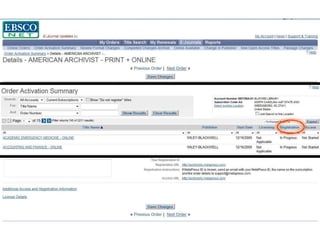
Licensing, registration & activation Use your audit spreadsheet to prioritize Document actions in EBSCOnet
 
Document Track every step of the process  Save everything Make it accessible Image from http://www.flickr.com/photos /46632302@N06/4279477491/
Workflow University of Wisconsin-Parkside Library
University of Wisconsin – Parkside One of 13 four-year universities in the Wisconsin state system Commuter campus with focus turning towards distance-education 5300 students About 200 individually subscribed e-journals
Questions we had… What do we have? What workflow will ensure access? What tools should we use? How do we manage e-journal data? http://commons.wikimedia.org/wiki/File:Magasin_IKEA_%C3%A0_Roques_1.jpg What  is  our inventory ?
How do we determine what we have? Tools SwetsWise report ILS report Platform
  What workflow will ensure access?  What tools will help us accomplish this? Workflow: Registration Licensing Activation Cataloging Tools used: Checklist Serials vendor website and reports (SwetsWise) ILS (Voyager) Follow-up triggers (Outlook) Link resolver (SFX) Management tool (ERMes)
Checklist
Workflow Ia. Pre-Registration  Check access through platform using library’s link resolver Platform
Workflow I. Registering for access
Workflow II. Licensing  Swetswise’s checklist  ERMes
Workflow III. Complete activation
Workflow IV. Cataloging Download MARC record, edit to local standards Add 856 field connecting record to link resolver Update OCLC holdings
How do we manage e-journal data? E-journal data is everywhere No funding available for a commercial ERMS System-wide purchase may be possible
What is ERMes? Open source, MS Access based ERMS Current version Designed for database management No Web Interface No Triggers  Does not integrate with ILS Developed by Librarians  William Doering (System Librarian) and Galadriel Chilton (E- Resources Librarian) from University of Wisconsin-La Crosse 54 users as of February 2011  http://murphylibrary.uwlax.edu/erm/ 2011 new release  (May/June) Migration strategy between versions Authentication rights for various levels of access Web interface Simultaneous user access E-serials/periodicals management
ERMes: benefits Is free! Can be modified for journal management Works for a small collection  Serves as one-stop-shop for library staff
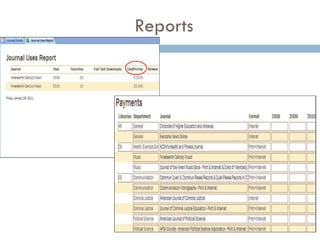
How do we use ERMes? Utilize it as a checklist Store and track e-journal data Create reports
Checklist
Information about e-journals
Reports
Lesson learned
What I learned Image from  http://www.flickr.com/photos/joelmontes/ 4762384399 Assume nothing Document everything Check in periodically
Create a checklist that works for your institution  (and follow it!) Utilize serials vendor during registration process Knowing platform of e-journal is key Use software to trigger follow-up to any correspondence  Enter both general information AND details on the ERM system What we learned
Questions?
Contact Information Kate Silton Electronic Resources Librarian F.D. Bluford Library North Carolina A&T State University (336)285-4256 [email_address] Anne F. Rasmussen Serials Librarian University of Wisconsin – Parkside Library  (262) 595-2420 [email_address] Qinghua Xu Electronic Resources Coordinator University of Wisconsin-Parkside Library (262) 595-2168 [email_address]

Individual e journal subscription: assembly required

  • 1.
    INDIVIDUAL E-JOURNAL SUBSCRIPTIONS:ASSEMBLY REQUIRED Kate Silton, North Carolina A&T State University Anne Rasmussen & Qinghua Xu, University of Wisconsin-Parkside
  • 2.
    Overview Challenges ofe-journal management Workflow: tool-based solutions What we learned
  • 3.
    Challenges of IndividualE-Journal Management
  • 4.
    Challenges: Thelife cycle of e-journals
  • 5.
    Challenges: Thecycle within the cycle…
  • 6.
    Challenges: Individuale-journals management More steps to consider in creating access than print Each publisher has different workflows for gaining access Managing the terms of a title needs as much attention as a whole journal package http://www.richardsnotes.org/archives/2005/02/21/andy-singers-no-exit-some-assembly-required/
  • 7.
    North Carolina A&TState University Library Workflow
  • 8.
    North Carolina A&TState University Public, land grant, HBCU FTE of 10,000 Strengths are in STEM fields 470 individual e-journal subscriptions
  • 9.
    Broad Recommendations PrioritizeOrganize Select your tools wisely Document
  • 10.
    Prioritize What arethe goals of our e-journal activation project? Image from U.S. National Archives http://www.flickr.com/photos/usnationalarchives/4271699851
  • 11.
    Organize Publisher PlatformType of license Image from http://www.flickr.com/photos/uwehermann/132244826/
  • 12.
    Select Your ToolsSerials vendor (EBSCOnet) Excel (to fill in the gaps) Knowledgebase and link resolver ERM (III)
  • 13.
    Tool-based solutions: TheAudit What are our subscriptions? Which subscriptions are currently accessible? Which subscriptions require licenses to be signed? Which subscriptions require registration? Which subscriptions don’t allow IP access? Off campus access?
  • 14.
  • 15.
  • 16.
    Licensing, registration &activation Use your audit spreadsheet to prioritize Document actions in EBSCOnet
  • 17.
  • 18.
    Document Track everystep of the process Save everything Make it accessible Image from http://www.flickr.com/photos /46632302@N06/4279477491/
  • 19.
    Workflow University ofWisconsin-Parkside Library
  • 20.
    University of Wisconsin– Parkside One of 13 four-year universities in the Wisconsin state system Commuter campus with focus turning towards distance-education 5300 students About 200 individually subscribed e-journals
  • 21.
    Questions we had…What do we have? What workflow will ensure access? What tools should we use? How do we manage e-journal data? http://commons.wikimedia.org/wiki/File:Magasin_IKEA_%C3%A0_Roques_1.jpg What is our inventory ?
  • 22.
    How do wedetermine what we have? Tools SwetsWise report ILS report Platform
  • 23.
    Whatworkflow will ensure access? What tools will help us accomplish this? Workflow: Registration Licensing Activation Cataloging Tools used: Checklist Serials vendor website and reports (SwetsWise) ILS (Voyager) Follow-up triggers (Outlook) Link resolver (SFX) Management tool (ERMes)
  • 24.
  • 25.
    Workflow Ia. Pre-Registration Check access through platform using library’s link resolver Platform
  • 26.
  • 27.
    Workflow II. Licensing Swetswise’s checklist ERMes
  • 28.
  • 29.
    Workflow IV. CatalogingDownload MARC record, edit to local standards Add 856 field connecting record to link resolver Update OCLC holdings
  • 30.
    How do wemanage e-journal data? E-journal data is everywhere No funding available for a commercial ERMS System-wide purchase may be possible
  • 31.
    What is ERMes?Open source, MS Access based ERMS Current version Designed for database management No Web Interface No Triggers  Does not integrate with ILS Developed by Librarians William Doering (System Librarian) and Galadriel Chilton (E- Resources Librarian) from University of Wisconsin-La Crosse 54 users as of February 2011 http://murphylibrary.uwlax.edu/erm/ 2011 new release (May/June) Migration strategy between versions Authentication rights for various levels of access Web interface Simultaneous user access E-serials/periodicals management
  • 32.
    ERMes: benefits Isfree! Can be modified for journal management Works for a small collection Serves as one-stop-shop for library staff
  • 33.
    How do weuse ERMes? Utilize it as a checklist Store and track e-journal data Create reports
  • 34.
  • 35.
  • 36.
  • 37.
  • 38.
    What I learnedImage from http://www.flickr.com/photos/joelmontes/ 4762384399 Assume nothing Document everything Check in periodically
  • 39.
    Create a checklistthat works for your institution (and follow it!) Utilize serials vendor during registration process Knowing platform of e-journal is key Use software to trigger follow-up to any correspondence  Enter both general information AND details on the ERM system What we learned
  • 40.
  • 41.
    Contact Information KateSilton Electronic Resources Librarian F.D. Bluford Library North Carolina A&T State University (336)285-4256 [email_address] Anne F. Rasmussen Serials Librarian University of Wisconsin – Parkside Library (262) 595-2420 [email_address] Qinghua Xu Electronic Resources Coordinator University of Wisconsin-Parkside Library (262) 595-2168 [email_address]