Download free for 30 days
Sign in
Upload
Language (EN)
Support
Business
Mobile
Social Media
Marketing
Technology
Art & Photos
Career
Design
Education
Presentations & Public Speaking
Government & Nonprofit
Healthcare
Internet
Law
Leadership & Management
Automotive
Engineering
Software
Recruiting & HR
Retail
Sales
Services
Science
Small Business & Entrepreneurship
Food
Environment
Economy & Finance
Data & Analytics
Investor Relations
Sports
Spiritual
News & Politics
Travel
Self Improvement
Real Estate
Entertainment & Humor
Health & Medicine
Devices & Hardware
Lifestyle
Change Language
Language
English
Español
Português
Français
Deutsche
Cancel
Save
Submit search
EN
Uploaded by
mentattechnologyente
31 views
Incident Command for IT Professionals and Their Teams
Incident Command practices derived from firefighting
Internet
◦
Read more
0
Save
Share
Embed
Embed presentation
Download
Download to read offline
1
/ 97
2
/ 97
3
/ 97
4
/ 97
5
/ 97
6
/ 97
7
/ 97
8
/ 97
9
/ 97
10
/ 97
11
/ 97
12
/ 97
13
/ 97
14
/ 97
15
/ 97
16
/ 97
17
/ 97
18
/ 97
19
/ 97
20
/ 97
21
/ 97
22
/ 97
23
/ 97
24
/ 97
25
/ 97
26
/ 97
27
/ 97
28
/ 97
29
/ 97
30
/ 97
31
/ 97
32
/ 97
33
/ 97
34
/ 97
35
/ 97
36
/ 97
37
/ 97
38
/ 97
39
/ 97
40
/ 97
41
/ 97
42
/ 97
43
/ 97
44
/ 97
45
/ 97
46
/ 97
47
/ 97
48
/ 97
49
/ 97
50
/ 97
51
/ 97
52
/ 97
53
/ 97
54
/ 97
55
/ 97
56
/ 97
57
/ 97
58
/ 97
59
/ 97
60
/ 97
61
/ 97
62
/ 97
63
/ 97
64
/ 97
65
/ 97
66
/ 97
67
/ 97
68
/ 97
69
/ 97
70
/ 97
71
/ 97
72
/ 97
73
/ 97
74
/ 97
75
/ 97
76
/ 97
77
/ 97
78
/ 97
79
/ 97
80
/ 97
81
/ 97
82
/ 97
83
/ 97
84
/ 97
85
/ 97
86
/ 97
87
/ 97
88
/ 97
89
/ 97
90
/ 97
91
/ 97
92
/ 97
93
/ 97
94
/ 97
95
/ 97
96
/ 97
97
/ 97
More Related Content
PPTX
EMERGENCY PREPAREDNESS AND RESPONSE MANAGEMENR PEM 19.pptx
by
JohnJerryDalawampu2
PPT
Bcp coop training taxpayer services 1-15-09
by
Richard Turner
PPT
1 im ts in colorado emsac november 2011 powerpoint presentation
by
mickitrost
PDF
Incident Command System in the Private Sector - An Overview
by
ReginaPhelps
PPTX
2720 Ch 15 PowerPoint.pptx
by
NickPalmisano2
PPT
Chapter 13
by
snoshoesam
PDF
Basic Incident Command System for College DRRM Subject
by
RandyLantita
PPT
Major Incident and Disaster Response
by
Hi Tech Criminal Justice
EMERGENCY PREPAREDNESS AND RESPONSE MANAGEMENR PEM 19.pptx
by
JohnJerryDalawampu2
Bcp coop training taxpayer services 1-15-09
by
Richard Turner
1 im ts in colorado emsac november 2011 powerpoint presentation
by
mickitrost
Incident Command System in the Private Sector - An Overview
by
ReginaPhelps
2720 Ch 15 PowerPoint.pptx
by
NickPalmisano2
Chapter 13
by
snoshoesam
Basic Incident Command System for College DRRM Subject
by
RandyLantita
Major Incident and Disaster Response
by
Hi Tech Criminal Justice
Similar to Incident Command for IT Professionals and Their Teams
PDF
The National Incident Management System: Rethinking Command and Control
by
Hi Tech Criminal Justice
PDF
Emergency Preparedness - Implementing an Incident Command System within a Mul...
by
Rochester Gas and Electric
PDF
Rick Clymer - Incident Management.pdf
by
QA or the Highway
PDF
OSMC 2024 | The story of firefighting: learnings from the incident management...
by
NETWAYS
PDF
Project Management and ICS article
by
David Rudawitz
PPT
Chapter 13
by
Joe
PPT
Crisis Mgt Presentation
by
wbesse
PPT
Class on ICS
by
Ashique Hasan
PPTX
Lecture 06 - Incident Management and SOC.pptx
by
prasadsanjaya2
PPT
Incident Command System xxxxxxxxxxxxxxxxxxxxxxxxx
by
Peter Miles
PPTX
Professional incident response
by
Brooks Garrett
PDF
History of ics
by
sugeladi
PDF
Challenging Environment In Asia Requires Emergency Response
by
Enterprise Security Risk Management
PPTX
The Cio And Crisis Leadership, An Examination
by
dbriner
PDF
Corporate Crisis Management - Minimize the Chaos
by
MissionMode
PDF
Emergency Management Operation Of Emergency Department
by
Robin Anderson
PPTX
Command systems
by
Prof. David E. Alexander (UCL)
PPTX
1810 Ch 2 PowerPoint.pptx
by
NickPalmisano2
PPTX
Incident Response Test
by
Siemplify
PDF
2811 Course overview JPR
by
NickPalmisano2
The National Incident Management System: Rethinking Command and Control
by
Hi Tech Criminal Justice
Emergency Preparedness - Implementing an Incident Command System within a Mul...
by
Rochester Gas and Electric
Rick Clymer - Incident Management.pdf
by
QA or the Highway
OSMC 2024 | The story of firefighting: learnings from the incident management...
by
NETWAYS
Project Management and ICS article
by
David Rudawitz
Chapter 13
by
Joe
Crisis Mgt Presentation
by
wbesse
Class on ICS
by
Ashique Hasan
Lecture 06 - Incident Management and SOC.pptx
by
prasadsanjaya2
Incident Command System xxxxxxxxxxxxxxxxxxxxxxxxx
by
Peter Miles
Professional incident response
by
Brooks Garrett
History of ics
by
sugeladi
Challenging Environment In Asia Requires Emergency Response
by
Enterprise Security Risk Management
The Cio And Crisis Leadership, An Examination
by
dbriner
Corporate Crisis Management - Minimize the Chaos
by
MissionMode
Emergency Management Operation Of Emergency Department
by
Robin Anderson
Command systems
by
Prof. David E. Alexander (UCL)
1810 Ch 2 PowerPoint.pptx
by
NickPalmisano2
Incident Response Test
by
Siemplify
2811 Course overview JPR
by
NickPalmisano2
Recently uploaded
PPTX
Human Aspects of Information Security: The People Factor.pptx
by
Omar Fernandez
PPTX
Introduction to Multi-dimentional array.pptx
by
Omar Fernandez
PDF
Networking 2 Syllabus using cisco packet tracer simulator
by
ODINARARCH
PPTX
Cybersecurity cyber incident Weeks_7_to_9.pptx
by
riaz59
PPTX
Competitive Positioning - All HCI Competitors vs HPE PCBE dHCI _ SimpliVity w...
by
yosefemiru123
PPTX
Analysis Intelligence in Cyber Protection.pptx
by
Omar Fernandez
PDF
Beacon Kit paper foundation tech framework pdf
by
Steven McGee
PPTX
A QUIZ ABOUT THE HISTORY OF MICROSOFT WORD
by
zoenadiajara1
PDF
Front-End vs Back-End Development: Roles, Tools, Skills & Career Guide
by
Indian Website Company
PPTX
chatgpt overview presentation for school.pptx
by
MojahidUlIslam19
PDF
galakticki fudbal galactic football.pdf...
by
StefanFilipovic9
PPTX
How Big Brands are Taking Your Traffic in Alberta [Data Inside].pptx
by
Visibility Drip
Human Aspects of Information Security: The People Factor.pptx
by
Omar Fernandez
Introduction to Multi-dimentional array.pptx
by
Omar Fernandez
Networking 2 Syllabus using cisco packet tracer simulator
by
ODINARARCH
Cybersecurity cyber incident Weeks_7_to_9.pptx
by
riaz59
Competitive Positioning - All HCI Competitors vs HPE PCBE dHCI _ SimpliVity w...
by
yosefemiru123
Analysis Intelligence in Cyber Protection.pptx
by
Omar Fernandez
Beacon Kit paper foundation tech framework pdf
by
Steven McGee
A QUIZ ABOUT THE HISTORY OF MICROSOFT WORD
by
zoenadiajara1
Front-End vs Back-End Development: Roles, Tools, Skills & Career Guide
by
Indian Website Company
chatgpt overview presentation for school.pptx
by
MojahidUlIslam19
galakticki fudbal galactic football.pdf...
by
StefanFilipovic9
How Big Brands are Taking Your Traffic in Alberta [Data Inside].pptx
by
Visibility Drip
Incident Command for IT Professionals and Their Teams
1.
Copyright © 2018,
Great Circle Associates, Inc. All Rights Reserved. Incident Command for IT: What We’ve Learned from the Fire Department USENIX SREcon18 27 March 2018 PDF of these slides: https://goo.gl/5C2M2d Brent Chapman Brent@GreatCircle.com @brent_chapman 1
2.
Copyright © 2018,
Great Circle Associates, Inc. All Rights Reserved. 2 When connectivity counts. Majordomo
3.
Copyright © 2018,
Great Circle Associates, Inc. All Rights Reserved. Why are we here? • Outages are inevitable. We do our best to avoid them, but sometimes things go wrong. • Outages are expensive and disruptive; they impact customers, reputation, and staff. • Therefore, we want outages to be shorter, and more efficiently managed. • Many orgs have adopted incident management practices based on the Incident Command System (ICS), which was developed by fire departments. • What have we learned? 3
4.
Copyright © 2018,
Great Circle Associates, Inc. All Rights Reserved. What is an incident? • Significant problem • Requires urgent response • Involves multiple responders • Different from ITIL definition of “incident” • In ITIL, a disk dying in a RAID array is an “incident”, because disk needs replacing • That’s routine; not what we’re here for today • We’re here for what ITIL calls “major incidents” 4
5.
Copyright © 2018,
Great Circle Associates, Inc. All Rights Reserved. IT incident examples • Service outages • Database outages • DB/middleware outages • Load surges • Security incidents • Intrusions • DoS attacks • Zero Day updates • Cloud provider outages • PaaS/IaaS outages • SaaS outages • Infrastructure failures • Power failures • Cooling failures • Network failures • … and so forth 5
6.
Copyright © 2018,
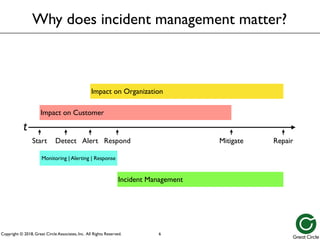
Great Circle Associates, Inc. All Rights Reserved. Incident Management Impact on Customer Impact on Organization Repair Repair Mitigate Mitigate Start Detect Alert Respond t Impact on Customer Impact on Organization Incident Management Why does incident management matter? 6 Monitoring | Alerting | Response
7.
Copyright © 2018,
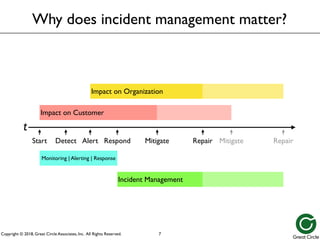
Great Circle Associates, Inc. All Rights Reserved. Repair Repair Mitigate Mitigate Impact on Organization Impact on Customer Incident Management Why does incident management matter? 7 Start Detect Alert Respond t Monitoring | Alerting | Response
8.
Copyright © 2018,
Great Circle Associates, Inc. All Rights Reserved. Why does incident management matter? • Reduces impact on customers • Both current and future • Less likely to take their business elsewhere • Reduces impact on organization • Firefighting causes development delays • Negative publicity impacts public perception, stock prices, regulatory interest • Reduces impact on individuals • Less burnout • Provides high-quality data for blameless postmortems 8
9.
Copyright © 2018,
Great Circle Associates, Inc. All Rights Reserved. • Public safety agencies • Fire departments • Urban & suburban • Forest & wildland • Police departments • Coast Guard • … etc. Who manages emergencies daily? 9
10.
Copyright © 2018,
Great Circle Associates, Inc. All Rights Reserved. • Organize themselves on the fly to deal with a major incident? • Quickly and effectively coordinate the efforts of multiple agencies? • Evolve the organization as the incident changes in scope, scale, or focus? • What can IT professionals learn from that? How do public safety agencies… 10
11.
Copyright © 2018,
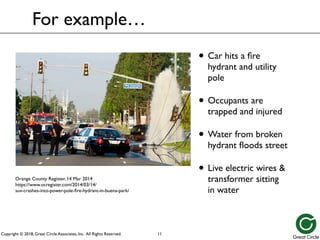
Great Circle Associates, Inc. All Rights Reserved. For example… • Car hits a fire hydrant and utility pole • Occupants are trapped and injured • Water from broken hydrant floods street • Live electric wires & transformer sitting in water 11 Orange County Register, 14 Mar 2014 https://www.ocregister.com/2014/03/14/ suv-crashes-into-power-pole-fire-hydrant-in-buena-park/
12.
Copyright © 2018,
Great Circle Associates, Inc. All Rights Reserved. • Who might be involved in response? • Fire department – rescue trapped occupants • Ambulance service – treat & transport victims • Police department – direct traffic & investigate • Water department – shut off hydrant • Electric company – deal with flooded transformer & electrical outage • How to coordinate all that? For example… 12
13.
Copyright © 2018,
Great Circle Associates, Inc. All Rights Reserved. • Ambulance crew needs to treat & transport victims • But first, fire department crew needs to extricate them from wreckage • But before they can do that, water company needs to shut off water • Which they can’t do until electric company safes the flooded transformer and live wires • And then hydrant and utility pole need to be repaired, and site cleaned up What needs to get done? 13
14.
Copyright © 2018,
Great Circle Associates, Inc. All Rights Reserved. • Who is in charge? • How do they figure out what needs to be done, and who can do it? • How do assignments get made, so that • Everything necessary gets done • No effort gets duplicated • Everything is done safely • How does leadership shift, over time? How do you organize this? 14
15.
Copyright © 2018,
Great Circle Associates, Inc. All Rights Reserved. • Fast-changing situation • Fire grows and moves as weather and winds shift • Plan evolves as situation & resources change • Many agencies involved • Firefighters from dozens of cities, plus CALFIRE, USFS, BLM, and military • Airborne water drop, transport, & scouting • Law enforcement to deal with residents • Support units (medical, kitchens, camps, fuel, etc.) • Might grow from 4 firefighters to 4,000 within a week An even bigger example: Southern California Wildfires 15
16.
Copyright © 2018,
Great Circle Associates, Inc. All Rights Reserved. Incident Command System (ICS) • Standardized organizational structure and set of operating principles • Tools for command, control, and coordination of a response to an incident • Provides means to coordinate efforts of multiple parties toward common goals • Uses principles that have been proven to improve effectiveness and efficiency 16 FD
17.
Copyright © 2018,
Great Circle Associates, Inc. All Rights Reserved. • Developed in 1970's to coordinate agencies dealing with yearly SoCal wildfires • Has evolved since into national standard • Now used by nearly all US public safety agencies • Often mandated, to obtain state/Federal funding History of ICS 17
18.
Copyright © 2018,
Great Circle Associates, Inc. All Rights Reserved. • Data center outage — total power failure • Utility service dropped, UPS didn’t take load, generator didn’t start in time • All systems went down hard (no shutdown) How about an IT example? 18
19.
Copyright © 2018,
Great Circle Associates, Inc. All Rights Reserved. • Need to • Ensure services transferred to alternate data center • Cold-start everything; figure out startup order • Check/fix systems as they’re brought back up • Diagnose and permanently fix power problem • Transfer services back from alternate data center • Might take days, involve dozens of people How about an IT example? 19
20.
Copyright © 2018,
Great Circle Associates, Inc. All Rights Reserved. • Timing usually a surprise – little or no warning • Time matters – need to respond quickly • Situation not perfectly understood at start • Learn as you go, and adjust on the fly • Resources change over time • People come and go; not all together at start • Need ways to bring newcomers up to speed • Need ways to transfer responsibilities What do incidents have in common? 20
21.
Copyright © 2018,
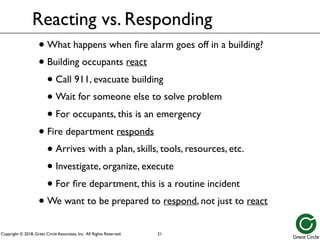
Great Circle Associates, Inc. All Rights Reserved. Reacting vs. Responding • What happens when fire alarm goes off in a building? • Building occupants react • Call 911, evacuate building • Wait for someone else to solve problem • For occupants, this is an emergency • Fire department responds • Arrives with a plan, skills, tools, resources, etc. • Investigate, organize, execute • For fire department, this is a routine incident • We want to be prepared to respond, not just to react 21
22.
Copyright © 2018,
Great Circle Associates, Inc. All Rights Reserved. Normal Operations vs. Emergency Operations 22 FD
23.
Copyright © 2018,
Great Circle Associates, Inc. All Rights Reserved. Key: Declare an Emergency • This is not how we operate, day-to-day • This is a special set of rules, for emergencies •Declare an emergency, to make it clear that you’re operating under these special rules • Goal is to return to normal operations as quickly as possible • Must also declare when emergency is over 23
24.
Copyright © 2018,
Great Circle Associates, Inc. All Rights Reserved. Peacetime vs Wartime • Regular day-to-day operations are “peacetime” • Org structure generally based on seniority • Lots of discussion & debate around decisions • Decisions generally made by consensus • Time measured in weeks, months • Once an incident is declared, it’s “wartime” • The rules and social norms change… • Time measured in minutes, hours 24
25.
Copyright © 2018,
Great Circle Associates, Inc. All Rights Reserved. Peacetime vs Wartime • Responding to an incident is “wartime” • IC is in charge, regardless of peacetime role • Decisions made by IC after considering input • Might need to take riskier options • IC might go against consensus; not a vote • Even if you disagree, support the decision • During the response is not the time to argue • Discussions may seem “rude” or “abrupt” • It’s usually not personal 25
26.
Copyright © 2018,
Great Circle Associates, Inc. All Rights Reserved. Tip: Give your emergency a name • Reinforces that there is an emergency • Helps identify docs, channels, etc. • Examples • Hurricane Maria,Tubbs Fire • omg/5150 • Incident 18-Alpha (Bravo, Charlie, …) • Don’t be too specific about cause • i.e.,“Database Outage” might turn out to be a networking problem 26
27.
Copyright © 2018,
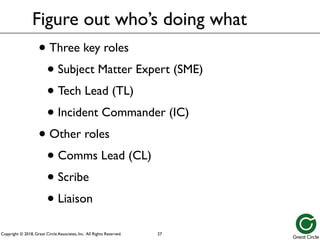
Great Circle Associates, Inc. All Rights Reserved. Figure out who’s doing what • Three key roles • Subject Matter Expert (SME) • Tech Lead (TL) • Incident Commander (IC) • Other roles • Comms Lead (CL) • Scribe • Liaison 27
28.
Copyright © 2018,
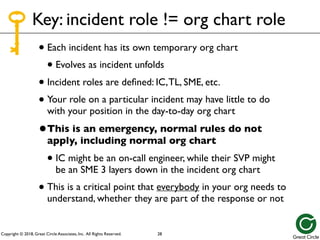
Great Circle Associates, Inc. All Rights Reserved. Key: incident role != org chart role • Each incident has its own temporary org chart • Evolves as incident unfolds • Incident roles are defined: IC,TL, SME, etc. • Your role on a particular incident may have little to do with your position in the day-to-day org chart •This is an emergency, normal rules do not apply, including normal org chart • IC might be an on-call engineer, while their SVP might be an SME 3 layers down in the incident org chart • This is a critical point that everybody in your org needs to understand, whether they are part of the response or not 28
29.
Copyright © 2018,
Great Circle Associates, Inc. All Rights Reserved. Subject Matter Expert (SME) responsibilities • Troubleshoot and fix the problem • Communicate with rest of responders • Coordinate activities with Tech Lead (TL) • Communicate before changing anything • Leave a good trail for the postmortem 29
30.
Copyright © 2018,
Great Circle Associates, Inc. All Rights Reserved. Tips for SMEs • Be prepared • Tools: chat client, charged laptop/phone, etc. • Credentials: passwords, keys, permissions, etc. • Knowledge: familiarity, documentation, etc. • Respond promptly when alerted • Don’t freelance • Never hesitate to escalate • Follow blameless principles 30
31.
Copyright © 2018,
Great Circle Associates, Inc. All Rights Reserved. It’s somebody else’s emergency 31 FD
32.
Copyright © 2018,
Great Circle Associates, Inc. All Rights Reserved. Tech Lead (TL) responsibilities • Lead SMEs to analyze and resolve the problem • Expected to be a subject matter expert (SME) • Keep the IC informed of progress and needs • Defer to IC for priority and policy decisions 32
33.
Copyright © 2018,
Great Circle Associates, Inc. All Rights Reserved. Incident Commander (IC) • Overall responsibility for managing the incident response • Single source of truth of what’s happening, and what’s planned • Point-of-contact for all inquiries from outside the response • Fills all other response roles, until each role is delegated 33
34.
Copyright © 2018,
Great Circle Associates, Inc. All Rights Reserved. IC responsibilities • Organize the response • Determine and control who is responding • Get responders onto the same comm channel • Facilitate discussions among responders • Delegate actions to Ops • Keep the “big picture” in mind • Make the “big decisions” • Keep folks outside the response informed • Lead the postmortem review process 34
35.
Copyright © 2018,
Great Circle Associates, Inc. All Rights Reserved. Tip: make first responder TL, not IC • Incident response is often launched by an on- caller who is already working a problem • Rather than make them shift gears to become the IC, they should continue as TL • Recruit somebody else to be IC, to organize response while TL keeps working the problem • IC gathers resources, and feeds them to TL, who puts them to work • TL keeps IC informed of what they’re doing, and what they need 35
36.
Copyright © 2018,
Great Circle Associates, Inc. All Rights Reserved. Key: how IC and TL work together • IC and TL have complementary roles • IC faces outward, manages interfaces between response and rest of organization • TL focuses inward, on executing the response • IC and TL coordinate closely with each other • One person can’t fill both roles well • Each role tends to have a different “rhythm” • Tend to get stuck in one, while other suffers 36
37.
Copyright © 2018,
Great Circle Associates, Inc. All Rights Reserved. Tip: often, IC and TL are all you need • Many incidents resolved with only IC and TL • TL concentrates on solving the problem • IC handles coordinating with rest of org • Worth declaring/treating as incident anyway • Framework to grow response, if needed • Much easier to manage if you start while response is small • Most orgs can benefit from the practice 37
38.
Copyright © 2018,
Great Circle Associates, Inc. All Rights Reserved. Do your thinking in advance 38 FD
39.
Copyright © 2018,
Great Circle Associates, Inc. All Rights Reserved. Communications among responders • You want all the responders for an incident to be communicating with each other, as a group • Two obvious mechanisms: • Verbal: phone bridge, face-to-face, etc. • Text: Slack, IRC, Google Chat, etc. • In general, text is better than verbal • Built-in transcript of who said what, when; useful for postmortem • Easier to share links, error messages, etc. 39
40.
Copyright © 2018,
Great Circle Associates, Inc. All Rights Reserved. Text communications • Best: channel-oriented text (i.e., Slack, IRC) • Better than ad hoc multi-party chats (i.e., Google Hangouts,Apple Messenger, SMS) • Somebody joining later can read back through channel history • History difficult to capture in multi-party chat, as participants come and go • Conversations often start in ad hoc chats; move them to logged channels ASAP 40
41.
Copyright © 2018,
Great Circle Associates, Inc. All Rights Reserved. Tip: use a dedicated channel • Create a channel just for this incident • Don’t use your team’s normal “chat” channel • Channel name should reflect incident name • Channel description should include one- sentence synopsis, and link to status doc • TL and IC control the channel 41
42.
Copyright © 2018,
Great Circle Associates, Inc. All Rights Reserved. Tip: show role via display name • If possible, set your display name on the channel to show your role on the current incident (e.g., IC,TL, Database SME, etc.) • Especially important for senior personnel and managers/executives • Otherwise, folks are going to assume they’re in charge 42
43.
Copyright © 2018,
Great Circle Associates, Inc. All Rights Reserved. Tip: share live links, not screenshots • Often want to share a graph or dashboard to the channel • Most useful is a live link that others can use as basis for further exploration and refinement • Screenshots are a poor substitute; can’t be refined, expanded, drilled down, etc. • Make sure to limit view to particular time • Link shortener (i.e., bit.ly) can be very useful • https://github.com/kellegous/go 43
44.
Copyright © 2018,
Great Circle Associates, Inc. All Rights Reserved. Tip: don’t dump long text into channel • Don’t know how chat clients are going to truncate, mangle, render what you copy/paste • Better to put into a doc, and share link to doc • Useful to have a shared doc per incident, for stuff like this, for folks to paste into • Internal “pastebin” service can also be useful • Paste long text, get a short URL to share • i.e., https://github.com/lordelph/pastebin • Beware privacy/security issues 44
45.
Copyright © 2018,
Great Circle Associates, Inc. All Rights Reserved. Tip: use chatbots to automate • New Relic uses Hubot • Alice Goldfuss talk from SREcon16: https://www.usenix.org/conference/srecon16/ program/presentation/goldfuss • PagerDuty integration with Slack • VictorOps • Many others available; rapidly evolving topic • Buzzword is “ChatOps” 45
46.
Copyright © 2018,
Great Circle Associates, Inc. All Rights Reserved. Verbal communications • Phone bridge, Skype session, Hangout, etc. • Pro: easier to convey emotion, uncertainty, etc. • Con: harder to convey detail • Lots of wasted time as folks join late, introduce selves, get caught up, etc. • Easy for someone to inadvertently disrupt call with background noise, not using mute, etc. • IC or TL has to moderate, with an iron fist • This is a distraction from their key job • “Permission to speak?” protocol might be useful 46
47.
Copyright © 2018,
Great Circle Associates, Inc. All Rights Reserved. Tip: treat verbal as a sidebar • A quick verbal discussion (face-to-face, on phone bridge, etc.) can be useful to float an idea, discuss some detail in depth, etc. • Don’t need to tie up everybody for that • No logging, which can be good or bad • Even if you record, someone must transcribe • Report results back to primary (text) channel 47
48.
Copyright © 2018,
Great Circle Associates, Inc. All Rights Reserved. Tip: maintain a status doc • Shared doc capturing current state of response • Who is filling what role • What the current high-level plan is • Estimate of impact of incident (number of customers affected, etc.) • Estimate of resolution time • NOT a history doc or a log (those are other docs) • Should be a snapshot of current status • Timestamped, so you know how current 48
49.
Copyright © 2018,
Great Circle Associates, Inc. All Rights Reserved. Other roles: Comms Lead (CL) • As response grows, communication with folks beyond the response often dominates IC work • On larger incidents, can be useful to designate a Comms Lead (CL), and delegate that to them • Similar to Public Information Officer (PIO) • Is the “voice of the IC” for keeping folks informed, answering questions, etc. • Two way: passes info back to IC/TL, if needed 49
50.
Copyright © 2018,
Great Circle Associates, Inc. All Rights Reserved. Other roles: Scribe • Unburdens the IC from record-keeping • Makes sure everything gets logged • Notes times of key events • Records and communicates decisions 50
51.
Copyright © 2018,
Great Circle Associates, Inc. All Rights Reserved. Keep an eye on the clock 51 FD
52.
Copyright © 2018,
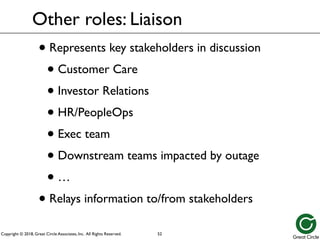
Great Circle Associates, Inc. All Rights Reserved. Other roles: Liaison • Represents key stakeholders in discussion • Customer Care • Investor Relations • HR/PeopleOps • Exec team • Downstream teams impacted by outage • … • Relays information to/from stakeholders 52
53.
Copyright © 2018,
Great Circle Associates, Inc. All Rights Reserved. Dispatch vs. Notification 53 FD
54.
Copyright © 2018,
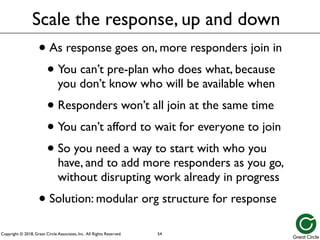
Great Circle Associates, Inc. All Rights Reserved. Scale the response, up and down • As response goes on, more responders join in • You can’t pre-plan who does what, because you don’t know who will be available when • Responders won’t all join at the same time • You can’t afford to wait for everyone to join • So you need a way to start with who you have, and to add more responders as you go, without disrupting work already in progress • Solution: modular org structure for response 54
55.
Copyright © 2018,
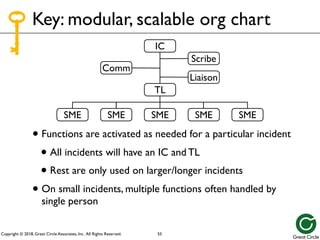
Great Circle Associates, Inc. All Rights Reserved. IC TL SME SME SME SME SME IC TL Comm SME SME SME SME SME IC TL Scribe Comm SME SME SME SME SME IC TL Liaison Scribe Comm SME SME SME SME SME IC TL • Functions are activated as needed for a particular incident • All incidents will have an IC and TL • Rest are only used on larger/longer incidents • On small incidents, multiple functions often handled by single person Key: modular, scalable org chart 55
56.
Copyright © 2018,
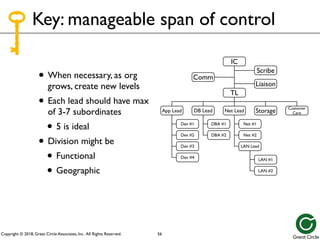
Great Circle Associates, Inc. All Rights Reserved. Key: manageable span of control • When necessary, as org grows, create new levels • Each lead should have max of 3-7 subordinates • 5 is ideal • Division might be • Functional • Geographic 56 Liaison Scribe Comm Storage Customer Care App Lead Dev #1 Dev #2 Dev #3 Dev #4 DBA #1 DBA #2 DB Lead Net #1 Net #2 LAN Lead Net Lead LAN #1 LAN #2 IC TL
57.
Copyright © 2018,
Great Circle Associates, Inc. All Rights Reserved. • On incident, each person has one boss • Strict tree structure, all the way to the top • Everybody knows who they work for, right now • Every supervisor knows who works for them • Works better than matrix in an emergency • Doesn’t assume folks normally work together, or even know each other • Makes communication & coordination easier, up/ down tree, as organization grows & changes • Reduces freelancing Key: unity of command 57
58.
Copyright © 2018,
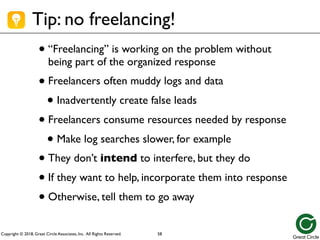
Great Circle Associates, Inc. All Rights Reserved. Tip: no freelancing! •“Freelancing” is working on the problem without being part of the organized response •Freelancers often muddy logs and data • Inadvertently create false leads •Freelancers consume resources needed by response • Make log searches slower, for example •They don’t intend to interfere, but they do •If they want to help, incorporate them into response •Otherwise, tell them to go away 58
59.
Copyright © 2018,
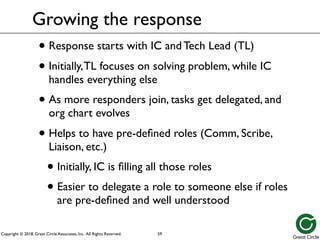
Great Circle Associates, Inc. All Rights Reserved. • Response starts with IC and Tech Lead (TL) • Initially,TL focuses on solving problem, while IC handles everything else • As more responders join, tasks get delegated, and org chart evolves • Helps to have pre-defined roles (Comm, Scribe, Liaison, etc.) • Initially, IC is filling all those roles • Easier to delegate a role to someone else if roles are pre-defined and well understood Growing the response 59
60.
Copyright © 2018,
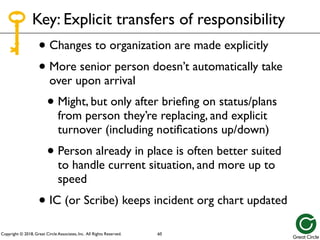
Great Circle Associates, Inc. All Rights Reserved. • Changes to organization are made explicitly • More senior person doesn’t automatically take over upon arrival • Might, but only after briefing on status/plans from person they’re replacing, and explicit turnover (including notifications up/down) • Person already in place is often better suited to handle current situation, and more up to speed • IC (or Scribe) keeps incident org chart updated Key: Explicit transfers of responsibility 60
61.
Copyright © 2018,
Great Circle Associates, Inc. All Rights Reserved. Focus on roles, not individuals 61 FD
62.
Copyright © 2018,
Great Circle Associates, Inc. All Rights Reserved. Tip: beware assumptions about roles • People will assume that role in everyday org chart translates directly to role in incident response • i.e., people will assume that aVP is IC, if theVP is participating in response • You must address this by being explicit about current roles in this incident • Senior leaders/managers/directors/execs need to be aware of this effect, and be careful • Explicitly state own role, and visibly defer to IC/TL • Ask questions out-of-band to IC/TL, not in channel 62
63.
Copyright © 2018,
Great Circle Associates, Inc. All Rights Reserved. Senior managers can inadvertently disrupt incident response 63 FD
64.
Copyright © 2018,
Great Circle Associates, Inc. All Rights Reserved. • Communicate clearly and completely; beware jargon • Reduces potential for confusion • Reduces time spent clarifying • Lets other people (including management) monitor, without interrupting with questions • Leaves a clear record for postmortem analysis • Talk directly to resources, when possible • Don’t pass messages up and down the org chart Key: Clear communications 64
65.
Copyright © 2018,
Great Circle Associates, Inc. All Rights Reserved. FD Tip: use CAN reports • Fire departments use “CAN reports”: Conditions,Actions, Needs (or Next Steps) • What’s happening, what are you doing about it, what do you need from recipient? • This is a quick mnemonic for communicating key details • Tailor the message to the recipient(s) • What do they most want to know? • What do you need from them? 65
66.
Copyright © 2018,
Great Circle Associates, Inc. All Rights Reserved. Communicating beyond responders • Communications among responders usually pretty good; they’re all on same channels/calls • Communications beyond responders (to management, customers, investors, regulators, public, etc.) is best funneled through IC • Want to paint a consistent picture • If needed, designate a Comms Lead (CL) • For critical stakeholder groups, designate a Liaison to represent that group within response and pass info back/forth to group 66
67.
Copyright © 2018,
Great Circle Associates, Inc. All Rights Reserved. Communicating beyond responders • Folks outside response generally want • Recognition — problem is being worked on • Impact — how many affected? who? • Estimated time to resolution • Generally don’t want play-by-play, inside details • Want current snapshot of status • More interested in where we are and what’s next, than in how we got here • Think CAN: Conditions,Actions, Next Steps • Some may have info to share back to response via IC/TL 67
68.
Copyright © 2018,
Great Circle Associates, Inc. All Rights Reserved. • Make an action plan for the incident, even if it’s only a couple of bullet points • Plan states, at a high level, what response is trying to accomplish right now • IC,TL, and other leads develop plan • Written plan is best • Makes it easier to keep everybody on target • Makes it easier for new arrivals to brief selves • Rule of thumb: if it crosses organizational or specialty boundaries, write it down Key: Shared action plan 68
69.
Copyright © 2018,
Great Circle Associates, Inc. All Rights Reserved. Tip: Use checklists • Very useful when doing something critical, under high stress • Especially if you’re likely to get interrupted • Even if it’s something you do often • The Checklist Manifesto, by Atul Gawande • PagerDuty’s checklists available at response.pagerduty.com 69
70.
Copyright © 2018,
Great Circle Associates, Inc. All Rights Reserved. Tip: Make changes cautiously • Before changing anything, tell channel what you’re about to do and why • Wait for objections, or concurrence • For big stuff, wait for clearance from TL/IC • Only change one thing at a time • Observe result of that change before moving on (or rolling back) • Coordinate changes on shared channel 70
71.
Copyright © 2018,
Great Circle Associates, Inc. All Rights Reserved. • Tell people what you want to accomplish, not how to do it • Let them figure out how to get it done • Gives them room to flexibly and creatively cope with changing circumstances • For example, say “get an ‘out of service’ notice up for our customers”, not “take host xyz123, reload it with RedHat and Apache, move it to rack 7, …” • Is generally faster to communicate, and the folks doing the work may know a better way than you Key: Management by objective 71
72.
Copyright © 2018,
Great Circle Associates, Inc. All Rights Reserved. • Need to know who is working on the incident, and who is joining but not yet assigned a task • So new resources can be used most effectively • So existing resources can be supported • Folks should “sign in” to response, get briefed, then wait for assignment • Designate a “report to” site or channel • Helps ensure they’re put to best use • Also simplifies briefing new arrivals Key: Comprehensive resource management 72
73.
Copyright © 2018,
Great Circle Associates, Inc. All Rights Reserved. • Might be physical (conference room) or virtual (Slack channel, phone bridge, etc.) • Command Post (CP) is key facility to identify – that’s where everybody can expect to find IC • If IC needs to leave CP, needs to transfer IC responsibility (temporarily or permanently) to someone who’ll still be there • Also useful to designate “staging area” for new resources to report to upon arrival, for sign-in and assignment; may be CP, or separate Key: Designated incident facilities 73
74.
Copyright © 2018,
Great Circle Associates, Inc. All Rights Reserved. Key:Time management • Keep an eye on the clock • Establish a cadence of updates and reviews • Hourly is a good default • More often for especially critical incidents • Less often for slow-moving or long-lasting • Tell folks when to expect next update/review • Set a timer to remind you • If you’ve got a Scribe, they can be timekeeper 74
75.
Copyright © 2018,
Great Circle Associates, Inc. All Rights Reserved. • It’s a Tuesday morning, and everything is normal • The company’s load is split 50/50 between its two data centers, in San Jose and Phoenix • At about 9:30am, the NOC loses all monitoring of San Jose, and the load doubles in Phoenix • The NOC suspects a network outage, begins to troubleshoot, and pages all NetOps managers, per their SOP • Bryan, a NetOps manager, happens to be nearby, and drives to the San Jose DC Incident Management in action… 75
76.
Copyright © 2018,
Great Circle Associates, Inc. All Rights Reserved. • Bryan arrives at the DC at about the same time as Josie and Tom, two of the company’s installers • In the parking lot, they notice that the facility’s generator is running • Inside, they find that the lights are on, but all of the UPS-powered equipment (servers, network, etc.) is without power 9:45am 76
77.
Copyright © 2018,
Great Circle Associates, Inc. All Rights Reserved. • Bryan calls the NOC: • Informs them he’s activating Incident Management plan • Names this incident “San Jose Outage” • Designates self as Tech Lead • [all examples of clear communication] First steps… 77 TL: Bryan
78.
Copyright © 2018,
Great Circle Associates, Inc. All Rights Reserved. • Bryan asks NOC to find an IC • Sue is qualified and available, and takes IC role [clear roles; incident role distinct from day-to-day role; first responder not necessarily IC] • Krishna in NOC joins as NOC rep for incident • Bryan directs Josie and Tom to switch off all systems, then investigate power problems. [management by objective] First steps… 78 Josie Tom IC: Sue TL: Bryan NOC: Krishna
79.
Copyright © 2018,
Great Circle Associates, Inc. All Rights Reserved. • Meanwhile, Sue (as IC): • Activates #SanJoseOutage Slack channel and pre-established phone bridge [clear communications] • Pages all DCOps personnel to report to DC conference room for assignment [staging area] • Creates incident status doc from template [clear comms, pre- planning] First steps… 79 Josie Tom IC: Sue TL: Bryan NOC: Krishna
80.
Copyright © 2018,
Great Circle Associates, Inc. All Rights Reserved. • Cary, the facilities manager, arrives. Bryan asks him to take charge of investigating the UPS failure, while Josie and Tom continue to switch off systems to prevent unplanned restarts. • Shin (the server team manager), Dave, and Karl (server sysadmins) arrive. Bryan asks Shin to direct them in preparing to bring servers back online. [span of control] 10:15am 80 Servers: Shin Dave Josie Tom Karl IC: Sue TL: Bryan NOC: Krishna Facilities: Cary
81.
Copyright © 2018,
Great Circle Associates, Inc. All Rights Reserved. • Chris (VP of Operations, and Sue’s great-grandboss), joins Slack channel and phone bridge. • After a brief discussion with Sue, they agree it makes most sense for Sue to remain as IC, and for Chris to handle communications to rest of company. [explicit roles; role transfer not automatic upon arrival of more senior personnel] 10:30am 81 Servers: Shin Dave Josie Tom Karl IC: Sue TL: Bryan NOC: Krishna Facilities: Cary Comm: Chris
82.
Copyright © 2018,
Great Circle Associates, Inc. All Rights Reserved. 10:45am • Krishna (NOC) relays reports of field offices having trouble accessing Phoenix DC viaVPN, probably due to San Jose outage. • Sue (IC) decides to page the Networking team. • Nori, Mahesh, and Karen (Nori’s & Mahesh’s boss) respond to page, and organize selves as Network team for incident, with Nori as lead. [modular, expandable org; not same as day-to-day org chart] 82 Servers: Shin Dave Josie Tom Karl IC: Sue TL: Bryan NOC: Krishna Facilities: Cary Comm: Chris Network: Nori Mahesh Karen
83.
Copyright © 2018,
Great Circle Associates, Inc. All Rights Reserved. 11:00am • Quick investigation shows major network problems. • Several more members of Networking team join the response, structured as sub- teams for LAN and WAN. [modular, expandable org; span of control] • Shin needs more help with servers, so Bryan reassigns Tom and Josie to Shin’s team. [comprehensive resource management, span of control] 83 Servers: Shin Dave Karl IC: Sue TL: Bryan NOC: Krishna Facilities: Cary Comm: Chris Network: Nori WAN: Mahesh Leeann LAN: Karen Sara Stef Doug Clancy Aubrey Josie Tom
84.
Copyright © 2018,
Great Circle Associates, Inc. All Rights Reserved. • The organization changes, as the situation and resources change • Following these incident management principles gives you a way to keep it all under control • Could keep this going indefinitely, if needed And so forth… 84
85.
Copyright © 2018,
Great Circle Associates, Inc. All Rights Reserved. Tip: explicitly declare end of incident • When you’ve got the situation under control, explicitly declare that the response has ended • May still be followup tasks to do; that’s OK • Notify same set of people of end, as of beginning • Tell people where to watch for followups • Bugs for issues brought to light by incident • Where/when postmortem will be published • Thank folks for their participation and support • Even after response ends, responders need time to reset, clean up, document, prepare for next time • Get started on the postmortem 85
86.
Copyright © 2018,
Great Circle Associates, Inc. All Rights Reserved. Managing multiple incidents simultaneously • What happens if you have multiple incidents occurring simultaneously? • Essentially two options: • Roll them into one response • Treat them as separate responses, and create an umbrella “meta-response” above them 86
87.
Copyright © 2018,
Great Circle Associates, Inc. All Rights Reserved. Meta-response for simultaneous incidents • Meta-response should have its own IC • Role of meta-response is mostly coordination of resources, and communication to rest of org (especially exec team) • Meta-response may not need TL • Probably needs Liaison to each individual response • Either IC of individual response, or designee •NOT the TL from each individual response; let them focus on their individual response 87
88.
Copyright © 2018,
Great Circle Associates, Inc. All Rights Reserved. Summary: Incident Management Principles • Modular & scalable organization structure • Manageable span of control • Unity of command • Explicit transfers of responsibility • Clear communications • Shared action plans • Management by objective • Comprehensive resource management • Designated incident facilities • Time management 88
89.
Copyright © 2018,
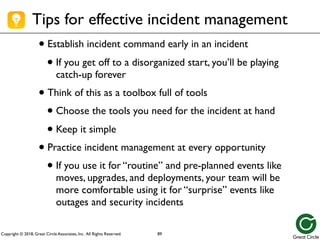
Great Circle Associates, Inc. All Rights Reserved. • Establish incident command early in an incident • If you get off to a disorganized start, you’ll be playing catch-up forever • Think of this as a toolbox full of tools • Choose the tools you need for the incident at hand • Keep it simple • Practice incident management at every opportunity • If you use it for “routine” and pre-planned events like moves, upgrades, and deployments, your team will be more comfortable using it for “surprise” events like outages and security incidents Tips for effective incident management 89
90.
Copyright © 2018,
Great Circle Associates, Inc. All Rights Reserved. Practice, practice, practice, then practice some more 90 FD
91.
Copyright © 2018,
Great Circle Associates, Inc. All Rights Reserved. Blameless postmortems • Very important to follow up with blameless postmortem • Needs to look at both • What caused the incident • How did we respond to the incident • Key questions • What happened? Why, when, how? • What might have happened? Did we get lucky? • How effective was our response? What went right, what went wrong, how could we prepare to do better next time? 91
92.
Copyright © 2018,
Great Circle Associates, Inc. All Rights Reserved. Blameless postmortems • Goal is to learn from incident, and prevent recurrence, not to place blame • If you focus on blame, people will be more focused on protecting themselves than in figuring out what happened and how to keep it from happening again • Lots of writing about this from John Allspaw and others • Template for doc available in Google SRE book 92
93.
Copyright © 2018,
Great Circle Associates, Inc. All Rights Reserved. Blameless postmortems • If incident was big enough to be an emergency, it was big enough to need a postmortem • IC or TL generally takes the lead in writing the postmortem, working with other SMEs • Timeline is often best reconstructed from chat log • Capture logs and docs immediately after incident, before they expire or get lost 93
94.
Copyright © 2018,
Great Circle Associates, Inc. All Rights Reserved. Schedule for blameless postmortems • If it’s not done quickly, it probably won’t get done ever • First draft to responders within 2-3 days • Second draft to rest of org within a week • Review meeting about one week after incident • Finalize and published within 2 weeks of incident 94
95.
Copyright © 2018,
Great Circle Associates, Inc. All Rights Reserved. Getting started at your company • PagerDuty Incident Response docs • https://response.pagerduty.com/ • Sanitized version of their own internal docs • Available on GitHub, to use as start for your own docs • Incident Management for Operations book • Rob Schnepp, RonVidal, & Chris Hawley • Published by O’Reilly, 2017 • “How to” from professional firefighters 95
96.
Copyright © 2018,
Great Circle Associates, Inc. All Rights Reserved. • Wikipedia entry describing ICS: • http://en.wikipedia.org/wiki/ Incident_Command_System • FEMA free materials and online courses: • http://training.fema.gov/EMIWeb/IS/ ICSResource Learning more about ICS 96
97.
Copyright © 2018,
Great Circle Associates, Inc. All Rights Reserved. The End • Please provide feedback at https://www.surveymonkey.com/r/IC4IT • I’m presenting Mastering Outages one-day class on Friday 18 May 2018, in San Francisco Bay Area • All this, plus more depth for ICs and other incident leaders, how to build an incident management program, etc. Send your colleagues! • Save $100 if you register by 16 April 2018, plus another $100 with code “SREcon18” • https://greatcircle.com/class • Consulting & training also available for in-house • Happy to be guest speaker, guest blogger, podcast guest, etc. • Join my list for thoughts and tips, upcoming events, future classes, and other tasty tidbits: https://greatcircle.com/ • Follow me on Twitter (@brent_chapman) or LinkedIn (brentchapman) 97
Download
![Copyright © 2018, Great Circle Associates, Inc. All Rights Reserved.
• Bryan calls the NOC:
• Informs them he’s activating
Incident Management plan
• Names this incident “San Jose
Outage”
• Designates self as Tech Lead
• [all examples of clear
communication]
First steps…
77
TL:
Bryan](https://image.slidesharecdn.com/incidentcommandforit-srecon18americasslideschapman-250324213523-1df2bb4a/85/Incident-Command-for-IT-Professionals-and-Their-Teams-77-320.jpg)
![Copyright © 2018, Great Circle Associates, Inc. All Rights Reserved.
• Bryan asks NOC to find an IC
• Sue is qualified and available, and
takes IC role [clear roles; incident
role distinct from day-to-day role;
first responder not necessarily IC]
• Krishna in NOC joins as NOC rep
for incident
• Bryan directs Josie and Tom to
switch off all systems, then
investigate power problems.
[management by objective]
First steps…
78
Josie
Tom
IC:
Sue
TL:
Bryan
NOC:
Krishna](https://image.slidesharecdn.com/incidentcommandforit-srecon18americasslideschapman-250324213523-1df2bb4a/85/Incident-Command-for-IT-Professionals-and-Their-Teams-78-320.jpg)
![Copyright © 2018, Great Circle Associates, Inc. All Rights Reserved.
• Meanwhile, Sue (as IC):
• Activates #SanJoseOutage Slack
channel and pre-established phone
bridge [clear communications]
• Pages all DCOps personnel to
report to DC conference room
for assignment [staging area]
• Creates incident status doc from
template [clear comms, pre-
planning]
First steps…
79
Josie
Tom
IC:
Sue
TL:
Bryan
NOC:
Krishna](https://image.slidesharecdn.com/incidentcommandforit-srecon18americasslideschapman-250324213523-1df2bb4a/85/Incident-Command-for-IT-Professionals-and-Their-Teams-79-320.jpg)
![Copyright © 2018, Great Circle Associates, Inc. All Rights Reserved.
• Cary, the facilities manager,
arrives. Bryan asks him to take
charge of investigating the UPS
failure, while Josie and Tom
continue to switch off systems
to prevent unplanned restarts.
• Shin (the server team manager),
Dave, and Karl (server
sysadmins) arrive. Bryan asks
Shin to direct them in preparing
to bring servers back online.
[span of control]
10:15am
80
Servers:
Shin
Dave
Josie
Tom
Karl
IC:
Sue
TL:
Bryan
NOC:
Krishna
Facilities:
Cary](https://image.slidesharecdn.com/incidentcommandforit-srecon18americasslideschapman-250324213523-1df2bb4a/85/Incident-Command-for-IT-Professionals-and-Their-Teams-80-320.jpg)
![Copyright © 2018, Great Circle Associates, Inc. All Rights Reserved.
• Chris (VP of Operations, and
Sue’s great-grandboss), joins
Slack channel and phone bridge.
• After a brief discussion with
Sue, they agree it makes most
sense for Sue to remain as IC,
and for Chris to handle
communications to rest of
company. [explicit roles; role
transfer not automatic upon
arrival of more senior
personnel]
10:30am
81
Servers:
Shin
Dave
Josie
Tom
Karl
IC:
Sue
TL:
Bryan
NOC:
Krishna
Facilities:
Cary
Comm:
Chris](https://image.slidesharecdn.com/incidentcommandforit-srecon18americasslideschapman-250324213523-1df2bb4a/85/Incident-Command-for-IT-Professionals-and-Their-Teams-81-320.jpg)
![Copyright © 2018, Great Circle Associates, Inc. All Rights Reserved.
10:45am
• Krishna (NOC) relays
reports of field offices having
trouble accessing Phoenix
DC viaVPN, probably due to
San Jose outage.
• Sue (IC) decides to page the
Networking team.
• Nori, Mahesh, and Karen
(Nori’s & Mahesh’s boss)
respond to page, and organize
selves as Network team for
incident, with Nori as lead.
[modular, expandable org; not
same as day-to-day org chart]
82
Servers:
Shin
Dave
Josie
Tom
Karl
IC:
Sue
TL:
Bryan
NOC:
Krishna
Facilities:
Cary
Comm:
Chris
Network:
Nori
Mahesh
Karen](https://image.slidesharecdn.com/incidentcommandforit-srecon18americasslideschapman-250324213523-1df2bb4a/85/Incident-Command-for-IT-Professionals-and-Their-Teams-82-320.jpg)
![Copyright © 2018, Great Circle Associates, Inc. All Rights Reserved.
11:00am
• Quick investigation shows
major network problems.
• Several more members of
Networking team join the
response, structured as sub-
teams for LAN and WAN.
[modular, expandable org;
span of control]
• Shin needs more help with
servers, so Bryan reassigns
Tom and Josie to Shin’s team.
[comprehensive resource
management, span of
control]
83
Servers:
Shin
Dave
Karl
IC:
Sue
TL:
Bryan
NOC:
Krishna
Facilities:
Cary
Comm:
Chris
Network:
Nori
WAN:
Mahesh
Leeann
LAN:
Karen
Sara
Stef
Doug
Clancy
Aubrey
Josie
Tom](https://image.slidesharecdn.com/incidentcommandforit-srecon18americasslideschapman-250324213523-1df2bb4a/85/Incident-Command-for-IT-Professionals-and-Their-Teams-83-320.jpg)


![How Big Brands are Taking Your Traffic in Alberta [Data Inside].pptx](https://cdn.slidesharecdn.com/ss_thumbnails/howbigbrandsaretakingyourtrafficinalbertadatainside-260123180142-42d276f3-thumbnail.jpg?width=640&height=640&fit=bounds)