www.proschoolonline.com/ 1
Importance of
Formatting
Excel Proficiency
www.proschoolonline.com/ 2
Learning Objectives
After going through this chapter you will be familiar with:
– Formatting
– Importance of formatting
– Conditional Formatting
www.proschoolonline.com/ 3
Formatting
The objectives of the model building process is to simplify the
enormous amounts of data available with us.
With proper spread of data we can extract some insight from
the numbers. For example if the income statement, balance
sheet and the cash flow statements are linked into each other
then we can understand the impact of one line item on the
others and thus we can develop several scenarios which might
pan out in the future.
Proper formatting makes the data easier to read and
understand.
www.proschoolonline.com/ 4
Formatting
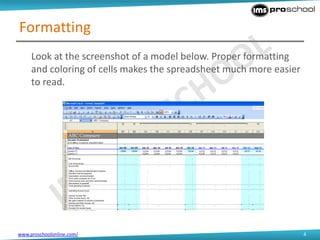
Look at the screenshot of a model below. Proper formatting
and coloring of cells makes the spreadsheet much more easier
to read.
www.proschoolonline.com/ 5
Importance of Formatting
• Please keep in mind that proper formatting is just as
important as the substance of your model.
• An unformatted model, regardless of how well built, will be
less effective than a clean, well formatted model.
• An unformatted model reflects poorly on your
professionalism.
www.proschoolonline.com/ 6
Color Coding
• A financial model can contain different types of information.
These can be:
– Labels and Names
– Numbers
– Calculated Formulae
• It is important to always color-code the contents of the cells.
This enables you and others to quickly identify which cells are
formulas and which are hard coded inputs.
www.proschoolonline.com/ 7
Color Coding
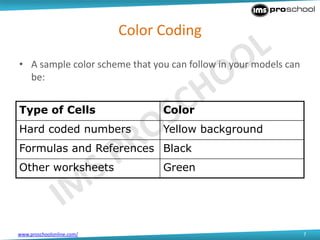
• A sample color scheme that you can follow in your models can
be:
Type of Cells Color
Hard coded numbers Yellow background
Formulas and References Black
Other worksheets Green
www.proschoolonline.com/ 8
Format Cells Box
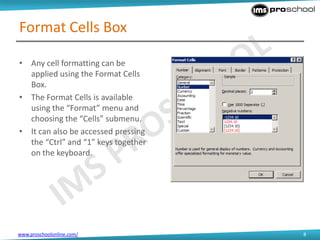
• Any cell formatting can be
applied using the Format Cells
Box.
• The Format Cells is available
using the “Format” menu and
choosing the “Cells” submenu.
• It can also be accessed pressing
the “Ctrl” and “1” keys together
on the keyboard.
www.proschoolonline.com/ 9
Conditional Formatting
Conditional formatting is useful when we have to set the format and font
style of numbers for a condition.
For example suppose we are calculating the gross margin of a company.
We want that if it goes below 40%, it should be highlighted in bold and red
font for easy viewing, so that we can investigate the numbers further for
that quarter. This is automatically done in excel, we just have to set the
condition.
www.proschoolonline.com/ 10
Conditional Formatting
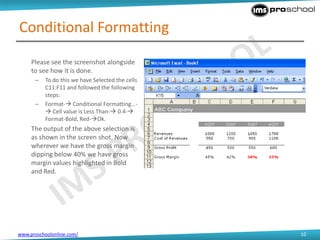
Please see the screenshot alongside
to see how it is done.
– To do this we have Selected the cells
C11:F11 and followed the following
steps:
– Format- Conditional Formatting…-
 Cell value is Less Than- 0.4-
Format-Bold, Red-Ok.
The output of the above selection is
as shown in the screen shot. Now
wherever we have the gross margin
dipping below 40% we have gross
margin values highlighted in Bold
and Red.
www.proschoolonline.com/ 11
Thank You.

Importance of formatting

  • 1.
  • 2.
    www.proschoolonline.com/ 2 Learning Objectives Aftergoing through this chapter you will be familiar with: – Formatting – Importance of formatting – Conditional Formatting
  • 3.
    www.proschoolonline.com/ 3 Formatting The objectivesof the model building process is to simplify the enormous amounts of data available with us. With proper spread of data we can extract some insight from the numbers. For example if the income statement, balance sheet and the cash flow statements are linked into each other then we can understand the impact of one line item on the others and thus we can develop several scenarios which might pan out in the future. Proper formatting makes the data easier to read and understand.
  • 4.
    www.proschoolonline.com/ 4 Formatting Look atthe screenshot of a model below. Proper formatting and coloring of cells makes the spreadsheet much more easier to read.
  • 5.
    www.proschoolonline.com/ 5 Importance ofFormatting • Please keep in mind that proper formatting is just as important as the substance of your model. • An unformatted model, regardless of how well built, will be less effective than a clean, well formatted model. • An unformatted model reflects poorly on your professionalism.
  • 6.
    www.proschoolonline.com/ 6 Color Coding •A financial model can contain different types of information. These can be: – Labels and Names – Numbers – Calculated Formulae • It is important to always color-code the contents of the cells. This enables you and others to quickly identify which cells are formulas and which are hard coded inputs.
  • 7.
    www.proschoolonline.com/ 7 Color Coding •A sample color scheme that you can follow in your models can be: Type of Cells Color Hard coded numbers Yellow background Formulas and References Black Other worksheets Green
  • 8.
    www.proschoolonline.com/ 8 Format CellsBox • Any cell formatting can be applied using the Format Cells Box. • The Format Cells is available using the “Format” menu and choosing the “Cells” submenu. • It can also be accessed pressing the “Ctrl” and “1” keys together on the keyboard.
  • 9.
    www.proschoolonline.com/ 9 Conditional Formatting Conditionalformatting is useful when we have to set the format and font style of numbers for a condition. For example suppose we are calculating the gross margin of a company. We want that if it goes below 40%, it should be highlighted in bold and red font for easy viewing, so that we can investigate the numbers further for that quarter. This is automatically done in excel, we just have to set the condition.
  • 10.
    www.proschoolonline.com/ 10 Conditional Formatting Pleasesee the screenshot alongside to see how it is done. – To do this we have Selected the cells C11:F11 and followed the following steps: – Format- Conditional Formatting…-  Cell value is Less Than- 0.4- Format-Bold, Red-Ok. The output of the above selection is as shown in the screen shot. Now wherever we have the gross margin dipping below 40% we have gross margin values highlighted in Bold and Red.
  • 11.