import java.util.Scanner;
/*
Henry Cutler ID 1234 7/20/2015
Assignment #5, 3 features in 1 program
Solution
for Assignment#5 COP2800
Pseudocode:
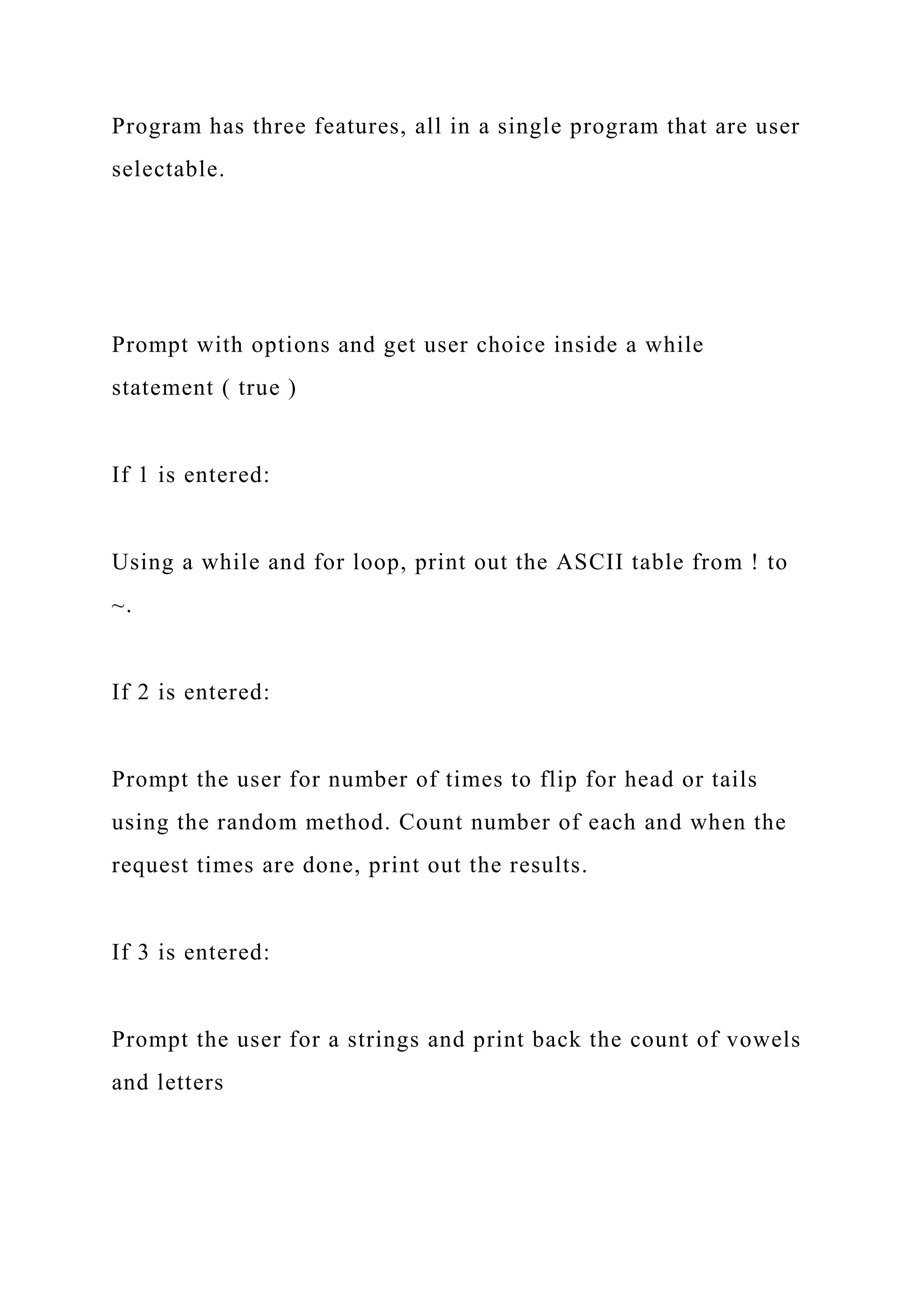
Program has three features, all in a single program that are user
selectable.
Prompt with options and get user choice inside a while
statement ( true )
If 1 is entered:
Using a while and for loop, print out the ASCII table from ! to
~.
If 2 is entered:
Prompt the user for number of times to flip for head or tails
using the random method. Count number of each and when the
request times are done, print out the results.
If 3 is entered:
Prompt the user for a strings and print back the count of vowels
and letters
Any other input entered program will exit using a break
statement, otherwise loops back to prompt user for feature
selection.
*/
public class Module5 {
public static void main(String[] args) {
// prompt the user
System.out.println("Welcome to Henry's 3 in 1 Programming
Assignment for Module 5n");
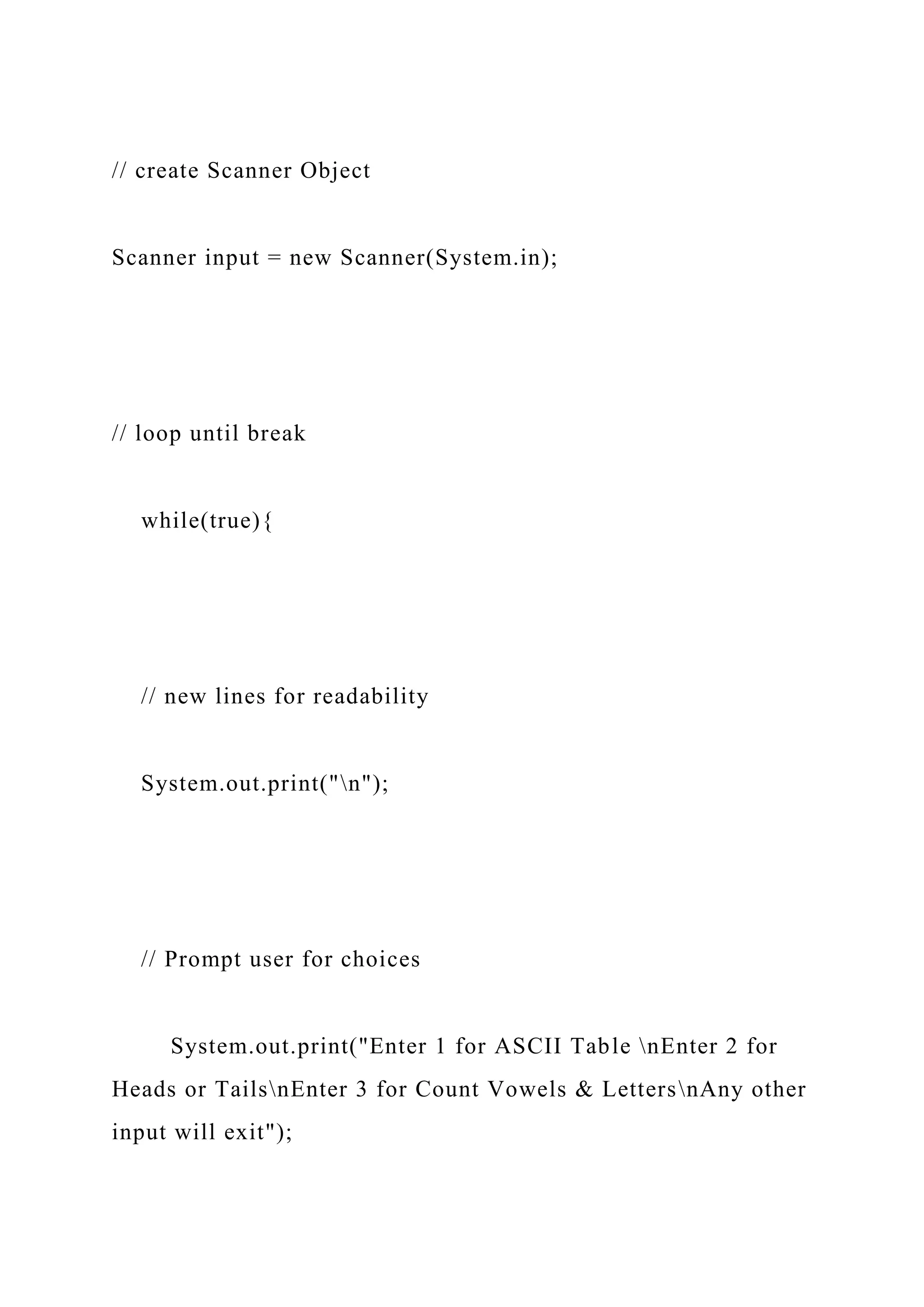
// create Scanner Object
Scanner input = new Scanner(System.in);
// loop until break
while(true){
// new lines for readability
System.out.print("n");
// Prompt user for choices
System.out.print("Enter 1 for ASCII Table nEnter 2 for
Heads or TailsnEnter 3 for Count Vowels & LettersnAny other
input will exit");
int choice = input.nextInt();
// Consume newline left-over
input.nextLine();
// first feature
if(choice == 1){
// start value is !
int value = (int) '!';
// newline for formating
System.out.println("You Selected ASCII Table!n");
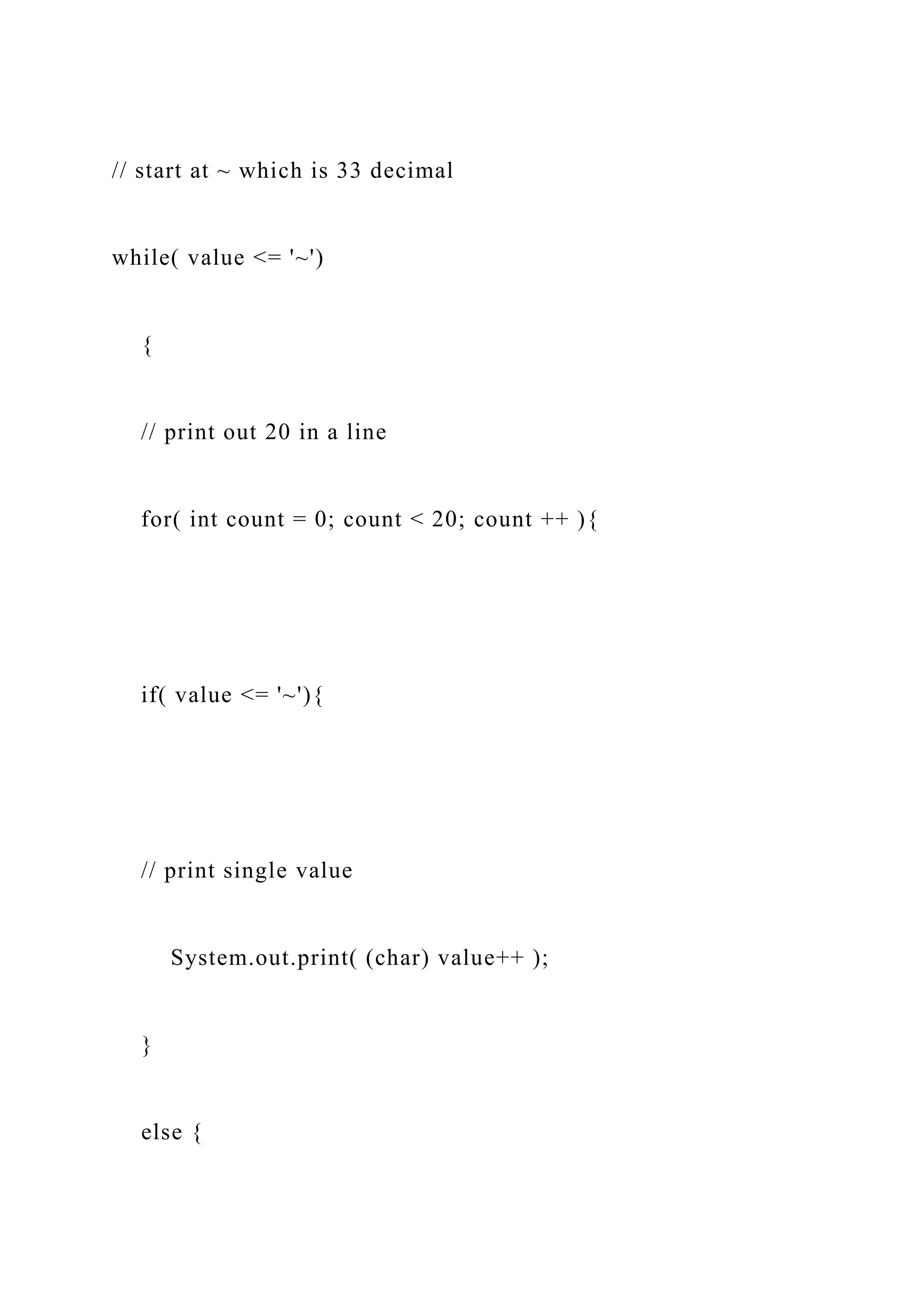
// start at ~ which is 33 decimal
while( value <= '~')
{
// print out 20 in a line
for( int count = 0; count < 20; count ++ ){
if( value <= '~'){
// print single value
System.out.print( (char) value++ );
}
else {
// break when we are at last char to print
break;
}
}
// New line every 10
System.out.print("n");
}
// New line at exit
System.out.print("n");
}
else if(choice == 2){
// Prompt user
System.out.println("You Selected Head or Tails!");
System.out.println("nHow many flips would you like to
try?");
// get value
int count = input.nextInt();
// clear
input.nextLine();
int headCount = 0;
int tailCount = 0;
// run for a count provided by user
for (int i = 0; i < count; i++) {
// get random number
if (Math.random() > 0.5){
// increment heads
headCount++;
}
else {
// increment tails
tailCount++;
}
}
System.out.println("Head count: " + headCount + " tail
count: " + tailCount);
}
else if(choice == 3){
// Prompt user
System.out.println("You Selected Count Vowels & Letters
!");
System.out.println("nEnter a string: ");
String s = input.nextLine();
// Initialize variables
int countVowels = 0;
int countConsonants = 0;
// loop using length of string for count
for (int i = 0; i < s.length(); i++) {
// ingnore case of letter
char temp = Character.toUpperCase(s.charAt(i));
// test if its a vowel
if (temp == 'A' || temp == 'E' || temp == 'I' || temp == 'O' ||
temp == 'U'){
// if it is a vowel increment count
countVowels++;
}
else if (Character.isLetter(temp)){
// if it is a letter and not a vowel
countConsonants++;
}
}
// print out results
System.out.println("The number of vowels is " +
countVowels);
System.out.println("The number of consonants is " +
countConsonants);
}
else{
// not 1 , 2 or 3
System.out.println("User didn't select 1,2 or 3. Exiting
Programn");
// release object
input.close();
// exit while with break statement
break;
}
} // end of while
} // end main
} // end method
Readings:
1. Review the Assignment 5 solution
2. Read Chapter 6 of your textbook
3. Watch the lecture video Chapter 6 Lecture
4. Watch the exercise videos 1-3
Assignments:
1. Take the Module 6 Quiz, I recommend you do this AFTER
you complete the
programming assignment!
2. Submit via the module 6 Assignment link your source code
solution (.java file )
to the following:
Program description:
Starting with your Assignment 5 solution, or if you had issues
completing, you
can start with the posted module 5 solution, you are going to
make
modifications to the three features so that they are methods.
The program from the user view is unchanged! This program
will function
exactly as Assignment 5 did, only that instead of features code
in the if/else
block, there will be methods called to run the features, with
modifications to
be followed below.
The code for feature 1 is to be moved into a newly created
method called
feature1, feature1 is to be a void method which has no arg value
and does not
return a value. Literally cut and paste the code within the if
block matching to
‘1’ and that code in to be inserted into the new feature1 method,
put the
feature1 method at the end of the file, outside of the main
method block.
The code for feature 2 is to be moved into a newly created
method called
feature2, feature2 is to be a void method ( no return value )
which has one arg
value of type int, called count. The code from the feature 2 that
prompts the
user for the flip value is the passed to the new feature2 method,
the remaining
code is cut and inserted into the new feature2 method put the
feature2
method at the end of the file, outside of the main method block.
The code for feature 3 is to be moved into a newly created
method called
feature3, feature3 is to be a String method ( returns a String )
which has one
arg value of type String, called s. The code from the feature 3
that prompts the
user for string message is passed to the new feature3 method,
the remaining
code is cut and inserted into the new feature3 method all but the
print
statements. The print statement(s) are replaced with a return,
and the value
for the return is contents of the original print statements which
is everything
between the parentheses of BOTH print statements.
Note you will have to concatenate ( use + ) and add a n to
match the original
vowel and constant messages.
The else if prints out the returned message by calling feature 3
as shown
below:
// call the method of feature 3 providing the message s from the
user, return
// value is the Letters message which is printed to user for the
consonants count
System.out.println(feature3(s));
Put the feature3 method at the end of the file, outside of the
main method
block.
Your program is to look exactly like the output shown below,
only the name
would be different. Notice that an apostrophe is used in the
prompt, your
program must do the same. The example shows all four
possibilities for the
program, option 1,2,3 and any other input by the user which
would exit the
program. Highlight in yellow is user provided input.
Tip:
You should do this is steps, start with the easiest, which is
feature 1 change,
when that is completed successfully, the do feature do likewise
feature 2 and
feature 3. Your textbook as has many example that will show
you exactly the
required syntax needed to complete this assignment.

import java.util.Scanner;Henry Cutler ID 1234 7202.docx

  • 1.
    import java.util.Scanner; /* Henry CutlerID 1234 7/20/2015 Assignment #5, 3 features in 1 program Solution for Assignment#5 COP2800 Pseudocode:
  • 2.
    Program has threefeatures, all in a single program that are user selectable. Prompt with options and get user choice inside a while statement ( true ) If 1 is entered: Using a while and for loop, print out the ASCII table from ! to ~. If 2 is entered: Prompt the user for number of times to flip for head or tails using the random method. Count number of each and when the request times are done, print out the results. If 3 is entered: Prompt the user for a strings and print back the count of vowels and letters
  • 3.
    Any other inputentered program will exit using a break statement, otherwise loops back to prompt user for feature selection. */ public class Module5 { public static void main(String[] args) { // prompt the user System.out.println("Welcome to Henry's 3 in 1 Programming Assignment for Module 5n");
  • 4.
    // create ScannerObject Scanner input = new Scanner(System.in); // loop until break while(true){ // new lines for readability System.out.print("n"); // Prompt user for choices System.out.print("Enter 1 for ASCII Table nEnter 2 for Heads or TailsnEnter 3 for Count Vowels & LettersnAny other input will exit");
  • 5.
    int choice =input.nextInt(); // Consume newline left-over input.nextLine(); // first feature if(choice == 1){ // start value is ! int value = (int) '!'; // newline for formating System.out.println("You Selected ASCII Table!n");
  • 6.
    // start at~ which is 33 decimal while( value <= '~') { // print out 20 in a line for( int count = 0; count < 20; count ++ ){ if( value <= '~'){ // print single value System.out.print( (char) value++ ); } else {
  • 7.
    // break whenwe are at last char to print break; } } // New line every 10 System.out.print("n"); } // New line at exit System.out.print("n"); } else if(choice == 2){
  • 8.
    // Prompt user System.out.println("YouSelected Head or Tails!"); System.out.println("nHow many flips would you like to try?"); // get value int count = input.nextInt(); // clear input.nextLine(); int headCount = 0; int tailCount = 0;
  • 9.
    // run fora count provided by user for (int i = 0; i < count; i++) { // get random number if (Math.random() > 0.5){ // increment heads headCount++; } else { // increment tails
  • 10.
    tailCount++; } } System.out.println("Head count: "+ headCount + " tail count: " + tailCount); } else if(choice == 3){ // Prompt user System.out.println("You Selected Count Vowels & Letters !"); System.out.println("nEnter a string: "); String s = input.nextLine();
  • 11.
    // Initialize variables intcountVowels = 0; int countConsonants = 0; // loop using length of string for count for (int i = 0; i < s.length(); i++) { // ingnore case of letter char temp = Character.toUpperCase(s.charAt(i)); // test if its a vowel
  • 12.
    if (temp =='A' || temp == 'E' || temp == 'I' || temp == 'O' || temp == 'U'){ // if it is a vowel increment count countVowels++; } else if (Character.isLetter(temp)){ // if it is a letter and not a vowel countConsonants++; } } // print out results
  • 13.
    System.out.println("The number ofvowels is " + countVowels); System.out.println("The number of consonants is " + countConsonants); } else{ // not 1 , 2 or 3 System.out.println("User didn't select 1,2 or 3. Exiting Programn"); // release object input.close();
  • 14.
    // exit whilewith break statement break; } } // end of while } // end main } // end method Readings: 1. Review the Assignment 5 solution 2. Read Chapter 6 of your textbook
  • 15.
    3. Watch thelecture video Chapter 6 Lecture 4. Watch the exercise videos 1-3 Assignments: 1. Take the Module 6 Quiz, I recommend you do this AFTER you complete the programming assignment! 2. Submit via the module 6 Assignment link your source code solution (.java file ) to the following: Program description: Starting with your Assignment 5 solution, or if you had issues completing, you can start with the posted module 5 solution, you are going to make modifications to the three features so that they are methods. The program from the user view is unchanged! This program will function exactly as Assignment 5 did, only that instead of features code in the if/else block, there will be methods called to run the features, with
  • 16.
    modifications to be followedbelow. The code for feature 1 is to be moved into a newly created method called feature1, feature1 is to be a void method which has no arg value and does not return a value. Literally cut and paste the code within the if block matching to ‘1’ and that code in to be inserted into the new feature1 method, put the feature1 method at the end of the file, outside of the main method block. The code for feature 2 is to be moved into a newly created method called feature2, feature2 is to be a void method ( no return value ) which has one arg value of type int, called count. The code from the feature 2 that prompts the user for the flip value is the passed to the new feature2 method, the remaining code is cut and inserted into the new feature2 method put the feature2 method at the end of the file, outside of the main method block.
  • 17.
    The code forfeature 3 is to be moved into a newly created method called feature3, feature3 is to be a String method ( returns a String ) which has one arg value of type String, called s. The code from the feature 3 that prompts the user for string message is passed to the new feature3 method, the remaining code is cut and inserted into the new feature3 method all but the print statements. The print statement(s) are replaced with a return, and the value for the return is contents of the original print statements which is everything between the parentheses of BOTH print statements. Note you will have to concatenate ( use + ) and add a n to match the original vowel and constant messages.
  • 18.
    The else ifprints out the returned message by calling feature 3 as shown below: // call the method of feature 3 providing the message s from the user, return // value is the Letters message which is printed to user for the consonants count System.out.println(feature3(s)); Put the feature3 method at the end of the file, outside of the main method block. Your program is to look exactly like the output shown below, only the name would be different. Notice that an apostrophe is used in the prompt, your program must do the same. The example shows all four possibilities for the program, option 1,2,3 and any other input by the user which
  • 19.
    would exit the program.Highlight in yellow is user provided input. Tip: You should do this is steps, start with the easiest, which is feature 1 change, when that is completed successfully, the do feature do likewise feature 2 and feature 3. Your textbook as has many example that will show you exactly the required syntax needed to complete this assignment.