© 2014 IBM Corporation
Where’s my message?
AMC-1883 Analyze IBM WebSphere MQ Recovery Logs,
Trace Routes, & Look In Applications
Peter Broadhurst – peter.broadhurst@uk.ibm.com
Please Note
IBM’s statements regarding its plans, directions, and intent are subject to change
or withdrawal without notice at IBM’s sole discretion.
Information regarding potential future products is intended to outline our general
product direction and it should not be relied on in making a purchasing decision.
The information mentioned regarding potential future products is not a
commitment, promise, or legal obligation to deliver any material, code or
functionality. Information about potential future products may not be incorporated
into any contract. The development, release, and timing of any future features or
functionality described for our products remains at our sole discretion.
Performance is based on measurements and projections using standard IBM
benchmarks in a controlled environment. The actual throughput or performance
that any user will experience will vary depending upon many factors, including
considerations such as the amount of multiprogramming in the user’s job stream,
the I/O configuration, the storage configuration, and the workload processed.
Therefore, no assurance can be given that an individual user will achieve results
similar to those stated here.
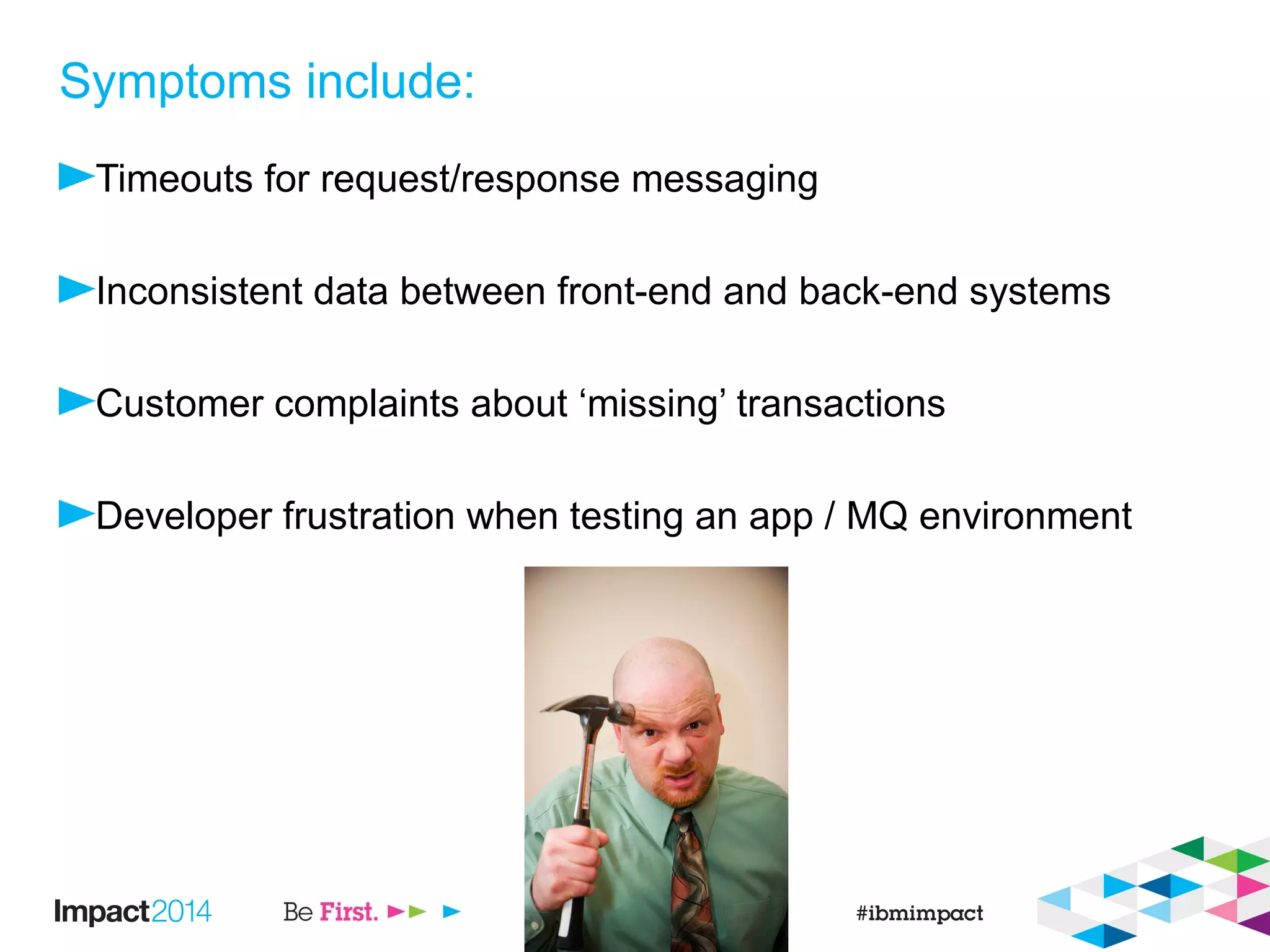
Symptoms include:
Timeouts for request/response messaging
Inconsistent data between front-end and back-end systems
Customer complaints about ‘missing’ transactions
Developer frustration when testing an app / MQ environment
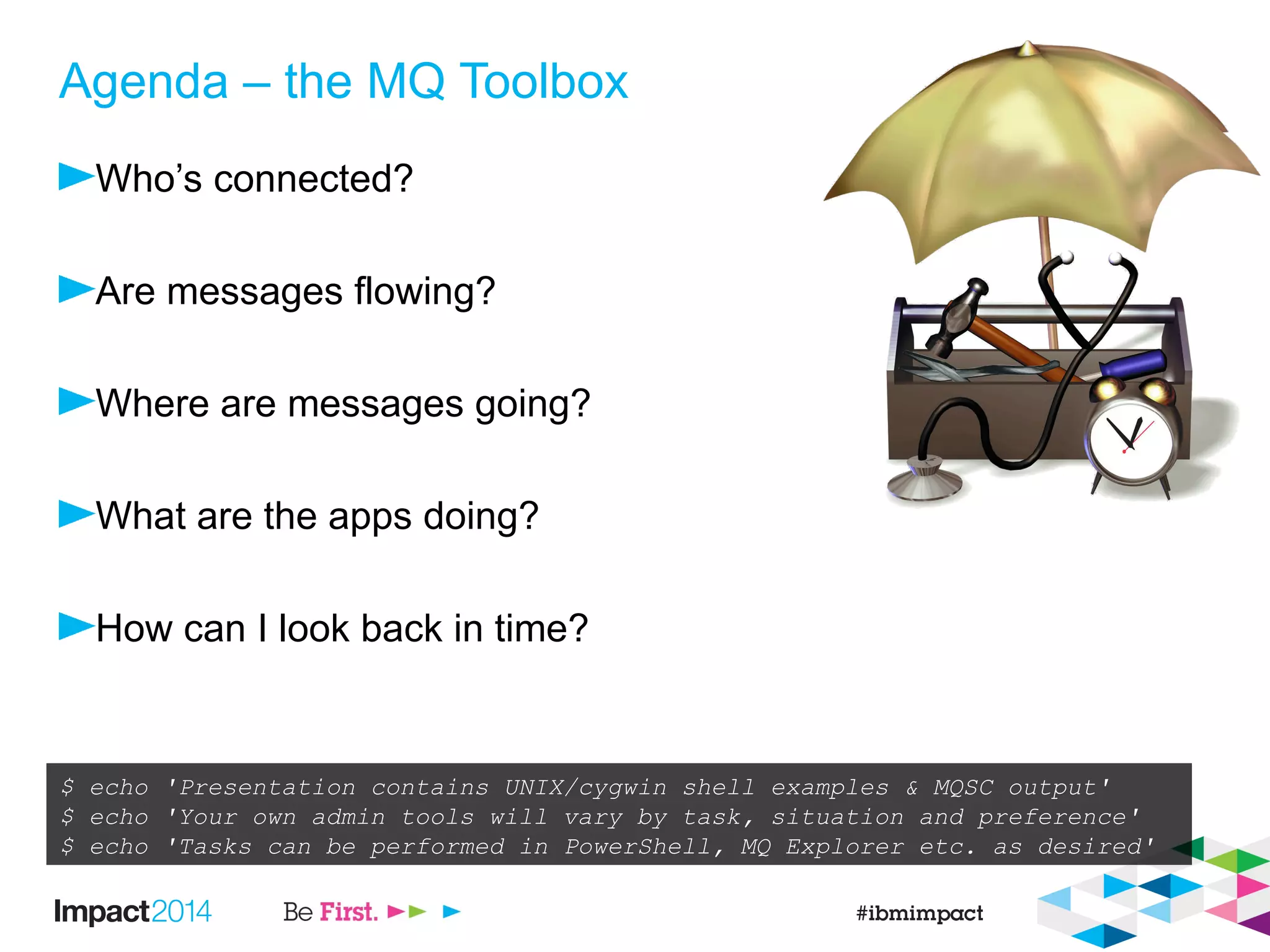
Agenda – the MQ Toolbox
Who’s connected?
Are messages flowing?
Where are messages going?
What are the apps doing?
How can I look back in time?
$ echo 'Presentation contains UNIX/cygwin shell examples & MQSC output'
$ echo 'Your own admin tools will vary by task, situation and preference'
$ echo 'Tasks can be performed in PowerShell, MQ Explorer etc. as desired'
Who’s connected?
DISPLAY CONN
$ echo $'DIS CONN(*) TYPE(HANDLE) ALLnDIS CONN(*) ALL' | runmqsc > o.txt
AMQ8276: Display Connection details.
CONN(577C425321295301)
EXTCONN(414D5143474154455741593120202020)
TYPE(HANDLE)
OBJNAME(WLMMDB.REQUEST) OBJTYPE(QUEUE)
ASTATE(NONE) HSTATE(INACTIVE)
OPENOPTS(MQOO_OUTPUT,MQOO_FAIL_IF_QUIESCING)
READA(NO)
OBJNAME(SENDINGAPP.REPLY) OBJTYPE(QUEUE)
ASTATE(ACTIVE) HSTATE(ACTIVE)
OPENOPTS(MQOO_INPUT_SHARED,MQOO_INQUIRE,MQOO_SAVE_ALL_CONTEXT,MQOO_FAIL_IF_QUIESCING)
READA(NO)
AMQ8276: Display Connection details.
CONN(577C425321295301)
EXTCONN(414D5143474154455741593120202020)
TYPE(CONN)
PID(9740) TID(185)
APPLDESC(WebSphere MQ Channel) APPLTAG(jms/GATEWAY1_CF)
APPLTYPE(SYSTEM) ASTATE(NONE)
CHANNEL(WAS.CLIENTS) CONNAME(127.0.0.1)
CONNOPTS(MQCNO_SHARED_BINDING) USERID(pbroad)
UOWLOG( ) UOWSTDA(2014-04-08)
UOWSTTI(13.24.00) UOWLOGDA( )
UOWLOGTI( ) URTYPE(XA)
EXTURID(XA_FORMATID[DSAW]
XA_GTRID[00000145414B8AB40000000104DF48FC0001020304050607080900010203040506070809]
XA_BQUAL[00000145414B8AB40000000104DF48FC0001020304050607080900010203040506070809000000010000000000000000
000000000001])
QMURID(0.7940075) UOWSTATE(ACTIVE)
Use CONN to match TYPE(CONN) and
TYPE(HANDLE) records
Use CONN to match TYPE(CONN) and
TYPE(HANDLE) records
TYPE(HANDLE) records let you find
applications by the objects they access.
See all open handles for an app in one place,
unlike DIS QSTATUS records
TYPE(HANDLE) records let you find
applications by the objects they access.
See all open handles for an app in one place,
unlike DIS QSTATUS records
Long running UOW information.
XID can be tied up with app server txn timeout
Long running UOW information.
XID can be tied up with app server txn timeout
Channel name + IP help identify client apps.
MQ V7.5 and later JMS clients can supply
an application name in the CF
Channel name + IP help identify client apps.
MQ V7.5 and later JMS clients can supply
an application name in the CF
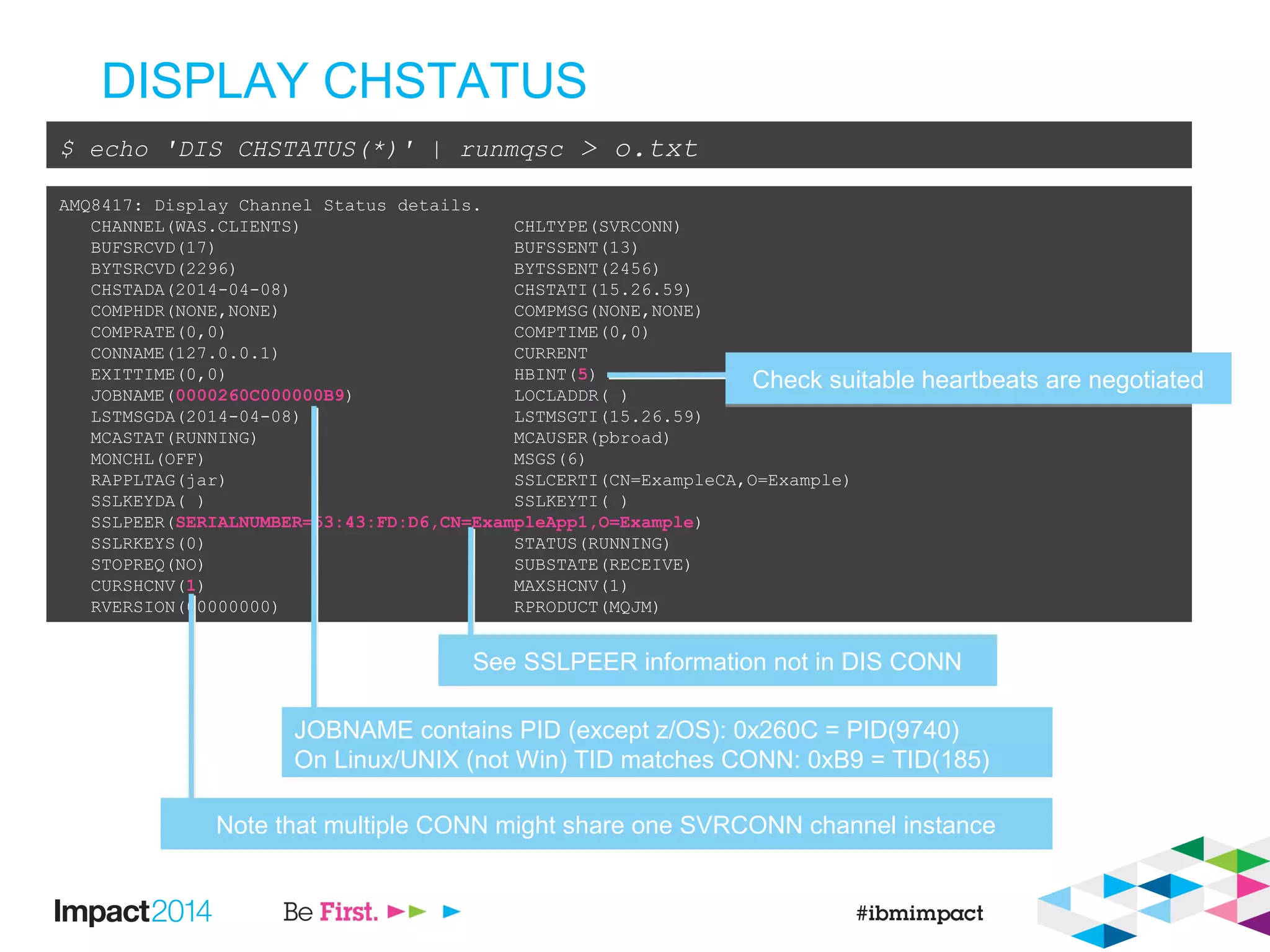
DISPLAY CHSTATUS
$ echo 'DIS CHSTATUS(*)' | runmqsc > o.txt
AMQ8417: Display Channel Status details.
CHANNEL(WAS.CLIENTS) CHLTYPE(SVRCONN)
BUFSRCVD(17) BUFSSENT(13)
BYTSRCVD(2296) BYTSSENT(2456)
CHSTADA(2014-04-08) CHSTATI(15.26.59)
COMPHDR(NONE,NONE) COMPMSG(NONE,NONE)
COMPRATE(0,0) COMPTIME(0,0)
CONNAME(127.0.0.1) CURRENT
EXITTIME(0,0) HBINT(5)
JOBNAME(0000260C000000B9) LOCLADDR( )
LSTMSGDA(2014-04-08) LSTMSGTI(15.26.59)
MCASTAT(RUNNING) MCAUSER(pbroad)
MONCHL(OFF) MSGS(6)
RAPPLTAG(jar) SSLCERTI(CN=ExampleCA,O=Example)
SSLKEYDA( ) SSLKEYTI( )
SSLPEER(SERIALNUMBER=53:43:FD:D6,CN=ExampleApp1,O=Example)
SSLRKEYS(0) STATUS(RUNNING)
STOPREQ(NO) SUBSTATE(RECEIVE)
CURSHCNV(1) MAXSHCNV(1)
RVERSION(00000000) RPRODUCT(MQJM)
See SSLPEER information not in DIS CONNSee SSLPEER information not in DIS CONN
JOBNAME contains PID (except z/OS): 0x260C = PID(9740)
On Linux/UNIX (not Win) TID matches CONN: 0xB9 = TID(185)
JOBNAME contains PID (except z/OS): 0x260C = PID(9740)
On Linux/UNIX (not Win) TID matches CONN: 0xB9 = TID(185)
Note that multiple CONN might share one SVRCONN channel instanceNote that multiple CONN might share one SVRCONN channel instance
Check suitable heartbeats are negotiatedCheck suitable heartbeats are negotiated
Automatic detection if
nobody is connected
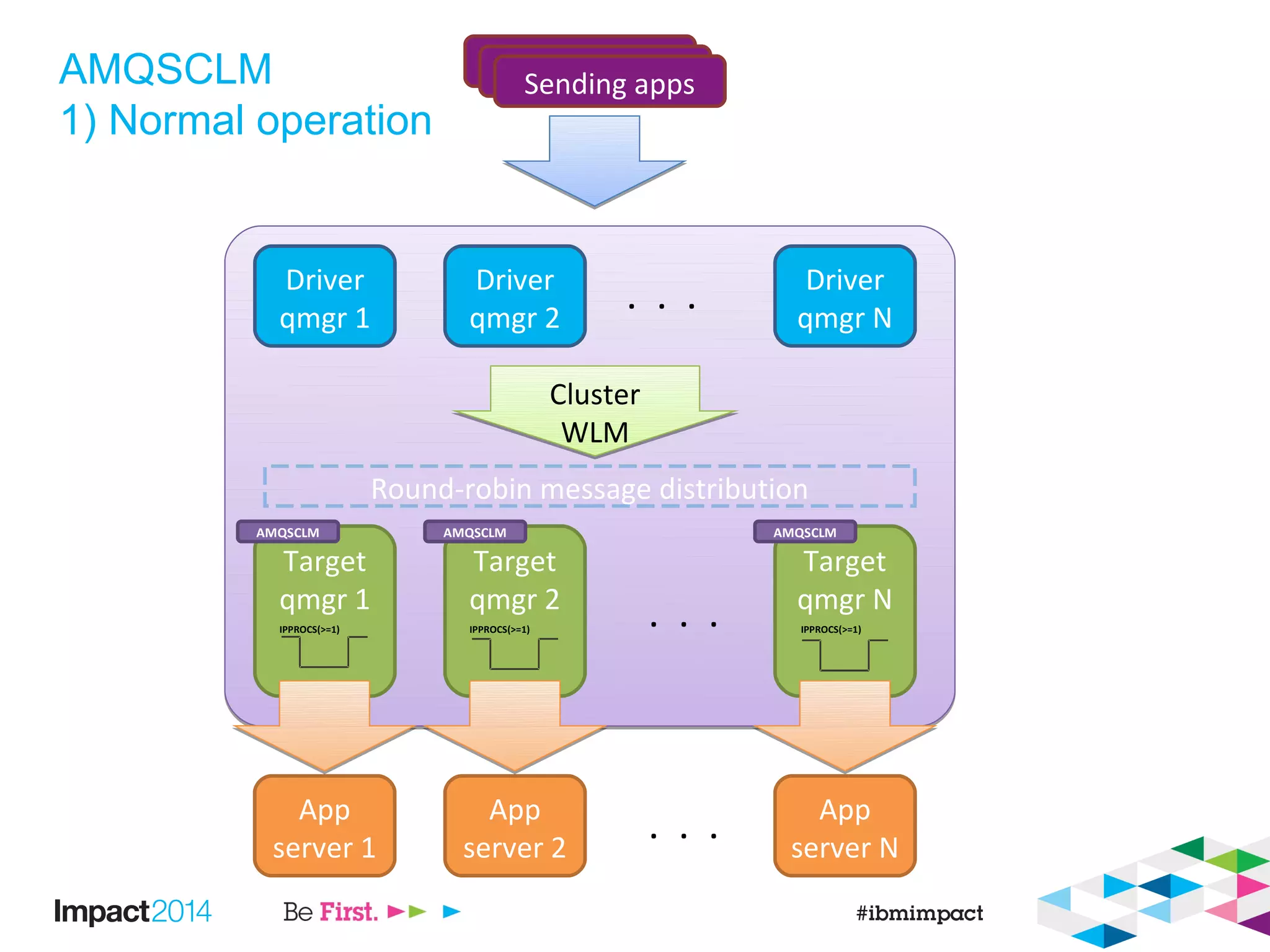
AMQSCLM
1) Normal operation
Driver
qmgr 1
Driver
qmgr 2
Driver
qmgr N
. . .
Target
qmgr 1
Target
qmgr 2
Target
qmgr N
. . .
Sending appsSending appsSending apps
Cluster
WLM
Cluster
WLM
Round-robin message distribution
App
server 1
App
server 2
App
server N
. . .
IPPROCS(>=1) IPPROCS(>=1) IPPROCS(>=1)
AMQSCLM AMQSCLM AMQSCLM
AMQSCLM
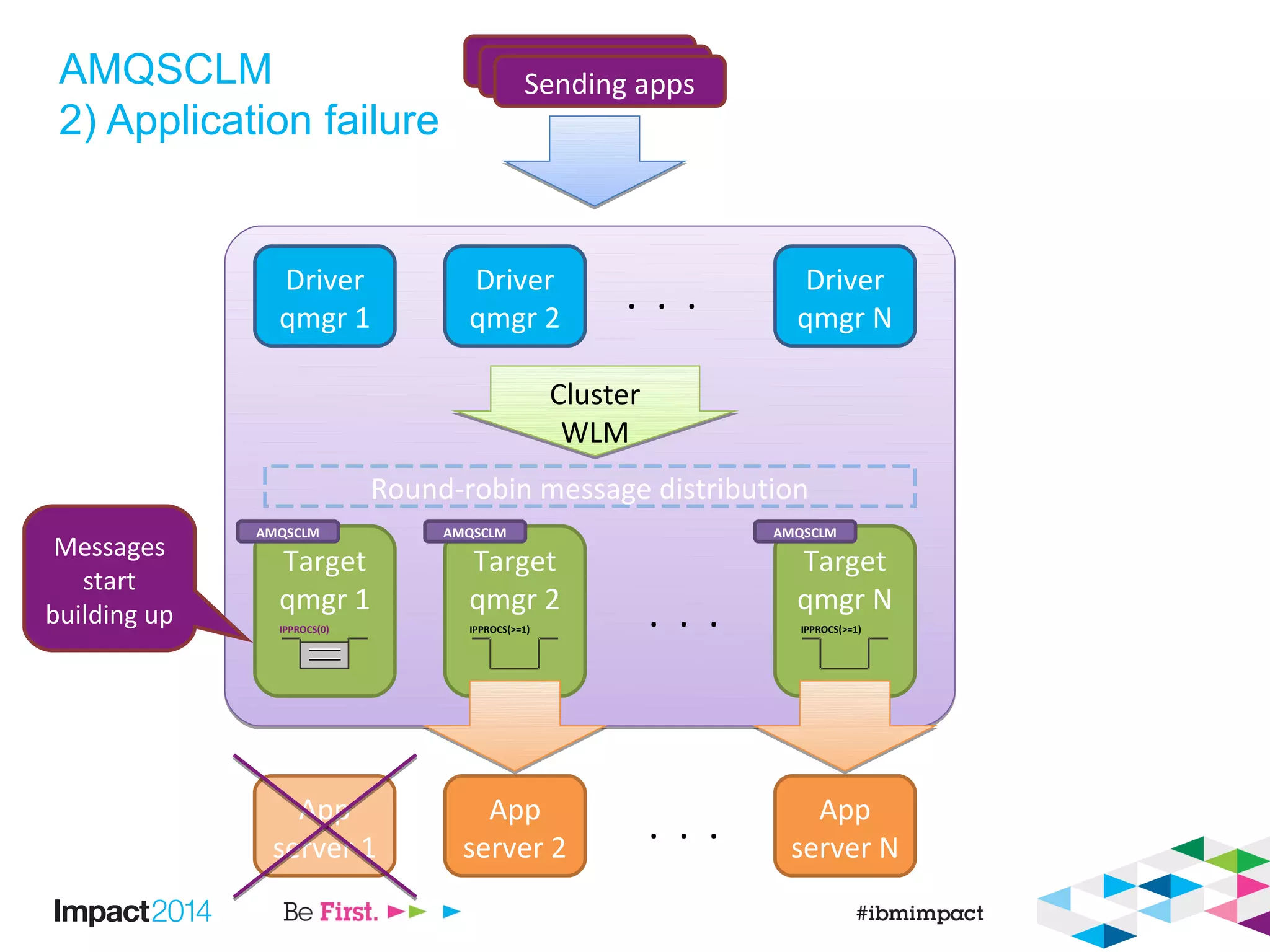
2) Application failure
Driver
qmgr 1
Driver
qmgr 2
Driver
qmgr N
. . .
Target
qmgr 1
Target
qmgr 2
Target
qmgr N
. . .
Sending appsSending appsSending apps
Cluster
WLM
Cluster
WLM
Round-robin message distribution
App
server 1
App
server 2
App
server N
. . .
IPPROCS(0) IPPROCS(>=1) IPPROCS(>=1)
Messages
start
building up
AMQSCLM AMQSCLM AMQSCLM
AMQSCLM
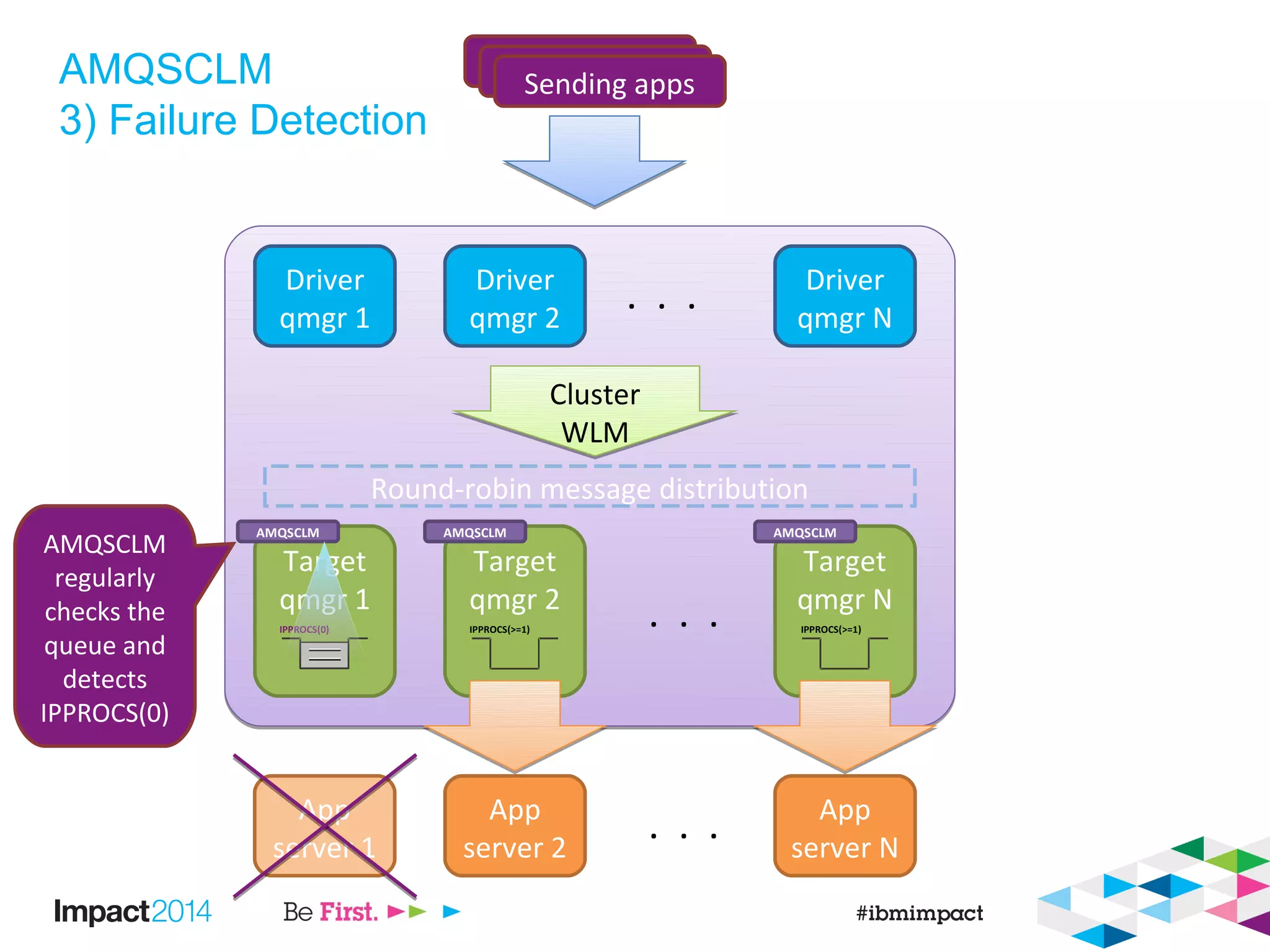
3) Failure Detection
Driver
qmgr 1
Driver
qmgr 2
Driver
qmgr N
. . .
Target
qmgr 1
Target
qmgr 2
Target
qmgr N
. . .
Sending appsSending appsSending apps
Cluster
WLM
Cluster
WLM
Round-robin message distribution
App
server 1
App
server 2
App
server N
. . .
IPPROCS(0) IPPROCS(>=1) IPPROCS(>=1)
AMQSCLM
regularly
checks the
queue and
detects
IPPROCS(0)
AMQSCLM AMQSCLM AMQSCLM
AMQSCLM
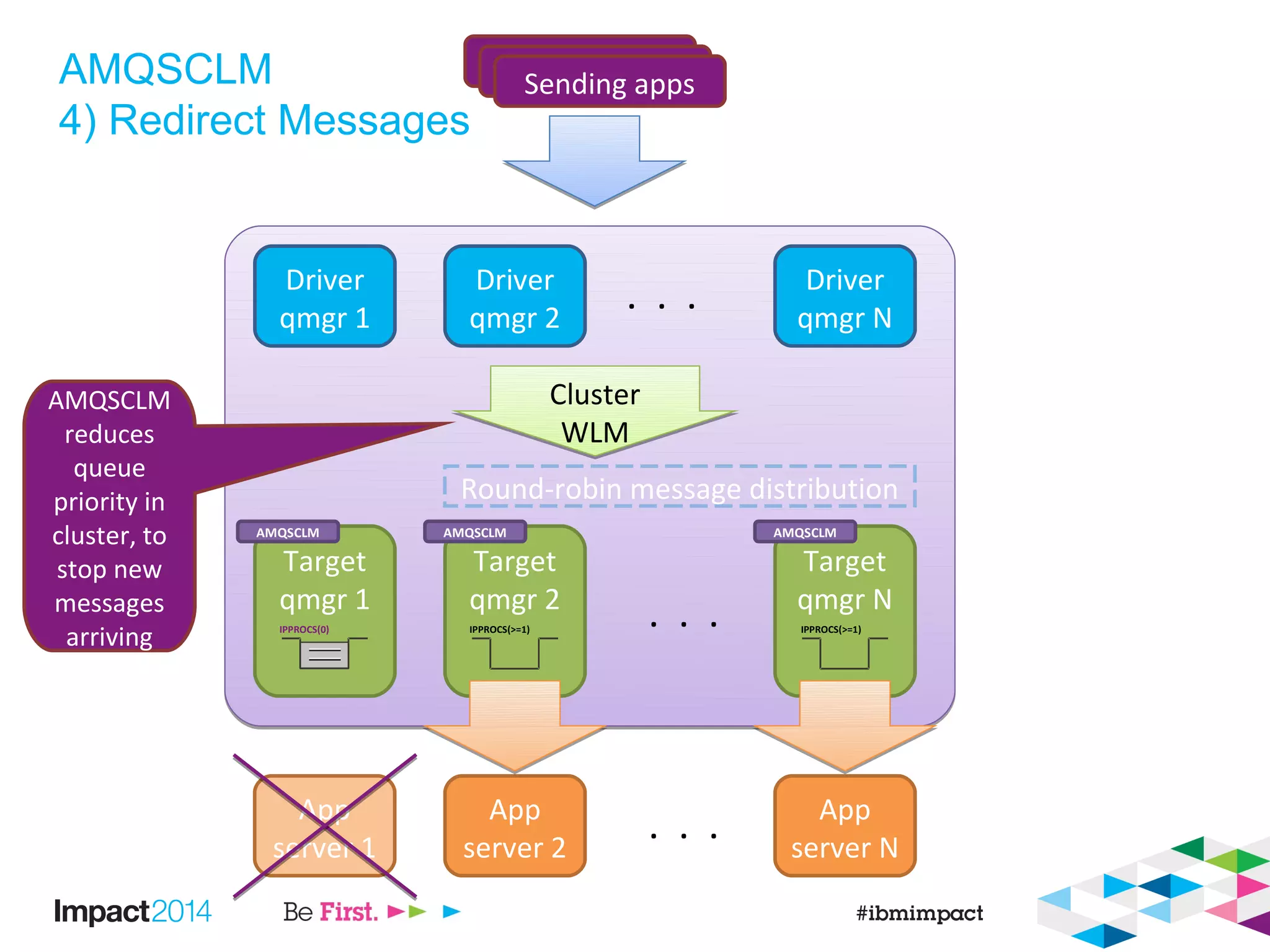
4) Redirect Messages
Driver
qmgr 1
Driver
qmgr 2
Driver
qmgr N
. . .
Target
qmgr 1
Target
qmgr 2
Target
qmgr N
. . .
Sending appsSending appsSending apps
Cluster
WLM
Cluster
WLM
Round-robin message distribution
App
server 1
App
server 2
App
server N
. . .
IPPROCS(0) IPPROCS(>=1) IPPROCS(>=1)
AMQSCLM
reduces
queue
priority in
cluster, to
stop new
messages
arriving
AMQSCLM AMQSCLM AMQSCLM
AMQSCLM
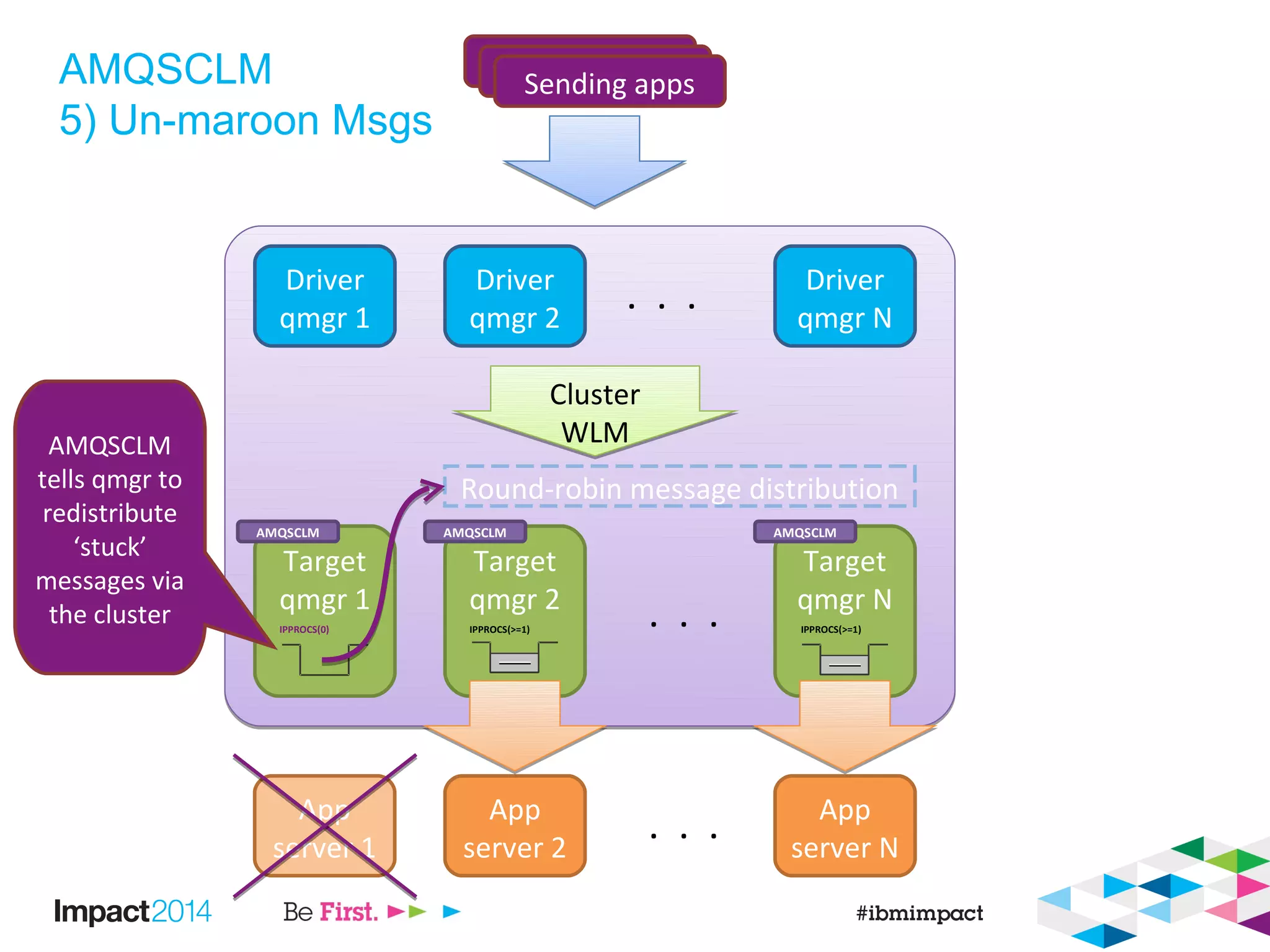
5) Un-maroon Msgs
Driver
qmgr 1
Driver
qmgr 2
Driver
qmgr N
. . .
Target
qmgr 1
Target
qmgr 2
Target
qmgr N
. . .
Sending appsSending appsSending apps
Cluster
WLM
Cluster
WLM
Round-robin message distribution
App
server 1
App
server 2
App
server N
. . .
IPPROCS(0) IPPROCS(>=1) IPPROCS(>=1)
AMQSCLM
tells qmgr to
redistribute
‘stuck’
messages via
the cluster
AMQSCLM AMQSCLM AMQSCLM
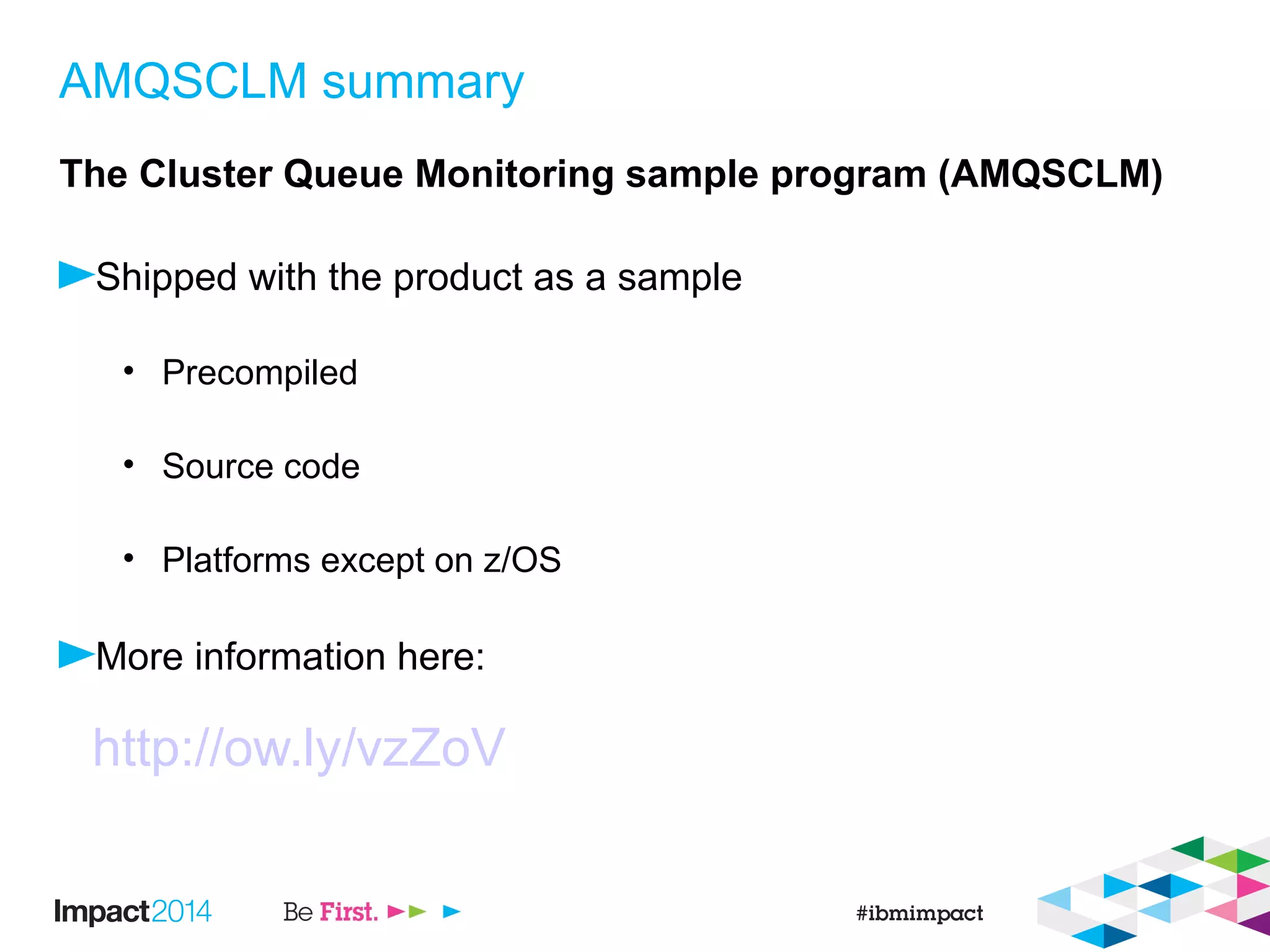
AMQSCLM summary
The Cluster Queue Monitoring sample program (AMQSCLM)
Shipped with the product as a sample
• Precompiled
• Source code
• Platforms except on z/OS
More information here:
http://ow.ly/vzZoV
Are messages flowing?
Real-time/online Monitoring – Queues
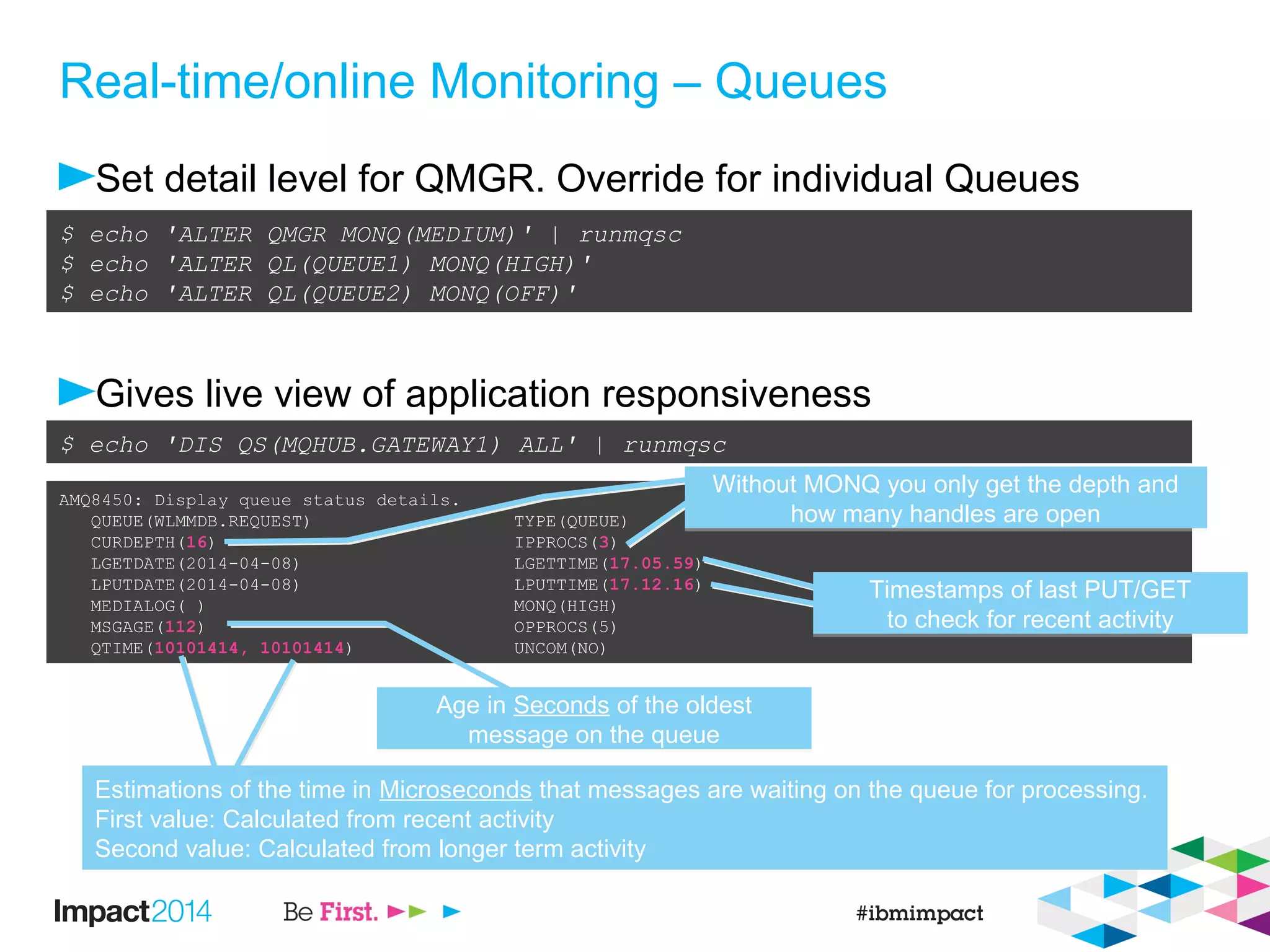
Set detail level for QMGR. Override for individual Queues
Gives live view of application responsiveness
$ echo 'ALTER QMGR MONQ(MEDIUM)' | runmqsc
$ echo 'ALTER QL(QUEUE1) MONQ(HIGH)'
$ echo 'ALTER QL(QUEUE2) MONQ(OFF)'
AMQ8450: Display queue status details.
QUEUE(WLMMDB.REQUEST) TYPE(QUEUE)
CURDEPTH(16) IPPROCS(3)
LGETDATE(2014-04-08) LGETTIME(17.05.59)
LPUTDATE(2014-04-08) LPUTTIME(17.12.16)
MEDIALOG( ) MONQ(HIGH)
MSGAGE(112) OPPROCS(5)
QTIME(10101414, 10101414) UNCOM(NO)
$ echo 'DIS QS(MQHUB.GATEWAY1) ALL' | runmqsc
Age in Seconds of the oldest
message on the queue
Age in Seconds of the oldest
message on the queue
Estimations of the time in Microseconds that messages are waiting on the queue for processing.
First value: Calculated from recent activity
Second value: Calculated from longer term activity
Estimations of the time in Microseconds that messages are waiting on the queue for processing.
First value: Calculated from recent activity
Second value: Calculated from longer term activity
Timestamps of last PUT/GET
to check for recent activity
Timestamps of last PUT/GET
to check for recent activity
Without MONQ you only get the depth and
how many handles are open
Without MONQ you only get the depth and
how many handles are open
Real-time/online Monitoring – Channels
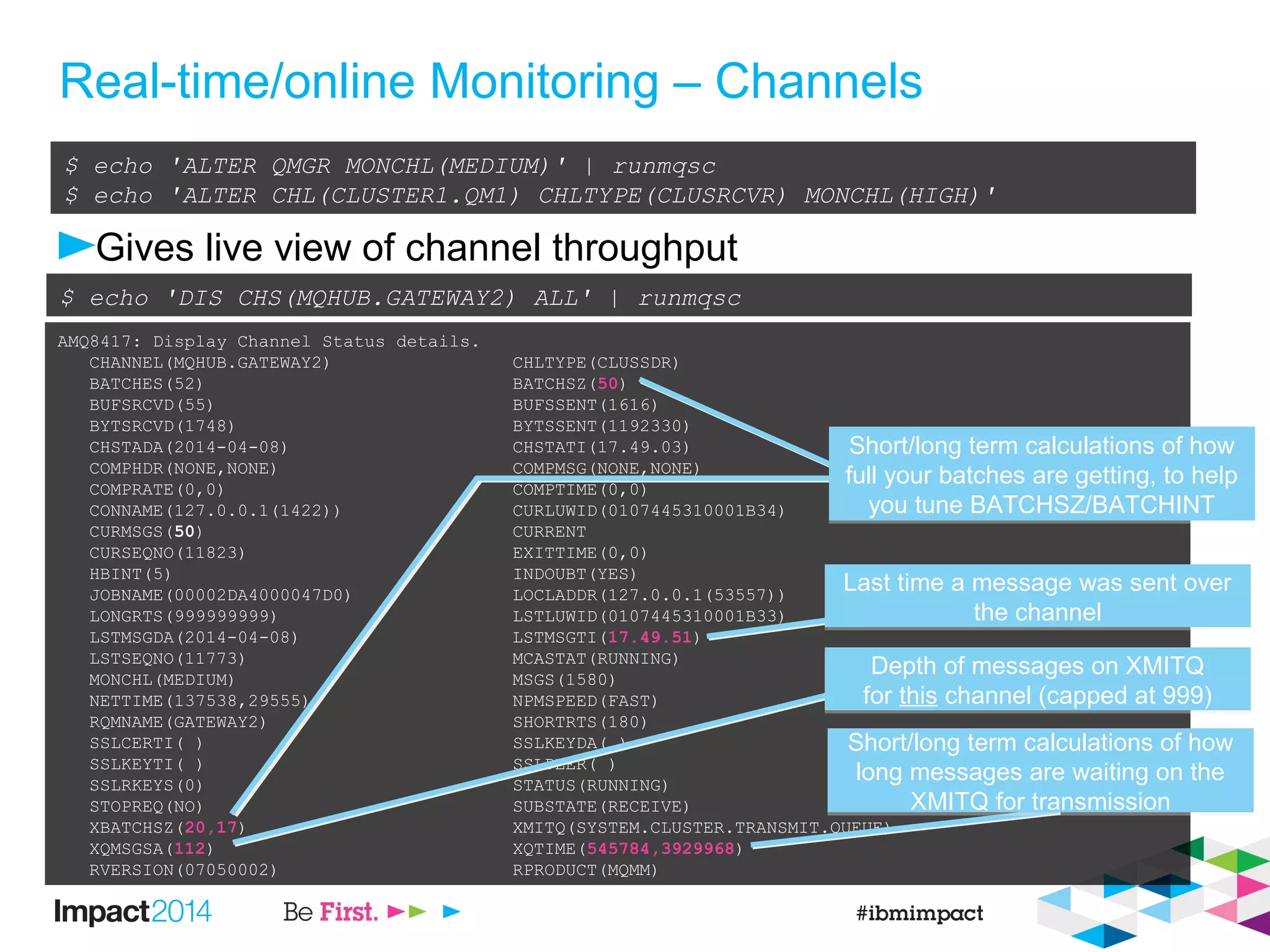
Gives live view of channel throughput
$ echo 'ALTER QMGR MONCHL(MEDIUM)' | runmqsc
$ echo 'ALTER CHL(CLUSTER1.QM1) CHLTYPE(CLUSRCVR) MONCHL(HIGH)'
AMQ8417: Display Channel Status details.
CHANNEL(MQHUB.GATEWAY2) CHLTYPE(CLUSSDR)
BATCHES(52) BATCHSZ(50)
BUFSRCVD(55) BUFSSENT(1616)
BYTSRCVD(1748) BYTSSENT(1192330)
CHSTADA(2014-04-08) CHSTATI(17.49.03)
COMPHDR(NONE,NONE) COMPMSG(NONE,NONE)
COMPRATE(0,0) COMPTIME(0,0)
CONNAME(127.0.0.1(1422)) CURLUWID(0107445310001B34)
CURMSGS(50) CURRENT
CURSEQNO(11823) EXITTIME(0,0)
HBINT(5) INDOUBT(YES)
JOBNAME(00002DA4000047D0) LOCLADDR(127.0.0.1(53557))
LONGRTS(999999999) LSTLUWID(0107445310001B33)
LSTMSGDA(2014-04-08) LSTMSGTI(17.49.51)
LSTSEQNO(11773) MCASTAT(RUNNING)
MONCHL(MEDIUM) MSGS(1580)
NETTIME(137538,29555) NPMSPEED(FAST)
RQMNAME(GATEWAY2) SHORTRTS(180)
SSLCERTI( ) SSLKEYDA( )
SSLKEYTI( ) SSLPEER( )
SSLRKEYS(0) STATUS(RUNNING)
STOPREQ(NO) SUBSTATE(RECEIVE)
XBATCHSZ(20,17) XMITQ(SYSTEM.CLUSTER.TRANSMIT.QUEUE)
XQMSGSA(112) XQTIME(545784,3929968)
RVERSION(07050002) RPRODUCT(MQMM)
$ echo 'DIS CHS(MQHUB.GATEWAY2) ALL' | runmqsc
Short/long term calculations of how
full your batches are getting, to help
you tune BATCHSZ/BATCHINT
Short/long term calculations of how
full your batches are getting, to help
you tune BATCHSZ/BATCHINT
Last time a message was sent over
the channel
Last time a message was sent over
the channel
Depth of messages on XMITQ
for this channel (capped at 999)
Depth of messages on XMITQ
for this channel (capped at 999)
Short/long term calculations of how
long messages are waiting on the
XMITQ for transmission
Short/long term calculations of how
long messages are waiting on the
XMITQ for transmission
Accounting and Statistics Overview
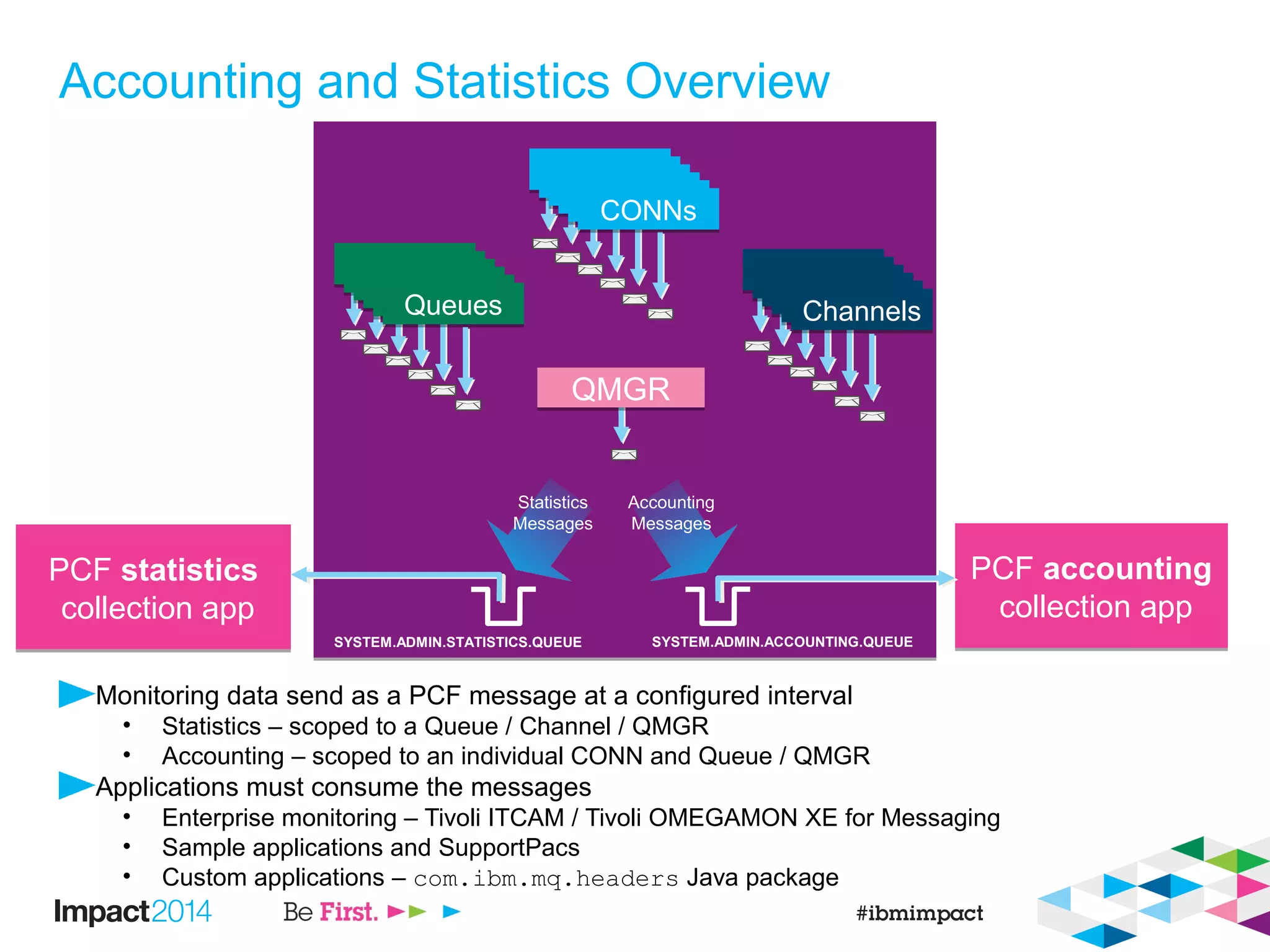
Monitoring data send as a PCF message at a configured interval
• Statistics – scoped to a Queue / Channel / QMGR
• Accounting – scoped to an individual CONN and Queue / QMGR
Applications must consume the messages
• Enterprise monitoring – Tivoli ITCAM / Tivoli OMEGAMON XE for Messaging
• Sample applications and SupportPacs
• Custom applications – com.ibm.mq.headers Java package
PCF accounting
collection app
PCF accounting
collection app
QueuesQueues ChannelsChannels
CONNsCONNs
PCF statistics
collection app
PCF statistics
collection app
Statistics
Messages
Accounting
Messages
QMGRQMGR
SYSTEM.ADMIN.STATISTICS.QUEUE SYSTEM.ADMIN.ACCOUNTING.QUEUE
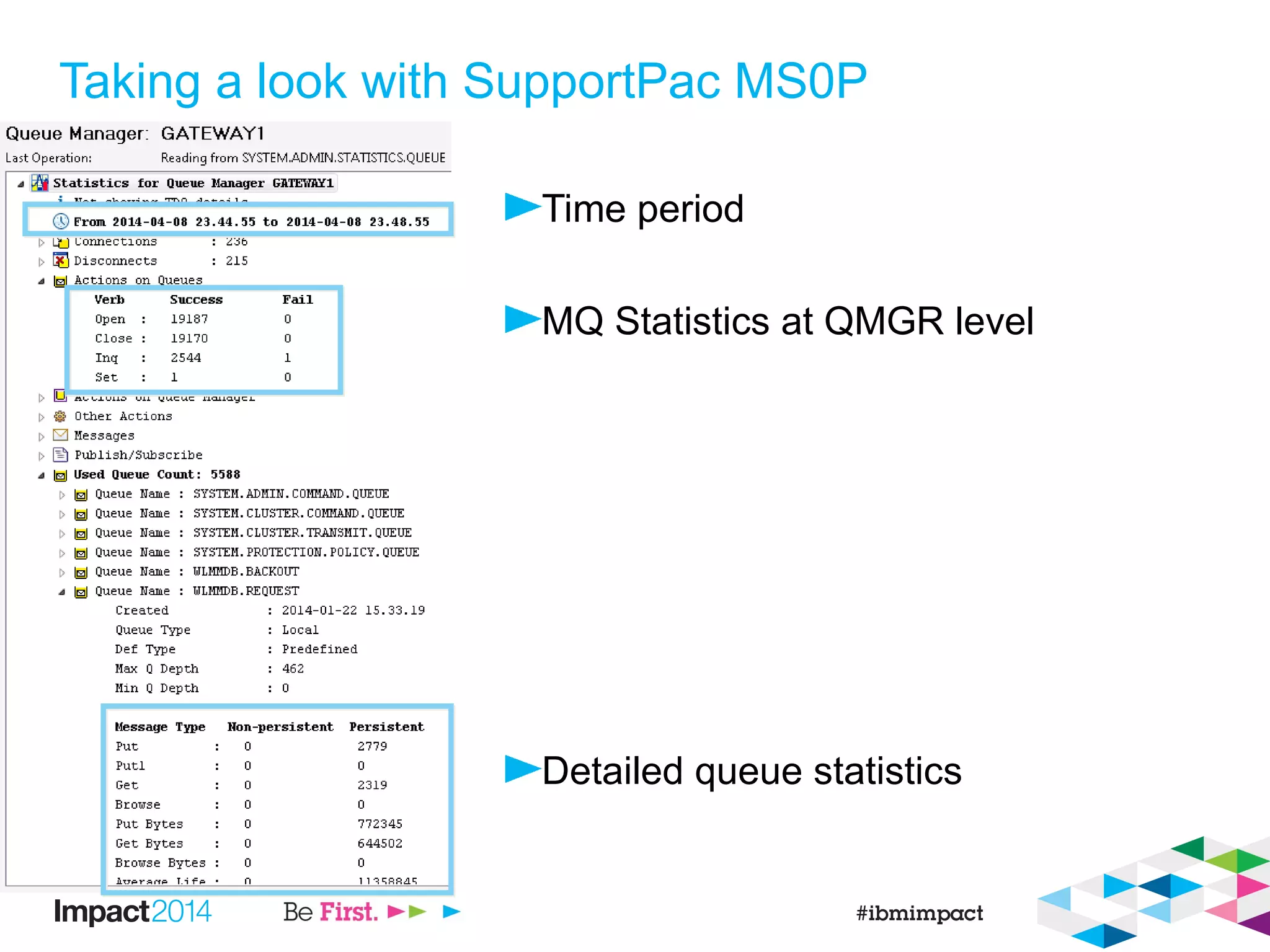
Taking a look with SupportPac MS0P
Time period
MQ Statistics at QMGR level
Detailed queue statistics
Simple practical example using amqsmon
Overall QMGR busyness
Simple data format
• Multiple values are
[Persistent, NonPersistent]
One message every X seconds
• Use amqsmon directly (perl/cron)
Low/high water marks for
• Connections
• Subscriptions
$ echo "ALTER QMGR STATMQI(ON)" | runmqsc
$ sleep 10
$ echo "RESET QMGR TYPE(STATISTICS)" | runmqsc
$ /opt/mqm/samp/bin/amqsmon -m GATEWAY1 -t statistics -a -w 0
MonitoringType: MQIStatistics
QueueManager: 'GATEWAY1'
IntervalStartDate: '2014-04-09'
IntervalStartTime: '00.00.35'
IntervalEndDate: '2014-04-09'
IntervalEndTime: '00.01.13'
CommandLevel: 700
ConnCount: 35
PutCount: [271, 0]
PutFailCount: 0
Put1Count: [2, 0]
Put1FailCount: 0
PutBytes: [273976, 0]
GetCount: [270, 0]
GetBytes: [269468, 0]
GetFailCount: 19
DurableSubscriptionHighWater: [0, 0, 0, 0]
DurableSubscriptionLowWater: [0, 0, 0, 0]
NonDurableSubscriptionHighWater: [0, 0, 0, 0]
NonDurableSubscriptionLowWater: [0, 0, 0, 0]
PutTopicCount: [0, 0]
PutTopicFailCount: 0
Put1TopicCount: [0, 0]
Put1TopicFailCount: 0
PutTopicBytes: [0, 0]
PublishMsgCount: [0, 0]
PublishMsgBytes: [0, 0]
Where are messages going?
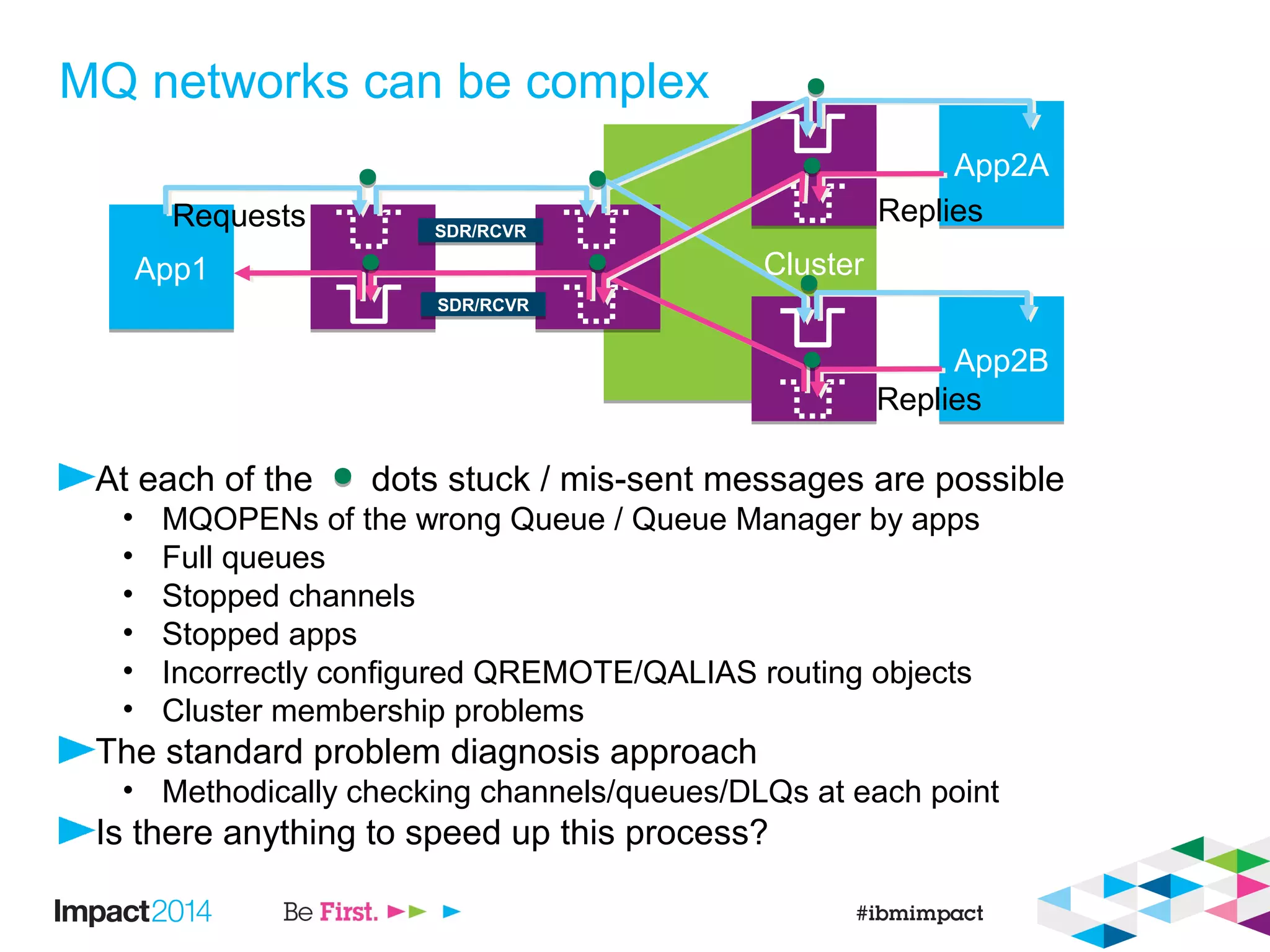
ClusterCluster
MQ networks can be complex
At each of the dots stuck / mis-sent messages are possible
• MQOPENs of the wrong Queue / Queue Manager by apps
• Full queues
• Stopped channels
• Stopped apps
• Incorrectly configured QREMOTE/QALIAS routing objects
• Cluster membership problems
The standard problem diagnosis approach
• Methodically checking channels/queues/DLQs at each point
Is there anything to speed up this process?
App1App1
App2AApp2A
App2BApp2B
Requests Replies
Replies
SDR/RCVRSDR/RCVR
SDR/RCVRSDR/RCVR
ClusterCluster
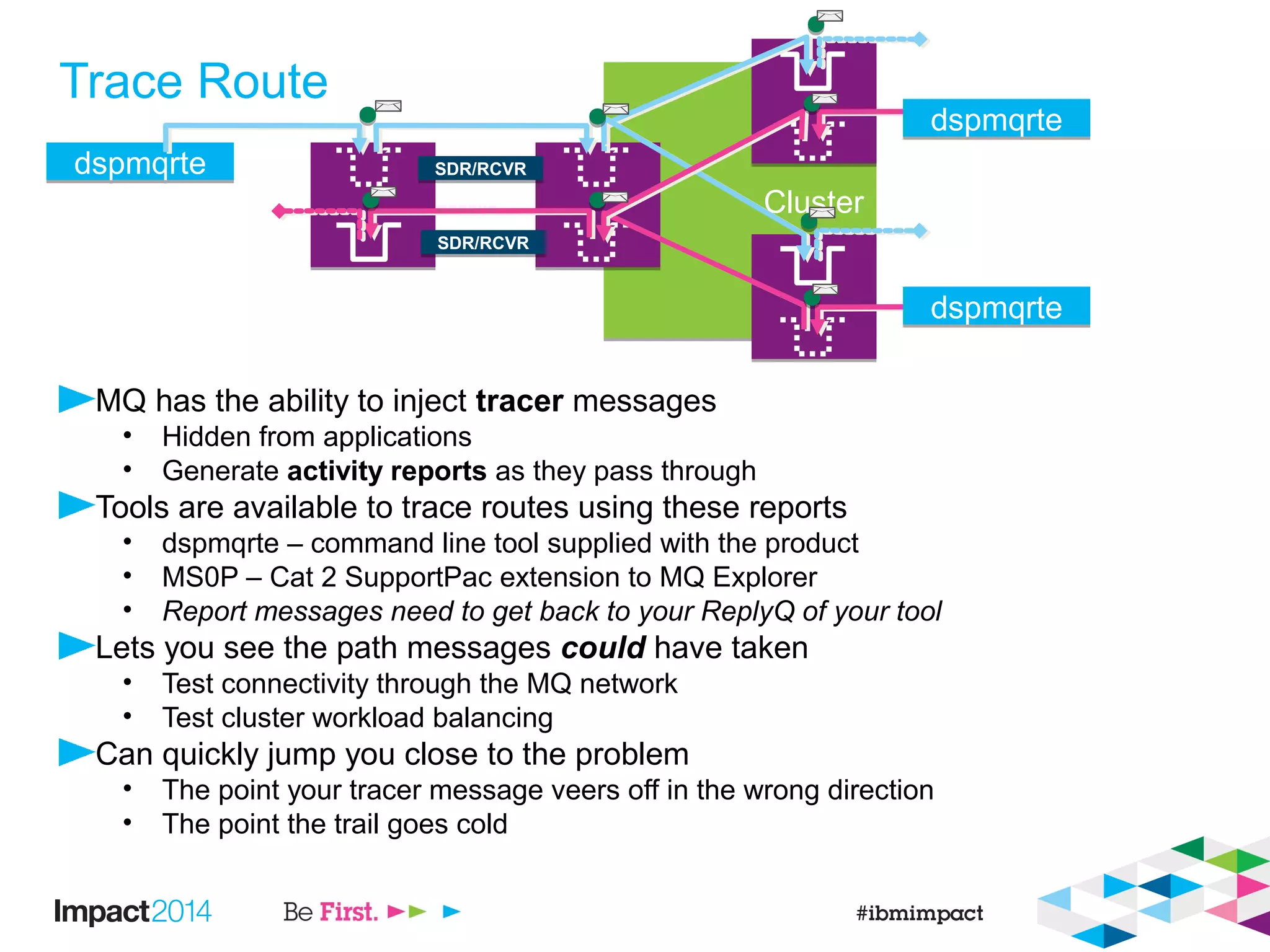
Trace Route
MQ has the ability to inject tracer messages
• Hidden from applications
• Generate activity reports as they pass through
Tools are available to trace routes using these reports
• dspmqrte – command line tool supplied with the product
• MS0P – Cat 2 SupportPac extension to MQ Explorer
• Report messages need to get back to your ReplyQ of your tool
Lets you see the path messages could have taken
• Test connectivity through the MQ network
• Test cluster workload balancing
Can quickly jump you close to the problem
• The point your tracer message veers off in the wrong direction
• The point the trail goes cold
dspmqrtedspmqrte SDR/RCVRSDR/RCVR
SDR/RCVRSDR/RCVR
dspmqrtedspmqrte
dspmqrtedspmqrte
Demo of dspmqrte & MS0P
What are the apps doing?
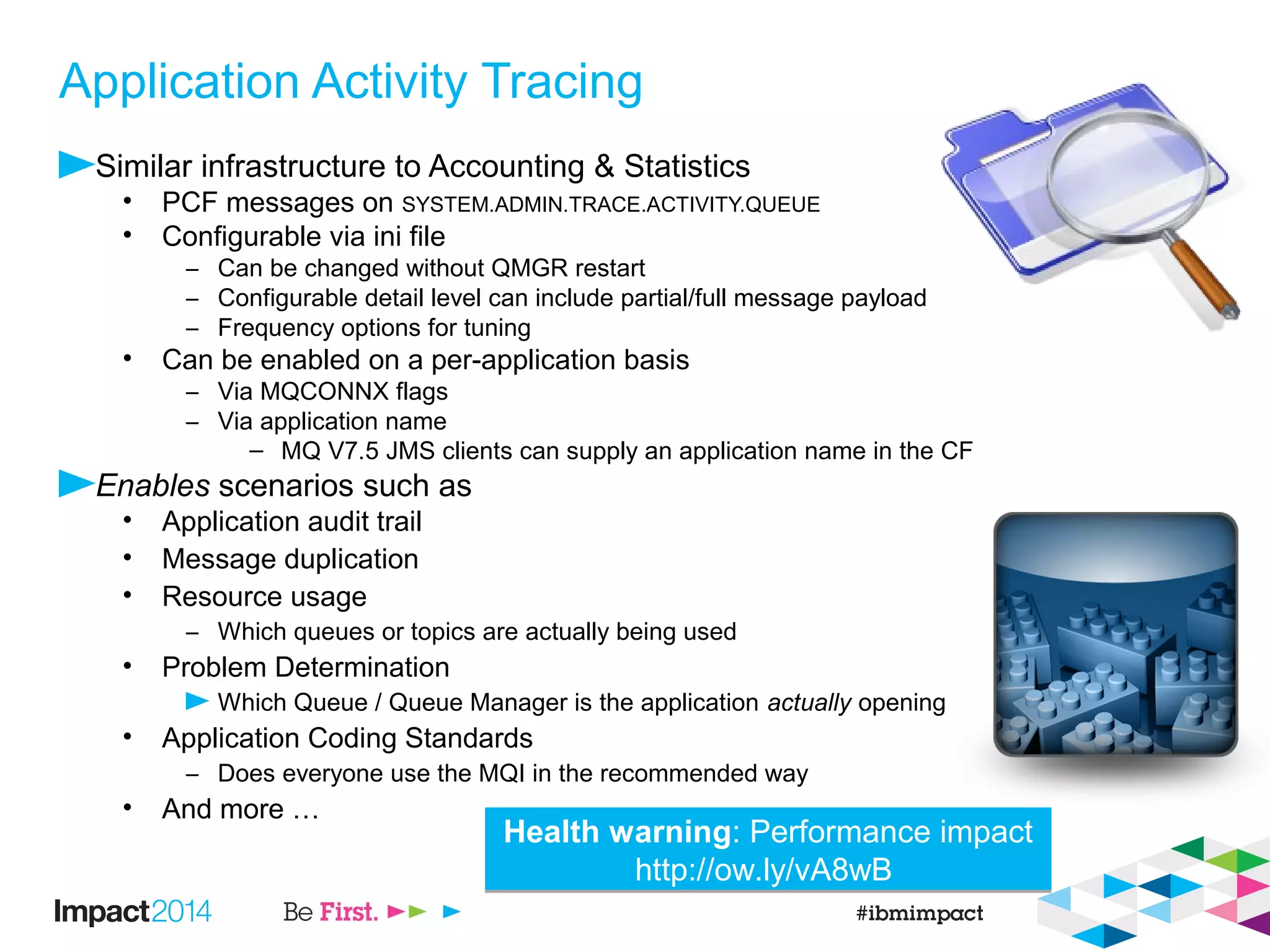
Application Activity Tracing
Similar infrastructure to Accounting & Statistics
• PCF messages on SYSTEM.ADMIN.TRACE.ACTIVITY.QUEUE
• Configurable via ini file
– Can be changed without QMGR restart
– Configurable detail level can include partial/full message payload
– Frequency options for tuning
• Can be enabled on a per-application basis
– Via MQCONNX flags
– Via application name
– MQ V7.5 JMS clients can supply an application name in the CF
Enables scenarios such as
• Application audit trail
• Message duplication
• Resource usage
– Which queues or topics are actually being used
• Problem Determination
Which Queue / Queue Manager is the application actually opening
• Application Coding Standards
– Does everyone use the MQI in the recommended way
• And more …
Health warning: Performance impact
http://ow.ly/vA8wB
Health warning: Performance impact
http://ow.ly/vA8wB
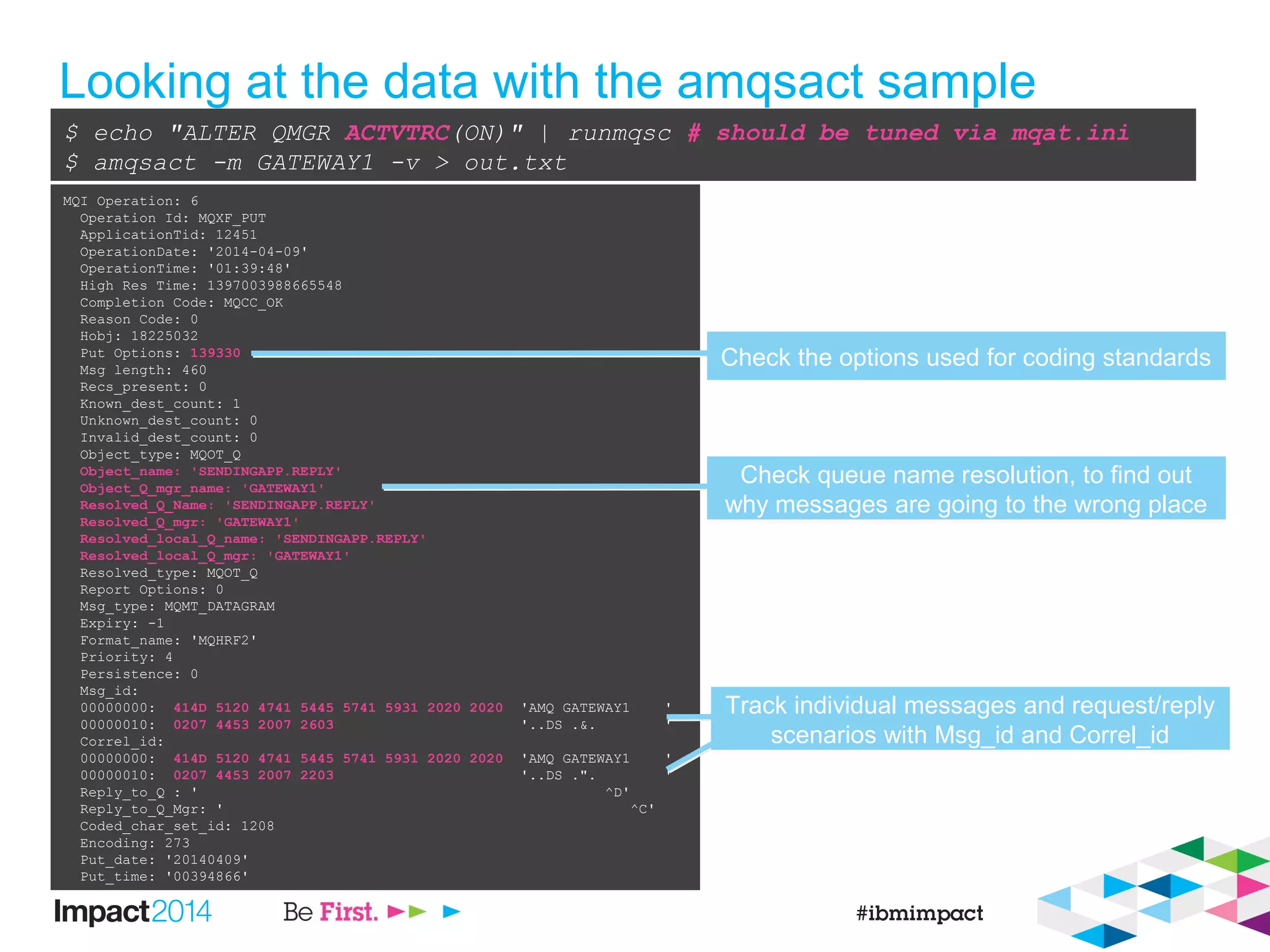
Looking at the data with the amqsact sample
$ echo "ALTER QMGR ACTVTRC(ON)" | runmqsc # should be tuned via mqat.ini
$ amqsact -m GATEWAY1 -v > out.txt
MQI Operation: 6
Operation Id: MQXF_PUT
ApplicationTid: 12451
OperationDate: '2014-04-09'
OperationTime: '01:39:48'
High Res Time: 1397003988665548
Completion Code: MQCC_OK
Reason Code: 0
Hobj: 18225032
Put Options: 139330
Msg length: 460
Recs_present: 0
Known_dest_count: 1
Unknown_dest_count: 0
Invalid_dest_count: 0
Object_type: MQOT_Q
Object_name: 'SENDINGAPP.REPLY'
Object_Q_mgr_name: 'GATEWAY1'
Resolved_Q_Name: 'SENDINGAPP.REPLY'
Resolved_Q_mgr: 'GATEWAY1'
Resolved_local_Q_name: 'SENDINGAPP.REPLY'
Resolved_local_Q_mgr: 'GATEWAY1'
Resolved_type: MQOT_Q
Report Options: 0
Msg_type: MQMT_DATAGRAM
Expiry: -1
Format_name: 'MQHRF2'
Priority: 4
Persistence: 0
Msg_id:
00000000: 414D 5120 4741 5445 5741 5931 2020 2020 'AMQ GATEWAY1 '
00000010: 0207 4453 2007 2603 '..DS .&. '
Correl_id:
00000000: 414D 5120 4741 5445 5741 5931 2020 2020 'AMQ GATEWAY1 '
00000010: 0207 4453 2007 2203 '..DS .". '
Reply_to_Q : ' ^D'
Reply_to_Q_Mgr: ' ^C'
Coded_char_set_id: 1208
Encoding: 273
Put_date: '20140409'
Put_time: '00394866'
Check the options used for coding standardsCheck the options used for coding standards
Check queue name resolution, to find out
why messages are going to the wrong place
Check queue name resolution, to find out
why messages are going to the wrong place
Track individual messages and request/reply
scenarios with Msg_id and Correl_id
Track individual messages and request/reply
scenarios with Msg_id and Correl_id
How can I look back in time?
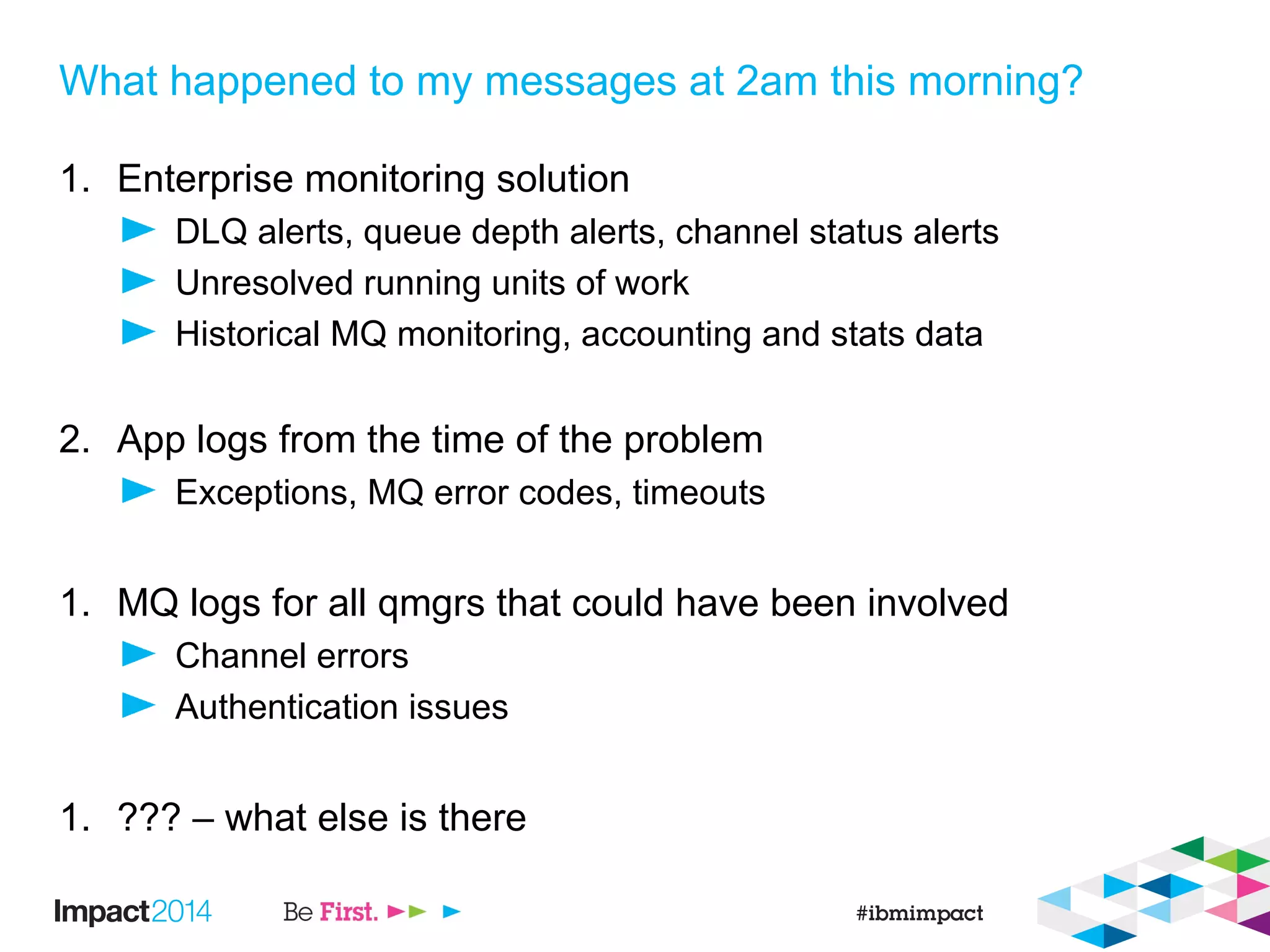
What happened to my messages at 2am this morning?
1. Enterprise monitoring solution
DLQ alerts, queue depth alerts, channel status alerts
Unresolved running units of work
Historical MQ monitoring, accounting and stats data
2. App logs from the time of the problem
Exceptions, MQ error codes, timeouts
1. MQ logs for all qmgrs that could have been involved
Channel errors
Authentication issues
1. ??? – what else is there
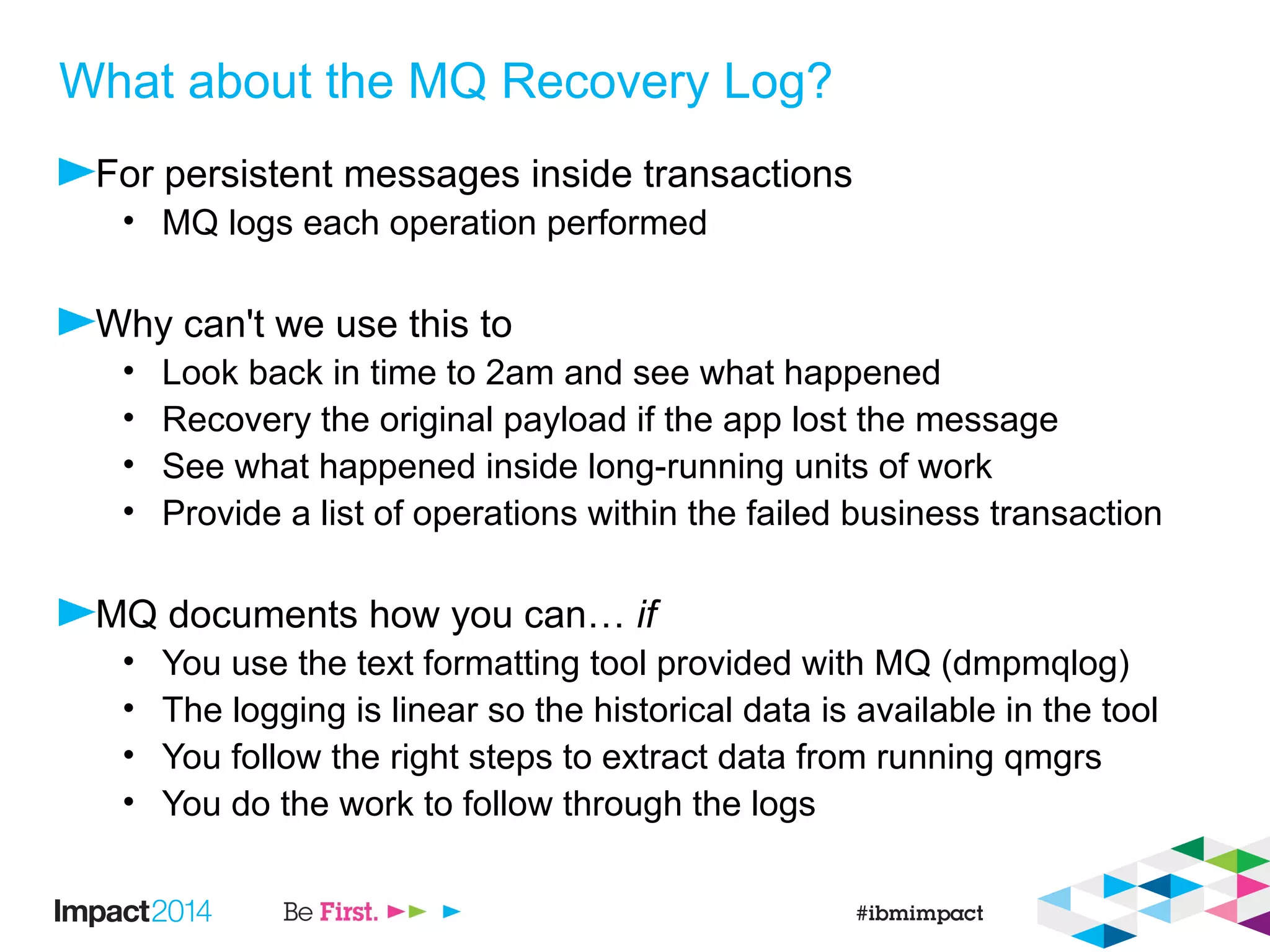
What about the MQ Recovery Log?
For persistent messages inside transactions
• MQ logs each operation performed
Why can't we use this to
• Look back in time to 2am and see what happened
• Recovery the original payload if the app lost the message
• See what happened inside long-running units of work
• Provide a list of operations within the failed business transaction
MQ documents how you can… if
• You use the text formatting tool provided with MQ (dmpmqlog)
• The logging is linear so the historical data is available in the tool
• You follow the right steps to extract data from running qmgrs
• You do the work to follow through the logs
Dmpmqlog output is readable, but analysis is tedious
Wouldn't it be easier to let
the computer do the
tedious bit?
LOG RECORD - LSN <0:0:954:44817>
**********
HLG Header: lrecsize 873, version 1, rmid 0, eyecatcher HLRH
LogRecdType . . : AQM Put Message (257)
Eyecatcher . . : ALRH Version . . . . : 1
LogRecdLen . . : 853 LogRecdOwnr . . : 256 (AQM)
XTranid . . . . : TranType: XA
XID: formatID 1463898948, gtrid_length 36, bqual_length 54
gtrid [000001430B3C84EF000000010000002734721FAD52A950DDA913D08C5C13719A34E164F2]
bqual
[000001430B3C84EF000000010000002734721FAD52A950DDA913D08C5C13719A34E164F200000001000000000000
0000000000000001]
QueueName . . . : Not known
Qid . . . . . . : {Hash 2147211283, Counter: 5}
ThisLSN . . . . : <0:0:0:0>
PrevLSN . . . . : <0:0:954:43944>
Version . . . . : 4
MapIndex . . . : 199
PrevLink.Locn . : 102408 PrevLink.Length : 8
PrevDataLink . : {High 0, Low 103424}
Data.Locn . . . : 103424 Data.Length . . : 613
Data . . . . . :
00000: 41 51 52 48 04 00 00 00 FF FF FF FF FF FF FF FF AQRH....ÿÿÿÿÿÿÿÿ
00016: 00 00 00 00 00 00 00 00 C7 00 00 00 02 00 C0 01 ........Ç.......
00032: 00 00 00 00 04 00 01 00 A5 00 00 00 00 00 00 00 ........¥.......
00048: 63 00 00 00 41 4D 51 20 49 49 42 30 31 5F 51 4D c...AMQ IIB01_QM
00064: 20 20 20 20 D9 26 B0 52 20 08 53 F5 30 30 30 30 .&.R .Sõ0000
00080: 30 30 39 39 00 00 00 00 00 00 00 00 00 00 00 00 0099............
00096: 00 00 00 00 00 00 00 00 00 00 00 00 00 00 00 00 ................
00112: 00 00 00 00 00 00 00 00 00 00 00 00 01 00 00 00 ................
00128: 00 00 00 00 FF FF FF FF 00 00 00 00 04 00 00 09 ....ÿÿÿÿ........
00144: 00 00 00 00 E3 ED 04 80 10 FD 67 E4 FF FF FF FF ....ãí.€.ýgäÿÿÿÿ
00160: 4D 44 20 20 01 00 00 00 00 00 00 00 08 00 00 00 MD ............
00176: 00 00 00 00 11 01 00 00 B8 04 00 00 4D 51 48 52 ........¸...MQHR
00192: 46 32 20 20 04 00 00 00 01 00 00 00 20 20 20 20 F2 ........
00208: 20 20 20 20 20 20 20 20 20 20 20 20 20 20 20 20
00224: 20 20 20 20 20 20 20 20 20 20 20 20 20 20 20 20
00240: 20 20 20 20 20 20 20 20 20 20 20 20 49 49 42 30 IIB0
00256: 31 5F 51 4D 20 20 20 20 20 20 20 20 20 20 20 20 1_QM
00272: 20 20 20 20 20 20 20 20 20 20 20 20 20 20 20 20
00288: 20 20 20 20 20 20 20 20 20 20 20 20 4D 55 53 52 MUSR
00304: 5F 4D 51 41 44 4D 49 4E 16 01 05 15 00 00 00 64 _MQADMIN.......d
00320: 20 3E AC 57 48 B3 09 B8 71 B0 4C F2 03 00 00 00 >¬WH..¸q.Lò....
00336: 00 00 00 00 00 00 00 0B 20 20 20 20 20 20 20 20 ........
00352: 20 20 20 20 20 20 20 20 20 20 20 20 20 20 20 20
00368: 20 20 20 20 20 20 20 20 1C 00 00 00 57 65 62 53 ....WebS
00384: 70 68 65 72 65 20 4D 51 20 43 6C 69 65 6E 74 20 phere MQ Client
00400: 66 6F 72 20 4A 61 76 61 32 30 31 33 31 32 31 39 for Java20131219
00416: 31 34 32 32 33 32 32 32 20 20 20 20 00 00 00 00 14223222 ....
00432: A4 00 00 00 00 00 00 00 00 00 00 00 00 00 00 00 ¤...............
00448: 52 46 48 20 00 00 00 02 00 00 00 A4 00 00 01 11 RFH .......¤....
00464: 00 00 04 B8 4D 51 53 54 52 20 20 20 00 00 00 00 ...¸MQSTR ....
00480: 00 00 04 B8 00 00 00 20 3C 6D 63 64 3E 3C 4D 73 ...¸... <mcd><Ms
00496: 64 3E 6A 6D 73 5F 74 65 78 74 3C 2F 4D 73 64 3E d>jms_text</Msd>
00512: 3C 2F 6D 63 64 3E 20 20 00 00 00 58 3C 6A 6D 73 </mcd> ...X<jms
00528: 3E 3C 44 73 74 3E 71 75 65 75 65 3A 2F 2F 2F 51 ><Dst>queue:///Q
00544: 31 3C 2F 44 73 74 3E 3C 54 6D 73 3E 31 33 38 37 1</Dst><Tms>1387
00560: 34 36 32 39 35 32 32 32 36 3C 2F 54 6D 73 3E 3C 462952226</Tms><
00576: 43 69 64 3E 30 30 30 30 30 30 39 39 3C 2F 43 69 Cid>00000099</Ci
00592: 64 3E 3C 44 6C 76 3E 32 3C 2F 44 6C 76 3E 3C 2F d><Dlv>2</Dlv></
00608: 6A 6D 73 3E 61 jms>a
Ordered unique IDs for each record (LSN)Ordered unique IDs for each record (LSN)
A set of documented record typesA set of documented record types
Transaction information with XIDs, or re-
used MQ transaction IDs
Transaction information with XIDs, or re-
used MQ transaction IDs
MQMD header data at discoverable offsets
in the hex of a message Put
MQMD header data at discoverable offsets
in the hex of a message Put
The message payload itselfThe message payload itself
Demo of example tool:
http://ow.ly/vAerO
Questions?
We Value Your Feedback
Don’t forget to submit your Impact session and speaker
feedback! Your feedback is very important to us – we use it to
continually improve the conference.
Use the Conference Mobile App or the online Agenda Builder to
quickly submit your survey
• Navigate to “Surveys” to see a view of surveys for sessions
you’ve attended
34
Thank You
Legal Disclaimer
• © IBM Corporation 2014. All Rights Reserved.
• The information contained in this publication is provided for informational purposes only. While efforts were made to verify the completeness and accuracy of the information contained
in this publication, it is provided AS IS without warranty of any kind, express or implied. In addition, this information is based on IBM’s current product plans and strategy, which are
subject to change by IBM without notice. IBM shall not be responsible for any damages arising out of the use of, or otherwise related to, this publication or any other materials. Nothing
contained in this publication is intended to, nor shall have the effect of, creating any warranties or representations from IBM or its suppliers or licensors, or altering the terms and
conditions of the applicable license agreement governing the use of IBM software.
• References in this presentation to IBM products, programs, or services do not imply that they will be available in all countries in which IBM operates. Product release dates and/or
capabilities referenced in this presentation may change at any time at IBM’s sole discretion based on market opportunities or other factors, and are not intended to be a commitment to
future product or feature availability in any way. Nothing contained in these materials is intended to, nor shall have the effect of, stating or implying that any activities undertaken by you
will result in any specific sales, revenue growth or other results.
• If the text contains performance statistics or references to benchmarks, insert the following language; otherwise delete:
Performance is based on measurements and projections using standard IBM benchmarks in a controlled environment. The actual throughput or performance that any user will
experience will vary depending upon many factors, including considerations such as the amount of multiprogramming in the user's job stream, the I/O configuration, the storage
configuration, and the workload processed. Therefore, no assurance can be given that an individual user will achieve results similar to those stated here.
• If the text includes any customer examples, please confirm we have prior written approval from such customer and insert the following language; otherwise delete:
All customer examples described are presented as illustrations of how those customers have used IBM products and the results they may have achieved. Actual environmental costs
and performance characteristics may vary by customer.
• Please review text for proper trademark attribution of IBM products. At first use, each product name must be the full name and include appropriate trademark symbols (e.g., IBM
Lotus® Sametime® Unyte™). Subsequent references can drop “IBM” but should include the proper branding (e.g., Lotus Sametime Gateway, or WebSphere Application Server).
Please refer to http://www.ibm.com/legal/copytrade.shtml for guidance on which trademarks require the ® or ™ symbol. Do not use abbreviations for IBM product names in your
presentation. All product names must be used as adjectives rather than nouns. Please list all of the trademarks that you use in your presentation as follows; delete any not included in
your presentation. IBM, the IBM logo, Lotus, Lotus Notes, Notes, Domino, Quickr, Sametime, WebSphere, UC2, PartnerWorld and Lotusphere are trademarks of International
Business Machines Corporation in the United States, other countries, or both. Unyte is a trademark of WebDialogs, Inc., in the United States, other countries, or both.
• If you reference Adobe® in the text, please mark the first use and include the following; otherwise delete:
Adobe, the Adobe logo, PostScript, and the PostScript logo are either registered trademarks or trademarks of Adobe Systems Incorporated in the United States, and/or other countries.
• If you reference Java™ in the text, please mark the first use and include the following; otherwise delete:
Java and all Java-based trademarks are trademarks of Sun Microsystems, Inc. in the United States, other countries, or both.
• If you reference Microsoft® and/or Windows® in the text, please mark the first use and include the following, as applicable; otherwise delete:
Microsoft and Windows are trademarks of Microsoft Corporation in the United States, other countries, or both.
• If you reference Intel® and/or any of the following Intel products in the text, please mark the first use and include those that you use as follows; otherwise delete:
Intel, Intel Centrino, Celeron, Intel Xeon, Intel SpeedStep, Itanium, and Pentium are trademarks or registered trademarks of Intel Corporation or its subsidiaries in the United States and
other countries.
• If you reference UNIX® in the text, please mark the first use and include the following; otherwise delete:
UNIX is a registered trademark of The Open Group in the United States and other countries.
• If you reference Linux® in your presentation, please mark the first use and include the following; otherwise delete:
Linux is a registered trademark of Linus Torvalds in the United States, other countries, or both. Other company, product, or service names may be trademarks or service marks of
others.
• If the text/graphics include screenshots, no actual IBM employee names may be used (even your own), if your screenshots include fictitious company names (e.g., Renovations, Zeta
Bank, Acme) please update and insert the following; otherwise delete: All references to [insert fictitious company name] refer to a fictitious company and are used for illustration
purposes only.

IBM IMPACT 2014 - AMC-1883 - Where's My Message - Analyze IBM WebSphere MQ Recovery Logs, Trace Routes, and Look In Applications

  • 1.
    © 2014 IBMCorporation Where’s my message? AMC-1883 Analyze IBM WebSphere MQ Recovery Logs, Trace Routes, & Look In Applications Peter Broadhurst – peter.broadhurst@uk.ibm.com
  • 2.
    Please Note IBM’s statementsregarding its plans, directions, and intent are subject to change or withdrawal without notice at IBM’s sole discretion. Information regarding potential future products is intended to outline our general product direction and it should not be relied on in making a purchasing decision. The information mentioned regarding potential future products is not a commitment, promise, or legal obligation to deliver any material, code or functionality. Information about potential future products may not be incorporated into any contract. The development, release, and timing of any future features or functionality described for our products remains at our sole discretion. Performance is based on measurements and projections using standard IBM benchmarks in a controlled environment. The actual throughput or performance that any user will experience will vary depending upon many factors, including considerations such as the amount of multiprogramming in the user’s job stream, the I/O configuration, the storage configuration, and the workload processed. Therefore, no assurance can be given that an individual user will achieve results similar to those stated here.
  • 3.
    Symptoms include: Timeouts forrequest/response messaging Inconsistent data between front-end and back-end systems Customer complaints about ‘missing’ transactions Developer frustration when testing an app / MQ environment
  • 4.
    Agenda – theMQ Toolbox Who’s connected? Are messages flowing? Where are messages going? What are the apps doing? How can I look back in time? $ echo 'Presentation contains UNIX/cygwin shell examples & MQSC output' $ echo 'Your own admin tools will vary by task, situation and preference' $ echo 'Tasks can be performed in PowerShell, MQ Explorer etc. as desired'
  • 5.
  • 6.
    DISPLAY CONN $ echo$'DIS CONN(*) TYPE(HANDLE) ALLnDIS CONN(*) ALL' | runmqsc > o.txt AMQ8276: Display Connection details. CONN(577C425321295301) EXTCONN(414D5143474154455741593120202020) TYPE(HANDLE) OBJNAME(WLMMDB.REQUEST) OBJTYPE(QUEUE) ASTATE(NONE) HSTATE(INACTIVE) OPENOPTS(MQOO_OUTPUT,MQOO_FAIL_IF_QUIESCING) READA(NO) OBJNAME(SENDINGAPP.REPLY) OBJTYPE(QUEUE) ASTATE(ACTIVE) HSTATE(ACTIVE) OPENOPTS(MQOO_INPUT_SHARED,MQOO_INQUIRE,MQOO_SAVE_ALL_CONTEXT,MQOO_FAIL_IF_QUIESCING) READA(NO) AMQ8276: Display Connection details. CONN(577C425321295301) EXTCONN(414D5143474154455741593120202020) TYPE(CONN) PID(9740) TID(185) APPLDESC(WebSphere MQ Channel) APPLTAG(jms/GATEWAY1_CF) APPLTYPE(SYSTEM) ASTATE(NONE) CHANNEL(WAS.CLIENTS) CONNAME(127.0.0.1) CONNOPTS(MQCNO_SHARED_BINDING) USERID(pbroad) UOWLOG( ) UOWSTDA(2014-04-08) UOWSTTI(13.24.00) UOWLOGDA( ) UOWLOGTI( ) URTYPE(XA) EXTURID(XA_FORMATID[DSAW] XA_GTRID[00000145414B8AB40000000104DF48FC0001020304050607080900010203040506070809] XA_BQUAL[00000145414B8AB40000000104DF48FC0001020304050607080900010203040506070809000000010000000000000000 000000000001]) QMURID(0.7940075) UOWSTATE(ACTIVE) Use CONN to match TYPE(CONN) and TYPE(HANDLE) records Use CONN to match TYPE(CONN) and TYPE(HANDLE) records TYPE(HANDLE) records let you find applications by the objects they access. See all open handles for an app in one place, unlike DIS QSTATUS records TYPE(HANDLE) records let you find applications by the objects they access. See all open handles for an app in one place, unlike DIS QSTATUS records Long running UOW information. XID can be tied up with app server txn timeout Long running UOW information. XID can be tied up with app server txn timeout Channel name + IP help identify client apps. MQ V7.5 and later JMS clients can supply an application name in the CF Channel name + IP help identify client apps. MQ V7.5 and later JMS clients can supply an application name in the CF
  • 7.
    DISPLAY CHSTATUS $ echo'DIS CHSTATUS(*)' | runmqsc > o.txt AMQ8417: Display Channel Status details. CHANNEL(WAS.CLIENTS) CHLTYPE(SVRCONN) BUFSRCVD(17) BUFSSENT(13) BYTSRCVD(2296) BYTSSENT(2456) CHSTADA(2014-04-08) CHSTATI(15.26.59) COMPHDR(NONE,NONE) COMPMSG(NONE,NONE) COMPRATE(0,0) COMPTIME(0,0) CONNAME(127.0.0.1) CURRENT EXITTIME(0,0) HBINT(5) JOBNAME(0000260C000000B9) LOCLADDR( ) LSTMSGDA(2014-04-08) LSTMSGTI(15.26.59) MCASTAT(RUNNING) MCAUSER(pbroad) MONCHL(OFF) MSGS(6) RAPPLTAG(jar) SSLCERTI(CN=ExampleCA,O=Example) SSLKEYDA( ) SSLKEYTI( ) SSLPEER(SERIALNUMBER=53:43:FD:D6,CN=ExampleApp1,O=Example) SSLRKEYS(0) STATUS(RUNNING) STOPREQ(NO) SUBSTATE(RECEIVE) CURSHCNV(1) MAXSHCNV(1) RVERSION(00000000) RPRODUCT(MQJM) See SSLPEER information not in DIS CONNSee SSLPEER information not in DIS CONN JOBNAME contains PID (except z/OS): 0x260C = PID(9740) On Linux/UNIX (not Win) TID matches CONN: 0xB9 = TID(185) JOBNAME contains PID (except z/OS): 0x260C = PID(9740) On Linux/UNIX (not Win) TID matches CONN: 0xB9 = TID(185) Note that multiple CONN might share one SVRCONN channel instanceNote that multiple CONN might share one SVRCONN channel instance Check suitable heartbeats are negotiatedCheck suitable heartbeats are negotiated
  • 8.
  • 9.
    AMQSCLM 1) Normal operation Driver qmgr1 Driver qmgr 2 Driver qmgr N . . . Target qmgr 1 Target qmgr 2 Target qmgr N . . . Sending appsSending appsSending apps Cluster WLM Cluster WLM Round-robin message distribution App server 1 App server 2 App server N . . . IPPROCS(>=1) IPPROCS(>=1) IPPROCS(>=1) AMQSCLM AMQSCLM AMQSCLM
  • 10.
    AMQSCLM 2) Application failure Driver qmgr1 Driver qmgr 2 Driver qmgr N . . . Target qmgr 1 Target qmgr 2 Target qmgr N . . . Sending appsSending appsSending apps Cluster WLM Cluster WLM Round-robin message distribution App server 1 App server 2 App server N . . . IPPROCS(0) IPPROCS(>=1) IPPROCS(>=1) Messages start building up AMQSCLM AMQSCLM AMQSCLM
  • 11.
    AMQSCLM 3) Failure Detection Driver qmgr1 Driver qmgr 2 Driver qmgr N . . . Target qmgr 1 Target qmgr 2 Target qmgr N . . . Sending appsSending appsSending apps Cluster WLM Cluster WLM Round-robin message distribution App server 1 App server 2 App server N . . . IPPROCS(0) IPPROCS(>=1) IPPROCS(>=1) AMQSCLM regularly checks the queue and detects IPPROCS(0) AMQSCLM AMQSCLM AMQSCLM
  • 12.
    AMQSCLM 4) Redirect Messages Driver qmgr1 Driver qmgr 2 Driver qmgr N . . . Target qmgr 1 Target qmgr 2 Target qmgr N . . . Sending appsSending appsSending apps Cluster WLM Cluster WLM Round-robin message distribution App server 1 App server 2 App server N . . . IPPROCS(0) IPPROCS(>=1) IPPROCS(>=1) AMQSCLM reduces queue priority in cluster, to stop new messages arriving AMQSCLM AMQSCLM AMQSCLM
  • 13.
    AMQSCLM 5) Un-maroon Msgs Driver qmgr1 Driver qmgr 2 Driver qmgr N . . . Target qmgr 1 Target qmgr 2 Target qmgr N . . . Sending appsSending appsSending apps Cluster WLM Cluster WLM Round-robin message distribution App server 1 App server 2 App server N . . . IPPROCS(0) IPPROCS(>=1) IPPROCS(>=1) AMQSCLM tells qmgr to redistribute ‘stuck’ messages via the cluster AMQSCLM AMQSCLM AMQSCLM
  • 14.
    AMQSCLM summary The ClusterQueue Monitoring sample program (AMQSCLM) Shipped with the product as a sample • Precompiled • Source code • Platforms except on z/OS More information here: http://ow.ly/vzZoV
  • 15.
  • 16.
    Real-time/online Monitoring –Queues Set detail level for QMGR. Override for individual Queues Gives live view of application responsiveness $ echo 'ALTER QMGR MONQ(MEDIUM)' | runmqsc $ echo 'ALTER QL(QUEUE1) MONQ(HIGH)' $ echo 'ALTER QL(QUEUE2) MONQ(OFF)' AMQ8450: Display queue status details. QUEUE(WLMMDB.REQUEST) TYPE(QUEUE) CURDEPTH(16) IPPROCS(3) LGETDATE(2014-04-08) LGETTIME(17.05.59) LPUTDATE(2014-04-08) LPUTTIME(17.12.16) MEDIALOG( ) MONQ(HIGH) MSGAGE(112) OPPROCS(5) QTIME(10101414, 10101414) UNCOM(NO) $ echo 'DIS QS(MQHUB.GATEWAY1) ALL' | runmqsc Age in Seconds of the oldest message on the queue Age in Seconds of the oldest message on the queue Estimations of the time in Microseconds that messages are waiting on the queue for processing. First value: Calculated from recent activity Second value: Calculated from longer term activity Estimations of the time in Microseconds that messages are waiting on the queue for processing. First value: Calculated from recent activity Second value: Calculated from longer term activity Timestamps of last PUT/GET to check for recent activity Timestamps of last PUT/GET to check for recent activity Without MONQ you only get the depth and how many handles are open Without MONQ you only get the depth and how many handles are open
  • 17.
    Real-time/online Monitoring –Channels Gives live view of channel throughput $ echo 'ALTER QMGR MONCHL(MEDIUM)' | runmqsc $ echo 'ALTER CHL(CLUSTER1.QM1) CHLTYPE(CLUSRCVR) MONCHL(HIGH)' AMQ8417: Display Channel Status details. CHANNEL(MQHUB.GATEWAY2) CHLTYPE(CLUSSDR) BATCHES(52) BATCHSZ(50) BUFSRCVD(55) BUFSSENT(1616) BYTSRCVD(1748) BYTSSENT(1192330) CHSTADA(2014-04-08) CHSTATI(17.49.03) COMPHDR(NONE,NONE) COMPMSG(NONE,NONE) COMPRATE(0,0) COMPTIME(0,0) CONNAME(127.0.0.1(1422)) CURLUWID(0107445310001B34) CURMSGS(50) CURRENT CURSEQNO(11823) EXITTIME(0,0) HBINT(5) INDOUBT(YES) JOBNAME(00002DA4000047D0) LOCLADDR(127.0.0.1(53557)) LONGRTS(999999999) LSTLUWID(0107445310001B33) LSTMSGDA(2014-04-08) LSTMSGTI(17.49.51) LSTSEQNO(11773) MCASTAT(RUNNING) MONCHL(MEDIUM) MSGS(1580) NETTIME(137538,29555) NPMSPEED(FAST) RQMNAME(GATEWAY2) SHORTRTS(180) SSLCERTI( ) SSLKEYDA( ) SSLKEYTI( ) SSLPEER( ) SSLRKEYS(0) STATUS(RUNNING) STOPREQ(NO) SUBSTATE(RECEIVE) XBATCHSZ(20,17) XMITQ(SYSTEM.CLUSTER.TRANSMIT.QUEUE) XQMSGSA(112) XQTIME(545784,3929968) RVERSION(07050002) RPRODUCT(MQMM) $ echo 'DIS CHS(MQHUB.GATEWAY2) ALL' | runmqsc Short/long term calculations of how full your batches are getting, to help you tune BATCHSZ/BATCHINT Short/long term calculations of how full your batches are getting, to help you tune BATCHSZ/BATCHINT Last time a message was sent over the channel Last time a message was sent over the channel Depth of messages on XMITQ for this channel (capped at 999) Depth of messages on XMITQ for this channel (capped at 999) Short/long term calculations of how long messages are waiting on the XMITQ for transmission Short/long term calculations of how long messages are waiting on the XMITQ for transmission
  • 18.
    Accounting and StatisticsOverview Monitoring data send as a PCF message at a configured interval • Statistics – scoped to a Queue / Channel / QMGR • Accounting – scoped to an individual CONN and Queue / QMGR Applications must consume the messages • Enterprise monitoring – Tivoli ITCAM / Tivoli OMEGAMON XE for Messaging • Sample applications and SupportPacs • Custom applications – com.ibm.mq.headers Java package PCF accounting collection app PCF accounting collection app QueuesQueues ChannelsChannels CONNsCONNs PCF statistics collection app PCF statistics collection app Statistics Messages Accounting Messages QMGRQMGR SYSTEM.ADMIN.STATISTICS.QUEUE SYSTEM.ADMIN.ACCOUNTING.QUEUE
  • 19.
    Taking a lookwith SupportPac MS0P Time period MQ Statistics at QMGR level Detailed queue statistics
  • 20.
    Simple practical exampleusing amqsmon Overall QMGR busyness Simple data format • Multiple values are [Persistent, NonPersistent] One message every X seconds • Use amqsmon directly (perl/cron) Low/high water marks for • Connections • Subscriptions $ echo "ALTER QMGR STATMQI(ON)" | runmqsc $ sleep 10 $ echo "RESET QMGR TYPE(STATISTICS)" | runmqsc $ /opt/mqm/samp/bin/amqsmon -m GATEWAY1 -t statistics -a -w 0 MonitoringType: MQIStatistics QueueManager: 'GATEWAY1' IntervalStartDate: '2014-04-09' IntervalStartTime: '00.00.35' IntervalEndDate: '2014-04-09' IntervalEndTime: '00.01.13' CommandLevel: 700 ConnCount: 35 PutCount: [271, 0] PutFailCount: 0 Put1Count: [2, 0] Put1FailCount: 0 PutBytes: [273976, 0] GetCount: [270, 0] GetBytes: [269468, 0] GetFailCount: 19 DurableSubscriptionHighWater: [0, 0, 0, 0] DurableSubscriptionLowWater: [0, 0, 0, 0] NonDurableSubscriptionHighWater: [0, 0, 0, 0] NonDurableSubscriptionLowWater: [0, 0, 0, 0] PutTopicCount: [0, 0] PutTopicFailCount: 0 Put1TopicCount: [0, 0] Put1TopicFailCount: 0 PutTopicBytes: [0, 0] PublishMsgCount: [0, 0] PublishMsgBytes: [0, 0]
  • 21.
  • 22.
    ClusterCluster MQ networks canbe complex At each of the dots stuck / mis-sent messages are possible • MQOPENs of the wrong Queue / Queue Manager by apps • Full queues • Stopped channels • Stopped apps • Incorrectly configured QREMOTE/QALIAS routing objects • Cluster membership problems The standard problem diagnosis approach • Methodically checking channels/queues/DLQs at each point Is there anything to speed up this process? App1App1 App2AApp2A App2BApp2B Requests Replies Replies SDR/RCVRSDR/RCVR SDR/RCVRSDR/RCVR
  • 23.
    ClusterCluster Trace Route MQ hasthe ability to inject tracer messages • Hidden from applications • Generate activity reports as they pass through Tools are available to trace routes using these reports • dspmqrte – command line tool supplied with the product • MS0P – Cat 2 SupportPac extension to MQ Explorer • Report messages need to get back to your ReplyQ of your tool Lets you see the path messages could have taken • Test connectivity through the MQ network • Test cluster workload balancing Can quickly jump you close to the problem • The point your tracer message veers off in the wrong direction • The point the trail goes cold dspmqrtedspmqrte SDR/RCVRSDR/RCVR SDR/RCVRSDR/RCVR dspmqrtedspmqrte dspmqrtedspmqrte
  • 24.
  • 25.
    What are theapps doing?
  • 26.
    Application Activity Tracing Similarinfrastructure to Accounting & Statistics • PCF messages on SYSTEM.ADMIN.TRACE.ACTIVITY.QUEUE • Configurable via ini file – Can be changed without QMGR restart – Configurable detail level can include partial/full message payload – Frequency options for tuning • Can be enabled on a per-application basis – Via MQCONNX flags – Via application name – MQ V7.5 JMS clients can supply an application name in the CF Enables scenarios such as • Application audit trail • Message duplication • Resource usage – Which queues or topics are actually being used • Problem Determination Which Queue / Queue Manager is the application actually opening • Application Coding Standards – Does everyone use the MQI in the recommended way • And more … Health warning: Performance impact http://ow.ly/vA8wB Health warning: Performance impact http://ow.ly/vA8wB
  • 27.
    Looking at thedata with the amqsact sample $ echo "ALTER QMGR ACTVTRC(ON)" | runmqsc # should be tuned via mqat.ini $ amqsact -m GATEWAY1 -v > out.txt MQI Operation: 6 Operation Id: MQXF_PUT ApplicationTid: 12451 OperationDate: '2014-04-09' OperationTime: '01:39:48' High Res Time: 1397003988665548 Completion Code: MQCC_OK Reason Code: 0 Hobj: 18225032 Put Options: 139330 Msg length: 460 Recs_present: 0 Known_dest_count: 1 Unknown_dest_count: 0 Invalid_dest_count: 0 Object_type: MQOT_Q Object_name: 'SENDINGAPP.REPLY' Object_Q_mgr_name: 'GATEWAY1' Resolved_Q_Name: 'SENDINGAPP.REPLY' Resolved_Q_mgr: 'GATEWAY1' Resolved_local_Q_name: 'SENDINGAPP.REPLY' Resolved_local_Q_mgr: 'GATEWAY1' Resolved_type: MQOT_Q Report Options: 0 Msg_type: MQMT_DATAGRAM Expiry: -1 Format_name: 'MQHRF2' Priority: 4 Persistence: 0 Msg_id: 00000000: 414D 5120 4741 5445 5741 5931 2020 2020 'AMQ GATEWAY1 ' 00000010: 0207 4453 2007 2603 '..DS .&. ' Correl_id: 00000000: 414D 5120 4741 5445 5741 5931 2020 2020 'AMQ GATEWAY1 ' 00000010: 0207 4453 2007 2203 '..DS .". ' Reply_to_Q : ' ^D' Reply_to_Q_Mgr: ' ^C' Coded_char_set_id: 1208 Encoding: 273 Put_date: '20140409' Put_time: '00394866' Check the options used for coding standardsCheck the options used for coding standards Check queue name resolution, to find out why messages are going to the wrong place Check queue name resolution, to find out why messages are going to the wrong place Track individual messages and request/reply scenarios with Msg_id and Correl_id Track individual messages and request/reply scenarios with Msg_id and Correl_id
  • 28.
    How can Ilook back in time?
  • 29.
    What happened tomy messages at 2am this morning? 1. Enterprise monitoring solution DLQ alerts, queue depth alerts, channel status alerts Unresolved running units of work Historical MQ monitoring, accounting and stats data 2. App logs from the time of the problem Exceptions, MQ error codes, timeouts 1. MQ logs for all qmgrs that could have been involved Channel errors Authentication issues 1. ??? – what else is there
  • 30.
    What about theMQ Recovery Log? For persistent messages inside transactions • MQ logs each operation performed Why can't we use this to • Look back in time to 2am and see what happened • Recovery the original payload if the app lost the message • See what happened inside long-running units of work • Provide a list of operations within the failed business transaction MQ documents how you can… if • You use the text formatting tool provided with MQ (dmpmqlog) • The logging is linear so the historical data is available in the tool • You follow the right steps to extract data from running qmgrs • You do the work to follow through the logs
  • 31.
    Dmpmqlog output isreadable, but analysis is tedious Wouldn't it be easier to let the computer do the tedious bit? LOG RECORD - LSN <0:0:954:44817> ********** HLG Header: lrecsize 873, version 1, rmid 0, eyecatcher HLRH LogRecdType . . : AQM Put Message (257) Eyecatcher . . : ALRH Version . . . . : 1 LogRecdLen . . : 853 LogRecdOwnr . . : 256 (AQM) XTranid . . . . : TranType: XA XID: formatID 1463898948, gtrid_length 36, bqual_length 54 gtrid [000001430B3C84EF000000010000002734721FAD52A950DDA913D08C5C13719A34E164F2] bqual [000001430B3C84EF000000010000002734721FAD52A950DDA913D08C5C13719A34E164F200000001000000000000 0000000000000001] QueueName . . . : Not known Qid . . . . . . : {Hash 2147211283, Counter: 5} ThisLSN . . . . : <0:0:0:0> PrevLSN . . . . : <0:0:954:43944> Version . . . . : 4 MapIndex . . . : 199 PrevLink.Locn . : 102408 PrevLink.Length : 8 PrevDataLink . : {High 0, Low 103424} Data.Locn . . . : 103424 Data.Length . . : 613 Data . . . . . : 00000: 41 51 52 48 04 00 00 00 FF FF FF FF FF FF FF FF AQRH....ÿÿÿÿÿÿÿÿ 00016: 00 00 00 00 00 00 00 00 C7 00 00 00 02 00 C0 01 ........Ç....... 00032: 00 00 00 00 04 00 01 00 A5 00 00 00 00 00 00 00 ........¥....... 00048: 63 00 00 00 41 4D 51 20 49 49 42 30 31 5F 51 4D c...AMQ IIB01_QM 00064: 20 20 20 20 D9 26 B0 52 20 08 53 F5 30 30 30 30 .&.R .Sõ0000 00080: 30 30 39 39 00 00 00 00 00 00 00 00 00 00 00 00 0099............ 00096: 00 00 00 00 00 00 00 00 00 00 00 00 00 00 00 00 ................ 00112: 00 00 00 00 00 00 00 00 00 00 00 00 01 00 00 00 ................ 00128: 00 00 00 00 FF FF FF FF 00 00 00 00 04 00 00 09 ....ÿÿÿÿ........ 00144: 00 00 00 00 E3 ED 04 80 10 FD 67 E4 FF FF FF FF ....ãí.€.ýgäÿÿÿÿ 00160: 4D 44 20 20 01 00 00 00 00 00 00 00 08 00 00 00 MD ............ 00176: 00 00 00 00 11 01 00 00 B8 04 00 00 4D 51 48 52 ........¸...MQHR 00192: 46 32 20 20 04 00 00 00 01 00 00 00 20 20 20 20 F2 ........ 00208: 20 20 20 20 20 20 20 20 20 20 20 20 20 20 20 20 00224: 20 20 20 20 20 20 20 20 20 20 20 20 20 20 20 20 00240: 20 20 20 20 20 20 20 20 20 20 20 20 49 49 42 30 IIB0 00256: 31 5F 51 4D 20 20 20 20 20 20 20 20 20 20 20 20 1_QM 00272: 20 20 20 20 20 20 20 20 20 20 20 20 20 20 20 20 00288: 20 20 20 20 20 20 20 20 20 20 20 20 4D 55 53 52 MUSR 00304: 5F 4D 51 41 44 4D 49 4E 16 01 05 15 00 00 00 64 _MQADMIN.......d 00320: 20 3E AC 57 48 B3 09 B8 71 B0 4C F2 03 00 00 00 >¬WH..¸q.Lò.... 00336: 00 00 00 00 00 00 00 0B 20 20 20 20 20 20 20 20 ........ 00352: 20 20 20 20 20 20 20 20 20 20 20 20 20 20 20 20 00368: 20 20 20 20 20 20 20 20 1C 00 00 00 57 65 62 53 ....WebS 00384: 70 68 65 72 65 20 4D 51 20 43 6C 69 65 6E 74 20 phere MQ Client 00400: 66 6F 72 20 4A 61 76 61 32 30 31 33 31 32 31 39 for Java20131219 00416: 31 34 32 32 33 32 32 32 20 20 20 20 00 00 00 00 14223222 .... 00432: A4 00 00 00 00 00 00 00 00 00 00 00 00 00 00 00 ¤............... 00448: 52 46 48 20 00 00 00 02 00 00 00 A4 00 00 01 11 RFH .......¤.... 00464: 00 00 04 B8 4D 51 53 54 52 20 20 20 00 00 00 00 ...¸MQSTR .... 00480: 00 00 04 B8 00 00 00 20 3C 6D 63 64 3E 3C 4D 73 ...¸... <mcd><Ms 00496: 64 3E 6A 6D 73 5F 74 65 78 74 3C 2F 4D 73 64 3E d>jms_text</Msd> 00512: 3C 2F 6D 63 64 3E 20 20 00 00 00 58 3C 6A 6D 73 </mcd> ...X<jms 00528: 3E 3C 44 73 74 3E 71 75 65 75 65 3A 2F 2F 2F 51 ><Dst>queue:///Q 00544: 31 3C 2F 44 73 74 3E 3C 54 6D 73 3E 31 33 38 37 1</Dst><Tms>1387 00560: 34 36 32 39 35 32 32 32 36 3C 2F 54 6D 73 3E 3C 462952226</Tms>< 00576: 43 69 64 3E 30 30 30 30 30 30 39 39 3C 2F 43 69 Cid>00000099</Ci 00592: 64 3E 3C 44 6C 76 3E 32 3C 2F 44 6C 76 3E 3C 2F d><Dlv>2</Dlv></ 00608: 6A 6D 73 3E 61 jms>a Ordered unique IDs for each record (LSN)Ordered unique IDs for each record (LSN) A set of documented record typesA set of documented record types Transaction information with XIDs, or re- used MQ transaction IDs Transaction information with XIDs, or re- used MQ transaction IDs MQMD header data at discoverable offsets in the hex of a message Put MQMD header data at discoverable offsets in the hex of a message Put The message payload itselfThe message payload itself
  • 32.
    Demo of exampletool: http://ow.ly/vAerO
  • 33.
  • 34.
    We Value YourFeedback Don’t forget to submit your Impact session and speaker feedback! Your feedback is very important to us – we use it to continually improve the conference. Use the Conference Mobile App or the online Agenda Builder to quickly submit your survey • Navigate to “Surveys” to see a view of surveys for sessions you’ve attended 34
  • 35.
  • 36.
    Legal Disclaimer • ©IBM Corporation 2014. All Rights Reserved. • The information contained in this publication is provided for informational purposes only. While efforts were made to verify the completeness and accuracy of the information contained in this publication, it is provided AS IS without warranty of any kind, express or implied. In addition, this information is based on IBM’s current product plans and strategy, which are subject to change by IBM without notice. IBM shall not be responsible for any damages arising out of the use of, or otherwise related to, this publication or any other materials. Nothing contained in this publication is intended to, nor shall have the effect of, creating any warranties or representations from IBM or its suppliers or licensors, or altering the terms and conditions of the applicable license agreement governing the use of IBM software. • References in this presentation to IBM products, programs, or services do not imply that they will be available in all countries in which IBM operates. Product release dates and/or capabilities referenced in this presentation may change at any time at IBM’s sole discretion based on market opportunities or other factors, and are not intended to be a commitment to future product or feature availability in any way. Nothing contained in these materials is intended to, nor shall have the effect of, stating or implying that any activities undertaken by you will result in any specific sales, revenue growth or other results. • If the text contains performance statistics or references to benchmarks, insert the following language; otherwise delete: Performance is based on measurements and projections using standard IBM benchmarks in a controlled environment. The actual throughput or performance that any user will experience will vary depending upon many factors, including considerations such as the amount of multiprogramming in the user's job stream, the I/O configuration, the storage configuration, and the workload processed. Therefore, no assurance can be given that an individual user will achieve results similar to those stated here. • If the text includes any customer examples, please confirm we have prior written approval from such customer and insert the following language; otherwise delete: All customer examples described are presented as illustrations of how those customers have used IBM products and the results they may have achieved. Actual environmental costs and performance characteristics may vary by customer. • Please review text for proper trademark attribution of IBM products. At first use, each product name must be the full name and include appropriate trademark symbols (e.g., IBM Lotus® Sametime® Unyte™). Subsequent references can drop “IBM” but should include the proper branding (e.g., Lotus Sametime Gateway, or WebSphere Application Server). Please refer to http://www.ibm.com/legal/copytrade.shtml for guidance on which trademarks require the ® or ™ symbol. Do not use abbreviations for IBM product names in your presentation. All product names must be used as adjectives rather than nouns. Please list all of the trademarks that you use in your presentation as follows; delete any not included in your presentation. IBM, the IBM logo, Lotus, Lotus Notes, Notes, Domino, Quickr, Sametime, WebSphere, UC2, PartnerWorld and Lotusphere are trademarks of International Business Machines Corporation in the United States, other countries, or both. Unyte is a trademark of WebDialogs, Inc., in the United States, other countries, or both. • If you reference Adobe® in the text, please mark the first use and include the following; otherwise delete: Adobe, the Adobe logo, PostScript, and the PostScript logo are either registered trademarks or trademarks of Adobe Systems Incorporated in the United States, and/or other countries. • If you reference Java™ in the text, please mark the first use and include the following; otherwise delete: Java and all Java-based trademarks are trademarks of Sun Microsystems, Inc. in the United States, other countries, or both. • If you reference Microsoft® and/or Windows® in the text, please mark the first use and include the following, as applicable; otherwise delete: Microsoft and Windows are trademarks of Microsoft Corporation in the United States, other countries, or both. • If you reference Intel® and/or any of the following Intel products in the text, please mark the first use and include those that you use as follows; otherwise delete: Intel, Intel Centrino, Celeron, Intel Xeon, Intel SpeedStep, Itanium, and Pentium are trademarks or registered trademarks of Intel Corporation or its subsidiaries in the United States and other countries. • If you reference UNIX® in the text, please mark the first use and include the following; otherwise delete: UNIX is a registered trademark of The Open Group in the United States and other countries. • If you reference Linux® in your presentation, please mark the first use and include the following; otherwise delete: Linux is a registered trademark of Linus Torvalds in the United States, other countries, or both. Other company, product, or service names may be trademarks or service marks of others. • If the text/graphics include screenshots, no actual IBM employee names may be used (even your own), if your screenshots include fictitious company names (e.g., Renovations, Zeta Bank, Acme) please update and insert the following; otherwise delete: All references to [insert fictitious company name] refer to a fictitious company and are used for illustration purposes only.