IMAGE MANIPULATION
CLARA BARROSO
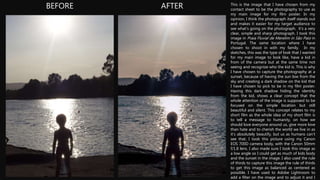
BEFORE AFTER This is the image that I have chosen from my
contact sheet to be the photography to use as
my main image for my film poster. In my
opinion, I think the photograph itself stands out
and makes it easier for my target audience to
see what's going on the photograph. it’s a very
clear, simple and sharp photograph. I took this
image in Praia Fluvial de Merelim in São Paio in
Portugal. The same location where I have
chosen to shoot in with my family. In my
sketches, this was the type of look that I wanted
for my main image to look like, have a kid in
from of the camera but at the same time not
seeing and recognize who the kid is. This is why
I have chosen to capture the photography at a
sunset, because of having the sun low from the
sky and creating a dark shadow on the kid that
I have chosen to pick to be in my film poster.
Having this dark shadow hiding the identity
from the kid, shows a clear concept that the
whole attention of the image is supposed to be
focused on the simple location but still
beautiful and silent. This concept relates to my
short film as the whole idea of my short film is
to tell a message to humanity, on how we
should love everyone around us, give more love
than hate and to cherish the world we live in as
it’s absolutely beautify, but us as humans can’t
see that. I took this picture using my Canon
EOS 700D camera body, with the Canon 50mm
f/1.8 lens. I also made sure I took this image as
a low angle so I could get as much of kids body
and the sunset in the image. I also used the rule
of thirds to capture this image the rule of thirds
to get this image as balanced as centered as
possible. I have used to Adobe Lightroom to
add a filter on the image and to adjust it and I
BEFORE AFTER
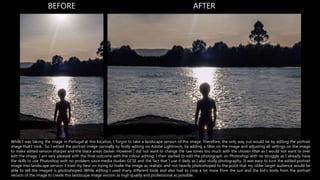
While I was taking the image in Portugal at this location, I forgot to take a landscape version of the image. Therefore, the only way out would be by editing the portrait
image that I took. So I edited the portrait image normally by firstly editing on Adobe Lightroom, by adding a filter on the image and adjusting all settings on the image
to make edited version sharper and the black areas darker. However I did not want to change the raw tones too much with the chosen filter as I would not want to over
edit the image. I am very pleased with the final outcome with the colour editing. I then started to edit the photograph on Photoshop with no struggle as I already have
the skills to use Photoshop with no problem since media studies GCSE and the fact that I use it daily as I also study photography. It was easy to turn the edited portrait
image into landscape version. I tried my best on trying to make the image as realistic and not heavily photoshoped to the point that my older target audience would be
able to tell the imaged is photoshoped. While editing I used many different tools and also had to crop a bit more from the sun and the kid’s body from the portrait
version of the image to create this landscape image version as high quality and professional as possible.

Image manipulation- Clara Barroso

  • 1.
  • 2.
    BEFORE AFTER Thisis the image that I have chosen from my contact sheet to be the photography to use as my main image for my film poster. In my opinion, I think the photograph itself stands out and makes it easier for my target audience to see what's going on the photograph. it’s a very clear, simple and sharp photograph. I took this image in Praia Fluvial de Merelim in São Paio in Portugal. The same location where I have chosen to shoot in with my family. In my sketches, this was the type of look that I wanted for my main image to look like, have a kid in from of the camera but at the same time not seeing and recognize who the kid is. This is why I have chosen to capture the photography at a sunset, because of having the sun low from the sky and creating a dark shadow on the kid that I have chosen to pick to be in my film poster. Having this dark shadow hiding the identity from the kid, shows a clear concept that the whole attention of the image is supposed to be focused on the simple location but still beautiful and silent. This concept relates to my short film as the whole idea of my short film is to tell a message to humanity, on how we should love everyone around us, give more love than hate and to cherish the world we live in as it’s absolutely beautify, but us as humans can’t see that. I took this picture using my Canon EOS 700D camera body, with the Canon 50mm f/1.8 lens. I also made sure I took this image as a low angle so I could get as much of kids body and the sunset in the image. I also used the rule of thirds to capture this image the rule of thirds to get this image as balanced as centered as possible. I have used to Adobe Lightroom to add a filter on the image and to adjust it and I
  • 3.
    BEFORE AFTER While Iwas taking the image in Portugal at this location, I forgot to take a landscape version of the image. Therefore, the only way out would be by editing the portrait image that I took. So I edited the portrait image normally by firstly editing on Adobe Lightroom, by adding a filter on the image and adjusting all settings on the image to make edited version sharper and the black areas darker. However I did not want to change the raw tones too much with the chosen filter as I would not want to over edit the image. I am very pleased with the final outcome with the colour editing. I then started to edit the photograph on Photoshop with no struggle as I already have the skills to use Photoshop with no problem since media studies GCSE and the fact that I use it daily as I also study photography. It was easy to turn the edited portrait image into landscape version. I tried my best on trying to make the image as realistic and not heavily photoshoped to the point that my older target audience would be able to tell the imaged is photoshoped. While editing I used many different tools and also had to crop a bit more from the sun and the kid’s body from the portrait version of the image to create this landscape image version as high quality and professional as possible.