Performance Testing  & Internet Monitoring
STOPWATCH Command Intended for: Performance testing (Response time measurements) Internet Monitoring Why?: Response time is a top factor for most visitors in choosing a website. For many visitors response time is even more important than prices or quality of content.  Monitor server uptime and server load Notify webmaster in case of problems
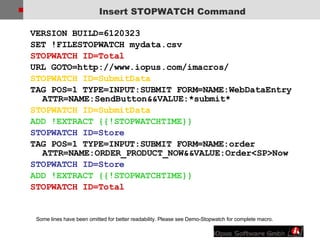
Insert STOPWATCH Command VERSION BUILD=6120323  SET !FILESTOPWATCH mydata.csv  STOPWATCH ID=Total URL GOTO=http://www.iopus.com/imacros/  STOPWATCH ID=SubmitData  TAG POS=1 TYPE=INPUT:SUBMIT FORM=NAME:WebDataEntry ATTR=NAME:SendButton&&VALUE:*submit* STOPWATCH ID=SubmitData ADD !EXTRACT {{!STOPWATCHTIME}} STOPWATCH ID=Store  TAG POS=1 TYPE=INPUT:SUBMIT FORM=NAME:order ATTR=NAME:ORDER_PRODUCT_NOW&&VALUE:Order<SP>Now  STOPWATCH ID=Store ADD !EXTRACT {{!STOPWATCHTIME}} STOPWATCH ID=Total Some lines have been omitted for better readability. Please see Demo-Stopwatch for complete macro.
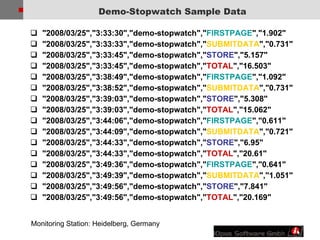
Demo-Stopwatch Sample Data &quot;2008/03/25&quot;,&quot;3:33:30&quot;,&quot;demo-stopwatch&quot;,&quot; FIRSTPAGE &quot;,&quot;1.902&quot; &quot;2008/03/25&quot;,&quot;3:33:33&quot;,&quot;demo-stopwatch&quot;,&quot; SUBMITDATA &quot;,&quot;0.731&quot; &quot;2008/03/25&quot;,&quot;3:33:45&quot;,&quot;demo-stopwatch&quot;,&quot; STORE &quot;,&quot;5.157&quot; &quot;2008/03/25&quot;,&quot;3:33:45&quot;,&quot;demo-stopwatch&quot;,&quot; TOTAL &quot;,&quot;16.503&quot; &quot;2008/03/25&quot;,&quot;3:38:49&quot;,&quot;demo-stopwatch&quot;,&quot; FIRSTPAGE &quot;,&quot;1.092&quot; &quot;2008/03/25&quot;,&quot;3:38:52&quot;,&quot;demo-stopwatch&quot;,&quot; SUBMITDATA &quot;,&quot;0.731&quot; &quot;2008/03/25&quot;,&quot;3:39:03&quot;,&quot;demo-stopwatch&quot;,&quot; STORE &quot;,&quot;5.308&quot; &quot;2008/03/25&quot;,&quot;3:39:03&quot;,&quot;demo-stopwatch&quot;,&quot; TOTAL &quot;,&quot;15.062&quot; &quot;2008/03/25&quot;,&quot;3:44:06&quot;,&quot;demo-stopwatch&quot;,&quot; FIRSTPAGE &quot;,&quot;0.611&quot; &quot;2008/03/25&quot;,&quot;3:44:09&quot;,&quot;demo-stopwatch&quot;,&quot; SUBMITDATA &quot;,&quot;0.721&quot; &quot;2008/03/25&quot;,&quot;3:44:33&quot;,&quot;demo-stopwatch&quot;,&quot; STORE &quot;,&quot;6.95&quot; &quot;2008/03/25&quot;,&quot;3:44:33&quot;,&quot;demo-stopwatch&quot;,&quot; TOTAL &quot;,&quot;20.61&quot; &quot;2008/03/25&quot;,&quot;3:49:36&quot;,&quot;demo-stopwatch&quot;,&quot; FIRSTPAGE &quot;,&quot;0.641&quot; &quot;2008/03/25&quot;,&quot;3:49:39&quot;,&quot;demo-stopwatch&quot;,&quot; SUBMITDATA &quot;,&quot;1.051&quot; &quot;2008/03/25&quot;,&quot;3:49:56&quot;,&quot;demo-stopwatch&quot;,&quot; STORE &quot;,&quot;7.841&quot; &quot;2008/03/25&quot;,&quot;3:49:56&quot;,&quot;demo-stopwatch&quot;,&quot; TOTAL &quot;,&quot;20.169&quot; Monitoring Station: Heidelberg, Germany
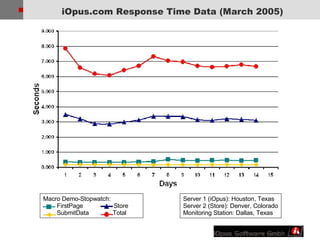
iOpus.com Response Time Data (March 2005) Server 1 (iOpus): Houston, Texas Server 2 (Store): Denver, Colorado Monitoring Station: Dallas, Texas Macro Demo-Stopwatch: FirstPage  Store SubmitData  Total
Best Practice for Response Time Measurements iMacros response time measurements always reflects the true user experience as they are measured using a real browser and the original browser plug-ins such as Adobe Flash Player, Silverlight or SUN Java runtime. Add a  CLEAR statement to your macro.  Average Measurements. The &quot;internet speed&quot; can fluctuate from minute to minute even on a fast connection.  Accuracy depends on the accuracy of the PC clock. This applies to all software that does time measurements on a PC.  Under normal conditions the processor speed does not influence the measured response times. Only if the PC is so slow that the web page rendering of the browser is slowed down, will the CPU speed have an influence on the measured response time.
Keyword Assertion Search for a keyword can be done via TAG Create a macro with only two lines: VERSION BUILD=6120125  TAG POS=1 TYPE=B ATTR=TXT : * completed * In this example, we are searching the web page for the first occurrence (POS=1) of the keyword &quot;completed“. The TAG command will test if keyword appeared on website.
Image Assertion Search for an image can be done via the SAVEITEM feature: CLEAR URL GOTO=http://www.iopus.com/imacros/  TAG POS=1 TYPE=IMG  ATTR=TXT:Only*version CONTENT=EVENT:SAVEITEM  This macro will download an image. If the image is missing on your web page, the macro stops with an “Image not found&quot; error.  To make sure that the missing image is not stored in the browser cache, it is recommended that you use the CLEAR command before this test.
Demo: Internet Monitoring Part1: Record an “Online Shopping Experience” macro at “Sears.com” and use it for response time measurements. Measure response time at various critical points separately, for example when an item is placed into the shopping cart. Part 2: Make sure the price is displayed correctly Part 3: Make sure the item image is displayed correctly

iMacros Web Testing

  • 1.
    Performance Testing & Internet Monitoring
  • 2.
    STOPWATCH Command Intendedfor: Performance testing (Response time measurements) Internet Monitoring Why?: Response time is a top factor for most visitors in choosing a website. For many visitors response time is even more important than prices or quality of content. Monitor server uptime and server load Notify webmaster in case of problems
  • 3.
    Insert STOPWATCH CommandVERSION BUILD=6120323 SET !FILESTOPWATCH mydata.csv STOPWATCH ID=Total URL GOTO=http://www.iopus.com/imacros/ STOPWATCH ID=SubmitData TAG POS=1 TYPE=INPUT:SUBMIT FORM=NAME:WebDataEntry ATTR=NAME:SendButton&&VALUE:*submit* STOPWATCH ID=SubmitData ADD !EXTRACT {{!STOPWATCHTIME}} STOPWATCH ID=Store TAG POS=1 TYPE=INPUT:SUBMIT FORM=NAME:order ATTR=NAME:ORDER_PRODUCT_NOW&&VALUE:Order<SP>Now STOPWATCH ID=Store ADD !EXTRACT {{!STOPWATCHTIME}} STOPWATCH ID=Total Some lines have been omitted for better readability. Please see Demo-Stopwatch for complete macro.
  • 4.
    Demo-Stopwatch Sample Data&quot;2008/03/25&quot;,&quot;3:33:30&quot;,&quot;demo-stopwatch&quot;,&quot; FIRSTPAGE &quot;,&quot;1.902&quot; &quot;2008/03/25&quot;,&quot;3:33:33&quot;,&quot;demo-stopwatch&quot;,&quot; SUBMITDATA &quot;,&quot;0.731&quot; &quot;2008/03/25&quot;,&quot;3:33:45&quot;,&quot;demo-stopwatch&quot;,&quot; STORE &quot;,&quot;5.157&quot; &quot;2008/03/25&quot;,&quot;3:33:45&quot;,&quot;demo-stopwatch&quot;,&quot; TOTAL &quot;,&quot;16.503&quot; &quot;2008/03/25&quot;,&quot;3:38:49&quot;,&quot;demo-stopwatch&quot;,&quot; FIRSTPAGE &quot;,&quot;1.092&quot; &quot;2008/03/25&quot;,&quot;3:38:52&quot;,&quot;demo-stopwatch&quot;,&quot; SUBMITDATA &quot;,&quot;0.731&quot; &quot;2008/03/25&quot;,&quot;3:39:03&quot;,&quot;demo-stopwatch&quot;,&quot; STORE &quot;,&quot;5.308&quot; &quot;2008/03/25&quot;,&quot;3:39:03&quot;,&quot;demo-stopwatch&quot;,&quot; TOTAL &quot;,&quot;15.062&quot; &quot;2008/03/25&quot;,&quot;3:44:06&quot;,&quot;demo-stopwatch&quot;,&quot; FIRSTPAGE &quot;,&quot;0.611&quot; &quot;2008/03/25&quot;,&quot;3:44:09&quot;,&quot;demo-stopwatch&quot;,&quot; SUBMITDATA &quot;,&quot;0.721&quot; &quot;2008/03/25&quot;,&quot;3:44:33&quot;,&quot;demo-stopwatch&quot;,&quot; STORE &quot;,&quot;6.95&quot; &quot;2008/03/25&quot;,&quot;3:44:33&quot;,&quot;demo-stopwatch&quot;,&quot; TOTAL &quot;,&quot;20.61&quot; &quot;2008/03/25&quot;,&quot;3:49:36&quot;,&quot;demo-stopwatch&quot;,&quot; FIRSTPAGE &quot;,&quot;0.641&quot; &quot;2008/03/25&quot;,&quot;3:49:39&quot;,&quot;demo-stopwatch&quot;,&quot; SUBMITDATA &quot;,&quot;1.051&quot; &quot;2008/03/25&quot;,&quot;3:49:56&quot;,&quot;demo-stopwatch&quot;,&quot; STORE &quot;,&quot;7.841&quot; &quot;2008/03/25&quot;,&quot;3:49:56&quot;,&quot;demo-stopwatch&quot;,&quot; TOTAL &quot;,&quot;20.169&quot; Monitoring Station: Heidelberg, Germany
  • 5.
    iOpus.com Response TimeData (March 2005) Server 1 (iOpus): Houston, Texas Server 2 (Store): Denver, Colorado Monitoring Station: Dallas, Texas Macro Demo-Stopwatch: FirstPage Store SubmitData Total
  • 6.
    Best Practice forResponse Time Measurements iMacros response time measurements always reflects the true user experience as they are measured using a real browser and the original browser plug-ins such as Adobe Flash Player, Silverlight or SUN Java runtime. Add a CLEAR statement to your macro. Average Measurements. The &quot;internet speed&quot; can fluctuate from minute to minute even on a fast connection. Accuracy depends on the accuracy of the PC clock. This applies to all software that does time measurements on a PC. Under normal conditions the processor speed does not influence the measured response times. Only if the PC is so slow that the web page rendering of the browser is slowed down, will the CPU speed have an influence on the measured response time.
  • 7.
    Keyword Assertion Searchfor a keyword can be done via TAG Create a macro with only two lines: VERSION BUILD=6120125  TAG POS=1 TYPE=B ATTR=TXT : * completed * In this example, we are searching the web page for the first occurrence (POS=1) of the keyword &quot;completed“. The TAG command will test if keyword appeared on website.
  • 8.
    Image Assertion Searchfor an image can be done via the SAVEITEM feature: CLEAR URL GOTO=http://www.iopus.com/imacros/ TAG POS=1 TYPE=IMG ATTR=TXT:Only*version CONTENT=EVENT:SAVEITEM This macro will download an image. If the image is missing on your web page, the macro stops with an “Image not found&quot; error. To make sure that the missing image is not stored in the browser cache, it is recommended that you use the CLEAR command before this test.
  • 9.
    Demo: Internet MonitoringPart1: Record an “Online Shopping Experience” macro at “Sears.com” and use it for response time measurements. Measure response time at various critical points separately, for example when an item is placed into the shopping cart. Part 2: Make sure the price is displayed correctly Part 3: Make sure the item image is displayed correctly